Seat Tarraco (2023 year). Manual in english - page 3
High-voltage battery
75
Charging the high-voltage battery
1
2
3
4
5
6
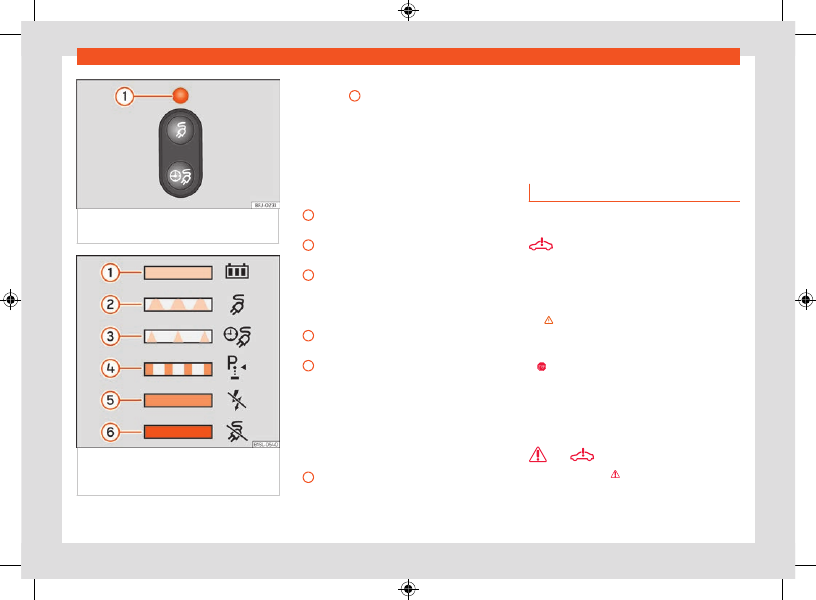
Fig. 56
Behind the battery charging socket
cover: charging process indicator.
Fig. 57
On the inside face of the cover
of the battery charging socket: sticker with
information on the charging process display.
The charging process indicator is an LED
1
located on the charging socket
that shows the status of the charging process.
A sticker on the battery charging cover pro-
vides information on the meaning of the LEDs
Charging process displays:
Green LED
Always on:
Charge completed success-
fully.
Flashing:
The high-voltage battery is
charging.
Short flashes:
Programmed charging is ac-
tive. The charging process has not yet star-
ted.
Yellow LED
Flashing:
The parking lock
P
has not been
enabled.
Briefly lights up:
The charging connector
has been plugged into the charging socket
and the vehicle has detected it.
Always on:
No electrical network has been
detected. Arrange an inspection of the
power supply and network. Seek professio-
nal assistance.
Red LED
Flashing:
Error in the charging system.
The charging process cannot start or has
paused.
Always on:
The charging connector has
not been locked. Unplug the charging con-
nector and plug it back in to the charging
socket, making sure it is properly inserted.
If the problem persists, check the compati-
bility of the cable or ask a professional for
help.
Troubleshooting
Valid for: hybrid vehicles
Fault in the high voltage system
The warning lamp lights up red. A message is
displayed in this regard.
There is a fault in the high voltage system. The
high voltage components may be damaged
.
It is not possible to charge the high-voltage
battery.
●
The vehicle must be parked in a safe
place
. Park the vehicle outdoors as soon as it is
possible and safe to do so.
●
Switch off the drive system.
●
Seek professional assistance.
and
Danger of fire!
The warning lamp lights up red and is dis-
played along with with a text message on the
instrument cluster accompanied by a continu-
ous audible warning.