Renault Megane (2018 year). Manual - part 8
 

  Index      Renault     Renault Megane - service manual 2018 year in english


Search            


Content   ..  6  7  8  9   ..


Renault Megane (2018 year). Manual - part 8


2.8

STANDING START PROCEDURE 

(1/2)

Activating the system
The system is activated by:
–  with the engine running, and the ve-

hicle stationary;

–  Sport mode activated (please see 

the “Multi-Sense” section);

–  depress the brake pedal with the left 

foot;

–  keeping the brake pedal pressed, 

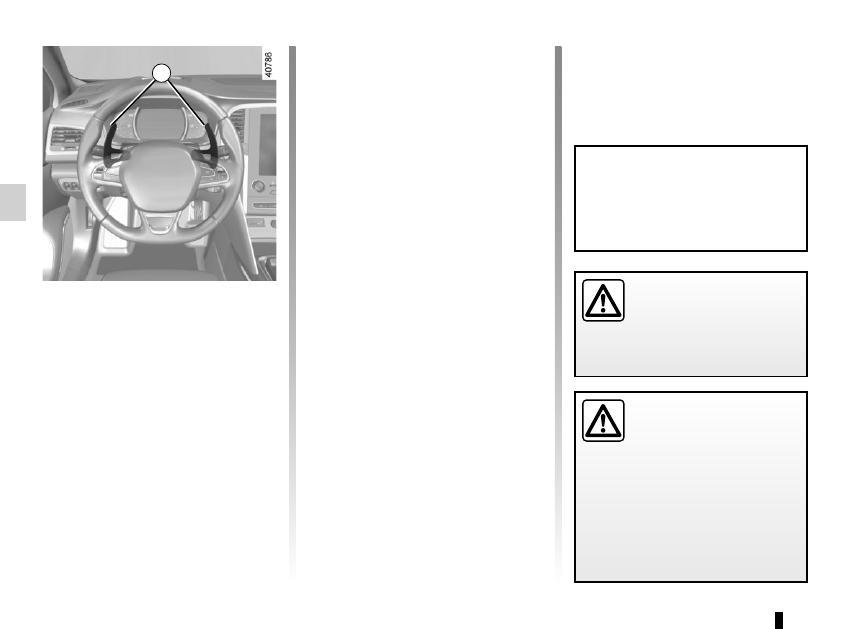
pull the two steering wheel pad-

dles  1 until the message “Launch 

Control ON” appears on the instru-

ment panel;

–  release the paddles 1;
–  with your left foot still pressing the 

brake pedal, press the accelerator 

pedal fully to beyond the point of 

resistance with your right foot (the 

engine speed will automatically sta-

bilise at around 2500 rpm);

–  within 3 seconds, release the brake 

pedal for a sporty vehicle start.

If fitted on the vehicle, with the vehicle 

stationary, the standing start procedure 

(Launch Control) is a function which 

permits maximum acceleration.
Note: This function should only be used 

when the mechanical components have 

reached their operating temperature.

1

Do not use this function on 

slippery or wet roads.
Risk of loss of control of 

the vehicle.

Because of the accelera-

tion gained, this function 

should only be used if traf-

fic conditions permit, and 

in compliance with the local driving 

regulations. Please ensure all the 

conditions are met before each use.
Risk of accident or serious injury.

Heavy use of the system will reduce 

the service life of the mechanical 

components (clutch, transmission, 

etc.).

2.9

Conditions for non-activation of the 

system
Certain conditions will not enable the 

system to be activated:
–  five successive authorised standing 

start procedures - beyond five proce-

dures being performed, the function 

will be prevented for approximately 

10 minutes;

–  high clutch temperature;
–  excessive road gradient percentage;
–  fault in the vehicle system (ESC, 

etc.).

Note: If the function is prevented by 

any of these conditions, the message 

“Launch Control ON” will not be dis-

played on the instrument panel.

Because of the accelera-

tion gained, this function 

should only be used if traf-

fic conditions permit, and 

in compliance with the local driving 

regulations. Please ensure all the 

conditions are met before each use.
Risk of accident or serious injury.

The use of the function accelerates 

wear on the tyres; please refer to the 

information on «Tyres» in Section 5 

of your driver’s handbook.

STANDING START PROCEDURE 

(2/2)

2.10

For all vehicles:

The warning light 

 on the instru-

ment panel is lit when the engine is on 

standby. The vehicle equipment re-

mains operational while the engine is 

stopped. 
Depending on the vehicle, when the 

engine switches to standby, the steer-

ing assistance may no longer be opera-

tional. 
In this case it becomes operational 

again when the engine is no longer on 

standby or the speed exceeds approxi-

mately 0.62 mph (1 km/h) (downhill, 

slope, etc.).

For manual gearboxes:
–  the gearbox is in neutral; 
–  and the clutch pedal is released. If 

the warning light 

 flashes, this 

means that the clutch pedal is not 

sufficiently released;

–  and the vehicle speed is less than 

approximately 1.86 mph (3 km/h).

FUNCTION STOP AND START 

(1/4)

This system enables a reduced fuel 

consumption and lower greenhouse 

gas emissions. 

The system is activated automati-

cally when the vehicle is started. While 

driving, the system stops the engine 

(standby) when the vehicle is at a 

standstill (traffic jam, traffic lights, etc).

Conditions for engine 

standby

The vehicle has set off from where it 

was parked;
For automatic gearboxes:

–  the gearbox is in position D, M or N;

–  and the brake pedal is pressed (suf-

ficiently hard);

– and the accelerator pedal is not 

pressed;

–  and the speed is zero for around 

1 second.

The engine remains on standby if posi-

tion P is selected, or if position N is se-

lected with the handbrake engaged and 

the brake pedal released.

If the engine is put in 

standby, the electronic 

parking brake (depending 

on the vehicle) is not ap-

plied automatically.

If the engine stalls while the system 

is in operation, pressing the clutch 

pedal right down will start it again.

Keep your vehicle station-

ary when the engine is 

on standby (shown by the 

warning light 

 on the 

instrument panel).

The ignition must be 

switched off before leav-

ing the vehicle (please see 

the information on “Starting, 

stopping the engine” in Section 2).

2.11

Conditions for coming out of 

engine standby

For automatic gearboxes:
–  the brake pedal is released, posi-

tion D or M engaged;

–  or the brake pedal is released, po-

sition N engaged and the parking 

brake off;

–  or the brake pedal is pressed again, 

with position P engaged or posi-

tion N engaged with the parking 

brake applied;

–  or position R is engaged;

–  or the accelerator pedal is pressed;

–  or in manual mode the gear lever is 

moved towards + or -.

For manual gearboxes:
–  the gearbox is in neutral and the 

clutch pedal is slightly depressed, or

–  the engine is in gear and the clutch 

pedal is pressed right down.

To fill up with fuel, the engine must 

be stopped (and not on standby): 

stop the engine (Please See 

“Starting, stopping the engine” in 

Section 2).

FUNCTION STOP AND START 

(2/4)

Preventing the engine from 

standing by

In certain situations, such as negotiat-

ing a crossroads for instance, it is pos-

sible (with the system activated) to keep 

the engine running so as to be ready to 

move off quickly.
Automatic gearbox:
Keep the vehicle stationary without 

pressing too hard on the brake pedal.
Manual gearbox:
Keep the clutch pedal pressed right 

down.

Special note: depending on the vehi-

cle, if you switch off the ignition when 

the engine is on standby, the warning 

light 

Ä

 is displayed for a few sec-

onds on the instrument panel.

2.12

FUNCTION STOP AND START 

(3/4)

Conditions preventing the 

standby of the engine

Certain conditions prevent the system 

from using the engine standby function, 

including when:
for vehicles equipped with a 

RENAULT  card:
–  the driver’s door is not closed;
–  the driver’s seatbelt is not fastened.
for all vehicles:
–  reverse gear is engaged;
–  the bonnet is not locked;
–  the outdoor temperature is too low 

or too high (less than around 5°C or 

higher than around 35°C);

–  the battery is not sufficiently charged;
–  the difference between the vehicle 

interior temperature and the auto-

matic climate control instruction is 

too high;

–  parking distance control is in opera-

tion;

– for vehicles with automatic gear-

boxes, the gradient is steeper than 

approximately 12%;

–  the “Clear View” function is activated 

(please see “Automatic climate con-

trol” in Section 3);

–  the engine temperature is too low;
–  the emission control system is being 

regenerated;

–  Multi-Sense Sport mode is activated 

(depending on the vehicle);

– ...

Warning light 

 is displayed on the 

instrument panel. This notifies you that 

engine standby is not available.

Deactivate the Stop and 

Start function for any opera-

tion performed in the engine 

compartment.

Special case for vehicles with 

a RENAULT card

With the engine on standby (traffic jam, 

traffic lights, etc.), if the driver unfas-

tens the seat belt and opens the driv-

er’s door, or gets out of the seat, the 

ignition is switched off.
The assisted parking brake is applied 

automatically.
To restart and reactivate the Stop and 

Start system, start the engine (please 

refer to the information on "Starting, 

stopping the engine" in Section 2).

Special case of vehicles with 

a key

With the engine on standby (traffic 

jam, traffic lights, etc.), if you get out of 

the vehicle, a beep warns you that the 

engine is on standby and has not been 

stopped.

2.13

FUNCTION STOP AND START 

(4/4)

Special feature of the automatic 

engine re-start
Under certain conditions, the engine 

can restart on its own in order to guar-

antee your safety and comfort.
This can occur especially when:
–  the outdoor temperature is too low 

or too high (less than around 5°C or 

higher than around 35°C);

–  the “Clear View” function is activated 

(please see “Automatic climate con-

trol” in Section 3);

–  the battery is not sufficiently charged;
–  the vehicle speed is above 3 mph 

(5 km/h) (downhill slope, etc.);

– repeated pressing on the brake 

pedal or braking system require-

ment;

– ...
For vehicles fitted with a manual gear-

box, the restarting of the engine may be 

stopped if the clutch pedal is released 

too quickly and a gear is engaged.

1

2

Deactivating, activating the 

function

Press 1 to deactivate the function. The 

message “Stop & Start deactivated” will 

appear on the instrument panel and the 

integrated warning light 2 on the switch 

will light up.

Pressing again will reactivate the 

system. The message “Stop & Start ac-

tivated” will appear on the instrument 

panel and the integrated warning light 2 

on switch 1 will go out.

Note: With the engine on standby, 

press switch 1 to automatically re-

start the engine.

The system is automatically reacti-

vated each time the vehicle is started 

(see “Starting, stopping the engine” in 

Section 2).

Operating faults

When the message “Check Stop & 

Start” appears on the instrument panel 

and the integrated warning light 2 lights 

up on the switch 1, the system is deac-

tivated.

Please consult an authorised dealer.

The ignition must be 

switched off before leav-

ing the vehicle (please see 

the information on “Starting, 

stopping the engine” in Section 2).

Special feature of vehicles with 

a key: for some of these condi-

tions the automatic restarting of the 

engine is inhibited if a front door is 

open.

2.14

SPECIAL FEATURES OF PETROL VERSIONS

The following operating conditions:
–  driving for long periods when the low 

fuel level warning light is lit;

–  using leaded petrol;
–  using fuel or lubrication additives 

which are not approved.

Or operating faults such as:
–  faulty ignition system, running out of 

fuel or disconnected spark plugs re-

sulting in the engine misfiring or cut-

ting out when driving;

–  loss of power,
as they may cause the catalytic con-

verter to overheat and thus reduce its 

efficiency,  or damage it irreparably 

and cause heat damage to the vehi-

cle.

If you notice any of the above operating 

faults, have the necessary repairs car-

ried out as soon as possible by an ap-

proved Dealer.
These faults may be avoided by regu-

larly taking your vehicle to an approved 

Dealer at the intervals specified in the 

Maintenance document.

Starting problems

To avoid damaging the catalytic con-

verter, do not keep trying to start the 

engine (using the start button, or by 

pushing or towing the vehicle) without 

having identified and corrected the 

starting fault.
If the fault cannot be identified, do not 

keep trying to start the engine, but con-

tact an approved Dealer.

Do not park the vehicle or 

run the engine in locations 

where combustible sub-

stances or materials such as 

grass or leaves can come into con-

tact with the hot exhaust system.

2.15

SPECIAL FEATURES OF DIESEL VERSIONS

Diesel engine speed

Diesel engines are fitted with an injec-

tion pump which prevents the engine 

speed being exceeded irrespective of 

the gear selected.
If the message “Check antipollution 

system” is displayed along with warn-

ing lights 

Ä

 and 

©

, consult an 

authorised dealer immediately. 
When driving, depending on the fuel 

grade used, it is possible that white 

smoke may be emitted.
This is due to the exhaust particle filter 

being cleaned automatically, and does 

not affect the way the vehicle runs.

Running out of fuel

If the tank has been completely 

drained, the system must be reprimed 

after the tank is refilled: See “Fuel 

tank” in section 1 before restarting the 

engine.

Do not park the vehicle or 

run the engine in locations 

where combustible sub-

stances or materials such 

as grass or leaves can come into 

contact with the hot exhaust system.

Precautions to be taken in 

winter

To avoid any faults in icy weather:
–  ensure that the battery is always fully 

charged,

–  always keep the diesel tank rela-

tively full to avoid water vapour con-

densing in it and accumulating at the 

bottom of the tank.

2.16

Gear lever

Selecting reverse gear
Vehicle with manual gearbox:
 Follow 

the grid marked on knob 1 and, depend-

ing on the vehicle, lift the ring against 

the knob to engage reverse gear.
Vehicles with automatic gear-

box:  refer to the information on the 

“Automatic gearbox” in Section 2.
The reversing lights will come on as 

soon as reverse gear is selected with 

the ignition on.

1

GEAR LEVER/HANDBRAKE

Handbrake

To release:
Pull the lever 3 up slightly, press 

button 2 and then lower the lever to the 

floor.

The red warning light 

}

 on the in-

strument panel will remain on, accom-

panied by the message “Parking brake 

on” and a beep if you are driving with an 

incorrectly released handbrake.

3

2

When stationary, and de-

pending on the slope and/or 

vehicle load, it may be nec-

essary to pull up the hand-

brake at least two extra notches and 

engage a gear (1

st

 or reverse gear) 

for vehicles with a manual gearbox 

or position P for vehicles with an au-

tomatic gearbox.

An impact to the under-

side of the vehicle while 

manoeuvring (e.g.: strik-

ing a post, raised kerb or 

other street furniture) may result in 

damage to the vehicle (e.g.: defor-

mation of an axle).
To avoid any risk of accident, have 

your vehicle checked by an ap-

proved Dealer.

Make sure that the hand-

brake is properly released 

when driving (red indicator 

light off), otherwise over-

heating, or even damage, may 

occur.

To apply:
Pull lever 3 upwards. Check that the 

vehicle is immobilised. The warning 

light 

}

 on the instrument panel will 

come on.

2.17

ELECTRONIC PARKING BRAKE 

(1/3)

Note:
To indicate that the electronic parking 

brake is released, a beep sounds and 

the message “Apply parking brake” ap-

pears on the instrument panel:
–  with the engine running: when the 

driver’s door is opened;

–  with the engine switched off (eg. 

when the engine stalls): when a front 

door is opened.

In this case, pull and release switch 2 to 

apply the assisted parking brake.

Assisted release of the parking 

brake
The brake will be released as soon as 

the vehicle starts and accelerates.

Assisted operation

The electronic parking brake immobi-

lises the vehicle when the engine is 

switched off by pressing the engine 

start/stop button 1 or by turning the 

ignition key (key in the “ ON"  2 po-

sition).
In all other circumstances, for example 

stalling of the engine or placing of 

the engine on standby by the  Stop 

and Start function (refer to the informa-

tion on the "Stop and Start" function in 

Section 2), the electronic parking brake 

is not applied automatically. Manual 

mode must be used.

For certain country-specific model ver-

sions, the assisted brake application 

function is not activated. Refer to the 

information on “Manual operation”.
To confirm that the electronic parking 

brake is applied, the message “Parking 

brake on” and warning light 

}


on the instrument panel and warning 

light 3 on the switch 2 light up.
After the engine is switched off, indi-

cator light 3 goes out several minutes 

after the electronic parking brake has 

been applied and indicator light 

}


goes out when the vehicle is locked.

Before leaving the vehi-

cle, check that the assisted 

parking brake is fully ap-

plied. Warning light 3 on 

switch  2 and warning light 

}


on the instrument panel light up to 

show that the parking brake is ap-

plied but go out when the doors are 

locked.

3

2

1

2.18

ELECTRONIC PARKING BRAKE 

(2/3)

Special cases

To park on a slope or while towing a 

trailer, for example, pull switch 2 for 

a few seconds to gain the maximum 

braking.

To park the vehicle without applying the 

electronic parking brake (if there is a 

risk of freezing, for example):

–  with the engine running, while simul-

taneously keeping the brake pedal 

and switch 2 depressed, switch off 

the engine by pressing the engine 

Start/Stop button 1;

–  in gear, release the brake pedal and 

switch 2.

For vehicles fitted with the Stop and 

Start function, with the engine on 

standby, the electronic parking brake is 

automatically activated if the driver un-

fastens their seat belt or opens the driv-

er's door or gets out of their seat.

Brief stop

To manually activate the electronic 

parking brake, (when stopping at a red 

light, or stopping when the engine is 

running, etc.): pull and release switch 2

The brake is released as soon as the 

vehicle is started up again.

Manual operation

You can control the electronic parking 

brake manually.

Applying the electronic parking 

brake

Pull switch 2. Warning light 3 and warn-

ing light 

}

 on the instrument panel 

light up.

Releasing the electronic parking 

brake

With the ignition on, depress the brake 

pedal then press switch 2: warning 

light 3 and warning light 

}

 go out.

1

Special feature related to the Stop and Start function: if the driver's seat 

is unfastened before the engine goes into standby due to the Stop and 

Start function, make sure that the parking brake is applied: the 

}

 in-

dicator light on the instrument panel confirms this. Risk of loss of immobilisa-

tion.

3

2

2.19

Operating faults

–  If there is a fault, the 

©

 warning 

light illuminates on the instrument 

panel accompanied by the “Check 

parking brake” message and, in 

some cases, the 

}

 warning 

light.

Please contact an authorised dealer 

as soon as possible.

–  If there is an assisted parking brake 

fault, the warning light 

®

 comes 

on, along with the message “Braking 

system fault”, a beep and, in some 

cases, the warning light 

}

.

This means that you must stop as 

soon as traffic conditions allow.

Versions with an automatic 

gearbox

For safety reasons, automatic release 

is deactivated when the driver’s door 

is open or not shut properly and the 

engine is running (in order to prevent 

the vehicle from moving without the 

driver). The “Release parking brake 

manually” message appears on the 

instrument panel when the driver de-

presses the accelerator.

ELECTRONIC PARKING BRAKE 

(3/3)

It is therefore essential to 

immobilise the vehicle by 

engaging first gear (manual 

gearbox) or position P (au-

tomatic gearbox). If the slope re-

quires it, chock the vehicle.

Never leave your vehicle 

without moving the selec-

tor lever to position P and 

switching off the engine. 

This is because when the vehicle is 

stationary with the engine running 

and a gear engaged, the vehicle 

may begin to move.
There is a risk of accidents.

If no lights or sounds are ap-

parent, this indicates a fault 

in the instrument panel. This 

indicates that it is essential 

to stop immediately (as soon as traf-

fic conditions allow). Ensure that the 

vehicle is correctly immobilised and 

contact an approved Dealer.

If the message “Electric fail-

ure DANGER” or “Check 

battery” appears, manually 

activate the electronic park-

ing brake by pulling switch 2 (or po-

sition the gear lever in P for auto-

matic gearboxes) before stopping 

the engine. 
Risk of loss of immobilisation of the 

vehicle.
Contact an authorised dealer.

2.20

DRIVING ADVICE, ECO-DRIVING 

(1/5)

Gear change indicator 2
Depending on the vehicle, to obtain op-

timum consumption levels, a warning 

light on the instrument panel lets you 

know the best time to move up or down 

a gear:

Š

 move up a gear;

 move down a gear.

If you regularly follow this indicator, you 

will reduce your vehicle’s fuel consump-

tion.

Fuel consumption is accredited in ac-

cordance with a standard regulatory 

method. Identical for all manufactur-

ers, this enables vehicles to be com-

pared with one another. Consumption 

in real time depends on vehicle usage 

conditions, the equipment fitted and the 

user’s driving style. To optimise fuel 

consumption, please refer to the follow-

ing advice.
Depending on the vehicle, you will have 

various functions which enable you to 

lower your fuel consumption:

–  the rev counter with ECO zone;

–  gear change indicator;

–  the driving style indicator;

–  the journey record and eco-driving 

advice via the multimedia screen;

– ECO mode.

Warning light 

 is displayed on 

the instrument panel when parameter 

“Free wheel in ECO mode” is activated 

(ON in menu "User settings”).
If fitted on the vehicle, the navigation 

system provides additional information.

On the instrument panel A 

or B 

Depending on the vehicle, the informa-

tion display can be organised and cus-

tomised based on the instrument panel 

customisation style selected from the 

multimedia screen.

The rev counter with ECO zone 1
Driving in the ECO zone helps you op-

timise fuel consumption under most cir-

cumstances.

2

1

A

B

2

1

2.21

DRIVING ADVICE, ECO-DRIVING 

(2/5)

4

On the multimedia screen

Journey record
Once the engine is switched off, you 

will see “Journey record” displayed on 

the screen 4, enabling you to view in-

formation relating to your last journey.
This indicates:

–  average fuel consumption;

–  number of miles/kilometres travelled;

– number of miles/kilometres saved. 

They correspond to driving with no 

fuel consumption.

An overall rating from 0 to 100 is dis-

played to let you assess your eco driv-

ing performance. The higher the rating, 

the lower the fuel consumption.

Eco advice is given to help improve 

your performance.
With your favourite journeys saved, 

you can compare your performance 

between trips and the performance of 

other vehicle users.

For more information, please see the 

multimedia system instructions.

Driving style indicator 3
Informs you about the driving style 

adopted in real time. This is shown by 

indicator light 3.
The more petals there are on indica-

tor 3, the smoother and more economi-

cal your driving.
To activate/deactivate the driving style 

indicator, please see the multimedia 

system instructions.

3

2.22

DRIVING ADVICE, ECO-DRIVING (

3/5)

ECO mode

ECO mode is a function which opti-

mises fuel consumption. It acts upon 

certain power consuming systems in 

the vehicle (heating, air conditioning, 

power-assisted steering, etc.) and on 

certain driving actions (acceleration, 

gear changing, cruise control, decele-

ration, etc.).
Limiting acceleration enables low fuel 

consumption in urban and surrounding 

areas. Reduced usage of the air condi-

tioning reduces fuel consumption with-

out affecting heating comfort.

Free wheel in ECO mode
Depending on the vehicle, for vehicles 

fitted with an automatic gearbox, in the 

deceleration phases (with the foot fully 

off the accelerator pedal), switching to 

freewheeling (automatic neutral) de-

creases engine braking and allows you 

to farther without accelerating in order 

to save fuel.

Activating the function
The function can be activated:
–  by pressing switch 5;
–  by pressing the switch 6 (please refer 

to the information on “Multi-Sense” in 

Section 3);

– from the navigation menu on the 

multimedia screen (please refer to 

the instructions for the multimedia 

equipment).

The warning light 

 comes on on 

the instrument panel to confirm activa-

tion.
While driving, it is possible to leave the 

ECO mode temporarily in order to im-

prove engine performance.
For this, depress the accelerator pedal 

firmly and fully.
ECO mode is reactivated when you 

take pressure off the accelerator pedal.

Disabling the  function
Press switch 5.

The warning light 

 goes out on 

the instrument panel to confirm deac-

tivation.

To activate/deactivate the “free wheel” 

mode, see “Vehicle settings customisa-

tion menu” in Section 1.

5

6

2.23

Driving advice and ECO 

driving

Behaviour
–  Drive carefully for the first few miles 

until the engine reaches its normal 

operating temperature, rather than 

let it warm up while the vehicle is sta-

tionary.

–  Speed is expensive.

–  Dynamic driving with a lot of frequent 

acceleration and braking is expen-

sive on fuel in comparison to the time 

saved.

–  Do not overrev the engine in the in-

termediate gears.

  You should always use the highest 

gear possible.

–  Avoid sudden acceleration.

–  Brake as little as possible. If you an-

ticipate an obstacle or bend in ad-

vance, you may then simply release 

the accelerator pedal.

– Do not try to maintain the same 

speed up a hill, accelerate no more 

than you would on flat ground. Keep 

your foot in the same position on the 

accelerator pedal.

–  Double declutching and accelerating 

before switching off are unnecessary 

in modern vehicles.

Obstructions to the driver

On the driver’s side, only 

use mats suitable for the 

vehicle, attached with the 

pre-fitted components, and check 

the fitting regularly. Do not lay one 

mat on top of another.

There is a risk of wedging the 

pedals

DRIVING ADVICE, ECO-DRIVING 

(4/5)

–  Bad weather, flooded roads:

Do not drive through 

floods if the water is 

above the lower edge of 

the wheel rims.


Content   ..  6  7  8  9   ..