Renault Megane (2018 year). Manual - part 9
 

  Index      Renault     Renault Megane - service manual 2018 year in english


Search            


Content   ..  7  8  9  10   ..


Renault Megane (2018 year). Manual - part 9


2.24

DRIVING ADVICE, ECO-DRIVING 

(5/5)

Advice on use
–  Opt for ECO mode.

–  Electricity is fuel; switch off all the 

electrical components which are 

not really needed. However (safety 

first), keep your lights on when the 

visibility is bad (“see and be seen”).

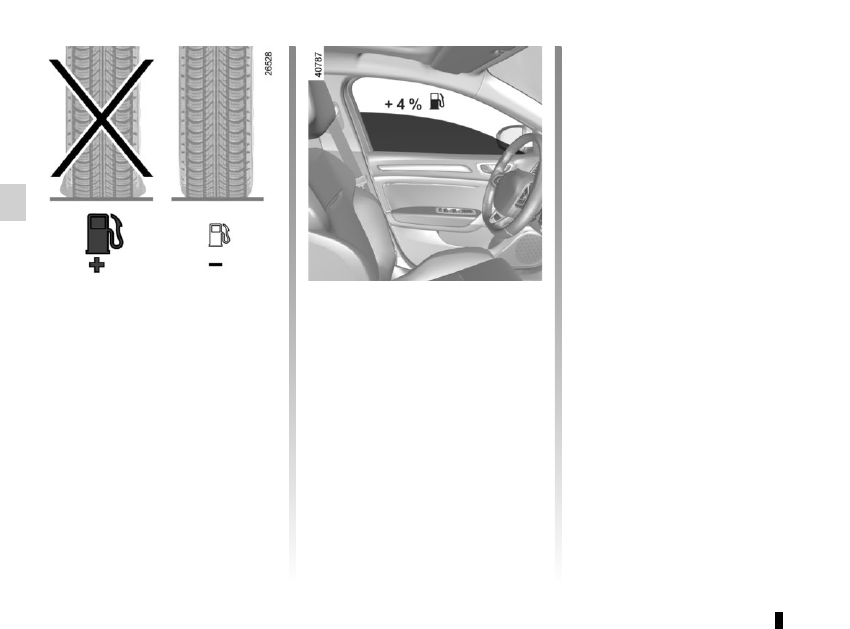
–  Use the air vents. Driving with the 

windows open at 60 mph (100 km/h) 

will increase fuel consumption by 

4%.

–  Never fill the fuel tank right to the 

brim to avoid overflow.

–  In vehicles fitted with air condi-

tioning, it is normal to observe an 

increase in fuel consumption (espe-

cially in urban conditions) when it is 

used. For vehicles fitted with manual 

air conditioning, switch off the system 

when it is not required.
Recommendations for reducing 

consumption and therefore help-

ing to preserve the environment:
If the vehicle has been parked in the 

sun, open the doors for a few mo-

ments to let the hot air escape before 

starting the engine.

– Do not leave an empty roof rack 

fitted to the vehicle.

–  It is better to fit a trailer for bulky ob-

jects.

–  When towing a caravan, fit a wind 

deflector and adjust it carefully.

–  Avoid using the car for door-to-door 

calls (short journeys with long waits 

in between) because the engine 

never reaches its normal operating 

temperature.

Tyres
–  An underinflated tyre increases fuel 

consumption.

–  Opt for the highest speed pressure 

or the pressure recommended to op-

timise fuel consumption indicated 

on edge of the driver’s door (please 

refer to the information on “Tyre infla-

tion pressure” in Section 4).

–  The use of non-recommended tyres 

can increase fuel consumption.

2.25

MAINTENANCE AND ANTIPOLLUTION ADVICE 

Your vehicle complies with criteria for 

recycling and recovering vehicles at the 

end of their service life, which entered 

into force in 2015.
Some parts of your vehicle have there-

fore been designed to facilitate future 

recycling.
These parts are easy to remove so 

that they can be recovered and reproc-

essed by recycling companies.
By virtue of its design, moderate fuel 

consumption and initial settings, your 

vehicle also conforms to current anti-

pollution regulations. The manufac-

turer is actively striving to reduce pol-

lutant exhaust gas emissions and to 

save energy. But the fuel consumption 

of your vehicle and the level of pollutant 

exhaust gas emissions are also your 

responsibility. Ensure that it is main-

tained and used correctly.

Maintenance

It is important to remember that fail-

ure to respect antipollution regulations 

could lead to legal action being taken 

against the vehicle owner.

In addition, replacing engine, fuel 

supply system and exhaust compo-

nents with parts other than those origi-

nally recommended by the manufac-

turer may alter your vehicle so that it 

no longer complies with anti-pollution 

regulations.
Have your vehicle adjusted and 

checked by an authorised dealer, in ac-

cordance with the instructions given in 

your maintenance schedule: they will 

have all the equipment necessary for 

ensuring that your vehicle is maintained 

to its original standard.

Engine adjustments

 Spark plugs: for optimum condi-

tions of use, output and performance 

the specifications laid down by our 

Design Department must be strictly 

applied.

  If the spark plugs have to be changed, 

use the make, type and gap specified 

for your vehicle’s engine. Contact an 

authorised dealer for this.

  Air filter, fuel filter: a choked ele-

ment will reduce efficiency. It must 

be replaced.

  Ignition and idle speed: no adjust-

ment is needed.

Exhaust gas monitoring 

system

The exhaust gas monitoring system will 

detect any operating faults in the vehi-

cle’s antipollution system.

If this system malfunctions, toxic sub-

stances may be released into the at-

mosphere or damage may occur.

Ä

This warning light on the in-

strument panel will indicate if 

there are any faults in the system:

This lights up when the ignition is 

switched on and goes out when the 

engine is started.
–  If it lights up continuously, consult an 

approved Dealer as soon as possi-

ble;

–  if it flashes, reduce the engine speed 

until the light stops flashing. Contact 

an authorised dealer as soon as pos-

sible.

2.26

ENVIRONMENT

Emissions

Your vehicle has been designed to 

emit fewer greenhouse gases (CO2) 

while in use, and therefore to consume 

less fuel (e.g. 140 g/km, equivalent to 

1494.6 mpg (5.3 l/100 km) for a diesel 

vehicle).
Our vehicles are also equipped with a 

particle filter system including a cata-

lytic converter, an oxygen sensor and 

an active carbon filter (the latter pre-

vents vapour from the fuel tank being 

released into the open air).
For certain diesel vehicles, this system 

also has a particle filter to reduce the 

volume of soot particles emitted.

Please make your own 

contribution towards 

protecting the environment 

too

–  Worn parts replaced in the course of 

routine vehicle maintenance (vehi-

cle battery, oil filter, air filter, batter-

ies, etc.) and oil containers (empty or 

filled with used oil) must be disposed 

of through specialist organisations.

–  At the end of the vehicle’s service 

life, it should be sent to approved 

centres to ensure that it is recycled.

–  In all cases, comply with local legis-

lation.

Recycling

Your vehicle is 85% recyclable and 

95% recoverable.
To achieve these objectives, many of 

the vehicle components have been de-

signed to enable them to be recycled. 

The materials and structures have 

been carefully designed to allow these 

components to be easily removed and 

reprocessed by specialist companies.
In order to preserve raw material re-

sources, this vehicle incorporates nu-

merous parts made from recycled plas-

tics or renewable materials (vegetable 

or animal-derived materials such as 

cotton or wool).

Your vehicle has been designed with 

respect for the environment in mind for 

its entire service life: during production, 

use and at the end of its life.

This commitment is illustrated by the 

Renault eco² signature.

Manufacture

Your vehicle has been manufactured at 

a factory which complies with a policy 

to reduce the environmental impact 

on the surrounding areas (reduction of 

water and energy consumption, visual 

and noise pollution, atmospheric emis-

sions and waste water; sorting and re-

using waste).

2.27

TYRE PRESSURE MONITORING SYSTEM 

(1/3)

If the vehicle is equipped with the func-

tion, this system monitors the tyre pres-

sure.

Operating principle

Each wheel (except for the emergency 

spare wheel) has a sensor in the infla-

tion valve which periodically measures 

the tyre pressure.
The system displays the current pres-

sures on the instrument panel 1 and 

alerts the driver in the event of insuffi-

cient pressure.

Resetting the standard level 

for the tyre pressures

This should be done:

– when the standard tyre pressure 

needs to be changed to adapt to 

usage conditions (empty, carrying a 

load, motorway driving, etc.);

–  after swapping a wheel (however 

this practice is not recommended);

–  after changing a wheel.
It should always be done after checking 

the tyre pressure of all four tyres when 

cold.
Tyre pressures must correspond to the 

current usage of the vehicle (empty, 

carrying a load, motorway driving, etc.).

2

1

Resetting procedure
With the ignition on:

–  repeatedly and briefly press con-

trol 2 to select the tyre pressure dis-

play and, depending on the vehicle, 

the “Tyre pressure” function;

–  press and hold (around 3 seconds) 

the button 2 to launch the reset. The 

flashing tyres followed by the mes-

sages “Learning TP initiated” and 

then “Tyres location in progress” in-

dicates that the reset request for the 

tyre pressure reference value has 

been acknowledged.

Reset can take several minutes of driv-

ing.
If the resetting is followed by short 

trips, the message “Tyres location in 

progress” can remain displayed after 

successive restarts.
Note: the standard tyre pressure 

cannot be less than that recommended 

and indicated on the door frame.

3

You can also perform a reset from 

the multimedia screen 3 if your vehi-

cle is fitted with a navigation system. 

Select Vehicle”,”Tyre pressure”.

2.28

TYRE PRESSURE MONITORING SYSTEM 

(2/3)

Display

The display 1 and the warning light 4 

 on the instrument panel warn 

you of any tyre pressure faults (flat tyre, 

punctured tyre, system fault, etc.).

“Puncture”

A wheel B is shown, depending on the 

vehicle, in red or white accompanied 

by the warning light 4 

 fixed, the 

message “Puncture” and a beep.

This message appears along with  the 

®

 warning light. They indicate that 

the affected wheel is punctured or se-

verely underinflated. Replace it or con-

tact an approved dealer if it is punc-

tured. Top up the tyre pressure if the 

wheel is deflated.

“Check tyre pressure sensors”

A wheel A disappears, the warning 

light  4 

 flashes for several sec-

onds then comes on continuously and 

the message “Check tyre pressure sen-

sors” appears. 

This message appears along with  the 

©

 warning light. They indicate that 

at least one wheel is not fitted with sen-

sors (e.g. emergency spare wheel). 

Otherwise, consult an authorised 

dealer.

“Adjust tyre pressure”

A wheel B is shown, depending on the 

vehicle, in orange or white accompa-

nied by the warning light 4 

 fixed 

and the message “Adjust tyre pres-

sure”. They indicate that a wheel is de-

flated.

Check and, if necessary, readjust the 

pressures of the four wheels when cold.

The warning light 4 

 goes off after 

a few minutes’ driving.

A

B

1

For your safety, the warning 
light 

® 

 requires you 

to stop immediately as soon 

as traffic conditions allow.

The sudden loss of pressure in a tyre (burst tyre, etc.) cannot be detected by the 

system.

4

2.29

Tyre repair product and 

inflation kit

Because the valves are specially de-

signed, only use equipment approved 

by the approved network. Please refer 

to “Tyre inflation kit” in Section 5.

Replacing wheels/tyres

This system requires specific equip-

ment (wheels, tyres, hubcaps, etc.). 

Please see the information on “Tyres” 

in Section 5.

Contact an approved Dealer to fit new 

tyres and to find out about available ac-

cessories compatible with the system 

and available from your dealer net-

work: the use of any other accessory 

could affect the correct operation of the 

system or damage a sensor.

Emergency spare wheel

If the vehicle is equipped with an emer-

gency spare wheel, it will not have a 

sensor.

TYRE PRESSURE MONITORING SYSTEM 

(3/3)

Changing a wheel

The system may take sev-

eral minutes depending on 

use for the new wheel po-

sitions and pressures to be recog-

nised; check the tyre pressures after 

all operations.

“Tyres location in progress”
This message “Tyres location in 

progress” appears when driving if one 

or more wheels have been fitted with 

sensors not recognised by Renault.
Consult an approved dealer

Readjustment of tyre 

pressures

The tyre pressures should be ad-

justed when cold (please refer to the 

label located on the edge of the driver’s 

door). If the tyre pressures cannot be 

checked when the tyres are cold, the 

recommended pressures should be in-

creased by 0.2 to 0.3 bar (3 PSI).

Never deflate a hot tyre.

This function is an addi-

tional driving aid.

The function does not take 

the place of the driver. It 

cannot, therefore, under any cir-

cumstances replace the vigilance 

or the responsibility of the driver. 

Check the tyre pressures, including 

the emergency spare wheel, once a 

month.

2.30

DRIVER CORRECTION DEVICES AND AIDS 

(1/10)

ABS (anti-lock braking 

system)

Under heavy braking, the ABS prevents 

the wheels from locking, allowing the 

stopping distance to be managed and 

keeping control of the vehicle.
Under these circumstances, the vehi-

cle can be steered to avoid an obstacle 

whilst braking. In addition, this system 

can increase stopping distances, par-

ticularly on roads with low surface grip 

(wet ground etc.).

You will feel a pulsation through the 

brake pedal each time the system is 

activated. The ABS does not in any way 

improve the vehicle's physical perform-

ance relating to the road surface and 

roadholding. It is still essential to follow 

the rules of good driving practice (such 

as driving at a safe distance from the 

vehicle in front etc.).

– ABS (anti-lock braking system);
– ESC
  (electronic stability control) 

with understeer control and trac-

tion control;

–  emergency brake assist;
–  active emergency braking;
–  hill start assistance;
–  rear wheel steering.
Other driving assistance systems are 

detailed on the following pages.

In an emergency, apply firm and 

continuous pressure to the brake 

pedal. There is no need to pump 

it repeatedly. The ABS will modu-

late the force applied in the braking 

system.

These functions are an ad-

ditional aid in the event of 

critical driving conditions, 

enabling the vehicle behav-

iour to be adapted to suit the driving 

conditions.
The functions do not take the place 

of the driver. They do not increase 

the vehicle’s limits and should 

not encourage you to drive more 

quickly. Therefore, they can under 

no circumstances replace the vigi-

lance or responsibility of the driver 

when manoeuvring the vehicle (the 

driver must always be ready for 

sudden incidents which may occur 

when driving).

2.31

DRIVER CORRECTION DEVICES AND AIDS 

(2/10)

Operating faults:

– 

©

 and 

x

 lit up on the in-

strument panel accompanied by the 

messages “Check ABS”, “Check 

braking system” and “Check ESC”: 

this indicates that the ABS, the ESC 

and the emergency brake assist are 

disabled.  Braking is always ena-

bled;

–  

x

D

©

 and 

®


lit on the instrument panel accom-

panied by the message “Braking 

system fault”: this indicates a fault 

with the braking system.

In both cases, consult an approved 

dealer.

Your braking systems 

are partially operational. 

However, it is dangerous 

to brake suddenly and 

it is essential to stop immediately, 

as soon as traffic conditions allow. 

Contact an approved dealer.

Warning light 

®

 re-

quires you to stop immedi-

ately, for your own safety, 

as soon as traffic conditions 

allow. Switch off the engine and do 

not restart it. Contact an approved 

Dealer.

2.32

Electronic stability control 

ESC with understeer control 

and traction control

Electronic stability control ESC
This system helps you to keep control 

of the vehicle in critical driving condi-

tions (avoiding an obstacle, loss of grip 

on a bend, etc.).

Operating principle
A sensor in the steering wheel detects 

the direction selected by the driver.
Other sensors throughout the vehicle 

measure the actual direction.
The system compares driver input to 

the actual trajectory of the vehicle and 

corrects the trajectory if necessary by 

controlling the braking of certain wheels 

and/or engine power. In the event that 

the system is engaged, indicator light 

 flashes on the instrument panel.

Understeer control
This system optimises the action of the 

ESC in the case of pronounced under-

steer (loss of front axle road holding).

Traction control
This system helps to limit wheelspin of 

the drive wheels and to control the ve-

hicle when pulling away accelerating or 

decelerating.
Operating principle
Using the wheel sensors, the system 

measures and compares the speed of 

the drive wheels at all times and slows 

down their over-rotation. If a wheel is 

starting to slip, the system brakes au-

tomatically until the drive supplied be-

comes compatible with the level of grip 

under the wheel again.

The system also adjusts the engine 

speed to the grip available under the 

wheels, independently of the pressure 

exerted on the accelerator pedal.

Operating faults
When the system detects an operat-

ing fault the message “Check ESC” and 

warning light 

©

 and 

 appear 

on the instrument panel.

In this case, the ESC and traction con-

trol system are deactivated. Consult an 

authorised dealer.

DRIVER CORRECTION DEVICES AND AIDS 

(3/10)

2.33

DRIVER CORRECTION DEVICES AND AIDS 

(4/10)

Emergency brake assist

This system supplements the ABS 

and helps reduce vehicle stopping dis-

tances.

Operating principle
The system is for detecting an emer-

gency braking situation. In this case, 

the braking assistance immediately de-

velops maximum power and may trig-

ger ABS regulation.
ABS braking is maintained as long as 

the brake pedal is applied.

Hazard warning lights switching on

Depending on the vehicle, these may 

light up in the event of sudden decel-

eration.

Braking anticipation
Depending on the vehicle, when you 

rapidly release the accelerator, the 

system anticipates the braking ma-

noeuvre in order to reduce stopping 

distances.
Special cases
When using the cruise control:

–  if you use the accelerator, when you 

release it, the system may be trig-

gered;

–  if you do not use the accelerator, the 

system will not be triggered.

Operating faults
When the system detects an operat-

ing fault the message “Check brak-

ing system” appears on the instrument 
panel along with the 

©

 warning 

light.
Consult an approved dealer.

2.34

DRIVER CORRECTION DEVICES AND AIDS 

(5/10)

If the driver depresses the brake pedal 

and the system still detects a risk of col-

lision, the brake force is increased.
If the driver fails to react following 

an alert of an imminent collision, the 

system activates the brakes.

Active emergency braking

Using the sensor 1, the system calcu-

lates the distance separating the vehi-

cle from the one in front and alerts the 

driver if there is a risk of a front-end col-

lision. The driver can then brake the ve-

hicle to limit the damage arising from a 

collision.
Note: Make sure that the sensor 1 is 

not obscured (by dirt, mud, snow, etc.).

Operation
When driving (speed between 19 and 

87 mph (30 and 140 km/h) or depend-

ing on the vehicle, 93 mph (150 km/h)), 

if there is a risk of collision with the ve-

hicle in front, depending on the vehicle:

–  the warning light 

 is displayed 

in red on the instrument panel, ac-

companied by a beep;

or
– the indicator 2 is displayed in red on 

the instrument panel and, depending 

on the vehicle, on the head up dis-

play, accompanied by a beep.

The system only detects vehicles 

driving in the same direction of traf-

fic. The system cannot detect mo-

torcycles because of the difficulty in 

forecasting their trajectory.

1

2

2.35

DRIVER CORRECTION DEVICES AND AIDS 

(6/10)

Activating or deactivating the 

system

For vehicles fitted with a navigation 

system
From the multimedia screen 3, select 

the “Vehicle” menu, “Driving assist-

ance”, “Active braking” then choose 

“ON" or "OFF".

Press the switch 5 OK again to activate 

or deactivate the function:

=

 function activated

<

 function deactivated

The warning light 

 is displayed on 

the instrument panel when the system 

is deactivated.

This system is reactivated each time 

the ignition is switched on.

Conditions for non-activation of the 

system
The system cannot be activated:

–  when the gear lever is in neutral;

–  when the parking brake is activated;

– while cornering.

3

6

5

For vehicle not fitted with a 

navigation system
–  With the vehicle at a standstill, press 

and hold the switch 5 OK to access 

the settings menu,

–  repeatedly press the control 6 up or 

down until you reach the “Driving as-

sistance” menu. Press the switch 5 

OK;

–  repeatedly press control 6 up or down 

until you reach the “Active braking” 

menu, then press the switch 5 OK.

You can access menu “Driving as-

sistance” directly from button 4 

.

4

2.36

DRIVER CORRECTION DEVICES AND AIDS 

(7/10)

Active emergency braking

This function is an additional driving aid. This function is not under any 

circumstances intended to replace the due care and attention of the 

driver, who should at all times be in control of the vehicle.

System servicing/repairs
–  In the event of an impact, the sensor alignment may become changed, and its 

operation will consequently be affected. Deactivate the function, then consult 

an authorised dealer.

–  Any work in the area where the radar is located (repairs, replacements, touch-

ing up of paintwork) must be carried out by a qualified professional.

Only an authorised dealer is qualified to service the system.

In the event of system disturbance
Some conditions can disturb or damage the operation of the system, such as:
–  a complex environment (metal bridge, etc.);
–  poor weather conditions (snow, hail, black ice, etc.).
Risk of inadvertent braking.

Operating faults
When the system detects an operating 

fault, the 

 warning light lights up 

on the instrument panel, with the mes-

sage “Active braking disconnected”. 
There are two possibilities:
–  The system is temporarily experienc-

ing difficulties (for example: sensor 

obscured by dirt, mud, snow etc.); 

in this case, park the vehicle and 

switch off the engine. Clean the de-

tection zone of the radar. When you 

next start the engine, the warning 

light and the message go out;

–  If this is not the case, this may arise 

from another cause; contact an 

Approved Dealer.

2.37

DRIVER CORRECTION DEVICES AND AIDS 

(8/10)

Active emergency braking

Limitation of the system operation
– The system will only respond to vehicles which are moving or which have been sensed as moving.

–  A vehicle travelling in the opposite direction will not trigger any alert or any action on the system operation.
–  The sensor area should be kept clean and free of any modifications in order to ensure the proper operation of the system.
–  The system cannot respond to small vehicles such as motorbikes or bicycles as effectively as to other vehicles.

Deactivating the function
You must disable the function if:
–  the brake lights are not functioning;
–  the front of the vehicle has undergone an impact or been damaged;
–  the vehicle is being towed (breakdowns).

Halting the function
You can halt the active braking function at any time by tapping the accelerator pedal or by turning the steering wheel in a avoid-

ance manoeuvre.
If the driver notices any unusual behaviour in the system, please consult an authorised dealer.

2.38

DRIVER CORRECTION DEVICES AND AIDS 

(9/10)

Hill start assistance

Depending on the gradient of the in-

cline, this system assists the driver 

when starting on a hill. It prevents the 

vehicle from rolling backwards by au-

tomatically applying the brakes when 

the driver lifts his/her foot off the brake 

pedal to depress the accelerator pedal.

System operation
It only operates when the gear lever is 

in a position other than neutral (other 

than  N or P for automatic transmis-

sions) and the vehicle is completely 

stationary (brake pedal depressed)

The system holds the vehicle for ap-

proximately 2 seconds. The brakes are 

then released (the vehicle will move ac-

cording to the slope).

The hill start assistance 

system cannot completely 

prevent the vehicle from 

rolling backwards in all sit-

uations (extremely steep gradients, 

etc.).

In all cases, the driver may depress 

the brake pedal to prevent the vehi-

cle from rolling backwards.

The hill start assistance function 

should not be used for prolonged 

stops: use the brake pedal.

This function is not designed to im-

mobilise the vehicle permanently.

If necessary, use the brake pedal to 

stop the vehicle.

The driver must remain particularly 

vigilant when driving on slippery or 

low-grip surfaces and/or on hills.

Risk of serious injury.

2.39

DRIVER CORRECTION DEVICES AND AIDS 

(10/10)

Rear wheel steering

On equipped vehicles, this system, 

when the vehicle is being driven, steers 

the rear wheels according to driving 

conditions: at low speed this system 

offers manoeuvrability, at higher speeds 

it optimises stability.
When driving at low speeds, the rear 

wheels steer in the opposite direction to 

the front wheels (figure A) to increase 

the vehicle’s manoeuvrability. This is 

used when driving in towns, on winding 

roads, during parking manoeuvres, etc.

When driving at higher speeds, the rear 

wheels steer in the same direction as 

the front wheels (figure B) to optimise 

the vehicle’s stability. This is useful 

when changing lanes or when corner-

ing etc.
Note: The system configuration (agil-

ity, etc.) depends on the mode selected 

in the “Multi-sense” menu (please refer 

to the information on “Multi-sense” in 

Section 3).

Operating faults
– If the 

©

 warning light, together 

with the message “Check power 

steering”, is displayed on the instru-

ment panel: please contact an au-

thorised dealer.

–  If the warning light 

®

, together 

with the message “Power steering 

fault”, is displayed on the instrument 

panel, this indicates a fault in the 

system.

A

B

®

 requires you to stop 

as soon as traffic conditions 

allow. Contact an approved 

Dealer.

An impact to the underside of the 

vehicle (e.g.: striking a post, raised 

kerb or other street furniture) may 

result in damage to the vehicle (e.g.: 

deformation of an axle).
To avoid any risk of accident, have 

your vehicle checked by an ap-

proved Dealer.


Content   ..  7  8  9  10   ..