Peugeot 208 (2017 year). Manual - part 3
 

  Index      Peugeot     Peugeot 208 - service manual 2017 year in english


Search            


Content   ..  1  2  3  4   ..


Peugeot 208 (2017 year). Manual - part 3


31

1

Dashboard instruments

- Trip 

2 showing:

•  the average speed,
•  the average fuel consumption,
•  the distance travelled,
for the second trip.

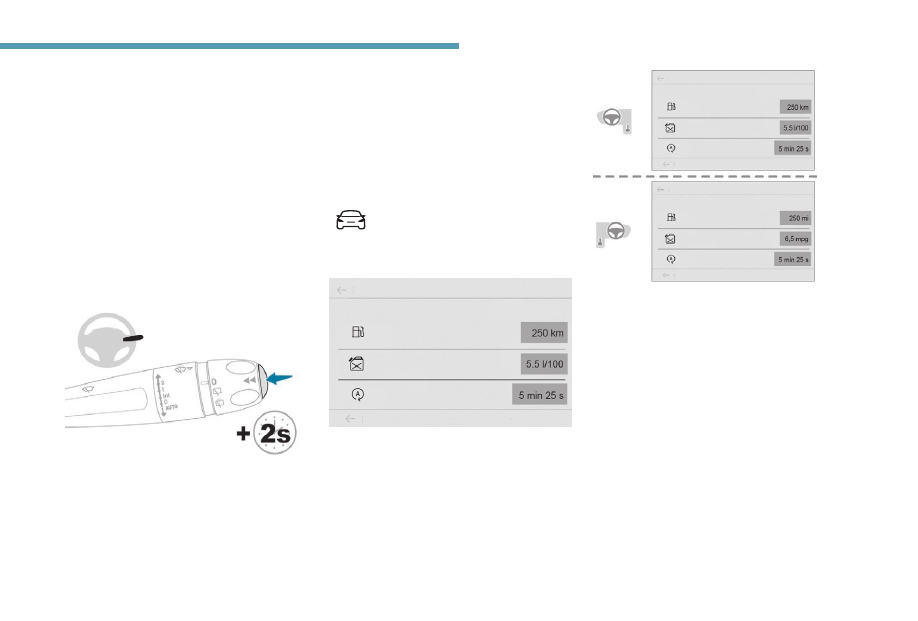
Current information showing:

•  the range,
•  the current fuel consumption,
•  the Stop & Start time counter.

Touch screen

Reset trip

F  When the trip required is displayed, press 

the control for more than 2 seconds or use 
the left-hand thumb wheel of the steering 
mounted controls.

Trips 1 and 2 are independent but their use is 
identical.

For example, trip 1 can be used for daily figures 
and trip 2 for monthly figures.

The information is accessible in the 
Driving / Vehicle menu.

Display of information in the touch screen

Permanent display:
F  Select the "Applications" menu then the 

"Vehicle Apps" tab then "Trip computer".

The information of the trip computer is 
displayed in tabs.
F  Press one of the buttons to display the 

desired tab.

Temporary display in a new window:
F  Press the end of the wiper control stalk for 

access to the information and to display the 
different tabs.

The current fuel consumption tab with:
- Range.

The current instantaneous fuel 
consumption.

The Stop & Start time counter,

32

Dashboard instruments

A few definitions

Range

(miles or km)

The distance which can still be 
travelled with the fuel remaining in 
the tank (related to the average fuel 
consumption over the last few miles 
(kilometres) travelled).

This value may fluctuate if a change 
of driving style or terrain results in a 
significant change in the current fuel 
consumption.

Dashes are displayed when the range falls 
below 20 miles (30 km).
After filling with at least 5 litres of fuel, the 
range is recalculated and is displayed if it 
exceeds 60 miles (100 km).

If dashes instead of figures continue to 
be displayed when driving, contact a 
PEUGEOT dealer or a qualified workshop.

The trip "1" tab with:

Average speed for the first trip.

Average fuel consumption.

Distance travelled.

The trip "2" tab with:

Average speed for the second trip.

Average fuel consumption.

Distance travelled.

Trip reset

F  When the desired trip is displayed, press 

the reset button or on the end of the wiper 
control stalk.

Trips "1" and "2" are independent and are used 
identically.
Trip "1" allows daily calculations to be carried 
out, for example, and trip "2" allows monthly 
calculations.

33

1

Dashboard instruments

Date and time adjustment

Instrument panel

F  Each press of this button moves between 

the following settings:

- hour,
- minutes,

12 or 24 hour format.

With PEUGEOT Connect 
Radio

F  Select the Settings menu.

F  Select "Date and time".

F  Select "Date" or "Time".
F  Choose the display formats.
F  Change the date and/or time using the 

numeric keypad.

F  Confirm with "OK".

Current fuel consumption

(mpg or l/100 km or km/l)

This function is only displayed from 
20 mph (30 km/h).

Calculated over the last few seconds.

Average fuel consumption

(mpg or l/100 km or km/l)

Calculated since the last trip computer 
reset.

Distance travelled

(miles or km)

Calculated since the last trip computer 
reset.

Average speed

Calculated since the last trip computer 
reset.

(mph or km/h)

Total time in stop mode

(minutes / seconds or hours / minutes)

If your vehicle is fitted with the Stop & Start, a 
time counter adds up the time spent in STOP 
mode during a journey.
It resets to zero every time the ignition is 
switched on.

34

Dashboard instruments

Lighting dimmer

System for the manual adjustment of the 
brightness of the instrument panel and the 
touch screen to suit the ambient light level.

With two buttons

Lights switched on:

F  Press this button to raise the 

level of brightness.

F  Press this button to lower it.

Release the button once the desired level of 
brightness is reached.

The system does not automatically 
manage the change between winter and 
summer time (depending on country).

The system does not automatically 
manage the change between winter and 
summer time (depending on country).
The change between winter and summer 
time is done by changing the time zone.

Additional adjustments

You can choose:

To change the display format of the date 
and time (12h/24h).

To change the time zone.

To activate or deactivate synchronisation 
with the GPS (UTC).

With PEUGEOT Connect 
Nav

Adjustment of the time and date is only 
available if synchronisation with GPS is 
deactivated.

F  Select the Settings menu.
F  Press the "OPTIONS" button to go to the 

secondary page.

F  Select "Setting the time-date".

F  Select the "Date" or "Time" tab.
F  Adjust the date and/or time using the 

numeric keypad.

F  Confirm with "OK".

35

1

Dashboard instruments

With one button

F  Press this button to adjust the 

brightness.

F  As soon as the lighting reaches the 

required level of brightness, release the 
button.

When the vehicle lighting is off, or in 
day mode (daytime running lamps on), 
pressing the button does not have any 
effect.

With touch screen

F  In the Settings menu, select "Brightness".
F  Adjust the brightness by pressing the 

arrows or moving the cursor.

The brightness can be adjusted differently 
for day mode (lighting control stalk in 
position "0") and night mode (lighting 
control stalk in any other position).

36

Access

Remote control

A.

Unfolding / Folding.

B.

Unlocking.
Disarming the alarm.

C.

Locking.
Locating the vehicle.
Arming the alarm.

Doors

Complete unlocking

With the key

F  Turn the key towards the front of the 

vehicle.

Using the remote control

F Press.

Selective unlocking

Complete unlocking is selected by default.

It is possible to activate or 
deactivate the selective unlocking 
with the touch screen from the menu 
Driving / Vehicle.

With the remote control

F  To unlock the driver's door only, 

press this button once.

F  To unlock the other doors and 

the boot, press this button 
briefly twice.

Unlocking is confirmed by rapid flashing 
of the direction indicators for around 
2 seconds.
According to the version you have, the 
electric door mirrors fold at the same time.

Locating your vehicle

F  A press switches on the 

vehicle's lighting and flashes 
the direction indicators for a few 
seconds to help you locate your 
vehicle in a car park.

Guide-me-home lighting

Make a long press on this button to 
operate the guide-me-home lighting 
(switching on the sidelamps, dipped 
beams and number plate lamps).

A second press before the end of the timed 
period cancels the guide-me-home lighting.

37

2

Access

Locking – Key

Locking

With the key

F  Turn the key towards the rear of the 

vehicle.

With the remote control

F Press.

Maintaining the lock (key or remote 
control) automatically closes the 
windows.

Locking is confirmed by fixed lighting of 
the direction indicators for approximately 
2 seconds.
According the version you have, the 
electric door mirrors fold at the same time.
The automatic folding and unfolding of 
the door mirrors can be deactivated by a 
PEUGEOT dealer or a qualified workshop.

If one of the doors or the boot is still open, 
the central locking does not take place.
When the vehicle is locked, if it is unlocked 
inadvertently, it will lock itself again 
automatically after about 30 seconds 
unless a door is opened.

As a safety measure (children on board), 
never leave the vehicle without taking your 
key, even for a short period.

Folding the key

F  Press this button before folding the key.

If you do not press the button, you risk 
damaging the remote control.

Back-up door locking

For mechanically locking and unlocking the 
doors in the event of a fault with the central 
locking system or a battery failure.

Driver’s side

Insert the key in the door lock to lock or unlock 
the door.

Passenger side

F  On the rear doors, check that the child lock 

is not on.

38

Access

F  Remove the black cap located on the edge 

of the door, using the key.

F  Insert the key in the socket without forcing 

it, then without turning it, move the latch 
sideways towards the inside of the door.

F  Remove the key and refit the cap.

Deadlocking

Deadlocking renders the exterior and 
interior door controls inoperative.
It also deactivates the manual central 
control button.
You must therefore never leave anyone 
inside the vehicle when it is deadlocked.

With the key

F  Turn the key to the rear in the driver's door 

lock.

F  Turn the key to the rear again within 

5 seconds to deadlock the vehicle.

Using the remote control

F Press.

F  Press this button again within 

5 seconds to deadlock the 
vehicle.

Deadlocking is confirmed by fixed 
lighting of the direction indicators for 
approximately 2 seconds.
According the version you have, the 
electric door mirrors fold at the same time.

Remote control problem

Following disconnection of the vehicle battery, 
replacement of the remote control battery or 
in the event of a remote control malfunction, 
you can no longer unlock, lock or locate your 
vehicle.
F  First of all, use the key in the door lock to 

unlock or lock your vehicle.

F  Then reinitialise the remote control.
If the problem persists, contact a PEUGEOT 
dealer as soon as possible.

Reset

F  Switch off the ignition.
F  Turn the key to position 2 (Ignition).

F  Immediately press the closed 

padlock button for a few 
seconds.

F  Switch off the ignition and remove the key 

from the switch.

The remote control is now fully operational 
again.

39

2

Access

Changing the battery

Battery ref.: CR1,620 / 3 volts.

If the battery is flat, you are informed 
by lighting of this warning lamp in 
the instrument panel, an audible 
signal and a message in the screen.

F  Unclip the cover using a small screwdriver 

at the cut-out.

F  Remove the cover.
F  Remove the discharged battery from its 

housing.

F  Fit the new battery into its housing 

observing the polarity.

F  Clip the cover onto the casing.

Do not throw away the remote control 
batteries, they contain metals which are 
harmful to the environment.
Take them to an approved collection 
point.

Lost keys
Go to a PEUGEOT dealer, taking with you 
the vehicle's registration certificate, your 
personal identification documents and if 
possible, the label bearing the key code.
The PEUGEOT dealer will be able to look 
up the key code and the transponder code 
required to order a new key.

Closed vehicle
Driving with the doors locked could make it 
difficult for the emergency services to enter 
the vehicle in an emergency.
As a safety precaution, never leave children 
alone in the vehicle, except for a very short 
period.
In all cases, it is essential to remove the key 
from the ignition switch when leaving the 
vehicle.

Remote control
The high frequency remote control is a 
sensitive system; do not operate it while 
it is in your pocket as there is a possibility 
that it may unlock the vehicle, without you 
being aware of it.
Do not repeatedly press the buttons of your 
remote control out of range and out of sight 
of your vehicle. It may become inoperative. 
It will then be necessary to reinitialise it 
again.
No remote control can operate when the 
key is in the ignition switch, even when 
the ignition is switched off, except for 
reinitialisation.

Anti-theft protection
Do not make any modifications to the 
electronic engine immobiliser system; this 
could cause malfunctions.

Second-hand vehicle
Have the pairing of all of the keys in your 
possession checked by a PEUGEOT dealer, 
to ensure that only your keys can be used to 
open and start the vehicle.

40

Access

Central locking

This function allows the doors and boot to be 
locked or unlocked simultaneously from inside 
the vehicle.

Locking

F  Press this button.
This locks the doors and the boot.

The indicator lamp comes on.

If one of the doors is open, the central 
locking from the inside does not take 
place.

Release

F  Press this button again.

The indicator lamp goes off.

When locking / deadlocking from the 
outside
When the vehicle is locked or deadlocked 
from outside, the switch does not operate.
F  After normal locking, pull one of the 

interior door levers to unlock the 
vehicle.

F  After deadlocking, it is necessary to 

use the remote control, or the key to 
unlock the vehicle.

Automatic central locking

The doors lock automatically while driving 
(speed above 6 mph [10 km/h]).

F  To activate or deactivate this 

function (activated by default), 
press this button until a buzzer 
sounds and/or a message 
appears in the screen.

Driving with the doors locked may render 
access by the emergency services to the 
interior difficult in an emergency.

Boot

Opening

Unlock the vehicle.

F  Press the tailgate opening button to 

release it, and then guide it open.

Closing

F  Lower the tailgate using the interior grab 

handle.

F  If necessary, press down on the tailgate to 

fully close it.

41

2

Access

Boot still open

With the engine running, this is 
signalled by:

this warning lamp coming on,

an alert message displayed for 
a few seconds.

Vehicle moving (speed above 6 mph 
(10 km/h)), this is signalled by:

this warning lamp coming on,

an alert message displayed for a few 
seconds,

an audible signal.

Back-up release

System for mechanically unlocking the boot in 
the event of a battery or central locking fault.

Release

F  Fold back the rear seats to gain access to 

the lock from inside the boot.

F  Insert a small screwdriver into hole A of the 

lock to unlock the tailgate.

F  Move the latch to the left.

Alarm

The alarm provides the following types of 
monitoring:

- Perimeter monitoring

The system checks for opening of the vehicle.
The alarm is triggered if anyone tries to open a 
door, the boot, the bonnet, etc.

- Volumetric monitoring

The system checks for any variation in the 
volume in the passenger compartment.
The alarm is triggered if anyone breaks a 
window, enters the passenger compartment or 
moves inside the vehicle.

- Anti-tilt (GTi version)

The system checks for any change in the 
attitude of the vehicle.
The alarm is triggered if the vehicle is lifted, 
moved or knocked.

42

Access

Self-protection function
The alarm is triggered if the battery, the 
central control or the siren wiring are put 
out of service or damaged.

For all work on the alarm system, contact a 
PEUGEOT dealer or a qualified workshop.

Total protection

Switching on
F  Switch off the ignition and get out of the 

vehicle.

F  Press the locking button on the 

remote control.

The exterior perimeter monitoring is activated 
after 5 seconds.
Interior volumetric monitoring is activated after 
45 seconds.
If an opening (door, boot, etc.) is incorrectly 
closed, the vehicle is not locked but the exterior 
perimeter monitoring will be activated after 
45 seconds at the same time as the interior 
volumetric monitoring.

Deactivation

F  Press the unlocking button on 

the remote control.

Automatic activation (depending on 
version)
The system is activated automatically 2 minutes 
after the last door or the boot is closed.

Protection – exterior 
perimeter monitoring alone

Deactivate the interior volumetric monitoring 
(and anti-tilt monitoring if your vehicle has it) 
to avoid unwanted triggering of the alarm in 
certain cases such as:

when a pet is in the vehicle,

a window is open,

washing your vehicle.

Deactivating the volumetric monitoring
The anti-tilt alarm is also deactivated, if your 
vehicle has one.
F  Switch the ignition off.

F  Within ten seconds, press the 

button until the indicator lamp is 
on fixed.

F  Get out of the vehicle.

F  Immediately press the locking 

button on the remote control.

The exterior perimeter monitoring 
alone is activated: the indicator lamp 
flashes once per second.

To be effective, the deactivation must 
be carried out each time the ignition is 
switched off.

The alarm monitoring system is 
activated (armed): the indicator 
lamp in the button flashes once per 
second.

The alarm system is deactivated: the 
indicator lamp in the button goes off.

To avoid triggering the alarm on 
entering the vehicle, first press the 
unlocking button on the remote 
control before opening.

43

2

Access

Locking the vehicle without 
activating the alarm

F  Lock or deadlock the vehicle using the 

key in the driver's door lock.

Triggering of the alarm

When the alarm is triggered, the siren sounds 
and the direction indicators flash for thirty 
seconds.
The monitoring functions remain active until 
the alarm has been triggered eleven times 
consecutively.

When the vehicle is unlocked using 
the remote control, rapid flashing 
of the indicator lamp in the button 
informs you that the alarm was 
triggered during your absence. 
Upon ignition, this flashing stops 
immediately.

Deactivate the monitoring 
functions

To stop the alarm, for example if the remote 
control is not working:
F  Unlock the vehicle using the key in the 

driver's door lock.

F  open the door; the alarm is triggered,
F  Switch on the ignition; this stops the alarm. 

The indicator lamp goes off.

Malfunction

When the ignition is switched on, 
fixed illumination of the button’s 
indicator lamp indicates a fault in the 
system.

Have it checked by a PEUGEOT dealer or a 
qualified workshop.

Electric windows

Manual mode 

Open

Press the control, without passing 
the point of resistance. The window 
stops as soon as you release the 
switch.

Close

Pull the control without going past 
the point of resistance. The window 
stops as soon as you release the 
switch.

44

Access

Automatic mode

(depending on version)

Open

Press the control, beyond the 
resistance point: the window opens 
completely when the switch is 
released. Pressing the switch again 
stops the movement of the window.

Close

Pull the control, beyond the 
resistance point: the window closes 
completely when the switch is 
released. Pressing the switch again 
stops the movement of the window.

The electric window controls remain 
operational for approximately 1 minute 
after the key has been removed.
Once this time has elapsed, the electric 
windows will not operate. To reactivate 
them, switch the ignition on again.

Anti-pinch

Deactivating the rear door 
electric windows

For the safety of your children, press 
the switch to prevent operation of 
the electric windows of the rear 
doors, irrespective of their position.

With the warning lamp on, the rear switches 
are deactivated. With the warning lamp off, the 
switches are active.

Reinitialisation

Following reconnection of the battery, the 
safety anti-pinch function must be reinitialised.
The safety anti-pinch is not active during these 
operations:

bring the window down completely, then 
bring it back up. It will go up by a few 
centimetres with each press. Repeat the 
operation until the window is fully closed,

continue to pull the switch upwards for at 
least 1 second after reaching this position, 
window closed.

Always remove the key when leaving the 
vehicle, even for a short time.
In the event of contact during operation 
of the windows, you must reverse the 
movement of the window. To do this, press 
the switch concerned.
When operating the passenger electric 
window switches, the driver must ensure 
that no one is preventing correct closing of 
the windows.
The driver must ensure that the 
passengers use the electric windows 
correctly.
Be aware of children when operating the 
windows.

(depending on version)

When the window rises and meets an obstacle, 
it stops and immediately partially lowers again.

In the event of unwanted opening 
of the window when closing 
automatically, press the switch until 
the window opens completely, then 
pull the switch immediately until the 
window closes. Continue to hold the 
control for approximately 1 second 
after the window has closed.

The safety anti-pinch function is not active 
during this operation.

3

45

Ease of use and comfort

PEUGEOT i-Cockpit

Before going out on the road and to benefit 
from the ergonomic layout of the PEUGEOT 
i-Cockpit, adjust in the following order:
-  height of the head restraint,
-  backrest angle,
-  cushion height,
-  longitudinal position of the seat,
-  reach and then height of the steering wheel,
-  rear view mirror and door mirrors.

Sitting comfortably

Whether or not your vehicle has certain seat 
adjustments described in this section depends 
on the trim level and country of sale.

Driver’s side

Sit fully back in the seat with your pelvis, back 
and shoulders in contact with the seat backrest.
The cushion height should be set so your eyes 
are looking at the centre of the windscreen.
The head room should be at least 4 in (10 cm).

Adjust the longitudinal position of the seat so 
you can fully press the pedals with legs slightly 
flexed.
The knee room should be at least 4 in 
(10 cm) from the dashboard for access to the 
dashboard controls.
Adjust the backrest angle to as vertical a 
position as possible; never tilt it more than 25°.
Adjust the head restraint so that its upper edge 
is level with the top of your head.
Adjust the length of the seat cushion to support 
your thighs.
Adjust the lumbar support so that it conforms to 
the shape of your spine.
Adjust the steering wheel so that it is at least 
10 in (25 cm) from your sternum and your arms 
are slightly bent.
The steering wheel should not hide the 
instrument panel.

As a safety precaution, adjust the seats 
only when the vehicle is stationary.

If your vehicle has electric seats, the 
ignition must be on to adjust them.

Once these adjustments have been made, 
check the "head up" instrument panel 
can be viewed correctly over the smaller 
diameter steering wheel.

46

Ease of use and comfort

Steering wheel adjustment

Passenger’s side

Sit fully back in the seat with your pelvis, back 
and shoulders in contact with the seat backrest.
Adjust the longitudinal position of the seat 
so that you are at a distance of at least 10 in 
(25 cm) from the dashboard.
Adjust the head restraint so that its upper edge 
is level with the top of your head.

F  When stationary, pull the control lever 

to release the steering wheel adjustment 
mechanism.

F  Adjust the height and reach to suit your 

driving position.

F  Push the control lever to lock the steering 

wheel adjustment mechanism.

For safety reasons, these adjustments 
must only be made with the vehicle 
stationary.

Mirrors

Door mirrors

As a safety measure, the mirrors should 
be adjusted to reduce the "blind spot".

Manual adjustments

F  Operate the lever in the four directions to 

adjust the angle of the mirror glass.

Folding
F  Fold the mirror manually to protect it when 

the vehicle is parked.

F  Unfold it before moving off again.
They do not have automatic demisting.


Content   ..  1  2  3  4   ..