Lexus RZ (2023 year). Manual in english - page 13
 

  Index      Manuals     Lexus RZ (2023 year). Manual in english


Search            copyright infringement  


Content      ..     11      12      13      14     ..


Lexus RZ (2023 year). Manual in english - page 13


409

6

6-2. Using the safe driving support functions

Driving support 

system

son, or gutter: 

P.400

7

Perform operations as indicated by 
the advice displays until the vehicle 
stops in the target parking space.

8

Check the position that the vehicle 
has stopped. If necessary, adjust the 
position of the parking spot to be 
registered using the arrow buttons, 
and then select “Reg.” button.

“Registration Completed” will be displayed 

on the center display.

Register the parking space only if 
there are no obstructions within the 
area shown by the thick lines.

The amount that the position of the 
parking spot to be registered can be 
adjusted is limited.

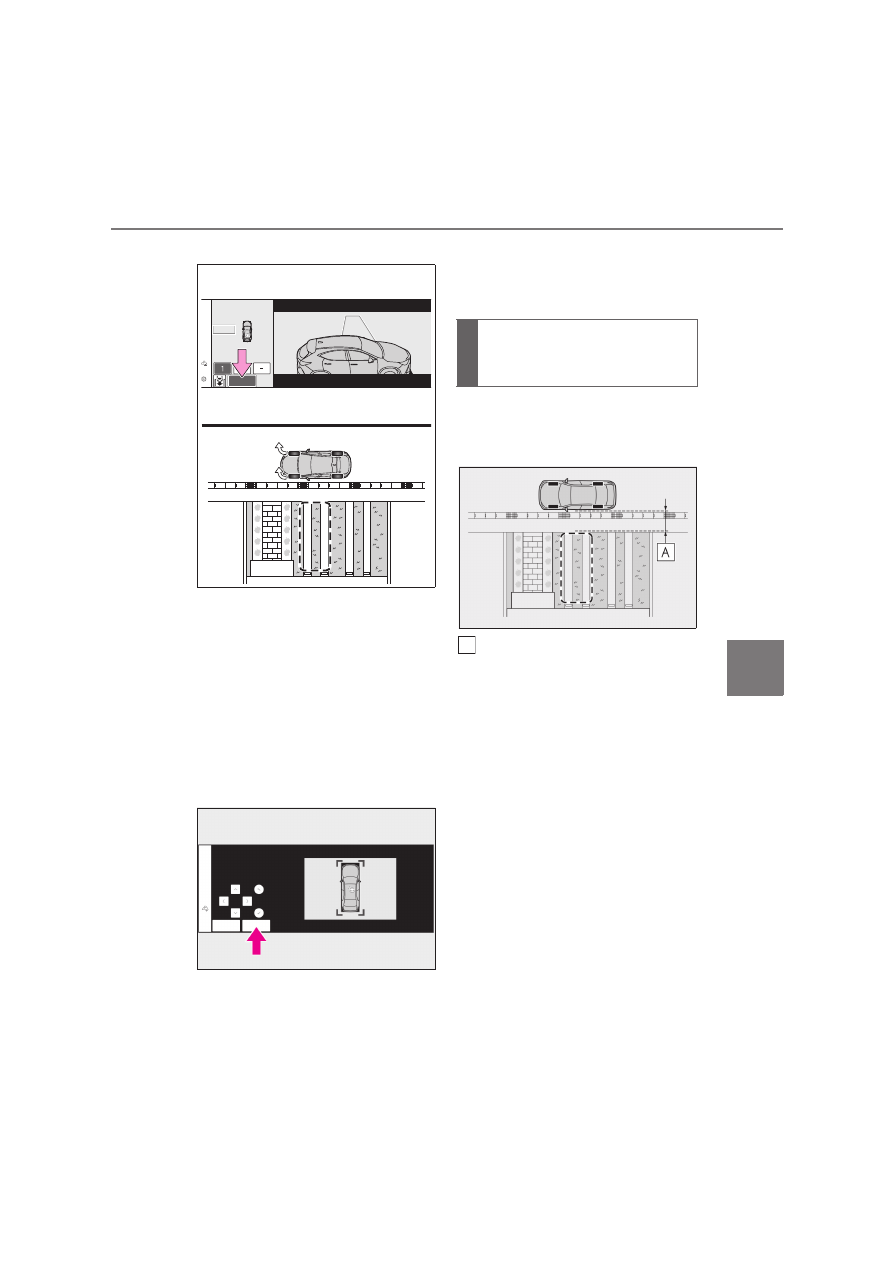
1

Stop the vehicle with it aligned near 
the center of the target parking 
space.

Approximately 1 m (3.3 ft.)

2

Press the Advanced Park main 
switch and check that a possible 
parking space is displayed on the 
center display.

If the “MODE” button is displayed, the but-

ton can be touched to change between the 

memory function, perpendicular parking 

(forward/reverse) function and parallel 

When parking in a parking space 
registered to the memory func-
tion

A

410

6-2. Using the safe driving support functions

parking function.

3

Select the desired parking space, 
and then select “Start” button.

Perform the procedure for the perpendic-

ular parking (forward/reverse) function 

from step 

3

. (

P.398)

If you feel that the vehicle is approach-

ing close to a surrounding vehicle, 

object, person, or gutter

P.400

When overwriting a registered parking 

space

If the maximum number of parking spaces 
have been registered and 

 is selected, a 

registered parking space can be selected 

and then overwritten with a new parking 

space.

When multiple parking spaces are reg-

istered

Select the desired parking space, and then 

select “Start” button.

When the brakes have been operated

P.400

NOTICE

When using the memory function 

(

P.400, 405)

The memory function is a function 

which provides assistance in parking in 

a previously registered parking space. 

If the condition of the road surface, 

vehicle, or surrounding area differs 

from when registration was per-

formed, the parking space may not be 

able to be detected correctly or assis-

tance may not be provided to the point 

that the vehicle is fully parked.

Do not register a parking space in situ-

ations such as the following, as the set 

parking space may not be able to be 

registered or assistance may not be 

possible later.

• When a camera lens is dirty or cov-

ered with water droplets

• When it is raining or snowing

• When the surrounding area is dark (at 

night, etc.)

In situations such as the following, it 

may not be possible to register a park-

ing space.

• When there is insufficient space 

between the road and parking space

• When the road surface around the 

parking space does not have any dif-

ferences the system can recognize

411

6

6-2. Using the safe driving support functions

Driving support 

system

NOTICE

If a parking space has been registered 

in situations such as the following, 

assistance may not be able to be 

started later or assistance to the regis-

tered position may not be possible.

• When shadows are cast on the parking 

space (there is a carport over the 

parking space, etc.)

• When there are leaves, garbage, or 

other objects which will likely move, in 

the parking space

• When the road surface around the 

parking space has the same repeating 

pattern (brick, etc.)

In situations such as the following, it 

may not be possible for the system to 

provide assistance to a registered 

parking spot:

• When the appearance of the parking 

space is affected by the shadow of the 

vehicle or trees

• When an object is detected in the reg-

istered parking space

• When a pedestrian or passing vehicle 

is detected during assistance

• When the position the vehicle is 

stopped when assistance is started dif-

fers from the position when registra-

tion was performed

• When the registered parking space 

cannot be reached due to the exist-

ence of parking blocks, etc.

• When the road surface around the 

parking space has changed (road sur-

face has degraded or been resur-

faced)

• When the sunlight conditions differ 

from when registration was performed 

(due to weather or time of day)

• When the sun is shining directly into a 

camera, such as in the early morning 

or evening

• When the color or brightness of the 

road surface is uneven

• When a light is temporarily shined on 

the parking space (lights of another 

vehicle, security light, etc.)

• When the road surface around the 

parking space has the same repeating 

pattern

• When there is a low protrusion on the 

road surface near the parking space

• When the parking space is on a slope

• When a camera has been splashed by 

hot or cold water and the lens has 

fogged up

• When a camera lens is dirty or cov-

ered with water droplets

• When accessories which obstruct the 

view of the camera are installed

If assistance is ended during registration, 
perform registration again.

412

6-2. Using the safe driving support functions

A smartphone can be used to remotely 
operate the parking functions and exit 
functions. Also, assistance can be pro-
vided to remotely move the vehicle for-
ward or backward into a garage, etc.

A smartphone can be used to remotely 
operate the parking function if the tar-
get parking space can be detected 
when the vehicle is stopped close and 
perpendicular to the center of the 
parking space. Also, depending on the 
condition of the parking space, etc., if it 

is necessary to change the direction of 
travel of the vehicle, the shift position 
can be shifted by assistance control.

1

Stop the vehicle with it aligned near 
the center of the target parking 
space. (

P.398, 403)

2

Press the Advanced Park main 
switch and check that a possible 
parking space is displayed on the 
center display. (

P.398, 403)

3

Select 

 and then select “Perpen-

dicular/parallel”.

4

Select “OK” button.

5

Exit the vehicle while carrying the 
electronic key and smartphone, 
and then start the Remote Park app 
on the smartphone.

The detection area of the electronic key is 

within approximately 3 m (9.8 ft.) around 

the vehicle.
If there is an obstruction in the path of the 

vehicle, move it before parking the vehicle. 

A corn can also be moved after exit the 

vehicle.

6

From outside of the vehicle, confirm 
the parking space on the screen of 
the smartphone and then select the 
start button.

Start operation of Remote control function 

while standing approximately 50 cm (1.6 

ft.) or more from the vehicle and out of the 

path of the vehicle.

7

Checking the safety of the area 
around the vehicle, trace the oper-
ation area on the screen of the 
smartphone.

While continuously tracing the operation 

area, the vehicle will move and parking 

assistance will be performed.

NOTICE

When registering a parking space to 

the memory function, if the road sur-

face cannot be detected “No available 

parking space to register” will be dis-

played.

When using the memory function, 

make sure to stop immediately in front 

of the stop position. Otherwise the 

parking space may not be able to be 

detected correctly or assistance may 

not be provided to the point that the 

vehicle is fully parked.

Do not use the memory function if a 

camera has been subjected to a strong 

impact or images of the panoramic 

view monitor are misaligned.

If a camera has been replaced, as the 

installation angle of the camera will 

have changed, it will be necessary to 

reregister parking spaces of the mem-

ory function.

Remote control function (if 
equipped)

Parking using Remote control 
function

413

6

6-2. Using the safe driving support functions

Driving support 

system

If operation of the screen of the 

smartphone is stopped, assistance can be 

suspended and the vehicle can be stopped.
When the operation of the screen of the 

smartphone is resumed to move the vehi-

cle, the vehicle will be locked automatically 

before moving.

8

When the parking space is 
reached, after the vehicle is 
stopped by the parking brake, the 
shift position will be shifted to P, the 
power switch will be turned off, and 
the doors will be locked.

A completion screen will be displayed on 

the smartphone.

The parking function can be used even if 

obstructions exist if

When using the parking functions at a 

parking space made of white lines, even if 

an obstruction exists in the parking 

space, the space can be set as the target 

parking space. This allows for assistance 

to continue after setting a parking space 

from inside the vehicle and then exiting 

the vehicle to move an obstruction, such 

as a traffic cone placed in a handicapped 

parking space.

When perpendicular parking using 

Advanced Park, 3 parking spaces on 

each side of the vehicle (up to 6 total) can 

be detected. However, when using 

Remote control function, only 1 parking 

space on each side of the vehicle can be 

detected.

When the brakes have been operated

P.400

After the vehicle is stopped, assistance 
can be provided to move the vehicle 
into a garage, etc., by using the forward 

and backward movement function.

1

Stop the vehicle at the location you 
would like to start assistance.

2

Press the Advanced Park main 
switch. (

P.398)

3

Select 

 and then select “For-

ward/reverse”.

4

Select “OK” button.

5

Exit the vehicle while carrying the 
electronic key and smartphone, 
and then start the Remote Park app 
on the smartphone.

The detection area of the electronic key is 

within approximately 3 m (9.8 ft.) around 

the vehicle.

6

From outside of the vehicle, confirm 
the direction of travel on the screen 
of the smartphone and then select 
the start button.

Start operation of Remote control function 

while standing approximately 50 cm (1.6 

ft.) or more from the vehicle and out of the 

path of the vehicle. The detection area of 

the electronic key is within approximately 

3 m (9.8 ft.) around the vehicle.

7

Checking the safety of the area 
around the vehicle, trace the oper-
ation area on the screen of the 
smartphone.

While continuously tracing the operation 

Moving the vehicle forward and 
backward using Remote control 
function

414

6-2. Using the safe driving support functions

area, the vehicle will move and forward and 

reverse movement assistance will be per-

formed.
If operation of the screen of the 

smartphone is stopped, assistance can be 

suspended and the vehicle can be stopped.
While assistance is being performed, it can 

be stopped part way or the direction of 

travel of the vehicle can be changed.

8

Select the power button on the 
screen of the smartphone.

The power switch will then turn OFF and 

the doors will lock automatically.

Changing the direction of travel

While assistance is being performed, the 

direction of travel of the vehicle can be 

changed by the forward and reverse move-

ment function.

When there is a wall behind the vehicle, 

etc., by operating the direction of travel 

changing button on the screen of the 

smartphone, the vehicle can be slightly 

moved forward to allow loading of items 

and then moved back to its original position.

When the brakes have been operated

P.400

Assistance can be provided to exit 
from a perpendicular or parallel park-
ing space when the power switch OFF.
When forward and backward move-
ment is selected, the maximum dis-
tance the vehicle can move is 7 m 
(23.0 ft.) from the starting point and 
possible to change the direction of 
travel.

1

While near the parked vehicle, 
unlock the doors using the elec-
tronic key, and then start the 

Remote Park app on the 
smartphone.

If the smartphone cannot connect to the 

vehicle, using the electronic key, unlock the 

doors again.

2

Select the start button on the 
screen of the smartphone.

The power switch will change to ON.

3

Check that a possible exit direction 
is displayed, select the exit direc-
tion.

4

Checking the safety of the area 
around the vehicle, trace the oper-
ation area on the screen of the 
smartphone.

While continuously tracing the operation 

area, the vehicle will move and departure 

assistance will be performed.
If operation of the screen of the 

smartphone is stopped, assistance can be 

suspended and the vehicle can be stopped.
While assistance is being performed, it can 

be stopped part way or the direction of 

travel of the vehicle can be changed.

5

Move the vehicle to the position 
where assistance ends and enter 
the vehicle while carrying the elec-
tronic key.

To stop assistance part way, stop operating 

the smartphone or enter the vehicle.

Exiting using Remote control 
function

415

6

6-2. Using the safe driving support functions

Driving support 

system

Exit using the remote air conditioning

Assistance can be provided to exit from a 

parking space, even when the remote air 

conditioning is operating.

When Remote control function is started 

while the remote air conditioning is oper-

ating, if tracing operations are not per-

formed on a smartphone, assistance can 

be canceled by entering the vehicle and 

depressing the brake pedal.

When the brakes have been operated

P.400

A smartphone can be used to remotely 
operate the memory function if the tar-
get parking space can be detected 
when the vehicle is stopped close to a 
parking space which was previously 
registered to the memory function.
Also, depending on the condition of 
the parking space, etc., if it is necessary 
to change the direction of travel of the 
vehicle, the shift position can be shifted 
by assistance control.

1

Stop the vehicle with it aligned near 
the center of the target parking 
space. (

P.409)

2

Press the Advanced Park main 
switch and check that a possible 
parking space is displayed on the 
center display. (

P.409)

3

Select 

 and then select “Perpen-

dicular/parallel”.

4

Select “OK” button.

If the “MODE” button is displayed, the but-

ton can be selected to change between the 

memory function, perpendicular parking 

(forward/reverse) function and parallel 

parking function.

5

Exit the vehicle while carrying the 
electronic key and smartphone, 
and then start the Remote Park app 
on the smartphone.

The detection area of the electronic key is 

within approximately 3 m (9.8 ft.) around 

the vehicle. If there is a cone or other 

obstruction in the path of the vehicle, move 

it after exiting the vehicle.

6

From outside of the vehicle, confirm 
the parking space on the screen of 
the smartphone and then select the 
start button.

Start operation of Remote control function 

while standing approximately 50 cm (1.6 

ft.) or more from the vehicle and out of the 

path of the vehicle.

7

Checking the safety of the area 
around the vehicle, trace the oper-
ation area on the screen of the 
smartphone.

While continuously tracing the operation 

area, the vehicle will move and parking 

assistance will be performed.
If operation of the screen of the 

smartphone is stopped, assistance can be 

suspended and the vehicle can be stopped.
When the operation of the screen of the 

smartphone is resumed to move the vehi-

cle, the vehicle will be locked automatically 

before moving.

8

When the parking space is 
reached, after the vehicle is 
stopped by the parking brake, the 
shift position will be shifted to P, the 
power switch will be turned off, and 
the doors will be locked.

A completion screen will be displayed on 

the smartphone.

Parking using the Remote control 
function and memory function

416

6-2. Using the safe driving support functions

When the brakes have been operated

P.400

Preparation before using

Make sure to perform the following 
before using Remote control function:

1

Download the Remote Park app 
from the app store.

2

Turn the power switch to ON and 
register the smartphone as a 
Bluetooth device to the multimedia 
system.

For details on registering a Bluetooth 

device, refer to the “MULTIMEDIA 

OWNER’S MANUAL”.

3

Setup the Remote Park app and 
register the vehicle.

4

The registered vehicle will be dis-
played on the screen of the 
smartphone. Select the vehicle.

The name and image of the vehicle can be 

changed on the new vehicle registration 

screen.
Vehicles can be added through the menu 

screen.

Remote control function on/off

1

Select 

 and then select 

“Advanced Park” on the center dis-
play.

2

Select “Remote Park” to turn it 
on/off. (The default setting is on.)

3

Press the Advanced Park main 
switch.

If the switch is pressed while assistance is 

being performed, the assistance will be 

canceled.

4

Select the   button displayed on 
the center display.

Preparation before using Remote 
control function

NOTICE

Remote control function

When using Remote control function, 

make sure carry an electronic key in 

your pocket, etc.

If an electronic key is held together 

with a smartphone, etc., the electronic 

key may not be able to be detected.

Vehicles with a digital key: Remote 

control function cannot be used when 

carrying only a digital key. The driver 

should always carry the electronic key.

When entering the vehicle after using 

Remote control function, make sure 

that the electronic key is brought into 

the vehicle and all of the doors are 

closed.

Vehicles with a power easy access sys-
tem: After entering the vehicle and end-
ing Remote control function operation, 
the seat return function will operate 
when the driver’s seat seat belt is fas-
tened or the brake pedal is depressed.

417

6

6-2. Using the safe driving support functions

Driving support 

system

Assistance will be canceled when

In situations such as the following, 
Advanced Park operation will be 
canceled. Firmly hold the steering 
wheel and depress the brake pedal to 
stop the vehicle.

As system operation has been canceled, 
begin the operation again or continue 
parking manually, using the steering wheel.

The Advanced Park main switch is 
pushed

The shift position has been shifted to 
P

The parking brake is engaged

A door or the back door is opened

The driver’s seat belt is unfastened

The outside rear view mirrors are 
folded

The TRC or VSC is turned off

The TRC, VSC or ABS operates

The power switch is pressed

The system determines assistance 

NOTICE

If the power switch is turned off when 

Remote control function operation has 

finished or been canceled, the doors 

will be locked automatically. However, 

if a door is open, it may not be locked. 

Check the vehicle condition after 

Remote control function operation has 

finished.

When the doors are locked after 

Remote control function operation has 

finished or been canceled, an alarm 

may sound if someone is detected 

inside the vehicle.

Situations in which the function may 

not operate correctly

When the functions of the smart entry 

& start system may not operate cor-

rectly: 

P.88

When the vehicle is near fluorescent 

lights

Radio wave interference:

P.87

Electronic key battery consumption

When Remote control function is 

being used, the electronic key battery 

will be used as the electronic key will 

continuously send and receive radio 

waves.

If the electronic key battery is 

depleted: 

P.552

Situations in which the sensors may 

not operate properly

P.363

When using Remote control function, 

visibility of the area around the vehicle 

may be limited. Make sure to check 

the following when using Remote con-

trol function:

• The vehicle and area around the vehi-

cle are clearly visible

• There are no people, animals, or 

objects in the path of the vehicle

• An appropriate distance from the vehi-

cle can be maintained and the safety of 

yourself and others can be ensured

• Caution for the area around the vehi-

cle is always maintained and there is no 

potential for danger

• You can cancel Remote control func-

tion immediately if necessary

Advanced Park cancelation/sus-
pension

418

6-2. Using the safe driving support functions

cannot be continued in the current 
parking environment

The system malfunctions

While the vehicle was stopped, 
“Cancel” was selected on the center 
display

Assistance will be suspended when

In situations such as the following, 
Advanced Park operation will be sus-
pended.

Assistance can be started again by follow-
ing the directions displayed on the center 
display.
Also, when assistance is suspended, if the 
shift position is shifted twice with the brake 
pedal depressed, assistance will be 
canceled in that shift position.
However, if assistance is suspended by 
shifting the shift position, assistance will be 
canceled if the shift position is shifted once.

The steering wheel is operated

The accelerator pedal is depressed

The shift position has been shifted

A moving object or stationary 
object that may collide with your 
vehicle has been detected, resulting 
in the operation of the EV system 
output control/braking control.

Camera switch is pressed

Remote control function assis-
tance will be canceled when

In situations such as the following, 
Remote control function operation will 
be canceled.
As system operation has been 
canceled, while carrying an electronic 

key, enter the vehicle and park the 
vehicle manually, using the steering 
wheel.

When a condition for stopping 
Advanced Park assistance is met, 
with the exception suspension due 
to a door being opened or the 
driver’s seat seat belt being released

When Remote control function is 
operated while the remote air con-
ditioning is operating and the power 
switch is changed to ON before 
remote air conditioning has ended

When 5 minutes have elapsed since 
Remote control function operation 
was started

When 3 minutes have elapsed since 
any operation was performed

When 30 seconds have elapsed 
with the vehicle not being able to be 
driven, even though the screen of 
the smartphone is being operated to 
drive the vehicle

When the power button on the 
screen of the smartphone is 
selected

When the Remote Park app is force 
closed

When the vehicle is on a steep slope

When an electronic key is detected 
inside the vehicle while Remote 
control function operation is sus-
pended

When the ambient temperature is 
-10°C (14°F) or less

419

6

6-2. Using the safe driving support functions

Driving support 

system

Remote control function assis-
tance will be suspended when

In situations such as the following, 
assistance will be suspended.

When the Bluetooth communica-
tion between the smartphone and 
multimedia system get lost

When smartphone continuous 
operation is suspended

When the Remote Park app is 
pushed to the background (a call is 
received, the home button is 
pressed, etc.)

When electronic key does not 
detected

When there is an obstruction in the 
movement direction of the vehicle

When the vehicle is operated while 
it is being driven by assistance

When the smart key is operated 
while it is being driven by assistance

When the door is unlocked while it 
is being driven by assistance

When a door is opened while the 
vehicle is being driven

Select 

 on the center display, and 

then select “Advanced Park”.

Remote Park (if equipped)

Remote control function can be turned 
on/off.

Speed Profile

The vehicle speed for when assistance 
is performed can be set.
This setting cannot be changed when 
registering a parking space to the 
memory function.

Obstacle detection range

The distance from which obstacles will 
be avoided while assistance is being 
performed can be set.

Preferred parking method

The preferred parking direction dis-
played when at a parking space which 
perpendicular (forward/reverse) or 
parallel parking is possible can be set.

Preferred parking direction

The preferred parking direction dis-
played when it is possible to pull per-
pendicular forward or reverse into a 
parking space can be selected.

Preferred exit direction (perpen-
dicular)

The preferred exit direction displayed 
when it is possible to pull forward or 
reverse to the left or right out of a park-
ing space can be selected.

Preferred exit direction (parallel)

The preferred exit direction displayed 
when it is possible to exit to the left or 
right from a parallel parking space can 
be selected.

Camera view when parking

The display angle of the camera image 
when using the perpendicular parking 
(forward/reverse) function or parallel 

Changing the Advanced Park 
settings

420

6-2. Using the safe driving support functions

parking function can be set.

Camera view when exiting

The display angle of the camera image 
when using the perpendicular exiting 
(forward/reverse) function or parallel 
parking exit function can be set.

Parking path adjustment

The course for when parking assis-
tance is operating can be adjusted 
inward or outward.
If the tires are worn, the path of vehicle 
may be offset from the center of the 
parking space. In this case, use this set-
ting to adjust the parking course.

Road width adjustment

When parking assistance is started, the 
amount of lateral movement while the 
vehicle is moving forward can be 
adjusted.

Park position adjustment (forward)

The position at which perpendicular 
parking (forward) is completed can be 
adjusted. (Except when using the 
memory function.)

Park position adjustment (reverse)

The position at which perpendicular 
parking (reverse) is completed can be 
adjusted. (Except when using the 
memory function.)

Rear accessory setting

If an accessory, such as a trailer hitch, 
has been installed to the rear of the 
vehicle, the length of the rear of the 
vehicle can be adjusted to help avoid 
colliding with objects to the rear of the 

vehicle.

Clear registered parking space

The parking spaces registered to the 
memory function can be deleted. Park-
ing space information cannot be 
deleted when assistance is being per-
formed or when registering parking 
space information to the memory func-
tion.

Lexus parking assist-sensor warn-
ing sound ON/OFF (Smartphone 
setting)

The warning sounds of the Lexus park-
ing assist-sensor from smartphone 
application can be turned on/off using 
the Remote Park app.

Lexus parking assist-sensor warn-
ing sound volume adjustment 
(Smartphone setting)

The volume of the warning sounds of 
the Lexus parking assist-sensor from 
smartphone application can be 

NOTICE

Take care when using the park position 

adjustment (forward) or park position 

adjustment (reverse) for adjusting 

because the vehicle may collide with 

parking blocks, curb stones, or other 

low objects.

If it is likely that your vehicle will collide 

with a nearby vehicle/object, parking 

block, curb stone, etc., depress the 

brake pedal to stop the vehicle and 

press the Advanced Park main switch 

to disable the system.

Changing the Remote Park app 
settings (if equipped)

421

6

6-2. Using the safe driving support functions

Driving support 

system

adjusted using the Remote Park app.

The operating state, assistance opera-
tion, etc. of the Advanced Park is dis-
played on the center display. If a 
message is displayed, respond accord-
ing to the content displayed.

If “No available parking space” is dis-

played

Move the vehicle to a location where a 

parking space or parking lines can be 

detected.

If “Unavailable in current condition” is 

displayed

Move the vehicle to another location and 

use the system.

If “Not enough space to exit” is dis-

played

The parallel parking exit function cannot be 

used due to a situation such as the distance 

between your vehicle and vehicles parked 

in front of and behind your vehicle being 

short, the existence of an object in the exit 

direction, etc.
Check the conditions of the area around 

your vehicle and exit from the parking 

space manually.

If “Cannot control speed” is displayed

The system judged that it cannot adjust the 

speed of the vehicle when using the system 

in an area with a slope or step and assis-

tance was canceled.
Use the system in a level location.

If “Obstacle detected” is displayed

As a moving object or stationary object that 

may collide with your vehicle has been 

detected, the EV system output con-

trol/braking control operates to suspend 

Advanced Park assistance.
Check the condition of the surrounding 

area. To resume assistance, select the 

“Start” button on the center display.

If “No available parking space to regis-

ter” is displayed

This message is displayed when 

 is 

selected at a parking space that cannot be 

detected.
Operate the system at a parking space 

where differences in the road surface can 

be recognized. (

P.407)

Advanced Park displayed mes-
sages

422

6-2. Using the safe driving support functions

The rear side radar sensors detect fol-
lowing vehicles driving in the same 
lane. If the system determines that the 
possibility of a rear-end collision is 

high, the emergency flashers will flash 
rapidly to warn the driver of the follow-
ing vehicle. Simultaneously, a message 
will be displayed on the multi-informa-
tion display to notify the driver of the 
approach of the following vehicle.

Operating conditions of Automatic 

Rear Flashing Hazard Lights

When the following conditions are met, the 

Automatic Rear Flashing Hazard Lights will 

operate:

The power switch is in ON.

The shift position is in a position other 

than R.

The turn signal lever is not being oper-

ated.

The relative speed between your vehicle 

and the following vehicle is between 

approximately 30 and 100 km/h (19 and 

62 mph)

Your vehicle is being driven at approxi-

mately 10 km/h (7 mph) or less or at any 

speed with the brake pedal depressed.

Automatic Rear Flashing 
Hazard Lights

The Automatic Rear Flashing Haz-
ard Lights is a system that uses the 
rear side radar sensors located on 
the inside of the rear bumper. 
When the system determines that 
the possibility of a rear-end collision 
is high, it flashes the emergency 
flashers rapidly to warn the driver of 
the following vehicle.

WARNING

Cautions regarding the use of the sys-

tem

The driver is solely responsible for safe 

driving. Always drive safely, taking care 

to observe your surroundings. The Auto-

matic Rear Flashing Hazard Lights is an 

auxiliary system that flashes the emer-

gency flashers rapidly to warn the driver 

of the following vehicle when it deter-

mines that the possibility of a rear-end 

collision is high. As this system may not 

function to its fullest extent in certain situ-

ations, the driver’s own visual confirma-

tion of safety is necessary. Over reliance 

on this function may lead to an accident 

resulting death or serious injury.

To ensure the system can operate 

properly

P.352

Automatic Rear Flashing Hazard 
Lights operation

423

6

6-2. Using the safe driving support functions

Driving support 

system

The Automatic Rear Flashing Hazard 

Lights will detect a vehicle when

The Automatic Rear Flashing Hazard Lights 

detects the following vehicle driving in the 

same lane within the detection range, when 

it determines that the possibility of a 

rear-end collision with it is high.

Situations in which the Automatic Rear 

Flashing Hazard Lights cannot detect 

vehicles

The Automatic Rear Flashing Hazard Lights 

cannot detect the following vehicles and 

other objects:

Small motorcycles, bicycles, pedestrians, 
etc.

*

Guardrails, walls, signs, parked vehicles 
and similar stationary objects

*

Vehicles traveling in the opposite direc-

tion

A vehicle in an adjacent lane

*

*

: Depending on the conditions, detection 

of a vehicle and/or object may occur.

Situations in which the Automatic Rear 

Flashing Hazard Lights may not operate 

properly

In the following situations, the system may 

not detect a following vehicle properly:

• When the sensor is misaligned due to a 

strong impact to the sensor or its sur-

rounding area

• When mud, snow, ice, a sticker, etc. is 

covering the sensor or surrounding area 

on the rear bumper

• When driving on a road surface that is 

wet with standing water during bad 

weather, such as heavy rain, snow, or fog

• When driving up and down consecutive 

steep inclines, such as hills, dips in the 

road, etc.

• When towing with the vehicle

• When the following vehicle is not 

approaching from straight behind your 

vehicle

• When the following vehicle is approach-

ing from an angle

• If a vehicle suddenly cuts behind your 

vehicle

• When the following vehicle is surrounded 

by other vehicles

• When there is a static object, such as a 

guardrail or wall, around a following vehi-

cle

• When a bicycle carrier or other acces-

sory is installed to the rear of your vehicle

• When the height of a following vehicle is 

too much different from that of your vehi-

cle

In the following situations, the system may 

operate even though there is no possibil-

ity of a collision

• When the sensor is misaligned due to a 

strong impact to the sensor or its sur-

rounding area

• When towing with the vehicle

• When your vehicle is surrounded by 

other vehicles

• When your vehicle is stopped to make a 

turn at an intersection, etc. and a vehicle 

passes your vehicle from straight behind

• When your vehicle is stopped on the 

roadside, etc. and a vehicle passes close 

to the side of your vehicle

• When a following vehicle closely 

approaches your vehicle before overtak-

ing

• When a following vehicle suddenly 

approaches to close to your vehicle

• When there is a static object, such as a 

guardrail or wall, around a following vehi-

cle

424

6-2. Using the safe driving support functions

With the Secondary Collision Brake 
(Rear Impacts while Stopped), the rear 
side radar sensors detect a following 
vehicle driving in the same lane while 
the vehicle is stopped. If the system 
determines that the possibility of a 
rear-end collision is very high, the 
brakes and brake lights will be auto-
matically controlled to reduce the vehi-
cle speed after the rear-end collision 
and help reduce the possibility of fur-
ther damage due to a secondary colli-
sion.

Operating conditions of Secondary 

Collision Brake (Rear Impacts while 

Stopped)

When the following conditions are met, the 

Secondary Collision Brake (Rear Impacts 

Secondary Collision Brake 
(Rear Impacts while 
Stopped)

The Secondary Collision Brake 
(Rear Impacts while Stopped) is a 
system that uses the rear side radar 
sensors located on the inside of the 
rear bumper. When the system 
determines that the possibility of a 
rear-end collision while the vehicle 
is stopped is very high, the brakes 
are controlled automatically to help 
reduce the possibility of further 
damage due to a secondary colli-
sion.

WARNING

Cautions regarding the use of the sys-

tem

The driver is solely responsible for safe 

driving. Always drive safely, taking care 

to observe your surroundings. The Sec-

ondary Collision Brake (Rear Impacts 

while Stopped) is an auxiliary system that 

controls the brakes automatically when it 

determines that the possibility of a 

rear-end collision with the following vehi-

cle driving in the same lane is very high 

while the vehicle is stopped. As the Sec-

ondary Collision Brake (Rear Impacts 

while Stopped) may not function to its 

fullest extent in certain situations, the 

driver’s own visual confirmation of safety 

is necessary. Over reliance on this func-

tion may lead to an accident resulting 

death or serious injury.

To ensure the system can operate 

properly

P.352

Secondary Collision Brake 
(Rear Impacts while Stopped) 
operation

425

6

6-2. Using the safe driving support functions

Driving support 

system

while Stopped) will operate:

The power switch is in ON.

The shift position is in a position other 
than R.

*

The turn signal lever is not being oper-

ated.

Approximately 7 or more minutes have 

elapsed since the system was operated.

The relative speed between your vehicle 

and the following vehicle is between 

approximately 30 and 100 km/h (19 and 

62 mph)

The vehicle speed is approximately 0 

km/h (0 mph).

*

: When the N shift position is selected, the 

system is operational when none of the 
brake pedal, parking brake, or brake 
hold system are operated.

The Secondary Collision Brake (Rear 

Impacts while Stopped) will detect a 

vehicle when

The Secondary Collision Brake (Rear 

Impacts while Stopped) detects the follow-

ing vehicle driving in the same lane within 

the detection range, when it determines 

that the possibility of a rear-end collision 

with it is very high.

Situations in which the Secondary Colli-

sion Brake (Rear Impacts while 

Stopped) cannot detect vehicles

The Secondary Collision Brake (Rear 

Impacts while Stopped) cannot detect the 

following vehicles and other objects:

Small motorcycles, bicycles, pedestrians, 
etc.

*

Guardrails, walls, signs, parked vehicles 
and similar stationary objects

*

Vehicles traveling in the opposite direc-

tion

A vehicle in an adjacent lane

*

*

: Depending on the conditions, detection 

of a vehicle and/or object may occur.

Situations in which the Secondary Colli-

sion Brake (Rear Impacts while 

Stopped) may not operate properly

In the following situations, the system may 

not detect a following vehicle properly:

• When the sensor is misaligned due to a 

strong impact to the sensor or its sur-

rounding area

• When mud, snow, ice, a sticker, etc. is 

covering the sensor or surrounding area 

on the rear bumper

• When driving on a road surface that is 

wet with standing water during bad 

weather, such as heavy rain, snow, or fog

• When driving up and down consecutive 

steep inclines, such as hills, dips in the 

road, etc.

• When towing with the vehicle

• When a following vehicle approaches 

immediately after your vehicle is stopped

• When the following vehicle is not 

approaching from straight behind your 

vehicle

• When the following vehicle is approach-

ing from an angle

• If a vehicle suddenly cuts behind your 

vehicle

• When the following vehicle is surrounded 

by other vehicles

• When there is a static object, such as a 

guardrail or wall, around a following vehi-

cle

• When the height of a following vehicle is 

too much different from that of your vehi-

cle

• When an accessory (such as a bicycle 

carrier) is installed to the rear of the vehi-

cle

Especially in situations such as the follow-

ing, the system may operate even though 

there is no possibility of a collision:

• When the sensor is misaligned due to a 

strong impact to the sensor or its sur-

rounding area

• When towing with the vehicle

• When your vehicle is stopped to make a 

turn at an intersection, etc. and a vehicle 

passes your vehicle from straight behind

• When the vehicle is stopped at a road-

side, etc. and another vehicle passes right 

next to your vehicle

• When a following vehicle closely 

426

6-2. Using the safe driving support functions

approaches your vehicle before overtak-

ing

• When a following vehicle suddenly 

approaches close to your vehicle

• When your vehicle is surrounded by 

other vehicles

• When there is a static object, such as a 

guardrail or wall, around a following vehi-

cle

• When a following vehicle approaches 

immediately before stopping or immedi-

ately after starting off

• When braked on a slippery road, etc., 

locking your tires, and a following vehicle 

approaches

• When the vehicle is washed in a car wash 

machine

EV system output restriction 
when the accelerator pedal 
and brake pedal are 
depressed at the same time

Purpose of the brake override 
system

If the accelerator pedal and brake 
pedal are depressed at the same 
time, the brake override system 
may operate and restrain the EV 
system output. A warning message 
is displayed on the multi-informa-
tion display while the system is 
operating.

WARNING

To avoid depressing the wrong pedal, 

become familiar with the location of the 

brake pedal and accelerator pedal 

before driving the vehicle.

If the accelerator pedal is mistaken for 

the brake pedal and depressed, the vehi-

cle may suddenly start off.

NOTICE

Do not depress the accelerator pedal 

and brake pedal at the same time while 

driving, as this may cause the EV system 

output to be restrained.

427

6

6-2. Using the safe driving support functions

Driving support 

system

When the following unusual operation 
is performed with the accelerator 
pedal depressed, the EV system output 
may be restrained.

When the shift position is shifted to 
R

*

When the shift position is shifted 
from P or R to forward drive shift 
position such as D

*

When the system operates, a message 
appears on the multi-information dis-
play. Read the message and follow the 
instruction.
A warning light comes on while the 
system is operating.

*

: Depending on the situation, the shift 

position may not be changed.

Drive-Start Control (DSC)

When the TRC is turned off (

P.269), sud-

den start restraint control also does not 

operate. If your vehicle have trouble escap-

ing from the mud or fresh snow due to sud-

den start restraint control operation, 

deactivate TRC (

P.269) so that the vehi-

cle may become able to escape from the 

mud or fresh snow.

Sudden start restraint con-
trol

Sudden start restraint control 
(Drive-Start Control [DSC])

428

6-3. Reducing impact to the occupants in a collision

6-3.Reducing impact to the occupants in a collision

When the vehicle is subjected to a 
severe frontal or side impact, the 
pretensioners retract the seat belts of 
the front seats and rear outer seats to 
securely restrain the occupants.
The pretensioners will not operate in 
minor frontal or side impacts, rear 
impacts, or vehicle rollovers.

Replacing the belt after the 

pretensioner has been activated

If the vehicle is involved in multiple colli-

sions, the pretensioner will activate for the 

first collision, but will not activate for the 

second or subsequent collisions.

PCS-linked control

If the PCS (Pre-Collision System) deter-

mines that the possibility of a collision with a 

vehicle is high, the seat belt pretensioners 

will be prepared to operate.

Reducing impact to passen-
gers in a collision

Seat belt pretensioners (front 
and outboard rear seats)

WARNING

Seat belt pretensioners

If a pretensioner has operated, the SRS 

warning light will illuminate. 

In this situation, the seat belt cannot be 

used and must be replaced by any 

authorized Lexus retailer or Lexus 

authorized repairer, or any reliable 

repairer. Failure to do so may result in 

death or serious injury.

SRS airbags

The SRS airbags deploy when the vehicle is subjected to certain types of 
severe impact that may cause significant injury to the occupants. The airbags 
work together with the seat belts to help reduce the risk of death or serious 
injury.

429

6

6-3. Reducing impact to the occupants in a collision

Driving support 

system

SRS driver airbag/front passenger airbag

Help reduce impact to the head and chest of the driver and front passenger

SRS knee airbags

Help reduce impact to the driver and front passenger

SRS side airbags

Help reduce impact to the chest of the occupants of the front seats

SRS curtain shield airbags

Help reduce impact to the heads of the occupants of the front and rear outer seats

SRS front center airbags

Help reduce impact to the head and neck of the occupants of the front seats

The main SRS airbag system compo-
nents are shown above. The SRS 
airbag system is controlled by the 
airbag sensor assembly. As the airbags 
deploy, a chemical reaction in the 
inflators quickly fills the airbags with 
non-toxic gas to help restrain the 
motion of the occupants.

If the SRS airbags deploy (inflate)

Slight abrasions, burns, bruising, etc., may 

be sustained from SRS airbags, due to the 

extremely high speed of deployment 

(inflation) by hot gases.

A loud noise and white powder will be 

emitted.

Parts of the airbag module (steering 

wheel hub, airbag cover and inflator) as 

well as the parts around the airbags may 

be hot for several minutes. The airbag 

itself may also be hot.

The windshield may crack.

The EV system will be stopped. (

P.33)

A

B

C

D

E

430

6-3. Reducing impact to the occupants in a collision

All of the doors will be unlocked.

The brakes and stop lights will be con-

trolled automatically. (

P.269)

The interior lights will turn on automati-

cally. (

P.223)

The emergency flashers will turn on auto-

matically. (

P.497)

Vehicles with eCall: If any of the following 

situations occur, the system is designed to 

send an emergency call to the eCall con-

trol center, notifying them of the vehicle’s 

location (without needing to push the 

“SOS” button) and an agent will attempt 

to speak with the occupants to ascertain 

the level of emergency and assistance 

required. If the occupants are unable to 

communicate, the agent automatically 

treats the call as an emergency and helps 

to dispatch the necessary emergency 

services. (

P.438)

• When an SRS airbag has been deployed

• When a seat belt pretensioner has oper-

ated

• When the vehicle has been involved in a 

severe rear-end collision

The SRS airbags deploy in a frontal 

impact when

The following SRS airbags will deploy in 

the event of an impact that exceeds a 

threshold level (level of force corre-

sponding to an approximately 20 - 30 

km/h [12 - 18 mph] frontal collision with a 

fixed wall that does not move or deform):

• SRS  front  airbags

• SRS knee airbags

The threshold level at which the SRS 

airbags will deploy will be higher than 

normal in the in the following situations:

• When the vehicle collides with an object, 

such as a parked vehicle or sign pole, 

which moves or deforms on impact

• If the vehicle is involved in an underride 

collision, such as a collision in which the 

front of the vehicle “underrides”, or goes 

under, the bed of a truck

Depending on the type of collision, only 

the following may deploy:

• Seat belt pretensioners

In the event of an especially severe frontal 

collision, the left and right SRS curtain 

shield airbags may also deploy.

The SRS airbags deploy in a side impact 

when

The following SRS airbags will deploy in 

the event of an impact that exceeds the 

set threshold level (level of force corre-

sponding to the impact force produced 

by an approximately 1500 kg [3300 lb.] 

vehicle colliding with the passenger com-

partment at a perpendicular angle at an 

approximate speed of 20 - 30 km/h [12 - 

18 mph]):

• SRS side airbags

• SRS curtain shield airbags

• SRS front center airbags

The SRS airbags deploy in an underside 

impact when

The following airbags may deploy if the 

underside of the vehicle collides with a 

hard object:

• SRS front airbags

• SRS knee airbags

• SRS side airbags

• SRS curtain shield airbags

The SRS side airbags will not deploy 

when

The following SRS airbags will not nor-

mally deploy in side or rear collisions, 

vehicle rollovers, or low speed frontal 

collisions. However, if such a collision 

causes sufficient sudden deceleration, 

the SRS airbags may deploy.

• SRS front airbags

• SRS knee airbags

431

6

6-3. Reducing impact to the occupants in a collision

Driving support 

system

The following SRS airbags may not 

deploy if the vehicle is collided with at a 

certain angle or in a side collision where 

an area of the vehicle other than the pas-

senger compartment is collided with:

• SRS side airbags

• SRS curtain shield airbags

• SRS front center airbags

The following SRS airbags will not nor-

mally deploy in front or rear collisions, 

vehicle rollovers, or low speed side colli-

sions:

• SRS side airbags

• SRS front center airbags

The following SRS airbags will not nor-

mally deploy in rear collisions, end over 

end vehicle rollovers, or low speed front 

or side collisions:

• SRS curtain shield airbags

When to contact any authorized Lexus 

retailer or Lexus authorized repairer, or 

any reliable repairer

In the following situations, the vehicle will 

require inspection and/or repair. Contact 

any authorized Lexus retailer or Lexus 

authorized repairer, or any reliable repairer 

as soon as possible.

When any of the SRS airbags have been 

deployed

When the front of the vehicle is damaged 

or deformed, or was involved in a colli-

sion that was not severe enough to cause 

any of the following SRS airbags to 

deploy:

• SRS front airbags

• SRS knee airbags

When a door or its surrounding area is 

damaged, deformed or has had a hole 

made in it, or was involved in a collision 

that was not severe enough to cause any 

of the following SRS airbags to deploy:

• SRS side airbags

• SRS curtain shield airbags

• SRS front center airbags

432

6-3. Reducing impact to the occupants in a collision

When the pad section of the steering 

wheel, the dashboard near the front pas-

senger SRS airbag or the lower side of 

the instrument panel is scratched, 

cracked, or otherwise damaged.

When the surface of a seat with an SRS 

side airbag or SRS front center airbag is 

scratched, cracked, or otherwise dam-

aged.

When the part of a front pillar, rear pillar 

or roof side rail garnish (padding) which 

covers a SRS curtain shield airbag is 

scratched, cracked, or otherwise dam-

aged.

WARNING

SRS airbag precautions

Observe the following precautions. Fail-

ure to do so may result in death or seri-

ous injury.

The driver and all passengers must 

wear their seat belts correctly. 

The SRS airbags are supplemental 

devices to be used with the seat belts.

The SRS driver airbag deploys with 

considerable force, and can cause 

death or serious injury, especially if the 

driver is very close to the airbag.Since 

the risk zone for the driver’s airbag is 

the first 50-75 mm (2-3 in.) of infla-

tion, placing yourself 250 mm (10 in.) 

from your driver airbag provides you 

with a clear margin of safety. This dis-

tance is measured from the center of 

the steering wheel to your breastbone. 

If your current driving position places 

you less than 250 mm (10 in.) away 

from the driver airbag, you can change 

your driving position in several ways:

• Move your seat to the rear as far as 

possible while still being able to reach 

the pedals comfortably.

• Slightly recline the seatback. Although 

vehicle designs vary, many drivers can 

achieve the 250 mm (11 in.) distance, 

even with the driver seat all the way 

forward, simply by reclining the 

seatback somewhat. If reclining the 

seatback makes it hard to see the road, 

raise yourself by using a firm, non-slip-

pery cushion, or raise the seat if your 

vehicle has that feature.

• If  your  steering  wheel is adjustable, tilt 

it downward. This points the airbag 

toward your chest instead of your head 

and neck. The seat should be adjusted 

as recommended above, while still 

being able to control the vehicle with 

the pedals and steering wheel, and 

maintaining your view of the instru-

ment panel controls.

The SRS front passenger airbag 

deploys with considerable force, and 

can cause death or serious injury, 

especially if the front passenger is very 

close to the airbag. The front passen-

ger seat should be positioned as far 

possible from the airbag with the 

seatback adjusted so that the passen-

ger is sat upright.

433

6

6-3. Reducing impact to the occupants in a collision

Driving support 

system

WARNING

Improperly seated and/or restrained 

infants and children can be killed or 

seriously injured by a deploying airbag. 

An infant or child who is too small to 

use a seat belt should be properly 

secured using a child restraint system. 

Lexus strongly recommends that all 

infants and children be placed in the 

rear seats of the vehicle and properly 

restrained. The rear seats are safer for 

infants and children than the front pas-

senger seat. (

P.66)

Do not sit on the edge of the seat or 

lean against the dashboard.

Do not allow a child to stand in front of 

the SRS front passenger airbag or sit 

on the lap of a front passenger.

Front seat occupants should never 

hold items on their lap.

Do not lean against the door, roof side 

rail, or front, side, or rear pillar.

Do not allow anyone to kneel on a seat 

toward the door or put their head or 

hands outside the vehicle.

Do not attach anything to or lean any-

thing against areas such as the dash-

board, steering wheel pad and lower 

portion of the instrument panel.

434

6-3. Reducing impact to the occupants in a collision

WARNING

Do not attach anything to areas such 

as the doors, windshield, side windows, 

front or rear pillars, roof side rails and 

assist grips. (With the exception of the 

speed limit label 

P.540)

Do not hang coat hangers or other 

hard objects on the coat hooks. These 

items could become projectiles if the 

SRS curtain shield airbags deploy, pos-

sibly leading to death or serious injury.

If a vinyl cover is attached to the area 

where the SRS knee airbag deploys, 

be sure to remove it.

Do not use seat accessories which 

cover the parts from which the SRS 

airbags deploy, as they may interfere 

with inflation of the SRS airbags. Such 

accessories may prevent the SRS 

airbags from deploying correctly, may 

disable the system or cause the SRS 

airbags to inflate unintentionally, possi-

bly resulting in death or serious injury.

Do not strike or apply significant force 

to the SRS airbag system components, 

front doors or their surrounding area. 

Doing so may cause the SRS airbags 

to malfunction.

Do not touch any components of the 

SRS airbags immediately after the SRS 

airbags have deployed (inflated) as 

they may be hot.

If breathing becomes difficult after the 

SRS airbags have deployed, open a 

door or window to allow fresh air in, or 

leave the vehicle if it is safe to do so. 

Wash off any residue as soon as possi-

ble to prevent skin irritation.

If a part where an SRS airbag is stored 

is damaged or cracked, have it 

replaced by any authorized Lexus 

retailer or Lexus authorized repairer, 

or any reliable repairer.

Modification and disposal of SRS 

airbag system components

Do not dispose of your vehicle or per-

form any of the following modifications 

without consulting any authorized Lexus 

retailer or Lexus authorized repairer, or 

any reliable repairer.

The SRS airbags may malfunction or 

deploy unintentionally, possibly leading 

to death or serious injury.

Removal, installation, disassembly or 

repair of the SRS airbags

Repair, removal or modification of the 

following parts or their surrounding

• Steering wheel

• Instrument  panel

• Dashboard

• Seats

• Seat upholstery

• Front pillars

• Side pillars

• Rear pillars

• Roof  side  rails

• Front door panels

• Front door trim

• Front door speakers

435

6

6-3. Reducing impact to the occupants in a collision

Driving support 

system

WARNING

Modifications to the front door panels 

(such as making holes in them)

Repair or modification of the following 

parts or their surrounding

• Front fender

• Front  bumper

• Sides of the vehicle interior

Installation of the following parts or 

accessories

• Bull bars or kangaroo bars

• Snow  plows

• Winches

Modifications to the vehicle's suspen-

sion

Installation of electronic devices such 

as mobile two-way radios (RF-trans-

mitter) and CD players

436

6-3. Reducing impact to the occupants in a collision

7

437

7

Wirel

ess

 co

mmunic

ation

Wireless communication

.

7-1. Emergency assistance

eCall ...............................................

438

438

7-1. Emergency assistance

7-1.Emergency assistance

*1

: Operates within the eCall coverage. 

The system name differs depending on 
the country.

*2

: If equipped

Microphone/Speaker
Indicator lights

“SOS” button

*

*

: This button is intended for communica-

tion with the eCall system operator.
Other SOS buttons available in other 
systems of a motor vehicle do not relate 
to the device and are not intended for 
communication with the eCall system 

operator.

Automatic Emergency Calls

If any airbag deploys, the system is 
designed to automatically call the 
eCall control center.

*

 The answering 

operator receives the vehicle’s loca-
tion, the time of the incident and the 
vehicle VIN, and attempts to speak 
with the vehicle occupants to assess 
the situation. If the occupants are una-
ble to communicate, the operator 
automatically treats the call as an 
emergency and contacts the nearest 
emergency services provider (112 sys-
tem etc.) to describe the situation and 
request that assistance be sent to the 
location.

*

: In some cases, the call cannot be made. 

(

P.439)

Manual Emergency Calls

In the event of an emergency, press the 
“SOS” button to call the eCall control 
center.

*

 The answering operator will 

determine your vehicle’s location, 
assess the situation, and dispatch the 
necessary assistance required.
Make sure to open the cover before 
pressing the “SOS” button.

eCall

*1, 2

eCall is a telematics service that 
uses Global Navigation Satellite 
System (GNSS) data and embed-
ded cellular technology to enable 
the following emergency calls to be 
made: Automatic emergency calls 
(Automatic Collision Notification) 
and manual emergency calls (by 
pressing the “SOS” button). This 
service is required by European 
Union Regulations.

System components

A
B
C

Emergency Notification Ser-
vices

439

7

7-1. Emergency assistance

Wirel

ess

 co

mmunic

ation

If you accidentally press the “SOS” button, 
tell the operator that you are not experi-
encing an emergency.

*

: In some cases, the call cannot be made. 

(

P.439)

When the power switch is turned to 
ON, the red indicator light will illumi-
nate for 10 seconds. Then, the green 
indicator light will illuminate for 2 sec-
onds and remain illuminated if the sys-
tem is functioning properly. The 
indicator lights indicate the following:

If the green indicator light illumi-
nates and stays on, the system is 
enabled.

If the green indicator light flashes 
twice per second, an automatic or 
manual Emergency Call is being 
made.

If no indicator lights illuminate, the 
system is not enabled.

If the red indicator light illuminates 
at any time other than immediately 
after the power switch is turned to 
ON, the system may be malfunc-
tioning or the backup battery may 
be depleted.

If the red indicator light blinks for 
approximately 30 seconds during 
an Emergency Call, the call has 
been disconnected or the cellular 
network signal is weak.

Free/Open Source Software Informa-

tion

This product contains Free/Open Source 

Software (FOSS).
The license information and/or the source 

code of such FOSS can be found at the fol-

lowing URL.
http://www.opensourceautomotive.com/

dcm/19MC/

Indicator lights

WARNING

When the Emergency Call may not 

be made

It may not be possible to make Emer-

gency Calls in any of the following situ-

ations. In such cases, report to 

emergency services provider (112 sys-

tem etc.) by other means such as 

nearby public phones.

• Even when the vehicle is in the cellular 

phone service area, it may be difficult 

to connect to the eCall control center 

if the reception is poor or the line is 

busy. In such cases, even though the 

system attempts to connect to the 

eCall control center, you may not be 

able to connect to the eCall control 

center to make Emergency Calls and 

contact emergency services.

• When the vehicle is out of the cellular 

phone service area, the Emergency 

Calls cannot be made.

• When any related equipment (such as 

the “SOS” button panel, indicator 

lights, microphone, speaker, DCM, 

antenna, or any wires connecting the 

equipment) is malfunctioning, dam-

aged or broken, the Emergency Call 

cannot be made.

440

7-1. Emergency assistance

WARNING

• During an Emergency Call, the system 

makes repeated attempts to connect 

to the eCall control center. However, if 

it cannot connect to the eCall control 

center due to poor radio wave recep-

tion, the system may not be able to 

connect to the cellular network and 

the call may finish without connecting. 

The red indicator light will blink for 

approximately 30 seconds to indicate 

this disconnection.

If the 12-volt battery’s voltage 

decreases or there is a disconnection, 

the system may not be able to connect 

to the eCall control center.

When the Emergency Call system is 

replaced with a new one

The Emergency Call system should be 

registered. Contact any authorized 

Lexus retailer or Lexus authorized 

repairer, or any reliable repairer.

For your safety

Please drive safely.

The function of this system is to assist 

you in making the Emergency Call in 

case of accidents such as traffic acci-

dents or sudden medical emergencies, 

and it does not protect the driver or 

passengers in any way. Please drive 

safely and fasten your seatbelts at all 

times for your safety.

In case of an emergency, make lives 

the top priority.

If you smell anything burning or other 

unusual smells, leave the vehicle and 

evacuate to a safe area immediately.

If the airbags deploy when the system 

is operating normally, the system 

makes emergency call. The system 

also makes emergency call when the 

vehicle is struck from the rear or rolls 

over, even if the airbags do not deploy.

For safety, do not make the Emergency 

Call while driving.

Making calls during driving may cause 

mishandling of the steering wheel, 

which may lead to unexpected acci-

dents.

Stop the vehicle and confirm the safety 

of your surroundings before making 

the Emergency Call.

When changing fuses, please use the 

specified fuses. Using other fuses may 

cause ignition or smoke in the circuit 

and lead to a fire.

Using the system while there is smoke 

or an unusual smell may cause a fire. 

Stop using the system immediately and 

consult any authorized Lexus retailer 

or Lexus authorized repairer, or any 

reliable repairer.

NOTICE

To prevent damage

Do not pour any liquids onto the “SOS” 

button panel, etc. and do not impact it.

If the “SOS” button panel, speaker or 

microphone malfunctions during an 

Emergency Call or manual mainte-

nance check

It may not be possible to make Emer-

gency Calls, confirm the system status, or 

communicate with the eCall control 

center operator. If any of the above 

equipment is damaged, please consult 

any authorized Lexus retailer or Lexus 

authorized repairer, or any reliable 

repairer.


Content      ..     11      12      13      14     ..