Lexus RZ (2023 year). Manual in english - page 11
 

  Index      Manuals     Lexus RZ (2023 year). Manual in english


Search            copyright infringement  


Content      ..     9      10      11      12     ..


Lexus RZ (2023 year). Manual in english - page 11


345

6

6-2. Using the safe driving support functions

Driving support 

system

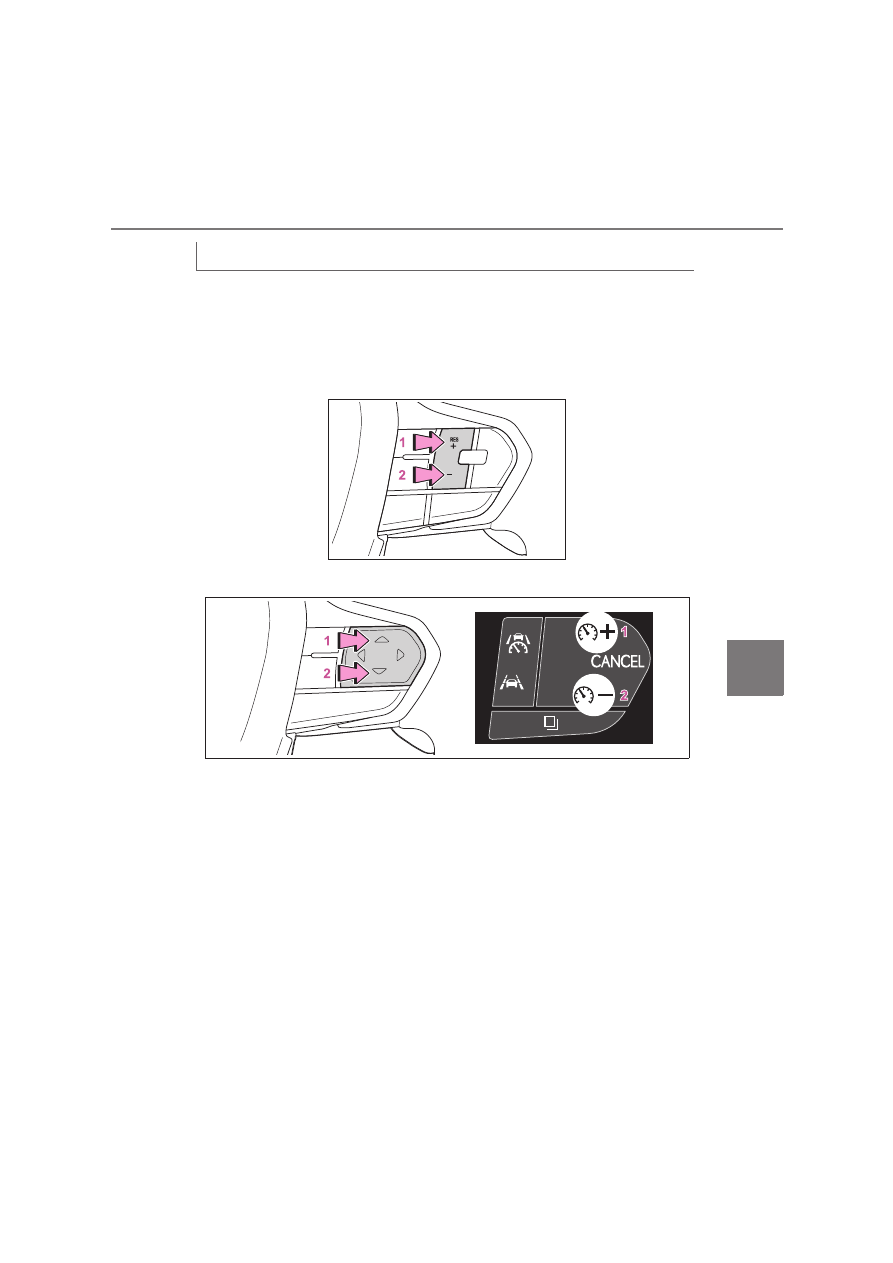
To change the set vehicle speed, press the “+” switch or “-” switch until the desired 
speed is displayed.

1

To change the set vehicle speed, press the “+” switch or “-” switch until the 
desired speed is displayed.

Vehicles without a head-up display

Vehicles with a head-up display

1

Increase set vehicle speed

2

Decrease set vehicle speed

Short press adjustment: Press the switch
Long press adjustment: Press and hold the switch until the desired set vehicle speed is 
reached.
The set vehicle speed will increase or decrease as follows:
Short press adjustment: By 1 km/h (0.6 mph) or 1 mph (1.6 km/h) each time the switch is 
pressed
Long press adjustment: Increases or decreases in 5 km/h (3.1 mph) or 5 mph (8 km/h) 
increments continuously while the switch is pressed and held
The set vehicle speed adjustment increment can be changed through a customize setting.

Adjusting the set vehicle speed

346

6-2. Using the safe driving support functions

1

Press the cancel switch or driving assist switch to cancel control.

Vehicles without a head-up display

Vehicles with a head-up display

2

Press the “RES” switch to resume control.

When control is canceled, the speed limiter indicator will change from illuminated in green 

to white.

When RSA function is enabled and the speed limiter is operating, if a speed limit 
sign is detected, the detected speed limit will be displayed with an up/down arrow. 
The set vehicle speed can be increased/reduced to the detected speed limit by 
pressing and holding the “+” or “-” switch.

When the set vehicle speed is lower than the detected speed limit

Press and hold the “+” switch.

Canceling/resuming control

Speed limiter with Road Sign Assist

347

6

6-2. Using the safe driving support functions

Driving support 

system

Vehicles without a head-up display

Vehicles with a head-up display

When the set vehicle speed is higher than the detected speed limit

Press and hold the “ - ” switch.

Vehicles without a head-up display

348

6-2. Using the safe driving support functions

Vehicles with a head-up display

The speed limiter with road sign assist 

may not operate properly when

As the speed limiter with road sign assist 

may not operate properly in situations 

where the RSA may not operate or cannot 

detect signs correctly (

P.318), when 

using this function, make sure to confirm the 

actual speed limit.
In the following situations, the set speed 

may not change to the detected speed limit 

by pressing and holding the “+” switch or “-” 

switch:

When the detected speed limit is the 

same as the set speed

When the detected speed limit is outside 

of the speed range which the speed lim-

iter system can operate

349

6

6-2. Using the safe driving support functions

Driving support 

system

Operation of this system is separated 
into 4 control states. Through control 
state “warning phase 1” and “warning 
phase 2”, the system determines if the 
driver is aware and responsive while 
outputting a warning and controlling 

Emergency Driving Stop 
System

Emergency Driving Stop System

The emergency driving stop system 
is a system which automatically 
decelerates and stops the vehicle 
within its lane if the driver becomes 
unable to continue driving the vehi-
cle, such as if they have suffered a 
medical emergency, etc.

During LTA (Lane Tracing Assist) 
control, if the system does not 
detect driving operations, such as if 
the driver is not holding the steer-
ing wheel, and determines the 
driver is not responsive, the vehicle 
will be decelerated and stopped 
within its current lane to help avoid 
a collision or reduce the impact of a 
collision.

WARNING

For safe use

Driving safely is solely the responsibil-

ity of the driver. Pay careful attention to 

the surrounding conditions in order to 

ensure safe driving. The emergency 

driving stop system is designed to pro-

vide support in an emergency where it 

is difficult for the driver to continue 

driving, such as if they have had a med-

ical emergency. It is not designed to 

support driving while drowsy or in 

poor physical health, or inattentive 

driving.

Although the emergency driving stop 

system is designed to decelerate the 

vehicle within its lane to help avoid or 

help reduce the impact of a collision if 

the system determines that it is difficult 

for the driver to continue driving, its 

effectiveness may change according 

to various conditions. Therefore, it may 

not always be able to achieve the same 

level of performance. Also, if the oper-

ating conditions are not met, this func-

tion will not operate.

After the emergency driving stop sys-

tem operates, if driving becomes pos-

sible again, immediately begin driving 

again or, if necessary, park the vehicle 

on the shoulder of the road and set a 

warning reflector and flare to warn 

other drivers of your stopped vehicle.

After this system operates, passengers 

should attend to the driver as neces-

sary and take appropriate hazard pre-

vention measures, such as moving to a 

place where safety can be ensured, 

such as the shoulder of the road or 

behind a guardrail.

This system detects the condition of 

the driver through the operation of the 

steering wheel. This system may oper-

ate if the driver is aware but intention-

ally and continuously does not operate 

the vehicle. Also, the system may not 

operate if it cannot determine that the 

driver is not responsive, such as if they 

are leaning on the steering wheel.

Situations in which the driver monitor 

may not operate properly :

P.282

Summary of the system

350

6-2. Using the safe driving support functions

the vehicle speed. If the system deter-
mines the driver is not responsive, it will 
operate in control state “deceleration 
stop phase” and “stop hold phase” and 
decelerate and stop the vehicle. It will 
then operate continuously in “stop hold 
phase”.

Operating conditions

This system operates when all of the follow-

ing conditions are met:

When the LTA is on

When the vehicle speed is approximately 

50 km/h (30 mph) or more

Operation cancelation conditions

In the following situations, system operation 

will be canceled:

When LTA control has been canceled 

(the LTA switch has been pressed, etc.)

When the dynamic radar cruise control 

has been canceled

When driver operations are detected 

(the steering wheel is held, the brake 

pedal, accelerator pedal, parking brake, 

hazard light switch, or turn signal lever is 

operated)

When the driving assist switch is pressed 

while in the stop and hold phase

When the power switch has been turned 

from ON to OFF

Situations in which some or all of the 

functions of the system cannot operate: 

P.282

LTA control when operation is canceled

When emergency driving stop system 

operation is canceled, LTA control may also 

be canceled.

If driving operations are not detected 
after the hands off steering wheel 
warning operates, a buzzer will sound 

intermittently and a message will be 
displayed to warn the driver, and the 
system will judge if the driver is respon-
sive or not. If driving operations, such 
as holding the steering wheel, are not 
performed within a certain amount of 
time, the system will enter warning 
phase 2.
Depending on the type of detection of 
the driver’s unresponsiveness, the sys-
tem may skip warning phase 1 and start 
the control of warning phase 2.

After entering warning phase 2, a 
buzzer will sound in short intervals and 
a message will be displayed to warn the 
driver, and the vehicle will slowly 
decelerate. If driving operations, such 
as holding the steering wheel, are not 
performed within a certain amount of 
time, the system will determine that the 
driver is not responsive and enter the 
deceleration stop phase.
The audio system will be muted until 
the driver becomes responsive.
When the vehicle is decelerating, the 
brake lights may illuminate, depending 
on the road conditions, etc.
After the vehicle has decelerated a 
certain amount, the emergency flash-
ers (hazard lights) will flash.

After the driver is judged as being not 
responsive, a buzzer will sound contin-

Warning phase 1

Warning phase 2

Deceleration stop phase

351

6

6-2. Using the safe driving support functions

Driving support 

system

uously and a message will be displayed 
to warn the driver, and the vehicle will 
slowly decelerate and stop. While the 
vehicle is decelerating, the emergency 
flashers (hazard lights) will flash to 
warn other drivers of the emergency.

After the vehicle is stopped, the park-
ing brake will be applied automatically. 
After entering the stop and hold phase, 
the buzzer will continue sounding con-
tinuously, the emergency flashers (haz-
ard lights) will flash to warn other 
drivers of the emergency, and the 
doors will unlock.

Restricted functions after the operation 

is canceled

After shifting to the deceleration stop 

phase, the following functions will not be 

available until the EV system is re-started 

even though the emergency driving stop 

system is canceled:

LTA

LCA (if equipped)

Center Display

Stop hold phase

Blind Spot Monitor

The blind spot monitor is a system 
that uses rear side radar sensors 
installed on the inner side of the 
rear bumper on the left and right 
side to assist the driver in confirm-
ing safety when changing lanes.

WARNING

Cautions regarding the use of the sys-

tem

The driver is solely responsible for safe 

driving. Always drive safely, taking 

care to observe your surroundings.

The blind spot monitor is a supplemen-

tary function which alerts the driver 

that a vehicle is in a blind spot of the 

outside rear view mirrors or is 

approaching rapidly from behind into a 

blind spot. Do not overly rely on the 

blind spot monitor. As the function 

cannot judge if it is safe to change 

lanes, over reliance could lead to an 

accident resulting in death or serious 

injury. As the system may not function 

correctly under certain conditions, the 

driver’s own visual confirmation of 

safety is necessary.

System components

A

352

6-2. Using the safe driving support functions

Turning the blind spot monitor on/off.

Outside rear view mirror indica-
tors/buzzer

When a vehicle is detected in a blind spot 
of the outside rear view mirrors or 
approaching rapidly from behind into a 
blind spot, the outside rear view mirror 
indicator (

P.246) on the detected side 

will illuminate. If the turn signal lever is 
operated toward the detected side, the 
outside rear view mirror indicator flashes 
and a buzzer sounds.

Driving assist information indicator

Illuminates when the blind spot monitor is 
turned off. At this time, “Blind Spot Monitor 
OFF” will be displayed on the multi-infor-
mation display.

Outside rear view mirror indicator visi-

bility

In strong sunlight, the outside rear view mir-

ror indicator may be difficult to see.

Buzzer

If the volume setting of the audio system is 

high or the surrounding area is loud, it may 

be difficult to hear the buzzer.

Customization

Some functions can be customized. 

(

P.613)

WARNING

To ensure the system can operate 

properly

Blind spot monitor sensors are installed 

behind the left and right sides of the rear 

bumper respectively. Observe the fol-

lowing to ensure the blind spot monitor 

can operate correctly.

B

C

Keep the sensors and the surrounding 

areas on the rear bumper clean at all 

times.

If a sensor or its surrounding area on the 
rear bumper is dirty or covered with 
snow, the Blind Spot Monitor may not 
operate and a warning message will be 
displayed. In this situation, clear off the 
dirt or snow and drive the vehicle with 
the operation conditions of the BSM 
function (

P.354) satisfied for approxi-

mately 10 minutes. If the warning mes-
sage does not disappear, have the 
vehicle inspected by any authorized 
Lexus retailer or Lexus authorized 
repairer, or any reliable repairer.

Do not attach accessories, stickers 

(including transparent stickers), alumi-

num tape, etc. to a sensor or its sur-

rounding area on the rear bumper.

Do not subject a sensor or its sur-

rounding area on the rear bumper to a 

strong impact.

If a sensor is moved even slightly off posi-
tion, the system may malfunction and 
vehicles may not be detected correctly. 
In the following situations, have your 
vehicle inspected by any authorized 
Lexus retailer or Lexus authorized 
repairer, or any reliable repairer.
• A sensor or its surrounding area is 

subject to a strong impact.

• If the surrounding area of a sensor is 

scratched or dented, or part of them 

has become disconnected.

353

6

6-2. Using the safe driving support functions

Driving support 

system

The blind spot monitor can be ena-
bled/disabled on 

 of the Center 

Display. (

P.613)

When the blind spot monitor is off, the 
driving assist information indicator 
(

P.246) will illuminate. At this time, 

“Blind Spot Monitor OFF” will be dis-
played on the multi-information dis-
play.
Each time the power switch is turned to 
ON, the blind spot monitor is enabled.

The blind spot monitor uses rear side radar sensors to detect the following vehicles 
traveling in adjacent lanes and advises the driver of the presence of such vehicles 
via the indicators on the outside rear view mirrors.

Vehicles that are traveling in areas that are not visible using the outside rear 
view mirrors (the blind spots)
Vehicles that are approaching rapidly from behind in areas that are not visible 

WARNING

Do not disassemble the sensor.

Do not modify the sensor or surround-

ing area on the rear bumper.

If a sensor or the rear bumper needs to 

be removed/installed or replaced, 

contact any authorized Lexus retailer 

or Lexus authorized repairer, or any 

reliable repairer.

Do not paint the rear bumper any 

color other than an official Lexus color.

The sensor is affected by the paint on 

the surface of rear bumper.

If not repaired correctly, the Blind Spot 

Monitor may not operate and warning 

message will be displayed. If paint 

repairs need, please consult any 

authorized Lexus retailer or Lexus 

authorized repairer, or any reliable 

repairer.

Turning the blind spot monitor 
system on/off

Blind Spot Monitor Operation

Objects that can be detected while driving

A

B

354

6-2. Using the safe driving support functions

using the outside rear view mirrors (the blind spots)

The areas that vehicles can be detected in are outlined below.

The range of each detection area is:

Approximately 0.5 m (1.6 ft.) to 3.5 m (11.5 ft.) from either side of the vehicle

*1

Approximately 1 m (3.3 ft.) forward of the rear bumper

*2

Approximately 3 m (9.8 ft.) from the rear bumper

Approximately 3 m (9.8 ft.) to 70 m (230 ft.) from the rear bumper

*3

*1

: The area between the side of the vehicle and 0.5 m (1.6 ft.) from the side of the vehicle 

cannot be detected.

*2

: While the vehicle is to being overtaken, up to approximately 3 m (9.8 ft.) forward of the 

rear bumper will be detected.

*3

: The greater the difference in speed between your vehicle and the detected vehicle is, 

the farther away the vehicle will be detected, causing the outside rear view mirror indi-
cator to illuminate or flash.

The Blind Spot Monitor linked 
function

The LDA (Lane Departure Alert) has a 
function that uses information of 
detected vehicles driving in an adja-
cent lane. For details about the function 
and its operating conditions; P.305

The blind spot monitor is operational 

when

The blind spot monitor is operational when 

all of the following conditions are met:

The power switch is in ON.

The blind spot monitor is on.

The shift position is in a position other 

than R.

The vehicle speed is approximately 10 

km/h (7 mph) or more.

The blind spot monitor will detect a vehi-

cle when

The blind spot monitor will detect a vehicle 

present in the detection area in the follow-

ing situations:

A vehicle in an adjacent lane overtakes 

your vehicle.

Detection range while driving

A
B
C
D

355

6

6-2. Using the safe driving support functions

Driving support 

system

You overtake a vehicle in an adjacent lane 

slowly.

Another vehicle enters the detection 

area when it changes lanes.

Situations in which the blind spot moni-

tor cannot detect vehicles

The blind spot monitor cannot detect the 

following vehicles and other objects:

Small motorcycles, bicycles, pedestrians, 
etc. 

*

Vehicles traveling in the opposite direc-

tion

Guardrails, walls, signs, parked vehicles 
and similar stationary objects 

*

Following vehicles that are in the same 
lane 

*

Vehicles traveling 2 lanes away from your 
vehicle 

*

Vehicles which are being overtaken rap-
idly by your vehicle 

*

*

: Depending on the conditions, detection 

of a vehicle and/or object may occur.

Conditions in which a buzzer may not 

sound

In situations such as the following, while the 

turn signal lever is being operated, the indi-

cator will flash but a buzzer may not sound:

When a second vehicle is detected while 

the turn signal lever is being held

When overtaking a vehicle in the adja-
cent lane at a much higher speed than it

*

*

: Depending on the situations, a buzzer 

may sound.

Conditions under which the system may 

not function correctly

The blind spot monitor may not detect 

vehicles correctly in the following situa-

tions:

• When the sensor is misaligned due to a 

strong impact to the sensor or its sur-

rounding area

• When mud, snow, ice, a sticker, etc., is 

covering the sensor or surrounding area 

on the rear bumper

• When driving on a road surface that is 

wet with standing water during bad 

weather, such as heavy rain, snow, or fog

• When multiple vehicles are approaching 

with only a small gap between each vehi-

cle

• When the distance between your vehicle 

and a following vehicle is short

• When there is a significant difference in 

speed between your vehicle and the vehi-

cle that enters the detection area

• When the difference in speed between 

your vehicle and another vehicle is 

changing

• When a vehicle enters a detection area 

traveling at about the same speed as your 

vehicle

• As your vehicle starts from a stop, a vehi-

cle remains in the detection area

• When driving up and down consecutive 

steep inclines, such as hills, dips in the 

road, etc.

• When driving on roads with sharp bends, 

consecutive curves, or uneven surfaces

• When vehicle lanes are wide, or when 

driving on the edge of a lane, and the 

vehicle in an adjacent lane is far away 

from your vehicle

• When an accessory (such as a bicycle 

carrier) is installed to the rear of the vehi-

cle

• When there is a significant difference in 

height between your vehicle and the 

vehicle that enters the detection area

• Immediately after the blind spot monitor 

is turned on

• When towing with the vehicle

Instances of the blind spot monitor 

unnecessarily detecting a vehicle and/or 

object may increase in the following situ-

ations:

• When the sensor is misaligned due to a 

strong impact to the sensor or its sur-

rounding area

• When the distance between your vehicle 

and a guardrail, wall, etc. that enters the 

detection area is short

• When driving up and down consecutive 

steep inclines, such as hills, dips in the 

road, etc.

• When vehicle lanes are narrow, or when 

356

6-2. Using the safe driving support functions

driving on the edge of a lane, and a vehi-

cle traveling in a lane other than the adja-

cent lanes enters the detection area

• When driving on roads with sharp bends, 

consecutive curves, or uneven surfaces

• When the tires are slipping or spinning

• When the distance between your vehicle 

and a following vehicle is short

• When an accessory (such as a bicycle 

carrier) is installed to the rear of the vehi-

cle

• When towing with the vehicle

Safe Exit Assist

The safe exit assist (with door open-
ing control) is a system that uses 
rear side radar sensors installed on 
the inner side of the rear bumper to 
help occupants judge if an 
approaching vehicle or bicycle may 
collide with a door when exiting or 
cancel opening of a door, to help 
reduce the possibility of a collision.

WARNING

Cautions regarding the use of the sys-

tem

The driver is solely responsible for safe 

driving. Always drive safely, taking 

care to observe your surroundings.

The safe exit assist is a supplementary 

system that, when the vehicle is 

stopped, informs occupants of the 

existence of approaching vehicles and 

bicycles. As this system alone cannot 

be used to judge safety, over-reliance 

on this system may lead to an accident 

resulting in death or serious injury.

In certain situations, this system may not 

function to its fullest extent. Therefore it is 

necessary for the occupants to visually 

check for safety directly and using the 

mirrors.

357

6

6-2. Using the safe driving support functions

Driving support 

system

Center Display

Turning the safe exit assist on/off.

Outside rear view mirror indicators

When a vehicle or bicycle which may col-
lide with a door (other than the back door) 
when opened is detected, the outside rear 
view mirror indicator (

P.246) on the 

detected side will illuminate. If the door on 
the detected side is open, or opening of the 
door is canceled, the outside rear view mir-
ror indicator will blink.

Meter

If collision with a door is likely and the door 
is opened or opening of the door is 
canceled, the door will be displayed on the 
multi-information display. Also, if a door is 
opened when an outside rear view mirror 
indicator is illuminated, a buzzer will sound 
as a warning.

Driving assist information indicator

Illuminates when the safe exit assist is 
turned off. At this time, “Safe Exit Assist 
OFF” will be displayed on the multi-infor-
mation display.

Speakers

When the outside rear view mirror indica-
tor blinks, the driver is informed through 
voice guidance that the system has oper-
ated. After the notification through voice 

guidance is made, no more voice guidance 
notifications will be made again until the 
door is fully closed.

Door opener switch (manual 
release handle)

If a door opener switch is operated to open 
a door while the outside rear view mirror 
indicator on that side is illuminated, open-
ing of the door will be canceled.

Outside rear view mirror indicator visi-

bility

In strong sunlight, the outside rear view mir-

ror indicator may be difficult to see.

Buzzer

If the volume setting of the audio system is 

high or the surrounding area is loud, it may 

be difficult to hear the buzzer.

Voice notifications

In the following situations, voice notifica-

tions will not be output:

After opening a door and entering the 

vehicle, until the EV system is started

When 3 minutes or more have elapsed 

since the EV system was stopped

When the language setting of the Center 

Display has been set to a language that 

does not support voice notifications

When all of the doors have been locked 

from outside the vehicle

When a door remains open for 1 minute 

or more after the EV system is stopped

When ACC mode has been enabled 

through a customize setting on the 

Center Display and the EV system has 

been stopped

When the parking assist volume setting 

on the Center Display has been set to off

Customization

Some functions can be customized. 

(

P.614)

System components

A

B

C

D

E

F

358

6-2. Using the safe driving support functions

The safe exit assist can be enabled/dis-

abled on 

 of the Center Display. 

(

P.614)

When the safe exit assist is off, the driv-
ing assist information indicator will illu-
minate. At this time, a message will be 
displayed on the multi-information dis-
play.
Each time the power switch is turned to 
ON, the safe exit assist is enabled.

When the safe exit assist detects the following vehicles or bicycles behind your 
vehicle using a rear side radar sensor, the occupants of the vehicle are informed 
through an outside rear view mirror indicator, buzzer, multi-information display and 
voice notification.

Vehicle or bicycle which has a high possibility of colliding with a door (other 
than the back door) when opened

The areas that vehicles can be detected in are outlined below.

WARNING

To ensure the system can operate 

properly

P.352

Turning the safe exit assist sys-
tem ON/OFF

Safe exit assist operation

Objects that can be detected by the safe exit assist

A

The safe exit assist detection areas

359

6

6-2. Using the safe driving support functions

Driving support 

system

Approximately 45 m (145 ft.) rearward from the front door

*

*

: The faster a vehicle or bicycle is approaching, the distance at which an outside rear view 

mirror indicator will illuminate or blink will become further.

The safe exit assist is operational when

The safe exit assist is operational when all of 

the following conditions are met:

When the power switch is ON, less than 

3 minutes have elapsed since the EV sys-

tem was off, or less than 3 minutes have 

elapsed since a door was opened and 

someone has entered the vehicle. (the 

time which operation is possible may be 

extended if a door is opened and closed)

Safe exit assist is on.

The vehicle is stopped.

The shift position is in a position other 

than R.

The safe exit assist will detect a vehicle 

when

The safe exit assist will detect a vehicle 

present in the detection area in the follow-

ing situations:

When the vehicle is stopped and a vehi-

cle or bicycle, which is traveling parallel 

to the vehicle, is approaching within the 

area that a door opens (other than the 

back door)

Conditions under which the system will 

not detect a vehicle

Safe exit assist does not detect the follow-

ing objects, vehicles, and bicycles:

• Vehicles or bicycles which are approach-

ing slowly

• Vehicles or bicycles which are deter-

mined to have a low possibility of colliding 

with a door (other than the back door) 

when opened

• Vehicles or bicycles which are approach-

ing from directly behind

• Vehicles or bicycles which are approach-

ing from the front

• Guardrails, walls, signs, parked vehicles, 

and other stationary objects

• Animals,  etc.

In situations such as the following, safe 

exit assist will not operate:

• When 3 minutes or more have elapsed 

since the EV system was off (the time 

which operation is possible may be 

extended if a door is opened and closed)

• When your vehicle is not completely 

stopped

Opening the doors when opening is 

canceled by the system

Perform the following operation to open a 

door.
After the approaching vehicle or bicycle 

passes or changes direction, check the sur-

rounding area and press the inside door 

opener switch again. Perform the following 

only in an emergency, etc., to open a door 

while the warning is operating, after check-

ing the safety of the area around your vehi-

cle.

Press and hold an inside door opener 

switch for approximately 3 seconds or 

more

A

360

6-2. Using the safe driving support functions

Press an inside door opener switch 

quickly 3 times or more

Pull a manual release handle

Conditions under which the system may 

not function correctly

The safe exit assist may not detect vehi-

cles correctly in the following situations:

• When the sensor is misaligned due to a 

strong impact to the sensor or its sur-

rounding area

• When mud, snow, ice, a sticker, etc., is 

covering the sensor or surrounding area 

on the rear bumper

• When driving on a road surface that is 

wet with standing water during bad 

weather, such as heavy rain, snow, or fog

• When a vehicle or bicycle approaches 

from behind a nearby parked vehicle

• When an approaching vehicle or bicycle 

suddenly changes direction

• Immediately after a vehicle or bicycle 

starts moving

• When the back door is open

• When a bicycle carrier, ramp, or other 

accessory is installed to the back of the 

vehicle

• When a parked vehicle, wall, sign, person 

or other stationary object is behind the 

vehicle

• When the vehicle is stopped at an angle 

to the road

• When a vehicle is traveling near an 

approaching vehicle or bicycle

• When an approaching vehicle or bicycle 

is traveling along a stationary object, such 

a wall or sign

• When a vehicle or bicycle is approaching 

at high speed

• When towing with the vehicle

• When stopped on a steep slope

• When stopped on a curve or at the exit of 

a curve

Instances of the safe exit assist unneces-

sarily detecting a vehicle and/or object 

may increase in the following situations:

• When the sensor is misaligned due to a 

strong impact to the sensor or its sur-

rounding area

• When a vehicle or bicycle approaches 

from behind your vehicle at an angle

• When the vehicle is stopped at an angle 

to the road

• When a vehicle or bicycle approaches 

from behind a parked vehicle at an angle

• When a parked vehicle, wall, sign, person 

or other stationary object is behind the 

vehicle

• When an approaching vehicle or bicycle 

suddenly changes direction

• When an approaching vehicle or bicycle 

is traveling along a stationary object, such 

a wall or sign

• When the back door is open

• When a bicycle carrier, ramp, or other 

accessory is installed to the back of the 

vehicle

• When a vehicle or bicycle is approaching 

at high speed

• When towing with the vehicle

• When stopped on a steep slope

• When stopped on a curve or at the exit of 

a curve

361

6

6-2. Using the safe driving support functions

Driving support 

system

Types of sensors

Front corner sensors
Front center sensors
Rear corner sensors
Rear center sensors
Front side sensors (vehicles with 
Advanced Park)
Rear side sensors (vehicles with 
Advanced Park)

Display

When the sensors detect an object, 
such as a wall, a graphic is shown on 
the center display depending on the 
position and distance to the object.

For details regarding the center dis-
play, refer to the “MULTIMEDIA 
OWNER’S MANUAL”.
Display example:

Front corner sensor detection
Front center sensor detection
Rear corner sensor detection
Rear center sensor detection
Front side sensor detection (vehi-
cles with Advanced Park)
Rear side sensor detection (vehi-
cles with Advanced Park)

The Lexus parking assist-sensor can be 
enabled/disabled on 

 of the center 

display. (

P.613)

When the Lexus parking assist-sensor 
function is disabled, the Lexus parking 
assist-sensor OFF indicator (

P.246) illu-

minates.

When turned off, the Lexus parking 
assist-sensor will be disabled and will 
not be enabled until the setting is 
changed to on again in center display.
If disabled using this method, the sys-

Lexus parking assist-sensor

The distance from your vehicle to 
objects, such as a wall, when paral-
lel parking or maneuvering into a 
garage is measured by the sensors 
and communicated via the center 
display and a buzzer. Always check 
the surrounding area when using 
this system.

System components

A
B
C
D

E

F

Turning Lexus parking assist-sen-
sor on/off

A
B
C
D

E

F

362

6-2. Using the safe driving support functions

tem will not be re-enabled by turning 
the power switch off and then to ON.

The system can be operated when

The power switch is ON.

Lexus parking assist-sensor function is 

on.

The vehicle speed is less than about 10 

km/h (6 mph).

A shift position other than P is selected.

If “Parking Assist Unavailable Sensor 

Blocked” is displayed on the multi-infor-

mation display

A sensor may be covered with water drops, 

ice, snow, dirt, etc.

Remove the water drops, ice, snow, dirt, 

etc., from the sensor to return the system to 

normal.
If a sensor is dirty, the position of the dirty 

sensor will be shown on the display.
Also, due to ice forming on a sensor at low 

temperatures, a warning message may be 

displayed or the sensor may not be able to 

WARNING

Cautions regarding the use of the sys-

tem

There is a limit to the degree of recogni-

tion accuracy and control performance 

that this system can provide, do not 

overly rely on this system. The driver is 

always responsible for paying attention 

to the vehicle’ surroundings and driving 

safely.

To ensure the system can operate 

properly

Observe the following precautions. 

Failing to do so may result in the vehicle 

being unable to be driven safely and pos-

sibly cause an accident.

Do not damage the sensors, and 

always keep them clean.

Do not attach a sticker or install an 

electronic component, such as a 

backlit license plate (especially fluo-

rescent type), fog lights, fender pole or 

wireless antenna near a radar sensor.

Do not subject the surrounding area of 

the sensor to a strong impact. If sub-

jected to an impact, have the vehicle 

inspected by any authorized Lexus 

retailer or Lexus authorized repairer, 

or any reliable repairer. If the front or 

rear bumper needs to be 

removed/installed or replaced, con-

tact any authorized Lexus retailer or 

Lexus authorized repairer, or any relia-

ble repairer.

Do not modify, disassemble or paint 

the sensors.

Do not attach a license plate cover.

Keep your tires properly inflated.

When to disable the function

In the following situations, disable the 

function as it may operate even though 

there is no possibility of a collision.

Failing to observe the warnings above.

A non-genuine Lexus suspension 

(lowered suspension, etc.) is installed.

Notes when washing the vehicle

Do not apply intensive bursts of water or 

steam to the sensor area.

Doing so may result in the sensor mal-

functioning.

When using a high pressure washer to 

wash the vehicle, do not spray the sen-

sors directly, as doing so may cause a 

sensor to malfunction.

When using steam to clean the vehicle, 

do not direct steam too close to the 

sensors as doing so may cause a sen-

sor to malfunction.

363

6

6-2. Using the safe driving support functions

Driving support 

system

detect an object. Once the ice melts, the 

system will return to normal.
If a warning message is displayed even if the 

sensor is clean, there may be a sensor mal-

function. Have the vehicle inspected by any 

authorized Lexus retailer or Lexus author-

ized repairer, or any reliable repairer.

Sensor detection information

The sensor’s detection areas are limited 

to the areas around the vehicle’ front and 

rear bumpers.

The following situations may occur dur-

ing use.

• Depending on the shape of the object 

and other factors, the detection distance 

may shorten, or detection may be impos-

sible.

• Detection may be impossible if static 

objects draw too close to the sensor.

• There will be a short delay between static 

object detection and display (warning 

buzzer sounds). Even at low speeds, 

there is a possibility that the object will 

come within 30 cm (1.0 ft.) before the 

display is shown and the warning buzzer 

sounds.

• It might be difficult to hear the buzzer due 

to the volume of the audio system or air 

flow noise of the air conditioning system.

• It may be difficult to hear the sound of this 

system due to the buzzers of other sys-

tems.

Objects which the system may not be 

properly detected

The shape of the object may prevent the 

sensor from detecting it. Pay particular 

attention to the following objects:

Wires, fences, ropes, etc.

Cotton, snow and other materials that 

absorb sound waves

Sharply-angled objects

Low objects

Tall objects with upper sections project-

ing outwards in the direction of your vehi-

cle

People may not be detected if they are 

wearing certain types of clothing.

Situations in which the system may not 

operate properly

Certain vehicle conditions and the sur-

rounding environment may affect the ability 

of a sensor to correctly detect objects. Par-

ticular instances where this may occur are 

listed below.

There is dirt, snow, water drops or ice on 

a sensor. (Cleaning the sensors will 

resolve this problem.)

A sensor is frozen. (Thawing the area will 

resolve this problem.) 

In especially cold weather, if a sensor is 

frozen the sensor display may be dis-

played abnormally, or objects, such as a 

wall, may not be detected.

When a sensor or the area around a sen-

sor is extremely hot or cold.

On an extremely bumpy road, on an 

incline, on gravel, or on grass.

When vehicle horns, vehicle detectors, 

motorcycle engines, air brakes of large 

vehicles, the clearance sonar of other 

vehicles or other devices which produce 

ultrasonic waves are near the vehicle

A sensor is coated with a sheet of spray 

or heavy rain.

If objects draw too close to the sensor.

When a pedestrian is wearing clothing 

that does not reflect ultrasonic waves (ex. 

skirts with gathers or frills).

When objects that are not perpendicular 

to the ground, not perpendicular to the 

vehicle traveling direction, uneven, or 

waving are in the detection range.

Strong wind is blowing

When driving in inclement weather such 

as fog, snow or a sandstorm

364

6-2. Using the safe driving support functions

When an object that cannot be detected 

is between the vehicle and a detected 

object

If an object such as a vehicle, motorcycle, 

bicycle or pedestrian cuts in front of the 

vehicle or runs out from the side of the 

vehicle

If the orientation of a sensor has been 

changed due to a collision or other 

impact

When equipment that may obstruct a 

sensor is installed, such as a towing eye-

let, bumper protector (an additional trim 

strip, etc.), bicycle carrier, or snow plow

When towing with the vehicle

If the front of the vehicle is raised or low-

ered due to the carried load

If the vehicle cannot be driven in a stable 

manner, such as when the vehicle has 

been in an accident or is malfunctioning

When a tire chains or an emergency tire 

puncture repair kit is used

Situations in which the system may 

operate even if there is no possibility of a 

collision

In some situations, such as the following, the 

system may operate even though there is no 

possibility of a collision.

When driving on a narrow road

When driving toward a banner, flag, 

low-hanging branch or boom barrier 

(such as those used at railroad crossings, 

toll gates and parking lots)

When there is a rut or hole in the surface 

of the road

When driving on a metal cover (grating), 

such as those used for drainage ditches

When driving up or down a steep slope

If a sensor is hit by a large amount of 

water, such as when driving on a flooded 

road

There is dirt, snow, water drops or ice on 

a sensor. (Cleaning the sensors will 

resolve this problem.)

A sensor is coated with a sheet of spray 

or heavy rain

When driving in inclement weather such 

as fog, snow or a sandstorm

When strong winds are blowing

When vehicle horns, vehicle detectors, 

motorcycle engines, air brakes of large 

vehicles, the clearance sonar of other 

vehicles or other devices which produce 

ultrasonic waves are near the vehicle

If the front of the vehicle is raised or low-

ered due to the carried load

When towing with the vehicle

If the orientation of a sensor has been 

changed due to a collision or other 

impact

The vehicle is approaching a tall or 

curved curb

Driving close to columns (H-shaped steel 

beams, etc.) in multi-story parking 

garages, construction sites, etc.

If the vehicle cannot be driven in a stable 

manner, such as when the vehicle has 

been in an accident or is malfunctioning

On an extremely bumpy road, on an 

incline, on gravel, or on grass

365

6

6-2. Using the safe driving support functions

Driving support 

system

When a tire chains or an emergency tire 

puncture repair kit is used

Detection range of the sensors 
(vehicles without Advanced Park)

Approximately 100 cm (3.3 ft.)
Approximately 150 cm (4.9 ft.)

Approximately 60 cm (2.0 ft.)

The diagram shows the detection range of 
the sensors. Note that the sensors cannot 
detect objects that are extremely close to 
the vehicle.
The range of the sensors may change 
depending on the shape of the object, etc.

Detection range of the sensors 
(vehicles with Advanced Park)

Approximately 200 cm (6.6 ft.)

The diagram shows the detection range of 
the sensors. Note that the sensors cannot 
detect objects that are extremely close to 
the vehicle.
The range of the sensors may change 
depending on the shape of the object, etc.

The distance and buzzer (vehicles without Advanced Park)

System detection range

A
B

C

A

Approximate distance to obstacle

Buzzer

Front center sensor: 100 cm (3.3 ft.) to 60 cm (2.0 ft.)

*

Rear center sensor: 150 cm (4.9 ft.) to 60 cm (2.0 ft.)

Slow

60 cm (2.0 ft.) to 45 cm (1.5 ft.)

*

Medium

45 cm (1.5 ft.) to 30 cm (1.0 ft.)

*

Fast

Less than 30 cm (1.0 ft.), Less than 15 cm (0.5 ft.) 

*

Continuous

366

6-2. Using the safe driving support functions

*

: Automatic buzzer mute function is enabled. (

P.366)

The distance and buzzer (vehicles with Advanced Park)

*

: Automatic buzzer mute function is enabled. (

P.366)

Buzzer operation and distance to 
an object

A buzzer sounds when the sensors are 
operating.

The buzzer beeps faster as the vehi-
cle approaches an object.
When the vehicle comes within 
approximately 30 cm (1.0 ft.)  of the 
object, the buzzer sounds continu-
ously.

When 2 or more sensors simultane-
ously detect a static object, the 
buzzer sounds for the nearest 
object.

Even when the sensors are operat-
ing, the buzzer will be muted in 

some situations. (automatic buzzer 
mute function)

Adjusting the buzzer volume

The buzzer volume of the Lexus park-
ing assist-sensor, RCTA and RCD can 
be adjusted all together on 

 of the 

center display. (

P.613)

Muting a buzzer

A mute button will be displayed on the 
center display when an object is 
detected. To mute the buzzer, select a 
mute button.
The buzzers for the Lexus parking 
assist-sensor, RCTA and RCD function 
will be muted simultaneously.

Approximate distance to obstacle

Buzzer

Front center sensor: 200 cm (6.6 ft.) to 100 cm (3.3 ft.)

Rear center sensor: 200 cm (6.6 ft.) to 150 cm (4.9 ft.)

Side sensor: 200 cm (6.6 ft.) to 165 cm (5.4 ft.)

Corner sensor: 200 cm (6.6 ft.) to 60 cm (2.0 ft.)

Does not sound (Display only)

Front center sensor: 100 cm (3.3 ft.) to 60 cm (2.0 ft.)

*

Rear center sensor: 150 cm (4.9 ft.) to 60 cm (2.0 ft.)

Side sensor: 165 cm (5.4 ft.) to 60 cm (2.0 ft.)

*

Slow

60 cm (2.0 ft.) to 45 cm (1.5 ft.)

*

Side sensor: 60 cm (2.0 ft.) to 40 cm (1.3 ft.)

*

Medium

45 cm (1.5 ft.) to 30 cm (1.0 ft.)

*

Side sensor: 40 cm (1.3 ft.) to 30 cm (1.0 ft.)

*

Fast

Less than 30 cm (1.0 ft.), Less than 15 cm (0.5 ft.) 

*

Continuous

367

6

6-2. Using the safe driving support functions

Driving support 

system

Mute will be canceled automatically in 
the following situations:

When the shift position is shifted.

When the vehicle speed exceeds a 
certain speed.

When there is malfunction in a sen-

sor or the system is temporarily una-
vailable.

When the operating function is disa-
bled manually.

When the power switch is turned 
off.

The object warning function informs the driver of the existence of objects along the 
side of the vehicle, using a display and buzzer, if the objects are within the esti-
mated path of the vehicle.

Object
Calculated vehicle route

When the vehicle is moving, the side sensors or side cameras can detect objects. 
While the vehicle is moving, if a detected object can no longer be detected by the 
side sensors or side cameras, the location of the object relative to the vehicle is 
estimated. If the object is determined to be in the estimated path of the vehicle, the 
object warning function will operate.

Object detected by side sensors or side cameras

1

The vehicle is stopped and objects along the sides of the vehicle are not 
detected.

Object warning function (vehicles with Advanced Park)

A
B

A

368

6-2. Using the safe driving support functions

2

Objects are detected as the vehicle is moving.

3

Even though the objects are outside of the detection area of the side sensors or 
side cameras, a warning is displayed and a buzzer sounds.

Object warning function operating con-

ditions

The object warning function is operational 

when the Lexus parking assist-sensor OFF 

indicator is not illuminated or flashing and 

any of the following conditions is met:

The Advanced Park is operating.

The vehicle moves about 7 m (23.0 ft.) 

after the EV system is started.

The R shift position is selected.

After the shift position has been changed 

from R to D, the vehicle has moved 7 m 

(23.0 ft.) or less.

Camera switch has been pressed and the 

center display is displayed.

The front or rear sensor detects a station-

ary object.

Detection of objects along the sides of 

the vehicle

Objects along the sides of the vehicle are 

not instantaneously detected. The loca-

tion of objects in relation to the vehicle is 

estimated after they are first detected by 

the front or rear side sensors, or side 

cameras. Therefore, after the power 

switch is changed to ON, even if an 

object is along the side of the vehicle, it 

may not be detected until the vehicle has 

been driven a small amount and the side 

sensors or side cameras completely scan 

the areas along the sides of the vehicle.

If a vehicle, person, animal, etc. is 

detected by a side sensor or side camera, 

but then leaves the detection area of the 

side sensor or side camera, the system 

will assume the object has not moved.

WARNING

Object warning function

In situations such as the following, the 

function may not operate correctly, pos-

sibly leading to an accident. Proceed 

carefully.

When starting off shortly after the 

power switch is turned to ON and a 

small vehicle or other object which 

cannot be detected by a front side sen-

sor is next to the vehicle.

In the situation shown in the following 
illustration, even if the vehicle starts off, as 
the vehicle on the left will not be 
detected and the object warning function 
will not operate.

When an object or person is in a posi-

tion which cannot be detected by the 

side sensors or side cameras.

When, after the side sensors or side 

cameras have completed scanning the 

areas along the sides of the vehicle, a 

vehicle, person, or other object 

approaches the side of the vehicle and 

cannot be detected.

When the outside rear view mirror is 

closed, the side sensors or side cam-

eras cannot detect objects.

369

6

6-2. Using the safe driving support functions

Driving support 

system

Center Display

WARNING

If the 12-volt battery was discharged or 

has been removed and installed, fold 

and extend the outside rear view mir-

rors.

Rear Crossing Traffic Alert

The RCTA function uses the BSM 
rear side radar sensors installed 
behind the rear bumper. This func-
tion is intended to assist the driver 
in checking areas that are not easily 
visible when backing up.

WARNING

Cautions regarding the use of the sys-

tem

The driver is solely responsible for safe 

driving. Always drive safely, taking care 

to observe your surroundings.

The RCTA function is only a supplemen-

tary function which alerts the driver that a 

vehicle is approaching from the right or 

left at the rear of the vehicle.

As the RCTA function may not function 

correctly under certain conditions, the 

driver's own visual confirmation of safety 

is necessary.

Over reliance on this function may lead 

to an accident resulting death or serious 

injury.

To ensure the system can operate 

properly

P.352

System components

A

370

6-2. Using the safe driving support functions

Turning the RCTA function on/off in Center 
Display.
If a vehicle approaching from the right or 
left at the rear of the vehicle is detected, 
the RCTA icon (

P.370) for the detected 

side will be displayed on the Center Dis-
play. This illustration

*

 shows an example of 

a vehicle approaching from both sides of 
the vehicle.

Outside rear view mirror indica-
tors/buzzer

If a vehicle is detected as approaching 
from the left or right behind the vehicle, 
both outside rear view mirror indicators 
(

P.246) will blink and a buzzer will 

sound.

Driving assist information indicator

Illuminates when the RCTA is turned off. At 
this time, “Rear Cross Traffic Alert OFF” 
will be displayed on the multi-information 
display.

*

: Depending on the vehicle grade and 

equipped options, the actual screen may 
be different from this illustration.

The RCTA can be enabled/disabled on 

 of the Center Display. (

P.614)

When the RCTA function is off, the 
driving assist information indicator 
(

P.246) will illuminate. At this time, 

“Rear Cross Traffic Alert OFF” will be 
displayed on the multi-information dis-
play. Each time the power switch is 
turned to ON, the RCTA function is 
enabled.

Outside rear view mirror indicator visi-

bility

In strong sunlight, the outside rear view mir-

ror indicator may be difficult to see.

Hearing the RCTA buzzer

The RCTA buzzer may be difficult to hear 

over loud noises, such as if the audio system 

volume is high.

Rear side radar sensors

P.352

The RCTA function uses rear side 
radar sensors to detect vehicles 
approaching from the right or left at 
the rear of the vehicle and alerts the 
driver of the presence of such vehicles 
by flashing the outside rear view mirror 
indicators and sounding a buzzer.

Approaching vehicles
Detection areas of approaching 
vehicles

When a vehicle approaching from the 
right or left at the rear of the vehicle is 

Turning the RCTA function 
ON/OFF

B

C

RCTA function

Operation of the RCTA function

RCTA icon display

A
B

371

6

6-2. Using the safe driving support functions

Driving support 

system

detected, the following will be dis-
played on the Center Display.

Example (Lexus parking assist moni-
tor): Vehicles are approaching from 
both sides of the vehicle

The areas that vehicles can be 
detected in are outlined below.

The buzzer can alert the driver of 
faster vehicles approaching from far-
ther away.
Example:

The RCTA function is operational when

The RCTA function operates when all of the 

following conditions are met:

The power switch is in ON.

The RCTA function is on.

The shift position is in R.

The vehicle speed is less than approxi-

mately 15 km/h (9 mph).

The approaching vehicle speed is 

between approximately 8 km/h (5 mph) 

and 56 km/h (34 mph).

Setting the buzzer volume

The buzzer volume can be adjusted on the 

Center Display.
The buzzer volume of the RCTA, Lexus 

parking assist-sensor, and RCD can be 
adjusted all together on 

 of the Center 

Display. (

P.613)

Muting a buzzer temporarily

When an object is detected, the temporary 

mute switch is displayed on the Center Dis-

play.

Select the switch to mute the buzzer of the 

Lexus parking assist-sensor, RCTA, and 

RCD all together.
Mute will be canceled automatically in the 

following situations:

When the shift position is changed.

When the vehicle speed exceeds a cer-

tain speed.

When there is a malfunction in a sensor 

or the system is temporarily unavailable.

When the operating function is disabled 

manually.

When the power switch is turned off.

Conditions under which the system will 

not detect a vehicle

The RCTA function is not designed to 

detect the following types of vehicles and/or 

objects:

Vehicles approaching from directly 

behind

RCTA function detection areas

Approaching vehi-

cle speed

 Approximate 

alert distance

56 km/h (34 mph) 

(fast)

40 m (131 ft.)

8 km/h (5 mph) 

(slow)

5.5 m (18 ft.)

372

6-2. Using the safe driving support functions

Vehicles backing up in a parking space 

next to your vehicle

Vehicles that the sensors cannot detect 

due to obstructions

Guardrails, walls, signs, parked vehicles 
and similar stationary objects

*

Small motorcycles, bicycles, pedestrians, 
etc.

*

Vehicles moving away from your vehicle

Vehicles approaching from the parking 
spaces next to your vehicle

*

The distance between the sensor and 

approaching vehicle gets too close

*

: Depending on the conditions, detection 

of a vehicle and/or object may occur.

Situations in which the system may not 

operate properly

The RCTA function may not detect vehicles 

correctly in the following situations:

When the sensor is misaligned due to a 

strong impact to the sensor or its sur-

rounding area

When mud, snow, ice, a sticker, etc. is 

covering the sensor or surrounding area 

on the position above the rear bumper

When driving on a road surface that is 

wet with standing water during bad 

weather, such as heavy rain, snow, or fog

When multiple vehicles are approaching 

with only a small gap between each vehi-

cle

When a vehicle is approaching at high 

speed

When equipment that may obstruct a 

sensor is installed, such as a towing eye-

let, bumper protector (an additional trim 

strip, etc.), bicycle carrier, or snow plow

When backing up on a slope with a sharp 

change in grade

When backing out of a sharp angle park-

ing spot

Immediately after the RCTA function is 

turned on

Immediately after the EV system is 

started with the RCTA function on

When the sensors cannot detect a vehi-

cle due to obstructions

When towing with the vehicle

When there is a significant difference in 

height between your vehicle and the 

vehicle that enters the detection area

When a sensor or the area around a sen-

sor is extremely hot or cold.

If the suspension has been modified or 

tires of a size other than specified are 

installed

If the front of the vehicle is raised or low-

ered due to the carried load

373

6

6-2. Using the safe driving support functions

Driving support 

system

When turning while backing up

When a vehicle turns into the detection 

area

Situations in which the system may 

operate even if there is no possibility of a 

collision

Instances of the RCTA function unneces-

sary detecting a vehicle and/or object may 

increase in the following situations:

When the parking space faces a street 

and vehicles are being driven on the 

street

When the distance between your vehicle 

and metal objects, such as a guardrail, 

wall, sign, or parked vehicle, which may 

reflect electrical waves toward the rear of 

the vehicle, is short

When equipment that may obstruct a 

sensor is installed, such as a towing eye-

let, bumper protector (an additional trim 

strip, etc.), bicycle carrier, or snow plow

When towing with the vehicle

When a vehicle passes by the side of your 

vehicle

When a detected vehicle turns while 

approaching the vehicle

When there are spinning objects near 

your vehicle such as the fan of an air con-

ditioning unit

When water is splashed or sprayed 

toward the rear bumper, such as from a 

sprinkler

Moving objects (flags, exhaust fumes, 

large rain droplets or snowflakes, rain 

water on the road surface, etc.)

When the distance between your vehicle 

and a guardrail, wall, etc., that enters the 

detection area is short

Gratings and gutters

374

6-2. Using the safe driving support functions

When a sensor or the area around a sen-

sor is extremely hot or cold.

If the suspension has been modified or 

tires of a size other than specified are 

installed

If the front of the vehicle is raised or low-

ered due to the carried load

RCD (Rear Camera Detec-
tion)

When the vehicle is backing up, the 
rear camera detection function can 
detect pedestrians in the detection 
area behind the vehicle. If a pedes-
trian is detected, a buzzer will 
sound and an icon will be displayed 
on the center display to inform the 
driver of the pedestrian.

WARNING

Cautions regarding the use of the sys-

tem

The recognition and control capabilities 

for this system are limited.

The driver should always drive safely by 

always being responsible without over 

relying on the system and have a under-

standing of the surrounding situations.

To ensure the system can operate 

properly

Observe the following, otherwise there is 

the danger that could lead to an acci-

dent.

Always clean the camera with damag-

ing it.

Do not install market electronic parts 

(such as illuminated license plate, fog 

lamps, etc.) in the camera vicinity.

Do not subject the camera vicinity to 

strong impacts. If the vicinity is sub-

jected to a strong impact, have the 

vehicle inspected at any authorized 

Lexus retailer or Lexus authorized 

repairer, or any reliable repairer.

Do not disassemble, remodel or paint 

the camera.

375

6

6-2. Using the safe driving support functions

Driving support 

system

Pedestrian detection icon

Displayed automatically when a pedestrian 
is detected.

The RCD can be enabled/disabled on 

 of the center display. (

P.614)

When the RCD function is off, the driv-

ing assist information indicator 
(

P.246) will illuminate. At this time, 

the message will be displayed on the 
multi-information display.
Each time the power switch is turned to 
ON, the RCD function is enabled.

If the rear camera detection function 
detects a pedestrian in the detection 
area, the buzzer and pedestrian detec-
tion will operate as follows:

If a pedestrian is detected in area 

Buzzer: Sounds repeatedly
Pedestrian detection icon: Blinks
If a pedestrian is detected in area 

Buzzer (When the vehicle is sta-
tionary): Sounds 3 times
Buzzer (When the vehicle is back-
ing up, when a pedestrian 
approaches the rear of the vehicle): 
Sounds repeatedly

WARNING

Do not attach accessories or stickers 

to the camera.

Do not install market protection parts 

(bumper trim, etc.) to the rear bumper.

Maintain suitable tire air pressure.

Make sure the back door is completely 

closed.

RCD function is turned off

In the following situations the system 

turns off. The RCD function may not 

operate properly and thus there is the 

danger that an accident may occur.

The contents mentioned above are not 

observed.

Suspensions other than genuine parts 

are installed.

RCD display

Turning the RCD function on/off

A

Pedestrian detection area

A

B

376

6-2. Using the safe driving support functions

Pedestrian detection icon: Blinks
If the system determines that your 
vehicle may collide with a pedes-
trian in area 
Buzzer: Sounds repeatedly
Pedestrian detection icon: Blinks

The rear camera detection function is 

operational when

The power switch is in ON.

RCD function is on.

The shift position is in R.

Advanced Park (if equipped) is not oper-

ating

Setting the buzzer volume

The buzzer volume of the Lexus parking 

assist-sensor, RCTA and RCD can be 
adjusted all together on 

 of the center 

display. (

P.613)

Muting a buzzer temporarily

When an object is detected, the temporary 

mute switch is displayed on the center dis-

play. Select the switch to mute the buzzer of 

the Lexus parking assist-sensor, RCTA, and 

RCD all together.
The buzzers for the Lexus parking 

assist-sensor, RCTA and RCD function will 

be muted simultaneously.
Mute will be canceled automatically in the 

following situations:

When the shift position is shifted.

When the vehicle speed exceeds a cer-

tain speed.

When there is a malfunction in a sensor 

or the system is temporarily unavailable.

When the operating function is disabled 

manually.

When the power switch is turned off.

Situations in which the system may not 

operate properly

Some pedestrians, such as the following, 

may not be detected by the rear camera 

detection function, preventing the func-

tion from operating properly:

• Pedestrians who are bending forward or 

squatting

• Pedestrians who are lying down

• Pedestrians who are running

• Pedestrians who suddenly enter the 

detection area

• People riding a bicycle, skateboard, or 

other light vehicle

• Pedestrians wearing oversized clothing 

such as a rain coat, long skirt, etc., making 

their silhouette obscure

• Pedestrians whose body is partially hid-

den by an object, such as a cart or 

umbrella

• Pedestrians which are obscured by dark-

ness, such as at night

In some situations, such as the following, 

pedestrians may not be detected by the 

rear camera detection function, prevent-

ing the function from operating properly:

• When backing up in inclement weather 

(rain, snow, fog, etc.)

• When the rear camera is obscured (dirt, 

snow, ice, etc. are attached) or scratched

• When a very bright light, such as the sun, 

or the headlights of another vehicle, 

shines directly into the rear camera

• When backing up in a place where the 

surrounding brightness changes sud-

denly, such as at the entrance or exit of a 

garage or underground parking lot

• When backing up in a dim environment 

such as during dusk or in an underground 

parking lot

• When the camera position and direction 

are deviated

• When a towing hook is attached

• When towing with the vehicle

• When water droplets are flowing on the 

camera lens

• When the vehicle height is extremely 

changed (nose up, nose down)

• When a tire chains or an emergency tire 

puncture repair kit is used

• If the suspension has been modified or 

tires of a size other than specified are 

installed

• When install market electronic parts 

(such as Illuminated license plate, fog 

lamps, etc.) in the camera vicinity

C


Content      ..     9      10      11      12     ..