Harley Davidson 2008 Touring Models. Service Manual - page 45
A.5
DELPHI MAXI FUSE HOUSING
DELPHI MAXI-FUSE HOUSING REPAIR
General
A Delphi Maxi-fuse connector completes the circuit through
the main fuse (Maxi-fuse).
Removing Maxi-Fuse
1.
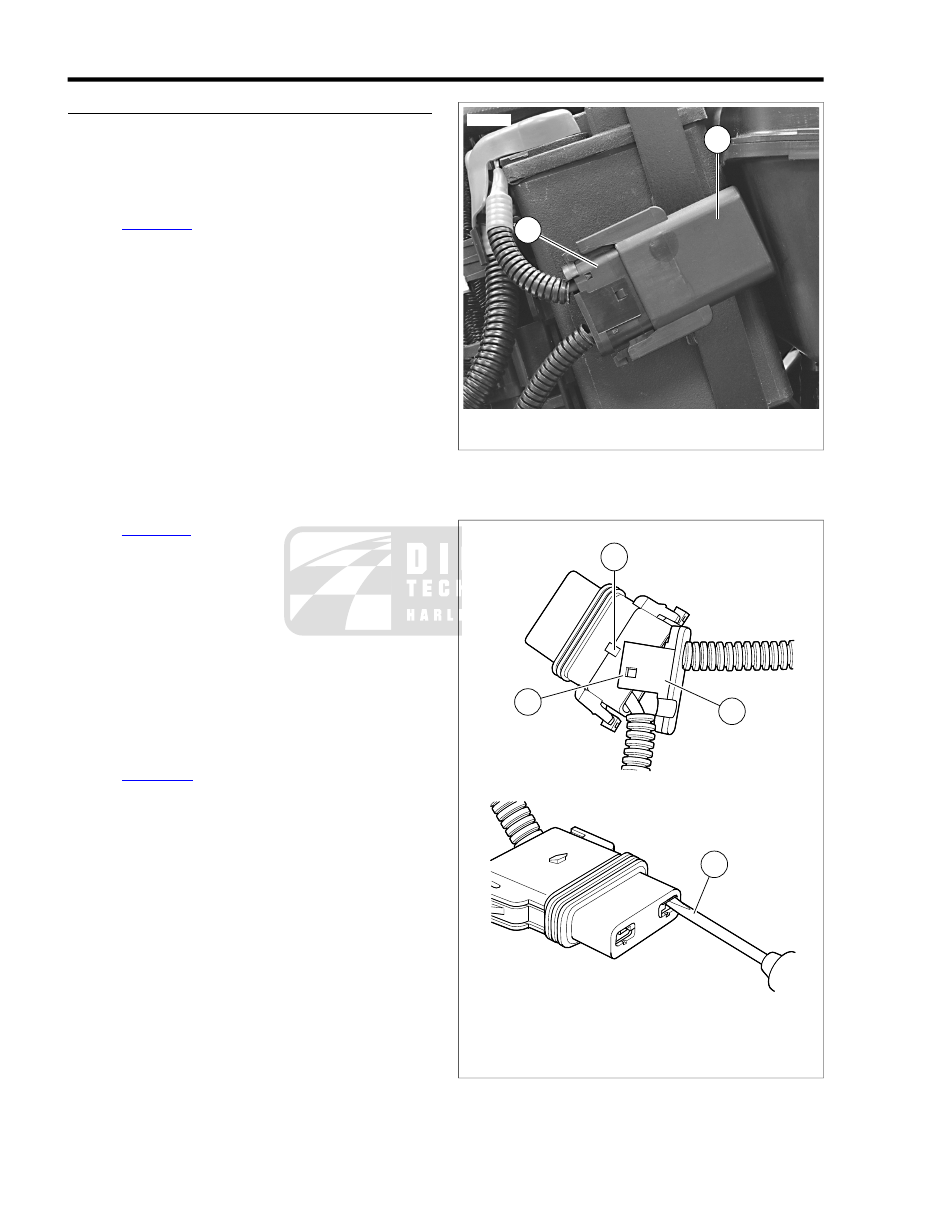
. Depress latches on Maxi-fuse cover (1)
and then slide cover off of connector (2).
2.
Holding the connector (fuse holder), pull the Maxi-fuse out
of the connector.
Installing Maxi-Fuse
1.
Insert the blade terminals of the Maxi-fuse into the sockets
of the connector and press the Maxi-fuse into the con-
nector.
2.
Slide the cover over the fuse until the cover clicks into
place.
NOTE
If removed from an OE attachment such as a grooved fuse
block cover, engage cover and slide into place.
Removing Socket Terminals
1.
See
. Gently pull socket housing to disengage
slots (1) on secondary lock (2) from tabs (3) on socket
housing. Free secondary lock from cables and set aside.
2.
Take note of the opening on one side of the socket ter-
minal. Gently insert flat blade of pick (Snap-On TT600-5)
or small screwdriver into opening (4) until it stops. Pivot
the pick toward the terminal body and hold in position.
3.
Tug on cable to pull socket from wire end of socket
housing. A firm tug is necessary to overcome the resist-
ance of the rubber seal.
4.
Repeat to remove remaining socket terminal.
Installing Socket Terminals
1.
. Carefully bend tang outward away from
the terminal body.
2.
Feed socket into wire end of socket housing until it clicks
in place. Verify that socket will not back out of chamber.
A slight tug on the cable will confirm that it is locked.
3.
Push rubber seal into wire end of socket housing.
4.
Repeat to install remaining socket terminal.
5.
Install secondary lock onto cables and then push onto wire
end of socket housing until slots engage tabs on sides of
socket housing.
1
2
sm00032
1.
Maxi-fuse cover
2.
Delphi Maxi-fuse housing
Figure A-14. Delphi Connector Housing: Maxi-Fuse
3
4
1
2
sm00033
1.
Secondary lock slot
2.
Secondary lock
3.
Tab
4.
Insert flat blade into opening
Figure A-15. Delphi Maxi-Fuse Housing: Remove Socket
Terminals
A-10 2008 Touring Service: Appendix A Connector Repair