Harley Davidson 2008 Touring Models. Service Manual - page 46
A.13
PACKARD 480 METRI-PACK CONNECTORS
480 METRI-PACK CONNECTOR REPAIR
General
A 480 Metri-Pack (P.E.D.) connector is frequently used for the
B+ (battery voltage) connector to power P&A accessories.
Referred to as Packard connectors, Metri-Pack connectors are
embossed with the initials P.E.D.
Separating Pin and Socket Housings
NOTE
Cut any cable strap anchoring the wire conduits of the pin
(accessory connector housing) and the socket (B+) housing.
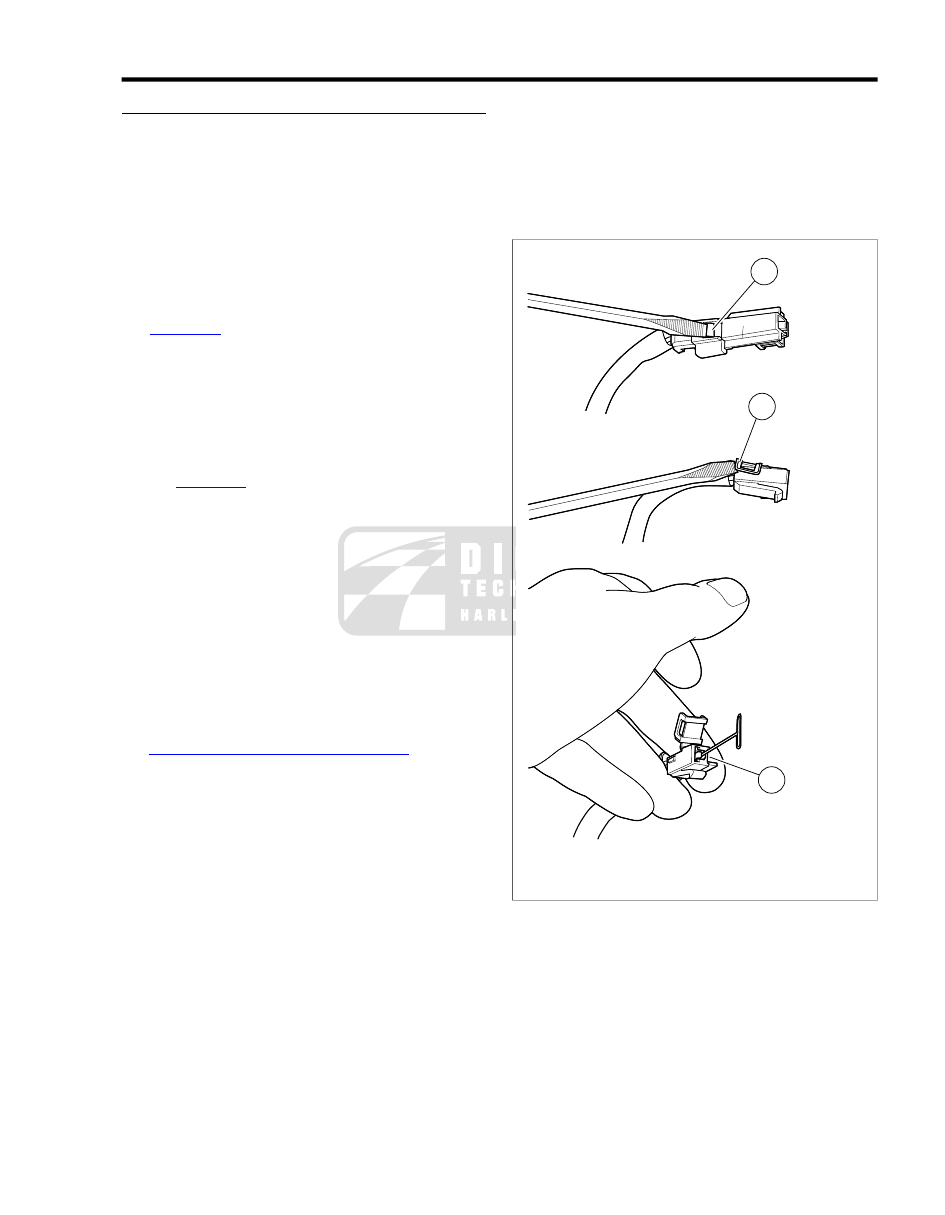
See
. Using small flat blade screwdriver, depress
button (1) on pin housing (red wire) side of the connector and
pull apart the pin and socket housings.
Mating Pin and Socket Housings
Orient the latch on the socket housing to the button catch on
the pin housing and press the housings together.
Removing Socket Terminals
1.
See
. Bend back the latch (2) slightly and free
one side of secondary lock, then repeat to release the
opposite side. Rotate the secondary lock outward on hinge
to access terminal in chamber of connector housing.
2.
On the mating end of the connector, note the tang in the
square shaped opening centered next to the terminal.
Gently insert the point of a stick pin or large safety pin into
the opening (3) between the tang and the chamber wall
until it stops.
3.
Pivot the end of the pin toward the terminal body to
depress the tang.
4.
Remove the pin and then pull terminal out of the wire end
of connector housing.
5.
If necessary, crimp new terminals on wires. See
A.15 PACKARD METRI-PACK TERMINALS
Installing Socket Terminals
1.
Carefully bend the tang outward away from the terminal
body.
2.
With the tang on the same side as the square shaped
opening in the mating end of the connector housing, feed
terminal into wire end of connector housing until it "clicks"
in place.
3.
Verify that terminal will not back out of the chamber. A
slight tug on the cable will confirm that it is locked.
4.
Rotate the hinged secondary lock inward until latches fully
engage tabs on both sides of connector housing.
NOTE
If removed, install new anchored cable strap in O.E. location.
Tighten cable strap to capture conduit of both accessory con-
nector and B+ connector approximately 1.0 in. (25.4 mm) from
housings.
1
2
3
sm00031
1.
Button on pin housing
2.
Secondary lock latch
3.
Opening between tang and chamber wall
Figure A-43. 480 Metri-Pack Connector: Remove Socket
Terminal
2008 Touring Service: Appendix A Connector Repair A-27