Citroen C4 Dag (2013 year). Manual - part 6
 

  Index      Citroen     Citroen C4 Dag - service manual 2013 year in english


Search            


Content   ..  4  5  6  7   ..


Citroen C4 Dag (2013 year). Manual - part 6


4

A C C E S S

79 

         REMOTE CONTROL KEY 

 System which permits central unlocking 

or locking of the vehicle using the door 

lock or from a distance. It is also used 

to locate and start the vehicle, as well 

as providing protection against theft. 

     Press the open padlock 

once to unlock the driver's 

door only. 

  Selective unlocking using the 

remote control 

      Turn the key towards the front in 

the driver's door lock to unlock the 

vehicle completely.   

  Complete unlocking using the 

remote control 

     Press the open padlock 

to unlock the vehicle com-

pletely.   

          Opening the vehicle using the 

2-button remote control 

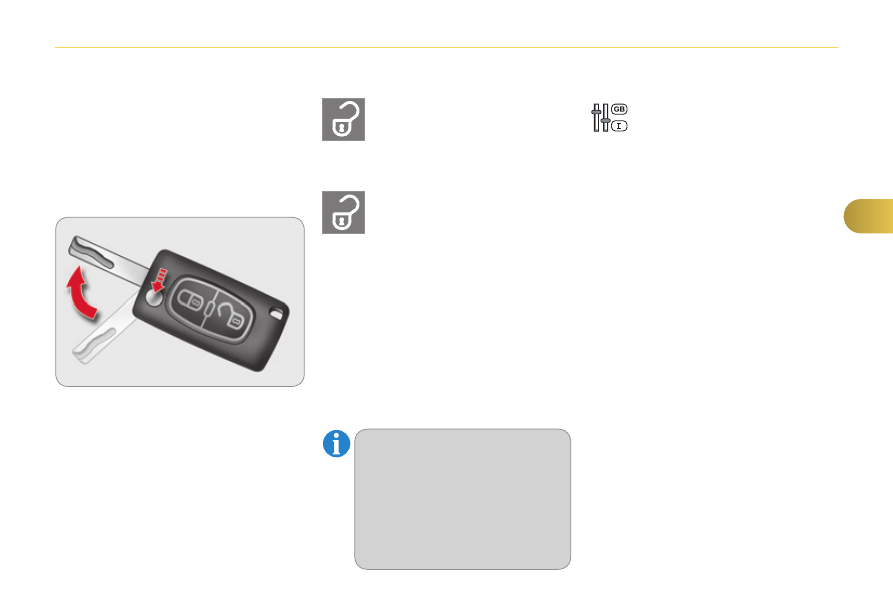
  Unfolding the key 
      Press this button to unfold the key.   

  Unlocking using the key 

  Programming unlocking 

 Setting the total or selective un-

locking is done via the vehicle 

confi guration menu. 

 Complete unlocking is activated by de-

fault.   

     Press the open padlock again to un-

lock the other doors and the boot.   

  The direction indicators fl ash for 

a few seconds. 
 The spotlamps in the door mir-

rors come on. 
 Depending on version, the door 

mirrors unfold, the welcome 

lighting comes on, the alarm is 

deactivated.  

4

A C C E S S

80 

          Unlocking the vehicle using the 

3-button remote control 

  Unfolding the key 
      Press this button to unfold the key.   

     Press the open padlock 

to unlock the vehicle com-

pletely.   

     Press the open padlock 

once to unlock the driver's 

door only. 

  Selective unlocking using the 

remote control 

      Maintain the press on the 

open padlock until the de-

sired opening is obtained. 

The windows stop as soon 

as you release the button.   

  Opening the windows using the 

remote control 

  Unlocking using the key 
      Turn the key forwards in the driver's 

door lock to unlock the vehicle com-

pletely.   

  Programming unlocking 

  Selective unlocking of the boot 

      Press the middle button on 

the remote control to un-

lock the boot. The doors 

remain locked.  

 Setting the selective unlocking 

of the boot is done via the vehi-

cle confi guration menu. 

 Selective unlocking of the boot is acti-

vated by default.   

  Programming the unlocking 

  Complete unlocking using the 

remote control 

 Selective unlocking is confi rmed  by 

rapid fl ashing of the direction indicators 

for approximately two seconds. 
 If selective unlocking of the boot is de-

activated, pressing this button also un-

locks the doors. 

 The complete or selective door 

unlocking parameter is set via 

the vehicle confi guration menu.  

 Remember to lock your boot 

again by pressing the closed 

padlock.  

     Press the open padlock again to un-

lock the other doors and the boot.   

  The direction indicators fl ash for 

a few seconds. 
 The spotlamps in the door mir-

rors come on. 
 Depending on version, the door 

mirrors unfold, the welcome 

lighting comes on, the alarm is 

deactivated.  

4

A C C E S S

81 

                   Locking the vehicle 

      Press the closed padlock to 

lock the vehicle.   

  Normal locking using the remote 

control 

  Normal locking using the key 
      Turn the key towards the rear in the 

driver's door lock to lock the vehicle.   

       Locating your vehicle 

 This function allows you to identify your 

vehicle from a distance, particularly in 

poor light. Your vehicle must be locked. 

   Folding the key 
      First press this button to fold the key.  

     Press the closed padlock 

on the remote control.  

 This will switch on the courtesy lamps 

and the direction indicators will fl ash for 

around ten seconds.  

  The direction indicators fl ash for a few 

seconds. 
 Depending on version, the door mirrors 

fold, the alarm is activated.  

  If one of the doors or the boot 

is still open, the central locking 

does not take place. 
 However, the alarm (if present) 

will be completely activated after 

about 45 seconds. 
 If the vehicle is unlocked inad-

vertently and with no action on 

the doors or boot, the vehicle will 

lock itself again automatically af-

ter about 30 seconds. 
 If the alarm had previously been 

activated, it will not be reactivated 

automatically.  

  The folding and unfolding of the 

door mirrors using the remote 

control can be deactivated by a 

CITROËN dealer or a qualifi ed 

workshop.   

   Closing the windows using the 

3-button remote control 

      Press and hold down the closed 

padlock until the level of closing 

is achieved. The windows stop 

when you release the button.  

 When closing the windows using 

the remote control you must en-

sure that nothing prevents their 

correct closing. 
 If you want to leave the windows 

partly open, it is necessary to 

deactivate the volumetric alarm 

protection.   

 If you do not press the button when 

folding the key, there is a risk of 

damage to the mechanism.   

4

A C C E S S

82 

             Anti-theft protection 

  Electronic engine immobiliser 
 The key contains an electronic chip 

which has a special code. When the 

ignition is switched on, this code must 

be recognised in order for starting to be 

possible. 
 This electronic engine immobiliser locks 

the engine management system a few 

minutes after the ignition is switched off 

and prevents starting of the engine by 

anyone who does not have the key.  

  In the event of a fault, you 

are informed by illumina-

tion of this warning lamp, 

an audible signal and a message in the 

screen. 
 In this case, your vehicle will not start; 

contact a CITROËN dealer as soon as 

possible.  

          Starting the vehicle 

      Insert the key in the ignition switch.  
 

The system recognises the starting 

code. 

     Turn the key fully towards the dash-

board to position  3 (Starting) . 

    When the engine starts, release 

the key.   

  A heavy object (key fob...), attached 

to the key and weighing down on 

its shaft in the ignition switch, could 

cause a malfunction.  

  Switching the vehicle off 

      Immobilise the vehicle. 
     Turn the key fully towards you to 

position  1 (Stop) . 

     Remove the key from the ignition 

switch.   

           Key left in the "Ignition on" 

position 
 On opening the driver's door, an alert 

message is displayed, accompa-

nied by an audible signal, to remind 

you that the key is still in the ignition 

switch at position  1 (Stop) . 
 If the key has been left in the ignition 

switch at position  2 (Ignition on) , the 

ignition will be switched off automati-

cally after one hour. 
 To switch the ignition back on, turn 

the key to position  

1 (Stop) , then 

back to position  2 (Ignition on) .   

  Keep safely, away from your 

vehicle, the label attached to the 

keys given to you on acquisition 

of the vehicle.   

4

A C C E S S

83 

                Operating fault with the 

2-button remote control 

 Following disconnection of the vehicle 

battery, replacement of the remote con-

trol battery or in the event of malfunction 

of the remote control, you can no longer 

unlock, lock or locate your vehicle. 
      First of all, use the key in the lock to 

unlock or lock your vehicle. 

     Then, reinitialise the remote control.  

  Reinitialisation 
      Switch off the ignition. 
     Turn the key to position  2 (Ignition on) . 
     Press the closed padlock immedi-

ately for a few seconds. 

     Switch off the ignition and remove 

the key from the ignition switch.  

 The remote control is fully operational 

again.  

 Battery ref.: CR1620/3 volts. 

  Changing the battery 

 If the battery is fl at, you are in-

formed by illumination of this 

warning lamp, an audible signal 

and a message in the screen. 

      Unclip the casing using a coin at the 

notch. 

    Slide the fl at battery out of its loca-

tion. 

     Slide the new battery into its loca-

tion observing the original direction. 

     Clip the casing. 
     Reinitialise the remote control.   

 If the problem persists, contact 

a CITROËN dealer as soon as 

possible.  

4

A C C E S S

84 

               Operating fault with the 

3-button remote control 

 In the event of a malfunction with the 

remote control, you can no longer un-

lock, lock or locate your vehicle. 
      First of all, use the key in the lock to 

unlock or lock your vehicle. 

     Then, reinitialise the remote control.  

  Reinitialisation 
      Switch off the ignition and remove 

the ignition key. 

     Press the closed padlock immedi-

ately for a few seconds. 

     Turn the key to position  2 (Ignition 

on) . 

     Switch off the ignition and remove 

the key from the ignition switch.  

 The remote control is fully operational 

again.  

 Battery ref.: CR2032/3 volts. 

  Changing the battery 

 If the battery is fl at, you are in-

formed by illumination of this 

warning lamp, an audible signal 

and a message in the screen. 

     Unclip the cover using a small 

screwdriver at the two cutouts. 

     Lift off the cover. 
    Remove the fl at battery from its lo-

cation. 

     Fit the new battery into its location 

observing the original direction of 

fi tment. 

     Clip the cover onto the casing.   

 If the problem persists, contact 

a CITROËN dealer as soon as 

possible.  

4

A C C E S S

85 

               Lost keys 

 Go to a CITROËN dealer with the vehicle's registration document, your 

personal identifi cation documents and if possible the key code label. 
 The CITROËN dealer will be able to look up the key code and the transponder 

code required to order a new key.  

        Do not throw the remote con-

trol batteries away, they contain 

metals which are harmful to the 

environment. 
 Take them to an approved col-

lection point. 

  Remote control 

 The high frequency remote control is a sensitive system; do not operate 

it while it is in your pocket as there is a possibility that it may unlock the 

vehicle, without you being aware of it. 
 Do not repeatedly press the buttons of your remote control out of range and 

out of sight of your vehicle. You run the risk of stopping it from working and 

the remote control would have to be reinitialised. 
 No remote control can operate when the key is in the ignition switch, even 

when the ignition is switched off, except for reinitialisation.  

  Locking the vehicle 

 Driving with the doors locked may make access to the passenger compart-

ment by the emergency services more diffi cult in an emergency. 
 As a safety precaution, never leave children alone in the vehicle, except for 

a very short period. 
 In all cases, it is essential to remove the key from the ignition switch when 

leaving the vehicle.  

  Anti-theft protection 

 Do not make any modifi cations to the electronic engine immobiliser system; 

this could cause malfunctions.  

  When purchasing a second-hand vehicle 

 Have the pairing of all of the keys in your possession checked by a 

CITROËN dealer, to ensure that only your keys can be used to open and 

start the vehicle.  

4

A C C E S S

86 

            CENTRAL LOCKING CONTROL 

  Locking 
      Press this button to lock the vehicle.  
 The red indicator lamp in the button 

comes on. 

 If the vehicle is locked from the 

outside, this button is inactive. 
      In this case, use the remote 

control or the key to unlock 

the vehicle or pull an interior 

door handle to open a door.    

 If one of the doors is open, cen-

tral locking from the inside does 

not take place.  

  Unlocking 
      Press the button again to unlock the 

vehicle.  

 The red indicator lamp in the button 

goes off. 

 ANTI-INTRUSION SECURITY 

  Operation 
 If one of the doors or the boot is open, 

the automatic central locking does not 

take place. 

  This control allows the simultaneous 

locking or unlocking of the doors and 

boot from inside the vehicle. 

  This system allows automatic simulta-

neous locking of the doors and boot as 

soon as the speed of the vehicle ex-

ceeds 6 mph (10 km/h). 

  Carrying long and voluminous 

objects  
 If you want to drive with the boot 

open, you should press the central 

locking button to lock the the doors. 

Otherwise, every time the speed 

of the vehicle exceeds 6 mph 

(10 km/h), the locks will rebound 

and the alerts mentioned above will 

appear. 

 Pressing the central locking button un-

locks the vehicle. 
 Above 6 mph (10 km/h), this locking is 

temporary.  

 This is signalled by the sound of the 

locks rebounding, accompanied by il-

lumination of this symbol in the instru-

ment panel, an audible signal and the 

display of an alert message. 

4

A C C E S S

87 

       Emergency control 

 System allowing the doors to be locked 

and unlocked manually in the event of 

a malfunction of the central locking sys-

tem or battery failure. 

  Locking the driver's door 
      Insert the key in the door lock, then 

turn it to the rear.  

 You can also apply the procedure de-

scribed for the passenger doors.  

  Unlocking the driver's door 
      Insert the key in the door lock, then 

turn it to the front.   

  Locking the front and rear 

passenger doors 

  Unlocking the front and rear 

passenger doors 
      Pull the interior door opening control.    

      Open the doors. 
     On the rear doors, check that the 

child lock is not on (see the corre-

sponding section). 

     Remove the black cap, located on 

the edge of the door, using the key. 

     Insert the key in the socket without 

forcing it, then without turning it, 

move the latch sideways towards 

the inside of the door. 

     Remove the key and refi t the cap. 
     Close the doors and check that the 

vehicle has locked correctly from 

the outside.   

  Activation / Deactivation 

 You can activate or deactivate this func-

tion permanently. 
      With the ignition on, press this but-

ton until an audible signal starts and 

a corresponding message is dis-

played.  

 the state of the system stays in memory 

when switching off the ignition.   

4

A C C E S S

88 

  *   According to country.  

      ALARM *  

 System which protects and provides a 

deterrent against theft and break-ins. It 

provides the following types of monitoring.  

  - exterior 

perimeter 

 The system checks for opening of the 

vehicle. 
 The alarm is triggered if anyone tries to 

open a door, the boot, the bonnet...    

  - interior 

volumetric 

 The system checks for any variation in the 

volume in the passenger compartment. 
 The alarm is triggered if anyone breaks a 

window, enters the passenger compart-

ment or moves inside the vehicle.    

  - tilt 
 The system checks for any change in 

the attitude of the vehicle. 
 The alarm is triggered if the vehicle is 

lifted, moved or knocked.    
  Self-protection function 
 The system checks for the putting out 

of service of its components. 
 The alarm is triggered if the battery, the 

central control or the siren wiring are 

put out of service or damaged.  

 For all work on the alarm sys-

tem, contact a CITROËN dealer 

or a qualifi ed workshop.  

  Locking the vehicle with full 

alarm system 

  Activation 
      Switch off the ignition and get out of 

the vehicle. 

     Press the locking button on the re-

mote control.  

 The monitoring system is active: the in-

dicator lamp in the button fl ashes once 

per second. 
 After the locking button on the remote 

control is pressed, the exterior perime-

ter monitoring is activated after a delay 

of 5 seconds and the interior volumetric 

and anti-tilt monitoring after a delay of 

45 seconds. 

 If an opening (door, boot...) is 

not closed fully, the vehicle is not 

locked but the exterior perimeter 

monitoring will be activated af-

ter a delay of 45 seconds at the 

same time as the interior volu-

metric and anti-tilt monitoring.  

  Deactivation 
      Press the unlocking button on the 

remote control.  

 The alarm system is deactivated: the 

indicator lamp in the button goes off.   

4

A C C E S S

89 

  Operating fault 

  When the ignition is switched on, fi xed 

illumination of the indicator lamp in the 

button indicates a fault with the system. 
 Have it checked by a CITROËN dealer 

or a qualifi ed workshop.   

  Locking the vehicle with exterior 

perimeter monitoring only 

 Deactivate the interior volumetric and 

anti-tilt monitoring to avoid unwanted 

triggering of the alarm in certain cases 

such as: 
   -  

leaving a pet in the vehicle, 

  -  

leaving a window partially open, 

  -  

washing your vehicle, 

  -  

changing a wheel, 

  -  

having your vehicle towed, 

  -  

transport by sea.  

  Deactivation of the interior 

volumetric and anti-tilt monitoring 
      Switch off the ignition. 
     Within ten seconds, press the but-

ton until the indicator lamp is on 

continuously. 

     Get out of the vehicle. 
     Press the locking button on the re-

mote control immediately.  

 The exterior perimeter monitoring alone 

is activated: the indicator lamp in the 

button fl ashes once per second. 

 To be effective, this deactivation 

must be carried out each time 

the ignition is switched off.  

  Reactivation of the interior 

volumetric and anti-tilt monitoring 
      Press the unlocking button on the 

remote control to deactivate the ex-

terior perimeter monitoring. 

     Press the locking button on the re-

mote control to activate all the moni-

toring functions.  

 The indicator lamp in the button again 

fl ashes once per second.   

  Triggering of the alarm 

  This is indicated by sounding of the si-

ren and fl ashing of the direction indica-

tors for thirty seconds. 
 The monitoring functions remain ac-

tive until the alarm has been triggered 

eleven times in succession. 
 When the vehicle is unlocked using the 

remote control, rapid fl ashing of the in-

dicator lamp in the button informs you 

that the alarm was triggered during your 

absence. When the ignition is switched 

on, this fl ashing stops immediately.   

  Failure of the remote control 

 To deactivate the monitoring functions: 

       unlock the vehicle using the key in 

the driver's door lock, 

     open the door; the alarm is triggered, 
    switch on the ignition; the alarm 

stops; the indicator lamp in the button 

goes off.    

  Locking the vehicle without 

activating the alarm 

       Lock or deadlock the vehicle using 

the key in the driver's door lock.    

4

A C C E S S

90 

            DOORS 

  Opening 

     After unlocking the vehicle com-

pletely using the remote control or 

the key, pull the door handle.    

  From outside 

 When the selective unlocking is 

activated, the fi rst press of the 

remote control unlocking button 

permits unlocking of the driver's 

door only. 

      Pull the interior control lever of a 

front door; this unlocks the vehicle 

completely.    

   From inside 

 With the selective unlocking ac-

tivated: 
   -   opening the the driver's door 

unlocks the driver's door only 

(if the vehicle has not already 

been completely unlocked). 

  -   opening one of the passen-

ger doors unlocks the rest of 

the vehicle.  

  Closing 

 When a door is not closed correctly: 

   -  

 when the engine is run-

ning , this warning lamp 

comes on, accompanied by 

an alert message for a few 

seconds, 

  -  

 when the vehicle is moving  (speed 

higher than 6 mph (10 km/h)), this 

warning lamp comes on, accom-

panied by an alert message for a 

few seconds.   

4

A C C E S S

91 

                  BOOT 

  Opening 

      After unlocking the boot or the ve-

hicle using the remote control or the 

key, press the opening control, then 

raise the tailgate.   

  Closing 

      Lower the tailgate using the interior 

grab handle. 

     If necessary, press down on the tail-

gate to fully close it.  

       Tailgate release 

 System allowing the mechanical unlock-

ing of the boot in the event of a battery or 

central locking system malfunction. 

  Unlocking 
     Fold back the rear seats to gain 

access to the lock from inside the 

boot. 

     Insert a small screwdriver into hole  A  

of the lock to unlock the tailgate. 

     Move the latch to the left.   

 If the tailgate is not closed correctly: 

   -  

 when the engine is running , 

this warning lamp comes on, 

accompanied by the display 

of an alert message for a few 

seconds, 

  -  

 when the vehicle is moving  (speed 

above 6 mph (10 km/h)), this warn-

ing lamp comes on, accompanied by 

an audible signal and the display of 

an alert message for a few seconds.   

  Locking after closing 
 If the fault persists after closing again, 

the boot will remain locked.   

4

A C C E S S

92 

                  ELECTRIC WINDOWS 

 Fitted with a safety anti-pinch system 

and a deactivation system for the rear 

controls. 

   1.    Driver's electric window.  
  2.    Passenger's electric window.  
  3.    Rear right electric window.  
  4.    Rear left electric window.  
  5.    Deactivation of the rear electric 

window controls.   

  The electric window controls 

remain operational for approxi-

mately 45 seconds after the 

i gnition is switched off or until 

the vehicle is locked after a door 

is opened. 
 If one of the passenger windows 

cannot be operated from the 

driver's door control panel, carry 

out the operation from the con-

trol panel of the passenger door 

concerned, and vice versa.  

  After approximately ten consecutive 

complete opening/closing move-

ments of the window, a protection 

function is activated which only au-

thorises closing of the window to 

prevent damage to the electric win-

dow motor. 
 Once the window is closed, the con-

trols will become available again af-

ter approximately 40 minutes.  

  If the window cannot be closed 

(for example, in the presence of 

ice), once the window has low-

ered: 
     press and hold the control 

until the window opens fully, 

     then pull the control immedi-

ately and hold it until the win-

dow closes, 

     continue to hold the control 

for approximately one sec-

ond after the window has 

closed.  

  The safety anti-pinch func-

tion is not operational during 

these operations.   

 There are two options: 

   -  

 manual mode  

     Press or pull the control gently. The 

window stops when the control is 

released.  

  -  

 automatic mode  

     

Press or pull the control fi rmly. 

The window opens or closes fully 

when the control is released. 

    Pressing the control again stops 

the movement of the window.   

  Safety anti-pinch 
 When the window rises and meets an 

obstacle, it stops and partially lowers 

again.  

  One-touch electric windows 

4

A C C E S S

93 

  Reinitialisation 
 After reconnecting the battery or a fault, 

you must be reinitialise the operation of 

the electric windows. For each of the 

control switches on the driver's side 

control panel: 
     pull the control until the window 

stops, 

     release the control and pull it again 

until the window closes fully, 

     continue to hold the control for ap-

proximately one second after the 

window has closed, 

     press the control to lower the win-

dow automatically to the low posi-

tion, 

     when the window has reached the 

low position, press the control again 

for approximately one second.  

  The safety anti-pinch function is not 

operational during these operations.    

      For the safety of your children, press 

control  5  to deactivate the rear elec-

tric window controls regardless of 

their position.  

 Indicator lamp on, the rear controls are 

deactivated. 
 Indicator lamp off, the rear controls are 

activated.  

  Deactivation of the rear electric 

window controls 

  Always remove the key from the 

ignition when leaving the vehi-

cle, even for a short time. 
 If an obstacle is encountered 

during operation of the electric 

windows, you must reverse the 

movement of the window. To 

do this, press the control con-

cerned. 
 When the driver operates the 

controls for the passengers' 

electric windows, they must en-

sure that nothing is preventing 

the windows closing correctly. 
 The driver must ensure that the 

passengers use the electric win-

dows correctly. 
 Be aware of children when oper-

ating the windows.  

4

A C C E S S

94 

            PANORAMIC SUNROOF 

 Your vehicle is fi tted with a tinted glass 

panoramic sunroof which increases 

the light and visibility in the passenger 

compartment. Its electric blind helps 

control the temperature in the passen-

ger compartment. 

  Electric blind 

  Opening 
 Turn the dial to the left (four possible 

settings).  

  Closing 
 Return the dial to the initial position. 

  Safety anti-pinch 
 If the blind encounters an obstacle dur-

ing closing, it stops and partially opens 

again. 
 If the blind fails to close at a second at-

tempt, it may be necessary to force the 

closing of the blind using the reinitiali-

sation procedure.   

 The blind is controlled electrically by a 

rotary dial. 

  In the event of contact during op-

eration of the blind, you must re-

verse its movement. To do this, 

turn the dial. 
 When the driver operates the 

dial, they must ensure that noth-

ing prevents the blind from clos-

ing correctly. 
 The driver must ensure that the 

passengers use the blind cor-

rectly. 
 Be aware of children during 

operation of the blind.   

  Reinitialising the system 

  Following reconnection of the battery, 

or in the event of a malfunction in its 

operation, it may be necessary to reini-

tialise the system: 
      turn the dial to the fully closed posi-

tion, 

     then immediately press the dial, clos-

ing starts after about 10 seconds, 

     maintain pressure on the dial until 

the blind has fully closed.  

  The anti-pinch function is inopera-

tive during these operations.   

 If the position of the blind does not 

agree with the position indicated by the 

dial, press the dial to open the blind to 

this position.  


Content   ..  4  5  6  7   ..