Citroen C3 Picasso (2016 year). Manual - part 16
 

  Index      Citroen     Citroen C3 Picasso - service manual 2016 year in english


Search            


Content   ..  14  15  16  17   ..


Citroen C3 Picasso (2016 year). Manual - part 16


08

/

/

/

/

/

/

/

+

/

/

/

239

C3Picasso_en_Chap13a_RT6-2-8_ed01-2015

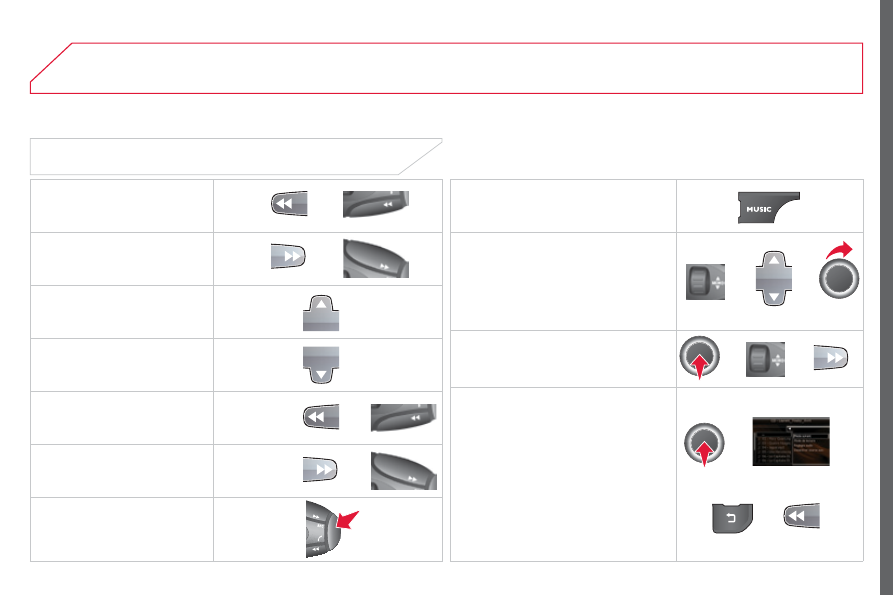
Selecting a track

Previous track.

Next track.

Previous folder.

Next folder.

Fast forward.

Fast backward.

Pause: long press on SRC.

MUSIC: List of USB or CD tracks or 
folders

Up or down in the list.

Confirm, next menu level.

Up one menu level.

Long press

Long press

MUSIC MEDIA PLAYERS

08

240

C3Picasso_en_Chap13a_RT6-2-8_ed01-2015

Audio streaming

Streaming allows audio files on your telephone to be played via the 

vehicle's speakers.

Connect the telephone: refer to the "USING THE TELEPHONE
section.
Select "Audio" or "All

" profile.

If play does not start automatically, it may be necessary to start the 
audio playback from the telephone.
Control is from the peripheral device or by using the audio system 
buttons.

Once connected in streaming mode, the telephone is considered to be 
a media source.
It is recommended that you activate "Repeat" on the Bluetooth 
peripheral.

MUSIC MEDIA PLAYERS

Connecting APPLE

®

 players

Connect the Apple

®

 player to the USB port using a suitable cable  

(not supplied).
Play starts automatically.

Control is via the audio system.

The classifications available are those of the portable device 

connected (artists / albums / genres / playlists / audiobooks / 
podcasts).
The default classification used is by artist. To modify the classification 

used, return to the first level of the menu then select the desired 

classification (playlists for example) and confirm to go down through 

the menu to the desired track.
The "Shuffle tracks" mode on an iPod

®

 corresponds to the "Random" 

mode on the audio system.
The "Shuffle albums" mode on an iPod

®

 corresponds to the "Random 

all" on the audio system.
"Shuffle tracks" is restored by default on each connection.

The version of software in the audio system may not be compatible 

with the generation of your Apple

®

 player.

08

241

C3Picasso_en_Chap13a_RT6-2-8_ed01-2015

MUSIC MEDIA PLAYERS

Using the auxiliary input (AUX)
JACK/USB audio cable not supplied

Connect the portable device 
(MP3, WMA player…) to the 

JACK auxiliary audio socket or 

USB port using a suitable cable.

Press MUSIC to display the "MUSIC
menu.

Select "Activate / Deactivate AUX 
input

" and confirm.

First adjust the volume of your portable 
device (to a high level). Then adjust the 
volume of your audio system.

Display and management of the controls are via the portable device.

09

242

C3Picasso_en_Chap13a_RT6-2-8_ed01-2015

AUDIO SETTINGS

They are accessible by the MUSIC 
button in the control panel or by a long 
press on RADIO according to the source 
in use.

- "Equalizer" (choice of 6 musical ambiences)
- "Bass"
- "Treble"
- "Loudness" (Activate/Deactivate)
- "Distribution" ("Driver", "All passengers")
- "Le-Ri balance" (Left/Right)
- "Fr-Re balance" (Front/Rear)
- "Auto. Volume" depending on road speed (Activate/Deactivate)

The audio settings (EqualizerBassTreble and Loudness) are 
different and independent for each sound source.
The settings for distribution and balance are common to all sources.

The distribution (or spatialisation using the Arkamys

©

 system) of sound 

is an audio process that allows the audio quality to be adapted to the 

number of listeners in the vehicle.

On-board audio: Arkamys

©

 Sound Staging optimises sound distribution 

in the the passenger compartment.

10

243

C3Picasso_en_Chap13a_RT6-2-8_ed01-2015

CONFIGURATION

Press SETUP to display the 
"

Configuration" menu.

Select "Choose colour

" and confirm to 

select the screen colour harmony and 
the map presentation mode:

day mode,

night mode,

automatic day/night mode, 

according to whether the 

headlamps are on.

Select "Adjust luminosity

" and confirm 

to adjust the screen brightness.
Press "OK" to save the changes.
The settings for day and night are 
independent.

Select "

Display configuration" and 

confirm.

Display configuration

11

244

C3Picasso_en_Chap13a_RT6-2-8_ed01-2015

SCREEN MENU MAP(S)

"Navigation - guidance" 
MENU

Enter an address

Select destination

Directory

GPS coordinates

Journey leg and route

Add a stage

Enter an address

Directory

Previous destinations

Order/delete journey legs

Divert route

Chosen destination

Guidance options

Define calculation criteria

Delete last destinations

Map management

Map orientation

MAIN FUNCTION

Option A1

Option A11

Option A

Option B...

Map details

Move the map

Mapping and updating

Description of risk areas database

Stop / Restore guidance

1

2

3

1

3

3

2

2

2

2

1

3

1

1

2

2

2

2

2

2

2

2

2

2

1

1

Set parameters for risk areas

2

Fastest route

2

Shortest route

Distance/Time

With tolls

2

2

2

With Ferry

2

Traffic info

2

Set speech synthesis

Fastest route

Shortest route

3

3

2

Distance/Time

With tolls

3

3

With Ferry

Traffic info

3

3

3

3

3

North direction

Vehicle direction

Perspective view

11

245

C3Picasso_en_Chap13a_RT6-2-8_ed01-2015

Select TMC station

Automatic TMC

Manual TMC

List of TMC stations

Display / Do not display 
messages

"TRAFFIC INFORMATION" 
MENU

Geographic filter

Retain all the messages:

Retain the messages:

Around the vehicle

On the route

1

2

2

2

1

2

2

3

3

1

SCREEN MENU MAP(S)

Dial

Directory of contacts

Call

Open

Import

"TELEPHONE" MENU

1

2

2

2

1

2

2

2

2

2

1

2

3

3

3

2

2

2

1

1

1

3

3

3

2

3

2

2

3

List of the paired peripherals

Connect

Disconnect

Delete

Delete all

Phone functions

Ring options

Contact mem. status

Delete calls log

Bluetooth functions

Peripherals search

Rename radiotelephone

Hang up

Display all phone contacts

Delete

Search

Contacts management

New contact

Delete all contacts

Import all the entries

Synchronization options

Display telephone contacts

No synchronization

Display SIM card contacts

2

Cancel

2

Sort by First name/Name

3

Cancel

11

246

C3Picasso_en_Chap13a_RT6-2-8_ed01-2015

SCREEN MENU MAP(S)

1

1

2

1

1

2

2

2

2

2

2

2

3

3

2

2

2

1

Random on all media

Repetition

Audio settings

Activate / Deactivate AUX 
input

"MUSIC" MENU

Change Media

Read mode

Normal

Random

All passengers

Le-Ri balance

Fr-Re balance

Auto. Volume

Update radio list

Bass

Treble

Loudness

Distribution

Driver

1

2

1

1

3

3

3

3

3

3

2

Equalizer

"RADIO" MENU

Change Waveband

Options

RDS station tracking

Audio settings

None

Classical

Jazz

Rock

Techno

Vocal

2

2

2

2

USB/iPod

AUX

CD

Bluetooth streaming

2

2

FM

AM

3

Activated / Deactivated

3

Activated / Deactivated

11

247

C3Picasso_en_Chap13a_RT6-2-8_ed01-2015

2

3

3

1

4

2

2

1

4

4

2

2

Night mode

Auto Day/Night

Adjust luminosity

Set date and time

"SETUP" MENU

Display configuration

Choose colour

Harmony:

Cartography:

Day mode

Speech synthesis setting

Guidance instructions volume

Select male voice/Select female voice

2

Select units

1

Define vehicle parameters*

* The settings vary according to the vehicle.

2

Alert log

1

Trip computer

2

Status of functions

2

Français

1

Select language

2

English

2

Italiano

2

Portuguese

2

Español

2

Deutsch

2

Nederlands

2

2

Turkçe

Cestina

2

2

Polski

Hrvatski

2

2

Русский

Hungarian

SCREEN MENU MAP(S)

248

C3Picasso_en_Chap13a_RT6-2-8_ed01-2015

The following table groups together the answers to the most frequently asked questions concerning your audio system.

FREQUENTLY ASKED QUESTIONS

QUESTION

ANSWER

SOLUTION

The route calculation is 
not successful.

The guidance criteria may conflict with the current location (exclusion of 

toll roads on a toll motorway).

Check the guidance criteria on the Navigation 

Menu, "Guidance options"\ "Define calculation 

criteria".

I am unable to enter my 
post code.

The system only accepts post codes of up to 7 characters.

The POIs do not appear.

The POIs have not been selected.

Select the POIs in the list of POIs.

The risk areas audible 

warning does not work.

The audible warning is not active.

Activate audible warnings in the Guidance options 

menu, "Navigation - guidance", "Set parameters 
for risk areas".

The system does not 
suggest a detour around 
an incident on the route.

The guidance criteria do not take account of TMC messages.

Select the "Traffic info" function in the list of 

guidance criteria.

I receive a Risk area alert 

which is not on my route.

Other than guidance, the system announces all Risk areas positioned in a 
cone located in front of the vehicle. It may provide an alert for a Risk area 
located on nearby or parallel roads.

Zoom in on the map to view the exact position of 

the Risk area. Select "On the route" to no longer 
receive alerts other than guidance or to reduce the 
time for the announcement.

249

C3Picasso_en_Chap13a_RT6-2-8_ed01-2015

FREQUENTLY ASKED QUESTIONS

QUESTION

ANSWER

SOLUTION

Certain traffic jams 

along the route are not 
indicated in real time.

On starting, it is several minutes before the system begins to receive the 

traffic information.

Wait until the traffic information is being received 

correctly (display of the traffic information icons on 

the map).

The filters are too restrictive.

Modify the "Geographic filter" settings.

In certain countries, only major routes (motorways...) are listed for the 

traffic information.

This phenomenon is normal. The system is 

dependent on the traffic information available.

The altitude is not 
displayed.

On starting, the initialisation of the GPS may take up to 3 minutes to 
receive more than 4 satellites correctly.

Wait until the system has started up completely. 
Check that there is a GPS coverage of at least 
4 satellites (long press on the SETUP button, then 
select "GPS coverage").

Depending on the geographical environment (tunnel...) or the weather, 

the conditions of reception of the GPS signal may vary.

This phenomenon is normal. The system 
is dependent on the GPS signal reception 
conditions.

I am unable to connect 
my Bluetooth telephone.

The telephone's Bluetooth function may be switched off or the telephone 

may not be visible.

Check that your telephone's Bluetooth 

function is switched on.

Check in the telephone settings that it is 
"visible to all".

The Bluetooth telephone is not compatible with the system.

You can check the compatibility of your telephone 

on www.citroen.co.uk (services)

The volume of the 
telephone connected 
in Bluetooth mode is 
inaudible.

The volume depends both on the system and on the telephone.

Increase the volume of the audio system, to 

maximum if required, and increase the volume of 

the telephone if necessary.

The ambient noise level has an influence on the quality of telephone 

communication.

Reduce the ambient noise level (close the windows, 

reduce the booster fan speed, slow down, ...).

250

C3Picasso_en_Chap13a_RT6-2-8_ed01-2015

FREQUENTLY ASKED QUESTIONS

QUESTION

ANSWER

SOLUTION

Some contacts are 
duplicated in the list.

The options for synchronizing contacts are synchronizing the contacts 
on the SIM card, the contacts on the telephone, or both. When both 
synchronizations are selected, some contacts may be duplicated.

Select "Display SIM card contacts" or "Display 
telephone contacts".

Contacts are not shown 

in alphabetical order.

Some telephones offer display options. Depending on the settings 

chosen, contacts can be transferred in a specific order.

Modify the display setting in the telephone 
directory.

The system does not receive 

SMS text messages.

The Bluetooth mode does not permit sending SMS text messages to the 

system.

The CD is ejected 
automatically or is not 
played by the player.

The CD is inserted upside down, is unplayable, does not contain any 

audio data or contains an audio format which the player cannot play.

Check that the CD is inserted in the player the 

right way up.

Check the condition of the CD: the CD cannot 
be played if it is too damaged.

Check the content in the case of a recorded 
CD: refer to the information and advice in the 
"MUSIC MEDIA PLAYERS" section.

The audio system's CD player does not play 
DVDs.

Some recorded CDs will not be played by the audio 

system because they are not of the correct quality.

The CD has been recorded in a format that is not compatible with the 

player (udf, ...).

The CD is protected by an anti-pirating protection system which is not 

recognised by the audio system.

There is a long waiting 

period following the insertion 

of a CD or connection of a 
USB memory stick.

When a new medium is inserted, the system reads a certain amount of 

data (directory, title, artist, etc.). This may take from a few seconds to a 

few minutes.

This phenomenon is normal.

The CD player sound is 
poor.

The CD used is scratched or of poor quality.

Insert good quality CDs and store them in suitable 
conditions.

The audio equipment settings (bass, treble, ambiences) are unsuitable.

Set the treble or bass level to 0, without selecting 

an ambience.

251

C3Picasso_en_Chap13a_RT6-2-8_ed01-2015

FREQUENTLY ASKED QUESTIONS

QUESTION

ANSWER

SOLUTION

Some characters in the 
media information are not 

displayed correctly while 

playing.

The audio system does not read some types of characters.

Use standard characters to name tracks and 
folders.

Playing of streaming files 

does not start.

The peripheral device connected does not support automatic play.

Start the playback from the device.

The names of tracks and 
the track length are not 
displayed on the screen 

when streaming audio.

The Bluetooth profile does not allow the transfer of this information.

The quality of reception 
of the radio station 
listened to gradually 
deteriorates or the stored 
stations do not function 
(no sound, 87.5 Mhz is 
displayed...).

The vehicle is too far from the transmitter used by the station listened 

to or there is no transmitter in the geographical area through which the 

vehicle is travelling.

Activate the "RDS" function by means of the 
short-cut menu to enable the system to check 

whether there is a more powerful transmitter in the 

geographical area.

The environment (hills, buildings, tunnels, basement car parks...) block 
reception, including in RDS mode.

This phenomenon is normal and does not indicate 

a fault with the audio system.

The aerial is absent or has been damaged (for example when going 

through an automatic car wash or in an underground car park).

Have the aerial checked by a CITROËN dealer.

I cannot find some radio 

stations in the list of 
stations received.

The station is not received or its name has changed in the list.

Some radio stations send other information in place of their name (the 

title of the song for example).
The system interprets this information as the name of the station.

The name of the radio 
station changes.

252

C3Picasso_en_Chap13a_RT6-2-8_ed01-2015

FREQUENTLY ASKED QUESTIONS

QUESTION

ANSWER

SOLUTION

When modifying the 
treble and bass setting, 
the choice of ambience is 
cancelled.

The selection of an ambience imposes specific treble and bass settings.

Modify the treble and bass settings or choose a 
musical ambience to obtain the desired sound 
quality.

When modifying the 
ambience, the treble 
and bass settings are 
cancelled.

When modifying the 
balance settings, 
the "Driver" or "All 
passengers" setting is 
cancelled.

The choice of the "Driver" distribution setting imposes specific balance 

settings.

When modifying 
the "Driver" or "All 
passengers" distribution 
setting, the balance 
settings are cancelled.

There is a difference in 

sound quality between 

the different audio 
sources (radio, CD...).

For optimum sound quality, the audio settings for Volume, Bass, Treble, 
Equalizer and Loudness can be adapted to the different sound sources, 

which may result in audible differences when changing source (radio, 

CD...).

Check that the audio settings for (Volume, Bass, 
Treble, Equalizer, Loudness) are adapted to 
the sources listened to. It is advisable to set the 
AUDIO functions (Bass, Treble, Fr-Re balance, 
Le-Ri balance) to the middle position, select the 
"None", musical ambience and set the loudness 
correction to the "Active" position in CD mode or 
to the "Inactive" position in radio mode.

253

C3Picasso_en_Chap13a_RT6-2-8_ed01-2015

FREQUENTLY ASKED QUESTIONS

QUESTION

ANSWER

SOLUTION

With the engine off, the 

system switches off after 

a few minutes of use.

When the engine is switched off, the system's operating time depends on 

the state of charge of the battery.
The switch-off is normal: economy mode is activated automatically to 

maintain the state of charge of the vehicle's battery, needed for engine 
starting. (See the "Energy economy mode" section).

Start the vehicle's engine to increase the battery 
charge.

Playback of my USB 
memory stick starts only 

after a very long wait 

(around 2 to 3 minutes).

Some files supplied with the memory stick may greatly slow down access 

to reading the memory stick (multiplication by 10 of the catalogue time).

Delete the files supplied with the memory stick 

and limit the number of sub-folders in the file 

structure on the memory stick.

When I connect my 
iPhone as telephone and 
to the USB port at the 
same time, I am unable 

to play the music files.

When the iPhone connects automatically as a telephone, it forces the 
streaming function. The streaming function takes the place of the USB 

function which is then not useable, there is a period without sound of the 

track being played with Apple

®

 players.

Disconnect and reconnect to the USB port 
(the USB function takes priority over streaming).

254

C3Picasso_en_Chap13a_RT6-2-8_ed01-2015


Content   ..  14  15  16  17   ..