HAMILTON-T1. Operator's Manual (2022) - page 7
13 Configuration
13.4.1 Setting breath timing options
13.4.4 Enabling TI max for invasive
modes
The ventilator controls mandatory breath
timing using a combination of inspiratory
In Configuration, you can enable or disable
time (TI) and Rate.
the TI max control setting, as desired, for
adult/pediatric patients in the following
For the modes PCV+ and APVcmv, you can
modes: APVsimv, PSIMV+, DuoPAP, and
set the ventilator to use either of the
SPONT
following to control breath timing: I:E or
TI.
To enable/disable TI max
To change the breath timing selection
1. Open the Modes > General > Philoso-
phy window.
4 In the Modes > General > Philosophy
2. Touch the Available in invasive modes
window, touch the desired breath tim-
ing option.
checkbox to enable/disable the
setting.
A checkmark indicates TI max is
13.4.2 Choosing the mode naming
enabled.
convention
You can select the naming convention
13.5 Configuring MMPs
used for adaptive modes: APVcmv /
APVsimv or (S)CMV+ / SIMV+.
You can specify which MMPs are display-
ed on the ventilator.
By default, (S)CMV+ / SIMV+ are used.
The list of entries in the Configuration
To select the mode naming convention
window is shown in the same order as the
4 In the Modes > General > Philosophy
MMPs appear on the main display.
window, select the desired option.
To select the MMPs to display
1. In Configuration, touch Graphics, then
13.4.3 Choosing the ASV version
the MMP tab.
By default, the device uses ASV version
2. In each dropdown list, select the
1.1. For details about the different ASV
desired parameter to show in that
versions, see Section 7.4.1.1.
position in the MMP list on the main
display.
To select the ASV version
4 In the Modes > General > Philosophy
window, select the desired version.
260
English | 10103179/02 USA
Defining Quick setups
13
13.6 Defining Quick setups
The General setup configuration
window is displayed. Note that the
A Quick setup refers to a group of settings
buttons in the left panel now change
you define, including patient characteris-
to provide access to the setup options.
tics, mode selection and control settings,
6.
Touch Rename setup to give the setup
alarm limit settings, and weaning zone
a meaningful name.
limits.
You must define a name as it is used
The settings saved with a Quick setup are
as the Quick setup button label in
automatically applied when the setup is
Standby, as well as in this Configura-
selected in the Standby window.
tion window.
For each patient group, you can configure
7.
Select the configuration settings to
apply to this setup by touching the
up to three Quick setups, and can specify a
appropriate button:
setup to be selected by default when the
ventilator is turned on.
- To apply the ventilator settings you
selected in step 1, touch Use current
settings.
13.6.1 Configuring individual setup
- To apply factory settings, touch Use
settings
factory settings.
To configure a Quick setup
8.
Touch Mode Ctrls > Controls to review
1.
In Standby mode, configure the venti-
patient parameter settings.
lator with the parameters you will save
Some parameters are not displayed, as
as a Quick setup.
they are based on weight:
Select:
- The following parameters are set
- Patient group and sex/height (Adult/
based on ideal body weight (IBW)
Ped) or weight (Neonatal)
(Adult/Ped): Vt, Rate, T low, T high, and
TI.
- Ventilation mode
- The following parameters are set
- Mode control settings
based on body weight (Neonatal): Vt,
- Alarm limits
Rate, T low, T high, TI, and TI max.
- Humidifier settings
9.
Touch Vt/IBW (Adult/Ped) or Vt/
- CPR ventilation settings
Weight (Neonatal) to set the tidal
2.
Touch Start ventilation and select the
volume per IBW or weight, respec-
desired graphic layout and graphics to
tively.
display. See Section 8.3.
The ventilator uses the Vt/IBW or Vt/
3.
Return to Standby.
Weight setting in calculations for the
following:
4.
Access Configuration mode.
- To set the initial delivered Vt in
5.
In the Configuration window, touch
volume-controlled modes
Setups, and then touch the button (1,
- To set the initial high and low alarm
2, or 3, or your custom-defined labels)
limits for Vt and ExpMinVol
for the setup to configure.
Hamilton Medical | HAMILTON-T1 Operator's Manual
261
13 Configuration
10. Review the alarm settings in the
13.8 Configuring CPR ventila-
Alarms window.
tion
11. In Vent Status, set patient parameters
manually.
You can specify the default ventilation
mode and control settings to be used
The Vent Status window allows you to
during CPR ventilation.
configure the weaning zone ranges
shown in the Vent Status panel
To change the default mode and control
according to your institution’s proto-
settings for CPR ventilation
col.
1. In Configuration, touch Setups, then
12. Touch the Back button to return to
CPR.
the Default setup window.
2. Select the desired mode and adjust
Configuration of the Quick setup is
the control settings, as appropriate.
complete.
Not all control settings are available
when configuring the default mode
13.6.2 Selecting a default Quick setup
for CPR ventilation. See Table 15-15.
Note that changes apply only to the
A Default setup comprises a group of
selected patient group.
settings that are automatically loaded
when turning on the ventilator.
13.9 Configuring connectivity
After you have configured one or more
Quick setups, select the default to use.
settings
To set a Quick setup as the default
When the Hamilton Connect Module is
enabled, your ventilator supports both
4 In Configuration, touch Setups and
wired and wireless communication meth-
select the setup to use as the default.
ods. These connection types allow you to
add the ventilator to a hospital network,
13.7 Activating SpO2 and CO2
connect to a patient monitor or computer,
or when used with the Hamilton Connect
measurement
App, view ventilation-related information
To enable SpO2 and/or CO2 measurement
from a connected ventilator on a smart-
on the ventilator, you must activate the
phone.
associated hardware option in Configura-
For details about connecting to the venti-
tion. See Section 13.11.3.
lator using the Hamilton Connect App, see
You must also enable each sensor in the
Section 11.2.
System window. See Section 4.5.
On the ventilator, you can update the
Hamilton Connect Module firmware,
import and export configuration settings,
as well as delete data and settings that are
saved to the module.
262
English | 10103179/02 USA
Updating Hamilton Connect Module firmware
13
The Hamilton Connect Configuration Tool
5. When the new firmware is installed,
is a separate application that allows IT per-
Update successfully completed is
sonnel to define the Connectivity configu-
displayed. Ensure that the new
ration settings for the ventilator. For
firmware version is displayed. The
details, see the Hamilton Connect Com-
ventilator is ready to use. You do not
munication and Configuration Guide.
need to restart the ventilator.
13.9.1 Updating Hamilton Connect
13.9.2 Copying Connectivity configu-
Module firmware
ration settings
To enable communication using the
NOTICE
Hamilton Connect Module, you must first
Turning off the device while the
import the Connectivity configuration file
firmware is being installed may corrupt
created for your ventilator.
the Hamilton Connect Module.
This file defines the connection types to
enable on your ventilator, as well as the
Module firmware updates are provided to
ventilator name and various settings asso-
you by your Hamilton Medical technical
ciated with your institution's network.
representative.
Connectivity configuration settings are
An update can take up to 10 minutes to
created using the Hamilton Connect Con-
complete. Note that you cannot install a
figuration Tool.
firmware version that is older than the
version currently installed on the Hamilton
If changes need to be made to the con-
Connect Module.
tents of this configuration file, you can
export the file (Section 13.9.2.2) and mod-
To update the Hamilton Connect Module
ify it in the Configuration Tool.
firmware
1. Insert the provided USB drive contain-
For details on the Configuration Tool and
ing the update into the USB port on
the Hamilton Connect Module, see the
the ventilator (Figure 2-5).
Hamilton Connect Communication and
Configuration Guide.
2. In Configuration, touch Connectivity >
Firmware.
13.9.2.1 Importing Connectivity configu-
Information about the currently
ration settings
installed version is displayed, as well as
important safety information.
Once the Connectivity configuration file
3. Select the desired version to install
has been created (using the Hamilton
from the New version dropdown list.
Connect Configuration Tool), you can
import the file to the ventilator using a
4. Touch Start.
USB drive.
Do not turn off the device during the
For details about creating the configura-
update.
tion file for your ventilator, see the Hamil-
ton Connect Communication and Configu-
ration Guide.
Hamilton Medical | HAMILTON-T1 Operator's Manual
263
13 Configuration
To import the Connectivity configuration
13.9.3 Setting the Hamilton Connect
file
Module to the factory default settings
1. Insert the USB drive into the USB port
on the ventilator (Figure 2-5).
NOTICE
2. In Configuration, touch Connectivity >
When ventilator connectivity is reset to
Configuration.
the factory defaults, all connection types
3. Select the desired Connectivity confi-
are disabled.
guration from the Import configuration
dropdown list.
You can reset the Hamilton Connect
Module to the factory default settings,
4. Touch Import.
which removes the Connectivity configu-
The features defined in the file are now
ration file and deletes all saved data.
enabled in the System > Settings > Connec-
To delete only the saved data while retain-
tivity window.
ing the Connectivity configuration, see
Section 13.9.5.
13.9.2.2 Exporting Connectivity configura-
tion settings
Note that the currently installed Hamilton
Connect Module firmware version remains
You can export the Connectivity configu-
unchanged.
ration file from the ventilator to a USB
drive.
To reset the Hamilton Connect Module to
the factory default settings
To export the configuration file from the
1. In Configuration, touch Connectivity >
ventilator
Configuration.
1. Insert a USB drive into the USB port on
2. Touch Use factory settings.
the ventilator (Figure 2-5).
A confirmation window is displayed.
2. In Configuration, touch Connectivity >
Touch Yes to continue or No to can-
Configuration.
cel.
3. Touch Export.
3. When complete, Reset successful is
The configuration file is saved onto the
displayed.
USB drive.
The Hamilton Connect Module factory
defaults are restored.
13.9.4 Removing device pairings
Information for smartphones that have
been paired with the ventilator is saved to
the Hamilton Connect Module. If desired,
you can remove all of the saved pairing
information.
264
English | 10103179/02 USA
Deleting data from the Hamilton Connect Module
13
To remove all paired device information
13.10 Copying configuration
1. In Configuration, touch Connectivity >
settings
More.
Before proceeding, review the safety
2. Touch Reset pairings.
information in Chapter 1.
A confirmation window is displayed.
Touch Yes to continue or No to can-
You can copy and transfer configuration
cel.
settings to other HAMILTON-T1 devices.
For details about configuration settings,
3. When complete, Reset successful is
ranges, and defaults, see Table 15.9.
displayed.
You can copy configuration settings to/
All previously paired device information is
from the ventilator using a USB drive or
deleted from the Hamilton Connect
with your smartphone using the Hamilton
Module.
Connect App85.
13.9.5 Deleting data from the Hamil-
You must be in Standby to copy configura-
ton Connect Module
tion settings.
You can delete data (such as screenshots
To copy configuration settings using a USB
drive
or ventilation-related data) that has been
saved to the Hamilton Connect Module.
1. Insert a USB drive into the ventilator
USB port. See Figure 2-5.
To remove saved data
2. In Configuration, touch Transfer.
1. In Configuration, touch Connectivity >
More.
3. In the Transfer window, touch Import
or Export.
2. Touch Delete recorded data.
- The device begins transferring the
A confirmation window is displayed.
files. A message is displayed after the
Touch Yes to continue or No to can-
files are successfully transferred.
cel.
- Exported files are stored in the
3. When complete, Recorded data
import-export config folder on the USB
deleted successfully is displayed.
drive.
All recorded data is deleted from the
- Imported configuration files are
Hamilton Connect Module. This does not
immediately applied to the ventilator.
remove information about paired devices
If you remove the USB drive before the
or have any effect on the connectivity con-
files are successfully transferred, you must
figuration.
start over and repeat the process.
85 For details, see the Hamilton Connect App Instructions for use.
Hamilton Medical | HAMILTON-T1 Operator's Manual
265
13 Configuration
13.11 Configuring device
5. Repeat until all desired software
options are added.
options
6. Touch the X to close the window.
Before use, you must enable any installed
7. Restart the ventilator to enable the
hardware options (for example, CO2 and
options.
SpO2), and add and enable software
options.
Upon turning on the ventilator, the added
options are available for use.
13.11.1 Reviewing installed options
13.11.3 Activating hardware options
To view installed options
Communication board-related functions
1. In Configuration, touch Options.
(CO2, SpO2) are activated at two levels:
2. Touch SW options for software or HW
• The hardware itself must be activated
options for hardware.
in configuration to make the function-
3. Scroll through the options to review,
ality available to the user, described in
as needed.
this section.
• Sensors that plug into the hardware are
13.11.2 Adding software options
individually enabled by the user, as
needed, in the System window. See
Software options are added using license
Chapter 4.
keys.
To activate hardware options in Configura-
Trial versions of software options may be
tion
available. Trial options expire and are
automatically deactivated after 30 days.
1. Touch Options.
2. In the Options window, touch the HW
Have all required keys available before
options tab.
proceeding.
The window lists hardware that
To add a software option
requires activation.
1. In Configuration, touch Options.
3. Select the checkbox for options to
2. In the Options window, touch SW
activate.
options.
A checkmark indicates the option is
activated.
3. Touch Add options.
4. Type the activation code exactly as
Upon exiting Configuration, the activated
provided into the field and touch
hardware is available for use.
Enter.
SpO2 and CO2 sensors require an addi-
If the message Option code invalid!
tional step, and must also be enabled in
appears, re-enter the code.
the System > Sensors window.
The message Option valid indicates
the code is correct and the option has
been added.
266
English | 10103179/02 USA
Removing options
13
13.11.4 Removing options
13.11.4.1 Deactivating hardware options
Note the following:
To deactivate hardware options
• Trial options are automatically removed
4
In the HW options window, clear the
at the end of the trial period.
checkboxes to deactivate the hard-
ware.
• Selecting Clear options removes all non-
trial options.
• The patient groups on the ventilator,
Adult/Ped and Neonatal, are also
treated as options. Clearing options
removes them and the associated venti-
lation modes. You must re-add them
before using the ventilator on a patient.
To remove software options
You can remove all non-trial software
options from the ventilator.
1. In the SW options window, touch Clear
options.
You are prompted to confirm deletion
of all non-trial options. See the previ-
ous notes.
2. Touch Clear options to remove the
options.
Touch Cancel to leave the options
installed.
3. Restart the ventilator.
Once you restart the ventilator, all
options (including patient groups)
listed in the window are cleared.
4. To re-add the patient groups and any
other desired options, re-enter Confi-
guration mode.
5. Add software options (including the
patient groups), as appropriate.
Hamilton Medical | HAMILTON-T1 Operator's Manual
267
14
Parts and accessories
14.1
Overview
270
269
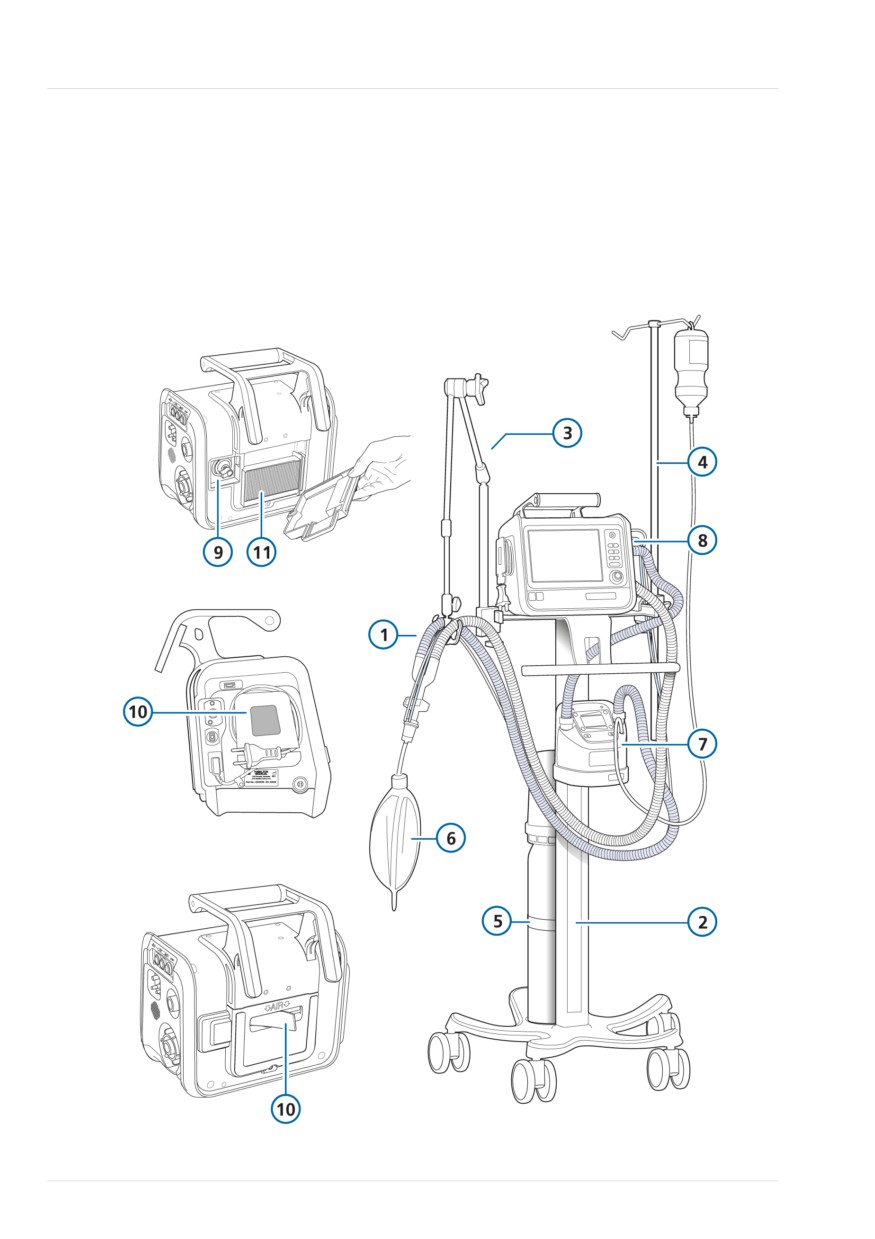
14 Parts and accessories
14.1 Overview
For additional parts and accessories and
ordering information, refer to the e-cata-
This chapter lists the parts available for the
log on the Hamilton Medical website or
HAMILTON-T1 ventilator. Note that not all
contact your Hamilton Medical representa-
parts are available in all markets.
tive.
Figure 14-1. Ventilator parts and accessories
270
English | 10103179/02 USA

Overview
14
Table 14-1. Ventilator parts and accessories
Item no. (ref
Description
PN
to Fig 14-1)
1
HAMILTON-H900 breathing circuit set, adult/pediatric
Breathing circuit set BC8022, dual limb, single use, preassembled,
260161
box of 15
Breathing circuit set BC8022-A, dual limb, autoclavable, pre-
260188
assembled, box of 1
Breathing circuit set BC4022, single limb, single use, preassem-
260186
bled, box of 15
HAMILTON-H900 breathing circuit set, neonatal
Breathing circuit set BC8010, dual limb, single use, preassembled,
260185
box of 15
Breathing circuit set BC8010-A, dual limb, autoclavable, pre-
260189
assembled, box of 1
Breathing circuit set BC4010, single limb, single use, preassem-
260187
bled, box of 15
1
Breathing circuit set, coaxial, single use, adult/pediatric
Length 1.80 m, box of 20
260206
Preassembled with flow sensor, length 1.80 m, box of 20
260207
Length 2.40 m, box of 10
260239
Preassembled, with flow sensor, length 2.40 m, box of 10
260240
Preassembled, with expiratory valve set, flow sensor, and elbow
260127
adapter, length 2.40 m, box of 10
Preassembled, with expiratory valve set, flow sensor, and elbow
260128
adapter, length 1.80 m, box of 20
Preassembled, with expiratory valve set, flow sensor, and elbow
260167
adapter, length 3.0 m, box of 10
Preassembled, with expiratory valve set, flow sensor, and elbow
260168
adapter, length 4.80 m, box of 8
Preassembled, with flow sensor and elbow adapter, length
260087
1.80 m, box of 20
Preassembled, with flow sensor and elbow adapter, length
260094
2.40 m, box of 10
Hamilton Medical | HAMILTON-T1 Operator's Manual
271

14 Parts and accessories
Item no. (ref
Description
PN
to Fig 14-1)
1
Preassembled, with flow sensor and elbow adapter, length 3.0 m,
260145
box of 10
Preassembled, with flow sensor and elbow adapter, length
260144
4.80 m, box of 8
1
Breathing circuit sets, dual limb, single use, neonatal
With Y-piece, flow sensor, flow sensor calibration adapter, and
260180
pressure line with T-piece connectors, length 1.50 m, box of 20
With Y-piece, flow sensor, flow sensor calibration adapter, and
260182
pressure line with T-piece connectors, length 3.0 m, box of 10
With expiratory valve set, Y-piece, flow sensor, flow sensor calib-
260170
ration adapter, and pressure line with T-piece connectors, length
1.50 m, box of 20
With expiratory valve set, Y-piece, flow sensor, flow sensor calib-
260169
ration adapter, and pressure line with T-piece connectors, length
3.0 m, box of 10
1
Breathing circuit sets, dual limb, single use, pediatric/neonatal
With Y-piece, length 1.50 m, box of 20
260241
With Y-piece, length 3.0 m, box of 20
260244
1
Breathing circuit sets, autoclavable
See the Hamilton Medical e-catalog.
1
Flow sensors, adult/pediatric
Flow sensor, single use, adult/pediatric, 1.88 m, box of 10
281637
Flow sensor, single use, adult/pediatric, 2.60 m, box of 10
282049
Flow sensor, autoclavable, adult/pediatric, 1.88 m, box of 1
950185
Flow sensor calibration adapter, single use, adult/pediatric,
279937
box of 10
Flow sensor calibration adapter, autoclavable, adult/pediatric,
282323
box of 10
272
English | 10103179/02 USA

Overview
14
Item no. (ref
Description
PN
to Fig 14-1)
1
Flow sensors, neonatal
Flow sensor, single use, neonatal, 1.60 m, box of 10
260177
Flow sensor, single use, neonatal, 1.88 m, box of 10
155500
Flow sensor, single use, neonatal, 3.10 m, box of 10
260179
Flow sensor calibration adapter, single use, neonatal, box of 10
279964
8
Expiratory valve
Expiratory valve set, autoclavable, adult/pediatric, box of 1
161175
Membrane, expiratory valve, autoclavable, adult/pediatric/neona-
161390
tal, box of 5
Expiratory valve set, single use, adult/pediatric, box of 10
161186
Expiratory valve set, autoclavable, neonatal (incl. membrane,
161188
expiratory valve)
Expiratory valve set, single use, neonatal, box of 10
161189
not shown
Pressure-monitoring line (for nCPAP, nCPAP-PC modes)
Pressure line, single use, neonatal/pediatric, 1.60 m, box of 10
260174
Pressure line, single use, neonatal/pediatric, 3.10 m, box of 10
260176
Luerlock adapter kit for nCPAP/nCPAP-PC with breathing set,
279971
single use, neonatal, box of 50
not shown
Nasal cannulas (adult/pediatric/neonatal)
See the Hamilton Medical e-catalog.
not shown
Masks and accessories, adult/pediatric
See the Hamilton Medical e-catalog.
not shown
Masks and accessories, neonatal
nCPAP Starter kit, large (10 sets, incl. mask, prongs, and bonnets)
281975
nCPAP Starter kit, small (1 set, incl. mask, prongs, and bonnets)
282330
not shown
Ventilation hose protective sleeve
Protective sleeve, 1.70 m
161435
Protective sleeve, 2.30 m
161436
Hamilton Medical | HAMILTON-T1 Operator's Manual
273
14 Parts and accessories
Item no. (ref
Description
PN
to Fig 14-1)
not shown
CO2 mainstream measurement
HAMILTON CAPNOSTAT-5 CO2 sensor (90° angled)
282157
CO2 mainstream airway adapter, single use, adult/pediatric,
281719
box of 10
CO2 mainstream airway adapter, single use, neonatal, box of 10
281720
CO2 mainstream airway adapter, reusable, adult/pediatric,
281721
box of 1
CO2 mainstream airway adapter, reusable, neonatal, box of 1
281722
OD15/ID15 adapter, single use, neonatal, box of 25
281803
not shown
CO2 sidestream measurement
HAMILTON LoFlo sidestream CO2 sensor
281928
CO2 sidestream adapter, single use, adult/pediatric, box of 10
281929
CO2 sidestream adapter, single use, adult/pediatric, box of 10
281931
CO2 sidestream adapter, single use, neonatal/pediatric, box of 10
281930
CO2 sidestream adapter, single use, neonatal, box of 10
281932
7
Humidifier
HAMILTON-H900 humidifier
See the Hamilton Medical e-catalog.
Trolley
2
Trolley (incl. humidifier support)
161150
3
Support arm, quick positioning, basic
281671
not shown
Tubing holder, dual
282722
4
Water bottle holder with quick lock (max. 1 kg per side)
160162
5
Cylinder holder
161152
not shown
Small basket (max. 3 kg capacity)
10101016
not shown
Large basket (max. 5 kg capacity)
10101017
6
Demonstration lung
IntelliLung, maximum 1 liter
281869
Demonstration lung assembly with endotracheal tube, adult,
151815
2 liter, with OD15 connector
274
English | 10103179/02 USA

Overview
14
Item no. (ref
Description
PN
to Fig 14-1)
6
Demonstration lung assembly with endotracheal tube, 0.5 liter,
151816
with OD15/OD22 connector (pediatric)
Demonstration lung, neonatal, OD15
R53353
A passive lung simulator with two independent compartments for
simulating neonatal patients.
10
Filter
Filter set
161275
Air intake dust filter and fan filter, set of 5
11
Filter, air intake (HEPA)
161236
not shown
Patient filter
HME filter (HMEF), single use, adult/pediatric
279963
HME filter (HMEF), single use, adult/pediatric
279974
Expiratory bacteria filter
279204
Inspiratory bacteria filter
279211
not shown
Power cord
Power cord with US plug, 2-pin, 3.0 m
355198
Power cord with British angled plug, 3.0 m
355199
Power cord with continental European plug, 2-pin, 3.0 m
355200
Power cord with Chinese plug, 3.0 m
355308
not shown
DC input cables
DC cable, metal (with MIL standard connector)
161624
DC cable open, metal (for individual assembly)
161622
Car cable, metal (for cigarette lighter)
161623
not shown
Cover
Cover, potential equalization conductor, gray
10112494
9
Oxygen sensor
Galvanic O2 sensor
396200
Galvanic O2 sensor, lead free
10110473
Hamilton Medical | HAMILTON-T1 Operator's Manual
275

14 Parts and accessories
Item no. (ref
Description
PN
to Fig 14-1)
not shown
Communication, HAMILTON-T1 and HAMILTON-T1 Military
Cable to COM1, 26 cm
161545
Cable to COM1, 50 cm
161650
Potential equalization USB cable
10102483
Cable, Nurse Call
160166
Communication, HAMILTON-T1
Extended communication board CO2
161537
Extended communication board CO2, Nurse call, COM1
161535
Extended communication board CO2, SpO2, COM1
161635
10076965
Extended communication board CO2, SpO2,
/COM1 (for
communication with the HAMILTON-H900 humidifier)
Communication Y-cable to HAMILTON-H900 and RS-232
10077038
Cable to HAMILTON-H900
950473
Communication, HAMILTON-T1 Military
Extended communication board CO2, SpO2, COM1
161990
not shown
Battery
Li-Ion battery
369108
not shown
Battery charger/calibrator
369104
not shown
High-pressure oxygen connector
DISS - diameter index safety standard
160470
NIST - no interchangeable screw thread
160471
not shown
Gas supply hoses and parts
Coupling insert for low pressure O2 inlet, 4.8 mm ID
279913
not shown
SpO2 sensors and accessories (Masimo)
See the Hamilton Medical e-catalog.
SpO2 sensors and accessories (Nihon Kohden)
See the Hamilton Medical e-catalog.
not shown
Nebulizer and accessories
See the Hamilton Medical e-catalog.
276
English | 10103179/02 USA

Overview
14
Item no. (ref
Description
PN
to Fig 14-1)
not shown
Tools and test equipment
See the Hamilton Medical e-catalog.
not shown
Ventilator hardware and mounting options
See the Hamilton Medical e-catalog.
not shown
NBC filter adapter and accessories for HAMILTON-T1 Military
See the Hamilton Medical e-catalog.
Language kit
English
10102152
English-US
10102336
German
10102154
Spanish
10102155
French
10102156
Italian
10102161
Russian
10102157
Chinese
10102159
Portuguese
10102160
Extended warranty
Extended warranty of 1 year
700403
Extended warranty of 2 years
700404
Extended warranty of 3 years
700405
Hamilton Medical | HAMILTON-T1 Operator's Manual
277
15
Specifications
15.1
Physical characteristics
280
15.2
Environmental requirements
281
15.3
Pneumatic specifications
283
15.4
Electrical specifications
284
15.5
Ventilation-related terminology
286
15.6
Control settings
289
15.7
Monitored parameters
294
15.8
Alarms
300
15.9
Configuration
303
15.10
ASV technical data
306
15.11
Ventilator breathing system specifications
308
15.12
Technical performance data
309
15.13
Functional description of ventilator system
317
15.14
Symbols used on device labels and packaging
320
15.15
Standards and approvals
322
15.16
Disposal and year of manufacture
324
15.17
Warranty
325
279
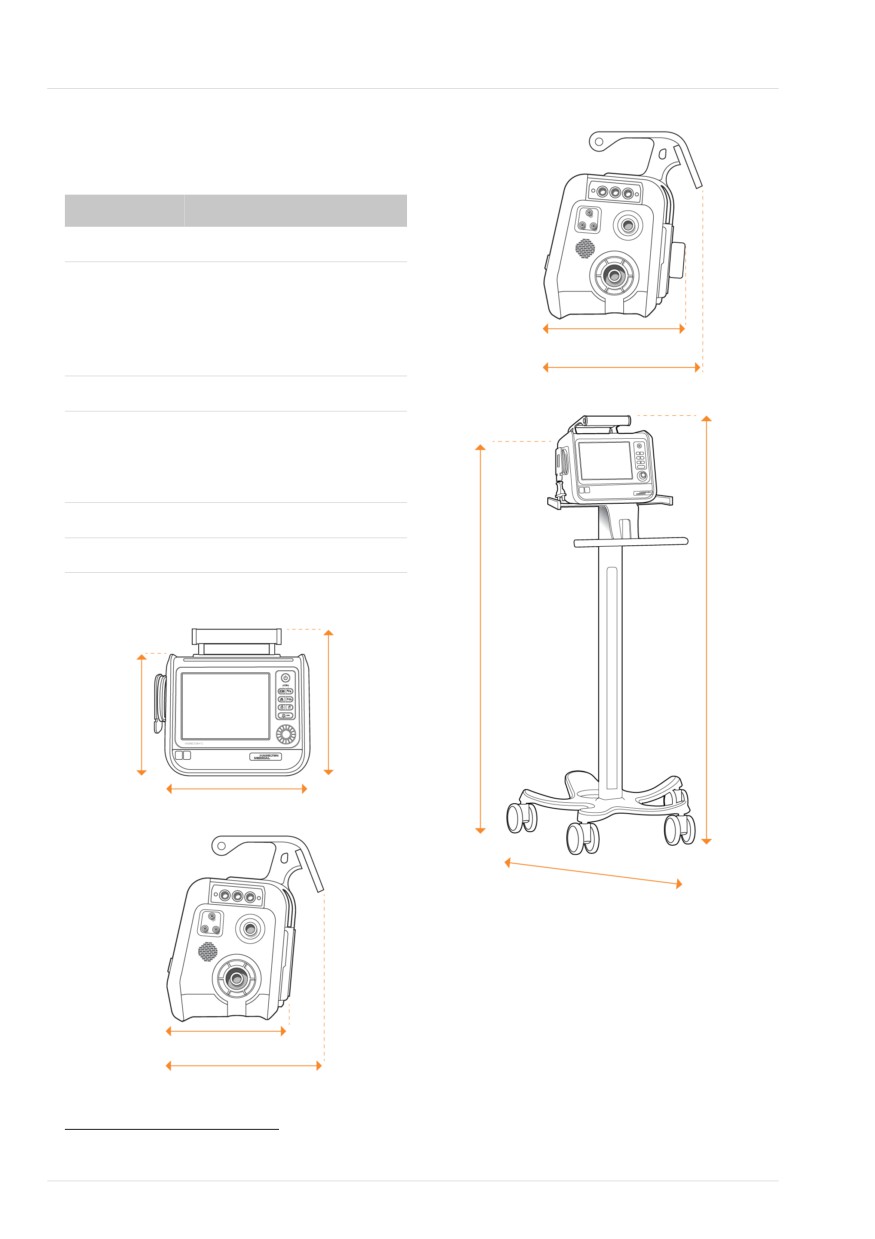
15 Specifications
15.1 Physical characteristics
Table 15-1. Physical characteristics86
Dimension
Specifications
Weight
6.5 kg (14.3 lb)
18.5 kg (40.8 lb) with trolley
The trolley can accommodate a maximum
22.4 cm (8.8 in)
safe working load of 44 kg (97 lb).87
27 cm (10.6 in)
Gas cylinder dimensions
Diameter: 100 to 140 mm (3.9 to 5.5 in)
Height: max. 820 mm (32 in)
Weight: max. 8 kg (17.6 lb)
Dimensions
138 cm
See the following figures.
(54.3 in)
143.3 cm
Figure 15-1. HAMILTON-T1 dimensions
(56.4 in)
24.5 cm
29.8 cm
(9.6 in)
(11.7 in)
31 cm (12.2 in)
63 cm
(24.8 in)
22 cm (8.7 in)
27 cm (10.6 in)
86 For accessories, see Section 14.
87 The maximum safe working load applies to a stationary, properly load-balanced trolley.
280
English | 10103179/02 USA
Environmental requirements
15
15.2 Environmental require-
ments
Table 15-2. Environmental requirements
Environment
Specifications
Temperature
Operation:88
Adult/Ped: -15°C to 50°C (5°F to 122°F)89
Neonatal: -15°C to 40°C (5°F to 104°F)
Shipment/
-20°C to 60°C (-4°F to 140°F), in original packaging90, 91
storage:
Altitude
Adult/Ped: -650 to 7620 m (-2,132 to 25,000 ft)89
Neonatal: -650 to 4000 m (-2,132 to 13,123 ft)
Note that at higher altitudes the ventilator performance
may be limited. See Figure 15-2. The Performance lim-
ited by high altitude alarm is generated and a message is
shown on the display. See Table 9-2.
Above 4000 m, supported only with DC power or bat-
tery operation.
Atmospheric
Operation88,
Adult/Ped: 376 to 1100 hPa89
pressure
shipment, and
Neonatal: 620 to 1100 hPa
storage:
Relative humidity
Operation:88
5% to 95%, noncondensing
Shipment/
10% to 95%, noncondensing
storage:
Ingress protection92
HAMILTON-T1 PN 161006, 161009: IP24
HAMILTON-T1 PN 1610060, 1610090: IP54
For specifications related to any external devices and sensors, refer to the manufacturer's Instruc-
tions for use.
For specifications related to the mainstream and sidestream CO2 sensor, see Section 15.12.
88 The stated operating conditions apply to both continuous and transient operation of the ventilator within the limitations specified in
the Intended use.
89 Only valid for devices with serial number > 3000. For devices with a lower serial number, the maximum operating temperature for
Adult/Ped use is 40°C (104°F) up to an altitude of 4600 m (15,091 ft) and a minimum atmospheric pressure of 570 hPa.
90 If the storage temperature is outside of the operational temperature range, the device must cool down or warm up for 10 minutes
at a temperature of 20°C.
91 When the device is not stored in its original packaging, the permitted storage temperature range is -15°C to 60°C.
92 Software version 3.0.x can be installed on the ventilator regardless of the IP rating indicated on the device
Hamilton Medical | HAMILTON-T1 Operator's Manual
281
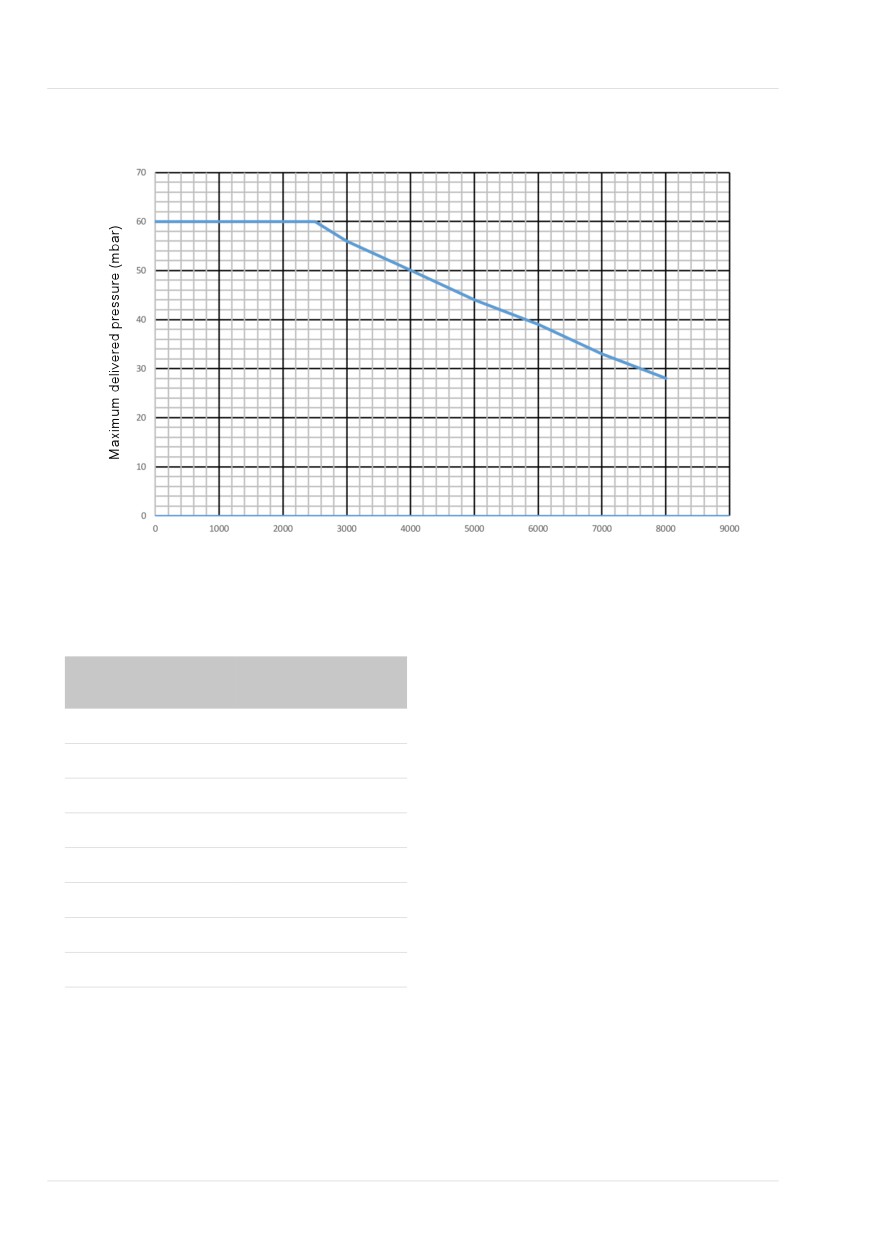
15 Specifications
Figure 15-2. Variations in maximum delivered pressure by altitude
Altitude (m)
Table 15-3. Variations in maximum delivered
pressure by altitude
Altitude (m)
Maximum delivered
pressure (mbar)
0
60
2500
60
3000
56
4000
50
5000
44
6000
39
7000
33
8000
28
282
English | 10103179/02 USA
Pneumatic specifications
15
15.3 Pneumatic specifications
Table 15-4. Pneumatic specifications
Component
Specifications
High-pressure
Pressure:
2.8 to 6 bar / 41 to 87 psi
oxygen inlet93
Flow:
Maximum of 200 l/min
Connector:
DISS (CGA 1240) or NIST
Low-pressure
Peak pressure:
Maximum 6 bar / 87 psi
oxygen inlet93
Flow:
≤ 15 l/min
Connector:
Quick-coupling system, compatible with Colder Prod-
ucts Company (CPC) PMC series
Air supply
Integrated blower
Gas mixing system
Delivered flow:
• > 260 l/min ±10% against ambient pressure (at sea
level)
• > 200 l/min with 100% oxygen
Delivered pressure:
Adult/Ped: 0 to 60 cmH2O
Neonatal: 0 to 45 cmH2O
Flow accuracy:
±10% or ±300 ml/min (whichever is greater)
Inspiratory outlet
Connector:
ISO ID15/OD22 conical
(To patient port)
Expiratory outlet
Connector (on
ISO ID15/OD22 conical
(From patient port)
expiratory valve):
93 Measurement expressed in STPD (standard temperature and pressure, dry).
Hamilton Medical | HAMILTON-T1 Operator's Manual
283
15 Specifications
15.4 Electrical specifications
Table 15-5. Electrical specifications
Element
Specifications
Input power
100 to 240 VAC, 50/60 Hz
12 to 28 VDC (total range 10.2 to 30.3 VDC)94
Power
50 VA typical, 150 VA maximum
consumption
Battery
Hamilton Medical provides a high-capacity95 battery. An optional second
battery is available.
Electrical specifi-
10.8 V DC, 6.7 Ah, 72 Wh
cations:
Type:
Lithium-ion, supplied by Hamilton Medical only
Recharge time:
While ventilator is connected to primary power,
approximately 3.25 h to fully recharge one battery,
approximately 6.25 h to fully recharge two batteries.
Storage:
-20°C to 60°C, ≤ 85% relative humidity. The storage
location should be free from vibration, dust, direct sun-
light, moisture, and corrosive gases, and with a recom-
mended temperature range < 21°C.
Extended exposure to temperatures above 45°C can
degrade battery performance and life.
94 When the voltage exceeds 34 VDC, the device automatically switches to battery power, and continues ventilation as set.
95 PN 369108, revision 4 and later.
284
English | 10103179/02 USA
Electrical specifications
15
Element
Specifications
Battery
Normal operating
Typically 4 hours with one battery, 8 hours with two bat-
time:
teries.
Operating times are measured with one or two fully
charged batteries, the blower in use, without communi-
cation board, and with the following settings:
Mode = PCV+, Rate = 10 b/min, ΔPcontrol = 10 cmH2O,
I:E = 1:4, PEEP = 5 cmH2O, Flow trigger = 5 l/min,
FiO2 = 40%.
Approximate operating times under these conditions are
as follows:
• One battery, display brightness = 80%: 4 h
• One battery, display brightness = 20%: 4.5 h
• Two batteries, display brightness = 80%: 8 h
• Two batteries, display brightness = 20%: 9.25 h
This operating time applies to new, fully charged Li-ion
batteries not exposed to extreme temperatures. The
actual operating time depends on battery age and on
how the battery is used and recharged.
Hamilton Medical | HAMILTON-T1 Operator's Manual
285

15 Specifications
15.5 Ventilation-related
terminology
The following sections describe ventila-
tion-related terminology displayed on
Hamilton Medical ventilators in compari-
son with the conventions defined in
EN ISO 19223:2019.
Table 15-6. Comparison of ventilation mode terminology, Hamilton Medical ventilators and EN ISO
19223:2019
Hamilton Medical
EN ISO 19223 mode
Description
mode name
terminology
(S)CMV+/APVcmv
A/C-vtPC
Synchronized controlled mandatory ventilation
with volume-targeted pressure control
SIMV+/APVsimv
SIMV-vtPC\PS
Synchronized intermittent mandatory ventilation
with volume-targeted pressure control and pres-
sure support
VS
CSV-vtPS
Continuous spontaneous ventilation with volume-
targeted pressure support
PCV+
A/C-PC
Synchronized pressure-controlled ventilation
PSIMV+
SIMV-PC\PS
Synchronized intermittent mandatory pressure
controlled ventilation with pressure support
DuoPAP
SIMV-PC\PS
Synchronized intermittent mandatory ventilation
with synchronized termination pressure control,
pressure support and ACAP96
APRV
IMV-PC\PS
Intermittent mandatory pressure controlled ventila-
tion with pressure support
SPONT
CSV-PS
Continuous spontaneous ventilation with pressure
support
ASV
ASV97
Synchronized intermittent mandatory ventilation
with volume-targeted pressure control and pres-
sure support
96 ACAP is defined as assured constant airway pressure.
97 EN ISO 19223 is not applicable because rate and tidal volume are variable in this mode.
286
English | 10103179/02 USA
Ventilation-related terminology
15
Hamilton Medical
EN ISO 19223 mode Description
mode name
terminology
INTELLiVENT-ASV
INTELLiVENT-ASV97
Ventilator management of CO2 elimination and
oxygenation based on clinician defined target
ranges and parameter limits, and physiological
input from the patient. The underlying mode is
ASV.
NIV
CSV-PS
Continuous spontaneous ventilation with pressure
support
NIV-ST
SIMV-PC
Synchronized intermittent mandatory ventilation
with pressure control
nCPAP
CPAP
Continuous positive airway pressure with ACAP96
nCPAP-PC
CSV-PC
Continuous spontaneous ventilation with pressure
control
Hamilton Medical | HAMILTON-T1 Operator's Manual
287

15 Specifications
Control parameter terminology
Monitoring parameter terminology
Table 15-7. Comparison of control-related ter-
Table 15-8. Comparison of monitoring-related
minology, Hamilton Medical ventilators and EN
terminology, Hamilton Medical ventilators and
ISO 19223:2019
EN ISO 19223:2019
Hamilton Medical
EN ISO 19223
Hamilton Medical
EN ISO 19223 terminol-
terminology
terminology
terminology
ogy
∆Psupport
∆p (support pressure)
PEEP
PEEP
∆Pcontrol
∆p (delta inspiratory
Paw
paw
pressure)
Ppeak
Peak inspiratory pres-
∆Pinsp
∆p
sure or peak pressure
P high
BAPH (baseline pressure
Pplateau
Plateau inspiratory pres-
high)
sure or plateau pressure
P low
BAP (baseline pressure)
AutoPEEP
AP (auto-PEEP)
PEEP/CPAP
BAP (baseline pressure)
Insp Flow
Peak inspiratory flow
P-ramp
Rise time
Exp Flow
expiratory flow
Plimit
APL (adjustable pres-
ExpMinVol
VM (minute volume)
sure limit)
MinVol NIV
Vt
VT (tidal volume)
MVSpont
VMAddn (additional
MVSpont NIV
minute volume)
%MinVol
%VM (minute volume in
relation to ideal body
VTI
VI
weight)
VTE
V
TE
Flow (in high flow
Continuous flow
VLeak
VTLeak (airway leak)
oxygen therapy)
MV Leak
VMLeak (leakage minute
Rate
Rate
volume)
TI
ti (inspiratory time)
fTotal
RRtot (total rate)
I:E
I:E ratio
fSpont
RRspont (spontaneous
T high
tH
rate)
T low
tL, BAP phase
fControl
Rate
Flow trigger
Flow trigger
I:E
I:E
ETS
Term'n Flow % (inspira-
TI
ti or tH (inspiratory time)
tory termination flow or
TE
tBAP or tL (expiratory
termination flow)
time)
Base flow
Bias flow
Cstat98
Cdyn
98 Calculated using the least squares fitting method.
288
English | 10103179/02 USA

Control settings
15
15.6 Control settings
Table 15-9. Control settings, ranges, and accuracy
Parameter
Range:
Range:
Default
Default
Accuracy99
or setting
settings:
settings:
(unit)
Adult/Ped
Neonatal
Adult/Ped
Neonatal
%MinVol100
25-350
--
100
--
--
(%)
Apnea back-
On, Off
On, Off
On
On
--
up
ETS101, 102
5-80
5-80
25
25
--
(%)
Flow103
2-60
2-15
15
2
±10% or
(l/min)
±1 l/min,
whichever is
greater
I:E104
1:9-4:1
1:9-4:1
1:4
1:3
--
IBW105
3-139
--
70
--
--
(kg)
Oxygen
21-100
21-100
50
50
± (volume
(%)
fraction of
2.5% +
2.5% gas
level)
P high (in
0-60
0-45
20
20
±5% or
APRV)
startup
startup
±1 cmH2O,
(cmH2O)
setting =
setting =
whichever is
PEEP + 15
PEEP + 15
greater
99 The stated accuracy includes the tolerance interval for each measurement.
100 Only in ASV mode.
101 Expiratory trigger sensitivity, in % of inspiratory peak flow.
102 When selecting a noninvasive mode, the device uses the ETS value used in the previous mode, if available. If the previous mode did
not use ETS, the device sets ETS to default values.
103 Only when using HiFlowO2.
104 In PCV+, (S)CMV, and APVcmv modes, mandatory breath timing can be controlled by using a combination of inspiratory time (TI)
and Rate, or by the I:E ratio; set the method in Configuration. All other modes are controlled by using a combination of inspiratory
time (TI) and Rate.
105 IBW is calculated using height and sex, and is used for adult and pediatric patients. Actual body weight is used for neonates.
Hamilton Medical | HAMILTON-T1 Operator's Manual
289

15 Specifications
Parameter
Range:
Range:
Default
Default
Accuracy99
or setting
settings:
settings:
(unit)
Adult/Ped
Neonatal
Adult/Ped
Neonatal
P high (in
0-60
3-45
20
20
±5% or
DuoPAP)
±1 cmH2O,
(cmH2O)
whichever is
greater
P low (in
0-35
0-25
5
5
±5% or
APRV)
±1 cmH2O,
(cmH2O)
whichever is
greater
Pat. height
(cm)
30-250
--
174
--
--
(in)
12-98
--
69
--
--
PEEP/CPAP
0-35
3-25
5
5
±5% or
(cmH2O)
±1 cmH2O,
whichever is
greater
Plimit
5-60
5-45
30
30
±5% or
(cmH2O)
±1 cmH2O,
whichever is
greater
P-ramp106
0-2000
0-600
70
50
±10
(ms)
ASV, NIV,
NIV, NIV-ST,
NIV-ST, SPONT:
SPONT,
max = 200
nCPAP-PC:
max = 200
106 P-ramp is limited to one-third (1/3) of TI time. Adjustment of TI time can override the P-ramp setting. Limitation in ASV, SPONT, NIV,
NIV-ST, nCPAP-PC: max 200 ms.
290
English | 10103179/02 USA

Control settings
15
Parameter
Range:
Range:
Default
Default
Accuracy99
or setting
settings:
settings:
(unit)
Adult/Ped
Neonatal
Adult/Ped
Neonatal
Rate107
1-80
1-80
35 (3.0-5.9
60 (0.2-1.25
±1
(b/min)
APVcmv,
PSIMV+: 5-80
IBW)
kg)
PCV+: 4-80
nCPAP-PC,
30 (6.0-8.9
45 (1.26-
PSIMV+,
APVcmv,
IBW)
2.99 kg)
NIV-ST: 5-80
PCV+,
25 (9.0-19.9
35 (3.0-5.9
PSIMV+PSync,
IBW)
kg)
NIV-ST,
20 (20-29.9
30 (6.0-8.9
APVsimv +
IBW)
kg)
Apnea Backup:
17 (30-39
25 (9.0-19.9
10-80
IBW)
kg)
15 (40-59
20 (20-30
IBW)
kg)
12 (60-139
IBW)
Set temp108
INV: 35-41
INV: 35-41
INV: 37
INV: 37
INV: 0.5
(°C)
NIV: 30-35
NIV: 30-35
NIV: 31
NIV: 31
NIV: 0.5
HiFlowO2: 33-
HiFlowO2: 33-
HiFlowO2:
HiFlowO2:
HiFlowO2: 2
37
37
35
35
Sex
Male, Female
--
Male
--
--
Sigh109
On, Off
--
Off
--
--
SpeakValve
On, Off
--
Off
--
--
compatibility
T gradient110
-2-3
-2-3
2
3
0.5
(°C)
T high (in
0.1-40
0.1-40
Based on
Based on
±0.01
APRV)107
rate (IBW)
rate (Weight)
(s)
T high (in
0.1-40
0.1-40
Based on
Based on
±0.01
DuoPAP)107
rate (IBW)
rate (Weight)
(s)
107 Startup setting derived from IBW (adult/pediatric), body Weight setting (neonatal). Does not apply in ASV mode.
108 When the humidifier is operating in HiFlow, the Set temp control cannot be set to a value higher than 39°C. If the control on the
ventilator is set above 39°C, the setting is automatically rounded down to 39°C.
109 Sigh is disabled in DuoPAP and APRV modes, when using HiFlowO2, when using CPR ventilation, and for neonates.
110 T gradient is always set to 2°C when the humidifier is set to HiFlow.
Hamilton Medical | HAMILTON-T1 Operator's Manual
291

15 Specifications
Parameter
Range:
Range:
Default
Default
Accuracy99
or setting
settings:
settings:
(unit)
Adult/Ped
Neonatal
Adult/Ped
Neonatal
T low (in
0.2-40
0.2-40
Based on
Based on
±0.01
APRV)
rate (IBW)
rate (Weight)
(s)
TI max
0.5-3
0.25-3
1.5
1.0 (≤ 10 kg)
±0.1
(s)
1.5 (> 10 kg)
TI107, 104, 111
0.1-12
0.1-12
Based on
Based on
±0.01
(s)
rate (IBW)
rate (Weight)
Trigger,
0.5-20
0.1-5
5
0.5
±10%
flow112
APVcmv,
APVcmv,
(l/min)
PCV+: 0.5-20 /
PCV+:
Off
0.1-5.0 / Off
Vt/IBW113
5-12
5-12
8
5
--
Vt/Weight113
(ml/kg)
Vt107
20-2000
2-300
Based on
Based on
Adult/Ped:
(ml)
IBW
Weight
±10% or
±10 ml,
whichever is
greater
Neo: ±10%
or ±2 ml,
whichever is
greater
Weight
--
0.2-30
--
2.0
--
(kg)
ΔPcontrol114
5-60
3-45
15
15
±5% or
(cmH2O)
nCPAP-PC:
±1 cmH2O,
0-45
whichever is
greater
ΔPinsp115
3-60
3-45
15
15
±5% or
(cmH2O)
±1 cmH2O,
whichever is
greater
111 Inspiratory time; used with Rate to set the breath cycle time.
112 Flow trigger is leak compensated.
113 Set in Configuration. IBW is calculated using height and sex, and is used for adult and pediatric patients. Actual body weight is used
for neonates.
114 Control pressure, added to PEEP/CPAP.
115 Inspiratory pressure, added to PEEP/CPAP.
292
English | 10103179/02 USA
Control settings
15
Parameter
Range:
Range:
Default
Default
Accuracy99
or setting
settings:
settings:
(unit)
Adult/Ped
Neonatal
Adult/Ped
Neonatal
ΔPsupport116
0-60
0-45
15
15
±5% or
(cmH2O)
±1 cmH2O,
whichever is
greater
116 Pressure support, added to PEEP/CPAP.
Hamilton Medical | HAMILTON-T1 Operator's Manual
293

15 Specifications
15.7 Monitored parameters
The monitored parameters displayed on
the ventilator are rounded to the nearest
Table 15-10 provides monitored para-
whole number, when required.
meter details.
Waveforms displayed on the ventilator are
Tables 15-11 and 15-12 list the ranges of
not filtered and represent the actual moni-
the real-time curves and loops.
tored values.
Pressure, flow, and volume measurements
are based on readings from the flow
sensor, and are expressed in BTPS (body
temperature and pressure saturated).
Table 15-10. Monitored parameters, ranges, and accuracy
Parameter (units)
Range:
Range:
Accuracy117
Adult/Ped
Neonatal
Pressure
AutoPEEP118
0-80
0-80
±2 cmH2O + 4% of the
(cmH2O)
actual reading
Driving pressure, ∆P
0-100
0-100
±2 cmH2O + 4% of the
(cmH2O)
actual reading
PEEP/CPAP
0-80
0-80
±2 cmH2O + 4% of the
(cmH2O)
actual reading
ΔPinsp119
0-50
--
±2 cmH2O + 4% of the
(cmH2O)
actual reading
Pmean
0-80
0-80
±2 cmH2O + 4% of the
(cmH2O)
actual reading
Ppeak
0-80
0-80
±2 cmH2O + 4% of the
(cmH2O)
actual reading
Pplateau
0-80
0-80
±2 cmH2O + 4% of the
(cmH2O)
actual reading
Pprox120
0-80
0-80
±2 cmH2O + 4% of the
(cmH2O)
actual reading
117 The stated accuracy includes the tolerance interval for each measurement, except for measurements displayed from external
sensors (CO2). See Section 15.12.1 for details.
118 Not available in nCPAP, nCPAP-PC modes.
119 Inspiratory pressure displayed in the Vent Status panel.
120 Only in HiFlowO2.
294
English | 10103179/02 USA

Monitored parameters
15
Parameter (units)
Range:
Range:
Accuracy117
Adult/Ped
Neonatal
Flow
Insp Flow (peak)
0-260
0-260
Adult/Ped:
(l/min)
±10% or ±20 ml/s, which-
ever is greater
Neo:
±10% or ±2 ml/s, which-
ever is greater
Exp Flow (peak)121
0-260
0-260
Adult/Ped:
(l/min)
±10% or ±20 ml/s, which-
ever is greater
Neo:
±10% or ±2 ml/s, which-
ever is greater
Flow (in HiFlowO2)
2-60
2-15
--
(l/min)
Flow (in nCPAP/nCPAP-
--
0-30
±10% or ±20 ml/s which-
PC)
ever is greater
(l/min)
Volume
ExpMinVol122, 118
0-99.9
0-99.9
±10% or ±0.3 l/min,
whichever is greater
MinVol NIV123, 118
(l/min)
MVSpont122, 118
0-99.9
0-99.9
±10% or ±0.3 l/min,
whichever is greater
MVSpont NIV123, 118
(l/min)
VTE122, 118
0-9000
0-9000
Adult/Ped:
±10% or ±10 ml, which-
VTE NIV123, 118
ever is greater
(ml)
Neo:
±10% or ±2 ml, which-
ever is greater
VTESpont118
0-9000
0-9000
±10% or ±10 ml, which-
(ml)
ever is greater
121 Not available in HiFlowO2 or if SpeakValve is active.
122 Only for invasive modes.
123 NIV is used with noninvasive modes.
Hamilton Medical | HAMILTON-T1 Operator's Manual
295

15 Specifications
Parameter (units)
Range:
Range:
Accuracy117
Adult/Ped
Neonatal
VTI118
0-9000
0-9000
Adult/Ped:
(ml)
±10% or ±10 ml, which-
ever is greater
Neo:
±10% or ±2 ml, which-
ever is greater
Vt/IBW
2-20
--
--
(ml/kg)
Vt/Weight
--
2-20
--
(ml/kg)
VLeak118
0-100
0-100
±10% (100 ml < VLeak <
(%)
2000 ml)
MVLeak118
0-99.9
0-99.9
±10% or ±0.3 l/min
whichever is greater
(l/min)
Time
I:E
9.9:1-1:99
9.9:1-1:99
--
fControl
0-999
0-999
±1 b/min
(b/min)
fSpont118
0-999
0-999
±1 b/min
(b/min)
fTotal
0-999
0-999
±1 b/min
(b/min)
TI
0-60
0-60
±100 ms
(s)
TE
0-60
0-60
±100 ms
(s)
Other calculated and displayed parameters
CPR timer
00:00-99:59
00:00-99:59
--
(mm:ss)
Cstat118
0-300
0-300
--
(ml/cmH2O)
Oxygen
18-105
18-105
± (volume fraction of
(%)
2.5% + 2.5% gas level)
296
English | 10103179/02 USA

Monitored parameters
15
Parameter (units)
Range:
Range:
Accuracy117
Adult/Ped
Neonatal
O2 consumption124
0-300
0-300
±10% or ±0.3 l/min,
(l/min)
whichever is greater
P0.1118
-99-0
-99-0
--
(cmH2O)
PTP118
0-99
0-99
--
(cmH2O*s)
RCexp125, 118
0-99.9
0-99.9
--
(s)
Rinsp118
0-999
0-999
--
(cmH2O / (l/s))
RSB
0-400
0-400
--
(1 / (l*min))
Ventilation counter
0-999
0-999
--
(days/hours/minutes)
CO2 related126
FetCO2
0-20
0-20
CO2 (BTPS):
(%)
0-40 mmHg: ±2 mmHg
PetCO2
0-150
0-150
41-70 mmHg: ±5% of
(mmHg)
reading
71-100 mmHg: ±8% of
reading
101-150 mmHg: ±10%
of reading
For sidestream CO2
sensor above 80 b/min:
±12% of reading
slopeCO2127
0-99.9
0-99.9
--
(%CO2/l)
Vtalv127
0-9999
0-9999
--
(ml)
V’alv127
0-20
0-20
--
(l/min)
124 If option is installed.
125 Least square fit method.
126 Only available if the CO2 communication board is installed and the CO2 sensor is enabled.
127 Only for mainstream CO2.
Hamilton Medical | HAMILTON-T1 Operator's Manual
297

15 Specifications
Parameter (units)
Range:
Range:
Accuracy117
Adult/Ped
Neonatal
V’CO2127
50-9999
50-9999
--
(ml/min)
VDaw127
0-999
0-999
--
(ml)
VDaw/VTE127
0-100
0-100
--
(%)
VeCO2127
0-999
0-999
--
(ml)
ViCO2127
0-999
0-999
--
(ml)
Humidifier related
T humidifier
0-99.9
0-99.9
--
(°C)
T Y-piece
0-99.9
0-99.9
--
(°C)
Table 15-11. Real-time waveforms
Parameter
Range
Y-axis scale
All waveforms show time, in seconds, on the x-axis.
Adult/Ped waveforms: 6, 12, 18, 24, 30; Neonatal waveforms: 3, 6, 12, 18, 24
Volume128, 129 (V)
0-3200
0-5, 0-10, 0-25, 0-50 (Neonatal default),
(ml) / time (s)
0-100, 0-200, 0-400, 0-800 (Adult/Ped
default), 0-1600, 0-3200
Flow128, 129
-300-300
±2.5, ±5, ±10 (Neonatal default), ±15,
(l/min) / time (s)
±25, ±45, ±75 (Adult/Ped default), ±150,
±300
Airway pressure (Paw)
-10-80
-5-20, -5-40 (default), -5-80, -5-120
(cmH2O) / time (s)
FCO2130
0-10
0-6 (default), 0-10
(%) / time (s)
PCO2130
0-100
0-60 (default), 0-100
(mmHg) / time (s)
128 Scaled automatically. Not leak compensated.
129 Not applicable in nCPAP and nCPAP-PC modes.
130 Available with CO2 option.
298
English | 10103179/02 USA
Monitored parameters
15
Table 15-12. Real-time graphics and loops
Parameter
X-axis scale
Y-axis scale
ASV graphs
ASV target graphics:
0-60
0-5, 0-10, 0-25, 0-50, 0-100, 0-200, 0-
400, 0-800 (default), 0-1600, 0-3200
Vt/Rate
x-axis: b/min
y-axis: ml
Loops
Pressure/Volume
-10-80
0-3200
x-axis: cmH2O
y-axis: ml
Volume/Flow
0-3200
-300-300
x-axis: ml
y-axis: l/min
Pressure/Flow
-10-80
-300-300
x-axis: cmH2O
y-axis: l/min
Volume/PCO2131
0-3200
0-100
x-axis: ml
y-axis: mmHg
Volume/FCO2131
0-3200
0-10
x-axis: ml
y-axis: %
131 Available with CO2 option.
Hamilton Medical | HAMILTON-T1 Operator's Manual
299

15 Specifications
15.8 Alarms
Table 15-13. Adjustable alarm priority, range, defaults, and resolution
Alarm
Priority
Range:
Range:
Default:
Default:
Resolution
(units)
Adult/Ped
Neo
Adult/
Neo
Ped
Apnea
High
15-60
5-60
20
5
Adult/Ped:
time,132
5
(s)
Neonatal:
1 (< 15)
5 (≥ 15)
ExpMinVol
High
0.1-50
0.03-10 /
Based on
Based on
Adult/Ped:
(high)133,132
NIV, NIV-ST:
Off
Rate and
Rate and
0.1 (< 1)
(l/min)
Vt
Vt
0.5 (≥ 1)
0.1-50 / Off
1 (≥ 10)
1.5 * Rate
1.5 * Rate
* Vt
* Vt
Neonatal:
0.01 (< 1)
0.1 (≥ 1)
ExpMinVol
High
0.1-50
Off /
Based on
Based on
Adult/Ped:
(low)133,132
0.01-10
Rate and
Rate and
0.1 (< 1)
NIV, NIV-ST:
(l/min)
Vt
Vt
0.5 (≥ 1)
Off / 0.1-50
1 (≥ 10)
0.6 * Rate
0.6 * Rate
* Vt
* Vt
Neonatal:
0.01 (< 1)
0.1 (≥ 1)
Flow
Medium
--
8-30
--
15
1
(high)134
(l/min)
fTotal (high)
Medium
0-99
2-210
40
70
1
(b/min)
fTotal (low)
Medium
0-99
0-200
0
0
1
(b/min)
132 Not applicable in nCPAP and nCPAP-PC modes.
133 Startup setting derived from IBW (adult/pediatric), body Weight setting (neonatal). Does not apply in ASV mode.
134 Only active in nCPAP and nCPAP-PC modes.
300
English | 10103179/02 USA

Alarms
15
Alarm
Priority
Range:
Range:
Default:
Default:
Resolution
(units)
Adult/Ped
Neo
Adult/
Neo
Ped
Oxygen
High
18-105
18-105
55 or
55 or
1
(high)135,136
+5 % of
+5 % of
(%)
the
the
current
current
setting
setting
Oxygen
High
18-97
18-97
45 or
45 or
1
(low)135,136
-5% of
-5% of
(%)
the
the
current
current
setting
setting
PetCO2
Medium
1-100/Off
1-100/Off
60
60
1
(high)137
(mmHg)
PetCO2
Medium
Off / 0-99
Off / 0-99
30
30
1
(low)137
(mmHg)
Pressure
High
15-70
18-55
40
40
1
(high)
nCPAP,
nCPAP,
(cmH2O)
nCPAP-
nCPAP-
PC:
PC: 15
10-55
APRV:
15-55
Pressure
High
4-60
4-55
PEEP
PEEP
1
(low)
nCPAP,
nCPAP: 3,
(cmH2O)
nCPAP-
nCPAP-
PC: 2-55
PC: 5
Pressure lim-
Medium,
5-60
8-45
30
30
1
itation138
Low after
(cmH2O)
silence
135 Active only when O2 monitoring is enabled.
136 The high and low Oxygen alarm limits are automatically set in relation to the current Oxygen setting: Oxygen setting + 5 (high
Oxygen limit) and Oxygen setting - 5 (low Oxygen limit). For example, if the Oxygen setting is 70%, the high Oxygen limit is set to 75
and the low limit is set to 65.
137 CO2 option required.
138 Can also be adjusted using Plimit. Pressure limitation is always 10 cmH2O below the pressure high limit.
Hamilton Medical | HAMILTON-T1 Operator's Manual
301

15 Specifications
Alarm
Priority
Range:
Range:
Default:
Default:
Resolution
(units)
Adult/Ped
Neo
Adult/
Neo
Ped
Vt (high)139
Medium
10-3000 /
0.1-300 /
Vt is
Vt is
Adult/Ped:
(ml)
Off
Off
based on
based on
5 (< 100)
IBW
Weight
10 (< 500)
50 (≥ 500)
1.5 * Vt
1.5 * Vt
Neonatal:
0.1 (< 10)
1 (≥ 10)
5 (≥ 100)
Vt (low)139
Medium
Off / 10-
Off / 0.1-
Vt is
Vt is
Adult/Ped:
(ml)
3000
300
based on
based on
5 (< 100)
IBW
Weight
10 (< 500)
50 (≥ 500)
0.5 * Vt
0.5 * Vt
Neonatal:
0.1 (< 10)
2 (≥ 10)
6 (≥ 100)
139 In ASV mode, this alarm only applies for spontaneous breaths.
302
English | 10103179/02 USA

Configuration
15
15.9 Configuration
Table 15-14. Configuration specifications
Parameter
Configuration range
Default setting
General
Language
English, US English, Chinese, Croatian, Czech,
English
Danish, Dutch, Finnish, French, German, Greek,
Hungarian, Indonesian, Italian, Japanese, Korean,
Norwegian, Polish, Portuguese, Romanian, Rus-
sian, Serbian, Slovak, Spanish, Swedish, Turkish,
Ukrainian
Units
Pressure: hPa, mbar, cmH2O
cmH2O
CO2: mmHg, Torr, kPa
mmHg
Length: cm, in
cm
More
Min. loudness
1
FS alarm sensitivity: 5 to 15%, Off
12%
HiFlowO2 limitation140: 2 to 15 l/min
15 l/min
Modes
Philosophy
Inspiratory time philosophy: I:E, TI
I:E
Mode label: (S)CMV+/SIMV+ or APVcmv/APVsimv
(S)CMV+/SIMV+
ASV: ASV, ASV 1.1
ASV 1.1
Ti max available in invasive modes
Disabled
Graphics
Main monitoring
MMP 1 to 4:
Ppeak142, ExpMinVol,
parameters
Pmean, PEEP/CPAP, Ppeak, ΔP (Driving pressure),
VTE, fTotal
(MMP)141
ExpMinVol, VTI, VTE, VLeak, fTotal, fSpont,
Oxygen, Cstat, Rinsp, I:E, TI, TE, MVSpont,
AutoPEEP, P0.1, PTP, RCexp, Pplateau, VTESpont,
MVLeak, Insp Flow, Exp Flow, Vt/IBW, Vt/Weight,
T humidifier and T Y-piece (HAMILTON-H900)
Settings
For all mode, control, and alarm settings, see the appropriate tables in this
chapter.
140 Only applies to the Neonatal patient group.
141 Additional parameters available when the CO2 or SpO2 options are installed.
142 The default setting is configurable.
Hamilton Medical | HAMILTON-T1 Operator's Manual
303