Military reference books and manuals (2009-2023, Volume 1) - page 21
(2) TC procedure documents must adhere to TC standards set in the JTF or
higher headquarters’ OPORD. Subordinate TC procedures and SOPs outlined
in procedures documents may be more restrictive than guidance described in
the JTF OPORD.
(3) Planners at the operational and tactical level must ensure procedures
documents facilitate common user understanding of TC operations in the JOA.
Commanders using TC should assign room owners and network monitors at all
levels with authority to regulate the execution of TC and ensure users are
properly implementing the guidance provided in the TC procedure documents.
c. Navy
Navy-wide OPTASKCHAT provides the overall framework and guidance for
using chat at the operational and tactical level. The Navy-wide OPTASKCHAT is a
working document and can be specifically tailored by fleets, deployed strike groups, and
task forces in order to meet the requirements of various operating areas and tactical
situations. Commanders promulgate amplification and additional guidance in
OPTASKCHAT supplements and inputs to the daily composite warfare commanders
(CWCs) intentions messages.
d. Air Force
The Air Force uses SPINS to complement higher TC guidance. Subordinate Air
Force units publish TC guidance down to the lowest level in appropriate baseline,
weekly, and daily SPINS. Unit specific TC guidance can also be found in unit SOPs
and flash bulletins.
(1) SPINS. The SPINS contain a communications section that describes TC
procedures. This section will include all information found in the higher
headquarters TC annex with added detail for operational and tactical level Air
Force users. The SPINS are developed within the Air Tasking Order (ATO)
process and become the approved policies and procedures for Air Force users
of TC.
(2) Unit SOPs and Flash Bulletins. Unit SOPs and flash bulletins provide an
additional reference for operation and tactical level unit specific TC procedures.
Note: SOPs and flash bulletins often remain constant and may become
outdated during prolonged deployments or when operating under different
commands.
e. Marines
Marines use an OPORD to publish and promulgate TC guidance and procedures
IAW the JTF OPORD. In the absence of TC guidance from a higher headquarters’, the
highest level of command for a particular mission or operational area will direct TC
standardization and execution. Subsequent subordinate units will ensure their TC
procedures comply with the higher headquarter’s guidance and may not give less
restrictive guidance.
7 JULY 2009
FM 6-02.73 / MCRP 3-40.2B / NTTP 6-02.8 / AFTTP 3-2.77
7
(1) Communications Annex to the OPORD. Marine units operating under a JTF
will publish TC guidance that is consistent with the JTF OPORD in a
communication annex to their base OPORD. At the direction of the S-3 the
Communications Annex of the Regiment/Battalion OPORD is developed by the
communications staff in conjunction with other participating components to detail
policies and procedures consistent with TC guidance from the JTF OPORD. TC
information found in these OPORDs should expand upon corresponding
guidance in the JTF OPORD and further detail TC operations down to the
tactical level. A FRAGORD may be published off of the base order to provide
updates to TC procedures and standards.
(2) Unit SOPs. Unit SOPs provide an additional reference for operation and
tactical level unit specific TC procedures.
f. Army
The Army normally will use an OPORD to publish and promulgate TC guidance
and procedures IAW the higher headquarters’ OPORD. The communications annex to
their base OPORD is the place where procedures for executing TC are described down
to the tactical level. Doctrinally, the Army does not currently use TC for C2, but instead
uses a planning, execution, and C2 process outlined in FM 5-0 and FM 6-0.
Note: The multi-Service TTP contained within this publication should be used on
secure, protected networks. Always consider operations security, local guidance,
directives, policies, and SOPs in the application of this TTP.
8
FM 6-02.73 / MCRP 3-40.2B / NTTP 6-02.8 / AFTTP 3-2.77
7 JULY 2009
Chapter II
CONNECTING WITH TC
1. Requirements to Get Started
a. The minimum requirements for a user to access an existing TC network are:
(1) Computer hardware (i.e., laptop, desktop computer, or workstation).
(2) Licensed copies of the necessary and approved TC software installed.
(3) Network access to the system used by the TC host server (i.e., SIPRNET).
(4) Fundamental knowledge of basic computer and chat skills.
(5) Familiarization with theater/unit guidance and directives for TC operations.
(6) Familiarization with the specific TC application.
b. Advances in TC technology and theater-specific regulations and procedures may
dictate specific requirements. Units must review TC guidance and procedures from
units they are replacing or operating within theater to ensure they arrive with the
proper hardware and software to integrate into the existing TC architecture.
2. TC User Call Sign Creation and Profile Development
Users must first establish an identity, or call sign, and post it in the TC directory
before they can properly log on to a TC network and communicate with others using
chat. Although methods to create call signs vary based on the TC application used, a
unit standard should be established by the command, following the naming conventions
outlined in this chapter, and published in TC procedure documents. TC call signs are
especially critical for communications in chat rooms passing command information, as
they are a primary means of authentication. Like radio call signs, TC call signs must be
standardized to ensure users are clearly identified. Unlike radio, TC has broader, often
displaced participation that require a user’s identity to be clear to the entire network.
a. TC Call Sign Naming Conventions.
(1) Each user will have a discrete TC call sign that establishes his/her identity
on the network. Depending on the TC system in use, this identity may reflect:
(a) The user’s name when logging on with a common access card (CAC).
(b) The computer identification.
(c) The user’s organization, function, and position IAW the naming
conventions in this chapter (preferred).
(2) General Tips on Call Sign Creation.
(a) Make call signs sufficiently descriptive in nature so that users can easily
identify who you are (organization, function, duty position).
(b) Make call signs authoritative if applicable to alleviate confusion when
lawful orders are passed. CAC login and “by name” call signs can be used to
regulate command authority using TC but is not recommended.
(c) Keep call signs as short as possible to alleviate taking up valuable
message space in a chat room.
(d) Avoid using call signs associated with the user’s name or computer’s
identification unless doing so to regulate command authority.
7 JULY 2009
FM 6-02.73 / MCRP 3-40.2B / NTTP 6-02.8 / AFTTP 3-2.77
9

(e) During high operational tempo periods, make every effort to conduct TC
over computers that do not require a CAC login unless intending to use CAC
call signs for authentication purposes. This will enhance continuity during
shift changes allowing users to retain their functional call sign while making it
unnecessary to log off during critical communications. This also allows new
users to scan through previous message traffic.
(f) Use the same TC call sign for an entire mission or deployment to minimize
confusion, regardless of time spent off the network. TC call sign changes
should be done for unit rotations rather than personnel shift changes.
(3) TC Call Sign Creation.
(a) Call signs will be created by combining two or more identifiers, separated
by an underscore or space, to create a descriptive name that is easily
distinguishable from other chat room users. Four identifiers may be used to
ensure a call sign is easily identified by all users.
(b) Based on a specific area of operations, users should consider whether it
is necessary to use the unit’s location to further distinguish their call sign and
facilitate clarity in a chat room.
(c) When an alternate call sign is required for an individual using a different
computer or in a different location (i.e. in a backup facility), clearly indicate
this status in the call sign:
•
3/1ID_FIRES_NCOIC_ALT
•
3/1ID_FIRES_NCOIC_TAC
(d) When there is more than one similar position in an organization
monitoring the same chat room, numbers should be used in the usernames to
differentiate
• CAOC_DTC1
• CAOC_DTC2
(e) See figure 2 illustrating call sign creation and table 1 for examples.
Figure 2. How to Create a Tactical Chat Call Sign
(f) Call signs should be as short as possible yet descriptive enough for all TC
users to identify the owner of the call sign. Priority of identifiers is from left to
right and identifiers should not be reused.
10
FM 6-02.73 / MCRP 3-40.2B / NTTP 6-02.8 / AFTTP 3-2.77
7 JULY 2009
(g) TC call signs are intended to increase joint interoperability. Therefore,
unit nicknames alone are not to be used as TC call signs as they do not meet
the naming convention and can cause confusion (e.g., Bulldog_12). Call signs
allocated in TC procedure documents are appropriate when function and
agency are also identified.
(h) Call signs may be structured using the following identifiers:
Identifier 1, “where”: The first portion of a call sign should clearly highlight the user’s
organization or designation. This identifier is the first one seen by TC users in a
traditional left to right scan and also facilitates grouping users from the same
organization when looking at an entire chat room population. When dictated in the ATO
or OPORD, a system identifier can be used as the first entry to clearly group similar
platforms (i. e., U for unmanned aircraft system (UAS), B for bomber, AH for attack
helicopter). First identifiers should consist of one of the following as applicable:
• Organization
• Unit Call Sign (when approved in ATO or OPORD)
• Unit Designation (if different than organization)
• System type
Identifier 2, “who”: The second portion of a call sign is used to further describe the
user’s function in their organization. It can be a subordinate unit, mission area, or call
sign when approved and published in the ATO or OPORD. If like users are chatting in
separate theaters or countries, the second identifier can be used to identify their
location. This is especially useful when chatting with rear detachments. Second
identifiers should consist of one of the following as applicable:
• Unit Call Sign
• Unit Designation
• Function/Position (authority)
• Location
Identifier 3, “what”: The third portion of a call sign should distinguish what the user does
in their organization. This is normally the last entry in the TC call sign if it clearly
identifies the user from the TC population by indicating their function or authority. Third
identifiers should consist of one of the following as applicable:
• Function/Position (authority)
• Subfunction/Position
Identifier 4 “other”: The fourth portion of a call sign is used as required to distinguish the
user’s subfunction as necessary or highlight that the user is at a different location or
using an alternate call sign. Fourth identifiers should consist of one of the following as
applicable:
• Subfunction/Position
• Alternate TC Call Sign or Location
7 JULY 2009
FM 6-02.73 / MCRP 3-40.2B / NTTP 6-02.8 / AFTTP 3-2.77
11

Table 1. Examples of TC User Call Signs
Duty Description
TC Call Sign
4th Infantry Division G-31
4ID_OPS_G3
4th Infantry Division G-3 (Rear Detachment)
4ID_REAR_G3
4th Infantry Division Plans Officer
4ID_OPS_PLANS
25th Infantry Division Assistant G-22
25ID_INTEL_AG2
C/2-10 Air Assault Commander
10CAB_C/2-10_ASSLT_CDR
3/1 Infantry Division Fires NCOIC3
3/1ID_FIRES_NCOIC
1st Marine Division G-3
1MARDIV_G3
TACC4 Senior Watch Officer
TACC_SWO
2nd Regimental Combat Team G-3
2RCT_G3
1st BCT5, 4th Infantry Division UAS6
UAS_4/1ID
CAOC7 Senior Intelligence Duty Officer
CAOC_609_SIDO
CAOC Senior Operations Duty Officer
CAOC_609_SODO
CAOC Command and Control Duty Officer
CAOC_609_C2DO
ASOC8 Air Battle Manager 1
ASOC_WARRIOR_ABM1
CRC9 Senior Director
CRC_RESOLUTE_SD
UAS Aircraft Call Sign FAZER 51
U_FAZER51
Bomber Aircraft Call Sign RHINO 63
B_RHINO63
JTAC10 Call Sign VIKING 11
J_VIKING11
USS11 Enterprise Tactical Action Officer
CVN65_ENT_TAO
NETWARCOM12 Plans & Policy
USFFC_NNWC_N5
Helicopter Anti-submarine Squadron 6
CCAW5_HSL6_OPSO
1. Army or Marine Corps component operations staff officer
2. Army of Marine Corps component intelligence staff officer
3. Noncommissioned officer in charge
4. Tactical air command center
5. Brigade combat team
6. Unmanned aircraft system
7. Combat air operations center
8. Air support operations center
9. Control and reporting center
10. Joint terminal attack controller
11. United States Ship
12. Network Warfare Command
b. Authentication Principles.
(1) Accurate call signs and TC discipline are the primary means of TC
authentication over a secure communications networks since there are no
intrinsic security capabilities in current TC applications to support authentication.
It is essential that chat users ensure they are logged on and identified with the
appropriate TC call sign.
(2) Another way to support authentication using current TC applications is to
login with a CAC enabled call sign that details the specific name, rank, and
organization of the TC user. This method is helpful in command chat rooms
with a group of users familiar with the command structure to positively identify
an individual possessing the authority to issue lawful orders to others.
(3) If there is ever a question of the authenticity of a user, the recipient of
message traffic should question the user over TC or by an alternate means as
soon as possible. ROs should police their rooms and approach or purge any
users with a questionable identity.
(4) Security functions, such as password protected rooms, are also available to
ensure the identity of chat room participants.
12
FM 6-02.73 / MCRP 3-40.2B / NTTP 6-02.8 / AFTTP 3-2.77
7 JULY 2009
(5) For any command issued over TC, the entry must come from a user
authorized to issue the command. The entry must identify the action to be taken
and the recipient of the command. Recipients will acknowledge all TC
commands. See Chapter 3, Communicating with TC, for examples of
commands and acknowledgment of commands using TC.
c. Profile Development.
(1) Profiles are utilized in many TC applications as a quick reference for
detailed information concerning users that the call sign alone does not facilitate.
As a result, organizations must ensure users update their profile information in
order to enhance and expedite:
(a) Authentication.
(b) Coordination.
(c) Alternate communication.
(d) Troubleshooting.
(2) TC users should as a minimum populate user profile fields with organization,
position, and alternate communication means. ROs should police their rooms to
ensure participants’ profiles are current, complete, and accurate. A profile that
is shared by multiple users (e.g. different shifts), should be populated with
common information.
(3) At a minimum, profile information should include:
(a) Complete unit or organization name and user’s position.
(b) Email (SIPRNET, NIPRNET).
(c) Telephone (Defense Switched Network [DSN], voice over secure internet
protocol [VOSIP]).
(d) Radio net and frequency (if applicable).
(e) Alternate point of contact with contact information.
• Opposite shift contact.
• Next higher echelon in chain of command.
• See table 2 for profile development examples.
Table 2. Profile Development Examples
Organization/Position:
3rd Brigade, 1st Cavalry Division, Fires NCOIC1
Email: firesncoic@army.mil
Phone: DSN 123-4567
Radio Net/Frequency: 3rd Brigade Fires Net
Alternate POC: HHQ: 3rd Brigade 1st Cavalry Division (S-3)2
Alternate Contact Information: DSN 876-5432
Organization/Position:
609 CAOC3, Senior Operations Duty Officer
Email: caocsodo@centaf.af.mil
Phone: DSN 123-4567; Fax: DSN 123-4568
Radio Net/Frequency: NA
Alternate POC: CAOC CCO4
Alternate Contact Information: DSN 765-4321
7 JULY 2009
FM 6-02.73 / MCRP 3-40.2B / NTTP 6-02.8 / AFTTP 3-2.77
13
Organization/Position:
3rd MAW5 TACC6, Senior Air Coordinator
Email: taccsac@3mawfwd.usmc.mil
Phone: DSN 123-4567
Radio Net/Frequency: TAC7 CMD8
Alternate POC: CAOC Marine Liaison Officer
Alternate Contact Information: DSN 765-4321
1. Noncommissioned officer in charge
2. Battalion or brigade operations staff officer
3. Combat air operations center
4. Central control officer
5. Marine aircraft wing
6. Tactical air command center
7. Terminal attack control
8. Command
3. Chat Rooms
This section will provide TC users with a fundamental understanding of the
different types of chat rooms, chat room naming conventions, where to find room
descriptions, and the security issues specific to chat rooms.
a. Types of Chat Rooms.
(1) There are two basic types of chat rooms, official and unsanctioned.
(a) Official Chat Rooms. Official chat rooms are approved rooms that are
established and used as published in TC procedures documents. They are
used to conduct TC specific to a function or mission and are permanent in
nature.
• Official chat rooms may consist of command chat rooms such as an
Operations Net, or functional chat rooms such as a Fires Net.
• Official chat rooms used for command purposes may have the word
“command” or “CMD” to describe the function of the chat room.
• Official chat rooms may also be created for coordination purposes
or for use as a “question and answer” outlet.
(b) Unsanctioned Chat Rooms. Unsanctioned chat rooms are those created
by users to temporarily augment official rooms and facilitate discussion
outside of the approved TC structure dictated in special TC procedure
documents. Due to excessive proliferation of unsanctioned chat rooms, their
use is highly discouraged unless they are critical to accomplishing a specific
mission and there is intent to publish them properly as official chat rooms.
Unsanctioned chat rooms are temporary in nature and may be automatically
purged by some TC applications after a period of time. Unsanctioned chat
rooms should not be confused with private or whisper chat (see chapter III).
(2) Units may establish a group of common use rooms for ad hoc use to
facilitate side-bar conferences and clarification on non-time-critical issues.
Having these rooms published and available as “official chat rooms” saves setup
time, makes it easier for users to join the room, and allows the discussion to be
14
FM 6-02.73 / MCRP 3-40.2B / NTTP 6-02.8 / AFTTP 3-2.77
7 JULY 2009

added to the archive. These common use rooms also help to alleviate the
proliferation of unsanctioned chat rooms. Examples of common use rooms are:
(a)
3BCT_Conference_Room
(b) CAS_Meeting_Room
(c) OIF_IED_Discussion_Room
b. Establishing Chat Rooms.
(1) Naming Conventions.
(a) Naming conventions are designed to aid users in finding chat rooms and
are based on the unit call sign or designator followed by the specific function
of the room. Commanders maintain the right to implement a more detailed
naming standard, but chat room names should follow a similar naming
convention to TC call signs as described in figure 3.
Figure 3. Creating a Tactical Chat Room Name
(b) To facilitate logical organization of a potentially large number of rooms
used in joint and combined organizations, an additional designator preceding
room names may be required to describe what nation and/or Service the
room belongs to. If necessary, the specific theater may be used to further
distinguish the room from other similar chat rooms (i.e., OEF [Operation
ENDURING FREEDOM], OIF [Operation IRAQI FREEDOM]). See tables 3,
4, and 5 for examples of TC chat room naming standards.
Table 3. TC Chat Room Service and Nation Characters
Service Character
Multinational Character
Army
A_
United Kingdom
UK_
Navy
N_
Canada
CA_
Marine Corps
M_
Australia
AS_
Air Force
F_
Coast Guard
C_
Other
Theater Level Room
#_
Special Operations Forces
S_
7 JULY 2009
FM 6-02.73 / MCRP 3-40.2B / NTTP 6-02.8 / AFTTP 3-2.77
15

Table 4. Examples of TC Chat Room Names
Owning Unit and Room Function
TC Room Name
Theater level (OIF) dynamic targeting room
OIF_Dynamic_Targeting
Combined Air Operations Center (609th) Control Officer
CAOC_609_CCO
10th Combat Aviation Brigade Command Net
10CAB_CMD
3rd Brigade Combat Team (BCT), 1st Cavalry Division, Fires room
3/1CD_FIRES
2nd BCT, 1st Infantry division, 2-77 Armor, Intelligence room
2/1ID_2-77AR_INTEL
TACC1 Air Defense
TACC_ AIRDEF
DASC2 to FSC3 coordination
DASC_FSCCOORD
Senior Director of the CRC4 Room
CRC_RESOLUTE_SD
Specific area of jurisdiction room for the CRC
CRC_EAST
1. Tactical air command center
2. Direct air support center
3. Fire support cell
4. Control and reporting center
Table 5. Examples of Room Names with Additional Identifiers
Functional name by theater-level mission set
#_Dynamic_Targeting
Service with organizational name or call sign and function
F_603ACS_DO
c. Chat Room Descriptions.
(1) Users can locate detailed information on specific chat rooms in TC
procedure documents. They should be listed as chat room descriptions and
include detailed information such as:
(a) Room name.
(b) RO with contact information.
(c) Room description and purpose.
(2) It is the responsibility of the RO to ensure that all chat room descriptions are
accurate and that the contact information is published correctly in the
appropriate TC procedure documents listed above.
(3) Examples of chat room descriptions are shown in table 6 and a more
detailed example is found in appendix F.
Table 6. Sample Chat Room Descriptions
Room Name
Room Owner
Room Description
#_CAOC_CBTOPS
CCO
The combined air operations center (CAOC) combat operations
DSN:
room will be used to direct the functions of the Combat Operations
VOSIP:
section. The primary purpose is to provide CCO with information
Email:
regarding current operations and to pass required CCO or higher
approval downward. This room is used to update CCO on those
events which pertain to execution of current tactical air and space
operations. Applicable specialty/support leads should provide
information to this room. The CCO room is the bridge between the
operational level and tactical levels of chat. The CCO will manage
and dictate tasking in this room.
16
FM 6-02.73 / MCRP 3-40.2B / NTTP 6-02.8 / AFTTP 3-2.77
7 JULY 2009
d. Chat Room Access Control.
(1) In some cases, sensitive information exchange and coordination may be
conducted in password protected or access controlled chat rooms. These
rooms may exist for a specific purpose, time period, or permanently assigned for
detailed coordination between authorized users. In these instances, the room
should be formally established and managed by an RO.
(2) The owning unit of an access controlled room is responsible for ensuring
identified users are given the means required to access the chat room:
(a) Passwords.
(b) Access cards.
(c) Appropriate networks.
4. Finding and Identifying TC Rooms
a. TC user guidance should be published in the TC procedures documents.
b. Guidance should provide sufficient information to enable a user to find
appropriate rooms, participation requirements, and chat room users. Guidance
should include the following information at a minimum:
(1) Standard chat rooms.
(a) Purpose of each chat room.
(b) Room owner.
(c) Participants and observers.
(d) Description of use and hierarchy of information.
(2) TC standards.
(a) Naming conventions.
(b) Business rules / standing operating procedures (SOPs).
(c) Approved abbreviations and terminology.
(3) Network configuration parameters.
(4) Authentication procedures.
(5) User permission levels.
(6) Access control or password protection requirements.
(7) Mission planning contact information.
c. Another commonly used procedural tool to ease chat room navigation and detail
chat room use and participation level is a TC Guard Chart or Chat Room Plan. The
below TC Guard Chart (figure 4) can be published in unit TC procedure documents
as a smart sheet for users to conduct TC operations. Another variation of this chart
can be found in appendix F.
7 JULY 2009
FM 6-02.73 / MCRP 3-40.2B / NTTP 6-02.8 / AFTTP 3-2.77
17

Figure 4. Example Tactical Chat Guard Chart
18
FM 6-02.73 / MCRP 3-40.2B / NTTP 6-02.8 / AFTTP 3-2.77
7 JULY 2009
Chapter III
COMMUNICATING WITH TC
1. Check-in/Check-out Procedures
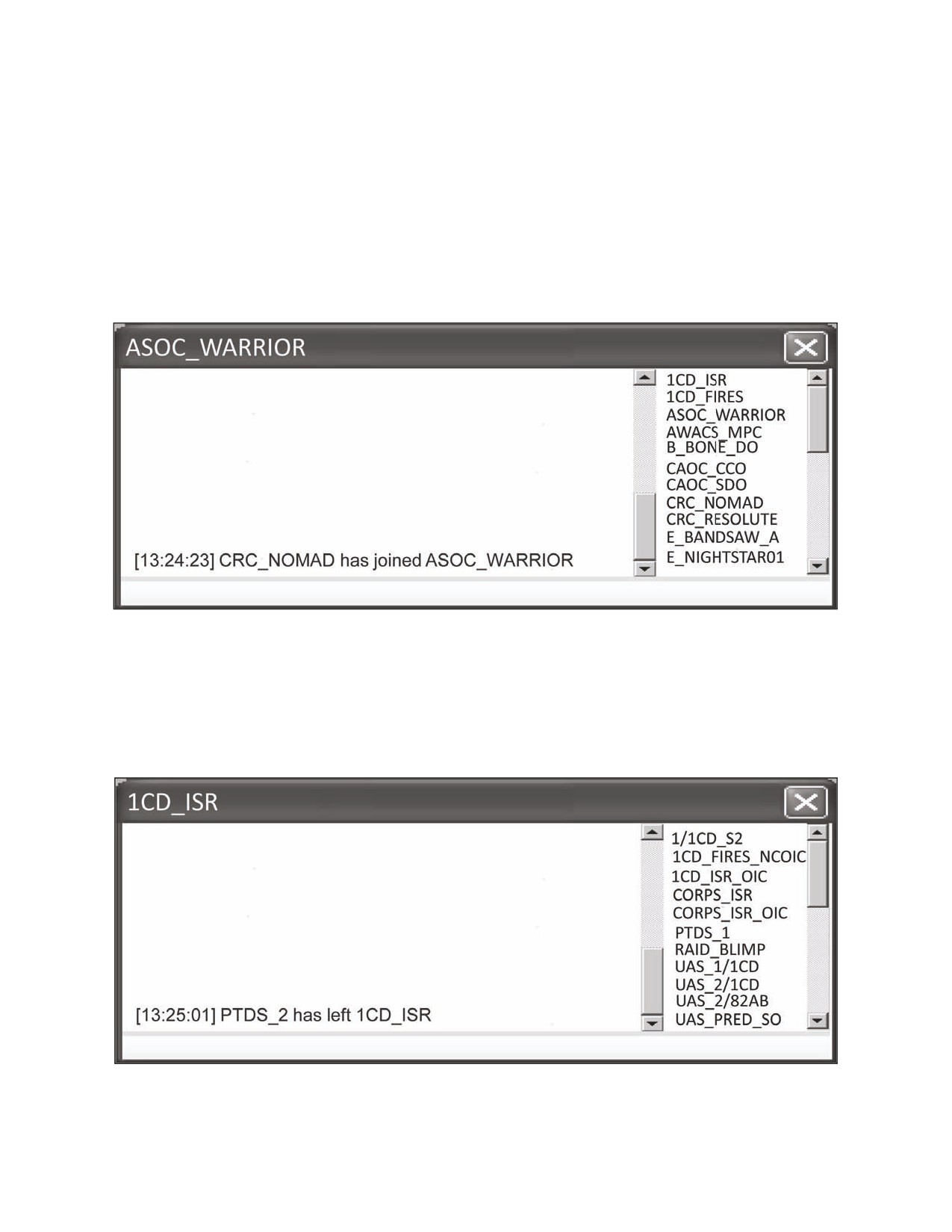
a. Check-in. Nearly all TC programs automatically announce room entry with a
highlighted entry stating the user has joined the chat room. The RO will treat this
notification as a check-in. An example of a user checking in to a chat room is
depicted in figure 5.
Figure 5.
Example of Tactical Chat Check In
b. Check-out. As with check-in, a message will be generated automatically when a
user has disconnected from the chat room. This will function as a check-out. An
example of a user checking out or leaving a chat room is depicted in figure 6. ROs
and participants should note that a critical user unexpectedly leaving a TC
room may be indicative of a connectivity problem with that critical user.
Figure 6.
Example of Tactical Chat Check Out
7 JULY 2009
FM 6-02.73 / MCRP 3-40.2B / NTTP 6-02.8 / AFTTP 3-2.77
19

2. Finding TC Room Users
While various TC applications have different ways to determine who the users are in
a given chat room, there are two common methods. TC operators can either search the
list of users in a chat room, or conduct a chat room net call.
a. Search List of Users.
(1) All TC users can determine who is in a chat room by scrolling the user list.
In many applications, the user list is located on the right side of a chat room
window.
(2) Using naming conventions as outlined in chapter 2 significantly enhances
this capability because it results in “lumping” like users together in the user list.
This is especially critical in chat rooms with a large amount of participants.
(3) Depending on the TC application, the user list may be manipulated as
required by the user. A proven method is to alphabetize the user list for ease of
use.
(4) Most TC applications will also allow a user to expand the user list to show
more users at once, as well as click on users to find their specific profile
information.
(5) An example of a user list is shown in figure 7.
Figure 7.
Example of a Chat Room List of Users
b. Conduct a Net Call.
(1) Net calls may be accomplished by any participating user and are done
similarly to traditional voice net calls or radio checks to confirm which users are
actively monitoring a chat room.
(2) A net call may be executed at any time, but is particularly helpful prior to
sending messages or commands where a specific audience is required to
receive and acknowledge the traffic.
(3) Use of net call should be used only when necessary so they do not interfere
with key message traffic in a chat room.
(4) An example of a TC user-to-user net call is depicted in figure 8.
20
FM 6-02.73 / MCRP 3-40.2B / NTTP 6-02.8 / AFTTP 3-2.77
7 JULY 2009

Figure 8.
Example of Tactical Chat Net Call
3. Roll Call
(1) Roll call is a formal process used prior to or during the transmission of
essential information over TC to identify whether key recipients of an intended
message are “present” in the chat room. Roll call should be initiated by the RO
and authorized participants only.
(2) Due to the large number of participants in a chat room, the use of a roll call
can be challenging. Rules of thumb for conducting a roll call:
(a) In addition to the message content, the roll call message must clearly
state:
• Which users are required to acknowledge the roll call.
• How users should respond to the roll call.
• Any specific instructions required of the users conducting the roll call.
(b) By default, users assigned as observers are not expected to respond to
roll calls unless specifically asked.
(3) Participants conducting the roll call will acknowledge and reply as directed.
Their reply may be as simple as a “c” for “copy” or as defined in appendix A, but
may also include a brief situation report if tasked.
(4) An example of a system specific roll call is shown in figure 9.
7 JULY 2009
FM 6-02.73 / MCRP 3-40.2B / NTTP 6-02.8 / AFTTP 3-2.77
21

Figure 9.
Example of Tactical Chat Roll Call
4. Standard TC Terminology and Abbreviations
The nature of chat as a means of coordination requires discipline in order to
minimize ambiguity and facilitate the understanding of messages sent and received.
Plain language may be the most effective means of passing information, especially with
new users or when giving commands. As a result, users should avoid generating new
terminology and abbreviations.
a. Abbreviations are used in TC to expedite information flow. However, they should
not be used at the expense of clarity and accuracy of information sent.
b. Do not use “civilian convenience” abbreviations commonly used in non-tactical
chat (i.e., lol, j/k, bff).
c. Avoid abbreviations that could have multiple meanings, unless made very clear in
the context of the message.
d. In order to streamline TC communications and minimize the amount of traffic
populating a chat room at a given time, brevity should be used whenever applicable.
e. Use approved terms detailed in Service, multi-Service, and joint publications.
f. See the table in appendix A for examples of standard TC terminology and
abbreviations for use during TC communications.
5. Message Structure
a. As with traditional radio transmissions, TC message structure should be
standardized in order to avoid confusion. A basic TC message should adhere to the
following format:
(1) Addressee (who a user is sending the message to).
(2) Message information.
(3) Applicable instructions.
b. Unlike traditional radio transmissions, it is not necessary to include the
originator’s call sign when conducting TC because it will be displayed in front of the
message traffic in the chat room window.
c. There is also no need to end a message with “over” or “out” because the posting
of the message ends the message string in a chat room window.
22
FM 6-02.73 / MCRP 3-40.2B / NTTP 6-02.8 / AFTTP 3-2.77
7 JULY 2009

d. An example of TC message structure is depicted in figure 10.
Figure 10. Example of Message Structure to Specific Addressee
6. Context
TC users must realize that context and intent are extremely difficult to convey over
chat and users may perceive information passed differently. For example:
a. Use of capital letters can be misinterpreted as “yelling” or “anger.”
b. High priority message traffic that is not highlighted or directed to a particular user
may be perceived as less of a priority.
c. Use of capital letters should be limited to TC messages that are of high
importance to the chat room population such as flash traffic.
7. Flash Traffic
a. Flash traffic is the use of all capitalized words to convey timely, critical
information rapidly to all members of a TC room. Flash traffic is normally used by
ROs and participants only. Flash traffic should be followed by critical information
sent in standard message structure format with a roll call if required.
b. For more information on acceptable flash words, see FM 1-02.1 / MCRP 3-25B /
NTTP 6-02.1 / AFTTP(I) 3-2.5, Multi-Service Brevity Codes.
c. Examples of commonly used flash words are listed in table 7.
Table 7. Examples of Flash Traffic
FLASH WORD
Meaning
AIR DEFENSE WARNING (in specific color)
Hostile attack is:
RED: Imminent or in progress
YELLOW: Probable
WHITE: Improbable
CEASE FIRE
Discontinue firing / do not open fire. Missiles in flight
are allowed to continue to intercept; continue to track.
CEASE ENGAGEMENT
A fire control order used to direct air defense units to
stop tactical action against a specified target. Guided
missiles already in flight will continue to intercept.
CHECK FIRE
Immediate pause of planned or current indirect fires.
DOWNED AIRCRAFT
Initial notification of potential combat search and
rescue or personnel recovery event.
FPCON (Letter)
Force protection condition.
7 JULY 2009
FM 6-02.73 / MCRP 3-40.2B / NTTP 6-02.8 / AFTTP 3-2.77
23

FRAGO
Fragmentary order follows.
HOLD FIRE
An emergency fire control order to stop firing on
designated target to include destruction of any
missiles in flight.
HOSTILE
Air to Air: A contact identified as enemy upon which
clearance to fire is authorized in accordance with
theater rules of engagement (ROE).
IDF
Indirect fire.
IED
Improvised explosive device.
IFE
In-flight emergency.
IMMEDIATE
Immediate fire mission / counter-fire mission.
INVESTIGATE
Verify specified elements of ROE, positive
identification (PID), collateral damage estimate
(CDE), and/or coordination of forces on the
referenced target/track.
MEDEVAC
Information on a medical evacuation (MEDEVAC)
request.
POI
Point of impact.
POO
Point of origin.
PRE-PLANNED
Pre-planned fire mission.
ROLL CALL
Initiate a TC roll call.
SAF
Small arms rire.
SAFETY
Immediate safety issue or potential fratricide.
SMACK
Clearance to employ ordnance on surface target
coordinates. ROE, PID, CDE, coordination of forces,
and commander’s guidance requirements on the
referenced target/track have been satisfied. NOT TO
BE UTILIZED IN A CAS (close air support)
SCENARIO.
TARGET
(Air to Ground) ROE, PID, coordination of forces, and
commander’s guidance requirements on the
referenced target/track have been satisfied.
Target/track correlation and CDE must be
accomplished prior to employing ordnance/fires.
TIC
Troops in contact.
URGENT
Information that requires immediate attention.
WEAPONS (FREE/TIGHT/HOLD/SAFE)
Engagement status IAW ROE or Brevity ublication.
Note: Any user of a TC room with situational awareness of an immediate safety issue,
potential fratricide, or other timely, critical information may post in any TC room or use
flash traffic without the permission of the RO.
8. Color Coded, Highlighting, and Sound Enabled Chat
a. Many TC applications allow users to convey critical information in TC through the
use of colors and sounds to highlight messages to the members of a chat room. For
example, some users configure their TC application so that improvised explosive
device (IED) flash traffic comes across as red with audio of an explosion that alerts
TC users of the message.
b. Most TC applications can also alert personnel to a new message in a chat room
they are monitoring by highlighting the room name. This is useful when users are
monitoring more than one chat room at a time.
24
FM 6-02.73 / MCRP 3-40.2B / NTTP 6-02.8 / AFTTP 3-2.77
7 JULY 2009
c. Colorizing key words linked to critical communications or TC call signs and
enabling sound cues when supported by the TC software enables users to
effectively monitor TC while maintaining appropriate focus on other systems critical
to the mission. An example of TC color coding is depicted in Table 8.
d. Color and sound coding must be standardized in the appropriate TC procedure
documents and users must accurately input the chat words necessary to “trigger” the
appropriate color or sound cue. Some TC systems default to a certain color. Users
should consider the capabilities and limitations of the TC application in use when
planning how to best use colors, sounds, and other cues. An example of how
inaccurate typing can lead to confusion and potential delays during a critical event is
shown in the following medical evacuation MEDEVAC scenario:
MEDEVAC SCENARIO
A MEDEVAC operation conducted during combat operations was delayed due to the
inaccurate typing of a TC user. When passing the severity of the injury in a command
TC room, the user typed the abbreviation for urgent surgical, “urg-surg,” to relay the
casualty’s condition to higher headquarters. Because the TC application they were
using was set to trigger color and sound alarms for the word “urgent surgical,” the
message was sent with no enhancing characteristics and may have been mistakenly
overlooked for a short period of time. This could have caused a critical delay in
launching the MEDEVAC aircraft if the receiving user was not paying particular attention
to that chat room when the message came through. Fortunately, in this scenario, the
user did not rely solely on color and sound alarms and caught the error before it
became an issue. This situation also highlights how TC may not be the C2 medium of
choice during MEDEVAC operations.
Table 8. Examples of TC Color Coding
Message
COLOR
FLASH TRAFFIC / Critical Unit Communications
red
Own unit elements/subordinate elements
green
Unit Commander
blue
Key External Agencies
brown
Higher Headquarters
orange
9. Reports
a. TC is an effective tool for sending scheduled and unscheduled reports. However,
unnecessarily saturating TC rooms with report information could create a situation
where users could miss seeing critical posts in fast-scrolling TC rooms (i.e., frequent
posts by many users, causing text to scroll quickly). There are two primary report
types used over TC applications: ad hoc and recurring.
(1) Ad Hoc Reports. Ad hoc reports are submitted as required to send or
receive information (see figure 11). Examples of ad hoc reports include:
(a) In-flight reports.
(b) Size, activity, location, unit, time, and equipment (SALUTE) reports.
(c) Position reports.
(d) Status reports.
7 JULY 2009
FM 6-02.73 / MCRP 3-40.2B / NTTP 6-02.8 / AFTTP 3-2.77
25

Figure 11. Example of an Ad Hoc In-flight Report
(2) Recurring Reports. Recurring reports are those submitted IAW a published
battle rhythm at predictable, reoccurring times. Examples include:
(a) Airspace reports.
(b) Daily situation reports (SITREPs) and rollups.
(c) Fuel and ammunition status reports.
(d) Personnel reports.
b. The following are rules of thumb for submitting reports using TC.
(1) Reports submitted in TC rooms should be done to enhance the situational
awareness of multiple users of the room.
(2) User specific reports should be sent by private chat or other means if
available.
(3) Reports that are not time critical should be submitted by other means such
as email, to avoid taking up valuable chat room space.
(4) Long reports should be submitted in less utilized, slower scrolling rooms so
they do not interfere with critical text communications in a busier chat room.
(5) Lengthy reoccurring reports should be:
(a) Submitted often enough to ensure timeliness of information and
contribute to the chat room population’s situational awareness.
(b) Not reoccur too often as to contribute to information overload in a room.
(c) Highlight only changes to previous reports to limit amount of information
in the chat room window.
(6) Reports following a line-format should be constructed ahead of time using
another program (e.g., Microsoft Word or Notepad) and pasted into a chat room.
This will facilitate accuracy and ensure the entire report is submitted at once and
not broken up by chat room message traffic.
26
FM 6-02.73 / MCRP 3-40.2B / NTTP 6-02.8 / AFTTP 3-2.77
7 JULY 2009
10. Time Synchronization
a. Synchronization. Time synchronization in TC is critical to support the submission
of real-time information. In many cases the TC time may not be synchronized with
the time format dictated in theater guidelines. Therefore, it is imperative that
operators do not rely on the TC time as the sole source for synchronizing operations.
b. Guidelines. Theater guidelines should specify the unit of time in use for
operations.
(1) Theater unit of time should be synchronized on TC network servers.
(2) Zulu time is the standard for TC networks. Use of zulu time maximizes
standardization and joint integration while minimizing confusion.
(3) Users must clearly state when a TC message references any time other
than the theater approved standard unit of time.
c. Time Stamps. It must be clearly understood that the time stamp automatically
attached to a TC post reflects the time a message was sent and is not related to the
content of the message. Users should never use the TC application indicated time
stamp as an actual event time. Times associated with a specific event (time on
target, IED) must be clearly indicated in the message content.
(1) When a computer is added to a domain, it automatically uses the default
network timing source for its time stamp. This source is set by domain
controllers and should be the same as the unit of time used in theater.
(2) Certain systems, such as airborne platforms with integrated TC systems,
may use their own time source.
(3) It is the responsibility of the RO to ensure their TC application is using the
appropriate time.
d. Time Hacks. A daily time hack is necessary for accurate and timely
transmissions using TC. Users will enhance precision of chat communications by
adding a time hack to:
(1) All lawful orders.
(2) Any time sensitive information.
11. Acknowledging TC Communications
a. As with traditional voice communications, it is necessary that the sender and
receiver of TC information close the communication loop to ensure
acknowledgement and receipt of TC posts.
b. It is very easy to send a message using TC, but not as easy to determine if and
when the message was received and understood. See figure 12 for an example of
acknowledging TC communications.
7 JULY 2009
FM 6-02.73 / MCRP 3-40.2B / NTTP 6-02.8 / AFTTP 3-2.77
27

Figure 12. Example of Acknowledging Tactical Chat Communications
(1) Recipients of posts should acknowledge communications even when they
are unable to process the information due to higher priorities.
(2) Examples of TC acknowledgement can be found in appendix A and include:
(a) Roger (rgr).
(b) Will Comply (wilco).
(c) Copy (c).
(d) Standby (stby).
(e) Working (wkg).
(f) Affirmative (affirm).
12. Commands
a. Commands given over chat are no different than those issued over a voice
frequency and will typically only be given over TC command nets.
b. Guidelines for TC commands.
(1) Commands disseminated via TC must be clear and concise to reduce the
potential of misunderstanding.
(2) Command messages must show intended recipient if not directed to the
entire chat room population.
(3) If multiple addresses have been issued the same order, a roll call should be
used to ensure acknowledgement and understanding by all participants.
(4) The requirement for the intended recipient to acknowledge the receipt of
formal orders applies exactly as it does in verbal communications.
(a) If a brief back is required to facilitate understanding of a command and
the commander’s intent, the receiver of the message should make every
effort to conduct the brief back verbally.
(b) If TC is the only available means, then the receiver should brief back their
understanding of the command in their own words and avoid simply cutting
and pasting the original command to validate they understood the
commander’s intent.
28
FM 6-02.73 / MCRP 3-40.2B / NTTP 6-02.8 / AFTTP 3-2.77
7 JULY 2009

(5) When relaying orders for another agency, users should include the order
issuing agency’s TC call sign and the term “directs” followed by the order (e.g.,
G3 directs…).
c. Do not use TC to pass or relay commands or lawful orders when:
(1) Theater, Service, or command dictates otherwise.
(2) Another medium would be faster or more effective.
(3) The order contains information beyond the need to know of the other chat
room participants.
d. Examples of commands and lawful orders utilizing chat are:
(1) Flash traffic.
(2) Operation orders.
(3) Reposition or committing forces to a specific tasking (see figure 13).
(4) Aircraft commands to return to base.
(5) Clearing fires.
(6) Activating an airspace control measure or fire support coordination measure
for a particular asset to support a mission.
Figure 13. Example of Lawful Orders on Tactical Chat
13. Private Chat
The majority of TC applications allow users to conduct private chat, commonly
referred to as whisper, to discuss topics apart from the chat room population. This
feature is often used as a way to conduct detailed coordination that could otherwise
flood a chat room and cause confusion of the other users. It allows for private agency-
to-agency coordination by allowing one user to invite another into their own personal
chat room. Private chat keeps unnecessary details out of the main room.
a. There are several key considerations when using private chat:
(1) Private chat should only be considered for essential matters that concern
one or two users, where a phone or similar means is impractical.
(2) When a discussion is likely to generate confusion, a private chat room may
be used.
7 JULY 2009
FM 6-02.73 / MCRP 3-40.2B / NTTP 6-02.8 / AFTTP 3-2.77
29
(3) Where a complex or long transmission to a small group is necessary, a
private room is the preferred method. Units should have these rooms
established in advance for this purpose.
b. Private chat has the potential to negatively impact the TC community. Private
chat:
(1) Will reduce the main chat room users’ situational awareness.
(2) Will potentially reduce other users’ access to critical information.
(3) Should be short in duration and as specific as practical.
(4) Should not be used when information is time critical.
(5) May not be authorized by the RO, as stated in the room description.
c. Avoid using private chat to communicate decisions or orders. Decisions and
orders should be communicated in an official command TC room or by other means.
When communications are likely to raise questions, or cannot effectively be
conveyed via private chat, a phone or radio shall be used in order to mitigate the
potential for confusion.
14. Chat Room Layout Rules of Engagement
In order to increase efficiency, units should filter information flow based on
mission requirements. Units may choose to separate key staff functions into specific
chat rooms or use TC to consolidate radio nets matching a traditional voice net
structure. A key to success is for units to appoint qualified operators to participate in
these chat rooms to maximize the flow of information. Commanders must carefully
assess the number of chat rooms and cross check to ensure their TC users can
accomplish the task without distraction or task saturation. Leaders need to make an
assessment based on both the mission and the capabilities of their TC users to
determine the number of TC rooms their operators can effectively monitor.
a. Users must be given guidance on which TC rooms require participation vs.
observation for task accomplishment and they must configure their screen
accordingly. This is traditionally found in a TC Guard Chart found in procedure
documents such as annex K to an OPORD, SPINS, or OPTASKCHAT.
b. Operators responsible for very specific, mission essential tasks should monitor a
single priority chat room. If needed, users may add one or two additional rooms as
required for critical situational awareness.
c. Operators with multiple duties or broader responsibilities may need to monitor
multiple windows. Rules of thumb for monitoring multiple windows:
(1) Recent theater experience has shown that four to six rooms are typically the
maximum number that can be effectively monitored at any given time.
(2) Up to ten additional rooms may be open, but minimized and occasionally
“cycled through,” or have features such as “flash” in mIRC, to assist with
notification when new traffic is posted.
(3) Resizing priority chat rooms to make them stand out enables a more
effective scan pattern and reduces the likelihood of missing information due to a
fast TC scroll rate caused by frequent posts from the chat room population.
(4) TC rooms with a fast scroll rate should be configured larger than other TC
rooms with less communications.
30
FM 6-02.73 / MCRP 3-40.2B / NTTP 6-02.8 / AFTTP 3-2.77
7 JULY 2009

(5) Making priority rooms larger and moving them to the left side of the screen
compliments a typical TC scan pattern (left to right).
(6) Use of dual monitors with all chat rooms tiled on one (left or right monitor) as
a technique may also be useful to minimize confusion with other computer
applications.
d. Figures 14, 15, and 16 give examples of the three different chat room layouts
based on user experience, competence, and responsibilities. Some platforms,
particularly aircraft, may have limited screen space to show multiple windows
simultaneously. Individual platforms will have to prioritize their chat room
participation and ensure that all participants are aware of these deficiencies.
Figure 14. Chat Room Layout Example - 3 Rooms
7 JULY 2009
FM 6-02.73 / MCRP 3-40.2B / NTTP 6-02.8 / AFTTP 3-2.77
31
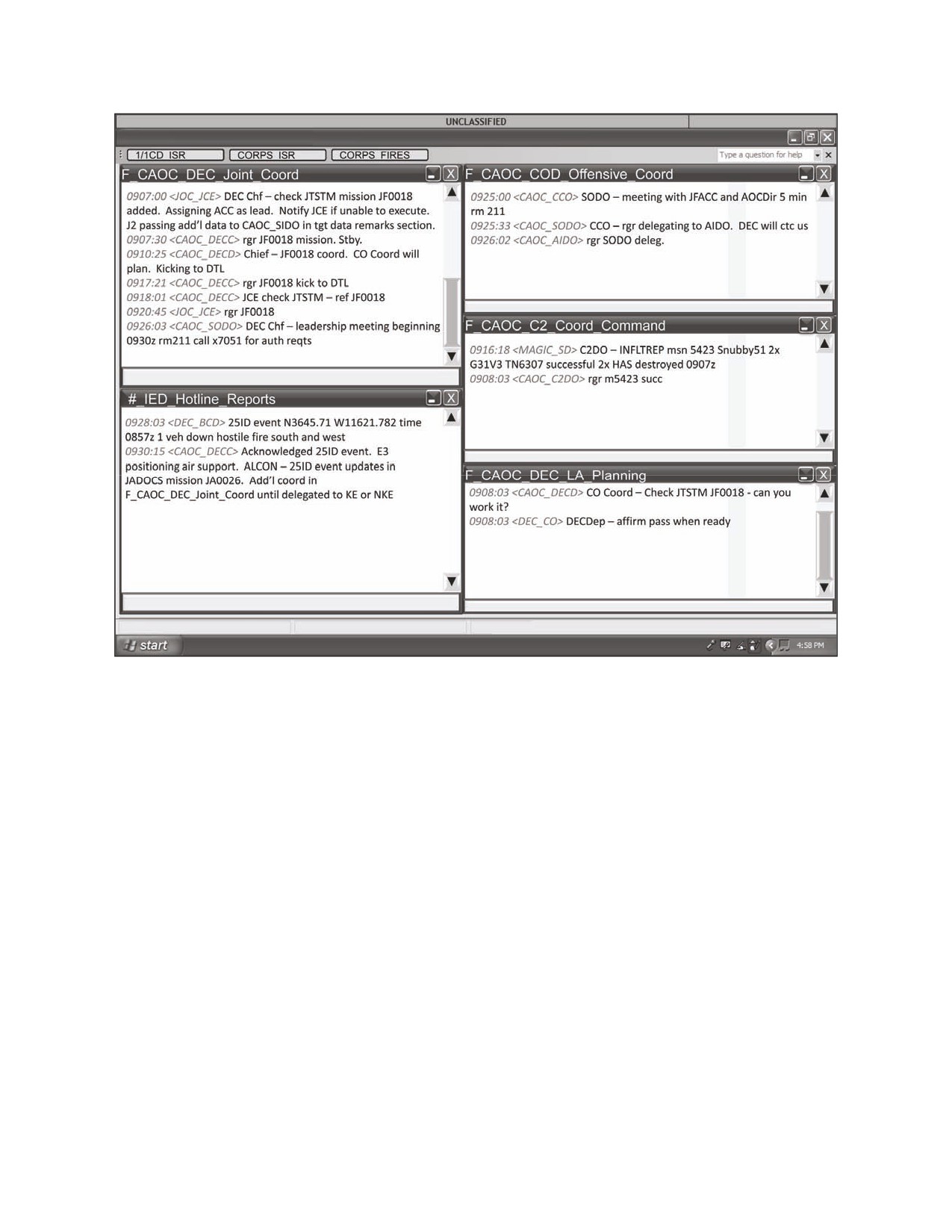
Figure 15. Chat Room Layout Example - 5 Rooms
32
FM 6-02.73 / MCRP 3-40.2B / NTTP 6-02.8 / AFTTP 3-2.77
7 JULY 2009

Figure 16. Chat Room Layout Example - 8 Rooms
15. Minimizing Communication Errors
An important element of TC is the ability to allow users to pass information between
chat rooms, from chat room to voice net or chat to another digital system. This inherent
flexibility allows information posted in one chat room to be quickly passed on to a larger
population for simultaneous action on the information. For this reason, it is critical to
minimize communication errors when transferring information so that only accurate
information is disseminated.
a. Cut and Paste. Cutting and pasting information to cross post into multiple TC
rooms is a way to quickly work a tactical problem in parallel. However, be advised
timely quality control of outgoing message information should occur prior to sending.
(1) When using cut and paste, extreme care must be used to ensure all
pertinent information is copied.
(2) For critical communications, users should proof read the text line prior to
pasting the information into a different chat room or SOR to ensure accuracy
and to prevent inadvertently spreading bad information.
7 JULY 2009
FM 6-02.73 / MCRP 3-40.2B / NTTP 6-02.8 / AFTTP 3-2.77
33
(3) An alternate method to consider is sending a link or directions to the room of
interest to avoid pulling information out of context. Consideration must be given
to limitations on access to other rooms, the urgency of disseminating the
information, and the releasability of the information.
b. Accuracy. The potential for inadvertently spreading bad or improperly
coordinated information on TC is high. Attention to detail is critical.
(1) Users must pay particular attention to ensure their posts are entered in the
right TC room. As a rule of thumb, users should check twice before hitting send.
(a) Check the room name prior to entering a TC post.
(b) If a post is typed into the entry line of the wrong room:
• copy and paste the entry into the right room, and
• delete the text from the entry line of the wrong room prior to hitting
enter on the computer.
(2) If an error is made in posting a message, quickly correct the error and ask
for acknowledgement from all pertinent users.
c. Scroll Rate Error. Users must be aware that posts may quickly scroll off the
screen in a rapidly scrolling TC room.
(1) It is critical that users possess the ability to “keep up” with traffic scrolling
quickly in a chat room, especially when sending chat that requires
acknowledgement to specific users.
(2) If no acknowledgement is received from the intended recipients:
(a) Scroll up in the chat room to ensure you posted in the right room.
(b) Send a message to the intended recipient to receive acknowledgement of
message.
(c) If acknowledgement is not received after an appropriate amount of time,
repost the information. Consideration should be given to the amount of
information posted. Large amounts of information posted a second time will
cause an additional rapid scroll rate and could worsen the problem.
(3) Users must realize that based on communications priorities and the tactical
situation, their post may not be the highest priority at the time for the intended
recipient. Patience is required in these situations.
34
FM 6-02.73 / MCRP 3-40.2B / NTTP 6-02.8 / AFTTP 3-2.77
7 JULY 2009
Chapter IV
BEST PRACTICE VIGNETTES
1. Warfighting Mission Areas
TC has become a common means of collaboration throughout tactical operations. TC
can be a primary, secondary, or tertiary means of communication and is often selected
as the primary means due to its flexibility and ease of use. This chapter contains best
practices for using TC with specific examples showing how TC, in the coordination,
integration, and execution of missions, often augments current collaborative tools and
systems of record. Examples highlight how TC has improved operations across major
warfighting mission areas to include maneuver, logistics, intelligence, fires, force
protection, air operations, and personnel recovery.
2. Maneuver
TC is used in maneuver to augment other communication means both across units
and up echelons. While TC cannot replace voice communications, it can greatly
enhance situational understanding when used for communicating between echelons
above division (EAD) assets and tactical or operational units. TC is also used to
enhance maneuver by augmenting systems of record to ensure critical information is
passed quickly to the largest number of required users.
a. Several methods in which TC enhances maneuver include:
(1) Sending and receiving mission information and orders.
(2) Sending, cueing, and lasing instructions to UAS mission payload operators.
(3) Providing real time UAS information directly back to the supported
maneuver unit’s tactical operations center (TOC).
(4) Providing real time updates on close air support (CAS) or close combat
attack (CCA) support to maneuver units in contact.
(5) Facilitating a common operational picture (COP) by collaborating
information between TOCs on the location and movement of unit troops on the
ground with adjacent or supporting forces.
b. Several examples of how TC enhances maneuver are described in the following
vignettes.
7 JULY 2009
FM 6-02.73 / MCRP 3-40.2B / NTTP 6-02.8 / AFTTP 3-2.77
35
CORDON AND SEARCH VIGNETTE
During a day mission by ground maneuver units conducting cordon and search
operations in a small village known for harboring insurgents, a Predator UAS flying in
support of troops on the ground spotted movement on the roof of a previously searched
building. The UAS operator, noticing that the forces conducting the cordon and search
had already begun moving away from the structure, used TC to immediately notify the
ground unit’s TOC that an individual was moving on the roof and appeared to be getting
into a hide site. After communicating this information to the troops on the ground, the
TOC confirmed that the individual seen by the UAS was not in their unit, and with the
assistance of the UAS operator using TC, was able to direct his troops to reenter the
building and “talk” them to the suspected hide site over voice communications. The
individual hiding on the rooftop was then captured. The use of TC in this instance was
critical to the capture of an insurgent that would otherwise have escaped. Units have
begun to incorporate VOSIP with TC in OIF to allow units to speak directly with UAS
operators, increasing productivity by 50%.
SECURING THE OBJECTIVE VIGNETTE
During Operation Iraqi Freedom, 3rd Corps Headquarters published an OPORD to
secure an objective area for Multi-National Division-Baghdad (MND-B). TC operators,
armed with the detailed planning of phased objectives, units tasks, and supporting
assets published in the OPORD, were able to maintain real time awareness of the
operational environment through TC by monitoring critical chat rooms populated by the
organizations enhancing C2 for the mission. As the operation unfolded, MND-B
Headquarters TC operators used the timely information flow provided through TC to
respond immediately to critical tasks. Information radioed from the field to unit TOCs
was quickly passed up to MND-B over TC, and operators were able to coordinate A-10
and field artillery support, adjusting, synchronizing, and deconflicting it through the
“Fires” chat room based on mission developments. By using TC to adjust fires, friendly
forces were quickly and accurately able to maximize maneuver and ensure mission
success.
3. Logistics and Force Sustainment
TC is used in logistics and force sustainment operations to pass necessary and
often critical logistics information without flooding voice communication mediums. This
enables forces to provide support and services to help ensure freedom of action, extend
operational reach, and prolong endurance. TC is also used to send detailed logistics
and other sustainment reports across units and up and down echelons IAW a published
battle rhythm or when ad hoc reports are requested by higher headquarters. It can also
be used between units to coordinate logistical support for troops passing through
another unit’s area of operations.
a. Several methods in which TC enhances logistics and force sustainment include:
(1) Passing daily logistical reports to TC users.
(2) Providing forward arming and refueling point (FARP) status reports to users.
(3) Forecasting and coordinating for logistical restocking of critical supply items.
36
FM 6-02.73 / MCRP 3-40.2B / NTTP 6-02.8 / AFTTP 3-2.77
7 JULY 2009
(4) Coordinating with adjacent units to assist with the critical resupply of units
passing through their area of operations.
(5) Passing changes in personnel status reports to facilitate rapid requests for
forces.
(6) Coordinating aerial refueling missions to prolong support operations.
b. An example of how TC enhances logistics is described in the following vignette.
CRITICAL REFUELING VIGNETTE
During Operation Enduring Freedom, a 10th Mountain Division Blackhawk helicopter
returning from a battlefield circulation mission ran into a wall of thunderstorms while
coming over a mountain pass. They did not have enough fuel to return to the airfield
and were in a fuel critical situation. They notified their battalion TOC using both voice
and chat over Blue Force Tracker (BFT) that they needed information on the status of
fuel available at a nearby forward operating base (FOB) that was out of radio
communications range and not usually configured to refuel helicopters. The TOC
immediately requested and received an ad hoc status report from the FOB using TC.
The FOB responded, indicating that the FARP was currently in a “cold” status but that
they could have it operational in time for the helicopter’s arrival and had enough fuel to
support the mission. This information was sent back to the helicopter via voice
communications and the crew was able to divert to the FOB for refueling and eventually
returned safely to their home airfield after the weather had passed. The combined use
of voice communications, TC, and a system of record with chat capability, resulted in
the logistical resupply of an aircrew and the successful completion of their mission.
4. Intelligence
TC is used extensively in the intelligence community in support of targeting to gather
and disseminate near real-time intelligence, surveillance, and reconnaissance (ISR)
data among multiple users. TC is effective because of its inherent ability to inform a
broad base of users about rapid changes. Using TC, intelligence officers can update
their estimates immediately, giving commanders a more accurate picture of the most
current situation in the operational environment.
a. Several methods in which TC enhances intelligence include:
(1) Receiving, analyzing, and distributing SALUTE reports.
(2) Receiving, analyzing, and distributing battle damage assessments (BDAs).
(3) Comparing ISR data by coordinating to cross-cue multiple ISR assets.
(4) Passing enemy indirect fire information from multiple ISR assets to quickly
acquire enemy locations for conduct of counter-fire operations.
(5) Forwarding UAS ISR information to operation centers and other TC users to
include:
(a) ISR sensor-to-shooter communications (see figure 17).
(b) Counter IED detection/interdiction.
(c) Status and station time of UAS asset providing tactical over watch.
(6) Quickly redirecting ISR assets to priority missions decreasing response
time.
7 JULY 2009
FM 6-02.73 / MCRP 3-40.2B / NTTP 6-02.8 / AFTTP 3-2.77
37
(7) Directing ISR assets to use optics and systems such as electronic
identification and moving target indicators.
(8) Gathering timely intelligence information and quickly incorporating it into the
COP to provide a near real-time picture of the operational environment.
b. Examples of how TC enhances intelligence are described in the following
vignettes.
SNIPER VIGNETTE
During a daylight operation, a Hunter UAS was orbiting near troops in contact with the
enemy at a road intersection. The Infantry Soldiers on the ground began to take sniper
fire from one of the surrounding structures but were unable to pinpoint the location of
the sniper due to sunlight and many buildings near their position. The company
commander immediately reported the situation to his battalion TOC. The message was
heard by the intelligence officer who recommended tasking the nearby UAS with an
orbit that would facilitate locating the sniper. The TOC battle captain then contacted the
UAS operator through TC with the mission information and recommended areas to
conduct surveillance based on the intelligence officer’s analysis. The UAS was
immediately moved to an orbit that facilitated viewing the buildings surrounding the
ground forces. With the help of the battalion intelligence officer giving the UAS operator
pan and zoom guidance, the location of two snipers was pin pointed. The information
was then passed through chat and video imagery to the TOC for targeting.
THEATER TO BRIGADE ISR COORDINATION VIGNETTE
JSTARS [Joint Surveillance Target Attack Radar System] was used during curfew hours
in Bagdad, Iraq, to monitor an area for movers using moving target indicators (MTI).
Just after midnight, they observed a MTI in a neighborhood known for its recent IED
activity. With its onboard TC system, the JSTARS coordinated directly with a brigade
combat team (BCT) TOC to use their Shadow UAS to further investigate the MTI. Using
chat, the Shadow was tasked by the battle captain with a new orbit and objective. With
the assistance of the BCT S2’s analysis of the Shadow video feed, the BCT was able to
quickly obtain positive identification of a 5-man team emplacing IEDs and immediately
notified the combat aviation brigade via TC and a nearby ground patrol with a SALUTE
report over voice communications. Within 30 minutes, two Apache helicopters
destroyed the target and a ground patrol was directed to the scene to secure the area
and conduct the BDA.
38
FM 6-02.73 / MCRP 3-40.2B / NTTP 6-02.8 / AFTTP 3-2.77
7 JULY 2009

Figure 17. Sample Sensor-to-shooter Communications Net Using TC
5. Fires
TC is used in the conduct of fires to enhance the collective and coordinated use of
indirect and joint fires through the targeting process. The ability to deconflict airspace
rapidly using chat has proven significant in reducing the time required for the conduct of
fires in recent operations. TC has significantly enhanced the coordination process and
reduced the kill chain by coupling the ability to consolidate all airspace coordination for
a given area or responsibility into a single chat room.
a. Several methods in which TC enhances fires include:
(1) Rapidly deconflicting airspace.
(2) Reducing the kill chain by allowing users to monitor communications traffic
and only input changes when needed.
(3) Coordinating counter battery fire by cross-cueing multiple assets.
(4) Providing rules of engagement (ROE) verification.
(5) Disseminating information and coordinating activation and deactivation of:
(a) Restricted operations zones (ROZ).
(b) Special use airspace.
7 JULY 2009
FM 6-02.73 / MCRP 3-40.2B / NTTP 6-02.8 / AFTTP 3-2.77
39
(6) Passing information to coordinate surface fires to include:
(a) Point of origin (POO).
(b) Point of impact (POI).
(c) Maximum altitude.
(d) Airspace impacted.
b. Examples of how TC enhances fires are described in the following vignettes.
CLEARANCE OF FIRES VIGNETTE
Ground units in Afghanistan were commonly separated by more than 90 kilometers.
Line-of-sight issues made TC the primary method of communication between battalion
and brigade TOCs. The radio telephone operator would monitor a minimum of four chat
rooms (battle captain, CJTF Fires, CJTF ASOC, and combined joint special operations
task force) for significant activities. The CJTF and division chat rooms were used for
clearance of fires between unit boundaries above the battalion level and into numerous
CJTF-owned areas in support of extremely long convoys and air-assault operations.
Rather than contacting several agencies via radio or telephone and taking several
minutes to initiate fire missions on a fleeing target or in the middle of a TIC, unit fire
support elements used TC rooms to request fires and deconflict airspace required for
the mission in a matter of seconds. An example of this transaction would look like this
in the Fires Chat Room:
“[03:31:27] <2/1BDE_BAE_FSE> IMMEDIATE Fire Mission, POO, Grid 28M MC 13245 24512, Killbox
32AY1SE, POI GRID 28M MC 14212 26114, Killbox 32AY3NE, MAX ORD 8.5K”
The CRC controller acknowledges the fire mission request and works to move or restrict
manned aircraft from affected airspace/altitudes.
“[03:31:28] <CRC_Resolute> 2/1BDE_BAE_FSE, stby wkng”
Once the CRC controller has issued all restrictions, moved aircraft if required, and
sanitized affected airspace using radar awareness from their scope, they provide
clearance to the requester.
“[03:31:57] <CRC_Resolute> 2/1BDE_BAE_FSE, Resolute all clear”
“[03:32:04] <2/1BDE_BAE_FSE> c”
Once the fire mission is complete, the brigade fire support element notifies users of the
end of mission.
“[03:41:23] <2/1BDE_BAE_FSE> EOM
“[03:41:31] <CRC_Resolute> c”
40
FM 6-02.73 / MCRP 3-40.2B / NTTP 6-02.8 / AFTTP 3-2.77
7 JULY 2009
COUNTER BATTERY VIGNETTE
Upon taking indirect fire at a forward operating base (FOB), TC was used to cross-cue
and coordinate multiple ISR and fires assets within theater to respond. Counter battery
radar initiated the process after picking up the incoming rounds and immediately posted
their POO in the fires chat room. A UAS operator with an asset overhead immediately
slewed his optics to the POO grid and informed the supporting unit of a possible positive
identification (PID) of an enemy mortar/rocket team. Airspace controllers in the fires
chat room reading the message traffic simultaneously began clearing airspace for
counter battery fire while a new UAS was assigned to follow and maintain PID of the
enemy if they traveled outside of the line of site of the initial UAS. At the same time, a
counter-fire was coordinated over TC, an air weapons team was ramped up, and a
nearby ground patrol was notified of the target. A fires process that has traditionally
taken numerous radio calls and large amounts of time to synchronize was coordinated
and executed in a few short minutes using TC.
6. Force Protection
TC is used to enhance force protection by quickly disseminating key information so
that commanders can continue to present maximum combat power while preserving
their forces and responding to threats in a timely manner.
a. Several methods in which TC enhances force protection include:
(1) Immediately disseminating threat level changes and base defense
conditions to all users.
(2) Directing unit responses to enemy attacks such as indirect fire.
(3) Changing or updating mission oriented protective postures.
(4) Sending personnel and equipment reports following attacks on FOBs.
(5) Changing or updating air defense postures in response to an aerial threat.
(6) Coordinating defensive counterair (DCA), [USMC used the term antiair
warfare] or air defense artillery (ADA).
(7) Directing force protection surveillance system operations.
b. An example of how TC enhances force protection is described in the following
vignette.
AIR DEFENSE VIGNETTE
During an air defense exercise hosted by the Weapons Tactics Instructor Course at
Marine Corps Air Station Yuma, AZ, the Army Patriot and Marine Tactical Air
Operations Center (TAOC) heavily utilized TC during the execution phase of the
mission to pass timely information. Both units used it to pass engagement orders, Link-
16 target track numbers, missile inventories, and status reports. In the words of one
observer, “this hugely aided the Sector Air Defense Commander’s ability to address
immediate threats with the most pertinent weapons system, F/A-18 or Patriot, in a timely
and lethal manner.” Additionally, when voice communications were lost, TC was the
only method to cue Patriots for targeting. Without a chat capability, the missile sites
would have gone into “self defense mode,” greatly increasing the chance for fratricide
and decreasing the ability to accomplish the defense mission.
7 JULY 2009
FM 6-02.73 / MCRP 3-40.2B / NTTP 6-02.8 / AFTTP 3-2.77
41
7. Air Operations
TC is commonly used to coordinate full spectrum air operations because it provides
a fast and deliberate means to communicate information allowing aviation units to
respond quicker to supported units. This is especially important when coordinating time
critical aviation support for troops on the ground such as MEDEVAC, casualty
evacuation (CASEVAC), CCA, and CAS.
a. There are many ways in which TC enhances air operations to include:
(1) Passing of critical requests for:
(a)
9-Line CAS requests.
(b) CCA Support.
(c) MEDEVAC requests.
(d) CASEVAC requests.
(2) Coordinating approval, coordination, and deconfliction of UAS, rotary-wing,
and fixed-wing aircraft.
(a) UAS launch, handoff, operation, and recovery may be coordinated via TC
primarily and voice secondary.
(b) Rotary or fixed-wing aircraft airspace can be coordinated via TC between
TOCs, joint terminal attack controllers (JTACs) and TOCs, or TOCs and
combined air operations centers (CAOCs)/air operations centers (AOCs).
(3) When an aircraft is on a JTAC frequency, TC can be used to coordinate:
(a) Lethal airspace (i.e., aircraft dropping munitions).
(b) Show of force.
(c) Climbs/descents.
(d) ROZ enforcement.
(e) Type 1, 2, or 3 control information.
(4) CAS coordination to include:
(a) Near-real-time management between ASOC and CRC/Airborne Warning
and Control System (AWACS)/Joint Surveillance Target Attack Radar System
(JSTARS) of air support requests (ASRs) and supporting aircraft.
(b) Troops in contact (TIC) declaration and response.
(c) Kill box activation and deactivation.
(5) Dynamic targeting (DT) coordination to include:
(a) Initial notification or tasking from CAOC/AOC to controlling agency.
(b) Target information/9-Line passed to ASOC/controlling agency/JTAC.
(c) Engagement authority.
(d) BDA determination.
(6) Alert scramble coordination to include:
(a) Request and authorization between tactical and operational assets.
(b) Air refueling coordination/management.
(c) Refueling track.
(d) Tanker and receiver status and locations.
42
FM 6-02.73 / MCRP 3-40.2B / NTTP 6-02.8 / AFTTP 3-2.77
7 JULY 2009
(7) Airfield operations and weather information dissemination to include:
(a) Airfield divert status and alarm conditions.
(b) Current and forecasted weather.
(c) Arrival and departure status.
(8) Global strike coordination to include:
(a) Authorization of target designation.
(b) Scrambling of assets.
(c) Providing clearance to engage.
b. Examples of how TC enhances air operations are described in the following
vignettes.
AIR SUPPORT REQUEST VIGNETTE
A JTAC was notified that a forward ground element was taking fire and was requesting
CAS. The JTAC used the designated TC chat room to notify the ASOC that the forward
element was taking fire and was requesting support. He immediately passed the grid
location, threat details, and control frequency, and then followed up with a full “9-Line.”
Using TC to multitask, the ASOC, CAOC, and CRC/E-3 coordinated to get a flight of
F-16s overhead. Through chat, these agencies were also able to quickly revise the
aerial refueling plan to move a tanker into place to support the mission. The F-16 pilots
then received the updated tasking, accurate 9-Line information, and revised refueling
plan in a fraction of the time it would have required using more traditional
communication methods (joint air request net and C2 coordination SATCOM [satellite
communications nets]).
AIRSPACE COORDINATION VIGNETTE
During a recent deployment to OIF, the senior director of the CRC monitored six TC
windows (ASOC, C2, CAOC Tanker Cell, TAOC/DASC, Radar Approach
Control/Airspace, and Special Operations). This allowed near real time targeting
communication between the ASOC and supported JTACs, various positions in the
CAOC, special operations forces, all UAS operators, and other C2 agencies such as
ATC facilities, the Marine TAOC, and the DASC. This configuration was especially
helpful when airspace was requested by aircrews that straddled or flew across the
areas of responsibility of multiple C2 agencies. All impacted players were up in a single
chat room and could coordinate in seconds rather than minutes by radio or secure
phone. This use of TC reduced traffic on three SATCOM nets increasing bandwidth for
primary communications.
7 JULY 2009
FM 6-02.73 / MCRP 3-40.2B / NTTP 6-02.8 / AFTTP 3-2.77
43
8. Personnel Recovery
Another mission area in which TC can be used is personnel recovery (PR).
However, there is a danger using TC in a PR event due to the nature of the mission.
Multiple users jumping into the chat room information flow can distract the primary
recovery mission. It is critical, especially in the TC environment, to maintain good
communications discipline. Once notification of isolated personnel is passed via TC,
multiple units/resources are simultaneously notified saving time and redundant
communications.
a. Several methods in which TC enhances personnel recovery include:
(1) Disseminating information on the location and condition of personnel.
(2) Authorizing and coordinating the support of ISR assets.
(3) Activating and deactivating ROZ as required.
(4) Integrating and synchronizing responding units.
b. The joint personnel recovery center (JPRC) uses TC to notify the TACS on all
search and recovery operations, typically through a chat room monitored by most
units in the operating environment. This allows responding units to have the same
information to coordinate their efforts and synchronize a response to execute the
recovery.
44
FM 6-02.73 / MCRP 3-40.2B / NTTP 6-02.8 / AFTTP 3-2.77
7 JULY 2009
Chapter V
TC TROUBLESHOOTING
1. Troubleshooting
When a problem with TC is first detected by a user, the extent and nature of the
problem must be quickly assessed to ensure minimum loss of critical information during
the down time. Some problems may be quickly resolved by the users themselves.
Other problems may require involvement by communications personnel. It is critical to
record essential information in open chat rooms and document the time the system
went down prior to resetting. This will help ensure continuity and determine the need to
acquire information missed during the time TC was inoperable. This chapter identifies
the immediate and follow-on actions of a user to ensure the fastest troubleshooting and
remedy of common TC problems. Table 9 is a sample checklist for trouble shooting TC.
Table 9. TC Trouble Shooting Checklist
Immediate Actions.
Use the following actions to restore or isolate faults with TC before reporting a problem
to a Help Desk.
1
Check local area network (LAN) connections. Some systems have lights to indicate
connectivity.
2
Check power connections. Ensure battery, adapters, and outlets all work.
3
Scroll to bottom of chat room window. Users scrolled to the top will not see new
message traffic and the screen will appear to be “locked up.”
4
Compare your workstation to other local workstations to determine if the issue is
isolated to one system or a group of systems.
5
Determine if other systems using the same network have issues. Call other units
with users in the chat room if necessary.
6
Close all non-essential applications.
7
Close all non-essential chat rooms.
8
Type a test message in the chat room to see if it posts in the window. Example “.”
9
If the faults are cleared by the above actions, then resume normal operations. If not,
then continue to troubleshoot internally by resetting the system.
Follow-on Actions.
1
Record essential data from the chat room window (times, locations, reports, etc.).
2
Disconnect and then reconnect to the TC server and check for connectivity.
3
Connect to an alternate TC server if available.
4
Restart TC application and check for connectivity.
5
Reboot entire system and check for connectivity.
6
If faults are cleared by any of the above actions, then resume normal operations. If
not, assess whether you have lost all TC functionality, or if you have limited
capability with an abnormal condition. Examples of abnormal conditions are:
• Slow performance.
• All or some of the usual room participants and observers are not present.
This assessment will dictate the user’s next course of action.
7 JULY 2009
FM 6-02.73 / MCRP 3-40.2B / NTTP 6-02.8 / AFTTP 3-2.77
45
Actions with no TC Functionality.
1
Immediately proceed to alternate communications means identified during mission
planning.
2
If possible, capture any important tactical data remaining in the chat room window
(times, locations, tactical reports, etc.).
3
Initiate trouble ticket procedures with the Help Desk or communications personnel.
4
Track trouble ticket procedures until full capability is restored. Assist the Help Desk
or communications personnel with a detailed description of the problem.
5
Discuss TC problems during shift change briefings.
Actions with Limited TC Functionality.
1
Initiate trouble ticket procedure with the Help Desk or communications personnel.
2
Prepare for possibility of a total loss of TC capability by:
• Testing secondary communications means identified during mission
planning.
• Capturing any important tactical data from the chat room window.
3
Track trouble ticket procedures until full capability is restored. Assist the Help Desk
or communications personnel with a detailed description of the problem.
4
Discuss TC problems during shift change briefings.
Actions when TC is Restored.
1
Contact the Room Owner to let them know you are back online.
2
Request Room Owner or participants “repost” important traffic missed during the
outage. To avoid confusion and information saturation, reposting of missed
information should not be done in primary rooms. Room Owners may create rooms
for this purpose. If no room is available, a private chat may be used.
2. TC Administration and Servicing
TC administration and servicing will be accomplished by specific Service
communications personnel at their respective levels. These specialists will ensure
network hardware, software, and firmware are configured and maintained, data is
recorded, and technical support is available to TC users. To ensure rapid technical
support of TC operations, a Help Desk and/or trouble ticket process may be established
with procedures outlined in the appropriate TC procedure documents (OPORD annex K,
SPINS, or OPTASKCHAT).
3. Troubleshooting Matrix
The troubleshooting matrix depicted in figure 18 can be used as a quick
reference for TC users. Having this form near a computer terminal that is using TC
in support of operations will facilitate the immediate response of a user to a problem
and avoid time wasted seeking out communications personnel.
46
FM 6-02.73 / MCRP 3-40.2B / NTTP 6-02.8 / AFTTP 3-2.77
7 JULY 2009
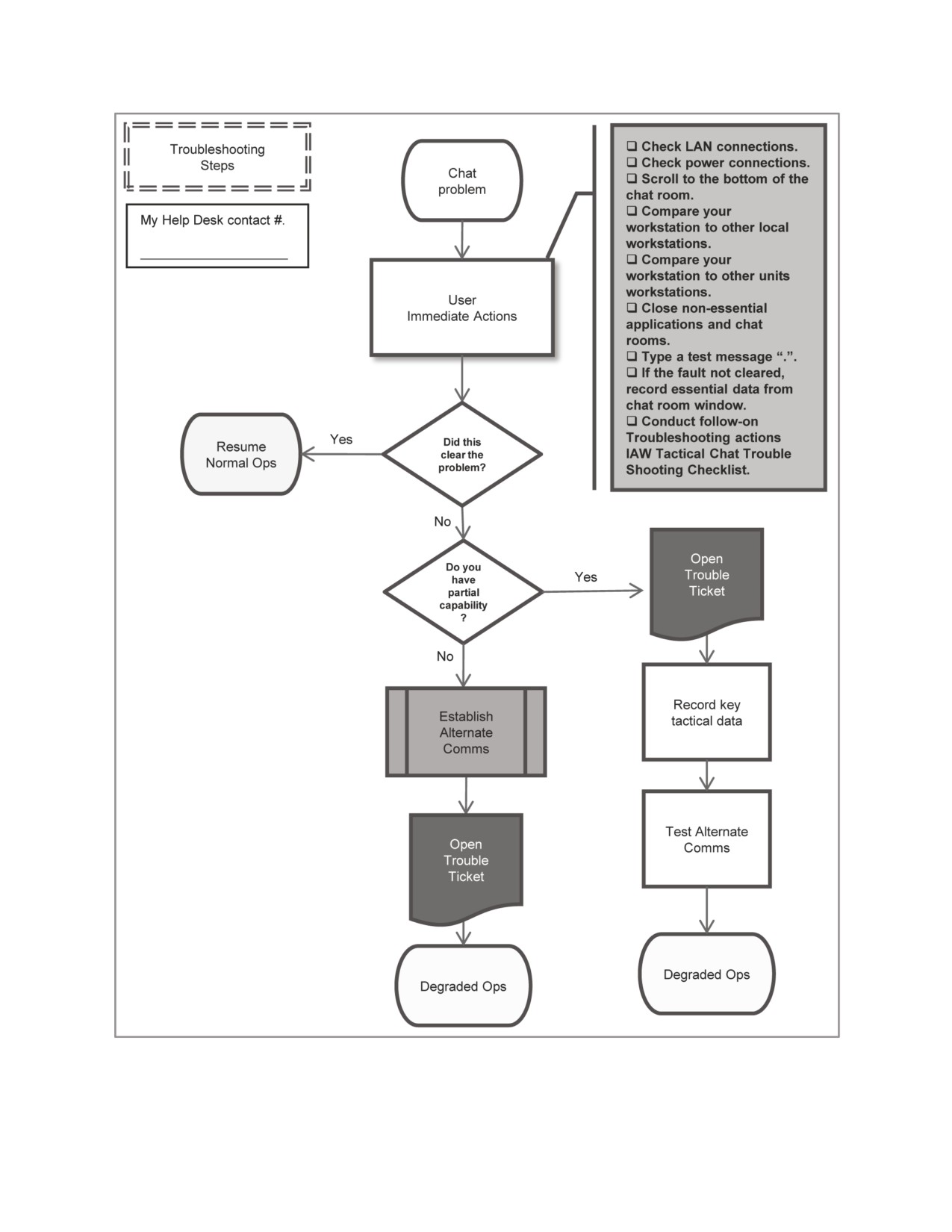
Figure 18.
Tactical Chat Troubleshooting Matrix
7 JULY 2009
FM 6-02.73 / MCRP 3-40.2B / NTTP 6-02.8 / AFTTP 3-2.77
47
This page intentionally left blank.
48
FM 6-02.73 / MCRP 3-40.2B / NTTP 6-02.8 / AFTTP 3-2.77
7 JULY 2009
Appendix A
EXAMPLES OF TC TERMS AND ABBREVIATIONS
Term or Abbreviation
Meaning
abn
airborne
arr
arrived
a/c
aircraft
a/f
as fragged or airfield depending on context
affirm
affirmative
afk
away from keyboard
appr
approved
aar
after action review
a/s
airspace
ata
actual time of arrival
atd
actual time of departure
att
at this time (use ‘now’)
bolo
be on the lookout for
c
copy (acknowledgment of receipt)
ck
check
cip
come in please (generally used when initiating whispers)
Clr
clear
clrd
cleared
canx
cancel
comm
communications
consol
consolidate
c/s
call sign
dc
disconnected
decon,
deconflict or decontaminate depending on context
decond
deconflicted
dep
departed
d/o
drop off
dz
drop zone
enrt
en route
eom
end of mission
eta
estimated time of arrival
etd
estimated time of departure
fc
frequency change
fl
flight level (altitude in hundreds of feet)
ff
flight following
ftr
failed to radio
g2w
good two way communication
gt
good test (reply to a “t” ((test)) connectivity check request)
hc
how copy
hvt
high value target
i+
(air refueling) instantaneous fuel available
ib
Inbound
IFE
in flight emergency
ifr
instrument flight rules or in flight report depending on context
imm
immediate
iso
in support of
7 JULY 2009
FM 6-02.73 / MCRP 3-40.2B / NTTP 6-02.8 / AFTTP 3-2.77
49
ivo
in vicinity of
lnd
landed
lkp
last known position
lz
landing zone
max ord
maximum ordnance altitude
mc
mission complete
msn
mission
mt
mis-tell (posted info in wrong room)
Mx or maint
maintenance
neg
negative
nstr
nothing significant to report
ob
outbound
o/c
on channel
o/n
operations normal
o/s
on station
osr
operating outside ROZ
o/t
on tank (air refueling)
pls
please
poi
point of injury/impact
poo
point of origin
pos
position
pri
priority
rcvr
aircraft receiving air refueling
rhr
ROZ hot request
rip
relief in place
rqst
request
rgr
roger
rp
release point
rnds
rounds
ron
remain overnight
roz
restricted operating zone
rtb
return to base
rtd
return to duty
rtn
routine
r/r
radar/IFF contact and radio communication established
rx
receive
sod
safe on deck
stby
standby (does not imply “working”)
SIPR
Secret Internet Protocol Relay (secure network)
sof
special operations forces
sp
start point
s/f
show of force
sfc
surface
t
test (request for a connectivity check)
thx
thank you
TIC
troops in contact
t/o
takeoff
tn
datalink track number
tot
time on target
TST
time sensitive target
tx
transmit
unk
unknown
urg
urgent
50
FM 6-02.73 / MCRP 3-40.2B / NTTP 6-02.8 / AFTTP 3-2.77
7 JULY 2009
urgsurg
urgent surgical
VFR
visual flight rules
w/d
wheels down
wkg
working (standby implied)
wrt
with regard to
wspr
Whisper
w/u
wheels up
wx
Weather
yw
you’re welcome
* (single asterisk)
used to make an immediate correction to previous posting
*** (three asterisks)
used to denote a VIP onboard a specific a/c
. (period)
used to check server connectivity; no reply is required
7 JULY 2009
FM 6-02.73 / MCRP 3-40.2B / NTTP 6-02.8 / AFTTP 3-2.77
51
This page intentionally left blank.
52
FM 6-02.73 / MCRP 3-40.2B / NTTP 6-02.8 / AFTTP 3-2.77
7 JULY 2009
Appendix B
TC PLANNING CHECKLIST
Deliberate planning for TC operations will enhance a unit’s communications
capability at home while helping them better prepare for the use of TC during tactical
operations. The following serves as a guide for unit preparation to ensure they have the
right equipment and connectivity prior to deployments, and alleviates the need for a
major train-up upon arriving in theater to relieve another unit.
Planning for TC operations requires expertise in many subject areas including:
• TC applications and procedures.
• Communications networks and connectivity.
• Equipment requirements.
• Communications requirements and priorities.
• Standard TC operating procedures.
Table 10 is a TC planning checklist divided into the following critical planning
phases:
• Identify the mission.
• Develop a communications plan.
• Determine TC communications requirements.
• Establish TC communications.
• Develop standard operating procedures.
• Train TC operators.
• Conduct precombat checks.
7 JULY 2009
FM 6-02.73 / MCRP 3-40.2B / NTTP 6-02.8 / AFTTP 3-2.77
53
Table 10. TC Planning Checklist
Identify the Mission.
1
Obtain all required operational and tactical level orders and necessary documents:
a
Operational Plans (OPLANS).
b
OPORDs.
c
ATO/ACO/SPINS.
d
OPTASKCHAT.
e
Standard operating procedures (SOPs).
2
If preparing for a deployment, obtain theater-specific orders:
a
OPLANS.
b
OPORDs.
c
ATO/ACO/SPINS.
d
OPTASKCHAT.
e
SOPs.
3
If replacing a unit, obtain necessary documents to facilitate the relief-in-place:
a
TC SOPs.
b
TC lessons learned and TTP.
Develop a Communications Plan.
1
Determine the communications requirements necessary to support the mission:
a
Voice & TC networks needed to monitor required communications (figure 19).
b
If replacing a unit, the networks they are using to monitor communications.
c
If replacing a unit, the TC applications they are using to conduct chat.
2
Develop a communications plan that supports the mission:
a
Determine what functions will be communicated using voice only.
b
Determine what functions will be communicated using TC only.
c
Determine what systems of record will be used.
d
Determine what communications will be augmented using TC (SOR, voice).
3
Create TC Degradation Plan:
a
Establish medium for primary communications (i.e. TC for DCN net).
b
Establish medium for secondary communications. (i.e. SATCOM for DCN net).
c
Establish medium for tertiary communications. (i.e. STE for DCN net).
d
Develop communications cards to facilitate degradation procedures.
e
Establish procedures for using a secondary TC server if available.
4
Establish TC documentation and record keeping procedures:
a
Method to keep log TC communications as official records.
b
Method to back up logs to avoid a computer failure that induces a loss of data.
5
Define Help Desk support and Procedures.
Determine TC Communications Requirements.
1
Determine Equipment requirements (see figure 9 for example TOC chat layout):
a
Number of computers required to perform TC IAW the Communications Plan.
b
Supporting communications equipment required to facilitate TC connectivity.
c
Backup computers and equipment to facilitate TC logistical requirement.
d
Number of TC systems current unit in theater will leave behind for use.
e
Printer requirements to create hardcopy documents of TC communications for
historical records.
54
FM 6-02.73 / MCRP 3-40.2B / NTTP 6-02.8 / AFTTP 3-2.77
7 JULY 2009

2
Determine connectivity requirements.
a
Determine the chat application to use for TC operations.
b
Obtain and install the appropriate chat application on computers.
c
Identify the communications infrastructure need to connect to TC servers.
d
Determine if there are multiple servers in use:
Server/domain names.
IP addresses.
e
Determine cryptographic requirements:
Firewall configurations.
Layered security measures that may affect hardware/software requirements.
3
Determine TC operator manning requirements.
Establish TC Communications.
1
Setup TC network at home station for training and functions checks:
a
Conduct internal functions check.
b
Conduct functions checks with higher headquarters and across units.
c
Conduct functions checks with unit being replaced if deploying.
2
Maintain connectivity and integrate TC into daily operations and training.
Develop TC Standard Operating Procedures (SOPs)
1
Ensure SOP includes at a minimum:
a
Standard chat rooms used by the unit.
b
Room names and descriptions.
c
Access controls.
d
TC user assignments and responsibilities.
e
Communication Priorities.
f
Usernames.
g
Use of audio and visual cues on the TC application.
h
File transfer procedures.
i
Rules on use of private chat.
j
Battle rhythms.
k
Shift change procedures.
l
Network maintenance.
m
Archiving and backup procedures.
n
Communications standards.
o
Help desk procedures.
p
Alternate communications plans.
Train TC Operators (see Appendix C)
1
See Appendix C.
Conduct Precombat Checks
1
Conduct preventive maintenance checks and service on all TC equipment.
2
Ensure TC operators have all required equipment, SOPs, and documents.
3
Ensure equipment is clean, operational and secured as appropriate for shipping.
4
Ensure packing list includes all equipment necessary to conduct TC operations.
5
Ensure backup equipment is packed to facilitate redundancy.
7 JULY 2009
FM 6-02.73 / MCRP 3-40.2B / NTTP 6-02.8 / AFTTP 3-2.77
55
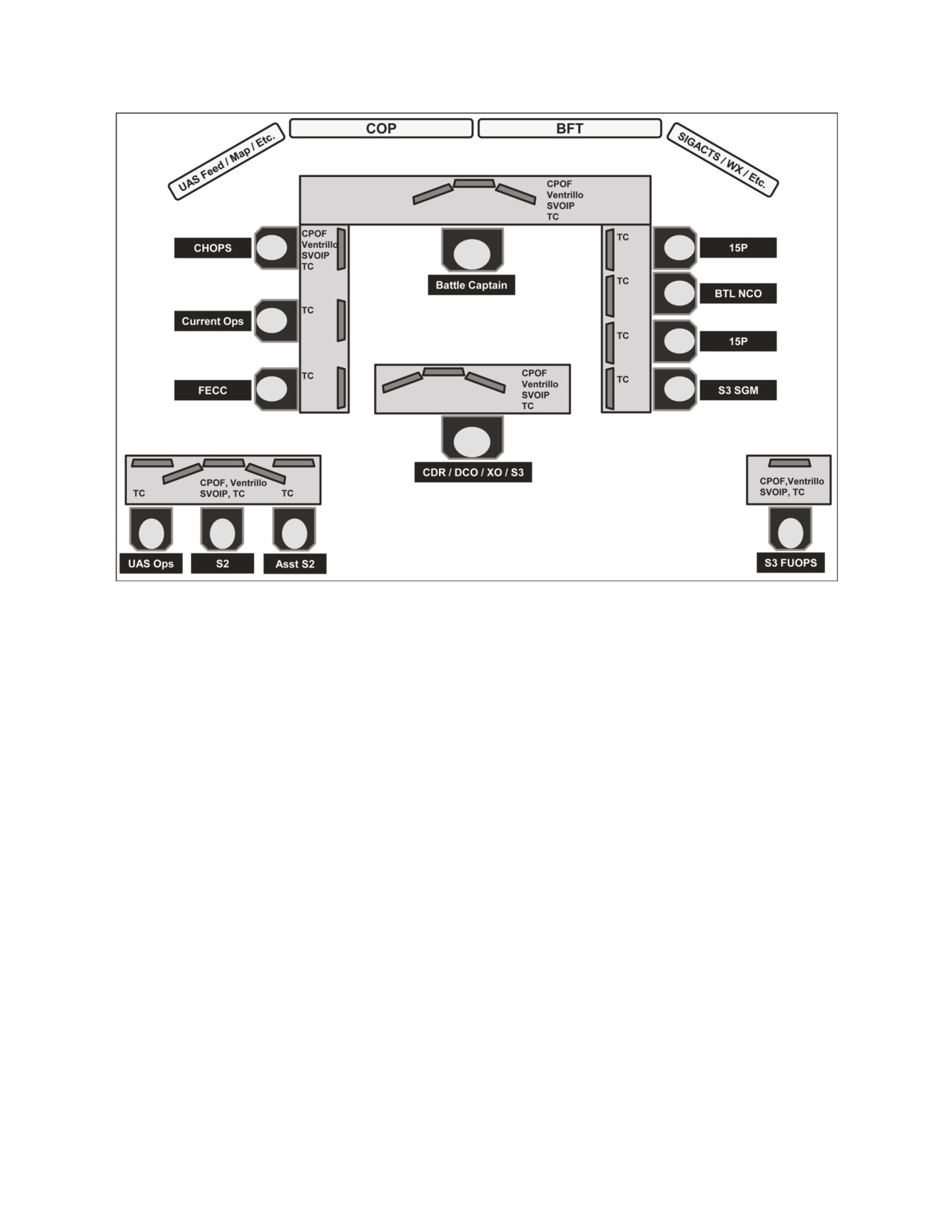
Figure 19. Example TOC Chat Layout
56
FM 6-02.73 / MCRP 3-40.2B / NTTP 6-02.8 / AFTTP 3-2.77
7 JULY 2009
Appendix C
TC TRAINING CONSIDERATIONS
Training is critical to the effective use of TC as a communications system.
Incorporating frequent TC training opportunities during home station operations allows
for operators to gain and maintain the knowledge needed to effectively utilize TC in a
combat environment. There are several things to consider prior to, during, and after
conducting TC training.
1. Considerations when Planning TC Training:
• Ensure the unit possesses all of the TC hardware, applicable software, and a
sufficient training area to accurately duplicate tactical operations.
• Ensure time is made available on the training calendar for dedicated basic TC
training prior to incorporating TC into daily operations.
• Provide an appropriate number of client workstations to train selected
individuals.
• Establish an approved local area network or intranet solely for training.
• Assign a “white cell” to operate as the TC host server, room owner, and chain
of command as necessary.
• Assign operators with advanced computer skills to the more demanding TC
workstations.
• Ensure TC communications are compatible with subordinate elements,
supported units, and higher headquarters.
• When conducting predeployment TC training in which the unit will occupy a
fixed site or conduct a transfer of authority with another unit, conduct a
detailed site survey to define TC systems in use, communications
requirements, and compatibility.
2. Considerations when Conducting TC Training:
• Start with a basic TC network setup focused on individual user tasks and
gradually build up to collective training.
• Basic TC training should teach users how to effectively develop a scan
pattern, use audio and visual cues properly, and establish room management
skills to avoid task saturation using TC.
• Configure collective training to mirror field operations centers in form and
function.
• If possible, convert a conference room into a facsimile of the operation
centers and use SOPs, to include the correct faces, places, systems, and
displays.
7 JULY 2009
FM 6-02.73 / MCRP 3-40.2B / NTTP 6-02.8 / AFTTP 3-2.77
57
•
For realism, use actual TC call signs, room names, and training scenarios
whenever possible. Request copies of TC logs from rooms being used in
theater to facilitate scenario development.
•
Follow a set battle rhythm and conduct shift change briefings.
•
Design realistic and rigorous training. If possible, connect via SIPRNET to
the unit’s deployment operational area. This practice enables units to
coordinate, fuse lessons learned with TTP, and conduct rehearsals in their
future operational areas.
•
Publish and follow realistic OPORDs and use annex K, SPINS, or
OPTASKCHAT to govern TC use during the training.
•
Conduct network rehearsals over both a wide area and local network. Talk
through critical portions of an operation over TC in a sequence established by
the trainer and practice battle tracking and information coordination.
•
Ensure all means of primary, secondary, and tertiary communications are
used in training to avoid dependency on TC systems.
•
Validate TC training with a culminating training event prior to deployment.
Integrate TC operations into a training exercise that involve higher, lower, and
adjacent units all communicating with TC.
•
If conducting training in theater, and separate training chat rooms are not
feasible, preface all posts with the word “EXERCISE.”
•
Provide a mechanism for capturing and sharing significant training activities.
•
Enforce TC network discipline and conduct troubleshooting procedures.
3. Considerations upon Completion of TC Training:
• Conduct after-action reviews of TC training by unit, staff section, and function.
• Use TC logs and recordkeeping as a debriefing tool.
• Assess how well the unit conducted TC operations and how it contributed to
the overall situational awareness and mission accomplishment of the group.
• Capture all lessons learned and newly developed TTP for incorporation into
the SOP and future training events.
• Establish a method to incorporate TC into daily operations.
• Conduct reoccurring training to ensure all operators are confident in their
ability to conduct TC in the tactical environment.
58
FM 6-02.73 / MCRP 3-40.2B / NTTP 6-02.8 / AFTTP 3-2.77
7 JULY 2009
Appendix D
SPINS EXAMPLE AND FORMAT FOR OPORDS
The following example shows an appendix from SPINS detailing theater TC procedures.
This format may also be used as supporting documentation to OPORD annexes.
A.1.1 OVERVIEW
A.1.1.1 Purpose. To establish guidance for using tactical chat (TC) for command and control
of CFACC assets. These rules apply only to CFACC controlled TC windows.
A.1.1.2 Overview. TC is a useful tool for maintaining situational awareness and exercising
Command and Control of assets in real time. It disseminates secure information quickly and
provides a written log. TC users must use caution to avoid inadvertently spreading inaccurate or
misleading information. It is vital to smooth operations within the AOR that these systems are
running in an efficient and uninterrupted manner. Different players will access and use TC traffic
in various ways: to direct, to execute, to monitor, to assess, and to manage.
A.1.1.3 TC System Considerations. The system, like any electronic networking system, is
vulnerable to outages of one component, where a critical node of the network is cut off from the
link with no indication to the remaining agencies that they have dropped out of the network.
Because there is no positive indication that a message has been received, it is dependent on the
receiving agency to acknowledge receipt and indicate closure. More importantly, critical, time-
sensitive information may be lost in fast-paced operations with multiple agencies inputting data
into the same window. Many operators sample numerous windows, and a key piece of
information occurring in a single window may be lost in the volume of message traffic.
A.1.1.4 Text Data.
A.1.1.4.1 TC deals with text data and the passage of written messages between
participating agencies. TC also has the capability to send electronic files between users and
platforms. Any player with access to the network may post into individual windows and may view
message traffic. Text data has the advantage of being easy to understand, can be expanded or
contracted as needed to convey information, and has many standard abbreviations available to
speed deliver and receipt of messages.
A.1.1.4.2 Entry of data into the TC window can be a laborious process; depending on
operator proficiency, it may take minutes to enter detailed, involved, or complicated data, and
even longer until the message is processed and understood by its intended receivers. If a text
message is not understood by the receiving participant, more text messages are required to
explain the original posting. Care should be taken to fully and succinctly phrase messages for
maximum utility and brevity.
A.1.1.4.2.1 Where possible, abbreviations should be used to quickly pass standard
phrases.
A.1.1.4.2.2 Where possible, standard formatting for various message traffic should be
used (ROZ activation, joint tactical air strike request, CAS 9-lines, TIC activation, SALUTE
Reports, etc.)
A.1.1.4.2.3 Capitalization and Highlight Usage. Capitalization and Highlighting of plain
English terms is used for emphasis that would have otherwise been conveyed by tone of voice
over a radio. Use of highlighted or all capitalized words or phrases will be kept at a minimum and
only be used to emphasize critical communications or FLASH TRAFFIC.
7 JULY 2009
FM 6-02.73 / MCRP 3-40.2B / NTTP 6-02.8 / AFTTP 3-2.77
59
A.1.2 CHAT ROOM PROCESSES AND PROCEDURES
A.1.2.1 TC traffic is divided among a number of topic-oriented windows (called chat rooms),
each dealing with one or more aspects of battle management. A list of current chat rooms (known
as channels by some TC programs) is available in a pop-up menu. These chat rooms are server
and system dependent.
A.1.2.2 New Chat Room Creation. Creation of a new chat rooms can be official (permanent)
or unsanctioned (temporary). The primary difference between official and unsanctioned chat
rooms is that the official rooms will not be automatically deleted by the server when not occupied.
Official chat rooms affecting CFACC players will need to be approved by requesting a SPINS
change to this document in which the requested channel will then be published. Unsanctioned
chat rooms will not need specific approval but should only be used for a specific reason and for a
short period of time.
A.1.2.2.1 Chat Room Name Changes. The current software does not allow for name
changes. Therefore, when a name change for a chat room is needed, a CFACC daily banner will
be posted a few days prior to the actual change taking place. The Room Owner of the old chat
room will also post a notification of when the new room takes effect in the topic heading.
A.1.2.3 CFACC TC Chat Rooms. CFACC chat rooms are organized into two general types,
C2 chat rooms and information/coordination chat rooms.
A.1.2.3.1 C2 Chat Rooms. C2 chat rooms are for command and control and are used to
issue orders. The other channels should be used to exchange information, coordinate, and solve
problems at lower levels.
A.1.2.3.1.1 C2 Chat Room Participation. The C2 chat rooms belong to the C2 agencies
and decision makers. They are used for coordination and decision-making. Others may monitor
for situational awareness, but generally should not use C2 chat rooms unless asked for their input.
A.1.2.3.1.2. Information/Coordination Chat Room Entries. Information/Coordination
chat rooms are used solely for sharing useful information. Only accurate and timely information
should be shared. No personal messages, derogatory comments, jokes, etc. are permitted.
A.1.2.4 Chat Room Topic Headings. All chat room topic headings must be mission related
and enhance situational awareness of the users. Some examples of proper topic headings
include: the posting of major frequency changes, time critical information, and operational status.
The Room Owner will remove topics containing non-mission essential phrases promptly. The
Room Owner must approve all topic headings.
A.1.2.5 Exercise Inputs. To the max extent possible, no exercise injects will be made on any
operational chat room unless “exercise” is prefaced in the channel name. Additionally, the word
“exercise” in the topic heading will not meet the requirement to discuss exercise inputs in a real
world chat room. In certain situations where separate exercise chat rooms are not possible, all
exercise inputs will be prefaced with “exercise” and precoordinated with all agencies within the
particular chat room.
A.1.2.6 Time hack and time stamp orders. In order to facilitate real time information, time
stamping entries is critical, and every entry in a chat room holds a time stamp in Zulu. In cases
where this is not possible, the user must ensure that they tell other users of the time discrepancy.
Time is a critical element of events, and a time hack is necessary for correct and timely
transmission. Users should type a manual time hack on all orders and anytime information is
being forwarded that is time critical.
A.1.2.7 Call Sign Abbreviations. Messaging may use abbreviations for call signs. Call sings
should be simple, easy to understand, and consistent. The first and last letter of the call sign, in
conjunction with the number, will be used to referenced (Ex. Eagle 01 - ee01). In the event
someone in the room becomes confused by the message traffic, type it out completely.
60
FM 6-02.73 / MCRP 3-40.2B / NTTP 6-02.8 / AFTTP 3-2.77
7 JULY 2009
A.1.2.8 Call Sign Usage. When addressing a specific participant, the user will type the call
sign of the user they are addressing prior to the message. The addressee of a message will
acknowledge the text immediately by “c”, “stby”, “wkg”, or other appropriate responses. It will be
important to respond to any message directed to you since an unacknowledged text may not
have been received by the intended participant.
A.1.2.9 Private Chat. The private chat, or “whisper” feature is very useful for protracted
agency-to-agency coordination and keeps information out of the main window. Users should not
post materials non-germane to the window topic.
A.1.2.9.1 Whispers should involve coordination issues between two agencies where
discussions in the main window is inappropriate.
A.1.2.9.2 Whispers which involve information that will likely be need by more than one or
two participants should be moved back to the main window for coordination.
A.1.2.9.3 Users utilizing whisper need to be cognizant that their situational awareness of
the communications in the main chat rooms may be reduced.
A.1.2.10 Room Owner Responsibilities. The CAOC will empower individuals to direct
communication in each chat room. They will report, log, and correct any unauthorized
coordination within their room. The Room Owners responsibilities include but are not limited to:
A.1.2.10.1 Provide real-time guidance regarding TC integration into planning, operations,
execution, and review.
A.1.2.10.2 Monitor participant involvement with window chatter to evaluate window
effectiveness, proposing movement of conversations to whisper when appropriate.
A.1.2.10.3 Have full control over their chat room topic heading. Normal users will not be
permitted to change the topic headings.
A.1.2.10.4 Monitor etiquette and discipline to ensure all subordinates are chatting IAW TC
policies and procedures.
A.1.2.10.5 Cease all unrelated transmissions. Misuse of an TC window must be
immediately identified, corrected, and reported by the Room Owner. If an offender is making non-
critical entries during a time-critical event, that user should be told to cease transmissions or
ejected from the chat room.
A.1.3 ID/CALLSIGNS
A.1.3.1 Each computer logged into the TC system will have an associated TC call sign that
identifies the user. These call signs should be associated with unit/aTCraft call sign and/or be
descriptive of the user’s organization or function and duty position.
A.1.3.1.1 Regular users of chat should not excessively deviate user call signs to ensure
continuity over time. Changes of names should indicate unit swaps rather than personnel shifts.
A.1.3.1.2 Some TC users are associated with particular aTCraft, units, or JTACS. These
callsigns may vary depending on the particular aTCraft, unit, or JTAC call sign through the same
computer may be used. This is acceptable, as it provides user information simplifying
identification and contact information.
A.1.3.1.3 Alternate identifiers for the same individual occupying a different computer
and/or position should be clearly identified. When there is more than one position utilizing the
same chat room, numbers should be used to follow the appropriate call sign (CCO1 or CCO2).
A.1.4 AIR OPERATIONS
A.1.4.1 Section used to detail air operations procedures and communications using TC.
A.1.5 C2 TC ABBREVIATIONS
A.1.5.1 Section used to show approved abbreviations commonly used in TC.
7 JULY 2009
FM 6-02.73 / MCRP 3-40.2B / NTTP 6-02.8 / AFTTP 3-2.77
61
A.1.6 CFACC TC CHAT ROOMS
A.1.6.1 Theater Specific Chat Rooms
ROOM NAME
ROOM OWNER
PURPOSE
C2 Chat Rooms (used by decision-makers to issue orders)
Information/Coordination Chat Rooms (used to discuss/coordinate/problem solve)
CAOC Chat Rooms
C2 Platforms Chat Rooms
ISR Chat Rooms
JPRC Chat Rooms
Counter-IED Reporting Chat Rooms
62
FM 6-02.73 / MCRP 3-40.2B / NTTP 6-02.8 / AFTTP 3-2.77
7 JULY 2009
Appendix E
OPTASKCHAT EXAMPLE
FM CSG/ESG COMMANDER
TO CSG/ESG
INFO RHHMHAA/COMPACFLT PEARL HARBOR HI//N6//
RHVSQUE/COMTHIRDFLT//J6//
RHVSQUE/COMTHIRDFLT//J6//
RUWFEAA/COMNAVAIRPAC SAN DIEGO CA
RUWFEAA/COMNAVAIRPAC SAN DIEGO CA
RHMFISS/COMNAVSURFPAC SAN DIEGO CA
RHMFISS/COMNAVSURFPAC SAN DIEGO CA
RHVEZPC/COMSTRKFORTRAPAC
RHMFISS/COMAFLOATRAGRUPAC SAN DIEGO CA
RHMFISS/TACTRAGRUPAC SAN DIEGO CA
RHMFISS/NCTAMS PAC HONOLULU HI//JFTOC/N34/N35/TACPLANS//
RHHMUNE/JFMO PAC HONOLULU HI
RHMFISS/NAVCOMTELSTA SAN DIEGO CA
RHOSHJE/COMCARSTRKGRU THREE
RHOVZFF/COMCARSTRKGRU FIVE
RHOVABE/COMCARSTRKGRU NINE
RHOVMTZ/COMCARSTRKGRU ELEVEN R
HOVJQI/COMCARSTRKGRU SEVEN
RHOVJQI/COMCARSTRKGRU SEVEN
BT
UNCLAS //NO2482//
MSGID/GENADMIN/COMCSG/ESG//
SUBJ/CSG / ESG OPTASK CHAT//
REF/A/GENADMIN/PREVIOUS OPTASK CHAT/DTG// REF/B/GENADMIN/COMTHIRDFLT/WORLD-WIDE OPTASK CHAT//
REF/C/NAVY WIDE OPTASK IM GUIDANCE/FROM C3F CAS WEBSITE//
REF/D/GENADMIN/COMSEVENTHFLT/301052ZMAY05//
NARK/REF A IS CSG/ESG OPTASK CHAT SUPP. REF B IS NAVY-WIDE OPTASK CHAT. REF C IS NAVY-WIDE OPTASK
IM. REF D IS C7F OPTASK TLAM.//
POC/COMMO/LCDR/CSG/ESG/LOC:/TEL:111-222-3333/ EMAIL:COMMO(AT)CSG/ESG.NAVY.SMIL.MIL//
RMKS/
1. THIS OPTASK CHAT SUPERCEDES PREVIOUS EDITIONS. CANCEL REF A. IAW REFS B-D THIS OPTASK CHAT
SUPPLEMENT
ESTABLISHES THE GENERAL ARCHITECTURE, OPERATING PROCEDURES AND ADMINISTRATIVE GUIDANCE FOR ALL
CSG/ESG-RELATED CHAT COMMUNICATIONS. THIS OPTASK APPLIES TO UNITS ASSIGNED TO THE CSG/ESG AND
OTHER UNITS PARTICIPATING IN STRIKE GROUP ESTABLISHED CHAT ROOMS. AMPLIFICATION AND ADDITIONAL
GUIDANCE WILL BE PROVIDED IN OPTASK CHAT MODS OR DAILY INTENTIONS MESSAGE.
----------
2. PERIOD EFFECTIVE: UPON RECEIPT UNTIL FURTHER NOTICE.
----------
3. CHAT OVERVIEW:
CHAT HAS BECOME A SIGNIFICANT, NEAR REAL-TIME, TWO-WAY COMMUNICATIONS PATH AMONG STRIKE GROUP
STAFFS, SHIPS, WATCH STANDERS, AND FLEET STAFFS ASHORE. THE PROFESSIONAL AND DISCIPLINED USE OF
CHAT CAN GREATLY ASSIST IN THE MANAGEMENT OF ALL ASPECTS OF STRIKE GROUP OPERATIONS.
A. RULE OF THUMB: COMMAND BY VOICE, COORDINATE VIA CHAT.
B. THE PRIMARY CHAT APPLICATION FOR IT-21 AFLOAT UNITS IS MICROSOFT (MS) CHAT. SAMETIME CHAT IS A
SECONDARY CHAT APPLICATION THAT IS
ALSO USED FOR COORDINATION PURPOSES WITH AFLOAT AND ASHORE UNITS.
C. CHAT NAMES SHALL INDICATE SHIP BY UNIT ABBREVIATION AND WATCH/POSITION, SUCH AS CSGIESG BWC,
CSG/ESG COMMO, OR WARFARE COMMANDER TWO-LETTER CALL SIGN SUCH AS RB, RP, RZ, ETC. EXCEPTIONS ARE
TO BE KEPT TO A MINIMUM AND USED ONLY WITH WARFARE COMMANDER APPROVAL.
D. WHEN THE STRIKE GROUP OPERATES IN A COALITION ENVIRONMENT, THE PRIMARY CHAT COMMUNICATION
SERVICES BETWEEN COALITION PARTNERS WILL RESIDE ON CENTRIXS. EACH CENTRIXS ENCLAVE WILL HAVE A
UNIQUE CHAT SERVER ACCESSIBLE WITHIN THAT ENCLAVE HUB.
----------
4. CHAT SERVERS:
A. FLEET CHAT SERVER INFORMATION GOES HERE.
B. CONTINGENCY CONNECTIVITY INFORMATION GOES HERE.
D. LOGIN DIRECTION GOES HERE.
E. FLEET SIPR CHAT SERVER ADDRESS/IP'S GO HERE.
F. FLEET CENTRIXS CHAT SERVER ADDRESS/IP'S GO HERE. AVAIL)
----------
S. CHAT COMMUNICATIONS:
7 JULY 2009
FM 6-02.73 / MCRP 3-40.2B / NTTP 6-02.8 / AFTTP 3-2.77
63
A. WITHIN THE CSG/ESG, CHAT ROOMS WILL BE USED IN BOTH TACTICAL AND ADMINISTRATRATIVE SUPPORT
ROLES.
(1) TACTICAL CHAT ROOMS - TACTICAL CHAT ROOMS SHALL BE USED FOR REPORTING AND COORDINATION, AND
WILL BE STRICTLY MANAGED BY THE NECOS. THEY WILL BE USED AS THE PRIMARY MEANS OF COORDINATING
TACTICAL AND OPERATIONAL EFFORTS THAT COULD OTHERWISE OVERWHELM A COMMAND RADIO CTCUIT. THE
GUARDING OF TACTICAL CHAT ROOMS IS REQUIRED AS OUTLINED IN WARFARE COMMANDERS GUIDANCE AND IN THE
CHAT MATRIX DESCRIBED HEREIN. CHAT ROOMS ARE THE PREFERRED METHOD OF COMMUNICATING LENGTHY
INFORMATION EXCHANGES BECAUSE TEXT IS EASIER TO READ AND UNDERSTAND WHEN COMPARED TO BROKEN,
ATTENUATED, OR GARBLED RADIO TRANSMISSIONS. THE NECOS MAY PROVIDE ADDITIONAL CHAT ROOM GUIDANCE
IN THEIR OPTASK. TACTICAL CHAT ROOMS ARE NOT THE PLACE TO DISCUSS ADMINISTRATIVE ISSUES.
(2) ADMINISTRATIVE CHAT ROOMS - MAY BE ESTABLISHED TO PROVIDE A VIRTUAL FORUM WHEREIN INDIVIDUALS
WITH SIMILAR RESPONSIBILITIES, OR WORKING WITHIN THE SAME FUNCTIONAL AREAS, CAN MEET FOR
DISCUSSION, COORDINATION, PLANNING, PROBLEM SOLVING, AND TROUBLESHOOTING. ADMINISTRATIVE CHAT
ROOMS WILL NOT HAVE AN ASSIGNED NECOS. ITS USE IS BY MUTUAL AGREEMENT OF PARTICIPANTS.
B. EACH WARFARE COMMANDER, COORDINATOR, OR ADMINISTRATOR MAY ESTABLISH ADDITIONAL CHAT ROOMS THAT
REQUIRE MONITORING OR CAN BE USED FOR COORDINATION. INDIVIDUAL WARFARE OPTASKS OR SUPPS WILL
ADDRESS REQUIREMENTS FOR ADDITIONAL ROOMS, IF NECESSARY, ESTABLISHING SPECIFIC RULE SETS FOR
THEIR USE.
C. TEMPORARY CHAT ROOMS - USERS MAY ESTABLISH TEMPORARY (NON-STANDING) CHAT ROOMS IF REQUIRED,
BUT SHOULD LIMIT USE OF THESE TEMPORARY CHAT ROOMS TO SPECIFIC PURPOSES, OPERATIONS OR
TIMEFRAMES.
D. BENEFITS OF CHAT MUST BE WEIGHED AGAINST THE LOSS OF SITUATIONAL AWARENESS THAT RESULTS IF
"CHATTING' DISTRACTS WATCH STANDERS FROM TACTICAL DISPLAYS. EACH CHAT ROOM IS THE EQUIVALENT OF
ANOTHER VOICE CTCUIT THAT MUST BE GUARDED, SO THE NUMBER OF ESTABLISHED CHAT ROOMS SHOULD BE
MINIMIZED.
E. CHAT PROGRAMS THAT USE THE TACTICAL CHAT (TC) PROTOCOL, SUCH AS MICROSOFT CHAT (IT-21) AND
ZTCON (GCCS-M) CHAT, WILL BE USED IN ALL TACTICAL AND ADMINISTRATIVE CHAT ROOMS. SINCE BOTH OF
THESE CHAT PROGRAMS USE THE TC PROTOCOL, AN INDIVIDUAL ON A STANDARD IT-21 WINDOWS MACHINE CAN
CHAT WITH AN INDIVIDUAL ON A
GCCS-M MACHINE AND VICE VERSA.
F. POINT TO POINT CHAT PROGRAMS LIKE SAMETIME CAN NOT BE USED IN CONJUNCTION WITH TC PROTOCAL
CHAT PROGRAMS. IT IS DESIGNED FOR COMMUNICATIONS BETWEEN TWO OR MORE INDIVUIDUALS IN A SHARED
WORKSPACE.
-----------
6. EXAMPLE DEFINITIONS AND ACRONYMS:
- CCSG7
COMMANDER CARRIER STRIKE GROUP SEVEN
- CVW14
COMMANDER AIR WING FOURTEEN
- CDS7
COMMANDER DESTROYER SQUADRON SEVEN
- RRSG
RONALD REAGAN STRIKE GROUP
- RGN
USS RONALD REAGAN
- CHV
USS CHANCELLORSVILLE
- DEC
USS DECATUR
- GRD
USS GRIDLEY
- HOW
USS HOWARD
- THA
USS THACH
- BFEM (BATTLE FORCE EMAIL): US-TO-ALLIED HIGH FREQUENCY SHIPS EXCHANGE NETWORK.
- MICROSOFT (MS) CHAT: AN OPEN FORUM COMMUNICATIONS APPLICATION USED AS A COLLABORATIVE TOOL
BETWEEN VARIOUS UNITS. ENHANCES STRIKE GROUP INFORMATION DISSEMINATION BY ENABLING TRANSMISSION
OF TEXT AND FILE ATTACHMENT IN A MS CHAT WINDOW.
- NECOS (NET CONTROL STATION): UNIT RESPONSIBLE FOR MAINTENANCE AND PROPER USAGE OF A RADIO
CTCUIT OR CHAT ROOM.
- FLEET NOC (NETWORK OPERATIONS CENTER): PROVIDES IP MANAGEMENT, NETWORK ENGINEERING, SOFTWARE
SUPPORT FUNCTIONS, AND NIPRNET AND SIPRNET CONNECTIVITY TO AFLOAT FORCES.
- PERSISTENT CHAT (PCHAT):
- PRNOC (PACIFIC REGION NETWORK OPERATION CENTER): LOCATED IN PEARL HARBOR, HAWAII.
- SAMETIME CHAT: A COMMUNICATIONS APPLICATION DESIGNED FOR POINT TO POINT COMMUNICATIONS BETWEEN
TWO OR MORE INDIVIDUALS WHICH ALLOWS FOR SHARED WORKSPACE FUNCTION IN A MEETING CENTER.
- SIPRNET (SECRET INTERNET PROTOCOL ROUTING NETWORK): DOD GENSER SECRET AND BELOW NETWORK. USED
AS PRIMARY SECURE IP COMMUNICATION PATH FOR OPERATIONAL AND TACTICAL COMMUNICATION, COORDINATION,
AND PLANNING. THE PROPER OPERATION AND MAINTENANCE OF SIPRNET CONNECTIVITY ARE CRUCIAL.
- WEBMASTER: INDIVIDUAL GRANTED AUTHORIZATION TO ADMINISTER CERTAIN ASPECTS OF THE CAS II NETWORK
AND WEB SITE. ADMINISTRATORS ARE RESPONSIBLE FOR MAINTAINING THEIR SHIP'S DOMINO SERVER AND THE
ADMINISTRATOR/EDITOR ACCOUNTS. ADMINISTRATORS WILL ALSO HAVE THE CAPABILITY TO ADD (POST), EDIT,
OR DELETE CONTENT WITHIN THEIR SECTION OF THE RRSG WEB SITE AND APPROVE NEW USER ACCOUNT
REQUESTS.
- WEB CONTENT PROVIDER: INDIVIDUAL WHO HAS BEEN GRANTED
AUTHORIZATION TO, AND IS REQUIRED TO, EDIT AND MAINTAIN CERTAIN AREAS OF THE OPERATIONAL CAS II
WEBSITES.
- ZTCON CHAT: CHAT SOFTWARE USED WITH UNIX BASED SYSTEMS THAT IS COMPATIBLE WITH MICROSOFT CHAT,
BUT NOT SAMETIME CHAT.
----------
64
FM 6-02.73 / MCRP 3-40.2B / NTTP 6-02.8 / AFTTP 3-2.77
7 JULY 2009
7. CHAT ROOM POLICIES.
A. COMMUNICATION BETWEEN CHAT ROOM PARTICIPANTS WILL REMAIN PROFESSIONAL AT ALL TIMES. USE OF
PROFANITY, SLANG, ETC., IS PROHIBITED.
B. NECOS IS RESPONSIBLE FOR ENSURING THAT ROOM MEMBERS ARE PROPERLY IDENTIFED AND THAT THE ROOM
IS BEING USED FOR ITS STATED PURPOSE.
C. TACTICAL ORDERS WILL CONTINUE TO BE PROMULGATED VIA VOICE AND-OR MESSAGE TRAFFIC AND BACKED UP
OR AMPLIFIED VIA CHAT.
D. USE CHAT TO SEND PERIODIC SITREPS. KEEP A TEXT TEMPLATE IN A WORD PROCESSING PROGRAM SUCH AS
MICROSOFT WORD OR NOTEPAD AND USE COPY AND PASTE TO INSERT INTO THE APPROPRIATE CHAT ROOM. INFORM
PARTICIPANTS OVER THE ASSOCIATED VOICE CTCUIT THAT THE SITREP IS AVAILABLE. THIS WILL REDUCE
VOICE CTCUIT USAGE AND MINIMIZE THE POSSIBILITY OF ERRORS IN TRANSMISSION.
E. DO NOT ENTER TEXT USING ALL CAPITAL LETTERS. FACILITATE EASE OF READING BY USING UPPER AND
LOWER CASE LETTERS WHERE APPROPRIATE.
F. KEEP ENTRIES CONCISE AND TO THE POINT.
G. AVOID USING CHAT TERMS/ACRONYMS SINCE SOME PARTICIPANTS MAY NOT BE FAMILIAR. THE USE OF
PROWORDS FROM THE RADIO USERS MANUAL IS ENCOURAGED TO MAINTAIN BREVITY AND CLARITY.
H. IF TEMPORARILY USING SOMEONE ELSE'S LOGON IN A CHAT ROOM, SUCH AS XO CHATTING UNDER A TAO
LOGON, COMMON COURTESY REQUIRES THAT THE NEW USER IDENTIFY HIMSELF TO OTHER ROOM MEMBERS.
I. CHAT ROOM PARTICIPANTS MUST BE VIGILANT AGAINST UNAUTHORIZED ATTEMPTS TO MONITOR, SPOOF OR
EXPLOIT CHAT ROOM COMMS. CHALLENGE ANY CHAT ROOM PARTICIPANT YOU FEEL MAY BE A THREAT. CONTACT
YOUR COMMAND COMPUTER NETWORK DEFENSE REPRESENTATIVE IF YOU FEEL THE CHAT ROOM HAS BEEN
EXPLOITED. ACTIONS TO CONTAIN THE PENETRATION WILL BE COORDINATED IN THE CND CHAT ROOM. NOTE:
UNOFFICIAL PARTIES MONITORING CHAT COMMUNICATIONS MAY BE CHALLENGED BY CHAT ROOM PARTICIPANTS AND
ASKED TO LEAVE.
----------
8. CHAT FORMAL TASKING AND ORDERS: A. SPECIFIC GUIDANCE FROM THE STRIKE GROUP COMMANDER GOES
HERE.
----------
9. CHAT ROOM NAMES:
THE FOLLOWING TACTICAL AND ADMINISTRATIVE CHAT ROOMS HAVE BEEN ESTABLISHED AND WILL BE GUARDED AS
REQUIRED (EXAMPLE).
CHAT ROOM
USE
NECOS
MSGID/GENADMIN/COMRRSTRKGRU//
#RRSG CWC
BWC, SHIP TAO, WARFARE CDRS
CCSG7
#RRSG SCC
SGWO, SHIP TAO, WARFARE CDRS
CDS7
#RRSG ADC
SGWO, SHIP TAO, WARFARE CDRS
ADC
#RRSG IWC
IWC, SHIP CTT
IWC
#RRSG CTP
ALL UNITS
CTPM
#RRSG COMMS
ALL UNITS, CCSG7, CDS7
RGN
#RRSG METOC
STRIKE GROUP METOC
CCSG7
#RRSG INTEL
SUBPLOT, SESS
FIWO
#RRSG LINK
ALL UNITS IN LINK
CHV
#RRSG MIO
AS REQUIRED
SCC
#RRSG TLAM
TLAM UNITS, LAC AS REQ D
CWC
#RRSG ASW
SCC AND UNITS UNDER SCC CONTROL
SCC
#RRSG FPC
FORCE PROTECTION COORD
CCSG7
#RRSG_
FIRESIDE_CHAT AS REQ
CCSG7
#RRSG LOG
AS REQ
CCSG7
#RRSG CND
IAM COORDINATION
CCSG7
----------
10. CHAT ROOM PARTICIPANTS:
A. ALL PARTICIPANTS SHALL ESTABLISH STANDARDIZED NAMING CONVENTIONS FIRST WITH THE COMMAND
ABBREVIATION FOLLOWED BY AN N-CODE IDENTIFIER OR WATCH POSITION WHICH CLEARLY IDENTIFIES THE
POSITION OF THE PARTICIPANT.
NAME ID
USER
CCSG7_N(CODE)
COMMANDER CARRIER STRIKE GROUP SEVEN STAFF
MEMBER
(EX. CCSG7-N31)
RB_BWC
STRIKE GROUP BATTLE WATCH CAPTAIN, TACTICAL FLAG
COMMAND CENTER
CDS7_N(CODE)
COMMANDER DESTROYER GROUP SEVEN STAFF MEMBER
(EX. CDS7_N3)
RZ_STAO
COMMANDER DESTROYER GROUP SEVEN STAFF TACTICAL ACTION OFFICER
SHIP_CO
SHIP COMMANDING OFFICERS (EX. DEC-CO)
SHIP_XO
SHIP EXECUTIVE OFFICERS (EX. HOW_XO)
SHIP_TAO
SHIP TAO'S (EX. RGN-TAO)
SHIP_COMM
SHIP COMM CENTERS (EX. RGN_COMM)
SHIP_ADP
SHIP ADP CENTERS (EX. RGN_ADP)
B. ALL OTHER CHAT NAMES SHOULD INDICATE SHIP/COMMAND NAME AND POSITION (I.E. RGN-OPSO, CHV_CICWO,
ETC.).
----------
7 JULY 2009
FM 6-02.73 / MCRP 3-40.2B / NTTP 6-02.8 / AFTTP 3-2.77
65
11. PASSWORD PROTECTION:
TEMPORARY PASSWORD PROTECTED CHAT ROOMS MAY BE ESTABLISHED AS REQUIRED BY THE WARFARE COMMANDER.
PASSWORD PROTECTED CHAT ROOMS AREESTABLISHED TO PREVENT OTHERS NOT HAVING A NEED TO KNOW FROM
GAINING ACCESS TO MISSION SPECIFIC INFORMATION. THE DESIGNATED NECOS SHALL BE A RRSG WARFARE
COMMANDER AND WILL BE RESPONSIBLE FOR ENSURING ACCESS IS RESTRICTED TO ONLY THOSE PERSONNEL OR
ENTITIES REQUIRING ACCESS. PASSWORD SCHEMES SHOULD BE A MINIMUM OF 7 CHARACTERS AND UTILIZE AT
LEAST 1 SYMBOL AND 1 UPPER CASE CHARACTER.
----------
12. WHISPER SESSION:
THE USE OF WHISPER BOXES SHALL BE KEPT TO A MINIMUM IN TACTICAL CHAT ROOMS. WHISPER BOXES DETRACT
FROM THE OVERALL SITUATIONAL AWARENESS OF CHAT ROOM PARTICIPANTS AND REDUCE THE COLLABORATIVE
BENEFIT OF THE CHAT TOOL. WHISPER SESSIONS ARE ACCEPTABLE FOR COMMUNICATING NON PERTINENT
INFORMATION WHICH WOULD NOT TAKE AWAY FROM THE SITUATIONAL AWARENESS OF OTHER MONITORING UNITS.
WHISPER USERS MUST REMEMBER THAT ANY INFORMATION OR AGREEMENTS REACHED IN WHISPER MODE THAT
EFFECT OTHERS MUST BE RETRANSMITTED IN THE OPEN CHAT ROOM OR THROUGH OTHER (VOICE/MSG) MEANS.
----------
13. POINTS OF CONTACT:
A. CCSG7 N60 LCDR LEE 123-456-7890 EMAIL: STEVEN.LEE (AT)CCSG7.NAVY.(SMIL).MIL
B. CCSG7 N61 ITC OILOB 456-789-1230 EMAIL: BRIAN.OILOB(AT)CCSG7.NAVY(.SMIL).MIL
C. CCSG7 N621 IT1 AEKS 922-335-0000 EMAIL: ZETTE.AEKS(AT)CCSG7.NAVY(.SMIL).MIL// DELL/-/-
/INST:Xl//
BT
#0839
66
FM 6-02.73 / MCRP 3-40.2B / NTTP 6-02.8 / AFTTP 3-2.77
7 JULY 2009
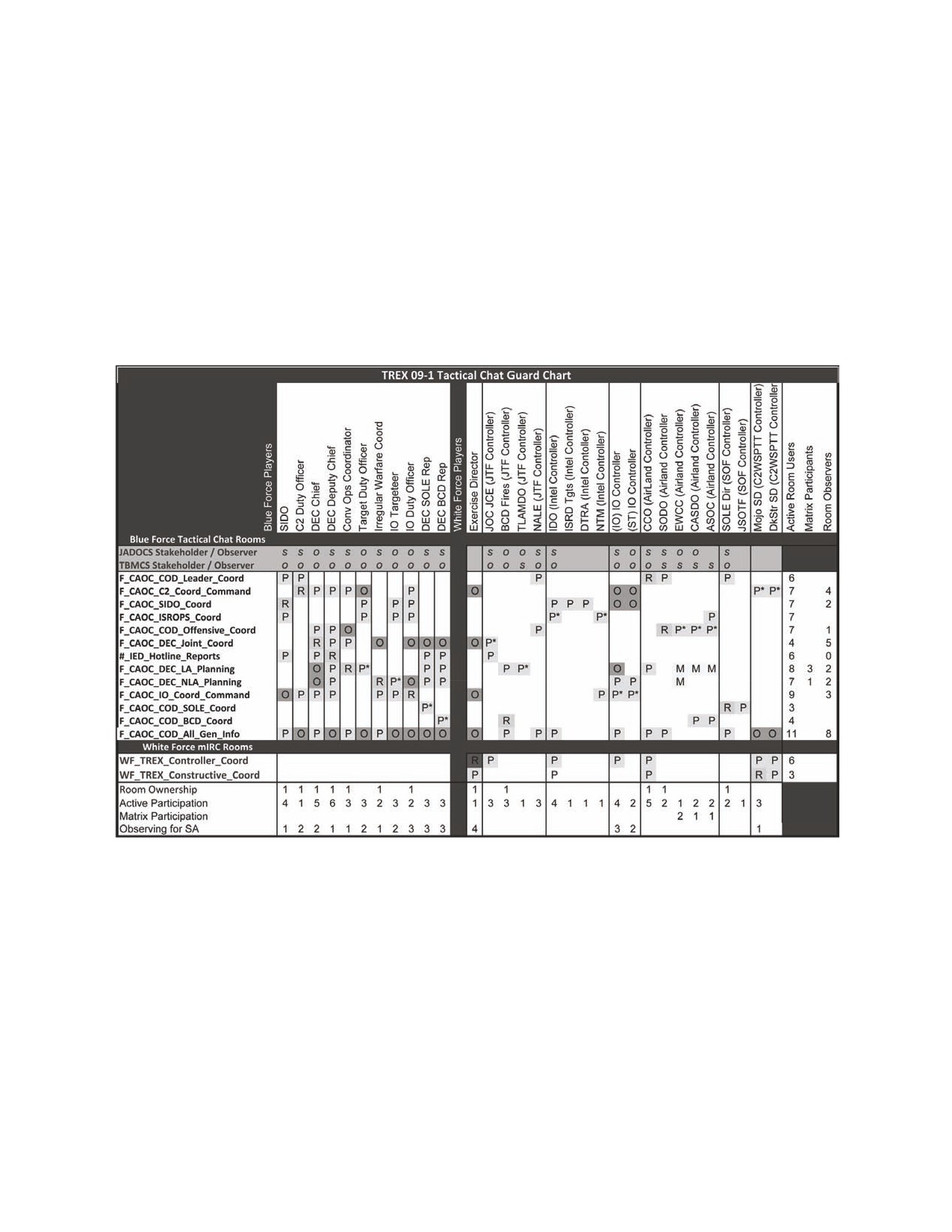
Appendix F
CHAT ROOM MANAGEMENT EXAMPLE
1. For this training example, the chat system of record (SOR) is mIRC. Applicable
rooms and guard chart for the AOC dynamic effects cell (DEC) are shown below. The
purpose of each room is described in short form by the title. Owners, full-time
participants, and matrix (part-time) participants are shown in the guard chart. Detailed
descriptions of room use and business rules are noted by room in section. Applicable
rooms and guard chart for the AOC DEC are shown below:
R - Room owner.
P* - Participant that has no room ownership (indicates the primary room monitored).
P - Participant (when also a room owner the owned room is assumed primary room monitored).
M - Room user who leaves a room minimized until called in to participate in a collaborative planning or coordination session.
O - Observer for situation awareness (SA) only. No active participation is expected or desired.
2. The DEC will interact with the listed rooms in accordance with the TC rules for the
specific room. When a room is designated internal coordination to a team or group, it
shall be understood that NO observer or participant will assume a lawful order has been
issued or will be issued by virtue of the content of this room. The only rooms that will
transmit lawful orders outside the AOC will have the term COMMAND in the room
name.
7 JULY 2009
FM 6-02.73 / MCRP 3-40.2B / NTTP 6-02.8 / AFTTP 3-2.77
67
a. F_CAOC_COD_Leader_Coord —This room is a coordination space internal
to the AOC for the chief of combat operations and his operations team leads. Other
AOC operations; planning; strategy; Intelligence, Surveillance, and Reconnaissance
Division (ISRD); and Air Mobility Division (AMD) users may monitor this room for SA.
The primary participants are the CCO, Senior Air Defense Officer (SADO), Senior
Intelligence Duty Officer (SIDO), Senior Operations Duty Officer (SODO), C2 Duty
Officer (C2DO), AOC Commander, and combined forces air component commander
(CFACC).
b. F_CAOC_C2_Coord_Command —This room is the mIRC parallel of AC-1
secure voice. The C2 Duty Officer will use this space to coordinate status and health of
the tactical air control squadron (TACS) with mIRC-equipped TACS platforms as well as
transmit AOC-directed commands to air forces in the AO. Commands on this channel
will follow the 10-line J28.2 compatible format for dynamic target tasking, or will begin
with ―CFACC directs. For TACS coordination issues the C2DO is assumed to be the
senior C2 liaison in the combat operations division (COD) and will have the authority to
adjust TACS. TACS platforms will use this room to report critical INFLTREPS of
dynamic tasking to include dynamic targeting (DT) and personnel recovery. This room
will NOT be used for INFLTREPs of immediate CAS or ASRs. TACS will report ASR
results to their supported ASOC.
c. F_CAOC_COD_Offensive_Coord—This room is a coordination space for the
SIDO and his subordinates to include the DEC, air interdiction (AI), electronic warfare /
suppression of enemy air defenses (SEAD), CAS, combat search and rescue duty
officer (CSARDO), etc. Other AOC operators may monitor this room; however, no lawful
orders outside the SODO‘s team will be transmitted in this room. The purpose of this
room is to allow the SODO to direct actions with his/her team and to allow subordinates
to raise issues to the SODO requiring cross-cell coordination and SODO approval.
d. F_CAOC_SIDO_Coord—This room is a coordination space for the senior
intelligence duty officer and his ISRD support team in the combat ops division. It is used
to coordinate and pass information with the ISRD specialty teams and target duty
officers assigned to the DEC. Only intelligence personnel participate in this room. All
observers should take note that information in this room is not fully vetted or valid or
ready for operational mission planning.
e. F_CAOC_DEC_Joint_Coord—This room is the coordination space for all
joint fires elements and the CAOC DEC. The DEC chief and deputy will interact with the
joint operations center joint coordination element and all Service component dynamic
targeting functions. The primary function of this room is to coordinate assignment of DT
planning and execution to the most capable system through its fires planning cell.
Decisions for joint transfer will be discussed in this room; however, the authoritative
source for decisions will be the Joint TST Manager in JADOCS. Discussions between
CAOC leadership and the DEC may also occur here for assigned DT missions;
68
FM 6-02.73 / MCRP 3-40.2B / NTTP 6-02.8 / AFTTP 3-2.77
7 JULY 2009
however, the authoritative source for decisions and status will be the Intra-AOC Target
Manager/Dynamic Targeting List in JADOCS.
f.
#_IED_Hotline_Reports—This theater-level room provides joint visibility and
reporting of significant targetable information directly to the DEC chief IAW IED TTP.
This room has deliberate reporting criteria and limited participants to maintain fast
linkage to the DEC. This is a reporting room only. No deliberation or coordination will
take place except to acknowledge receipt of the report. The DEC chief or deputy will vet
the information through appropriate channels to determine required actions. If actions
are deemed appropriate, the DEC chief or deputy will respond with the report
timestamp, disposition, and whether the authoritative mission data can be found in
JADOCS (to include manager) or other persistent collaborative targeting tools in the
ASOC or another component.
g. F_CAOC_DEC_Lethal_Attack_Planning—This room is a collaborative
planning space for lethal attack planning led by the DEC attack coordinator (AC). Upon
assignment of a mission planning task, the AC will post a matrix organization
participation requirement remark in the JADOCS DTL manager Target Data tab. This
list will include COD offensive duty officers and unit liaison officers as directed by the
AC and intelligence duty officers as directed by the TDO. The room name will be posted
as the final line of the remark to allow rapid assembly. The AC will post the same
remark in CAOC_COD_All_Gen_Info and voice to the floor in the COD_All voice
channel that a lethal attack mission planning task is posted. All operations duty officers
(ODOs) and liaison officers (LNOs) will check the list and join if named. Planning
coordination will proceed in the room until the AC produces a mission task message. At
that time the AC will dismiss the planners until the next event requiring their interaction.
h. F_CAOC_DEC_Non-Lethal_Attack_Planning—This room is the non-lethal
equivalent of the lethal attack planning room and will be led by the irregular warfare duty
officer (IWDO). Upon assignment of a mission planning task, the IW will post a matrix
organization participation requirement remark in the JADOCS DTL manager Target
Data tab. This list will include COD offensive duty officers and unit liaison officers as
directed by the IW and intelligence and IO duty officers as directed by the IOT. The
room name will be posted as the final line of the remark to allow rapid assembly. The IW
will post the same remark in CAOC_COD_All_Gen_Info and voice to the floor in the
COD. All voice channel that a non-lethal attack mission planning task is posted. All
intelligence and information operations duty officers (IODOs) will check the list and join
if named. Planning coordination will proceed in the room until the IW produces a
mission task message. At that time the IW will dismiss the planners until the next event
requiring their interaction.
i. F_CAOC_IO_Coord_Command—This room is the information operations
duty officer‘s coordination space and command channel to IO forces. The IODO will
coordinate information with the DEC IOT and other IO nodes in the AOC as well as
reachback agencies. Non-lethal attack mission commands will be published in this
room.
7 JULY 2009
FM 6-02.73 / MCRP 3-40.2B / NTTP 6-02.8 / AFTTP 3-2.77
69
j. F_CAOC_COD_SOLE_Coord—This room is the information sharing and
coordination space between the JSOTF and AOC special operations liaison element
(SOLE). The DEC SOLE representative will monitor this room for information relating to
DEC mission analysis or tasking. The DEC SOLE representative may interact (with
SOLE Director delegated authority) with the joint special operations task force and
other United States Special Operations Command (USSOCOM) agencies to gather
critical mission planning or analysis information.
k. F_CAOC_COD_BCD_Coord—This room is the information sharing and
coordination space between the corp TOC and the AOC battlefield coordination
detachment (BCD). The DEC BCD representative will monitor this room for information
relating to DEC mission analysis or tasking. The DEC BCD representative may interact
(with BCD director delegated authority) with corps TOC or other LCC agencies to gather
critical mission planning or analysis information.
l. CAOC_COD_All_Gen_Info—This room is used by team leads to post
temporary information that is relevant and significant to a large audience in the combat
operations division. Information relating to small audiences or that is better suited for a
collaborative tool (such as INFLTREPs, mission reports, battle hit assessment, etc.) will
be posted in appropriate locations such as persistent collaborative tools, shared drives,
or AOC portal web pages. DEC operations requiring immediate attention of varied
ODOs and LNOs will both be posted and voiced in this room. All COD players should
have this room displayed.
70
FM 6-02.73 / MCRP 3-40.2B / NTTP 6-02.8 / AFTTP 3-2.77
7 JULY 2009
REFERENCES
Joint Publications
JP 1-02, Department of Defense Dictionary of Military and Associated Terms. 12 April
2001.
CJCSI 3151.01B. Global Command and Control System Common Operational Picture
Reporting Requirements, 31 October 2008.
CJCSM 3500.04E, Universal Joint Task Manual, 25 August 2008.
DoDD 4630.05, Interoperability and Supportability of Information Technology (IT) and
National Security Systems (NSS), 5 May 2004.
JP 3-30, Command and Control for Joint Air Operations, 5 June 2003.
JP 3-31, Command and Control for Joint Land Operations, 23 March 2004.
JP 3-32, Command and Control for Joint Maritime Operations, 8 August 2006.
JP 3-33, Joint Task Force Headquarters, 16 February 2007.
JP 3-52, Joint Doctrine for Airspace Control in the Combat Zone, 30 August 2004.
JP 6-0, Joint Communications Systems, 20 March 2006.
Multi-Service Publications
FM1-02.1 (FM 3-54.10) / MCRP 3-25B / NTTP 6-02.1 / AFTTP(I) 3-2.5, Multi-Service
Brevity Codes. 1 October 2007.
Army
FM 3-0, Operations, 27 February 2008.
FM 6-0, Mission Command: Command and Control of Army Forces, 11 August 2003.
FM 6-99.2, U.S. Army Report and Message Formats, 30 April 2007.
FM 7-15, The Army Universal Task List, 27 February 2009.
Marine Corps
MCDP 6, Command and Control, 4 October 1996.
Air Force
AFDD 2-8, Command and Control, 1 June 2007.
7 JULY 2009
FM 6-02.73 / MCRP 3-40.2B / NTTP 6-02.8 / AFTTP 3-2.77
71
This page intentionally left blank.
72
FM 6-02.73 / MCRP 3-40.2B / NTTP 6-02.8 / AFTTP 3-2.77
7 JULY 2009

GLOSSARY
ABBREVIATIONS AND ACRONYMS
A
ACO
airspace control order
ADA
air defense artillery
AC
attack coordinator
AFTTP
Air Force tactics, techniques, and procedures
AI
air interdiction
ALSA
Air Land Sea Application Center
AMD
air mobility division
AO
area of operations
AOC
air operations center
AOR
area of responsibility
ASOC
air support operations center
ASR
air support request
ATO
air tasking order
B
BCD
battlefield coordination detachment
BCT
brigade combat team
BDA
battle damage assessment
BFT
blue force tracker
C
C2
command and control
C2DO
command and control duty officer
CAC
common access card
CAOC
combined air operations center
CAS
close air support
CASEVAC
casualty evacuation
CFACC
combined forces air component commander
CJTF
coalition joint task force
CCA
close combat attack
CCDR
combatant commander
CCO
central control officer
COD
combat operations division
COP
common operational picture
CCSG
commander, carrier strike group
CFACC
combined force air component commander
CSARDO
combat search and rescue duty officer
CSG
carrier strike group
D
DCA
defensive counterair
DEC
dynamic effects cell
DSN
Defense Switched Network
7 JULY 2009
FM 6-02.73 / MCRP 3-40.2B / NTTP 6-02.8 / AFTTP 3-2.77
73
DT
dynamic targeting
DTL
dynamic targeting list
E
ESG
expeditionary strike group
F
FARP
forward arming and refueling point
FM
field manual
FRAGORD
fragmentary order
FSE
fire support element
G
GCC
Geographic combatant commander
I
IAW
in accordance with
IDN
initial distribution number
IED
improvised explosive device
INFLTREPS
In-flight reports
IO
information operations
IODO
information operations duty officer
IP
internet protocol
ISRD
intelligence, surveillance, and reconnaissance division
IT
information technology
IWDO
Irregular warfare duty officer
J
J-3
operations directorate of a joint staff; operations staff section
J-6
communications system directorate of a joint staff; command,
control, communications, and computer systems staff section
JADOCS
joint automated deep operations coordination system
JFC
joint force commander
JOA
joint operations area
JP
joint publication
JPRC
joint personnel recovery center
JSTARS
joint surveillance target attack radar system
JTAC
joint terminal attack controller
JTF
joint task force
L
Lemay Center
Curtis E. LeMay Center for Doctrine Development and
Education
LNO
liaison officer
LAN
local area network
M
MCCDC
Marine Corps Combat Development Center
MCRP
Marine Corps reference publication
MEDEVAC
medical evacuation
MND-B
Multinational Division-Baghdad
MTI
moving target indicator
74
FM 6-02.73 / MCRP 3-40.2B / NTTP 6-02.8 / AFTTP 3-2.77
7 JULY 2009
MTTP
multi-Service tactics, techniques, and procedures
N
NECOS
net control station
NL
non-lethal
NIPRNET
non-secure internet protocol router network
NTTP
Navy tactics, techniques, and procedures
NWDC
Navy Warfare Development Command
O
ODO
operations duty officer
OEF
Operation ENDURING FREEDOM
OIF
Operation IRAQI FREEDOM
OPLAN
operation plan
OPORD
operation order
OPTASKCHAT
operation task chat
P
PCHAT
persistent chat
PID
positive identification
POI
point of impact
POO
point of origin
PR
personnel recovery
R
RO
room owner
ROE
rules of engagement
ROZ
restricted operations zone
S
S-3
battalion or brigade operations staff officer (Army; Marine
Corps battalion or regiment)
S-6
communications staff officer
SADO
senior air defense officer
SALT
size, activity, location, time
SALUTE
size, activity, location, unit, time, and equipment
SATCOM
satellite communications
SEAD
suppression of enemy air defenses
SIDO
senior intelligence duty officer
SIGACT
significant activity
SIPRNET
secret internet protocol router network
SITREP
situation report
SODO
senior operations duty officer
SOLE
special operations liaison element
SOP
standard operating procedure
SOR
system of record
SUA
special use airspace
T
TACS
tactical air control squadron
TAOC
Tactical Air Operations Center
7 JULY 2009
FM 6-02.73 / MCRP 3-40.2B / NTTP 6-02.8 / AFTTP 3-2.77
75
TC
tactical chat
TIC
troops in contact
TOC
tactical operations center
TRADOC
United States Army Training and Doctrine Command
TST
time-sensitive targeting
TTP
tactics, techniques and procedures
U
UAS
unmanned aircraft system
UJTL
Universal Joint Task List
UNTL
Universal Naval Task List
US
United States
USSOCOM
United States Special Operations Command
V
VOSIP
voice over secure internet protocol
76
FM 6-02.73 / MCRP 3-40.2B / NTTP 6-02.8 / AFTTP 3-2.77
7 JULY 2009
FM 6-02.73
MCRP 3-40.2B
NTTP 6-02.8
AFTTP 3-2.77
7 July 2009
By Order of the Secretary of the Army
Official:
GEORGE W. CASEY, JR.
General, United States Army
Chief of Staff
JOYCE E. MORROW
Administrative Assistant to the
Secretary of the Army
0923105
DISTRIBUTION:
Active Army, Army National Guard, and US Army Reserve: Not to be distributed;
electronic media only.
By Order of the Secretary of the Air Force
STEPHEN J. MILLER
Major General, USAF
Commander
Curtis E. LeMay Center for Doctrine Development and Education
ACCESIBILITY: Publications and forms are available on the e-Publishing website at
www.e-publishing .af.mil for downloading or ordering.
RELEASABILITY: Distribution authorized to DOD and DOD contractors only to protect
technical or operational information from automatic dissemination
under the International Exchange Program or by other means. This
protection applies to publications required solely for official use and
to those containing valuable technical or operational information.
This determination was made on 1 December 2008.
MARINE CORPS PCN: 144 000173 00
PIN: 085792-000

DOC NO: AZSPU-GEN-PRC-001-C9
CASPIAN REGION
Document Title: AzSPU Management of change Procedure
Document No
AzSPU-GEN-PRC-001
Revision Number:
C9
Owner
Richard Bodley-Scott
Revision Date:
07/10/2010
Ilhama Zeynalova (MoC steering group
Custodian
Next Review date
March 2011
chairman)
Authority
Mike Barnes
This is a controlled document. Any change to this document must be reviewed and approved by
the appropriate site prior to use and issue. Any documents not approved in this manner will be
Uncontrolled.
AzSPU-GEN-PRC-001-A2
Page 1 of 102
1 PURPOSE
4
2 ACCOUNTABILITY
4
3 SCOPE
4
4 MANAGEMENT OF CHANGE PROCESS FLOW
8
5 MANAGING RISK
11
6 PRIORITY
12
7 COMPETENCY AND TRAINING
13
8 ABBREVIATIONS AND DEFINITIONS
18
9 REFERENCES
18
10 SPECIFIC GUIDANCE - TECHNICAL MOC
20
11 SPECIFIC GUIDANCE - TECHNICAL MOC (DC&I FACILITIES)
28
12 SPECIFIC GUIDANCE - PROCESS SOFTWARE MOC
36
13 SPECIFIC GUIDANCE - PROCESS SOFTWARE MOC (DC&I FACILITIES)
44
14 SPECIFIC GUIDANCE - CHEMICAL MOC
51
15 SPECIFIC GUIDANCE - MAINTENANCE & INSPECTION MOC
59
16 SPECIFIC GUIDANCE - MAINTENANCE & INSPECTION MOC (DC&I FACILITIES)
66
17 SPECIFIC GUIDANCE - DRILLING, COMPLETIONS & INTERVENTIONS MOC
72
18 SPECIFIC GUIDANCE - DOCUMENTATION MOC
77
19 SPECIFIC GUIDANCE - ORGANIZATIONAL MOC
80
20 SPECIFIC GUIDANCE - IT&S MOC
84
21 SPECIFIC GUIDANCE - MARINE MOC
88
22 SPECIFIC GUIDANCE - DC&I DEVIATION MOC
94
23 SPECIFIC GUIDANCE - TECHNICAL MOC (WIMS DEVIATION)…………………………………………………………3
AzSPU-GEN-PRC-001-A2
Page 2 of 102
Amendment Summary
Revision No
Review Date
Summary description of changes
eMOC Ref
C1
18.7.2008
Initial issue for comment
C2
12.8.2008
Compliance additions
C3
3.12.2008
Edits
C4
5.12.2008
Compliance check sheet added
C5
8.1.2009
Edits
C6
8.1.2009
Edits drilling IT&S
C7
7.2.2009
Comp check and linkages updates issue for use
HSE TD-28
AzSPU Management of Change Procedure - major review
C8
30/07/2010
eMOC 56
and update
Update to the Process Safety TA HAZOP sign off
requirements
C9
07/10/2010
Update to include PSCM contractor change requirement
eMOC 56
Update to the rev R folder identification
General formatting and link updating
AzSPU-GEN-PRC-001-A2
Page 3 of 102
1 Purpose
This document provides a single Management of Change (MoC) procedure which will be used by the AzSPU to meet
the essential requirements of OMS 4.2 Management of Change and GRP 4.2-0001 to:
Allow AzSPU to implement and maintain a management of change process for temporary and permanent
changes. (E&P OMS Ver2 section 4.2.1)
Identify which tool will be used to support the MoC process ((E&P OMS Ver2 section 4.2.1.1)
Monitor legal regulatory and BP requirements so as to be aware of changes in these that might necessitate
changes to the AzSPU activity. (E&P OMS Ver2 section 4.2.2)
Specify criteria for determining which proposed changes to AzSPU activity require application of the MoC
process, paying particular attention to those affecting plant, material, equipment, technology, process, products,
services, procedures, practices, people and organization. (E&P OMS Ver2 section 4.2.3)
Detail the requirement for risk assessment, identification and application of risk reduction measures, the
required level of management approval; application of a review prior to implementing the change to verify that
identified risk reduction measures are in place, then identified training and updating of relevant documents (E&P
OMS Ver2 section 4.2.4) is completed
Identify the minimum review and approval requirements for change. ((E&P OMS Ver2 section 4.2.4)
Communicate the details of the proposed change to affected members of the workforce(E&P OMS Ver2 section
4.2.5)
Provide a process to track MoC actions to closure(E&P OMS Ver2 section 4.2.6)
Provide a process to verify the original scope and duration of temporary changes are not exceeded without
review and approval (E&P OMS Ver2 section 4.2.7)
Define the workflow for various types and categories of change (E&P OMS Ver2 section 4.2.6, GRP 4.2-0001 section
5.2.2.D)
Identify training and competency assessments for those with accountabilities within the MoC process.
(E&P OMS
Ver2 section 4.2.6, GRP 4.2-0001 section 5.2.2.C)
Identify the process of review that will be used to verify that the procedure is being implemented correctly
To ensure that change is managed in a clear uniform manner across the AzSPU, a single „e-MoC‟ data-base tool will
be used. This will be sub-divided by the various operating area groups to provide an MoC register, allowing the
operating area line management team to have a clear view of change ongoing in their area of responsibility.
2 Accountability
2.1
MoC Process
The Single Point Accountable person for the MoC Process is the AzSPU HSE & ENG Vice President.
2.2
MoC implementation within the Performance Units
The Single Point Accountable person for the MoC process implementation within the each division is the division Vice
president. For an individual MoC, the most senior manager approving the MoC has ultimate accountability for that
MoC.
3 Scope
This document covers the management of change system used by:
BP assets and Brownfield sites within the AzSPU in Azerbaijan, Georgia and Turkey when implementing
permanent / temporary / emergency changes.
Major projects green field sites are subject to their own management of the change process and are excluded
from the scope of this document with the exception of brown field work.
Contracts where it has been agreed that the contractor‟s management of change process will be used are
excluded from the scope of this document with the exception of when the contract Technical Specialist requires
formal oversight of a change or if the change affects marine systems.
3.1
Change types
MoC Type managed and approved under this procedure can be permanent, temporary and emergency.
AzSPU-GEN-PRC-001-A2
Page 4 of 102
Types will be categorized as follows:
Technical Changes
Process Software Changes
Chemical
Maintenance & Inspection Changes
Drilling Intervention and Completions Changes (Wells)
Document Changes
Organizational Changes
IT&S Changes
Marine Changes
DC&I Deviation
Note: Specific guidance for each change type can be found after the reference section of this document
Go to link for the MoC decision tree for guidance on what type of MoC is required or if no MoC is required
Document
Document Title
Applies to
Notes
number
MOC-FRM-037
MoC Decision Tree
AzSPU
To aid selection of MoC type
3.1.1 Permanent Change
A permanent change is a change that will be in place for more than 90 days.
Note: 90 days is a reflection of how long it takes to formally update documents and systems after a change has been
implemented. If the change will be removed before 90 days then the requirements to update the master equipment list and back
draft drawings and update other systems is waived. It is accepted that this will be managed on site.
Note: On occasion the operation areas require modifications that will be in place for longer than 90 days however they do not
consider this as the long term solution, i.e. pipe clamps are fitted as an immediate measure to stop a leak and it is envisaged that
this may be in place for in excess of 90 days. As such, a permanent MoC should be raised and any periodic review /maintenance
/ inspection should be managed through the computer maintenance management system, to ensure that this type of change
does not exceed the period defined in the scope. A traction action is to be raised (and assigned to the MOC authorizer) with an
action date to remove this modification. A separate MoC should be used to decommission this equipment and update the
associated documents and systems.
Note: Examples of permanent changes for DC&I include MoC related to well basis of design documents and statement of
requirements.
3.1.2 Temporary Change
A temporary change is a change that will have a limited duration and will be less than 90 days.
Temporary changes are typically part of a test, optimization trial, improvement project or similar Change.
Temporary changes are typically planned in advance and executed under normal working conditions.
Note: Examples of temporary changes for DC&I include BOP test extensions and kick tolerance deviations
The temporary change will have the same sign off requirements as a permanent change, which will be based on risk
level and the type of MoC. The documentation, as built drawings, operations instructions and any other maintenance
requirements will be maintained in a file on site and within the MoC. The normal information that would be updated
within the master documentation and equipment data-bases is waived. This recognizes that the temporary change
will be removed (within 90 days) and the site left as it was before.
Note: Before close out of a Temporary MoC, a clear reference stating that all temporary changes have been removed.
Any Temporary MoC which is due to expire should be reviewed and actioned by the Authorizer.
A temporary MoC may be re-authorized twice by a period of no more than 90 days, only after an appropriate risk
assessment has been recorded and attached to the MoC. After this period the MoC will need to be fully resubmitted
as a permanent MoC.
Note: The two extensions reflects that on occasion within the Az SPU the ordering purchasing and receipt of material in country
can take up to 180 days
Note: the temporary MoC period is from the date of authorization, to the date in the post implementation action that confirms
that the temporary change has been removed - this should never exceed 270 days including all extensions.
AzSPU-GEN-PRC-001-A2
Page 5 of 102

3.1.3 Emergency Change
The definition of an emergency change is an immediate change which is required for safe operation. In this case a
formal MoC will be raised and verified within 96hrs.
Emergency changes will have the same sign off requirements as a permanent change, which will be based on risk
level and the type of MoC.
During the emergency the site management of risk will be considered and managed under ISSOW until the approved
MoC can be put in place
3.2
AzSPU Sites
These are the sites and facilities which are owned/operated/interface with or are used by AzSPU sites. The table
identifies the applicability of this procedure to these areas.
Note: Where technical over sight is required of a contractor the Contract Technical Specialist will initiate the MoC process
BP non operated vessels / barges/ boats/ buoys/MDU etc used by BP will require a Marine MoC if there is
modification that affects or changes the marine system.
AZSPU eMoC SITE
AZSPU eMoC Facility
Owned
Operated by
AzSPU MoC applies
by
CEC - Caspian energy
C&EA
BP
BP AZSPU
YES
centre
Central services
AzSPU
BP
BP AZSPU
YES
Central services
Resource
BP
BP AZSPU
YES
Central services
D&C
BP
BP AZSPU
YES
Central services
HSE & Eng
BP
BP AZSPU
YES
Central services
Developments
BP
BP AZSPU
YES
Central services
HR
BP
BP AZSPU
YES
Central services
C&EA and Security
BP
BP AZSPU
YES
Central services
CFO
BP
BP AZSPU
YES
Central services
Shah Deniz 2
BP
BP AZSPU
YES
Central services
Turkey
BP
BP AZSPU
YES
Central services
Operations
BP
BP AZSPU
YES
Central services
Midstream
BP
BP AZSPU
YES
Yes when required for
CFO
Housing
OTHERS
BP AZSPU
over sight
Yes when required for
CFO
Office Operations
OTHERS
BP AZSPU
over sight
Yes when required for
CFO
SPS QUAY side
BDWJF
ASCO
over sight
Yes when required for
CFO
Primorsk
SOCAR
ASCO
over sight
Yes when required for
CFO
SPS Logistics base
BDWJF
VARIOUS
over sight
CFO
BP Logistics Base
BP
ASCO
YES
CFO
Diesel Tank Farm
BP
ASCO
YES
Yes when required for
CFO
Davis training centre
BP
over sight
Yes when required for
CFO
TISA
BP
TISA
over sight
D&C
Advanced fluid facility
BP
HALLIBURTON
YES
Yes when required for
D&C
Mobile Drilling Units
OTHERS
OTHERS
over sight or marine
change
yes when required for
Developments
COP
BP
BP CDO
over sight or
Brownfield work
yes when required for
Developments
SD2
BP
BP CDO
over sight or
Brownfield work
AzSPU-GEN-PRC-001-A2
Page 6 of 102
AZSPU eMoC SITE
AZSPU eMoC Facility
Owned
Operated by
AzSPU MoC applies
by
yes when required for
Developments
SCPx
BP
BP CDO
over sight or
Brownfield work
yes when required for
Developments
Marine Fleet
BP
BP CDO
over sight or
Brownfield work
Yes when required for
HSE & ENG
CTTC- Training Centre
BP
TTE
over sight
Midstream Export Azerbaijan
BTC - BVA & pipeline
BP
BP AZSPU
YES
(BTC/SCP/WREP)
Midstream Export Azerbaijan
BTC -IPA1
BP
BP AZSPU
YES
(BTC/SCP/WREP)
Midstream Export Azerbaijan
BTC - PSA2
BP
BP AZSPU
YES
(BTC/SCP/WREP)
Midstream Export Azerbaijan
SCP - BVA & pipeline
BP
BP AZSPU
YES
(BTC/SCP/WREP)
Midstream Export Azerbaijan
WREP - Pipeline
BP
BP AZSPU
YES
(BTC/SCP/WREP)
Midstream Export Azerbaijan
WREP - PS2
BP
BP AZSPU
YES
(BTC/SCP/WREP)
Midstream Export Azerbaijan
WREP - PS5
BP
BP AZSPU
YES
(BTC/SCP/WREP)
Midstream Export Azerbaijan
WREP - PS8
BP
BP AZSPU
YES
(BTC/SCP/WREP)
Midstream Export Turkey
Yes when required for
BTC - BVT & pipeline
BP
BIL
(BTC/SCP/Ceyhan)
over sight
Midstream Export Turkey
Yes when required for
BTC - Ceyhan Terminal
BP
BIL
(BTC/SCP/Ceyhan)
over sight
Midstream Export Turkey
Yes when required for
BTC -IPT1
BP
BIL
(BTC/SCP/Ceyhan)
over sight
Midstream Export Turkey
Yes when required for
BTC -IPT2
BP
BIL
(BTC/SCP/Ceyhan)
over sight
Midstream Export Turkey
Yes when required for
BTC - PT1
BP
BIL
(BTC/SCP/Ceyhan)
over sight
Midstream Export Turkey
Yes when required for
BTC - PT2
BP
BIL
(BTC/SCP/Ceyhan)
over sight
Midstream Export Turkey
Yes when required for
BTC - PT3
BP
BIL
(BTC/SCP/Ceyhan)
over sight
Midstream Export Turkey
Yes when required for
BTC - PT4
BP
BIL
(BTC/SCP/Ceyhan)
over sight
Midstream Export Turkey
Yes when required for
SCP - Area 99 (Turkey)
BP
BIL
(BTC/SCP/Ceyhan)
over sight
Midstream Georgia
BTC - BVG
BP
BP AZSPU
YES
(BTC/SCP/WREP/Supsa)
Midstream Georgia
BTC - pipeline
BP
BP AZSPU
YES
(BTC/SCP/WREP/Supsa)
Midstream Georgia
BTC -PSG1
BP
BP AZSPU
YES
(BTC/SCP/WREP/Supsa)
Midstream Georgia
BTC - PSG2
BP
BP AZSPU
YES
(BTC/SCP/WREP/Supsa)
Midstream Georgia
SCP - BVG
BP
BP AZSPU
YES
(BTC/SCP/WREP/Supsa)
Midstream Georgia
SCP - pipeline
BP
BP AZSPU
YES
(BTC/SCP/WREP/Supsa)
Midstream Georgia
SCP - Area 72 (PSG1)
BP
BP AZSPU
YES
(BTC/SCP/WREP/Supsa)
Midstream Georgia
SCP - Area 73 (PSG1)
BP
BP AZSPU
YES
(BTC/SCP/WREP/Supsa)
AzSPU-GEN-PRC-001-A2
Page 7 of 102

AZSPU eMoC SITE
AZSPU eMoC Facility
Owned
Operated by
AzSPU MoC applies
by
Midstream Georgia
SCP - Area 75 (PSG2)
BP
BP AZSPU
YES
(BTC/SCP/WREP/Supsa)
Midstream Georgia
SCP - Area 80 (Georgia)
BP
BP AZSPU
YES
(BTC/SCP/WREP/Supsa)
Midstream Georgia
WREP - Pipeline
BP
BP AZSPU
YES
(BTC/SCP/WREP/Supsa)
Midstream Georgia
WREP - PRS1
BP
BP AZSPU
YES
(BTC/SCP/WREP/Supsa)
Midstream Georgia
WREP - PRS2
BP
BP AZSPU
YES
(BTC/SCP/WREP/Supsa)
Midstream Georgia
WREP - PS11
BP
BP AZSPU
YES
(BTC/SCP/WREP/Supsa)
Midstream Georgia
WREP - PS13
BP
BP AZSPU
YES
(BTC/SCP/WREP/Supsa)
Midstream Georgia
WREP - PS15
BP
BP AZSPU
YES
(BTC/SCP/WREP/Supsa)
Midstream Georgia
WREP - Supsa
BP
BP AZSPU
YES
(BTC/SCP/WREP/Supsa)
Waterman Produced
Midstream Sangachal terminal
BP
Waterman
YES
Water skid
Midstream Sangachal terminal
ST CWAA
BP
BP AZSPU
YES
Midstream Sangachal terminal
SPS CWAA
BP
BP AZSPU
YES
Midstream Sangachal terminal
Serenja waste (haz)
BP
BP AZSPU
YES
Midstream Sangachal terminal
ST- STP
BP
AAS-ATE JV
YES
Midstream Sangachal terminal
Sumgait 1 (closed out )
ADES
ASS
NO
Sumgait 2 (non haz
Yes when required for
Midstream Sangachal terminal
TTMMC
SRM
waste)
over sight
Midstream Sangachal terminal
BTC- PSA1
BP
BP AZSPU
YES
Midstream Sangachal terminal
LTPW
BP
BP AZSPU
YES
Midstream Sangachal terminal
SCP
BP
BP AZSPU
YES
Midstream Sangachal terminal
Shah Deniz (onshore)
BP
BP AZSPU
YES
Midstream Sangachal terminal
ACG EOP
BP
BP AZSPU
YES
Midstream Sangachal terminal
ACG STEP
BP
BP AZSPU
YES
Operations Azeri
CA
BP
BP AZSPU
YES
Operations Azeri
WA
BP
BP AZSPU
YES
Operations Azeri
EA
BP
BP AZSPU
YES
Operations Azeri
Azeri Subsea
BP
BP AZSPU
YES
Operations Chirag/DWG
Chirag 1
BP
BP AZSPU
YES
Operations Chirag/DWG
DWG
BP
BP AZSPU
YES
Operations Chirag/DWG
Chirag/DWG Subsea
BP
BP AZSPU
YES
Operations Chirag/DWG
Chirag Drilling Rig
KCAD
KCAD
YES
Yes when required for
BUE, CMS,
BUE, CMS,
Operations logistics
Marine fleet operations
over sight or marine
CBARS
CBARS
change
Yes when required for
Operations logistics
Baku Sea Port
Others
Others
over sight
Yes when required for
Operations logistics
Aviation
Silk Way
CHC
over sight
Operations Shah Deniz
SDA
BP
BP AZSPU
YES
Operations Shah Deniz
Shah Deniz Subsea
BP
BP AZSPU
YES
4 Management of Change Process flow
The majority of changes to be managed in the management of change process described here will have originated in
another process or system. For example the majority of Technical MoCs originate from the Engineering Query
process, where a problem will have been identified, solutions will have been appraised and site management will
have selected the change to go forward. Those changes that do not go through the EQ process or other process
may be cancelled at the verify stage at the discretion of the key verifier, if they do not meet the gate criteria.
AzSPU-GEN-PRC-001-A2
Page 8 of 102