DB2 Server for VSE & VM SQL Reference (Version 7 Release 5) - page 3
Expressions
Expressions
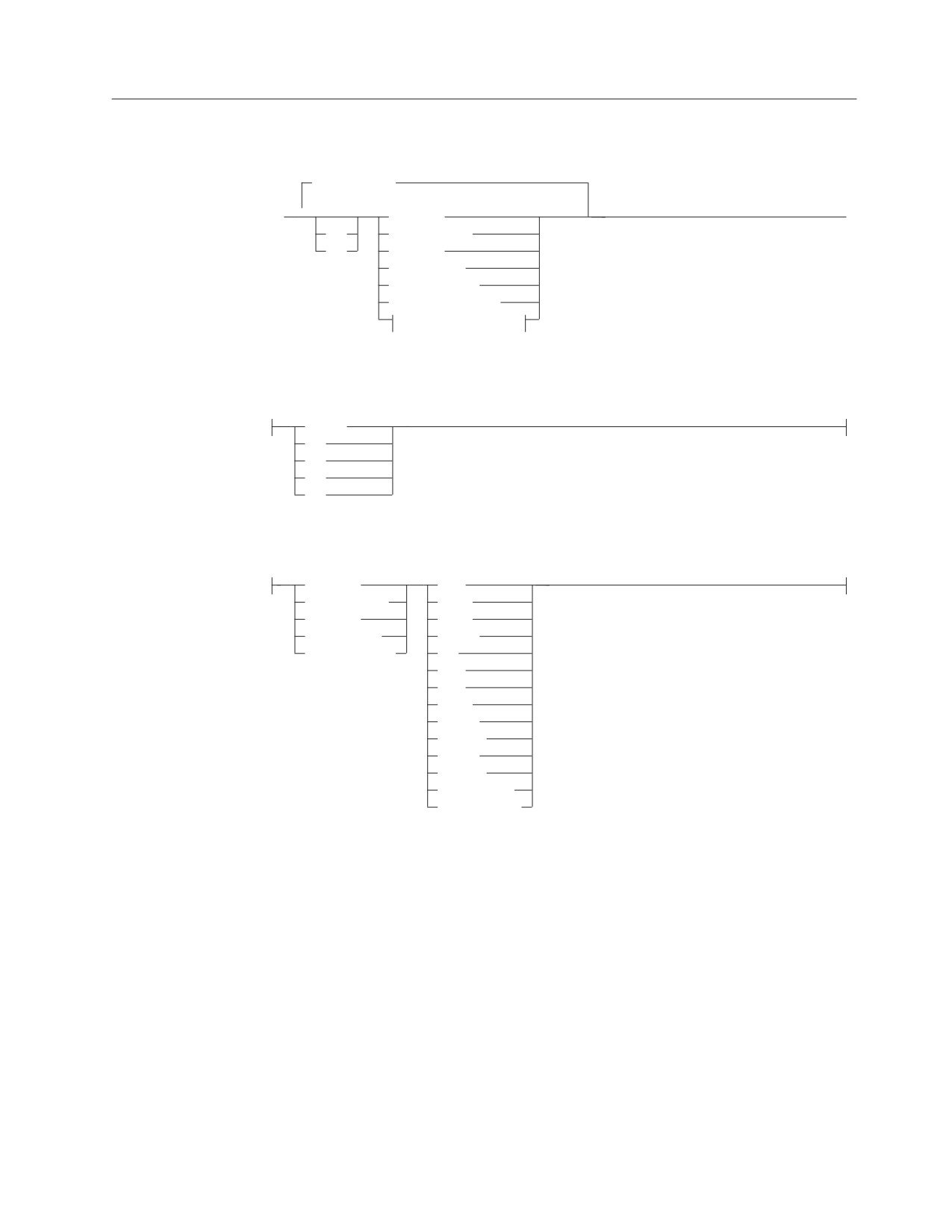
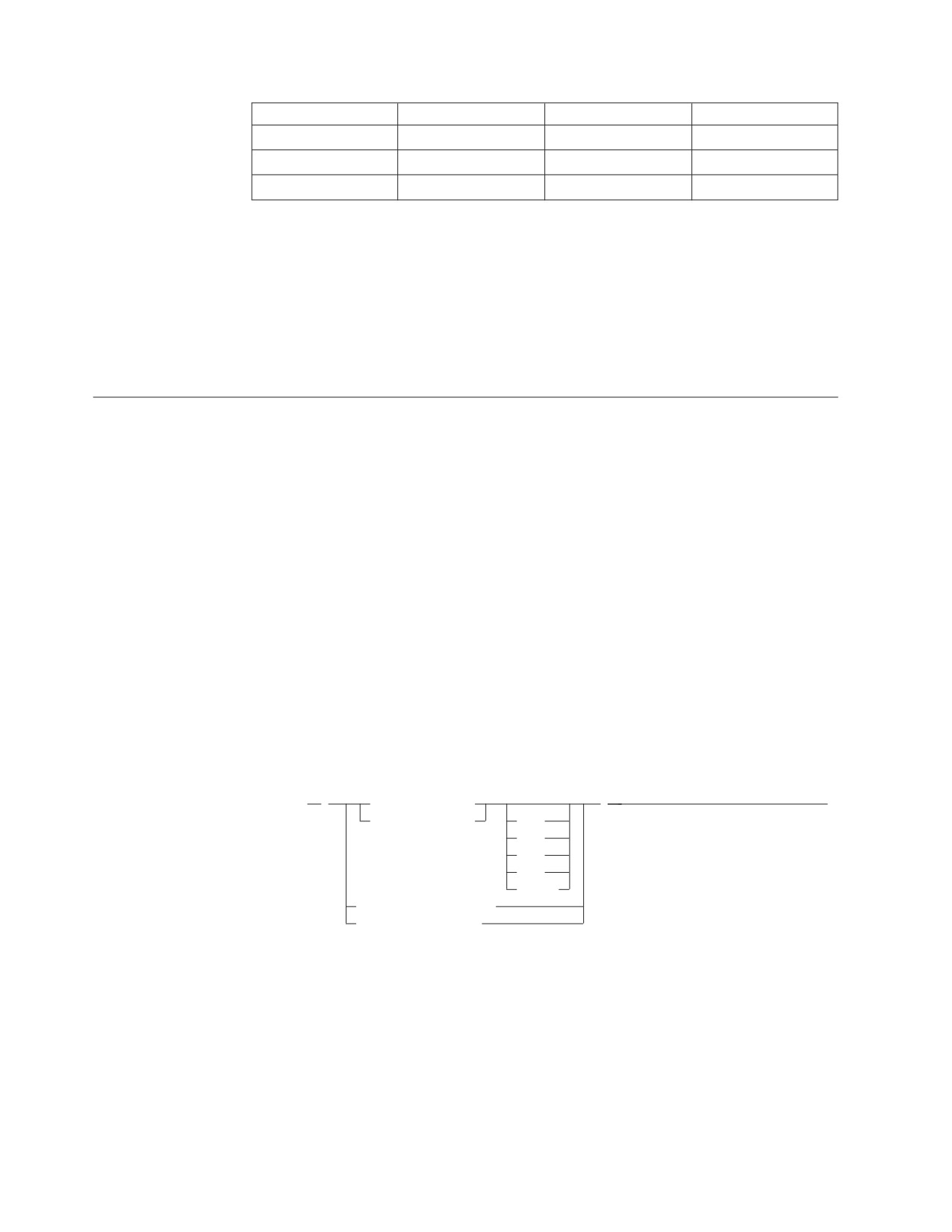
An expression specifies a value.
| operator |
(1)
►►
▼
function
►◄
+
(expression)
−
constant
column_name
host_variable
special_register
labeled_duration
operator:
(2)
CONCAT
/
+
−
labeled_duration:
function
YEAR
(expression)
YEARS
constant
MONTH
column_name
MONTHS
host_variable
DAY
DAYS
HOUR
HOURS
MINUTE
MINUTES
SECOND
SECONDS
MICROSECOND
MICROSECONDS
Notes:
1
Not all combinations of operands and operations are supported.
2
Either || or !! can be used as an alternative to CONCAT in all DB2
Server for VSE &
VM-supported code pages. However, !! is not supported in IBM-SQL.
Without Operators
If no operators are used, the result of the expression is the specified value.
Examples:
SALARY
:SALARY
’SALARY’
MAX(SALARY)
Chapter 3. Language Elements
71
Expressions
With the Concatenation Operator
The concatenation operator (CONCAT) links two string operands to form a string
expression.
The operands of concatenation must be compatible strings. Note that datetime data
types (including the CURRENT DATE, CURRENT TIME, and CURRENT
TIMESTAMP special registers) can be used as operands in a character string
expression because the datetime data types are compatible with the character data
type. If both operands are character strings, the sum of their length attributes must
not exceed 254; if both are graphic strings, the sum of their length attributes must
not exceed 127.
If either operand can be null, the result can be null, and if either is null, the result
is the null value. Otherwise, the result consists of the first operand string followed
by the second.
With mixed data this result will not have redundant shift codes “at the seam”.
Thus, if the first operand is a string ending with a “shift-in” character, while the
second operand is a character string beginning with a “shift-out” character, these
two bytes are eliminated from the result. Note that no check is made for
improperly formed mixed data when doing concatenation.
The length of the result is the sum of the lengths of the operands, unless
redundant shift codes are eliminated, in which case the length is two less than the
lengths of the operands.
If both operands are fixed-length character strings (neither of which is mixed data)
the result is a fixed-length character string whose length attribute is the sum of the
length of the operands. Otherwise, the result is a varying-length character string
whose length attribute is the sum of the length attributes of the operands.
If both operands are fixed-length graphic strings, the result is a fixed-length
graphic string whose length attribute is the sum of the length of the operands.
Otherwise, the result is a varying-length graphic string whose length attribute is
the sum of the length attributes of the operands.
The CCSID of the result is determined by the CCSID of the operands as explained
under “Conversion Rules for Operations that Combine Strings” on page 130.
If an operand is a string from a column with a field procedure, the operation
applies to the decoded form of the value; the result does not inherit the field
procedure.
Example 1: FIRSTNME CONCAT ’ ’ CONCAT LASTNAME
Example 2: Given:
COLA defined as VARCHAR(5) with value ’AA’
COLB defined as VARCHAR(5) with value ’BB
’
COLC defined as CHAR(5) with value ’CC
’
COLD defined as CHAR(5) with value ’DDDDD’
The value of COLA CONCAT COLB CONCAT COLC CONCAT COLD is:
’AABB CC DDDDD’
72
SQL Reference
Expressions
With Arithmetic Operators
Arithmetic operators (+, -, *, /) link two numeric or datetime operands to form a
numeric expression.
If arithmetic operators are used, the result of the expression is a number derived
from the application of the operators to the values of the operands. If any operand
can be null, or the expression is used in an outer SELECT list, the result can be
null. If any operand has the null value, the result of the expression is the null
value. Arithmetic operators must not be applied to character strings. For example,
USER+2 is incorrect.
The prefix operator + (unary plus) does not change its operand. The prefix operator
- (unary minus) reverses the sign of a nonzero operand. If the data type of A is
small integer, the data type of -A is large integer. If the data type of A is small float,
then the data type of -A is large float. The first character of the token following a
prefix operator must not be a plus or minus sign.
The infix operators +, -, *, and / specify addition, subtraction, multiplication, and
division, respectively. Either an error or a warning results if the second operand of
division has a value of zero.
Two-Integer Operands
If both operands of an arithmetic operator are integers, the operation is performed
in binary and the result is a large integer. Any remainder of division is lost. The
result of an integer arithmetic operation (including unary minus) must be within
the range of large integers.
Integer and Decimal Operands
If one operand is an integer and the other is decimal, the operation is performed in
decimal using a temporary copy of the integer that has been converted to a
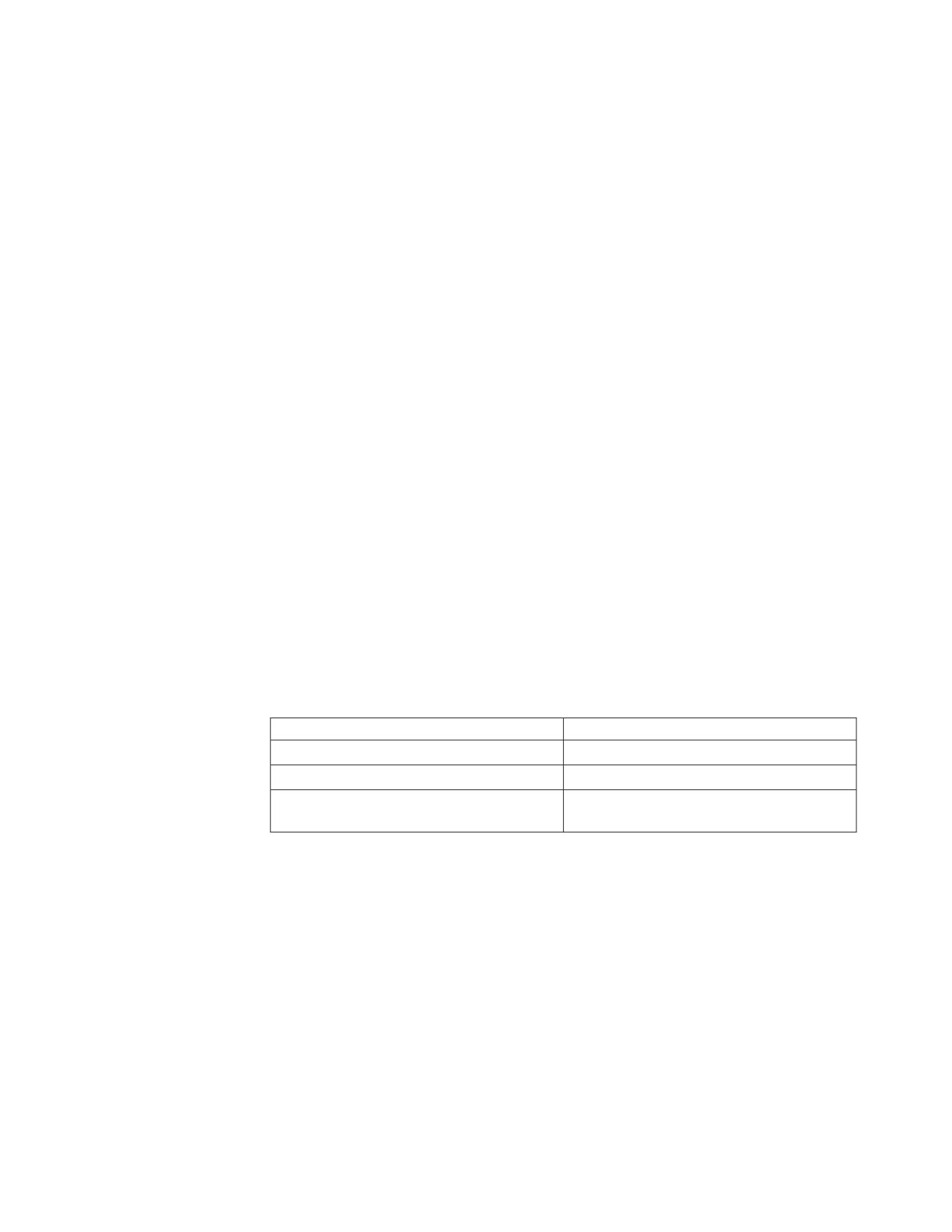
decimal number with zero scale and precision as defined in the following table:
Operand
Precision of Decimal Copy
Column or variable:large integer
11
Column or variable:small integer
5
Constant
Same as the number of digits (including
leading zeros) in the constant
Two-Decimal Operands
If both operands are decimal, the operation is performed in decimal. The result of
any decimal arithmetic operation is a decimal number with a precision and scale
that are dependent on the operation and the precision and scale of the operands. If
the operation is addition or subtraction and the operands do not have the same
scale, the operation is performed with a temporary copy of one of the operands
that has been extended with trailing zeros so that its fractional part has the same
number of digits as the other operand.
Unless specified otherwise, all functions and operations that accept decimal
numbers allow a precision of up to 31 digits. The result of a decimal operation
cannot have a precision greater than 31.
Chapter 3. Language Elements
73
Expressions
Decimal Arithmetic in SQL
The following formulas define the precision and scale of the result of decimal
operations in SQL. The symbols p and s denote the precision and scale of the first
operand and the symbols p' and s' denote the precision and scale of the second
operand.
The precision of the result of addition and subtraction is min(31, max(p-s,
p'-s')+max(s, s')+1) and the scale is max(s, s').
The precision of the result of multiplication is min(31, p+p') and the scale is min(31,
s+s').
The precision of the result of division is 31 and the scale is 31-p+s-s'. If the scale is
negative, a negative value is returned in the SQLCODE field of the SQLCA.
Precision and scale can be influenced by decimal constants with leading or trailing
zeros.
Floating-Point Operands
If either operand of an arithmetic operator is floating-point, the operation is
performed in floating-point. If necessary, the operands are first converted to double
precision floating-point numbers. Thus, if any element of an expression is a
floating-point number, the result of the expression is a double precision
floating-point number.
An operation involving a floating-point number and an integer is performed with
a temporary copy of the integer that has been converted to double precision
floating-point. An operation involving a floating-point number and a decimal
number is performed with a temporary copy of the decimal number that has been
converted to double precision floating-point. The result of a floating-point
operation must be within the range of floating-point numbers.
Datetime Operands
Datetime values can be incremented, decremented, and subtracted. These
operations may involve decimal numbers called durations. Following is a definition
of durations and a specification of the rules for datetime arithmetic.
Durations
A duration is a number representing an interval of time. There are four types of
durations:
Labeled Durations (see diagram on page 71)
A labeled duration represents a specific unit of time as expressed by a
number (which can be the result of an expression) followed by one of the
seven duration keywords: YEARS, MONTHS, DAYS, HOURS, MINUTES,
SECONDS, or MICROSECONDS (the singular form of these keywords is
also acceptable: YEAR, MONTH, DAY, HOUR, MINUTE, SECOND, and
MICROSECOND.). The number specified is converted as if it were
assigned to a DECIMAL(15,0) number. A labeled duration can only be used
as an operand of an arithmetic operator in which the other operand is a
value of data type DATE, TIME, or TIMESTAMP. Thus, the expression
START_DATE + 2 MONTHS + 14 DAYS is valid, while the expression
START_DATE + (2 MONTHS + 14 DAYS) is not. In both of these
expressions, the labeled durations are 2 MONTHS and 14 DAYS.
Date Duration
A date duration represents a number of years, months, and days, expressed
74
SQL Reference
Expressions
as a DECIMAL(8,0) number. To be properly interpreted, the number must
have the format yyyyxxdd, where yyyy represents the number of years, xx
the number of months, and dd the number of days. The result of
subtracting one DATE value from another, as in the expression END_DATE
- START_DATE, is a date duration.
Time Duration
A time duration represents a number of hours, minutes, and seconds,
expressed as a DECIMAL(6,0) number. To be properly interpreted, the
number must have the format hhmmss where hh represents the number of
hours, mm the number of minutes, and ss the number of seconds. The
result of subtracting one TIME value from another is a time duration.
Timestamp Duration
A timestamp duration represents a number of years, months, days, hours,
minutes, seconds, and microseconds, expressed as a DECIMAL (20,6)
number. To be properly interpreted, the number must have the format
yyyyxxddhhmmsszzzzzz, where yyyy, xx, dd, hh, mm, and ss represent,
respectively, the number of years, months, days, hours, minutes, and
seconds, and zzzzzz represents the number of microseconds. The result of
subtracting one timestamp value from another is a timestamp duration.
Datetime Arithmetic in SQL
The only arithmetic operations that can be performed on datetime values are
addition and subtraction. If a datetime value is the operand of addition, the other
operand must be a duration. The specific rules governing the use of the addition
operator with datetime values follow.
v If one operand is a date, the other operand must be a date duration or labeled
duration of years, months, or days.
v If one operand is a time, the other operand must be a time duration or a labeled
duration of hours, minutes, or seconds.
v If one operand is a timestamp, the other operand must be a duration. Any type
of duration is valid.
v Neither operand of the addition operator can be a parameter marker.
The rules for the use of the subtraction operator on datetime values are not the
same as those for addition because a datetime value cannot be subtracted from a
duration, and because the operation of subtracting two datetime values is not the
same as the operation of subtracting a duration from a datetime value. The specific
rules governing the use of the subtraction operator with datetime values follow.
v If the first operand is a date, the second operand must be a date, a date
duration, a string representation of a date, or a labeled duration of years,
months, or days.
v If the second operand is a date, the first operand must be a date, or a string
representation of a date.
v If the first operand is a time, the second operand must be a time, a time
duration, a string representation of a time, or a labeled duration of hours,
minutes, or seconds.
v If the second operand is a time, the first operand must be a time, or string
representation of a time.
v If the first operand is a timestamp, the second operand must be a timestamp, a
string representation of a timestamp, or a duration.
v If the second operand is a timestamp, the first operand must be a timestamp or
a string representation of a timestamp.
Chapter 3. Language Elements
75
Expressions
v Neither operand of the subtraction operator can be a parameter marker.
Date Arithmetic
Dates can be subtracted, incremented, or decremented.
Subtracting Dates: The result of subtracting one date (DATE2) from another
(DATE1) is a date duration that specifies the number of years, months, and days
between the two dates. The data type of the result is DECIMAL(8,0). If DATE1 is
greater than or equal to DATE2, DATE2 is subtracted from DATE1. If DATE1 is
less than DATE2, however, DATE1 is subtracted from DATE2, and the sign of the
result is made negative. The following procedural description clarifies the steps
involved in the operation RESULT = DATE1 - DATE2.
If DAY(DATE2) <= DAY(DATE1)
then DAY(RESULT) = DAY(DATE1) - DAY(DATE2).
If DAY(DATE2) > DAY(DATE1)
then DAY(RESULT) = N + DAY(DATE1) - DAY(DATE2)
where N = the last day of MONTH(DATE2).
MONTH(DATE2) is then incremented by 1.
If MONTH(DATE2) <= MONTH(DATE1)
then MONTH(RESULT) = MONTH(DATE1) - MONTH(DATE2).
If MONTH(DATE2) > MONTH(DATE1)
then MONTH(RESULT) = 12 + MONTH(DATE1) - MONTH(DATE2).
YEAR(DATE2) is then incremented by 1.
YEAR(RESULT) = YEAR(DATE1) - YEAR(DATE2).
For example, the result of DATE('3/15/2000') - '12/31/1999' is 215 (or, a duration
of 0 years, 2 months, and 15 days).
Incrementing and Decrementing Dates: The result of adding a duration to a
date, or of subtracting a duration from a date, is itself a date. The result must fall
between the dates January 1, 0001 and December 31, 9999 inclusive. If a duration
of years is added or subtracted, only the year portion of the date is affected. The
month is unchanged, as is the day unless the result would be February 29 of a
non-leap-year. Here the day portion of the result is set to 28, and the SQLWARN7
condition is set, indicating that an end-of-month adjustment was made to correct
an incorrect date.
Similarly, if a duration of months is added or subtracted, only months and, if
necessary, years are affected. (For the purposes of the operation, a month is a
calendar page. Adding n months to a date, for example, is like turning n pages of
a calendar starting with the page on which the date appears.) The day portion of
the date is unchanged unless the result would be incorrect (September 31, for
example). Here, the day is set to the last day of the month, and the SQLWARN7
field in SQLCA is set indicating the adjustment.
Adding or subtracting a duration of days will, of course, affect the day portion of
the date, and potentially the month and year.
Date durations, whether positive or negative, may also be added to and subtracted
from dates. As with labeled durations, the result is a valid date and SQLWARN7 is
set whenever an end-of-month adjustment is necessary.
When a positive date duration is added to a date, or a negative date duration is
subtracted from a date, the date is incremented by the specified number of years,
months, and days, in that order. Thus, DATE1 + X, where X is a positive
76
SQL Reference
Expressions
DECIMAL(8,0) number, is equivalent to the expression DATE1 + YEAR(X) YEARS
+ MONTH(X) MONTHS + DAY(X) DAYS.
When a positive date duration is subtracted from a date, or a negative date
duration is added to a date, the date is decremented by the specified number of
days, months, and years in that order. Thus, DATE1 − X, where X is a positive
DECIMAL(8,0) number, is equivalent to the expression DATE1 − DAY(X) DAYS −
MONTH(X) MONTHS − YEAR(X) YEARS.
When adding durations to dates, adding one month to a given date gives the same
date one month later unless that date does not exist in the later month. In that case,
the date is set to that of the last day of the later month. For example, January 28
plus one month gives February 28; and one month added to January 29, 30, or 31
results in either February 28 or, for a leap year, February 29.
Note: If one or more months is added to a given date and then the same number
of months is subtracted from the result, the final date is not necessarily the
same as the original date.
Time Arithmetic
Times can be subtracted, incremented, or decremented.
Subtracting Times: The result of subtracting one time (TIME2) from another
(TIME1) is a time duration that specifies the number of hours, minutes, and
seconds between the two times. The data type of the result is DECIMAL(6,0). If
TIME1 is greater than or equal to TIME2, TIME2 is subtracted from TIME1. If
TIME1 is less than TIME2, however, TIME1 is subtracted from TIME2, and the sign
of the result is made negative. The following procedural description clarifies the
steps involved in the operation RESULT = TIME1 - TIME2.
If SECOND(TIME2) <= SECOND(TIME1)
then SECOND(RESULT) = SECOND(TIME1) - SECOND(TIME2).
If SECOND(TIME2) > SECOND(TIME1)
then SECOND(RESULT) = 60 + SECOND(TIME1) - SECOND(TIME2).
MINUTE(TIME2) is then incremented by 1.
If MINUTE(TIME2) <= MINUTE(TIME1)
then MINUTE(RESULT) = MINUTE(TIME1) - MINUTE(TIME2).
If MINUTE(TIME2) > MINUTE(TIME1)
then MINUTE(RESULT) = 60 + MINUTE(TIME1) - MINUTE(TIME2).
HOUR(TIME2) is then incremented by 1.
HOUR(RESULT) = HOUR(TIME1) - HOUR(TIME2).
For example, the result of TIME('11:02:26') - '00:32:56' is 102930 (a duration of 10
hours, 29 minutes, and 30 seconds).
Incrementing and Decrementing Times: The result of adding a duration to a
time, or of subtracting a duration from a time, is itself a time. Any overflow or
underflow of hours is discarded, thereby ensuring that the result is always a time.
If a duration of hours is added or subtracted, only the hours portion of the time is
affected. The minutes and seconds are unchanged.
Similarly, if a duration of minutes is added or subtracted, only minutes and, if
necessary, hours are affected. The seconds portion of the time is unchanged.
Chapter 3. Language Elements
77
Expressions
Adding or subtracting a duration of seconds will, of course, affect the seconds
portion of the time, and potentially the minutes and hours.
Time durations, whether positive or negative, also can be added to and subtracted
from times. The result is a time that has been incremented or decremented by the
specified number of hours, minutes, and seconds, in that order.
For example, TIME1 + X, where X is a DECIMAL(6,0) number, is equivalent to the
expression
TIME1 + HOUR(X) HOURS + MINUTE(X) MINUTES + SECONDS(X) SECONDS
Timestamp Arithmetic
Timestamps can be subtracted, incremented, or decremented.
Subtracting Timestamps: The result of subtracting one timestamp (TS2) from
another (TS1) is a timestamp duration that specifies the number of years, months,
days, hours, minutes, seconds, and microseconds between the two timestamps. The
data type of the result is DECIMAL(20,6). If TS1 is greater than or equal to TS2,
TS2 is subtracted from TS1. If TS1 is less than TS2, however, TS1 is subtracted from
TS2 and the sign of the result is made negative. The following procedural
description clarifies the steps involved in the operation RESULT = TS1 - TS2.
If MICROSECOND(TS2) <= MICROSECOND(TS1) then
MICROSECOND(RESULT) = MICROSECOND(TS1) -
MICROSECOND(TS2).
If MICROSECOND(TS2) > MICROSECOND(TS1)
then MICROSECOND(RESULT) = 1000000 +
MICROSECOND(TS1) - MICROSECOND(TS2),
and SECOND(TS2) is incremented by 1.
The seconds and minutes part of the timestamps are subtracted as specified in the
rules for subtracting times.
If HOUR(TS2) <= HOUR(TS1)
then HOUR(RESULT) = HOUR(TS1) - HOUR(TS2).
If HOUR(TS2) > HOUR(TS1)
then HOUR(RESULT) = 24 + HOUR(TS1) - HOUR(TS2)
and DAY(TS2) is incremented by 1.
The date part of the timestamps is subtracted as specified in the rules for
subtracting dates.
Incrementing and Decrementing Timestamps: The result of adding a duration to
a timestamp, or of subtracting a duration from a timestamp, is itself a timestamp.
Date and time arithmetic is performed as previously defined, except that an
overflow or underflow of hours is carried into the date part of the result, which
must be within the range of valid dates. Microseconds overflow into seconds.
Precedence of Operations
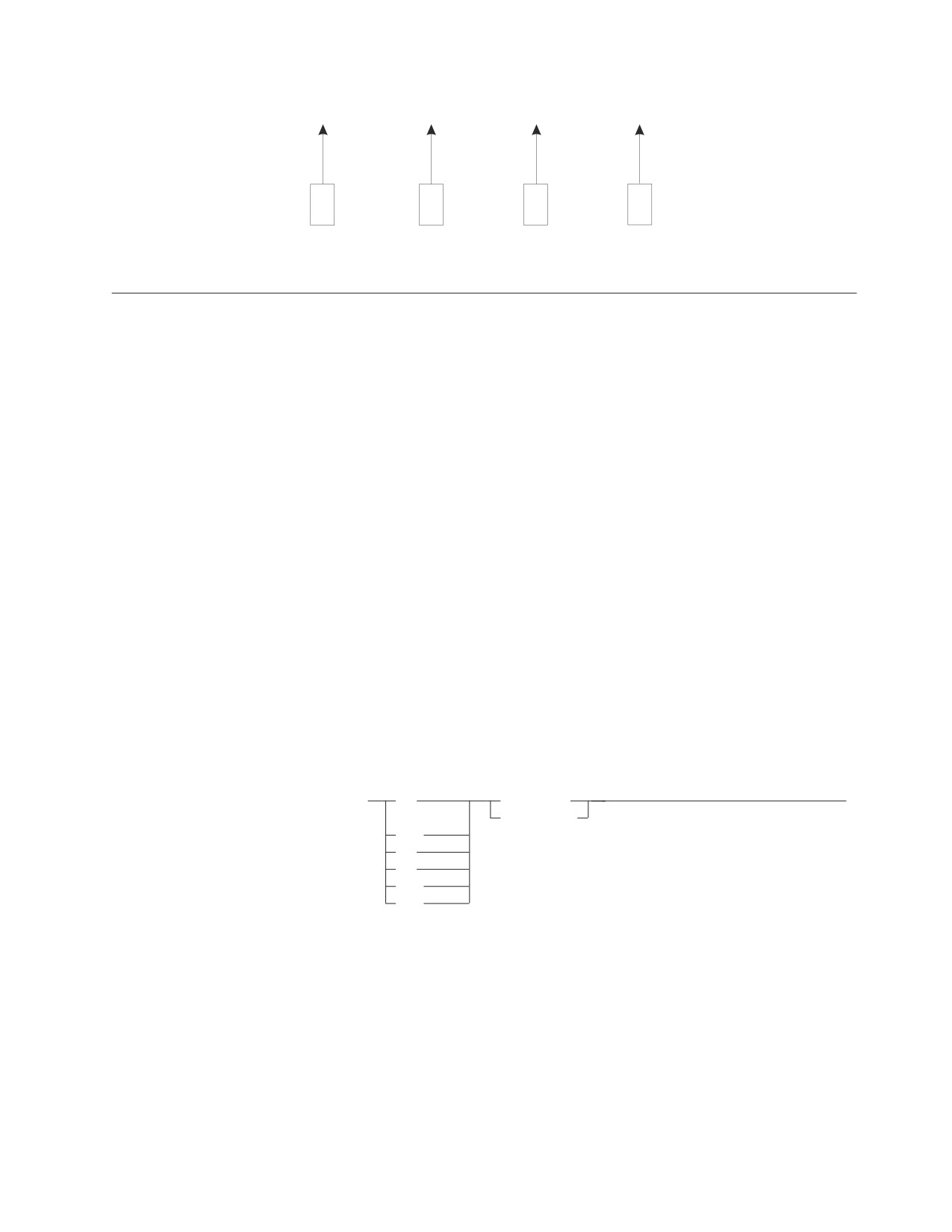
Expressions within parentheses are evaluated first. When the order of evaluation is
not specified by parentheses, prefix operators are applied before multiplication and
division, and multiplication and division are applied before addition and
subtraction. Operators at the same precedence level are applied from left to right.
Example:
78
SQL Reference
Expressions
1.10
(SALARY + BONUS) + SALARY / :VAR3
2
1
4
3
Concatenation is performed before datetime arithmetic.
Predicates
A predicate specifies a condition that is true, false, or unknown about a given row
or group.
The following rules apply to all types of predicates:
v All values specified in the same predicate must be compatible.
v The length attribute of a host variable referenced in a predicate must not be
greater than 254 bytes.
v With the exception of the LIKE predicate, a long string column must not be
referenced.
v A view column referenced in a predicate must not be derived from a column
function.
v If a basic predicate or a LIKE predicate contains an operand with a null value,
then it is evaluated as unknown. Other predicates containing negative indicator
values are evaluated according to:
- The rules for defining the predicate in terms of the basic predicates
- The rules for nulls in basic predicates
- The truth tables for logic with three values.
v The value of an indicator variable provided at runtime for a parameter marker
in a predicate must not be negative.
Basic Predicate
►► expression
=
expression
►◄
(1)
(subselect)
<>
<
>
<=
>=
Notes:
1
Either ¬= or ^= may be used as an alternative to the <> operand in all code pages
supported by the DB2 Server for VSE & VM database manager. However, these
alternatives are not supported in IBM-SQL. Portable applications should use <>.
A basic predicate compares two values.
A subselect in a basic predicate must specify a single result column and must not
return more than one value.
Chapter 3. Language Elements
79

Basic
If the value of either operand is null or the subselect returns no value, the result of
the predicate is unknown. Otherwise the result is either true or false.
For values x and y:
Predicate
Is True If and Only If...
x = y
x is equal to y
x<> y
x is not equal to y
x < y
x is less than y
x > y
x is greater than y
x>= y
x is greater than or equal to y
x<= y
x is less than or equal to y
Examples:
EMPNO = ’528671’
PRTSTAFF <> :VAR1
SALARY + BONUS + COMM < 20000
SALARY > (SELECT AVG(SALARY) FROM EMPLOYEE)
Quantified Predicate
►► expression
=
SOME
(subselect)
►◄
(1)
ANY
<>
ALL
<
>
<=
>=
Notes:
1
Either ¬= or ^= may be used as an alternative to the <> operand in all code pages
supported by the DB2 Server for VSE & VM database manager. However, these
alternatives are not supported in IBM-SQL. Portable applications should use <>.
A quantified predicate compares a value with a set of values.
The subselect must specify a single result column and can return any number of
values, including null values.
A quantified predicate has the same form as a basic predicate except that the
second operand is a subselect preceded by SOME, ANY, or ALL.
When ALL is specified, the result of the predicate is:
v true if any of the following are true:
- the subselect returns no values
- the specified relationship is true for every value returned by the subselect
- the subselect returns no value and the first operand is null.
v false if the specified relationship is false for at least one value returned by the
subselect.
v unknown if the specified relationship is not false for any of the values returned
by the subselect and at least one comparison is unknown because of a null
value.
80
SQL Reference
Quantified
When SOME or ANY is specified, the result of the predicate is:
v true if the specified relationship is true for at least one value returned by the
subselect.
v false if any of the following are true:
- the subselect returns no values
- the specified relationship is false for every value returned by the subselect.
v unknown if the specified relationship is not true for any of the values returned
by the subselect and at least one comparison is unknown because of a null
value.
Use the information below when referring to the following examples.
TBLA: COLA
TBLB: COLB
1
2
2
3
3
4
Example 1
SELECT * FROM TBLA WHERE COLA = ANY(SELECT COLB FROM TBLB)
Results in 2,3. The subselect returns (2,3). COLA in rows 2 and 3 equals at least
one of these values.
Example 2
SELECT * FROM TBLA WHERE
COLA > ANY(SELECT COLB FROM TBLB)
Results in 3,4. The subselect returns (2,3). COLA in rows 3 and 4 is greater than at
least one of these values.
Example 3
SELECT * FROM TBLA WHERE COLA> ALL(SELECT COLB FROM TBLB)
Results in 4. The subselect returns (2,3). COLA in row 4 is the only one that is
greater than both these values.
Example 4
SELECT * FROM TBLA WHERE COLA> ALL(SELECT COLB FROM TBLB WHERE COLB<0)
Results in 1,2,3,4. The subselect returns no values. Thus, the predicate is true for all
rows in TBLA.
BETWEEN Predicate
►► expression
BETWEEN expression AND expression
►◄
NOT
The BETWEEN predicate compares a value with a range of values. The BETWEEN
predicate:
value1 BETWEEN value2 AND value3
is logically equivalent to the search condition:
value1 >= value2 AND value1 <= value3
Chapter 3. Language Elements
81
BETWEEN
The BETWEEN predicate:
value1 NOT BETWEEN value2 AND value3
is logically equivalent to the search condition:
NOT(value1 BETWEEN value2 AND value3)
that is:
value1 < value2 OR value1 > value3
If any expression evaluates to a datetime data type, then comparisons will be done
with all expressions converted to the appropriate datetime data type.
The values for the expressions in the BETWEEN predicate can have different
CCSID values. If a conversion is necessary then it will be based on the above
logical equivalence. Conversion is based on the rules for comparisons (see
“Conversion Rules for String Comparison” on page 58). If a column’s CCSID is
chosen as the final CCSID value then both the other values are converted, if
necessary, to that CCSID; this need not be true if the value is not a column’s
CCSID.
Example 1
EMPLOYEE.SALARY BETWEEN 20000 AND 40000
Example 2
SALARY NOT BETWEEN 20000 + :HV1 AND 40000
Example 3
Given the following:
┌────────────┬───────────────┬───────┐
│ Expression │ Type
│ CCSID │
├────────────┼───────────────┼───────┤
│ CON_1
│ constant
│ 00001 │
│ HV_2
│ host variable │ 00002 │
│ HV_3
│ host variable │ 00003 │
└────────────┴───────────────┴───────┘
When evaluating the predicate:
CON_1 BETWEEN :HV_2 AND :HV_3
conversion will be based on considering this to be the same as:
CON_1 >= :HV_2 AND CON_1 <= :HV_3
The values in both HV_2 and HV_3 will be converted to CCSID
00001.
Example 4
Given the following:
┌────────────┬───────────────┬───────┐
│ Expression │ Type
│ CCSID │
├────────────┼───────────────┼───────┤
│ CON_1
│ constant
│ 00001 │
│ HV_2
│ host variable │ 00002 │
│ COL_3
│ column
│ 00003 │
└────────────┴───────────────┴───────┘
When evaluating the predicate:
CON_1 BETWEEN :HV_2 AND COL_3
82
SQL Reference

BETWEEN
conversion will be based on considering this to be the same as:
CON_1 >= :HV_2 AND CON_1 <= COL_3
Because the CCSID of the column (that is, 00003) is used as the final CCSID value,
the values of CON_1 and HV_2 both will be converted to 00003 before any
comparisons are done.
Example 5
Given the following:
┌────────────┬───────────────┬───────┐
│ Expression │ Type
│ CCSID │
├────────────┼───────────────┼───────┤
│ COL_1
│ column
│ 00001 │
│ HV_2
│ host variable │ 00002 │
│ CON_3
│ constant
│ 00003 │
└────────────┴───────────────┴───────┘
When evaluating the predicate:
COL_1 BETWEEN :HV_2 AND CON_3
conversion will be based on considering this to be the same as:
COL_1 >= :HV_2 AND COL_1 <= CON_3
The values in both HV_2 and CON_3 will be converted to CCSID 00001. (Note the
difference in this example’s conversion when using a column and example 4.)
Example 6
Given the following:
┌────────────┬─────────────────┬──────────────┐
│ Expression │ Type
│ Value
│
├────────────┼─────────────────┼──────────────┤
│ COL_1
│ column CHAR(10) │ '01/01/1992' |
└────────────┴─────────────────┴──────────────┘
When evaluating the predicate:
COL_1 BETWEEN '07/20/1991' AND '10/22/1992'
the comparison will be done as character strings and the predicate will evaluate to
false.
When evaluating the predicate:
COL_1 BETWEEN DATE('7/20/1991') AND '10/22/1992'
the comparison will be done as date types and the predicate will evaluate to true.
EXISTS Predicate
►►
EXISTS
(subselect)
►◄
NOT
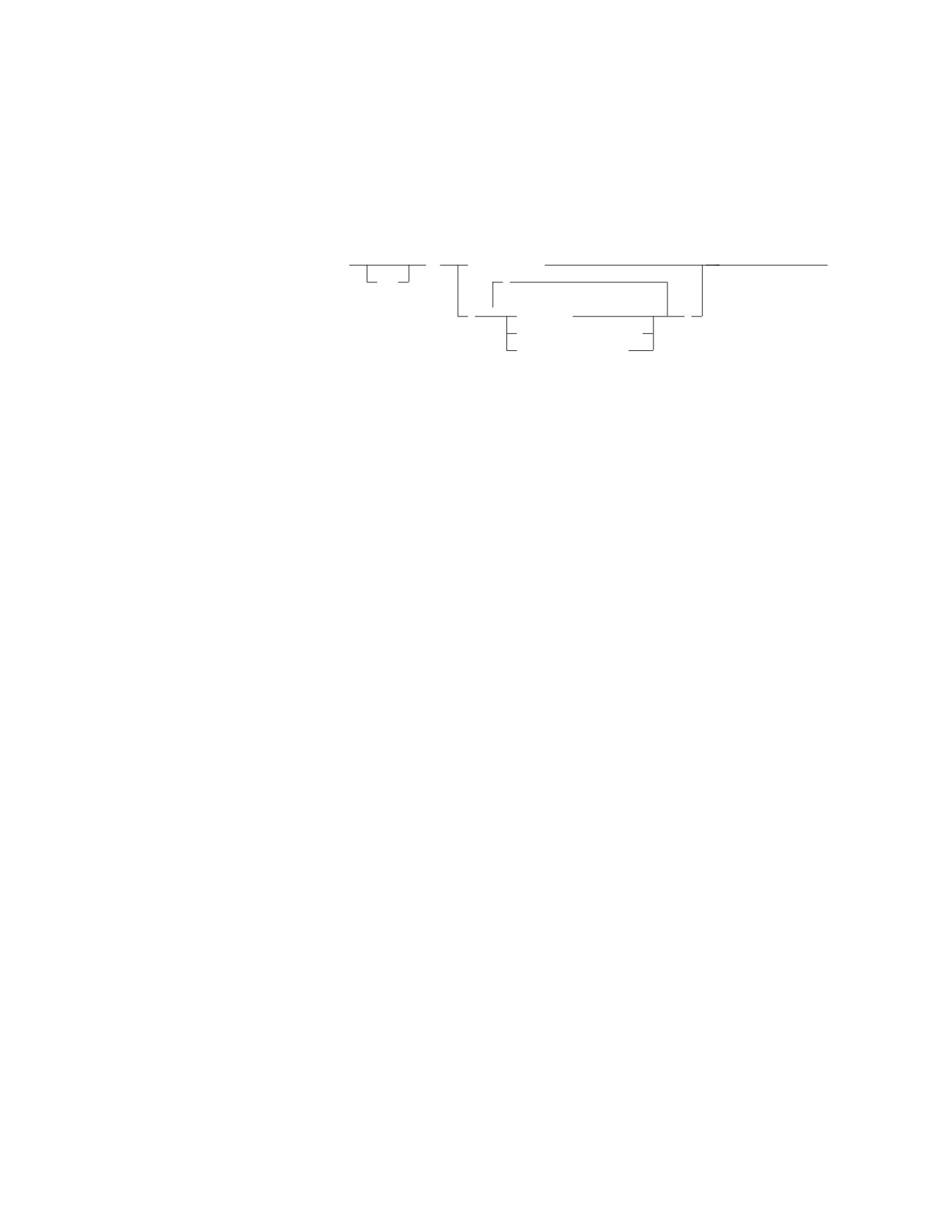
The EXISTS predicate tests for the existence of certain rows. The subselect may
specify any number of columns, and
v The result is true only if the number of rows specified by the subselect is not
zero
v The result is false only if the number of rows specified by the subselect is zero
Chapter 3. Language Elements
83
EXISTS
v The result cannot be unknown.
The values returned by the subselect are ignored.
Example: EXISTS (SELECT * FROM EMPLOYEE WHERE SALARY > 60000)
IN Predicate
►► expression
IN
(subselect)
►◄
NOT
,
(
▼
constant
)
host_variable_list
special_register
The IN predicate compares a value with a set of values.
In the subselect form, the subselect must identify a single result column and may
return any number of values, including null values.
An IN predicate of the form:
expression IN (subselect)
is equivalent to a quantified predicate of the form:
expression = ANY (subselect)
An IN predicate of the form:
expression NOT IN (subselect)
is equivalent to a quantified predicate of the form:
expression <> ALL (subselect)
If any value evaluates to a datetime data type, then comparisons will be done with
all values converted to the appropriate datetime data type.
In the non-subselect form of the IN predicate, the second operand is a set of one or
more values specified by any combination of constants, host variables, host
structures, or special registers. This form of the IN predicate is equivalent to the
subselect form except that the second operand consists of the specified values
rather than the values returned by a subselect.
The values for the expressions in the IN predicate can have different CCSIDs.
Conversion occurs where required based on the assumption that:
value1 IN (value2, value3, ...)
is logically equivalent to the clause:
value1 = value2
OR value1 = value3
OR ...
Conversion is based on the rules for comparisons (see “Conversion Rules for String
Comparison” on page 58).
Examples
84
SQL Reference
IN
Example 1
DEPTNO IN (’D01’, ’B01’, ’C01’)
Example 2
EMPNO IN (SELECT EMPNO FROM EMPLOYEE WHERE WORKDEPT = ’E11’)
Example 3
Given the following:
┌────────────┬───────────────┬───────┐
│ Expression │ Type
│ CCSID │
├────────────┼───────────────┼───────┤
│ COL_1
│ column
│ 00001 │
│ HV_2
│ host variable │ 00002 │
│ HV_3
│ host variable │ 00003 │
│ CON_4
│ constant
│ 00004 │
└────────────┴───────────────┴───────┘
When evaluating the predicate:
COL_1 IN (:HV_2, :HV_3, CON_4)
conversion will be based on considering this to be the same as:
COL_1 = :HV_2 OR COL_1 = :HV_3 OR COL_1 = CON_4
The values in HV_2, HV_3, and CON_4 will be converted to CCSID
00001.
Example 4
Given the following:
┌────────────┬───────────────┬───────┐
│ Expression │ Type
│ CCSID │
├────────────┼───────────────┼───────┤
│ HV_1
│ host variable │ 00001 │
│ CON_2
│ constant
│ 00002 │
│ CON_3
│ constant
│ 00002 │
│ HS_4
│ host structure│
│
│
HV_41
│ host variable │ 00003 │
│
HV_42
│ host variable │ 00004 │
└────────────┴───────────────┴───────┘
When evaluating the predicate:
:HV_1 IN ( CON_2, CON_3, :HS_4)
conversion will be based on considering this to be the same as:
:HV_1 = CON_2 OR :HV_1 = CON_3 OR :HV_1 = :HV_41 OR :HV_1 = :HV_42
Thus, the value in HV_1 will be converted to CCSID 00002 before it is compared to
CON_2 and CON_3, and the values in HV_41 and HV_42 will be converted to
CCSID 00001 before they are compared to HV_1.
Chapter 3. Language Elements
85
LIKE
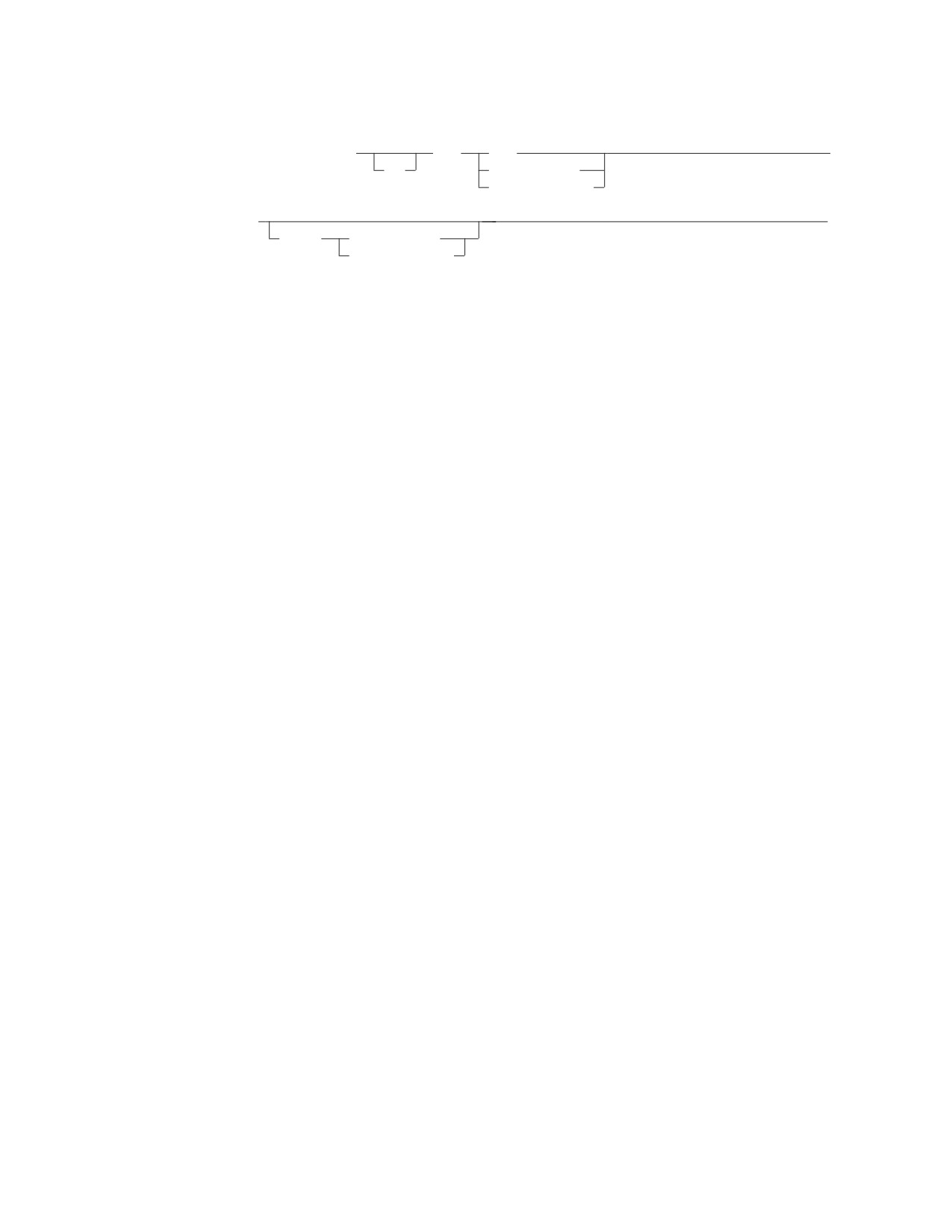
LIKE Predicate
►► column_name
LIKE
USER
►
NOT
host_variable
string_constant
►
►◄
ESCAPE
host_variable
string_constant
The LIKE predicate searches for strings that have a certain pattern. The pattern is
specified by a string in which the underscore and percent sign have special
meanings.
The column_name must identify a string column. If a character string column is
identified, the other operands must be character strings. If a graphic string column
is identified, the other operands must be graphic strings. With character strings,
the terms character, percent sign, and underscore in the following description refer to
single-byte characters. With graphic strings, the terms refer to double-byte
characters.
Note that trailing blanks in a pattern are usually part of the pattern. The exception
to this is that trailing blanks in a pattern that is specified within a fixed-length host
variable are ignored when that pattern is compared against a varying-length
column.
Simple Description
For character columns, a simple description of the LIKE pattern is as follows:
v The underscore sign (_) represents any single character.
v The percent sign (%) represents a string of zero or more characters.
v Any other character represents itself.
Rigorous Description
Let x denote a value of a column and y denote the string specified by the second
operand.
The string y is interpreted as a sequence of the minimum number of substring
specifiers so each character of y is part of exactly one substring specifier. A
substring specifier is an underscore, a percent sign, or any non-empty sequence of
characters other than an underscore or a percent sign.
The result of the predicate is unknown if x or y is the null value. Otherwise, the
result is either true or false. The result is true if x and y are both empty strings or
if there exists a partitioning of x into substrings such that:
v A substring of x is a sequence of zero or more contiguous characters and each
character of x is part of exactly one substring.
v If the nth substring specifier is an underscore, the nth substring of x is any
single character.
v If the nth substring specifier is a percent sign, the nth substring of x is any
sequence of zero or more characters.
v If the nth substring specifier is neither an underscore nor a percent sign, the nth
substring of x is equal to that substring specifier and has the same length as that
substring specifier.
86
SQL Reference
LIKE
v The number of substrings of x is the same as the number of substring specifiers.
It follows that if y is an empty string and x is not an empty string, the result is
false.
The predicate x NOT LIKE y is equivalent to the search condition NOT(x LIKE y).
If the CCSID of either the pattern value or the escape value is different than the
CCSID of the column, that value is converted to adhere to the CCSID of the
column before the predicate is applied.
With Mixed Data
If the column has a mixed subtype, the pattern can include both SBCS and DBCS
characters. The special characters in the pattern are interpreted as follows:
v An SBCS underscore refers to one SBCS character.
v A DBCS underscore refers to one DBCS character.
v A percent (either SBCS or DBCS) refers to any number of characters of any type,
either SBCS or DBCS.
v Any redundant shifts in either column values or the pattern value are ignored.
With a Field Procedure
If the column has a field procedure, the procedure is invoked to decode the values
of the column, and the comparisons are made with the decoded values.
The ESCAPE Clause
This clause allows the definition of patterns intended to match values that contain
the actual percent and underscore characters. The following rules govern the use of
the ESCAPE clause:
v If a character string column is identified, the escape character must be a
character string constant or variable of length 1.
v If a graphic string column is identified, the escape character must be a graphic
string constant or variable of length 1.
v If the ESCAPE host_variable has a negative indicator variable, the result of the
predicate is unknown.
v The host_variable or string_constant forming the pattern must not contain the
escape character except when followed by the escape character, '%' or '_'.
For example, if '+' is the escape character, any occurrences of '+' other than '++',
'+_', or '+%' in the pattern is an error.
v An escape clause cannot be used with a pattern having a mixed subtype.
If both the pattern and the escape character are constants, the entire pattern will
always be checked for incorrect occurrences of the escape character.
If either the pattern or the escape character is a host_variable, occurrences of the
escape character in the pattern will not be validated unless the portion of the
pattern proceeding the escape character matches at least one row.
USER as a Pattern
The rules for the LIKE predicate are unchanged with the special register USER.
This means that the value of the special register USER is treated as a pattern.
USER evaluates to a CHAR(8) string whose value is the user ID of the currently
connected user. If the value of USER contains a '_' it will match any character and
the result of:
WHERE C1 LIKE USER
Chapter 3. Language Elements
87
LIKE
would not be the same as the result of:
WHERE C1 = USER
It is recommended that the 'equals' predicate be used where user IDs may contain
special characters, and the value of USER is not to be treated as a pattern.
Examples:
Example 1: Search for the string ‘SYSTEMS’ appearing anywhere within the
PROJNAME column in the PROJECT table.
PROJECT.PROJNAME LIKE '%SYSTEMS%'
Example 2: Search for a string with a first character of ‘J’ that is exactly two
characters long in the FIRSTNME column of the EMPLOYEE table.
EMPLOYEE.FIRSTNME LIKE 'J_'
Example 3: In:
C1 LIKE ’AAAA+%BBB%’ ESCAPE ’+’
'+' is the escape character and indicates that the search is for a string that starts
with 'AAAA%BBB'. The '+%' is interpreted as a single occurrence of '%' in the
pattern.
Example 4::
both: WHERE COL1 LIKE ’aaa<▌AABB▐%%▌CC▐>’
and : WHERE COL1 LIKE ’aaa<▌AABB▐>%<▌CC▐>’
would match the value
-->’aaa<▌AABBDDZZCC▐>’
as well as the value
-->’aaa<▌AABB▐>dzx<▌CC▐>’
Example 5::
WHERE COL1 LIKE ’a%<▌CC▐>’
would match the values -->
’a<▌CC▐>’
and
’ax<▌CC▐>’ and
’ab<▌DDEE▐>fg<▌CC▐>’
Example 6::
WHERE COL1 LIKE ’a_<▌CC▐>’
would match the value
-->
’ax<▌CC▐>’
but not the value
-->
’a<▌XXCC▐>’
Example 7::
WHERE COL1 LIKE ’a<__▌CC▐>’
would match the value
-->
’a<▌XXCC▐>’
but not the value
-->
’ax<▌CC▐>’
Example 8::
WHERE COL1 LIKE ’<>’
would match the "empty string" value.
Example 9::
WHERE COL1 LIKE ’ab<▌CC▐>_’
would match the values -->
’ab<▌CC▐>d and
’ab<><▌CC▐>d
88
SQL Reference
NULL
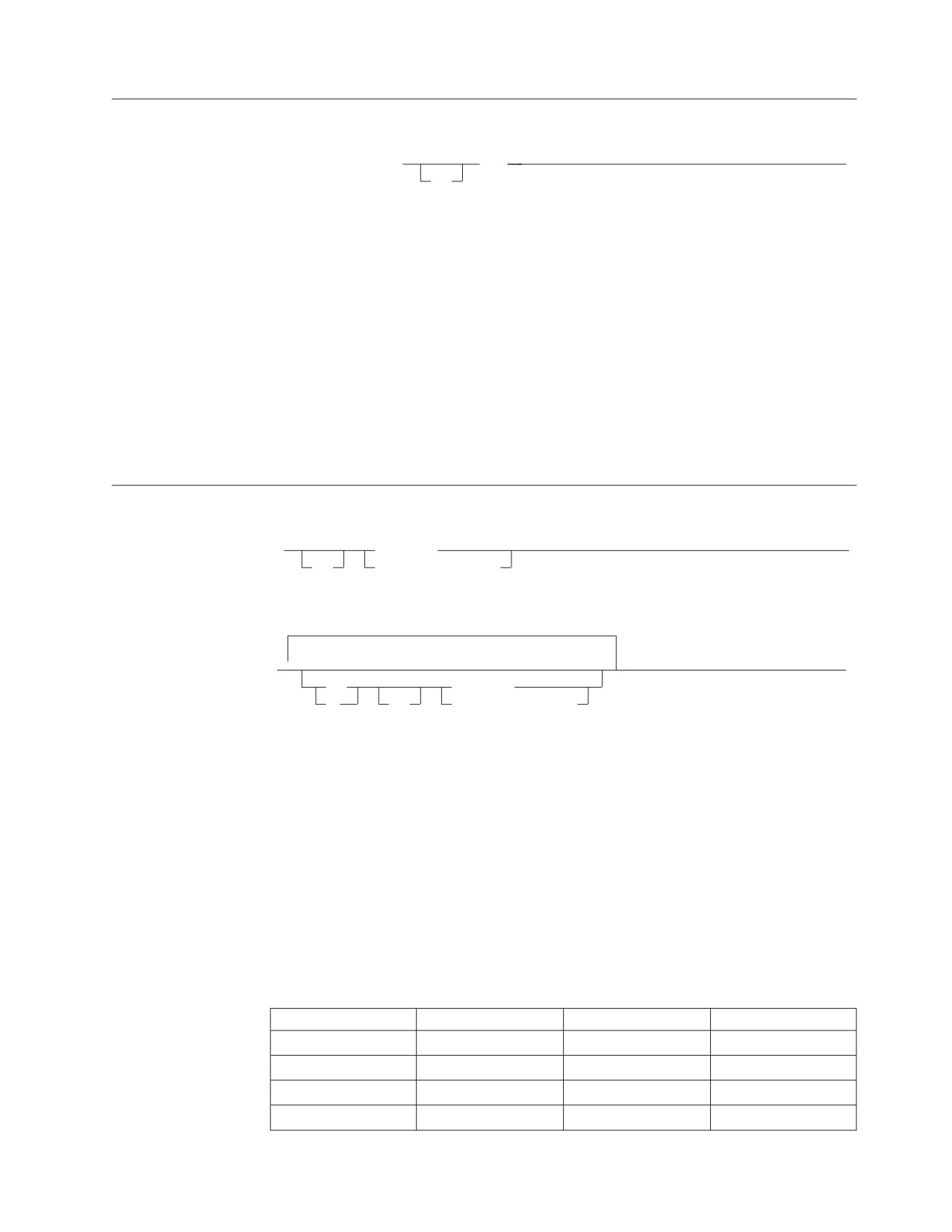
NULL Predicate
►► column_name IS
NULL
►◄
NOT
The NULL predicate tests for null values.
The result of a NULL predicate cannot be unknown. If the value of the column is
null, the result is true. If the value is not null, the result is false. If NOT is
specified, the result is reversed.
To search for fields that contain null values, the words IS NULL must be used.
'WHERE PAY IS NULL' is correct, but 'WHERE PAY = NULL' is incorrect.
Examples:
EMPLOYEE.PHONE IS NULL
SALARY IS NOT NULL
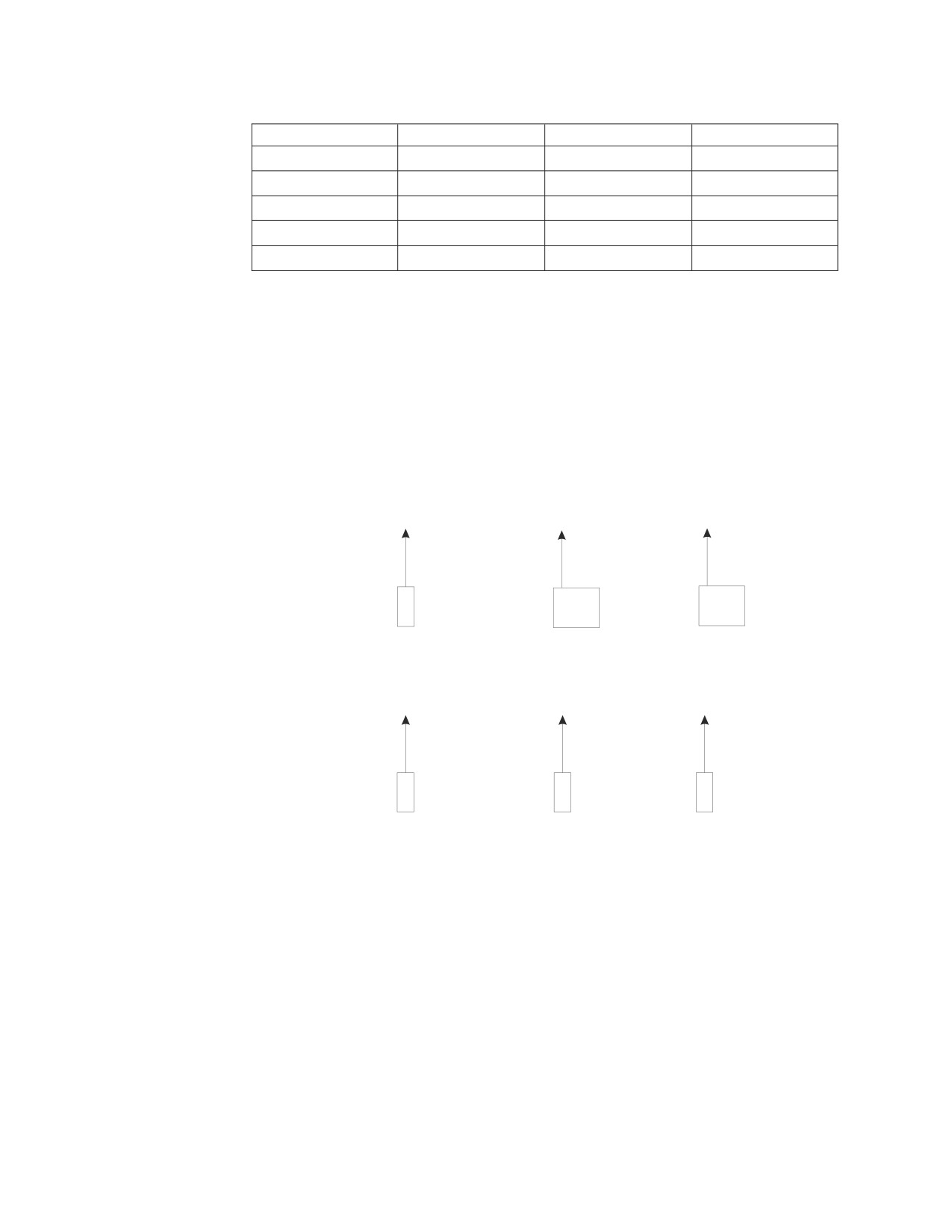
Search Conditions
►►
predicate
►
NOT
(search_condition)
► ▼
►◄
AND
predicate
OR
NOT
(search_condition)
A search condition specifies a condition that is true, false, or unknown about a given
row or group. When the condition is “true,” the row or group qualifies for the
results. When the condition is “false” or “unknown,” the row or group does not
qualify.
The result of a search condition is derived by application of the specified logical
operators (AND, OR, NOT) to the result of each specified predicate. If logical
operators are not specified, the result of the search condition is the result of the
specified predicate.
AND and OR are defined in the following table in which P and Q are any
predicates:
Table 5. Truth Tables for AND and OR
P
Q
P AND Q
P OR Q
True
True
True
True
True
False
False
True
True
Unknown
Unknown
True
False
True
False
True
Chapter 3. Language Elements
89
NULL
Table 5. Truth Tables for AND and OR (continued)
P
Q
P AND Q
P OR Q
False
False
False
False
False
Unknown
False
Unknown
Unknown
True
Unknown
True
Unknown
False
False
Unknown
Unknown
Unknown
Unknown
Unknown
NOT(true) is false, NOT(false) is true, and NOT(unknown) is unknown.
Search conditions within parentheses are evaluated first. If the order of evaluation
is not specified by parentheses, NOT is applied before AND, and AND is applied
before OR. The order in which operators at the same precedence level are
evaluated is undefined to allow for optimization of search conditions.
Examples:
Example 1
MAJPROJ = ' MA2100 '
AND
DEPTNO = ' D11 '
OR
DEPTNO = ' B03 '
OR
DEPTNO = ' E11 '
1
2 or 3
2 or 3
Example 2
MAJPROJ = ' MA2100 ' AND DEPTNO = ' D11 ' OR DEPTNO = ' B03 ' OR DEPTNO = ' E11 '
2
1
3
90
SQL Reference

Chapter 4. Functions
A function is an operation denoted by a function name followed by one or more
operands which are enclosed in parentheses. The operands of functions are called
arguments. Most functions have a single argument that is specified by an expression.
The result of a function is a single value derived by applying the function to the
result of the expression.
Functions are classified as column functions or scalar functions. The argument of a
column function is a set of values. An argument of a scalar function is a single
value. If multiple arguments are allowed, each argument is a single value.
In the syntax of SQL, the term function is used only in the definition of an
expression. Thus a function can be used only where an expression can be used.
Additional restrictions apply to the use of column functions as specified in the
following section and in Chapter 5, “Queries,” on page 121.
Column Functions
The following information applies to all column functions, except for the
COUNT(*) variation of the COUNT function.
The argument of a column function is a set of values derived from one or more
columns. The scope of the set is a group or an intermediate result table as
explained in Chapter 5, “Queries,” on page 121. For example, the result of the
following SELECT statement is the number of distinct values of JOB for employees
in department D01:
SELECT COUNT(DISTINCT JOB)
FROM EMPLOYEE
WHERE WORKDEPT = ’D01’
The keyword DISTINCT is not considered an argument of the function but rather a
specification of an operation that is performed before the function is applied. If
DISTINCT is specified, duplicate values are eliminated. If ALL is implicitly or
explicitly specified, duplicate values are not eliminated.
The DISTINCT operation can only be applied to values of a column. If DISTINCT
is omitted, the values of the arguments are specified by an expression. That
expression must not include a column function and must include at least one
column-name, a requirement that is not satisfied by a reference to a view column
derived from a constant or expression without a column-name. If a column_name is
a correlated reference (which is allowed in a subquery of a HAVING clause) the
expression must not include operators.
AVG
ALL
►► AVG
(
numeric_expression
)
►◄
DISTINCT column_name
The AVG function returns the average of a set of numbers.
91

AVG
The argument values must be numbers and their sum must be within the range of
the data type of the result. The result can be null.
The data type of the result is the same as the data type of the argument values,
except that:
v The result is a double-precision floating-point if the argument values are
single-precision floating-point.
v The result is a large integer if the argument values are small integers.
If the data type of the argument values is decimal with precision p and scale s, the
precision of the result is 31 and the scale is 31-p+s. Negative scale is not allowed.
The function is applied to the set of values derived from the argument values by
the elimination of null values. If DISTINCT is specified, duplicate values are
eliminated.
If the function is applied to an empty set, the result is a null value. Otherwise, the
result is the average value of the set.
The order in which the summation part of the operation is performed is undefined,
but every intermediate result must be within the range of the result data type.
If the type of the result is integer, the fractional part of the average is lost.
Examples
Example 1: Using the PROJECT table, set the host variable AVERAGE
(decimal(5,2)) to the average staffing level (PRSTAFF) of projects in department
(DEPTNO) ‘D11’.
SELECT AVG(PRSTAFF)
INTO :AVERAGE
FROM PROJECT
WHERE DEPTNO = ’D11’
Results in AVERAGE being set to 4.25 (that is, 17 / 4) when using the sample
table.
Example 2: Using the PROJECT table, set the host variable ANY_CALC to the
average of each unique staffing level value (PRSTAFF) of projects in department
(DEPTNO) ‘D11’.
SELECT AVG(DISTINCT PRSTAFF)
INTO :ANY_CALC
FROM PROJECT
WHERE DEPTNO = ’D11’
Results in ANY_CALC being set to 4.66 (that is, 14 / 3) when using the sample
table.
COUNT
►► COUNT
( DISTINCT column_name
)
►◄
(*)
The COUNT function returns the number of rows or values in a set of rows or
values.
92
SQL Reference
COUNT
The column_name must not identify a long string column. The result of the function
is a large integer and must be within the range of large integers. The result cannot
be null.
The argument of COUNT(*) is a set of rows. The result is the number of rows in
the set.
The argument of COUNT(DISTINCT column_name) is a set of values. The function
is applied to the set of values derived from the argument values by the elimination
of null values and duplicate values. The result is the number of values in the set.
Examples
Example 1: Using the EMPLOYEE TABLE, set the host variable FEMALE (int) to
the number of rows where the value of the SEX column is ‘F’.
SELECT COUNT(*)
INTO :FEMALE
FROM EMPLOYEE
WHERE SEX = ’F’
Results in FEMALE being set to 13 when using the sample table.
Example 2: Using the EMPLOYEE table, set the host variable FEMALE_IN_DEPT
(int) to the number of departments (WORKDEPT) that have at least one female as
a member.
SELECT COUNT(DISTINCT WORKDEPT)
INTO :FEMALE_IN_DEPT
FROM EMPLOYEE
WHERE SEX = ’F’
Results in FEMALE_IN_DEPT being set to 5 when using the sample table. (There
is at least one female in departments A00, C01, D11, D21, and E11.)
MAX
ALL
►► MAX
(
expression
)
►◄
(1)
DISTINCT
column_name
Notes:
1
Although it is allowed, the keyword DISTINCT does not affect the result of the
function.
The MAX function returns the maximum value in a set of values.
The argument values can be any values other than long strings.
The data type and length attribute of the result are the same as the data type and
length attribute of the argument values. When the argument is a string, the result
has the same CCSID as the argument. The result can be null.
The function is applied to the set of values derived from the argument values by
the elimination of null values.
Chapter 4. Functions
93
MAX
If the function is applied to an empty set, the result is a null value. Otherwise, the
result is the maximum value in the set.
Examples
Example 1: Using the EMPLOYEE table, set the host variable MAX_SALARY
(decimal(7,2)) to the maximum monthly salary (SALARY / 12) value.
SELECT MAX(SALARY) /12
INTO :MAX_SALARY
FROM EMPLOYEE
Results in MAX_SALARY being set to 4395.83 when using the sample table.
Example 2: Using the PROJECT table, set the host variable LAST_PROJ (char(24))
to the project name (PROJNAME) that comes last in the collating sequence.
SELECT MAX(PROJNAME)
INTO :LAST_PROJ
FROM PROJECT
Results in LAST_PROJ being set to ‘WELD LINE PLANNING’ when using the
sample table.
MIN
ALL
►► MIN
(
expression
)
►◄
(1)
DISTINCT
column_name
Notes:
1
Although it is allowed, the keyword DISTINCT does not affect the result of the
function.
The MIN function returns the minimum value in a set of values.
The argument values can be any values other than long strings.
The data type and length attribute of the result are the same as the data type and
length attribute of the argument values. When the argument is a string, the result
has the same CCSID as the argument. The result can be null.
The function is applied to the set of values derived from the argument values by
the elimination of null values.
If the function is applied to an empty set, the result is a null value. Otherwise, the
result is the minimum value in the set.
Examples
Example 1: Using the EMPLOYEE table, set the host variable COMM_SPREAD
(decimal(7,2)) to the difference between the maximum and minimum commission
(COMM) for the members of department (WORKDEPT) ‘D11’.
SELECT MAX(COMM) - MIN(COMM)
INTO :COMM_SPREAD
FROM EMPLOYEE
WHERE WORKDEPT
= ’D11’
94
SQL Reference
MIN
Results in COMM_SPREAD being set to 1118 (that is, 2580 - 1462) when using the
sample table.
Example 2: Using the PROJECT table, set the host variable FIRST_FINISHED
(char(10)) to the estimated ending date (PRENDATE) of the first project scheduled
to be completed.
SELECT MIN(PRENDATE)
INTO :FIRST_FINISHED
FROM PROJECT
Results in FIRST_FINISHED being set to ‘1982-09-15’ when using the sample table.
SUM
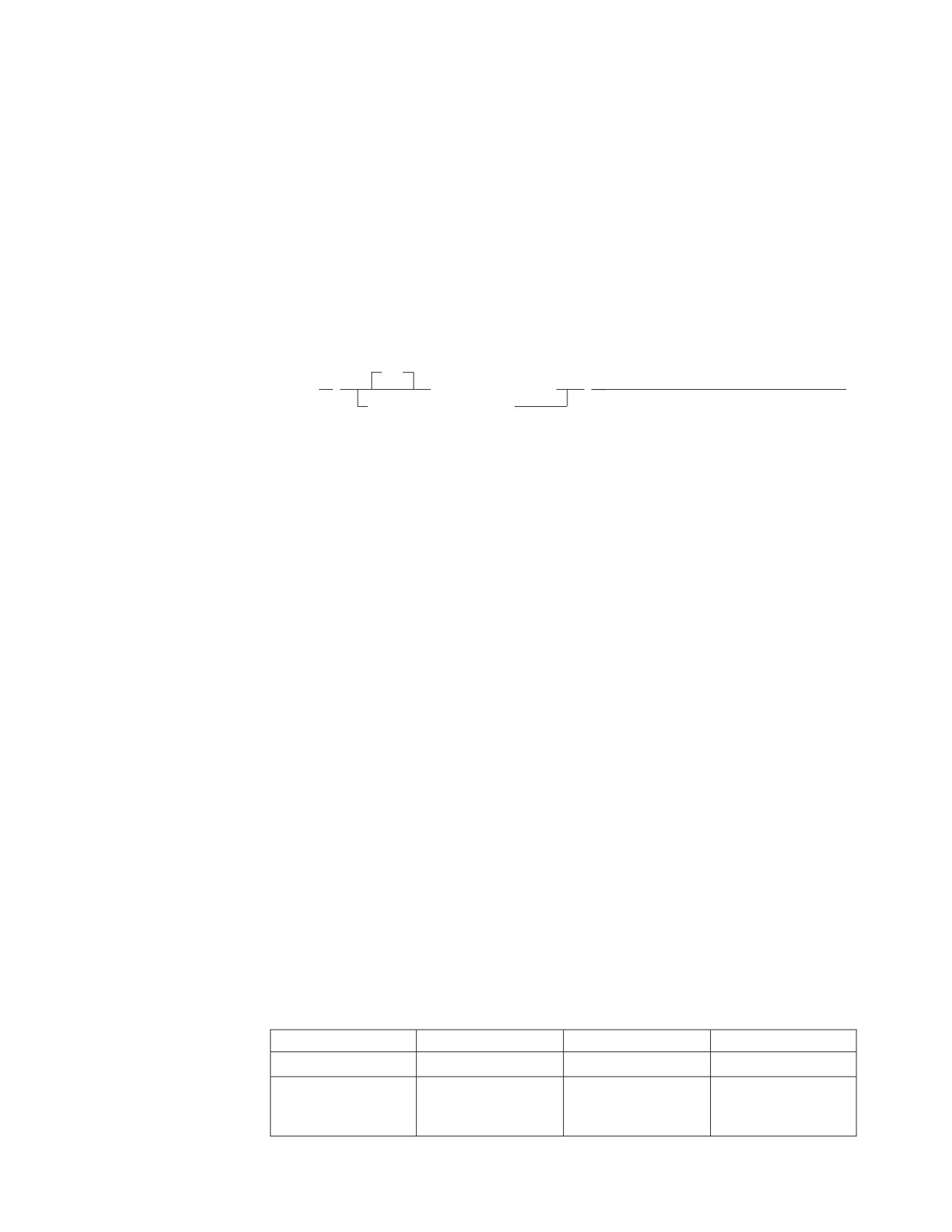
ALL
►► SUM
(
numeric_expression
)
►◄
DISTINCT column_name
The SUM function returns the sum of a set of numbers.
The argument values must be numbers and their sum must be within the range of
the data type of the result.
The data type of the result is the same as the data type of the argument values
except that the result is a large integer if the argument values are small integers
and double precision floating-point if the argument values are single precision
floating-point. If the data type of the argument values is decimal, the precision of
the result is 31 and the scale is the same as the scale of the argument values. The
result can be null.
The function is applied to the set of values derived from the argument values by
the elimination of null values. If DISTINCT is specified, duplicate values are
eliminated.
If the function is applied to an empty set, the result is a null value. Otherwise, the
result is the sum of the values in the set.
Examples
Example 1: Using the EMPLOYEE table, set the host variable JOB_BONUS
(decimal(9,2)) to the total bonus (BONUS) paid to clerks (JOB=‘CLERK’).
SELECT SUM(BONUS)
INTO :JOB_BONUS
FROM EMPLOYEE
WHERE JOB = ’CLERK’
Results in JOB_BONUS being set to 2800 when using the sample table.
Example 2: Assume that a table SALES has the following columns and values:
Name:
CUSTOMER
SALES
MONTHS
Type:
smallint
int
int
Desc:
Customer number
Total value of
Number of months
purchases by this
that customer has
customer
bought something
Chapter 4. Functions
95
SUM
Name:
CUSTOMER
SALES
MONTHS
Values:
101
1000
5
102
500
1
103
300
3
Set the host variable TOT_AVG_SALE (integer) to the sum of the average monthly
sales per customer.
SELECT SUM(SALES / MONTHS)
INTO :TOT_AVG_SALE
FROM SALES
Results in TOT_AVG_SALE being set to 800. Note that the expression for each row
is calculated before it is added to the sum.
Scalar Functions
A scalar function can be used wherever an expression can be used. The restrictions
on the use of column functions do not apply to scalar functions. For example, the
argument of a scalar function can be a function; that is, scalar functions can be
nested. However, the restrictions that apply to the use of expressions and column
functions also apply when an expression or column function is used within a
scalar function. For example, the argument of a scalar function can be a column
function only if a column function is allowed in the context in which the scalar
function is used.
The restrictions on the use of column functions do not apply to scalar functions
because a scalar function is applied to a single value rather than a set of values.
For example, the result of the following SELECT statement has as many rows as
there are employees in department D11:
SELECT EMPNO, LASTNAME, YEAR(CURRENT DATE - BIRTHDATE)
FROM EMPLOYEE
WHERE WORKDEPT = ’D11’
CHAR
►► CHAR
(
date_expression
)
►◄
time_expression
,ISO
,USA
,EUR
,JIS
,LOCAL
timestamp_expression
decimal_expression
The CHAR function returns a string representation of a datetime value or decimal
value.
The first argument must be a decimal number, timestamp, date, or time. The
second argument, if applicable, is the name of a string format.
The result of the function is a fixed-length character string. The CCSID of the
string is the default CCSID (based on the default subtype value, CHARSUB) of the
96
SQL Reference
CHAR
application server. If the first argument can be null, the result can be null; if the
first argument is null, the result is the null value.
The other rules depend on the data type of the first argument:
v
If the first argument is a decimal number:
The second argument must not be specified. The result is the fixed length
character string representation of the argument. The first character of the result
is a minus sign if the argument is negative; otherwise, the first character is
blank.
The result includes a decimal point, sign, and p digits, where p is the precision
of the argument. The length of the result is 2+p.
v
If the first argument is a timestamp:
The second argument is not applicable and must not be specified.
The result is the character string representation of the timestamp. The length of
the result is 26.
v
If the first argument is a date:
Omission of the second argument is an implicit specification of the string format
specified at installation time. The installation default for the string format can be
overridden by preprocessor options. If LOCAL is implicitly or explicitly
specified, a date installation exit must be installed.
The result is the character string representation of the date in the format
specified by the second argument. If LOCAL is specified, the length of the result
is the length specified in the SYSOPTIONS catalog during start-up. Otherwise,
the length of the result is 10.
v
If the first argument is a time:
Omission of the second argument is an implicit specification of the string format
specified at installation time. The installation default can be overridden by
preprocessor options. If LOCAL is implicitly or explicitly specified, a time exit
must be installed.
The result is the character string representation of the time in the format
specified by the second argument. If LOCAL is specified, the length of the result
is the length specified in the SYSOPTIONS catalog during start-up. Otherwise,
the length of the result is 8.
Examples
Example 1: Assume the column PRSTDATE has an internal value equivalent to
1988-12-25.
CHAR(PRSTDATE, USA)
Results in the value ‘12/25/1988’.
Example 2: Assume the column STARTING has an internal value equivalent to
17.12.30, and the host variable HOUR_DUR (decimal(6,0)) is a time duration with a
value of 050000 (that is, 5 hours).
CHAR(STARTING, USA)
Results in the value ‘5:12 PM’.
CHAR(STARTING + :HOUR_DUR, USA)
Results in the value ‘10:12 PM’.
Chapter 4. Functions
97
CHAR
Example 3: Assume the column RECEIVED (timestamp) has an internal value
equivalent to the combination of the PRSTDATE and STARTING columns.
CHAR(RECEIVED)
Results in the value ‘1988-12-25-17.12.30.000000’.
DATE
►► DATE
( expression
)
►◄
The DATE function returns a date from a value.
The argument must be a timestamp, a date, a positive number less than or equal to
3652059, a valid string representation of a date, or a character string of length 7.
If the argument is a character string of length 7, it must represent a valid date in
the form yyyynnn, where yyyy are digits denoting a year, and nnn are digits
between 001 and 366 denoting a day of that year.
The result of the function is a date. The data type is DATE. If the argument can be
null, the result can be null; if the argument is null, the result is the null value.
The other rules depend on the data type of the argument:
v If the argument is a timestamp:
The result is the date part of the timestamp.
v If the argument is a date:
The result is that date.
v If the argument is a number:
The result is the date that is n-1 days after January 1, 0001, where n is the
number that would occur if the INTEGER function were applied to the
argument.
v If the argument is a character string:
The result is the date represented by the character string.
Notes:
1. When a string representation of a date is SBCS with a CCSID that is not the
same as the default CCSID for SBCS data, that value is converted to adhere
to the default CCSID for SBCS data before it is interpreted and converted to
a date value.
2. When a string representation of a date is mixed with a CCSID that is not the
same as the default CCSID for mixed data, that value is converted to adhere
to the default CCSID for mixed data before it is interpreted and converted to
a date value.
Examples
Example 1: Assume that the column RECEIVED (timestamp) has an internal
value equivalent to ‘1988-12-25-17.12.30.000000’.
DATE(RECEIVED)
Results in an internal representation of ‘1988-12-25’.
Example 2:
98
SQL Reference

DATE
DATE(’1988-12-25’)
Results in an internal representation of ‘1988-12-25’.
DATE(’25.12.1988’)
Results in an internal representation of ‘1988-12-25’.
DATE(35)
Results in an internal representation of ‘0001-02-04’.
DAY
►► DAY
(
date_expression
)
►◄
timestamp_expression
date_duration_expression
timestamp_duration_expression
The DAY function returns the day part of a value.
The argument must be a date, timestamp, date duration, or timestamp duration. If
a decimal number, the argument must be:
v DECIMAL(8,0) for date duration
v DECIMAL(20,6) for timestamp duration
to be properly interpreted.
The result of the function is a large integer. If the argument can be null, the result
can be null; if the argument is null, the result is the null value.
The other rules depend on the data type of the argument:
v If the argument is a date or a timestamp:
The result is the day part of the value, which is an integer between 1 and 31.
v If the argument is a date duration or timestamp duration:
The result is the day part of the value, which is an integer between -99 and 99.
A nonzero result has the same sign as the argument.
Examples
Example 1: Using the PROJECT table, set the host variable END_DAY (smallint)
to the day that the WELD LINE PLANNING project (PROJNAME) is scheduled to
stop (PRENDATE).
SELECT DAY(PRENDATE)
INTO :END_DAY
FROM PROJECT
WHERE (PROJNAME) = ’WELD LINE PLANNING’
Results in END_DAY being set to 15 when using the sample table.
Example 2: Assume that the column DATE1 (date) has an internal value
equivalent to 2000-03-15 and the column DATE2 (date) has an internal value
equivalent to 1999-12-31.
DAY(DATE1 - DATE2)
Results in the value 15.
Chapter 4. Functions
99
DAYS
DAYS
►► DAYS
(
date_expression
)
►◄
timestamp_expression
date_string_expression
The DAYS function returns an integer representation of a date.
The argument must be a date, a timestamp, or a valid string representation of a
date.
Notes:
1. When a string representation of a date is SBCS with a CCSID that is not the
same as the default CCSID for SBCS data, that value is converted to adhere to
the default CCSID for SBCS data before it is interpreted and converted to a
date value.
2. When a string representation of a date is mixed with a CCSID that is not the
same as the default CCSID for mixed data, that value is converted to adhere to
the default CCSID for mixed data before it is interpreted and converted to a
date value.
The result of the function is a large integer. If the argument can be null, the result
can be null; if the argument is null, the result is the null value.
The result is 1 more than the number of days from January 1, 0001 to D, where D
is the date that would occur if the DATE function were applied to the argument.
Examples
Example 1: Using the PROJECT table, set the host variable EDUCATION_DAYS
(int) to the number of elapsed days (PRENDATE - PRSTDATE) estimated for the
project (PROJNO) ‘IF2000’.
SELECT DAYS(PRENDATE) - DAYS(PRSTDATE)
INTO :EDUCATION_DAYS
FROM PROJECT
WHERE (PROJNO) = ’IF2000’
Results in EDUCATION_DAYS being set to 396 when using the sample table.
Example 2: Using the PROJECT table, set the host variable TOTAL_DAYS (int) to
the sum of elapsed days (PRENDATE - PRSTDATE) estimated for all projects in
department (DEPTNO) ‘E21’.
SELECT SUM(DAYS(PRENDATE) - DAYS(PRSTDATE))
INTO :TOTAL_DAYS
FROM PROJECT
WHERE (DEPTNO) = ’E21’
Results in TOTAL_DAYS being set to 1584 when using the sample table.
100
SQL Reference

DECIMAL
DECIMAL
►► DECIMAL
( numeric_expression
►
,0
,precision_integer
,scale_integer
► )
►◄
The DECIMAL function returns a decimal representation of a number.
numeric_expression
An expression that returns a value of any numeric data type.
precision_integer
An integer constant with a value in the range of 1 to 31.
The default for the precision_integer depends on the data type of the
numeric_expression:
v
15 for floating-point and decimal
v
11 for large integer
v
5 for small integer.
scale_integer
An integer constant in the range of 0 to the precision_integer value.
The result of the function is a decimal number with precision of p and scale of s,
where p and s are the second and third arguments. If the first argument can be
null, the result can be null; if the first argument is null, the result is the null value.
The result is the same number that would occur if the first argument were
assigned to a decimal column or variable with a precision of p and a scale of s. An
error occurs if the number of significant decimal digits required to represent the
whole part of the number is greater than p-s.
Examples
Example 1: Use the DECIMAL function in order to force a DECIMAL data type
(with a precision of 5 and a scale of 2) to be returned in a select-list for the
EDLEVEL column (data type = SMALLINT) in the EMPLOYEE table. The EMPNO
column should also appear in the select list.
SELECT EMPNO, DECIMAL(EDLEVEL,5,2)
FROM EMPLOYEE
Example 2: Assume the host variable PERIOD is of type INTEGER. Then, in order
to use its value as a date duration it must be ″cast″ as decimal(8,0).
SELECT PRSTDATE + DECIMAL(:PERIOD,8)
FROM PROJECT
DIGITS
►► DIGITS
(
integer_expression
)
►◄
decimal_expression
The DIGITS function returns a character string representation of a number.
Chapter 4. Functions
101
DIGITS
The argument is an expression that returns a value of an integer, small integer, or
decimal data type.
The result of the function is a fixed-length character string. The CCSID of the
string is the default CCSID (based on the default subtype value, CHARSUB) of the
application server. If the argument can be null, the result can be null; if the
argument is null, the result is the null value.
The result is a string of digits that represents the absolute value of the argument
without regard to its scale. Thus, the result does not include a sign or a decimal
point. The result includes any necessary leading zeros so that the length of the
string is:
v
5 if the argument is a small integer
v
10 if the argument is a large integer
v p if the argument is a decimal number with a precision of p.
Examples
Example 1: Using the EMP_ACT table, set the host variable TIME_DISPLAY
(char(5)) to the time (EMPTIME) that employee number (EMPNO) ‘000130’ is to
spend on an activity (ACTNO) 90.
SELECT DIGITS(EMPTIME)
INTO :TIME_DISPLAY
FROM EMP_ACT
WHERE EMPNO = ’000130’ AND ACTNO = 90
TIME_DISPLAY will be set to ’00100’ when using the sample table.
Example 2: Return activity number (ACTNO) from the EMP_ACT table as a
character string in a select list. The EMPNO and PROJNO columns should also
appear in the select list.
SELECT EMPNO, PROJNO, DIGITS(ACTNO)
FROM EMP_ACT
FLOAT
►► FLOAT
( numeric_expression
)
►◄
The FLOAT function returns a floating-point representation of a number.
The argument is an expression that returns a value of any numeric data type.
The result of the function is a double precision floating-point number. If the
argument can be null, the result can be null; if the argument is null, the result is
the null value.
The result is the same number that would occur if the argument were assigned to
a double precision floating-point column or variable.
Example
Using the EMPLOYEE table, find the ratio of salary to commission for employees
whose commission is not zero. The columns involved (SALARY and COMM) have
DECIMAL data types. To eliminate the possibility of out-of-range results, FLOAT is
applied to SALARY so that the division is carried out in floating point:
102
SQL Reference
FLOAT
SELECT EMPNO, FLOAT(SALARY)/COMM
FROM EMPLOYEE
WHERE COMM > 0
HEX
►► HEX
(expression)
►◄
The HEX function returns a hexadecimal representation of a value.
The argument is an expression that returns a value of any data type other than a
long string.
The result of the function is a character string. The CCSID of the string is the
default CCSID (based on the default subtype value, CHARSUB) of the application
server. If the argument can be null, the result can be null; if the argument is null,
the result is the null value.
The result is a string of hexadecimal digits. The first two represent the first byte of
the argument, the next two represent the second byte of the argument, and so
forth. If the argument is a datetime value, the result is the hexadecimal
representation of the internal form of the argument.
If the argument is a single-byte character string (SBCS), the length of the argument
must be 127 or less, and the length of the result is twice the defined (maximum)
length of the argument. If the argument is a double-byte character string (DBCS),
the length of the argument must be 63 or less, and the length of the result is four
times the defined (maximum) length of the argument.
The result is fixed-length if the argument is fixed length. If the argument is
varying-length, the result is also varying-length.
Examples
Example 1: Using the DEPARTMENT table set the host variable HEX_MGRNO
(char(12)) to the hexadecimal representation of the manager number (MGRNO) for
the ‘PLANNING’ department (DEPTNAME).
SELECT HEX(MGRNO)
INTO :HEX_MGRNO
FROM DEPARTMENT
WHERE DEPTNAME = ’PLANNING’
HEX_MGRNO will be set to ’F0F0F0F0F2F0’ when using the sample table.
Example 2: Suppose COL_1 is a column with a data type of char(1) and a value
of 'B'. The hexadecimal representation of the letter 'B' is X'C2'. HEX(COL_1) returns
a two-character string 'C2'.
Example 3: Suppose COL_3 is a column with a data type of decimal(6,2) and a
value of 40.1. HEX(COL_3) returns the internal representation, an eight-character
string '0004010C'.
Chapter 4. Functions
103

HOUR
HOUR
►► HOUR
(
time_expression
)
►◄
timestamp_expression
time_duration_expression
timestamp_duration_expression
The HOUR function returns the hour part of a value.
The argument must be a time, timestamp, time duration, or timestamp duration. If
a decimal number, the argument must be:
v DECIMAL(6,0) for time duration
v DECIMAL(20,6) for timestamp duration
to be properly interpreted.
The result of the function is a large integer. If the argument can be null, the result
can be null; if the argument is null, the result is the null value.
The other rules depend on the data type of the argument:
v If the argument is a time or timestamp:
The result is the hour part of the value, which is an integer between 0 and 24.
v If the argument is a time duration or timestamp duration:
The result is the hour part of the value, which is an integer between -99 and 99.
A nonzero result has the same sign as the argument.
Example
Using the CL_SCHED sample table, select all the classes that start in the afternoon.
SELECT * FROM CL_SCHED
WHERE HOUR(STARTING) BETWEEN 12 AND 17
INTEGER
►► INTEGER
( numeric_expression
)
►◄
The INTEGER function returns an integer representation of a number.
The argument is an expression that returns a value of any numeric data type.
The result of the function is a large integer. If the argument can be null, the result
can be null; if the argument is null, the result is the null value.
The result is the same number that would occur if the argument were assigned to
a large integer column or variable. If the whole part of the argument is not within
the range of integers, an error occurs. The decimal part of the argument is
truncated if present.
Example
Using the EMPLOYEE table, select a list containing salary (SALARY) divided by
education level (EDLEVEL). Truncate any decimal in the calculation. The list
should also contain the values used in the calculation and employee number
(EMPNO). The list should be in descending order of the calculated value.
104
SQL Reference
INTEGER
SELECT INTEGER(SALARY / EDLEVEL), SALARY, EDLEVEL, EMPNO
FROM EMPLOYEE
ORDER BY 1 DESC
LENGTH
►► LENGTH
( expression
)
►◄
The LENGTH function returns the length of a value.
The argument is an expression that returns a value of any data type. The
expression cannot be a long string host variable.
The result of the function is a large integer. If the argument can be null, the result
can be null; if the argument is null, the result is the null value.
The result is the length of the argument. The length of strings includes blanks. The
length of a varying-length string is the actual length, not the maximum length.
The length of a graphic string is the number of DBCS characters. The length of all
other values is the number of bytes used to represent the value:
v
2 for small integer
v
4 for large integer
v The integer part of (p/2)+1 for packed decimal numbers with precision p
v
4 for single-precision float
v
8 for double-precision float
v The length of the string for character strings
v
4 for date
v
3 for time
v
10 for timestamp
Note that no special consideration is given for mixed character strings. Shift-in,
shift-out, and each byte of a DBCS character within a mixed string are all
considered to be single bytes.
Examples
Example 1: Assume the host variable ADDRESS is a varying-length character
string with a value of ‘895 Don Mills Road’.
LENGTH(:ADDRESS)
Returns the value 18.
Example 2: Assume that START_DATE is a column of type DATE.
LENGTH(START_DATE)
Returns the value 4.
Example 3: Assume that START_DATE is a column of type DATE.
LENGTH(CHAR(START_DATE, EUR))
Returns the value 10.
Chapter 4. Functions
105

MICROSECOND
MICROSECOND
►► MICROSECOND
(
timestamp_expression
)
►◄
timestamp_duration_expression
The MICROSECOND function returns the microsecond part of a value.
The argument must be a timestamp or timestamp duration. If a decimal number,
the argument must be DECIMAL(20,6) for timestamp duration to be properly
interpreted.
The result of the function is a large integer. If the argument can be null, the result
can be null; if the argument is null, the result is the null value.
The other rules depend on the data type of the argument:
v If the argument is a timestamp:
The result is the microsecond part of the value, which is an integer between 0
and 999 999.
v If the argument is a duration:
The result is the microsecond part of the value, which is an integer between
−999 999 and 999 999. A nonzero result has the same sign as the argument.
Example
Assume a table TABLEA contains two columns, TS1 and TS2, of type TIMESTAMP.
Select all rows in which the microseconds portion of TS1 is not zero and the
seconds portion of TS1 and TS2 are identical.
SELECT * FROM TABLEA
WHERE MICROSECOND(TS1) <> 0 AND SECOND(TS1) = SECOND(TS2)
MINUTE
►► MINUTE
(
time_expression
)
►◄
timestamp_expression
time_duration_expression
timestamp_duration_expression
The MINUTE function returns the minute part of a value.
The argument must be a time, timestamp, time duration, or timestamp duration. If
a decimal number, the argument must be:
v DECIMAL(6,0) for time duration
v DECIMAL(20,6) for timestamp duration
to be properly interpreted.
The result of the function is a large integer. If the argument can be null, the result
can be null; if the argument is null, the result is the null value.
The other rules depend on the data type of the argument:
v If the argument is a time or a timestamp:
The result is the minute part of the value, which is an integer between 0 and 59.
v If the argument is a time duration or timestamp duration.
106
SQL Reference

MINUTE
The result is the minute part of the value, which is an integer between -99 and
99. A nonzero result has the same sign as the argument.
Example
Using the CL_SCHED sample table, select all classes with a duration less than 50
minutes.
SELECT * FROM CL_SCHED
WHERE HOUR(ENDING - STARTING) = 0 AND
MINUTE(ENDING - STARTING) < 50
MONTH
►► MONTH
(
date_expression
)
►◄
timestamp_expression
date_duration_expression
timestamp_duration_expression
The MONTH function returns the month part of a value.
The argument must be a date, timestamp, date duration, or timestamp duration. If
a decimal number, the argument must be:
v DECIMAL(8,0) for date duration
v DECIMAL(20,6) for timestamp duration
to be properly interpreted.
The result of the function is a large integer. If the argument can be null, the result
can be null; if the argument is null, the result is the null value.
The other rules depend on the data type of the argument:
v If the argument is a date or a timestamp:
The result is the month part of the value, which is an integer between 1 and 12.
v If the argument is a date duration or timestamp duration:
The result is the month part of the value, which is an integer between -99 and
99. A nonzero result has the same sign as the argument.
Example
Select all rows from the EMPLOYEE table for people who were born (BIRTHDATE)
in DECEMBER.
SELECT * FROM EMPLOYEE
WHERE MONTH(BIRTHDATE) = 12
SECOND
►► SECOND
(
time_expression
)
►◄
timestamp_expression
time_duration_expression
timestamp_duration_expression
The SECOND function returns the seconds part of a value.
The argument must be a time, timestamp, time duration, or timestamp duration. If
a
decimal number, the argument must be:
Chapter 4. Functions
107
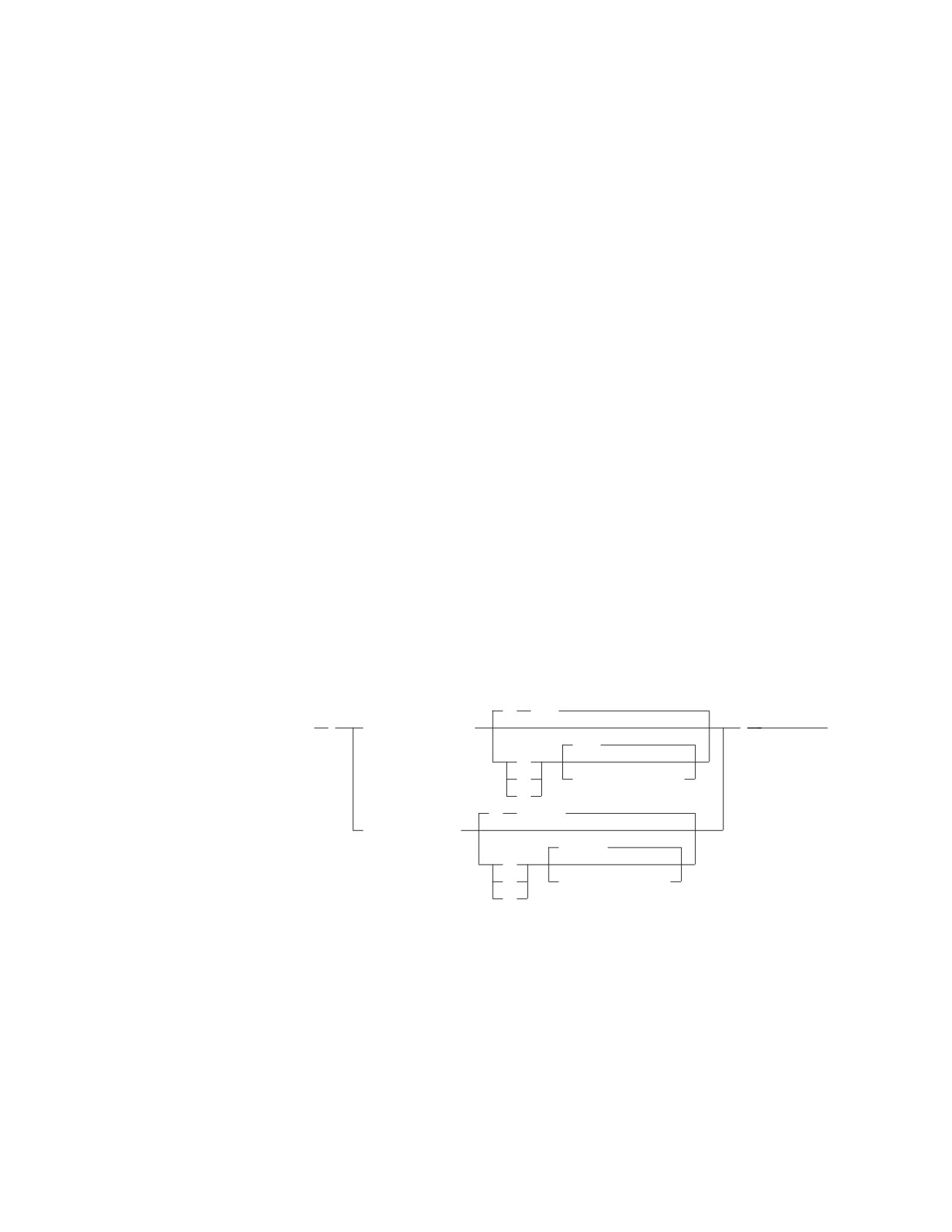
SECOND
v DECIMAL(6,0) for time duration
v DECIMAL(20,6) for timestamp duration
to be properly interpreted.
The result of the function is a large integer. If the argument can be null, the result
can be null; if the argument is null, the result is the null value.
The other rules depend on the data type of the argument:
v If the argument is a time or timestamp:
The result is the seconds part of the value, which is an integer between 0 and 59.
v If the argument is a time duration or timestamp duration:
The result is the seconds part of the value, which is an integer between -99 and
99. A nonzero result has the same sign as the argument.
Examples
Example 1: Assume that the host variable TIME_DUR (decimal(6,0)) has the value
153045.
SECOND(:TIME_DUR)
Returns the value 45.
Example 2: Assume that the column RECEIVED (timestamp) has an internal
value equivalent to 1988-12-25-17.12.30.000000.
SECOND(RECEIVED)
Returns the value 30.
STRIP
,B
,’ ’
►► STRIP
(
character_string
)
►◄
,’ ’
,L
,T
,strip_character
,B
,B
,’G< >’
graphic_string
,’G< >’
,L
,T
,strip_character
,B
The STRIP function returns a value in which blanks, or another specified character,
have been removed from the end or the beginning of a string.
character_string or graphic_string
Either a character-compatible expression (CHAR, VARCHAR, TIME, DATE,
TIMESTAMP) or a graphic expression (GRAPHIC, VARGRAPHIC). The
argument cannot be a long string.
Note that the argument cannot have a subtype of mixed.
L
T
108
SQL Reference

STRIP
B One of L, T, or B (not in quotation marks) to remove leading, trailing, or both
leading and trailing characters from a string. If a value other than L, T, or B is
specified, an error will occur.
The default value is B.
strip_character
A character constant indicating the character to be stripped from string.
The default is either a single character space or a graphic double character
space (X'4040') depending on the data type of string.
The data type and CCSID of the result depends on the data type of the string
argument. The possible data types and CCSIDs are shown in the following table:
Input Data Type
Output Data Type
Output CCSID
CHAR(n)
VARCHAR(n)
same as that of string
VARCHAR(n)
VARCHAR(n)
same as that of string
GRAPHIC(n)
VARGRAPHIC(n)
same as that of string
VARGRAPHIC(n)
VARGRAPHIC(n)
same as that of string
DATE
VARCHAR(n)1
CCSID of the default subtype
TIME
VARCHAR(n)1
CCSID of the default subtype
TIMESTAMP
VARCHAR(26)
CCSID of the default subtype
1
For DATE and TIME data types, the value of n is determined by the
SYSTEM.SYSOPTIONS values for datetime formats. If a LOCAL format datetime
value is used, then n is the LOCAL length specified in SYSTEM.SYSOPTIONS,
otherwise 8, 10, and 26 will be used for TIME, DATE, and TIMESTAMP
respectively.
The defined length of the result is identical to the defined length of the string
argument.
If the first argument can be null, then the result can be null. If the first argument is
null, the result is the null value.
Examples
Example 1: Assume the host variable HELLO (char(9)) has a value of ‘ Hello ’.
STRIP(:HELLO)
Returns the value ‘Hello’.
STRIP(:HELLO, T)
Returns the value ‘ Hello’.
Example 2: Assume the host variable BALANCE (char(9)) has a value of
‘000345.50’.
STRIP(:BALANCE,L,’0’, )
Returns the value ‘345.50’.
Example 3: This example shows the treatment of a graphic string.
STRIP(G’<▌XXLLMMNNXXXX▐>’, T,G’<▌XX▐>’)
Chapter 4. Functions
109
STRIP
Returns the value G’<▌XXLLMMNN▐>’
Example 4: This example shows that spaces are treated like any other character.
Therefore, if spaces precede the character that is to be stripped from the start of the
string, then nothing is stripped.
STRIP(’
00123.400’,B,’0’)
Returns the value ‘ 00123.4’.
SUBSTR
►► SUBSTR
( string_expression, start_integer_expression
►
►
)
►◄
,length_integer_expression
The SUBSTR function returns a substring of a string. If any argument of the
SUBSTR function can be null, the result can be null; if any argument is null, the
result is the null value. The CCSID of the result is the same as that of string.
string
Denotes an expression that specifies the string from which the result is
derived. string must be a character string or a graphic string. If a long string is
specified, it must be a column, not a host variable, and the resulting string
must have a length attribute of not more than 254 bytes (127 characters for
graphic data).
A substring of string is zero or more contiguous characters of string. If string is
a graphic string, a character is a DBCS character. If string is a character string,
a character is a byte.
The SUBSTR function accepts mixed data strings. However, because SUBSTR
operates on a strict byte-count basis, the result will not necessarily be a
properly formed mixed data string.
The SUBSTR function also accepts a datetime argument type for extended
flexibility in extracting datetime substring values.
Note: TIMESTAMP expressions always have an implicit length of 26 and
datatype of CHAR. If the statement is a dynamically prepared one,
DATE and TIME expressions each have an implicit length of 254 and a
data type of VARCHAR. If the statement is not a dynamically prepared
one, DATE and TIME expressions each have an implicit data type of
CHAR and a length which is determined by the value for datetime
formats in the SYSTEM.SYSOPTIONS catalog table. If the datetime
format is LOCAL, the length is the LOCAL length in the
SYSTEM.SYSOPTIONS catalog table; otherwise, it is 8 for TIME and 10
for DATE.
start
Denotes an expression that specifies the position of the first character of the
result. It must be a positive binary integer that is not greater than the length
attribute of string. (The length attribute of a varying-length string is its
maximum length.)
length
Denotes an expression that specifies the length of the result. If specified,
length-expression must evaluate to a binary integer in the range 0 to n, where n
110
SQL Reference
SUBSTR
is the length attribute of string - start + 1. It must not, however, be the integer
constant 0. (SUBSTR(col,1,1-1) is valid; SUBSTR(col,1,0) is not).
If length is explicitly specified, string is effectively padded on the right with the
necessary number of blank characters so that the specified substring of string
always exists.
The default for length is the number of characters from the character specified
by the start to the last character of string. However, if string is a varying-length
string with an actual length less than start (for example, SUBSTR('abcde', 7),
the default is zero and the result is the empty string.
If string is a character string:
v
If length is explicitly specified by an integer constant less than or equal to 254,
the result is a fixed-length character string with a length attribute of length.
v
If length is not explicitly specified, but string is a fixed-length character string
and start is an integer constant, the result is a fixed-length character string with
a length attribute of:
LENGTH(string) - start + 1
v
If length is not explicitly specified, but string is a varying-length character string
or start is not an integer constant, the result is a varying-length character string
with a length attribute that is the same as the length attribute of string.
(Remember, that if the actual length of the string is less than the start position,
the actual length of the substring is zero.)
v
The maximum length attribute of the result is 254.
If string is a graphic string:
v
If length is explicitly specified by an integer constant less than or equal to 127,
the result is a fixed-length graphic string with a length attribute of length.
v
If length is not explicitly specified, but string is a fixed-length graphic string and
start is an integer constant, the result is a fixed-length graphic string with a
length attribute of:
LENGTH(string) - start + 1
v
If length is not explicitly specified, but string is a varying-length graphic string or
start is not an integer constant, the result is a varying-length graphic string with
a length attribute that is the same as the length attribute of string. (Remember,
that if the actual length of the string is less than the start position, the actual
length of the substring is zero.)
v
The maximum length attribute of the result is 127.
If string is a fixed-length string, omission of length is an implicit specification of
LENGTH(string) - start + 1. If string is a varying-length string, omission of length is
an implicit specification of zero or LENGTH(string) - start + 1, whichever is greater.
Examples
Example 1: Assume the host variable NAME (varchar(50)) has a value of ‘KATIE
AUSTIN’ and the host variable SURNAME_POS (int) has a value of 7.
SUBSTR(:NAME, :SURNAME_POS)
Returns the value ‘AUSTIN’
SUBSTR(:NAME, :SURNAME_POS, 1)
Returns the value ‘A’.
Chapter 4. Functions
111