DB2 Server for VSE & VM SQL Reference (Version 7 Release 5) - page 2
Concepts
unnecessary when all the strings involved in a statement’s execution are
represented in the same way. This is frequently the case for stand-alone installations
and for networks within the same country or region. Thus, for many readers,
character conversion may be irrelevant.
Character conversion can occur when an SQL statement is processed remotely.
Consider, for example, these two cases:
v The values of host variables sent from the application requester to the
application server
v The values of result columns sent from the application server to the application
requester.
In either case, the string could have a different representation at the sending and
receiving systems. Conversion can also occur during string operations on the same
system.
The following list defines some of the terms used when discussing character
conversion.
character set
A defined set of characters. For example, the
following character set appears in several code
pages:
v
26 non-accented letters A through Z
v
26 non-accented letters a through z
v digits 0 through 9
v
,
:
;
? ( ) ’ ″ / - _ & + % * = < :>
code page
A set of assignments of characters to code points.
In EBCDIC, for example, "A" is assigned code point
X'C1' and "B" is assigned code point X'C2'. Within a
code page, each code point has only one specific
meaning.
code point
A unique bit pattern that represents a character.
coded character set
A set of unambiguous rules that establish a
character set and the one-to-one relationships
between the characters of the set and their coded
representations.
encoding scheme
A set of rules used to represent character data. For
example:
v Single-Byte EBCDIC
v Single-Byte ASCII (see Note)
v Double-Byte EBCDIC
v Mixed Single-, Double- and Multi-Byte ASCII.
Note: Single-Byte ASCII is an encoding scheme
used to represent strings in many
environments, including OS/2. In the
OS/2 environment, ASCII refers to the PC
Data encoding scheme.
substitution character
A unique character that is substituted during
character conversion for any characters in the
source coding representation that do not have a
match in the target coding representation.
30
SQL Reference
Concepts
Character Sets and Code Pages
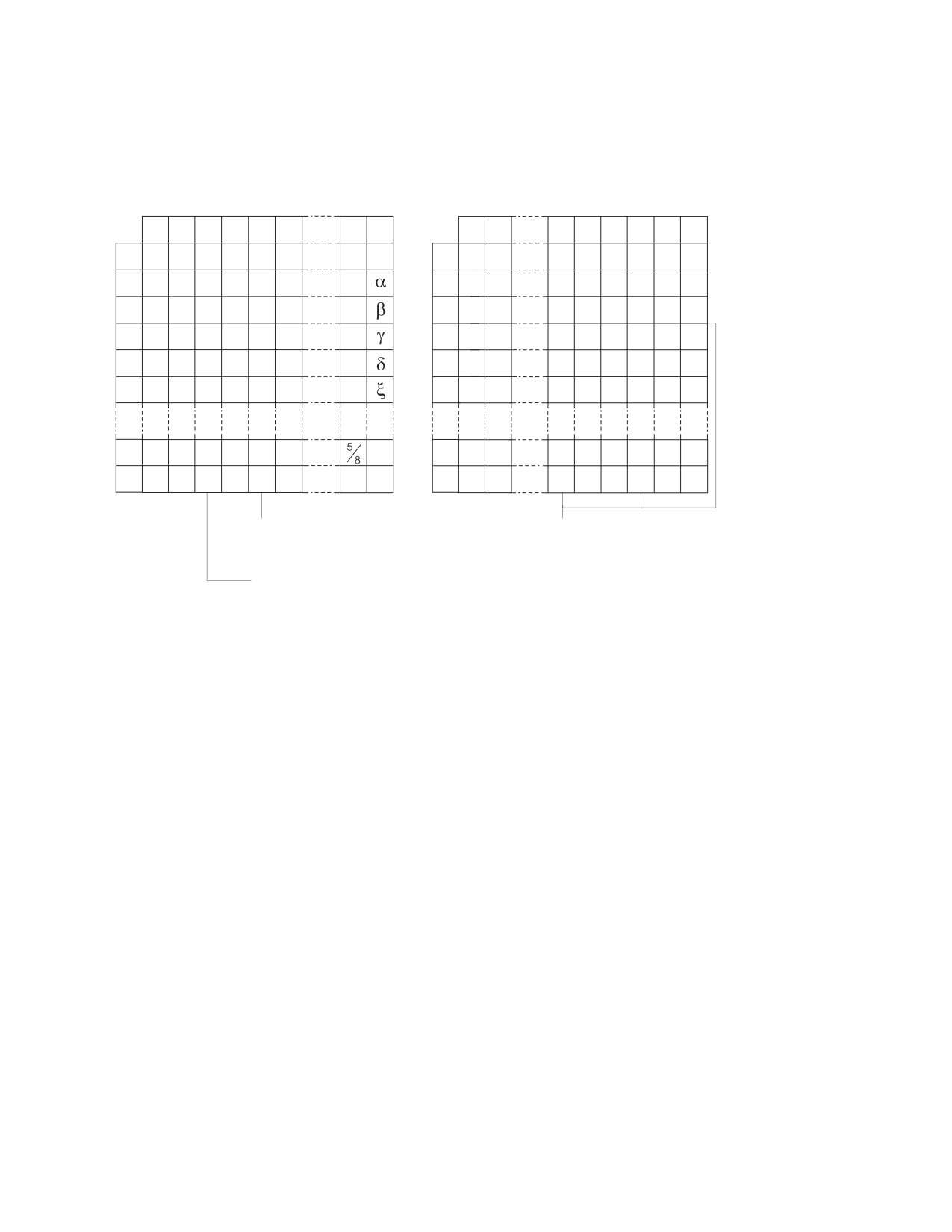
The following example shows how a typical character set might map to different
code points in two different code pages.
Code page: pp1 (ASCII)
Code page: pp2 (EBCDIC)
0
1
2
3
4
5
E
F
0
1
A
B
C
D
E
F
0
0
@
P
Â
0
#
0
1
1
A
Q
À
1
$
A
J
1
2
”
2
B
R
Å
2
s
%
B
K
S
2
3
3
C
S
Á
3
t
C
L
T
3
4
4
D
T
Ã
4
u
D
M
U
4
5
%
5
E
U
Ä
5
v
(
E
N
V
5
E
>
N
ö
E
!
:
Â
}
F
/
*
O
®
F
À
¢
;
Á
{
Character set ss1
Character set ss1
(in code page pp1)
(in code page pp 2)
Code
point: 2F
Even with the same encoding scheme, there are many different coded character
sets, and the same code point can represent a different character in different coded
character sets. Furthermore, a byte in a character string does not necessarily
represent a character from a single-byte character set (SBCS). Character strings are
also used for mixed and bit data. Mixed data is a mixture of single-byte characters,
double-byte characters and possibly multi-byte characters. On some platforms,
mixed data may be comprised of 2, 3, 4 or more bytes. Bit data is not associated
with any character set. Note that this is not the case with graphic strings; the
database manager assumes that every pair of bytes in every graphic string
represents a character from a double-byte character set (DBCS).
For more details on character conversion, see:
v
“Conversion Rules for String Comparison” on page 58 for rules on string
comparisons
v
“Conversion Rules for Operations that Combine Strings” on page 130 for rules
on concatenation.
Coded Character Sets and CCSIDs
IBM’s Character Data Representation Architecture (CDRA) deals with the
differences in string representation and encoding. The Coded Character Set Identifier
(CCSID) is a key element of this architecture. A CCSID is a 2-byte (unsigned)
binary number that uniquely identifies an encoding scheme and one or more pairs
of character sets and code pages.
A CCSID is an attribute of strings, just as a length is an attribute of strings. In DB2
Server for VSE & VM databases, different columns can have different CCSID
Chapter 2. Concepts
31
Concepts
attributes and each string in a column has the CCSID attribute of that column.
Note that not all IBM relational database managers support the specification of
CCSIDs at the column level.
Character conversion involves the use of a CCSID Conversion Selection Table. The
Conversion Selection Table, which is stored in the SYSTEM.SYSSTRINGS catalog
table, contains a list of valid source and target combinations. For each pair of
CCSIDs, the Conversion Selection Table contains information used to perform the
conversion from one coded character set to the other. This information includes an
indication of whether conversion is required. (In some cases, no conversion is
necessary even though the strings involved have different CCSIDs.)
Default CCSID
Every application server and application requester has a default CCSID (or default
CCSIDs in installations that support DBCS data). A list of the CCSIDs supported
by the DB2 Server for VSE & VM database manager can be found in the CCSID
column of the SYSTEM.SYSCCSIDS catalog table.
A default CCSID is the CCSID of the default subtype; for example, the USER special
register could have either an SBCS or mixed subtype, and its default CCSID would
be the subtype’s CCSID specified by the application server. The CCSID of the
following types of strings is determined at the application server:
v String constants
v Special registers with string values (such as USER and CURRENT SERVER)
v The result of the scalar functions CHAR, DIGITS, HEX, and VARGRAPHIC
v String columns defined by CREATE TABLE and ALTER TABLE statements
v The character representation of datetime values.
The default CCSID of strings stored in host variables is determined at the
application requester.
Statements are converted from the default CCSID of the application requester to
the default CCSID of the application server.
In VM: When an application server or application requester is initialized with
PROTOCOL=SQLDS (see SQLSTART and SQLINIT in the DB2 Server for VSE &
VM Database Administration manual), the default CCSID of the application
requester is the same as that of the application server regardless of the values
reported on the application requester when an SQLINIT QUERY is performed.
In VSE: When an application requester accesses a local application server, the
default CCSID of the application requester is the same as that of the application
server, regardless of the values reported on the application requester when a
DSQQ transaction is performed.
Authorization and Privileges
Users can successfully process SQL statements only if they are authorized to
perform the specified function. To create a table, a user must be authorized to
create tables; to alter a table, a user must be authorized to alter the table; and so
forth.
Two forms of permission exist:
v Authority to
- connect to a specific database manager
- allocate resources such as private dbspaces and public dbspaces
32
SQL Reference
Concepts
- administer the database manager. This is called DBA (Database
Administrator) authority.
v Privilege to
- access objects in the database
- create indexes on specific tables.
Authorization, then, refers to who is allowed to access what data, whereas privileges
refer to how an authorized user can use the data. For example, authorized users
can create, modify, and delete tables. These users then have privileges on those
tables and can selectively grant and revoke those privileges to other users.
The person or persons holding DBA authority are charged with the task of
controlling the database manager and are responsible for the safety and integrity of
the data. Those with DBA authority control who will have access to the database
manager and the extent of this access.
Chapter 2. Concepts
33
34
SQL Reference
Chapter 3. Language Elements
This chapter defines the basic syntax of SQL and language elements that are
common to many SQL statements.
v
“Characters”
v
“Tokens” on page 36
v
“Identifiers” on page 36
v
“Naming Conventions” on page 38
v
“Authorization IDs and Authorization-names” on page 41
v
“Data Types” on page 42
v
“Null Values” on page 51
v
“Assignments and Comparisons” on page 53
v
“Constants” on page 59
v
“Special Registers” on page 62
v
“Column Names” on page 63
v
“References to Host Variables” on page 68
v
“Expressions” on page 71
v
“Predicates” on page 79
v
“Search Conditions” on page 89.
Characters
The basic symbols of keywords and operators in the SQL language as supported
by this product are single-byte EBCDIC characters. Characters of the language are
classified as letters, digits, or special characters.
A letter is any one of the uppercase characters A through Z, the lowercase letters a
through z, plus the three characters reserved as alphabetic extenders for national
languages (for example, in code page 37, $ is at 5B, # is at 7B, @ is at 7C).
A digit is any of the characters 0 through 9.
A special character is one of the characters listed below:
space
/
slash
"
quote or double-quote
:
colon
%
percent
;
semi-colon
&
ampersand
<
less than
'
apostrophe or single quote
=
equals
(
left parenthesis
>
greater than
)
right parenthesis
?
question mark
asterisk
_
underscore
+
plus sign
¬
logical NOT *
,
comma
^
caret *
−
minus sign
|
vertical bar *
period
!
exclamation point *
* Not supported in IBM-SQL. For portability of programs, consider alternative
characters.
A character set composed of characters not found in the default U.S. English
EBCDIC character set can be created (thus, for instance, expanding the set of
35
Characters
characters defined as letters). Such a character set could be useful in folding, which
converts lowercase characters of a character string into uppercase. For information
on how to create these characters, refer to the section on defining your own
character set in the DB2 Server for VM System Administration or DB2 Server for VSE
System Administration manual. Also, see “SYSCHARSETS” on page 378.
Tokens
The basic syntactic units of the language are called tokens. A token consists of one
or more characters, excluding the blank character, and excluding characters within
a string constant (for example ’string’) or delimited identifier (for example
″field1″). These terms are defined later.
Tokens are classified as ordinary or delimiter tokens:
v An ordinary token is a numeric constant, an ordinary identifier, a host identifier,
or a keyword.
Examples:
1
.1
+2
3
:SALARY
E
SELECT
v A delimiter token is a string constant, a delimited identifier, an operator symbol,
or any of the special characters shown in the syntax diagrams. A question mark
(?) is also a delimiter token when it serves as a parameter marker, as explained
under “PREPARE” on page 313.
Examples:
’string’
"field1"
=
,
Spaces
A space is a sequence of one or more blank characters. Tokens, other than string
constants and delimited identifiers, must not include a space. Any token can be
followed by a space. Every ordinary token must be followed by a delimiter token
or a space. If the syntax does not allow an ordinary token to be followed by a
delimiter token, that ordinary token must be followed by a space.
Comments
Static SQL statements may include host language comments or SQL comments.
Either type of comment may be specified wherever a space may be specified,
except within a delimiter token or between the keywords EXEC and SQL. SQL
comments are introduced by two consecutive hyphens (--) and terminated by the
end of the line. For more information, see “SQL Comments” on page 143.
Uppercase and Lowercase
Letters used in an ordinary token other than a C variable must be uppercase
letters. Thus, lowercase letters can only be used in string constants, delimited
identifiers, and C language host variables. In all other tokens, the lowercase letters
will be folded to uppercase.
Identifiers
An identifier is a token used to form a name. An identifier in an SQL statement is
either an SQL identifier or a host identifier.
SQL Identifiers
There are two types of SQL identifiers: ordinary identifiers and delimited identifiers.
36
SQL Reference
Identifiers
v
An ordinary identifier is an uppercase letter followed by zero or more characters,
each of which is an uppercase letter, a digit, or the underscore character. The
database manager “folds” lowercase characters in ordinary identifiers to
uppercase (see “Characters” on page 35 for a complete definition of a letter). An
ordinary identifier must not be a reserved word. (See the back cover for a list of
DB2 Server for VSE & VM reserved words.)
Most ordinary identifiers may include DBCS characters if the following support
is true:
- For a VM application requester, the CHARNAME parameter of the SQLINIT
EXEC must identify a mixed character set; at the application server, the
SYSTEM.SYSOPTIONS catalog must have the DBCS option set to YES and the
CHARNAME option must be a mixed CHARNAME
- For VSE, the CHARNAME option in the SYSTEM.SYSOPTIONS catalog table
must be a mixed CHARNAME; at the application server, the
SYSTEM.SYSOPTIONS catalog must have the DBCS option set to YES and the
CHARNAME option must be a mixed CHARNAME
Note: The ordinary identifiers that cannot include DBCS characters are
identified in “Naming Conventions” on page 38.
See “SYSOPTIONS” on page 393 for more information on the DBCS and
CHARNAME options.
v
A delimited identifier is a sequence of characters enclosed within quotation marks
("). Any character except a quote (") may be used between the quotation marks;
however, leading blanks and trailing blanks are not allowed, and periods (.)
should be avoided. Lowercase characters are not folded to uppercase, the
identifier need not start with a letter, and the value of a delimited identifier may
be the same as a reserved word.
Examples:
WKLYSAL
WKLY_SAL
"WKLY_SAL"
"UNION"
"wkly sal" "wkly_sal" "Dave’s Table"
Note that "Dave"s Table" is incorrect.
SQL identifiers are also classified according to their maximum length. A long
identifier has a maximum length of 18 bytes. A short identifier has a maximum
length of 8 bytes. The length of either a long or short identifier does not include
quotation marks around delimited identifiers.
Host Identifiers
A host_identifier is a name declared in a host program. The rules for forming a
host_identifier are the rules of the host language. In addition, a host_identifier:
v has a maximum length of 18 characters in Fortran
v in IBM VM systems, host identifiers can contain DBCS characters if the SQLINIT
EXEC is invoked with DBCS set to YES and the CHARNAME parameter
specifies a mixed character set. Values in the SYSTEM.SYSOPTIONS table do not
affect the use of DBCS characters in host identifiers.
v in VSE, can include DBCS characters if, in the SYSTEM.SYSOPTIONS catalog
table at the application server, the CHARNAME option specifies a mixed
character set and the DBCS option is set to YES.
v should not begin with SQL or RDI
v should not begin with SQ for Fortran.
Chapter 3. Language Elements
37
Naming Conventions
Naming Conventions
The rules for forming a name depend on the type of the object designated by the
name. Though names may include any character, it is not advisable to use special
characters, such as #, @, or $, with the DRDA protocol. Special characters may not
be supported by all code pages (see “Character Conversion” on page 29 for more
information on code pages).
The syntax diagrams use the metavariables in the following list to represent actual
object names and values. The list does not include all metavariables used; there are
also metavariables whose scope is limited to a particular diagram and these are
defined locally.
authorization_name
A short identifier that designates a user or group of
users. It must only include SBCS characters. See
“Authorization IDs and Authorization-names” on
page 41.
collection_id
A short identifier that provides a logical grouping
for SQL objects. A collection_id used as the qualifier
of the name of a table, view, index, or package is
an authorization_name. Collection_id is the same as
owner_name. It must not include DBCS characters.
column_name
A qualified or unqualified name that designates a
column of a table or view. The unqualified form of
a column_name is a long identifier. The qualified
form is a qualifier followed by a period and a long
identifier. The qualifier is a table name, a view
name, a synonym, or a correlation name.
constraint_name
A long identifier that designates a referential
constraint on a table.
correlation_name
A long identifier that designates a table, a view, or
individual rows of a table or view.
cursor_name
In the Positioned UPDATE and Positioned DELETE
statements: a long identifier that designates an SQL
cursor. In all other statements: a long, ordinary
identifier that designates an SQL cursor.
Cursor_names, in these statements, unlike other
ordinary identifiers, can be SQL reserved words
(though the use of reserved words in ordinary
identifiers is not recommended because that usage
is not supported in either IBM-SQL or ISO/ANSI
SQL). It must not include DBCS characters.
cursor_variable
A host_identifier used to name or identify a cursor
in an extended dynamic statement. The
host_identifier’s attribute must be VARCHAR and its
length attribute must be 18.
dbspace_name
A qualified or unqualified name that designates a
dbspace. The unqualified form of a dbspace_name is
a long identifier. An unqualified dbspace_name in an
SQL statement is implicitly qualified by the
38
SQL Reference

Naming Conventions
authorization ID of that statement. The qualified
form is a collection_id followed by a period and a
long identifier.
descriptor_name
A host_identifier, optionally preceded by a colon,
that designates an SQL descriptor area (SQLDA).
Note that a descriptor_name never includes an
indicator variable.
host_variable
A sequence of tokens that designates a host
variable. A host_variable includes at least one
host_identifier, as explained in “Host Identifiers” on
page 37.
host_variable_list
A list of one or more host variables, host
structures, or both, which takes the following form:
,
►►
▼
host_variable
►◄
In this context, a host_variable can also reference a
host structure. See “Host Structures and Indicator
Arrays” on page 69 for more information on host
structures.
index_id
An unqualified index_name. It is a long identifier.
index_name
A qualified or unqualified name that designates an
index. The unqualified form of an index_name is a
long identifier. An unqualified index_name in an
SQL statement is implicitly qualified by the
authorization ID of that statement. The qualified
form is a collection_id followed by a period and a
long identifier.
owner_name
A short identifier that designates an owner of a
database object such as a table, view, index, or
package. Owner_name is the same as collection_id. It
must not include DBCS characters.
package_id
An unqualified package_name. It is a short ordinary
identifier. It must not include DBCS characters.
package_name
A qualified or unqualified name that designates a
package. The unqualified form of a package_name is
a short ordinary identifier. An unqualified
package_name in an SQL statement is implicitly
qualified by the authorization ID of that statement.
The qualified form is a collection_id followed by a
period and a short ordinary identifier.
package_spec
A metavariable used to name or identify packages
within extended dynamic statements.
►►
►
collection_id
host_identifier
Chapter 3. Language Elements
39
Naming Conventions
► package_id
►◄
host_identifier
If a host_identifier is used it must be CHAR(8) and,
if the name in the host_identifier is less than 8
characters, it must be padded to the right with
blanks.
In C, the host variable must have a datatype of C
NUL-terminated and a length of 9.
password
A short ordinary identifier that designates a
password. It must not include DBCS characters.
section_variable
A host_identifier used to identify a statement that
has been prepared into an extended dynamic
package. The section_variable’s data type must be
INTEGER.
server_name
A long identifier that designates an application
server. It must not include DBCS characters.
statement_name
A long ordinary identifier that designates a
prepared SQL statement. Statement_names, unlike
other ordinary identifiers, can be SQL reserved
words (though the use of reserved words in
ordinary identifiers is not recommended because
that usage is not supported in either IBM-SQL or
ISO/ANSI SQL). It must not include DBCS
characters.
synonym
A long identifier that names a synonym, a table, or
a view. Synonym is a different term to refer to a
table or view that must exist at the current server.
A synonym is named when it is preceded by the
keyword SYNONYM; it names a local table or
view when it is used in an SQL statement. A
qualified name is never interpreted as a synonym.
table_id
An unqualified table_name. It is a long identifier.
table_name
A qualified or unqualified name that designates a
table. The unqualified form of a table_name is a
long identifier. An unqualified table_name in an
SQL statement is implicitly qualified by the
authorization ID of that statement. The qualified
form is a collection_id followed by a period and a
long identifier.
view_id
An unqualified view_name. It is a long identifier.
view_name
A qualified or unqualified name that designates a
view. The unqualified form of a view_name is a
long identifier. An unqualified view_name in an
SQL statement is implicitly qualified by the
authorization ID of that statement. The qualified
form is a collection_id followed by a period and a
long identifier.
40
SQL Reference
Naming Conventions
Authorization IDs and Authorization-names
An authorization ID is a character string that is obtained by the database manager
when a connection is established between the database manager and either an
application process or a program preparation process. It designates a set of
privileges. It may also designate a user or a group of users, but this property is not
controlled by the database manager.
Authorization IDs are used by the database manager to provide:
v Authorization checking of SQL statements
v Implicit qualifiers for the names of tables, views, indexes, dbspaces, and
packages.
An authorization ID applies to every SQL statement. The authorization ID that
applies to a static SQL statement is the authorization ID that is used during
program preparation. The authorization ID that applies to a dynamic SQL
statement is the authorization ID that was obtained by the database manager when
a connection was established between the database manager and the process. This
is called the run-time authorization ID.
An authorization-name specified in an SQL statement should not be confused with
the authorization ID of the statement. An authorization-name is an identifier that is
used in GRANT and REVOKE statements to designate a target of the grant or
revoke. It cannot be identical to the authorization ID of the GRANT or REVOKE
statement. Note that the premise of a grant of privileges to X is that X will
subsequently be the authorization ID of statements which require those privileges.
Examples:
Example 1
Assume SMITH is your user ID and the authorization ID that the database
manager obtained when the connection was established with the application
process. You process the following statement interactively:
GRANT SELECT ON TDEPT TO KEENE
SMITH is the authorization ID of the statement. Thus, the authority to process the
statement is checked against SMITH and SMITH is the implicit qualifier of TDEPT.
KEENE is an authorization-name specified in the statement. KEENE is given the
SELECT privilege on SMITH.TDEPT.
Example 2
Assume SMITH has administrative authority and is the authorization ID of the
following statements:
DROP TABLE TDEPT
Removes the SMITH.TDEPT table.
DROP TABLE SMITH.TDEPT
Removes the SMITH.TDEPT table.
DROP TABLE KEENE.TDEPT
Removes the KEENE.TDEPT table.
Chapter 3. Language Elements
41
Data Types
Data Types
For information about specifying the data types of columns, see “CREATE TABLE”
on page 219.
The smallest unit of data that can be manipulated in SQL is called a value. How
values are interpreted depends on the data type of their source. The sources of
values are:
Constants
Columns
Host variables
Functions
Expressions
Special registers.
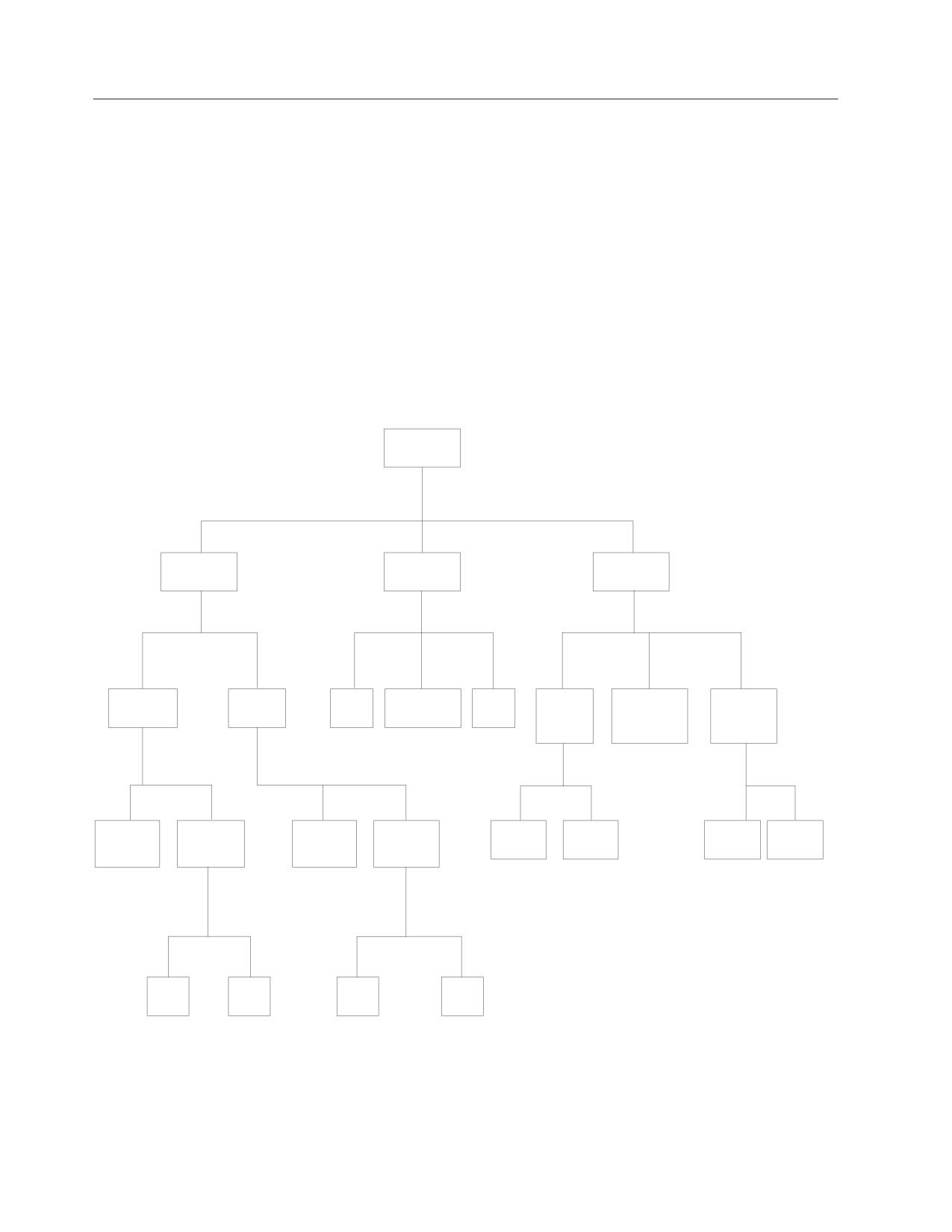
Figure 6 illustrates the various data types supported by the database manager.
data types
string
datetime
numeric
character
graphic
date
timestamp
time
binary
packed
floating
integer
decimal
point
fixed
varying
fixed
varying
small
large
single
double
length
length
length
length
short
long
short
long
Figure 6. Data Types Supported by the Database Manager
Result Set Locators
This data type is used to identify host variables that are used by the DB2 Server
for VSE & VM requester to uniquely indicate a query result set returned by a
42
SQL Reference
Data Types
stored procedure. These host variables are called result set locator variables. They
are only supported in client applications written in Assembler, C, COBOL, and
PL/I. These variables should be included in the SQL DECLARE section and cannot
be array variables.
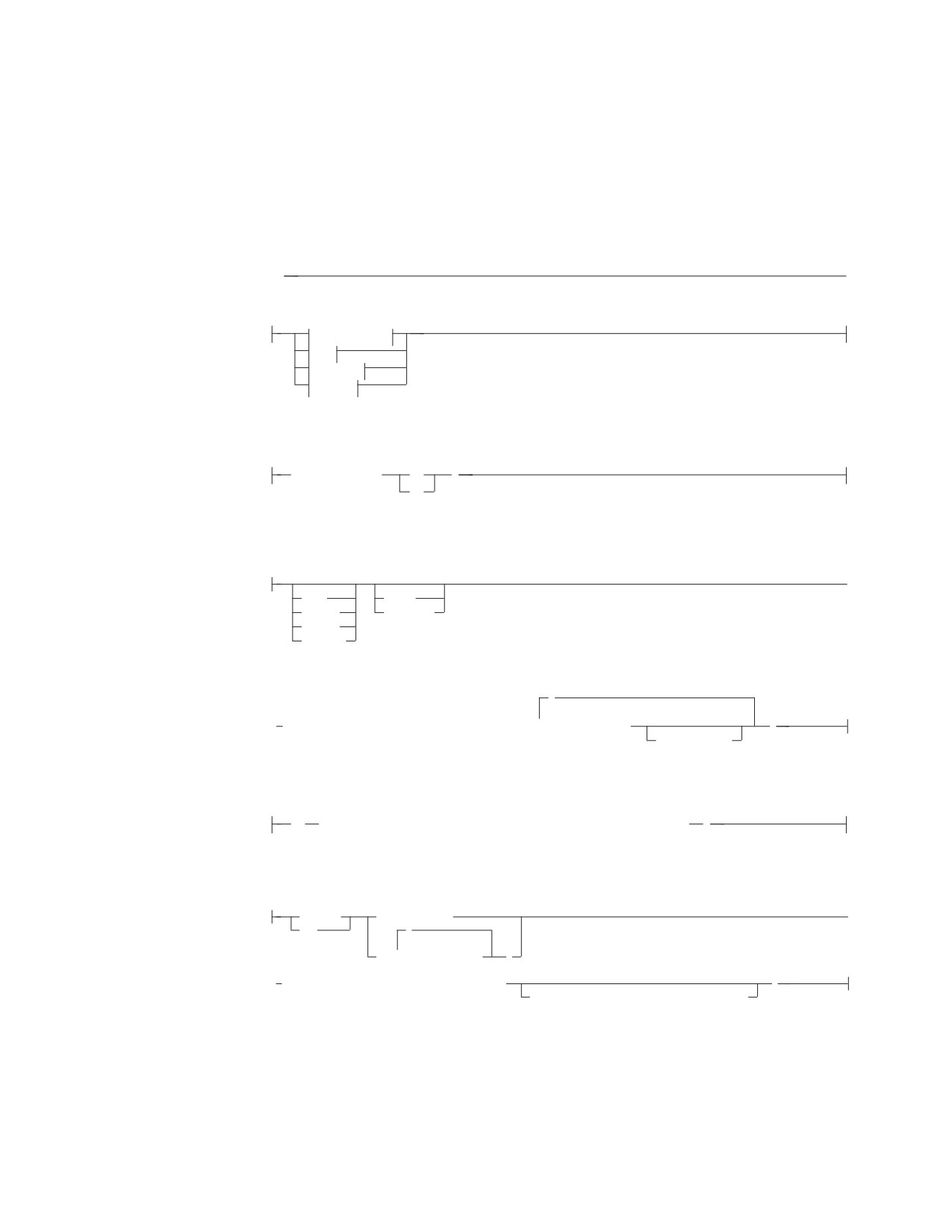
The syntax used to declare a result set locator variable for each language follows:
RESULT SET LOCATOR
►►
►◄
Assembler
C
COBOL
PL/I
Assembler:
variable-name
DC
F
DS
C:
►
auto
const
extern
volatile
static
_Packed
,
►
SQL TYPE IS RESULT_SET_LOCATOR VARYING
▼
variable-name
;
= init-value
COBOL:
01
variable-name SQL TYPE IS RESULT-SET-LOCATOR VARYING
PL/I:
DECLARE
variable-name
►
DCL
,
(
▼
variable-name
)
► SQL TYPE IS RESULT_SET_LOCATOR VARYING
;
Alignment and/or Scope and/or Storage
Nulls
All data types include the null value. The null value is a special value that is
distinct from all non-null values; it denotes an unknown value. Although all data
types include the null value, columns defined as NOT NULL cannot contain null
values.
Chapter 3. Language Elements
43
Data Types
Character Strings
A character string is a sequence of bytes. The length of the string is the number of
bytes in the sequence. If the length is zero, the value is called the empty string. The
empty string should not be confused with the null value.
Fixed-Length Character Strings
All values of a fixed-length string column have the same length, which is
determined by the length attribute of the column. The length attribute must be
between 1 and 254 inclusive. Therefore, every fixed-length string column is a short
string column.
Varying-Length Character Strings
The values of a varying-length string column can have different lengths. The
maximum length is determined by the length attribute of the column. The length
attribute must be between 1 and 32,767.
A varying-length character string column with a length attribute greater than 254 is
a long string column; otherwise it is a short string column. A derived character string
with a maximum length greater than 254 is a long string; otherwise it is a short
string. Long strings and long string columns cannot be referenced in:
v A function other than SUBSTR or LENGTH. (In SUBSTR and LENGTH, the
argument may be a long string column but it may not be a long string host
variable.)
v A GROUP BY clause
v An ORDER BY clause
v A CREATE INDEX statement
v A PRIMARY KEY, FOREIGN KEY, or UNIQUE clause
v A SELECT DISTINCT statement’s select list
v A subselect of a UNION or UNION ALL
v A subselect of an INSERT
v A predicate, with the exception of the first operand of the LIKE predicate.
v As anything but a host variable on the right side of the SET clause of an
UPDATE statement.
The SUBSTR function can be used to convert portions of long strings to short
strings. A further restriction on long strings is that, although the argument of the
SUBSTR function may be a long string, the result cannot be a long string.
Note also that blocking is turned off for any cursor operation involving a long
string.
Character String Host Variables
Fixed-length string variables can be used in all host languages except REXX.
Varying-length string variables can be used in all host languages except Fortran.
Varying-length string variables in Assembler, C, and COBOL are simulated. In C,
varying-length string variables can also be represented by NUL-terminated strings.
String variables with values longer than 254 bytes are subject to the same
restrictions as long string columns.
Character Subtypes
Each character string is further defined as having one of the following subtypes:
bit data
Data that is not associated with a coded character set and is
therefore never converted. The CCSID for bit data is 65535
(X'FFFF').
SBCS data
Data in which every character is represented by a single byte. Each
44
SQL Reference
Data Types
SBCS string has an associated CCSID. If necessary, an SBCS string
is converted before it is used in an operation with a character
string that has a different CCSID.
mixed data
Data that may contain a mixture of characters from a single-byte
character set (SBCS), a double-byte character set (DBCS) and a
multi-byte character set (MBCS). Each mixed string has an
associated CCSID. If necessary, a mixed string is converted before
an operation with a character string that has a different CCSID. If a
mixed data string contains a DBCS character, it cannot be
converted to SBCS data.
Each database has a default character subtype, either SBCS or mixed. Host
variables assume the default character subtype value. This default subtype can be
overridden on a per package basis. Different rules for truncation, padding, and
concatenation apply to character subtypes.
If mixed data values are used then the following rules apply to ensure proper
formation.
1.
Two single-byte EBCDIC codes are given special meanings:
v X'0E', the shift-out character, used to mark the beginning of a sequence of
double-byte codes.
v X'0F', the shift-in character, used to mark the end of a sequence of
double-byte codes.
2.
Shift-out and shift-in characters must be paired. The following examples are
incorrect:
'xy<▌AABB▐'
'▌AABB▐<xy'
3.
A trailing shift-out character is an error. The following examples are incorrect:
'xy<'
'<'
4.
Neither a shift-out nor shift-in character can be nested. It follows that either a
shift-in encountered while processing SBCS or a shift-out encountered while
processing DBCS is incorrect. The following examples are incorrect:
'xy<▌AABB▐<▌CC▐'
'▌GG▐>
abc>de'
'><▌AA▐'
'>'
'>xyz'
5.
The substring of data between a shift-out and a shift-in character is always an
even number of bytes (or zero bytes - see redundant shift character pairs in the
next rule). The following example is incorrect:
'xy<▌AABBC▐>'
6.
Redundant shift-out and shift-in or shift-in and shift-out pairs are allowed in
properly formed mixed data. The following examples are valid:
'<><▌BB▐>'
'<▌AA▐><▌BB▐>'
'xy<>z'
'<>xyz<><>'
Generally, redundant pairs will not affect “character sensitive” facilities. For
example, in the case of the LIKE predicate, specifying:
WHERE COL1 LIKE '%A<>'
is identical to
COL1 LIKE '%A'
Note: The basic equal predicate is not “character sensitive.” For example,
specifying:
WHERE COL1 = 'A<>'
Chapter 3. Language Elements
45
Data Types
would not find a match on the column value
'A'
In order for the database manager to recognize double-byte characters in a mixed
data string, two conditions must be present:
1. During DB2 Server for VM installation, the DBCS option must be set to YES on
both the application requester and application server. During DB2 Server for
VSE installation, the DBCS option must be set to YES. See “SYSOPTIONS” on
page 393.
2. Within the string, the double-byte characters must be enclosed between paired
shift-out and shift-in characters.
The pairing is detected as the string is read from left to right. The code X'0E' is
interpreted as a shift-out character if X'0F' occurs later; otherwise it is incorrect.
The first X'0F' following the X'0E' is the paired shift-in character.
There must be an even number of bytes between the paired characters, and
each pair of bytes is considered to be a double-byte character. There can be
more than one set of paired shift-out and shift-in characters in the string.
The length of a mixed data string is its total number of bytes, counting two bytes
for each double-byte character and one byte for each shift-out or shift-in character.
Defining Mixed Data for a Distributed Relational Database: The method of
representing DBCS characters within a mixed data string differs between ASCII
and EBCDIC.
v ASCII reserves a set of code points for SBCS characters and another set as the
first half of DBCS characters. Upon encountering the first half of a DBCS
character, the system knows that it is to read the next byte in order to obtain the
complete character.
v EBCDIC makes use of two special code points, X'0E' and X'0F', to introduce and
end a string of DBCS characters respectively.
When defining mixed data, the integer specified in
CHAR(integer)
indicates the number of bytes to be used for the column. One effect of this is that
more double-byte characters can be stored in a mixed ASCII column than in a
mixed EBCDIC column.
Examples:
▌FF▐r▌EE▐d needs at least CHAR(6) in ASCII
<▌FF▐>r<▌EE▐>d needs at least CHAR(10) in EBCDIC
Because of these differences, mixed data is not transparently portable between DB2
for OS/2 and DB2 Server for VSE & VM. To minimize the effects of these
differences, use varying-length strings in applications that require mixed data and
operate on both ASCII and EBCDIC systems. In the previous example, this would
mean defining the columns as VARCHAR(10).
Extended UNIX Code (EUC) also allows for a form of ASCII mixed data. It is an
encoding scheme supported by UNIX in far eastern countries which allows for
MBCS characters. Each EUC codepage is made up of three character sets, or
planes, denoted by G0, G1, and G2 or four character sets, denoted by G0, G1, G2
and G3. The group in which the data belongs is determined by the range of its first
and second bytes. G0 is comprised of single-byte characters and is the ASCII
46
SQL Reference
Data Types
invariant coded character set. G1 characters are double-byte characters within
another range. G2 and G3 characters are triple-byte characters, distinguished by
the first byte and the range of the last three bytes.
Graphic Strings
A graphic string is any sequence of double-byte characters (and does not include
shift-out or shift-in characters). The length of the string is the number of its
characters. Like character strings, graphic strings can be empty. There is no
subtype associated with graphic strings.
Every graphic string has a CCSID that identifies a double-byte coded character set.
If necessary, a graphic string is converted before it is used in an operation with a
graphic string that has a different CCSID.
Fixed-Length Graphic Strings
All values of a fixed-length graphic column have the same length, given by the
length attribute of the column. The length attribute cannot be greater than 127.
Therefore, every fixed-length graphic string column is a short string column.
Varying-Length Graphic Strings
The values of a varying-length graphic string column can have different lengths.
The maximum length is determined by the length attribute of the column. The
length attribute must be between 1 and 16383.
A varying-length graphic string column with a length attribute greater than 127 is
a long string column; otherwise it is a short string column. A derived graphic string
with a maximum length greater than 127 is a long string; otherwise it is a short
string. Long graphic strings are subject to the same limitations that apply to long
character strings.
Graphic String Host Variables
Graphic variables can be used in COBOL, PL/I, and REXX.
Numbers
All numbers have a sign and a precision. The precision of binary integers and
decimal numbers is the total number of binary or decimal digits excluding the
sign. The precision of floating-point numbers is either single or double, referring to
the number of hexadecimal digits in the fraction. If a column value is zero, the
sign is positive.
Small Integer
A small integer is a System/390* binary integer with a precision of 15 bits. The
range of small integers is -32768 to 32767.
Large Integer
A large integer is a System/390 binary integer with a precision of 31 bits. The range
of large integers is -2,147,483,648 to +2,147,483,647.
Single Precision Floating-Point
A single precision floating-point number is a System/390 short (32 bits) floating-point
number. The range of magnitude is approximately -7.2E75 to -5.4E-79, 0, +5.4E-79
to 7.2E+75.
Chapter 3. Language Elements
47
Data Types
Double Precision Floating-Point
A double precision floating-point number is a System/390 long (64 bits) floating-point
number. The range of magnitude is approximately -7.2E75 to -5.4E-79, 0, +5.4E-79
to 7.2E+75.
Decimal
A decimal value is a packed decimal number with an implicit decimal point. The
position of the decimal point is determined by the precision and the scale of the
number. The scale, which is the number of digits in the fractional part of the
number, can be neither negative nor greater than the precision. The maximum
precision is 31 digits.
All values of a decimal column have the same precision and scale. The range of a
decimal variable or the numbers in a decimal column is -n to +n, where the
absolute value of n is the largest number that can be represented with the
applicable precision and scale. The maximum range is from 1.0E-31 up to but not
including 1.0E+32.
Note: The precision always remains equal to the attribute that defined the
precision. For example, a decimal data type defined with a 6,2 attribute
cannot have a 7,2 value stored in it.
Numeric Host Variables
Binary integer variables can be used in all host languages. Floating-point variables
can be used in all host languages. Decimal variables can be used in all host
languages except C and Fortran.
Datetime Values
Although datetime values can be used in certain arithmetic and string operations
and are compatible with certain strings, they are neither strings nor numbers.
However, strings can represent datetime values; see “String Representations of
Datetime Values” on page 49.
Date
A date is a three-part value (year, month, and day) designating a point in time
under the Gregorian calendar, which is assumed to have been in effect from the
year 1 A.D. The range of the year part is 0001 to 9999. The range of the month part
is 1 to 12. The range of the day part is 1 to x, where x is 28, 29, 30, or 31,
depending on the month.
Note: Historical dates do not always follow the Gregorian calendar. For example,
dates between 1582-10-04 and 1582-10-15 are accepted as valid dates
although they never existed in the Gregorian calendar.
The internal representation of a date is a string of 4 bytes in packed decimal
notation. Each byte consists of two decimal digits. The first 2 bytes represent the
year, the third byte the month, and the last byte the day.
The length of a DATE column as described in the catalog is four bytes,
representing the internal length. The length of a DATE column as described in the
SQLDA is ten bytes, unless your site specified a date installation exit when the
database manager was installed. In the latter case, the string format of a date may
be up to 254 bytes in length.
48
SQL Reference
Data Types
Time
A time is a three-part value (hour, minute, and second) designating a time of day
using a 24-hour clock. The range of the hour part is 0 to 24, while the range of the
minute and second parts is 0 to 59. If the hour is 24, the minute and second
specifications are both zero.
The internal representation of a time is a string of 3 bytes. Each byte consists of
two digits in packed decimal notation. The first byte represents the hour, the
second byte the minute, and the last byte the second.
The length of a TIME column as described in the catalog is 3 bytes, representing
the internal length. The length of a TIME column as described in the SQLDA is 8
bytes, unless your site specified a time installation exit when the database manager
was installed. In the latter case, the string format may be up to 254 bytes in length.
Timestamp
A timestamp is a seven-part value (year, month, day, hour, minute, second, and
microsecond) that designates a date and time as defined previously, except that the
time includes a specification of microseconds. The range of the microsecond part is
000000 to 999999. If the hour is 24, the microsecond value is 000000.
The internal representation of a timestamp is a string of 10 bytes in packed
decimal notation. Each byte consists of two decimal digits. The first 4 bytes
represent the date, the next 3 bytes the time, and the last 3 bytes the microseconds.
The length of a TIMESTAMP column as described in the catalog is 10 bytes,
representing the internal length. The length of a TIMESTAMP column as described
in the SQLDA is 26 bytes.
String Representations of Datetime Values
Values whose data types are DATE, TIME, or TIMESTAMP are represented in an
internal form that is transparent to the user of SQL. Dates, times, and timestamps,
however, can also be represented by character strings. These representations
directly concern the user of SQL because there are no constants or variables whose
data types are DATE, TIME, or TIMESTAMP. Thus, to be retrieved, a datetime
value must be assigned to a character string variable. The format of the resulting
string will depend on how you defined datetime formats using the DATE and
TIME preprocessor options, or how your site chose to represent datetime values at
the time the database manager was installed.
When a valid string representation of a datetime value is used in an operation with
an internal datetime value, the string representation is converted to the internal
form of the date, time, or timestamp before the operation is performed. If the
CCSID of the string is not the same as the default CCSID, the string is first
converted to the coded character set identified by the default CCSID before the
string is converted to the internal form of the datetime value.
The following sections define the valid string representations of datetime values.
Date Strings: A string representation of a date is a character string that starts
with a digit and has a length of at least 8 characters. An input string representation
of a date or time value with LOCAL specified can be any short character string.
Trailing blanks can be included. Leading zeros can be omitted from the month and
day portions.
Chapter 3. Language Elements
49
Data Types
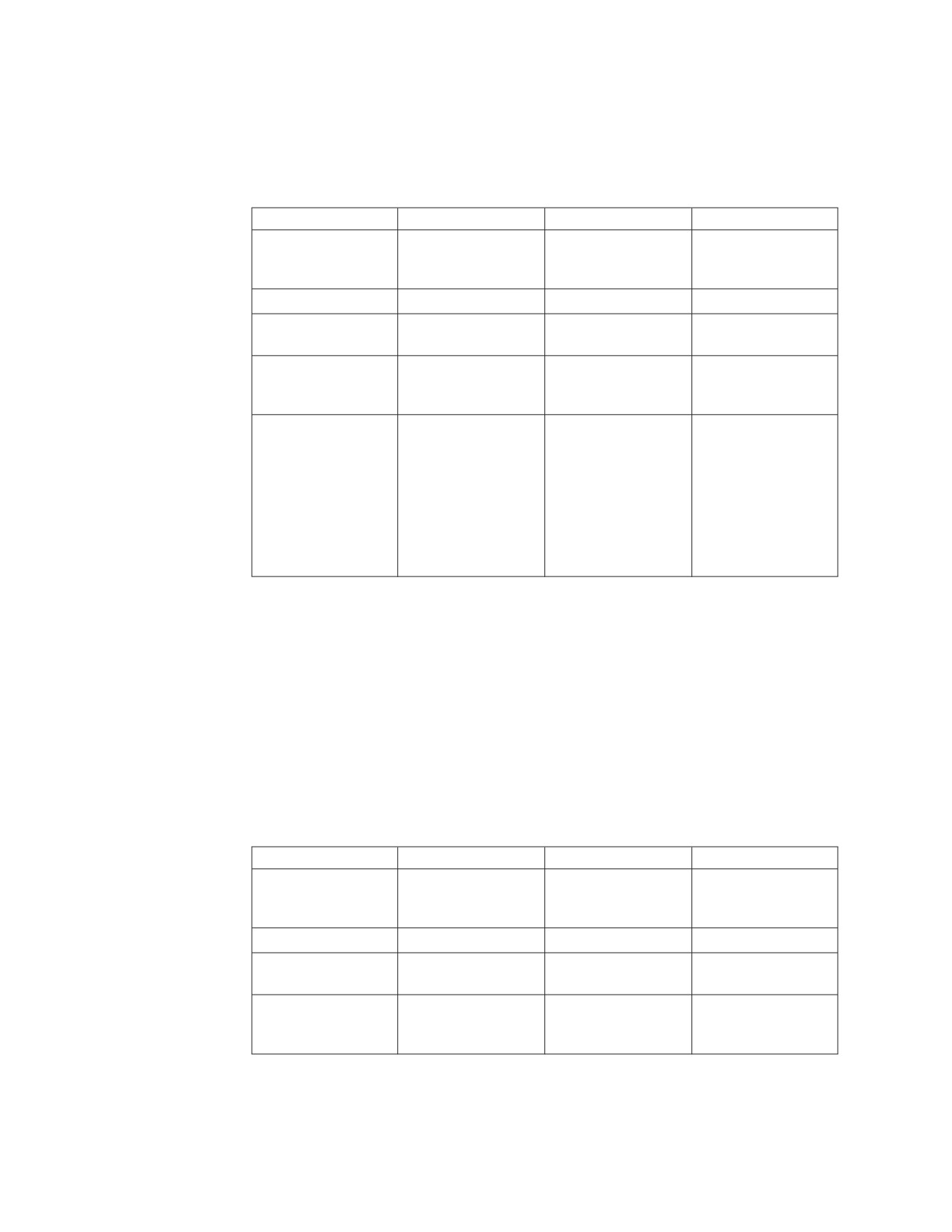
Valid string formats for dates are listed in Table 1. Each format is identified by
name and includes an associated abbreviation (for use by the CHAR function) and
an example of its use. For a site-defined date string format, the format and length
must have been specified when the database manager was installed.
Table 1. Formats for String Representations of Dates
Format Name
Abbreviation
Date Format
Example
International
ISO
yyyy-mm-dd
1987-10-12
Organization for
Standardization
IBM USA standard
USA
mm/dd/yyyy
10/12/1987
IBM European
EUR
dd.mm.yyyy
12.10.1987
standard
Japanese industrial
JIS
yyyy-mm-dd
1987-10-12
standard Christian
era
Site-defined (see
LOCAL
Any site-defined
—
“Defining Your Own
form
Datetime Format” in
the DB2 Server for
VM System
Administration or DB2
Server for VSE System
Administration
manual)
Time Strings: A string representation of a time is a character string that starts
with a digit and has a length of at least 4 characters. An input string representation
of a date or time value with LOCAL specified can be any short character string.
Trailing blanks can be included; a leading zero can be omitted from the hour part
of the time and seconds can be omitted entirely. If you choose to omit seconds, an
implicit specification of 0 seconds is assumed. Thus 13.30 is equivalent to 13.30.00.
Valid string formats for times are listed in Table 2. Each format is identified by
name and includes an associated abbreviation (for use by the CHAR function) and
an example of its use. In the case of a site-defined time string format, the format
and length must have been specified when the database manager was installed.
Table 2. Formats for String Representations of Times
Format Name
Abbreviation
Time Format
Example
International
ISO
hh.mm.ss
13.30.05
Organization for
Standardization
IBM USA standard
USA
hh.mm AM or PM1
1.30 PM
IBM European
EUR
hh.mm.ss
13.30.05
standard
Japanese industrial
JIS
hh.mm.ss
13.30.05
standard Christian
era
50
SQL Reference

Data Types
Table 2. Formats for String Representations of Times (continued)
Format Name
Abbreviation
Time Format
Example
Site-defined (see
LOCAL
Any site-defined
—
“Defining Your Own
form
Datetime Format” in
the DB2 Server for
VM System
Administration or DB2
Server for VSE System
Administration
manual)
Notes:
1
A single space must separate the time and the AM or PM, as shown in the
example.
In the USA time format, the hour must not be greater than 12 and cannot be 0
except for the special case of 00:00 AM. Using the ISO format of the 24-hour clock,
the correspondence between the USA format and the 24-hour clock is as follows:
Table 3. USA Format
USA Format
24 Hour Clock
12:01 AM through 12:59 AM
00.01.00 through 00.59.00
01:00 AM through 11:59 AM
01.00.00 through 11.59.00
12:00 PM (noon) through 11:59 PM
12.00.00 through 23.59.00
12:00 AM (midnight)
24.00.00
00:00 AM (midnight)
00.00.00
Timestamp Strings: A string representation of a timestamp is a character string
that starts with a digit and has a length of at least 16 characters. The complete
string representation of a timestamp has the form yyyy-xx-dd-hh.mm.ss.zzzzzz.
Trailing blanks can be included. Leading zeros can be omitted from the month,
day, and hour part of the timestamp, and trailing zeros can be truncated or
omitted entirely from microseconds. If you choose to omit any digit of the
microseconds portion, an implicit specification of 0 is assumed. Thus,
1990-3-2-8.30.00.10 is equivalent to 1990-03-02-08.30.00.100000.
Null Values
Null is a special value used to represent "not applicable" or "undefined". For
example:
In the PROJECT sample table, the value for MAJPROJ in the PROJNO 'AD3100'
row is null. In this case a value is not applicable because AD3100 is itself a
major project.
In the DEPARTMENT sample table, the value for MGRNO in the DEPTNO
'D01' row is null. In this case the value is undefined.
Null is not the same as blank, an empty string, or zero. Columns can be defined to
allow or disallow null values. In an application, a null value can be represented in
a host variable by assigning a negative value to that host variable’s associated
indicator variable.
Chapter 3. Language Elements
51
Null Values
Assigning Null Values Within the Database:
v Either a host variable with a negative indicator variable or the NULL keyword
can be used in an INSERT or UPDATE statement to enter a null value into the
database.
v Nullable columns omitted from an INSERT statement are also set to NULL.
v In referential constraints with a DELETE rule of SET NULL, when a row is
deleted from a parent table, the nullable foreign key columns of the
corresponding rows in the dependent table will be set to null values.
Returning Null Values to the Application from the Database:
v Null values returned to the application are the result of: null values in the
database, host variables with negative indicator variables or arithmetic errors.
Null Values within Expressions and Predicates
v If there is a null value as an operand of any arithmetic expression or string
expression, then the value of that expression is the null value.
v If the first argument of any scalar function except VALUE has a null value, then
the value of that function is null.
v The COUNT column function includes rows with a column having the null
value but the other column functions ignore NULLs.
v The value of a column function is null if all of the column values are null.
v Search conditions containing null values are evaluated by applying three-valued
logic (see Table 5 on page 89) to the truth values of the component predicates. If
the truth-value of a search condition is unknown for a row, the row does not
satisfy the search condition.
v If a basic predicate contains an expression which has a null value then the
truth-value of the predicate is unknown.
v The effect of null values on quantified predicates, BETWEEN predicates, and IN
predicates can be determined by applying the rules for: the definition of the
predicates in terms of the basic predicates, null values in basic predicates, and
three-valued logic.
v The truth-value of the LIKE predicate is unknown if the value of the column, the
pattern or the escape character is null.
v The truth-value of the EXISTS predicate is true even if only null values are
returned by the subselect.
v The NULL predicate is true if the column value is null.
Equality and Ordering of Null Values:
v Two null values are not considered to be equal when compared. For instance,
the truth-value of an '=' predicate is unknown if both operands have a null
value.
v In contrast to the previous point, ORDER BY, GROUP BY and DISTINCT treat
all null values as if they were equal. Furthermore, the ORDER BY clause handles
a null value as if it was larger than any other value.
Checking for a Null Value:
v The correct way to check for null values is with the NULL predicate. For
example:
WHERE MGRNO IS NOT NULL
52
SQL Reference
Null Values
On the other hand, the predicate:
WHERE NOT MGRNO = :HV:IND
will never return any rows if IND has a negative value. In order to search for a
null value among other values, the null value must be specified in a separate
predicate. For example:
WHERE NOT MGRNO < 1000 OR MGRNO IS NULL
Rows for which MGRNO is null will not satisfy the predicate:
WHERE NOT MGRNO < 1000
Assignments and Comparisons
Assignment operations are performed during the execution of FETCH, INSERT,
PUT, SELECT INTO, and UPDATE statements. Comparison operations are
performed during the execution of statements that include predicates and other
language elements such as MAX, MIN, DISTINCT, GROUP BY, and ORDER BY.
The basic rule for both operations is that the data type of the operands involved
must be compatible. The compatibility rule also applies to UNION, concatenation,
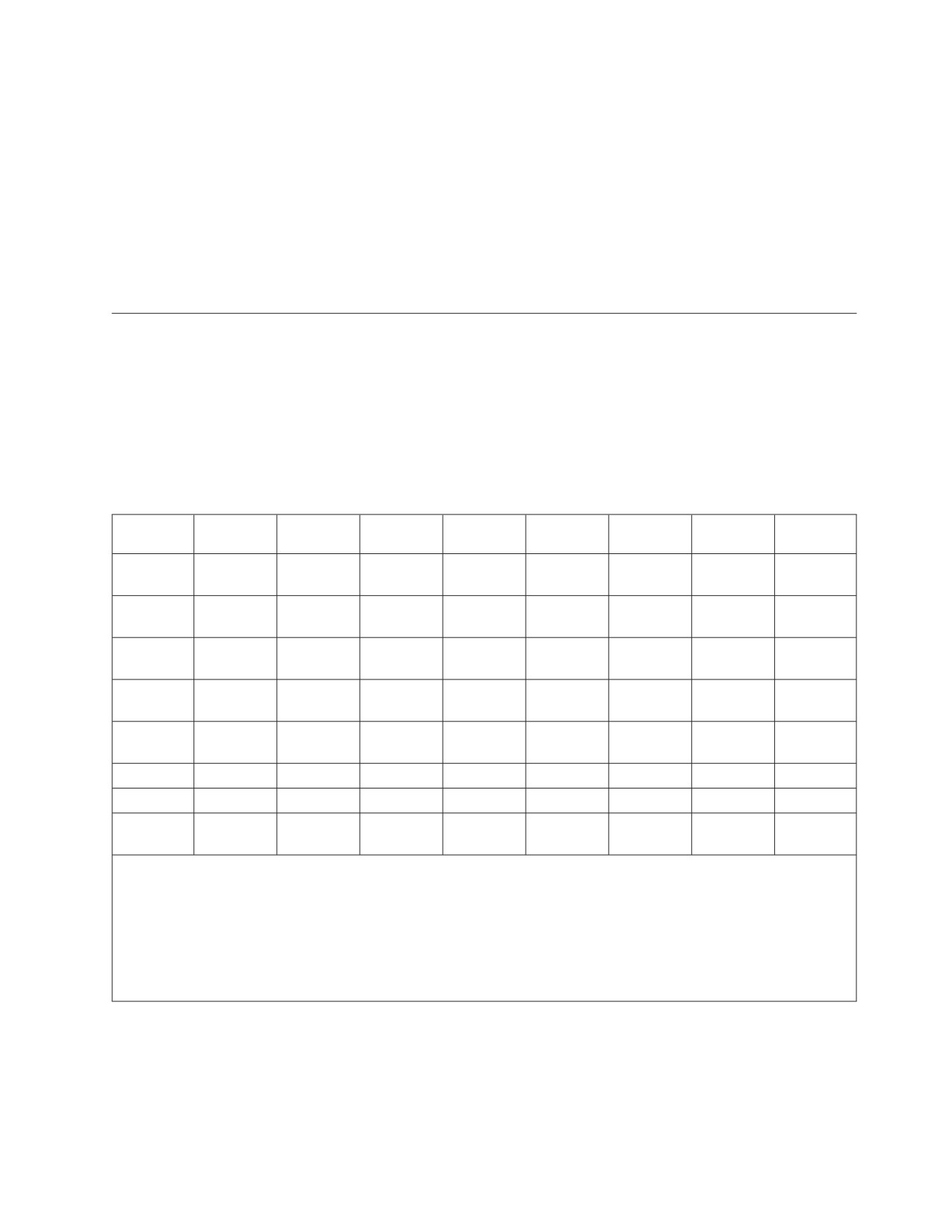
and the VALUE scalar function. The compatibility matrix is as follows:
Operand
Binary
Decimal
Floating
Character
Graphic
Date
Time
Time-
Integer
Number
Point
String
String
stamp
Binary
Yes
Yes
Yes
No
No
No
No
No
Integer
Decimal
Yes
Yes
Yes
No
No
No
No
No
Number
Floating
Yes
Yes
Yes
No
No
No
No
No
Point
Character
No
No
No
Yes
No
String
Graphic
No
No
No
No
Yes
No
No
No
String
Date
No
No
No
No
Yes
No
No
Time
No
No
No
No
No
Yes
No
Time-
No
No
No
No
No
No
Yes
stamp
Note: * The compatibility of datetime values and character strings is limited to assignment and comparison:
v Datetime values can be assigned to character string columns and to character string variables as explained in
“Datetime Assignments” on page 57.
v A valid string representation of a date can be assigned to a date column or compared with a date.
v A valid string representation of a time can be assigned to a time column or compared with a time.
v A valid string representation of a timestamp can be assigned to a timestamp column or compared with a
timestamp.
A basic rule for assignment operations is that a null value cannot be assigned to a
column that cannot contain null values, nor to a host variable that does not have
an associated indicator variable. (See “References to Host Variables” on page 68 for
a discussion of indicator variables.)
Chapter 3. Language Elements
53
Null Values
Numeric Assignments
The basic rule for numeric assignments is that the whole part of a decimal or
integer number cannot be truncated. If necessary, the fractional part of a decimal
number is truncated.
Decimal or Integer to Floating-Point
Floating-point numbers are approximations of real numbers. Hence, when a
decimal or integer number is assigned to a floating-point column or variable, the
result may not be identical to the original number.
Because of the added length of double precision floating-point numbers (64 bits
rather than the 32 bits of a single precision value), the approximation is more
accurate if the receiving column or variable is defined as double precision rather
than single precision. Accuracy is lost if the precision of the target is less than that
of the assigned value, as would be the case if a number greater than 16,777,216
were assigned to a single precision floating-point column.
Floating-Point or Decimal to Integer
When a floating-point or decimal number is assigned to an integer column or
variable, the fractional part of the number is lost.
Decimal to Decimal
When a decimal number is assigned to a decimal column or variable, the number
is converted, if necessary, to the precision and the scale of the target. The necessary
number of leading zeros is appended or eliminated, and, in the fractional part of
the number, the necessary number of trailing zeros is appended, or the necessary
number of trailing digits is eliminated.
Integer to Decimal
When an integer is assigned to a decimal column or variable, the number is
converted first to a temporary decimal number and then, if necessary, to the
precision and scale of the target. The precision and scale of the temporary decimal
number is 5,0 for a small integer or 11,0 for a large integer.
Floating-Point to Floating-Point
When a single precision floating-point number is assigned to a double precision
floating-point column or variable, the single precision data is padded with eight
hex zeros.
When a double precision floating-point number is assigned to a single precision
floating-point column or variable, the double precision data is converted and
rounded up on the seventh hex digit.
Floating-Point to Decimal
When a single precision floating-point number is converted to decimal, the number
is first converted to a temporary decimal number of precision 6 by rounding on the
seventh decimal digit. Nine zeros are then appended to the number to bring the
precision to 15. Because of the rounding involved, a number less than 0.5*10-6 is
reduced to 0.
When a double precision floating-point number is converted to decimal, the
number is first converted to a temporary decimal number of precision 15. Then, if
necessary, the number is truncated to the precision and scale of the target. In this
conversion, the number is rounded (using floating-point arithmetic) to a precision
of 15 decimal digits. As a result, a number less than 0.5*10-15 is reduced to 0. The
54
SQL Reference
Null Values
scale is given the largest possible value that allows the whole part of the number
to be represented without loss of significance.
Example:
This example shows the effect of rounding a double precision
floating-point number by using a temporary decimal number:
The floating-point number
.123456789098765E-05
in decimal notation is:
.00000123456789098765
+5
Rounding adds 5
---------------------
in the 16th position
.00000123456789148765
and truncates the result to:
.000001234567891
To COBOL Integers
Assignments to COBOL integer variables use the full size of the integer. Thus, the
value placed in the COBOL data item may be out of the range of values.
In COBOL, for example, if COL1 contains a value of 12345, the COBOL statements:
01
A PIC S9999
BINARY.
EXEC SQL SELECT COL1
INTO :A
FROM TABLEX
END-EXEC.
result in the value 12345 being placed in A, even though A has been defined with
only 4 digits.
Notice that the following COBOL statement:
MOVE 12345 TO A.
results in 2345 being placed in A.
String Assignments
The general rule for string assignments is that the length of a string assigned to a
column must not be greater than the length attribute of the column. (Trailing
blanks are included in the length of the string.)
Following are exceptions to this rule:
v If the source of the assignment is a column value, the string is truncated, if
necessary, to the length attribute of the target column.
v If the source of the assignment is a fixed-length host variable and the target is a
short varying-length column, all the trailing blanks of the source string, if any,
are always truncated before assignment. Hence, if the host variable’s length
attribute is greater than the target column’s length attribute and all the excess
positions in the original source string contained blanks, the assignment is
completed without an error being returned.
When a string is assigned to a fixed-length string column or host variable and the
length of the string is less than the length attribute of the target, the string is
padded on the right with the necessary number of blanks (SBCS blanks for
character strings of all subtypes, DBCS blanks for graphic strings).
For example, the mixed value 'ab <▌CC▐>' padded to a length of 8 becomes
'ab<▌CC▐> '.
Bit data is padded with blanks, not with X'00''s.
Chapter 3. Language Elements
55
Null Values
When a string of length n is assigned to a varying-length string variable with a
maximum length greater than n, the characters after the nth character of the
variable are undefined and might or might not be set to blanks.
When a string is assigned to a variable and the string is longer than the length
attribute of the variable, the string is truncated on the right by the necessary
number of characters. When this occurs, the value 'W' is assigned to the
SQLWARN1 field of the SQLCA. Furthermore, if an indicator variable is provided,
it is set to the original length of the string.
The truncation rules for character strings are based on the subtype of the target.
The rules are as follows:
v If the target is bit or SBCS, blind truncation occurs.
v If the target is mixed, there is compensation for any incomplete DBCS string. For
example, with a target
CHAR(8) MIXED DATA:
the character string
'abc <▌DDEE▐>fg'
becomes
'abc <▌DD▐> '
If truncation is to occur on mixed character data but the data does not follow the
proper rules regarding mixed data, then the data will be truncated as SBCS and
SQLWARN1 will be set to 'Z'.
For a description of the SQLCA, see “SQL Communication Area (SQLCA)” on page
353.
The above rules apply when both the source and the target are strings. When a
datetime data type is involved, see “Datetime Assignments” on page 57.
Conversion Rules for String Assignments
A string assigned to a column or host variable is first converted, if necessary, to the
coded character set of the target. Character conversion is necessary only if all of
the following are true:
v The CCSIDs are different.
v Neither CCSID is 65535 (X'FFFF').
v The string is neither null nor empty.
v The CCSID Conversion Selection Table indicates that conversion is necessary.
The database manager returns an error for any of the following conditions;
v The CCSID Conversion Selection Table is used but does not contain any
information about the pair of CCSIDs.
v A character of the string cannot be converted, and the operation is assignment to
a column or assignment to a host variable without an associated indicator
variable.
The database manager returns a warning for any of the following conditions:
v A character of the string is converted to the substitution character.
v A character of the string cannot be converted, and the operation is assignment to
a host variable with an associated indicator variable. For example, a DBCS
56
SQL Reference
Null Values
character cannot be converted and placed in a host variable with an SBCS
CCSID. In this example, the string is not assigned to the host variable and the
associated indicator variable is set to -2.
Datetime Assignments
A value assigned to a DATE column must be a date or a valid string representation
of a date. A date can only be assigned to a DATE column, a character string
column, or a character string variable. A value assigned to a TIME column must be
a time or a valid string representation of a time. A time can only be assigned to a
TIME column, a character string column, or a character string variable. A value
assigned to a TIMESTAMP column must be a timestamp or a valid string
representation of a timestamp. A timestamp can only be assigned to a TIMESTAMP
column, a character string column, or a character string variable.
When a datetime value is assigned to a character string variable or column, it is
converted to a string representation. Leading zeros are not omitted from any part
of the date, time, or timestamp. The required length of the target varies depending
on the format of the string representation. If the length of the target is greater than
required, it is padded on the right with blanks. If the length of the target is less
than required, the result depends on the type of datetime value involved, and on
the type of target.
If the target is a column, truncation is not allowed. The length must be at least 10
for a date, 8 for a time, and 26 for a timestamp.
When the target is a host variable, the following rules for DATE, TIME, and
TIMESTAMP apply:
DATE
The length of the variable must not be less than 10.
TIME
If the USA format is used, the length of the variable must not be less than 8.
This format does not include seconds.
If the ISO, EUR, or JIS format is used, the length of the variable must not be
less than 5. If the length is 5, 6, or 7, the seconds part of the time is omitted
from the result, and SQLWARN1 is set to 'W'. In this case, the seconds part of
the time is assigned to the indicator variable if one is provided, and, if the
length is 6 or 7, blank padding occurs so that the value is a valid string
representation of a time.
TIMESTAMP
The length of the variable must not be less than 19. If the length is between 19
and 25, the timestamp is truncated like a string, causing the omission of one or
more digits of the microsecond part. If the length is 20, the trailing decimal
point is replaced by a blank so that the value is a valid string representation of
a timestamp.
For further information on string lengths for datetime values, see “Datetime
Values” on page 48.
Numeric Comparisons
Numbers are compared algebraically; that is, with regard to sign. For example, −2
is less than +1.
Chapter 3. Language Elements
57
Null Values
If one number is an integer and the other number is decimal, the comparison is
made with a temporary copy of the integer, which has been converted to decimal.
When decimal numbers with different scales are compared, the comparison is
made with a temporary copy of one of the numbers that has been extended with
trailing zeros so that its fractional part has the same number of digits as the other
number.
If one number is floating-point and the other number is integer or decimal, the
comparison is made with a temporary copy of the integer or decimal number,
which has been converted to double precision floating-point. Similarly, if one
number is single precision floating-point and one is double precision floating-point,
the comparison is made with a temporary copy of the single precision
floating-point number that has been converted to double precision.
Two floating-point numbers are equal only if the bit configurations of their
normalized forms are identical.
String Comparisons
Two strings are compared by comparing the corresponding bytes of each string. If
the strings do not have the same length, the comparison is made with a temporary
copy of the shorter string that has been padded on the right with blanks so that it
has the same length as the other string. All character subtypes use an SBCS blank
character for padding. However, when a comparison other than simple equals or
not equals occurs between two varying-length string values, the pad character is
X'00'.
Note: The only place where this will make a difference is when a value being
compared contains non-printable characters, that is, characters whose code
point is less than X'40'. Examples of places where X'00' is used are: the
greater than predicate, sorting in response to an ORDER BY clause, and
retrieving ordered data using an index.
Two strings are equal if they are both empty or if all corresponding bytes are
equal. An empty string is equal to a blank string. If two strings are not equal, their
relationship is determined by the comparison of the first pair of unequal bytes
from the left end of the strings. This comparison is made according to the EBCDIC
collating sequence of the CCSID under which they are compared. If a field
procedure is defined on a column, the comparison will be made according to the
EBCDIC collating sequence of the value encoded by the field procedure, if the
encoded value is a string.
Conversion Rules for String Comparison
When two strings are compared, one of the strings is first converted, if necessary,
to the coded character set of the other string. Character conversion is necessary
only if all of the following are true:
v The CCSIDs of the two strings are different.
v Neither CCSID is 65535 (X'FFFF').
v If either string selected for conversion is null or empty.
v The CCSID Conversion Selection Table indicates that conversion is necessary.
If one string has an SBCS CCSID and the other has a mixed CCSID, the SBCS
string is converted. Otherwise, the string selected for conversion depends on the
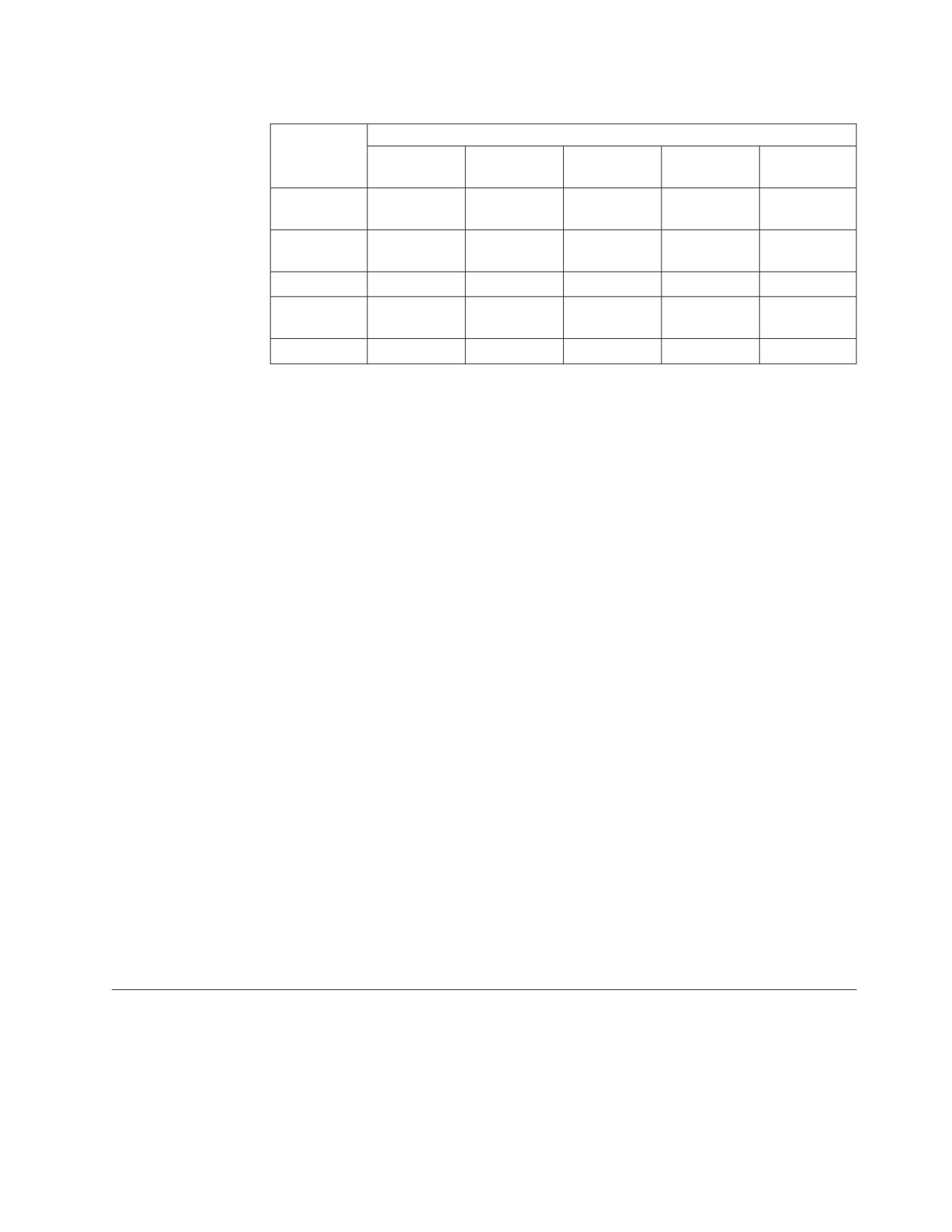
type of each operand. The following table shows which operand is selected for
conversion, given the operand types.
58
SQL Reference
Null Values
Table 4. Selecting the Operand for Character Conversion
Second Operand
First
Column
Derived
Special
Operand
Value
Value
Constant
Register
Host Variable
Column
Value
second
second
second
second
second
Derived
Value
first
second
second
second
second
Constant
first
first
second
second
second
Special
Register
first
first
second
second
second
Host Variable
first
first
first
first
second
A host variable containing data in a foreign encoding scheme is always converted
to the native form of data before it is used in any operation. The above rules are
based on the assumption that this conversion has already occurred.
An error occurs if a character of the string cannot be converted or the CCSID
Conversion Selection Table is used but does not contain any information about the
pair of CCSIDs. A warning occurs if a character of the string is converted to the
substitution character.
Datetime Comparisons
A DATE, TIME, or TIMESTAMP value can be compared either with another value
of the same data type or with a string representation of that data type. All
comparisons are chronological, which means the farther a point in time is from
January 1, 0001, the greater the value of that point in time.
Comparisons involving TIME values and string representations of time values
always include seconds. If the string representation omits seconds, zero seconds
are implied. Therefore the following predicate is true:
TIME(’03.42.00’) = ’03.42’
Note: TIME(’00.00.00’) does not compare as an equal to TIME(’24.00.00’).
Comparisons involving TIMESTAMP values are chronological without regard to
representations that might be considered equivalent. Thus, the following predicate
is true:
TIMESTAMP(’1990-02-23-00.00.00’)>’1990-02-22-24.00.00’
In comparisons of DATE and TIME, two strings which are not identical are
considered to be equal if they represent the same date (that is, '1991-1-1' =
'1991-01-01').
Constants
A constant (also called a literal) specifies a value. Constants are classified as string
constants or numeric constants. Numeric constants are further classified as integer,
floating-point, or decimal. String constants are further classified as character or
graphic.
Chapter 3. Language Elements
59
Constants
All constants have the attribute NOT NULL. A negative sign in a numeric constant
with a value of zero is ignored.
Integer Constants
An integer constant specifies an integer as a signed or unsigned number with a
maximum of 10 digits that does not include a decimal point. The data type of an
integer constant is large integer, and its value must be within the range of a large
integer.
Examples: 64
-15
+100
32767
720176
In syntax diagrams the term integer is used for an integer constant that must not
include a sign.
Floating-Point Constants
A floating-point constant specifies a floating-point number as two numbers separated
by an E. The first number can include a sign and a decimal point; the second
number can include a sign but not a decimal point. The value of the constant is the
product of the first number and the power of 10 specified by the second number; it
must be within the range of floating-point numbers. The number of characters in
the constant must not exceed 30. Excluding leading zeros, the number of digits in
the first number must not exceed 17 and the number of digits in the second must
not exceed 2. The data type of a floating-point constant is double precision
floating-point.
Examples: 15E1
2.E5
2.2E-1
+5.E+2
Decimal Constants
A decimal constant specifies a decimal number as a signed or unsigned number that
includes a decimal point and at most 31 digits. The precision is the total number of
digits (including leading and trailing zeros). When precision is greater than 31, and
a precision of 31 is possible by eliminating leading zeros, then those zeros are
eliminated.
Examples: 25.5
1000.
-15.
+37589.3333333333
Character String Constants
A character string constant specifies a varying-length character string. There are two
forms of character string constant:
v A sequence of characters that starts and ends with a string delimiter ('). This
form of string constant specifies the character string contained between the
string delimiters. The length of the character string must not be greater than 254.
Two consecutive string delimiters represent one string delimiter within the
character string. Two consecutive apostrophes not contained within a string
represent an empty string.
Examples: ’Peggy’
’14.12.1985’
’32’
’DON’’T CHANGE’
’’
v An X followed by a sequence of characters that starts and ends with a string
delimiter is called a hexadecimal constant. Note that hexadecimal constants are
just another way of representing character data. The characters between the
string delimiters must be an even number of hexadecimal digits. The number of
hexadecimal digits must not exceed 254. A hexadecimal digit is a digit or any of
the letters A through F (uppercase or lowercase). Under the conventions of
60
SQL Reference
Constants
hexadecimal notation, each pair of hexadecimal digits represents a character.
This form of string constant lets you specify characters that do not have a
keyboard representation.
Hexadecimal constants, as character string constants, are converted from the
CCSID of the application requester to the CCSID of the application server as
part of the CCSID conversion of statements. One example of where this may
give unexpected results is the following situation. Consider the case of an
application requester which uses CCSID=851 (an ASCII CCSID) and a DB2
Server for VSE & VM application server which uses CCSID=500 (an EBCDIC
CCSID). The table T1 has a character column defined as FOR BIT DATA. The
statement
INSERT INTO T1 VALUES (X’41’)
will insert the hexadecimal value X'C1' into the column, because CCSID
conversion of the statement happens before the statement is interpreted (note
that for CCSID=851, 'A' = X'41' and for CCSID=500, 'A' = X'C1'). To have no
conversion occur and have the value X'41' inserted into the column, use a host
variable instead of the constant.
Examples: X’FFFF’
X’535164A1’
X’C5C2C3C4C9C3’
X’4153434949’
The subtype is classified as mixed data if it includes a DBCS substring (that is, it
contains properly matched shift control characters) and the application server and
application requester both support DBCS characters (that is, the CHARNAME is a
mixed CHARNAME). In all other cases, a character string constant is classified as
SBCS data. For example, X’0E42C142C2’ would be interpreted as SBCS data
because it contains improperly matched shift control characters.
Examples of mixed character string constants:
'abc<▌XXYYZZ▐>'
'<▌XXYYZZ▐>'
'a<▌XXYYZZ▐>b'
'<▌XX▐>ab<▌YYZZ▐>cd'
Character constants of the bit subtype cannot be defined.
The CCSID assigned to a constant is the appropriate default CCSID of the
application server at bind time. Since a character string constant is always part of a
statement, it is converted with the statement from the default CCSID of the
application requester to the default CCSID of the application server. For example,
an ASCII constant might get converted to an EBCDIC representation. A special case
is the above example where a hexadecimal constant which is first converted to its
character representation before it is converted from the default CCSID of the
application requester to the default CCSID of the application server.
Graphic String Constants
A graphic string constant is a short, varying-length string that specifies a graphic
string. There are three forms of graphic string constant, two for static SQL
statements in PL/I and one for all other contexts. In the following description of
these three forms, the string of characters (▌XXYYZZ▐) is the actual string, consisting
of 0 to 127 double-byte characters. The character G (N may be used as a synonym
for G) and the string delimiter (here represented by the apostrophe [']) are required
in the positions indicated.
The forms of graphic string constants are:
v In PL/I source programs: <▌’XXYYZZ’GG▐> and '<▌XXYYZZ▐>'G.
Chapter 3. Language Elements
61
Constants
In the first form, ▌’▐, is the double-byte string delimiter X'427D' and, in this case,
▌GG▐ is the double-byte character X'42C7'. To use that character within the
double-byte character sequence, it must be doubled.
See “PREPARE” on page 313 for more information on the use of DBCS constants
in prepared statements in PL/I Version 2 programs.
v In all other contexts: G'<▌XXYYZZ▐>'
Here, ' is the EBCDIC string delimiter, X'7D'. With this form of graphic string
constant, the empty string can be denoted by G’<>’. G must be the single-byte
character G.
The CCSID assigned to a constant is the appropriate default CCSID of the
application server at bind time, assuming that the application server and
application requester support DBCS characters (that is, the CHARNAME is a
mixed CHARNAME). Since a graphic string constant is always part of a statement,
it is converted with the statement from the default CCSID of the application
requester to the default CCSID of the application server.
Graphic string constants are only supported in COBOL, PL/I, and REXX.
Special Registers
A special register is a storage area that is defined for an application process by the
database manager and stores information that can be referenced in SQL statements.
A reference to a special register is a reference to a value provided by the
application server. If the value is a string, its CCSID is a default CCSID (based on
the default subtype value, CHARSUB) of the application server.
USER
The USER special register specifies a CHAR(8) value that identifies the run-time
authorization ID. The authorization ID is padded on the right with blanks, if
necessary, so that the value of USER is always a fixed-length character string of
length 8.
Example
Select all notes from the IN_TRAY sample table that the user placed there.
SELECT * FROM IN_TRAY
WHERE SOURCE = USER
CURRENT DATE
The CURRENT DATE special register specifies a date that is based on a reading of
the time-of-day clock when the SQL statement is processed at the application
server. The data type is DATE. If this special register is used more than once
within a single SQL statement, or used with CURRENT TIME or CURRENT
TIMESTAMP within a single statement, all values are based on a single clock
reading.
Example
Using the PROJECT table, set the project end date (PRENDATE) of the MA2111
project (PROJNO) to the current date.
UPDATE PROJECT
SET PRENDATE = CURRENT DATE
WHERE PROJNO = ’MA2111’
62
SQL Reference
Special Registers
CURRENT SERVER
The CURRENT SERVER special register specifies a CHAR(18) value that identifies
the current application server. The server-name ID is padded on the right with
blanks, if necessary, so that the value of CURRENT SERVER is always a
fixed-length character string of length 18.
The CURRENT SERVER can be changed by the CONNECT statement.
Example
Set the host variable APPL_SERVE (varchar(18)) to the name of the application
server to which the application is connected.
SELECT CURRENT SERVER
INTO :APPL_SERVE
FROM ONE_ROW_TABLE
CURRENT TIME
The CURRENT TIME special register specifies a time that is based on a reading of
the time-of-day clock when the SQL statement is processed at the application
server. The data type is TIME. If this special register is used more than once within
a single SQL statement, or used with CURRENT DATE or CURRENT TIMESTAMP
within a single statement, all values are based on a single clock reading.
CURRENT TIMESTAMP
The CURRENT TIMESTAMP special register specifies a timestamp that is based on
a reading of the time-of-day clock when the SQL statement is processed at the
application server. The data type is TIMESTAMP. If this special register is used
more than once within a single SQL statement, or used with CURRENT DATE or
CURRENT TIME within a single statement, all values are based on a single clock
reading.
CURRENT TIMEZONE
The CURRENT TIMEZONE special register specifies the difference between UTC
(Universal Coordinated Time, formerly known as GMT) and local time at the
application server. The data type is DECIMAL(6,0). The difference is represented
by a time duration (a decimal number in which the first two digits are the number
of hours, the next two digits are the number of minutes, and the last two digits are
the number of seconds). The number of hours is between -24 and 24 exclusive.
Subtracting CURRENT TIMEZONE from a local time converts that local time to
UTC.
Example
Using the IN_TRAY table select all the rows from the table and adjust the value
from the RECEIVED column to account for timezone.
SELECT RECEIVED - CURRENT TIMEZONE, SOURCE,
SUBJECT, NOTE_TEXT FROM IN_TRAY
Column Names
The meaning of a column name depends on its context. A column name can be
used to:
v Declare the name of a column, as in a CREATE TABLE statement.
v Identify a column, as in a CREATE INDEX statement.
v Specify values of the column, as in the following contexts:
Chapter 3. Language Elements
63
Column Names
- In a column function, a column name specifies all values of the column in the
group or intermediate result table to which the function is applied. (Groups
and intermediate result tables are explained under Chapter 5, “Queries,” on
page 121.) For example, MAX(SALARY) applies the function MAX to all
values of the column SALARY in a group.
- In a GROUP BY or ORDER BY clause, a column name specifies all values in
the intermediate result table to which the clause is applied. For example,
ORDER BY DEPT orders an intermediate result table by the values of the
column DEPT.
- In an expression, a search condition, or a scalar function, a column name specifies
a value for each row or group to which the construct is applied. For example,
when the search condition CODE = 20 is applied to some row, the value
specified by the column name CODE is the value of the column CODE in that
row.
Qualified Column Names
A qualifier for a column name can be a table name, a view name, a synonym, or a
correlation name.
Whether a column name can be qualified depends on its context:
v In some forms of the COMMENT ON and LABEL ON statements, the column
name must be qualified.
v Where the column name specifies values of the column, a column name can be
qualified at the user’s option.
v In all other contexts, a column name must not be qualified.
Where a qualifier is optional it can serve two purposes. See “Column Name
Qualifiers to Avoid Ambiguity” on page 66 and “Column Name Qualifiers in
Correlated References” on page 67 for details.
Correlation Names
A correlation name can be defined in the FROM clause of a query and in the first
clause of an UPDATE or DELETE statement. For example, the clause shown below
establishes Z as a correlation name for X.MYTABLE.
FROM X.MYTABLE Z
A correlation name is associated with a table or view only within the context in
which it is defined. Hence, the same correlation name can be defined for different
purposes in different statements, or in different clauses of the same statement.
As a qualifier, a correlation name can be used to avoid ambiguity or to establish a
correlated reference. It can also be used merely as a shorter name for a table or
view. In the example, Z might have been used merely to avoid having to enter
X.MYTABLE more than once.
If a correlation name is specified for a table name or view name, any qualified
reference to a column of that instance of the table or view must use the correlation
name, rather than the table name or view name. For example, the reference to
EMPLOYEE.PROJECT in the following example is incorrect, because a correlation
name has been specified for EMPLOYEE:
┌───────────┐
FROM EMPLOYEE E
│ INCORRECT │
WHERE EMPLOYEE.PROJECT=’ABC’
└───────────┘
64
SQL Reference
Column Names
The qualified reference to PROJECT should instead use the correlation name, 'E', as
shown below:
FROM EMPLOYEE E
WHERE E.PROJECT='ABC'
Names specified in a FROM clause are either exposed or non-exposed. A correlation
name is always an exposed name. All exposed names in the FROM clause must be
unique. A table name, view name, or synonym is said to be exposed in that FROM
clause if a correlation name is not specified. For example, in the following FROM
clause, a correlation name is specified for EMPLOYEE but not for DEPARTMENT,
so DEPARTMENT is an exposed name, and EMPLOYEE is not:
FROM EMPLOYEE E, DEPARTMENT
The names are compared after qualifying any unqualified table or view names.
The first two FROM clauses shown below are correct, because each one contains no
more than one reference to EMPLOYEE that is exposed:
1.
Given the FROM clause:
FROM EMPLOYEE E1, EMPLOYEE
a qualified reference such as EMPLOYEE.PROJECT denotes a column of the
second instance of EMPLOYEE in the FROM clause. A qualified reference to the
first instance of EMPLOYEE must use the correlation name “E1” (E1.PROJECT).
2.
Given the FROM clause:
FROM EMPLOYEE, EMPLOYEE E2
a qualified reference such as EMPLOYEE.PROJECT denotes a column of the
first instance of EMPLOYEE in the FROM clause. A qualified reference to the
second instance of EMPLOYEE must use the correlation name “E2”
(E2.PROJECT).
3.
Given the FROM clause:
┌────────────┐
FROM EMPLOYEE, EMPLOYEE
│ INCORRECT
│
└────────────┘
a reference to either the first or second instance of EMPLOYEE will be incorrect
as neither is uniquely identified.
4.
Given the following statement:
SELECT *
┌───────────┐
FROM EMPLOYEE E1, EMPLOYEE E2
│ INCORRECT │
WHERE EMPLOYEE.PROJECT = ’ABC’
└───────────┘
the qualified reference EMPLOYEE.PROJECT is incorrect, because both
instances of EMPLOYEE in the FROM clause have correlation names. Instead,
references to PROJECT must be qualified with either correlation name
(E1.PROJECT or E2.PROJECT).
5.
Given the FROM clause:
FROM EMPLOYEE, X.EMPLOYEE
a reference to a column in the second instance of EMPLOYEE must use
X.EMPLOYEE (X.EMPLOYEE.PROJECT). This FROM clause is only valid if the
authorization ID of the statement is not X.
A correlation name specified in a FROM clause must not be the same as:
v Any other correlation name in that FROM clause
Chapter 3. Language Elements
65
Column Names
v Any unqualified table name, view name, or synonym exposed in the FROM
clause
v The second SQL identifier of any qualified table name, view name, or synonym
in the FROM clause.
For example, the following FROM clauses are incorrect:
FROM EMPLOYEE E, EMPLOYEE E
┌───────────┐
FROM EMPLOYEE DEPARTMENT, DEPARTMENT
│ INCORRECT │
FROM X.T1, EMPLOYEE T1
└───────────┘
The following FROM clause is technically correct, though potentially confusing:
FROM EMPLOYEE DEPARTMENT, DEPARTMENT EMPLOYEE
Column Name Qualifiers to Avoid Ambiguity
In the context of a function, a GROUP BY clause, ORDER BY clause, an expression,
or a search condition, a column name refers to values of a column in some table or
view. The tables and views that might contain the column are called the object
tables of the context. Two or more object tables might contain columns with the
same name. One reason for qualifying a column name is to designate the table
from which the column comes.
Table Designators: A qualifier that designates a specific object table is called a
table designator. The clause that identifies the object tables also establishes the table
designators for them. For example, the object tables of an expression in a SELECT
clause are named in the FROM clause that follows it, as in this statement:
SELECT CORZ.COLA, OWNY.MYTABLE.COLA
FROM OWNX.MYTABLE CORZ, OWNY.MYTABLE
This example illustrates how to establish table designators in the FROM clause:
v A name that follows a table or view name is both a correlation name and a table
designator. Thus, CORZ is a table designator. CORZ qualifies the first column
name in the select list.
v An exposed name is its own table designator. Thus, OWNY.MYTABLE is a table
designator. OWNY.MYTABLE qualifies the second column name in the select
list.
Avoiding undefined or ambiguous references: When a column name refers to
values of a column, exactly one object table must include a column with that name.
The following situations are considered errors:
v No object table contains a column with the specified name. The reference is
undefined.
v The column name is qualified by a table designator, but the table designated
does not include a column with the specified name. Again the reference is
undefined.
v The name is unqualified and more than one object table includes a column with
that name. The reference is ambiguous.
Avoid ambiguous references by qualifying a column name with a uniquely defined
table designator. If the column is contained in several object tables with different
names, the table names can be used as designators.
When qualifying a column with the exposed table name form of a table designator,
either the qualified or unqualified form of the exposed table name may be used.
However, the qualifier used and the table used must be the same after fully
qualifying the table name or view name and the table designator.
66
SQL Reference
Column Names
1. If the authorization ID of the statement is CORPDATA:
SELECT CORPDATA.EMPLOYEE.WORKDEPT
FROM EMPLOYEE
is a valid statement.
2. If the authorization ID of the statement is REGION:
SELECT CORPDATA.EMPLOYEE.WORKDEPT
┌───────────┐
FROM EMPLOYEE
│ INCORRECT │
└───────────┘
is incorrect, because EMPLOYEE represents the table REGION.EMPLOYEE, but
the qualifier for WORKDEPT represents a different table,
CORPDATA.EMPLOYEE.
Column Name Qualifiers in Correlated References
A subselect is a form of a query that can be used as a component of various SQL
statements. Refer to Chapter 5, “Queries,” on page 121 for more information on
subselects. A subselect used within a search condition of any statement is called a
subquery.
A subquery can include search conditions of its own, and these search conditions
can, in turn, include subqueries. Thus an SQL statement can contain a hierarchy of
subqueries. Those elements of the hierarchy that contain subqueries are said to be
at a higher level than the subqueries they contain.
Every element of the hierarchy has a clause that establishes one or more table
designators. This is the FROM clause, except in the highest level of an UPDATE or
DELETE statement. A search condition of a subquery can reference not only
columns of the tables identified by the FROM clause of its own element of the
hierarchy, but also columns of tables identified at any level along the path from its
own element to the highest level of the hierarchy. A reference to a column of a
table identified at a higher level is called a correlated reference.
A correlated reference to column C of table T can be of the form C, T.C, or Q.C, if
Q is a correlation name defined for T. However, a correlated reference in the form
of an unqualified column name is not good practice. The following explanation is
based on the assumption that a correlated reference is always in the form of a
qualified column name and that the qualifier is a correlation name.
A qualified column name, Q.C, is a correlated reference only if these three
conditions are met:
v Q.C is used in a search condition of a subquery.
v Q does not designate a table used in the FROM clause of that subquery.
v Q does designate a table used at some higher level.
Q.C refers to column C of the table or view at the level where Q is used as the
table designator of that table or view. Because the same table or view can be
identified at many levels, unique correlation names are recommended as table
designators. If Q designates a table at more than one level, Q.C refers to the lowest
level that contains the subquery that includes Q.C.
In the following statement, Q is used as a correlation name for T1 and T2, but Q.C
refers to the correlation name associated with T2, because it is the lowest level that
contains the subquery that includes Q.C.
SELECT *
FROM T1 Q
WHERE A < ALL (SELECT B
FROM T2 Q
Chapter 3. Language Elements
67

Column Names
WHERE B < ANY (SELECT D
FROM T3
WHERE D = Q.C))
References to Host Variables
A host variable is an Assembler language storage area, C variable, COBOL data
item, Fortran variable, PL/I variable, or a REXX variable that is referenced in an
SQL statement. Host variables are defined by statements of the host language (that
is, they are given a name and a data type), as described in the DB2 Server for VSE
& VM Application Programming manual. Note that host variables cannot be
referenced in dynamic SQL statements; instead, parameter markers must be used
(see “Parameter markers” on page 314).
All host variables used in an SQL statement must be declared in an SQL declare
section in all host languages other than REXX, where variables do not have to be
declared. No variables may be declared outside an SQL declare section with names
identical to variables declared inside an SQL declare section. An SQL declare
section begins with BEGIN DECLARE SECTION and ends with END DECLARE
SECTION.
The Metavariable host-variable
The metavariable host_variable, as used in the syntax diagrams, is a reference to a
host language variable (the main variable) and an optional associated host language
variable (the indicator variable). A host_variable in the INTO clause of a FETCH or a
SELECT INTO statement is an output variable to which a value is assigned by the
database manager. In all other contexts a host_variable is an input variable which
provides a value to the database manager.
The general form of a host_variable reference is:
►►
:host_identifier
►◄
INDICATOR
:host_identifier
The first host_identifier designates the main variable. Depending on the operation, it
either furnishes a value to the database manager, or is furnished one. An input
variable furnishes a value; an output variable is furnished one. For example, an input
variable can specify a comparand in a WHERE clause or a replacement for a
column value in an UPDATE statement. An output variable can receive a column
value when a row is fetched from a table. A given host_variable can serve as both
an input and an output variable in the same program.
The second host_identifier designates the associated indicator variable and it must be
defined as a half-word integer (corresponding to the data type SMALLINT). The
indicator variable does one of the following:
v Identifies the null value. When the indicator variable is negative, this signifies
that its associated main variable has the null value.
v Records the original length of a truncated string.
v Indicates that a character could not be converted.
v Indicates that there is an error in the arithmetic expression.
v Records the seconds portion of a time if the time is truncated on assignment to
its associated main variable.
68
SQL Reference
Column Names
Indicator variables, including indicator variables in predicates, can be used to
identify null values on input to the database manager (UPDATE, INSERT, or PUT
statements or predicates of SELECT, DELETE and UPDATE), or on output from the
database manager (INTO clause of SELECT and FETCH statements).
If the second host_identifier is omitted, the host_variable does not have an indicator
variable. The value specified by the host_variable reference :V1 is always the value
of V1, and the null value cannot be assigned to the variable. It is always good
practice to include an output indicator variable. Thus, this form should not be used
in an INTO clause unless the corresponding result column cannot contain null
values. If this form is used and the column contains nulls, the database manager
will return an error at run-time.
An SQL statement that references host variables must be within the scope of the
declaration of those host variables. For host variables referenced in the SELECT
statement of a cursor, that rule applies to the OPEN statement rather than to the
DECLARE CURSOR statement.
For more information on host variables, see the DB2 Server for VSE & VM
Application Programming manual.
Example:
Using the PROJECT table:
v Set the host variable PNAME (varchar(26)) to the project name (PROJNAME)
v Set the host variable STAFF (dec(5,2)) to the mean staffing level (PRSTAFF)
v Set the host variable MAJPROJ (char(6)) to the major project (MAJPROJ) for
project (PROJNO) ‘IF1000’.
Columns PRSTAFF and MAJPROJ may contain null values, so provide indicator
variables STAFF_IND (smallint) and MAJPROJ_IND (smallint).
SELECT PROJNAME, PRSTAFF, MAJPROJ
INTO :PNAME, :STAFF :STAFF_IND, :MAJPROJ :MAJPROJ_IND
FROM PROJECT
WHERE PROJNO = ’IF1000’
Host Structures and Indicator Arrays
Host structures and indicator arrays can be defined in C, COBOL, and PL/I. Host
structures are defined by statements of the host language, as explained in the DB2
Server for VSE & VM Application Programming manual. As used here, the term "host
structure" does not include an SQLCA or SQLDA.
The form of a host structure reference is identical to the form of a host_variable
reference. The reference :S1:I1 is a host structure reference if S1 names a host
structure. I1 must be defined as either an indicator variable or a one-dimensional
array of half-word integer variables . S1 is the main structure and I1 is its indicator
variable or indicator array.
In the discussion that follows, let S1 be a structure defined with variables V1, V2,
and V3. Let I1 be a one-dimensional array of three half-word integers. Each Vn is a
subfield of S1 as follows:
S1
V1
V2
V3
I1(3)
Chapter 3. Language Elements
69
Column Names
A host structure can be used in any context where a host_variable_list can be
referenced. A host structure reference is equivalent to a reference to each of the
subfields contained within the structure in the order which they are defined in the
host language structure declaration. The nth variable of the indicator array is the
indicator variable for the nth subfield of the main structure.
Host structures and variable arrays used as indicator arrays must also be declared
in an SQL declare section, the same as host_variables.
In PL/I, for example, the statement:
EXEC SQL FETCH CURSOR1 INTO :S1;
is equivalent to:
EXEC SQL FETCH CURSOR1 INTO :V1, :V2, :V3;
If the main structure has m more subfields than the indicator array, the last m
subfields of the main structure do not have associated indicator variables. If the
main structure has m less subfields than the indicator array, the last m variables of
the indicator array are ignored. If an indicator variable (rather than an indicator
array) is specified, only the first subfield of the main structure has an indicator
variable. If an indicator array is not specified for a host structure, no subfield of
the main structure has an indicator variable.
The following restrictions apply to the use of a host structure in place of a list of
host_variables. (For language specific information and examples, please refer to the
DB2 Server for VSE & VM Application Programming manual.)
v A host structure may be any two-level structure or substructure defined within
an SQL declare section. For multi-level structures, all of the deepest two-level
structures may be used as host structures.
v Elements of indicator arrays cannot be referenced individually in SQL statements
as host variables or indicator variables. However, an indicator array may be
referenced following a host variable or host structure subfield. In this case, the
first element of the indicator array contains the indicator information.
For example, the statement:
EXEC SQL FETCH CURSOR2 INTO :V2:I1;
will result in the first element of I1 receiving the indicator value. The second
and third elements of I1 are not affected by this statement.
v If different structures are declared with identical subfield or sub-structure names,
any reference to these names must be qualified to the extent needed to ensure
that the reference is not ambiguous. In an SQL statement, the format of a
qualified name is S1.V1.
v The use of qualified field or subfield names is not supported by the package_spec
metavariable. Host structure subfields can be used in the package*us.spec as host
variables, but must be unqualified. (In this case, it is not possible to use a
subfield that has been declared with the same name as a subfield in a different
host structure.)
A subfield of a structure, including structures which are not valid as host
structures, may also be used as a host variable. The only requirement is that the
structure must be declared within an SQL declare section.
See “Examples” on page 169 for additional coding examples.
70
SQL Reference