DB2 Server for VSE & VM SQL Reference (Version 7 Release 5) - page 1
DB2 Server for VSE & VM
IBM
SQL Reference
Version 7 Release 5
SC09-2989-02
Contents
Summary of Changes
vii
Character Sets and Code Pages
31
Summary of Changes for DB2 Version 7 Release 5
vii
Coded Character Sets and CCSIDs
31
|
Enhancements, New Functions, and New
Authorization and Privileges
32
|
Capabilities
. vii
Chapter 3. Language Elements
35
Chapter 1. Introduction
1
Characters
35
Who This Book Is For
1
Tokens
36
Prerequisite Knowledge
1
Spaces
36
How This Book Is Organized
1
Comments
36
Syntax Notation Conventions
2
Identifiers
36
SQL Reserved Words
5
SQL Identifiers
36
Conventions for Representing Mixed Data Values . . 6
Host Identifiers
37
Short Forms Used in Syntax Diagrams
7
Naming Conventions
38
Authorization IDs and Authorization-names . .
41
Example 1
41
Chapter 2. Concepts
9
Example 2
41
Static SQL
9
Data Types
42
Dynamic SQL
9
Result Set Locators
42
Interactive SQL
10
Nulls
43
Extended Dynamic SQL
10
Character Strings
44
Relational Database
10
Graphic Strings
47
Tables
10
Numbers
47
Keys
11
Datetime Values
48
Primary Keys
11
Null Values
51
Integrity
11
Assigning Null Values Within the Database: .
52
Data Integrity
12
Returning Null Values to the Application from
Entity Integrity
12
the Database:
52
Referential Integrity
12
Null Values within Expressions and Predicates
52
Relationships Between Tables
12
Equality and Ordering of Null Values: .
52
Foreign Keys
13
Checking for a Null Value:
52
Referential Constraints
13
Assignments and Comparisons
53
Delete Rules
13
Numeric Assignments
54
Insert Rules
16
String Assignments
55
Update Rules
16
Conversion Rules for String Assignments
56
Activating and Deactivating Keys . .
17
Datetime Assignments
57
Indexes
17
Numeric Comparisons
57
Views
17
String Comparisons
58
Packages
18
Conversion Rules for String Comparison
58
Catalog
18
Datetime Comparisons
59
Application Processes, Concurrency, and Recovery
18
Constants
59
Isolation Level
20
Integer Constants
60
Repeatable Read (RR)
20
Floating-Point Constants
60
Cursor Stability (CS)
21
Decimal Constants
60
Uncommitted Read (UR)
21
Character String Constants
60
Isolation Level Restrictions
22
Graphic String Constants
61
Isolation Level Escalation
22
Special Registers
62
Program Control of Isolation
22
USER
62
Application Requesters and Application Servers .
22
CURRENT DATE
62
Distributed Relational Database
23
CURRENT SERVER
63
Application Servers in DRDA
25
CURRENT TIME
63
Remote Unit of Work
26
CURRENT TIMESTAMP
63
Distributed Unit of Work
26
CURRENT TIMEZONE
63
The Use of DB2 Family SQL on Various
Column Names
63
Application Servers
26
Qualified Column Names
64
Data Representation Considerations
29
References to Host Variables
68
Character Conversion
29
iii
The Metavariable host-variable
68
subselect
121
Host Structures and Indicator Arrays
69
select-clause
122
Expressions
71
from-clause
124
Without Operators
71
where-clause
125
With the Concatenation Operator
72
group-by-clause
125
With Arithmetic Operators
73
having-clause
126
Two-Integer Operands
73
Examples of a subselect
127
Integer and Decimal Operands
73
Example 1
127
Two-Decimal Operands
73
Example 2
127
Decimal Arithmetic in SQL
74
Example 3
127
Floating-Point Operands
74
Example 4
127
Datetime Operands
74
Example 5
127
Datetime Arithmetic in SQL
75
Example 6
128
Precedence of Operations
78
Example 7
128
Predicates
79
fullselect
128
Basic Predicate
79
Examples of a fullselect
130
Quantified Predicate
80
Conversion Rules for Operations that Combine
BETWEEN Predicate
81
Strings
130
EXISTS Predicate
83
select-statement
133
IN Predicate
84
order-by-clause
133
LIKE Predicate
86
update-clause
134
NULL Predicate
89
with-clause
135
Search Conditions
89
Examples of a select-statement
136
Example 1
90
Example 2
90
Chapter 6. Statements
137
How SQL Statements Are Invoked
139
Chapter 4. Functions.
91
Embedding a Statement in an Application
Column Functions .
91
Program
140
AVG
91
Dynamic Preparation and Execution . .
141
COUNT
92
Static Invocation of a select-statement .
141
MAX
93
Dynamic Invocation of a select-statement
141
MIN
94
Interactive Invocation . .
142
SUM
95
SQL Return Codes
142
Scalar Functions . .
96
SQLCODE
142
CHAR
96
SQLSTATE
143
DATE
98
SQL Comments
143
DAY
99
Example
143
DAYS
100
ACQUIRE DBSPACE
144
DECIMAL . .
101
ALLOCATE CURSOR
146
DIGITS
101
ALTER DBSPACE
148
FLOAT
102
ALTER PROCEDURE
150
HEX
103
ALTER PSERVER
155
HOUR
104
ALTER TABLE
157
INTEGER . .
104
ASSOCIATE LOCATORS . .
166
LENGTH
105
BEGIN DECLARE SECTION .
169
MICROSECOND
106
CALL
171
MINUTE
106
CLOSE
175
MONTH
107
Extended CLOSE
177
SECOND
107
COMMENT ON
178
STRIP
108
COMMENT ON PROCEDURE
180
SUBSTR
110
COMMIT
182
TIME
112
CONNECT (for VM)
185
TIMESTAMP .
113
CONNECT (for VSE)
191
TRANSLATE .
115
CREATE INDEX
198
VALUE
117
CREATE PACKAGE
201
VARGRAPHIC .
118
CREATE PROCEDURE
208
YEAR
120
CREATE PSERVER
216
CREATE SYNONYM
218
Chapter 5. Queries
121
CREATE TABLE
219
CREATE VIEW
231
Authorization
121
DECLARE CURSOR
235
iv SQL Reference
Extended DECLARE CURSOR
240
Updateable Columns
371
DELETE
242
SYSACCESS
373
DESCRIBE
247
SYSCATALOG
375
Extended DESCRIBE
251
SYSCCSIDS
378
DESCRIBE CURSOR
252
SYSCHARSETS
378
DESCRIBE PROCEDURE .
254
SYSCOLAUTH
379
DROP
257
SYSCOLSTATS
380
DROP PROCEDURE
260
SYSCOLUMNS
381
DROP PSERVER
261
SYSDBSPACES
384
DROP STATEMENT
262
SYSDROP
385
END DECLARE SECTION .
263
SYSFIELDS
386
EXECUTE
264
SYSFPARMS
387
Extended EXECUTE
268
SYSINDEXES
388
EXECUTE IMMEDIATE . .
270
SYSKEYCOLS
390
EXPLAIN
273
SYSKEYS
391
FETCH
283
SYSLANGUAGE
392
Extended FETCH
287
SYSOPTIONS
393
GRANT (Package Privileges)
288
SYSPARMS
395
GRANT (System Authorities)
290
SYSPROGAUTH
396
GRANT (Table Privileges) .
293
SYSPSERVERS
397
INCLUDE
296
SYSROUTINES
398
INSERT
298
SYSSTRINGS
400
LABEL ON
303
SYSSYNONYMS
402
LOCK DBSPACE
305
SYSTABAUTH
403
LOCK TABLE
306
SYSUSAGE
405
OPEN
307
SYSUSERAUTH and SYSUSERLIST .
406
Extended OPEN
312
SYSVIEWS
406
PREPARE
313
Extended PREPARE
317
Appendix D. Sample Tables
409
PUT
322
Relationships Among the Tables .
409
Extended PUT
325
ACTIVITY Table
410
REVOKE (Package Privileges) .
327
Relationship of ACTIVITY to Other Tables .
411
REVOKE (System Authorities) .
328
CL_SCHED Table
411
REVOKE (Table Privileges) . .
330
DEPARTMENT Table
411
ROLLBACK
334
Relationship of DEPARTMENT to Other Tables
412
SELECT INTO
336
EMPLOYEE Table
412
UPDATE
338
Relationship of EMPLOYEE to Other Tables .
413
UPDATE STATISTICS
344
EMP_ACT Table
413
WHENEVER
346
Relationship of EMP_ACT to Other Tables .
415
IN_TRAY Table
415
Appendix A. SQL Limits .
349
PROJECT Table
415
Notes
351
Relationship of PROJECT to Other Tables . .
416
PROJ_ACT Table
416
Relationship of PROJ_ACT to Other Tables .
418
Appendix B. SQLCA and SQLDA .
353
SQL Communication Area (SQLCA)
353
In COBOL and Assembler
353
Appendix E. Data Conversion Chart
419
In PL/I and C
353
In Fortran
353
Appendix F. Terminology Differences
423
Description of Fields
353
Terminology Cross-Reference
423
INCLUDE SQLCA Declarations
357
SQL Descriptor Area (SQLDA)
359
Appendix G. DRDA Considerations
425
Description of Fields
359
Omissions from the Standards
425
Fields in an Occurrence of SQLVAR . .
360
Extensions to the Standards
425
SQLTYPE and SQLLEN
362
DB2 Server for VSE & VM Facility Restrictions .
426
CCSID Usage
363
INCLUDE SQLDA Declarations
364
Appendix H. Incompatibilities Between
Releases
427
Appendix C. DB2 Server for VSE & VM
Definition of an Incompatibility
427
Catalog
369
Impact on Existing Applications
427
“Roadmap” to Catalog
370
Contents v
V2R1 and V1R3.5 Incompatibilities
428
V7R2 and V7R1 Incompatibilities
465
V2R2 and V2R1 Incompatibilities
430
Detailed Notes on V2R2-V2R1 Incompatibilities
432
Notices
467
V3R1 and V2R2 Incompatibilities
433
Programming Interface Information
469
Detailed Notes on V3R1-V2R2 Incompatibilities
437
Trademarks
469
V3R3 and V3R2 Incompatibilities (VM Only) . . . 444
Detailed Notes on V3R3-V3R2 Incompatibilities
449
Bibliography
471
V3R4 and V3R3 Incompatibilities (VM Only) . . . 450
Detailed Notes on V3R4-V3R3 Incompatibilities
454
Index
475
V3R4 and V3R2 Incompatibilities (VSE Only) . . . 454
Detailed Notes on V3R4-V3R2 Incompatibilities
462
V3R5 and V3R4 Incompatibilities
463
Contacting IBM
493
V5R1 and V3R5 Incompatibilities
464
Product information
493
V6R1 and V5R1 Incompatibilities
464
V7R1 and V6R1 Incompatibilities
465
vi SQL Reference
Summary of Changes
|
This is a summary of the technical changes to the DB2 Server for VSE & VM
|
database management system for this edition of the book. Several manuals are
|
affected by some or all of the changes discussed here. For your convenience, the
|
changes made in this edition are identified in the text by a vertical bar (|) in the
|
left margin. This edition may also include minor corrections and editorial changes
|
that are not identified.
This summary does not list incompatibilities between releases of the DB2 Server
for VSE & VM product; see either the DB2 Server for VSE & VM SQL Reference, DB2
Server for VM System Administration, or the DB2 Server for VSE System
Administration manuals for a discussion of incompatibilities.
Summary of Changes for DB2 Version 7 Release 5
Version 7 Release 5 of the DB2 Server for VSE & VM database management
system is intended to run on the Z/VM Version 5 Release 2 or later environment
and on the Z/VSE(®) Version 3 Release 1 or later environment.
|
Enhancements, New Functions, and New Capabilities
|
The following have been added to DB2 Version 7 Release 5:
|
Explain Option on DBSU REBIND PACKAGE Command
|
This new functionality allows the EXPLAIN(YES/NO) option on REBIND
|
PACKAGE command. If EXPLAIN(YES) is issued, then all four update tables
|
(structure, plan, cost, reference) will be updated. If EXPLAIN(NO) is issued, then
|
none of the four update tables will be updated.
|
For more information, see the following DB2 Server for VSE & VM documentation:
|
v DB2 Server for VSE & VM Database Services Utility
|
v DB2 Server for VSE & VM Performance Tuning Handbook
|
v DB2 Server for VSE & VM Quick Reference
|
v DB2 Server for VSE & VM SQL Reference
|
For Fetch only
|
This new functionality accepts the ″FOR FETCH ONLY″ clause after a cursor select
|
statement. It causes a cursor to become read-only (no UPDATEs or DELETEs are
|
permitted using this cursor). If a read-only cursor is referenced in an UPDATE or
|
DELETE statement, SQLCODE -510 will be issued and the statement is not
|
processed. In addition, under the SBLOCK preprocessor option, ″FOR FETCH
|
ONLY″ forces blocking to be used on the read-only cursor regardless of whether
|
there is a COMMIT. If there is no ″FOR FETCH ONLY″ clause, under SBLOCK,
|
blocking would only be done if a COMMIT was absent.
|
For more information, see the following DB2 Server for VSE & VM documentation:
|
v DB2 Server for VM Messages and Codes
|
v DB2 Server for VSE & VM Application Programming
|
v DB2 Server for VSE & VM Performance Tuning Handbook
|
v DB2 Server for VSE & VM Quick Reference
vii
|
v DB2 Server for VSE & VM SQL Reference
|
Application Message Formatter
|
This functionality provides an Application Programming Interface (API) that
|
retrieves the descriptive text for an SQLCODE, given an SQLCA input parameter.
|
The API will be available for Assembly, COBOL, C, PL/I and FORTRAN.
|
In DB2 for VM and DB2 for VSE Online, the user may specify the language of the
|
returned text. The languages supported by DB2 for VSE/VM are American English
|
(AMENG), uppercase English (UCENG), German (GER), French (FRANC) and
|
Japanese (KANJI). VSE Batch does not support switching to another language.
|
Therefore the default will be used regardless of the user’s specification. The values
|
of SQLCODE, SQLSTATE, SQLERRD1 and SQLERRD2 will be automatically
|
appended to the returned text. The user may also specify to have the entire
|
SQLCA included. If the SQLCODE could not be found in the repository, the entire
|
SQLCA will be returned in the buffer.
|
If the SQLCA was set by another product (such as DB2 UBD), the descriptive text
|
is retrieved if the SQLCODE exists in the DB2 for VM/VSE repositories. However,
|
the token substitutions may not be correct.
|
For more information, see DB2 Server for VSE & VM Application Programming.
|
Convert buffer read/write to compiler macro
|
The DRDA code has over 100 small modules. Each call to an external module has a
|
certain amount of overhead associated with it. Certain modules are called very
|
frequently and this can add up to a significant amount of time. This functionality
|
improves the performance by converting few modules to macros or internal
|
procedures, to reduce this overhead.
|
Modify Build Tree Creation
|
This functionality modifies Build Tree creation used by DRDA parsing and
|
generation. It is built in such a way that every code point that is used to search
|
through the tree must be converted to a different format before the search can be
|
done. If modified build tree was created with the converted point, then the code
|
point would not have to be converted every time the tree must be searched. This
|
improves the performance of the DRDA code path length with the minimal search.
|
Split code point search routines
|
When parsing a data stream within each parser action routine, a binary search is
|
done to find the specific code point. Some action specific routines are quite large,
|
so the binary search can be long. Splitting and spreading the code point evenly
|
among other modules would reduce the overheads and improves the performance
|
of the DRDA code path length.
|
DRDA Multi-Row Insert
|
Multi Row insert is a means of caching homogenous insert statements and sending
|
them as a block to the server for processing. This reduces the overhead of sending
|
a large number of singular inserts and receiving as many responses.
|
Buffering of homogenous inserts eliminates the need to send an SQL statement to
|
the DB2 server every time an insert is made, thereby improving performance over
|
DRDA.
|
For more information, see the following DB2 Server for VSE & VM documentation:
|
v DB2 Server for VSE & VM Application Programming
viii
SQL Reference
|
v DB2 Server for VSE & VM Database Administration
|
v DB2 Server for VM System Administration
|
v DB2 Server for VSE & VM Performance Tuning Handbook
|
v DB2 Server for VSE & VM Quick Reference
|
v DB2 Server for VSE & VM SQL Reference
|
Connection Pooling for DRDA TCP/IP in Online Resource
|
Adapter
|
Connection pooling is a technique that allows multiple users to share a cached set
|
of pre-established connections that provide access to a database. Establishing a
|
connection between a user and a server takes a sizeable time. Users who have
|
validated their entry to a database once need not establish a connection every time
|
a request is submitted. Instead, they can use a pre-established connection from a
|
pool of such connections and get their results much faster.
|
From the user’s point of view, there is a considerable improvement in response
|
time after this line item is implemented.
|
For more information, see the following documentation on DB2 Server for VSE &
|
VM:
|
v DB2 Server for VSE System Administration
|
v DB2 Server for VSE & VM Application Programming
|
v DB2 Server for VSE & VM Operation
|
v DB2 Server for VSE & VM Performance Tuning Handbook
|
IBM DB2 Server for VSE, Client Edition
|
This feature allows the customer the flexibility to install and use only the client
|
(run-time support) component of DB2 Server for VSE without the requirement to
|
buy and install the server component during the installation process of DB2 server
|
for VSE product. The client-only installation enables customers to reduce the total
|
cost of ownership when they have their databases residing on a non-local platform
|
(like VM, z/OS, LUW) and have a large number of their DB2 applications on VSE
|
(like ISQL on CICS, DBSU on VSE, other online/batch applications on VSE).
|
For more information, see the following DB2 Server for VSE & VM documentation:
|
v DB2 Server for VSE System Administration
|
v DB2 Server for VSE Program Directory
|
IBM DB2 Server for VM, Client Edition
|
This feature allows the customer the flexibility to install and use only the client
|
(run-time support) component of DB2 Server for VM without the requirement to
|
buy and install the server component during the installation process of DB2 server
|
for VM product. The client-only installation enables our customers to reduce the
|
total cost of ownership when they have their databases residing on a non-local
|
platform (like VM, z/OS, LUW) and have a large number of their DB2 applications
|
on VM (like ISQL, DBSU, other user applications on VM).
|
For more information, see the following DB2 Server for VSE & VM documentation:
|
v DB2 Server for VM System Administration
|
v DB2 Server for VM Program Directory
Summary of Changes ix
|
Handling Commit Responses from DB2 UDB Stored Procedures
|
This feature will allow DB2 Resource Manager on VSE/VM to accept and process
|
results of a stored procedure running in a UDB server with a COMMIT statement
|
in the stored procedure.
|
Currently, DB2 for VM/VSE client does not handle responses from ’COMMIT’
|
statements coded in DB2 UDB stored procedures. Implementation of this feature
|
will enable handling responses of COMMIT statements in DB2 UDB stored
|
procedures and thus allow users to have COMMIT statements in their stored
|
procedures, while using DB2 for VM/VSE client.
|
COMMIT statements, however, are not allowed in stored procedures on the DB2
|
Server for VM/VSE.
|
For more information, see DB2 Server for VSE & VM Application Programming.
|
Make on-line programs AMODE 31 RMODE ANY
|
This feature converts DB2 server for VSE online program which presently operate
|
under 24 bit addressing mode from AMODE 24, to AMODE 31 RMODE ANY.
|
Presently, all the online programs are loaded below 16M line. Implementation of
|
this line item ensures that all the online program will be loaded above the 16M
|
line, which results in more virtual storage below the line, which can be utilized by
|
other applications.
|
For more information, see the following DB2 Server for VSE & VM documentation:
|
v DB2 Server for VSE System Administration
|
v DB2 Server for VSE Program Directory
|
Provide BIND File Support in VM and in VSE Batch Environments
|
This feature provides the facility of binding packages across servers. The process of
|
binding is achieved by dividing the program preparation method into two steps.
|
The first step does the precompilation of the embedded SQL programs with the
|
prep parameter ’BIND’. Invocation of VSE/VM preprocessor creates a ’bindfile’.
|
The bindfile can be bound against any DB2 server using VSE/VM binder. During
|
this process, the access path is generated, SQL statements are verified,
|
authorization checks are performed, and package on the target server is created.
|
This line item eliminates the need of re-prepping the source code or porting of
|
packages across DB2 servers.
|
For more information, see the following DB2 Server for VSE & VM documentation:
|
v DB2 REXX SQL for VM/ESA Installation and Reference
|
v DB2 Server for VM Messages and Codes
|
v DB2 Server for VSE & VM Application Programming
|
v DB2 Server for VSE & VM Database Administration
|
v DB2 Server for VM Program Directory
|
v DB2 Server for VSE Program Directory
|
Convert TCP/IP LE/C interface to EZASMI API
|
The feature of converting TCP/IP LE/C interface to EZASMI API intends to
|
replace the current LE/C interface and implement the EZA Assembler Interface
|
(EZASMI)to enhance performance in DB2 Client/Server for VSE over DRDA.
|
Currently, either LE/C interface or CSI Assembler Interface is used for TCP/IP
|
functions. The EZASMI interface makes the code all Assembler.
x SQL Reference
|
For more information, see DB2 Server for VSE Program Directory
Summary of Changes xi
xii SQL Reference
Chapter 1. Introduction
This introductory chapter:
v Identifies the book’s purpose and audience
v Explains how the book is organized
v Explains how to use the book
v Explains how to read the syntax diagrams.
Note: For ease of reading, this book follows the following convention:
v the term DB2 Server for VSE & VM is used where the discussion refers to both
operating system environments (VM and VSE)
v the terms DB2 Server for VM and DB2 Server for VSE are used where the
discussion must refer explicitly to either the VM or VSE operating system
environments.
Who This Book Is For
This book is for programmers, system administrators, and database administrators
who want to use SQL to access a DB2 Server for VSE & VM database. This book is
a reference rather than a tutorial or guide. It assumes you are already familiar with
SQL. This book also assumes that you will be writing applications for the VM or
VSE environment and therefore presents the full functions of the DB2 Server for
VSE & VM program.
Prerequisite Knowledge
It is assumed that you possess an understanding of system administration,
database administration, or application programming in the DB2 Server for VM or
DB2 Server for VSE environment, as provided by the appropriate guide, and you
have some knowledge of the following:
v VM (CMS, CP) or VSE (CICS or batch, as applicable)
v A programming language
v Structured Query Language (SQL).
It also assumes that you are familiar with the information found in the DB2 Server
for VSE & VM Overivew manual.
How This Book Is Organized
This book has the following sections:
v Chapter 1, “Introduction,” on page 1 identifies the purpose, the audience, and
the use of the book.
v Chapter 2, “Concepts,” on page 9 discusses the basic concepts of relational
databases and SQL.
v Chapter 3, “Language Elements,” on page 35 describes the basic syntax of SQL
and the language elements that are common to many SQL statements.
v Chapter 4, “Functions,” on page 91 contains syntax diagrams, semantic
descriptions, rules, and usage examples of SQL column and scalar functions.
v Chapter 5, “Queries,” on page 121 describes the various forms of a query, which
is a component of various SQL statements.
1

v Chapter 6, “Statements,” on page 137 contains syntax diagrams, semantic
descriptions, rules, and examples of all SQL statements.
v The appendixes contain information about SQL limits, SQLCA, SQLDA, system
catalog tables, SQL reserved words, supplied sample tables, and terminology
differences.
Syntax Notation Conventions
Throughout this manual, syntax is described using the structure defined below.
v Read the syntax diagrams from left to right and from top to bottom, following
the path of the line.
The ►►─── symbol indicates the beginning of a statement or command.
The ───► symbol indicates that the statement syntax is continued on the next
line.
The ►─── symbol indicates that a statement is continued from the previous line.
The ───►◄ symbol indicates the end of a statement.
Diagrams of syntactical units that are not complete statements start with the
►─── symbol and end with the ───► symbol.
v Some SQL statements, Interactive SQL (ISQL) commands, or database services
utility (DBS Utility) commands can stand alone. For example:
►► SAVE
►◄
Others must be followed by one or more keywords or variables. For example:
►► SET AUTOCOMMIT OFF
►◄
v Keywords may have parameters associated with them which represent
user-supplied names or values. These names or values can be specified as either
constants or as user-defined variables called host_variables (host_variables can only
be used in programs).
►► DROP SYNONYM synonym
►◄
v Keywords appear in either uppercase (for example, SAVE) or mixed case (for
example, CHARacter). All uppercase characters in keywords must be present;
you can omit those in lowercase.
v Parameters appear in lowercase and in italics (for example, synonym).
v If such symbols as punctuation marks, parentheses, or arithmetic operators are
shown, you must use them as indicated by the syntax diagram.
v All items (parameters and keywords) must be separated by one or more blanks.
v Required items appear on the same horizontal line (the main path). For example,
the parameter integer is a required item in the following command:
2
SQL Reference
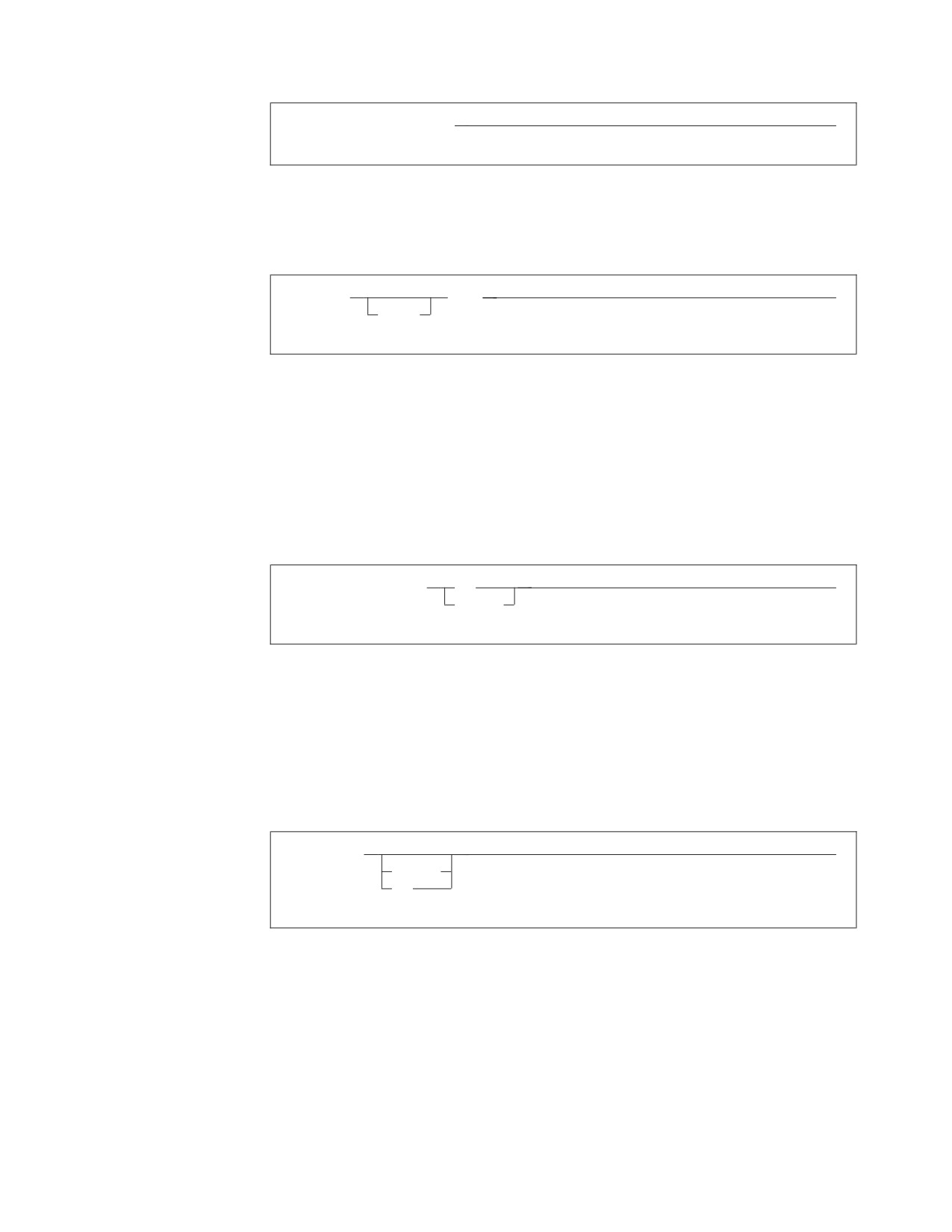
►► SHOW DBSPACE integer
►◄
This command might appear as:
SHOW DBSPACE 1
v Optional items appear below the main path. For example:
►► CREATE
INDEX
►◄
UNIQUE
This statement could appear as either:
CREATE INDEX
or
CREATE UNIQUE INDEX
v If you can choose from two or more items, they appear vertically in a stack.
If you must choose one of the items, one item appears on the main path. For
example:
►► SHOW LOCK DBSPACE
ALL
►◄
integer
Here, the command could be either:
SHOW LOCK DBSPACE ALL
or
SHOW LOCK DBSPACE 1
If choosing one of the items is optional, the entire stack appears below the main
path. For example:
►► BACKWARD
►◄
integer
MAX
Here, the command could be:
BACKWARD
or
BACKWARD 2
or
BACKWARD MAX
Chapter 1. Introduction
3
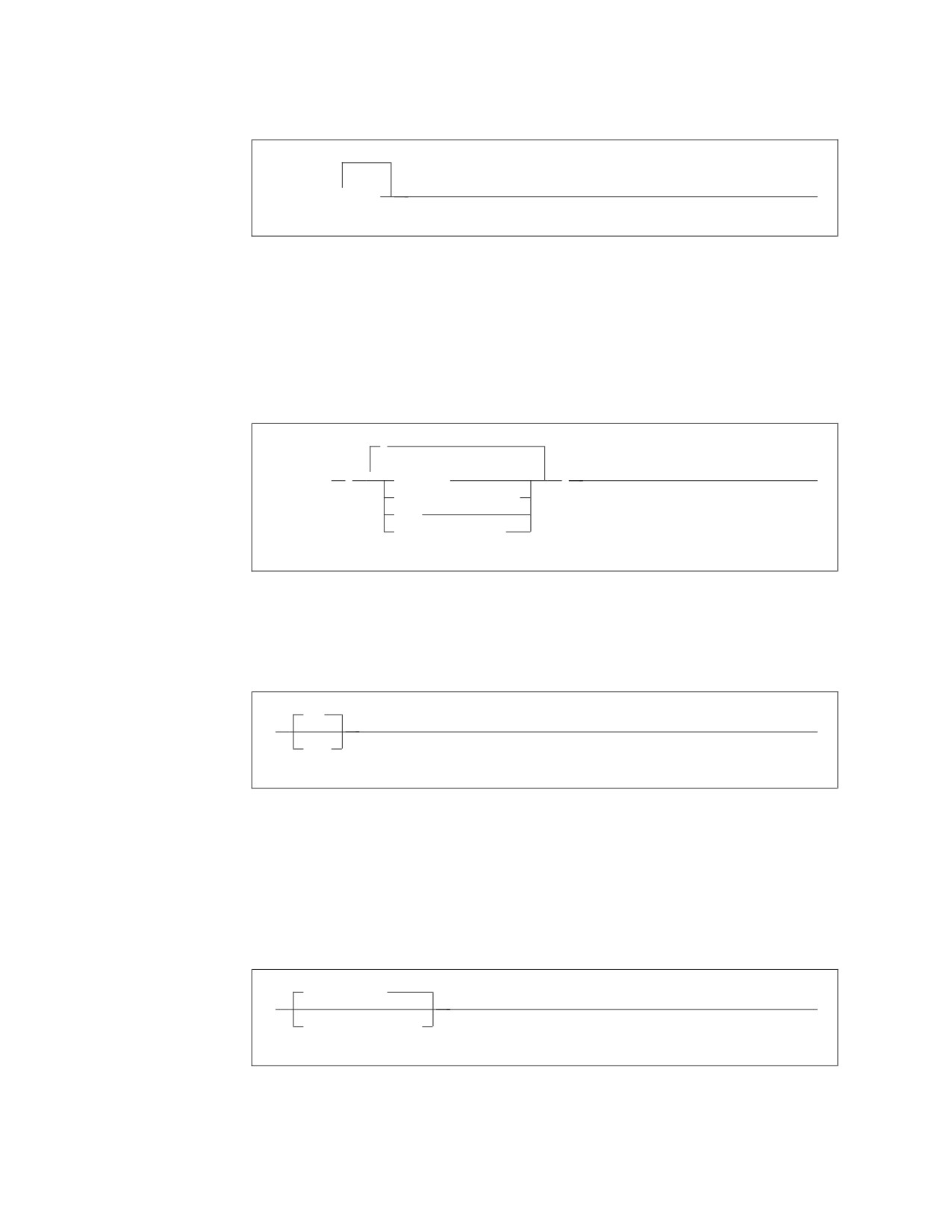
v The repeat symbol indicates that an item can be repeated. For example:
►► ERASE
▼
name
►◄
This statement could appear as:
ERASE NAME1
or
ERASE NAME1 NAME2
A repeat symbol above a stack indicates that you can make more than one
choice from the stacked items, or repeat a choice. For example:
,
▼
►► VALUES
(
constant
)
►◄
host_variable_list
NULL
special_register
v If an item is above the main line, it represents a default, which means that it will
be used if no other item is specified. In the following example, the ASC keyword
appears above the line in a stack with DESC. If neither of these values is
specified, the command would be processed with option ASC.
ASC
►►
►◄
DESC
v When an optional keyword is followed on the same path by an optional default
parameter, the default parameter is assumed if the keyword is not entered.
However, if this keyword is entered, one of its associated optional parameters
must also be specified.
In the following example, if you enter the optional keyword PCTFREE =, you
also have to specify one of its associated optional parameters. If you do not
enter PCTFREE =, the database manager will set it to the default value of 10.
PCTFREE = 10
►►
►◄
PCTFREE = integer
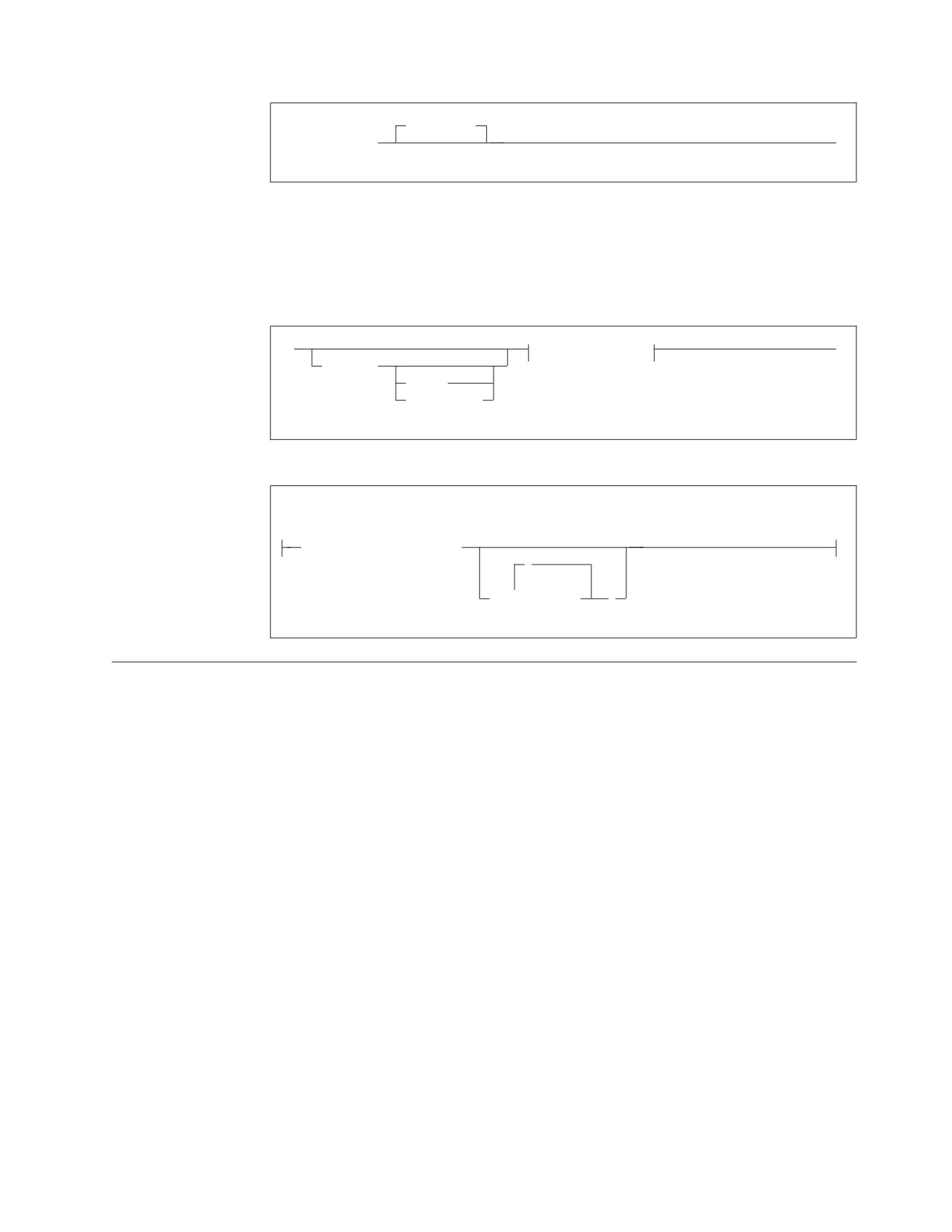
v Words that are only used for readability and have no effect on the execution of
the statement are shown as a single uppercase default. For example:
4
SQL Reference
PRIVILEGES
►► REVOKE ALL
►◄
Here, specifying either REVOKE ALL or REVOKE ALL PRIVILEGES means the
same thing.
v Sometimes a single parameter represents a fragment of syntax that is expanded
below. In the following example, fieldproc_block is such a fragment and it is
expanded following the syntax diagram containing it.
►►
fieldproc_block
►◄
NOT NULL
UNIQUE
PRIMARY KEY
fieldproc_block:
FIELDPROC program_name
,
▼
(
constant
)
SQL Reserved Words
The following words are reserved in the SQL language. They cannot be used in
SQL statements except for their defined meaning in the SQL syntax or as host
variables, preceded by a colon.
In particular, they cannot be used as names for tables, indexes, columns, views, or
dbspaces unless they are enclosed in double quotation marks (").
Chapter 1. Introduction
5
ACQUIRE
GRANT
RESOURCE
ADD
GRAPHIC
REVOKE
ALL
GROUP
ROLLBACK
ALTER
ROW
AND
HAVING
RUN
ANY
AS
IDENTIFIED
SCHEDULE
ASC
IN
SELECT
AVG
INDEX
SET
INSERT
SHARE
BETWEEN
INTO
SOME
BY
IS
STATISTICS
STORPOOL
CALL
LIKE
SUM
CHAR
LOCK
SYNONYM
CHARACTER
LONG
COLUMN
TABLE
COMMENT
MAX
TO
COMMIT
MIN
CONCAT
MODE
UNION
CONNECT
UNIQUE
COUNT
NAMED
UPDATE
CREATE
NHEADER
USER
CURRENT
NOT
NULL
VALUES
DBA
VIEW
DBSPACE
OF
DELETE
ON
WHERE
DESC
OPTION
WITH
DISTINCT
OR
WORK
DOUBLE
ORDER
DROP
PACKAGE
EXCLUSIVE
PAGE
EXECUTE
PAGES
EXISTS
PCTFREE
EXPLAIN
PCTINDEX
PRIVATE
FIELDPROC
PRIVILEGES
FOR
PROGRAM
FROM
PUBLIC
Conventions for Representing Mixed Data Values
When mixed data values are shown in examples the following conventions apply:
Convention Meaning
<
Represents the mixed shift-out character (X'0E').
>
Represents the mixed shift-in character (X'0F').
x
Represents an SBCS character (where x can be any lowercase
character).
▌XX▐
Represents a DBCS character (where ▌XX▐ can be any double
uppercase character).
6
SQL Reference
Short Forms Used in Syntax Diagrams
Some words have been shortened in some of the syntax diagrams in this book. The
words are:
Full Word
Short Form
character
char
expressions
exp
string
str
Chapter 1. Introduction
7
8
SQL Reference
Chapter 2. Concepts
SQL is a standardized language for defining and manipulating data in a relational
database. In accordance with the relational model of data, the database is perceived
as a set of tables, relationships are represented by values in tables, and data is
retrieved by specifying a result table that can be derived from one or more base
tables.
SQL statements are processed by a database manager. One of the functions of the
database manager is to transform the specification of a result table into a sequence
of internal operations that optimize data retrieval. This transformation occurs when
the SQL statement is prepared. Statement preparation is also known as binding.
All executable SQL statements must be prepared before they can be processed. The
result of preparation is the executable or operational form of the statement. The
method of preparing an SQL statement and the persistence of its operational form
distinguish static SQL from dynamic SQL.
Static SQL
The source form of a static SQL statement is embedded within an application
program written in a host language such as COBOL. The statement is prepared
before the program is run and the operational form of the statement persists
beyond the execution of the program.
A source program containing static SQL statements must be processed by an SQL
preprocessor before it is compiled. The preprocessor checks the syntax of the SQL
statements, turns them into host language comments, and generates host language
statements to invoke the database manager.
The preparation of an SQL application program includes parsing and validation,
the binding of its SQL statements, and the compilation of the modified source
program.
Dynamic SQL
A dynamic SQL statement is prepared during the execution of an SQL application
and the operational form of the statement does not persist beyond the unit of
work. The source form of the statement is a character string that is passed to the
database manager by the program using the static SQL statement PREPARE or
EXECUTE IMMEDIATE.
SQL statements embedded in a REXX application are dynamic SQL statements.1
SQL statements submitted to an interactive SQL facility are also dynamic SQL
statements.
1. The DB2 REXX SQL feature must be installed.
9

Concepts
Interactive SQL
An interactive SQL facility is associated with the database manager. Essentially,
every interactive SQL facility is an SQL application program that reads statements
from a terminal, prepares and processes them dynamically, and displays the results
to the user. Such SQL statements are said to be issued interactively. The DB2 Server
for VSE & VM Interactive SQL Guide and Reference manual discusses interactive SQL
in greater detail. An associated product, Query Management Facility (QMF), also
uses DB2 Server for VSE & VM interactively.
Extended Dynamic SQL
Extended dynamic statements support direct creation and maintenance of packages
for DB2 Server for VSE & VM data and provide a function similar to that provided
by the DB2 Server for VSE & VM preprocessors. These functions are particularly
useful where:
v The current preprocessors do not support the language of the application or
support program that is needed.
v SQL statements are conceived and built dynamically, but are processed
repetitively (in a different logical unit of work). In this case it is a performance
benefit to avoid having to repeat the preprocessing of statements each time they
are processed, as would be required for normal dynamic statements.
v It is desirable to build and maintain an application package of SQL statements to
be shared by a group of users.
Individual SQL statements can be added or deleted without affecting or repeating
the preprocessing of other SQL statements in the group (a group can be stored in
one package).
By using the extended dynamic statements, development programmers can write
their own preprocessors or database interface routines that support preplanned
access to the database manager. Preplanned access means that access paths to data
are optimized once when the statement is prepared. They need not be prepared
again for each execution.
Extended dynamic SQL statements may be used only in Assembler and REXX
programs.
Relational Database
A relational database is a database that can be perceived as a set of tables and
manipulated in accordance with the relational model of data.
Tables
Tables are logical structures maintained by the database manager. Tables are made
up of columns and rows. A column is the vertical component of a table. It has a
name and a defined data type (for example, character, decimal, or integer). A row is
the horizontal component of a table. At the intersection of every column and row
is a specific data item called a value. A row contains a sequence of values such that
the nth value is a value of the nth column of the table. There is no inherent order
of the rows within a table but there is a defined order of columns for a table.
10
SQL Reference
Concepts
A base table is created with the CREATE TABLE statement and holds persistent user
data. A result table or an active set is a set of rows that the database manager selects
or generates from one or more base tables.
Keys
A key is one or more columns identified as such in the description of a table, an
index, or a referential constraint. The same column can be part of more than one
key. A key composed of more than one column is called a composite key.
A composite key is an ordered set of columns of the same table. The ordering of the
columns is not constrained by their ordering within the table. The term value when
used with respect to a composite key denotes a composite value. Thus, a rule such
as “the value of the foreign key must be equal to the value of the primary key”
means that each component of the value of the foreign key must be equal to the
corresponding component of the value of the primary key.
A unique key is a key that is constrained so that no two of its values are equal. The
constraint is enforced by the database manager during the execution of INSERT
and UPDATE statements. The mechanism used to enforce the constraint is called a
unique index. Thus, every unique key is a key of a unique index.
Primary Keys
A primary key is a unique key that is part of the definition of a table. A table can
have at most one primary key, and the columns of a primary key cannot contain
null values. Primary keys are optional and can be defined in CREATE TABLE
statements or ALTER TABLE statements.
The unique index on a primary key is called the primary index. When a primary
key is defined in a CREATE TABLE statement, the primary index is automatically
created by the database manager.
When a primary key is defined in an ALTER TABLE statement, a primary index is
automatically created by the database manager even if a unique index exists on the
same columns of that primary key.
Integrity
Integrity refers to the accuracy of data in the database. Integrity is maintained in
the following ways:
1. An entire group of related changes is either made to the database, or the entire
operation is canceled. For example, when money is transferred from one bank
account to another, the database manager ensures that both the deduction from
the one account and the deposit to the other account complete successfully or
none of the changes are made. This is called atomic integrity; it protects other
users and programs from using inconsistent data.
2. Duplicate rows of information for the same entity can be avoided. For example,
an EMPLOYEE table consisting of employee number, employee name, and
department number can be defined so that values are unique for an employee
number and name, eliminating duplicate rows for any employee. This is called
entity integrity.
3. Integrity of data in related tables can be ensured. For example, a
DEPARTMENT table may contain department numbers and other information
related to the EMPLOYEE table. A relation can be defined so that only valid
Chapter 2. Concepts
11
Concepts
and existing department numbers as specified in the DEPARTMENT table can
appear in the EMPLOYEE table. Changes to the DEPARTMENT table can be
automatically reflected in the EMPLOYEE table. This is called referential
integrity. Rules or referential constraints can be defined by users to ensure
referential integrity between tables.
Data Integrity
The database manager protects other users and programs from using inconsistent
or wrong data by preventing more than one user or application from
simultaneously updating data; by allowing the user to rollback uncommitted
changes; and by using entity integrity and referential integrity.
Entity Integrity
Entity integrity may be maintained in two ways: by defining a primary key on a
table or placing a unique constraint on a column.
You define a primary key on a table to ensure that duplicate rows do not occur.
The database manager enforces the uniqueness of the primary key by
automatically creating a unique index on its columns. A primary key is a part of
the table definition and is defined when the table is created or altered. Primary
keys are also used in defining referential integrity.
Columns that are not used to define a primary key can be defined to have unique
values. Define a unique constraint on a column when you wish the database
manager not to accept a row of data if a unique column already contains the same
value in another row.
Referential Integrity
Referential integrity allows the definition of relationships between tables such that
the existence of values in one table depends on the existence of the same values in
another table. The database manager supports referential integrity by providing for
the definition of primary keys, foreign keys, and through a set of rules defining the
relationships among the tables. Together, these are known as referential constraints.
Relationships Between Tables
The relationship defined by a referential constraint is a set of connections between
the rows of two or more tables. The tables are related through matching column
values in the tables. A table is considered a parent table if its primary key is
referenced in a referential constraint, or a dependent table if it has a foreign key
and is related to a parent table through a referential constraint. A table can be both
a parent and a dependent table, depending on its relationship to other tables.
The relationship is defined using the CREATE TABLE statement for new tables and
the ALTER TABLE statement for existing tables. When you use these statements,
you specify the rules that must be followed in both parent and dependent tables
when rows are deleted.
The following relationships may occur:
v A parent table has a primary key and is a parent in at least one relationship.
v A dependent table has at least one foreign key (defined below) and is a dependent
in at least one relationship. A table can be a dependent in any number of
relationships.
v A table can be both a dependent table and a parent table, but not of itself.
12
SQL Reference
Concepts
v A table is a descendent of table T if it is a dependent of T or it is a dependent of
a descendent of T.
v An independent table is neither a parent nor a dependent.
Foreign Keys
A foreign key consists of one or more columns in the dependent table that together
must either take on a value that exists in the primary key of the parent table, or be
a null foreign key. When a row is updated or inserted into a dependent table, each
non-null foreign key insert or update value must match a value of the
corresponding primary key in the parent table. There can be multiple foreign keys
defined on a dependent table referencing the same or different parent tables. The
columns in the key may be nullable. If any of the columns contain a null value, the
foreign key value is considered null. If the foreign key value is not null, then it
must match an existing primary key value in the referencing parent table.
Referential Constraints
A referential constraint consists of a foreign key, the identification of a table
containing a primary key, a constraint name and rules that govern changes. A
referential constraint requires that a value can exist in one table (the dependent
table) only if it also exists in another table (the parent table). After referential
constraints have been defined, the enforcement of the referential constraint is
immediate and the insert, update and delete rules are enforced when the INSERT
(or PUT), UPDATE, and DELETE statements are issued. See “ALTER TABLE” on
page 157 and “CREATE TABLE” on page 219 for information on how to declare
referential constraints.
Referential constraints can be specified when tables are defined, or they can be
added later. If they are added later, the database manager checks the references in
the existing data. You can either drop or deactivate referential constraints to load
large volumes of data, for example. After you load your data, you must recreate or
reactivate your referential constraints. See “Activating and Deactivating Keys” on
page 17 for more information.
Delete Rules
In order to maintain referential integrity, delete rules are imposed on all
relationships. Every relationship includes a delete rule that was implicitly or
explicitly specified when the referential constraint was declared by creating a
foreign key. The options are:
v RESTRICT
The deletion of a parent row is restricted. No deletions are allowed on a parent
row until it has no dependent rows. This is the default action if no option is
specified when the foreign key is created.
v CASCADE
The deletion of a row in the parent table will cause the deletion of any
dependent rows in a dependent table. When a dependent row is deleted, if the
dependent table is also a parent table, then the delete rule of the referential
constraint applies in turn. Each referential constraint in which a table is a parent
has its own delete rule, and all applicable delete rules determine the result of the
delete operation. Consequently a row in the parent table cannot be deleted if the
deletion cascades to any of its descendents that has a dependent row in a
referential constraint with a delete rule of RESTRICT.
v SET NULL
Chapter 2. Concepts
13
Concepts
The deletion of a row in a parent table causes the corresponding values of the
foreign key in any dependent rows to be set to null. Only nullable columns of
the foreign key are set to null.
You may delete rows from a dependent table at any time, without taking any
action on the parent table.
The following terminology applies to the delete rules.
v A table T2 is delete-connected to another table T1 if a delete of rows in table T1
can involve table T2. The following conditions determine whether tables are
considered to be delete-connected:
1. Dependent tables are always delete-connected to their parents irrespective of
the delete rule.
2. A table T2 is delete-connected to another table T1 if a delete of rows in table
T1 can cause a delete of rows in T2’s parent table(s). IBM-SQL2 allows the
concept of a self-referencing table, one that is delete-connected to itself. Note
that DB2 Server for VSE & VM does not directly support a self-referencing
table.
In the relationship below, T2 and TX are both delete-connected to T1.
T1
Cascade
TX
Any delete rule
T2
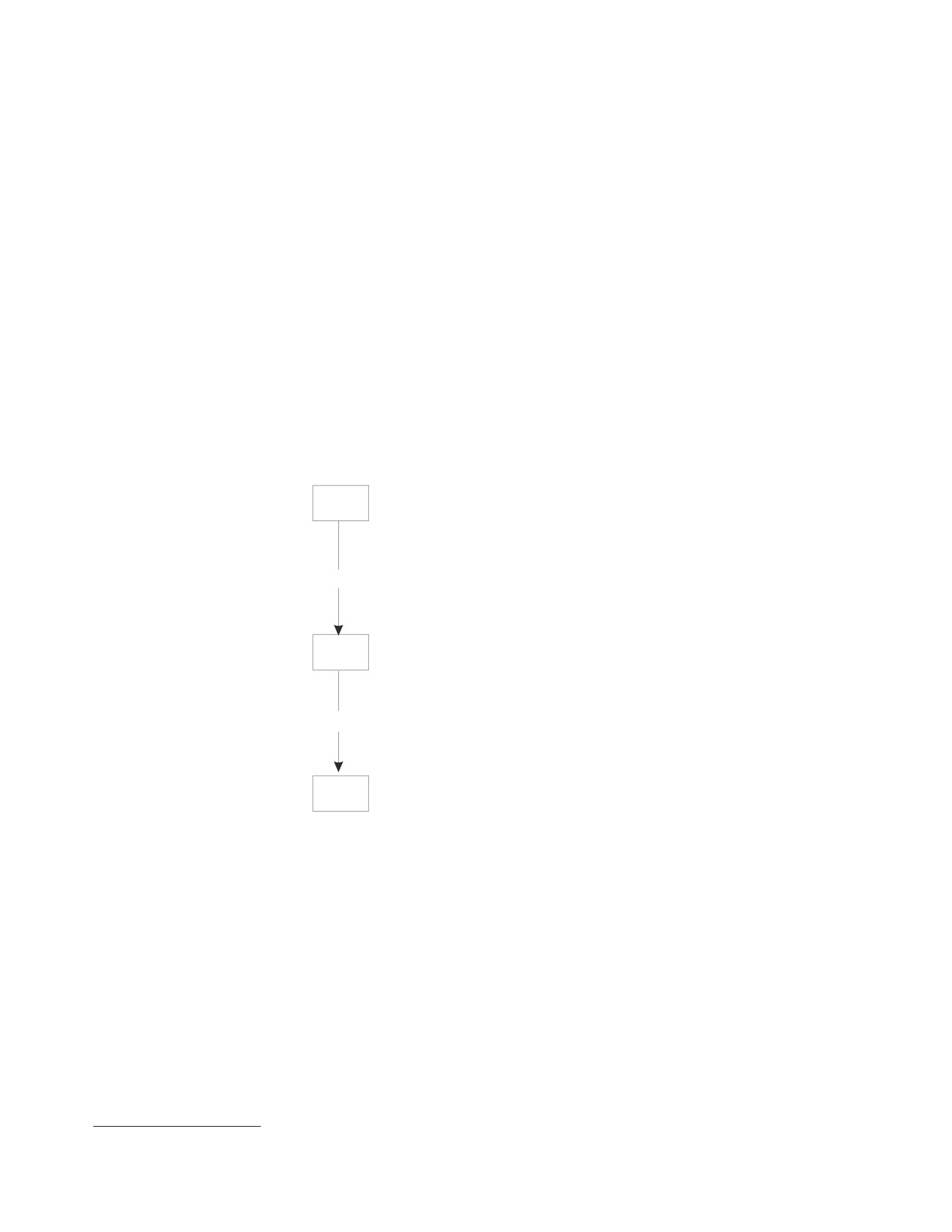
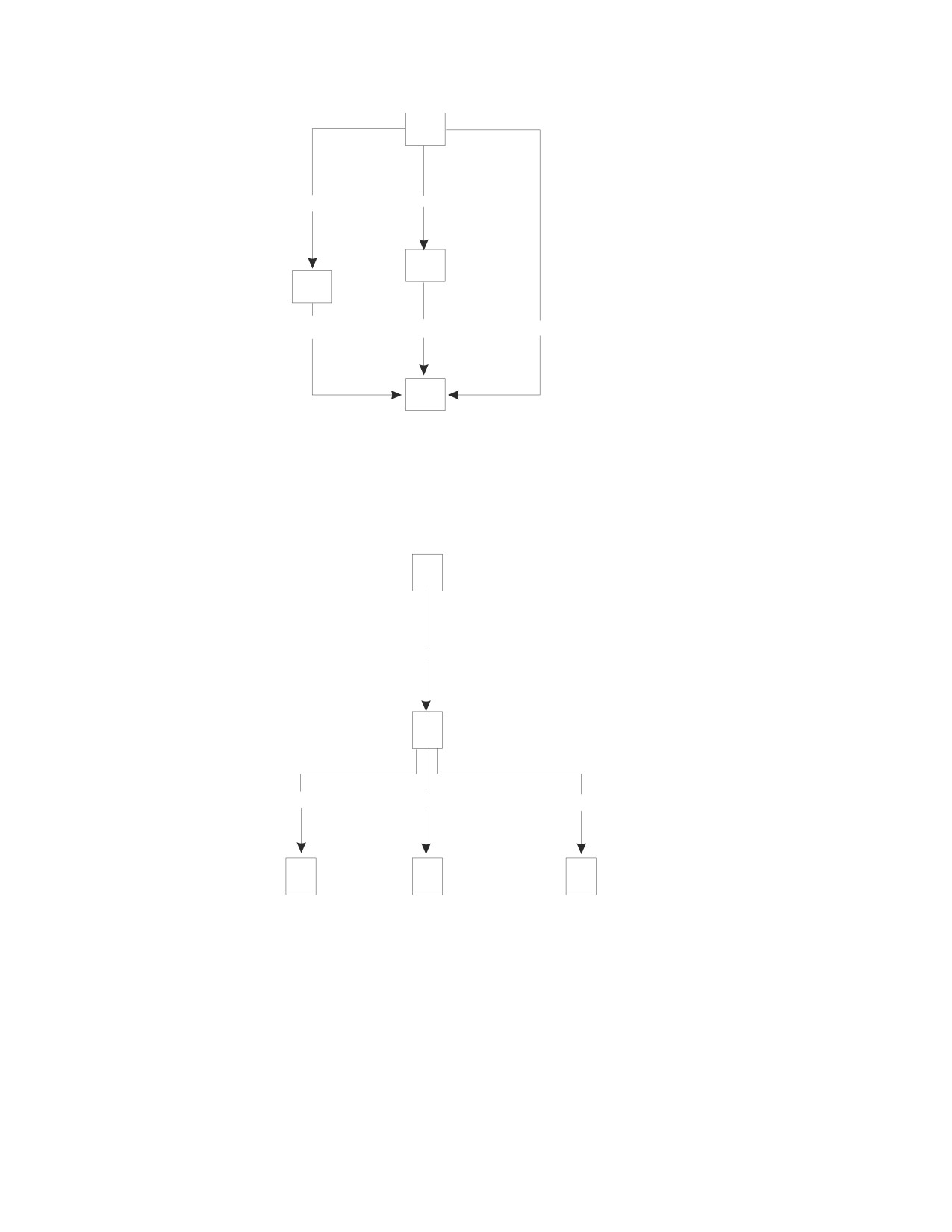
v A table T2 is delete-connected through multiple paths to table T1 if there is more
than one relationship by which T2 is delete-connected to T1.
In the diagram below, T2 is delete-connected to T1 with a delete rule of
RESTRICT through two paths, one through T3 and a second by direct path. Note
that T2 is not delete-connected to T1 along the path through T4 because a delete
of rows in T1 will not cause a delete of rows in T4, which is T2’s parent table
along this path.
2. This is the term used to refer to IBM’s SQL as published in the IBM SQL Reference, Volume 1 (SC26-8416)
14
SQL Reference
Concepts
T1
Cascade
Set Null
T4
T3
Restrict
Set Null
Restrict
T2
v A referential cycle is a set of referential constraints for two or more tables such
that each table in the set is a descendent of itself.
v A self-referencing table is a table that is a parent and dependent in the same
referential constraint. The constraint is called a self-referencing constraint.
These relationships are depicted in the following example.
T1
Cascade
T2
Restrict
Set Null
Cascade
T3
T4
T5
Table T3, T4 and T5 are dependents of table T2 which is a dependent of table T1.
Since T1 is a parent table, the delete rule of referential constraint applies when a
row of T1 is deleted. Specifically, deletion of a row in table T1 will cause all
dependent rows in table T2 to be deleted. Since T2 is also a parent table, the delete
rule of referential constraint also applies when a row of T2 is deleted. Specifically,
the DELETE RESTRICT rule in table T3, the DELETE SET NULL rule in table T4
and the DELETE CASCADE rule in table T5 will apply. Note that if a row in T2 is
to be deleted because its parent row in T1 is to be deleted, and this row has a
dependent row in T3, then the entire delete operation will fail and will be rolled
back.
Chapter 2. Concepts
15
Concepts
DELETE Rule Restrictions
It is necessary to impose restrictions on referential constraint relationships to
ensure that operations on delete-connected tables return consistent results with no
dependence on a defined order of operations.
Definition Restrictions: The following restrictions are checked whenever a
referential constraint is defined when a table is created or altered.
v If a table has more than one referential constraint referencing the same parent,
all the delete rules on those constraints must be the same and must not be SET
NULL.
v If a table is delete-connected to the same parent through multiple paths, all of
the delete rules on a path, except for the last one, must be CASCADE. The last
delete rule on all paths must be the same, and must not be SET NULL.
v A referential cycle involving two or more tables must not cause a table to be
delete-connected to itself. In general, for a referential cycle involving n tables,
where n >= 2, there can be at most n − 2 delete rules that are CASCADE. For
example, in a referential cycle involving two tables, neither delete rule can be
CASCADE. In a referential cycle involving four tables, at most two delete rules
may be CASCADE.
Delete with Subquery Restrictions: The following restriction is enforced when a
DELETE statement is prepared or preprocessed with a WHERE clause containing a
subquery. If T2 is the object table of a DELETE statement, and T1 is referenced in a
subquery of the WHERE clause, T1 must not be a table that can be affected by the
DELETE on T2. The following example demonstrates the principle.
DELETE FROM T2 WHERE FIELD2 IN (SELECT FIELD1 FROM T1);
The following rules are enforced on tables T1 and T2.
1. T1 and T2 must not be the same table.
2. T1 must not be a dependent of T2 in a relationship with a delete rule of
CASCADE or SET NULL.
3. T1 must not be a dependent of another table T3 in a relationship with a delete
rule of CASCADE or SET NULL if deletes of T2 cascade to T3.
Insert Rules
The database manager checks the implicit insert rules when a row is inserted into
either a parent table or a dependent table in a referential structure.
When a row is inserted into a parent table, the database manager ensures that:
v The primary key is unique and does not contain a null value.
When a row is inserted into a dependent table, the database manager ensures that
either:
v The foreign key has a matching primary key in the parent table, or
v The foreign key contains a null value in one or more of its columns.
Update Rules
When a key value is updated, the database manager checks the implicit update
rules.
When a primary key is updated, the primary key must be unique and not null,
and all dependent rows must be deleted or updated before the parent row can be
updated.
16
SQL Reference
Concepts
When a foreign key is updated, it must have a matching primary key in the parent
table or be a null key. A foreign key is considered null when any of its column
values becomes null.
Activating and Deactivating Keys
After a referential constraint has been defined, referential integrity is immediately
enforced and the primary and foreign keys are active. The database manager
ensures that data integrity is maintained.
You may want to deactivate referential constraints, for example, to improve
performance when loading large volumes of data. You can deactivate a table’s
primary key, any of its foreign keys, or a dependent foreign key. When any of
these keys are deactivated, both the parent table and dependent table become
unavailable to all users except the owner or someone possessing DBA authority.
After loading the data, referential constraints must be activated again. Activating
them causes the database manager to validate the references in the data.
When the keys are reactivated, the referential constraints are automatically
enforced once again. See “ALTER TABLE” on page 157 for more information on
activating and deactivating keys.
Indexes
An index is an ordered set of pointers to rows of a base table. Each index is based
on the values of data in one or more table columns. An index is an object that is
separate from the data in the table. When you request an index, the database
manager builds this structure and maintains it automatically.
Indexes are used by the database manager to:
v Improve performance. In most cases, access to data is faster than without an
index.
v Ensure uniqueness. A table with a unique index cannot have rows with identical
keys.
Views
A view provides an alternative way of looking at the data in one or more tables.
A view is a named specification of a result table. The specification is a SELECT
statement that is effectively processed whenever the view is referenced in an SQL
statement. Thus, a view can be thought of as having columns and rows just like a
base table. For retrieval, all views can be used just like base tables. Whether a view
can be used in an insert, update, or delete operation depends on its definition as
explained in the description of CREATE VIEW. (See “CREATE VIEW” on page 231
for more information.)
An index cannot be created for a view. However, an index created for a table on
which a view is based may improve the performance of operations on the view.
When the column of a view is directly derived from a column of a base table, that
column inherits any constraints that apply to the column of the base table. For
example, if a view includes a foreign key of its base table, INSERT and UPDATE
operations using that view are subject to the same referential constraint as the base
Chapter 2. Concepts
17

Concepts
table. Likewise, if the base table of a view is a parent table, DELETE operations
using that view are subject to the same rules as DELETE operations on the base
table.
Packages
A package is an object that contains control structures (called sections) used to
process SQL statements. Packages are produced during program preparation. The
control structures can be thought of as the bound or operational form of SQL
statements. All control structures in a package are derived from the SQL statements
embedded in a single source program.
Catalog
The database manager maintains a set of tables containing information about the
data it controls. These tables are collectively known as the catalog. The catalog tables
contain information about objects such as tables, views, and indexes.
Tables in the catalog are like any other database tables. If you have authorization,
you can use SQL statements to look at data in the catalog tables in the same way
that you retrieve data from any other table. The database manager ensures that the
catalog contains accurate descriptions of the relational database at all times.
Application Processes, Concurrency, and Recovery
All SQL programs run as part of an application process. An application process
involves the execution of one or more programs, and is the unit to which the
database manager allocates resources and locks. Different application processes
may involve the execution of different programs, or different executions of the
same program.
More than one application process may request access to the same data at the same
time. Locking is the mechanism used to maintain data integrity under such
conditions, preventing, for example, two application processes from updating the
same row of data simultaneously.
The database manager acquires locks in order to prevent uncommitted changes
made by one application process from being perceived by any other. The database
manager will release all locks it has acquired on behalf of an application process
when that process ends, but an application process itself can also explicitly request
that locks be released sooner. This operation is called commit.
The recovery facilities of the database manager provide a means of “backing out”
uncommitted changes made by an application process. This might be necessary in
the event of an error on the part of an application process, or in a “deadlock”
situation. An application process itself, however, can explicitly request that its
database changes be backed out. This operation is called rollback.
A logical unit of work (LUW), also known as a unit of work, is a recoverable sequence
of operations within an application process. At any time, an application process is
a single unit of work, but during the life of an application process there may be
many recovery operations performed as a result of the commit or rollback
operations.
A unit of work is initiated when an application process is initiated. A unit of work
is also initiated when the previous unit of work is terminated by something other
18
SQL Reference
Concepts
than the termination of the application process. A unit of work is terminated by a
commit operation, a rollback operation, or the termination of a process. A commit
or rollback operation affects only the database changes made within the unit of
work it terminates. While these changes remain uncommitted, other application
processes are unable to perceive them and they can be backed out. Once
committed, these database changes are accessible by other application processes
and can no longer be backed out.
A lock acquired by the database manager on behalf of an application process is
held until its associated recovery operation has passed.
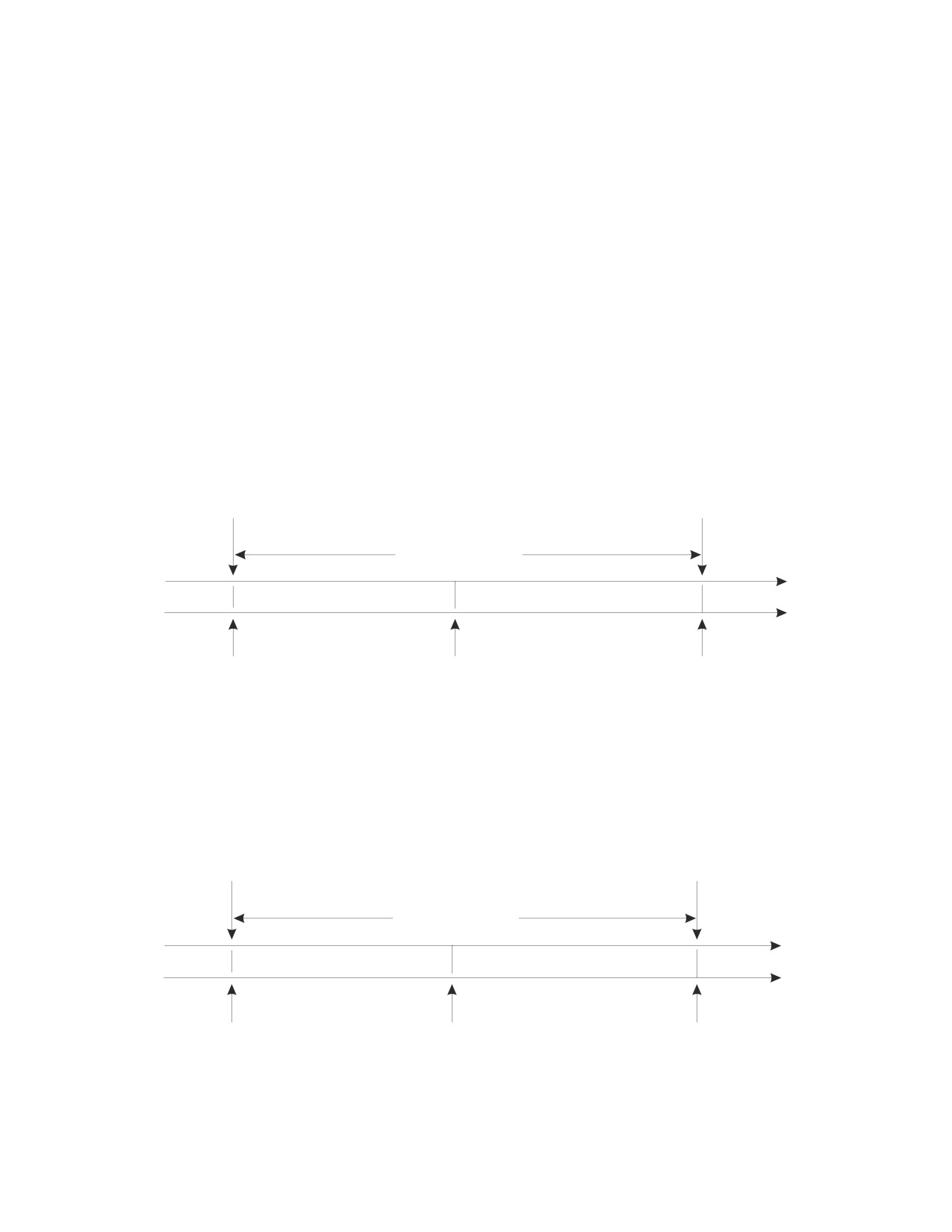
The initiation and termination of a unit of work define points of consistency within
an application process. For example, a banking transaction might involve the
transfer of funds from one account to another. Such a transaction would require
that these funds be subtracted from the first account, and added to the second.
Following the subtraction step, the data is inconsistent. Only after the funds have
been added to the second account is consistency reestablished. When both steps
are complete, the commit operation can be used to terminate the unit of work,
thereby making the changes available to other application processes.
Point of
New point of
consistency
consistency
one unit of work
TIME LINE
database updates
back out updates
Begin
Failure;
Data is returned to
unit of work
Begin rollback
its initial state;
End unit of work
Figure 1. Unit of Work with a Commit Statement
If a problem occurs before the unit of work terminates, the database manager will
back out uncommitted changes in order to restore the consistency of the data that
it assumes existed when the unit of work was initiated.
Point of
New point of
consistency
consistency
one unit of work
TIME LINE
database updates
back out updates
Begin
Failure;
Data is returned to
unit of work
Begin rollback
its initial state;
End unit of work
Figure 2. Unit of Work with a Rollback Statement
Chapter 2. Concepts
19
Concepts
Cursor operations within a single unit of work are not protected from the result of
other operations within the same unit of work. One example is a DELETE
statement that deletes a row selected by a previous OPEN statement. Another
example is two concurrently open cursors (at least one of which is updateable)
operating on some of the same data.
Isolation Level
The isolation level associated with an application process defines the degree of
isolation of that application process from other concurrently executing application
processes. The isolation level of an application process, P, therefore specifies:
v The degree to which rows read and updated by P are available to other
concurrently executing application processes
v The degree to which update activity of other concurrently executing application
processes can affect P.
Isolation level is specified as an attribute of a package and applies to the
application processes that use the package. The database manager provides a
means of specifying an isolation level of a package through the program
preparation process. The isolation levels are supported by automatically locking
the appropriate data. Depending on the type of lock, this limits or prevents access
to the data by concurrent application processes. The DB2 Server for VSE & VM
database manager supports three types of locks:
Share Limits concurrent application processes to read-only operations on the
data.
Update
Limits concurrent application processes to read-only operations on the
data. This lock expresses an intent to possibly update the data. If the data
is updated, the database manager upgrades the lock to an exclusive lock.
Exclusive
Prevents concurrent application processes from accessing the data in any
way.
The following descriptions of isolation levels refer to locking data in row units.
Data can be locked in larger physical units than base table rows. However,
logically, locking occurs at least at the base table row level. Similarly, the database
manager can escalate a lock to a higher level. An application process is guaranteed
at least the minimum requested lock level.
The DB2 Server for VSE & VM database manager supports three isolation levels.
Other database managers support additional levels (see the IBM SQL Reference for
details of these additional levels). Regardless of the isolation level, it places
exclusive locks on every row that is inserted, updated, or deleted. Thus, all
isolation levels ensure that any row that is changed during a unit of work is not
accessed by any other application (except for those using an isolation level of UR)
until the unit of work is complete. The isolation levels are:
Repeatable Read (RR)
Level RR ensures that:
v Any row that is read during a unit of work is not changed by other application
processes until the unit of work is complete.
v Any row that was changed by another application process cannot be read until it
is committed by that application process.
20
SQL Reference
Concepts
In addition to any exclusive locks, an application process running at level RR
acquires at least share locks on all the rows it reads. Furthermore, the locking is
performed so that the application process is completely isolated from the effects of
concurrent application processes.
Cursor Stability (CS)
Like level RR, level CS ensures that:
v Any row that was changed by another application process cannot be read until it
is committed by that application process.
Unlike RR:
v CS does not completely isolate the application process from the effects of
concurrent application processes. At level CS, application processes that run the
same query more than once might see additional rows. These additional rows
are called phantom rows.
For example, a phantom row can occur in the following situation:
1. Application process P1 reads the set of rows n that satisfy some search
condition.
2. Application process P2 then INSERTs one or more rows that satisfy the
search condition and COMMITs those INSERTs.
3. P1 reads the set of rows again with the same search condition and obtains
both the original rows and the rows inserted by P2.
v CS only ensures that the current row of every cursor is not changed by other
application processes. Thus, the rows that were read during a unit of work can
be changed by other application processes.
In addition to any exclusive locks, an application process running at level CS has
at least a share lock for the current row of every cursor.
Uncommitted Read (UR)
Unlike CS or RR, level UR allows:
v Any row that is read during a unit of work to be changed by other application
processes.
v Any row that was changed by another application process to be read even if that
change has not been committed by that application process.
Level UR allows an application to access most uncommitted changes of other
applications. However, tables, views and indexes that are being created or dropped
by other applications are not available while the application is processing. Any
other changes by other applications can be read before they are committed or
rolled back.
Non-read-only statements under level UR will behave as if the isolation level were
cursor stability.
Like CS, UR does not completely isolate the application process from the effects of
concurrent application processes. At level UR, application processes that run the
same query more than once might see phantom rows, or may experience
nonrepeatable reads.
For example, a nonrepeatable read can occur in the following situation:
Chapter 2. Concepts
21
Concepts
1. Application process P1 reads the row from the database, then goes on to
process other SQL requests.
2. Application process P2 either modifies or deletes the row and COMMITs the
change.
3. P1 attempts to read the original row again, and either receives the modified
row, or discovers that the original row has been deleted.
An application process running at level UR does not require any share locks.
Isolation Level Restrictions
Isolation levels, Cursor Stability and Uncommitted Read, only apply to Public
dbspaces with ROW or PAGE level locking. Private dbspaces and Public dbspaces
with DBSPACE level locking always use Repeatable Read isolation level. Data
definition statements, such as CREATE, ACQUIRE or GRANT, and any statements
that access the System Catalogs are always executed with Repeatable Read,
regardless of the isolation level specified.
Isolation Level Escalation
Another relational database manager may request the DB2 Server for VSE & VM
database manager to perform an operation on a DB2 Server for VSE & VM
database (see “Application Requesters and Application Servers”). If the request
specifies an isolation level other than one supported by the DB2 Server for VSE &
VM database manager, the level is changed accordingly:
v Read Stability (RS) is changed to level RR
For more information on these isolation levels, see the IBM SQL Reference. Lock
level escalation is discussed in the chapter on preprocessing and running programs
in the DB2 Server for VSE & VM Application Programming manual.
Program Control of Isolation
The DB2 Server for VSE & VM database manager supports a facility that allows
programs to dynamically modify the isolation level. The fact that a program will
use this facility is indicated by the specification of the value USER instead of a
specific isolation level when the program is prepared. Refer to the DB2 Server for
VSE & VM Application Programming manual for details on how to do this.
Application Requesters and Application Servers
Application requesters and application servers work together to provide data to an
application, regardless of where that data is located. The application requester
accepts a database request from an application and passes it to an application
server. In a distributed relational database, it transforms a database request from
the application into communication protocols suitable for use in a distributed
database network. The application server receives and processes the requests sent by
the application requester.
Note: An application requester is sometimes called a user machine in VM and a
user partition in VSE. An application server is sometimes called a database
machine in VM and a database partition in VSE.
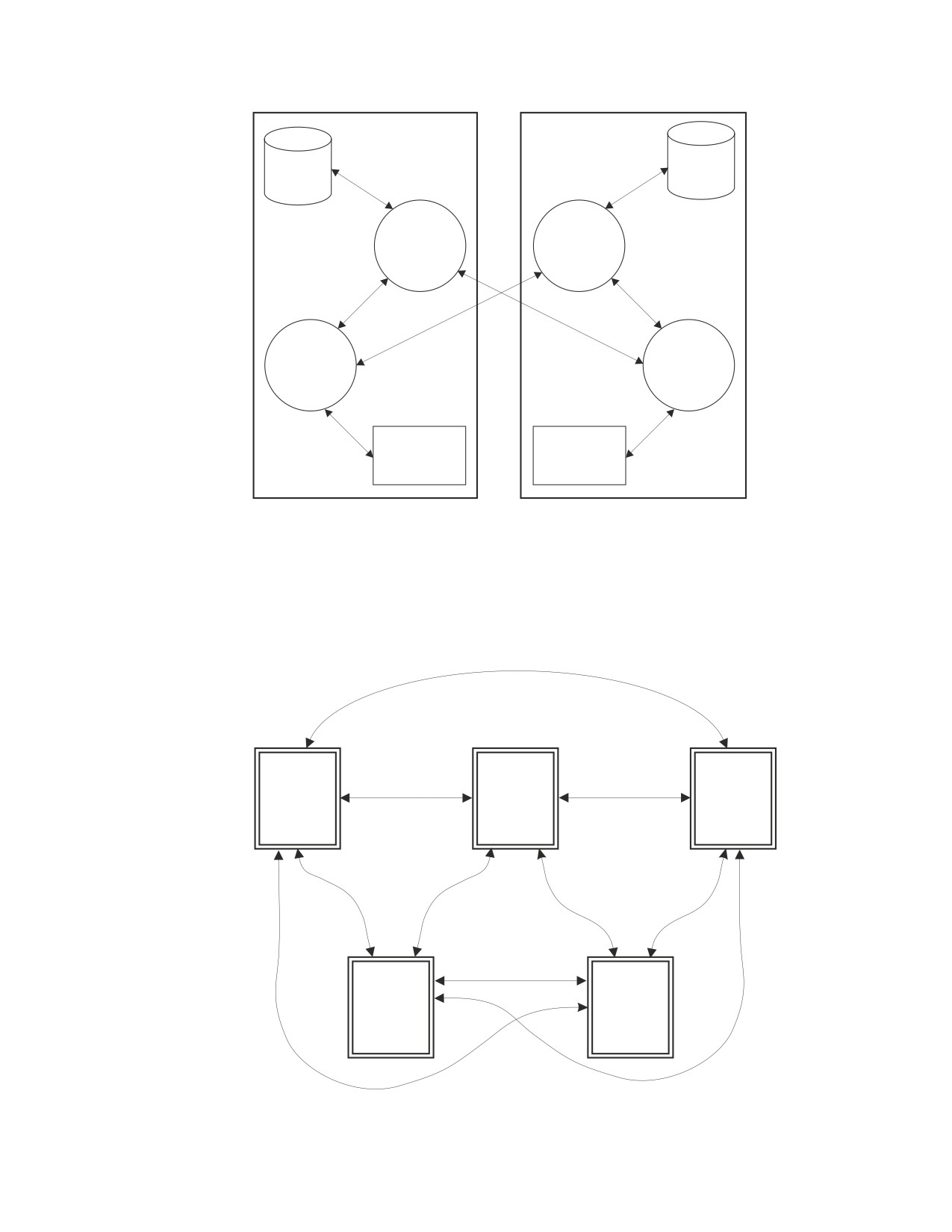
In this example, an application requester in Rochester is requesting data from an
application server in Toronto.
22
SQL Reference

Concepts
Application
requester
Rochester
Toronto
Application
server
SQL
Program
package
Figure 3. Requesting and Receiving Data Between an Application Requester and Application
Server
An application process must be connected to the application server facility of a
database manager before SQL statements that reference tables or views can be
processed. A CONNECT statement establishes a connection between an application
process and its server. VM and CICS/VSE applications may also use an implicit
connection, in which case an explicit CONNECT statement is not necessary. An
application process has only one server at any time, but the server can change
when a CONNECT statement is processed.
Distributed Relational Database
A distributed relational database consists of a set of tables and other objects that
are spread across different but interconnected computer systems. Each computer
system has a relational database manager to manage the tables and other objects in
its environment. The database managers communicate and cooperate with each
other in a way that allows a given database manager to process SQL statements on
another computer system.
The following diagram shows how data is requested and transmitted between two
relational database systems participating in a complete Distributed Relational
Database Architecture (DRDA) relationship. Each of the two systems may request
data from the other.
Chapter 2. Concepts
23
Concepts
Tables
Tables
Application
Application
Server
Server
Application
Application
Requester
Requester
Application
Application
Programs
Programs
Figure 4. Requester/Server Data Flow
The following diagram shows supported IBM relational database DRDA
connections; AIX connections are the same as those for OS/2. Incoming arrows
indicate application server support; outgoing arrows indicate application requester
support. Note that the relationships displayed are for unlike IBM systems only.
Some of the systems shown provide other protocols for like-system connections.
MVS
VM
OS/400
OS/2
VSE
or
AIX
Figure 5. IBM Relational Database Connections
24
SQL Reference

Concepts
Distributed relational databases are built on formal requester-server protocols and
functions. Working together, the application requester and application server
handle the communication and location considerations so that the application is
isolated from these considerations and can operate as if it were accessing a local
database. DB2 Server for VM supports application servers and application
requesters for DRDA communication protocols. DB2 Server for VSE supports
application servers and application requesters for online CICS/VSE application
programs for DRDA. DB2 Server for VSE also provides Remote Unit of Work
(RUOW) application requester support for batch applications. For more
information on DRDA communication protocols, see the Distributed Relational
Database Architecture Reference.
Two communication protocols can be used by the DB2 Server for VSE & VM
database manager. These protocols allow the data to be used within distributed
relational databases or as a non-distributed relational database. The two protocols
are:
SQLDS
A protocol for a DB2 Server for VSE & VM database manager to
communicate with other like database managers.
DRDA
A protocol for communicating with both like and unlike database
managers.
The following table shows the protocols that are used between DB2 Server for VSE
& VM application requesters and application servers.
Application Requester
Communication Protocol
Application Server
DB2 for VSE
SQLDS
DB2 Server for VM
Used for guest sharing.
DB2 for VSE
SQLDS
DB2 Server for VSE
DB2 for VSE
DRDA
DB2 Server for VSE
DB2 for VSE
DRDA
DB2 Server for VM
DB2 for VSE
DRDA
DB2 for MVS
DB2 for VSE
DRDA
DB2 for OS/400
DB2 for VSE
DRDA
DB2 for OS/2
DB2 for VSE
DRDA
DB2 for AIX
DB2 for VM
SQLDS
DB2 Server for VM
DB2 for VM
DRDA
DB2 Server for VM
DB2 for VM
DRDA
DB2 Server for VSE
DB2 for VM
DRDA
DB2 for MVS
DB2 for VM
DRDA
DB2 for OS/400
DB2 for VM
DRDA
DB2 for OS/2
DB2 for VM
DRDA
DB2 for AIX
For more information on the communication protocols, see the DB2 Server for VSE
& VM Performance Tuning Handbook.
Application Servers in DRDA
The application server can be local to or remote from the environment where the
process is initiated. This environment includes a local directory that describes the
Chapter 2. Concepts
25
Concepts
application servers that can be identified in a CONNECT statement. The format
and maintenance of this directory are described in the “Network Information”
sections for each SQL product in the Distributed Relational Database Connectivity
Guide manual.
To process a static SQL statement that references tables or views, the application
server uses the bound form of the statement. This bound statement is taken from a
package that the database manager previously created through a bind operation.
Data managed by any remote application server that implements the DRDA
architecture can be accessed and manipulated by VSE Batch application programs
that have the ability to execute SQL statements.
Remote Unit of Work
A remote unit of work (RUOW) is a logical unit of work that allows for the remote
preparation and execution of SQL statements. An application process at computer
system A can connect to an application server at computer system B and, within
one or more logical units of work, process any number of static or dynamic SQL
statements that reference objects at B. After terminating a unit of work at B, the
application process can connect to an application server at computer system C, and
so on.
The DB2 Server for VM requester can remotely prepare and run most SQL
statements given the following conditions:
v All objects referenced in a single SQL statement are managed by the same
application server.
v All of the SQL statements in a unit of work are processed by the same
application server.
The DB2 Server for VSE requester can remotely prepare and run most SQL
statements given the following conditions:
v The Online Resource Adapter must be enabled.
v The remote server must be known to the Online Resource Adapter.
DB2 Server for VSE also provides DRDA support that consists of remote unit of
work (RUOW) Application Requester (AR) support for Batch applications.
Distributed Unit of Work
A distributed unit of work (DUOW) is a logical unit of work that allows a user or
application program to read or update data at multiple locations. An application
process at computer system A can connect to an application server at computer
system B, process static or dynamic SQL statements that reference objects at B, then
connect to an application server at computer system C, and process SQL
statements that reference objects at C, and so on, before terminating the unit of
work. Each SQL statement can access one application server. Commits and
rollbacks are coordinated at all locations so that if a failure occurs anywhere in the
system, data integrity is preserved.
The Use of DB2 Family SQL on Various Application Servers
This section will mainly be of interest to people who are writing applications that
are:
v DB2 Server for VSE CICS applications, or are to be run on DB2 Server for VM
application requesters and
26
SQL Reference
Concepts
v accessing data that is controlled by the application servers of one or more unlike
relational database managers.
The section will also be of interest to people with the opposite requirement (for
instance a DB2 for OS/2 application requester connected to a DB2 Server for VM
or DB2 Server for VSE application server).
The DB2 family’s support of SQL is a superset of SQL92 Entry Level (SQL92E).3
Not all DB2 family members support all elements of SQL. For a complete
discussion of the individual family members’ support of SQL, please see the IBM
SQL Reference, Version 2, Volume 1.
For the most part, an application may use the statements and clauses that are
supported by the database manager of the application server to which it is
currently connected even though that application may be running on the
application requester of a database manager that does not support some of those
statements and clauses.
There are some restrictions that apply. Due to the different availability dates of the
IBM relational database products, it is not possible to provide a complete list of
these. The rest of this section will, therefore, outline some general guidelines that
govern the inter-operability of statements and provide examples of statements that
can and cannot be used among products.
v All Data Definition and Authorization statements that are supported by an
application server can be issued from any application requester.
Example: A CICS application running as a DB2 Server for VSE application
requester connected to a DB2 for MVS application server may use a CREATE
TABLESPACE statement. Similarly, an application running on a DB2 for MVS
application requester connected to a DB2 Server for VM or DB2 Server for VSE
application server may use an ACQUIRE DBSPACE statement.
v Most other statements that do not contain any host variables can be issued from
any application requester.
Example: An application running on a DB2 Server for VM application requester
connected to a DB2 for MVS application server may issue the following
statement even though the DB2 Server for VM database manager does not
support the WITH HOLD clause.
EXEC SQL DECLARE PRIMARY_CURSOR CURSOR WITH HOLD
FOR SELECT_COURSES;
v Some statements without host variables are not sent to the application server;
rather, they are processed completely by the application requester. Such
statements may only be used on application requesters of products that support
statements.
Example 1: An application running on a DB2 Server for VM application requester
cannot issue the DECLARE STATEMENT statement against a DB2 for MVS
application server.
3. SQL92E is the term used to refer to the combination of the following standards:
ISO (International Standards Organization) 9075-1992(E)
ANSI (American National Standard for Information Systems) X3.135-1992
FIPS (Federal Information Processing Standards) publication 127-2.
The above documents list more than one level of conformance. The levels are Entry, Transitional (FIPS only), Intermediate, and
Full SQL. We are concerned with Entry SQL and we designate that with the abbreviation SQL92E.
Chapter 2. Concepts
27
Concepts
Example 2: An application running on a DB2 Server for VM application requester
cannot issue the DECLARE VARIABLE statement against a DB2 for OS/400
application server.
v
Some statements without host variables are the joint responsibility of the
application requester and application server. Such statements must be fully
understood by the application requester.
Example: An application running on a DB2 Server for VM application requester
connected to a DB2 for OS/400 application server cannot issue the following
statement, because the PRIOR clause is not supported by the DB2 Server for VM
database manager.
EXEC SQL FETCH PRIOR FROM PAGE_CURSOR;
v
If a statement or clause contains host variables and an application requester does
not understand that statement or clause, those host variables are assumed to be
input host variables. If this is not a valid assumption, the application server will
reject the statement.
Example 1: An application running on a DB2 Server for VM application requester
could issue the following statement to a DB2 for MVS application server:
EXEC SQL SET CURRENT SQLID = :CUR_USER;
because :CUR_USER references an input host variable.
Example 2: However, an application running on a DB2 Server for VM application
requester could not issue the following statement to a DB2 for MVS application
server:
EXEC SQL SET :TIME_UPDATED = CURRENT TIME;
because :TIME_UPDATED references an output host variable.
v
Only DB2 Server for VSE & VM supports Extended Dynamic SQL. However, an
application on a DB2 Server for VM application requester or a DB2 Server for
VSE CICS application requester can issue most extended dynamic statements for
non-modifiable packages against unlike application servers. A list of restrictions
can be found in Appendix G, “DRDA Considerations,” on page 425.
v
Only DB2 Server for VSE & VM supports Insert Cursors. However, an
application on a DB2 Server for VM application requester or a DB2 Server for
VSE CICS application requester can declare Insert Cursors and issue PUT
statements against unlike application servers. Note that there is no blocking of
input data because the application requester turns PUT statements into INSERT
statements. The purpose of this support is to allow an application to run without
having to make this change in the source program.
v
In IBM-SQL, all objects (that is, tables, views, indexes, and packages) have a
two-part name. DB2 for MVS application servers also support three-part names
for tables, views, and aliases (a non-IBM-SQL object). The high order part of the
name identifies an application server (also called a location in DB2 for MVS). In
addition to the heterogeneous remote unit of work facility using DRDA
protocols among unlike products, DB2 for MVS supports a homogeneous
distributed unit of work facility using private protocols. This facility makes use of
three-part names in order to allow statements within the same unit of work to
be issued against different application servers as long as data is only modified at
one of those application servers.
For example, an application which is run on a DB2 Server for VM application
requester can issue the following statements in order to read data controlled by
DB2 for MVS application servers at Halifax, Montreal and Toronto and use the
information obtained there to update a DB2 for MVS table at Halifax.
28
SQL Reference
Concepts
EXEC SQL CONNECT TO HALIFAX;
EXEC SQL SELECT SUM(WEEKLY_NET)
-- processed by DB2 at Halifax
INTO :TOT3
FROM FORCASTING.SALES;
EXEC SQL SELECT SUM(WEEKLY_NET)
-- routed by DB2 at Halifax to be
-- processed by DB2 at Montreal
INTO :TOT1
FROM MONTREAL.FORCASTING.SALES;
EXEC SQL SELECT SUM(WEEKLY_NET)
-- routed by DB2 at Halifax to be
-- processed by DB2 at Toronto
INTO :TOT2
FROM TORONTO.FORCASTING.SALES;
TOT = TOT1 + TOT2 + TOT3;
EXEC SQL UPDATE FORCASTING.TOTALS
-- processed by DB2 at Halifax
SET WEEKLY_NET = :TOT;
DRDA protocols are used in the communications between the application
requester and the application server at Halifax. Private DB2 for MVS protocols
are used in the communications between Halifax and Toronto as well as the
communications between Halifax and Montreal. Three-part names allow
statements within the same unit of work to be issued against different
application servers.
For more information on distributed unit of work, refer to the DB2 for MVS
library.
Data Representation Considerations
Different systems represent data in different ways. When data is moved from one
system to another, data conversion must sometimes be performed. Products
supporting DRDA will automatically perform any necessary conversions at the
receiving system.
With numeric data, the information needed to perform the conversion is the data
type of the data and how that data type is represented by the sending system. For
example, when a floating point variable from an OS/400 application requester is
assigned to a column of a table at a VM application server, the DB2 Server for VM
database manager, knowing the data type and the sending system, converts the
number from IEEE format to S/390 format.
With character data, additional information is needed to convert character strings.
String conversion depends on both the coded character set of the data and the
operation that is to be performed with that data. Character conversions are
performed in accordance with the IBM Character Data Representation Architecture
(CDRA). For more information on character conversion, refer to Character Data
Representation Architecture Reference and Registry.
Character Conversion
A string is a sequence of bytes that may represent characters. Within a string, all
the characters are represented by a common coding representation. In some cases,
it might be necessary to convert these characters to a different coding
representation. The process of conversion is known as character conversion.
Character conversion, when required, is automatic and is transparent to the
application when it is successful. A knowledge of conversion is therefore
Chapter 2. Concepts
29
//////////////////////////////////////////