DB2 Server for VSE & VM SQL Reference (Version 7 Release 5) - page 4
SUBSTR
Example 2: Select all rows from the PROJECT table for which the project name
(PROJNAME) starts with the word ‘OPERATION ’.
SELECT * FROM PROJECT
WHERE SUBSTR(PROJNAME,1,10) = ’OPERATION ’
The space at the end of the constant is necessary to preclude initial words such as
‘OPERATIONS’.
Example 3: Assume there is a host variable VC300 (VARCHAR(300)), the host
variable START (int) has a value of 30, and the host variable LNGTH (int) has a
value of 250. Obtain a substring of VC300 starting at START with a length of
LNGTH.
Attempt 1:
SUBSTR(:VC300, :START, :LNGTH)
This is not allowed because LNGTH is a host variable and the resulting size is
assumed to be that of the source string (300). Thus the size of the host variable
exceeds the maximum allowed size of 254.
Attempt 2:
SUBSTR(SUBSTR(:VC300, :START, 254), 1, :LNGTH)
This attempt is successful.
1. The inner substring, that is:
SUBSTR(:VC300, :START, 254)
produces a CHAR(254) result whose value is taken from position 30 to position
273 of VC300 (and contains trailing blanks if VC300 is less than 273 bytes long).
2. The outer substring, that is:
SUBSTR(inner_result, 1, :LNGTH)
produces a VARCHAR(254) result whose value is taken from position one to
position 250 of the inner_result. The length of the result is 250.
Attempt 3:
SUBSTR(:VC300, 299)
This is not allowed because the result is a varying-length string with length
attribute 300 which is longer than 254.
TIME
►► TIME
(
time_expression
)
►◄
timestamp_expression
time_string_expression
The TIME function returns a time from a value.
The argument must be a timestamp, a time, or a valid string representation of a
time.
112
SQL Reference

TIME
The result of the function is a time. The data type is TIME. If the argument can be
null, the result can be null; if the argument is null, the result is the null value.
The other rules depend on the data type of the argument:
v If the argument is a timestamp:
The result is the time part of the timestamp.
v If the argument is a time:
The result is that time.
v If the argument is a character string:
The result is the time represented by the character string.
Notes:
1. When a string representation of a time is SBCS with a CCSID that is not the
same as the default CCSID for SBCS data, that value is converted to adhere
to the default CCSID for SBCS data before it is interpreted and converted to
a time value.
2. When a string representation of a time is mixed with a CCSID that is not the
same as the default CCSID for mixed data, that value is converted to adhere
to the default CCSID for mixed data before it is interpreted and converted to
a time value.
Example
Select all notes from the IN_TRAY sample table that were received at least one
hour later in the day (any day) than the current time.
SELECT * FROM IN_TRAY
WHERE TIME(RECEIVED) >= CURRENT TIME + 1 HOUR
TIMESTAMP
►► TIMESTAMP
(
timestamp_expression
)
►◄
timestamp_str_expression
yyyymmddhhmmss_character_expression
390_storeclock_character_expression
date_expression
,time_expression
date_str_expression
,time_str_expression
The TIMESTAMP function returns a timestamp from a value or a pair of values.
The rules for the arguments depend on whether the second argument is specified.
v If only one argument is specified:
It must be an expression that returns a timestamp, a valid string representation
of a timestamp, a character string of length 8, or a character string of length 14.
A character string of length 8 is assumed to be a System/390 Store Clock value.
A character string of length 14 must be a string of digits that represents a valid
date and time in the form yyyyxxddhhmmss, where yyyy is the year, xx is the
month, dd is the day, hh is the hour, mm is the minute, and ss is the seconds.
v If both arguments are specified:
The first argument must be an expression that returns either a date or a valid
string representation of a date. The second argument must be an expression that
returns either a time or a valid string representation of a time.
Chapter 4. Functions
113
TIMESTAMP
The result of the function is a timestamp. The data type is TIMESTAMP. If either
argument can be null, the result can be null; if either argument is null, the result is
the null value.
The other rules depend on whether the second argument is specified:
v If both arguments are specified:
The result is a timestamp with the date specified by the first argument and the
time specified by the second argument. The microsecond part of the timestamp
is zero.
v If only one argument is specified and it is a timestamp:
The result is that timestamp.
v If only one argument is specified and it is a character string:
The result is the timestamp represented by that character string. The
interpretation of a character string as a Store Clock value will yield a timestamp
with a year between 1900 to 2042 as described in the IBM System/370 Principles of
Operation manual.
Notes:
1. When a string representation of a timestamp or date and time is SBCS with a
CCSID that is not the same as the default CCSID for SBCS data, that value is
converted to adhere to the default CCSID for SBCS data before it is
interpreted and converted to a timestamp value.
2. When a string representation of a timestamp or date and time is mixed with
a CCSID that is not the same as the default CCSID for mixed data, that value
is converted to adhere to the default CCSID for mixed data before it is
interpreted and converted to a timestamp value.
Example
Assume the column START_DATE (date) has a value equivalent to 1988-12-25, and
the column START_TIME (time) has a value equivalent to 17.12.30.
TIMESTAMP(START_DATE, START_TIME)
Returns the value ’1988-12-25-17.12.30.000000’.
114
SQL Reference
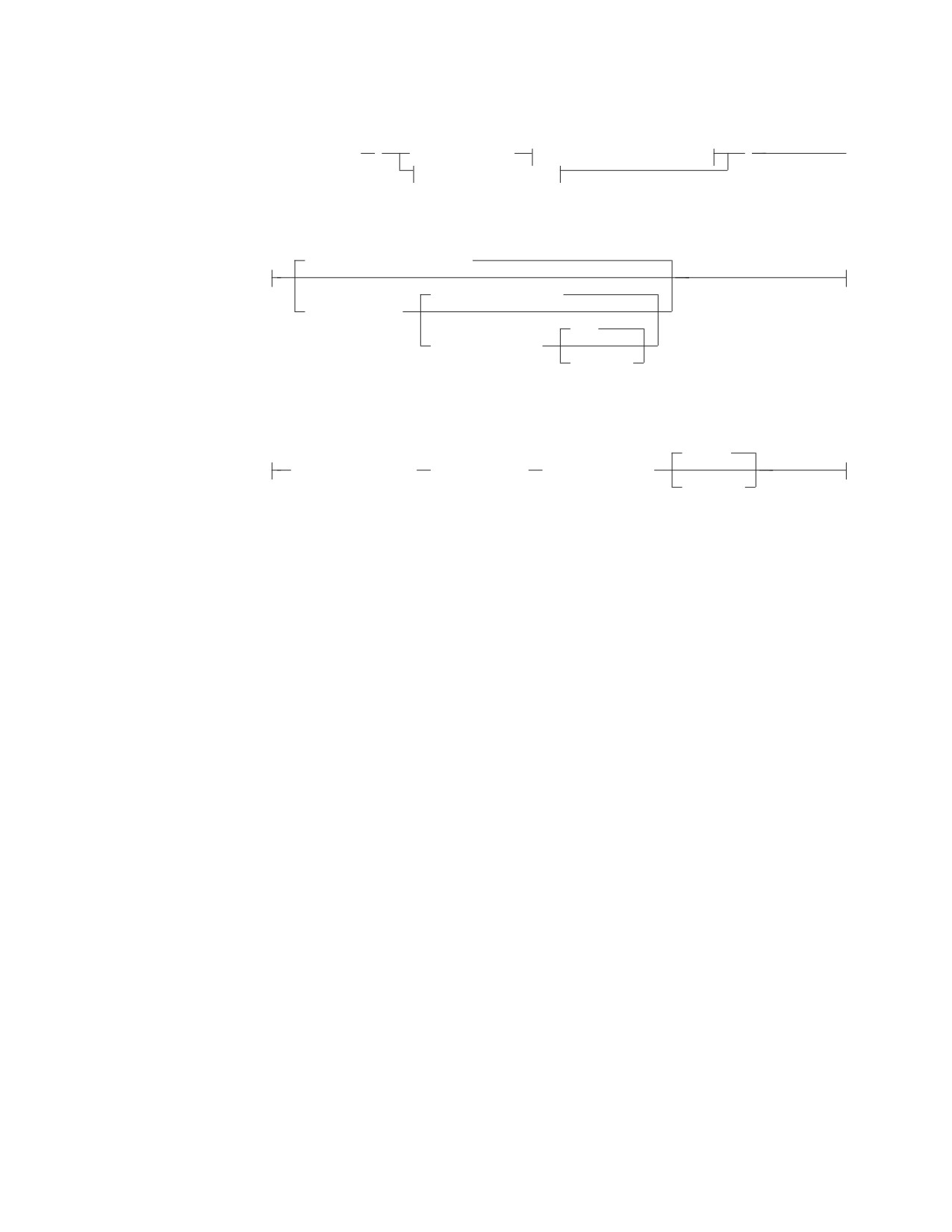
TRANSLATE
TRANSLATE
►► TRANSLATE
(
char_string_exp
char_string_exp options
)
►◄
graphic_string_exp
char_string_exp options:
,’ABC...XYZ’,’abc...xyz’
,X’000102...FDFEFF’
,to_string_exp
,’ ’
,from_string_exp
,pad_char
graphic_string_exp:
,G’< >’
graphic_string_exp
,to_string_exp
,from_string_exp
,pad_char
The TRANSLATE function returns a value in which one or more characters in a
string expression may have been translated into other characters.
char_string_exp or graphic_string_exp
A short string expression that has either a character data type (CHAR,
VARCHAR, DATE, TIME, or TIMESTAMP) or a graphic data type (GRAPHIC
or VARGRAPHIC). This argument cannot be a long string.
when the first argument is char_string_exp:
to_string_exp
Is a short string expression that has a character data type.
If the length attribute of to_string_exp is less than the length attribute of
from_string_exp, then to_string-exp is padded to the longer length using
either the pad_char or a space.
If the length attribute of to_string_exp is more than the length attribute
of from_string_exp, the extra characters in to_string_exp are ignored,
without a warning.
from_string_exp
Is a short string expression that has a character data type.
If there are duplicate characters in from_string_exp, the first one
scanning from the left is used. No warning is issued.
The default value for from_string_exp is a string of 256 characters
starting with the character X'00' and ending with the character X'FF'
(decimal 255).
pad_char
Is a CHAR(1) constant used to pad to_string_exp if it is shorter than
from_string_exp. If the length is not equal to one, an error will occur.
The default pad_char is a space.
Note: None of the arguments can have a subtype of mixed.
Chapter 4. Functions
115

TRANSLATE
If to_string_exp is not supplied, then from_string_exp must not be supplied.
In this case, char_string_exp is simply translated to upper case. This is done
based on the folding rules specified in the SYSCHARSETS catalog table.
when the first argument is graphic_string_exp:
to_string_exp
Is a short string expression that also returns a graphic data type.
If the length attribute of to_string_exp is less than the length attribute of
from_string_exp, then to_string_exp is padded to the longer length using
either the pad_char or a graphic space.
If the length attribute of to_string_exp is more than the length attribute of
from_string_exp, the extra characters in to_string_exp are ignored, without a
warning.
from_string_exp
Is a short string expression that has a graphic data type.
If there are duplicate characters in from_string_exp, the first one scanning
from the left is used. No warning is issued.
pad_char
Is a GRAPHIC(1) constant that is used to pad to_string_exp if it is shorter
than from_string_exp. If the length is not equal to 1, an error will occur.
The default pad_char is a graphic space.
Translation Process
The result string is built character by character from char_string_exp, translating
characters in from_string_exp to the corresponding character in to_string_exp. For
each character in char_string_exp, the same character is searched for in
from_string_exp. If the character is found to be the nth character in from_string_exp,
the resulting string will contain the nth character from to_string_exp. If to_string_exp
is less than n characters long, the resulting string will contain the pad character. If
the character is not found in from_string_exp, it is moved to the result string
untranslated.
The data type and CCSID of the result depends on the data type of the string
argument. The possible data types and CCSIDs are shown in the following table:
Input Data Type
Output Data Type
Output CCSID
CHAR(n)
VARCHAR(n)
same as that of string
VARCHAR(n)
VARCHAR(n)
same as that of string
GRAPHIC(n)
VARGRAPHIC(n)
same as that of string
VARGRAPHIC(n)
VARGRAPHIC(n)
same as that of string
DATE
VARCHAR(n)1
CCSID default of the subtype
TIME
VARCHAR(n)1
CCSID default of the subtype
TIMESTAMP
VARCHAR(26)
CCSID default of the subtype
1
For DATE and TIME data types, the value of n is determined by the
SYSTEM.SYSOPTIONS values for datetime formats. If a LOCAL format datetime
value is used, then n is the LOCAL length specified in SYSTEM.SYSOPTIONS,
otherwise 8, 10, and 26 will be used for TIME, DATE, and TIMESTAMP
respectively.
116
SQL Reference
TRANSLATE
The length of the result is identical to the length of the string argument. If any
argument can be null, the result can be null; if any argument is null, the result is
the null value.
The use of an argument expression (for example, column or host variable) defined
as mixed character is not allowed.
Examples
Example 1: Assume the host variable SITE (varchar(30)) has a value of ’Pivabiska
Lake Place’.
TRANSLATE(:SITE)
Returns the value ’PIVABISKA LAKE PLACE’.
TRANSLATE(:SITE,’$’,’L’)
Returns the value ’Pivabiska $ake Place’.
TRANSLATE(:SITE,’$$’,’Ll’)
Returns the value ’Pivabiska $ake P$ace’.
TRANSLATE(:SITE,’pLA’,’Place’,’.’)
Returns the value ’pivAbiskA LAk. pLA..’.
Example 2: Produce a list that includes the first three columns from all rows in
the IN_TRAY sample table and order the list on SUBJECT in a case insensitive
manner.
SELECT SUBJECT, RECEIVED, SOURCE, TRANSLATE(SUBJECT)
FROM IN_TRAY
ORDER BY 4
Example 3: This shows the treatment of a graphic string.
TRANSLATE(G’
<▌JJOOHHNN▐>’,G’
<▌AACCKK▐>’,G’
<▌OOHHNN▐>’)
Returns the value G’<▌JJAACCKK▐>’.
VALUE
▼
►► VALUE
( expression
,expression
)
►◄
The VALUE function returns the first non-null result in a series of expressions.
v None of the expressions can be long strings.
v The data types of the arguments must be compatible.
If any argument is numeric, all arguments must be numeric (SMALLINT,
INTEGER, DECIMAL, and FLOAT). If any argument is a character string, all
arguments must be character-compatible strings (CHAR, VARCHAR, DATE, TIME,
TIMESTAMP). If any argument is a graphic string, all arguments must be graphic
strings (GRAPHIC and VARGRAPHIC).
Chapter 4. Functions
117
VALUE
The arguments are evaluated in the order in which they are specified, and the
result value of the function is equal to the first argument that is not NULL. If the
arguments can be null, the result can be null; if all the arguments are null, the
result is the null value.
v
If all arguments are dates, the result data type is a date; if all arguments are
times, the result data type is a time; and if all arguments are timestamps, the
result data type is a timestamp.
v
If the arguments are strings, the CCSID of the result is calculated using the rules
given in “Conversion Rules for Operations that Combine Strings” on page 130.
v
If all arguments are fixed-length strings, the result is a fixed-length string of
length n, where n is the length of the longest argument.
v
If any argument is a varying-length string, the result is a varying-length string
with length attribute n, where n is the length attribute of the argument with the
greatest length attribute. The actual length of the result is the actual length of
the selected argument.
v
If the arguments are numeric, the result data type is the strongest of the
argument data types (FLOAT > DECIMAL > INTEGER > SMALLINT).
v
If the resultant data type is DECIMAL, precision and scale values are
determined as follows: scale is the largest result scale of any data type, and
precision is 'MIN(31,SCALE+n)' where 'n' is the largest integral part (precision
minus scale) result of any argument. For example, in VALUE(A, B, C), where A
is DECIMAL(10, 4), B is DECIMAL(8, 5), C is DECIMAL(5, 2), the resulting scale
is MAX(4, 5, 2) = 5 and the resulting precision is
MIN(31, 5 + MAX(10-4, 8-5, 5-2)) = 11
If scale + 'n' is greater than 31, then there is a potential for a conversion error
because there may be a value whose integer part will not fit and an error occurs.
For example, in VALUE(X, Y) where X is DECIMAL(27, 2) and Y is
DECIMAL(14, 9) the resultant data type is DECIMAL(31,9). If the value of 'X' is
1000000000000000000000000.02 and the value of 'Y' is 30000.000000004, then a
decimal overflow occurs because 'X' will not fit in DECIMAL(31,9).
Examples
Example 1: Select all the values from all the rows in the DEPARTMENT table. If
the value for department manager (MGRNO) is missing (that is, null) then return a
value of ‘ABSENT’.
SELECT DEPTNO, DEPTNAME, VALUE(MGRNO, ’ABSENT’), ADMRDEPT
FROM DEPARTMENT
Example 2: Select the employee number (EMPNO) and salary (SALARY) from all
the rows in the EMPLOYEE table. If the salary is missing (that is, null) then return
a value of zero.
SELECT EMPNO, VALUE(SALARY,0)
FROM EMPLOYEE
VARGRAPHIC
►► VARGRAPHIC
( expression
)
►◄
The VARGRAPHIC function returns a graphic string representation of a character
string.
118
SQL Reference
VARGRAPHIC
The argument must be a character string (CHAR, VARCHAR) or a character
compatible string (DATE, TIME, TIMESTAMP). If varying-length, the maximum
length must not be greater than 127. If the argument is a character string constant
that is to be interpreted as mixed data, it must contain properly paired shift control
characters.
The result of the function is a varying-length graphic string. If the subtype of the
argument is SBCS then the CCSID of the result is the system default CCSID for
graphic data. If the subtype of the argument is mixed, then the CCSID of the result
is the graphic CCSID which makes up the DBCS portion of the mixed argument
CCSID. For details, see the DB2 Server for VM System Administration or DB2 Server
for VSE System Administration manual for the table showing mixed CCSIDs and
their corresponding DBCS (and SBCS) component CCSIDs.
If the argument can be null, the result can be null; if the argument is null, the
result is the null value. The result includes all DBCS characters of the argument
and the DBCS equivalent of all single-byte characters of the argument. The first
character of the result is the first logical character of the argument, the second
character of the result is the second logical character of the argument, and so on.
The result does not include X'0E' or X'0F'.
The DBCS equivalent of X'40' is X'4040'. The DBCS equivalent of every single-byte
character (nn) other than X'40' is X'42nn'.
The length of the result depends on the number of logical characters in the
argument. If the length or maximum length of the argument is n bytes, the
maximum length of the result is n (DBCS characters).
VARGRAPHIC will convert a mixed data value to GRAPHIC in the following
manner:
v DBCS characters from the source will be placed into the target unchanged
v SBCS characters from the source will have their DBCS equivalent placed into the
target
v No shift-in or shift-out characters will be transferred to the target.
Example
Using the EMPLOYEE table, set the host variable VAR_DESC (vargraphic(24)) to
the VARGRAPHIC equivalent of the first name (FIRSTNME) for employee number
(EMPNO) ‘000050’.
SELECT VARGRAPHIC(FIRSTNME)
INTO :VAR_DESC
FROM EMPLOYEE
WHERE EMPNO = ’000050’
VAR_DESC will be set to the GRAPHIC form of ’JOHN’ when using the sample
table. The hex representation of this is: X'42D142D642C842D5'.
Chapter 4. Functions
119

YEAR
YEAR
►► YEAR
(
date_expression
)
►◄
timestamp_expression
date_duration_expression
timestamp_duration_expression
The YEAR function returns the year part of a value.
The argument must be a date, timestamp, date duration, or timestamp duration. If
a decimal number, the argument must be:
v DECIMAL(8,0) for date duration
v DECIMAL(20,6) for timestamp duration
to be properly interpreted.
The result of the function is a large integer. If the argument can be null, the result
can be null; if the argument is null, the result is the null value.
The other rules depend on the data type of the argument specified:
v If the argument is a date or a timestamp:
The result is the year part of the value, which is an integer between 1 and 9 999.
v If the argument is a date duration or timestamp duration:
The result is the year part of the value, which is an integer between -9 999 and
9 999. A nonzero result has the same sign as the argument.
Examples
Example 1: Select all the projects in the PROJECT table that are scheduled to start
(PRSTDATE) and end (PRENDATE) in the same calendar year.
SELECT * FROM PROJECT
WHERE YEAR(PRSTDATE) = YEAR(PRENDATE)
Example 2: Select all the projects in the PROJECT table that are scheduled to take
less than one year to complete.
SELECT * FROM PROJECT
WHERE YEAR(PRENDATE - PRSTDATE) < 1
120
SQL Reference

Chapter 5. Queries
A query specifies a result table.
In a program, a query is a component of certain SQL statements. There are three
forms of a query:
v The subselect
v The fullselect
v The select-statement.
There is another form of select, described under “SELECT INTO” on page 336.
Authorization
For any form of a query, the privileges held by the authorization ID of the
statement must include at least one of the following for each of the tables or views
identified in the statement:
v Ownership of the table or view
v The SELECT privilege on the table or view
v DBA authority.
subselect
►► select_clause
from_clause
►◄
where_clause
group_by_clause
having_clause
The subselect is a component of the fullselect, the CREATE VIEW statement, and
the INSERT statement. It is also a component of certain predicates which, in turn,
are components of a subselect. A subselect that is a component of a predicate is
called a subquery. If more than one table or view is identified in the FROM clause,
the subselect is called a join. (See the DB2 Server for VSE & VM Application
Programming manual for information on joining tables.)
A subselect specifies a result table derived from the tables or views identified in
the FROM clause. The derivation can be described as a sequence of operations in
which the result of each operation is input for the next. (This is only a way of
describing the subselect. The method used to perform the derivation may be quite
different from this description.)
The sequence of the (hypothetical) operations is:
1. FROM clause
2. WHERE clause
3. GROUP BY clause
4. HAVING clause
5. SELECT clause.
121

select-clause
select-clause
ALL
►► SELECT
►◄
DISTINCT
,
▼
expression
table_name.*
view_name.*
correlation_name.*
The SELECT clause specifies the columns of the final result table. The column
values are produced by the application of the select list to R. The select list is the
names or expressions specified in the SELECT clause. R is the result of the
previous operation of the subselect. For example, if the only clauses specified are
SELECT, FROM, and WHERE, R is the result of that WHERE clause.
ALL
Retains all rows of the final result table and does not eliminate redundant
duplicates. This is the default.
DISTINCT
Eliminates all but one of each set of duplicate rows of the final result table.
DISTINCT must not be used more than once in a subselect. This restriction
includes SELECT DISTINCT and the use of DISTINCT in a column function of
the select list or HAVING clause, but does not include subqueries of the
subselect.
Two rows are duplicates of one another only if each value in the first row is
equal to the corresponding value in the second row. (For determining duplicate
rows, two null values are considered equal.)
Select List Notation
Represents a list of names that identify the columns of table R. The first name
in the list identifies the first column of R, the second name identifies the
second column of R, and so on.
The list of names is established when the statement containing the SELECT
clause is prepared. Hence, * does not identify any columns that have been
added to a table after the statement has been prepared.
expression
Can be any expression of the type described in Chapter 3. Each column name
used in the select list must unambiguously identify a column of R. The
operand of an operator must not be a column function that includes the
keyword DISTINCT.
name.*
Represents a list of names that identify the columns of name. The name can be a
table name, view name, or correlation name, and must designate a table or
view named in the FROM clause. The first name in the list identifies the first
column of the table or view, the second name in the list identifies the second
column of the table or view, and so on.
The list of names is established when the statement containing the SELECT
clause is prepared. Hence, * does not identify any columns that have been
added to a table after the statement has been prepared.
122
SQL Reference
select-clause
The number of columns in the result of SELECT is the same as the number of
expressions in the operational form of the select list (that is, the list established
during program preparation) and must not exceed 255. The result table of a
subquery must be a single column, unless the subquery is used in the EXISTS
predicate.
Limitation on Long String Columns
No column in the list may be a long string column if:
v SELECT DISTINCT is used
v The subselect is a subquery
v The subselect is an operand of UNION or UNION ALL.
Note:
The restriction does not apply to a subquery of an EXISTS predicate because an
EXISTS subquery does not return values.
Applying the Select List
Some of the results of applying the select list to R depend on whether GROUP BY
or HAVING is used. Those results are described separately.
If GROUP BY or HAVING is used::
v Each column-name in the select list must either identify a grouping column or be
specified within a column function.
v The select list is applied to each group of R, and the result contains as many
rows as there are groups in R. When the select list is applied to a group of R,
that group is the source of the arguments of the column functions in the select
list.
If neither GROUP BY nor HAVING is used:
v The select list must not include any column functions, or it must be entirely a
list of column functions.
v If the select list does not include column functions, it is applied to each row of R
and the result contains as many rows as there are rows in R.
v If the select list is a list of column functions, R is the source of the arguments of
the functions and the result of applying the select list is one row.
In either case the nth column of the result contains the values specified by
applying the nth expression in the operational form of the select list.
Null attribute of result columns
Result columns allow null values if they are derived from:
v Any column function but COUNT
v A column that allows null values
v An arithmetic expression in an outer select list
v An arithmetic expression that allows nulls
v A scalar function or string expression that allows null values
v A host variable that has an indicator variable
v A result of a UNION if at least one of the corresponding items in the select list
is nullable.
Names of result columns
A result column derived from a column name acquires the unqualified name of
that column. All other result columns have no names.
Chapter 5. Queries
123

select-clause
Data type of result columns
Each column of the result of SELECT acquires a data type from the expression
from which it is derived.
When the expression is ...
The data type of the result column is ...
the name of any numeric column
the same as the data type of the column,
with the same precision and scale for
decimal columns.
an integer constant
INTEGER.
a decimal or floating-point constant
the same as the data type of the constant,
with the same precision and scale for
decimal constants. For floating-point
constants, the data type is DOUBLE
PRECISION.
the name of any numeric host variable
the same as the data type of the variable,
with the same precision and scale for
decimal variables. If the data type of the
variable is not identical to an SQL data type
(for example, DISPLAY SIGN LEADING
SEPARATE in COBOL), the result column is
decimal.
an arithmetic or string expression
the same as the data type of the result.
Decimal results have the same precision and
scale as described under “Expressions” on
page 71.
any function
(see Chapter 4 to determine the data type of
the result.)
the name of any string column
the same as the data type of the column,
with the same length attribute.
the name of any string host variable
the same as the data type of the variable,
with a length attribute equal to the length of
the variable. If the data type of the variable
is not identical to an SQL data type (for
example, a NUL-terminated string in C), the
result column is a varying-length string.
a character string constant of length n
VARCHAR(n)
a graphic string constant of length n
VARGRAPHIC(n)
the name of a datetime column
the same as the data type of the column.
from-clause
,
►► FROM
▼
table_name
►◄
view_name
correlation_name
The FROM clause specifies an intermediate result table. If a single table or view is
identified, the intermediate result table is simply that table or view. If more than
one table or view is identified, the intermediate result table consists of all possible
combinations of the rows of the identified tables or views. Each row of the result is
a row from the first table or view concatenated with a row from the second table
124
SQL Reference

from-clause
or view, concatenated in turn with a row from the third, and so on. The number of
rows in the result is the product of the number of rows in all the named tables or
views.
The following rules apply to the names specified in a FROM clause:
v Each table_name or view_name must identify an existing table or view at the
application server.
v Each correlation_name is defined as a designator of the table or view identified
by the immediately preceding table_name or view_name.
v The exposed names must be unique. An exposed name is a correlation_name, a
table_name that is not followed by a correlation_name, or a view_name that is
not followed by a correlation_name.
If a correlation_name is specified for a table or view, any qualified reference to a
column of that table or view in the subselect must use that correlation_name. For
more information about the FROM clause, see “Correlation Names” on page 64.
where-clause
►► WHERE search_condition
►◄
The WHERE clause specifies an intermediate result table that consists of those
rows of R for which the search_condition is true. R is the result of the FROM
clause of the subselect.
The search_condition must conform to the following rules:
v Each column name must unambiguously identify a column of R or be a
correlated reference. A column name is a correlated reference if it identifies a
column of a table or view identified in an outer subselect.
v A column function must not be specified unless the WHERE clause is specified
in a subquery of a HAVING clause and the argument of the function is a
correlated reference to a group.
Any subquery in the search_condition is effectively processed for each row of R and
the results are used in the application of the search_condition to the given row of R.
A subquery is actually processed for each row of R only if it includes a correlated
reference. In fact, a subquery with no correlated references is processed just once,
whereas a subquery with a correlated reference may have to be processed once for
each row.
group-by-clause
,
▼
►► GROUP BY
column_name
►◄
The GROUP BY clause specifies an intermediate result table that consists of a
grouping of the rows of R. R is the result of the previous clause of the subselect.
Each column_name must unambiguously identify a column of R other than a long
string column. Each identified column is called a grouping column.
Chapter 5. Queries
125
group-by-clause
The result of GROUP BY is a set of groups of rows. The rows within each group
are in an arbitrary order. In each group of more than one row, all values of each
grouping column are equal; and all rows with the same set of values of the
grouping columns are in the same group. For grouping, all null values within a
grouping column are considered equal.
Because every row of a group contains the same value of any grouping column,
the name of a grouping column can be used in a search condition in a HAVING
clause or an expression in a SELECT clause; in each case, the reference specifies
only one value for each group.
If the grouping column contains varying-length strings with trailing blanks, the
values in the group can differ in the number of trailing blanks and may not all
have the same length. In that case, a reference to the grouping column still
specifies only one value for each group, but the value for a group is chosen
arbitrarily from the available set of values. Thus, the actual length of the result
value is unpredictable.
If a field procedure is not involved, the collating sequence depends on the CCSID
of the application server. With the DRDA protocol, the application server could be
using an ASCII CCSID, producing an unexpected result to an application program
assuming an EBCDIC CCSID and code page (see the IBM SQL Reference manual for
details).
GROUP BY is ignored if used in a subquery of a basic predicate.
having-clause
►► HAVING search_condition
►◄
The HAVING clause specifies an intermediate result table that consists of those
groups of R for which the search_condition is true. R is the result of the previous
clause of the subselect. If this clause is not GROUP BY, R is considered a single
group with no grouping columns.
Each column name in the search_condition must:
v unambiguously identify a grouping column of R, or
v be specified within a column function, or
v be a correlated reference. A column name is a correlated reference if it identifies
a column of a table or view identified in an outer subselect.
A group of R to which the search condition is applied supplies the argument for
each column function in the search condition, except for any function whose
argument is a correlated reference.
If the search condition contains a subquery, the subquery can be thought of as
being processed each time the search condition is applied to a group of R, and the
results used in applying the search condition. In actuality, the subquery is
processed for each group only if it contains a correlated reference. For an
illustration of the difference, see examples 6 and 7 under “Examples of a subselect”
on page 127.
126
SQL Reference
having-clause
A correlated reference to a group of R must either identify a grouping column or
be contained within a column function.
The HAVING clause must not be used in a subquery of a basic predicate.
Examples of a subselect
Example 1
Select all columns and rows from the EMPLOYEE table.
SELECT * FROM EMPLOYEE
Example 2
Join the EMP_ACT and EMPLOYEE tables, select all the columns from the
EMP_ACT table and add the employee’s surname (LASTNAME) from the
EMPLOYEE table to each row of the result.
SELECT EMP_ACT.*, LASTNAME
FROM EMP_ACT, EMPLOYEE
WHERE EMP_ACT.EMPNO = EMPLOYEE.EMPNO
Example 3
Using a join-condition on the EMPLOYEE and DEPARTMENT tables, select the
employee number (EMPNO), employee name (FIRSTNME concatenated with
MIDINIT concatenated with LASTNAME), department number (WORKDEPT in
the EMPLOYEE table and DEPTNO in the DEPARTMENT table) and department
name (DEPTNAME) of all employees who were born (BIRTHDATE) earlier than
1930.
SELECT EMPNO, FIRSTNME CONCAT ’ ’ CONCAT MIDINIT CONCAT ’ ’ CONCAT LASTNAME,
WORKDEPT, DEPTNAME
FROM EMPLOYEE, DEPARTMENT
WHERE WORKDEPT = DEPTNO
AND YEAR(BIRTHDATE) < 1930
Example 4
Select the job (JOB) and the minimum and maximum salaries (SALARY) for each
group of rows with the same job code in the EMPLOYEE table, but only for groups
with more than one row and with a maximum salary greater than or equal to 27
000.
SELECT JOB, MIN(SALARY), MAX(SALARY)
FROM EMPLOYEE
GROUP BY JOB
HAVING COUNT(*) > 1 AND MAX(SALARY) >= 27000
Example 5
Select all the rows of EMP_ACT table for employees (EMPNO) in department
(WORKDEPT) ‘E11’. (Employee department numbers are shown in the EMPLOYEE
table.)
SELECT * FROM EMP_ACT
WHERE EMPNO IN (SELECT EMPNO FROM EMPLOYEE
WHERE WORKDEPT = ’E11’)
Chapter 5. Queries
127

subselect
Example 6
From the EMPLOYEE table, select the department number (WORKDEPT) and
maximum departmental salary (SALARY) for all departments whose maximum
salary is less than the average salary for all employees.
SELECT WORKDEPT, MAX(SALARY)
FROM EMPLOYEE
GROUP BY WORKDEPT
HAVING MAX(SALARY) < (SELECT AVG(SALARY)
FROM EMPLOYEE)
The subquery in the HAVING clause would only be processed once in this
example.
Example 7
Using the EMPLOYEE table, select the department number (WORKDEPT) and
maximum departmental salary (SALARY) for all departments whose maximum
salary is less than the average salary in all other departments.
SELECT WORKDEPT, MAX(SALARY)
FROM EMPLOYEE EMP_COR
GROUP BY WORKDEPT
HAVING MAX(SALARY) < (SELECT AVG(SALARY)
FROM EMPLOYEE
WHERE NOT WORKDEPT = EMP_COR.WORKDEPT)
Note: In contrast to example 6, the subquery in the HAVING clause would need to
be executed for each group.
fullselect
▼
►►
subselect
►◄
(fullselect)
UNION
subselect
UNION ALL
(fullselect)
A fullselect specifies a result table. If UNION is not used, the result of the fullselect
is the result of the specified subselect.
UNION or UNION ALL
Derives a result table by combining two other result tables (R1 and R2). If
UNION ALL is specified, the result consists of all rows in R1 and R2. If
UNION is specified without the ALL option, the result is the set of all rows in
either R1 or R2, with duplicate rows eliminated. In either case, each row of the
UNION table is either a row from R1 or a row from R2. The columns of the
result are not named in the SQLDA.
Two rows are duplicates if each value in the first is equal to the corresponding
value of the second. (For determining duplicates, two null values are considered
equal.)
UNION and UNION ALL are associative operations. However, when UNION and
UNION ALL are used in the same statement, the result depends on the order in
which the operations are performed. Operations within parentheses are performed
first. When the order is not specified by parentheses, operations are performed in
left-to-right order.
128
SQL Reference

fullselect
Rules for columns
R1 and R2 must have the same number of columns, and the data type of the
nth column of R1 must be compatible with the data type of the nth column of
R2.
R1 and R2 must not include long string columns.
The nth column of the result of UNION and UNION ALL is derived from the
nth columns of R1 and R2. The following table shows all valid combinations of
operand columns and, for each combination, the data type of the result column.
The data type of the result
If one operand column is...
And the other operand is...
column is...
CHAR(x)
CHAR(y)
CHAR(z) where z = max(x,y)
VARCHAR(x)
CHAR(y) or VARCHAR(y)
VARCHAR(z) where z =
max(x,y)
bit data
mixed, SBCS, or bit data
bit data
mixed data
mixed or SBCS data
mixed data
SBCS data
SBCS data
SBCS data
GRAPHIC(x)
GRAPHIC(y)
GRAPHIC(z) where z =
max(x,y)
VARGRAPHIC(x)
GRAPHIC(y) or
VARGRAPHIC(z) where z =
VARGRAPHIC(y)
max(x,y)
DATE
DATE
DATE
TIME
TIME
TIME
TIMESTAMP
TIMESTAMP
TIMESTAMP
FLOAT (double)
any numeric type
FLOAT (double)
FLOAT (single)
FLOAT (single)
FLOAT (single)
FLOAT (single)
DECIMAL, NUMERIC,
FLOAT (double)
INTEGER, or SMALLINT
DECIMAL(w,x)
DECIMAL(y,z) or
DECIMAL(p,s) where p =
NUMERIC(y,z,)
max(x,z)+max(w-x,y-z) s =
max(x,z) (see note below)
DECIMAL(w,x)
INTEGER
DECIMAL(p,x) where p =
x+max(w-x,11) (see note
below)
DECIMAL(w,x)
SMALLINT
DECIMAL(p,x) where p =
x+max(w-x,5) (see note
below)
INTEGER
INTEGER
INTEGER
INTEGER
SMALLINT
INTEGER
SMALLINT
SMALLINT
SMALLINT
Note: A decimal result column must not have a precision greater than 31.
If neither operand column allows nulls, the result column does not allow nulls.
Otherwise, the result column allows nulls. If the description of any operand
column is not the same as the description of the result column, its values are
converted to conform to the description of the result column.
The conversion operation is exactly the same as if the values were assigned to
the result column. For example, if one operand column is CHAR(10), and the
Chapter 5. Queries
129
fullselect
other operand column is CHAR(5), the result column is CHAR(10), and the
values derived from the CHAR(5) column are padded on the right with five
blanks.
Examples of a fullselect
Example 1
Select all columns and rows from the EMPLOYEE table.
SELECT * FROM EMPLOYEE
Example 2
List the employee numbers (EMPNO) of all employees in the EMPLOYEE table
whose department number (WORKDEPT) either begins with ‘E’ or who are
assigned to projects in the EMP_ACT table whose project number (PROJNO)
begins with either ‘MA2100’, ‘MA2110’, or ‘MA2112’.
SELECT EMPNO FROM EMPLOYEE
WHERE WORKDEPT LIKE ’E%’
UNION
SELECT EMPNO FROM EMP_ACT
WHERE PROJNO IN(’MA2100’, ’MA2110’, ’MA2112’)
Example 3
Make the same query as in example 2, and, in addition, “tag” the rows from the
EMPLOYEE table with ‘emp’ and the rows from the EMP_ACT table with
‘emp_act’.
SELECT EMPNO, ’emp’ FROM EMPLOYEE
WHERE WORKDEPT LIKE ’E%’
UNION
SELECT EMPNO, ’emp_act’ FROM EMP_ACT
WHERE PROJNO IN(’MA2100’, ’MA2110’, ’MA2112’)
Example 4
Make the same query as in example 2, only use UNION ALL so that no duplicate
rows are eliminated.
SELECT EMPNO FROM EMPLOYEE
WHERE WORKDEPT LIKE ’E%’
UNION ALL
SELECT EMPNO FROM EMP_ACT
WHERE PROJNO IN(’MA2100’, ’MA2110’, ’MA2112’)
Conversion Rules for Operations that Combine Strings
The operations that combine strings are concatenation, UNION, and UNION ALL.
These rules also apply to the VALUE scalar function. In each case, the CCSID of
the result is determined at bind time, and the execution of the operation may
involve conversion of strings to the coded character set identified by that CCSID.
The CCSID of the result is determined by the CCSIDs of the operands. The CCSIDs
of the first two operands determine an intermediate result CCSID, this CCSID and
the CCSID of the next operand determine a new intermediate result CCSID, and so
on. The last intermediate result CCSID and the CCSID of the last operand
determine the CCSID of the result string or column. For each pair of CCSIDs, the
result CCSID is determined by the sequential application of the following rules:
v If the CCSIDs are equal, the result is that CCSID.
v If either CCSID is 65535 (X'FFFF'), the result is 65535.
v If one CCSID denotes SBCS data and the other denotes mixed data, the result is
the CCSID for mixed data.
130
SQL Reference
fullselect
v Otherwise, the result CCSID is determined by the following table:
Chapter 5. Queries
131

fullselect
Table 6. Selecting the CCSID of the Intermediate Result
Second Operand
First
Column
Derived
Special
Operand
Value
Value
Constant
Register
Host Variable
Column
Value
first
first
first
first
first
Derived
Value
second
first
first
first
first
Constant
second
second
first
first
first
Special
Register
second
second
first
first
first
Host Variable
second
second
second
second
first
However, a host variable containing data in a foreign encoding scheme is always
converted to the native form of data before it is used in any operation. The
above rules are based on the assumption that this conversion has already
occurred.
Note that an intermediate result is considered to be a derived value operand.
For example, assume COLA, COLB, and COLC are columns with CCSIDs 37,
278, and 500, respectively. The result CCSID of COLA CONCAT COLB CONCAT
COLC would be determined as follows:
- The result of the CCSID of COLA CONCAT COLB is first determined to be
37, because both operands are columns, so the CCSID of the first operand is
chosen.
- The result CCSID of “intermediate result” CONCAT COLC is determined to
be 500, because the first operand is a derived value and the second operand
is a column, so the CCSID of the second operand is chosen.
An operand of concatenation or the selected argument of the VALUE scalar
function is converted, if necessary, to the coded character set of the result string.
Each string of an operand of UNION or UNION ALL is converted, if necessary, to
the coded character set of the result column. Character conversion is necessary
only if all of the following are true:
v The CCSIDs are different.
v Neither CCSID is 65535 (X'FFFF').
v The string is neither null nor empty.
v The CCSID Conversion Selection Table indicates that conversion is necessary.
An error occurs if a character of a string cannot be converted or if the CCSID
Conversion Selection Table is used but does not contain any information about the
CCSID pair. A warning occurs if a character of a string is converted to the
substitution character.
Examples
Example 1
Given the following:
Expression
Type
CCSID
COL_1
column
00001
HV_2
host variable
00002
COL_3
column
00003
132
SQL Reference
fullselect
When evaluating the predicate:
COL_1 CONCAT :HV_2 CONCAT COL_3
The resulting CCSID of the first two operands is 00001. Because the result of the
first concatenation is a derived string, the second concatenation will have a result
CCSID of 00003 (the column CCSID is chosen over the CCSID of the derived
string). The final CCSID is 00003.
Example 2
Using the information from the previous example, when evaluating the predicate:
VALUE(COL_1, :HV_2, COL_3)
The resulting CCSID of the first two operands is 00001. However, the expression
type is column, not derived string, since the two operands are not combined as in
the concatenation example. Using the rules for the intermediate CCSID and the
third operand’s CCSID, 00001 (the intermediate CCSID) is chosen as the final
CCSID. This is because the CCSID of the first column is chosen over the CCSID of
the second column.
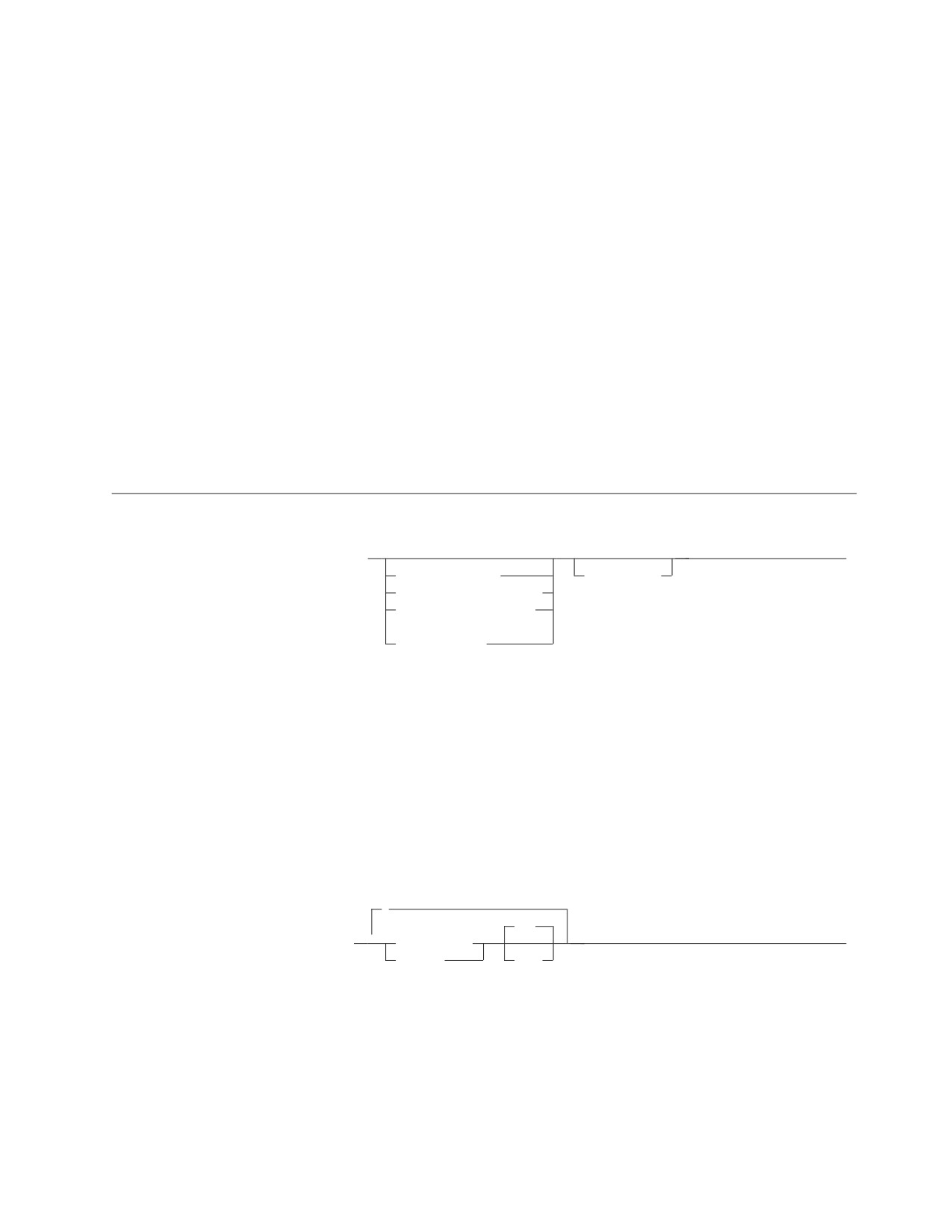
select-statement
|
►► fullselect
►◄
order_by_clause
with_clause
for_fetch_only_clause
for_read_only_clause
(1)
update_clause
Notes:
|
1
The update-clause cannot be specified if the fullselect contains an order-by-clause.
The select-statement is the form of a query that can be directly specified in a
DECLARE CURSOR statement, or prepared and then referenced in a DECLARE
CURSOR statement. It can also be issued interactively, causing a result table to be
displayed at your terminal. In either case, the table specified by a select-statement is
the result of the fullselect.
order-by-clause
,
ASC
▼
►► ORDER BY
column_name
►◄
integer
DESC
The ORDER BY clause specifies an ordering of the rows of the result table. If a
single column is identified, the rows are ordered by the values of that column. If
more than one column is identified, the rows are ordered by the values of the first
identified column, then by the values of the second identified column, and so on.
A long string column must not be identified.
Chapter 5. Queries
133
order-by-clause
A named column may be identified by an integer or a column_name. An unnamed
column must be identified by an integer. A column is unnamed if it is derived
from a constant, an arithmetic expression, or a function. If the fullselect includes a
UNION operator, every column of the result table is unnamed.
column_name
Must unambiguously identify a column of the result table. Although columns
not included in the result table cannot be referenced in the ORDER BY clause,
the rules for unambiguous column references are the same as in the other
clauses of the fullselect. See “Column Name Qualifiers to Avoid Ambiguity” on
page 66 for more information
integer
Must be greater than 0 and not greater than the number of columns in the
result table. The integer n identifies the nth column of the result table.
ASC
Uses the values of the column in ascending order. This is the default.
DESC
Uses the values of the column in descending order.
Ordering is performed in accordance with the comparison rules described in
Chapter 3. The null value is higher than all other values. If your ordering
specification does not determine a complete ordering, rows with duplicate values
of the last identified column have an arbitrary order. If the ORDER BY clause is
not specified, the rows of the result table have an arbitrary order.
If a field procedure is not involved, the collating sequence depends on the CCSID
of the application server. With the DRDA protocol, the application server could be
using an ASCII CCSID, producing an unexpected result to an application program
assuming an EBCDIC CCSID and code page (see the IBM SQL Reference for
details).
|
for_fetch_only/for_read_only clause
|
The FOR FETCH/READ ONLY clause forces blocking on read only cursors
|
without the use of BLOCK as a preprocessing option.
|
If the application has been preprocessed with the NOBLOCK option (no
|
blocking) then the FOR FETCH ONLY will be ignored.
|
FOR READ ONLY is a synonym of the FOR FETCH ONLY.
update-clause
,
►►
FOR UPDATE OF
▼
column_name
►◄
The UPDATE clause identifies the columns that can be updated in a subsequent
Positioned UPDATE statement. Each column_name must be unqualified and must
identify a column of the table or view identified in the first FROM clause of the
fullselect. The clause must not be specified if the result table of the fullselect is
read-only.
If an UPDATE clause is specified, only the columns identified in that clause can be
updated in subsequent Positioned UPDATE statements.
134
SQL Reference
update-clause
If a dynamically prepared select-statement does not include an UPDATE clause, its
associated cursor is not updateable.
The use of this clause for statically prepared select-statements and statically
prepared Positioned UPDATE statements depends on whether the NOFOR
preprocessor option is in effect. If the UPDATE clause is not specified:
v If NOFOR is in effect, all updateable columns can be updated in subsequent
Positioned UPDATE statements.
v If NOFOR is not in effect, the cursor associated with the select-statement is not
updateable.
See the DB2 Server for VSE & VM Application Programming manual for information
on preprocessing and running programs.
If blocking is not in effect, a row may be deleted from a non-read-only table if the
FOR UPDATE OF clause is specified.
If blocking is in effect and you intend to perform a positioned delete operation,
blocking must be explicitly turned off by specifying the FOR UPDATE OF clause in
the DECLARE statement.
Notes:
1. There is no corresponding FOR DELETE OF clause.
2. The order-by clause is not allowed with the update-clause.
with-clause
►► WITH
RR
►◄
CS
UR
The WITH clause specifies the isolation level at which the statement is executed.
RR
Repeatable read
CS
Cursor stability
UR
Uncommitted read
WITH UR can be specified only if the result table is read-only.
The isolation level specified on the SELECT statement will override any other
isolation level specification; for example, in ISQL, if SET ISOLATION CS has been
specified, and a SELECT statement WITH UR is executed, that statement will use
an isolation level of uncommitted read. A SELECT statement without the WITH
clause will use an isolation level of CS, as defined by the SET ISOLATION
statement. As another example, a statement specifying WITH UR in a package
prepped with ISOL(CS) will use an isolation level of uncommitted read.
If a SELECT statement specifying WITH UR is used with a cursor that is not
read-only, SQLCODE -173 will be returned indicating that WITH UR cannot be
specified on a select statement used in a non-read-only cursor.
Chapter 5. Queries
135
select-statement
Examples of a select-statement
Example 1
Select all columns and rows from the EMPLOYEE table.
SELECT * FROM EMPLOYEE
Example 2
Select the project name (PROJNAME), start date (PRSTDATE), and end date
(PRENDATE) from the PROJECT table. Order the result table by the end date with
the most recent dates appearing first.
SELECT PROJNAME, PRSTDATE, PRENDATE
FROM PROJECT
ORDER BY PRENDATE DESC
Example 3
Select the department number (WORKDEPT) and average departmental salary
(SALARY) for all departments in the EMPLOYEE table. Arrange the result table in
ascending order by average departmental salary.
SELECT WORKDEPT, AVG(SALARY)
FROM EMPLOYEE
GROUP BY WORKDEPT
ORDER BY 2
Example 4
Declare a cursor named UP_CUR to be used in a PL/I program to update the start
date (PRSTDATE) and the end date (PRENDATE) columns in the PROJECT table.
The program must receive both of these values together with the project number
(PROJNO) value for each row.
EXEC SQL DECLARE UP_CUR CURSOR FOR
SELECT PROJNO, PRSTDATE, PRENDATE
FROM PROJECT
FOR UPDATE OF PRSTDATE, PRENDATE;
136
SQL Reference

Chapter 6. Statements
This chapter contains syntax diagrams, semantic descriptions, rules, and examples
of the use of the SQL statements listed in the following table.
Table 7. SQL Statements
SQL Statement
Function
Refer to Page
ACQUIRE DBSPACE
Obtains and names a dbspace.
“ACQUIRE DBSPACE” on
page 144
ALLOCATE CURSOR
Defines a cursor and associates it with a result set
“ALLOCATE CURSOR” on
locator variable.
page 146
ALTER DBSPACE
Alters the percentage of free space. Also alters the lock
“ALTER DBSPACE” on
size of a PUBLIC dbspace.
page 148
ALTER PROCEDURE
Alters the definition of an existing stored procedure.
“ALTER PROCEDURE” on
page 150
ALTER PSERVER
Alters the definition of an existing stored procedure
“ALTER PSERVER” on page
server.
155
ALTER TABLE
Adds a column to a table or manages referential
“ALTER TABLE” on page
constraints.
157
ASSOCIATE LOCATORS
Obtains the RESULT SET LOCATOR value for each
“ASSOCIATE LOCATORS”
result set returned by a stored procedure.
on page 166
BEGIN DECLARE
Marks the beginning of a host variable declaration
“BEGIN DECLARE
SECTION
section.
SECTION” on page 169
CALL
Invokes a stored procedure.
“CALL” on page 171
CLOSE
Closes a cursor.
“CLOSE” on page 175
Extended CLOSE
Closes a cursor defined by an Extended DECLARE
“Extended CLOSE” on page
CURSOR statement.
177
COMMENT ON
Replaces or adds a comment to the description of a
“COMMENT ON” on page
table, view, or column.
178
COMMENT ON
Replaces or adds a comment to the description of a
“COMMENT ON
PROCEDURE
stored procedure identified.
PROCEDURE” on page 180
COMMIT
Terminates a logical unit of work and commits the
“COMMIT” on page 182
database changes made by that logical unit of work.
CONNECT
Connects to an application server.
“CONNECT (for VM)” on
page 185
CREATE INDEX
Defines an index on a table.
“CREATE INDEX” on page
198
CREATE PACKAGE
Creates a package.
“CREATE PACKAGE” on
page 201
CREATE PROCEDURE
Defines a stored procedure.
“CREATE PROCEDURE”
on page 208
CREATE PSERVER
Defines a stored procedure server.
“CREATE PSERVER” on
page 216
CREATE SYNONYM
Defines an alternate name for a table or view.
“CREATE SYNONYM” on
page 218
CREATE TABLE
Defines a table.
“CREATE TABLE” on page
219
2007
137

Table 7. SQL Statements
(continued)
SQL Statement
Function
Refer to Page
CREATE VIEW
Defines a view of one or more tables or views.
“CREATE VIEW” on page
231
DECLARE CURSOR
Defines an SQL cursor.
“DECLARE CURSOR” on
page 235
Extended DECLARE
Defines a cursor that is to be associated with a
“Extended DECLARE
CURSOR
statement that was prepared using an Extended
CURSOR” on page 240
PREPARE statement.
DELETE
Deletes zero or more rows from a table.
“DELETE” on page 242
DESCRIBE
Describes the result columns of a prepared statement.
“DESCRIBE” on page 247
Extended DESCRIBE
Describes the result columns of a SELECT statement that
“Extended DESCRIBE” on
was prepared using an Extended PREPARE statement.
page 251
DESCRIBE CURSOR
Obtains information about the result set that is
“DESCRIBE CURSOR” on
associated with the cursor and puts that information
page 252
into a descriptor.
DESCRIBE PROCEDURE
Obtains information about the result sets returned by a
“DESCRIBE PROCEDURE”
stored procedure and puts that information into a
on page 254
descriptor.
DROP
Deletes a dbspace, index, package. synonym, table, or
“DROP” on page 257
view
DROP PROCEDURE
Deletes the definition of a stored procedure.
“DROP PROCEDURE” on
page 260
DROP PSERVER
Deletes the definition of a stored procedure server.
“DROP PSERVER” on page
261
DROP STATEMENT
Deletes a statement from a package created with
“DROP STATEMENT” on
CREATE PACKAGE.
page 262
END DECLARE SECTION
Marks the end of a host variable declaration section.
“END DECLARE
SECTION” on page 263
EXECUTE
Executes a prepared SQL statement.
“EXECUTE” on page 264
Extended EXECUTE
Executes an SQL statement prepared using an Extended
“Extended EXECUTE” on
PREPARE statement.
page 268
EXECUTE IMMEDIATE
Prepares and executes an SQL statement.
“EXECUTE IMMEDIATE”
on page 270
EXPLAIN
Obtains information about the structure and execution
“EXPLAIN” on page 273
performance of a DELETE, INSERT, UPDATE, or
SELECT statement.
FETCH
Assigns values of a row of a result table to host
“FETCH” on page 283
variables.
Extended FETCH
Assigns values of a row in a result table to host
“Extended FETCH” on page
variables using a cursor defined by an Extended
287
DECLARE CURSOR statement.
GRANT (Package
Grants privilege to execute statements in a package
“GRANT (Package
Privileges)
Privileges)” on page 288
GRANT (System
Grants system authorities.
“GRANT (System
Authorities)
Authorities)” on page 290
GRANT (Table Privileges)
Grants privileges on a table or view.
“GRANT (Table Privileges)”
on page 293
INCLUDE
Inserts declarations into a source program.
“INCLUDE” on page 296
138
SQL Reference
Table 7. SQL Statements
(continued)
SQL Statement
Function
Refer to Page
INSERT
Inserts zero or more rows into a table.
“INSERT” on page 298
LABEL ON
Replaces or adds a label on the description of a table,
“LABEL ON” on page 303
view, or column.
LOCK DBSPACE
Either prevents concurrent processes from changing a
“LOCK DBSPACE” on page
dbspace or prevents concurrent processes from using a
305
dbspace.
LOCK TABLE
Either prevents concurrent processes from changing a
“LOCK TABLE” on page
table or prevents concurrent processes from using a
306
table.
OPEN
Opens a cursor.
“OPEN” on page 307
Extended OPEN
Opens a cursor defined by an Extended DECLARE
“Extended OPEN” on page
CURSOR statement.
312
PREPARE
Prepares an SQL statement (with optional parameters)
“PREPARE” on page 313
for execution within the same logical unit of work.
Extended PREPARE
Prepares an SQL statement into a package created with
“Extended PREPARE” on
CREATE PACKAGE.
page 317
PUT
Inserts (a row of) data into a table.
“PUT” on page 322
Extended PUT
Inserts (a row of) data into a table using a cursor
“Extended PUT” on page
defined by an Extended DECLARE CURSOR statement.
325
REVOKE (Package
Revokes the privilege to execute statements in a
“REVOKE (Package
Privileges)
package.
Privileges)” on page 327
REVOKE (System
Revokes system authorities.
“REVOKE (System
Authorities)
Authorities)” on page 328
REVOKE (Table Privileges)
Revokes privileges on a table or view.
“REVOKE (Table
Privileges)” on page 330
ROLLBACK
Terminates a logical unit of work and backs out the
“ROLLBACK” on page 334
database changes made by that unit of work.
SELECT INTO
Specifies a result table of no more than one row and
“SELECT INTO” on page
assigns the values to host variables.
336
UPDATE
Updates the values of one or more columns in zero or
“UPDATE” on page 338
more rows of a table.
UPDATE STATISTICS
Update statistics on tables and indexes in system
“UPDATE STATISTICS” on
catalogs.
page 344
WHENEVER
Defines actions to be taken on the basis of SQL return
“WHENEVER” on page 346
codes.
How SQL Statements Are Invoked
The SQL statements described in this chapter are classified as executable or
nonexecutable. The Invocation section in the description of each statement indicates
whether the statement is executable.
An executable statement can be invoked in three ways:
v Embedded in an application program
v Dynamically prepared and processed
v Issued interactively.
Chapter 6. Statements
139
Depending on the statement, you can use some or all of these methods. The
Invocation section in the description of each statement tells you which methods can
be used.
A nonexecutable statement can only be embedded in an application program.
In addition to the statements described in this chapter, there is one more SQL
statement construct: the select-statement. (See “select-statement” on page 133.) It is
not included in this chapter because it is used differently from other statements.
A select-statement can be invoked in three ways:
v Included in DECLARE CURSOR and implicitly processed by OPEN
v Dynamically prepared, referenced in DECLARE CURSOR, and implicitly
processed by OPEN
v Entered interactively.
The first two methods are called, respectively, the static and the dynamic invocation
of select-statement.
The different methods of invoking an SQL statement are discussed below in more
detail. For each method, the discussion includes the mechanism of execution,
interaction with host variables, and testing if the execution was successful.
Embedding a Statement in an Application Program
You can include SQL statements in a source program that will be submitted to the
preprocessor. Such statements are said to be embedded in the program. An
embedded statement can be placed where a similar host language statement is
allowed in the program. You must precede each embedded statement with EXEC
SQL.
Executable statements
An executable statement embedded in an application program is run every time a
statement of the host language would be processed if specified in the same place.
(Thus, for example, a statement within a loop is run every time the loop is
processed, and a statement within a conditional construct is run only when the
condition is satisfied.)
An embedded statement can contain references to host variables. A host variable
referenced in this way can be used in two ways:
v As input (the current value of the host variable is used in the execution of the
statement)
v As output (the variable is assigned a new value as a result of executing the
statement).
In particular, all references to host variables in expressions and predicates are
effectively replaced by current values of the variables, that is, the variables are
used as input. The treatment of other references is described individually for each
statement.
All executable statements should be followed by a test of an SQL return code (see
“SQL Return Codes” on page 142). Alternatively, you can use the WHENEVER
statement (which is itself nonexecutable) to change the flow of control immediately
after the execution of an embedded statement.
140
SQL Reference
If the program is prepared with the NOEXIST option (see the DB2 Server for VSE &
VM Application Programming manual), then objects referenced in SQL statements
need not exist when the statements are prepared.
Nonexecutable statements
An embedded nonexecutable statement is processed only by the preprocessor. The
preprocessor reports any errors encountered in the statement. The statement is
never processed, and acts as a no-operation if placed among executable statements
of the application program. Therefore, you should not follow such statements by a
test of an SQL return code.
Dynamic Preparation and Execution
Your application program can dynamically build an SQL statement in the form of a
character string placed in a host variable. In general, the statement is built from
some data available to the program (for example, input from a terminal). The
statement so constructed can be prepared for execution by means of the
(embedded) statement PREPARE and processed by means of the (embedded)
statement EXECUTE. Alternatively, you can use the (embedded) statement
EXECUTE IMMEDIATE to prepare and process a statement in one step.
A statement that is going to be dynamically prepared must not contain references
to host variables. It can instead contain parameter markers. (See “PREPARE” on
page 313 for rules concerning the parameter markers.) When the prepared
statement is processed, the parameter markers are effectively replaced by current
values of the host variables specified in the EXECUTE statement. (See “EXECUTE”
on page 264 for rules concerning this replacement.) After prepared, a statement can
be processed several times with different values of host variables. Note that
parameter markers are not allowed in EXECUTE IMMEDIATE.
The successful or unsuccessful execution of the statement is indicated by the
setting of an SQL return code in the SQLCA after the EXECUTE (or EXECUTE
IMMEDIATE) statement. You should check the SQL return code as described above
for embedded statements. See “SQL Return Codes” on page 142 for more
information.
Static Invocation of a select-statement
You can include a select-statement as a part of the (nonexecutable) statement
DECLARE CURSOR. Such a statement is processed every time you open the cursor
by means of the (embedded) statement OPEN. After the cursor is open, you can
retrieve the result table a row at a time by successive executions of the FETCH
statement.
The select-statement used in this way may contain references to host variables.
These references are effectively replaced by the values that the variables have at
the moment of executing OPEN.
Dynamic Invocation of a select-statement
Your application program can dynamically build a select-statement in the form of a
character string placed in a host variable. In general, the statement is built from
some data available to the program (for example, a query obtained from a
terminal). The statement so constructed can be prepared for execution by means of
the (embedded) statement PREPARE, and referenced by a (nonexecutable)
statement DECLARE CURSOR. The statement is then processed every time you
Chapter 6. Statements
141
open the cursor by means of the (embedded) statement OPEN. After the cursor is
open, you can retrieve the result table one row at a time by successive executions
of the FETCH statement.
The select-statement used in that way must not contain references to host variables.
It can instead contain parameter markers. (See “PREPARE” on page 313 for rules
concerning the parameter markers.) The parameter markers are effectively replaced
by the values of the host variables specified in the OPEN statement. (See “OPEN”
on page 307 for rules concerning this replacement.)
Interactive Invocation
A capability for entering SQL statements from a terminal is part of the architecture
of the database manager. This product provides ISQL and the Database Services
utility for this facility. An associated product, Query Management Facility (QMF),
also provides interactive access to DB2 Server for VSE & VM databases. A
statement entered in this way is said to be issued interactively. See the DB2 Server
for VSE & VM Interactive SQL Guide and Reference manual and the DB2 Server for
VSE & VM Database Services Utility manual for more information and examples.
A statement issued interactively must be an executable statement that does not
contain parameter markers or references to host variables. These make sense only
in the context of an application program.
SQL Return Codes
An application program containing executable SQL statements must either provide
a structure named SQLCA or a stand-alone integer variable named SQLCODE
(SQLCOD in Fortran and RPG). An SQLCA is provided automatically in REXX and
RPG. In other languages, an SQLCA can be obtained by using the INCLUDE
SQLCA statement. INCLUDE SQLCA must not be used if a stand-alone SQLCODE
is provided.
The SQLCA includes an integer variable named SQLCODE (SQLCOD in Fortran
and RPG). The option of providing a stand-alone SQLCODE instead of an SQLCA
allows for conformance with the ISO/ANSI SQL standard. This option can be
requested with either the STDSQL(89) or NOSQLCA preprocessor option as
described in the DB2 Server for VSE & VM Application Programming manual.
SQLCODE
Regardless of whether the application program provides an SQLCA or a
stand-alone variable, SQLCODE is set by the database manager after each SQL
statement is processed. All IBM database managers conform to the ISO/ANSI SQL
standard, as follows:
v If SQLCODE = 0 and SQLWARN0 is blank, execution was successful.
v If SQLCODE = 100, “no data” was found. For example, a FETCH statement
returned no data, because the cursor was positioned after the last row of the
result table.
v If SQLCODE > 0 and not = 100, execution was successful with a warning.
v If SQLCODE = 0 and SQLWARN0 = 'W', execution was successful with a
warning.
v If SQLCODE < 0, execution was not successful.
The meaning of SQLCODE values other than 0 and 100 is usually product-specific.
142
SQL Reference
SQLSTATE
SQLSTATE is also set by the database manager after execution of each SQL
statement. Thus, application programs can check the execution of SQL statements
by testing SQLSTATE instead of SQLCODE. SQLSTATE (SQLSTT in Fortran and
RPG) is a character string variable in the SQLCA.
SQLSTATE provides application programs with common codes for common error
conditions. Furthermore, SQLSTATE is designed so that application programs can
test for specific errors or classes of errors. The coding scheme is the same for all
database managers and is based on the proposed ISO/ANSI SQL2 standard. See
“SQLSTATEs” in the DB2 Server for VM Messages and Codes or the DB2 Server for
VSE Messages and Codes manual for more information and a complete list of the
possible values of SQLSTATE.
SQL Comments
Static SQL statements can include host language or SQL comments. SQL comments
are introduced by two hyphens.
These rules apply to the use of SQL comments:
v The two hyphens must be on the same line, not separated by a space.
v Comments can be started wherever a space is valid (except within a delimiter
token or before or between 'EXEC' and 'SQL').
v Comments are terminated by the end of line.
v Comments are not allowed within statements that are dynamically prepared
(using PREPARE or EXECUTE IMMEDIATE) or prepared using any of the
extended dynamic PREPARE statements.
v In COBOL, the hyphens must be preceded by a space.
For host language rules regarding the use of SQL comments, see the DB2 Server for
VSE & VM Application Programming manual.
Example
This example shows how to include comments in a statement:
CREATE VIEW PRJ_MAXPER -- projects with most support personnel
AS SELECT PROJNO, PROJNAME -- number and name of project
FROM PROJECT
WHERE DEPTNO = ’E21’ -- systems support dept code
AND PRSTAFF > 1
Chapter 6. Statements
143

ACQUIRE DBSPACE
ACQUIRE DBSPACE
The ACQUIRE DBSPACE statement causes the database manager to find and name
an available dbspace.
Invocation
This statement can be embedded in an application program or issued interactively.
It is an executable statement that can be dynamically prepared.
Authorization
The privileges held by the authorization ID of the statement must include at least
one of the following:
v DBA authority to acquire either a public dbspace or a dbspace for another user
v RESOURCE authority to acquire a private dbspace.
Syntax
►► ACQUIRE
PUBLIC
DBSPACE NAMED dbspace_name
►
PRIVATE
►
►◄
,
(1)
8
▼
(
NHEADER =
integer
)
128
PAGES =
integer
33
PCTINDEX =
integer
15
PCTFREE =
integer
PAGE
LOCK =
DBSPACE
ROW
STORPOOL = integer
Notes:
1
If any of these clauses is specified more than once, the value with the first
specification is used.
Description
PUBLIC/PRIVATE
Is the type of dbspace requested. If the dbspace is PUBLIC, its owner becomes
PUBLIC; if the type is PRIVATE, its owner becomes the authorization ID of the
statement.
NAMED dbspace-name
Provides a name for the dbspace. The name must be a valid SQL identifier. It
must be unique within all the dbspaces owned by the same user, but may
duplicate the name of a dbspace owned by another user.
If the dbspace name of a private dbspace is qualified, the qualifier is the owner
of the dbspace. Otherwise, the authorization ID of the statement is the owner
of the dbspace. The owner has all privileges on the dbspace. The privileges can
be granted by the owner and cannot be revoked from the owner.
144
SQL Reference
ACQUIRE DBSPACE
If the dbspace name of a public dbspace is qualified, the qualifier must be
"PUBLIC".
NHEADER
Is the number of 4096-byte logical pages in the dbspace that the database
manager reserves for header pages. Header pages record information about the
contents of the dbspace. NHEADER cannot be larger than eight pages.
PAGES
Is the minimum number of 4096-byte logical pages required for this dbspace.
The database manager determines the page number by rounding the number
you specify to the next higher multiple of 128.
PCTINDEX
Is the percentage of all pages in the dbspace that the database manager is to
reserve for the construction of indexes.
PCTFREE
Is the percentage of space on each page that the database manager is to keep
free when data is inserted into the dbspace.
LOCK
Is the lock size, applicable to public dbspaces only. The lock size determines
the extent of locking that the database manager acquires when a user reads or
updates data. If ROW is specified, only a row in the table is locked; PAGE or
DBSPACE cause the smallest lockable unit to be a page (4096 bytes) or the
dbspace, respectively.
STORPOOL
Is the storage pool number. This parameter tells the database manager to
acquire the dbspace from a specified storage pool. If a dbspace of the specified
type and size is not available in the storage pool, the ACQUIRE DBSPACE is
not successful and the database manager returns an error. If STORPOOL is not
specified, the database manager acquires a dbspace of the correct size and type
from any recoverable storage pool. For more information, see the DB2 Server
for VM System Administration or DB2 Server for VSE System Administration
manual.
Examples
Acquire a private dbspace in storage pool number 3 and call it FCPSPACE. Leave
25% of the space free on each page.
ACQUIRE PRIVATE DBSPACE NAMED FCPSPACE
(STORPOOL=3, PCTFREE=25)
Chapter 6. Statements
145
ALLOCATE CURSOR
ALLOCATE CURSOR
The ALLOCATE CURSOR statement defines a cursor and associates it with a result
set locator variable.
Invocation
This statement can be embedded in an application program. It is an executable
statement that can be dynamically prepared. It cannot by issued interactively.
Authorization
None required.
Syntax
►► ALLOCATE cursor-name CURSOR FOR RESULT SET rs-locator-variable
►◄
Description
cursor-name
Identifies a cursor name, which must be unique within the logical unit of work
in which it is used. It is an ordinary identifier.
CURSOR FOR RESULT SET rs-locator-variable
Identifies a result set locator variable that has been declared in the application
program according to the rules for declaring result set locator variables. The
result set locator variable must contain a valid result set locator value, as is
returned by the ASSOCIATE LOCATORS or DESCRIBE PROCEDURE SQL
statement.
Notes
1.
Dynamically prepared ALLOCATE CURSOR statements:
One restriction is that a statement identifier cannot be used for an ALLOCATE
CURSOR statement if the same statement identifier has been used for a
DECLARE CURSOR statement. For example, the following SQL statements are
not valid because the PREPARE statement uses STMT1 as an identifier for the
ALLOCATE CURSOR statement when it has already been used for a DECLARE
CURSOR statement:
DECLARE C1 CURSOR FOR STMT1;
PREPARE STMT1 FROM
’ALLOCATE C2 CURSOR FOR RESULT SET ?’; INVALID
If an ALLOCATE CURSOR statement is dynamically prepared, the DYNALC
prep option must be used for the preprocessor to successfully process any
FETCH statements issued against the allocated cursor. If the prep option is not
used, the preprocessor returns SQLCODE -504 for these FETCH statements
because the cursor was not identified by the prep.
2.
Rules for using an allocated cursor:
The following rules apply when you use an allocated cursor:
v You cannot open an allocated cursor by using the SQL OPEN cursor
statement.
v You can close an allocated cursor by using the SQL CLOSE cursor statement.
This closes the cursor in the stored procedure as well.
146
SQL Reference
ALLOCATE CURSOR
v You can allocate only one cursor to each result set.
3. Mortality of an allocated cursor:
A rollback and an implicit and explicit close will destroy allocated cursors. A
commit destroys allocated cursors that are not defined WITH HOLD by the
stored procedure. However, note that DB2 Server for VSE & VM does not
support CURSOR WITH HOLD. Destroying an allocated cursor closes the
associated cursor in the stored procedure.
4. For the ALLOCATE CURSOR statement to be successful, the application must
be connected to the site at which the stored procedure was executed.
Examples
The statement in the following example is assumed to be in a PL/I program.
Define and associate cursor C1 with the result set locator variable :loc1 and the
related result set returned by the stored procedure:
EXEC SQL ALLOCATE C1 CURSOR FOR RESULT SET :loc1
Chapter 6. Statements
147
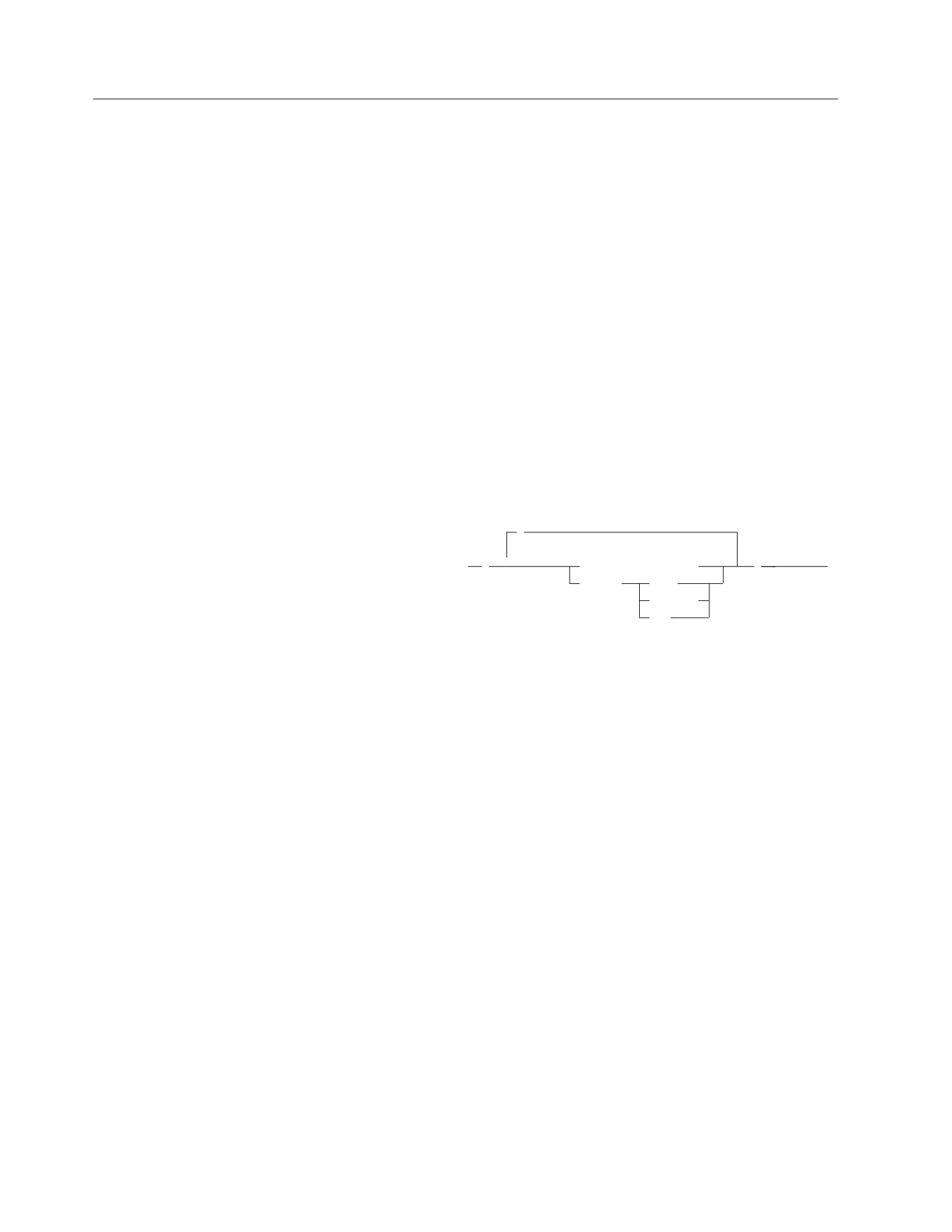
ALTER DBSPACE
ALTER DBSPACE
The ALTER DBSPACE statement lets you change the amount of free space that the
database manager reserves on each data page, and lets you change the type of a
lock on a public dbspace.
Invocation
This statement can be embedded in an application program or issued interactively.
It is an executable statement that can be dynamically prepared.
Authorization
The privileges held by the authorization ID of the statement must include at least
one of the following:
v For a private dbspace:
Ownership of the dbspace or
DBA authority.
v For a public dbspace:
DBA authority.
Syntax
,
(1)
▼
►► ALTER DBSPACE dbspace_name
(
PCTFREE = integer
)
►◄
LOCK =
PAGE
DBSPACE
ROW
Notes:
1
If either of these clauses is specified more than once, the value with the first
specification is used.
Description
dbspace_name
Identifies the dbspace to be changed. It must be a dbspace that exists at the
application server.
PCTFREE
Is the percentage of space on each page that the database manager is to keep
empty when inserting data into the dbspace’s tables. A common practice is to
set PCTFREE to a higher value when a dbspace is acquired, load the data, and
create an index defined in the same order as the data was loaded. After this
process is complete, the PCTFREE is lowered. Some or all of the free space is
now available for inserts. The judicious use of reserved free space may result
in a more favorable placement of data on pages and, therefore, improve access
time.
LOCK
Alters the lock size of a public dbspace. The valid lock sizes are DBSPACE,
PAGE, and ROW. If DBSPACE is specified, the system locks the whole
dbspace. Page causes the smallest lockable unit to be a page (4096 bytes); ROW
causes this unit to be a row.
148
SQL Reference
ALTER DBSPACE
Examples
Example 1
Alter your private dbspace named FCPSPACE so that no space is reserved on any
of the pages.
ALTER DBSPACE FCPSPACE
(PCTFREE=0)
Example 2
Alter a public dbspace named SPACE so that the pages are locked and the amount
of free space is reduced to 3%.
ALTER DBSPACE PUBLIC.SPACE
(PCTFREE=3, LOCK=PAGE)
Chapter 6. Statements
149

ALTER PROCEDURE
ALTER PROCEDURE
The ALTER PROCEDURE statement is used to alter the definition of an existing
stored procedure. It updates the catalog and the corresponding cached information.
The STOP PROC command must be issued with the REJECT option before the
ALTER PROCEDURE statement will be accepted.
Invocation
This statement can be issued from an application program or interactively. It is an
executable statement that can be dynamically prepared.
Authorization
The issuer of the ALTER PROCEDURE must have DBA authority.
Syntax
ALTER PROCEDURE
►► ALTER PROCEDURE procedure-name
►
AUTHID authid
,
(1)
► ▼
►◄
options
Notes:
1
One or more clauses may be specified, however each clause may be specified
at most once.
150
SQL Reference
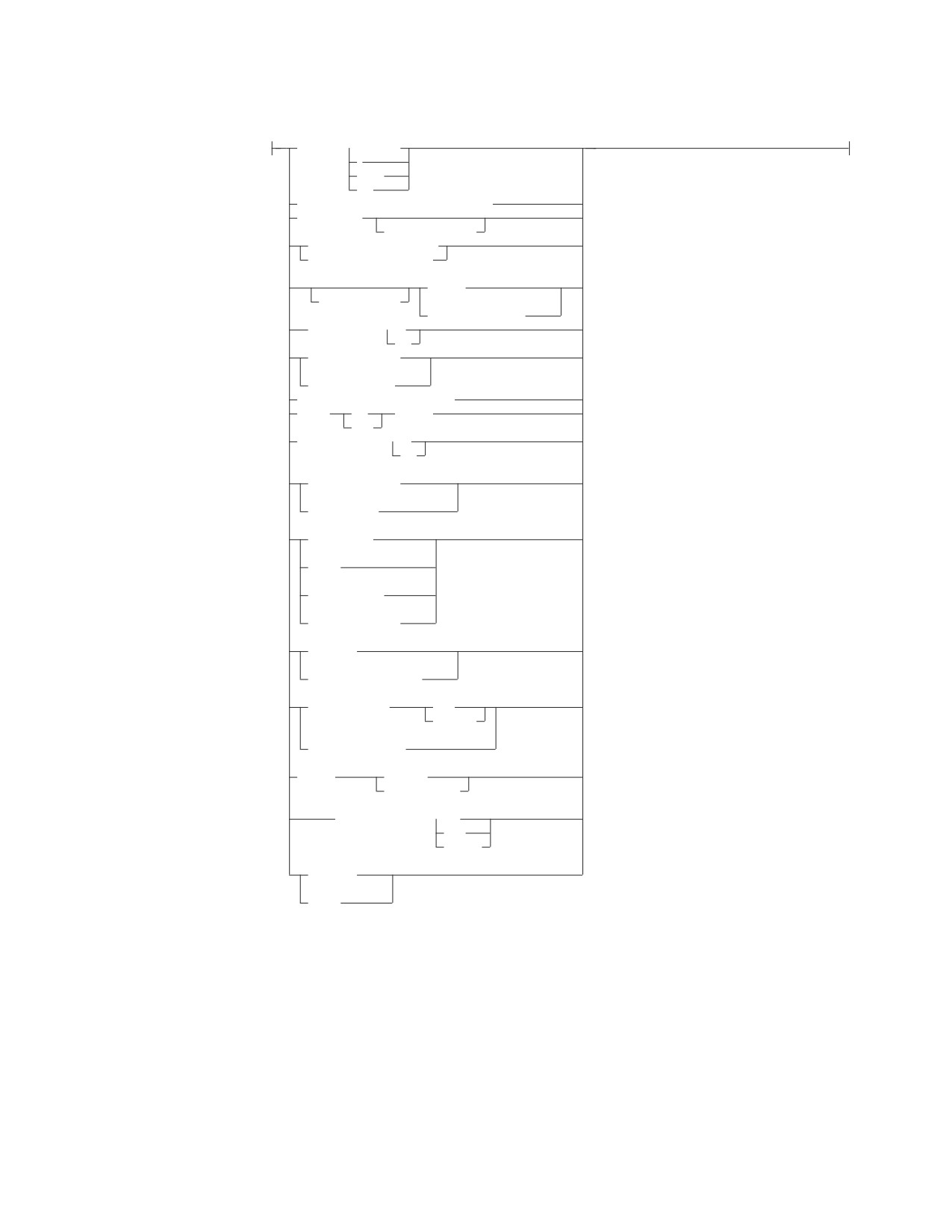
ALTER PROCEDURE
options:
LANGUAGE ASSEMBLE
C
COBOL
PLI
EXTERNAL NAME external-program-name
SERVER GROUP
server-group-name
DEFAULT SERVER GROUP YES
DEFAULT SERVER GROUP NO
(1)
GENERAL
PARAMETER STYLE
(2)
GENERAL WITH
NULLS
STAY RESIDENT NO
YES
PROGRAM TYPE MAIN
(3)
PROGRAM TYPE SUB
RUN OPTIONS run-time-options
RESULT
SET
integer
SETS
COMMIT ON RETURN NO
YES
(4)
(5)
NOT DETERMINISTIC
(4)
(6)
DETERMINISTIC
(4)
CONTAINS SQL
(4)
NO SQL
(4)
READS SQL DATA
(4)
MODIFIES SQL DATA
(4)
NO COLLID
(4)
COLLID collection-id
(4)
WLM ENVIRONMENT
name
(name,*)
(4)
NO WLM ENVIRONMENT
(4)
ASUTIME
NO LIMIT
LIMIT integer
(4)
EXTERNAL SECURITY DB2
USER
DEFINER
(4)
NO DBINFO
(4)
DBINFO
Notes:
1
SIMPLE CALL may be used as an alternative to GENERAL. This is for
compatibility within the DB2 family.
2
SIMPLE CALL WITH NULLS may be used as an alternative to GENERAL
WITH NULLS. This is for compatibility within the DB2 family.
3
Currently, DB2 Server for VSE & VM supports stored procedures written as
main programs only.
4
This parameter is included for compatibility with the DB2 family. If specified,
it is ignored.
Chapter 6. Statements
151
ALTER PROCEDURE
5
VARIANT may be specified as an alternative to NOT DETERMINISTIC. This
is for compatibility within the DB2 family.
6
NOT VARIANT may be specified as an alternative to DETERMINISTIC. This
is for compatibility within the DB2 family.
Only the parameters that are meaningful to DB2 Server for VSE & VM are
described here. If a parameter is not specified on the ALTER PROCEDURE
statement, its value is unchanged.
Description
procedure-name
Names the stored procedure. For DB2 Server for VSE & VM, the name must be
an ordinary identifier of 18 characters or less.
authid
The authorization ID for the stored procedure. The authid must be an ordinary
identifier of 8 characters or less. If specified, then only the version of
procedure-name that is accessible only by authid will be altered.
LANGUAGE
Specifies the programming language used to create the stored procedure. All
stored procedure programs must be designed to run in the IBM Language
Environment.
ASSEMBLE
Specifies that the stored procedure is written in Assembler.
C
Specifies that the stored procedure is written in C.
COBOL
Specifies that the stored procedure is written in COBOL.
PLI
Specifies that the stored procedure is written in PLI.
EXTERNAL NAME external-program-name
Identifies the load module or phase associated with the stored procedure. The
external-program-name must be an ordinary identifier of 8 characters or less. The
load module or phase does not need to exist when the ALTER PROCEDURE
statement is issued. However, when a CALL for the stored procedure is issued,
the load module must exist and be accessible to the stored procedure server.
SERVER GROUP server-group-name
Identifies the group of stored procedure servers in which this stored procedure
will run. If specified, server-group-name must be an ordinary identifier of 18
characters or less. server-group-name must be defined in
SYSTEM.SYSPSERVERS.
The SERVER GROUP clause can be specified without a server group name.
This provides the ability to take a stored procedure out of a named group and
move it to the default group. If server-group-name is not specified, the stored
procedure must be able to run in the default group. The DEFAULT SERVER
GROUP clause determines whether the stored procedure can run in the default
stored procedure server group.
DEFAULT SERVER GROUP
Specifies whether the stored procedure can run in the default server group.
YES The stored procedure can run in the default server group.
NO The stored procedure cannot run in the default server group. If NO is
152
SQL Reference