Kia Rio / Rio Hatchback (2022 year). Manual in english - page 15
Driving your vehicle
•
The driver can monitor his/her driv-
Taking a break
ing conditions on the cluster.
WARNING
- When the 'Inattentive Driving
For your safety, change the
Warning' is deselected from the
Settings after parking the vehi-
User Settings 'System Off' is dis-
cle at a safe location.
played.
- The function will operate when
vehicle speed is between 0~130
CAUTION
mph (0 ~ 210 km/h).
•
Driver Attention Warning may
- When vehicle speed is not within
suggest a break depending on
the operating speed, the mes-
the driver's driving pattern or
sage 'Standby' will be displayed.
habits, even if the driver does-
n't feel fatigue.
•
The driver's attention level is dis-
ODL3059147L
played on the scale of 1 to 5. The
•
Driver Attention Warning is a
•
The 'Consider taking a break' mes-
lower the level is, the more inatten-
supplemental function and
sage will appear on the cluster and
tive the driver is.
may not be able to determine
an audible warning will sound to
whether the driver is inatten-
•
The level decreases when the driv-
suggest that the driver take a
tive.
er does not take a break for a cer-
break, when the driver's attention
tain period of time.
level is below 1.
•
The driver who feels fatigued
should take a break at a safe
•
Driver Attention Warning will not
location, even though there is
suggest a break when the total
no break suggestion by Driver
driving time is shorter than 10 min-
Attention Warning.
utes or 10 minutes has not passed
after the last break was suggested.
5
79
Driving your vehicle
✽ NOTICE
Leading Vehicle Departure Alert
CAUTION
•
For more details on setting the
This reminds the driver the leading
•
Leading Vehicle Departure
functions in the infotainment sys-
vehicle's driving departure after stop-
tem, refer to "Instrument cluster"
ping.
Warning is a supplemental
function and may not alert the
in chapter 4.
driver whenever the front
•
Driver Attention Warning will
WARNING
vehicle departs from a stop.
reset the last break time to 00:00
in the following situations:
• If any other function's warn-
•
Always check the front of the
- The engine is turned off
ing message is displayed or
vehicle and road conditions
- The driver unfastens the seat belt
audible warning is generated,
before departure.
and opens the driver's door.
Leading Vehicle Departure
- The vehicle is stopped for more
Warning message may not be
than 10 minutes.
displayed and audible warn-
•
When the driver resets Driver
ing may not be generated.
Attention Warning, the last break
• The driver should hold the
time is set to 00:00 and the driver's
responsibility to safely drive
attention level is set to High.
and control the vehicle.
5
80
Driving your vehicle
Driver Attention Warning mal-
Limitations of Driver Attention
Leading Vehicle Departure Alert
function and limitations
Warning
function
Driver Attention Warning may not
Driver Attention Warning mal-
work properly in the following situa-
function
tions:
• The vehicle is driven violently.
• The vehicle intentionally crosses
over lanes frequently.
• The vehicle is controlled by Driver
Assistance function, such as Lane
Keeping Assist.
OSC050292N
ODL3059149L
When Driver Attention Warning is not
working properly, the 'Check Driver
Attention Warning
(DAW) system'
warning message will appear on the
cluster. If this occurs, have your vehi-
cle inspected by an authorized Kia
OCK050295
dealer.
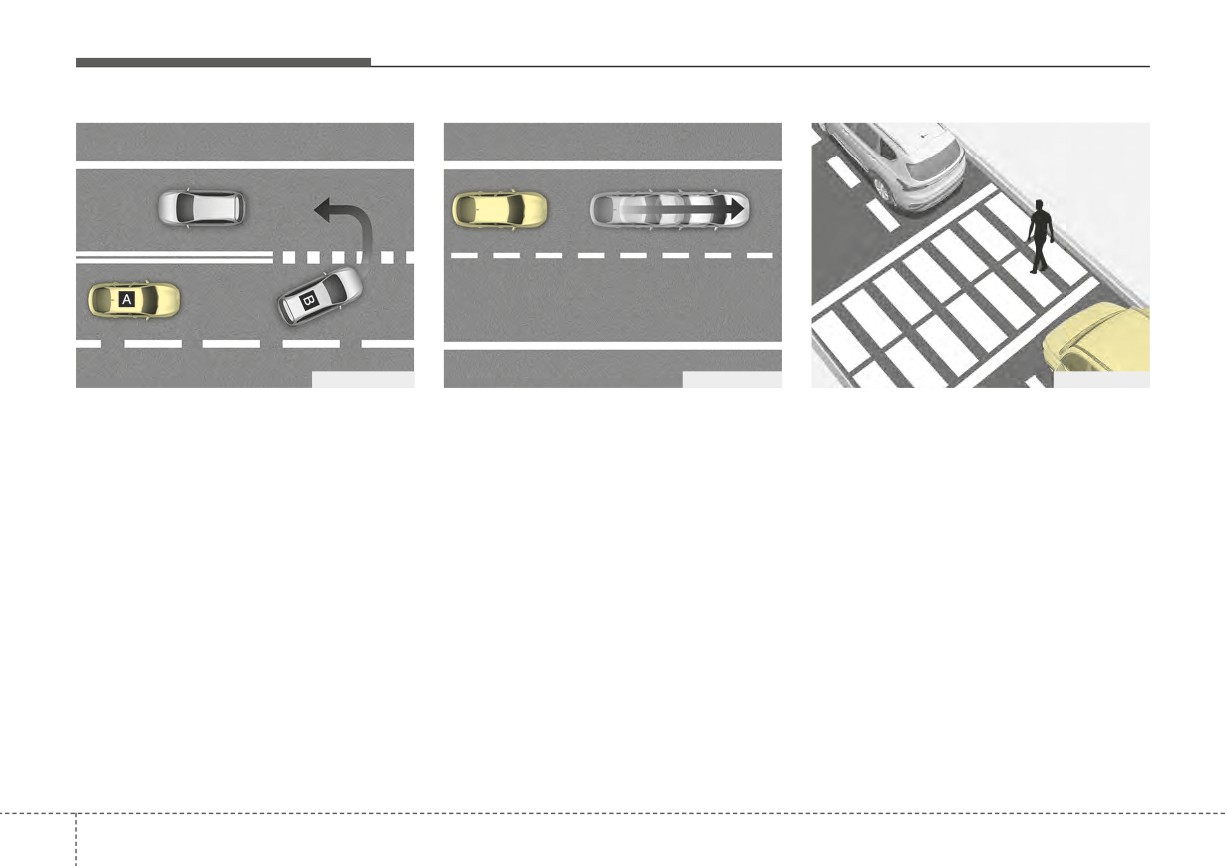
[A]: Your vehicle, [B]: Front vehicle
• When the vehicle cuts in
If a vehicle cuts in front of your vehi-
cle, Leading Departure Alert may not
operate properly.
5
81
Driving your vehicle
OSC050287N
OSC050288N
OSC050289N
[A] : Your vehicle, [B] : Front vehicle
• When the vehicle ahead abruptly
• When a pedestrian is between you
departs
and the vehicle ahead
• When the vehicle ahead sharply
steers
If the vehicle in front abruptly depar-
If there is a pedestrian(s) in between
If the vehicle in front makes a sharp
tures, Leading Vehicle Departure
you and the vehicle in front, Leading
Alert may not operate properly.
Vehicle Departure Alert may not
turn, such as to turn left or right or
make a U-turn, etc., Leading Vehicle
operate properly.
Departure Alert may not operate
properly.
5 82
Driving your vehicle
OSC050290N
OSC050291N
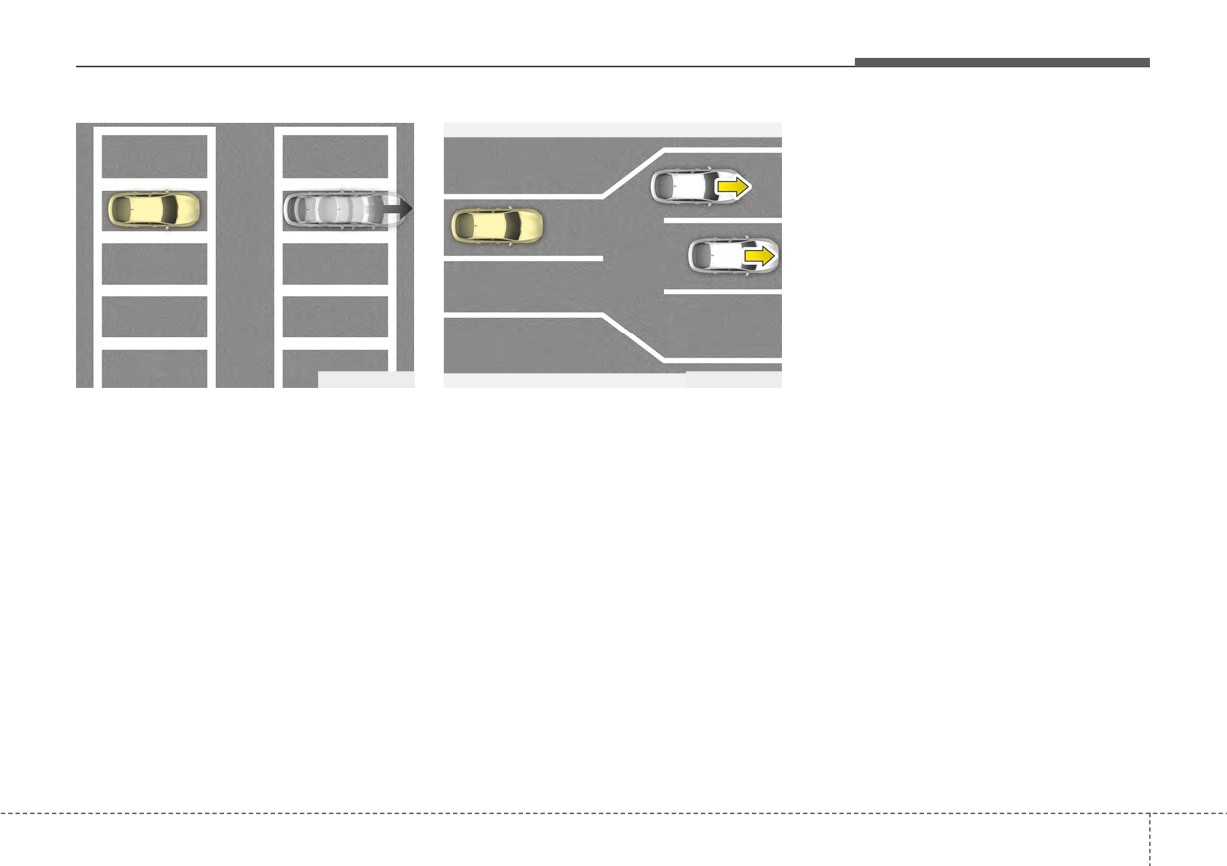
• When in a parking lot
• When driving at a tollgate or inter-
section, etc.
If a vehicle parked in front drives
away from you, Leading Vehicle
If you pass a tollgate or intersection
Departure Alert may alert you that
with lots of vehicles or you drive
the parked vehicle is driving away.
where lanes are merged or divided
frequently,
Leading
Vehicle
Departure Alert may not operate
properly.
5
83
Driving your vehicle
CRUISE CONTROL (CC) (IF EQUIPPED)
■ Type A
Cruise Control operation
On a steep slope, the vehicle may
slightly slow down or speed up while
Setting set speed
driving uphill or downhill.
OSC041596N
■ Type B
OSC051094N
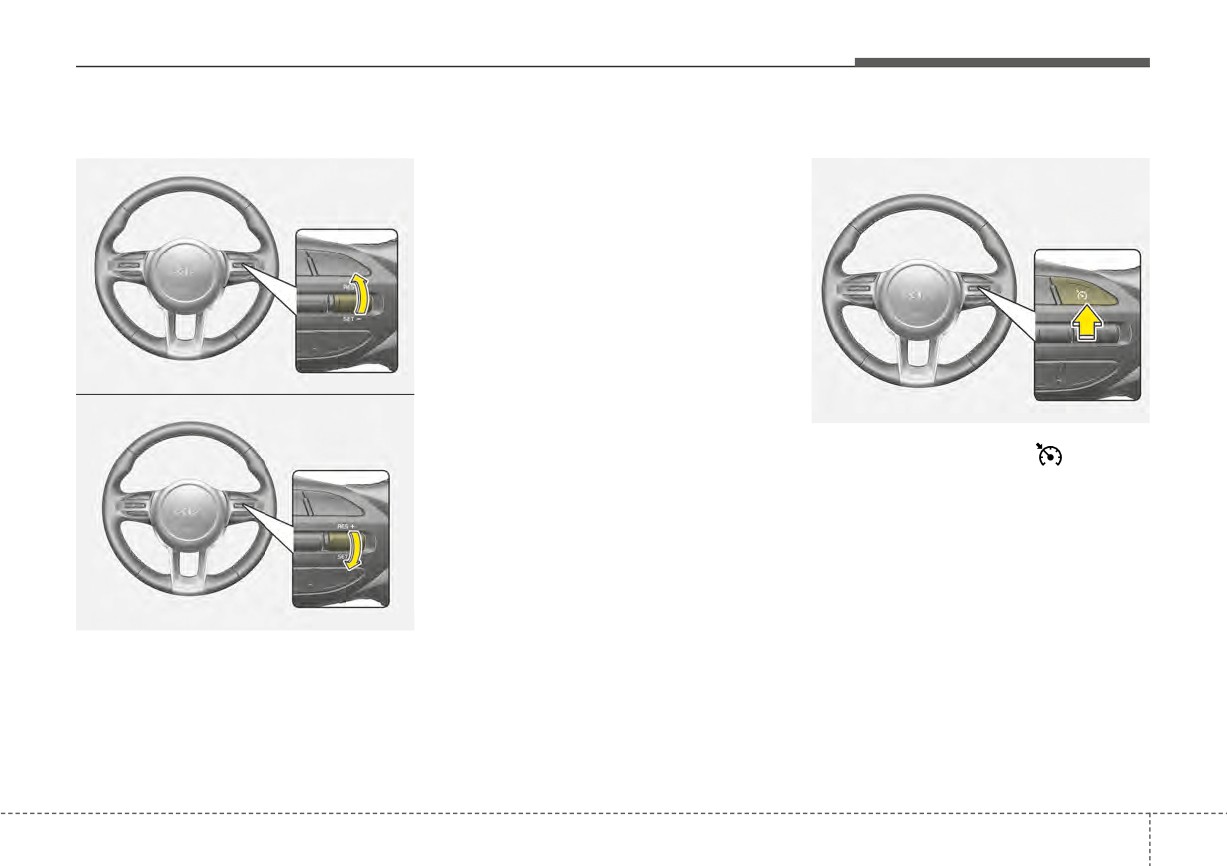
1. Press the Driving Assist (
) but-
ton on the steering wheel to turn
the function on. The CRUISE indi-
cator will illuminate.
2. Accelerate to the desired speed,
ODL3A050124
which must be more than 20 mph
(1) CRUISE indicator
(30 km/h).
(2) Set speed
3. Push the SET- switch down and
(3) Set indicator
release it. The SET indicator (Type
A) or the set speed on the LCD
Cruise Control allows you to drive at
screen (Type B) will illuminate.
speeds above 20 mph (30 km/h)
without depressing the accelerator
4. Release the accelerator pedal.
pedal.
5
84
Driving your vehicle
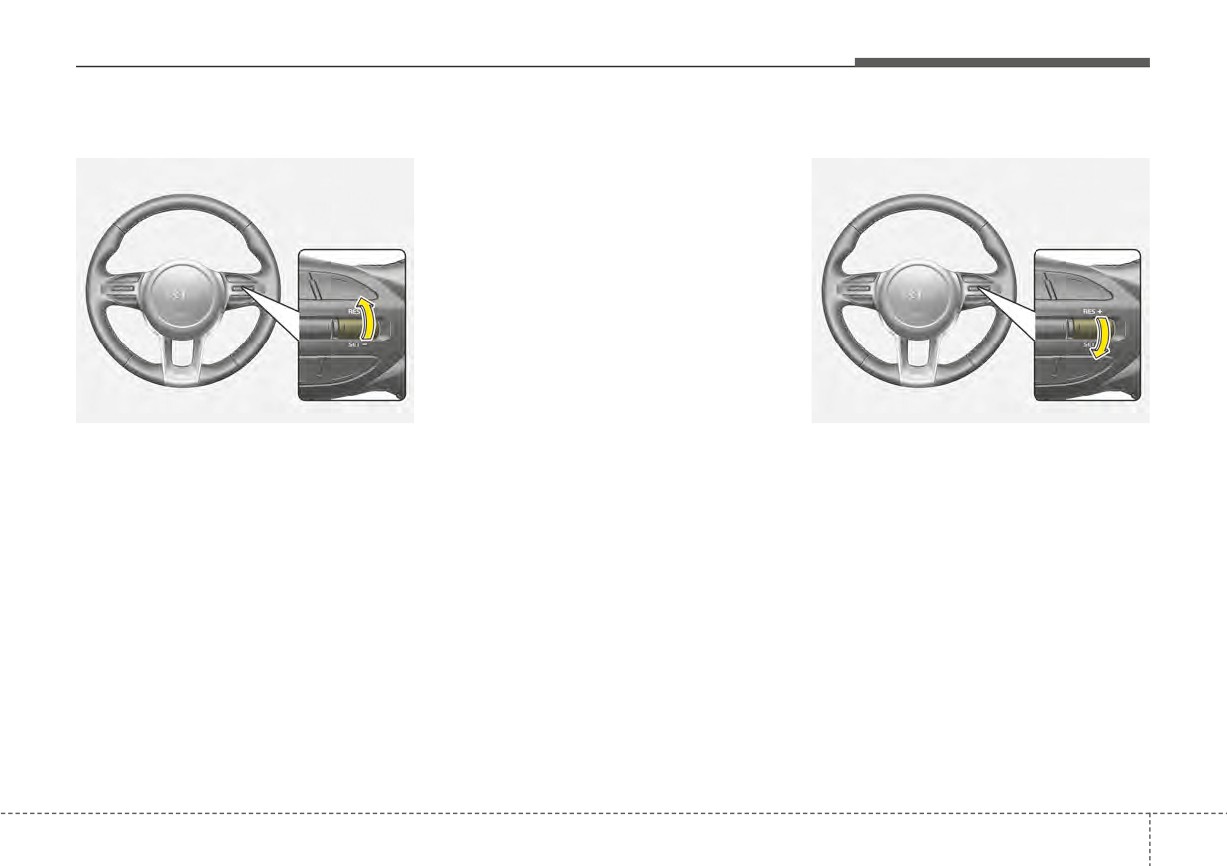
Increasing set speed :
Release the switch when the Decreasing set speed:
desired speed is shown and the
vehicle will accelerate to that
speed.
OSC051096N
OSC051097N
•
Push the RES+ switch up and
•
Push the SET- switch down and
release it immediately. The set
release it immediately. The set
speed will increase by 1 mph (1
speed will decrease by 1 mph (1
km/h) each time the switch is oper-
km/h) each time the switch is oper-
ated in this manner.
ated in this manner.
•
Push the RES+ switch up and hold
•
Push the SET- switch down and
it while monitoring the set speed
hold it while monitoring the set
on the cluster. The set speed will
speed on the cluster. The set
increase to the nearest multiple of
speed will decrease to the nearest
5 mph (10 km/h) at first, and then
multiple of 5 mph (10 km/h) at first,
increase by 5 mph (10 km/h) each
and then decrease by 5 mph (10
time the switch is operated in this
km/h) each time the switch is oper-
manner.
ated in this manner.
Release the switch at the speed
you want to maintain.
5
85
Driving your vehicle
Accelerating temporarily
Temporarily pausing Cruise
Automatically
Control
Cruise Control will be paused when:
If you want to speed up temporarily
when Cruise Control is on, depress
Manually
• Depress the brake pedal.
the accelerator pedal. Increased
• Shift into N (Neutral)
speed will not interfere with Cruise
• ESC (Electronic Stability Control)
Control operation or change the set
is operating.
speed.
• Decrease the vehicle speed to less
To return to the set speed, take your
than approximately
20 mph (30
foot off the accelerator pedal.
km/h).
The SET indicator (Type A) or the set
speed on the LCD screen (Type B)
will turn off but the CRUISE indicator
will stay on.
OSC051098N
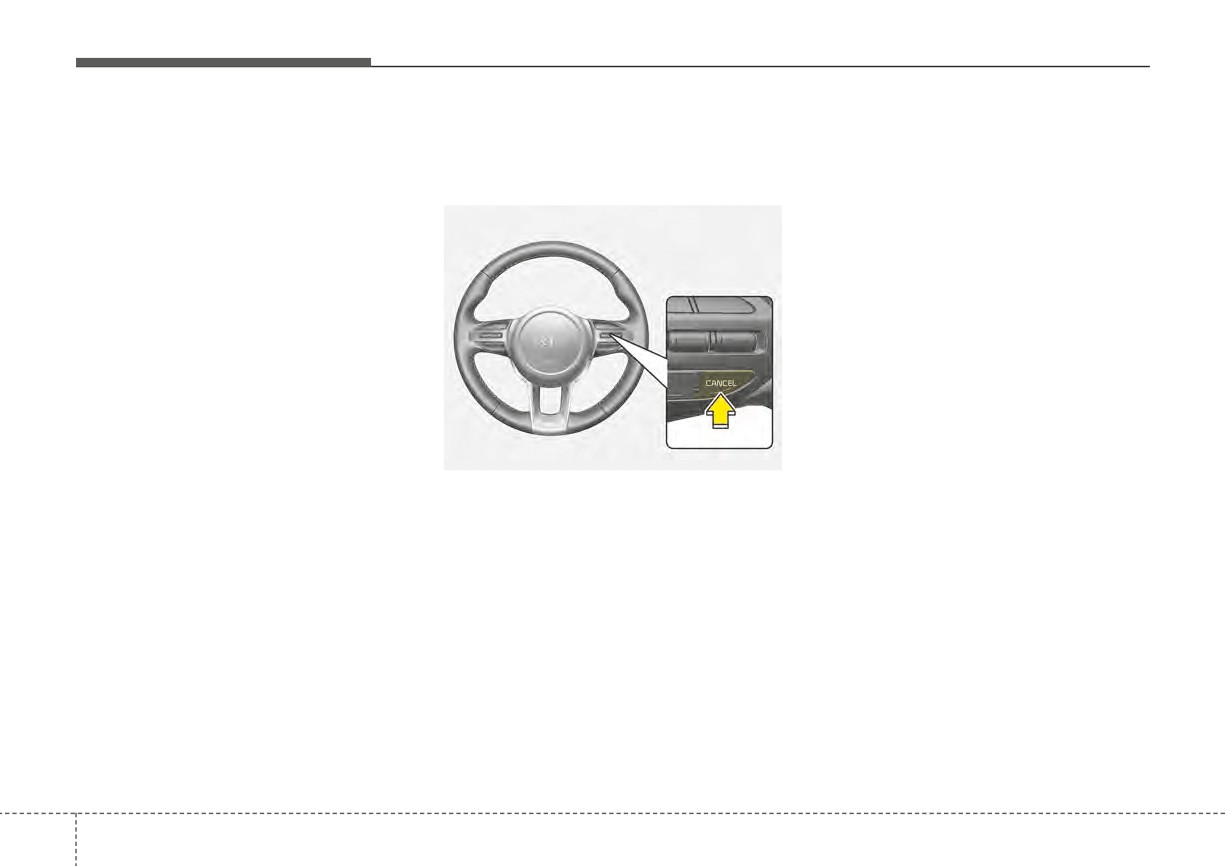
If you want
to
pause
temporarily
when Cruise Control is on, push the
CANCEL button.
The SET indicator (Type A) or the set
speed on the LCD screen (Type B)
will turn off but the CRUISE indicator
will stay on.
5
86
Driving your vehicle
Resuming Cruise Control
If you push the RES+ switch up, vehi- Turning off Cruise Control
cle speed will resume to the preset
speed.
Vehicle speed must be above
20
mph (30 km/h) for the function to
resume.
OSC051096N
OSC051094N
Press the Driving Assist
button to
turn Cruise Control off. The CRUISE
indicator will go off.
Always press the Driving Assist but-
ton to turn Cruise Control off when
not in use.
OSC051097N
Push the RES+ or SET- switch.
If you push the SET- switch down,
vehicle speed will be set to the cur-
rent speed on the cluster.
5
87
Driving your vehicle
(Continued)
WARNING
- When driving in heavy traf-
Take the following precautions
fic, or when traffic condi-
when using Cruise Control:
tions make it difficult to
•
Always set the vehicle speed
drive at a constant speed
under the speed limit in your
- When driving on rainy, icy, or
country. Keep Cruise Control
snow-covered roads
off when the function is not in
use, to avoid inadvertently
- When driving on hilly or
setting a speed. Check that
windy roads
the CRUISE indicator is off.
- When driving in windy areas
•
Cruise Control does not sub-
- When driving with limited
stitute for proper and safe
view (possibly due to bad
driving. It is the responsibility
weather, such as fog, snow,
of the driver to always drive
rain and sandstorm)
safely and should always be
•
Do not use Cruise Control
aware of unexpected and sud-
when towing a trailer.
den situations occurring.
•
Always drive cautiously to
prevent unexpected and sud-
den situations from occur-
ring. Pay attention to the road
conditions at all times.
•
Do not use Cruise Control
when it may be unsafe to keep
the vehicle at a constant speed:
(Continued)
5
88
Driving your vehicle
LANE FOLLOWING ASSIST (LFA) (IF EQUIPPED)
Lane Following Assist is designed to
Detecting sensor
detect lane markings or vehicles on
CAUTION
■ Front view camera
the road, and assists the driver's
For more details on the precau-
steering to help center the vehicle in
tions of the front view camera,
the lane.
refer to "Forward Collision-
Avoidance Assist
(FCA)
(if
equipped)" in chapter 5.
WARNING
Lane Following Assist is a sup-
plemental system and is not a
substitute for safe driving. It is
the responsibility of the driver
to always check the speed and
distance to the vehicle ahead.
OSC051301N
Always drive safely and use
caution.
The front view camera is used as a
detecting sensor to detect lane
markings and front vehicles.
Refer to the picture above for the
detailed location of the detecting
sensor.
5
89
Driving your vehicle
Lane Following Assist set-
Lane Following Assist opera-
CAUTION
tings
tion
When the steering wheel is not
Setting features
Warning and control
controlled, the green (
) indi-
cator light will blink and change
to white.
OSC051283N
OSC041598N
Turning Lane Following Assist
Lane Following Assist
ON/OFF
If the vehicle ahead or both lane
With the ignition switch or ENGINE
markings are detected and your vehi-
START/STOP button in the ON posi-
cle speed is below 120 mph (190
tion, press the Lane Driving Assist
km/h), the green (
) indicator light
button
located on the steering
will illuminate on the cluster, and the
wheel to turn on Lane Following
function will help center the vehicle in
Assist. The white or green (
) indi-
the lane by assisting with steering.
cator light will illuminate on the clus-
ter.
Press the
button again to turn
off the function.
5
90
Driving your vehicle
WARNING
•
The steering wheel may not
be assisted if the steering
wheel is held very tight or the
steering wheel is steered over
a certain level.
•
Lane Following Assist does
not operate at all times. It is the
responsibility of the driver to
safely steer the vehicle and to
OSC051300N
ODL3A050291
maintain the vehicle in its lane.
Hands-off warning
If the driver still does not have their
•
The hands-off warning mes-
If the driver takes their hands off the
hands on the steering wheel after the
sage may appear late depend-
steering wheel for several seconds,
hands-off warning, the 'Lane
ing on road conditions. Always
the 'Keep hands on steering wheel'
Following Assist
(LFA) canceled'
have your hands on the steer-
warning message will appear and an
warning message will appear and
ing wheel while driving.
audible warning will sound in stages.
Lane Following Assist will be auto-
•
If the steering wheel is held very
matically canceled.
• First stage: Warning message
lightly the hands-off warning
message may appear because
• Second stage: Warning message
the function may not recognize
(red steering wheel) and audible
that the driver has their hands
warning
on the steering wheel.
•
If you attach objects to the
steering wheel, the hands-off
warning may not work properly.
5
91
Driving your vehicle
✽ NOTICE
■ Lane undetected
• Even though the steering is assist-
ed by Lane Following Assist, the
• For more details on setting the
driver may control the steering
functions, refer to "LCD Display
wheel.
Mode" in chapter 4.
• When both lane markings are
• The steering wheel may feel heav-
detected, the lane lines on the clus-
ier or lighter when the steering
ter will change from gray to white.
wheel is assisted by the function
than when it is not.
OSC041599N
■ Lane detected
OSC041600N
• If lane markings are not detected,
steering wheel control by Lane
Following Assist can be limited
depending on whether a vehicle is
in front or the driving conditions of
the vehicle.
5
92
Driving your vehicle
Lane Following Assist mal-
Limitations of Lane Following
function and limitations
Assist
For more details on "Limitations of
Lane Following Assist malfunc-
the function", refer to "Lane Keeping
tion
Assist (LKA) (if equipped)" in chapter
5.
WARNING
For more details on the function
precautions, refer to "Lane
Keeping Assist
(LKA)
(if
equipped)" in chapter 5.
ODL3059139L
When Lane Following Assist is not
working properly, the 'Check Lane
Following Assist (LFA) system' warn-
ing message will appear on the clus-
ter.
If this occurs, have your vehicle
inspected by an authorized Kia deal-
er.
5
93
Driving your vehicle
REAR CROSS-TRAFFIC COLLISION WARNING (RCCW) (IF EQUIPPED)
Rear Cross-Traffic Collision Warning
Detecting sensor
is designed to detect vehicles
■ Rear corner radar
approaching from the rear left and
right side while your vehicle is
reversing, and warning the driver that
a collision is imminent with a warning
message and an audible warning.
WARNING
Rear Cross-Traffic Collision
Warning is a supplemental sys-
OSC050099
tem and is not a substitute for
safe driving. Rear Cross-Traffic
[A]: Rear Cross-Traffic Collision
OSC051302N
Collision Warning may not
Warning operating range
detect all objects behind the
Refer to the picture above for the
vehicle. Always drive safely and
detailed location of the detecting
CAUTION
use caution.
sensor.
The time of warning may vary
depending on vehicle speed of
CAUTION
the approaching vehicle.
For more details on the precau-
tions of the rear corner radar,
refer to "Blind-Spot Collision
Warning (BCW) (if equipped)" in
chapter 5.
5
94
Driving your vehicle
Rear Cross-Traffic Collision
Warning Timing
Warning settings
WARNING
When the engine is restarted,
Setting features
Rear Cross-Traffic Collision
Warning will always turn on.
However, if 'Off' is selected after
the engine is restarted, the driv-
er should always be aware of
the surroundings and drive
safely.
✽ NOTICE
OJA050141L
Settings for Rear Cross-Traffic
Collision Warning include Rear
With the ignition switch or ENGINE
OJA050145L
Cross-Traffic Collision Warning and
START/STOP button in the ON posi-
Rear Cross-Traffic Collision-
tion, select 'Driver Assistance
→
Rear Cross-Traffic Safety
Avoidance Assist.
Warning Timing' from the User
With the ignition switch or ENGINE
Settings menu to change the initial
START/STOP button in the ON posi-
warning activation time for Rear
✽ NOTICE
tion, select 'Driver Assistance
→
Cross-Traffic Collision Warning.
Parking Safety → Rear Cross-Traffic
If the engine is restarted, Warning
When the vehicle is first delivered,
Timing will maintain the last setting.
Safety' from the User Settings menu
warning timing is set to 'Normal' If
to turn on Rear Cross-Traffic
you change the warning timing, the
Collision Warning and deselect to
warning time of other Driver Assist
turn off the function.
functions may change.
5
95
Driving your vehicle
Rear Cross-Traffic Collision
CAUTION
Warning operation
•
The setting of the Warning
Rear Cross-Traffic Collision
Timing applies to all functions
Warning warning
of Rear Cross-Traffic Collision
Warning.
Rear Cross-Traffic Collision Warning
will warn the driver when a collision
•
Even though
‘Normal’ is
is imminent.
selected for warning timing, if
a vehicle from the left or right
side approaches at high
speed, the warning may seem
late.
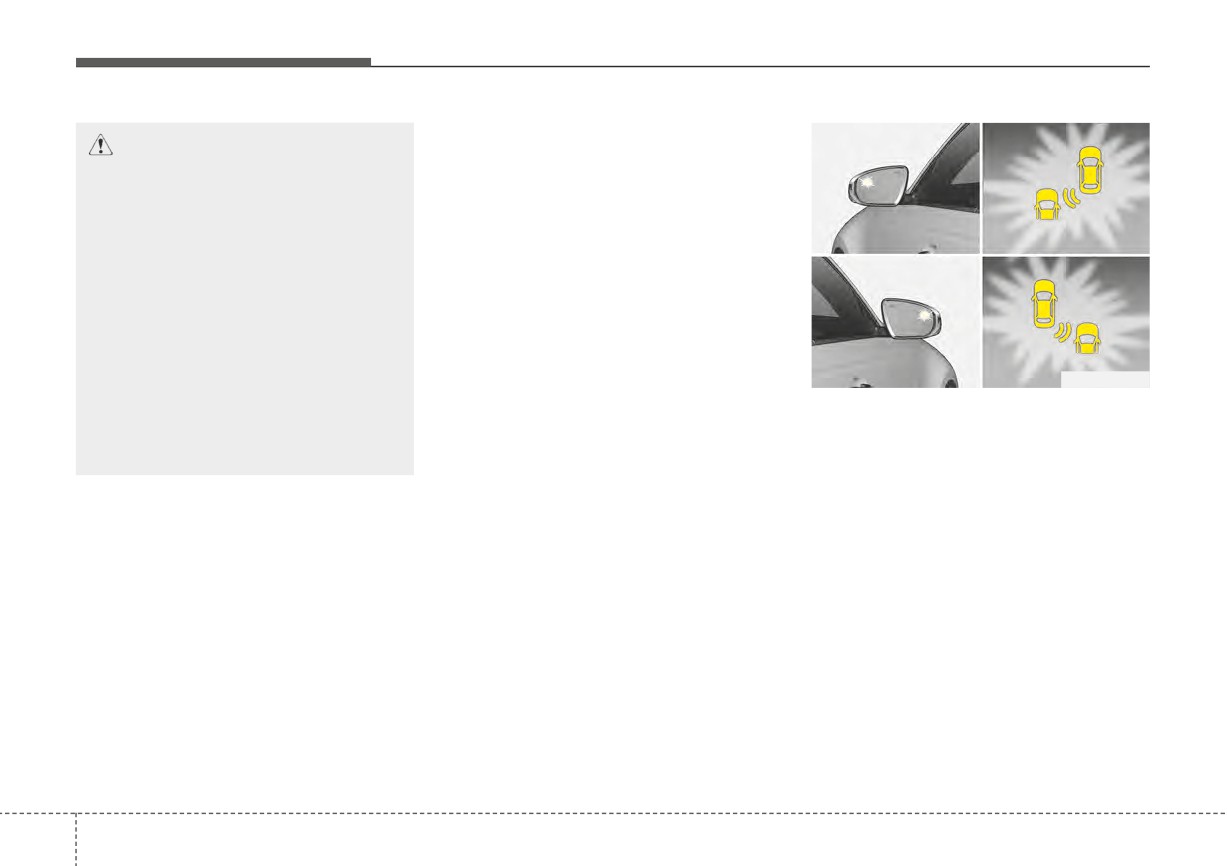
ORJ058127
•
Select 'Late' for Warning
Collision warning
Timing when traffic is light and
To warn the driver of an approaching
when driving speed is slow.
vehicle from the rear left/right side of
your vehicle, the outside rearview
mirror will blink and a warning will
appear on the cluster. At the same
time, an audible warning will sound.
If Rear view camera is operating, a
warning will also appear on the info-
tainment screen.
5
96
Driving your vehicle
Rear Cross-Traffic Collision Warning
Rear Cross-Traffic Collision
will operate when the following con-
Warning malfunction and limi-
ditions are satisfied:
tations
• Your vehicle gear is shifted to R
Rear Cross-Traffic Collision
(Reverse)
Warning malfunction
• Your vehicle speed is below 5 mph
(8 km/h)
• The approaching vehicle is within
approximately 82 feet (25 m) from
the left and right side of your vehicle
• The speed of the vehicle
ODL3A050286
approaching from the left and right
When the outside rearview mirror
is above 3 mph (5 km/h)
warning light is not working properly,
the 'Check side view mirror warning
✽ NOTICE
light' warning message will appear
on the cluster for several seconds,
If the operating conditions are satis-
ODL3A050285
and the master (
) warning light
fied, there will be a warning when-
will illuminate on the cluster. If this
ever the vehicle approaches from the
When Rear Cross-Traffic Collision
occurs, have your vehicle inspected
left or right side even though your
Warning is not working properly, the
by an authorized Kia dealer.
vehicle speed is 0 mph (0 km/h).
'Check Rear Cross-Traffic Safety
system' warning message will
appear on the cluster for several sec-
onds, and the master (
) warning
light will illuminate on the cluster. If
this occurs, have your vehicle
inspected by an authorized Kia deal-
er.
5
97
Driving your vehicle
Rear Cross-Traffic Collision
If
Rear Cross-Traffic Collision
Limitations of Rear Cross-Traffic
Warning disabled
Warning does not operate properly
Collision Warning
after it is removed, have the function
Rear Cross-Traffic Collision Warning
inspected by an authorized Kia deal-
may not operate properly, or it may
er.
operate unexpectedly under the fol-
lowing circumstances:
WARNING
• Departing from where trees or
•
Even though the warning
grass is overgrown
message does not appear on
• Departing from where roads are
the cluster, Rear Cross-Traffic
wet
Collision Warning may not
• Speed of the approaching vehicle
properly operate.
is fast or slow
•
Rear Cross-Traffic Collision
ODL3A050287
Warning may not properly
operate in an area (e.g. open
✽ NOTICE
When the rear bumper around the
terrain), where any substance
For more details on the limitations
rear-side radar or sensor is covered
are not detected after turning
of the rear corner radar, refer to
with foreign matters, such as snow or
ON the engine.
"Blind-Spot Collision Warning
rain, or if you have installed a trailer
(BCW) (if equipped)" in chapter 5.
or carrier, it can reduce the detecting
performance and temporarily limit or
CAUTION
disable Rear Cross-Traffic Collision
Turn off Rear Cross-Traffic
Warning.
Collision Warning to install a
If this occurs, the 'Rear Cross-Traffic
trailer, carrier, etc., or remove the
Safety disabled. Radar blocked'
trailer, carrier, etc. to use Rear
warning message will appear on the
Cross-Traffic Collision Warning.
cluster.
Rear Cross-Traffic Collision Warning
will operate properly when such foreign
material or trailer, etc., is removed.
5
98
Driving your vehicle
(Continued)
(Continued)
WARNING
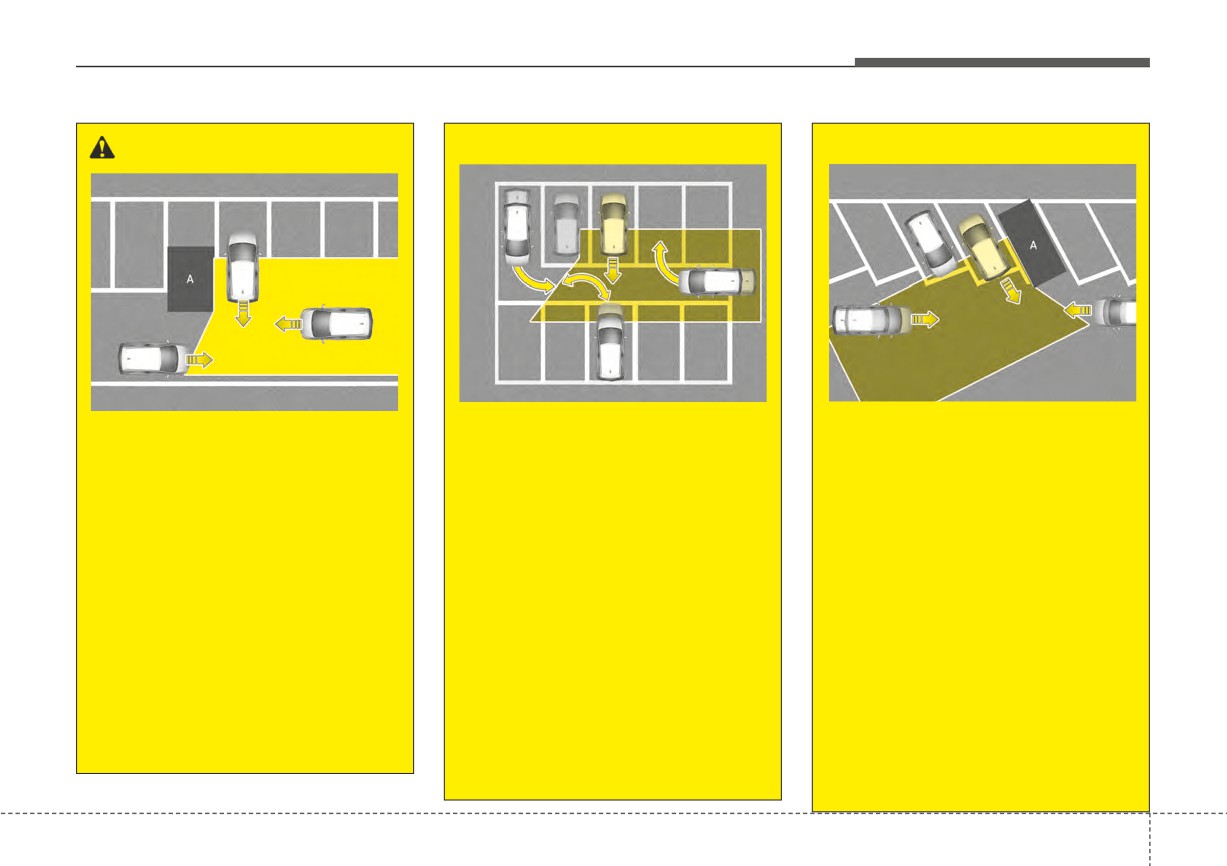
OSC050101
OSC050102
OSC050100
[A]: Vehicle
• When the vehicle is in a com-
[A]: Structure
plex parking environment
• When the vehicle is parked
• Driving near a vehicle or
diagonally
Rear Cross-Traffic Collision
structure
Warning may detect vehicles
Rear Cross-Traffic Collision
Rear Cross-Traffic Collision
which are parking or pulling out
Warning may detect vehicles
Warning may be limited when
which are parking or pulling out
near your vehicle (e.g. a vehicle
driving near a vehicle or struc-
near your vehicle (e.g. a vehicle
leaving beside your vehicle, a
ture, and may not detect the
leaving beside your vehicle, a
vehicle parking or pulling out in
vehicle approaching from the left
vehicle parking or pulling out in
the rear area, a vehicle
or right. If this occurs, the func-
the rear area, a vehicle
approaching your vehicle mak-
tion may not warn the driver
approaching your vehicle mak-
ing a turn, etc.). If this occurs,
when necessary.
ing a turn, etc.). If this occurs,
the function may unnecessarily
the function may unnecessarily
Always check your surround-
warn the driver.
warn the driver.
ings while backing up.
Always check your surround-
Always check your surround-
(Continued)
ings while backing up.
ings while backing up.
(Continued)
(Continued)
5
99
Driving your vehicle
(Continued)
(Continued)
(Continued)
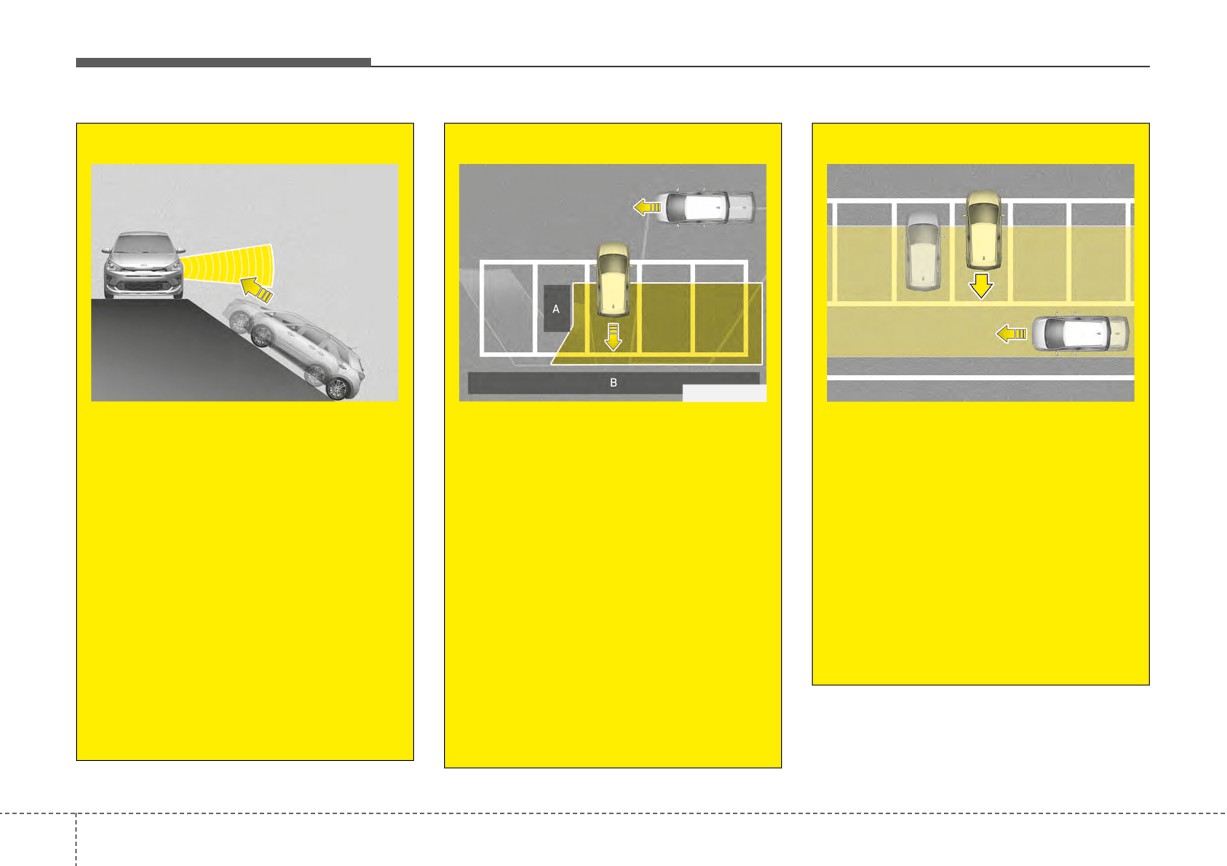
OSC051104N
OSC050103
OSC050286N
• When the vehicle is on or near
[A]: Structure, [B]: Wall
• When the vehicle is parked
a slope
rearward
• Pulling into the parking space
Rear Cross-Traffic Collision
where there is a structure
Rear Cross-Traffic Collision
Warning may be limited when
Warning may detect vehicles
Rear Cross-Traffic Collision
the vehicle is on a uphill or
passing by behind you when
Warning may detect vehicles
downhill slope, or near it, and
parking backwards into a
passing by in front of you when
may not detect the vehicle
parking space. If this occurs,
parking backwards into a park-
approaching from the left or
the function may unnecessar-
ing space with a wall or struc-
right. If this occurs, the function
ily warn the driver. Always
ture in the rear or side area. If
may not warn the driver when
check your surroundings
this occurs, the function may
necessary.
while backing up.
unnecessarily warn the driver.
Always check your surround-
Always check your surround-
ings while backing up.
ings while backing up.
(Continued)
(Continued)
5
100