Kia Rio / Rio Hatchback (2022 year). Manual in english - page 14
Driving your vehicle
Radio frequency radiation expo-
sure information:
This equipment complies with FCC
radiation exposure limits set forth for
an uncontrolled environment.
This equipment should be installed
and operated with minimum distance
of 8 in (20 cm) between the radiator
(antenna) and your body.
This transmitter must not be co-locat-
ed or operating in conjunction with
any other antenna or transmitter.
5
57
Driving your vehicle
LANE KEEPING ASSIST (LKA) (IF EQUIPPED)
Lane Keeping Assist is designed to
Detecting sensor
help detect the lane markers while
CAUTION
■ Front view camera
driving over a certain speed. Lane
For more details on the precau-
Keeping Assist will warn the driver if
tions of the front view camera,
the vehicle leaves the lane without
refer to "Forward Collision-
using the turn signal, or will automat-
Avoidance Assist
(FCA)
(if
ically assist the driver's steering to
equipped)" in chapter 5.
help prevent the vehicle from depart-
ing the lane.
WARNING
Lane Keeping Assist is a sup-
plemental function and is not a
OSC051301N
substitute for safe driving prac-
tices. It is the responsibility of
The front view camera is used as a
detecting sensor to detect lane
the driver to always pay atten-
tion and drive safely.
markings.
Refer to the picture above for the
detailed location of the detecting
sensor.
5
58
Driving your vehicle
Lane Keeping Assist settings
• If 'Lane Departure Warning' is
Turning Lane Keeping Assist
selected, Lane Keeping Assist will
ON/OFF
Setting features
warn the driver with an audible
warning when lane departure is
detected. In this mode, Lane
Keeping Assist will not automati-
cally assist the driver's steering
when lane departure is detected.
• If 'Off' is selected, Lane Keeping
Assist will turn off. The indicator
light will turn off on the cluster.
WARNING
OSC050282N
• If 'Lane Departure Warning' is
OSC051283N
selected, steering is not
Lane Safety
With ignition switch or ENGINE
assisted.
START/STOP button in the ON posi-
With the ignition switch or ENGINE
• Lane Keeping Assist does not
tion, press and hold the Lane Driving
START/STOP button in the ON posi-
control the steering wheel
Assist button (
) located on the
tion, select or deselect 'Driver
when the vehicle is driven in
steering wheel to turn on Lane
Assistance → Lane Safety' from the
the middle of the lane.
Keeping Assist.
User Settings.
• The driver should always be
The white indicator light (
) will
• If 'Standard LKA' is selected, Lane
aware of the surroundings
illuminate on the cluster. If you press
Keeping Assist will automatically
and steer the vehicle if 'Off' is
and hold the Lane Driving Assist but-
assist the driver's steering when
selected.
ton located on the steering wheel,
lane departure is detected to help
Lane Keeping Assist will be turned
prevent the vehicle from moving
off and the indicator on the cluster
out of its lane.
display will go off.
5 59
Driving your vehicle
✽ NOTICE
Lane Keeping Assist operation
Lane Departure Warning
• If the engine is restarted, Lane
Warning and control
■ Left
Keeping Assist will maintain the
Lane Keeping Assist will warn and
last setting.
help control the vehicle with Lane
• When Lane Keeping Assist is
Departure Warning and Lane
turned off with the Lane Driving
Keeping Assist.
Assist button, Lane Safety settings
will turn off.
OYB050158L
■ Right
OYB050159L
5
60
Driving your vehicle
•
To warn the driver that the vehicle
Lane Keeping Assist
Hands-off warning
is departing from the projected
•
To warn the driver that the vehicle
lane in front, the green (
) indi-
is departing from the projected
cator light will blink on the cluster,
lane in front, the green (
) indi-
the lane line will blink on the clus-
cator light will blink on the cluster,
ter depending on which direction
and the steering wheel will make
the vehicle is veering, and an audi-
adjustments to keep vehicle inside
ble warning will sound.
the lane.
•
Lane Keeping Assist will operate
•
Lane Keeping Assist will operate
when your vehicle speed is
when your vehicle speed is
between approximately
40~120
between approximately
40~120
mph (60~200 km/h).
mph (60~200 km/h).
OSC051300N
If the driver takes their hands off the
steering wheel for several seconds,
the 'Keep hands on steering wheel'
warning message will appear on the
cluster, and an audible warning will
sound in stages.
5
61
Driving your vehicle
■ Lane undetected
(Continued)
WARNING
• If you attach objects to the
•
The steering wheel may not
steering wheel, the hands-off
be assisted if the steering
warning may not work proper-
wheel is held very tight or the
ly.
steering wheel is steered over
a certain degree.
•
Lane Keeping Assist does not
✽ NOTICE
operate at all times. It is the
•
For more details on setting the
responsibility of the driver to
functions, refer to "LCD Display
OSC041599N
safely steer the vehicle and to
Mode" in chapter 4.
■ Lane detected
maintain the vehicle in its
•
When lane markings are detected,
lane.
the lane lines on the cluster will
•
The hands-off warning mes-
change from gray to white and the
sage may appear late depend-
green (
) indicator light will
ing on road conditions. Always
illuminate.
have your hands on the steer-
ing wheel while driving.
•
If the steering wheel is held
very lightly, the hands off
OYB050157L
warning message may appear
because Lane Keeping Assist
•
Even though the steering is assist-
may not recognize that the
ed by Lane Keeping Assist, the
driver has their hands on the
driver may control the steering
steering wheel.
wheel.
(Continued)
•
The steering wheel may feel heav-
ier or lighter when the steering
wheel is assisted by Lane Keeping
Assist than when it is not.
5
62
Driving your vehicle
Lane Keeping Assist malfunc-
Limitations of Lane Keeping
•
The lane number increases or
tion and limitations
Assist
decreases, or the lane markings
are crossing
Lane Keeping Assist may not oper-
Lane Keeping Assist malfunction
ate properly or may operate unex-
•
The lane markings are complicat-
pectedly under the following circum-
ed or a structure substitutes for the
stances:
lines, such as a construction area
•
The lane is contaminated or diffi-
•
There are road markings, such as
cult to detect because:
zigzag lanes, crosswalk markings
and road signs
- The lane markings are covered
with rain, snow, dirt, oil, etc.
•
The lane suddenly disappears,
such as at the intersection
- The color of the lane marking is
not distinguishable from the road
•
The lane is very wide or narrow
- There are markings on the road
•
There is a road edge without a lane
near the lane or the markings on
•
There is a boundary structure in
OSC050297N
the road look similar to the lane
the roadway, such as a tollgate,
markings
sidewalk, curb, etc.
When Lane Keeping Assist is not
working properly, the 'Check Lane
- The lane marking is indistinct or
•
The distance to the front vehicle is
Keeping Assist (LKA) system', warn-
damaged
extremely short or the vehicle in
ing message will appear and the yel-
- The shadow is on the lane mark-
front is covering the lane marking
low (
) indicator light will illumi-
ing by a median strip, trees,
For more details on the limitations of
nate on the cluster. In this case, have
guardrail, noise barriers, etc.
the front view camera, refer to
your vehicle inspected by an author-
•
There are more than two lane
"Forward Collision-Avoidance Assist
ized Kia dealer.
markings on the road
(FCA) (if equipped)" in chapter 5.
5
63
Driving your vehicle
(Continued)
(Continued)
WARNING
•
If the vehicle is driven at high
- The turn signal or hazard
Take the following precautions
speed, the steering wheel will
warning flasher is turned on
when using Lane Keeping
not be controlled. The driver
- The vehicle is not driven in
Assist:
must always follow the speed
the center of the lane when
•
The driver should hold the
limit when using Lane Keeping
Lane Keeping Assist is
responsibility to safely drive
Assist.
turned on or right after
and control the vehicle. Do not
•
If any other function's warn-
changing a lane
solely rely on Lane Keeping
ing message is displayed or
Assist or drive dangerously.
- ESC
(Electronic Stability
audible warning is generated,
Control) or VSM
(Vehicle
•
The operation of Lane
Lane Keeping Assist warning
Stability Management) is
Keeping Assist can be can-
message may not be dis-
activated
celled or not work properly
played and audible warning
depending on road conditions
- The vehicle is driven on a
may not be generated.
and surroundings. Always be
sharp curve
•
You may not hear the warning
cautious while driving.
- Vehicle speed is below
35
sound of Lane Keeping Assist
•
Refer to "Limitations of Lane
mph (55 km/h) or above 130
if the surrounding is noisy.
Keeping Assist" in chapter 5,
mph (210 km/h)
•
If you attach objects to the
if the lane is not detected
- The vehicle makes sharp
steering wheel, steering may
properly.
lane changes
not be assisted properly.
•
When you are towing a trailer
- The vehicle is suddenly
•
Lane Keeping Assist may not
or another vehicle, we recom-
stopped
operate for 15 seconds after
mend that Lane Keeping
the vehicle is started, or the
Assist is turned off due to
front view camera is initial-
safety reasons.
ized.
(Continued)
•
Lane Keeping Assist will not
operate when:
(Continued)
5
64
Driving your vehicle
BLIND-SPOT COLLISION WARNING (BCW) (IF EQUIPPED)
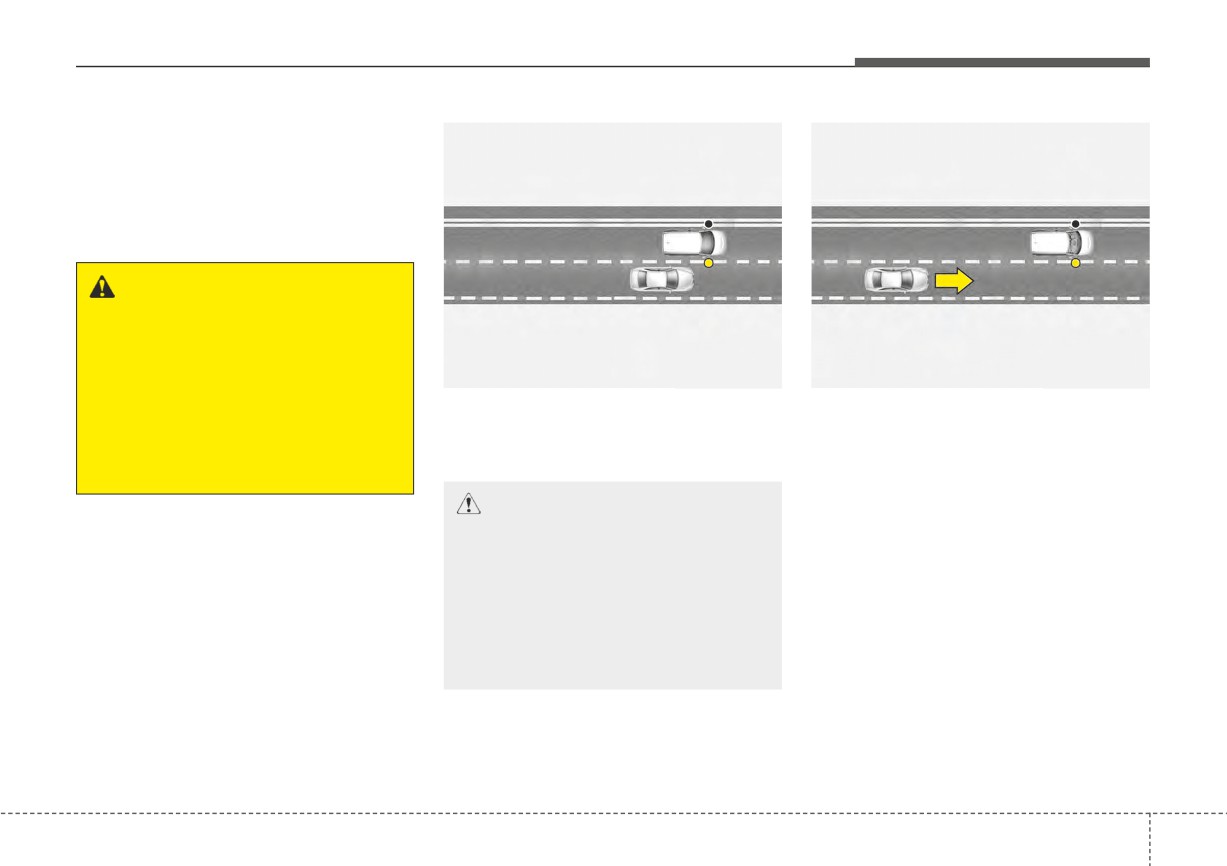
Blind-Spot Collision Warning is
designed to help detect and monitor
approaching vehicles in the driver's
blind spot area and warn the driver of
a possible collision with a warning
message and audible warning.
WARNING
Blind-Spot Collision Warning is
a supplemental system and is
not a substitute for safe driving.
OSK3058089L
OSK3058090L
Blind-Spot Collision Warning
may not detect all vehicles in
Blind-Spot Collision Warning helps
Blind-Spot Collision Warning helps
the blind-spot of the vehicle.
detect and informs the driver that a
detect and informs the driver that a
Always drive safely and use
vehicle is in the blind spot.
vehicle is approaching at high speed
caution.
from the blind spot area.
CAUTION
The detecting range may vary
depending on the speed of your
vehicle. Even if there is a vehicle
in the spot area, Blind-Spot
Collision Warning may not warn
you when you pass by at high
speeds.
5
65
Driving your vehicle
Detecting sensor
CAUTION
CAUTION
■ Rear corner radar
Warning timing may vary
•
Never disassemble the rear
depending on the speed of the
corner radar or radar assem-
vehicle
approaching
at
high
bly, or cause any damage to it.
speed.
•
If the rear corner radar or near
the radar has been damaged
or impacted in any way, even
though the warning message
does not appear on the clus-
ter,
Blind-Spot Collision
Warning may not operate
properly. In this case, have
OSC051302N
your vehicle inspected by an
Refer to the picture
above for the
authorized Kia dealer.
detailed location of
the detecting
•
If the rear corner radars have
sensor.
been replaced or repaired,
have your vehicle inspected
by an authorized Kia dealer.
•
Use only genuine parts to
repair the rear bumper where
the rear corner radar is located.
•
Do not apply license plate
frame or object, such as a
bumper sticker, film or a
bumper guard near the rear
corner radar.
(Continued)
5
66
Driving your vehicle
Blind-Spot Collision Warning
(Continued)
settings
•
Blind-Spot Collision Warning
may not work properly if the
Setting features
bumper has been replaced, or
the surroundings of the rear
corner radar have been dam-
aged or paint has been
applied.
•
If a trailer, carrier, etc., is
installed, it may adversely
affect the performance of the
ODL3A050288
rear corner radar or Blind-
When the engine is restarted with
Spot Collision
Warning
may
the function off, the 'Blind-Spot
not operate.
Safety System is Off' message will
OSC050106
appear on the cluster.
Blind-Spot Safety
If you change the setting from 'Off' to
With the ignition switch or ENGINE
'Warning Only', the warning light on
START/STOP button in the ON posi-
the outside rearview mirror will blink
tion, select or deselect "User Settings
for three seconds.
→ Driver Assistance → Blind-Spot
In addition, if the engine is turned on,
Safety" to set whether to use each
when Blind-Spot Collision Warning is
function.
set to 'Warning Only', the warning
light on the outside rearview mirror
• If 'Warning Only' is selected, Blind-
Spot Collision Warning will warn
will blink for three seconds.
the driver with a warning message,
an audible warning depending on
the collision risk levels.
• If 'Off' is selected, Blind-Spot
Collision Warning will turn off.
5
67
Driving your vehicle
Warning Timing
WARNING
CAUTION
• If 'Warning Only' is selected,
•
The setting of the Warning
steering is not assisted.
Timing applies to all functions
of
Blind-Spot
Collision
• If 'Off' is selected, the driver
Warning.
should always be aware of the
surroundings and drive safely.
•
Even though 'Normal' is
selected for Warning Timing, if
a vehicle approaches at high
✽ NOTICE
speed, the warning may seem
late.
If the engine is restarted, Blind-Spot
Collision Warning will maintain the
•
Select 'Late' for Warning
last setting.
Timing when traffic is light and
OJA050141L
when driving speed is slow.
With the ignition switch or ENGINE
START/STOP button in the ON posi-
tion, select 'Driver Assistance
→
Warning Timing' from the User
Settings to change the initial warning
activation time for Blind-Spot
Collision Warning.
When the vehicle is first delivered,
Warning Timing is set to 'Normal'. If
you change the Warning Timing, the
Warning Timing of other Driver
Assistance functions may change.
5
68
Driving your vehicle
Blind-Spot Collision Warning
Collision warning
operation
WARNING
•
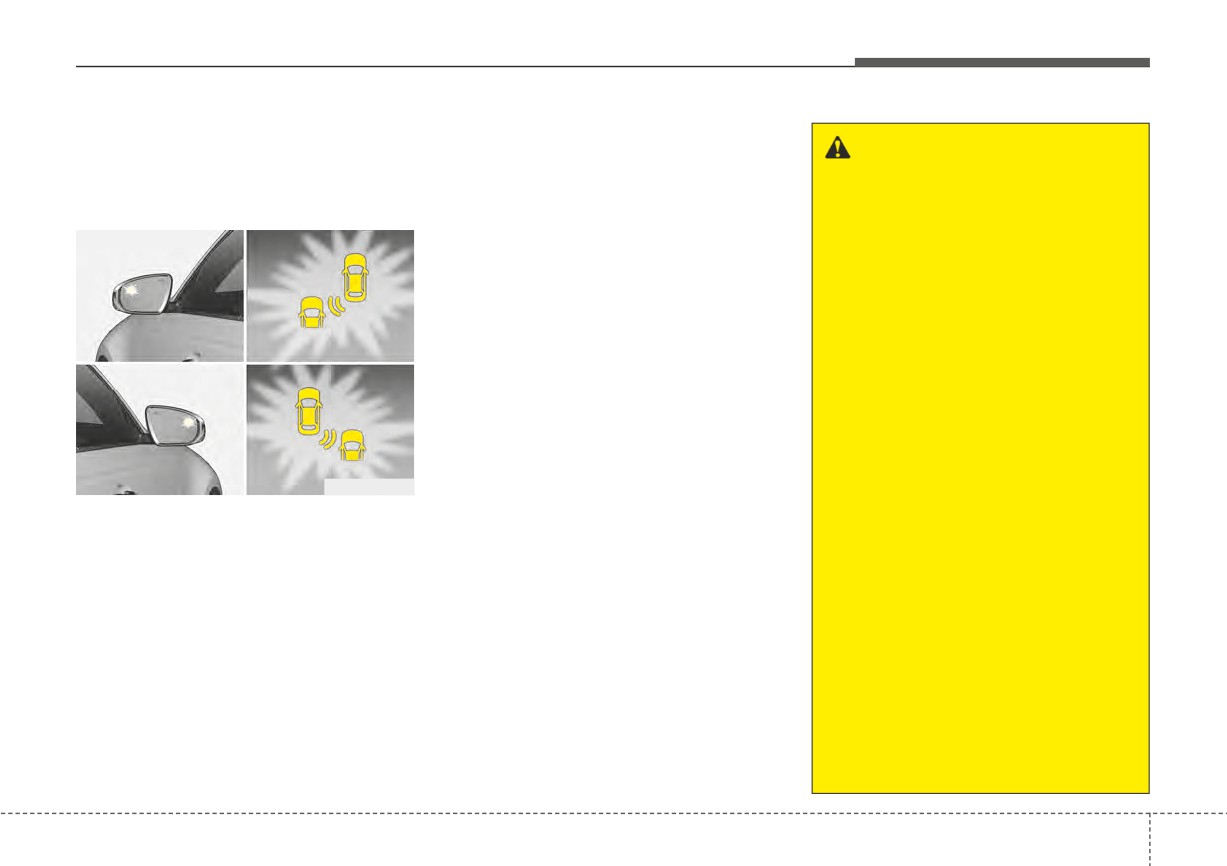
Collision warning will operate when
the turn signal is turned on in the
•
The detecting range of the
Blind-Spot Collision Warning
direction of the detected vehicle.
rear corner radar is deter-
warning
mined by the standard road
•
To warn the driver of a collision, the
■ Vehicle detection
width, therefore, on a narrow
warning light on the outside
road, the function may detect
rearview mirror and head-up dis-
other vehicles in the next lane
play (if equipped) will blink.
and warn you. In contrast, on
•
When the turn signal is turned off
a wide road, the function may
or you move away from the lane,
not be able to detect a vehicle
the collision warning will be can-
driving in the next lane and
celed and Blind-Spot Collision
may not warn you.
Warning will return
to
vehicle
•
When the hazard warning
detection state.
light is on, the collision warn-
ing by the turn signal will not
ORJ058127
operate.
•
To warn the driver a vehicle is
•
For your safety, change the
detected, the warning light on the
Settings after parking the
outside rearview mirror and head-
vehicle at a safe location.
up display (if equipped) will illumi-
•
If any other function's warn-
nate
ing message is displayed or
•
Blind-Spot Collision Warning will
audible warning is generated,
operate when your vehicle speed
Blind-Spot
Collision
is above 12 mph (20 km/h) and the
Warning's warning message
speed of the vehicle in the blind
may not be displayed and
spot area is above
7 mph (10
audible warning may not be
km/h).
generated.
(Continued)
5
69
Driving your vehicle
Blind-Spot Collision Warning
(Continued)
malfunction and limitations
•
You may not hear the warning
sound of Blind-Spot Collision
Blind-Spot Collision Warning mal-
Warning if the surrounding is
function
noisy.
•
Blind-Spot Collision Warning
may warn the driver late or
may not warn the driver
depending on the road and
driving conditions.
•
Driver should maintain con-
ODL3A050286
trol of the vehicle at all times.
When the outside rearview mirror
Do not depend on Blind-Spot
warning light is not working properly,
Collision Warning. Maintain a
the 'Check side view mirror warning
safe braking distance, and if
light' warning message will appear
necessary, depress the brake
ODL3A050298
on the cluster for several seconds,
pedal to reduce driving speed
and the master (
) warning light
When Blind-Spot Collision Warning is
or to stop the vehicle.
will illuminate on the cluster. If this
not working properly, the 'Check
occurs, have your vehicle inspected
Blind-Spot Safety system' warning
by an authorized Kia dealer.
message will appear on the cluster
for several seconds, and the master
(
) warning light will illuminate on
the cluster. If this occurs, have your
vehicle inspected by an authorized
Kia dealer.
5
70
Driving your vehicle
Blind-Spot Collision Warning dis-
If Blind-Spot Collision Warning does
abled
not operate normally after it is
CAUTION
removed, have your vehicle inspect-
Turn off Blind-Spot Collision
ed by an authorized Kia dealer.
Warning to install or remove a
trailer, carrier, or another attach-
ment. Turn on
Blind-Spot
WARNING
Collision
Warning
when
fin-
•
Even though the warning
ished.
message does not appear on
the
cluster,
Blind-Spot
Collision Warning may not
properly operate.
•
Blind-Spot Collision Warning
may not properly operate in
ODL3A050289
an area (for example, open ter-
rain), where any objects are
When the rear bumper around the
not detected right after the
rear corner radar or sensor is cov-
engine is turned on, or when
ered with foreign material, such as
the detecting sensor is
snow or rain, or installing a trailer or
blocked with foreign material
carrier, it can reduce the detecting
right after the engine is turned
performance and temporarily limit or
on.
disable Blind-Spot Collision Warning.
If this occurs, the 'Blind-Spot Safety
system disabled. Radar blocked'
warning message will appear on the
cluster.
Blind-Spot Collision Warning will
operate normally when such foreign
material or trailer, etc. is removed,
and then the engine is restarted.
5
71
Driving your vehicle
Limitations of Blind-Spot Collision
•
Driving through a narrow road
ner radar is impacted, damaged or
Warning
where trees or grass are over-
the radar is out of position
Blind-Spot Collision Warning may
grown
• Your vehicle height is low or high
not operate properly or it may oper-
•
Driving on a wet road surface, such
due to heavy loads, abnormal tire
ate unexpectedly under the following
as a puddle on the road
pressure, etc.
circumstances:
•
The other vehicle drives very close
Blind-Spot Collision Warning may
•
There is inclement weather, such
behind your vehicle, or the other
not operate properly or it may oper-
as heavy snow, heavy rain, etc.
vehicle passes by your vehicle in
ate unexpectedly when the following
close proximity
objects are detected:
•
The rear corner radar is covered
with snow, rain, dirt, etc.
•
The speed of the other vehicle is
•
A motorcycle or bicycle is detected
very fast that it passes by your
•
The temperature around the rear
•
A vehicle such as a flat trailer is
corner radar is high or low
vehicle in a short time
detected
•
Your vehicle passes by the other
•
Driving on a highway (or motor-
•
A big vehicle such as a bus or truck
vehicle
way) ramp
is detected
•
Your vehicle changes lanes
•
The road pavement (or the periph-
•
A moving obstacle such as a
eral ground) abnormally contains
•
Your vehicle has started at the
pedestrian, animal, shopping cart
metallic components (for example,
same time as the vehicle next to
or a baby stroller is detected
possibly due to subway construc-
you and has accelerated
•
A vehicle with low height such as a
tion).
•
The vehicle in the next lane moves
sports car is detected
•
There is a fixed object near the
two lanes away from you, or when
vehicle, such as sound barriers,
the vehicle two lanes away moves
guardrails, central dividers, entry
to the next lane from you
barriers, street lamps, signs, tun-
•
A trailer or carrier is installed
nels, walls, etc. (including double
around the rear corner radar
structures)
•
The bumper around the rear cor-
•
Driving in vast areas where there
ner radar is covered with objects,
are few vehicles or structures (for
such as a bumper sticker, bumper
example, desert, meadow, suburb,
guard, bike rack, etc.
etc.)
•
The bumper around the rear cor-
5
72
Driving your vehicle
(Continued)
(Continued)
WARNING
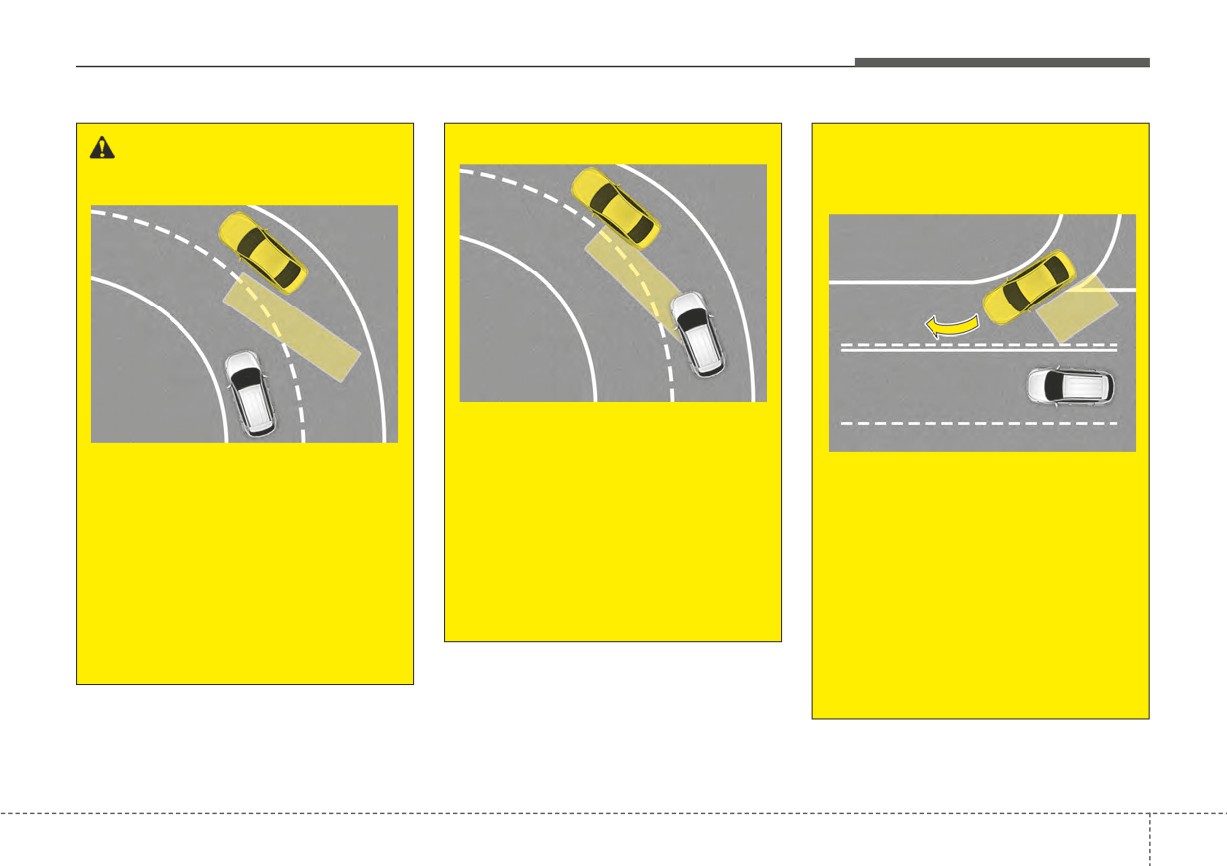
- Driving where the road is
- Driving on a curved road
merging/dividing
OJFHP058459
OJFHP058458
Blind-Spot Collision Warning
OJFHP058460
may not operate properly when
Blind-Spot Collision Warning
driving on the curved road. The
Blind-Spot Collision Warning
may not operate properly when
function may recognize the
may not operate properly when
driving on a curved road. The
vehicle in the same lane.
driving where the road merges
function may not detect the
Always pay attention to road
or divides. The function may not
vehicle in the next lane.
and driving conditions while
detect the vehicle in the next
Always pay attention to road
driving.
lane.
and driving conditions while
(Continued)
Always pay attention to road
driving.
and driving conditions while
(Continued)
driving.
(Continued)
5
73
Driving your vehicle
(Continued)
(Continued)
WARNING
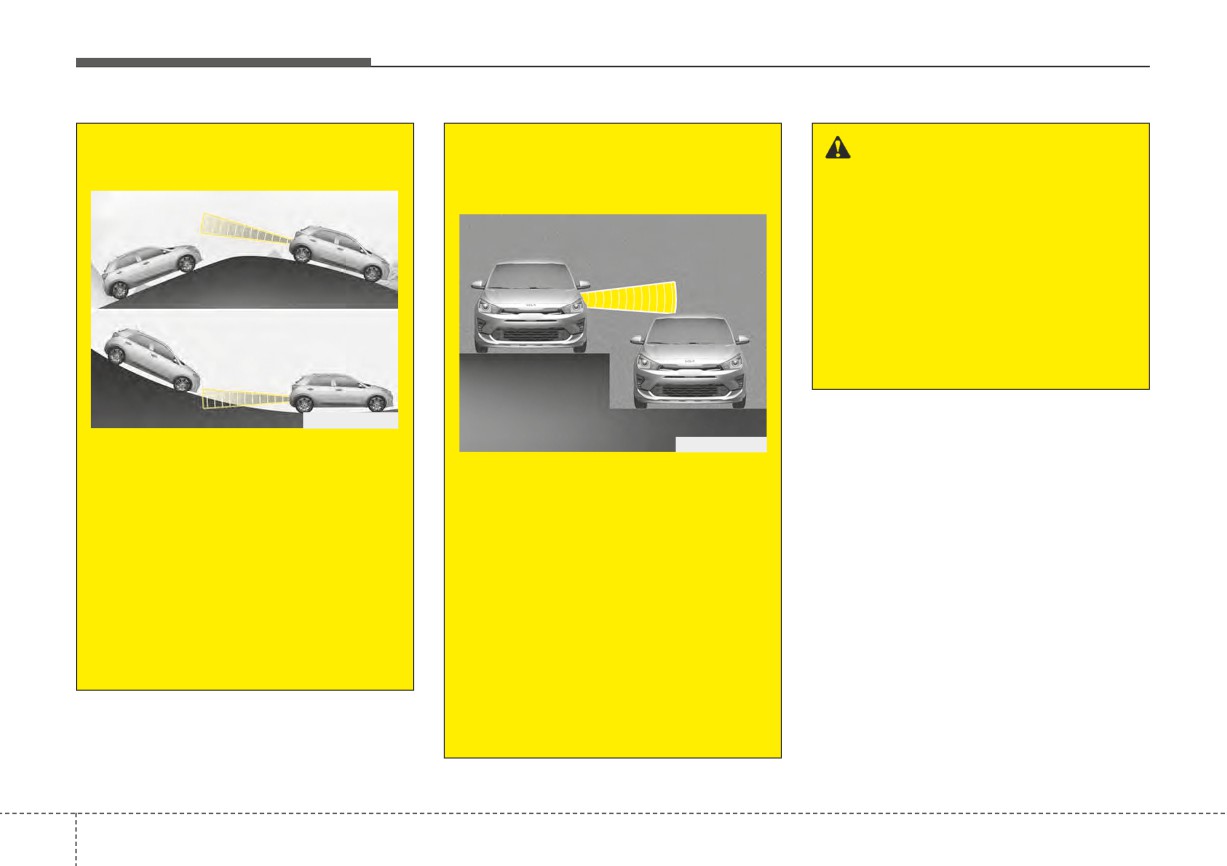
- Driving on an inclined road
- Driving where the heights of
• Blind-Spot Collision Warning
the lanes are different
may not operate properly if
interfered with strong electro-
magnetic waves.
• Blind-Spot Collision Warning
may not operate for 3 seconds
after the vehicle is started, or
the rear corner radars are ini-
tialized.
OSC051092N
This device complies with Part 15
OSC051093N
of the FCC rules.
Blind-Spot Collision Warning
may not operate properly when
Blind-Spot Collision Warning
Operation is subject to the following
driving on a slope. The function
may not operate properly when
two conditions:
may not detect the vehicle in
driving where the heights of the
1. This device may not cause harm-
the next lane or may incorrectly
lanes are different. The function
ful interference, and
detect the ground or structure.
may not detect the vehicle on a
2. This device must accept any inter-
road with different lane heights
Always pay attention to road
ference received, including inter-
(underpass joining section,
and driving conditions while
ference that may cause undesired
grade separated intersections,
driving.
operation.
etc.).
(Continued)
Always pay attention to road
and driving conditions while
driving.
5
74
Driving your vehicle
DRIVER ATTENTION WARNING (DAW) (IF EQUIPPED)
Basic function
Leading Vehicle Departure
Detecting sensor
Alert
Driver Attention Warning can help
■ Front view camera
determine the driver's attention level
Leading Vehicle Departure Alert will
by analyzing driving pattern and driv-
inform the driver when a detected
ing time while the vehicle is driven.
vehicle in front departs from a stop.
The function will recommend a break
when the driver's attention level falls
below a certain level to help drive
safely.
WARNING
Driver Attention Warning is a
supplemental system and is not
OSC051301N
a substitute for safe driving.
The front view camera is used to
Driver Attention Warning may
help detect driving patterns and front
not detect all instances of inat-
vehicle departure while vehicle is
tentive
driving
practices.
being driven.
Always drive safely and use
caution.
Refer to the picture above for the
detailed location of the detecting
sensor.
5
75
Driving your vehicle
Driver Attention Warning set-
• If 'Inattentive Driving Warning' is
CAUTION
tings
selected, Driver Attention Warning
Always keep the front view cam-
will inform the driver the driver's
Setting features
era in good condition to main-
attention level and will recommend
tain optimal performance of
taking a break when the level falls
Driver Attention Warning.
below a certain level.
For more details on the precau-
tions of the front view camera,
CAUTION
refer to "Forward Collision-
When the engine is restarted,
Avoidance Assist
(FCA)
(if
Driver Attention Warning will
equipped)" in chapter 5.
always turn on.
OSC050284N
Driver Attention Warning
• Driver Attention Warning is set to
be in the OFF position, when your
vehicle is first delivered to you from
the factory.
To turn ON Driver Attention
Warning, turn on the engine, and
then select "User Settings → Driver
Assistance
→ Driver Attention
Warning" on the LCD display.
5
76
Driving your vehicle
Leading Vehicle Departure Alert
Warning Timing
✽ NOTICE
If the engine is restarted, Driver
Attention Warning will maintain the
last setting.
OSC050285N
OJA050141L
If 'Leading Vehicle Departure Alert' is
The driver can select the initial warn-
selected, the function will inform the
ing activation time in the User
driver when a detected vehicle in
Settings in the LCD display by
front departs from a stop.
selecting "User Settings
→ Driver
Assistance
→ Warning Timing".
When the vehicle is first delivered,
warning timing is set to 'Normal'. If
you change the Warning Timing, the
Warning Timing of other Driver
Assistance functions may change.
Make sure to check the warning tim-
ing before changing it.
5
77
Driving your vehicle
Driver Attention Warning
Attention level
■ Function off
operation
■ Attentive driving
Basic function
Display and warning
The basic function of Driver Attention
Warning is to inform the driver the
'Attention Level' and to alert the driv-
er 'Consider taking a break'.
ODL3059144L
■ Standby
ODL3059145L
■ Inattentive driving
ODL3059148L
ODL3059146L
5
78