Kia Rio / Rio Hatchback (2022 year). Manual in english - page 12
Driving your vehicle
✽ NOTICE
Starting the engine
(Continued)
If
you leave the ENGINE
•
Never reach for the ENGINE
START/STOP button in the ACC or
WARNING
START/STOP button or any
ON position for a long time, the bat-
other controls through the
•
Always wear appropriate
tery will discharge.
steering wheel while the vehi-
shoes when operating your
cle is in motion. The presence
vehicle. Unsuitable shoes
of your hand or arm in the
(high heels, ski boots, etc.)
WARNING
area could cause loss of vehi-
may interfere with your ability
•
Never press the ENGINE
cle control, an accident and
to use the brake, accelerator.
START/STOP button while the
serious bodily injury or death.
vehicle is in motion. This could
•
Do not start the vehicle with
result in loss of directional
•
Do not place any movable
the
accelerator
pedal
objects around the driver's
depressed. The vehicle can
control and braking function,
which could cause an accident.
seat as they may move while
move and lead to an accident.
driving, interfere with the driv-
•
The anti-theft steering column
•
Wait until the engine rpm is nor-
er and lead to an accident.
lock is not a substitute for the
mal. The vehicle may suddenly
parking brake. Before leaving
move if the brake pedal is
the driver's seat, always make
released when the rpm is high.
sure the shift lever is engaged
in P
(Park), set the parking
brake fully and shut the
engine off. Unexpected and
sudden vehicle movement
may occur if these precau-
tions are not taken.
(Continued)
5
13
Driving your vehicle
Starting the engine
Starting and stopping the engine
Starting the engine with smart key
1. Carry the smart key or place it
for turbocharger intercooler
•
Even if the smart key is in the vehi-
inside the vehicle.
1. Do not race or accelerate the
cle, if it is far away from you, the
engine immediately after starting.
engine may not start.
2. Make sure the parking brake is
firmly applied.
If the engine is cold, idle for sever-
•
When the ENGINE START/STOP
al seconds to ensure sufficient
button is in the ACC position or
3. Intelligent Variable Transmission
lubrication in the turbocharger
above, if any door is opened, the
- Place the transmission shift lever
unit.
system checks for the smart key. If
in P
(Park). Depress the brake
the smart key is not in the vehicle,
pedal fully.
2. After high speed or extended driv-
the “
” indicator and a message
ing, requiring a heavy engine load,
You can also start the engine
“Key is not in the vehicle” will appear
when the shift lever is in the N
idle the engine about
1 minute
on the instrument cluster and LCD
before turning it off.
(Neutral) position.
Display. And if all doors are closed,
4. Press the ENGINE START/STOP
This idle time will allow the tur-
the chime will sound for 5 seconds.
button.
bocharger to cool prior to shutting
The indicator or warning will turn off
the engine off.
It should be started without depress-
while the vehicle is moving. Always
ing the accelerator pedal.
have the smart key with you.
CAUTION
5. Do not wait for the engine to warm
up while the vehicle remains sta-
Do not turn the engine off imme-
tionary. Start driving at moderate
diately after it has been subject-
engine speeds. (Extreme and/or
ed to a heavy load. Doing so
excessive accelerating and decel-
may cause severe damage to
erating should be avoided.)
the engine or turbocharger unit.
5
14
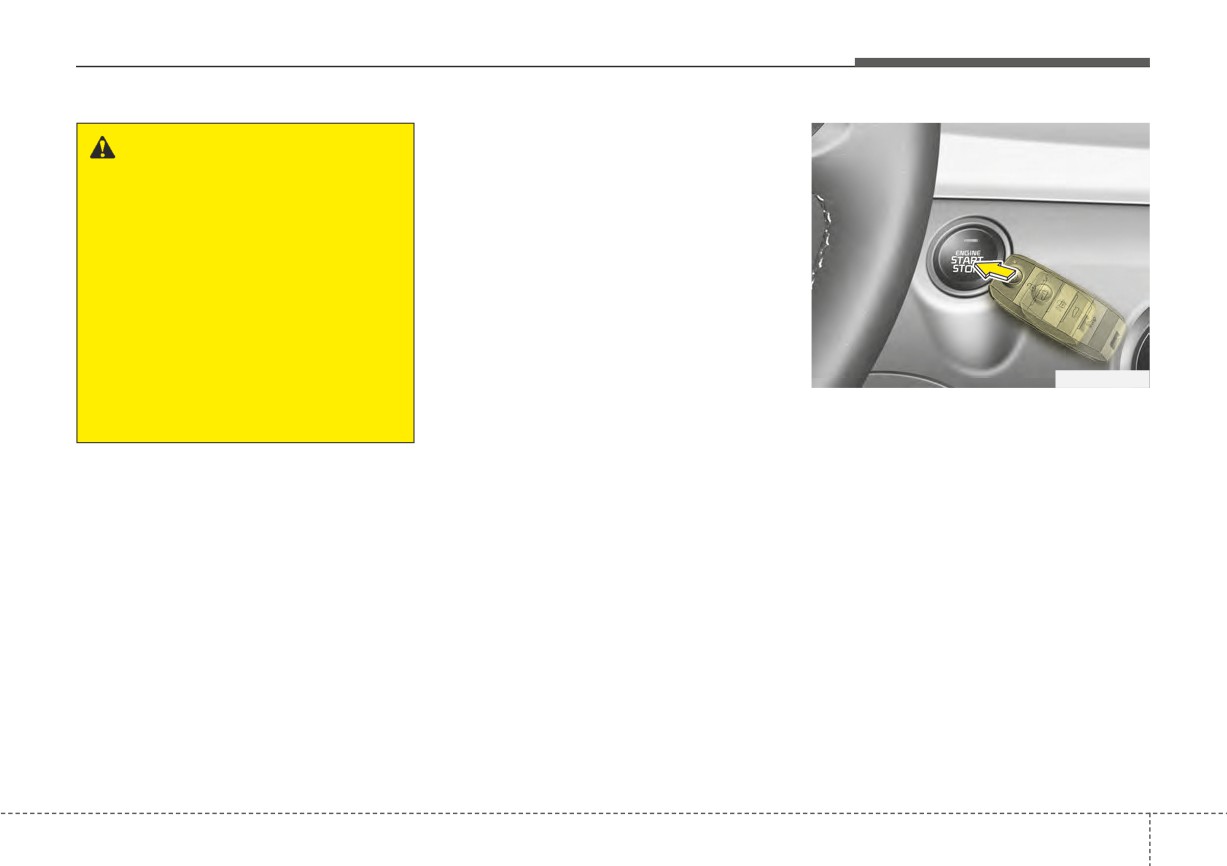
Driving your vehicle
✽ NOTICE
WARNING
If the engine stalls while the vehicle
The engine will start only when
is in motion, do not attempt to move
the smart key is in the vehicle.
the shift lever to the P (Park) posi-
Never allow children or any per-
tion. If the traffic and road condi-
son who is unfamiliar with the
tions permit, you may put the shift
vehicle to touch the ENGINE
lever in the N
(Neutral) position
START/STOP button or related
while the vehicle is still moving and
parts. Pushing the ENGINE
press the ENGINE START/STOP
START/STOP button while the
button in an attempt to restart the
smart key is in the vehicle may
engine.
result in unintended engine
OSC050005N
activation and/or
unintended
✽ NOTICE
vehicle movement.
• If the battery is weak or the smart
key does not work correctly, you
can start the engine by pressing
the ENGINE START/STOP but-
ton with the smart key.
The side with the lock button
should contact the ENGINE
START/STOP button directly.
When you press the ENGINE
START/STOP button directly with
the smart key, the smart key
should contact the button at a
right angle.
(Continued)
5
15
Driving your vehicle
(Continued)
• When the stop lamp fuse is blown,
you cannot start the engine nor-
mally.
Replace the fuse with a new one. If
it is not possible, you can start the
engine by pressing the ENGINE
START/STOP button for 10 sec-
onds while it is in the ACC posi-
tion. The engine can start without
depressing the brake pedal. But
for your safety, always depress the
brake pedal before starting the
engine.
CAUTION
• Do not press the ENGINE
START/STOP button for more
than 10 seconds except when
the stop lamp fuse is blown.
• Do not turn the ignition switch
to the START position with the
engine running. It may dam-
age the starter.
5
16
Driving your vehicle
INTELLIGENT VARIABLE TRANSMISSION (IVT)
Intelligent Variable Transmission
(IVT) operation
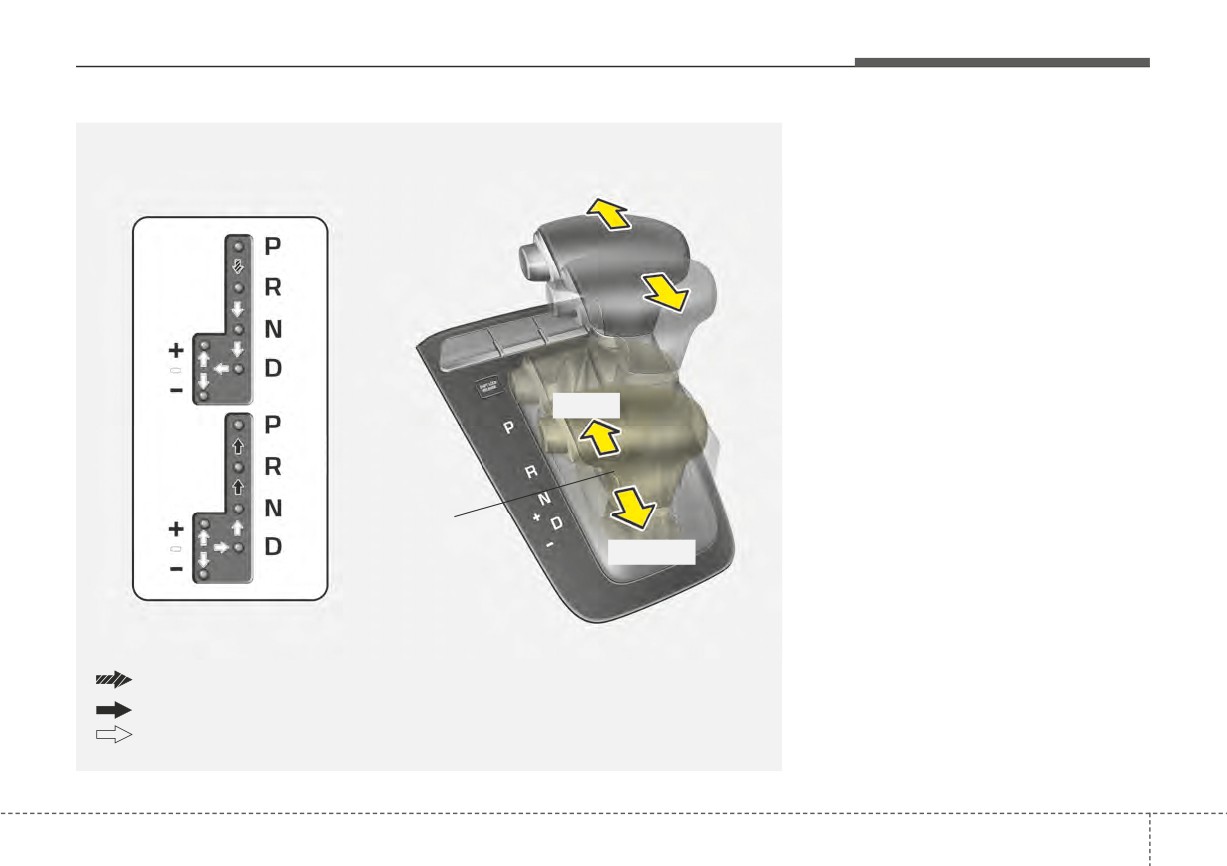
The Intelligent Variable Transmission
(IVT) automatically shifts depending
on speed and accelerator pedal posi-
tion. The individual speeds are
selected automatically, depending on
the position of the shift lever.
+ (UP)
Manual Mode
- (DOWN)
Depress the brake pedal and the lock release button when shifting.
Press the lock release button when shifting.
The shift lever can be shifted freely.
OYB056071
5
17
Driving your vehicle
For smooth operation, depress the
P (Park)
brake pedal when shifting from N
CAUTION
Always come to a complete stop
(Neutral) to a forward or reverse gear.
•
To avoid damage to your
before shifting into P
(Park). This
transmission, do not acceler-
position locks the transmission and
ate the engine in R (Reverse)
prevents the front wheels from rotat-
WARNING
or any forward gear position
ing.
- Intelligent Variable
with the brakes on.
Transmission (IVT)
•
When stopped on an incline,
WARNING
•
Always check the surrounding
do not hold the vehicle sta-
areas near your vehicle for
•
Shifting into P (Park) while the
tionary with engine power.
people, especially children,
Use the service brake or the
vehicle is in motion will cause
before shifting a car into D
the drive wheels to lock which
parking brake.
(Drive) or R (Reverse).
will cause you to lose control
•
Do not shift from N (Neutral)
of the vehicle.
•
Before leaving the driver’s
or P (Park) into D (Drive), or R
seat, always make sure the
•
Do not use the P (Park) posi-
(Reverse) when the engine is
shift lever is in the P (Park)
tion in place of the parking
above idle speed.
position; then set the parking
brake. Always make sure the
brake fully and shut the engine
shift lever is latched in the P
off. Unexpected and sudden
(Park) position and set the
Transmission ranges
vehicle movement can occur if
parking brake fully.
The indicator in the instrument clus-
these precautions are not fol-
•
Never leave a child unattend-
ter displays the shift lever position
lowed in the order identified.
ed in a vehicle.
when the ignition switch or ENGINE
•
Do not use the engine brake
START/STOP button is in the ON
(shifting from a high gear to
position.
lower gear) rapidly on slip-
CAUTION
pery roads.
The transmission may be dam-
The vehicle may slip, causing
aged if you shift into P (Park)
an accident.
while the vehicle is in motion.
5
18
Driving your vehicle
R (Reverse)
-Parking in N (Neutral) gear
WARNING
Use this position to drive the vehicle
Follow the steps below when parking
backward.
if you want the vehicle to move when
•
With the exception of parking
pushed.
in neutral gear, always park
the vehicle in “P” (Park) for
CAUTION
1.After parking your vehicle, step on
safety and engage the parking
the brake pedal and move the shift
Always come to a complete stop
brake.
lever to “P” with the ignition switch or
before shifting into or out of R
ENGINE START/STOP button in
•
Before parking in “N” (Neutral)
(Reverse); you may damage the
“ON” or while the engine is running.
gear, first make sure the park-
transmission if you shift into R
ing ground is level and flat. Do
while the vehicle is in motion,
2.If the parking brake is applied
not park in “N” gear on any
except as explained in “Rocking
unlock the parking brake.
slopes or gradients.
the vehicle” in this chapter.
3.While pressing the brake pedal,
If parked and left in “N”, the
turn the ignition switch or ENGINE
vehicle may move and cause
START/STOP button “OFF”.
N (Neutral)
serious damage and injury.
- For smart key equipped vehicles,
The wheels and transmission are not
the ignition switch or ENGINE
engaged. The vehicle will roll freely
START/STOP button can be
even on the slightest incline unless
moved to “OFF” only when the
the parking brake or service brakes
shift lever is in “P”.
are applied.
4.Change the gear shift lever to “N”
(Neutral) while pressing the brake
WARNING
pedal and pushing “SHIFT LOCK
Do not drive with the shift lever
RELEASE” button or inserting, a
in N (Neutral).
tool (e.g. flathead screw-driver) into
the
“SHIFT LOCK RELEASE”
The engine brake may not work,
access hole at the same time. Then,
which may lead to an accident.
the vehicle will move when external
force is applied.
5
19
Driving your vehicle
D (Drive)
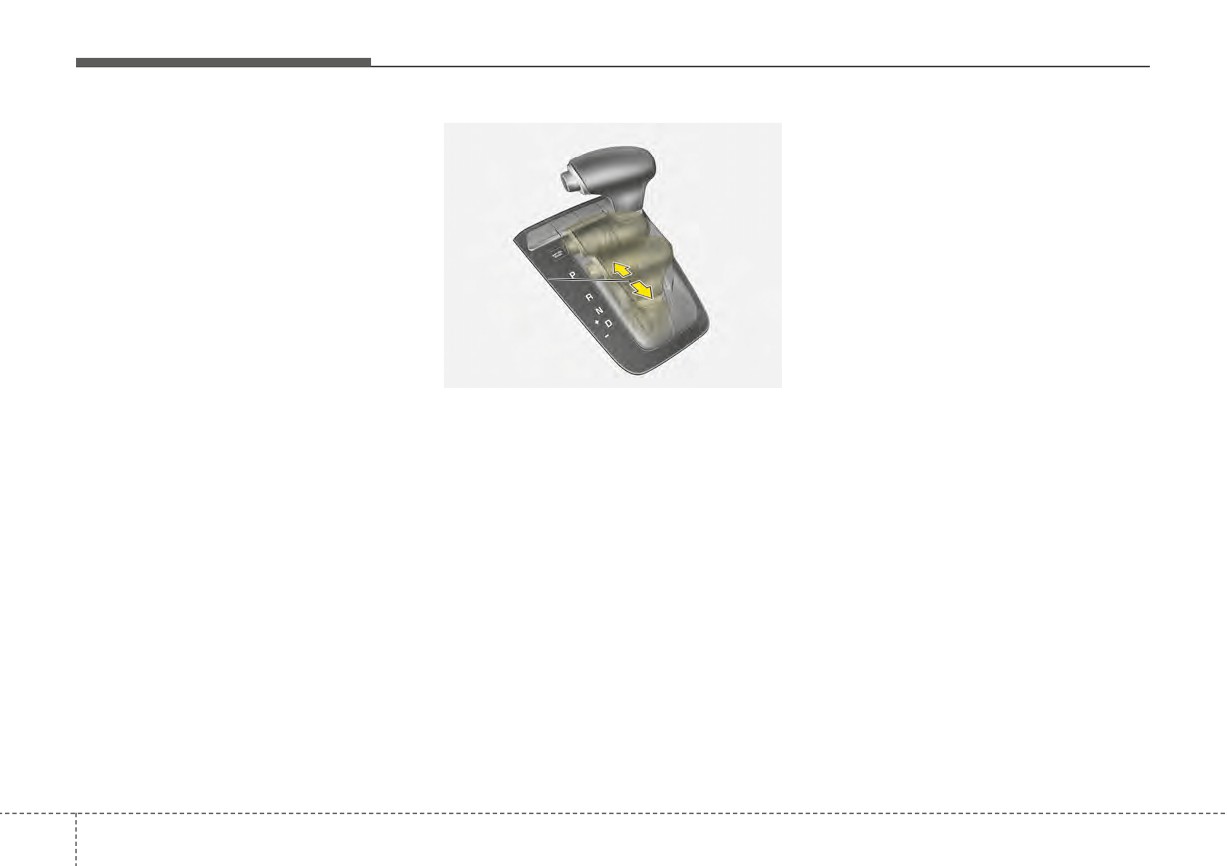
In Manual Mode, moving the shift
lever backwards or forwards will
This is the normal forward driving
position. The transmission will auto-
allow you to make gearshifts rapidly.
In contrast to a manual transmission,
matically shift, providing the best fuel
economy and power.
the Manual Mode allows gearshifts
with
the
accelerator
pedal
depressed.
Manual
For extra power when passing anoth-
Mode
Up (+)
: Push the lever forward
er vehicle or climbing grades,
once to shift up one gear.
depress the accelerator fully, at which
time the transmission will automati-
Down (-) : Pull the lever backwards
once to shift down one gear.
cally downshift to the next lower gear.
OYB056059
Manual Mode
✽ NOTICE
Whether the vehicle is stationary or
Always come to a complete stop
in motion, Manual Mode is selected
before shifting into D (Drive).
by pushing the shift lever from the D
(Drive) position into the manual gate.
To return to D (Drive) range opera-
tion, push the shift lever back into the
main gate.
Manual Mode manages the driving
dynamics by automatically adjusting
the steering effort and the engine
and transmission control logic for
enhanced driver performance.
5
20
Driving your vehicle
✽ NOTICE
(Continued)
Shift lock system
•
When driving on a slippery road,
•
In Manual Mode, the driver must
For your safety, the Intelligent
push the shift lever forward into
execute upshifts in accordance
Variable Transmission
(IVT) has a
the +(up) position. This causes the
with road conditions, being care-
shift lock system which prevents
transmission to shift into the 2nd
ful to keep the engine speed below
shifting the transmission from P
gear which is better for smooth
the red zone.
(Park) into R (Reverse) unless the
driving on a slippery road. Push
•
In Manual Mode, only the 8 for-
brake pedal is depressed.
the shift lever to the -(down) side
ward gears can be selected. To
To shift the transmission from P
to shift back to the 1st gear.
reverse or park the vehicle, move
(Park) into R (Reverse):
•
When Manual Mode is activated:
the shift lever to the R (Reverse)
- The engine rpm will tend to
1. Depress and hold the brake pedal.
or P (Park) position as required.
remain raised over a certain
2. Start the engine or turn the ignition
•
In Manual Mode, downshifts are
length of time even after releas-
switch or ENGINE START/STOP
made automatically when the
ing the accelerator
button to the ON position.
vehicle slows down. When the
- Upshifts are delayed when accel-
vehicle stops, 1st gear is automati-
3. Move the shift lever.
erating
cally selected.
If the brake pedal is repeatedly
•
In Manual Mode, the fuel efficien-
•
In Manual Mode, when the engine
depressed and released with the shift
cy may decrease.
rpm approaches the red zone, shift
lever in the P (Park) position, a chat-
points are varied to upshift auto-
tering noise near the shift lever may
matically.
be heard. This is a normal condition.
•
To maintain the required levels of
vehicle performance and safety,
the system may not execute cer-
WARNING
tain gearshifts when the shift lever
Always fully depress the brake
is operated.
pedal before and while shifting
(Continued)
out of the P (Park) position into
another position to avoid inad-
vertent motion of the vehicle,
which could injure persons in
or around the vehicle.
5
21
Driving your vehicle
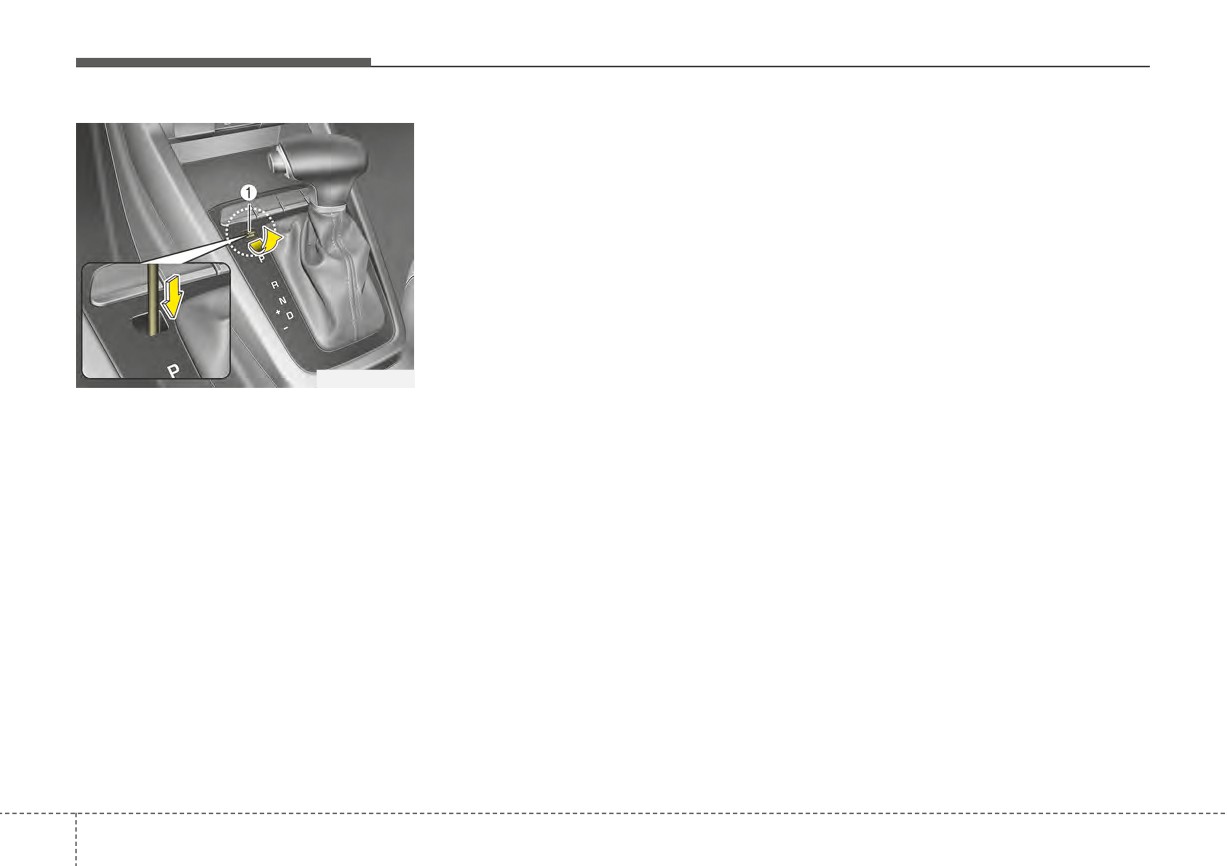
1. Place the ignition switch or
Good driving practices
ENGINE START/STOP button in
•
Never move the shift lever from P
the LOCK/OFF position.
(Park) or N (Neutral) to any other
2. Apply the parking brake.
position with the accelerator pedal
3. Carefully remove the cap covering
depressed.
the shift-lock release access hole.
•
Never move the shift lever into P
4. Insert a tool (e.g. flathead screw-
(Park) when the vehicle is in
driver) into the access hole and
motion.
press down on the tool.
•
Be sure the vehicle is completely
5. Move the shift lever.
stopped before you attempt to shift
into R (Reverse) or D (Drive).
OSC057011N
6. Remove the tool from the shiftlock
override access hole then install
•
Never take the vehicle out of gear
Shift-lock override
the cap.
and coast down a hill. This may be
If the shift lever cannot be moved
extremely hazardous. Always leave
If the shift lever does not move even
from the P (Park) position into R
the vehicle in gear when moving.
(Reverse) position with the brake
after performing this procedure, have
the system inspected by an author-
•
Do not "ride" the brakes. This can
pedal depressed, continue depress-
ized Kia dealer.
cause them to overheat and mal-
ing the brake, then do the following:
function. Instead, when you are
driving down a long hill, slow down
Ignition key interlock system
and shift to a lower gear. When you
The ignition key cannot be removed
do this, engine braking will help
unless the shift lever is in the P
slow down the vehicle.
(Park) position.
•
Slow down before shifting to a
lower gear. Otherwise, the lower
gear may not be engaged.
5
22
Driving your vehicle
• Always use the parking brake. Do
(Continued)
not depend on placing the trans-
WARNING
mission in P (Park) to keep the
•
The risk of a rollover is greatly
•
When driving uphill or down-
vehicle from moving.
increased if you lose control of
hill, always shift to D (Drive)
your vehicle at highway speeds.
for driving forward or shift to R
(Reverse) for driving back-
•
Losing control often occurs if
WARNING
wards, and check the gear
two or more wheels drop off the
Exercise extreme caution when
position indicated on the clus-
roadway and the driver over-
driving on a slippery surface.
ter before driving.
steers to reenter the roadway.
Be especially careful when
Driving in the opposite direc-
•
In the event your vehicle
braking, accelerating or shifting
tion of the selected gear can
leaves the roadway, do not
gears. On a slippery surface, an
lead to a dangerous situation
steer sharply. Instead, slow
abrupt change in vehicle speed
by shutting off the engine and
down before pulling back into
can cause the drive wheels to
affecting the braking perform-
the travel lanes.
lose traction and the vehicle to
ance.
•
Never exceed posted
speed
lose control.
•
Always buckle-up! In a colli-
limits.
sion, an unbelted occupant is
• Optimum vehicle performance and
significantly more likely to be
economy is obtained by smoothly
seriously injured or killed than
depressing and releasing the
a properly belted occupant.
accelerator pedal.
•
Avoid high speeds when cor-
nering or turning.
•
Do not make quick steering
wheel movements, such as
sharp lane changes or fast,
sharp turns.
(Continued)
5
23

Driving your vehicle
Moving up a steep grade from a
WARNING
standing start
If your vehicle becomes stuck in
To move up a steep grade from a
snow, mud, sand, etc., then you
standing start, depress the brake
may attempt to rock the vehicle
pedal, release the parking brake,
free by moving it forward and
and shift the shift lever to D (Drive).
backward. Do not attempt this
Select the appropriate gear depend-
procedure if people or objects
ing on load weight and steepness of
are anywhere near the vehicle.
the grade, and release the parking
During the rocking operation,
brake. Depress the accelerator grad-
the vehicle may suddenly move
ually while releasing the service
forward or backward as it
brakes.
becomes unstuck, causing
When accelerating from a stop on a
injury or damage to nearby peo-
steep hill, the vehicle may have a
ple or objects.
tendency to roll backwards.
Shifting the shift lever into
2
(Second Gear) will help prevent the
vehicle from rolling backwards.
5
24
Driving your vehicle
BRAKE SYSTEM
Power brakes
Wet brakes may impair the vehicle’s
CAUTION - Brake pedal
ability to safely slow down; the vehi-
Your vehicle has power-assisted
Do not drive with your foot rest-
cle may also pull to one side when
brakes that adjust automatically
ing on the brake pedal. This will
the brakes are applied. Applying the
through normal usage.
create abnormally high brake
brakes lightly will indicate whether
In the event that the power-assisted
temperatures which can cause
they have been affected in this way.
brakes lose power because of a
excessive brake lining and pad
Always test your brakes in this fash-
stalled engine or some other reason,
wear.
ion after driving through deep water.
you can still stop your vehicle by
To dry the brakes, apply them lightly
applying greater force to the brake
while maintaining a safe forward
pedal than you normally would. The
speed until brake performance
stopping distance, however, will be
WARNING - Steep hill
returns to normal.
longer.
braking
When the engine is not running, the
Avoid continuous application of
reserve brake power is partially
the brakes when descending a
depleted each time the brake pedal
long or steep hill by shifting to a
is applied. Do not pump the brake
lower gear. Continuous brake
pedal when the power assist has
application will cause the
been interrupted.
brakes to overheat and could
result in a temporary loss of
Pump the brake pedal only when
braking performance.
necessary to maintain steering con-
trol on slippery surfaces.
5
25
Driving your vehicle
In the event of brake failure
Disc brakes wear indicator
WARNING - Brake wear
If service brakes fail to operate while
When your brake pads are worn and
the vehicle is in motion, you can
new pads are required, you will hear
Do not ignore high pitched wear
make an emergency stop with the
a high-pitched warning sound from
sounds from your brakes. If you
parking brake. The stopping dis-
your front brakes or rear brakes (if
ignore this audible warning, you
tance, however, will be much greater
equipped). You may hear this sound
will eventually lose braking per-
than normal.
come and go or it may occur when-
formance, which could lead to a
ever you depress the brake pedal.
serious accident.
Please remember that some driving
WARNING - Parking brake
conditions or climates may cause a
Avoid applying the parking
brake squeal when you first apply (or
brake to stop the vehicle while it
lightly apply) the brakes. This is nor-
is moving, except in an emer-
mal and does not indicate a problem
gency situation. Applying the
with your brakes.
parking brake while the vehicle
Always replace the front or rear
is moving at normal speeds can
brake pads as pairs.
cause a sudden loss of control
of the vehicle. If you must use
the parking brake to stop the
CAUTION - Replace brake
vehicle, use great caution in
pads
applying the brake.
Do not continue to drive with
worn brake pads. Continuing to
drive with worn brake pads can
damage the braking system and
result in costly brake repairs.
5
26
Driving your vehicle
Rear drum brakes (if equipped)
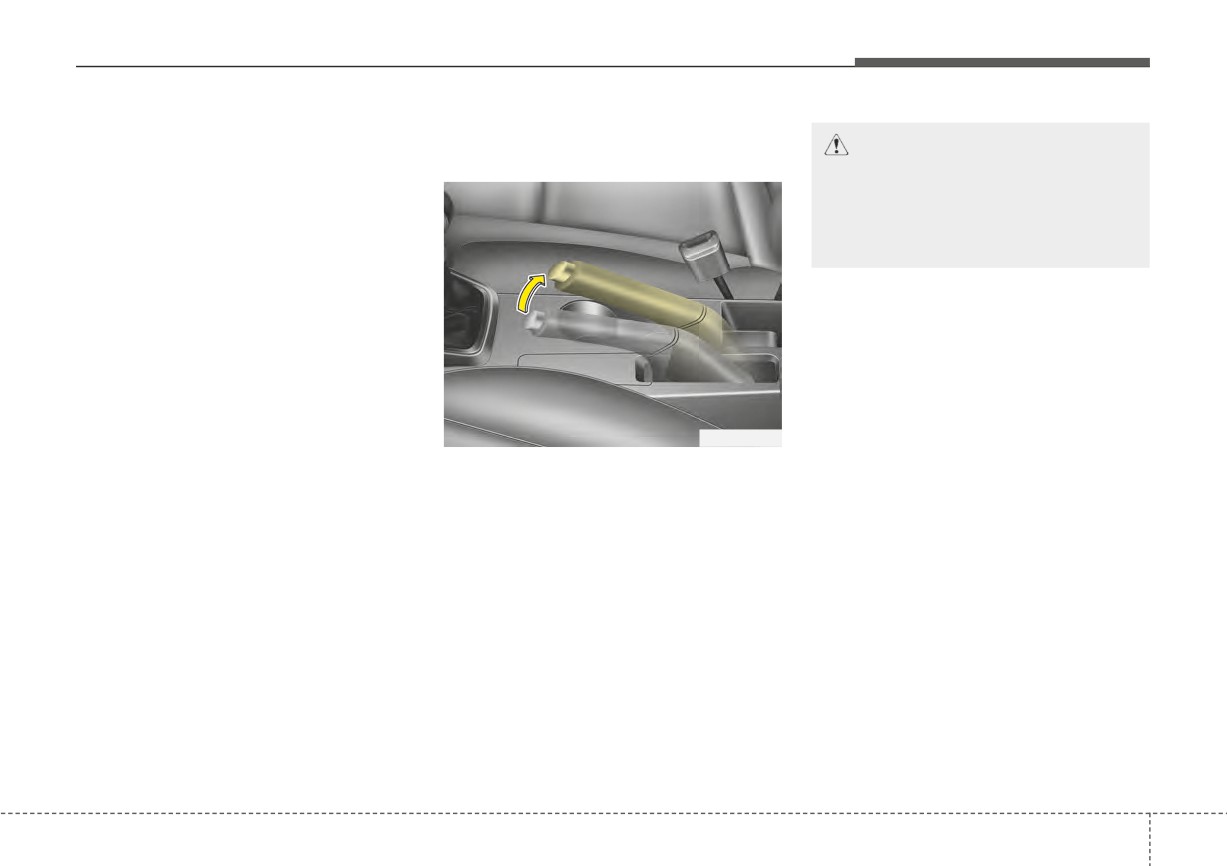
Parking brake
CAUTION - Parking brake
Your rear drum brakes do not have
Applying the parking brake
wear indicators. Therefore, have the
Driving with the parking brake
rear brake linings inspected if you
applied will cause excessive
hear a rear brake rubbing noise. Also
brake pad (or lining) and brake
have your rear brakes inspected
rotor wear.
each time you change or rotate your
tires and when you have the front
brakes replaced.
OYB056060
To engage the parking brake, first
apply the foot brake and then without
pressing the release button in, pull
the parking brake lever up as far as
possible. In addition it is recommend-
ed that when parking the vehicle on
a gradient, the shift lever should be
positioned in the P (Park) position for
Intelligent Variable Transmission
vehicles.
5
27
Driving your vehicle
Releasing the parking brake
•
If your vehicle is equipped with an
WARNING - Parking brake
intelligent variable transmission,
use
don't let your vehicle creep for-
ward. To avoid cleeping forward,
•
Never allow a passenger to
keep your foot firmly on the brake
touch the parking brake. If the
pedal when the vehicle is stopped.
parking brake is released
unintentionally, serious injury
•
Be cautious when parking on a hill.
may occur.
Firmly engage the parking brake
and place the shift lever in P
•
All vehicles should always
(Intelligent Variable Transmission).
have the parking brake fully
If your vehicle is facing downhill,
engaged when parking to
turn the front wheels into the curb
avoid inadvertent movement
to help keep the vehicle from
of the vehicle which can injure
OYB056061
rolling. If your vehicle is facing
occupants or pedestrians.
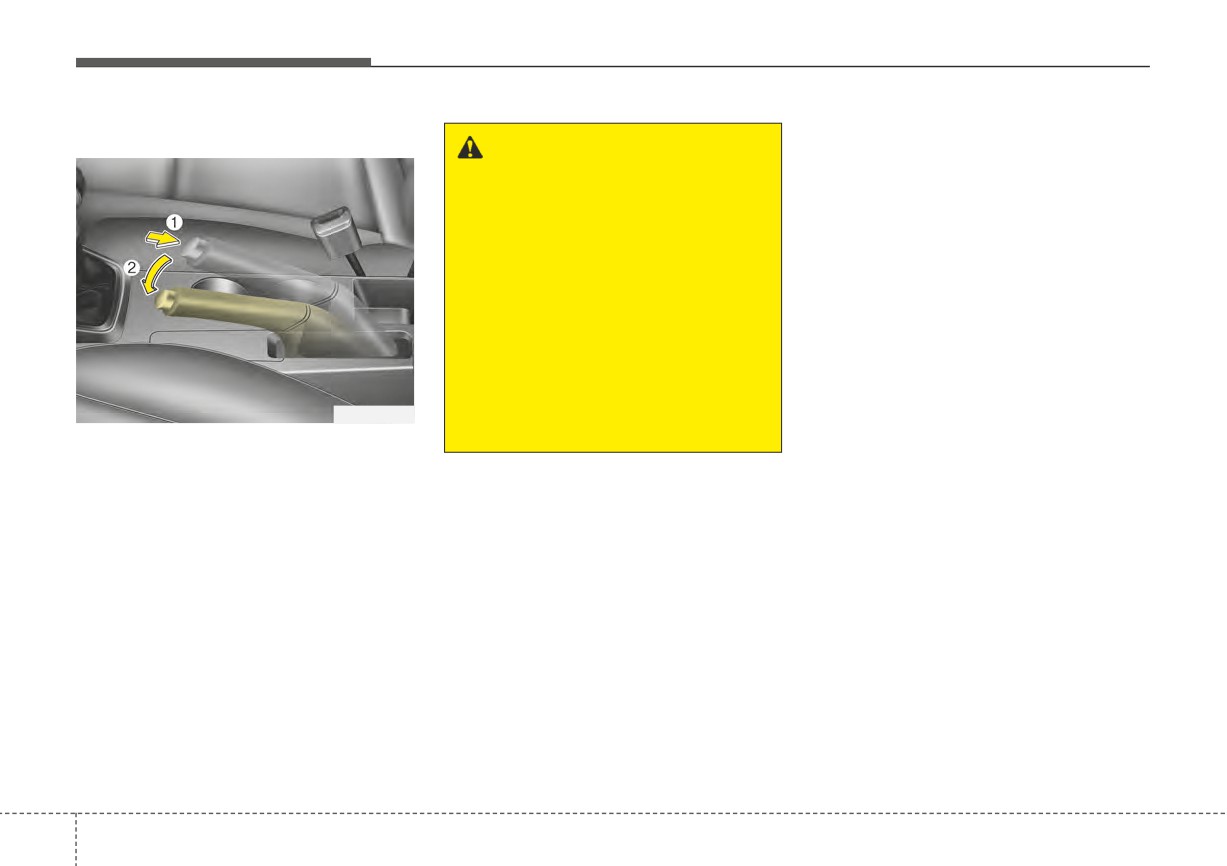
To release the parking brake, first
uphill, turn the front wheels away
apply the foot brake and pull up the
from the curb to help keep the vehi-
parking brake lever slightly.
cle from rolling. If there is no curb
Secondly, press the release button
or if it is required by other condi-
(1) and lower the parking brake lever
tions to keep the vehicle from
(2) while holding the button.
rolling, chock the wheels.
5 28
Driving your vehicle
•
Under some conditions, your park-
If at all possible, stop driving the
ing brake can freeze in the
vehicle immediately. If that is not pos-
engaged position. This is most like-
sible, use extreme caution while
ly to happen when there is an
operating the vehicle and only con-
accumulation of snow or ice aroud
tinue to drive the vehicle until you
or near the rear brakes or if the
can reach a safe location or repair
brakes are wet. If there is a risk
shop.
that the parking brake may freeze,
apply it only temporarily while you
put the shift lever in P (Intelligent
Variable Transmission) and chock
the rear wheels so the vehicle can-
W-75
not roll. Then release the parking
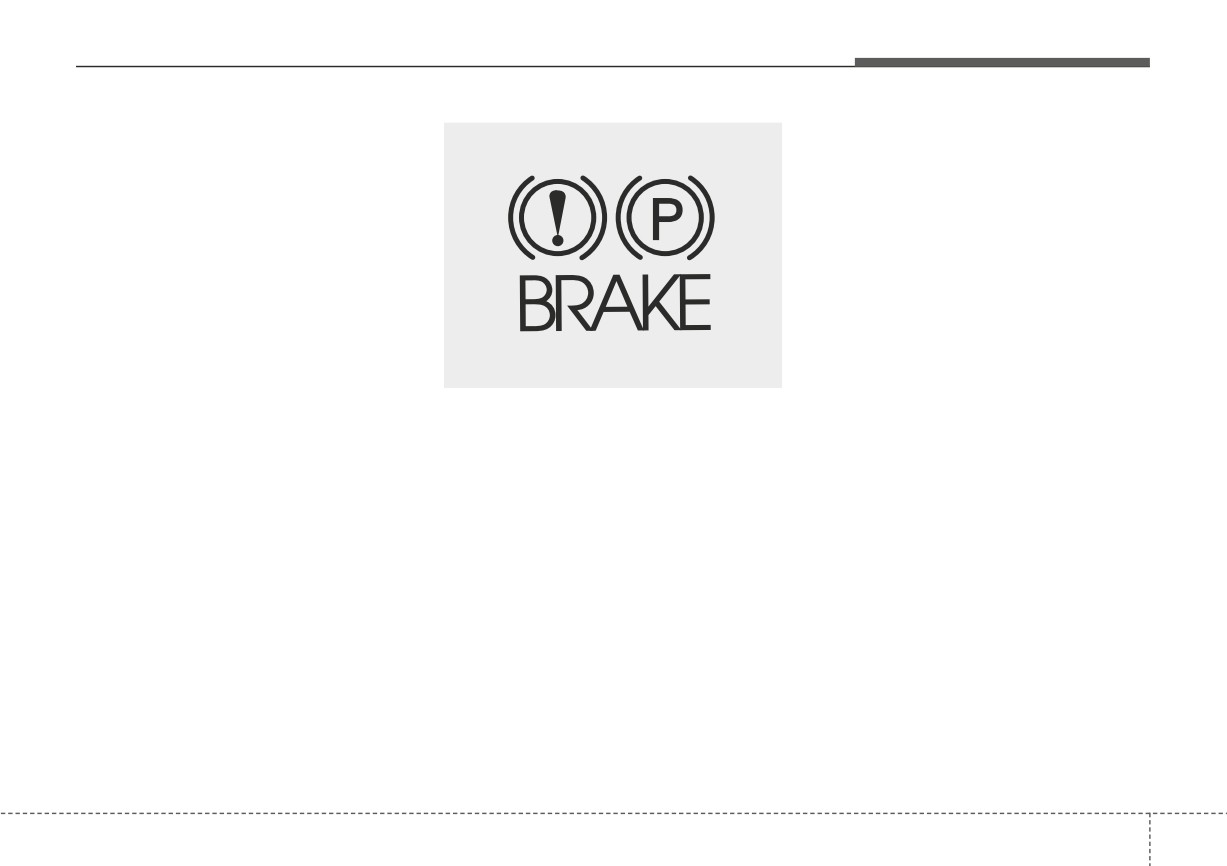
Check the brake warning light by
brake.
turning the ignition switch or
•
Do not hold the vehicle on an
ENGINE START/STOP button ON
incline with the accelerator pedal.
(do not start the engine). This light
This can cause the transmission to
will illuminate when the parking
overheat. Always use the brake
brake is applied with the ignition
pedal or parking brake.
switch or ENGINE START/STOP but-
ton in the START or ON position.
Before driving, be sure the parking
brake is fully released and the brake
warning light is off.
If the brake warning light remains on
after the parking brake is released
while the engine is running, there
may be a malfunction in the brake
system. Immediate attention is nec-
essary.
5
29
Driving your vehicle
Anti-lock Brake System (ABS)
The ABS continuously senses the
✽ NOTICE
speed of the wheels. If the wheels
ABS (or ESC) will not prevent acci-
A click sound may be heard in the
are going to lock, the ABS system
dents due to improper or dangerous
engine compartment when the vehi-
repeatedly modulates the hydraulic
driving maneuvers. Even though
cle begins to move after the engine is
brake pressure to the wheels.
ABS (or ESC) helps improve vehicle
started. These conditions are normal
control during emergency braking,
When you apply your brakes under
and indicate that the anti-lock brake
always maintain a safe distance
conditions which may lock the
system is functioning properly.
between you and objects ahead.
wheels, you may hear a
“tik-tik’’
Vehicle speeds should always be
sound from the brakes, or feel a cor-
•
Even with the anti-lock brake sys-
reduced during extreme road condi-
responding sensation in the brake
tem, your vehicle still requires suf-
tions.
pedal. This is normal and means
ficient stopping distance. Always
your ABS is active.
maintain a safe distance from the
The vehicle should be driven at
In order to obtain the maximum ben-
vehicle in front of you.
reduced speeds in the following cir-
cumstances:
efit from your ABS in an emergency
•
Always slow down when cornering.
situation, do not attempt to modulate
The anti-lock brake system cannot
• When driving on rough, gravel or
your brake pressure and do not try to
prevent accidents resulting from
snow-covered roads
pump your brakes. Press your brake
excessive speeds.
• When driving with tire chains
pedal as hard as possible or as hard
•
On loose or uneven road surfaces,
installed
as the situation allows the ABS to
operation of the anti-lock brake
• When driving on roads where the
control the force being delivered to
system may result in a longer stop-
road surface is pitted or has differ-
the brakes.
ping distance than for vehicles
ent surface heights.
equipped with a conventional
Driving in these conditions increases
brake system.
the stopping distance for your vehi-
cle.
5
30
Driving your vehicle
• When you drive on a road with
Electronic Stability Control
poor traction, such as an icy road,
(ESC)
and have operated your brakes
continuously, the ABS will be active
continuously and the ABS warning
light may illuminate. Pull your vehi-
cle over to a safe place and stop
the engine.
• Restart the engine. If the ABS
warning light goes off, then your
ABS system is normal. Otherwise,
W-78
you may have a problem with the
ABS. Contact an authorized Kia
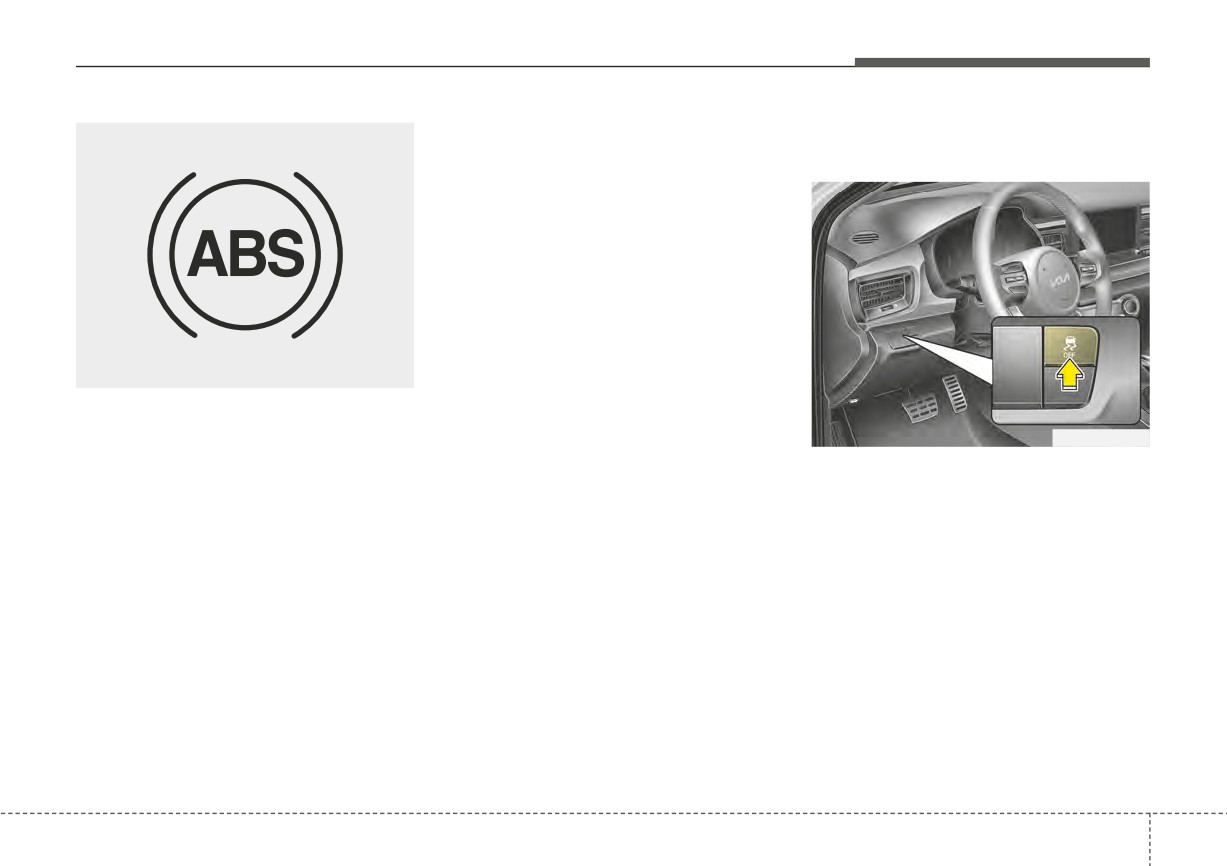
The ABS warning light will stay on for
dealer as soon as possible.
approximately 3 seconds after the
OSC051299N
ignition
switch
or
ENGINE
START/STOP button is ON. During
The Electronic Stability Control
✽ NOTICE
that time, the ABS will go through
(ESC) system is designed to stabi-
When you jump start your vehicle
self-diagnosis and the light will go off
lize the vehicle during cornering
because of a drained battery, the
if everything is normal. If the light
maneuvers. ESC checks where you
engine may not run as smoothly and
stays on, you may have a problem
are steering and where the vehicle is
the ABS warning light may turn on
with your ABS but your regular
actually going. ESC applies the
at the same time. This happens
brakes will work normally. Contact an
brakes on individual wheels and
because of the low battery voltage. It
authorized Kia dealer as soon as
intervenes with the engine manage-
does not mean your ABS has mal-
possible.
ment system to stabilize the vehicle.
functioned.
• Do not pump your brakes!
• Have the battery recharged before
driving the vehicle.
5
31
Driving your vehicle
Electronic Stability Control (ESC) will
When you apply your brakes under
ESC operation
not prevent accidents. Excessive
conditions which may lock the
ESC ON condition
speed in turns, abrupt maneuvers and
wheels, you may hear a
“tik-tik’’
• When the ignition is turned
hydroplaning on wet surfaces can still
sound from the brakes, or feel a cor-
-
ON, ESC and ESC OFF
result in serious accidents. Only a
responding sensation in the brake
indicator lights illuminate
safe and attentive driver can prevent
pedal. This is normal and means
for approximately
3 sec-
accidents by avoiding maneuvers that
your ESC is active.
onds, then ESC is turned
cause the vehicle to lose traction.
on.
Even with ESC installed, always fol-
WARNING
• Press the ESC OFF but-
low all the normal precautions for driv-
ing - including driving at safe speeds
For maximum protection, always
ton for at least half a sec-
for the conditions.
wear your seat belt. No system,
ond after turning the igni-
no matter how advanced, can
tion ON to turn ESC off.
The Electronic Stability Control
compensate for all driver error
(ESC OFF indicator will
(ESC) system is an electronic sys-
and/or driving conditions.
illuminate). To turn the
tem designed to help the driver main-
Always drive responsibly.
ESC on, press the ESC
tain vehicle control under adverse
OFF button
(ESC OFF
conditions. It is not a substitute for
indicator light will go off).
safe driving practices. Factors includ-
ing speed, road conditions and driv-
• When starting the engine,
er steering input can all affect
you may hear a slight tick-
whether ESC will be effective in pre-
ing sound. This is the ESC
venting a loss of control. It is still your
performing an automatic
responsibility to drive and corner at
system self-check and
reasonable speeds and to leave a
does not indicate a prob-
sufficient margin of safety.
lem.
5
32
Driving your vehicle
When operating
ESC operation off
When the ESC is in opera-
ESC OFF state
tion, ESC indicator light
This car has 2 kinds of ESC
blinks.
off states.
• When the Electronic
If the engine stops when
Stability Control is operat-
ESC is off, ESC remains off.
ing properly, you can feel a
Upon restarting the engine,
slight pulsation in the vehi-
the ESC will automatically
cle. This is only the effect
turn on again.
of brake control and indi-
cates nothing unusual.
ODL3059100L
• When moving out of the
mud or slippery road,
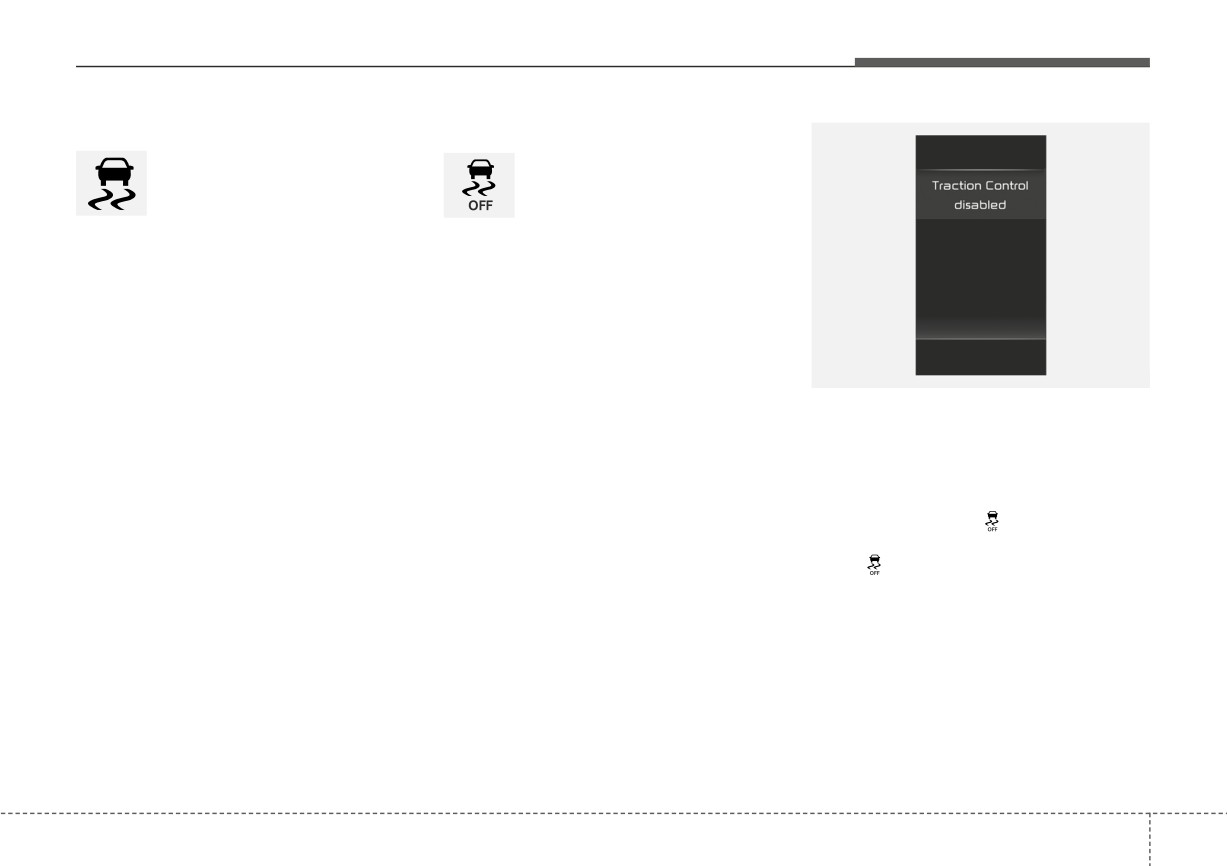
• ESC off state 1 : “Traction
pressing the accelerator
Control disabled”
pedal may not cause the
To turn off the traction control func-
engine rpm
(revolutions
tion and only operate the brake con-
per minute) to increase.
trol function of the ESC, press the
ESC OFF button (
) for less than 3
seconds and the ESC OFF indicator
light (
) will illuminate. At this state,
only the brake function will operate.
5
33
Driving your vehicle
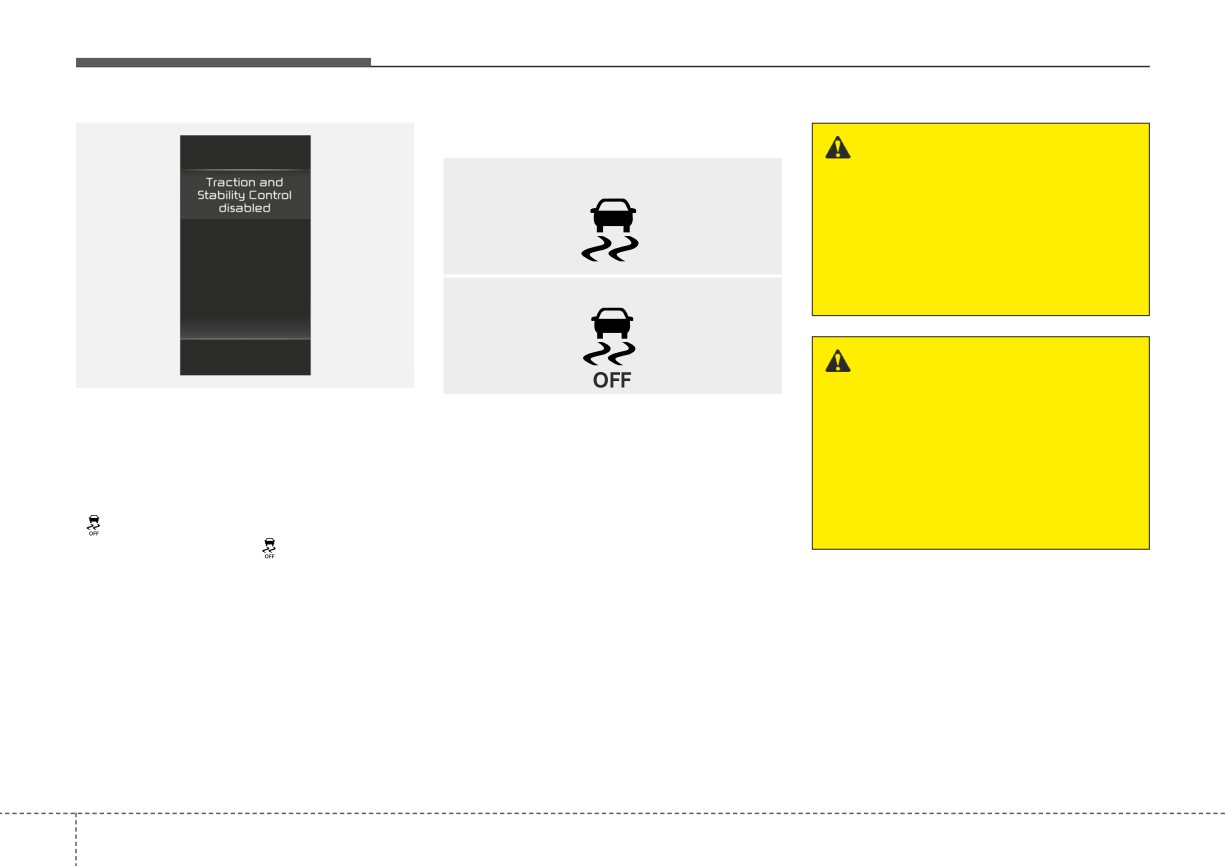
Indicator light
WARNING
■ ESC indicator light
Driving with varying tire or
wheel sizes may cause the ESC
system to malfunction. When
replacing tires, make sure they
are the same size as your origi-
■ ESC OFF indicator light
nal tires.
WARNING - Electronic sta-
ODL3059101L
bility control
• ESC off state 2 : “Traction &
When the ignition switch or ENGINE
Drive carefully even though
Stability Control disabled”
START/STOP button is turned ON,
your vehicle has Electronic
To turn off the traction control func-
the indicator light illuminates, then
Stability Control. It can only
tion and the brake control function of
goes off if ESC system is operating
assist you in maintaining con-
the ESC, press the ESC OFF button
normally.
trol under certain circum-
(
) for more than 3 seconds. ESC
The ESC indicator light blinks when-
stances.
OFF indicator light (
) will illuminate
ever ESC is operating or illuminates
and ESC OFF warning chime will
when ESC fails to operate.
sound. In this state, the car stability
The ESC OFF indicator light comes
control function will not operate.
on when the ESC is turned off with
the button.
5
34