Kia Rio / Rio Hatchback (2022 year). Manual in english - page 11
Features of your vehicle
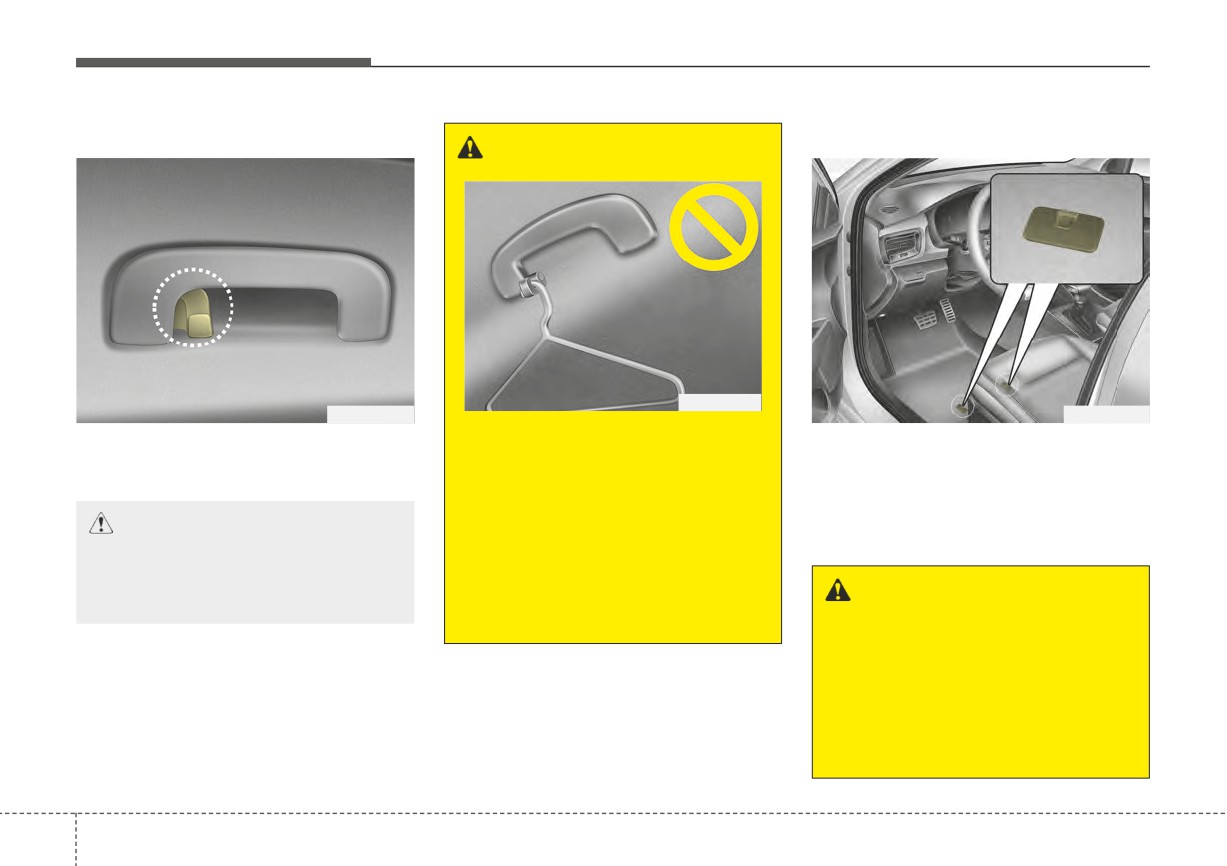
Clothes hanger (if equipped)
Floor mat anchor(s)
WARNING
OPS046500
OYB046450
OYB046448
Do not hang other objects such
The clothes hanger is located on the
When using a floor mat on the floor
roof of the rear seats.
as hangers or hard objects
carpet, make sure it attaches to the
except clothes. Also, do not put
floor mat anchor(s) in the front and rear
heavy, sharp or breakable
floor carpet of your vehicle. This keeps
CAUTION - Hanging
objects in clothing pockets. In
the floor mat from sliding forward.
clothing
an accident or when the curtain
air bag is inflated, it may cause
Do not hang heavy clothes, since
those may damage the hook.
vehicle damage or personal
WARNING - Aftermarket
injury.
floor mat
Do not install aftermarket floor
mats that are not capable of
being securely attached to the
vehicle's floor mat anchors.
Unsecured floor mats can inter-
fere with pedal operation.
4
146
Features of your vehicle
The following must be observed
Shopping bag holder
Covering shelf (for 5 door)
when installing ANY floor mat in the
(if equipped)
vehicle.
• Ensure that the floor mats are
securely attached to the vehicle's
floor mat anchor(s) before driving
the vehicle.
• Do not use ANY floor mat that can-
not be firmly attached to the vehi-
cle's floor mat anchors.
• Do not stack floor mats on top of
one another (e.g. ,all-weather rub-
ber mat on top of a carpeted floor
OSC047435N
mat). Only a single floor mat should
OYB046449
Use the cover to hide items stored in
be installed in each position.
the cargo area.
CAUTION
The covering shelf will be lifted when
✽ NOTICE
•
Do not hang a bag weighing
the liftgate is opened. Disconnect the
Your vehicle was manufactured with
more than 7 lbs. (3 kg). It may
strap (1) from holder if you want to
driver's side floor mat anchors that
cause damage to the shop-
return the cover to original position. To
are designed to securely hold the
ping bag holder.
remove the covering shelf completely,
floor mat in place. To avoid any
lift the cover to a 43-degree angle and
•
Do not hang a bag with frail
interference with pedal operation,
pull it out to the fullest extent (2). For
objects when you drive on a
Kia recommends that only the Kia
installation of the cover, reverse the
rough road as the objects may
floor mat designed for use in your
removal procedure.
be damaged.
vehicle should be installed.
When you return the covering shelf
to its original position, hold the cover
and lower it.
4
147
Features of your vehicle
CAUTION
WARNING
• Do not operate the vehicle
Do not place objects on the cov-
with the cover removed. It may
ering shelf while driving. Such
damage the cover.
objects may be thrown about
• Since the covering shelf may
inside the vehicle and possibly
be damaged or malformed, do
injure vehicle occupants during
not apply excessive force to
an accident or when braking.
the cover.
Never allow anyone to ride in the lug-
gage compartment. It is designed for
luggage only.
Maintain the balance of the vehicle
and locate the weight as far forward
as possible.
4
148
Features of your vehicle
INFOTAINMENT SYSTEM
✽ NOTICE
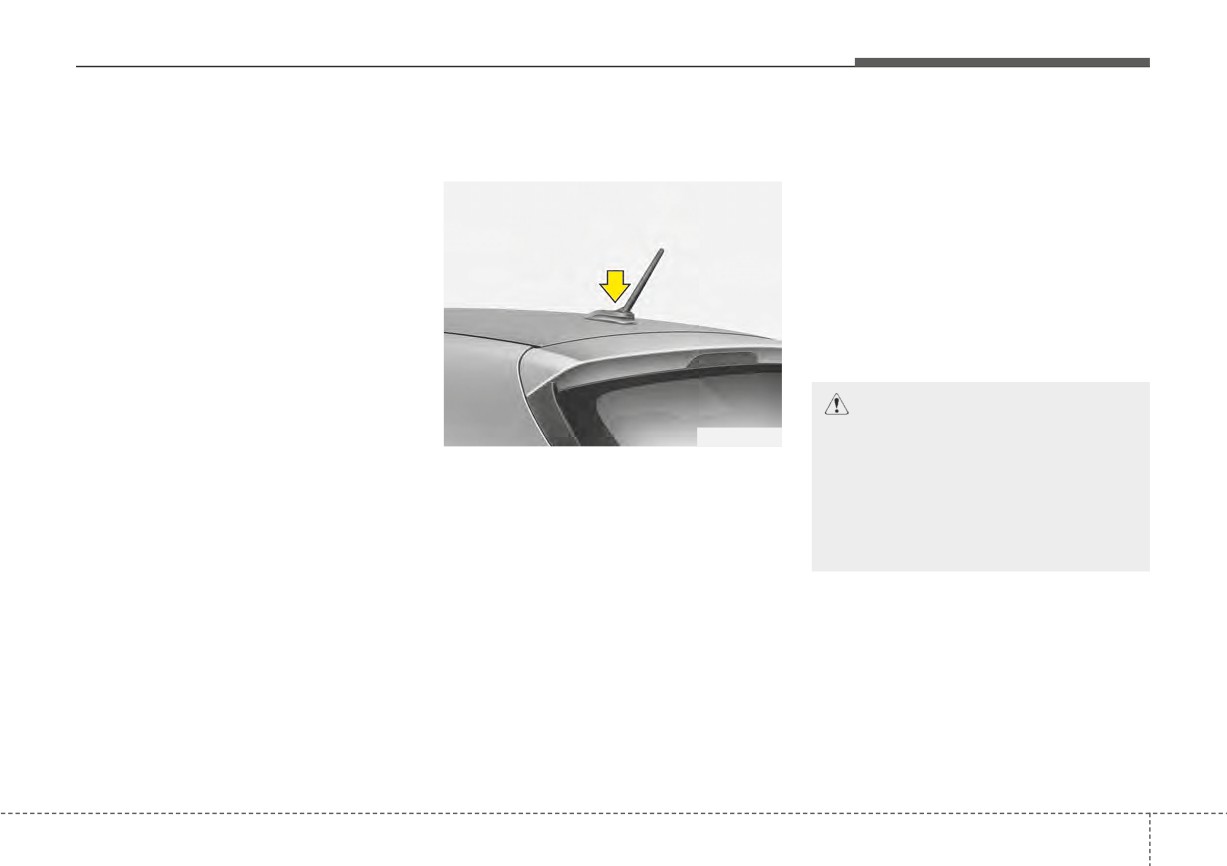
Antenna
When reinstalling your antenna, it is
important that it is fully tightened and
If you install an aftermarket HID
Micro pole antenna
adjusted to the upright position to
head lamp, your vehicle’s audio and
ensure proper reception. But it could
electronic device may malfunction.
be removed when parking the vehi-
cle or when loading cargo on the roof
❈ If your vehicle is equipped with
rack.
Infotainment system, refer to a
When cargo is loaded on the roof
separately supplied manual for
rack, do not place the cargo near the
detailed information.
antenna pole to ensure proper
reception.
CAUTION
OYB046453
Before entering a place with a
low height clearance or a car
The micro pole antenna receives
wash, remove the antenna by
data transmitted from base stations
rotating it counter-clockwise. If
and satellites
(e.g. AM/FM, SXM,
not, the antenna may be dam-
GPS, LTE) and also transmits to
aged.
base stations (e.g. LTE). The anten-
na pole is removable type.
To remove the antenna, turn it coun-
terclockwise. To install the antenna,
turn it clockwise.
4
149
Features of your vehicle
USB port
How vehicle audio works
This can be due to many factors,
such as the distance from the radio
FM reception
station, closeness of other strong
radio stations or the presence of
buildings, bridges or other large
obstructions in the area.
OSC040519
JBM001
You can use an USB port to plug in
AM and FM radio signals are broad-
an USB.
cast from transmitter towers located
around your city. They are intercept-
ed by the radio antenna on your vehi-
cle. This signal is then received by
the radio and sent to your vehicle
speakers.
When a strong radio signal has
reached your vehicle, the precise
engineering of your audio system
ensures the best possible quality
reproduction. However, in some
cases the signal coming to your vehi-
cle may not be strong and clear.
4
150
Features of your vehicle
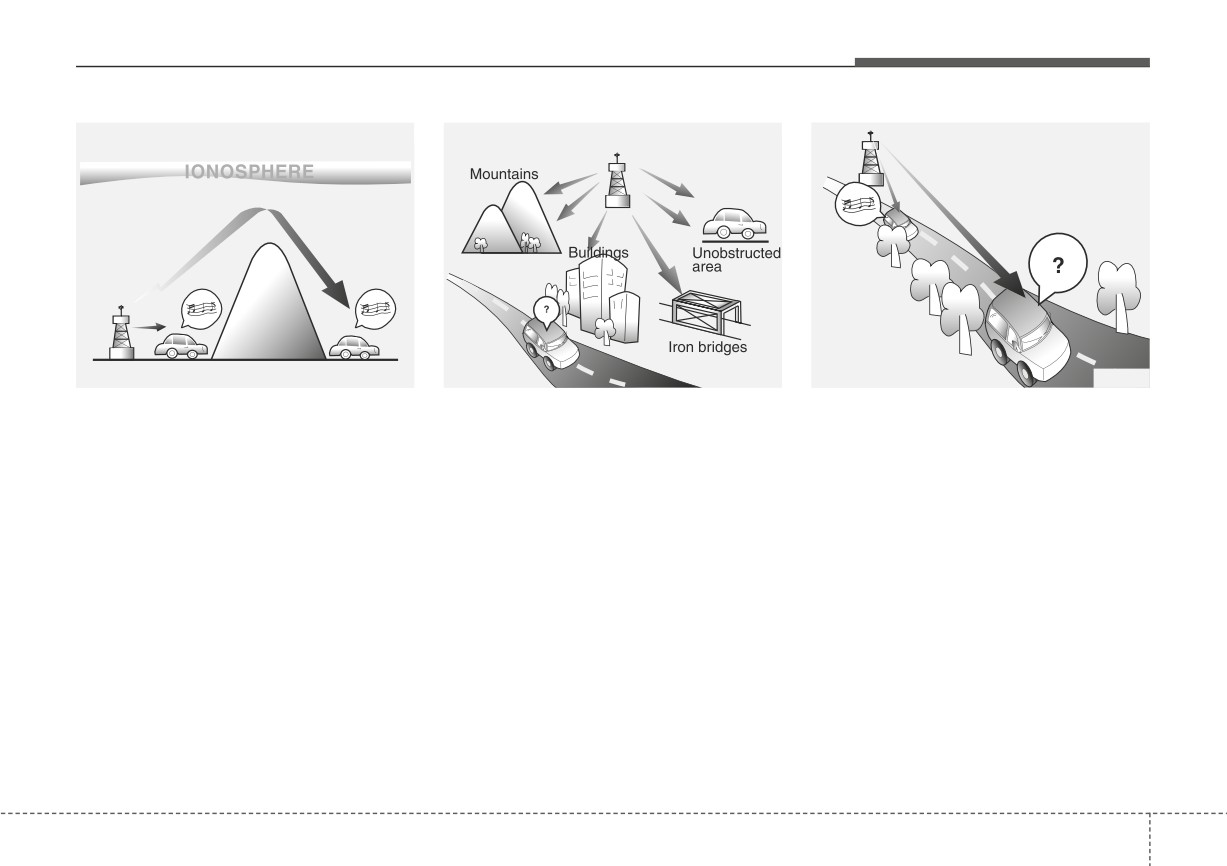
AM reception
FM radio station
JBM002
JBM003
JBM004
AM broadcasts can be received at
FM broadcasts are transmitted at
• Fading
- As your vehicle moves
greater distances than FM broad-
high frequencies and do not bend to
away from the radio station, the
casts. This is because AM radio
follow the earth's surface. Because
signal will weaken and sound will
waves are transmitted at low fre-
of this, FM broadcasts generally
begin to fade. When this occurs,
quencies. These long, low frequency
begin to fade at short distances from
we suggest that you select another
radio waves can follow the curvature
the station. Also, FM signals are eas-
stronger station.
of the earth rather than travelling
ily affected by buildings, mountains,
• Flutter/Static - Weak FM signals or
straight out into the atmosphere. In
or other obstructions. These can
large obstructions between the
addition, they curve around obstruc-
result in certain listening conditions
transmitter and your radio can dis-
tions so that they can provide better
which might lead you to believe a
turb the signal causing static or
signal coverage.
problem exists with your radio. The
fluttering noises to occur. Reducing
following conditions are normal and
the treble level may lessen this
do not indicate radio trouble:
effect until the disturbance clears.
4
151
Features of your vehicle
Using a cellular phone or a two-
way radio
WARNING
When a cellular phone is used inside
Driving while distracted can
the vehicle, noise may be produced
result in a loss of vehicle con-
from the audio system. This does not
trol that may lead to an acci-
mean that something is wrong with
dent, severe personal injury,
the audio equipment. If this occurs,
and death. The driver's primary
try using the cellular phone as far
responsibility is in the safe and
away as possible from the audio
legal operation of the vehicle,
equipment.
and any handheld devices,
other equipment, or vehicle sys-
When using a communication sys-
JBM005
tems which take the driver's
tem such as a cellular phone or a
eyes, attention, and focus away
•
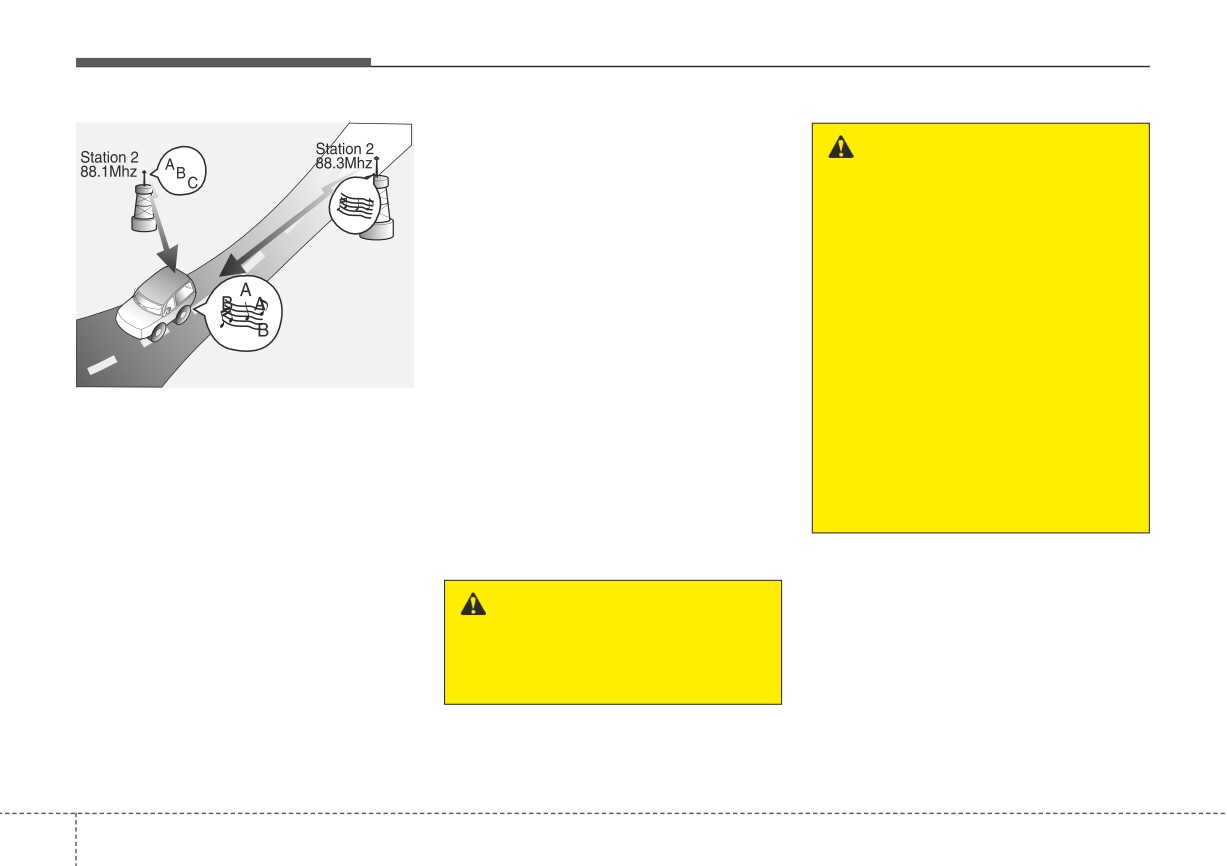
Station Swapping - As a FM signal
radio set inside the vehicle, a sepa-
from the safe operation of the
weakens, another more powerful
rate external antenna must be fitted.
vehicle, or which are not per-
signal near the same frequency
When a cellular phone or a radio set
missible by law, should never
may begin to play. This is because
is used with an internal antenna
be used during operation of the
your radio is designed to lock onto
alone, it may interfere with the vehi-
vehicle.
the clearest signal. If this occurs,
cle's electrical system and adversely
select another station with a
affect safe operation of the vehicle.
stronger signal.
•
Multi-Path Cancellation
- Radio
signals being received from sever-
WARNING
al directions can cause distortion
Do not use a cellular phone
or fluttering. This can be caused by
while driving. Stop at a safe
a direct and reflected signal from
location to use a cellular phone.
the same station, or by signals
from two stations with close fre-
quencies. If this occurs, select
another station until the condition
has passed.
4
152
Features of your vehicle
WARNING - Audio
System
Do not disassemble, assemble,
or modify this audio system.
Such acts could result in fire or
electric shock.
WARNING - Antenna
Do not touch the antenna dur-
ing thunder or lightning as such
acts may lead to lightning
induced electric shock.
4
153
Features of your vehicle
Declaration of Conformity
FCC
This equipment has been tested and found to comply with the limits for a Class B digital device, pursuant to part 15
of the FCC Rules. These limits are designed to provide reasonable protection against harmful interference in a resi-
dential installation.
This equipment generates, uses and can radiate radio frequency energy and, if not installed and used in accordance
with the instructions,may cause harmful interference to radio communications. However, there is no guarantee that
interference will not occur in a particular installation. If this equipment does cause harmful interference to radio or tel-
evision reception, which can be determined by turning the equipment off and on, the user is encouraged to try to cor-
rect the interference by one or more of the following measures :
• Reorient or relocate the receiving antenna.
• Increase the separation between the equipment and receiver.
• Connect the equipment into an outlet on a circuit different from that to which the receiver is connected.
• Consult the dealer or an experienced radio/TV technician for help.
Caution: Any changes or modifications to this device not explicitly approved by manufacturer could void
your authority to operate this equipment.
4
154
Features of your vehicle
This device complies with part 15 of the FCC Rules. Operation is subject to the following two conditions :
(1) This device may not cause harmful interference, and (2) this device must accept any interference received, includ-
ing interference that may cause undesired operation.
This equipment complies with FCC radiation exposure limits set forth for an uncontrolled environment.
This equipment should be installed and operated with minmum 20cm between the radiator and your body. This trans-
mitter must not be collocated or operating in conjunction with any other antenna or transmitter unless authorized to
do so by the FCC.
4
155
Driving your vehicle
Before driving
5-5
Forward Collision-Avoidance Assist (FCA)
5-41
• Before entering vehicle
5-5
• Detecting sensor
5-41
• Necessary inspections
5-5
• Forward Collision-Avoidance Assist settings
5-42
• Before starting
5-5
• Forward Collision-Avoidance Assist warning message
Key positions
5-7
and function control
5-44
• Ignition switch position
5-7
• Brake operation
5-46
• Starting the engine
5-9
• Warning message and warning light
5-47
• Forward Collision-Avoidance Assist malfunction . . 5-48
ENGINE START/STOP button
5-10
• Limitations of Forward Collision-Avoidance Assist 5-50
• Illuminated ENGINE START/STOP button
5-10
• ENGINE START/STOP button position
5-10
Lane Keeping Assist (LKA)
5-58
• Starting the engine
5-13
• Detecting sensor
5-58
• Lane Keeping Assist settings
5-59
Intelligent Variable Transmission (IVT)
5-17
• Lane Keeping Assist operation
5-60
• Intelligent Variable Transmission (IVT) operation . 5-17
5
• Lane Keeping Assist malfunction and limitations . . 5-63
• Good driving practices
5-22
Blind-Spot Collision Warning (BCW)
5-65
Brake system
5-25
• Detecting sensor
5-66
• Power brakes
5-25
• Blind-Spot Collision Warning settings
5-67
• Parking brake
5-27
• Blind-Spot Collision Warning operation
5-69
• Anti-lock Brake System (ABS)
5-30
• Blind-Spot Collision Warning malfunction and
• Electronic Stability Control (ESC)
5-31
limitations
5-70
• Hill-start Assist Control (HAC)
5-35
• Vehicle Stability Management (VSM)
5-36
Driver Attention Warning (DAW)
5-75
• Good braking practices
5-38
• Basic function
5-75
• Leading Vehicle Departure Alert
5-75
Sport mode integrated control system
5-40
• Detecting sensor
5-75
• SPORT mode
5-40
• Driver Attention Warning settings
5-76
• Driver Attention Warning operation
5-78
Declaration of conformity
5-102
• Driver Attention Warning malfunction and
• The radio frequency components (Rear Corner Radar)
limitations
5-81
complies
5-102
Cruise Control (CC)
5-84
Economical operation
5-103
• Cruise Control operation
5-84
Special driving conditions
5-105
• Increasing set speed
5-85
• Hazardous driving conditions
5-105
• Decreasing set speed
5-85
• Rocking the vehicle
5-105
• Accelerating temporarily
5-86
• Smooth cornering
5-106
• Temporarily pausing Cruise Control
5-86
• Driving at night
5-106
• Resuming Cruise Control
5-87
• Driving in the rain
5-107
• Turning off Cruise Control
5-87
• Driving in flooded areas
5-108
Lane Following Assist (LFA)
5-89
• Driving off-road
5-108
• Detecting sensor
5-89
• Highway driving
5-108
5
• Lane Following Assist settings
5-89
Winter driving
5-110
• Lane Following Assist operation
5-90
• Snowy or Icy conditions
5-110
• Lane Following Assist malfunction and limitations . 5-93
• Use high quality ethylene glycol coolant
5-112
Rear Cross-Traffic Collision Warning (RCCW) . 5-94
• Check battery and cables
5-112
• Detecting sensor
5-94
• Change to "winter weight" oil if necessary
5-113
• Rear Cross-Traffic Collision Warning settings
5-95
• Check spark plugs and ignition system
5-113
• Rear Cross-Traffic Collision Warning operation. . . 5-96
• To keep locks from freezing
5-113
• Rear Cross-Traffic Collision Warning malfunction
• Use approved window washer anti-freeze in system5-113
and limitations
5-97
• Don't let your parking brake freeze
5-113
• Don't let ice and snow accumulate underneath . . . 5-113
• Carry emergency equipment
5-114
• Trailer Towing
5-114
Vehicle load limit
5-115
• Tire and loading information label
5-115
• Certification label
5-118
Vehicle weight
5-120
• Base curb weight
5-120
• Vehicle curb weight
5-120
• Cargo weight
5-120
• GAW (Gross axle weight)
5-120
• GAWR (Gross axle weight rating)
5-120
• GVW (Gross vehicle weight)
5-120
• GVWR (Gross vehicle weight rating)
5-120
5
Driving your vehicle
Be sure the exhaust system
does not leak.
WARNING - Open
trunk/liftgate
The exhaust system should be
Do not drive with the trunk/lift-
checked whenever the vehicle is
raised to change the oil or for any
gate open.
other purpose. If you hear a change
Poisonous exhaust gases can
in the sound of the exhaust or if you
enter the passenger compart-
drive over something that strikes the
ment. If you must drive with the
underneath side of the vehicle, have
trunk/liftgate open proceed as
the exhaust system checked as soon
follows:
as possible by an authorized Kia
1.Close all windows.
dealer.
2.Open side vents.
3.Set the air intake control at
WARNING - Engine
“Fresh”, the air flow control at
exhaust
“Floor” or “Face” and the fan
at the highest speed.
Do not inhale exhaust fumes or
leave your engine running in an
enclosed area for a prolonged
time.
Exhaust fumes contain carbon
monoxide, a colorless, odorless
gas that can cause uncon-
sciousness and death by
asphyxiation.
5
4
Driving your vehicle
BEFORE DRIVING
Before entering vehicle
Before starting
WARNING - Distracted
• Be sure that all windows, outside
•
Close and lock all doors.
driving
mirror(s), and outside lights are
•
Position the seat so that all con-
clean.
Focus on the road while driving.
trols are easily reached.
• Check the condition of the tires.
The driver's primary responsi-
•
Buckle your seat belt.
bility is in the safe and legal
• Check under the vehicle for any
•
Adjust the inside and outside
operation of the vehicle. Use of
sign of leaks.
rearview mirrors.
any hand held devices, other
• Be sure there are no obstacles
equipment or vehicle systems
•
Be sure that all lights work.
behind you if you intend to back up.
that distract the driver should
•
Check all gauges.
not be used during vehicle
•
Check the operation of warning
Necessary inspections
operation.
lights when the ignition switch or
Fluid levels, such as engine oil,
ENGINE START/STOP button is
engine coolant, brake fluid, and
turned to the ON position.
washer fluid should be checked on a
•
Release the parking brake and
regular basis, with the exact interval
make sure the brake warning light
depending on the fluid. Further
goes off.
details are provided in chapter
7,
For safe operation, be sure you are
“Maintenance”.
familiar with your vehicle and its
equipment.
5
5
Driving your vehicle
WARNING - Fire risk
WARNING - Loose
WARNING - Driving while
When you intend to park or stop
objects
intoxicated
the vehicle with the engine on,
Securely store items in your
Do not drive while intoxicated.
be careful not to depress the
vehicle. When you make a sud-
Drinking and driving is danger-
accelerator pedal for a long
den stop or turn the steering
ous. Even a small amount of
period of time. It may overheat
wheel rapidly, loose objects
alcohol will affect your reflexes,
the engine or exhaust system
may drop on the floor and could
perceptions and judgment.
and cause fire.
interfere with the operation of
Driving while under the influ-
the foot pedals, possibly caus-
ence of drugs is as dangerous
ing an accident.
as or more dangerous than driv-
WARNING - Check sur-
ing drunk.
roundings
Always check the surrounding
WARNING - Proper
areas near your vehicle for peo-
footwear
ple, especially children, before
Always wear appropriate shoes
putting a vehicle into D (Drive)
when operating your vehicle.
or R (Reverse).
Unsuitable shoes (high heels, ski
boots, sandals, etc.) may inter-
fere with your ability to use the
brake and accelerator pedals.
5
6
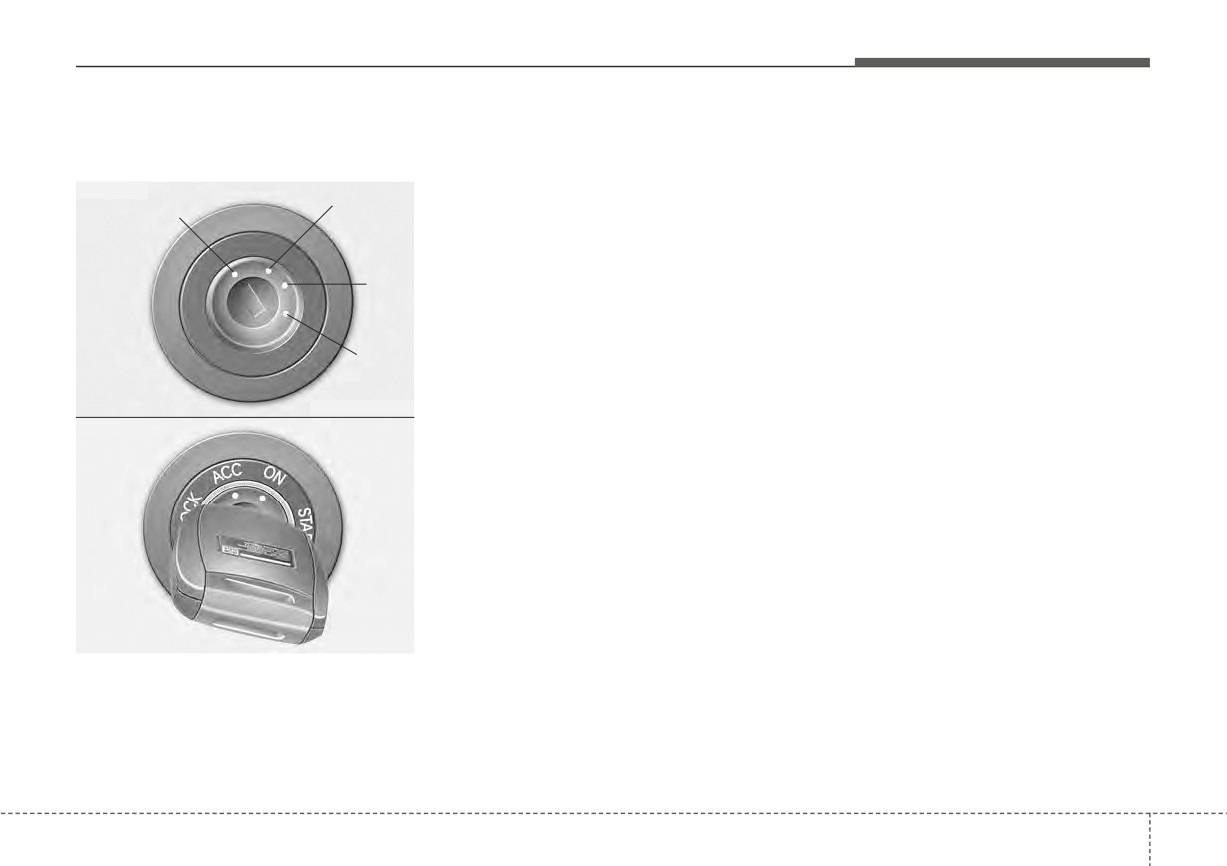
Driving your vehicle
KEY POSITIONS
Ignition switch position
The anti-theft steering column lock is
ACC (Accessory)
not a substitute for the parking brake.
The steering wheel is unlocked and
LOCK
Before leaving the driver's seat,
electrical accessories are operative.
■ Type A
ACC
always make sure the shift lever is
If difficulty is experienced turning the
LOCK
engaged in P
(Park) for the
ignition switch to the ACC position,
Intelligent Variable Transmission, set
turn the key while turning the steer-
the parking brake fully and shut the
ing wheel right and left to release the
ON
engine off.
tension.
ON
START
The warning lights can be checked
before the engine is started. This is
OUB051002
the normal running position after the
■ Type B
engine is started.
Do not leave the ignition switch ON if
the engine is not running to prevent
battery discharge.
OSC057001N
The steering wheel locks to protect
against theft.
The ignition key can be removed only
in the LOCK position.
5
7
Driving your vehicle
START
WARNING - Steering
WARNING - Leaving the
Turn the ignition switch to the START
wheel
vehicle
position to start the engine. The
engine will crank until you release
Never reach for any controls
To avoid unexpected or sudden
the key; then it returns to the ON
through the steering wheel
vehicle movement, never leave
position. The brake warning light can
while the vehicle is in motion.
your vehicle if the transmission
be checked in this position.
The presence of your hand or
is not locked in the P
(Park)
arm in this area could cause a
position and the parking brake
✽ NOTICE
loss of vehicle control.
is not fully engaged. Before
If you leave the ignition switch to the
leaving the driver's seat, always
ACC or ON position for a long time,
make sure the shift lever is
the battery may discharge.
engaged in P (Park), set the
WARNING - Key holder
parking brake fully and shut the
Do not attach small purses,
engine off.
WARNING - Ignition
multiple keys, or any other
switch
heavy accessories to the dri-
ver's key chain used to start the
Never turn the ignition switch to
vehicle. This may cause the
LOCK or ACC while the vehicle
inserted key to inadvertently
is moving. This would result in
change the ignition position to
loss of directional control and
the ACC position while the vehi-
braking function, which could
cle is moving, thereby increas-
cause an accident.
ing the risk of an accident and
deactivating several safety fea-
tures.
5
8
Driving your vehicle
Starting the engine
Starting the engine with an igni-
4. Do not wait for the engine to warm
tion key
up while the vehicle remains sta-
tionary.
1. Make sure the parking brake is
WARNING - Proper
applied.
Start driving at moderate engine
footwear
speeds.
(Extreme and/or exces-
2. Intelligent Variable Transmission
Always wear appropriate shoes
sive accelerating and decelerating
- Place the transmission shift lever
when operating your vehicle.
should be avoided.)
in P
(Park). Depress the brake
Unsuitable shoes (high heels, ski
pedal fully.
If the engine stalls while the vehicle
boots, sandals, etc.) may inter-
is in motion, do not attempt to move
fere with your ability to use the
You can also start the engine
the shift lever to the P (Park) posi-
brake and accelerator pedals.
when the shift lever is in the N
tion. If traffic and road conditions per-
(Neutral) position.
mit, you may put the shift lever in the
3. Turn the ignition switch to START
N (Neutral) position while the vehicle
and hold it there until the engine
is still moving and turn the ignition
starts (a maximum of 10 seconds),
switch to the START position in an
then release the key.
attempt to restart the engine.
It
should be started without
depressing the accelerator.
CAUTION - Starter
Do not engage the starter for
more than 10 seconds. If the
engine stalls or fails to start,
wait 5 to 10 seconds before re-
engaging the starter. Improper
use of the starter may damage
it.
5
9
Driving your vehicle
ENGINE START/STOP BUTTON (IF EQUIPPED)
Illuminated ENGINE
ENGINE START/STOP button
Vehicles equipped with anti-theft
START/STOP button
position
steering column lock
The steering wheel locks when the
OFF
ENGINE START/STOP button is in the
With Intelligent Variable Transmission
OFF position to protect you against
To turn off the engine (START/RUN
theft. It locks when the door is opened.
position) or vehicle power (ON posi-
tion),
press
the
ENGINE
If the steering wheel is not locked
START/STOP button with the shift
properly when you open the driver's
lever in the P (Park) position. When
door, the warning chime will sound.
you
press
the
ENGINE
Try locking the steering wheel again.
START/STOP button without the shift
If the problem is not solved, have the
lever in the P
(Park) position, the
system checked by an authorized
ENGINE START/STOP button will
Kia dealer.
OYB050001L
not change to the OFF position but to
the ACC position.
Whenever the front door is opened,
the ENGINE START/STOP button
In addition, if the ENGINE
will illuminate for your convenience.
START/STOP button is in the OFF
The light will go off after about 30
position after the driver's door is
seconds when the door is closed. It
opened, the steering wheel will not
will also go off immediately when the
lock and the warning chime will
theft-alarm system is armed.
sound. If that occurs, close the door.
Then the steering wheel will lock and
the warning chime will stop.
5
10
Driving your vehicle
✽ NOTICE
✽ NOTICE
ACC(Accessory)
If the steering wheel doesn't unlock
In an emergency situation while the
With Intelligent Variable Transmission
properly,
the
ENGINE
vehicle is in motion, you are able to
Press the ENGINE START/STOP
START/STOP button will not work.
turn the engine off and to the ACC
button while it is in the OFF position
Press the ENGINE START/STOP
position by pressing the ENGINE
without depressing the brake pedal.
button while turning the steering
START/STOP button for more than
wheel right and left to release the
2 seconds or 3 times successively
The steering wheel unlocks and elec-
tension.
within 3 seconds.
trical accessories are operational.
If the vehicle is still moving, to
✽ NOTICE
restart the vehicle:
If the ENGINE START/STOP button
• Intelligent Variable Transmission
is in the ACC position for more than 1
You are able to turn off the engine
- Press
the
ENGINE
hour, the button is turned off auto-
(START/RUN) or vehicle power
START/STOP button when vehi-
matically to prevent battery dis-
(ON), only when the vehicle is not in
cle speed is 3 mph (5 km/h) or
charge.
motion.
over.
5
11
Driving your vehicle
ON
START/RUN
✽ NOTICE
With Intelligent Variable Transmission
With Intelligent Variable Transmission
If
you press the ENGINE
Press the ENGINE START/STOP
To start the engine, depress the brake
START/STOP button without
button while it is in the ACC position
pedal and press the ENGINE
depressing the brake pedal for
without depressing the brake pedal.
START/STOP button with the shift
Intelligent Variable Transmission
lever in the P (Park) or the N (Neutral)
vehicles, the engine will not start
position. For your safety, start the
and the ENGINE START/STOP
The warning lights can be checked
engine with the shift lever in the P
button changes as follow:
before the engine is started. Do not
(Park) position.
OFF ➔ACC ➔ ON ➔ OFF or ACC
leave the ENGINE START/STOP
button in the ON position for a long
time. The battery may discharge,
because the engine is not running.
5
12