Toyota C-HR (2019 year). Manual - part 20
 

  Index      Toyota     Toyota C-HR - service manual 2019 year in english


Search            


Content   ..  18  19  20  21   ..


Toyota C-HR (2019 year). Manual - part 20


305

5-3. Using the storage features

5

In

te

rior 

fe

at

ures

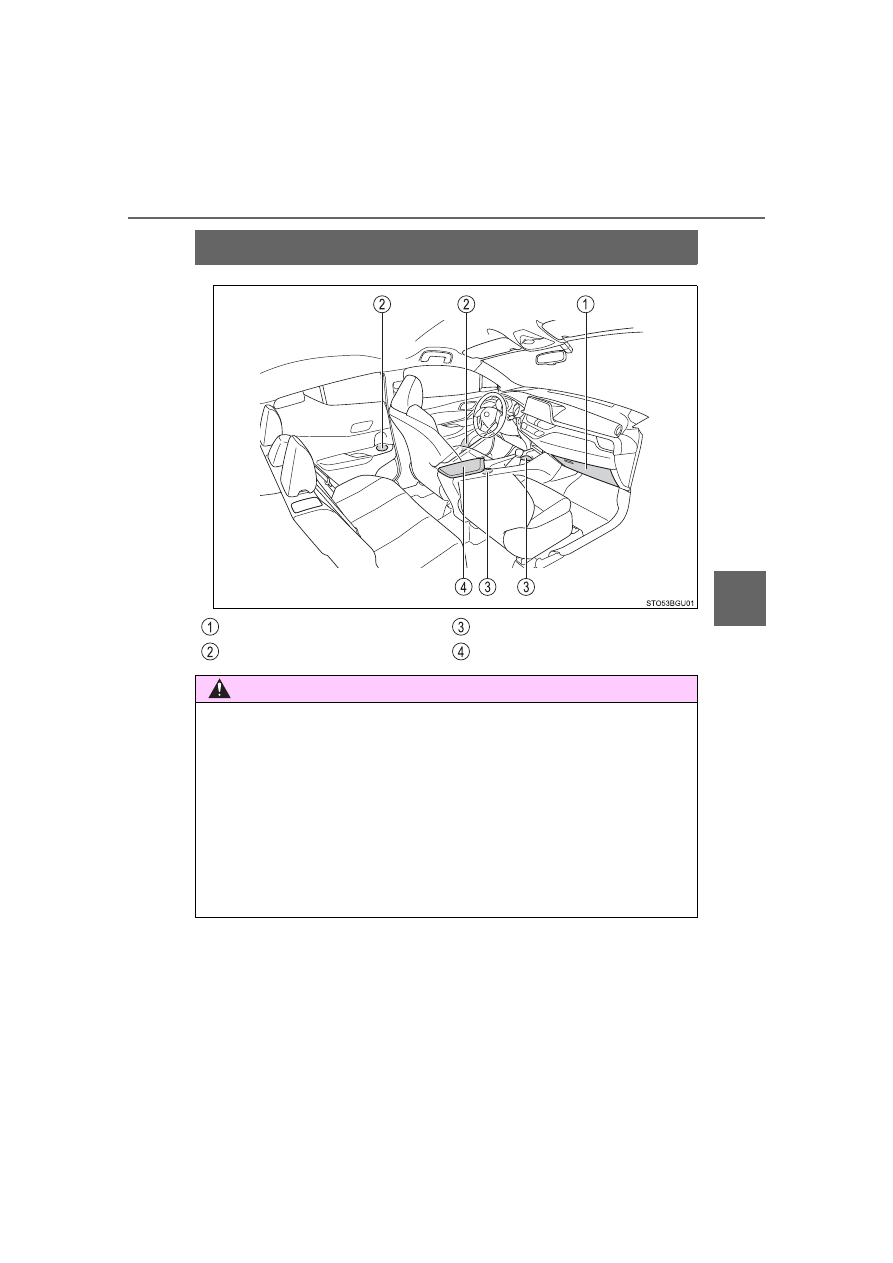
List of storage features

Glove box

 (

P. 306)

Bottle holders

(

P. 307)

Cup holders 

(

P. 308)

Console box

 (

P. 306)

WARNING

Do not leave glasses, lighters or spray cans in the storage spaces, as this
may cause the following when cabin temperature becomes high:
• Glasses may be deformed by heat or cracked if they come into contact

with other stored items.

• Lighters or spray cans may explode. If they come into contact with other

stored  items,  the  lighter  may  catch  fire  or  the  spray  can  may  release
gas, causing a fire hazard.

When driving or when the storage compartments are not in use, keep the
lids closed and trays clear. 
In the event of sudden braking or sudden swerving, an accident may occur
due to an occupant being struck by an open lid or the items stored inside.

306

5-3. Using the storage features

Press the button to open the glove
box.

The glove box light turns on when the tail lights are on.

Lift  the  lid  while  pulling  up  the
knob.

Glove box

Console box

307

5-3. Using the storage features

5

In

te

rior 

fe

at

ures

When storing a bottle, close the cap.

The bottle may not be stored depending on its size or shape.

Bottle holders

Front

Rear

WARNING

Do not place anything other than a bottle in the bottle holders.
Other items may be thrown out of the holders in the event of an accident or
sudden braking and cause injury.

NOTICE

Put the cap on before stowing a bottle. Do not place open bottles in the bot-
tle holders, or glass or paper cups containing liquid. The contents may spill
and glass cups may break.

308

5-3. Using the storage features

Cup holders

The rear cup holder can have the partition
turned  over,  removed,  and  the  depth
changed.

WARNING

Do not place anything other than cups or aluminum cans in the cup hold-
ers.
Other items may be thrown out of the holders in the event of an accident or
sudden braking, causing injury.

Observe the following precautions. 
Failure to do so may result in serious injury such as burns.
• Close the lid on drinks that are hot.
• Check that the item can be sustained by the internal support.
• Take care to not let the cup height exceed armrest height.
• Do not use the partition in the front cup holder as it is only for use with

the rear cup holder.

309

5-3. Using the storage features

5

In

te

rior 

fe

at

ures

Luggage compartment features

Cargo  hooks  are  provided  for
securing loose items.

Cargo hooks

WARNING

To avoid injury, always return the cargo hooks to their positions when they
are not in use.

Grocery bag hooks

NOTICE

Do not hang any object heavier than 4.4 lb. (2 kg) on the grocery bag hook.

310

5-3. Using the storage features

Lift  the  deck  mat  tab  and  pull  it
toward you to remove it.

Auxiliary boxes

Side auxiliary boxes

311

5-3. Using the storage features

5

In

te

rior 

fe

at

ures

Hard type

Unhook  the  cords  and  return
the luggage cover to horizontal
position.

Type A

Pull it toward you and then lift
the luggage cover to remove
it.

Installation position

Confirm  that  the  cover  has
been securely installed to the
original  position  when  install-
ing.

Removal position

Type B

Lift  the  luggage  cover  and
pull  it  toward  you  to  remove
it.

Confirm that the cover has been
securely installed to the original
position when installing.

Luggage cover

1

2

2

312

5-3. Using the storage features

Soft type

Removing the luggage cover

Unhook the cords.

Unhook the hook to the hook
brackets.

Stowing the luggage cover

Hold  the  luggage  cover  with
both  hands.  Point  your
thumbs  in  opposite  direc-
tions.

1

2

1

313

5-3. Using the storage features

5

In

te

rior 

fe

at

ures

Bend  one  side  of  the  cover
towards you.

Twist  the  other  side  in  the
opposite direction,  as shown
in the illustration.

Make a small circle, then fold
it inward.

Make  sure  the  three  circles
are side by side.

2

3

4

5

314

5-3. Using the storage features

Make sure the luggage cover
is properly folded.

6

WARNING

Observe the following precautions.
Failure to do so may result in death or serious injury.

Do not place anything on the luggage cover. In the event of sudden brak-
ing or turning, the item may go flying and strike an occupant.

Do not allow children to climb on the luggage cover. Climbing on the lug-
gage cover could result in damage to the luggage cover.

Soft type luggage cover only: Be sure to properly fold the luggage cover.
Other wise it could unexpectedly unfold.

Soft type luggage cover only: Be sure to attach the cords correctly to pre-
vent the cover from flying off.

NOTICE

Soft type luggage cover only: Do not apply too much force when folding the
luggage cover. Doing so may damage the luggage cover.

315

5-4. Using the other interior features

5

In

te

rior 

fe

at

ures

Other interior features

To  set  the  visor  in  the  forward
position, flip it down.
To set the visor in the side posi-
tion,  flip  down,  unhook,  and
swing it to the side.

Slide the cover to open.

The  light  turns  on  when  the  cover
is opened. (if equipped)

Sun visors

2

1

Vanity mirrors

316

5-4. Using the other interior features

The clock can be adjusted by pressing and holding the buttons.

Adjusts the hours
Adjusts the minutes

Vehicles without a smart key system:
The clock is displayed when the engine switch is in the “ACC” or “ON” posi-
tion.
Vehicles with a smart key system:
The  clock  is  displayed  when  the  engine  switch  is  in  ACCESSORY  or
IGNITION ON mode.

When  the  battery  terminals  are  disconnected  and  reconnected,  the  clock
will automatically be set to 1:00.

Clock

317

5-4. Using the other interior features

5

In

te

rior 

fe

at

ures

Please use as a power supply for electronic goods that use less than
12 VDC/10 A (power consumption of 120 W).

Lift  the  lid  while  pulling  up  the
knob and open the console box.

Open the cover.

Vehicles without a smart key system:
The power outlet can be used when the engine switch is in the “ACC” or “ON”
position.
Vehicles with a smart key system:
The power outlet can be used when the engine switch is in ACCESSORY or
IGNITION ON mode.

Power outlet

1

2

NOTICE

To  avoid  damaging  the  power  outlet,  close  the  power  outlet  cover  when
the  power  outlet  is  not  in  use.  Foreign  objects  or  liquids  that  enter  the
power outlet may cause a short circuit.

To prevent battery discharge, do not use the power outlet longer than nec-
essary when the engine is off.

318

5-4. Using the other interior features

An assist grip installed on the ceil-
ing  can  be  used  to  support  your
body while sitting on the seat.

Assist grips

WARNING

Do not use the assist grip when getting in or out of the vehicle or rising from
your seat.

NOTICE

To prevent damage to the assist grip, do not hang any heavy object or put a
heavy load on the assist grip.

319

5-4. Using the other interior features

5

In

te

rior 

fe

at

ures

Safety Connect

System components

“SOS” button
LED light indicators
Microphone

: If equipped

Safety  Connect  is  a  subscription-based  telematics  service  that
uses Global Positioning System (GPS) data and embedded cel-
lular technology to provide safety and security features to sub-
scribers.  Safety  Connect  is  supported  by  Toyota’s  designated
response  center,  which  operates  24  hours  per  day,  7  days  per
week.
Safety  Connect  service  is  available  by  subscription  on  select,
telematics hardware-equipped vehicles.
By  using  the  Safety  Connect  service,  you  are  agreeing  to  be
bound  by  the  Telematics  Subscription  Service Agreement  and
its Terms and Conditions, as in effect and amended from time to
time, a current copy of which is available at in the United States,
Toyotapr.com in Puerto Rico and Toyota.ca in Canada. All use of
the  Safety  Connect  service  is  subject  to  such  then-applicable
Terms and Conditions.

320

5-4. Using the other interior features

Services
Subscribers have the following Safety Connect services available:
● Automatic Collision Notification

*

Helps drivers receive necessary response from emergency ser-
vice providers. (

P. 322)

*

: U.S. Patent No. 7,508,298 B2

● Stolen Vehicle Location

Helps drivers in the event of vehicle theft. (

P. 323)

● Emergency Assistance Button (SOS)

Connects drivers to response-center support. (

P. 323)

● Enhanced Roadside Assistance

Provides drivers various on-road assistance. (

P. 323)

Subscription
After you have signed the Telematics Subscription Service Agree-
ment and are enrolled, you can begin receiving services. 
A variety of subscription terms are available for purchase. Contact
your  Toyota  dealer,  call  following  appropriate  Safety  Connect
response center or push the “SOS” button in your vehicle for further
subscription details.

• The United States

1-855-405-6500

• Canada

1-888-869-6828

• Puerto Rico

1-877-855-8377


Content   ..  18  19  20  21   ..