Seat Ateca (2023 year). Manual in english - page 7
Parking and manoeuvring
203
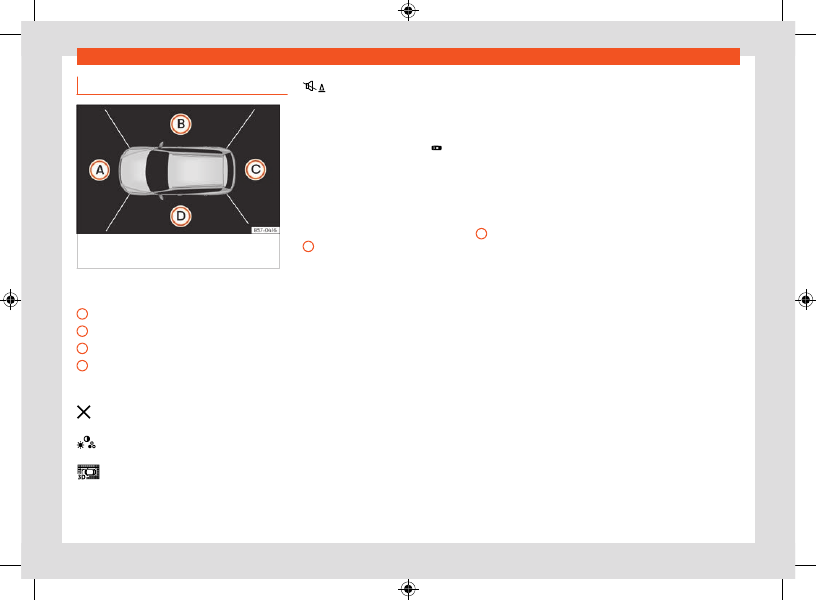
Peripheral view system (Top View Camera)
A
B
C
D
Area View system
Fig. 145
Display of the Area View system:
aerial view.
There are four different views to choose from
:
Front camera area
Right camera area
Rear camera area
Left camera area
Function buttons:
Exit the current display.
Adjust the display: bright, contrast and
colour.
Three-dimensional views
Depending on the equipment: connect-
ing and disconnecting the ParkPilot
sound.
The aerial view is generated by combining the
images from all the cameras
.
The top view can be selected by pressing the
vehicle inside the zone.
The system will automatically switch between
front and rear camera view according to the
direction of travel.
Press on the different areas
A
to
D
of the top view or reduced top view to select
and set the corresponding view, which will be
highlighted in orange.
Conditions necessary for the use of the Area
View system
●
The doors and the rear lid must be closed.
●
The image must be reliable and clear. For this
reason, for example, the camera lens must be
clean.
●
The area around the vehicle must be clearly
and totally visible.
●
The area for parking or manoeuvring should
be a flat surface.
●
The vehicle should
not
be loaded very heav-
ily at the rear.
●
The driver must be used to the system.
●
There should be no damage to the vehicle in
the camera area. If the position or installation
angle of the cameras have been changed, e.g.
after a rear-end collision, the system should be
checked by a specialised workshop.
Special characteristics
The images on the area view system cameras
are only two-dimensional. Due to a lack of spa-
tial depth, it is difficult or impossible to make
out on-screen any holes there may be on the
ground, objects jutting out from the ground or
parts protruding from other vehicles.
Situations in which the objects or other vehicles
appear to be further away or closer than they
really are:
●
On moving from a horizontal plane to a slope.
●
On moving from a slope to a horizontal plane.
●
If the vehicle is heavily loaded at the rear.
●
If the vehicle approaches protruding objects.
These objects may be outside the cameras' an-
gle of visibility.
Trailer mode
The Area View system conceals, in the rear
camera area, all the auxiliary guiding lines
when the factory-fitted towing bracket is con-
nected electrically to a trailer