Renault Captur (2023 year). Manual in english - page 4
REAGENT TANK (4/4)
System faults
When the indicator lights light up, this may be accompanied by a beep.
Indicator lights
Message
Readings
“Check Anti- Pollution System”
Indicates a fault in the system. Contact your approved
“AdBlue quality to check”
Dealer as soon as possible.
“AdBlue injection to check”
Indicates a system fault and that in less than 496
miles (800 km) it will become impossible to re-
start the vehicle.
These warnings are repeated:
- every 62 miles (100 km) until there is around
“XXX KM failure antipollution”
500 miles (800 km) and 124 miles (200 km) left
before the vehicle cannot be restarted;
- Every 31 miles (50 km) when there is less than
124 miles (200 km) left before the vehicle cannot
be restarted.
Contact your approved Dealer as soon as possible.
Indicates that after the ignition is switched off the ve-
“0 KM failure antipollution”
hicle will not restart. Call an approved Dealer.
1.116
CarManuals2.co
Section 2: Driving
Running in
2.2
Ignition switch
2.3
Starting, stopping the engine
2.4
Stop and Start Function
2.12
Special features of petrol and diesel versions
2.16
Special features of LPG versions
2.20
Gear lever, Handbrake
2.24
Electronic parking brake
2.25
“AUTOHOLD” function
2.29
Eco-driving
2.30
Maintenance and antipollution advice
2.38
Environment
2.39
Tyre pressure loss warning
2.40
Driver correction devices and aids
2.46
Lane departure warning
2.51
Lane Keeping Assist
2.56
Blind spot warning
2.62
Safe distance alert
2.69
360° camera
2.73
Active emergency braking
2.82
Detection of road signs
2.90
Speed limiter, cruise control
2.94
Stop and Go adaptive cruise control
2.103
Highway and Traffic Jam Companion
2.117
Parking distance control
2.133
Reversing camera
2.140
Parking exit warning
2.142
Assisted parking
2.146
Automatic gearbox, electronic lever, manual lever .
2.151
Emergency call
2.161
2.1
CarManuals2.co
RUNNING IN
Petrol version
Diesel version
For the first 600 miles (1,000 km), do
For the first 1,000 miles (1,500 km),
not exceed 78 mph (130 km/h) in the
do not exceed 80 mph (130 km/h) in
highest gear, or 3,000 to 3,500 rpm.
the highest gear, or 2,500 rpm. After
completing this mileage you may drive
You may only expect top performance
faster, although you may only expect
from your vehicle after approximately
top performance after approximately
1,800 miles (3,000 km).
3,600 miles (6,000 km).
Service intervals: refer to the
During the running in period, do not ac-
Maintenance Document for your vehi-
celerate hard while the engine is still
cle.
cold and do not let the engine over-rev.
Service intervals: refer to the
Maintenance Document for your vehi-
cle.
2.2
CarManuals2.co
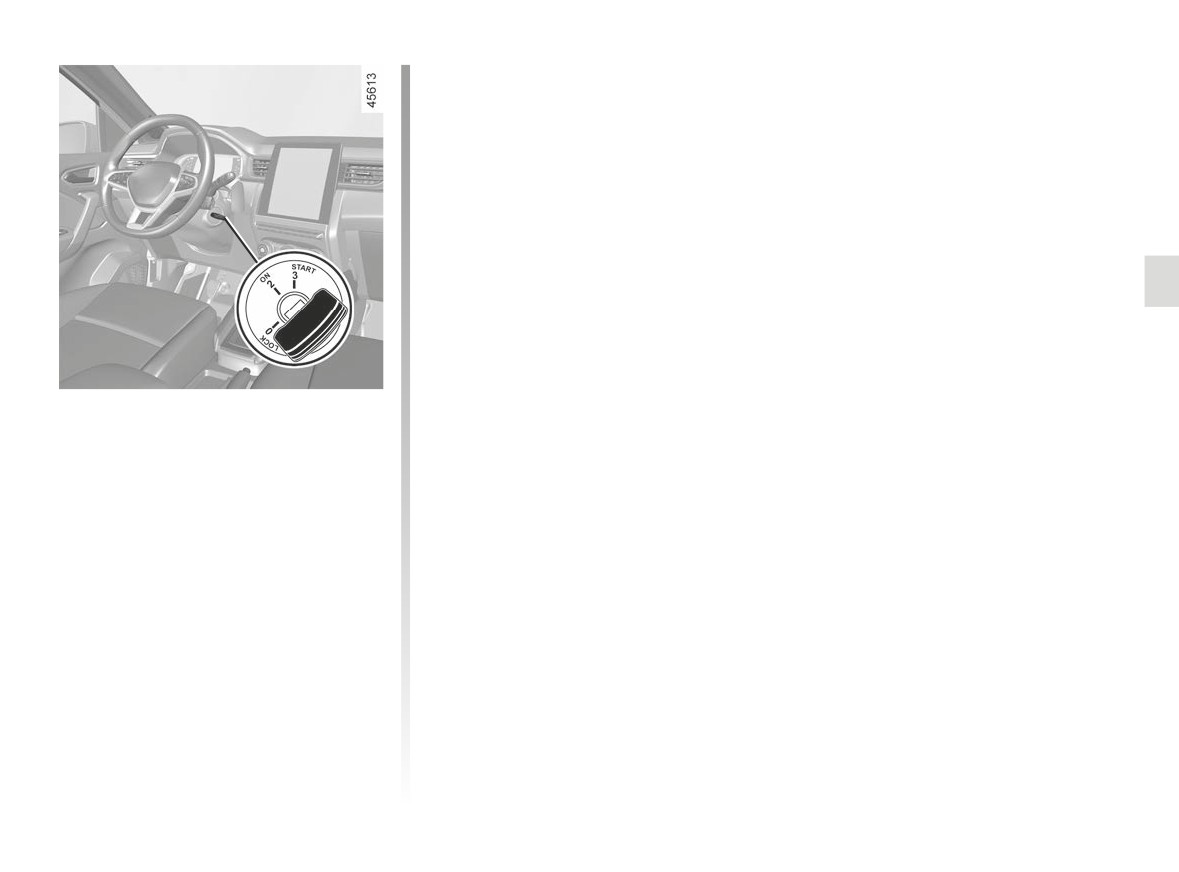
IGNITION SWITCH: vehicle with key
“Ignition” position ON 2
The ignition is switched on: Any acces-
sories (radio etc.) can be used.
“Start” position START 3
If the engine fails to start at the first
attempt, the key must be turned back
before the starter can be activated
again. Release the key as soon as the
engine starts.
Note: on diesel versions, several sec-
onds may pass between turning the
key and the engine starting to allow for
engine preheating.
Ignition switch
Off position LOCK 0 (steering lock
applied)
To lock: remove the key and turn the
steering wheel until the steering column
locks.
To unlock: turn the key and the steering
wheel slightly.
2.3
CarManuals2.co
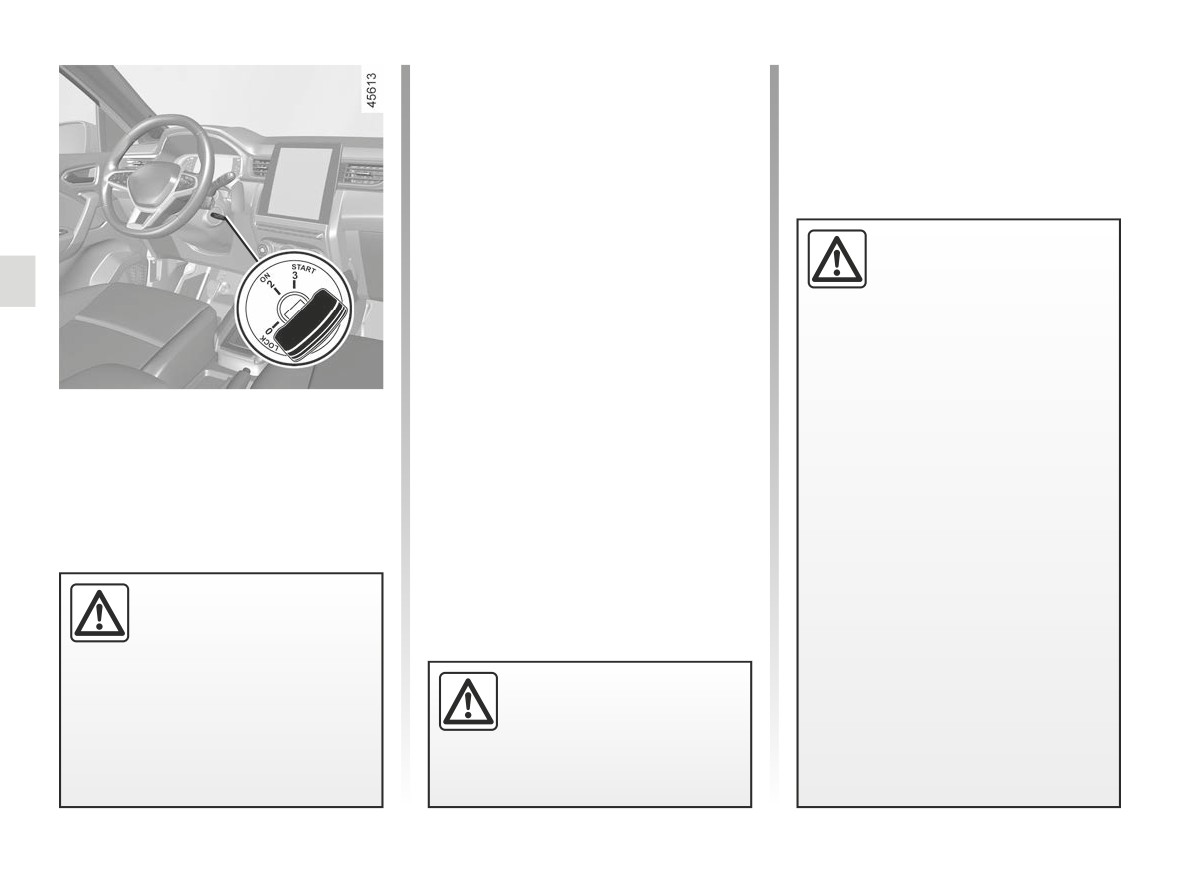
STARTING, STOPPING THE ENGINE: vehicle with key (1/2)
Petrol versions
Note: on vehicles equipped with a
- Activate the starter without acceler-
manual gearbox, in the event of engine
ating;
stalling the message “Press Clutch” will
- release the key as soon as the
be displayed on the instrument panel.
engine starts.
Fully press the clutch pedal to restart
the engine.
Diesel versions
É
Driver’s responsibility
- Turn the ignition key to the
when parking or stopping
“ON”position 2 and hold this position
the vehicle
until the engine preheating light goes
off;
Never leave an animal,
- turn the key to the start position
child or adult who is not self-suffi-
“START” 3 without pressing the
cient alone in your vehicle, even for
accelerator;
a short time.
- release the key as soon as the
Starting the engine
They may pose a risk to themselves
engine starts.
or to others by starting the engine,
Special note: when starting the engine
To start:
activating equipment such as the
in very low exterior temperatures (below
On vehicles equipped with automatic
electric windows or locking the
-10°C): hold down the clutch pedal until
gearboxes with a mechanical lever, set
doors, for example.
the engine starts.
the lever to position P.
Also, in hot and/or sunny weather,
Stopping the engine
please remember that the tempera-
With the engine idling, turn the key to
ture inside the passenger compart-
the “LOCK” position 0.
ment increases very quickly.
Never switch off the igni-
RISK OF DEATH OR SERIOUS
tion before the vehicle has
INJURY.
stopped completely. Once
the engine has stopped, the
brake servo, power-assisted steer-
Never start your vehicle
ing etc., and the passive safety de-
while freewheeling on a gra-
vices such as the airbags and pre-
dient. Risk of non-activation
tensioners will no longer operate.
of power-assisted steering.
There is a risk of accidents.
2.4
CarManuals2.co
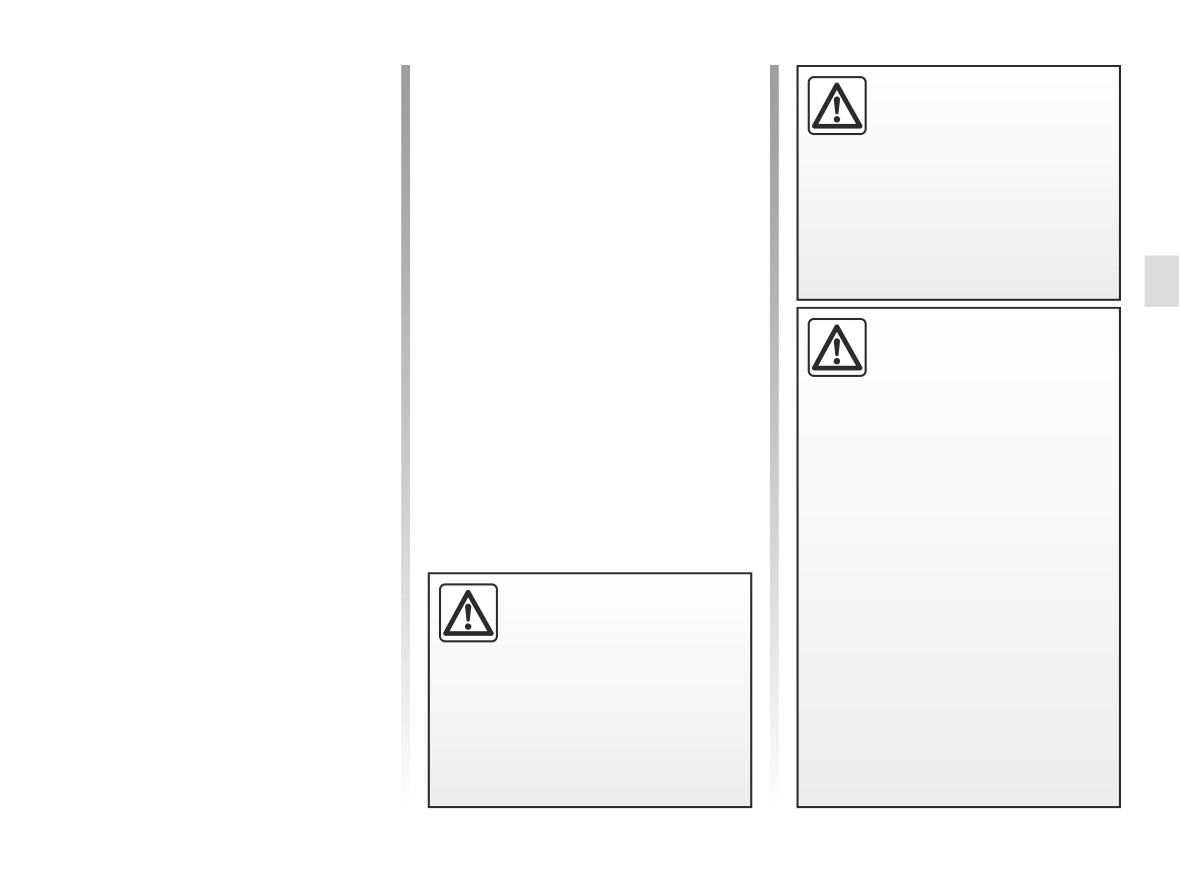
STARTING, STOPPING THE ENGINE: vehicle with key (2/2)
LPG versions
Never switch off the igni-
The engine is always started using
tion before the vehicle has
petrol:
stopped completely. Once
the engine has stopped, the
- activate the starter without accelerat-
brake servo, power-assisted steer-
ing;
ing etc. and the passive safety de-
- release the key as soon as the
vices such as the airbags and pre-
engine starts.
tensioners will no longer operate.
The system will automatically deter-
mine the switchover from petrol to LPG.
Depending on the vehicle, under cer-
tain conditions of use (e.g., hard accel-
Driver’s responsibility
eration), the system may opt to tempo-
when parking or stopping
rarily switch back to petrol mode.
the vehicle
If the environmental conditions are
Never leave an animal,
once again suitable, the system may
child or adult who is not self-suffi-
once again permit LPG mode.
cient alone in your vehicle, even for
a short time. They may pose a risk
For more information ➥ 2.20.
to themselves or to others by start-
At temperatures close to 0°C or less, it
ing the engine, activating equipment
is recommended to use ECO mode to
such as the electric windows or
maximise the use of LPG mode ➥ 2.30.
locking the doors. Also, in hot and/
or sunny weather, please remem-
ber that the temperature inside the
Do not park the vehicle or
passenger compartment increases
run the engine in locations
very quickly. RISK OF DEATH OR
where combustible sub-
SERIOUS INJURY.
stances or materials such
as grass or leaves can come into
contact with the hot exhaust system.
2.5
CarManuals2.co
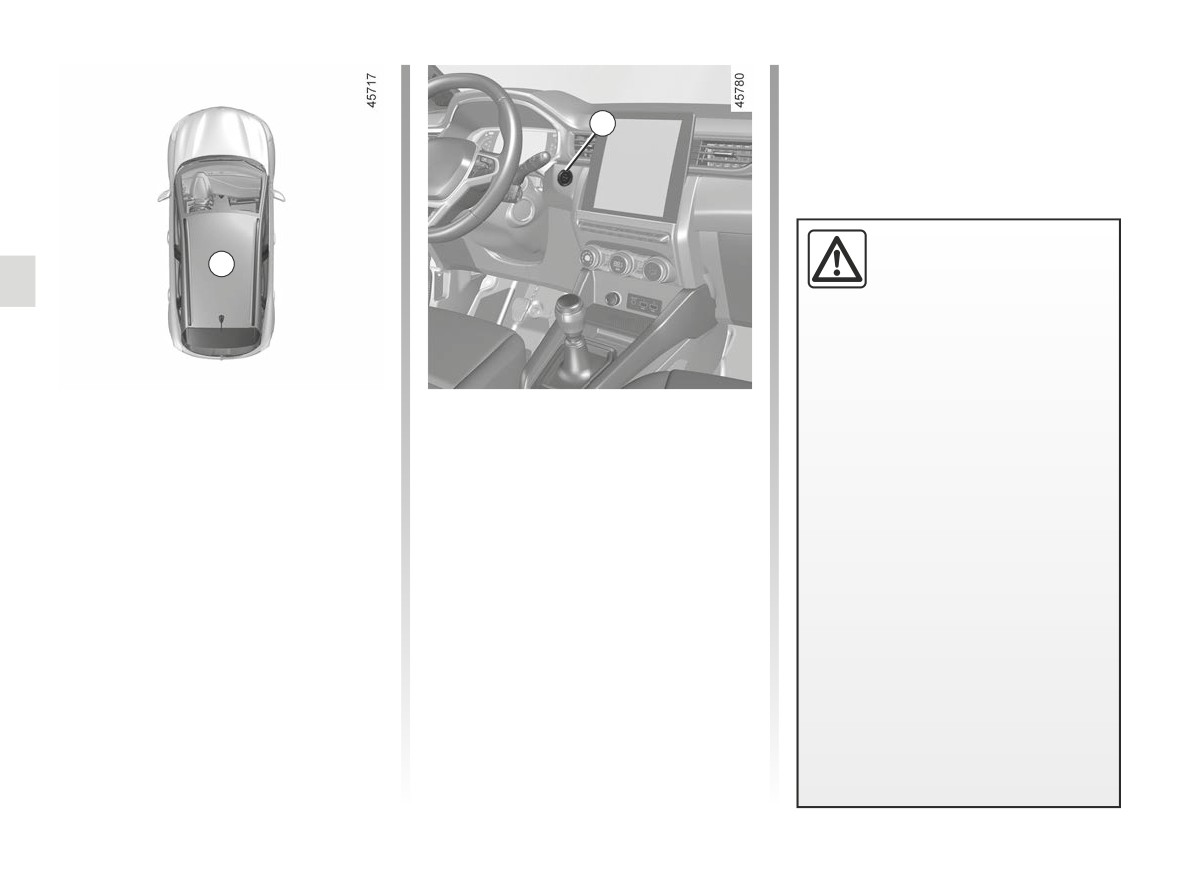
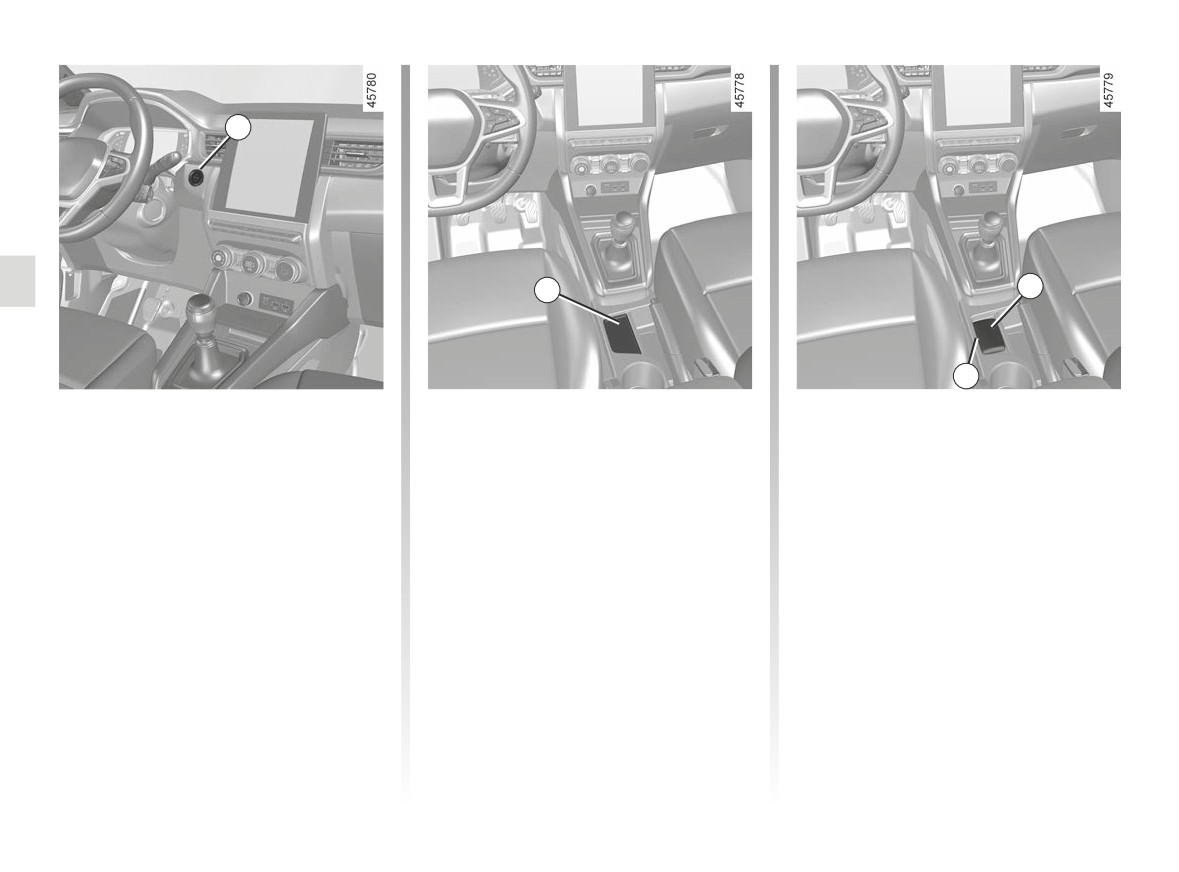
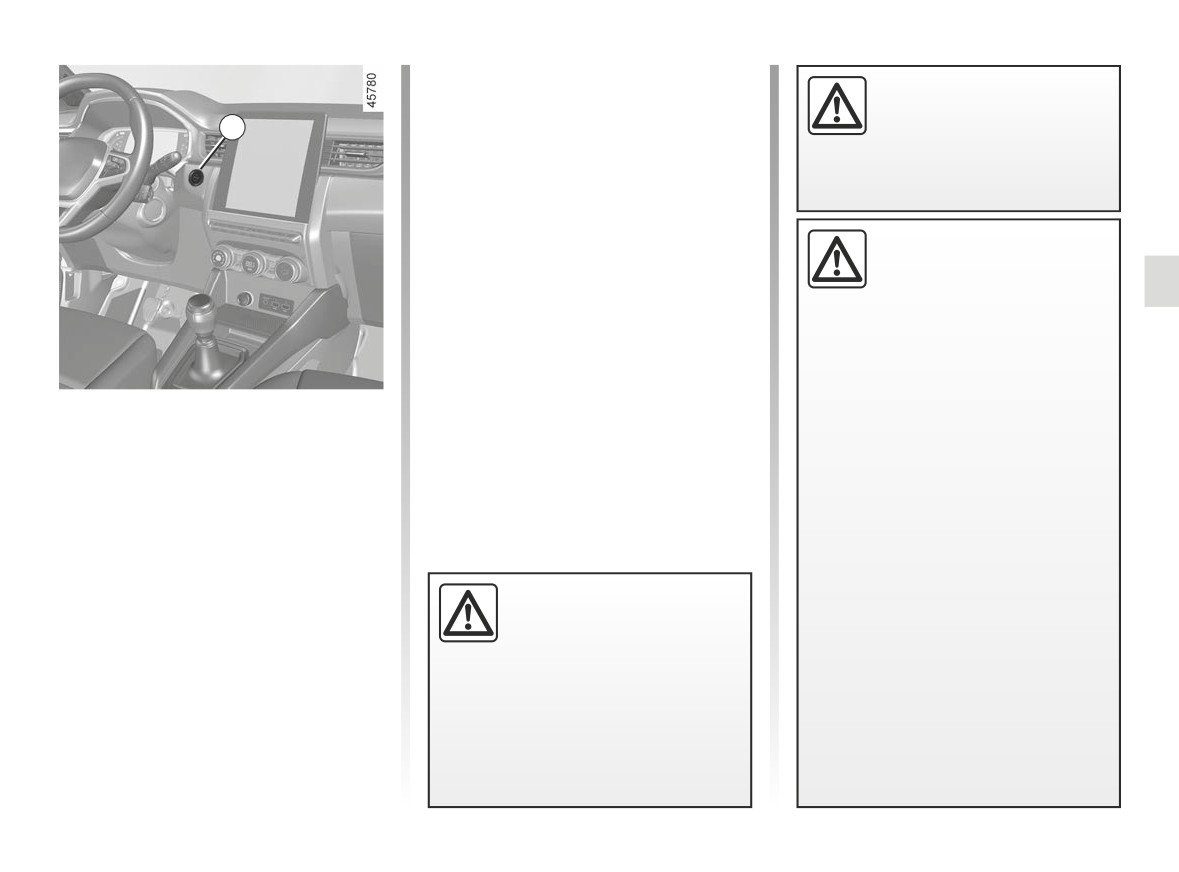
STARTING, STOPPING THE ENGINE: vehicle with card (1/6)
Note: on vehicles equipped with a
manual gearbox, in the event of engine
stalling the message “Press Clutch” will
2
be displayed on the instrument panel.
Fully press the clutch pedal to restart
the engine.
Driver’s responsibility
when parking or stopping
1
the vehicle
Never leave an animal,
child or adult who is not self-suffi-
cient alone in your vehicle, even for
a short time.
The card must be inserted in detection
Special features
They may pose a risk to themselves
zone 1.
or to others by starting the engine,
- If one of the starting conditions is
activating equipment such as the
To start:
not met, either the “Press Brake +
electric windows or locking the
START” or “Press Clutch + START”
- vehicles with an automatic gearbox,
doors, for example.
or
“Select Gearbox Position P”
in the P position, press the brake
message is displayed on the instru-
Also, in hot and/or sunny weather,
pedal, press the 2 button, then re-
ment panel;
please remember that the tempera-
lease the brake pedal once the
ture inside the passenger compart-
engine has started;
- in some cases, it will be necessary
ment increases very quickly.
to move the steering wheel whilst
- vehicles with a manual gearbox,
pressing the start button 2 to help
RISK OF DEATH OR SERIOUS
press the brake pedal and press
unlock the steering column; the
INJURY.
the 2 button, then release the brake
message “Turn Steering Wheel +
pedal once the engine has started.
START” will warn you of this;
If a gear is engaged, also press the
clutch pedal.
2.6
CarManuals2.co
STARTING, STOPPING THE ENGINE: vehicle with card (2/6)
LPG version
Never switch off the igni-
The engine is always started using
tion before the vehicle has
petrol.
stopped completely. Once
the engine has stopped, the
Turn the key to the “Start” position with-
brake servo, power-assisted steer-
out depressing the accelerator pedal.
ing etc. and the passive safety de-
The system will automatically deter-
vices such as the airbags and pre-
mine the switchover from petrol to LPG.
tensioners will no longer operate.
Depending on the vehicle, under cer-
tain conditions of use (e.g., hard accel-
eration), the system may opt to tempo-
rarily switch back to petrol mode.
Driver’s responsibility
If the environmental conditions are
when parking or stopping
once again suitable, the system may
the vehicle
once again permit LPG mode.
Never leave an animal,
child or adult who is not self-suffi-
For more information ➥ 2.20.
cient alone in your vehicle, even for
At temperatures close to 0°C or less, it
a short time. They may pose a risk
is recommended to use ECO mode to
to themselves or to others by start-
maximise the use of LPG mode ➥ 2.30.
ing the engine, activating equipment
such as the electric windows or
locking the doors. Also, in hot and/
or sunny weather, please remem-
ber that the temperature inside the
Do not park the vehicle or
passenger compartment increases
run the engine in locations
very quickly. RISK OF DEATH OR
where combustible sub-
SERIOUS INJURY.
stances or materials such
as grass or leaves can come into
contact with the hot exhaust system.
2.7
CarManuals2.co
STARTING, STOPPING THE ENGINE: vehicle with card (3/6)
2
4
5
4
“Hands-free” starting with
Operating faults
The message “Place card on zone +
START” appears on the instrument
the tailgate open
In certain cases, the hands-free card
panel.
In this case, the card should not be lo-
may not work:
Press the brake or clutch pedal, then
cated in the luggage compartment, to
- card battery flat, etc.;
place the card 5 (button side) on the
prevent the risk of loss.
- near to appliances operating on the
placement area 4. Press the 2 button
same frequency as the card (moni-
to start the vehicle. The message goes
Accessories function
tor, mobile phone, video game, etc.);
out.
(switching on the ignition)
- vehicle located in a high electromag-
Once you have gained access to your
netic radiation zone.
vehicle, you may use some of its func-
tions (radio, navigation, wipers, etc.).
To use the other functions, with the
card in the passenger compartment,
press the 2 button without pressing the
pedals.
2.8
CarManuals2.co
STARTING, STOPPING THE ENGINE: vehicle with card (4/6)
If the card is no longer in the passen-
When you leave your vehi-
ger compartment or if the card’s bat-
cle, especially if you have
tery is flat, when the vehicle is station-
2
your card with you, check
ary and you try to switch the engine off,
that the engine is com-
the message “Keycard absent : press/
pletely switched off.
hold START” appears on the instrument
panel: press the 2 button for longer than
three seconds.
Driver’s responsibility
If the card is no longer in the passenger
when parking or stopping
compartment, make sure you can re-
the vehicle
trieve it before pressing and holding the
button. Without the card, you will not be
Never leave an animal,
able to restart the vehicle.
child or adult who is not self-suffi-
cient alone in your vehicle, even for
With the engine switched off, any ac-
a short time.
cessories being used (radio, etc.) will
continue to function for approximately
They may pose a risk to themselves
Conditions for stopping the
10 minutes.
or to others by starting the engine,
engine
activating equipment such as the
When the driver’s door is opened, the
The vehicle must be stationary, lever
electric windows or locking the
accessories stop working.
in position P on vehicles with an auto-
doors, for example.
matic gearbox.
Also, in hot and/or sunny weather,
With the card in the vehicle, press
please remember that the tempera-
button 2: the engine stops. The steer-
ture inside the passenger compart-
ing column is locked when a door is
ment increases very quickly.
opened or the vehicle is locked.
Never switch off the igni-
RISK OF DEATH OR SERIOUS
tion before the vehicle has
INJURY.
stopped completely. Once
the engine has stopped, the
brake servo, power-assisted steer-
ing etc., and the passive safety de-
vices such as the airbags and pre-
tensioners will no longer operate.
2.9
CarManuals2.co
STARTING, STOPPING THE ENGINE: vehicle with card (5/6)
Note: once the function has been acti-
vated, it cannot be deactivated.
9
7
We advise you to contact an Approved
Dealer.
6
Operation
8
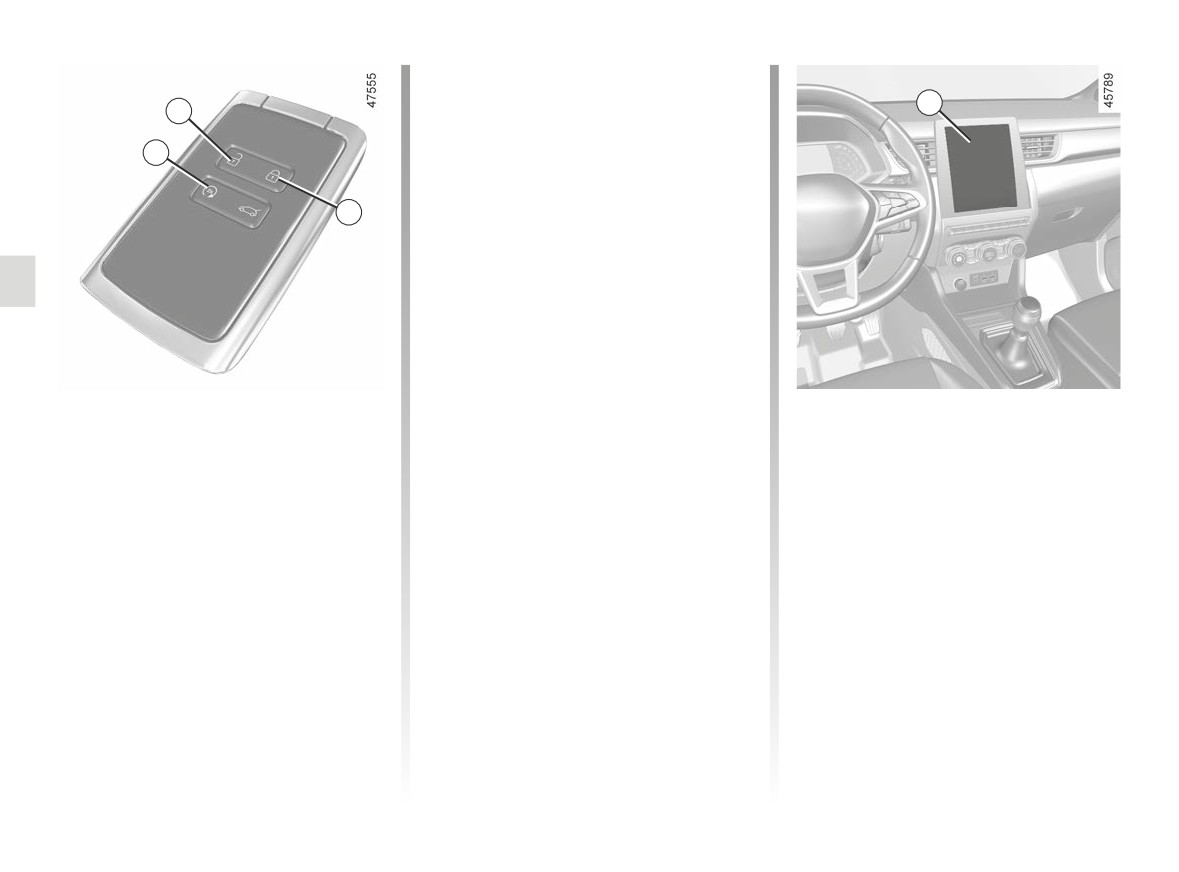
To start the engine remotely, press
the locking button 8 then within an-
other 2 seconds, press the remote start
button 6 for approximately 2 seconds.
The hazard lights come on continu-
ously for approximately 3 seconds and
the engine starts.
The engine will run for 5 minutes. Once
the engine is running, you can add an-
Remote engine start-up
other 5 minutes by pressing the 8 lock-
This function also lets you programme
ing button again, then the remote start
the engine to start, in order to heat or
This function allows remote starting of
button 6. The hazard lights come on
ventilate the passenger compartment
the engine.
continuously for 3 seconds to confirm
up to 24 hours before using the vehicle.
that the function has been prolonged.
Initialisation
Depending on the vehicle, configuration
and programming are carried out using
If the vehicle is so equipped, press
the multimedia display 9, for more infor-
the unlocking button 7 then press the
mation please refer to the multimedia
remote start button twice in succession
instructions.
for about 2 seconds each time 6. The
time between the two presses must be
less than 5 seconds. The hazard warn-
ing lights will come on continuously for
3 seconds to confirm the system reset.
2.10
CarManuals2.co
STARTING, STOPPING THE ENGINE: vehicle with card (6/6)
Remote engine start performance
The remote engine start-up operates if:
Do not use the engine
varies according to surroundings such
- the gearbox is in P or N position
remote start-up function or
as:
on vehicles fitted with an automatic
its programming when:
-
Obstacles, buildings, walls, other ve-
gearbox;
- the vehicle is in a garage
hicles, etc.;
- the ignition is switched off;
or in a confined space.
–
radio frequency interference (tele-
- the bonnet is closed;
Risk of poisoning or suffoca-
vision, radio, mobile phone, other
remote controls, etc.);
- all of the opening elements (doors
tion by exhaust gas emissions.
and luggage compartment) are
- the vehicle is covered with a pro-
-
Condition of the key/card battery.
closed and locked when you leave
tective cover.
the vehicle;
Fire hazard.
- in extreme weather conditions, the
- the bonnet is open or before it
remote engine start-up by program-
opens.
ming may not work.
Risk of burns or serious injury.
If one of these conditions is not met, the
lights will flash for approximately 3 sec-
Depending on the country, the
onds.
remote start function or its pro-
gramming may be prohibited by
law and/or by the regulations in
force.
In the event that the func-
Before using this function, check
tion is used, please ensure
the legislation and/or the regula-
that power-consuming de-
tions in force for the country.
vices (such as the wipers,
exterior lights, radio, heated seats,
heated steering wheel, etc.) are de-
activated and all accessories are
disconnected before leaving the ve-
hicle.
Fire hazard.
2.11
CarManuals2.co
STOP AND START FUNCTION (1/4)
This system enables a reduced fuel
and
The vehicle equipment remain opera-
consumption and lower greenhouse
- the speed is zero or, depending on
tional while the engine is stopped.
gas emissions. The system is acti-
the vehicle, as soon as the speed is
When the engine switches to standby,
vated automatically when the vehicle
lower than a threshold specific to the
the steering assistance may no longer
is started. During driving, the system
vehicle.
be operational.
stops the engine (standby) when the
The engine remains on standby if posi-
vehicle comes to a stop or is moving
In this case it becomes operational
tion P is selected, or if position N is se-
at a slow speed (depending on the ve-
again when the engine is no longer on
lected with the handbrake engaged and
standby or the speed exceeds approxi-
the brake pedal released.
hicle). The
warning light is dis-
mately 1 mph (1 km/h) (downhill, slope
played on the instrument panel.
For vehicles equipped with manual
etc.).
gearboxes:
Conditions of standby at low
- the gearbox is in neutral;
and
If the engine is put in
speed
- the clutch pedal is released. If the
standby, the electronic
The vehicle has set off from where it
parking brake (depending
was parked;
warning light flashes, this
on the vehicle) is not ap-
means that the clutch pedal must be
plied automatically.
For vehicles equipped with auto-
released completely;
matic gearboxes:
and
- the gearbox is in position D, M or N;
- the vehicle speed is lower than a
and
Keep your vehicle station-
threshold specific to the vehicle.
- the brake pedal is depressed (suffi-
ary when the engine is
ciently hard);
For all vehicles:
on standby (shown by the
If the
warning light flashes,
warning light
on the
Warning light
on the instru-
this means that the brake pedal is
instrument panel).
ment panel is lit when the engine is on
not sufficiently pressed;
standby.
and
- the accelerator pedal is not de-
pressed;
The engine MUST be
stopped (not put in standby)
before leaving the vehicle.
➥ 2.4 ➥ 2.6.
2.12
CarManuals2.co
STOP AND START FUNCTION (2/4)
Conditions of standby at high
Preventing the engine from
Conditions for coming out of
speed
standing by
engine standby
Depending on the vehicle, standby may
In certain situations, such as negotiat-
For automatic gearboxes:
be activated in freewheel mode ➥ 1.58.
ing a crossroads for instance, it is pos-
- when the driver’s door is opened;
sible (with the system activated) to keep
For vehicles equipped with auto-
or
the engine running so as to be ready to
matic gearboxes:
- when the driver’s seat belt is unfas-
move off quickly.
tened;
- the gearbox is in position D or M;
For vehicles equipped with auto-
- the brake pedal is released, position
and
matic gearboxes:
D, M or N engaged;
– the brake pedal is released;
or
Keep the vehicle stationary without
- position R is engaged;
pressing too hard on the brake pedal.
and
or
- the acceleration pedal is released.
For vehicles equipped with manual
- the accelerator pedal is depressed;
gearboxes:
or
The warning light
on the instru-
Keep the clutch pedal pressed right
- in manual mode, the gear change
ment panel is lit when the engine is on
down.
paddles are activated.
standby.
To fill up with fuel, the engine
must be stopped (and not
“AUTOHOLD” function activated
only on standby in the case
➥ 2.29, the brake pedal may be
of vehicles equipped with
released and the engine standby
the STOP and START function): you
maintained.
must switch off the ignition ➥ 2.4
To exit engine standby, with the
➥ 2.6. Fire hazard.
brake pedal released, press the ac-
celerator pedal.
2.13
CarManuals2.co
STOP AND START FUNCTION (3/4)
For manual gearboxes:
Conditions preventing the
- the gradient is too steep for vehicles
fitted with an automatic gearbox;
- when opening the driver’s door, with-
standby of the engine
out any gear engaged and the clutch
- the “Clear view” function is activated
Certain conditions prevent the system
pedal released;
➥ 3.11 ;
from using the engine standby function,
or
including when:
- the engine temperature is too low;
- when unfastening the driver’s seat
-
the driver’s door is not closed;
- the emission control system is being
belt, without any gear engaged and
regenerated;
the clutch pedal released;
–
the driver’s seatbelt is not fastened;
- ...
or
–
reverse gear is engaged;
- the gearbox is in neutral and the
–
the bonnet is not locked;
Warning light
is displayed on the
clutch pedal is slightly depressed;
instrument panel. This notifies you that
–
the outdoor temperature is too low or
engine standby is not available.
or
too high;
- the engine is in gear and the clutch
-
the battery is not sufficiently charged;
pedal is pressed right down.
–
the difference between the vehicle
Special note: depending on the vehi-
interior temperature and the auto-
cle, if you switch off the ignition when
matic climate control instruction is
the engine is on standby, the warning
too high;
light Ä
is displayed for a few sec-
-
parking distance control is in opera-
onds on the instrument panel.
tion;
-
the altitude is too high;
For vehicles equipped with a
manual gearbox:
the restart may be interrupted if the
Deactivate the Stop and
clutch pedal is released too quickly
Start function for any opera-
while a gear is engaged.
tion performed in the engine
compartment.
2.14
CarManuals2.co
STOP AND START FUNCTION (4/4)
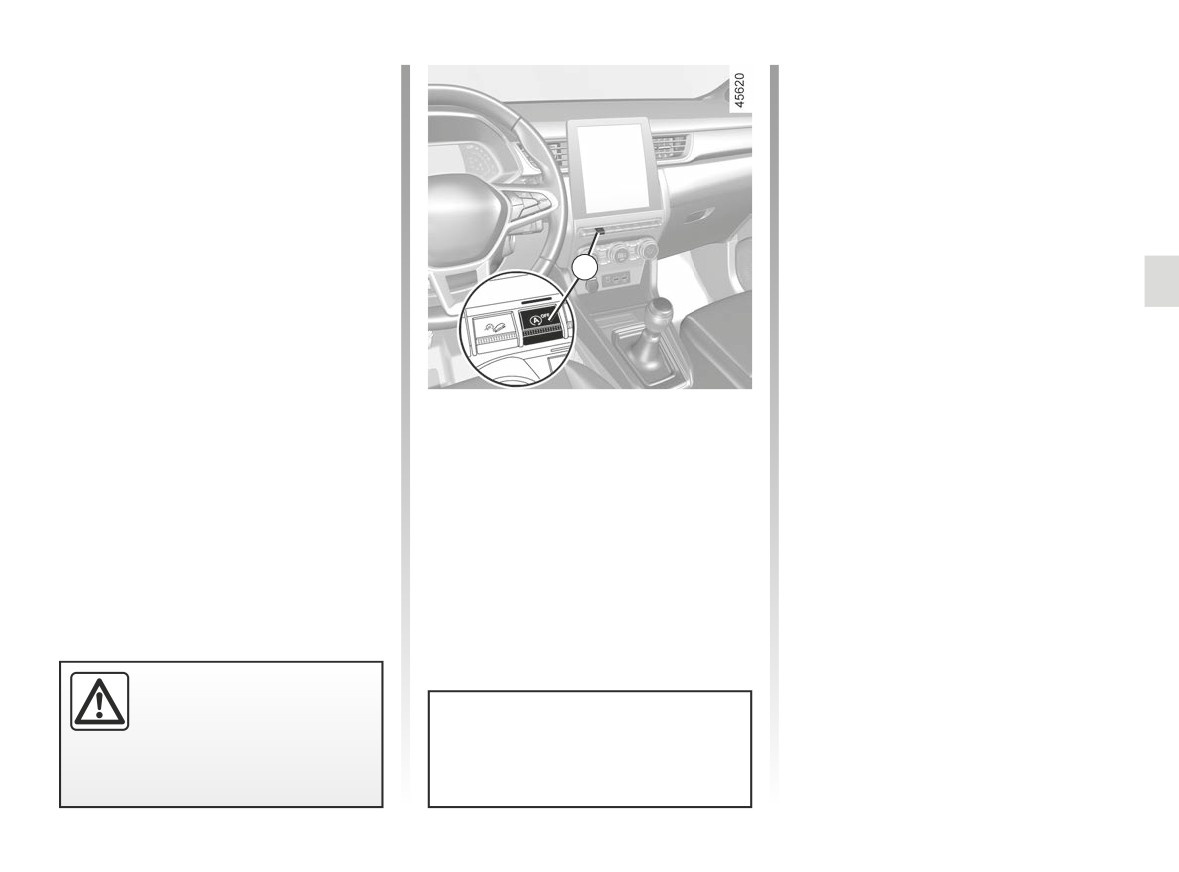
Special feature of the automatic
Deactivating, activating the
engine re-start
function
Under certain conditions, the engine
Press 1 to deactivate the function. The
can restart on its own in order to guar-
message “Stop & Start deactivated” ap-
antee your safety and comfort.
pears on the instrument panel and the
This can occur especially when:
ignition warning light 1 appears.
- the outdoor temperature is too low or
too high;
Pressing again will reactivate the
system. The message “Stop & Start
- the “Clear view” function is activated
1
Activated” appears on the instrument
➥ 3.11 ;
panel and the 1 switch disappears.
- the battery is not sufficiently charged;
The system is automatically reactivated
- the vehicle speed is above 3 mph
each time the vehicle is started using
(5 km/h) (downhill slope, etc.);
the start button. ➥ 2.4 ➥ 2.6.
- repeated pressing on the brake
pedal or braking system require-
Operating faults
ment;
The
warning light may appear
When the “Check Stop & Start” mes-
- ...
along with a message on the instru-
sage appears on the instrument panel
ment panel:
and the 1 switch is on, this indicates
The
warning light is displayed on
- “Optimising Battery Recharge” to pri-
that the system is deactivated.
the instrument panel to notify you of au-
oritise battery charging;
tomatic engine restarting.
Please consult an authorised dealer.
- “Prioritising Thermal Comfort” to pri-
oritise air conditioning;
- “Prioritising running engine” to priori-
tise engine operations.
The engine MUST be
stopped (not put in standby)
before leaving the vehicle.
Special note: engine on standby,
➥ 2.4 ➥ 2.6.
press switch 1 to automatically re-
start the engine.
2.15
CarManuals2.co
SPECIAL FEATURES OF PETROL VERSIONS (1/2)
The following operating conditions
If you notice any of the above operat-
should be avoided:
ing faults, have the necessary repairs
carried out as soon as possible by an
- driving for long periods when the low
approved dealer.
fuel level warning light is lit;
These faults may be avoided by regu-
- using leaded petrol;
larly taking your vehicle to an approved
- using lubricant or fuel additives
Dealer at the intervals specified in the
which are not approved.
Maintenance Document.
Or operating faults such as:
- faulty ignition, running out of fuel or
Starting problems
disconnected spark plugs resulting
To avoid damaging the catalytic con-
in the engine misfiring or cutting out
verter or the starter, and to prevent pre-
when driving;
mature wearing of the battery, do not
- loss of power;
keep trying to start the engine (using
the start button, or by pushing or towing
as they may cause the catalytic con-
the vehicle) without having identified
verter to overheat and thus reduce its
and corrected the fault.
efficiency, or damage it irreparably
and cause heat damage to the vehi-
If the fault cannot be identified, do not
cle.
keep trying to start the engine, but con-
tact an approved Dealer.
Do not park the vehicle or
run the engine in locations
where combustible sub-
stances or materials such as
grass or leaves can come into con-
tact with the hot exhaust system.
2.16
CarManuals2.co
SPECIAL FEATURES OF PETROL VERSIONS (2/2)
Particle filter
Note: the indicator light may go out
If the filter becomes saturated, the
after 20 minutes if the driving condi-
warning light and, depending
The particle filter is used in the treat-
tions required to clean the filter are not
ment of exhaust gases from petrol en-
fully met.
on the vehicle, the
warning light
gines.
will appear on the instrument panel, ac-
Depending on the vehicle, the warning
If the vehicle is stopped before the
companied by the message “Check in-
warning light disappears you will have
jection”. In this case, please consult an
light
displayed on the instrument
to restart the process from the begin-
Authorised Dealer.
panel indicates that the filter is becom-
ning.
ing clogged and requires cleaning. To
If the
®
warning light and, de-
clean it, when the
warning light
pending on the vehicle, the
appears, and as traffic conditions and
warning light appears, accompanied by
speed limits allow, drive at between
the “WARNING: Engine Failure Risk”
about 31 mph (50 km/h) and 68 mph
message, stop the vehicle, switch off
(110 km/h) until the light goes out.
the engine and contact an Approved
Dealer.
After between approximately 5 and
20 minutes, the warning light should go
out.
Warning light
®
re-
quires you to stop immedi-
ately, for your own safety,
as soon as traffic conditions
allow. Switch off the engine and do
not restart it. Contact an approved
Dealer.
2.17
CarManuals2.co
SPECIAL FEATURES OF DIESEL VERSIONS: PARTICLE FILTER (1/2)
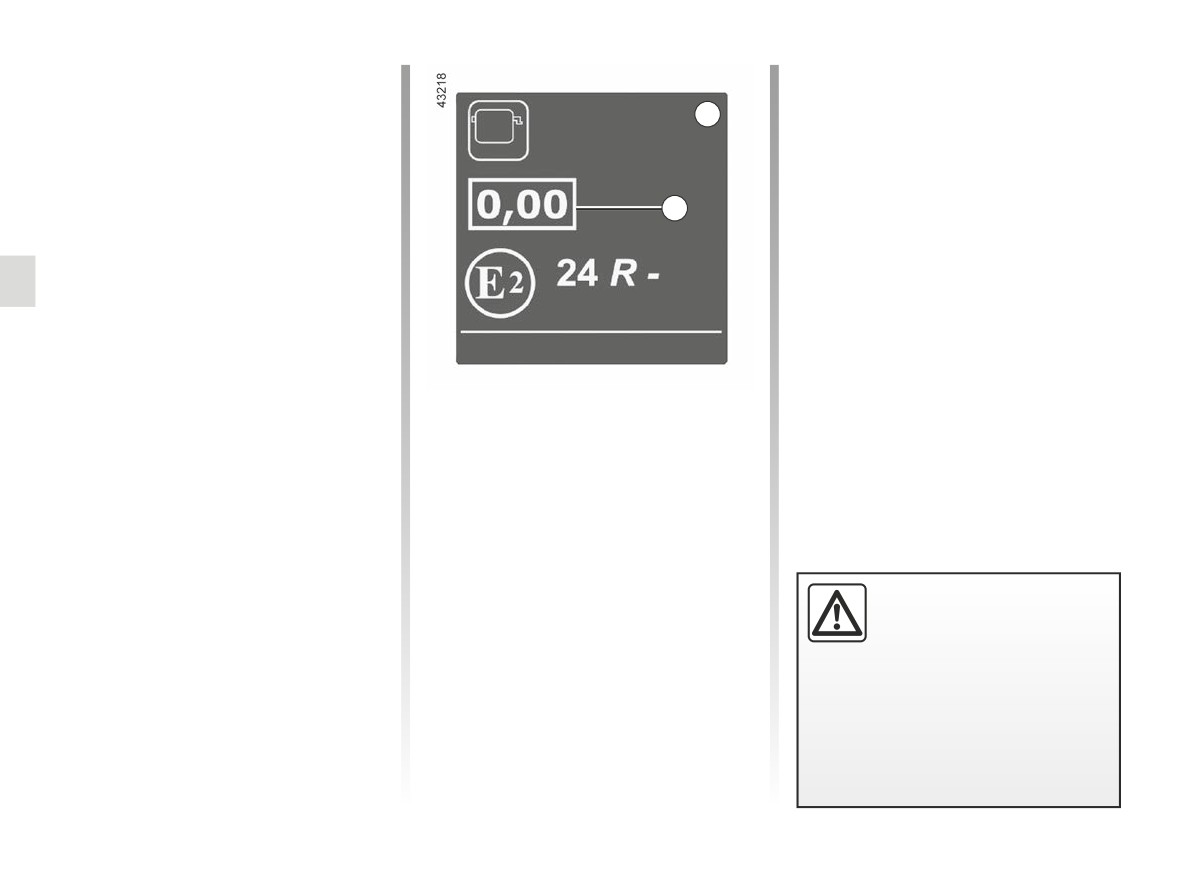
Diesel engine speed
Precautions to be taken in
Diesel engines are fitted with an injec-
winter
A
tion pump which prevents the engine
To avoid any faults in icy weather:
speed being exceeded irrespective of
- ensure that the battery is always fully
the gear selected.
charged;
If the message “Check Anti- Pollution
1
- always keep the diesel tank rela-
System” is displayed along with warn-
tively full to avoid water vapour con-
ing lights Ä
densing in it and accumulating at the
authorised dealer immediately.
bottom of the tank.
When driving, depending on the fuel
grade used, it is possible that white
smoke may be emitted.
This is due to the exhaust particle filter
being cleaned automatically, and does
Engine smoke opacity label
not affect the way the vehicle runs.
You can find the information 1 on the
label A stuck in the engine compart-
Running out of fuel
ment or, depending on the vehicle, on
After the tank has been filled follow-
the vehicle identification plate ➥ 6.2.
ing a complete draining of fuel, the
1 Diesel exhaust emissions.
fuel system must be reprimed: ➥ 1.108
before restarting the engine.
Do not park the vehicle or
run the engine in locations
where combustible sub-
stances or materials such as
grass or leaves can come into con-
tact with the hot exhaust system.
2.18
CarManuals2.co
SPECIAL FEATURES OF DIESEL VERSIONS: PARTICLE FILTER (2/2)
Particle filter
Note: the warning light may reappear
If the filter becomes saturated, the
if the driving conditions are not fully
warning light and, depending
The particle filter is used in the treat-
met with regard to cleaning the filter. If
ment of exhaust gases from diesel en-
the vehicle is stopped or if the engine
on the vehicle, the
warning light
gines.
speed drops below 2,000 rpm before
will appear on the instrument panel, ac-
Depending on the vehicle, the warning
the warning light goes out, the opera-
companied by the message “Check in-
tion may need to be repeated.
jection”. In this case, please consult an
light
displayed on the instrument
Authorised Dealer.
panel indicates that the filter is becom-
ing clogged and requires cleaning.
If the
®
warning light and, de-
To do this, when the
warning
pending on the vehicle, the
light is displayed, continue driving ac-
warning light appears, accompanied by
cording to traffic conditions and ob-
the “WARNING: Engine Failure Risk”
serve the speed limit until the warning
message, stop the vehicle, switch off
lights disappears. If possible, do not
the engine and contact an Approved
let the engine speed drop below
Dealer.
2,000 rpm.
After between approximately 10 and
20 minutes, the warning light should go
out.
The display of the
on the instru-
ment panel may be accompanied by an
increase in engine speed and operation
of the cooling system in order to clean
the particle filter.
Warning light
®
re-
quires you to stop immedi-
ately, for your own safety,
as soon as traffic conditions
allow. Switch off the engine and do
To facilitate the particle filter re-
not restart it. Contact an approved
generation, carry out a long driving
Dealer.
phase (at least 20 minutes) on main
roads every 124 miles (200 km).
2.19
CarManuals2.co
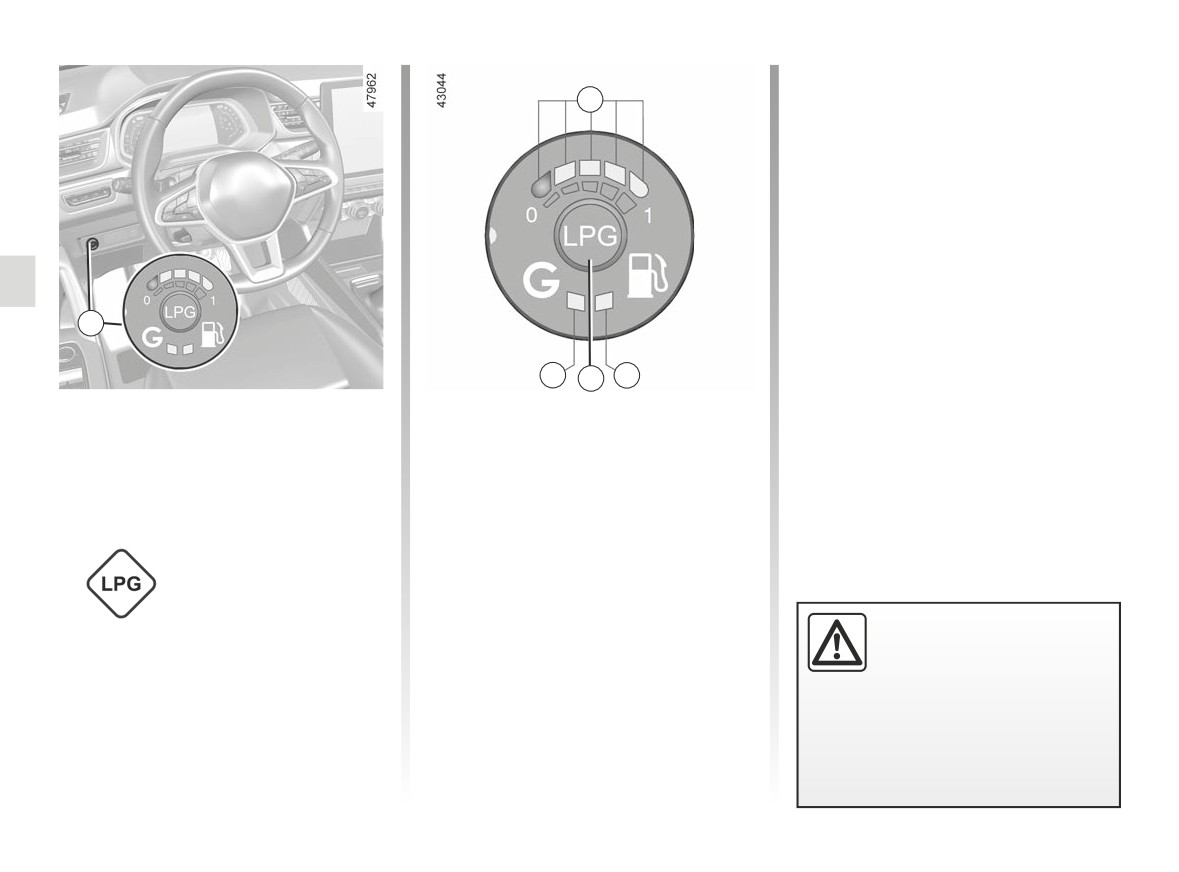
SPECIAL FEATURES OF LPG VERSIONS (1/4)
Yellow warning light B
A
A lit warning light indicates that petrol
mode is active.
Fuel gauge warning light A
The warning lights A (four green lights
and one red light) indicate the level in
the LPG tank.
The red warning light indicates the fuel
tank.
The amount of LPG indicated is an in-
1
dicative value.
The red warning light indicates that
C
1
B
the tank is almost empty and that the
These vehicles operate using petrol or
LPG/petrol fuel mode
engine is operating using the reserve
LPG.
LPG tank (maximum range of 50 miles
selection control 1
They have two separate tanks.
(80 km)).
This enables the driver to switch from
What is LPG?
one fuel mode to another.
Green warning light C
Liquefied petroleum
A lit warning light indicates that LPG
gas that complies with
mode is active.
standard EN 589, or
Rapid flashing of the warning light C
the equivalent na-
indicates that the system is waiting for
If the yellow warning light B
tional regulations.
the necessary conditions to switch to
is on and the green warn-
LPG mode.
ing light C is flashing slowly
It can be readily identified by its charac-
while a beep can be heard,
teristic smell.
please take your vehicle to an au-
thorised dealer for inspection.
2.20
CarManuals2.co
SPECIAL FEATURES OF LPG VERSIONS (2/4)
Changing fuel mode during
To switch from LPG to petrol.
driving
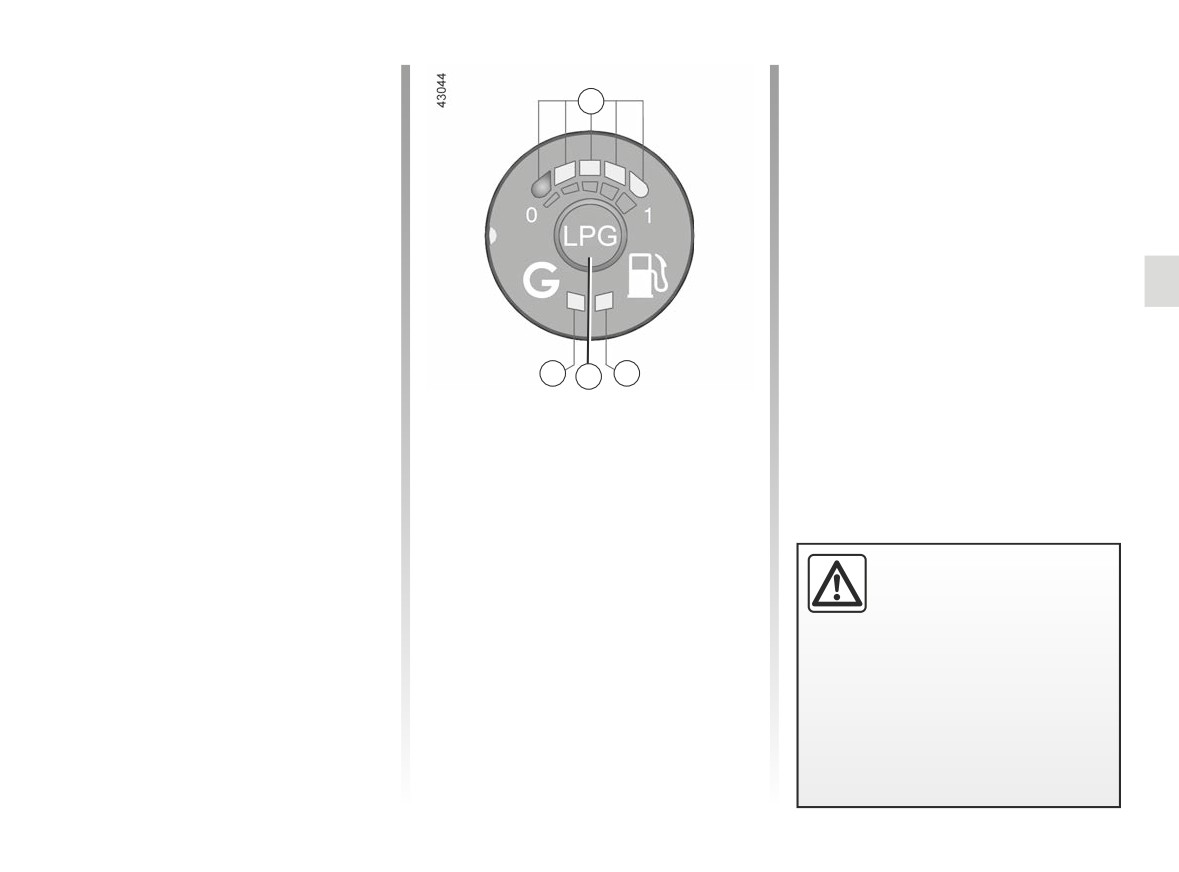
A
Release the accelerator pedal and
press the control 1.
To switch from petrol to LPG
Petrol mode is indicated by the yellow
Press the button 1. The transition to
warning light B.
LPG is made during the first accelera-
tion.
C
1
B
The LPG fuel level A is activated. The
yellow warning light B goes out and the
green warning light C flashes quickly to
confirm that LPG mode has been se-
lected, then stops flashing when LPG
mode is active.
An LPG installation on a ve-
hicle may lead to changes
to the vehicle’s features,
compared to petrol ver-
sions. This may relate to the number
of seats, mass (usable capacity)
and towing capacity.
Consult an approved dealer.
2.21
CarManuals2.co
SPECIAL FEATURES OF LPG VERSIONS (3/4)
Changing fuel mode during
Operating fault
driving (continued)
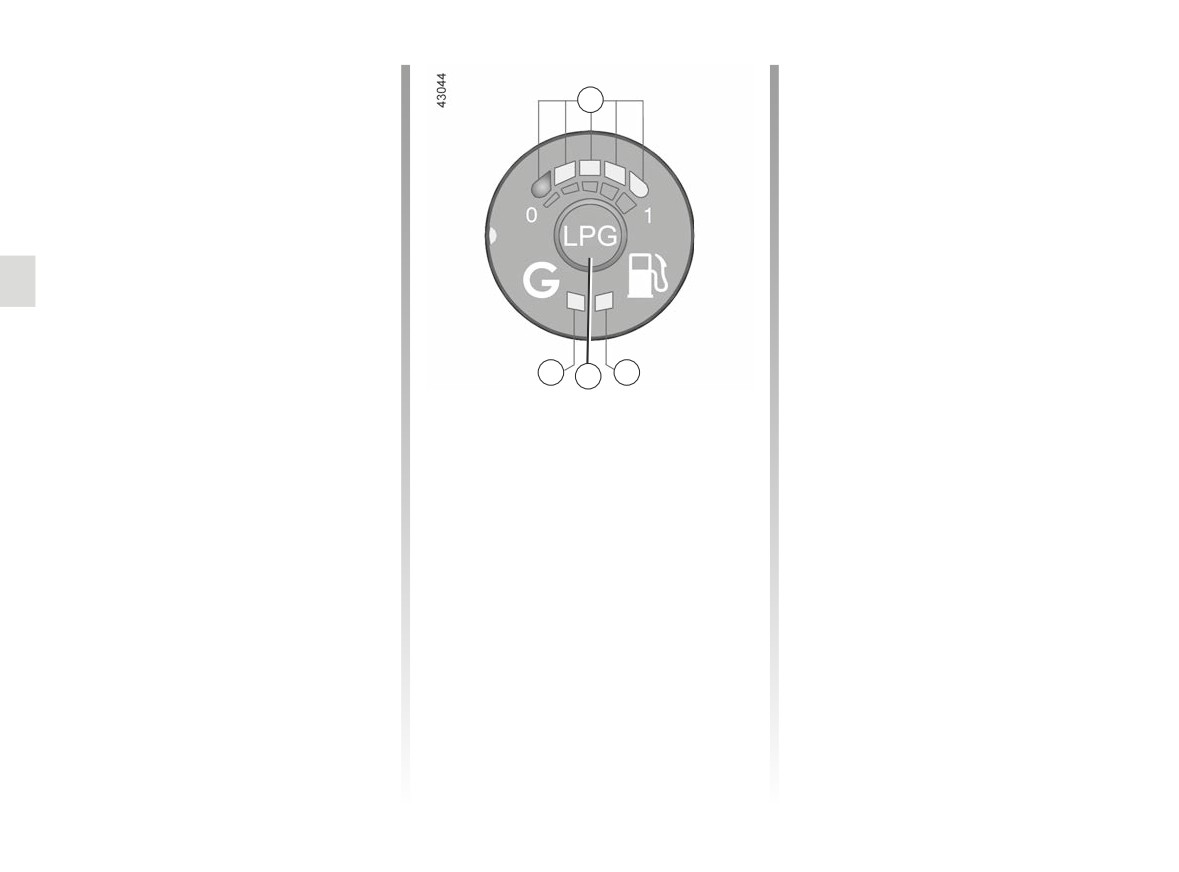
A
In the event of a fault which may affect
the correct operation of the engine, the
Automatic switch to petrol
system automatically switches from
The system automatically switches to
LPG to petrol mode.
petrol mode if there is no more LPG
This is confirmed by:
remaining in the tank. You will be in-
- the appearance of the yellow warn-
formed by:
ing light B;
- the green C and yellow B warning
- slow flashing of the green warning
lights coming on;
light C;
- a beep sounds.
- a beep sounds.
Pressing control 1 stops the beep from
Pressing control 1 stops the beep from
sounding and only the yellow warning
C
B
sounding and only the yellow warning
light B stays on.
1
light B stays on.
Depending on the vehicle, under cer-
tain conditions of use (e.g., hard accel-
eration), the system may opt to tempo-
rarily switch back to petrol mode.
The green warning light C flashes with-
out any sound signal. Once the suita-
ble conditions are present once again,
it will automatically switch back to LPG
mode. After several unfruitful attempts,
the system may decide to remain in
petrol mode for the current journey.
A new attempt may be made after the
engine has been stopped completely
for about one minute.
2.22
CarManuals2.co
SPECIAL FEATURES OF LPG VERSIONS (4/4)
If driving under severe
conditions
If driving in severe conditions (starting
on a steep incline etc.), it is advisable
to switch to petrol mode.
At temperatures close to 0°C or less, it
is recommended to use ECO mode to
maximise the use of LPG mode ➥ 2.30.
In the event of an accident
LPG has a very specific
The main precautions to be taken are
smell so you will be able to
the same as with petrol vehicles:
detect any leaks easily. If
- apply the parking brake;
you smell gas in your vehi-
- stop the engine (a safety device that
cle or immediately surrounding your
stops LPG from entering the engine
vehicle:
is automatically triggered);
- switch to petrol mode immedi-
ately and make sure there are no
- switch off the ignition;
flames or sources of fire near the
- observe local regulations.
vehicle;
- go to an authorised dealer.
Do not touch, hit or dis-
mantle any part of the LPG
system components.
2.23
CarManuals2.co
GEAR LEVER, HANDBRAKE
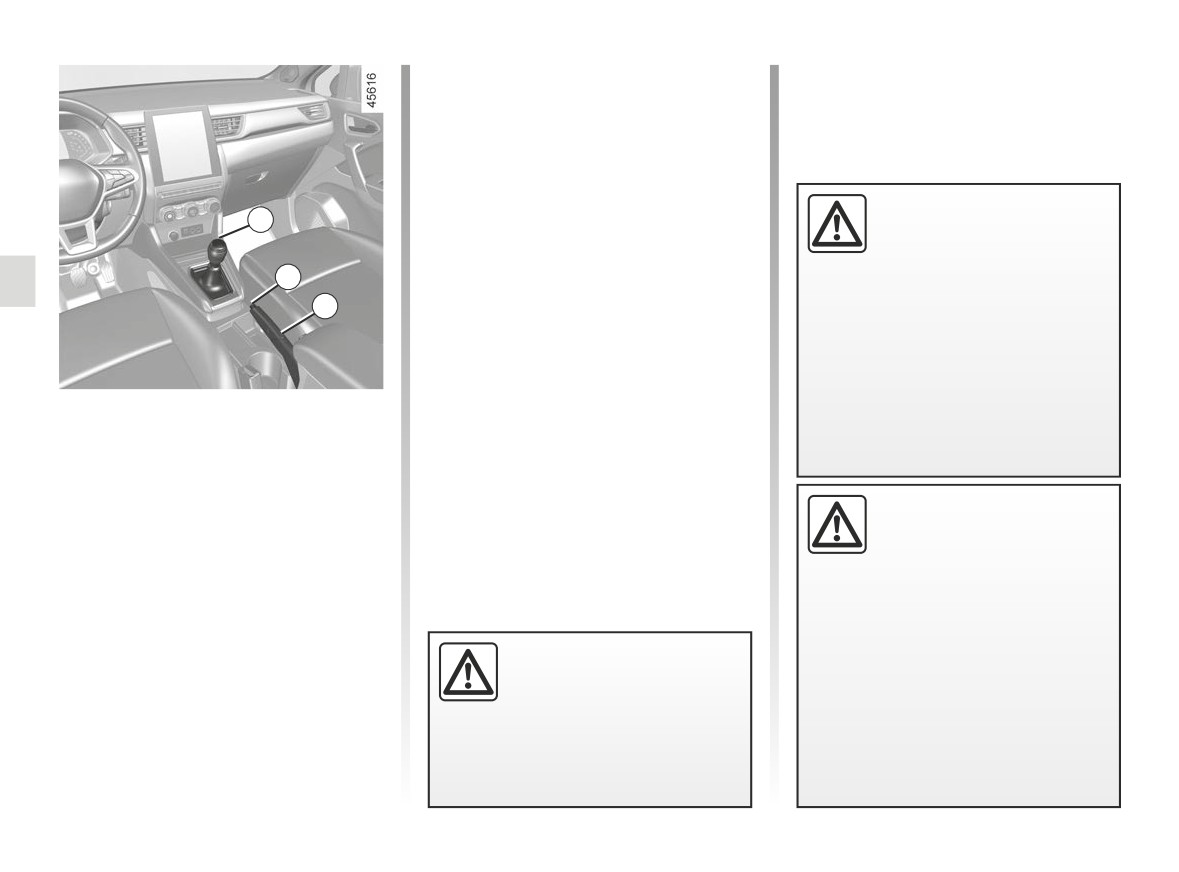
Handbrake
To release:
Pull the lever
3 up slightly, press
button 2 and then lower the lever to the
floor.
When stationary and de-
1
The warning light }
on the instru-
pending on the slope and/or
ment panel will go out.
vehicle load, it may be nec-
The red warning light on the instrument
essary to pull up the hand-
2
panel will come on if you are driving
brake at least two extra notches and
with an incorrectly released handbrake.
3
engage a gear (1st or reverse gear)
on vehicles with a manual gearbox
To apply:
or position P on vehicles with an au-
Pull lever 3 upwards. Check that the
tomatic transmission.
vehicle is immobilised. The warning
Gear lever
light }
on the instrument panel will
Vehicles with manual gearbox: refer
come on.
to the grid on the gear lever knob 1.
Vehicles with an automatic gearbox:
➥ 2.151.
An impact to the under-
side of the vehicle while
Selecting reverse gear
manoeuvring
(e.g.: strik-
The reversing lights will come on as
ing a post, raised kerb or
soon as reverse gear is selected with
other street furniture) may result in
the ignition on.
damage to the vehicle (e.g.: defor-
mation of an axle).
Make sure that the hand-
To avoid any risk of accident, have
brake is fully released when
your vehicle checked by an ap-
driving (red indicator light
proved Dealer.
off), otherwise overheating,
or even damage, may occur.
2.24
CarManuals2.co
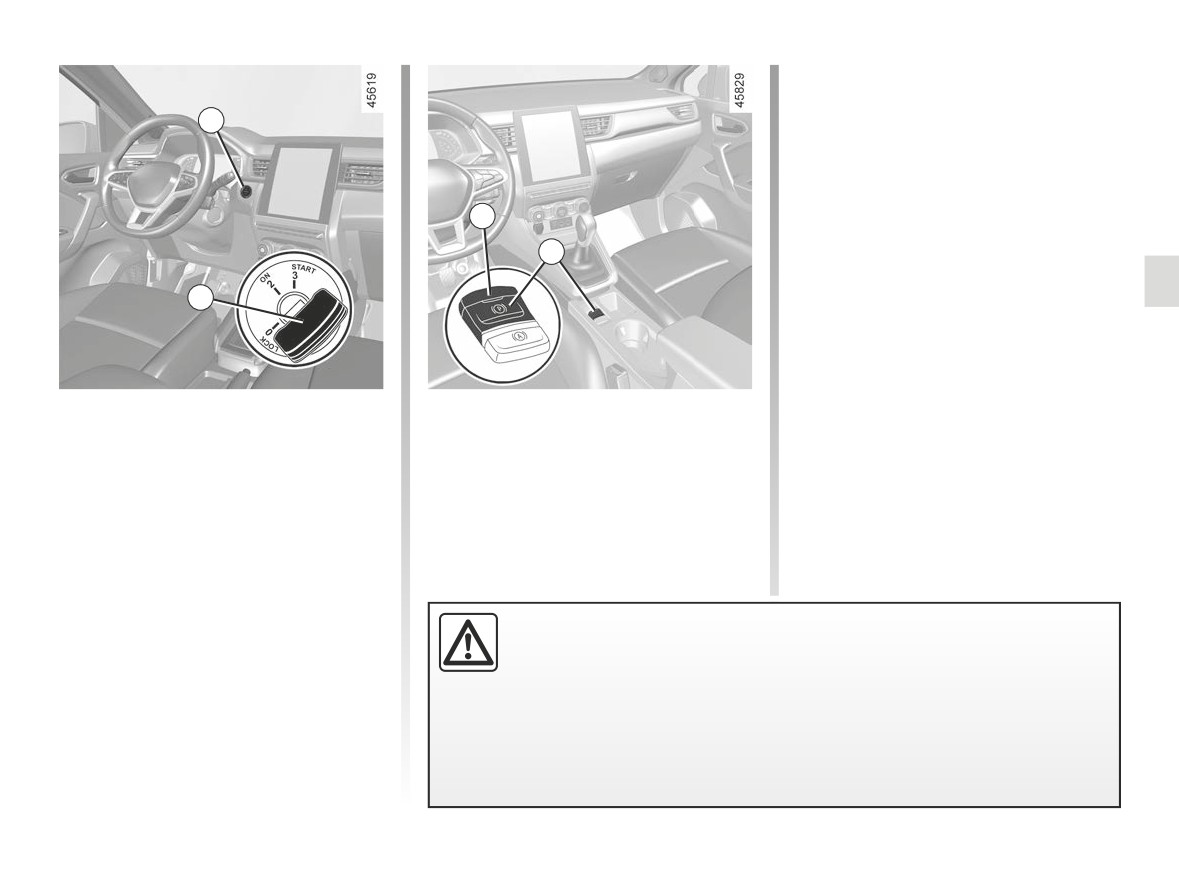
ELECTRONIC PARKING BRAKE (1/4)
In all other instances, for example the
engine has stalled or is in standby
due to the Stop and Start ➥ 2.12,
1
the assisted parking brake is not ap-
plied automatically. Manual mode must
be used. For certain country-specific
model versions, the assisted brake ap-
3
plication function is not activated. Refer
to the information on “Manual opera-
4
tion”.
To confirm that the electronic parking
2
brake is applied, the message “Parking
Brake ON” is displayed, the
}
warning light appears on the instrument
panel and the 3 warning light appears
on the 4 switch.
Assisted operation
or
After the engine is switched off, indi-
-
for vehicles fitted with an automatic
cator light 3 goes out several minutes
Applying the electronic parking
gearbox, when position P is en-
after the assisted parking brake has
brake
gaged.
With the vehicle stationary, the elec-
been applied and indicator light }
tronic parking brake can be used to im-
goes out when the vehicle is locked.
mobilise the vehicle:
- by pressing the engine start/stop
button 1 or by turning the ignition
key to the 2 “ON” position (2);
or
The electronic parking brake can be used to immobilise the vehicle.
- when the driver’s seat belt is un-
Before leaving the vehicle, check that the electronic parking brake is fully
fastened;
applied.
or
Warning light 3 on switch 4 and warning light }
on the instrument
– when the driver’s door is opened;
panel illuminate to show that the parking brake is applied but switch off when the
doors are locked. Depending on the vehicle, a sticker is located on the upper sec-
tion of the windscreen to remind you of this.
2.25
CarManuals2.co
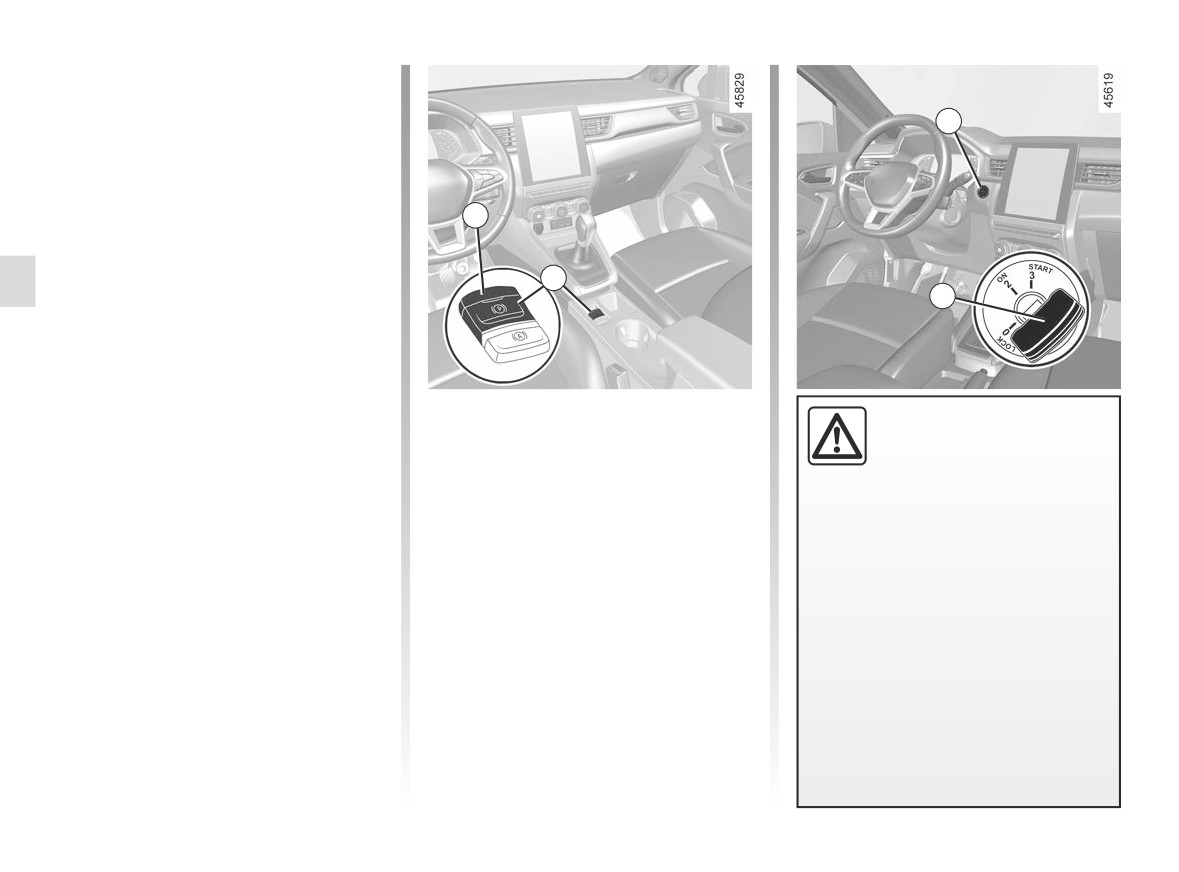
ELECTRONIC PARKING BRAKE (2/4)
Assisted operation
(continued)
1
Note: in some situations (electronic
parking brake failure, manual release of
the parking brake, etc.), a beep sounds
and the message “WARNING: Apply
Parking Brake” appears on the instru-
3
ment panel to warn you that the elec-
tronic parking brake has been released.
4
- with the engine running: when the
2
driver’s door is opened;
- with the engine switched off (e.g.
when the engine stalls): when a front
door is opened.
In this case, pull and release switch 4 to
Manually applying the electronic
The
electronic
parking
apply the assisted parking brake.
parking brake
brake can be used to im-
Pull switch 4. Warning light 3 and warn-
mobilise the vehicle. Before
Assisted release of the parking
ing light }
on the instrument panel
leaving the vehicle, check
brake
light up.
that the electronic parking brake is
The brake will be released as soon as
fully applied.
the vehicle starts and accelerates.
Manually releasing the electronic
Warning light 3 on switch 4 and
parking brake
Press the 1 switch without pressing the
warning light }
on the instru-
Manual operation
pedals or turn the key 2 to the “ON”
ment panel illuminate to show
You can apply the electronic parking
position 2 to switch on the vehicle igni-
that the parking brake is applied
brake manually.
tion. Press the brake pedal then press
but switch off when the doors are
switch 4: indicator light 3 on the switch
locked.
and indicator light }
displayed on
Depending on the vehicle, a sticker
the instrument panel go out.
is located on the upper section of
the windscreen to remind you of
this.
2.26
CarManuals2.co
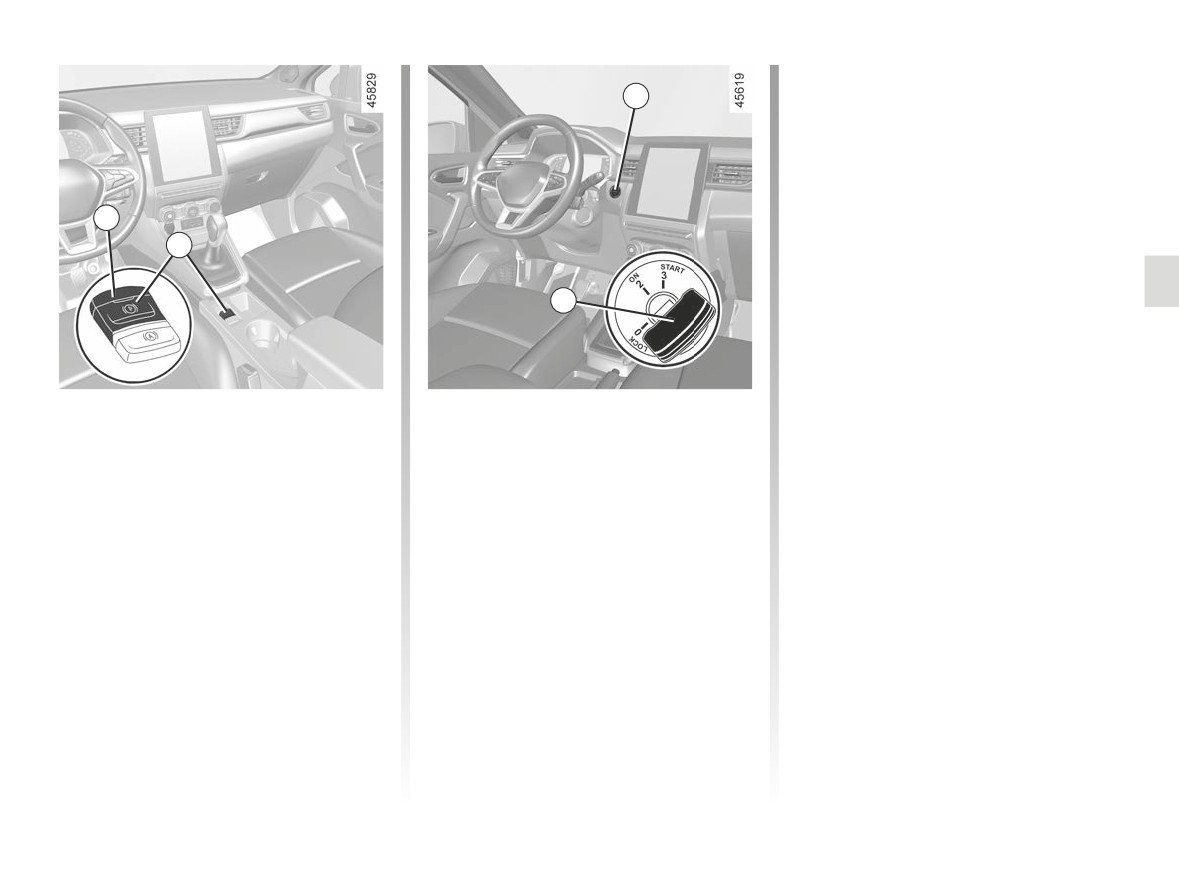
ELECTRONIC PARKING BRAKE (3/4)
- manually release the electronic park-
1
ing brake (please see the informa-
tion on “Manually releasing the elec-
tronic parking brake” on the previous
page);
- depending on the vehicle, the elec-
tronic parking brake is applied auto-
3
matically. You will have to release it
4
manually.
2
Brief stop
To park the vehicle without applying the
electronic parking brake (if there is a
To apply the electronic parking brake
risk of freezing, for example):
manually (when stopping at a red light,
or stopping when the engine is running,
- engage any gear or the P position:
etc.): pull and release the switch 4. The
the drive wheels will be mechanically
brake is released as soon as the vehi-
locked by the driveshaft;
cle is started up again.
- switch off the engine by pressing the
engine start/stop button 1 or by turn-
ing the ignition key 2;
Special cases
- release the driver’s seat belt;
To park on a slope or while towing a
trailer, for example, pull switch 4 for
- open the driver’s door;
a few seconds to gain the maximum
braking.
2.27
CarManuals2.co
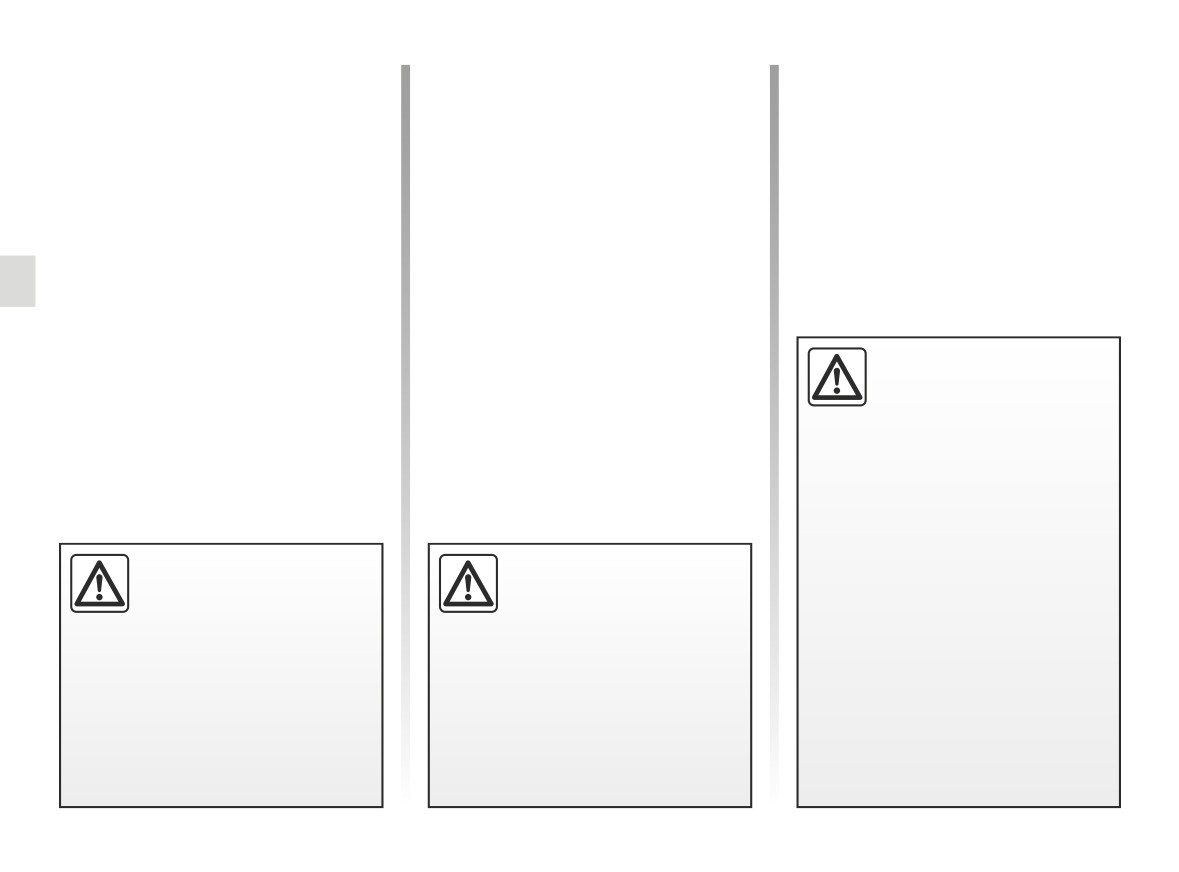
ELECTRONIC PARKING BRAKE (4/4)
Versions with an automatic
Operating faults
gearbox
-
For safety reasons, automatic release
light illuminates on the instrument
is deactivated when the driver’s door
panel accompanied by the “Check
is open or not shut properly and the
Parking Brake” message and, in
engine is running (in order to prevent
some cases, the }
warning
the vehicle from moving without the
light.
driver). The “Release Parking Brake
Contact your approved Dealer
Manually” message appears on the
straight away.
instrument panel when the driver de-
presses the accelerator.
-
If there is an assisted parking brake
fault, the warning light
®
comes on, along with the message
“WARNING: Braking System”, a
If the “WARNING: Electric
beep and, in some cases, the warn-
System” or “Check battery”
or
“WARNING: Braking
ing light }
System” message appears,
you must immobilise the vehicle by
This means that you must stop as
selecting first gear (on a manual
soon as traffic conditions allow.
gearbox), engaging P position (au-
tomatic gearbox) or by pulling the
switch 4 for approximately 10 sec-
onds.
Never leave your vehicle
If no lights or sounds are ap-
If the conditions and the slope re-
without re-engaging P po-
parent, this indicates a fault
quire it, chock the wheels of the ve-
sition and switching off the
in the instrument panel. This
hicle.
engine. This is because
indicates that it is essential
when the vehicle is stationary with
to stop immediately (as soon as traf-
Risk of loss of immobilisation of
the engine running and a gear en-
fic conditions allow). Ensure that the
the vehicle.
gaged, the vehicle may begin to
vehicle is correctly immobilised and
Contact an authorised dealer.
move if you accelerate.
contact an approved Dealer.
There is a risk of accidents.
2.28
CarManuals2.co
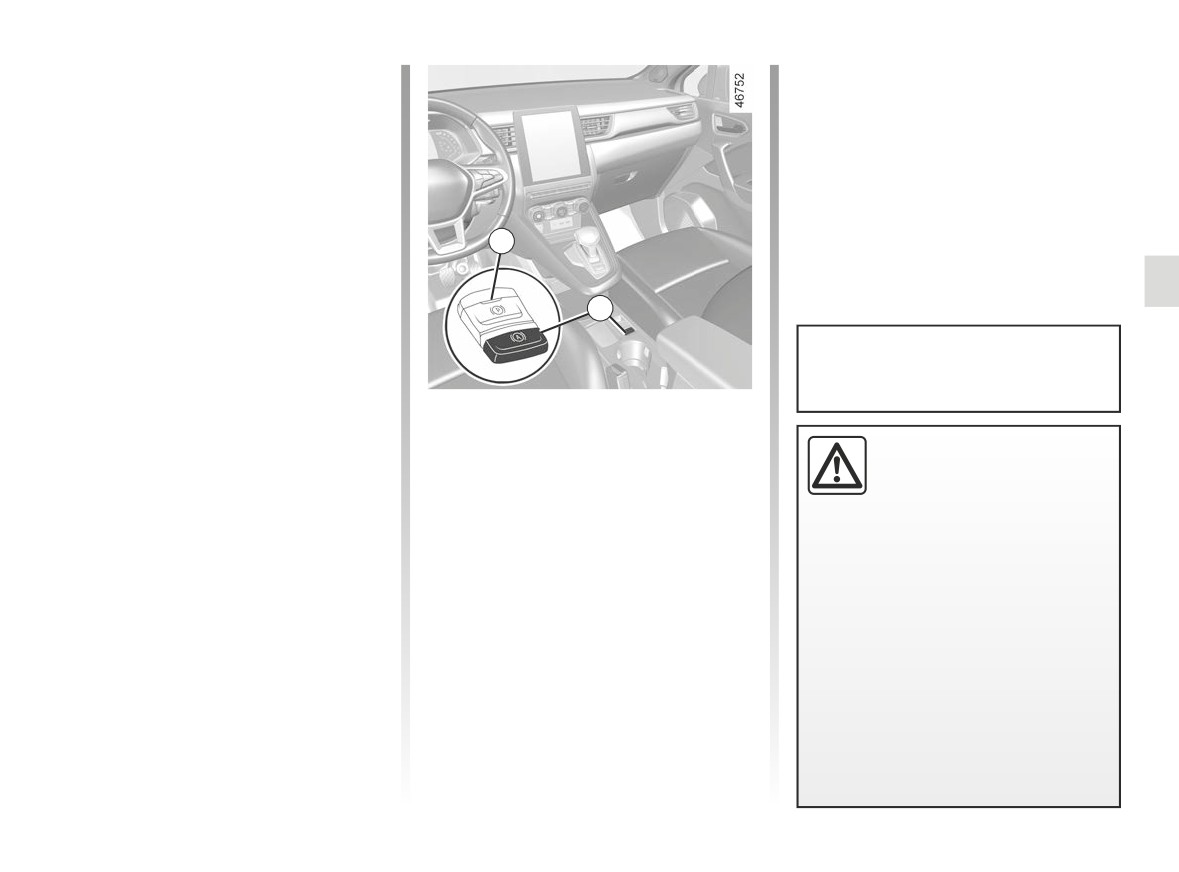
“AUTOHOLD” FUNCTION
Vehicle stopped (e.g. at a red light, an
Conditions for interrupting the
intersection, a traffic jam, etc.), the func-
braking force
tion ensures braking force even when
The following conditions must be met:
the driver releases the brake pedal.
- the driver accelerates sufficiently
The braking force is released as soon
with a gear engaged;
as the driver accelerates sufficiently
or
with a gear engaged.
- the driver disables the function.
1
Activation
Warning light
goes out on the in-
Press switch 2.
strument panel.
The 1 switch warning light 2 illuminates
to confirm that the function is activated.
2
Upon each start-up, the function
Deactivation
continues the mode set at the time
Press the brake pedal and 2 switch si-
the engine was last switched off.
multaneously.
Conditions for maintaining the
The 1 switch warning light 2 disappears
braking force
The electronic parking
to confirm that the function is deacti-
The following conditions must be met:
brake can be used to im-
vated.
- the seat belt for the driver is fas-
mobilise the vehicle. Before
If the braking force is maintained, the
tened;
leaving the vehicle, check
parking brake is applied automatically
and
that the electronic parking brake is
when:
- the electronic parking brake is re-
fully applied.
- the driver exits the vehicle;
leased;
The indicator light on switch 2 and
or
and
- the vehicle is immobilised for more
- the vehicle is not stationary on a very
the warning light }
on the in-
than approximately three minutes.
steep slope.
strument panel illuminate to show
The maintained braking force is con-
that the parking brake is applied
and switch off when the doors are
firmed by the
warning light on
locked. Depending on the vehicle, a
the instrument panel.
sticker is located on the upper sec-
tion of the windscreen to remind you
of this.
2.29
CarManuals2.co
DRIVING ADVICE, ECO DRIVING (1/8)
Fuel consumption is accredited in ac-
Depending on the vehicle, you will have
cordance with a standard regulatory
various functions which enable you to
method. Identical for all manufactur-
lower your fuel consumption:
ers, this enables vehicles to be com-
- the rev counter;
pared with one another. Consumption
in real time depends on vehicle usage
- gear change indicator;
conditions, the equipment fitted and the
- the driving style indicator;
user’s driving style. To optimise fuel
- the journey record and eco-driving
consumption, please refer to the follow-
advice via the multimedia screen;
ing advice.
- acceleration indicator Eco;
- ECO mode;
- the free-wheel function;
- the Stop and Start function ➥ 2.12.
If fitted on the vehicle, the navigation
system provides additional information.
2.30
CarManuals2.co
DRIVING ADVICE, ECO DRIVING (2/8)
A
B
C
1
1
1
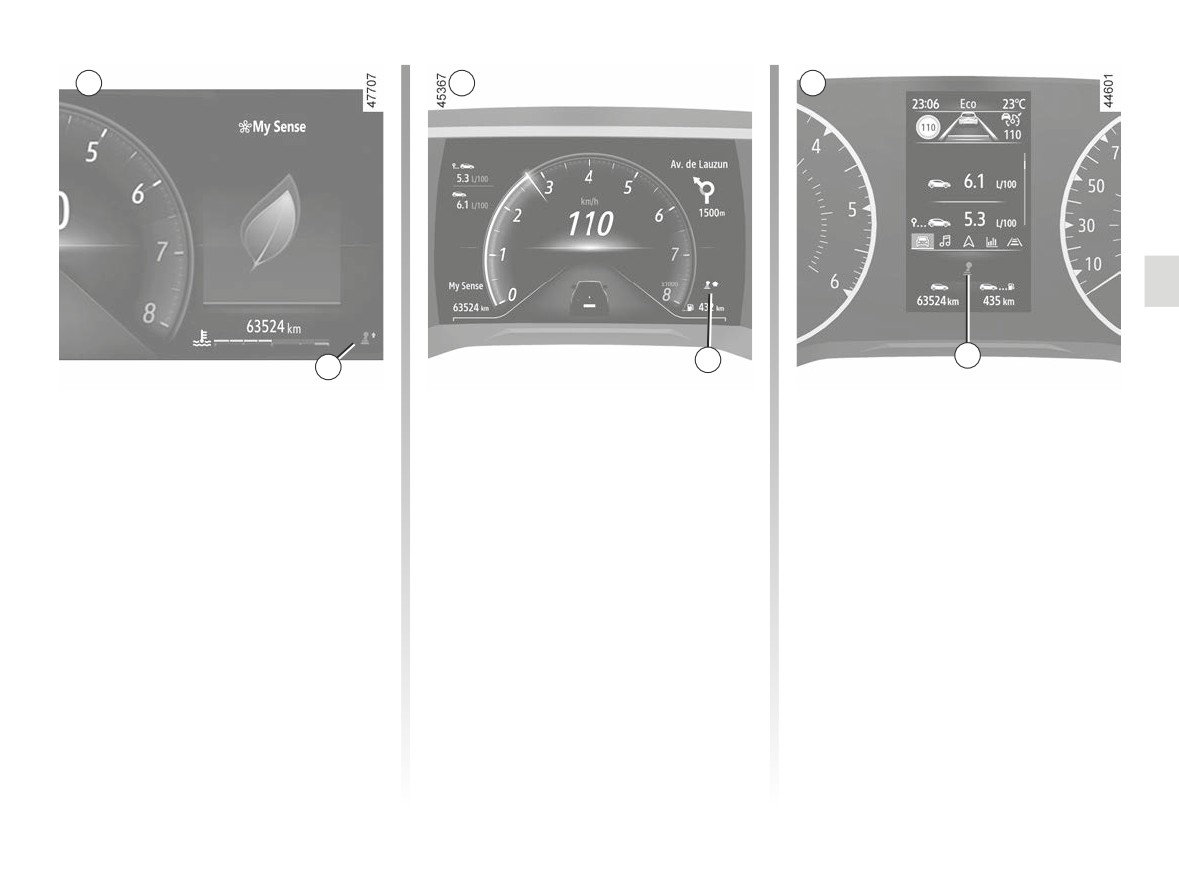
On the instrument panel A, B
Gear change indicator 1
or C
Depending on the vehicle, to obtain op-
timum consumption levels, a warning
Depending on the vehicle, the informa-
light on the instrument panel lets you
tion display can be organised and cus-
know the best time to move up or down
tomised based on the instrument panel
a gear:
customisation style selected from the
multimedia screen.
shift up a gear;
downshift a gear.
If you regularly follow this indicator, you
will reduce your vehicle’s fuel consump-
tion.
2.31
CarManuals2.co
DRIVING ADVICE, ECO DRIVING (3/8)
A
B
2
C
2
2
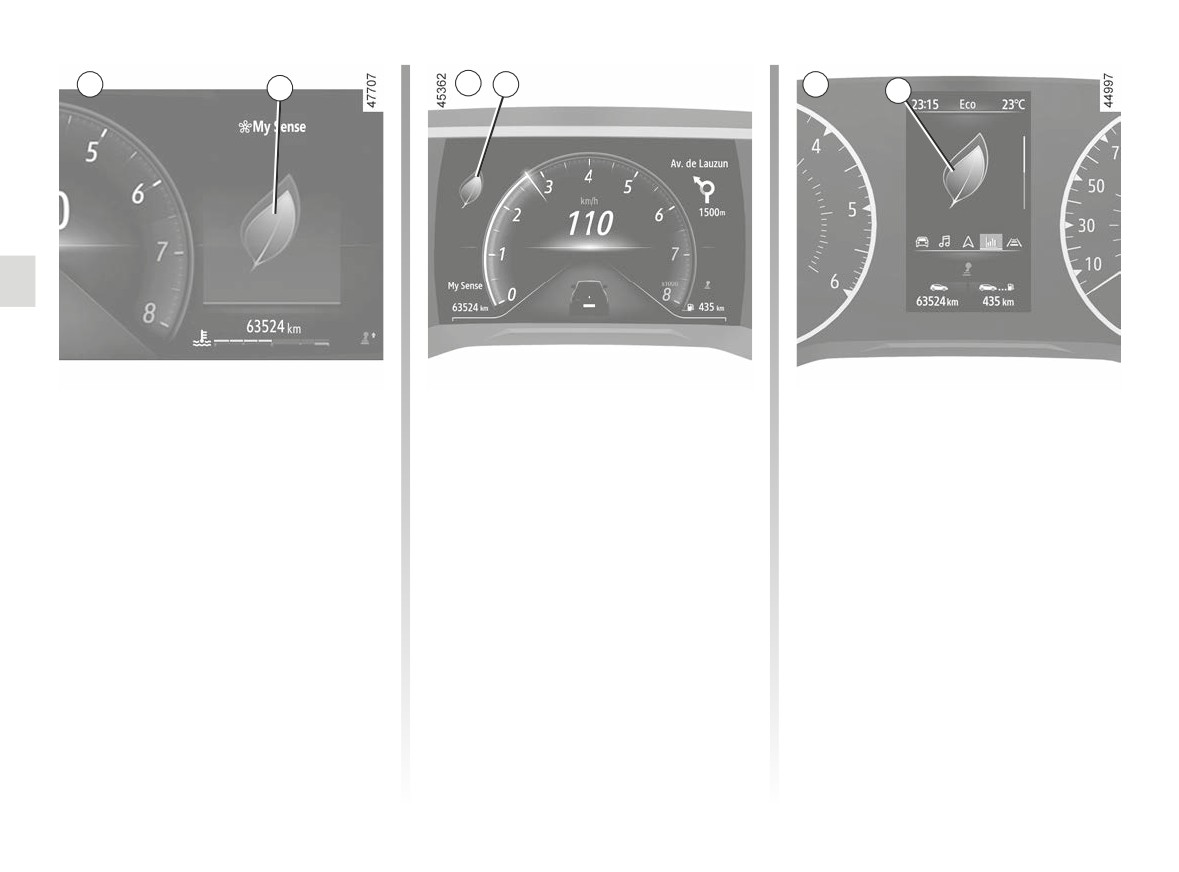
Driving style indicator 2
Informs you about the driving style
adopted in real time. This is shown by
indicator light 2.
The more petals displayed on 2, the
more your driving is flexible and eco-
nomical.
If you regularly monitor this indicator,
you will reduce your vehicle’s fuel con-
sumption.
Please refer to the multimedia instruc-
tions for further information.
2.32
CarManuals2.co
DRIVING ADVICE, ECO DRIVING (4/8)
A
3
3
B
C
3
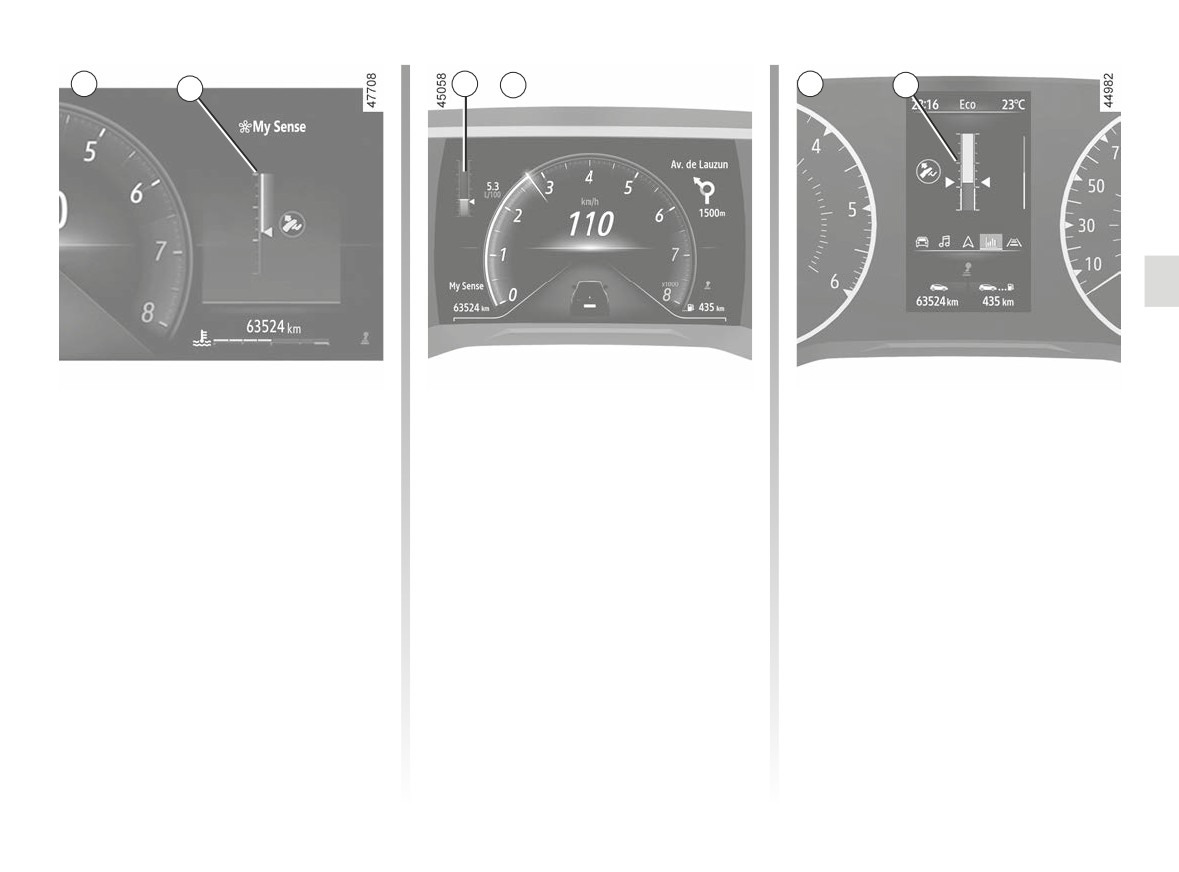
Acceleration indicator Eco 3
This informs you in real time whether
you are accelerating moderately or
strongly.
This is shown by the 3 warning light:
- green: acceleration is moderate and
correct;
- white: acceleration is too high;
- grey: acceleration is high.
Note: it is not possible to simultane-
ously display the driving style indica-
tor 2 and the Eco acceleration indica-
tor 3.
2.33
CarManuals2.co
DRIVING ADVICE, ECO DRIVING (5/8)
An overall rating from 0 to 100 is dis-
4
played to let you assess your eco driv-
ing performance. The higher the rating,
the lower the fuel consumption.
Eco advice is given to help improve
your performance.
With your favourite journeys saved,
you can compare your performance
between trips and the performance of
other vehicle users.
Please refer to the multimedia instruc-
tions for further information.
On the multimedia screen
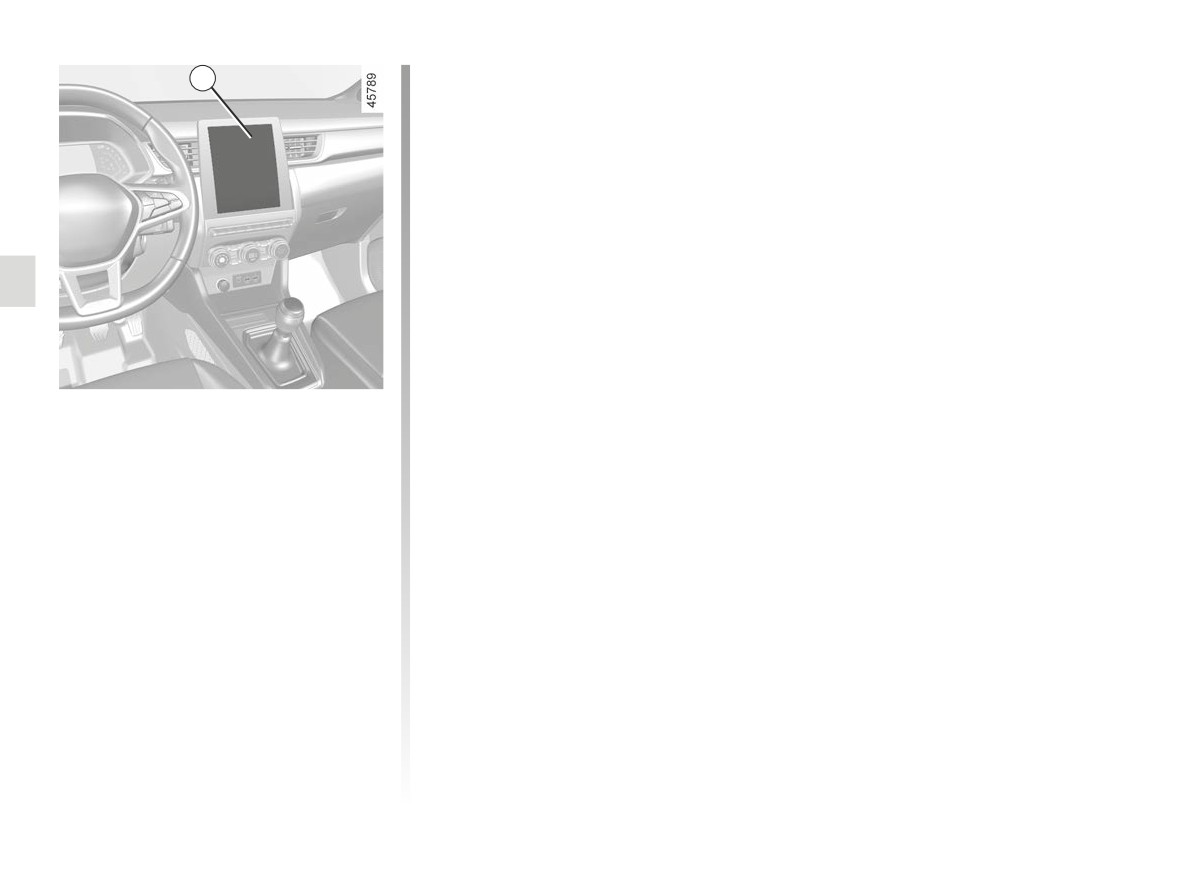
Journey record
Once the engine is switched off, you
will see “Journey record” displayed on
the multimedia screen 4, enabling you
to view information on your last journey.
This indicates:
- the general score;
- score evolution;
- distance without fuel consumption.
2.34
CarManuals2.co
DRIVING ADVICE, ECO DRIVING (6/8)
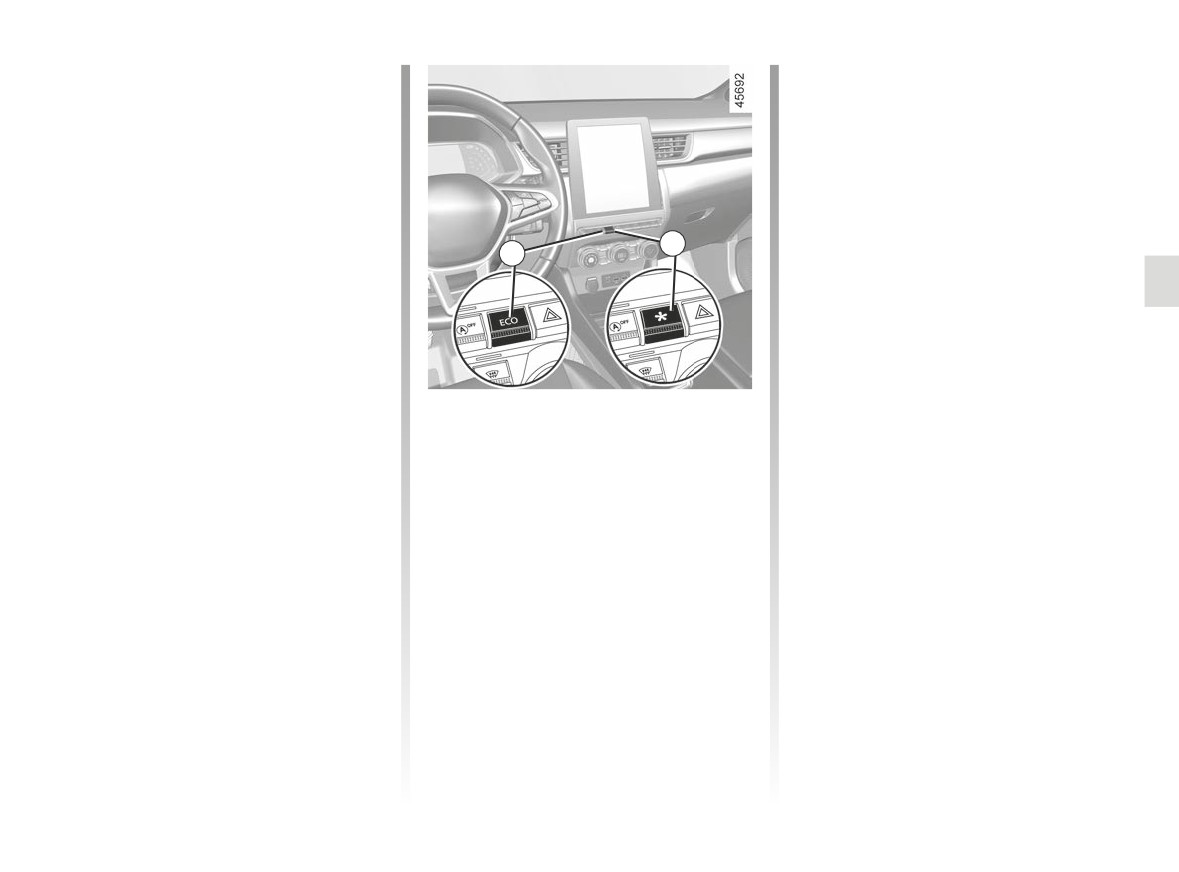
ECO mode
Free-wheel function
ECO mode is a function which opti-
Depending on the vehicle, for vehicles
mises fuel consumption. This acts on
fitted with an automatic gearbox, in the
certain driving actions (acceleration,
deceleration phases (with the foot fully
shifting gears, cruise control, decelera-
off the accelerator pedal), switching to
tion etc.).
freewheeling (automatic neutral) de-
creases engine braking and allows you
Limiting acceleration enables low fuel
to farther without accelerating in order
consumption in urban and surrounding
6
to save fuel.
areas.
5
Activating the function
The
freewheel warning light illu-
minates when the “Freewheel” parame-
Depending on the vehicle, the function
ter is activated (ON) in the user settings
can be activated either:
➥ 1.83.
- by pressing switch 5;
This warning light is displayed when the
- by pressing the 6 switch. ➥ 3.2;
To do this, press the accelerator pedal
function is activated:
firmly and fully.
- from the multimedia screen (refer to
- in grey when the vehicle is not in
the multimedia instructions).
ECO mode is reactivated when you
freewheel mode;
take pressure off the accelerator pedal.
- in green or, depending on the vehi-
The warning light
comes on on
cle, when the vehicle is in freewheel
the instrument panel to confirm activa-
Disabling the function
mode (automatic neutral).
tion.
Depending on the vehicle, the function
Note: depending on the vehicle, for
While driving, it is possible to leave the
can be deactivated either:
vehicles equipped with Multi-Sense
ECO mode temporarily in order to im-
- by pressing switch 5;
➥ 3.2, activation/deactivation is done
prove engine performance.
- by pressing the 6 switch. ➥ 3.2.
by configuring the various My Sense
modes or ECO mode.
The warning light
goes out on
the instrument panel to confirm deac-
tivation.
2.35
CarManuals2.co
DRIVING ADVICE, ECO DRIVING (7/8)
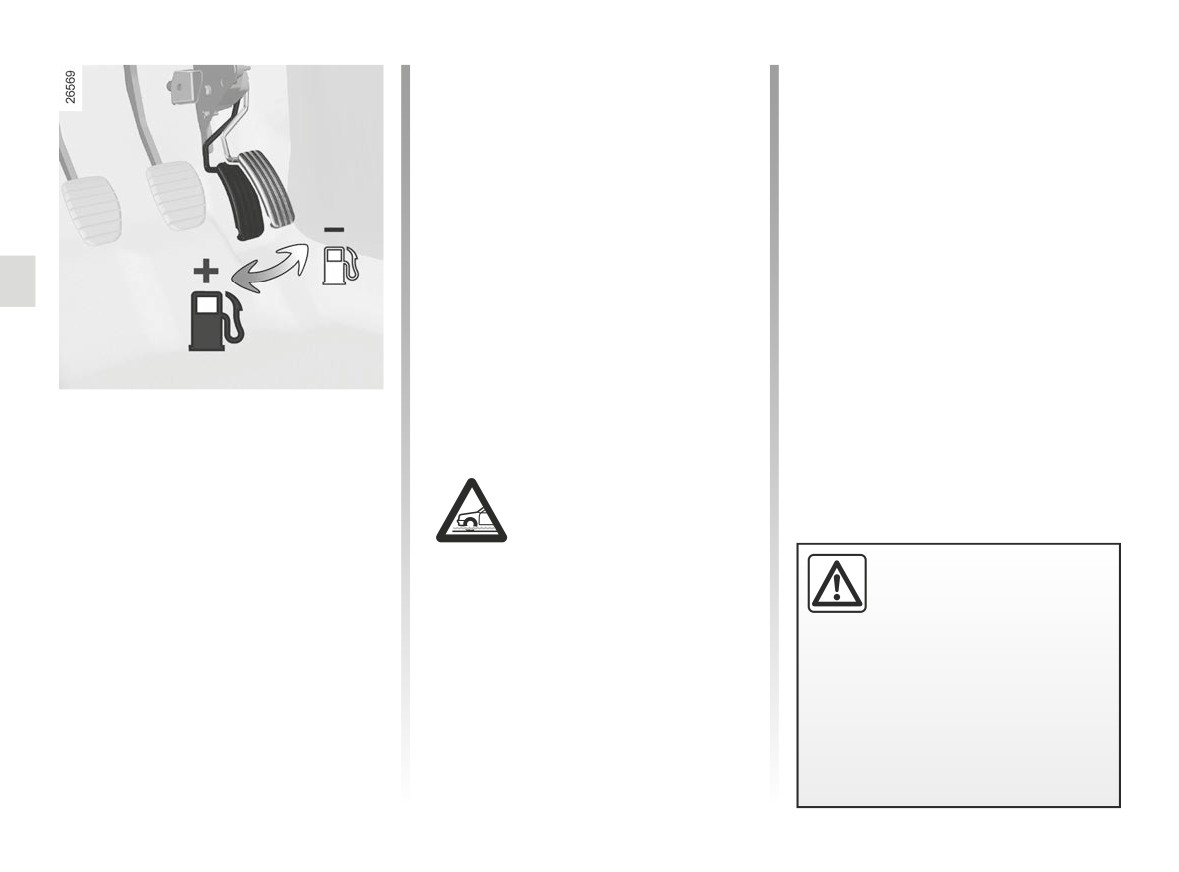
- Do not over rev the engine in the in-
termediate gears. You should always
use the highest gear possible.
- Avoid sudden acceleration.
- Brake as little as possible. If you an-
ticipate an obstacle or bend in ad-
vance, you may then simply release
the accelerator pedal.
- Do not try to maintain the same
speed up a hill, accelerate no more
than you would on the level. Keep
your foot in the same position on the
accelerator pedal.
- Double declutching and accelerating
before switching off are unnecessary
Driving advice and ECO
in modern vehicles.
driving
- Bad weather, flooded roads:
Behaviour
Do not drive through
- Drive carefully for the first few miles
floods if the water is
until the engine reaches its normal
above the lower edge of
operating temperature, rather than
the wheel rims.
let it warm up while the vehicle is sta-
Obstructions to the driver
tionary.
On the driver’s side, only
use mats suitable for the
- Speed is expensive.
vehicle, attached with the
- Dynamic driving with a lot of frequent
pre-fitted components, and check
acceleration and braking is expen-
the fitting regularly. Do not lay one
sive on fuel in comparison to the time
mat on top of another.
saved.
There is a risk of wedging the
pedals.
2.36
CarManuals2.co
DRIVING ADVICE, ECO DRIVING (8/8)
- In vehicles fitted with air condi-
tioning, it is normal to observe an
increase in fuel consumption (espe-
cially in urban conditions) when it is
used. For vehicles fitted with manual
air conditioning, switch off the system
when it is not required.
Advice for reducing consumption
and therefore helping to preserve
the environment:
If the vehicle has been parked in the
sun, open the doors for a few mo-
ments to let the hot air escape before
starting the engine.
- Do not leave an empty roof rack
Tyres
Advice on use
fitted to the vehicle.
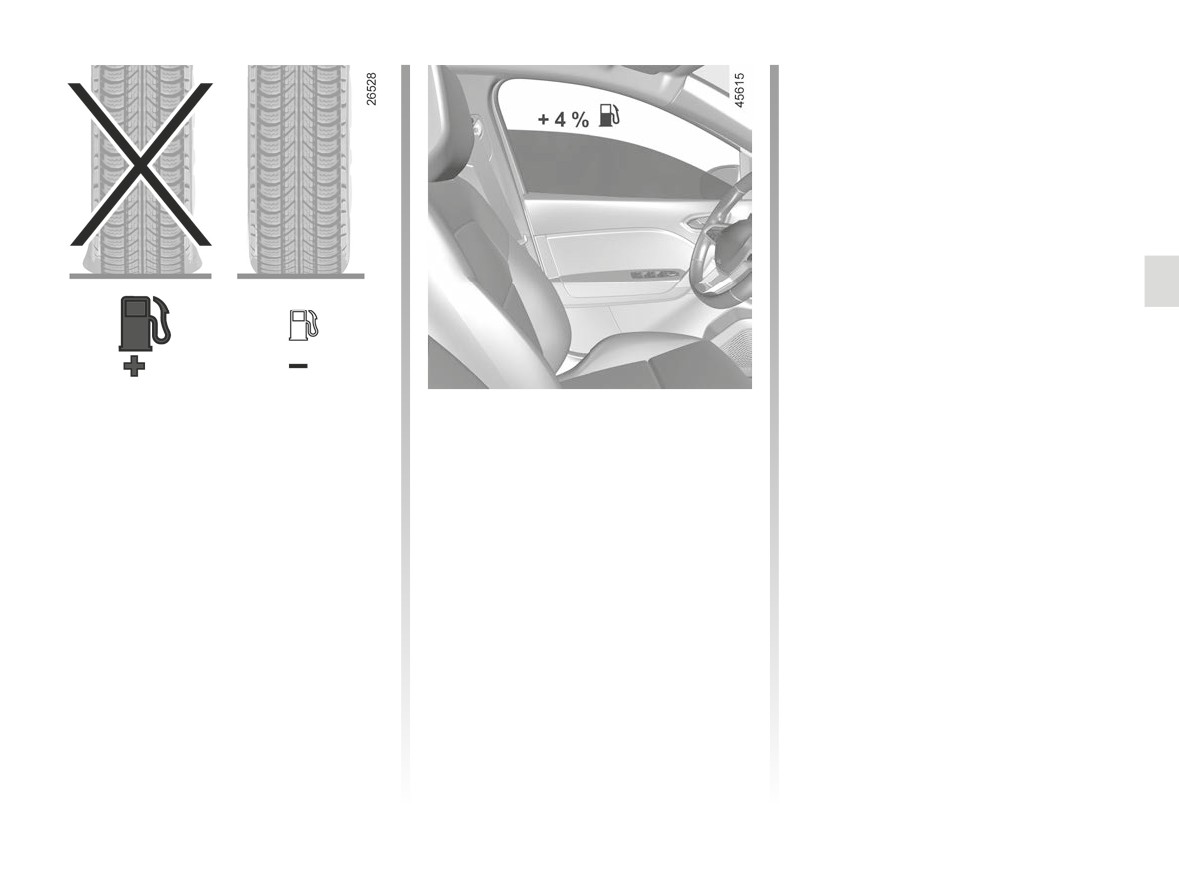
– An underinflated tyre increases fuel
- Favour the ECO mode.
- It is better to fit a trailer for bulky ob-
consumption.
jects.
- Electricity is fuel; switch off all the
- To optimise fuel consumption, set the
electrical components which are
- When towing a caravan, fit a wind
highest speed tyre pressure or the
not really needed. However (safety
deflector and adjust it carefully.
recommended pressure indicated on
first), keep your lights on when the
- Avoid using the car for door-to-door
the edge of the driver’s door ➥ 4.11.
visibility is bad (“see and be seen”).
calls (short journeys with long waits
– The use of non-recommended tyres
- Use the air vents. Driving with the
in between) because the engine
can increase fuel consumption.
windows open at 60 mph (100 km/h)
never reaches its normal operating
will increase fuel consumption by
temperature.
4%.
- Never fill the fuel tank right to the
brim to avoid overflow.
2.37
CarManuals2.co
MAINTENANCE AND ANTIPOLLUTION ADVICE
Your vehicle complies with criteria for
In addition, replacing engine, fuel
- Air filter, fuel filter: a choked ele-
recycling and recovering vehicles at the
supply system and exhaust compo-
ment will reduce efficiency. It must
end of their service life, which entered
nents with parts other than those origi-
be replaced.
into force in 2015.
nally recommended by the manufac-
turer may alter your vehicle so that it
Some parts of your vehicle have there-
Exhaust gas monitoring
no longer complies with anti-pollution
fore been designed to facilitate future
regulations.
system
recycling.
Have your vehicle adjusted and
The exhaust gas monitoring system will
These parts are easy to remove so
checked by an authorised dealer, in ac-
detect any operating faults in the vehi-
that they can be recovered and repro-
cordance with the instructions given in
cle’s antipollution system.
cessed by recycling companies.
your maintenance schedule: they will
If this system malfunctions, toxic sub-
By virtue of its design, moderate fuel
have all the equipment necessary for
stances may be released into the at-
consumption and initial settings, your
ensuring that your vehicle is maintained
mosphere or damage may occur.
vehicle also conforms to current an-
to its original standard.
This warning light on the in-
tipollution regulations. The manufac-
Ä
strument panel will indicate if
turer is actively striving to reduce pol-
there are any faults in the system:
lutant exhaust gas emissions and to
Engine adjustments
This lights up when the ignition is
save energy. But the fuel consumption
- Spark plugs: for optimum condi-
switched on and goes out when the
of your vehicle and the level of pollutant
tions of use, output and performance
engine is started.
exhaust gas emissions are also your
the specifications laid down by our
- If it lights up continuously, consult an
responsibility. Ensure that it is main-
Design Department must be strictly
approved Dealer as soon as possi-
tained and used correctly.
applied.
ble;
If the spark plugs have to be changed,
- if it flashes, reduce the engine speed
use the make, type and gap specified
until the light stops flashing. Contact
Maintenance
for your vehicle’s engine. Contact an
an authorised dealer as soon as pos-
It is important to remember that fail-
authorised dealer for this.
sible.
ure to respect antipollution regulations
- Ignition and idle speed: no adjust-
➥ 1.113
could lead to legal action being taken
ment is needed.
against the vehicle owner.
2.38
CarManuals2.co
ENVIRONMENT
Your vehicle has been designed with
Emissions
- At the end of the vehicle’s service
respect for the environment in mind for
life, it should be sent to approved
Your vehicle has been designed to emit
its entire service life: during production,
centres to ensure that it is recycled.
fewer greenhouse gases (CO2) while in
use and at the end of its life.
use, and therefore to consume less fuel
- In all cases, comply with local legis-
(eg. 140 g/km, equivalent to 5.3 l/100
lation.
Manufacture
km for a diesel vehicle).
Your vehicle has been manufactured at
Our vehicles are also equipped with a
Recycling
a factory which complies with a policy
particle filter system including a cata-
Your vehicle is 85% recyclable and
to reduce the environmental impact
lytic converter, an oxygen sensor and
95% recoverable.
on the surrounding areas (reduction of
an active carbon filter (the latter pre-
water and energy consumption, visual
vents vapour from the fuel tank being
To achieve these objectives, many of
and noise pollution, atmospheric emis-
released into the open air).
the vehicle components have been de-
sions and waste water; sorting and re-
signed to enable them to be recycled.
For certain diesel vehicles, this system
using waste).
The materials and structures have
also has a particle filter to reduce the
been carefully designed to allow these
volume of soot particles emitted.
components to be easily removed and
reprocessed by specialist companies.
Please make your own
In order to preserve raw material re-
contribution towards
sources, this vehicle incorporates nu-
protecting the environment
merous parts made from recycled plas-
tics or renewable materials (vegetable
too
or animal-derived materials such as
- Worn parts replaced in the course of
cotton or wool).
routine vehicle maintenance (vehi-
cle battery, oil filter, air filter, batter-
ies, etc.) and oil containers (empty or
filled with used oil) must be disposed
of through specialist organisations.
2.39
CarManuals2.co
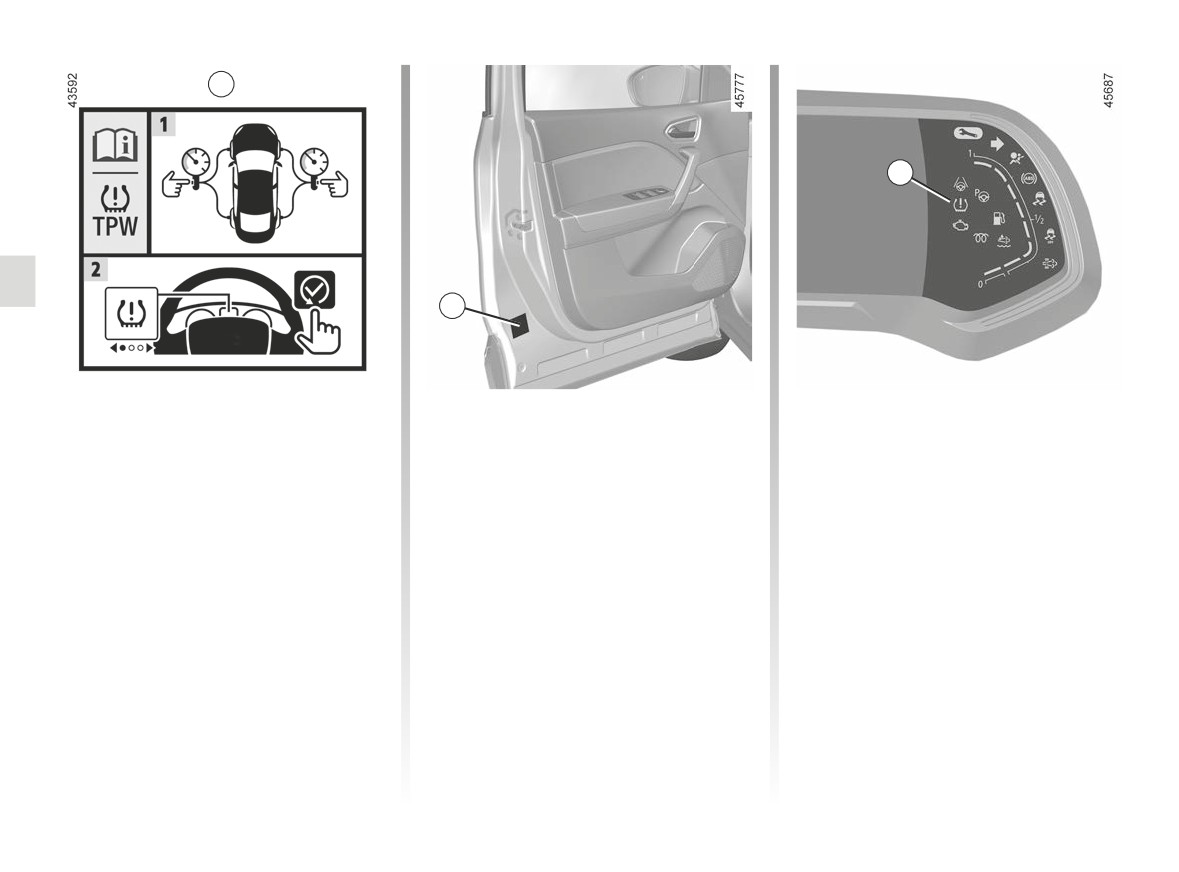
TYRE PRESSURE LOSS WARNING (1/6)
1
2
1
When fitted to the vehicle, this system
Operating principle
notifies the driver if one or more tyres
This system detects a loss of pressure
lose pressure.
in one of the tyres by measuring the
The system can be identified by the 1
wheel speed while driving.
label in the vehicle.
Warning light
2 comes on to
alert the driver in the event of insuffi-
cient pressure (deflated wheel, punc-
tured tyre, etc.).
2.40
CarManuals2.co
TYRE PRESSURE LOSS WARNING (2/6)
Operating conditions
-
significant change in load or distribu-
Resetting the standard level
tion of load on one side of the vehi-
The system should be reset with a
for the tyre pressures
cle;
pressure equal to that stated on the tyre
This should be done:
-
sporty driving with strong accelera-
pressure label (refer to the information
tion;
- after each re-inflation or resetting of
on “Tyre Pressures” in section 4), other-
-
driving on snowy or slippery surface;
tyre pressure;
wise it may not give a reliable warning
–
driving with snow chains;
in the event of significant pressure loss.
- after changing a wheel;
–
fitting a single new tyre;
Resetting should always be carried
-
use of tyres not approved by the net-
– after changing wheels around.
out after checking the tyre pressure
work.
Tyre pressures must correspond to the
of all four tyres when cold.
current usage of the vehicle (empty,
In the following situations, the system
carrying a load, motorway driving, etc.).
risk coming into action late or not func-
tioning correctly:
- system not reset after reinflation or
any operation on the wheels;
- system badly reset: different inflation
pressures from the recommended
pressures;
This function is an addi-
tional driving aid.
The function does not take
the place of the driver. It
cannot, therefore, under any cir-
cumstances replace the vigilance
or the responsibility of the driver.
Check the tyre pressures, including
The sudden loss of pressure in a
the emergency spare wheel, once a
tyre (burst tyre, etc.) cannot be de-
month.
tected by the system.
2.41
CarManuals2.co