Peugeot 1007 (2008 year). Manual - part 10
 

  Index      Peugeot     Peugeot 1007 - service manual 2008 year in english


Search            


Content   ..  8  9  10  11   ..


Peugeot 1007 (2008 year). Manual - part 10


10

10

138

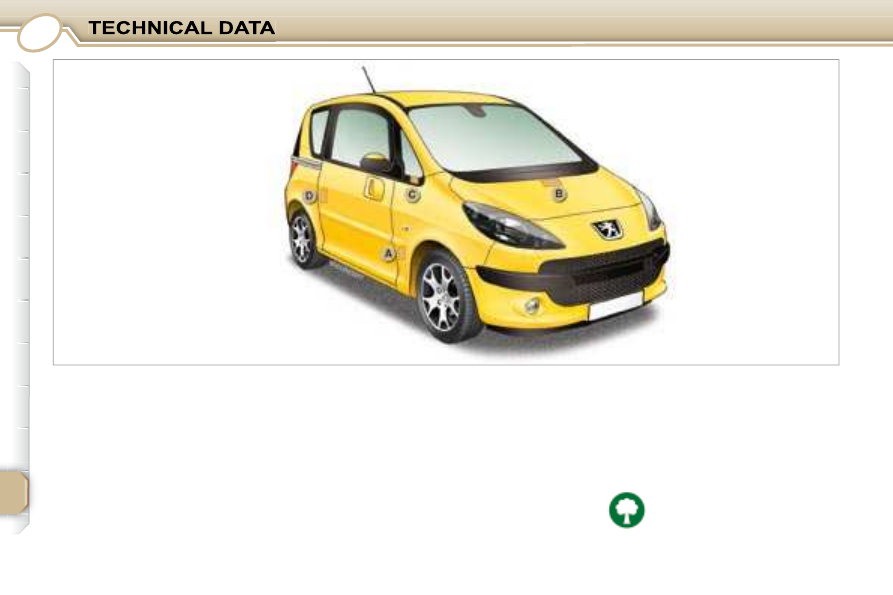
               IDENTIFICATION FEATURES 
OF YOUR 1007 

   A.    Manufacturer’s plate.  
  B.    Serial number on the 

bodywork (under the 
bonnet, at the centre of the 
crossmember).
  

  C.    Serial number on the fascia 

(on the small aperture, 
left-hand side).
  

  D.    Tyres and paint colour 

reference.   

 The  label   D   on  the  pillar,  near  the 

left-hand door striker, indicates: 

   -  

the wheel and tyre sizes, 

  -  

the brands of tyres approved by 

the manufacturer, 

  -  

the  tyre  pressures   (the  tyre 

pressure  must  be  checked 
when the tyre  is cold, at  least 
once a month)

 , 

  -  

the paint colour reference.  

  Wheels  equipped  with  195/50R16 

tyres  cannot  be  fi tted  with  snow 

chains.  
  Contact  a    PEUGEOT    dealer  for 
information.
  

 Low tyre pressures increase 

fuel consumption. 

S

O

S

SOU R CE

MODE

B AND

ESC

2

abc

5

jkl

8

tuv

3

def

6

mno

9

wxyz

1

4

ghi

7

pqr s

0

#

MENU

LIST

TA 

P TY

DARK

139

        RT4  

 MULTIMEDIA AUDIO EQUIPMENT/TELEPHONE JUKEBOX 

FUNCTION (10 GB)/GPS (EUROPE) 

 The SERVICE BOX internet site provides additional 
animated information about the RT4. It can be consulted at 
the following address: 
http://public.servicebox.peugeot.com. 
 Simple registration permits access and free consultation of 
the handbook. 

 The RT4 GPS audio/telephone is coded in such a 
way that it will only operate in your vehicle. If it is to be 
installed in another vehicle, contact a  PEUGEOT  dealer 

for confi guration of the system. 

 For safety reasons, it is imperative that the driver carries 
out operations which require prolonged attention while 
the vehicle is stationary. 
 When the engine is switched off and to prevent 
discharging of the battery, the RT4 audio/telephone may 
switch off after a few minutes. 


CONTENTS  

  • 01 First steps  

pg. 140  

  • 02 General menu  

pg. 141  

  • 03 GPS  

pg. 142  

  • 04 Traffi c information  

pg. 150  

  • 05 Audio/Video  

pg. 152  

  • 06 Telephone  

pg. 159  

  • 07 Control short-cuts  

pg. 162  

  • 08 Confi guration  

pg. 164  

  • 09 Display fl ow charts  

pg. 165  

  • Frequently asked questions   pg. 180  

S

O

S

SOU R CE

MODE

B AND

ESC

2

abc

5

jkl

8

tuv

3

def

6

mno

9

wxyz

1

4

ghi

7

pqr s

0

#

MENU

LIST

TA 

P TY

DARK

01

2

2

1

1

55

3

3

4

4

8

8

99

10

10

15

15

11

11

17

17

18

18

12

12

16

16

14

14

7

7

6

6

13

13

140

   1.  

Ejection of the CD. 

  2.  

Selection of the source: radio, Jukebox, CD, CD changer 

and auxiliary (AUX, if activated on the Confi guration menu).   


Long press: CD copy to hard disc. 

  3.  

Long press on the SOS button: emergency call. 

  4.  

Selection of the display on the screen from the modes: TRIP, 
TEL, NAV and AUDIO. 


5.   Modifi cation of the screen display.   
 

Long press: reinitialisation of the RT4 GPS audio/telephone. 

  6.  

On/Off and Volume adjustment. 

  7.  

Selection of the wavebands FM1, FM2, FMast, AM. 

  8.

   TA (Traffi c Announcement) function on/off.   


Long press: access to the PTY (radio Programme TYpes) 
mode. 


9.   Access to the "PEUGEOT" services menu. 
  10.   Cancellation of the current operation.   
 

Long press: return to the current application. 

  11.   Automatic search for a lower/higher frequency.   
 

 Selection of the previous/next CD, MP3 or Jukebox track. 

  12.   Displaying of the general menu. 

  13.   Keypad for entering descriptions by successive presses. 

  14.   Selection of the previous/next CD. Selection of the previous/

next MP3/Jukebox directory. 


15.   Audio option adjustments: front/rear, left/right balance, 

loudness, sound ambiences. 

  16.

   Selection and confi rmation. 

  17.   SIM card slot. 

  18.   Displaying of the list of local radio stations, of the tracks on 

the CD or of the MP3/Jukebox directories. 


Long press: updating of the local radio stations.  

 FIRST STEPS 

02

141

       GENERAL MENU 

 MAP: orientation, details, 
display. 

 AUDIO FUNCTIONS: radio, 
CD, Jukebox, options. 

 For maintenance of the 
display, the use of a 
soft, non-abrasive cloth 

(spectacles cloth) is 
recommended without any 
additional product. 

 TELEMATIC: telephone, 
directory, SMS. 

 CONFIGURATION: vehicle, 
display, time, languages, 

voice, auxiliary socket (AUX) 
parameters. 

 VIDEO: activation, parameters. 

 VEHICLE DIAGNOSTICS: 
warnings log, status of the 
functions. 

 NAVIGATION GUIDANCE: 
GPS, stages, options. 

 TRAFFIC INFORMATION: TMC 
information, messages. 

MENU

ESC

LIST

MENU

ESC

MENU

LIST

ESC

MENU

LIST

ESC

MENU

LIST

ESC

MENU

LIST

ESC

MENU

LIST

1

1

2

2

3

3

55

7

7

4

4

6

6

8

8

ESC

MENU

LIST

ESC

MENU

LIST

03

142

 Press the MENU button. 

 Turn the dial and select the 
NAVIGATION GUIDANCE function. 

 Press the dial to confi rm the selection. 

 Turn the dial and select the 
DESTINATION CHOICE function. 

 Press the dial to confi rm the selection. 

 Press the dial to confi rm the selection. 

 Turn the dial and select the ENTER 
AN ADDRESS function. 

 When the country has been selected, 
turn the dial and select the TOWN 
function. 

TOWN

ENTER AN ADDRESS

DESTINATION CHOICE

 Tip: for a detailed global view of the menus available, refer to the "Display fl ow charts" section of this 
RT4 chapter. 

         GPS 

  SELECTING A DESTINATION 

ESC

MENU

LIST

99

11

11

12

12

14

14

10

10

ESC

MENU

LIST

13

13

ESC

MENU

LIST

2

abc

5

jkl

8

tuv

3

def

6

mno

9

wxyz

1

4

ghi

r

7

pq s

0

#

ESC

MENU

LIST

ESC

MENU

LIST

143

 Press the dial to confi rm the selection. 

 Turn the dial and select the letters of 

the town one by one confi rming each 
time by pressing the dial. 

 Select OK and press the dial to 

confi rm. 

 To speed up the process, the POST CODE can be 
entered instead of the name of the town. 
 Use the alphanumeric keypad to enter the letters and 
digits and "*" to correct. 

 Press the dial to confi rm the selection. 

 Select OK on the ENTER AN 
ADDRESS page. 

 Repeat steps 8 to 12 for the ROAD and N° functions. 

OK

OK

 Select the STORE function to record the address entered in a 

directory record and press the dial to confi rm the selection. 

 The points of interest (POI) indicate all of the service locations in the 

vicinity (hotels, various businesses, airports...).    

STORE

PARIS

POI

ESC

LIST

MENU

ESC

MENU

LIST

ESC

MENU

LIST

ESC

MENU

LIST

ESC

MENU

LIST

MENU

1

1

2

2

3

3

4

4

55

6

6

7

7

8

8

ESC

MENU

LIST

ESC

MENU

LIST

ESC

MENU

LIST

03

144

  GUIDANCE OPTIONS 

       GPS 

 The route chosen by the RT4 GPS audio/telephone depends directly on the guidance options. 

 Changing these options may completely change the route. 

 Press the MENU button. 

 Turn the dial and select the 
NAVIGATION GUIDANCE function. 

 Press the dial to confi rm the selection. 

 Turn the dial and select the 
GUIDANCE OPTIONS function. 

 Turn the dial and select the DEFINE 
CALCULATION CRITERIA function. 

 Press the dial to confi rm the selection. 

 Press the dial to confi rm the selection. 

GUIDANCE OPTIONS

DISTANCE/TIME

DEFINE CALCULATION CRITERIA

 Turn the dial and select, for example, 
the DISTANCE/TIME function. 

ESC

MENU

LIST

ESC

MENU

LIST

MENU

99

10

10

11

11

12

12

1

1

2

2

3

3

4

4

55

ESC

LIST

MENU

ESC

MENU

LIST

ESC

MENU

LIST

ESC

MENU

LIST

ESC

MENU

LIST

ESC

MENU

LIST

ESC

MENU

LIST

145

 Turn the dial and select the TRAFFIC 
INFO function if it is not ticked. 

 Press the dial to confi rm the selection. 

 Select OK and press the dial to 

confi rm.  

TRAFFIC INFO

 Press the dial to confi rm the selection. 

 Tick this box for optimum operation of the traffi c information, 
diversions will be suggested. 

OK

       GUIDANCE SPEECH SYNTHESIS 

 Press the MENU button. 

 Turn the dial and select the 
NAVIGATION GUIDANCE function. 

 Press the dial to confi rm the selection. 

GUIDANCE OPTIONS

 Turn the dial and select the 
GUIDANCE OPTIONS function. 

 Press the dial to confi rm the selection. 

ESC

LIST

MENU

ESC

MENU

LIST

ESC

MENU

LIST

MENU

6

6

8

8

1

1

2

2

3

3

4

4

ESC

MENU

LIST

ESC

MENU

LIST

S

O

S

SOU R CE

MODE

B AND

T

P T

A

Y

DARK

ESC

MENU

LIST

7

7

ESC

MENU

LIST

03

146

 Press the MENU button. 

 Turn the dial and select the MAP 
function. 

 Press the dial to confi rm the selection. 

 Turn the dial and select the MAP 
DETAILS function. 
 Permits selection of the services 
which can be seen on the map 

(hotels, restaurants...). 

 ACTIONS ON THE MAP 

MAP DETAILS

 During the announcements, the volume of each 

speech synthesis function (guidance, traffi c 

information...) can be adjusted directly. 

 GUIDANCE SPEECH 
SYNTHESIS 

 Select the ADJUST SPEECH 
SYNTHESIS function and press the 

dial to confi rm. 

 GPS 

ADJUST SPEECH SYNTHESIS

DEACTIVATE

 Select the DEACTIVATE function and 

press the dial to confi rm. 

OK

 Select OK and press the dial to 

confi rm. 

ESC

MENU

LIST

MENU

ESC

MENU

LIST

ESC

LIST

MENU

1

1

2

2

3

3

4

4

55

6

6

7

7

ESC

MENU

LIST

03

ESC

MENU

LIST

ESC

MENU

LIST

ESC

MENU

LIST

147

 For improved visibility, beyond the scale of 10 km, the map automatically switches to North Orientation. 

 Turn the dial and select the MAP 
function. 

 Press the MENU button. 

 Press the dial to confi rm the selection. 

 Turn the dial and select the 3D VIEW 
tab. 

 Select OK   and press the dial to 

confi rm.  

 Turn the dial and select the MAP 
ORIENTATION function. 

 Press the dial to confi rm the selection. 

  3D VIEW 

 GPS 

MAP ORIENTATION

3D VIEW

OK

ESC

MENU

LIST

MENU

ESC

MENU

LIST

ESC

LIST

MENU

1

1

2

2

3

3

4

4

55

6

6

7

7

ESC

MENU

LIST

ESC

MENU

LIST

ESC

MENU

LIST

ESC

MENU

LIST

148

 Press the MENU button. 

 Press the dial to confi rm the selection. 

 Turn the dial and select the MAP 
function. 

 Turn the dial and select the MAP IN 
WINDOW or FULL SCREEN MAP 
tab. 

 Select OK   and press the dial to 

confi rm.  

 Press the dial to confi rm the selection. 

 Turn the dial and select the DISPLAY 
MAP function. 

  DISPLAYING THE MAP IN A WINDOW OR 
IN FULL SCREEN MODE 

 GPS 

DISPLAY MAP

FULL SCREEN MAP

OK

MAP IN WINDOW

ESC

LIST

MENU

MENU

1

1

ESC

MENU

LIST

2

2

3

3

4

4

55

ESC

MENU

LIST

99

ESC

MENU

LIST

8

8

ESC

MENU

LIST

7

7

ESC

MENU

LIST

6

6

ESC

MENU

LIST

ESC

MENU

LIST

ESC

MENU

LIST

03

149

  ADDING A STAGE 

 During guidance, press the MENU 
button. 

 Turn the dial and select the 
NAVIGATION GUIDANCE function. 

 Press the dial to confi rm the selection. 

 Turn the dial and select the 
JOURNEY LEGS AND ROUTE 
function. 

JOURNEY LEGS AND ROUTE

 Select OK and press the dial to 

confi rm the order of the stages. 

 When the new address has been 
entered, select OK and press the dial 

to confi rm. 

 Enter for example a new address. 

 Select the ADD A STAGE function 

(9 stages maximum) and press the 

dial to confi rm. 

 Press the dial to confi rm the selection. 

 The stage must be completed or deleted before the guidance can 
continue to the next destination. 
 Otherwise, the RT4 GPS audio/telephone will always guide you 
back to the previous stage.  

ENTER AN ADDRESS

ADD A STAGE

 GPS 

ESC

LIST

MENU

MENU

1

1

ESC

MENU

LIST

2

2

3

3

ESC

MENU

LIST

4

4

55

ESC

MENU

LIST

6

6

7

7

ESC

MENU

LIST

8

8

ESC

MENU

LIST

ESC

MENU

LIST

ESC

MENU

LIST

04

150

  ACTIVATING THE FILTER ON THE ROUTE 

 We recommend a fi lter on the route and a fi lter around the vehicle of: 
   -   5 km or 10 km for a region with heavy traffi c, 
  -   20 km for a region with a normal level of traffi c, 
  -   100 km for long journeys (motorway).  

 Press the MENU button. 

 Turn the dial and select the TRAFFIC 
INFORMATION function. 

 Press the dial to confi rm the selection. 

FILTER TRAFFIC INFORMATION

 Turn the dial and select the FILTER 
TRAFFIC INFORMATION function. 

 Press the dial to confi rm the 
selection. 

GEOGRAPHIC FILTER

 Select the GEOGRAPHIC FILTER 

function and press the dial to confi rm. 

 Turn the dial and select the ON THE 
ROUTE tab. 

OK

       TRAFFIC INFORMATION 

 Select OK and press the dial to 

confi rm.  

ESC

LIST

MENU

MENU

1

ESC

MENU

LIST

2

2

3

3

4

4

6

6

55

ESC

MENU

LIST

ESC

MENU

LIST

7

7

ESC

MENU

LIST

ESC

MENU

LIST

ESC

MENU

LIST

ESC

MENU

LIST

04

151

 Press the MENU button. 

READ MESSAGES

NEW MESSAGE DISPLAY

OK

  CONFIGURING THE TMC MESSAGE 
ANNOUNCEMENTS 

 We recommend that you do not tick the NEW MESSAGE DISPLAY tab for regions with heavy traffi c. 

 Turn the dial and select the TRAFFIC 
INFORMATION function. 

 Press the dial to confi rm the selection. 

 Press the dial to confi rm the selection. 

 Turn the dial and select the 
CONFIGURE MESSAGE 
ANNOUNCEMENT function. 

 Select the READ MESSAGES tab. 

 The Traffi c Information Messages will 
be read by the voice synthesiser. 

 Select the NEW MESSAGE DISPLAY tab. 

 The traffi c information messages 

are extended to the fi lters selected 

(geographic...) and can also be 
displayed when guidance is not active. 

 TRAFFIC INFORMATION 

 Select OK and press the dial to 

confi rm.  

CONFIGURE MESSAGE ANNOUNCEMENT

1

1

2

2

3

3

4

4

S

O

S

SOU R CE

MODE

B AND

T

P T

A

Y

DARK

SOU R CE

S

O

S

SOU R CE

MODE

B AND

T

P T

A

Y

DARK

B AND

SOU R CE

B AND

ESC

MENU

LIST

LIST

ESC

LIST

MENU

MENU

ESC

MENU

LIST

ESC

MENU

LIST

ESC

MENU

LIST

1

1

2

2

3

3

4

4

LIST

ESC

MENU

LIST

ESC

MENU

LIST

152

 AUDIO/VIDEO 

 RADIO 

 SELECTING A STATION 

 Press the SOURCE button several 
times in succession and select the 
RADIO. 

 Press the BAND button to select a 
waveband: FM1, FM2, FMast, AM. 

 Briefl y press one of the buttons to 
carry out an automatic search of the 
radio stations. 

 Press one of the buttons to carry out a 
manual search of the radio stations. 

 Press the LIST button to display the 
list of stations received locally 

(60 maximum). 
 To update this list, press for more than 
two seconds. 

 The external environment (hills, buildings, tunnels, basement car parks, ...) may block reception, 
including in RDS mode. This is a normal effect of the way in which radio waves are transmitted and does 

not indicate any failure of the audio equipment. 

  RDS 

 Select ACTIVATE FREQUENCY 

FOLLOWING (RDS) then press OK. 
RDS appears on the display. 

 Select the RADIO PREFERENCES 
function then press OK. 

 Select AUDIO FUNCTIONS then 
press OK. 

 Press the MENU button. 

 The RDS, if displayed, enables you to continue listening to the 
same station by means of frequency following. However, in certain 
conditions, this RDS station is not followed throughout the country 
as radio stations do not cover 100 % of the territory. This explains 
the loss of reception of the station during a journey.  

RADIO PREFERENCES

ACTIVATE FREQUENCY FOLLOWING (RDS)

S

O

S

SOU R CE

MODE

B AND

T

P T

A

Y

DARK

SOU R CE

ESC

MENU

LIST

LIST

SOU R CE

LIST

S
O
S

SOURC E

MODE

BAND

ESC

2

abc

5

jkl

8

tuv

3

def

6

mno

9

wxyz

1

4

ghi

7

pqrs

0

#

MENU

LIST

TA PT Y

DARK

1

1

2

2

05

153

         AUDIO/VIDEO 

  MP3 CD 

 The MP3 format, an abbreviation of MPEG 1.2 & 2.5 Audio Layer 3, 
is an audio compression standard which permits the recording of 

several tens of music fi les on a single disc. 

 In order to be able to play a recorded CDR or CDRW, when recording 
it is preferable to select standards ISO 9660 level 1.2 or Joliet. 
 If the disc is recorded in another format, it may not be played 
correctly. 
 It is recommended that the same recording standard is always used 

for an individual disc, with as low a speed as possible (4x maximum) 
for optimum sound quality. 
 In the particular case of a multi-session CD, the Joliet standard is 
recommended. 

 The audio equipment will only play audio fi les with the extension 
".mp3" with a sampling rate of 22.05 KHz or 44.1 KHz. No other type 

of fi le (.wma, .mp4, m3u...) can be played. 

 It is advisable to restrict fi le names to 20 characters without using 

special characters (e.g.: " " ? ; ù) to avoid any playing or displaying 
problems.   

 CD 

  PLAYING A CD OR AN MP3 COMPILATION 

 If the player already contains a disc, 
press the SOURCE button several 
times in succession and select CD to 
listen to it. 

 Press one of the buttons to select a 
track on the CD. 

 Press the LIST button to display the list of tracks on the CD or of 
the directories of the MP3 compilation. 
 The playing and displaying of an MP3 compilation may depend on 
the recording programme and/or the parameter settings used. We 
recommend use of the ISO 9660 recording standard.  

  INFORMATION AND ADVICE 

   Insert circular compact discs only. Some 
anti-pirating systems, on original discs or CDs 
copied using a personal recorder, may generate 
malfunctions regardless of the quality of the original 
player. 

 Insert an audio CD or an MP3 compilation in the 
player, play begins automatically. 


Content   ..  8  9  10  11   ..