Peugeot 208 (2017 year). Manual - part 8
 

  Index      Peugeot     Peugeot 208 - service manual 2017 year in english


Search            


Content   ..  6  7  8  9   ..


Peugeot 208 (2017 year). Manual - part 8


111

6

Driving

Manual gearbox

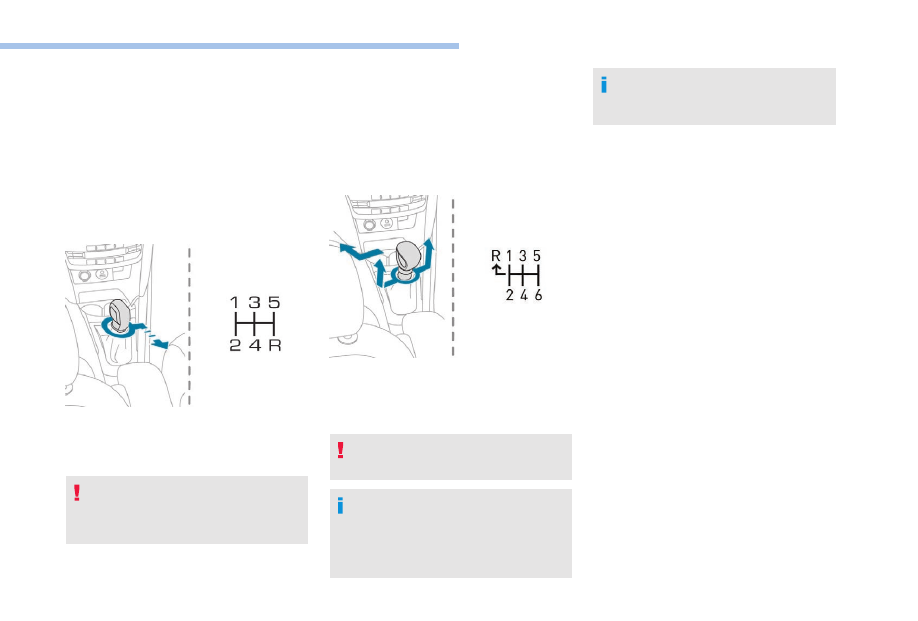
5-speed

F  Move the gear lever fully to the right to 

engage 5

th

 gear.

Engaging reverse gear

F  Move the gear lever to the right then pull it 

back.

Only engage reverse gear when the 
vehicle is stationary with the engine at 
idle.

6-speed

F  Move the lever fully to the right to engage 5

th


or 6

th

 gear.

Engaging reverse gear

F  Raise the collar below the gear lever knob, 

then push the lever fully to the left and then 
forward.

Only engage reverse gear when the vehicle 
is stationary with the engine at idle.

As a safety precaution and to aid engine 
start-up:
-  always select neutral,
-  press the clutch pedal.

The gear shift indicator is displayed on the 
instrument panel.

112

Driving

Electronic gearbox

5-speed

R.

Reverse.

N.

Neutral.

A.

Automatic mode.

M.

Manual mode.

6-speed

R.

Reverse.

N.

Neutral.

A.

Automatic mode.

M.

Manual mode.

You can change from position A to M and 
from M to A at any time.

Automatic mode

This mode allows gear changing 
without action by the driver.

Moving off

Lever at position N.

F  Press the brake pedal firmly.

F  Start the engine.
F  Place the lever at A or R.
F  Release the brake pedal and press the 

accelerator pedal progressively.

If the engine does not start:
- If 

N is flashing in the instrument panel, move 

the gear lever to position A then to position 
N.

-  If the Foot on the brake message is 

displayed, press the brake pedal firmly.

The AR or N position of the lever is indicated 
in the display.

Stopping – Moving off on a slope

Do not use the accelerator to hold the vehicle, 
but apply the parking brake.

Stopping – Parking

Place the lever at N and apply the parking 
brake.

Manual gear change

This one-off gear change makes it possible 
to overtake, for example, while remaining in 
automated mode.

F  Operate the steering mounted control 

paddles + or -.

The gearbox engages the gear selected 
if engine speed allows it. AUTO remains 
displayed on the instrument panel.
After a few moments with no action on the 
control paddles, the gearbox returns to 
automatic operation.

113

6

Driving

Manual mode

This mode allows manual sequential gear 
changing.
F  Move the selector lever to M.

F  Push the lever forward to change 

up.

F  Pull the lever back to change 

down.

Steering mounted control paddles

F  Pull the "+" paddle to change up.
F  Pull the "-" paddle to change up.
The gear engaged is indicated in the display.

Creep function

Depending on the engine, the vehicle moves 
without pressing the accelerator.

Assistance with low-speed 
manoeuvres

With the engine running at idle, parking brake 
released and the lever placed at AM or R, the 
vehicle moves off when your release the brake 
pedal.
It stops on opening the driver's door. Closing 
the door, and putting your foot on the brake 
or accelerator pedal allows movement of the 
vehicle again.

Following disconnection of the battery, you 
have to reinitialise the gearbox.
F  Switch on the ignition.

AUTO and – appear in the 
instrument panel.

F  Select position N.

F  Press the brake pedal firmly.

F  Wait around 30 seconds until N or a gear 

appears in the instrument panel.

F  Release the brake pedal.
The gearbox is operational again.

With the ignition on, if this warning 
lamp comes on and AUTO flashes, 
accompanied by an audible signal 
and a message in the screen, this 
indicates a gearbox fault.

Have it checked by a PEUGEOT dealer or a 
qualified workshop.

114

Driving

Automatic gearbox

P.

Parking.

R.

Reverse.

N.

Neutral.

D.

Drive (automatic driving).

M.

Manual mode.

S.

Sport – more active driving.

T

Snow – for driving on snowy roads.

Display in the instrument 
panel

When you select a position with the lever, 
the corresponding lamp is displayed in the 
instrument panel.

Foot on the brake warning

Press the brake pedal when this 
comes on in the instrument panel.

Automatic mode

This mode allows gear changing 
without action by the driver.

Moving off

Parking brake applied.
F  Start the engine.
F  Lever at position P or N.

F  Press the brake pedal firmly.

F  Release the parking brake.
F  Place the selector at D or R.
F  Release the brake pedal and press the 

accelerator pedal progressively.

The vehicle then moves off.

Never leave children unattended in the 
vehicle when the engine is running.

F  Select position D for automatic 

changing of the gears.

The gearbox then operates in auto-adaptive 
mode, without any intervention on the part 
of the driver. It continuously selects the most 
suitable gear according to the style of driving, 
the profile of the road and the load in the 
vehicle.
For maximum acceleration without touching 
the lever, press the accelerator pedal down 
fully (kick down). The gearbox shifts down 
automatically or holds the gear selected until 
the maximum engine speed is reached.
When braking, the gearbox shifts down 
automatically to provide effective engine 
braking.
If you release the accelerator sharply, the 
gearbox will not shift to a higher gear for safety 
reasons.

Manual mode

This mode allows manual sequential 
gear changing.

F  Move the gear lever to M.

115

6

Driving

F  Push the lever forward to 

change up.

F  Pull the lever back to change 

down.

Invalid value

This symbol is displayed if a gear 
is not engaged correctly (selector 
between two positions).

You can change from position D to M and 
M to D at any time.

If position RD or M is selected when the 
engine is running at idle, with the brakes 
released, the vehicle moves even without 
the accelerator being pressed.
Never leave children unattended in the 
vehicle when the engine is running.
When carrying out maintenance with the 
engine running, apply the parking brake 
and select position P.

Never select position N while the vehicle 
is moving.
Never select position P or R unless the 
vehicle is completely stationary.

If position N is selected inadvertently while 
driving, allow the engine to return to idle, 
then select position D to accelerate.
If the temperature is below -23°C, the 
engine should be left at idle for four 
minutes, to ensure the correct operation 
and life of the engine and gearbox.

Sport programme

This special programme completes the 
automatic operation of the gearbox in certain 
circumstances.

F  With the engine running, press 

button S.

The gearbox automatically favours a dynamic 
style of driving.
S appears on the instrument panel.

Snow program

This special program completes the automatic 
operation and makes it easier to move off and 
make progress in conditions of poor grip.

F  With the engine running, press 

the 

T button.

The gearbox adapts to driving on slippery 
roads.
T appears on the instrument panel.

Return to automatic 
operation

F  Press the button again at any 

time to quit the program and 
return to auto-adaptive mode.

Stopping – Parking

Before switching off the engine.
F  Move the lever to position P or N.
F  Apply the parking brake.
F  Immobilise the vehicle.

116

Driving

If the lever is not in position P, a message 
appears in the screen on opening the 
driver's door or approximately 45 seconds 
after switching off the ignition.
F  Place the lever at position P; the 

message disappears.

When driving on flooded roads or when 
crossing a ford, proceed at walking pace.

When the ignition is on, the lighting 
of this warning lamp, associated with 
an audible signal and a message 
on the screen, indicates a gearbox 
fault.

In this case, the gearbox switches to back-up 
mode and is locked in 3rd gear. You may feel 
a substantial knock when changing from P 
to R and from N to R. This will not cause any 
damage to the gearbox.
Do not exceed 60 mph (100 km/h), local speed 
restrictions permitting.
Contact a PEUGEOT dealer or a qualified 
workshop as soon as possible.

There is a risk of damage to the gearbox:
F  if you press the accelerator and brake 

pedals at the same time,

F  if you force the movement of the lever 

from position P to another position with 
a flat battery.

To reduce fuel consumption during 
prolonged stops with the engine running 
(traffic jams, etc.), position the gear lever 
at N and apply the parking brake.

Gear shift indicator

(Depending on engine.)
This system reduces fuel consumption by 
recommending the most appropriate gear.

Depending on the driving situation and your 
vehicle's equipment, the system may advise 
you to skip one (or more) gear(s). You can 
follow this instruction without engaging the 
intermediate gears.
Gearshift recommendations should not be 
considered obligatory. The configuration of the 
road, the amount of traffic and safety remain 
determining factors when choosing the best 
gear. The driver thus remains responsible 
for deciding whether to follow or ignore the 
system's instructions.
This function cannot be deactivated.

With an electronic or automatic gearbox, 
the system is only active in manual mode.

117

6

Driving

On BlueHDi Diesel versions with manual 
gearbox, in certain driving conditions the 
system may suggest changing into neutral so 
that the engine can go into standby (STOP 
mode with Stop & Start). In this case, N is 
displayed in the instrument panel.

Example:
-  You are in third gear.
-  You press the accelerator pedal.
-  The system may suggest that you engage a 

higher gear.

The system adapts its gear shift 
recommendation according to the driving 
conditions (slope, load, etc.) and the 
driver’s requirements (power, acceleration, 
braking,  etc.).
The system never suggests:
-  engaging first gear,
-  engaging reverse gear,
-  engaging a lower gear.

On vehicle fitted with a manual gearbox, 
the arrow may be accompanied by the 
gear recommended.

Hill start assist

System that holds your vehicle for around 
2 seconds, the time to move your foot from the 
brake pedal to the accelerator.

The hill start assist function cannot be 
deactivated. However, use of the parking 
brake to immobilise the vehicle interrupts 
its function.

The information appears on the instrument 
panel in the form of an arrow.

Uphill, with the vehicle stationary, it will 
briefly stop the vehicle from rolling back 
when you release the brake pedal.
With an electronic gearbox, if you are in 
position A.
With an automatic gearbox, if you are in D.

118

Driving

Hill start assist is only available when:
-  your foot on the brake pedal fully 

immobilises the vehicle,

-  certain conditions of gradient are met,
-  with the driver’s door closed.

Downhill, with the vehicle stationary and 
reverse gear engaged, the vehicle is held 
for a short time when you release the brake 
pedal.

Do not leave the vehicle while it is being 
held temporarily by hill start assist.
If you need to leave the vehicle with the 
engine running, apply the parking brake 
manually. Then ensure that the parking 
brake warning lamp lights up constantly on 
the instrument panel.

Operating fault

The fixed illumination of these 
warning lamps indicates a fault with 
the system.
Have the system checked by a 
PEUGEOT dealer or a qualified 
workshop.

Stop & Start

The system puts the engine temporarily into 
standby – STOP mode – during stops in the 
traffic (red lights, traffic jams,  etc.). The engine 
restarts automatically – START mode – as 
soon as you wish to leave again. Restarting 
occurs instantaneously, quickly and silently.
Perfect for urban use, the Stop & Start system 
reduces fuel consumption and exhaust 
emissions as well as the noise level when 
stationary.

STOP mode

The "ECO" warning lamp illuminates 
in the instrument panel and the 
engine goes into standby.

With e-HDi or BlueHDi Diesel and an 
electronic gearbox
:
-  Speed below 4 mph (6 km/h).
-  Gear lever in position N.

Or

-  Brake pedal pressed.

119

6

Driving

With BlueHDi Diesel and a manual gearbox:
-  As soon as the vehicle stops or the speed is 

less than 2 mph (3 km/h) (with 1.5 Blue HDi 
engine).

-  Gear lever in neutral and clutch pedal 

released.

With PureTech petrol and a manual, 
electronic or automatic gearbox
:
-  As soon as the vehicle stops or the speed 

is less than 2 mph (3 km/h) (with manual 
gearbox and depending on which version 
you have).

-  Gear lever in neutral and clutch pedal 

released (manual gearbox).

-  Brake pedal pressed or gear lever in 

position N (electronic or automatic gearbox).

Special cases: STOP mode not 
available

STOP mode is not invoked when:
-  the driver's door is open,
-  the driver's seat belt is not fastened,
-  the vehicle has not exceeded 6 mph 

(10 km/h) since the last engine start using 
the key,

-  the engine is needed to maintain a 

comfortable temperature in the passenger 
compartment,

-  demisting is active,

The ECO warning lamp flashes for a 
few seconds, then goes off.

This operation is perfectly normal.

A time counter sums up the time 
periods spent in STOP mode 
during a journey. It resets every 
time the ignition is switched on 
using the key.

For your comfort, during parking 
manoeuvres, STOP mode is not available 
for a few seconds after coming out of 
reverse gear.
The Stop & Start system does not affect 
the functionality of the vehicle, such as for 
example, braking, power steering,

With a manual gearbox in STOP mode, if 
a gear is engaged without fully depressing 
the clutch pedal, a warning lamp comes 
on or an alert message is displayed asking 
you to depress the clutch pedal to restart 
the engine.

Never refuel with the engine in STOP 
mode; you must switch off the ignition 
using the key.

START mode

The ECO warning lamp goes off and 
the engine starts:

With a manual gearbox:
-  Clutch pedal depressed.

With an electronic / automatic gearbox:
-  Gear lever in position A / D or M.
-  Brake pedal released.

or

-  some special conditions (battery charge, 

engine temperature, braking assistance, 
exterior temperature, etc.) where the engine 
is needed to control the system.

120

Driving

-  Gear lever in position N.
-  Brake pedal released.
-  Then gear lever in position A / D or M.

or

-  Reverse gear engaged.

Special cases: START invoked 
automatically

As a safety measure and for your comfort, 
START mode is invoked automatically when:
-  you open the driver's door,
-  you unfasten the driver's seat belt,
-  some special conditions (battery charge, 

engine temperature, braking assistance, 
air conditioning setting, etc.) where the 
engine is needed for control of the system 
or vehicle.

The ECO warning lamp flashes for a 
few seconds, then goes off.

This operation is perfectly normal.

Manual deactivation

In certain circumstances, such as the need 
to maintain a comfortable temperature in the 
passenger compartment, it may be preferable 
to deactivate the Stop & Start system.
The system can be deactivated at any time, 
once the ignition is switched on.

This control switches off the Stop & Start 
system.

- Press.
-  The indicator lamp in the control remains 

on.

-  A message is displayed.
If you are stationary in Stop mode, the engine 
restarts immediately.

Manual reactivation

- Press.
-  The indicator lamp in the control goes off.
-  A confirmation message is displayed.

If the engine is in STOP mode, it restarts 
immediately.
The Stop & Start system is reactivated 
automatically every time the ignition is 
switched on.

Opening the bonnet

Before doing anything under the bonnet, 
deactivate the Stop & Start system to 
avoid the risk of injury related to an 
automatic change to START mode.

Driving on flooded roads

Before driving in a flooded area, it is 
strongly recommended that you deactivate 
the Stop & Start system.
For more information on Driving advice
particularly on flooded roads, refer to the 
corresponding section.

121

6

Driving

Operating fault

In the event of a fault with the system, the ECO 
OFF switch warning lamp flashes then comes 
on fixed.
Have it checked by a PEUGEOT dealer or a 
qualified workshop.
If a fault occurs in STOP mode, the vehicle 
may stall. All of the instrument panel warning 
lamps come on. It is then necessary to switch 
the ignition off and to restart the engine using 
the key.

The Stop & Start system requires a 
12 V battery of specific technology and 
specification.
All work on this type of battery must be 
carried out only by a PEUGEOT dealer or 
a qualified workshop.
For more information on the 12 V battery
refer to the corresponding section.

Speed limiter "LIMIT"

The system prevents the vehicle from 
exceeding the speed setting programmed by 
the driver.

Steering mounted controls

1.

Speed limiter mode selection / off.

2.

Increases the set value.

3.

Decreases the set value.

4.

Speed limiter On / Pause.

The vehicle responds to the accelerator until 
resistance is felt in the pedal, which signifies 
that the vehicle has reached the limiter speed 
setting.
However, pressing the pedal beyond this point 
of resistance to the floor permits exceeding 
of the programmed speed. To resume use of 
the limiter, simply reduce the pressure on the 
accelerator pedal gradually and return to a 
speed below that programmed.
Setting and operation of the system can be 
done stationary with the engine running or 
when driving.

Selection

F  Place the thumbwheel at the "LIMIT" 

position: the speed limiter mode is selected 
but is not switched on (PAUSE).

Switching the speed limiter on is not required to 
set the speed limit.

The speed setting is selected with the engine 
running, stationary or when driving. The 
minimum speed setting possible is 20 mph 
(30 km/h).

122

Driving

Registering a limit speed

This can be done without switching the limiter 
on, but the engine must be running.

To register a speed higher than the previous 
setting:

Press the SET + 
button. 

A short press increases the speed setting by 
1 mph (km/h).
Pressing and holding increases the setting in 
steps of 5 mph (km/h).

To register a speed lower than the previous 
setting:

Press the SET – 
button.

A short press decreases the setting by 1 mph 
(km/h).
Pressing and holding decreases the setting in 
steps of 5 mph (km/h).

On / Pause

A first press on this button switches the speed 
limiter on, a second press pauses it.

Exceeding the registered 
limit speed

Pressing the accelerator pedal to 
exceed the registered speed will not 
have any effect, unless you press 
the pedal firmly past the point of 
resistance
.

The speed limiter is deactivated temporarily 
and the registered speed setting flashes, 
accompanied by an audible signal.
To return to normal operation of the speed 
limiter, reduce your speed to below the 
registered speed setting.

Flashing of the speed setting

It flashes:
-  after forcing the accelerator pedal past the 

point of resistance,

-  when the limiter cannot prevent the speed 

of the vehicle increasing, because of the 
profile of the road or when going down a 
steep hill,

-  under sharp acceleration.

F  Place the thumbwheel at the 0 position or 

switch off the ignition to stop the system.

The last speed registered stays in memory.

Switching the system off

123

6

Driving

Operating fault

The registered speed is erased, then replaced 
by three dashes.
Have it checked by a PEUGEOT dealer or a 
qualified workshop.

In any event, the speed limiter cannot 
replace the need to observe speed limits, 
nor can it replace the need for vigilance on 
the part of the driver.
Always pay attention to the profile of the 
road and sharp acceleration and stay in 
complete control of your vehicle.
To avoid any jamming under the pedals:
-  ensure that the mat is positioned and 

secured to the floor correctly,

-  never place one mat on top of another.

Cruise control "CRUISE"

System which automatically maintains the 
speed of the vehicle at the value programmed 
by the driver, without any action on the 
accelerator pedal.

Steering mounted controls

1.

Cruise control mode selection / off.

2.

Increases the set value.

3.

Decreases the set value.

4.

Pause / Resume cruise control.

This driving assistance system, for use when 
the traffic is flowing, allows a speed set by 
the driver to be maintained, except on a steep 
gradient.

With a manual gearbox
In order for it to be programmed or activated, 
the vehicle speed must be greater than 25 mph 
(40 km/h) with 4

th

 gear or higher engaged.

With an electronic gearbox
To be registered or activated, the speed of the 
vehicle must be above 25 mph (40 km/h) with 
2

nd

 gear or higher engaged in manual mode, or 

position A selected.
With an automatic gearbox
To be registered or activated, the speed of the 
vehicle must be above 25 mph (40 km/h) with 
2

nd

 gear or higher engaged in manual mode, or 

position D selected.

Selection

F  Place the thumbwheel at the "CRUISE" 

position: the cruise control mode is selected 
but is not switched on (PAUSE).

124

Driving

Registering a cruise speed 
setting

-  Bring the vehicle up to the desired speed by 

pressing the accelerator.

Press the SET – or 
SET + button.

The speed setting is registered/activated and 
the vehicle will maintain this speed.

Temporarily exceeding the 
programmed speed

It is possible to accelerate and 
temporarily drive at a speed higher 
than the registered speed setting.
The cruise speed setting value 
flashes.

When the accelerator pedal is 
released, the vehicle will return to 
the registered speed setting.

Pause (OFF)

-  Press this button or the brake or clutch 

pedal (depending on the version).

With 1.2 PureTech 82 and 110 (Euro 6.2) 
or 1.5 BlueHDi (Euro 6.2) engines, a 
manual gearbox and the Stop & Start, 
pressing the clutch pedal does not pause 
the cruise control, the cruise control 
remains active after changing gears.

Resume

-  After the cruise control has been paused, 

press this button.

The vehicle returns to the last registered speed.
Alternatively, you can also resume the 
procedure for "Registering a cruise speed 
setting".

125

6

Driving

To register a speed higher than the previous 
setting, there are two possibilities.

Without using the accelerator

Press the SET + 
button.

A short press increases the speed setting by 
1 mph (km/h).
Pressing and holding increases the setting in 
steps of 5 mph (km/h).

By using the accelerator

Exceed the saved speed until 
you reach the desired speed.

Press the SET – or 
SET + button.

To register a speed lower than the previous 
setting:

Press the SET – 
button.

A short press decreases the setting by 1 mph 
(km/h).
Pressing and holding decreases the setting in 
steps of 5 mph (km/h).

Switching the system off

-  Place the thumbwheel at the 0 position: 

cruise control mode is deselected. The 
display returns to the total mileage recorder.

After switching off the ignition, all registered 
speed settings are lost.

Operating fault

The registered speed is erased, then replaced 
by three dashes.
Have it checked by a PEUGEOT dealer or a 
qualified workshop.

Changing the registered 
speed setting

126

Driving

When changing the programmed 
reference speed by means of a maintained 
press, pay attention as the speed can 
increase or decrease rapidly.
Do not use the cruise control on slippery 
roads or in heavy traffic.
On a steep descent, the cruise control will 
not be able to prevent the vehicle from 
exceeding the registered speed.
The cruise control system cannot in 
any circumstances replace the need 
to observe speed limits or the need for 
vigilance on the part of the driver.
To avoid any risk of jamming the pedals:
-  ensure that the mat is positioned and 

secured to the floor correctly,

-  never place one mat on top of another.

Memorising speeds

This function allows speeds to be saved, which 
can then be offered to set the two systems: the 
speed limiter (to limit the speed of the vehicle) 
or the cruise control (for a vehicle cruising 
speed).
You can memorise up to five settings in the 
system for each of the two systems.
By default, some speed settings are already 
memorised.

With touch screen

This memorisation can be 
configured from the menu Driving / 
Vehicle
.

F  Select the "Driving functions" tab.
F  Select the "Adjusting Speeds" function.
F  Press "ON" to activate the function.
F  Select the speed setting 1 to 5 that you want 

to change.

F  Select the speed setting value you want to 

change.

F  Enter the new value using the numerical 

keypad and confirm and click on "OK" to 
confirm.

As a safety measure, the driver must carry 
out these operations when stationary.

Selection

To select a memorised speed:
F  Press and hold the "+" or "-" button; the 

system stops at the nearest memorised 
speed.

F  Press and hold again the "+" or "-" button to 

select another memorised speed.

A reminder of the speed and the state of the 
system (on / off) is displayed in the instrument 
panel.


Content   ..  6  7  8  9   ..