Peugeot 208 (2017 year). Manual - part 5
 

  Index      Peugeot     Peugeot 208 - service manual 2017 year in english


Search            


Content   ..  3  4  5  6   ..


Peugeot 208 (2017 year). Manual - part 5


3

63

Ease of use and comfort

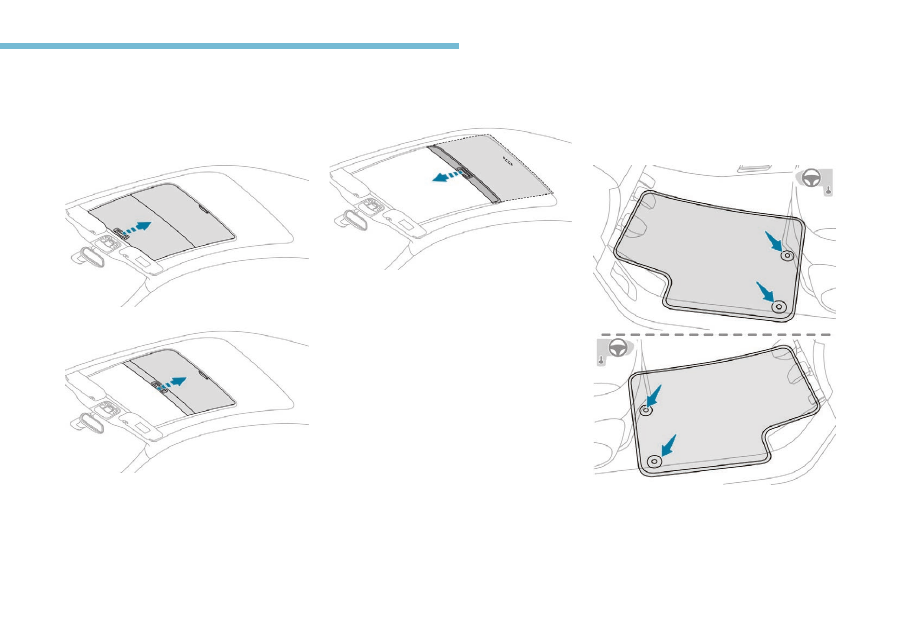
Sunroof blind

Opening

F  Take the blind by its handle and push it 

rearward to the desired position.

Locking

F  Take the blind by its handle and pull it 

forward to the desired position.

Interior fittings

Mats

Fitting

When fitting the mat for the first time, on the 
driver's side use only the fixings provided in the 
wallet attached.
The other mats are simply placed on the 
carpet.

64

Ease of use and comfort

Removal

To remove the mat on the driver's side:
F  move the seat as far back as possible,
F  unclip the fixings,
F  remove the mat.

Refitting

To refit the mat on the driver's side:
F  position the mat correctly,
F  put on the fixings again by pressing,
F  check that the mat is secured correctly.

To avoid any risk of jamming of the pedals:
-  only use mats which are suited to the 

fixings already present in the vehicle; 
these fixings must be used,

-  never place one mat on top of another.
The use of mats not approved by 
PEUGEOT may interfere with access to 
the pedals and hinder the operation of the 
cruise control / speed limiter.
The mats approved by PEUGEOT have 
two fixings located below the seat.

12 V accessory socket

F  To connect a 12 V accessory (maximum 

power: 120 Watts), lift the cover and 
connect a suitable adaptor.

Do not exceed the maximum power rating 
of the socket (risk of damage to your 
device).

The connection of an electrical device 
not approved by PEUGEOT, such as a 
USB charger, may adversely affect the 
operation of vehicle electrical systems, 
causing faults such as poor telephone 
reception or interference with displays in 
the screens.

USB port/Jack auxiliary socket

This connection box, consisting of a USB port 
and a JACK auxiliary socket is located on the 
centre console.
You can connect a portable device, such as a 
digital audio player e.g. iPod

®

 or USB memory 

stick.
It reads the audio files which are transmitted to 
your audio system and played via the vehicle's 
speakers.
You can manage these files using the steering 
mounted controls or the audio system control 
panel and display them on the screen.

When the USB port is used, the portable 
device charges automatically.
While charging, a message is displayed if the 
power consumption of the portable device 
exceeds the amperage supplied by the vehicle.

3

65

Ease of use and comfort

Boot fittings

1.

Rear shelf

2.

Hooks

3.

Boot lamp

4.

Stowing rings (depending on version)

Rear shelf

To remove the shelf:
F  unhook the two cords,
F  gently lift the shelf, then remove it.

66

Ease of use and comfort

To stow it:

To refit the shelf:
F  engage it on each side of the supports and 

slide it until it reaches the notches,

F  raise it to refit the two cords.

When sharp deceleration occurs, objects 
placed on the load space cover can turn 
into projectiles.

-  vertically behind the rear seats,
-  vertically behind the front seats.

67

4

Lighting and visibility

Lighting control stalk

Travelling abroad
If planning to use your vehicle in a country 
that drives on the other side of the road, 
the headlamp dipped beams must be 
adjusted to avoid dazzling oncoming 
drivers. Contact a PEUGEOT dealer or a 
qualified workshop.

Selection of main lighting 
mode

Turn the ring to align the desired symbol with 
the marking.

Lighting off (ignition off) / Front 
daytime running lamps (engine 
running).
Sidelamps only.

Dipped or main beam headlamps.

Automatic illumination of headlamps.

Dipping the headlamps

Pull the lever to switch the lighting between 
dipped and main beam headlamps.

In the lighting off and sidelamps modes, the 
driver can switch on the main beam headlamps 
temporarily ("headlamp flash") by keeping the 
lever pulled.

Display

Illumination of the corresponding indicator 
lamp in the instrument panel confirms that the 
lighting selected is on.

Foglamps

The foglamps operate with dipped or main 
beam headlamps on.

Rear foglamp only

F  To switch it on, turn the ring forwards.
When the lighting is switched off automatically 
(version with AUTO lighting), the foglamp and 
the dipped beam headlamps will remain on.
F  To switch it off, turn the ring rearwards.

In some weather conditions (e.g. low 
temperature or humidity), the presence 
of misting on the internal surface of the 
glass of the headlamps and rear lamps is 
normal; it disappears after the lamps have 
been on for a few minutes.

68

Lighting and visibility

Front foglamps and rear foglamp

Rotate and release the ring:
F  once forwards to switch on the front 

foglamps,

F  forwards a second time to switch on the rear 

foglamp,

F  once rearwards to switch off the rear 

foglamp,

F  rearwards a second time to switch off the 

front foglamps.

If the lighting is switched off automatically 
(version with AUTO lighting) or the dipped 
beams are switched off manually, the foglamps 
and sidelamps remain on.
F  Turn the ring rearwards to switch off the 

foglamps, the sidelamps will then switch off.

In good or rainy weather, both day and 
night, using the front foglamps and the 
rear foglamp is prohibited. In these 
situations, the power of their beams may 
dazzle other drivers. They should only be 
used in fog or falling snow.
In these weather conditions, it is your 
responsibility to switch on the foglamps 
and dipped beam headlamps manually as 
the sunshine sensor may detect sufficient 
light.
Do not forget to turn off the front foglamps 
and the rear foglamp as soon as they are 
no longer necessary.

Switching off of the lighting when the 
ignition is switched off 
On switching off the ignition, all of the 
lighting turns off immediately, except for 
dipped beam if automatic guide-me-home 
lighting is activated.

Switching on the lighting after the 
ignition is switched off 
To reactivate the lighting control, set the 
ring to 0 – lamps off, then to the desired 
position.
When the driver's door is opened, a 
temporary audible signal warns you that 
the vehicle's lighting is on.
The lamps, with the exception of the 
sidelamps, switch off automatically after 
a maximum duration of 30 minutes to 
prevent discharging of the battery.

Direction indicators

F  Lower the lighting control stalk fully when 

turning left.

F  Raise the lighting control stalk fully when 

turning right.

69

4

Lighting and visibility

Three flashes

Move the stalk briefly upwards or downwards, 
without going beyond the point of resistance; 
the corresponding direction indicators will flash 
three times.

This function can be used at any speed, 
but it is particularly useful for changing 
lane on fast roads.

Automatic illumination of 
headlamps

If you forget to cancel the direction 
indicators for more than 20 seconds, the 
volume of the audible signal will increase if 
the speed is above 40 mph (60 km/h).

When a low level of ambient light is detected 
by a sunshine sensor, the number plate lamps, 
sidelamps and dipped beam headlamps are 
switched on automatically, without any action 
on the part of the driver. They can also come 
on if rain is detected, at the same time as 
automatic operation of the windscreen wipers.
As soon as the brightness returns to a 
sufficient level or after the windscreen wipers 
are switched off, the lamps are switched off 
automatically.

Switching on

F  Turn the ring to the AUTO position. 

Activation of the function is accompanied by 
a message in the screen.

Switching off

F  Turn the ring to another position. 

Deactivation of the function is accompanied 
by a message in the screen.

In fog or snow, the sunshine sensor may 
detect sufficient light. In this case, the 
lighting will not come on automatically.
Do not cover the sunshine sensor, linked 
with the rain sensor and located in the 
centre of the windscreen behind the rear 
view mirror; the associated functions 
would no longer be controlled.

Automatic guide-me-home 
lighting

Association with automatic illumination of 
headlamps provides the guide-me-home 
lighting with the following additional options:
-  selection of the lighting duration of 15, 30 or 

60 seconds,

-  automatic activation of guide-me-home 

lighting when the automatic illumination of 
headlamps is in operation.

70

Lighting and visibility

The guide-me-home lighting can be 
configured in the menu Driving / 
Vehicle
.

In the event of a malfunction of the 
sunshine sensor, the lighting comes 
on, this warning lamp is displayed 
in the instrument panel and/or a 
message appears in the screen, 
accompanied by an audible signal.
Contact a PEUGEOT dealer or a 
qualified workshop.

Manual guide-me-home 
lighting

Temporarily keeping the dipped beam 
headlamps on after the vehicle's ignition has 
been switched off makes the driver's exit easier 
when the light is poor.

Switching on

F  With the ignition off, "flash" the headlamps 

using the lighting stalk.

F  A further "headlamp flash" switches the 

function off.

Manual guide-me-home lighting 
is also available from the remote 
control lighting button.

Switching off

Manual guide-me-home lighting goes off 
automatically at the end of a given period of 
time.

Parking lamps

Side markers for the vehicle by illumination of 
the sidelamps on the traffic side only.
F  Within one minute after switching off the 

ignition, operate the lighting control stalk 
up or down depending on the traffic side 
(example: parked on the right; lighting 
control stalk downwards; the left-hand 
sidelamp comes on).

This is confirmed by an audible signal and 
illumination of the corresponding direction 
indicator warning lamp in the instrument panel.
To switch off the parking lamps, return the 
lighting control stalk to the middle position or 
switch on the ignition.

71

4

Lighting and visibility

Headlamp adjustment

To avoid causing a nuisance to other road 
users, the height of the headlamp beams 
should be adjusted according to the load in the 
vehicle.

0.

1 or 2 people in the front seats.

-.

Intermediate setting.

1.

5 people.

-.

5 people + maximum authorised load.

2.

Driver + maximum authorised load.

The initial setting is position 0.

Daytime running lamps/
Sidelamps

In daytime running lamps, the diodes are 
brighter.

The front and rear lamps light up automatically 
when the engine starts.
They provide the following functions:
-  Daytime running lamps (lighting control 

stalk at position "0" or "AUTO" with 
adequate light level).

-  Sidelamps (lighting control stalk in "AUTO

position with low light levels or "Sidelamps 
only" or "dipped/main beam headlamps").

Cornering lighting

With dipped or main beams, this system 
makes use of the beam from a front foglamp 
to illuminate the inside of a bend, when the 
vehicle speed is below 25 mph (approximately 
40 km/h) (urban driving, winding road, 
intersections, parking manoeuvres, etc.).

72

Lighting and visibility

Wiper control stalk

In wintry conditions, remove snow, ice or 
frost present on the windscreen, around 
the wiper arms and blades and the 
windscreen seal, before operating the 
wipers.

Do not operate the wipers on a dry 
windscreen. Under extremely hot or cold 
conditions, ensure that the wiper blades 
are not stuck to the windscreen before 
operating the wipers.

Front wipers

Without cornering lighting

With cornering lighting

Activation

This function operates:
-  when the corresponding direction indicator 

is switched on,

or
-  from a certain angle of rotation of the 

steering wheel.

Deactivation

The system does not operate:
-  below a certain angle of rotation of the 

steering wheel,

-  above 25 mph (40 km/h),
-  when reverse gear is engaged.

Programming

It is possible to activate or 
deactivate the cornering lighting 
from the Driving / Vehicle menu.
This function is activated by default.

73

4

Lighting and visibility

Fast (heavy rain).

Normal (moderate rain).

Intermittent (proportional to the 
speed of the vehicle).

Off.

Single wipe (press down and 
release).

Automatic rain sensitive 
windscreen wipers

The windscreen wipers operate 
automatically, without any action 
on the part of the driver, when rain 
is detected (sensor behind the rear 
view mirror), adapting their speed to 
the intensity of the rainfall.

Switching on

Give a short downwards push to the control.
A wiping cycle confirms that the instruction has 
been accepted.

This warning lamp comes on in the 
instrument panel and a message is 
displayed.

Switching off

Give the control stalk a brief push downwards 
or shift the control stalk to a different position 
(Int, 1 or 2).

This warning lamp goes off in the 
instrument panel and a message is 
displayed.

The automatic rain sensitive windscreen 
wipers must be reactivated by pushing the 
control stalk downwards, if the ignition has 
been off for more than 1 minute.

If the wipers operate in intermittent mode 
when in AUTO mode, have the system 
checked by a PEUGEOT dealer or a 
qualified workshop.

74

Lighting and visibility

Do not cover the rain sensor combined 
with the sunshine sensor, located at the 
top of the windscreen behind the rear view 
mirror.
When using an automatic car wash, switch 
off the automatic rain sensitive wipers.
In winter, it is advisable to wait until 
the windscreen is completely clear of 
ice before activating the automatic rain 
sensitive wipers.

Front screenwash

Pull the wiper control stalk towards you. The 
screenwash and then the wipers operate for a 
preset time.

Rear wiper

Off.

Intermittent wipe.

Wash-wipe (set duration).

If a significant accumulation of snow or ice 
is present, or when using a bicycle carrier 
on the boot, deactivate the automatic rear 
wiper via the vehicle configuration menu 
or touch screen.

Reverse gear

When reverse gear is engaged, the rear wiper 
will come into operation if the windscreen wiper 
is operating.

From the Driving / Vehicle menu, it 
is possible to activate or deactivate 
operation of the rear wiper when 
reversing.

75

5

Safety

General safety 
recommendations

Labels are attached in different places on 
your vehicle. They include safety warnings 
as well as identification information for 
your vehicle. Do not remove them: they 
are an integral part of your vehicle.

For any work on your vehicle, use a 
qualified workshop that has the technical 
information, skills and equipment required, 
all of which a PEUGEOT dealer is able to 
provide.

We draw your attention to the following 
points:
-  The fitting of electrical equipment 

or accessories not approved by 
PEUGEOT may cause excessive 
current consumption and faults and 
failures with the electrical system of 
your vehicle. Contact a PEUGEOT 
dealer for information on the range of 
recommended accessories.

-  As a safety measure, access to 

the diagnostic socket, used for the 
vehicle's electronic systems, is 
reserved strictly for PEUGEOT dealers 
or qualified workshops, equipped 
with the special tools required (risk 
of malfunctions of the vehicle's 
electronic systems that could cause 
breakdowns or serious accidents). 
The manufacturer cannot be held 
responsible if this advice is not 
followed.

-  Any modification or adaptation not 

intended or authorised by PEUGEOT 
or carried out without meeting the 
technical requirements defined by 
the manufacturer will result in the 
suspension of the legal and contractual 
warranties.

Installation of accessory radio 
communication transmitters
Before installing a radio communication 
transmitter, you must contact a PEUGEOT 
dealer for the specification of transmitters 
which can be fitted (frequency, maximum 
power, aerial position, specific installation 
requirements), in line with the Vehicle 
Electromagnetic Compatibility Directive 
(2004/104/EC).

Depending on country regulations, some 
safety equipment may be compulsory: 
high visibility safety vests, warning 
triangles, breathalysers, spare bulbs, 
spare fuses, fire extinguisher, first aid kit, 
mud flaps at the rear of the vehicle, etc.

76

Safety

Hazard warning lamps

Visual warning with all of the direction 
indicators flashing to alert other road users to a 
vehicle breakdown, recovery or accident.

F  When you press this button, all of the 

direction indicators flash.

It can operate with the ignition off.

Automatic operation of 
hazard warning lamps

When braking in an emergency, depending on 
the deceleration, the hazard warning lamps 
come on automatically.
They switch off automatically the first time you 
accelerate.
F  You can also switch them off by pressing 

the button.

Emergency or assistance 
call 

Peugeot Connect SOS

** As per the geographic coverage of 

"Peugeot Connect SOS", "Peugeot Connect 
Assistance" and the official national 
language chosen by the owner of the vehicle.

  The list of countries covered and PEUGEOT 

CONNECT services is available from dealers 
or on the website for your country.

In an emergency, press this 
button for more than 2 seconds.
The flashing green LED and 
the voice message confirm that 
the call has been made to the 
"Peugeot Connect SOS call 
centre*.

Pressing this button again 
immediately cancels the call.
The green LED goes off.

The green LED remains on (without flashing) 
when communication is established.
It goes off at the end of the call.

"Peugeot Connect SOS" immediately locates 
your vehicle, contacts you in your own 
language**, and – if necessary – requests the 
relevant emergency services be dispatched. In 
countries where the service is not available, or 
when the locating service has been expressly 
declined, the call is sent directly to the 
emergency services (112) without the vehicle 
location.

*  In accordance with the general conditions 

of use for the service available from dealers 
and subject to technological and technical 
limitations.

If an impact is detected by the airbag 
control unit, and independently of the 
deployment of any airbags, an emergency 
call is made automatically.

77

5

Safety

If you benefit from the Peugeot Connect 
Packs offer with the SOS and assistance 
pack included, there are additional 
services available to you in your personal 
space, via the Internet website for your 
country.

Peugeot Connect 
Assistance

** As per the geographic coverage of 

"Peugeot Connect SOS", "Peugeot Connect 
Assistance" and the official national 
language chosen by the owner of the vehicle.

  The list of countries covered and PEUGEOT 

CONNECT services is available from dealers 
or at www.peugeot.co.uk.

Press this button for more than 
2 seconds to request assistance 
if the vehicle breaks down.

A voice message confirms that the call has 
been made**.

Pressing this button again 
immediately cancels the 
request.

The cancellation is confirmed by a voice 
message.

Geo-location

You can deactivate geo-location by 
simultaneously pressing the "Peugeot Connect 
SOS" and "Peugeot Connect Assistance" 
buttons, followed by a press on "Peugeot 
Connect Assistance" to confirm.

To reactivate geo-location, simultaneously 
press the "Peugeot Connect SOS" and 
"Peugeot Connect Assistance" buttons again, 
followed by a press on "Peugeot Connect 
Assistance" to confirm.

Operation of the system

When the ignition is switched 
on, the green indicator lamp 
comes on for 3 seconds 
indicating that the system is 
operating correctly.
The orange indicator lamp 
flashes then goes off: the 
system has a fault.

The orange indicator lamp is permanently on: 
the back-up battery should be replaced.

The system's fault does not prevent the 
vehicle from being driven.

In both cases, the emergency and assistance 
calls service may not work.
Contact a qualified repairer as soon as 
possible.

78

Safety

If you purchased your vehicle outside the 
Brand network, we invite you to have the 
configuration of these services checked 
and, if desired, have a dealer change it to 
suit your wishes. In a multilingual country, 
configuration is possible in the official 
national language of your choice.

For technical reasons, particularly 
to improve the quality of PEUGEOT 
CONNECT services to customers, the 
manufacturer reserves the right to carry 
out updates to the vehicle's on-board 
telematic system.

Electronic stability control 
(ESC)

Electronic stability control (ESC) comprising 
the following systems:
-  anti-lock braking system (ABS) and 

electronic brake force distribution (EBFD),

-  emergency braking assistance (EBA),
-  wheel anti-slip regulation (ASR) or traction 

control,

-  dynamic stability control (DSC).

It is triggered in relation to the speed at which 
the brake pedal is pressed. This is felt by a 
reduction in the resistance of the pedal and an 
increase in the effectiveness of the braking.

Anti-slip regulation (ASR)

The ASR system (also known as Traction 
Control) optimises traction in order to limit 
wheel slip by acting on the brakes of the driving 
wheels and on the engine. It also improves 
the directional stability of the vehicle on 
acceleration.

Dynamic stability control (DSC)

If there is a difference between the path 
followed by the vehicle and that required by 
the driver, the DSC monitors each wheel and 
automatically acts on the brake of one or more 
wheels and on the engine to return the vehicle 
to the required path, within the limits of the laws 
of physics.

Definitions

Anti-lock braking system (ABS) 
and electronic brake force 
distribution (EBFD)

This system improves the stability and 
manoeuvrability of your vehicle when braking 
and contributes towards improved control on 
corners, in particular on poor or slippery road 
surfaces.
The ABS prevents wheel lock in the event of 
emergency braking.
The electronic brake force distribution system 
manages the braking pressure wheel by wheel.

Emergency braking assistance 
(EBA)

In an emergency, this system enables you to 
reach the optimum braking pressure more 
quickly and therefore reduce the stopping 
distance.


Content   ..  3  4  5  6   ..