Peugeot 207 Dag (2010 year). Manual - part 14
 

  Index      Peugeot     Peugeot 207 Dag - service manual 2010 year in english


Search            


Content   ..  12  13  14 


Peugeot 207 Dag (2010 year). Manual - part 14


214

06

11

22

11

11

22

33

22

YES

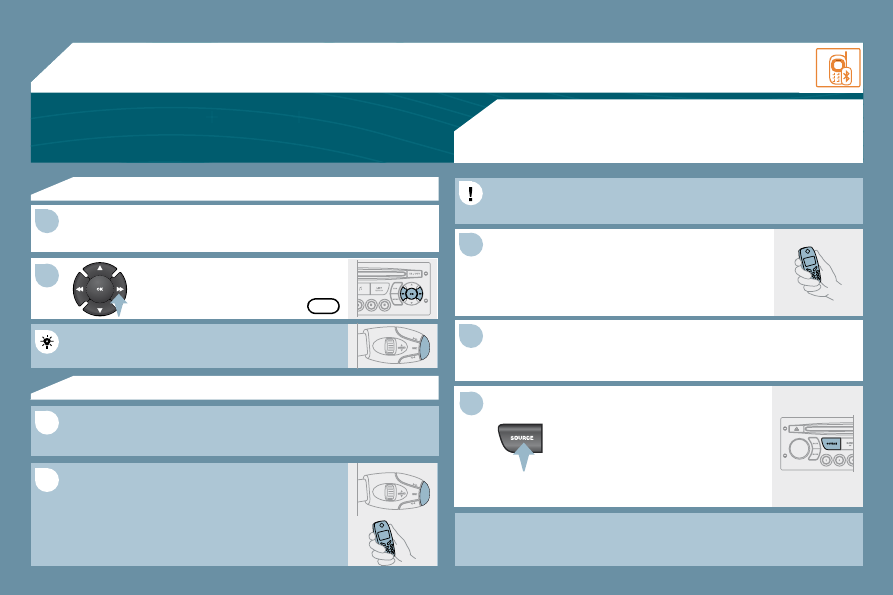
  RECEIVING A CALL 

  An incoming call is announced by a ring and a superimposed display 

on the multifunction screen.  

 Initiate the pairing between the telephone and 

the vehicle. This pairing can be initiated from 

the vehicle's telephone function menu or via the 
telephone's keypad. See steps 1 to 10 on the 
previous pages. During the pairing phase, the vehicle 

must be stationary with the key in the ignition. 

 Select the telephone to be connected from the telephone function 

menu. 

 The audio system connects to a newly paired telephone 

automatically. 

  Select the YES tab on the display 

using the buttons and confi rm by 

pressing OK.  

  Press the steering mounted control OK to accept 
the call.   

  From the Bluetooth telephone function Audio menu, select Manage 
the telephone call then Call, Call list or Directory.  

  Press the end of the steering mounted control for 

more than two seconds to gain access to your 
directory. 
 Or 

 To dial a number, use your telephone's keypad, with 
the vehicle stationary.   

  MAKING A CALL 

BLUETOOTH AUDIO STREAMING  

(AVAILABLE DURING THE YEAR) 

 Wireless transmission of the telephone's music fi les via the audio 

equipment. The telephone must be able to manage the appropriate 

bluetooth profi les (Profi les A2DP/AVRCP). 

  *    In certain cases, playing of the Audio fi les must be initiated from the 

keypad.  

  **   If the telephone supports the function.  

 Activate the streaming source by 

pressing the SOURCE button * . The 
tracks to be played can be controlled 

as usual via the buttons on the Radio 
control panel and the steering wheel 

controls ** . The contextual information 
can be displayed on the screen.  

 BLUETOOTH 

215

11

22

33

44

55

66

77

88

07  CONFIGURATION 

 Press the MENU button.  

  Using the arrows, select 

PERSONALISATION 

CONFIGURATION.  

  Press to confi rm the selection.  

  Using the arrows, select DISPLAY 

CONFIGURATION.  

  Press to confi rm the selection.  

  Press to confi rm the selection.  

  Using the arrows, select ADJUST 
DATE AND TIME.  

  Adjust the settings one by one 

confi rming by pressing the OK button. 

Next select the OK tab on the screen 

then confi rm.   

DISPLAY CONFIGURATION. 

ADJUST DATE AND TIME

OK

PERSONNALISATION CONFIGURATION

SETTING THE DATE AND TIME 

  SCREEN C 

216

9

08

  Each press of the button, located at the end of the 

 wiper stalk , displays the different trip computer 

information in succession, depending on the screen. 

   -   the "vehicle "  tab with: 

       the range, the current fuel consumption and the distance remaining to 

the destination,  

  -   the "1" tab (trip 1) with: 

       the average speed, the average consumption and the distance travelled 

calculated over trip "1",  

  -   the "2" tab (trip 2) with the same information for a second trip.  

  A FEW DEFINITIONS 

Range:  displays the distance which can travelled with the remaining fuel 

detected in the tank, based on the average fuel consumption over the last 

few miles (kilometres). 

 This displayed value may vary signifi cantly following a change in the 
vehicle speed or the relief of the route. 

 When the range falls below 20 miles (30 km), dashes are displayed. After 

fi lling with at least 5 litres of fuel, the range is recalculated and is displayed 

when it exceeds 60 miles (100 km). 
 If, whilst driving, dashes are displayed continuously in place of the digits, 
contact a PEUGEOT dealer. 

  Current fuel consumption:  only calculated and displayed above 20 mph 

(30 km/h). 
  Average fuel consumption:  this is the average fuel consumption since 

the last trip computer zero reset. 
  Distance travelled:  calculated since the last trip computer zero reset. 
  Distance remaining to the destination:  calculated with reference to 

the fi nal destination, entered by the user. If guidance is activated, the 

navigation system calculates it as a current value. 
  Average speed:  this is the average speed calculated since the last trip 

computer zero reset (ignition on).  

  Zero reset 

 When the required trip is displayed, press the control for more than 
two seconds.   

 TRIP COMPUTER 

217

1

2

2

2

2

1

2

2

1

2

3

3

1

2

2

2

2

2

2

1

2

2

2

2

2

2

2

2

1

2

2

1

2

3

2

3

1

1

1

1

09 

1

1

1

1

  RADIO-CD 

  DISPLAY ADJUST 

  YEAR  

  MONTH  

  DAY  

  HOUR  

  MINUTES  

  12 H/24 H MODE   

 SCREEN MENU MAP 

  MAIN FUNCTION 

  *   The parameters vary according to vehicle.  

  CHOICE A 

  Choice A1  

  Choice A2   

  CHOICE B...   

  LANGUAGE 

  FRANCAIS  

  ITALIANO  

  NEDERLANDS  

  PORTUGUES  

  PORTUGUES-BRASIL  

  DEUTSCH  

  ENGLISH  

  ESPANOL   

 Press the OK dial for access to short-cut 

menus according to the display on the 

screen: 

         monochrome A 

monochrome C 

  RADIO 

  activate/deactivate RDS  

  activate/deactivate REG mode  

  activate/deactivate radiotext   

  RDS SEARCH  

  REG MODE  

  CD REPEAT  

  RANDOM PLAY   

  VEHICLE CONFIG *  

  REV WIPE ACT  

  GUIDE LAMPS   

  OPTIONS 

  DIAGNOSTICS 

  consult  

  abandon    

  UNITS 

  TEMPERATURE: °CELSIUS/°FAHRENHEIT  

  FUEL CONSUMPTION: KM/L - L/100 - MPG   

  CD/MP3 CD 

  activate/deactivate Intro  

  activate/deactivate track repeat (the entire current CD for 

CD, the entire current folder for MP3 CD)  

  activate/deactivate random play (the entire current CD for 

CD, the entire current folder for MP3 CD)   

  USB 

  activate/deactivate track repeat (of the current folder/

artist/genre/playlist)  

  activate/deactivate random play     (of the current folder/

artist/genre/playlist)   

217

1

2

2

2

2

1

2

2

1

2

3

3

1

2

2

2

2

2

2

1

2

2

2

2

2

2

2

2

1

2

2

1

2

3

2

3

1

1

1

1

09 

1

1

1

1

  RADIO-CD 

  DISPLAY ADJUST 

  YEAR  

  MONTH  

  DAY  

  HOUR  

  MINUTES  

  12 H/24 H MODE   

 SCREEN MENU MAP 

  MAIN FUNCTION 

  *   The parameters vary according to vehicle.  

  CHOICE A 

  Choice A1  

  Choice A2   

  CHOICE B...   

  LANGUAGE 

  FRANCAIS  

  ITALIANO  

  NEDERLANDS  

  PORTUGUES  

  PORTUGUES-BRASIL  

  DEUTSCH  

  ENGLISH  

  ESPANOL   

 Press the OK dial for access to short-cut 

menus according to the display on the 

screen: 

         monochrome A 

monochrome C 

  RADIO 

  activate/deactivate RDS  

  activate/deactivate REG mode  

  activate/deactivate radiotext   

  RDS SEARCH  

  REG MODE  

  CD REPEAT  

  RANDOM PLAY   

  VEHICLE CONFIG *  

  REV WIPE ACT  

  GUIDE LAMPS   

  OPTIONS 

  DIAGNOSTICS 

  consult  

  abandon    

  UNITS 

  TEMPERATURE: °CELSIUS/°FAHRENHEIT  

  FUEL CONSUMPTION: KM/L - L/100 - MPG   

  CD/MP3 CD 

  activate/deactivate Intro  

  activate/deactivate track repeat (the entire current CD for 

CD, the entire current folder for MP3 CD)  

  activate/deactivate random play (the entire current CD for 

CD, the entire current folder for MP3 CD)   

  USB 

  activate/deactivate track repeat (of the current folder/

artist/genre/playlist)  

  activate/deactivate random play     (of the current folder/

artist/genre/playlist)   

218

1

2

3

4

3

4

3

2

3

4

3

4

1

2

1

2

3

3

3

4

4

4

2

3

4

2

3

3

4

3

1

2

4

3

2

4

4

3

3

4

4

2

3

4

4

3

2

3

2

 SCREEN MENU MAP 

  BLUETOOTH TELEPHONE 

  AUDIO FUNCTIONS 

  PLAY MODES 

  album repeat (RPT)  

 activate/deactivate 

  track random play (RDM)  

 activate/deactivate   

  TRIP COMPUTER 

  MANAGE THE TELEPHONE CALL 

  terminate the current call  

  Activate private mode    

  FM BAND PREFERENCES 

  alternative frequencies (RDS)  

 activate/deactivate 

  regional mode (REG)  

 activate/deactivate 

  radio-text information (RDTXT)  

 activate/deactivate  

  ENTER DISTANCE TO DESTINATION 

  Distance: x   miles   

  BLUETOOTH CONFIGURATION 

 Connect/Disconnect a device 

 Telephone function 

 Audio Streaming function 

  Consult the paired device  

  Delete a paired device  

  Perform a Bluetooth search   

CALL

  Calls list  

 Directory  

 Pressing the MENU button displays: 

  PERSONALISATION-CONFIGURATION 

  DEFINE THE VEHICLE PARAMETERS *   

  DISPLAY CONFIGURATION 

  video brightness adjustment  

 normal video 

 inverse video 

 brightness (- +) adjustment 

  date and time adjustment  

 day/month/year adjustment 

 hour/minute adjustment 

 choice of 12 h/24 h mode 

  choice of units  

 l/100 km - mpg - km/l 

 °Celsius/°Fahrenheit  

  *   The parameters vary according to vehicle.  

  CHOICE OF LANGUAGE   

  ALERT LOG 

  Diagnostic s  

  STATUS OF THE FUNCTIONS *  

  Functions activated or deactivated    

 monochrome C 

219

  There is a difference in 
sound quality between 
the different audio 
sources (radio, CD...). 

 Check that the audio settings (Volume, Bass, 

Treble, Ambience, Loudness) are adapted to 
the sources listened to. It is advisable to set 

the AUDIO functions (Bass, Treble, Front-Rear 

Balance, Left-Right Balance) to the middle 

position, select the musical ambience "None" 
and set the loudness correction to the "Active" 

position in CD mode or to the "Inactive" position 

in radio mode.  

 For optimum sound quality, the audio settings (Volume, Bass, Treble, 

Ambience, Loudness) can be adapted to the different sound sources, 

which may result in audible differences when changing source (radio, 
CD...). 

  The CD is ejected 

automatically or is not 
played by the player. 

   -   Check that the CD is inserted in the player the 

right way up. 

  -   Check the condition of the CD: the CD cannot 

be played if it is too damaged. 

  -   Check the content in the case of a recorded 

CD: consult the advice in the "Audio" section. 

  -   The audio equipment's CD player does not 

play DVDs. 

  -   Due to their quality level, certain writeable CDs 

will not be played by the audio system.   

 The CD is inserted upside down, is unplayable, does not contain any audio 

data or contains an audio format which the player cannot play. 

 The CD is protected by an anti-pirating protection system which is not 

recognised by the audio equipment. 

  The message "USB 
peripheral error" is 
displayed on the screen. 

 Recharge the battery of the peripheral device. 

 The Bluetooth connection is cut. 

 The battery of the peripheral may not be suffi ciently charged. 

 The USB memory stick is not recognised. 

 The memory stick may be corrupt. 

 Reformat the memory stick.  

  QUESTION 

 SOLUTION 

 ANSWER 

 FREQUENTLY ASKED QUESTIONS 

  The CD player sound 
is poor. 

 The CD used is scratched or of poor quality. 

 Insert good quality CDs and store them in 
suitable conditions. 

 The audio equipment settings (bass, treble, ambiences) are unsuitable. 

 Set the treble or bass level to 0, without selecting 

an ambience.   

220

  The traffi c announcement 
(TA) is displayed. I do 

not receive any traffi c 

information. 

 Tune to a radio station which broadcasts traffi c 

information.  

 The radio station is not part of the regional traffi c information network. 

  QUESTION 

 SOLUTION 

 ANSWER 

  The quality of reception 
of the radio station 
listened to gradually 
deteriorates or the 
stored stations do 
not function (no 

sound, 87.5 Mhz is 
displayed...). 

 The vehicle is too far from the transmitter used by the station listened to or 

there is no transmitter in the geographical area through which the vehicle 
is travelling. 

 The environment (hills, buildings, tunnels, basement car parks...) block 

reception, including in RDS mode. 

 The aerial is absent or has been damaged (for example when going 
through a car wash or into an underground car park). 

 Activate the RDS function to enable the system 

to check whether there is a more powerful 

transmitter in the geographical area. 

 This phenomenon is normal and does not 

indicate a failure of the audio equipment. 

 Have the aerial checked by a PEUGEOT dealer.  

  Sound cut-outs of 
1 to 2 seconds in radio 

mode. 

 During this brief sound cut-out, the RDS searches for any frequency 

permitting better reception of the station. 

 Deactivate the RDS function if the phenomenon 

is too frequent and always on the same route.  

  With the engine off, 

the audio equipment 
switches off after a few 

minutes of use. 

 When the engine is switched off, the audio equipment operating time 
depends on the battery charge. 

 The switch-off is normal: the audio equipment switches to economy mode 
and switches off to prevent discharging of the vehicle's battery. 

 Start the vehicle's engine to increase the battery 
charge.  

  The stored stations do 
not function (no sound, 

87.5 Mhz is displayed...). 

 An incorrect waveband is selected. 

 Press the BAND AST button to return to the 
waveband (AM, FM1, FM2, FMAST) on which the 
stations are stored.  

  The message "the audio 

system is overheated" 
appears on the display. 

 Switch the audio system off for a few minutes to 

allow the system to cool.   

 In order to protect the installation if the surrounding temperature is too 

high, the audio equipment switches to an automatic thermal protection 

mode leading to a reduction of the volume or stopping of the playing of the 
CD. 

221

EMERGENCY OR ASSISTANCE CALL 

  EMERGENCY CALL 

  ASSISTANCE CALL 

  OPERATION OF THE SYSTEM 

  In an emergency, press this button for more than 
2 seconds. Flashing of the green diode and a voice 

message confi rm that the call has been made to the 

PEUGEOT Emergency team * .  

  Pressing this button again immediately cancels the request. The green 
diode switches off.  

  The green diode remains on (without fl ashing) when communication is 

established. It switches off at the end of communication.  

  This call is dealt with by the PEUGEOT Emergency team which receives 

locating information from the vehicle and can send a detailed alert to the 

appropriate emergency services. In countries in which the team is not 
operational, or when the locating service has been expressly refused, 

the call is dealt with directly by the emergency services (112) without the 
vehicle location.  

  If an impact is detected by the airbag ECU, and independently of any 

triggering of the airbags, an emergency call is made automatically.   

  *   This service is subject to conditions and availability.  
  Consult a PEUGEOT dealer.  

  Press this button for more than 2 seconds to request 
assistance if the vehicle breaks down.  

A voice message confi rms that the call has been made * .  

  Pressing this button again immediately cancels the request. 

 The cancellation is confi rmed by a voice message.   

  When the ignition is switched on, the green 

indicator lamp comes on for 3 seconds 

indicating that the system is operating 
correctly.  

  If the orange indicator lamp fl ashes: there is 

a system malfunction. 

 If the orange indicator lamp is lit continuously: 

the backup battery must be replaced. 
 In both cases, consult a PEUGEOT dealer.   

10

168

TECHNICAL DATA

   SALOON WEIGHTS AND TOWED LOADS (in kg)   

  Diesel engines  

   1.4 litre Turbo 

HDI 70 hp   

   1.6 litre Turbo 

HDI 90 hp   

   1.6 litre Turbo HDI 

90 hp 99g   

   1.6 litre Turbo 

HDI 110 hp   

  Gearboxes  

   Manual   

   Manual   

   Manual   

   Manual   

   -  

Kerb weight  

  1 261 - 1 251 - 1 269     1 280 - 1 272 - 1 290  

  1 260 - 1 279  

  1 328 - 1 319 - 1 358  

   -  

Payload  

  399 - 369 - 341  

  420 - 408 - 340  

  445 - 450  

  382 - 391 - 323  

   -  

Gross vehicle weight (GVW)  

  1 660 - 1 620 - 1 610     1 700 - 1 680 - 1 630  

  1 630 - 1 654  

  1 710 - 1 710 - 1 681  

   -  

Gross train weight (GTW)  


 on a 12 % gradient 

  2 242 - 2 265


  2 650  

  1 630 - 1654  

  2 690  

   -  

Braked trailer (within GTW limit)  


 on a 10 % or 12 % gradient 


600


  950 - 970 - 1 020  


  980  


 on an 8 % gradient 


-


  980 - 1 000  


  1 030  

   -  

Braked trailer **  (with load transfer within 
GTW limit)  


850


  1 150  


  1 150  

   -  

Unbraked trailer  

  600  

  600  


  600  

   -  

Recommended nose weight  

  46  

  46  

  46  

  46  

The GTW and towed load values indicated apply up to a maximum altitude of 1 000 metres; the towed load mentioned must 
be reduced by 10 % for each additional 1 000 metres of altitude.
 The speed of a towing vehicle must not exceed 60 mph (100 km/h) (comply with the legislation in force in your country). 
 High ambient temperatures may result in a reduction in the performance of the vehicle in order to protect the engine; when 
the ambient temperature is higher than 37 °C, limit the weight towed.   

**   The weight of the braked trailer may be increased, within the GTW limit, on condition that the GVW of the towing vehicle is reduced 

by the same amount; warning, towing using a lightly loaded towing vehicle may adversely affect its roadholding performance. 


Content   ..  12  13  14