Content .. 1987 1988 1989 1990 ..
Nissan Qashqai (2007-2010). Manual - part 1989
AV-214
< ON-VEHICLE REPAIR >
[AUDIO WITH NAVIGATION]
REAR VIEW CAMERA
1.
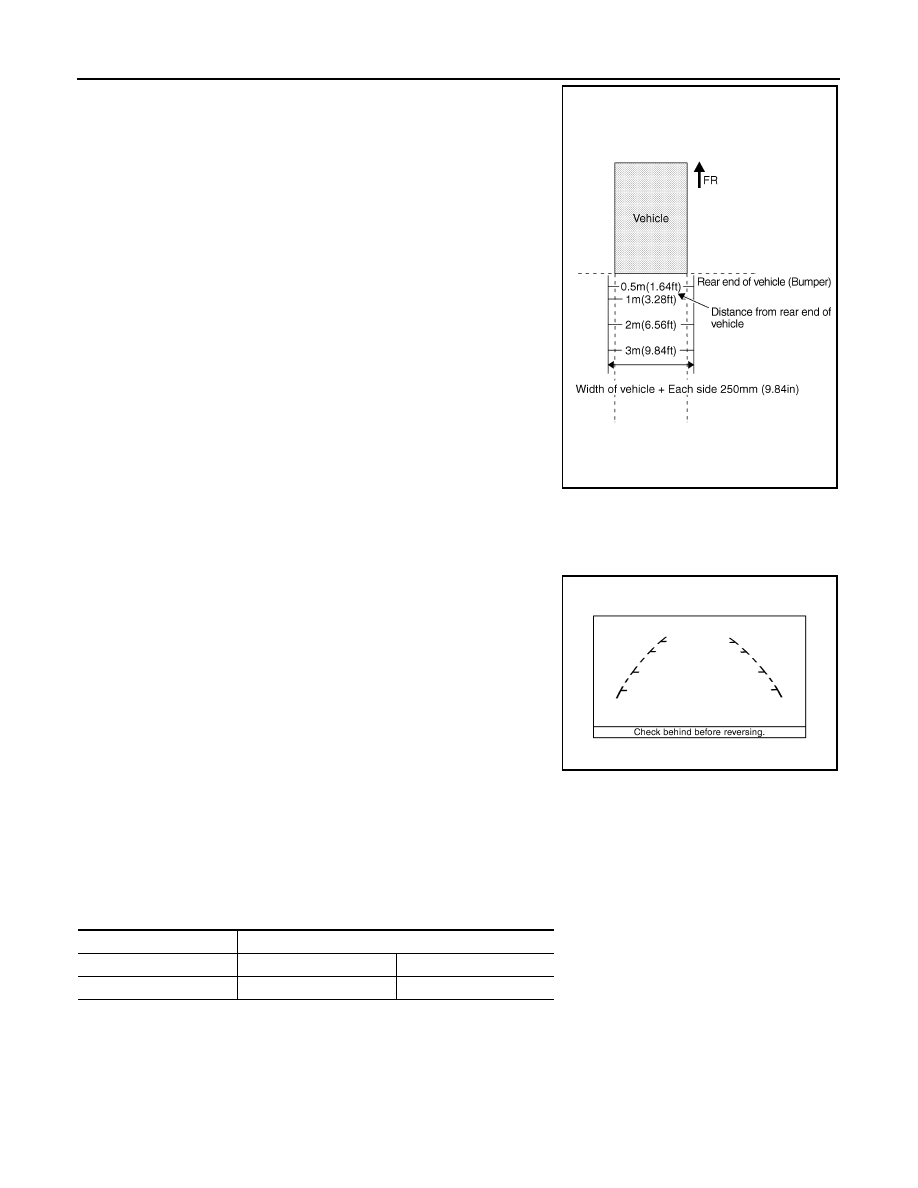
Create a correction line to modify the guiding lines inside moni-
tors. Draw lines on the rearward area of the vehicle passing
through the following points: 250 mm (9.84 in) from both sides of
the vehicle, and 0.5 m (1.64 ft), 1 m (3.28 ft), 2 m (6.56 ft), and 3
m (9.84 ft) from the rear end of the bumper.
2.
Connect CONSULT-III. Then touch “REAR VIEW CAMERA” on “SELECT SYSTEM” screen.
CAUTION:
Correct the guiding line with the engine stopped for safety.
3.
Shift selector lever to R position.
4.
Touch “ADJ GUIDELINE POSITION” on “SELECT WORK ITEM” screen.
CAUTION:
Vehicle width guiding lines may move horizontally when starting “ADJ GUIDELINE POSITION”
mode. It is normal.
5.
Touch “X UP”, “X DOWN”, “Y UP”, and “Y DOWN” so as to align with a correction line created, and then
adjust the guiding lines.
6.
Touch “SAVE” so as to fix the lines if the guiding lines align with the correction lines. Then end the correc-
tion by touching “END”. GO TO 7 if the guiding lines do not align with the correction lines.
7.
Touch “SELECT GUIDELINE PATTERN” on “SELECT WORK ITEM” screen.
8.
Change the pattern of the guiding lines by touching “UP” or “DOWN”. [Select from among 2 patterns
(“PATTERN NO. 0” or “1”) of the guiding lines.]
9.
Fix the pattern of the guiding lines by touching “SAVE”.
SKIB4106E
SKIB4648E
Adjustment direction
ADJUST MONITOR
LEFT/RIGHT
X VALUE ADJ
−
8 - 8
UP/DOWN
Y VALUE ADJ
−
8 - 8