Content .. 1116 1117 1118 1119 ..
Nissan Qashqai (2007-2010). Manual - part 1118
INTELLIGENT KEY BATTERY
DLK-551
< ON-VEHICLE REPAIR >
[WITH I-KEY & SUPER LOCK]
C
D
E
F
G
H
I
J
L
M
A
B
DLK
N
O
P
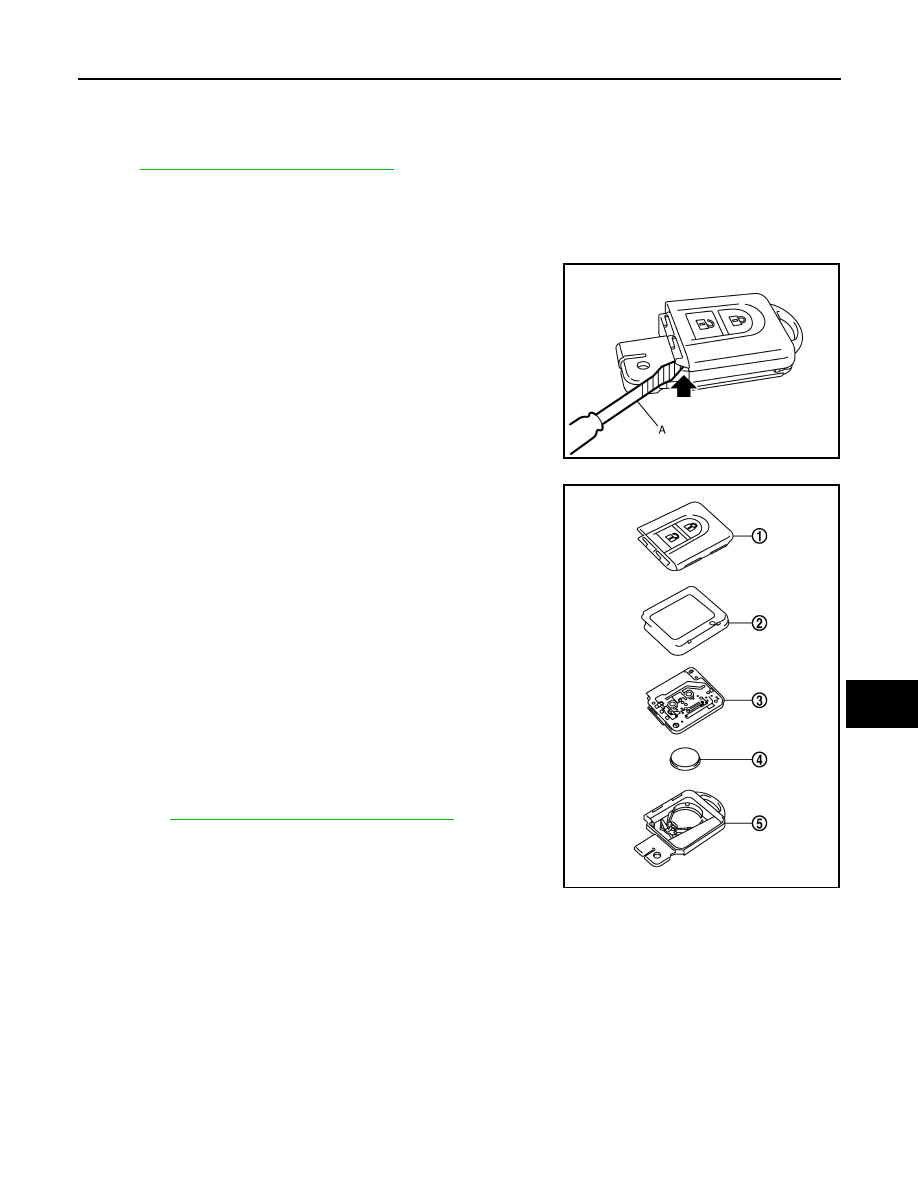
INTELLIGENT KEY BATTERY
Exploded View
INFOID:0000000001109246
DLK-281, "Removal and Installation"
Removal and Installation
INFOID:0000000001109247
REMOVAL
1.
Remove Intelligent Key cover.
2.
Insert a flat-bladed screwdriver (A) wrapped with tape as shown
in the illustration and then separate lower and upper cases by
twisting screwdriver.
CAUTION:
• Do not touch the circuit board or battery terminal.
• The Intelligent Key is water-resistant. However, if it does
get wet, immediately wipe it dry.
3.
Remove the circuit board assembly from the upper case (1).
[Substrate assembly: circuit board (3) + rubber (2)]
4.
Gently press the rubber (2) and remove the circuit board (3).
CAUTION:
Do not touch the printed circuits directly.
5.
Remove the battery (4) from the lower case (5) and replace it.
CAUTION:
When replacing battery, keep dirt, grease, and other foreign
materials off the electrode contact area.
6.
After replacement, assemble the upper and lower cases by
engaging the hooks on their circumference while being careful
not to pinch the rubber, etc.
CAUTION:
After replacing the battery, check that all Intelligent Key
functions work normally.
Refer to
DLK-134, "Component Function Check"
INSTALLATION
Install in the reverse order of removal.
MIIB0661E
Battery replacement
: Coin-type lithium battery
(CR2032)
MIIB0662E