Mitsubishi ASX (2018 year). Manual - part 8
 

  Index      Mitsubishi     Mitsubishi ASX - service manual 2018 year in english


Search            


Content   ..  6  7  8  9   ..


Mitsubishi ASX (2018 year). Manual - part 8


Information screen (when the

ignition switch or the operation

mode is ON)

E00521100576

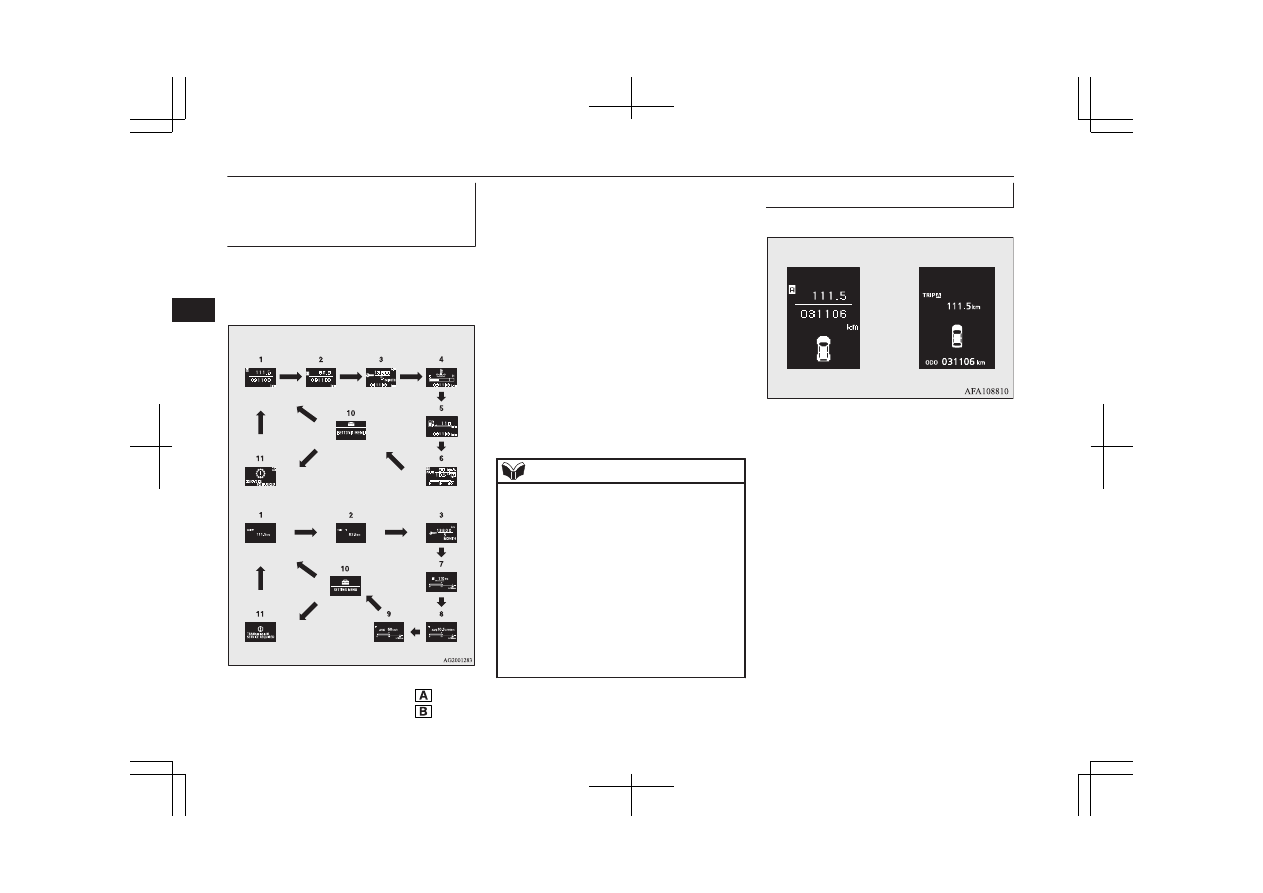
Each  time  you  lightly  press  the  multi-infor-
mation  meter  switch,  the  display  screen
switches in the following order.

Type 1

Type 2

When there is no warning display

When there is no warning display

When there is a
warning display

When there is a
warning display

1- Odometer (Type1)/Tripmeter 
2- Odometer (Type1)/Tripmeter 

3- Service reminder
4- Engine  coolant  temperature  display

(Type 1)

5- Driving range display (Type 1)
6- Average  speed  display,  average  fuel

consumption  display,  momentary  fuel
consumption display (Type 1)

7- Driving  range  display,  momentary  fuel

consumption display (Type 2)

8- Average  fuel  consumption  display,  mo-

mentary fuel consumption display (Type
2)

9- Average  speed  display,  momentary  fuel

consumption display (Type 2)

10- Function setting screen
11- Redisplay of a warning display screen

NOTE

l

While driving, even if you operate the multi-
information  meter  switch,  the  function  set-
ting screen is not displayed. Always stop the
vehicle in a safe place before operating.
Refer  to  “Changing  the  function  settings
(when  the  ignition  switch  or  the  operation
mode is ON)” on page 5-19.

l

When there is information to be announced,
such  as  a  system  fault,  the  buzzer  sounds
and the screen display is switched.
Refer to “Interrupt display screen (when the
ignition  switch  or  the  operation  mode  is
ON)” on page 5-14.

Odometer/Tripmeter

E00568400046

Type 1

Type 2

The  operation  method  is  the  same  as  when
the  ignition  switch  or  the  operation  mode  is
OFF.
Refer  to  “Odometer/Tripmeter”  for  further
details on page 5-06.

Multi-information display

5-10

OGAE18E1

Instruments and controls

5

Service reminder

E00522500694

This  displays  the  distance
and  number  of  months  until
the next periodic inspection.
Refer  to  “Service  reminder”
on page 5-16.

Type 2

Type 1

Engine coolant temperature

display

E00521400566

This  indicates  the  engine
coolant temperature.
If  the  coolant  becomes  hot,
“ ” will blink.
Pay  careful  attention  to  the
engine  coolant  temperature
display  while  you  are  driv-
ing.

CAUTION

l

If the engine is overheating, “ ” will blink.
In this case, the bar graph is on the red zone.
lmmediately park the vehicle in a safe place
and  take  the  required  measures.  Refer  to
“Engine overheating” on page 8-04.

Driving range display

E00568500047

This  displays  the  approximate  driving  range
(how many more kilometres or miles you can
drive).  When  the  driving  range  falls  below
approximately 50 km (30 miles), “---” is dis-
played.

Type 1

Type 2

Refuel as soon as possible.

Type 1

Type 2

NOTE

l

The  driving  range  is  determined  based  on
the  fuel  consumption  data.  This  may  vary
depending  on  the  driving  conditions  and
habits. Treat the distance displayed as just a
rough guideline.

l

When  you  refuel,  the  driving  range  display
is updated.
However, if you only add a small amount of
fuel, the correct value will not be displayed.
Fill with a full tank whenever possible.

l

On  rare  occasions,  the  value  displayed  for
the  driving  range  may  change  if  you  are
parked on an extremely steep incline. This is
due to the movement of fuel in the tank and
does not indicate a malfunction.

Multi-information display

5-11

OGAE18E1

Instruments and controls

5

NOTE

l

The  display  setting  can  be  changed  to  the
preferred units (km or miles).
Refer  to  “Changing  the  function  settings
(when  the  ignition  switch  or  the  operation
mode is ON)” on page 5-19.

Average speed display

E00568600048

This displays the average speed from the last
reset to the present time.
There are the following 2 mode settings.
For  the  method  for  changing  the  average
speed display setting, refer to “Changing the
function settings (when the ignition switch or
the operation mode is ON)” on page 5-19.

Type 1

Type 2

Manual reset mode

l

When  the  average  speed  is  being  dis-
played, if you hold down the multi-infor-
mation  meter  switch,  the  average  speed
displayed at that time is reset.

l

When  the  following  operation  is  per-
formed, the mode setting is automatical-
ly switched from manual to auto.
[Except for vehicles equipped with key-
less operation system]
Turn  the  ignition  switch  from  the
“ACC” or “LOCK” position to the “ON”
position.
[For vehicles equipped with keyless op-
eration system]
Change  the  operation  mode  from  ACC
or OFF to ON.
 
Switching  to  auto  occurs  automatically.
If  switching  to  manual  mode  is  done,
however,  the  data  from  the  last  reset  is
displayed.

Auto reset mode

l

When  the  average  speed  is  being  dis-
played, if you hold down the multi-infor-
mation  meter  switch,  the  average  speed
displayed at that time is reset.

l

When the engine switch or the operation
mode is in the following conditions, the
average  speed  display  is  automatically
reset.
[Except for vehicles equipped with key-
less operation system]
The  ignition  switch  is  in  the  “ACC”  or
“LOCK”  position  for  about  4  hours  or
longer.

NOTE

l

The  average  speed  display  and  the  average
fuel  consumption  display  can  be  reset  indi-
vidually for the auto reset mode and manual
reset mode.

l

“---”  is  displayed  when  the  average  speed
cannot be measured.

l

The  initial  (default)  setting  is  “Auto  reset
mode”.

l

The  display  setting  can  be  changed  to  the
preferred units (km/h or mph).
Refer  to  “Changing  the  function  settings
(when the ignition switch is “ON”)” on page
5-19.

l

The memory of the auto reset mode or man-
ual reset mode for the average speed display
is erased if the battery is disconnected.

Average fuel consumption dis-

play

E00568700137

This  displays  the  average  fuel  consumption
from the last reset to the present time.

Multi-information display

5-12

OGAE18E1

Instruments and controls

5

There are the following 2 mode settings.
For  information  on  how  to  change  the  aver-
age fuel consumption display setting, refer to
“Changing the function settings (when the ig-
nition switch or the operation mode is ON)”
on page 5-19.
 

Type 1

Type 2

The  “ ”  mark  (A)  in  the  momentary  fuel
gauge  shows  the  average  fuel  consumption.
(Type 2)
 

Manual reset mode

l

When  the  average  fuel  consumption  is
being  displayed,  if  you  hold  down  the
multi-information  meter  switch,  the
average  fuel  consumption  displayed  at
that time is reset.

l

When  the  following  operation  is  per-
formed, the mode setting is automatical-
ly switched from manual to auto.
[Except for vehicles equipped with key-
less operation system]
Turn  the  ignition  switch  from  the
“ACC” or “LOCK” position to the “ON”
position.
[For vehicles equipped with keyless op-
eration system]
Change  the  operation  mode  from  ACC
or OFF to ON.
 
Switching  to  auto  occurs  automatically.
If  switching  to  manual  mode  is  done,
however,  the  data  from  the  last  reset  is
displayed.

Auto reset mode

l

When  the  average  fuel  consumption  is
being  displayed,  if  you  hold  down  the
multi-information  meter  switch,  the
average  fuel  consumption  displayed  at
that time is reset.

l

When the engine switch or the operation
mode is in the following conditions, the
average  fuel  consumption  display  is  au-
tomatically reset.
[Except  vehicles  equipped  with  keyless
operation system]
The  ignition  switch  is  in  the  “ACC”  or
“LOCK”  position  for  about  4  hours  or
longer.
[For vehicles equipped with keyless op-
eration system]
The  operation  mode  is  in  ACC  or  OFF
for about 4 hours or longer.

NOTE

l

The  average  speed  display  and  the  average
fuel  consumption  display  can  be  reset  indi-
vidually for the auto reset mode and manual
reset mode.

l

“---” is displayed when the average fuel con-
sumption cannot be measured.

l

The  initial  (default)  setting  is  “Auto  reset
mode”.

l

The  average  fuel  consumption  depends  on
the  driving  condition  (road  condition,  driv-
ing  behavior,  etc.).  The  displayed  fuel  con-
sumption may vary from the actual fuel con-
sumption.  Treat  the  fuel  consumption  dis-
played as just a rough guideline.

l

The memory of the auto reset mode or man-
ual  reset  mode  for  the  average  fuel  con-
sumption  display  is  erased  if  the  battery  is
disconnected.

Multi-information display

5-13

OGAE18E1

Instruments and controls

5

NOTE

l

The  display  setting  can  be  changed  to  the
preferred units {km/L, mpg (US), mpg (UK)
or L/100 km}.
Refer  to  “Changing  the  function  settings
(when  the  ignition  switch  or  the  operation
mode is ON)” on page 5-19.

Momentary fuel consumption

display

E00568800040

While  driving,  this  displays  the  momentary
fuel consumption, using a bar graph.

Type 2

Type 1

When the value of momentary fuel consump-
tion surpasses the value of average fuel con-
sumption,  the  momentary  fuel  consumption
is displayed with a white bar graph. (Type 2)

Be conscious of maintaining the value of mo-
mentary fuel consumption below the value of
average  fuel  consumption,  driving  with  the
bet-ter fuel consumption can be possible.

NOTE

l

When the momentary fuel consumption can-
not  be  measured,  the  bar  graph  is  not  dis-
played.

l

The  display  setting  can  be  changed  to  the
preferred units {km/L, mpg (US), mpg (UK)
or L/100 km}.
Refer  to  “Changing  the  function  settings
(when  the  ignition  switch  or  the  operation
mode is ON)” on page 5-19.

l

It is possible to cancel the green bar graph.
Refer  to  “Changing  the  function  settings
(when  the  ignition  switch  or  the  operation
mode is ON)” on page 5-19.

Function setting screen

E00521900271

The  “Display  language”,
“Temperature  unit”,  “Fuel
consumption 

unit”, 

and

“Average  fuel  consumption
and speed reset method” etc.
settings  can  be  modified  as

desired.
Refer  to  “Changing  the  function  settings
(when  the  ignition  switch  or  the  operation
mode  is  ON)”  on  page  5-19  
for  further  de-
tails.

Interrupt display screen (when

the ignition switch or the oper-

ation mode is ON)

E00522000673

Warning display

When  there  is  information  to  be  announced,
such as a system fault, a sound is emitted and
the information screen switches to the warn-
ing display screen.
Refer to the warning list and take the neces-
sary measures.
Refer to “Warning display list (when the ig-
nition switch or the operation mode is ON)”
on page 5-31.
When  the  cause  of  the  warning  display  is
eliminated, the warning display goes out au-
tomatically.

To  return  to  the  screen  displayed  before
the warning display
Even  if  the  cause  of  the  warning  display  is
not  eliminated,  you  can  return  to  the  screen
that  was  displayed  before  the  warning  dis-
play.
 

Multi-information display

5-14

OGAE18E1

Instruments and controls

5

If  you  press  the  multi-information  meter
switch,  the  display  screen  switches  to  the
screen that was displayed before the warning
display and the   mark (A) is displayed.

Type 1

Type 2

NOTE

l

Warning display screens with a “ ” or “ ”
mark  displayed  in  the  upper  right  of  the
screen  can  be  switched.  If  you  want  to
switch  the  display,  press  the  multi-informa-
tion meter switch as follows.
“ ”: Press lightly.
“ ”: Press for about 2 seconds or more.

Redisplay  of  a  warning  display

screen

When the   mark is displayed, if you lightly
press  the  multi-information  meter  switch  a
few  times,  the  warning  display  screen  you
switched from is displayed again.

Other interrupt displays

The  operation  status  of  each  system  is  dis-
played on the information screen.
Refer to the appropriate page in the warning
display list for further details.
Refer  to  “Other  interrupt  displays”  on  page
5-42.

Selector lever position display

screen*

E00532500323

Shows the position of the se-
lector lever.
Refer  to  “Selector  lever  op-
eration” on page 6-33.

Outside temperature display

screen

E00522100300

This  shows  the  temperature
outside the vehicle.

NOTE

l

The  display  setting  can  be  changed  to  the
preferred units (°C or °F).
Refer  to  “Changing  the  function  settings
(when  the  ignition  switch  or  the  operation
mode is ON)” on page 5-19.

l

Depending  on  factors  such  as  the  driving
conditions,  the  displayed  temperature  may
vary from the actual outside temperature.

Fuel remaining display screen

E00522200402

This displays the amount of fuel remaining.

Type 1

Type 2

Multi-information display

5-15

OGAE18E1

Instruments and controls

5

CAUTION

l

For petrol-powered vehicles, do not run out
of fuel, or the catalytic converter may be ad-
versely  affected.  If  the  warning  display  ap-
pears, refuel as soon as possible.

l

For  diesel-powered  vehicles,  do  not  drive
with  an  extremely  low  fuel  level;  running
out  of  fuel  could  cause  damage  to  the  fuel
system.

NOTE

l

It  may  take  several  seconds  to  stabilise  the
display after refilling the tank.

l

If  fuel  is  added  with  the  ignition  switch  or
the operation mode is in ON, the fuel gauge
may incorrectly indicate the fuel level.

Fuel lid mark

E00522300070

The arrow (A) indicates that the fuel tank fill-
er is located on the left side of the body.

Fuel remaining warning display

E00522402235

When the fuel is reduced to about 10 litres*

1

or 7 litres*

2

, the information screen switches

to the interrupt display of the fuel remaining
warning display, and the “ ” mark (B) on the
fuel  remaining  display  flashes  slowly  (about
once per second).
If the warning display appears, refuel as soon
as possible.

After  a  few  seconds,  the  information  screen
returns from the fuel remaining warning dis-
play to the previous screen.
If the remaining fuel level is reduced further,
the information screen switches to the fuel re-
maining  warning  display  and  the  “ ”  mark
(B)  on  the  fuel  remaining  display  flashes
quickly (about twice per second).

*1

: Except for diesel-powered 1600 models

*2

: Diesel-powered 1600 models

Type 1

Type 2

NOTE

l

On inclines or curves, the display may be in-
correct  due  to  the  movement  of  fuel  in  the
tank.

Service reminder

E00522500708

Displays the approximate time until the next
periodic 

inspection 

recommended 

by

MITSUBISHI  MOTORS.  “---”  is  displayed
when the inspection time has arrived.

NOTE

l

Depending on the vehicle specifications, the
displayed time until the next periodic inspec-
tion  may  differ  from  that  recommended  by
MITSUBISHI MOTORS.
In addition, the display settings for the next
periodic inspection time can be modified.
To modify the display settings, have it adjus-
ted at a MITSUBISHI MOTORS Authorized
Service Point.
For  more  details,  consult  a  MITSUBISHI
MOTORS Authorized Service Point.

Multi-information display

5-16

OGAE18E1

Instruments and controls

5

Type 1

Type 2

1. Displays the time until the next periodic

inspection.

NOTE

l

The  distance  is  shown  in  units  of  100  km
(100  miles).  The  time  is  shown  in  units  of
months.

2. This informs you that a periodic inspec-

tion is due. We recommend you to con-
sult  a  MITSUBISHI  MOTORS  Author-
ized Service Point.
 
At that time, when the ignition switch is
switched  from  the  “LOCK”  position  to
the “ON” position or the operation mode
is  changed  from  OFF  to  ON,  the  warn-
ing  display  is  displayed  for  a  few  sec-
onds on the information screen.

Type 1

Type 2

3. After  your  vehicle  is  inspected  at  a

MITSUBISHI  MOTORS  Authorized
Service  Point,  it  displays  the  time  until
the next periodic inspection.

To reset

The “---” display can be reset while the igni-
tion  switch  or  the  opertion  mode  is  in  OFF.
When  the  display  is  reset,  the  time  until  the
next periodic inspection is displayed and the
warning display is no longer displayed when
the  ignition  switch  is  turned  from  the
“LOCK” position to the “ON” position or the
operation mode is changed from OFF to ON.

1. When  you  lightly  press  the  multi-infor-

mation meter switch a few times, the in-
formation screen switches to the service
reminder display screen.

Type 1

Type 2

Multi-information display

5-17

OGAE18E1

Instruments and controls

5

2. Press  and  hold  the  multi-information

meter  switch  for  about  2  seconds  or
more  to  display  “ ”  and  make  it  flash.
(If there is no operation for about 10 sec-
onds with flashing, the display returns to
the previous screen.)

3. Lightly  press  the  multi-information  me-

ter  switch  while  the  icon  is  flashing  to
change  the  display  from  “---”  to
“CLEAR”.  After  this,  the  time  until  the
next  periodic  inspection  will  be  dis-
played.

Type 1

Type 2

CAUTION

l

The customer is responsible for making sure
that periodic inspection and maintenance are
performed.  Inspections  and  maintenance
must be performed to prevent accidents and
malfunctions.

NOTE

l

“---”display  cannot  be  reset  when  the  igni-
tion switch or the operation mode is in ON.

l

When  “---”  is  displayed,  after  a  certain  dis-
tance  and  a  certain  period  of  time,  the  dis-
play is reset and the time until the next peri-
odic inspection is displayed.

l

If you accidentally reset the display, we rec-
ommend  you  to  consult  a  MITSUBISHI
MOTORS Authorized Service Point.

Door ajar warning display

screen (when the ignition

switch or the operation mode is

ON)

E00522600565

Type 1

Type 2

If any of the doors or the tailgate is not com-
pletely closed, this displays the open door or
tailgate.
If  the  vehicle  speed  exceeds  approximately
8 km/h (5 mph) while a door is ajar, a buzzer
sounds 4 times. This notifies the driver that a
door is ajar.

CAUTION

l

Before  moving  your  vehicle,  check  that  the
warning lamp is OFF.

Multi-information display

5-18

OGAE18E1

Instruments and controls

5

Changing the function settings

(when the ignition switch or the

operation mode is ON)

E00522702023

1. Stop the vehicle in a safe place.

Firmly  apply  the  parking  brake  and  put
the gearshift lever into the “N” (Neutral)
position (M/T) or the selector lever into
the “P” (Park) position (A/T or CVT).

2. Lightly  press  the  multi-information  me-

ter  switch  a  few  times  to  switch  the  in-
formation  screen  to  the  function  setting
screen.
Refer  to  “Information  screen  (when  the
ignition switch or the operation mode is
ON)” on page 5-10.

Type 1

Type 2

CAUTION

l

For safety, stop the vehicle before operating.
While driving, even if you operate the multi-
information  meter  switch,  the  function  set-
ting screen is not displayed.

3. Press  and  hold  the  multi-information

meter  switch  for  about  2  seconds  or
more  to  switch  from  the  setting  mode
screen to the menu screen.

Type 1

Type 2

NOTE

l

To  return  the  menu  screen  to  the  function
setting  screen,  press  and  hold  the  multi-in-
formation  meter  switch  for  about  2  seconds
or more.

NOTE

l

If  no  operations  are  made  within  about  15
seconds of the menu screen being displayed,
the  display  returns  to  the  function  setting
screen.

4. Select  the  item  to  change  on  the  menu

screen and change to the desired setting.
Refer  to  the  following  items  for  further
details on the operation methods.
Refer  to  “Changing  the  reset  mode  for
average  fuel  consumption  and  average
speed” on page 5-20.
Refer  to  “Changing  the  fuel  consump-
tion display unit” on page 5-21.
Refer  to  “Changing  the  temperature
unit” on page 5-22.
Refer  to  “Changing  the  display  lan-
guage” on page 5-22.
Refer  to  “Operation  sound  setting”  on
page 5-23.
Refer  to  “Changing  the  time  until
“REST  REMINDER”  is  displayed”  on
page 5-23.
Refer  to  “Changing  the  turn-signal
sound” on page 5-24.
Refer  to  “Changing  the  momentary  fuel
consumption display” on page 5-25.
Refer  to  “Reset  of  low  tyre  pressure
warning threshold” on page 6-76
Refer  to  “Tyre  ID  set  change”  on  page
6-76

Multi-information display

5-19

OGAE18E1

Instruments and controls

5

Refer  to  “Returning  to  the  factory  set-
tings” on page 5-25.

Changing the reset mode for
average fuel consumption and
average speed

E00522900845

The  mode  conditions  for  the  average  fuel
consumption  and  average  speed  display  can
be switched between “Auto reset” and “Man-
ual reset”.

1. Press  and  hold  the  multi-information

meter  switch  for  about  2  seconds  or
more  to  switch  from  the  setting  mode
screen to the menu screen.
Refer to “Changing the function settings
(when  the  ignition  switch  or  the  opera-
tion mode is ON)” on page 5-19.

2. Lightly  press  the  multi-information  me-

ter switch to select “AVG” (average fuel
consumption and average speed setting).

Type 1

Type 2

3. Press  and  hold  the  multi-information

meter  switch  for  about  2  seconds  or
more to switch in sequence from A or 1
(Auto reset mode) → M, 2 or P (Manual
reset  mode)  →  A  or  1  (Auto  reset
mode).
The  setting  is  changed  to  the  selected
mode condition.

Manual reset mode

l

When the average fuel consumption and
average  speed  are  being  displayed,  if
you  hold  down  the  multi-information
meter switch, the average fuel consump-
tion and average speed displayed at that
time are reset.

l

When  the  following  operation  is  per-
formed, the mode setting is automatical-
ly switched from manual to auto.
[Except  vehicles  equipped  with  keyless
operation system]
Turn  the  ignition  switch  from  the
“ACC” or “LOCK” position to the “ON”
position.
[For  vehicles  equipped  with  the  keyless
operation  system]  Change  the  operation
mode from ACC or OFF to ON.
 
Switching  to  auto  occurs  automatically.
If  switching  to  manual  mode  is  done,
however,  the  data  from  the  last  reset  is
displayed.

Auto reset mode

l

When the average fuel consumption and
average  speed  are  being  displayed,  if
you  hold  down  the  multi-information
meter switch, the average fuel consump-
tion and average speed displayed at that
time are reset.

Multi-information display

5-20

OGAE18E1

Instruments and controls

5

l

When the engine switch or the operation
mode is in the following conditions, the
average  fuel  consumption  display  and
average  speed  display  are  automatically
reset.
[Except  vehicles  equipped  with  keyless
operation system]
The  ignition  switch  is  in  the  “ACC”  or
“LOCK”  position  for  about  4  hours  or
longer.
[For vehicles equipped with keyless op-
eration system]
The  operation  mode  is  in  ACC  or  OFF
for about 4 hours or longer.

NOTE

l

The  average  fuel  consumption  display  and
average speed display can be reset individu-
ally for the auto reset mode and manual reset
mode.

l

The memory of the auto reset mode or man-
ual  reset  mode  for  the  average  fuel  con-
sumption display and average speed display
is erased if the battery is disconnected.

l

The  initial  (default)  setting  is  “Auto  reset
mode”.

Changing the fuel consumption
display unit

E00523000579

The display unit for fuel consumption can be
switched.  The  distance,  speed,  and  amount
units are also switched to match the selected
fuel consumption unit.

1. Press  and  hold  the  multi-information

meter  switch  for  about  2  seconds  or
more  to  switch  from  the  setting  mode
screen to the menu screen.
Refer to “Changing the function settings
(when  the  ignition  switch  or  the  opera-
tion mode is ON)” on page 5-19.

2. Lightly  press  the  multi-information  me-

ter  switch  to  select  “AVG  UNIT”  (fuel
consumption display setting).

Type 1

Type 2

3. Press  and  hold  the  multi-information

meter  switch  for  about  2  seconds  or
more to display “AVG UNIT” (fuel con-
sumption display unit setting).

4. Lightly  press  the  multi-information  me-

ter  switch  to  switch  in  sequence  from
km/L → L/100 km → mpg (US) → mpg
(UK) → RETURN → km/L.

Type 1

Type 2

5. Press  and  hold  the  multi-information

meter  switch  for  about  2  seconds  or
more  to  change  the  setting  to  the  selec-
ted unit.

NOTE

l

The  display  units  for  the  driving  range,  the
average fuel consumption, the average speed
and  the  momentary  fuel  consumption  are
switched,  but  the  units  for  the  indicating
needle  (speedometer),  the  odometer  and  the
tripmeter will remain unchanged.

Multi-information display

5-21

OGAE18E1

Instruments and controls

5

NOTE

l

The  memory  of  the  unit  setting  is  erased  if
the battery is disconnected, and it returns au-
tomatically to L/100 km.

The distance and speed units are also switch-
ed  in  the  following  combinations  to  match
the selected fuel consumption unit.

Fuel con-
sumption

Distance

(driving

range)

Speed

(average

speed)

L/100 km

km

km/h

mpg (US)

mile(s)

mph

mpg (UK)

mile(s)

mph

km/L

km

km/h

Changing the temperature unit

E00523100466

The  display  unit  for  temperature  can  be
switched.

1. Press  and  hold  the  multi-information

meter  switch  for  about  2  seconds  or
more  to  switch  from  the  setting  mode
screen to the menu screen.
Refer to “Changing the function settings
(when  the  ignition  switch  or  the  opera-
tion mode is ON)” on page 5-19.

2. Lightly  press  the  multi-information  me-

ter  switch  to  select  “ ”  (temperature
unit setting).

Type 1

Type 2

3. Press  and  hold  the  multi-information

meter  switch  for  about  2  seconds  or
more  to  switch  in  sequence  from  °C  →
°F → °C.
The  setting  is  changed  to  the  selected
temperature unit.

NOTE

l

If the battery is disconnected, the unit setting
is erased from memory and is automatically
set to °C.

Changing the display language

E00523200715

The  language  of  the  multi-information  dis-
play can be switched.

1. Press  and  hold  the  multi-information

meter  switch  for  about  2  seconds  or
more  to  switch  from  the  setting  mode
screen to the menu screen.
Refer to “Changing the function settings
(when  the  ignition  switch  or  the  opera-
tion mode is ON)” on page 5-19.

2. Lightly  press  the  multi-information  me-

ter switch to select “LANGUAGE” (lan-
guage setting).

Type 1

Type 2

Multi-information display

5-22

OGAE18E1

Instruments and controls

5

3. Press  and  hold  the  multi-information

meter  switch  for  about  2  seconds  or
more  to  display  “LANGUAGE”  (lan-
guage setting).

4. Lightly  press  the  multi-information  me-

ter switch to select the desired language.

5. If  you  hold  down  the  multi-information

meter  switch  for  about  2  seconds  or
more, the setting is changed to the selec-
ted language.

NOTE

l

The  memory  of  the  language  setting  is
erased  if  the  battery  is  disconnected,  and  it
returns automatically to ENGLISH or RUS-
SIAN.

l

If “---” is selected in the language setting, a
warning  message  is  not  displayed  when
there  is  a  warning  display  or  interrupt  dis-
play.

Operation sound setting

E00523401714

You can turn off the operation sounds of the
multi-information  meter  switch  and  daytime
dipper button.

1. Press  and  hold  the  multi-information

meter  switch  for  about  2  seconds  or
more  to  switch  from  the  setting  mode
screen to the menu screen.
Refer to “Changing the function settings
(when  the  ignition  switch  or  the  opera-
tion mode is ON)” on page 5-19.

2. Lightly  press  the  multi-information  me-

ter switch to select “ ” (operation sound
setting).

Type 1

Type 2

3. Press  and  hold  the  multi-information

meter  switch  for  about  2  seconds  or
more  to  switch  in  sequence  from  ON
(operation sound on) → OFF (operation
sound off) → ON (operation sound on).
The  setting  is  changed  to  the  selected
condition.

NOTE

l

The  memory  of  the  operation  sound  setting
is erased if the battery is disconnected, and it
returns  automatically  to  ON  (operation
sound on).

l

The operation sound setting only deactivates
the operation sound of the multi-information
meter switch and daytime dipper button. The
warning display and other sounds cannot be
deactivated.

Changing the time until “REST
REMINDER” is displayed

E00523501715

The  time  until  the  display  appears  can  be
changed.

1. Press  and  hold  the  multi-information

meter  switch  for  about  2  seconds  or
more  to  switch  from  the  setting  mode
screen to the menu screen.
Refer to “Changing the function settings
(when  the  ignition  switch  or  the  opera-
tion mode is ON)” on page 5-19.

Multi-information display

5-23

OGAE18E1

Instruments and controls

5

2. Lightly  press  the  multi-information  me-

ter switch to select “ALARM” (rest time
setting).

Type 1

Type 2

3. Press  and  hold  the  multi-information

meter  switch  for  about  2  seconds  or
more  to  display  “ALARM”  (rest  time
setting).

Type 1

Type 2

4. Lightly  press  the  multi-information  me-

ter switch to select the time until the dis-
play.

5. Press  and  hold  the  multi-information

meter  switch  for  about  2  seconds  or
more, the setting is changed to the selec-
ted time.

NOTE

l

If the battery is disconnected, the unit setting
is erased from memory and is automatically
set to OFF.

l

The  drive  time  is  reset  when  the  ignition
switch is turned off or the operation mode is
put in OFF.

Changing the turn-signal sound

E00529101407

It is possible to change the turn-signal sound.

1. Press  and  hold  the  multi-information

meter  switch  for  about  2  seconds  or
more  to  switch  from  the  setting  mode
screen to the menu screen.
Refer to “Changing the function settings
(when  the  ignition  switch  or  the  opera-
tion mode is ON)” on page 5-19.

2. Lightly  press  the  multi-information  me-

ter  switch  to  select 

  (changing  the

turn-signal sound).

Type 1

Type 2

Multi-information display

5-24

OGAE18E1

Instruments and controls

5

3. Press  and  hold  the  multi-information

meter  switch  for  about  2  seconds  or
more to switch in sequence from 1 (turn-
signal  sound  1)  →  2  (turn-signal  sound
2) → 1 (turn-signal sound 1).
The setting changes to the selected turn-
signal sound.

Changing the momentary fuel
consumption display (Type 2)

E00529200195

It is possible to change the bar graph setting
of the momentary fuel consumption display.

1. Press  and  hold  the  multi-information

meter  switch  for  about  2  seconds  or
more  to  switch  from  the  setting  mode
screen to the menu screen.
Refer to “Changing the function settings
(when  the  ignition  switch  or  the  opera-
tion mode is ON)” on page 5-19.

2. Lightly  press  the  multi-information  me-

ter  switch  to  select 

  (changing  the

momentary fuel consumption display)

3. Press  and  hold  the  multi-information

meter  switch  for  about  2  seconds  or
more  to  switch  in  sequence  from  ON
(with the green bar graph) → OFF (with-
out the green bar graph) → ON (with the
green bar graph).
The  setting  changes  to  the  selected  bar
graph setting.

Returning to the factory set-
tings

E00523601888

Many of the function settings can be returned
to their factory settings.

1. Press  and  hold  the  multi-information

meter  switch  for  about  2  seconds  or
more  to  switch  from  the  setting  mode
screen to the menu screen.
Refer to “Changing the function settings
(when  the  ignition  switch  or  the  opera-
tion mode is ON)” on page 5-19.

2. Lightly  press  the  multi-information  me-

ter  switch  to  select  “RESET”  (returning
to the factory settings).

Type 1

Type 2

3. When  you  press  and  hold  the  multi-in-

formation meter switch for about 5 sec-
onds or more, the buzzer sounds and all
of  the  function  settings  are  returned  to
the factory settings.

Multi-information display

5-25

OGAE18E1

Instruments and controls

5


Content   ..  6  7  8  9   ..