Lexus LX600 (2023 year). Manual in english - page 10
314
4-5. Using the driving support systems
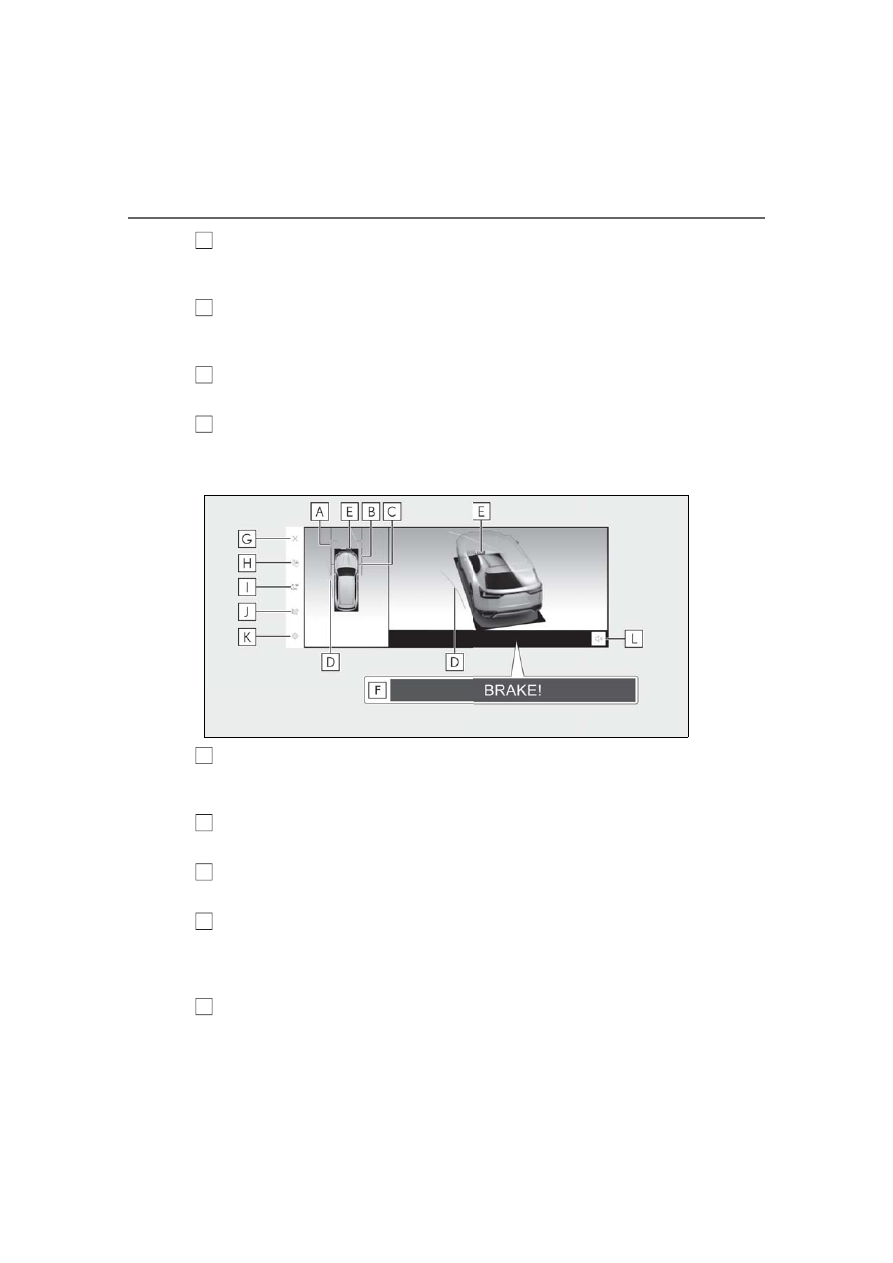
Parking Support Brake
When the system determines that the possibility of a collision with detected target objects
is high, a warning message is displayed.
Setting button
Changes settings, such as the automatically display cornering view, the vehicle body color,
the intuitive parking assist detection distance. (
Display off button
Changes the screen back to the previously displayed screen, such as the audio screen.
Intuitive parking assist mute button
This button temporarily mutes the intuitive parking assist sound.
Cornering View & panoramic view
Distance guide lines
Show distance in front of the vehicle.
• Display points approximately 3 ft. (1 m) from the edge of the bumper.
Vehicle width guide lines
Shows guide lines of the vehicle’s width including the outside rear view mirrors.
Front tire guide lines
Shows guide lines of where the front tire touches the ground.
Estimated course lines
Shows an estimated course when the steering wheel is turned.
• This line will be displayed when the steering wheel is turned by 90° or more from the
center (straight-line) position.
Intuitive parking assist
When a sensor detects a stationary object, the direction of and the approximate distance to
I
J
K
L
A
B
C
D
E