Lexus GX460 (2023 year). Manual in english - page 8
 

  Index      Manuals     Lexus GX460 (2023 year). Manual in english


Search            copyright infringement  


Content      ..     6      7      8      9     ..


Lexus GX460 (2023 year). Manual in english - page 8


GX460_OM_OM60R43U_(U)

249

4-5. Using the driving support systems

4

Dr

iving

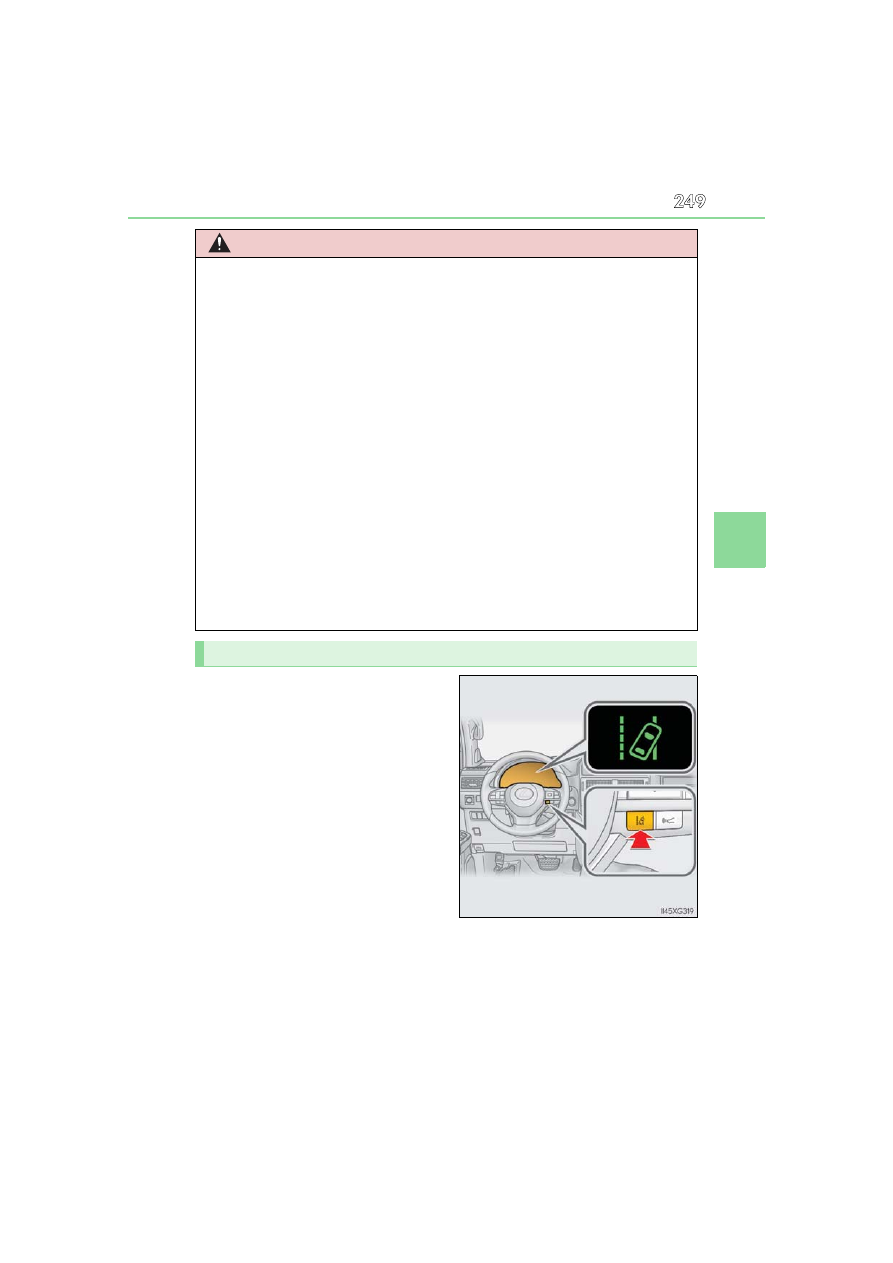
Press the LDA switch to turn the LDA
system on.

The LDA indicator illuminates.
Press the LDA switch again to turn the

LDA system off.
When the LDA system is turned on or

off, operation of the LDA system contin-

ues in the same condition the next time

the engine is started.

WARNING

Situations unsuitable for LDA system

Do not use the LDA system in the following situations.

The system may not operate properly and lead to an accident, resulting in death or

serious injury.

A spare tire, tire chains, etc. are equipped.

Objects or patterns that could be mistaken for white (yellow) lines are present on the

side of the road (guardrails, curbs, reflective poles, etc.).

Vehicle is driven on a snow-covered road.

White (yellow) lines are difficult to see due to rain, snow, fog, dust, etc.

Asphalt repair marks, white (yellow) line marks, etc. are present due to road repair.

Vehicle is driven in a temporary lane or restricted lane due to construction work.

Vehicle is driven in a construction zone.

Preventing LDA system malfunctions and operations performed by mistake

Do not modify the headlights or place stickers, etc. on the surface of the lights.

Do not modify the suspension etc. If the suspension etc. needs to be replaced, con-

tact your Lexus dealer.

Do not install or place anything on the hood or grille. Also, do not install a grille guard

(bull bars, kangaroo bar, etc.).

If your windshield needs repairs, contact your Lexus dealer.

Turning LDA system on

250

GX460_OM_OM60R43U_(U)

4-5. Using the driving support systems

LDA indicator
The illumination condition of the
indicator informs the driver of the
system operation status.

Illuminated in green: 

LDA system is operating.
Flashing in orange: 

Lane departure alert function is operat-

ing.

Lane departure alert function display
Displayed when the multi-information display is switched to the driving assist
system information screen. 

Indications on multi-information display

1

2

Inside of displayed white lines is
white

Inside of displayed white lines is
black

Indicates that the system is recognizing
white (yellow) lines. When the vehicle
departs from its lane, the white line dis-
played on the side the vehicle departs
from flashes orange.

Indicates that the system is not able to
recognize white (yellow) lines or is
temporarily canceled.

GX460_OM_OM60R43U_(U)

251

4-5. Using the driving support systems

4

Dr

iving

Operation conditions of each function

Lane departure alert function
This function operates when all of the following conditions are met.
• LDA is turned on.

• Vehicle speed is approximately 32 mph (50 km/h) or more.

• System recognizes white (yellow) lines.

• Width of traffic lane is approximately 9.8 ft. (3 m) or more.

• Turn signal lever is not operated.

• Vehicle is driven on a straight road or around a gentle curve with a radius of more

than approximately 492 ft. (150 m).

• No system malfunctions are detected. (

P. 253)

Vehicle sway warning function
This function operates when all of the following conditions are met.

• Setting for “Sway Warning” in 

 of the multi-information display is set to “On”.

(

P. 91)

• Vehicle speed is approximately 32 mph (50 km/h) or more.

• Width of traffic lane is approximately 9.8 ft. (3 m) or more.

• No system malfunctions are detected. (

P. 253)

Temporary cancellation of functions

When the operation conditions are no longer met, a function may be temporarily can-

celed. However, when the operation conditions are met again, operation of the function

is automatically restored. (

P. 251)

Lane departure alert function

The warning buzzer may be difficult to hear due to external noise, audio playback, etc.

Also, it may be difficult to feel steering wheel vibrations due to the road conditions etc.

Vehicle sway warning function

White (yellow) lines are only on one side of road

The LDA system will not operate for the side on which white (yellow) lines could not be

recognized.

When the system determines that the vehicle is

swaying while the vehicle sway warning function

is operating, a buzzer sounds and a warning

message urging the driver to rest and the sym-

bol shown in the illustration are simultaneously

displayed on the multi-information display.
Depending on the vehicle and road conditions,

the warning may not operate.

252

GX460_OM_OM60R43U_(U)

4-5. Using the driving support systems

Conditions in which functions may not operate properly

In the following situations, the camera sensor may not detect white (yellow) lines and var-

ious functions may not operate normally.

There are shadows on the road that run parallel with, or cover, the white (yellow) lines.

The vehicle is driven in an area without white (yellow) lines, such as in front of a tollgate

or checkpoint, or at an intersection, etc.

The white (yellow) lines are cracked, “Botts’ dots”, “Raised pavement marker” or stones

are present.

The white (yellow) lines cannot be seen or are difficult to see due to sand, etc.

The vehicle is driven on a road surface that is wet due to rain, puddles, etc.

The traffic lines are yellow (which may be more difficult to recognize than lines that are

white).

The white (yellow) lines cross over a curb, etc.

The vehicle is driven on a bright surface, such as concrete.

The vehicle is driven on a surface that is bright due to reflected light, etc.

The vehicle is driven in an area where the brightness changes suddenly, such as at the

entrances and exits of tunnels, etc.

Light from the headlights of an oncoming vehicle, the sun, etc. enters the camera.

The vehicle is driven where the road diverges, merges, etc.

The vehicle is driven on a slope.

The vehicle is driven on a road which tilts left or right, or a winding road.

The vehicle is driven on an unpaved or rough road.

The vehicle is driven around a sharp curve.

The traffic lane is excessively narrow or wide.

The vehicle is extremely tilted due to carrying heavy luggage or having improper tire

pressure.

The distance to the preceding vehicle is extremely short.

The vehicle is moving up and down a large amount due to road conditions during driv-

ing (poor roads or road seams).

The headlight lenses are dirty and emit a faint amount of light at night, or the beam axis

has deviated.

The vehicle has just changed lanes or crossed an intersection.

GX460_OM_OM60R43U_(U)

253

4-5. Using the driving support systems

4

Dr

iving

Warning message

If the following warning message is displayed on the multi-information display and the

LDA indicator illuminates in orange, follow the appropriate troubleshooting procedure.

If a different warning message is displayed, follow the instructions displayed on the

screen.

Warning message

Details/Actions

“Lane Departure 

Alert

Malfunction

Visit Your Dealer”

The system may not be operating properly.

Have the vehicle inspected at your Lexus

dealer.

“Front Camera 

Unavailable 

See Owner’s Manual”

Dirt, rain, condensation, ice, snow, etc. are

present on the windshield in front of the cam-

era sensor.

Turn the LDA system off, remove any dirt,

rain, condensation, ice, snow, etc. from the

windshield, and then turn the LDA system

back on.

“Front Camera 

Unavailable”

The operation conditions of the camera sen-

sor (temperature, etc.) are not met.

When the operation conditions of the cam-

era sensor (temperature, etc.) are met, the

LDA system will become available. Turn

the LDA system off, wait for a little while,

and then turn the LDA system back on.

“Lane Departure Alert 

Unavailable”

The LDA system is temporarily canceled due

to a malfunction in a sensor other than the

camera sensor.

Turn the LDA system off and follow the

appropriate troubleshooting procedures

for the warning message. Afterward, drive

the vehicle for a short time, and then turn

the LDA system back on.

“Lane Departure 

Alert 

Unavailable 

Below Approx 

32MPH”

The LDA system cannot be used as the vehicle

speed is less than approximately 32 mph

(50 km/h).

Drive the vehicle at approximately 32 mph

(50 km/h) or more.

254

GX460_OM_OM60R43U_(U)

4-5. Using the driving support systems

Customization

The following settings can be changed.

For how to change settings, refer to P. 604.

Function

Setting details

Lane departure alert function

Adjust alert sensitivity

Adjust alert type

Vehicle sway warning function

Turn function on and off

Adjust alert sensitivity

255

GX460_OM_OM60R43U_(U)

4-5. Using the driving support systems

4

Dr

iving

Dynamic radar cruise control

In vehicle-to-vehicle distance control mode, the vehicle automatically acceler-
ates and decelerates to match the speed changes of the preceding vehicle even
if the accelerator pedal is not depressed. In constant speed control mode, the
vehicle runs at a fixed speed.
Use the dynamic radar cruise control on freeways and highways.

Vehicle-to-vehicle distance control mode (

P. 258)

Constant speed control mode (

P. 263)

Indicators
Set speed
Vehicle-to-vehicle distance switch
Display
Cruise control switch

Summary of functions

1

2
3
4
5

256

GX460_OM_OM60R43U_(U)

4-5. Using the driving support systems

WARNING

Before using dynamic radar cruise control

Driving safely is the sole responsibility of the driver. Do not rely solely on the system,

and drive safely by always paying careful attention to your surroundings. 

The dynamic radar cruise control provides driving assistance to reduce the driver’s

burden. However, there are limitations to the assistance provided. 

Read the following conditions carefully. Do not overly rely on this system and always

drive carefully.
• When the sensor may not be correctly detecting the vehicle ahead: 

P. 265

• Conditions  under  which  the  vehicle-to-vehicle  distance  control  mode  may  not

function correctly: 

P. 266

Set the speed appropriately depending on the speed limit, traffic flow, road condi-

tions, weather conditions, etc. The driver is responsible for checking the set speed.

Even when the system is functioning normally, the condition of the preceding vehicle

as detected by the system may differ from the condition observed by the driver.

Therefore, the driver must always remain alert, assess the danger of each situation

and drive safely. Relying on this system or assuming the system ensures safety while

driving can lead to an accident, resulting in death or serious injury.

Switch the dynamic radar cruise control off using the “ON/OFF” button when not in

use.

Cautions regarding the driving assist systems

Observe the following precautions, as there are limitations to the assistance provided

by the system.

Failure to do so may cause an accident resulting in death or serious injury.

Assisting the driver to measure following distance

The dynamic radar cruise control is only intended to help the driver in determining

the following distance between the driver’s own vehicle and a designated vehicle

traveling ahead. It is not a mechanism that allows careless or inattentive driving, and it

is not a system that can assist the driver in low-visibility conditions. It is still necessary

for driver to pay close attention to the vehicle’s surroundings.

Assisting the driver to judge proper following distance

The dynamic radar cruise control determines whether the following distance

between the driver’s own vehicle and a designated vehicle traveling ahead is within a

set range. It is not capable of making any other type of judgement. Therefore, it is

absolutely necessary for the driver to remain vigilant and to determine whether or not

there is a possibility of danger in any given situation.

Assisting the driver to operate the vehicle

The dynamic radar cruise control has limited capability to prevent or avoid a collision

with a vehicle traveling ahead. Therefore, if there is ever any danger, the driver must

take immediate and direct control of the vehicle and act appropriately in order to

ensure the safety of all involved.

GX460_OM_OM60R43U_(U)

257

4-5. Using the driving support systems

4

Dr

iving

WARNING

Situations unsuitable for dynamic radar cruise control

Do not use dynamic radar cruise control in any of the following situations.

Doing so may result in inappropriate speed control and could cause an accident result-

ing in death or serious injury.

Roads where there are pedestrians, cyclists, etc.

In heavy traffic

On roads with sharp bends

On winding roads

On slippery roads, such as those covered with rain, ice or snow

On steep downhills, or where there are sudden changes between sharp up and down

gradients 

Vehicle speed may exceed the set speed when driving down a steep hill.

At entrances to freeways and highways

When weather conditions are bad enough that they may prevent the sensors from

detecting correctly (fog, snow, sandstorm, heavy rain, etc.)

When there is rain, snow, etc. on the front surface of the radar sensor or camera sen-

sor

In traffic conditions that require frequent repeated acceleration and deceleration

When your vehicle is towing a trailer (with towing hitch) or during emergency towing

When an approach warning buzzer is heard often

258

GX460_OM_OM60R43U_(U)

4-5. Using the driving support systems

This mode employs a radar sensor to detect the presence of vehicles up to
approximately 328 ft. (100 m) ahead, determines the current vehicle-to-vehicle
following distance, and operates to maintain a suitable following distance from
the vehicle ahead.

Note that vehicle-to-vehicle distance will close in when traveling on long downhill

slopes.

Example of constant speed cruising
When there are no vehicles ahead

The vehicle travels at the speed set by the driver. The desired vehicle-to-vehicle dis-

tance can also be set by operating the vehicle-to-vehicle distance switch.

Example of deceleration cruising and follow-up cruising
When a preceding vehicle driving slower than the set speed appears

When a vehicle is detected running ahead of you, the system automatically deceler-

ates your vehicle. When a greater reduction in vehicle speed is necessary, the system

applies the brakes (the stop lights will come on at this time). The system will respond to

changes in the speed of the vehicle ahead in order to maintain the vehicle-to-vehicle

distance set by the driver. Approach warning warns you when the system cannot

decelerate sufficiently to prevent your vehicle from closing in on the vehicle ahead.

Example of acceleration 
When there are no longer any preceding vehicles driving slower than the set
speed

The system accelerates until the set speed is reached. The system then returns to con-

stant speed cruising.

Driving in vehicle-to-vehicle distance control mode

1

2

3

GX460_OM_OM60R43U_(U)

259

4-5. Using the driving support systems

4

Dr

iving

Press the “ON/OFF” button to acti-
vate the cruise control.

Radar cruise control indicator will come

on and a message will be displayed on

the multi-information display.
Press the button again to deactivate the

cruise control.
If the “ON/OFF” button is pressed and

held for 1.5 seconds or more, the system

turns on in constant speed control

mode. (

P. 263)

Accelerate or decelerate, with
accelerator pedal operation, to the
desired vehicle speed (at or above
approximately 30 mph [50 km/h])
and push the lever down to set the
speed.

Cruise control “SET” indicator will come

on.
The vehicle speed at the moment the

lever is released becomes the set speed.

Setting the vehicle speed (vehicle-to-vehicle distance control mode)

1

2

260

GX460_OM_OM60R43U_(U)

4-5. Using the driving support systems

To change the set speed, operate the lever until the desired set speed is dis-
played.

Increases the speed
Decreases the speed

Fine adjustment: Momentarily move
the lever in the desired direction.
Large adjustment: Hold the lever up or
down to change the speed, and release
when the desired speed is reached.

In the vehicle-to-vehicle distance control mode, the set speed will be increased
or decreased as follows:

For the U.S.A., Hawaii and Puerto Rico
Fine adjustment: By 1 mph (1.6 km/h)

*

1

 or 1 km/h (0.6 mph)

*

2

 each time the lever is

operated
Large adjustment: Increases or decreases in 1 mph (1.6 km/h)

*

1

 or 1 km/h

(0.6 mph)

*

2

 increments for as long as the lever is held

Except for the U.S.A., Hawaii and Puerto Rico
Fine adjustment: By 1 mph (1.6 km/h)

*

1

 or 1 km/h (0.6 mph)

*

2

 each time the lever is

operated
Large adjustment: Increases or decreases in 5 mph (8 km/h)

*

1

 or 5 km/h

(3.1 mph)

*

2

 increments for as long as the lever is held

In the constant speed control mode (

P. 263), the set speed will be increased

or decreased as follows:

Fine adjustment: By 1 mph (1.6 km/h)

*

1

 or 1 km/h (0.6 mph)

*

2

 each time the lever is

operated
Large adjustment: The speed will continue to change while the lever is held.

*

1

:  When the set speed is shown in “MPH”

*

2

:  When the set speed is shown in “km/h”

Adjusting the set speed

1

2

GX460_OM_OM60R43U_(U)

261

4-5. Using the driving support systems

4

Dr

iving

Pressing the switch changes the vehi-
cle-to-vehicle distance as follows:

Long
Medium
Short

The vehicle-to-vehicle distance is set

automatically to long mode when the

engine switch is turned to IGNITION

ON mode.
If a vehicle is running ahead of you, the preceding vehicle mark will also be displayed.

Select a distance from the table below. Note that the distances shown corre-
spond to a vehicle speed of 50 mph (80 km/h). Vehicle-to-vehicle distance
increases/decreases in accordance with vehicle speed.

Changing the vehicle-to-vehicle distance (vehicle-to-vehicle distance
control mode)

Preceding 
vehicle mark

1

2

3

Vehicle-to-vehicle distance settings (vehicle-to-vehicle distance con-
trol mode)

Distance options

Vehicle-to-vehicle distance

Long

Approximately 160 ft. (50 m)

Medium

Approximately 130 ft. (40 m)

Short

Approximately 100 ft. (30 m)

262

GX460_OM_OM60R43U_(U)

4-5. Using the driving support systems

Pulling the lever toward you cancels
the speed control.

The speed control is also canceled when

the brake pedal is depressed.

Pushing the lever up resumes the
cruise control and returns vehicle
speed to the set speed.

However, cruise control does not

resume when the vehicle speed is

approximately 25 mph (40 km/h) or

less.

When your vehicle is too close to a
vehicle ahead, and sufficient automatic
deceleration via the cruise control is
not possible, the display will flash and
the buzzer will sound to alert the driver.
An example of this would be if another
driver cuts in front of you while you are
following a vehicle. Depress the brake
pedal to ensure an appropriate vehicle-
to-vehicle distance.

Warnings may not occur when

In the following instances, warnings may not occur even when the vehicle-to-
vehicle distance is small.

When the speed of the preceding vehicle matches or exceeds your vehicle
speed

When the preceding vehicle is traveling at an extremely slow speed

Immediately after the cruise control speed was set

When depressing the accelerator pedal

Canceling and resuming the speed control

1

2

Approach warning (vehicle-to-vehicle distance control mode)

GX460_OM_OM60R43U_(U)

263

4-5. Using the driving support systems

4

Dr

iving

When constant speed control mode is selected, your vehicle will maintain a set
speed without controlling the vehicle-to-vehicle distance. Select this mode only
when vehicle-to-vehicle distance control mode does not function correctly due
to a dirty radar sensor, etc.

With the cruise control off, press and
hold the “ON/OFF” button for 1.5
seconds or more.

Immediately after the “ON/OFF” but-

ton is pressed, the radar cruise control

indicator will come on. Afterwards, it

switches to the cruise control indicator.
Switching to constant speed control

mode is only possible when operating

the lever with the cruise control off.

Accelerate or decelerate, with
accelerator pedal operation, to the
desired vehicle speed (at or above
approximately 25 mph [40 km/h])
and push the lever down to set the
speed.

Cruise control “SET” indicator will come

on.
The vehicle speed at the moment the

lever is released becomes the set speed.
Adjusting the speed setting: 

P. 260

Canceling and resuming the speed setting: 

P. 262

Selecting constant speed control mode

1

2

264

GX460_OM_OM60R43U_(U)

4-5. Using the driving support systems

Dynamic radar cruise control can be set when

The shift lever is in D.

Vehicle speed is at or above approximately 30 mph (50 km/h).

Accelerating after setting the vehicle speed

The vehicle can accelerate by operating the accelerator pedal. After accelerating, the

set speed resumes. However, during vehicle-to-vehicle distance control mode, the vehi-

cle speed may decrease below the set speed in order to maintain the distance to the pre-

ceding vehicle.

Automatic cancelation of vehicle-to-vehicle distance control mode

Vehicle-to-vehicle distance control mode is automatically canceled in the following situ-

ations:

Actual vehicle speed falls at or below approximately 25 mph (40 km/h).

VSC is activated.

Active TRAC is activated for a period of time.

When the VSC or Active TRAC system is turned off.

When second start mode is set.

The sensor cannot detect correctly because it is covered in some way.

Pre-collision braking is activated.

The switching operation continues for 5 seconds or more after the center differential

lock switch has been operated.

If vehicle-to-vehicle distance control mode is automatically canceled for any other rea-

son, there may be a malfunction in the system. Contact your Lexus dealer.

Automatic cancelation of constant speed control mode

Constant speed control mode is automatically canceled in the following situations:

Actual vehicle speed is more than approximately 10 mph (16 km/h) below the set vehi-

cle speed.

Actual vehicle speed falls below approximately 25 mph (40 km/h).

VSC is activated.

Active TRAC is activated for a period of time.

When the VSC or Active TRAC system is turned off.

Pre-collision braking is activated.

The switching operation continues for 5 seconds or more after the center differential

lock switch has been operated.

If constant speed control mode is automatically canceled for any other reason, there may

be a malfunction in the system. Contact your Lexus dealer.

Brake system operation sound

If the brakes are applied automatically while the vehicle is in vehicle-to-vehicle distance

control mode, a brake system operation sound may be heard. This does not indicate a

malfunction.

GX460_OM_OM60R43U_(U)

265

4-5. Using the driving support systems

4

Dr

iving

Warning messages and buzzers for dynamic radar cruise control

Warning messages and buzzers are used to indicate a system malfunction or to inform

the driver of the need for caution while driving. If a warning message is shown on the

multi-information display, read the message and follow the instructions.

When the sensor may not be correctly detecting the vehicle ahead

In the case of the following and depending on the conditions, operate the brake pedal

when deceleration of the system is insufficient or operate the accelerator pedal when

acceleration is required.

As the sensor may not be able to correctly detect these types of vehicles, the approach

warning (

P. 262) may not be activated.

Vehicles that cut in suddenly

Vehicles traveling at low speeds

Vehicles that are not moving in the same lane

Vehicles with small rear ends (trailers with no load on board, etc.)

Motorcycles traveling in the same lane

When water or snow thrown up by the surrounding vehicles hinders the detecting of

the sensor

When your vehicle is pointing upwards

(caused by a heavy load in the luggage com-

partment, etc.)

Preceding vehicle has an extremely high

ground clearance

266

GX460_OM_OM60R43U_(U)

4-5. Using the driving support systems

Conditions under which the vehicle-to-vehicle distance control mode may not function

correctly

In the case of the following conditions, operate the brake pedal (or accelerator pedal,

depending on the situation) as necessary.
As the sensor may not be able to correctly detect vehicles ahead, the system may not

operate properly.

When the vehicle ahead of you decelerates suddenly

When driving on a road surrounded by a structure, such as in a tunnel or on a bridge

While the vehicle speed is decreasing to the set speed after the vehicle accelerates by

depressing the accelerator pedal

When the road curves or when the lanes are

narrow

When steering wheel operation or your posi-

tion in the lane is unstable

267

GX460_OM_OM60R43U_(U)

4-5. Using the driving support systems

4

Dr

iving

Intuitive parking assist

Front center sensors
Front corner sensors
Rear corner sensors
Rear center sensors

Press 

 or 

 of the meter control switches and select 

 on the multi-

information display.

Press 

 or 

 of the meter control switches and select 

, and then

press .

Press 

 or 

 of the meter control switches and select 

, and then

press .

Each pressing of the switch turns the intuitive parking assist on and off.
When ON is selected, Intuitive parking assist indicator will come on.

The distance from your vehicle to nearby obstacles when parallel parking or
maneuvering into a garage is measured by the sensors and communicated via
the multi-information display, the navigation system screen, and a buzzer.
Always check the surrounding area when using this system.

Types of sensors

1

2
3
4

Turning the intuitive parking assist on/off

1

2

3

268

GX460_OM_OM60R43U_(U)

4-5. Using the driving support systems

When the sensors detect an obstacle, a graphic is shown on the multi-informa-
tion display and navigation system screen depending on the position and dis-
tance to the obstacle.

Multi-information display
Front corner sensor operation
Front center sensor operation
Rear corner sensor operation
Rear center sensor operation

Multimedia screen or navigation system screen 

Insert display

When the Lexus parking assist monitor

*

or Multi-terrain Monitor

*

 is displayed.

A simplified image is displayed on the

upper corner of the screen when an

obstacle is detected.

*

: If equipped

Display

1

2
3
4

GX460_OM_OM60R43U_(U)

269

4-5. Using the driving support systems

4

Dr

iving

Distance display

Sensors that detect an obstacle will illuminate continuously or blink.

Sensor detection display, obstacle distance

Multi-

information 

display

Insert 

display

Approximate distance to obstacle

Front corner 

sensor/front 

center sensor

Rear corner 

sensor/rear 

center sensor

(continuous)

(blinking 

slowly)

Front center sensor:

3.3 ft. (100 cm) to 

2.0 ft. (60 cm)

Rear center sensor:

4.9 ft. (150 cm) to 

2.1 ft. (65 cm)

(continuous)

(blinking)

Front corner sensor:

1.6 ft. (50 cm) to 

1.3 ft. (40 cm)

Front center sensor:

2.0 ft. (60 cm) to 

1.5 ft. (45 cm)

Rear corner sensor:

1.8 ft. (55 cm) to 

1.2 ft. (37.5 cm)

Rear center sensor:

2.1 ft. (65 cm) to 

1.6 ft. (50 cm)

(continuous)

(blinking 

rapidly)

Front corner sensor:

1.3 ft. (40 cm) to 

1.0 ft. (30 cm)

Front center sensor:

1.5 ft. (45 cm) to 

1.0 ft. (30 cm)

Rear corner sensor:

1.2 ft. (37.5 cm) to 

0.8 ft. (25 cm)

Rear center sensor:

1.6 ft. (50 cm) to 

1.3 ft. (40 cm)

(blinking)

(continuous)

Less than 

1.0 ft. (30 cm)

Rear corner sensor:

Less than 

0.8 ft. (25 cm)

Rear center sensor:

Less than 

1.3 ft. (40 cm)

270

GX460_OM_OM60R43U_(U)

4-5. Using the driving support systems

Buzzer operation and distance to an obstacle

A buzzer sounds when the sensors are operating.

The buzzer sounds faster as the vehicle approaches an obstacle. 
When the vehicle comes within the following distance of the obstacle, the
buzzer sounds continuously.

• Front corner sensors: Approximately 1.0 ft. (30 cm)
• Front center sensors: Approximately 1.0 ft. (30 cm)
• Rear corner sensors: Approximately 0.8 ft. (25 cm)
• Rear center sensors: Approximately 1.3 ft. (40 cm)

When an obstacle is detected by multiple sensors simultaneously, the
buzzer sounds according to the distance to the closest obstacle.

When obstacles are simultaneously detected to the front and rear of the
vehicle, separate buzzers sound patterns according to the distance to each
obstacle.

You can change the volume of the warning beeps. (

P. 274)

Approximately 3.3 ft. (100 cm)
Approximately 4.9 ft. (150 cm)
Approximately 1.6 ft. (50 cm)
Approximately 1.8 ft. (55 cm)

The diagram shows the detection range

of the sensors. Note that the sensors

may not be able to detect obstacles that

are extremely close to the vehicle.
The range of the sensors may change

depending on the shape of the object

etc.

Detection range of the sensors

1

2
3
4

GX460_OM_OM60R43U_(U)

271

4-5. Using the driving support systems

4

Dr

iving

The intuitive parking assist can be operated when

Front corner sensors:
• The engine switch is in IGNITION ON mode.

• The shift lever is in a position other than P.

• The vehicle speed is less than approximately 6 mph (10 km/h).

(At any speed when the shift lever is in R)

Front center sensors:
• The engine switch is in IGNITION ON mode.

• The shift lever is in a position other than P or R.

• The vehicle speed is less than about 6 mph (10 km/h).

Rear corner and rear center sensors:
• The engine switch is in IGNITION ON mode.

• The shift lever is in R.

Intuitive parking assist display

When an obstacle is detected while the Lexus parking assist monitor or Multi-terrain

Monitor is in use, the warning indicator will appear in the upper corner of the screen

even if the display setting has been set to off.

Sensor detection information

The sensor’s detection areas are limited to the areas around the vehicle’s bumper.

The following situations may occur during use.
• Depending on the shape of the object and other factors, the detection distance may

shorten, or detection may be impossible.

• Detection may be impossible if static objects draw too close to the sensor.

• There will be a short delay between object detection and display. Even at low

speeds, there is a possibility that the object will come within the sensor’s detection

areas before the display is shown and the warning beep sounds.

• It might be difficult to hear the buzzer due to the volume of the audio system or air

flow noise of the air conditioning system.

• It may be difficult to hear the sound of this system due to the buzzers of other sys-

tems.

Objects which the system may not properly detect

The shape of the obstacle may prevent a sensor from detecting it. Pay particular attention

to the following obstacles:

Wires, fences, ropes, etc.

Cotton, snow and other materials that absorb sound waves

Sharply-angled objects

Low obstacles

Tall obstacles with upper sections projecting outwards in the direction of your vehicle

272

GX460_OM_OM60R43U_(U)

4-5. Using the driving support systems

Situations in which the system may not operate properly

Certain vehicle conditions and the surrounding environment may affect the ability of a

sensor to correctly detect objects. Particular instances where this may occur are listed

below.

There is dirt, snow, water drops or ice on a sensor. (Cleaning the sensors will resolve

this problem.)

A sensor is frozen. (Thawing the area will resolve this problem.) In especially cold

weather, if a sensor is frozen the sensor display may be displayed abnormally, or

objects, such as a wall, may not be detected.

On an extremely bumpy road, on an incline, on gravel, or on grass.

When vehicle horns, vehicle detectors, motorcycle engines, air brakes of large vehi-

cles, the clearance sonar of other vehicles or other devices which produce ultrasonic

waves are near the vehicle.

A sensor is coated with a sheet of spray or heavy rain.

If objects draw too close to the sensor.

When a pedestrian is wearing clothing that does not reflect ultrasonic waves (ex. skirts

with gathers or frills).

When objects that are not perpendicular to the ground, not perpendicular to the vehi-

cle traveling direction, uneven, or waving are in the detection range.

Strong wind is blowing.

When driving in inclement weather such as fog, snow or a sandstorm.

When an object that cannot be detected is between the vehicle and a detected object.

If an object such as a vehicle, motorcycle, bicycle or pedestrian cuts in front of the vehi-

cle or runs out from the side of the vehicle.

If the orientation of a sensor has been changed due to a collision or other impact.

When equipment that may obstruct a sensor is installed, such as a towing eyelet,

bumper protector (an additional trim strip, etc.), bicycle carrier, or snow plow.

If the front of the vehicle is raised or lowered due to the carried load.

If the vehicle cannot be driven in a stable manner, such as when the vehicle has been in

an accident or is malfunctioning.

When tire chains, a compact spare tire or an emergency tire puncture repair kit are

used.

When a sensor or the area around a sensor is

extremely hot or cold.

GX460_OM_OM60R43U_(U)

273

4-5. Using the driving support systems

4

Dr

iving

Situations in which the system may operate even if there is no possibility of a collision

In some situations, such as the following, the system may operate even though there is no

possibility of a collision.

When driving toward a banner, flag, low-hanging branch or boom barrier (such as

those used at railroad crossings, toll gates and parking lots).

When there is a rut or hole in the surface of the road.

When driving on a metal cover (grating), such as those used for drainage ditches.

When driving up or down a steep slope.

If a sensor is hit by a large amount of water, such as when driving on a flooded road.

There is dirt, snow, water drops or ice on a sensor. (Cleaning the sensors will resolve

this problem.)

A sensor is coated with a sheet of spray or heavy rain.

When driving in inclement weather such as fog, snow or a sandstorm.

When vehicle horns, vehicle detectors, motorcycle engines, air brakes of large vehi-

cles, the clearance sonar of other vehicles or other devices which produce ultrasonic

waves are near the vehicle.

If the front of the vehicle is raised or lowered due to the carried load.

If the orientation of a sensor has been changed due to a collision or other impact.

The vehicle is approaching a tall or curved curb.

Driving close to columns (H-shaped steel beams, etc.) in multi-story parking garages,

construction sites, etc.

If the vehicle cannot be driven in a stable manner, such as when the vehicle has been in

an accident or is malfunctioning.

When driving on a narrow road.

When strong winds are blowing.

274

GX460_OM_OM60R43U_(U)

4-5. Using the driving support systems

When tire chains, a compact spare tire or an emergency tire puncture repair kit are

used.

If “Parking Assist Unavailable Clean Parking Assist Sensor” is displayed on the multi-

information display

A sensor may be dirty or covered with snow or ice. In such cases, if it is removed from the

sensor, the system should return to normal.
Also, due to the sensor being frozen at low temperatures, a malfunction display may

appear or an obstacle may not be detected. If the sensor thaws out, the system should

return to normal.

If “Parking Assist Malfunction Visit Your Dealer” is displayed on the multi-information

display

Depending on the malfunction of the sensor, the device may not be working normally.

Have the vehicle inspected by your Lexus dealer.

Adjusting the buzzer volume

Press 


or 

 of the meter control switches and select 

on the multi-informa-

tion display.
Press 

or 

 of the meter control switches and select 

, and then press 

.

Select the volume and then press 

.

Each time the switch is pressed, the volume level will change between 1, 2 and 3.

Customization

Detection distance of the sensor can be changed. 

(Customizable features: 

P. 604)

Muting a buzzer temporarily

A mute button will be displayed on the multi-information display when an object is

detected. To mute the buzzer, press 

.

Mute will be automatically canceled in the following situations:

When the shift position is changed.

When there is a malfunction in a sensor or the system is temporarily unavailable.

When the function is disabled while it is operating.

When the power switch is turned off.

When the shift lever is in D or S and the vehicle speed is 9 mph (15 km/h) or higher.

Certification for the intuitive parking assist (Canada only)

This ISM device complies with Canadian ICES-001.

On an extremely bumpy road, on an incline, on

gravel, or on grass.

1

2
3

GX460_OM_OM60R43U_(U)

275

4-5. Using the driving support systems

4

Dr

iving

WARNING

Cautions regarding the use of the system

There is a limit to the degree of recognition accuracy and control performance that this

system can provide, do not overly rely on this system. The driver is always responsible

for paying attention to the vehicle’s surroundings and driving safely.

To ensure the system can operate properly

Observe the following precautions.

Failing to do so may result in the vehicle being unable to be driven safely and possibly

cause an accident.

Do not damage the sensors, and always keep them clean.

Do not attach a sticker or install an electronic component, such as a backlit license

plate (especially fluorescent type), fog lights, fender pole or wireless antenna near a

radar sensor.

Do not subject the surrounding area of the sensor to a strong impact. If subjected to

an impact, have the vehicle inspected by your Lexus dealer. If the front or rear

bumper needs to be removed/installed or replaced, contact your Lexus dealer.

Do not modify, disassemble or paint the sensors.

Do not attach a license plate cover.

Keep your tires properly inflated.

When to disable the function

In the following situations, disable the function as it may operate even though there is

no possibility of a collision.

Failing to observe the warnings above.

A non-genuine Lexus suspension (lowered suspension, etc.) is installed.

Notes when washing the vehicle

Do not apply intensive bursts of water or steam to the sensor area.
Doing so may result in the sensor malfunctioning.

When using a high pressure washer to wash the vehicle, do not spray the sensors

directly, as doing so may cause a sensor to malfunction.

When using steam to clean the vehicle, do not direct steam too close to the sensors

as doing so may cause a sensor to malfunction.

276

GX460_OM_OM60R43U_(U)

4-5. Using the driving support systems

NOTICE

When using intuitive parking assist

In the following situations, the system may not function correctly due to a sensor mal-

function etc. Have the vehicle checked by your Lexus dealer.

A buzzer does not sound when you turn the intuitive parking assist on.

The intuitive parking assist operation display flashes, and a buzzer sounds when no

obstacles are detected.

If the area around a sensor collides with something, or is subjected to strong impact.

If the bumper collides with something.

If the display shows continuously without a beep.

If a display error occurs, first check the sensor.

If the error occurs even if there is no ice, snow or mud on the sensor, it is likely that the

sensor is malfunctioning.

277

GX460_OM_OM60R43U_(U)

4-5. Using the driving support systems

4

Dr

iving

Lexus parking assist monitor

When the display is changed to the wide rear view mode, a wider lateral view
behind the vehicle will be displayed.

The screen illustrations used in this text are intended as examples, and may differ from

the image that is actually displayed on the screen.

The rear view image is displayed when
the shift lever is in R and the engine
switch is in IGNITION ON mode.

The parking assist monitor system will

be deactivated when the shift lever is in

any position other than R.
When the shift lever is shifted to R and

any mode button (such as “SETUP”) is

pressed, the parking assist monitor is

canceled, and the screen is switched to

the mode of the button that was pressed.

The parking assist monitor is a supplemental device intended to assist the driver
when backing up. When backing up, be sure to visually check all around the
vehicle both directly and using the mirrors before proceeding. If you do not, you
may hit another vehicle, and could possibly cause an accident.
Pay attention to the following precautions when using the parking assist monitor.

: If equipped

The parking assist monitor assists the driver by displaying an image of the view
behind the vehicle while backing up, for example while parking.

Driving precautions

278

GX460_OM_OM60R43U_(U)

4-5. Using the driving support systems

Screen display

The parking assist monitor screen will be displayed if the shift lever is shifted to
R while the engine switch is in IGNITION ON mode.

Each time the display mode switching button is selected, the mode will change as

follows:

Display mode switch screen button 

Each time the button is selected, the rear view mode and the wide rear view mode

are switched.

Guide line switching button

Select to switch the guide line mode.

• Each time the button is selected, the display mode changes in the following

order:
Estimated course line display mode 

 Parking assist guide line display mode

 Distance guide line display mode.

Rear Cross Traffic Alert

When a sensor detects a vehicle approaching from the rear, the direction of the

vehicle approaching from the rear is displayed and the buzzer sounds.

Intuitive parking assist

When a sensor detects a stationary object, the direction of and the approximate

distance to the stationary object are displayed and the buzzer sounds.

Using the Lexus parking assist monitor

Rear view

Wide rear view

1

2

3

4

GX460_OM_OM60R43U_(U)

279

4-5. Using the driving support systems

4

Dr

iving

Using the system when perpendicular parking

Use any of the following modes.

Estimated course line display mode (

P. 280)

Estimated course lines are dis-
played which move in accor-
dance with the operation of the
steering wheel.

Parking assist guide line display mode (

P. 281)

The steering wheel return points
(parking assist guide lines) are
displayed.

This mode is recommended for those

who are comfortable with parking

the vehicle without the aid of the esti-

mated course lines.

Distance guide line display mode (

P. 282)

Distance guide lines only are dis-
played.

This mode is recommended for those

who are comfortable with parking

the vehicle without the aid of the

guide lines.

280

GX460_OM_OM60R43U_(U)

4-5. Using the driving support systems

Screen description

Vehicle width extension guide line

Displays a guide path when the vehicle is being backed straight up.

Estimated course lines

Show an estimated course when the steering wheel is turned.

Distance guide line

Show distance behind the vehicle when the steering wheel is turned.

• The guide lines move in conjunction with the estimated course lines.

• The guide lines display points approximately 1.5 ft. (0.5 m) (red) and approxi-

mately 3 ft. (1 m) (yellow) from the center of the edge of the bumper.

Distance guide line

Show distance behind the vehicle.

• Displays a point approximately 1.5 ft. (0.5 m) (blue) from the edge of the

bumper.

Vehicle center guide line

Indicates the estimated vehicle center on the ground.

Estimated course line display mode

Rear view

Wide Rear view

1

2

3

4

5


Content      ..     6      7      8      9     ..