Honda Fit (2019 year). Manual - part 14
207
uu
Audio System
u
USB Port(s)
Features
USB Port(s)
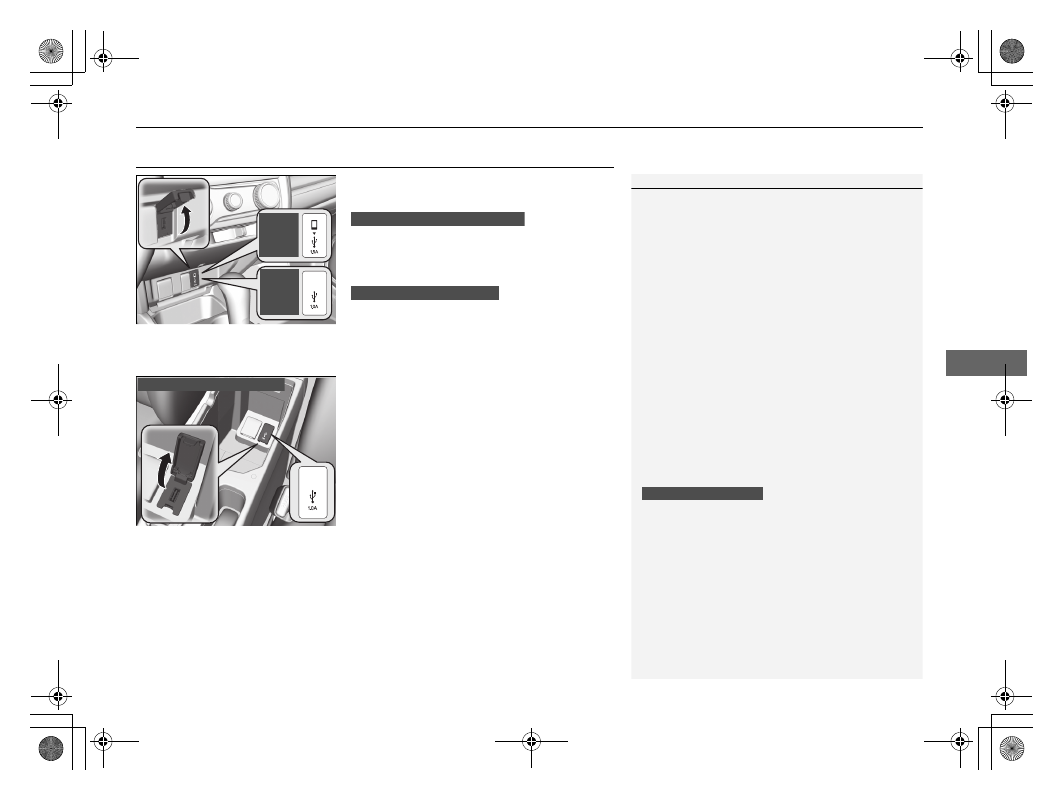
Install the iPod USB connector or the USB flash
drive to the USB port.
u
The USB port (1.0A) is for playing audio
files on a USB flash drive and connecting
a cellular phone and charging device.
u
The USB port (1.5A) is for charging
devices, playing audio files and
connecting compatible phones with
Apple CarPlay
TM
or Android Auto
TM
.
■
In the console compartment
*
The USB port (1.0A) is for playing audio files
on the USB flash drive and connecting a
cellular phone and charging device.
*1 : Models with the smart entry system have an ENGINE START/STOP button instead of an ignition switch.
1
•
Do not leave the iPod or USB flash drive in the
vehicle. Direct sunlight and high temperatures may
damage it.
•
We recommend using an extension cable with the
USB port.
•
Do not connect the iPod or USB flash drive using a
hub.
•
Do not use a device such as a card reader or hard
disk drive, as the device or your files may be
damaged.
•
We recommend keeping your data backed up
before using the device in your vehicle.
•
Displayed messages may vary depending on the
device model and software version.
If the audio system does not recognize the iPod, try
reconnecting it a few times or reboot the device. To
reboot, follow the manufacturer’s instructions
provided with the iPod or visit www.apple.com/ipod.
The USB port can supply up to 1.0A/1.5A of power. It
does not output 1.0A/1.5A unless requested by the
device.
For amperage details, read the operating manual of
the device that needs to be charged.
Turn the ignition switch to ACCESSORY
(
q or ON
(
w
*1
first.
Under certain conditions, a device connected to the
port may generate noise in the radio you are listening
to.
USB charge (1.0A/1.5A)
Models
with
Display
Audio
Models
with
color
audio
system
Models with color audio system
Models with Display Audio
In the console compartment
* Not available on all models