Citroen Jumpy Dispatch (2023 year). Manual in english - page 9
MyCitroën Drive
The system reads a variety of data (folder, title,
► You can check the compatibility of the
Some telephones offer display options.
artist, etc.). This can take from a few seconds to
telephone on the Brand's website (services).
Depending on the settings chosen, contacts can
a few minutes.
Android Auto and/or CarPlay do not work.
be transferred in a specific order.
This is perfectly normal.
Android Auto and CarPlay may not activate if the
► Modify the telephone directory display
Some characters in information about the
USB cables are of poor quality.
settings.
currently playing media may not be displayed
► Use genuine USB cables to ensure
The system is not receiving SMS text
correctly.
compatibility.
messages.
The audio system is unable to process certain
Android Auto and/or CarPlay do not work.
Bluetooth mode does not allow SMS text
types of character.
Android Auto and CarPlay are not available in all
messages to be sent to the system.
► Use standard characters to name tracks and
countries.
folders.
► Check the list of supported countries via
Settings
Playback of streaming files does not start.
these websites: Google Android Auto or Apple.
When the treble and bass settings are
The connected device does not automatically
The volume of the telephone connected via
changed, the ambience is deselected.
launch playback.
Bluetooth is too low.
When the ambience is changed, the treble
► Start playback from the device.
The volume depends on both the system and the
and bass settings are reset.
Track names and playing times are not
telephone.
Selecting an ambience imposes the treble and
displayed on the audio streaming screen.
► Increase the volume of the audio system, to
bass settings, and vice versa.
The Bluetooth profile does not allow the transfer
maximum if required, and increase the volume of
► Modify the treble and bass or ambience
of this information.
the telephone if necessary.
settings to obtain the desired musical ambience.
Ambient noise affects the quality of the
When the balance settings are changed, the
Telephone
telephone call.
distribution is deselected.
I am unable to connect my Bluetooth
► Reduce ambient noise (e.g. close the
When the distribution setting is changed, the
telephone.
windows, reduce ventilation, slow down).
balance settings are deselected.
The telephone's Bluetooth function may be
Some contacts are duplicated in the list.
Selecting a distribution setting imposes the
switched off or the device may not be visible.
The options for synchronising contacts are:
balance settings, and vice versa.
► Check that the telephone has Bluetooth
synchronise the contacts on the SIM card, the
► Modify the balance setting or the distribution
switched on.
contacts on the telephone, or both. When both
setting to obtain the desired sound quality.
► Check in the telephone settings that it is
synchronisations are selected, some contacts
There is a difference in sound quality
"visible to all".
may be duplicated.
between audio sources.
► Deactivate then reactivate the telephone’s
► Select "Display SIM card contacts" or
To allow for optimal listening quality, the sound
Bluetooth function.
"Display telephone contacts".
settings can be tailored to different audio
The Bluetooth telephone is not compatible with
The contacts are not listed in alphabetical
sources, which can generate audible differences
the system.
order.
when changing source.
280
CarManuals2.co
MyCitroën Drive
► Check that the sound settings are appropriate
12
to the sources listened to. We recommend
setting the sound functions (Bass, Treble,
Balance) to the middle position, setting the
musical ambience to "None", setting loudness
correction to "Active" in USB mode and "Inactive"
in Radio mode.
► In all cases, after applying sound settings,
adjust the volume level on the portable device (to
a high level) first. Then adjust the volume level
on the audio system.
When the engine is off, the system switches
off after several minutes of use.
When the engine is switched off, the system's
operating time depends on the state of charge of
the battery.
The switch-off is normal: the system
automatically goes into energy economy mode
and switches off to maintain an adequate charge
in the battery.
► Start the vehicle’s engine to increase the
charge of the battery.
The date and time cannot be set.
Date and time settings are only available if
satellite synchronisation is deactivated.
► Settings menu/Options/Date-Time Setting.
Select the "Time" tab and deactivate "GPS
synchronisation" (UTC).
281
CarManuals2.co
Vehicle data recording and privacy
- Environmental conditions (e.g. temperature,
identification number and used if necessary.
Vehicle data recording
rain sensor, distance sensor).
The personnel working for the servicing network
and privacy
As a general rule, this data is temporary, is
(e.g. garages, manufacturers) or third parties
Electronic control units are installed in your
not stored for longer than one operating cycle
(e.g. roadside assistance agents) may read
vehicle. These control units process data
and is only used within the vehicle itself. The
the vehicle's data. This also applies to work
received from the vehicle's sensors, for example,
control units often record this data (including the
carried out under warranty and quality assurance
or data they generate themselves or exchange
vehicle's key). This function allows either the
measures.
with each other. Some of these control units are
temporary or permanent storage of information
This data is generally read via the OBD
required for the correct operation of your vehicle,
about the state of the vehicle, stresses on
(On-Board Diagnostics) port fitted by law to
some others assist you while driving (driving or
components, servicing requirements, as well as
the vehicle. It is used to report on the technical
manoeuvring aids), while others provide comfort
events and technical errors.
state of the vehicle or its components and
or infotainment functions.
Depending on the vehicle's equipment level, the
facilitates the diagnosis of malfunctions, in
The following contains general information about
data stored is as follows:
compliance with warranty obligations and for
how data is processed within the vehicle.
- Operating state of system components
quality improvement. This data, in particular the
You will find additional information about the
(e.g. filling level, tyre pressures, battery charge
information relating to stress on components,
specific data which is downloaded, stored
status).
technical events, operator errors and other
and transmitted to third parties and what it is
- Faults and malfunctions in important system
malfunctions, is sent to the Manufacturer, if
used for in your vehicle under the keyword
components (e.g. lamps, brakes).
necessary, along with the vehicle's identification
"Data protection". This information is directly
- System reactions in specific driving situations
number. The Manufacturer's liability may also be
associated with the references for the functions
(e.g. deployment of an airbag, triggering of
engaged. The Manufacturer may also use the
in question contained in the corresponding
stability control and braking systems).
operating data taken from the vehicle for product
vehicle handbook, or in the general terms and
- Information about events which have
recalls. This data may also be used to check the
conditions of sale.
damaged the vehicle.
customer's warranty and any claims made under
- For electric and rechargeable hybrid vehicles,
warranty.
This information is also available online.
the traction battery charge level and the
Any malfunctions stored in the vehicle may be
Vehicle operating data
estimated driving range.
reset by an after-sales service company during
In particular circumstances (e.g. if the vehicle
servicing or repair work, or at your request.
The control units process the data used for the
has detected a malfunction), it may be necessary
operation of the vehicle.
to record data which would otherwise simply not
This data includes, for example:
be stored.
- Information about the state of the vehicle
When taking your vehicle in for servicing
(e.g. speed, travel time, lateral acceleration,
(e.g. repairs, maintenance), the stored operating
wheel rotation rate, fastened seat belts display).
data may be read along with the vehicle's
282
CarManuals2.co
Vehicle data recording and privacy
Comfort and infotainment
online services in line with the settings that you
Online services
13
have selected.
functions
If your vehicle is connected to a wireless
network, data can be exchanged between
Comfort settings and personalised settings
Smartphone integration
your vehicle and other systems. Connection
may be saved in the vehicle and modified or
(e.g. Android Auto® or
to a wireless network is made possible via a
reinitialised at any time.
transmitter located in your vehicle or a mobile
Depending on the vehicle's equipment level, this
Apple®CarPlay®)
device that you have provided (e.g. smartphone).
may include:
If your vehicle is equipped accordingly, you can
The online services can be used via this wireless
- Seat and steering wheel position settings.
connect your smartphone or another mobile
connection. These include online services and
- Chassis and air conditioning settings.
device to the vehicle in order to operate it using
applications (apps) provided to you by the
- Personalised settings such as the interior
the vehicle's integrated controls. Images and
Manufacturer or other suppliers.
lighting.
sounds from the smartphone can be transmitted
You can enter your own data into the functions
through the audio and telematics system.
Exclusive services
of your vehicle's audio and telematic system, as
Specific information is simultaneously sent
As regards the Manufacturer's online services,
part of the selected functionalities.
to your smartphone. Depending on the type
the corresponding functions are described by
Depending on the vehicle's equipment level, this
of integration, this includes data such as location,
the Manufacturer in an appropriate medium
may include:
day/night mode and other general information
(e.g. handbook, Manufacturer's website) and the
- Multimedia data such as music, videos or
about the vehicle. For more information, please
information about data protection is provided.
photos to be read by an integrated multimedia
refer to the user instructions for the vehicle or the
Personal data may be used for online services.
system.
audio and telematics system.
The exchange of data for this purpose takes
- Address book data to be used with an
Integrating a smartphone allows you to use
place over a secure connection, using for
integrated hands-free system or with an
its applications, such as a navigation app or
example the Manufacturer's dedicated computer
integrated navigation system.
music player. No other integration between
systems. The collection, processing and use of
- Entered destinations.
the smartphone and the vehicle is possible, in
personal data for the development of services
- Data regarding the use of online services.
particular active access to vehicle data. How the
are carried out solely on the basis of a legal
This data for the comfort and infotainment
data is processed subsequently is determined
authorisation, for example in the case of a
functions may be stored locally in the vehicle
by the supplier of the application being used.
legal emergency call system or a contractual
or saved to a device that you have connected
The ability the change settings depends on the
agreement or else under a consent agreement.
to the vehicle (e.g. smartphone, USB memory
application in question and on the operating
You can activate or deactivate the services and
stick or MP3 player). Data that you have entered
system installed on your smartphone.
functions (some may be chargeable) and, in
yourself may be deleted at any time.
some cases, the vehicle's entire connection to
This data may also be transmitted outside the
the wireless network. This does not include the
vehicle at your request, particularly when using
283
CarManuals2.co
Vehicle data recording and privacy
statutory functions and services such as the
emergency or assistance call system.
Third-party services
If you use online services provided by other
(third-party) suppliers, these services are subject
to the responsibility, the data protection and
the terms and conditions of use of the supplier
in question. The Manufacturer often has no
influence over the content exchanged in this
regard.
Please therefore ensure that you are aware of
the nature, extent and purpose of the collection
and use of personal data as part of the third-
party services provided by the service provider
in question.
284
CarManuals2.co
Hydrogen electric motor supplement
Hydrogen electric motor
supplement
294
CarManuals2.co
Owner's Manual
Introduction
6
Seats, restraints
8
Instruments and controls
10
Driving and operating
13
Vehicle care
17
Service and maintenance
24
Technical data
25
Index
28
CarManuals2.co
6
Introduction
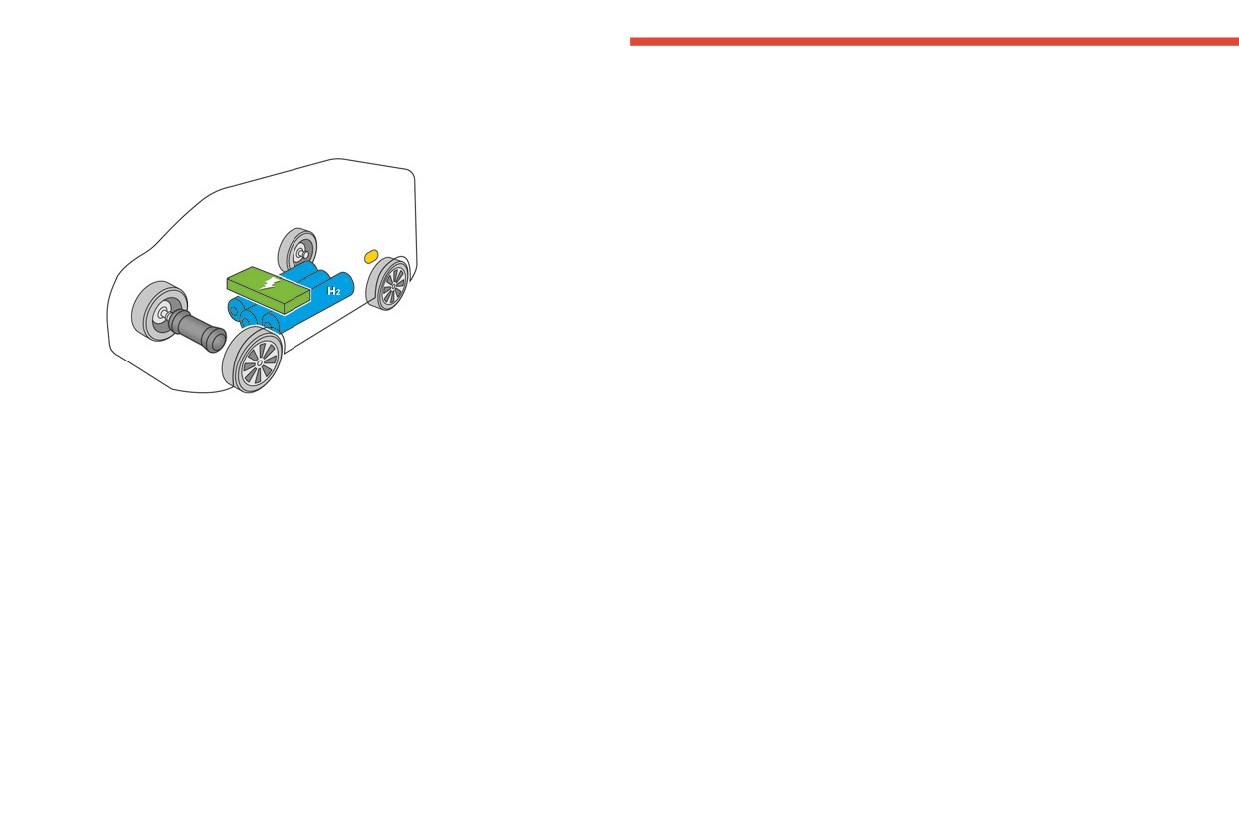
The fuel cell drivetrain contains of
Introduction
three subsystems:
Introduction
● The fuel cell system (1) located in
the engine compartment.
This Owner's Manual supplement
provides all the necessary
● The high voltage battery (2)
information about the fuel cell
located under the front seats.
version. It is only valid in combination
● The hydrogen tank system (3)
with the Owner's Manual for your
located under the load
vehicle and cannot be considered
compartment.
separately.
The hydrogen reacts in the fuel cell
with oxygen supplied from the
General information
ambient air. Water, heat and
The vehicle uses a mid-power
electrical energy emerge from this
hydrogen fuel cell system that is
reaction.
supported by a high voltage battery,
Water and excess air are released
in order to provide sufficient
through the exhaust, while the
autonomy.
electrical energy is used to provide
the electric motor with power.
Additionally to that, the high voltage
battery can be charged via a charging
port in order to guarantee sufficient
autonomy in case of an empty
hydrogen level. Electric energy is also
provided by regenerative braking.
CarManuals2.co
8
Seats, restraints
Seats, restraints
Child restraints
Child restraint installation
locations
Child restraints
8
Child restraint installation
As required by European regulations,
locations
8
this table gives the options for
installing child seats secured using
the seat belt and universally
approved as well as the larger ISOFIX
and i-Size child seats on seat
positions equipped with ISOFIX
mountings in the vehicle.
Yes : Suitable for fitment of the
designated catecory of the
child restraint system.
No
: Not suitable for fitment of the
designated catecory of the
child restraint system.
CarManuals2.co

Seats, restraints
9
Permissible options for fastening a child restraint system with a three-point seat belt
Front passenger seat with activated
Front passenger seat with
Child restraint system categories
airbag ON
deactivated airbag OFF
Universal belted child restraint system 1)
Yes 2) 3)
Yes 2) 4)
i-size child restraint system
NO
NO
Position equipped with a Top-tether fixing
NO
NO
Carry-cot (ISOFIX lateral facing child restraint
NO
NO
system)
ISOFIX child restraint fixture: L1, L2
ISOFIX rearward facing child restraint system
NO
NO
ISOFIX forward facing child restraint system
NO
NO
Booster seat - full width: B3
Yes 2) 5) 6)
NO
1)
Universal child seat: chiId seat that can be installed in all vehicles using the seat belt. Applies to all stature and mass groups.
2)
For a seat with height adjustment, set it to the highest and fully back longitudinal position.
3)
Only a forward facing child restraint system is authorised at this seat position with the front passenger's airbag activated ON.
4)
To install a rearward facing child restraint system at this seat position, the front passenger's airbag must be deactivated OFF.
5)
Seat not fitted with ISOFIX compliant mountings.
6)
Set the headrest to the lowest position.
CarManuals2.co
10
Instruments and controls
Warning lights, gauges
Hydrogen gauge
Instruments and
and indicators
controls
Instrument cluster
Warning lights, gauges and indi-
cators
10
Instrument cluster
10
Hydrogen gauge
10
Hydrogen leakage
11
Fuel cell system fault
11
Displays
11
Driver Information Centre
11
Overview
Displays the hydrogen level in the
tank.
u Hydrogen leakage 3 11
If the control indicator 2 illuminates
v Fuel cell system fault 3 11
yellow, refuel the tank immediately.
w 2 Low hydrogen level 3 10
If additionally the charging level of the
high voltage battery is too low,
M
illuminates yellow.
Refueling 3 15.
Charging 3 14.
CarManuals2.co
Instruments and controls
11
After refuelling or charging, the range
Hydrogen leakage
Displays
is updated automatically after a brief
u illuminates red together with
C
delay.
and a warning message is displayed
Driver Information Centre
in the Driver Information Centre.
Trip / information menus
Combined autonomy information
A hydrogen leak has been detected.
menu
Differerent pages with combined
Do not park or transport the vehicle
information can be selected.
indoors, such as a garage or the like.
Information page
9 Warning
Have the cause of the fault
remedied immediately by a
workshop.
Fuel cell system fault
v and
C
are illuminated yellow
and a warning message is displayed
in the Driver Information Centre.
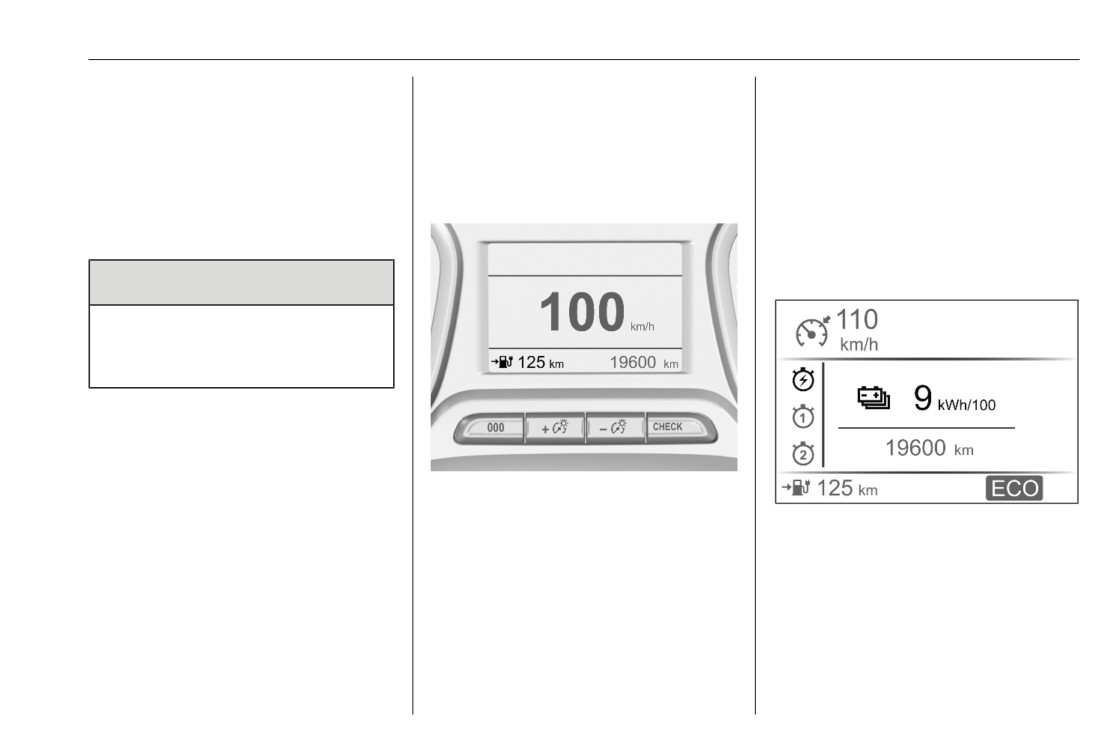
The combined autonomy (fuel cell
The range of the vehicle might be
system and high voltage battery) of
reduced. In order to enable the
the vehicle is shown in this menu.
continuation of the journey, the high
Instantaneous consumption
The autonomy is calculated from
voltage battery will be used.
current hydrogen level, the charging
Display of the instantaneous
Therefore, ensure that the charging
level of the high voltage battery and
consumption of combined energy
level of the high voltage battery is high
from the current consumption. The
(fuel cell and high voltage battery).
enough.
display shows average values.
Odometer
Seek the assistance of a workshop.
The recorded overall distance.
Charging 3 14.
CarManuals2.co
12
Instruments and controls
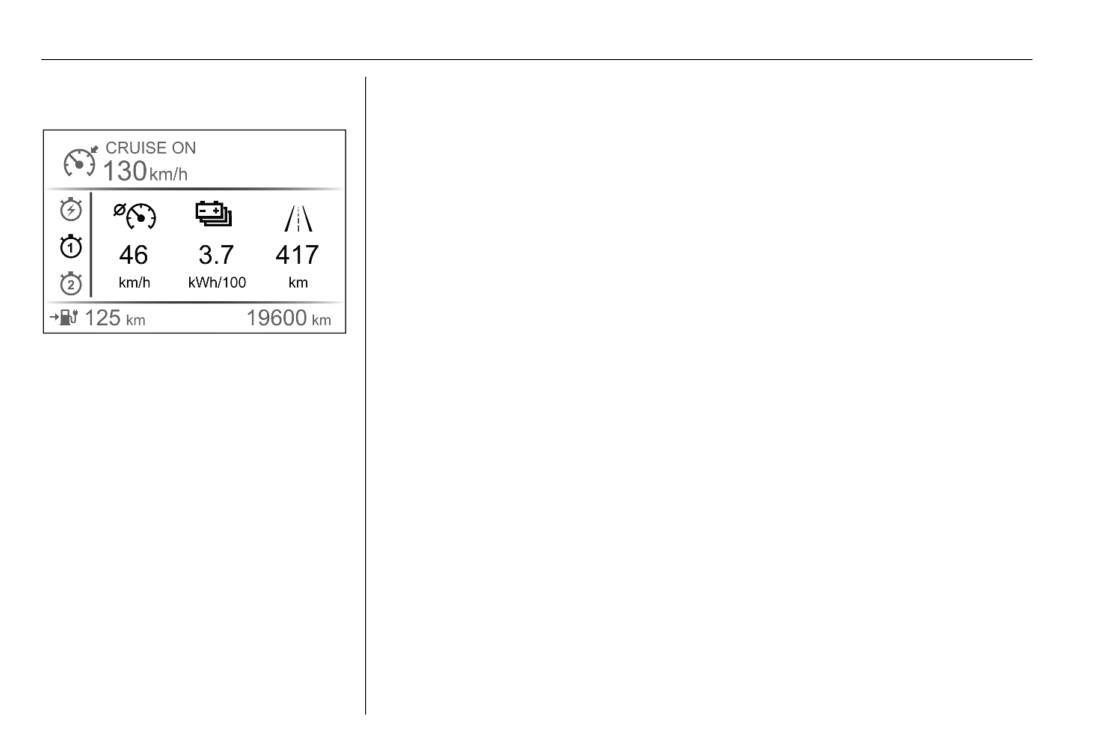
Trip pages
To reset, press 000 for a few seconds.
Average speed
Display of average speed.
Average consumption
Display of the average consumption
of combined energy (fuel cell and high
voltage battery). After a reset it starts
with a default value.
Trip odometer
The recorded distance since the
reset.
CarManuals2.co
Driving and operating
13
Driving and
Starting and operating
Driver assistance
systems
operating
Starting the engine
Note
Parking assist
The operating temperature of the
Note
Starting and operating
13
vehicle is between -20 °C and +50
If a coupling ball bar is attached to
Starting the engine
13
°C.
the vehicle, the detection zone of the
Parking
13
Vehicle operation is restricted to this
parking sensors is disturbed and
Driver assistance systems
13
ambient temperature range.
they do not operate properly.
Parking assist
13
Deactivate the parking assist
Parking
Charging
14
everytime a coupling ball bar is
General information
14
Note
attached to the vehicle.
Fuel
14
Please note that the vehicle may
Hydrogen
14
emit noises after the engine has
Refuelling
15
been switched off. This is normal
and does not indicate any damage.
CarManuals2.co
14
Driving and operating
Charging
Fuel
General information
Hydrogen
Electric power consumption and
range
Type 2 plug or outlet used for AC
The electric power consumption and
charging
the vehicle's range by using only the
high voltage battery were not
Note
available at time of printing.
The system does not allow the
Only use hydrogen fuel that complies
For the values specific to your
simultaneous refuelling and
with European standards DIN EN
vehicle, refer to the EEC Certificate of
charging of the vehicle.
17124 or ISO 14687 or equivalent.
Conformity provided with your vehicle
or other national registration
documents.
The determination of electric power
consumption is regulated by directive
R (EC) No. 715/2007 and No.
2017/1151 (in the latest applicable
version).
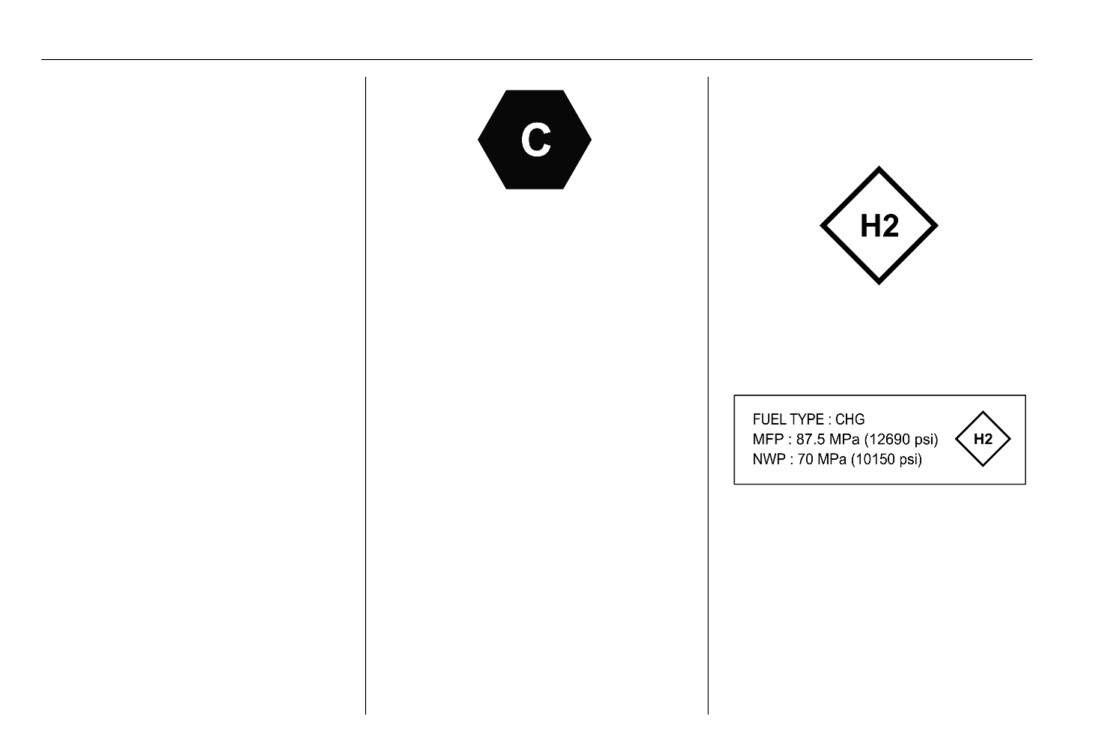
A label with symbols at the fuel filler
flap is indicating the allowed
Charging
hydrogen fuel type, as well as the
maximum fueling pressure (MFP) and
In order to ensure the compatibility of
the nominal working pressure (NWP).
plug and outlet, different labels are
used. The labels are located on the
In Europe the pump nozzles of the
inside of the vehicle's charging port
filling stations are marked with these
flap. Make sure to connect only a
symbols. Refuel only the allowed fuel
cable of the same type.
type.
CarManuals2.co
Driving and operating
15
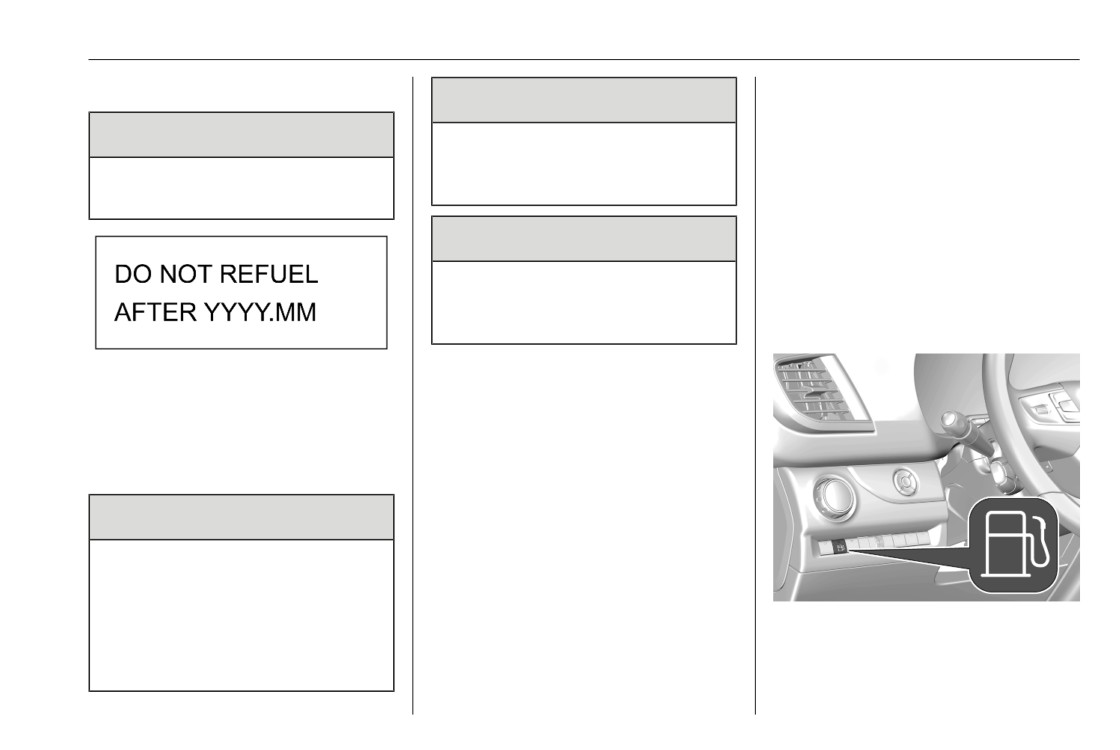
Expiring date hydrogen tanks
Before refuelling
9 Danger
In order to start the refuelling,
9 Danger
Never refuel the vehicle after an
following preconditions must be
accident. Seek the assistance of a
fullfilled:
Never refuel the hydrogen tanks
workshop.
● The vehicle is stationary.
after the indicated expiring date.
● The ignition is switched off.
9 Warning
● The parking brake is applied.
● The gear selector is in position
Only use fueling stations which
P.
comply with the fueling standard
SAE J2601 or EN 17127.
Refuelling
Note
The expiring date of the hydrogen
The system does not allow the
tanks is indicated on a label located
simultaneous refuelling and
on the inside of the fuel filler flap.
charging of the vehicle.
Note
Refuelling
Once refuelling has been enabled by
the system, the refuelling of the
9 Danger
vehicle must be started within five
minutes. If this time has been
Before refuelling, switch off
expired, the refuelling process is
ignition and any external heaters
cancelled.
with combustion chambers.
In this case, close the fuel filler flap,
Follow the operating and safety
1. Press r. The system performs a
if it has been opened before, and
instructions of the filling station
start refueling process again.
check of the preconditions. This
when refuelling.
may take up to 30 seconds. If the
preconditions have been fullfilled,
CarManuals2.co
16
Driving and operating
the fuel filler flap is then unlocked
and a message is displayed in the
Driver Information Centre.
3. Remove the fuel filler cap and
refuel the vehicle by following the
instructions given by the filling
station.
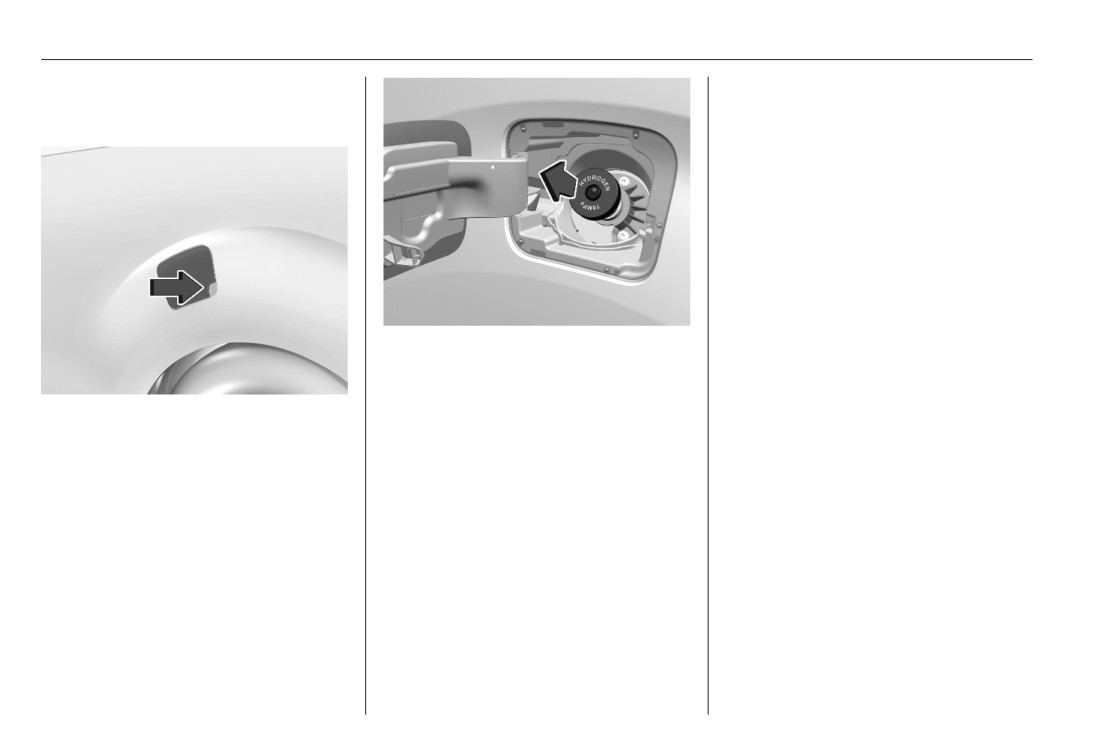
2. Open the fuel filler flap by pulling
on the right bottom corner.
4. After refuelling, reinsert the fuel
filler cap, close the fuel filler flap
Note
and allow it to engage.
If the fuel filler flap has been closed
again by mistake, it has to be re-
Note
opened within one minute, otherwise
The fuel filler flap must be properly
the refueling process needs to be
closed, otherwise the system will not
started again.
allow the vehicle to move off.
The fuel filler flap is located at left
rear side of the vehicle.
CarManuals2.co
Vehicle care
17
Vehicle care
Vehicle checks
Fuel cell system coolant
Vehicle checks
17
Coolant level
Fuel cell system coolant
17
Engine coolant
17
Caution
Electrical system
18
Fuses
18
The coolant reservoir may contain
Engine compartment fuse box ... 19
traces of hydrogen which is
normal.
Vehicle tools
20
Tools
20
Using the wrong coolant can
cause severe damages to the fuel
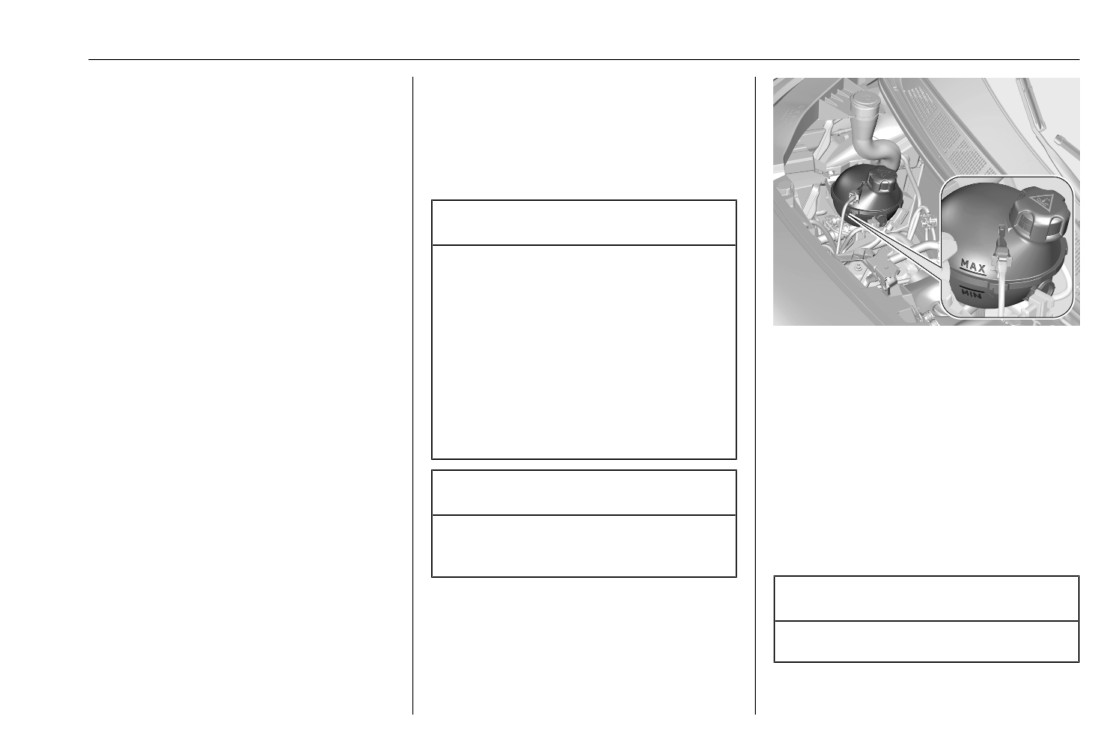
If the cooling system is cold, the
Wheels and tyres
21
cell system. Only trained service
coolant level should be above the
Spare wheel
21
personnel are allowed to open the
MIN mark. If the cooling level is too
Jump starting
21
coolant reservoir and to top up
low, seek the assistance of a
coolant.
workshop.
Engine coolant
Caution
The factory filled coolant provides
A too low coolant level can cause
freeze protection down to approx.
damage to the fuel cell system.
-37 °C.
Caution
Only use approved antifreeze.
CarManuals2.co
18
Vehicle care
Coolant level
Electrical system
9 Warning
Caution
Allow the engine to cool before
Fuses
opening the cap. Carefully open
Data on the replacement fuse must
A too low coolant level can cause
the cap, relieving the pressure
match the data on the defective fuse.
engine damage.
slowly.
There is a fuse box in the engine
compartment.
To top up, use a 1:1 mixture of
Before replacing a fuse, turn off the
released coolant concentrate mixed
respective switch and the ignition.
with clean tap water. If no coolant
concentrate is available, use clean
A blown fuse can be recognised by its
tap water. Install the cap tightly. Have
melted wire.
the coolant concentration checked
and have the cause of the coolant
Caution
loss remedied by a workshop.
Do not replace the fuse until the
cause of the fault has been
remedied.
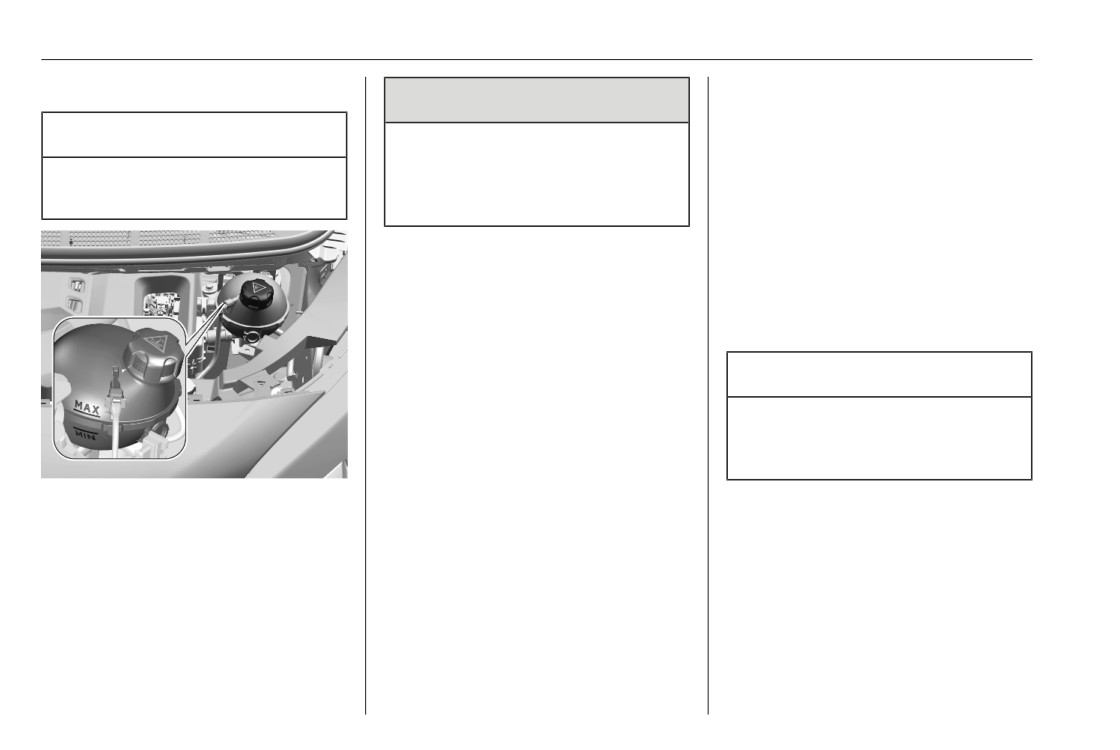
If the cooling system is cold, the
Some functions are protected by
coolant level should be above the
several fuses.
MIN mark. Top up if the level is low.
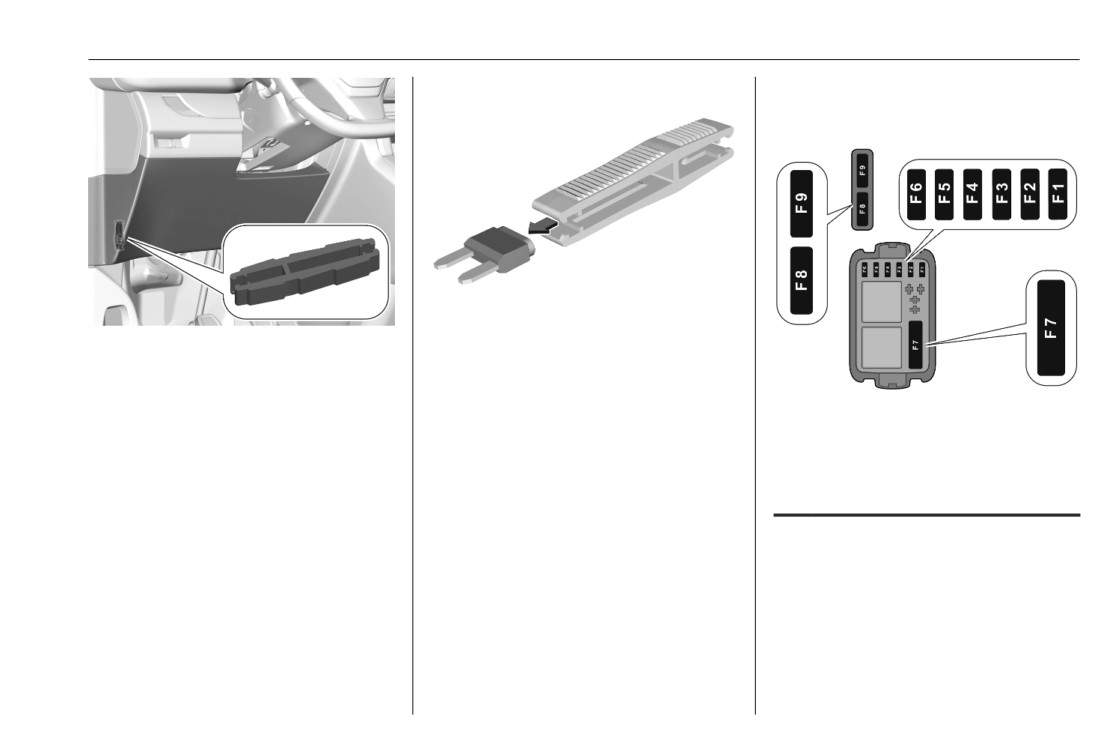
Fuses may also be inserted without
existence of a function.
Fuse extractor
A fuse extractor may be located
behind the passenger compartment
fuse box cover:
CarManuals2.co
Vehicle care
19
Engine compartment fuse
box
Unclip the cover by pulling at the top
Grab the fuse with the fuse extractor
left, then right. Disengage the cover
and withdraw the fuse.
completely and turn it over.
The extractor has two sides, each
The fuse box is in the front left of the
side is designed for a different type of
engine compartment.
fuses.
Disengage the cover and remove it.
No. Circuit
1
Fuel flap / DCDC converter
2
Three way valve
3
Fuel cell system
4
Fuel cell propulsion system
controller
CarManuals2.co
20
Vehicle care
No. Circuit
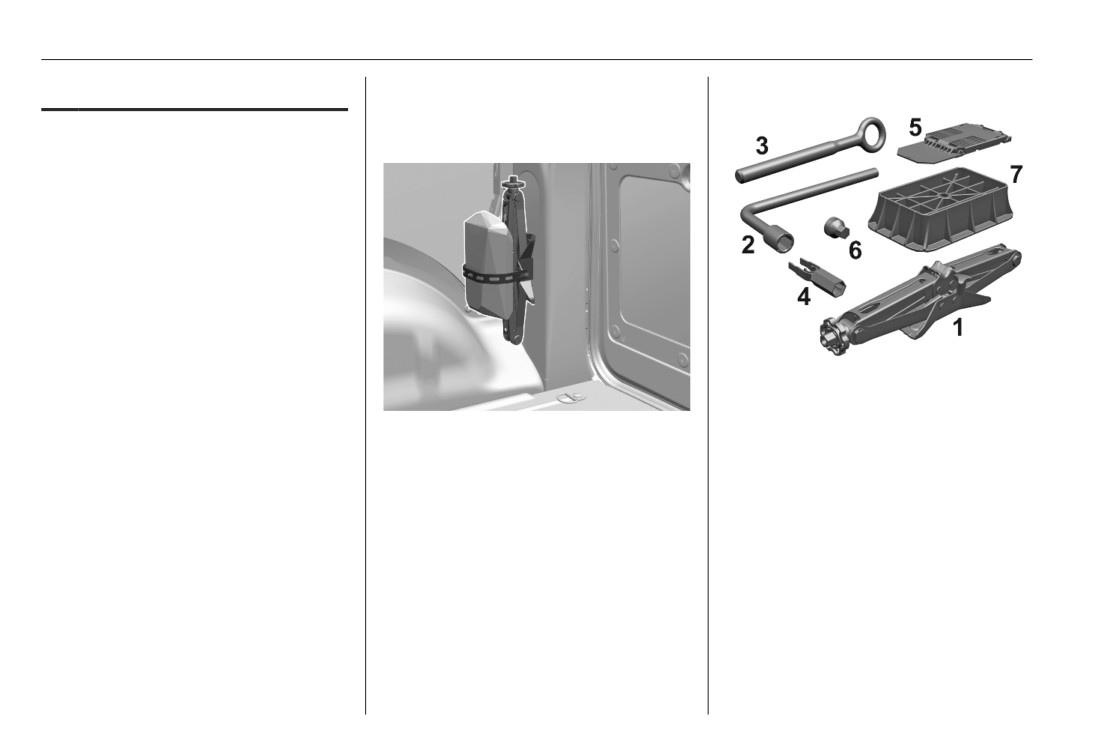
Vehicles with spare wheel
Vehicle tools
5
Fuel cell propulsion system
Tools
controller
6
H2 sensors
7
Main fuse
8
High temperature pump
9
Relays / RDI sensor / Refuel
button
After having changed defective fuses,
close the fuse box cover and lock it.
If the fuse box cover is not closed
●
Jack (1)
correctly, malfunction may occur.
●
Wheel wrench (2)
The tools are located in the load
●
Towing eye (3)
compartment.
●
Wheel bolt cover remover (4)
●
Chock (5)
●
Adapter for the locking wheel
nuts (6)
●
Jack base (7)
Vehicles without spare wheel
The bag contains the tyre repair kit
and is located behind the driver's
seat.
CarManuals2.co
Vehicle care
21
Wheels and tyres
Jump starting
9 Warning
Spare wheel
Do not start with quick charger.
Avoid contact of the battery with
A vehicle with a discharged vehicle
eyes, skin, fabrics and painted
battery can be started using jump
surfaces. The fluid contains
leads and the vehicle battery of
sulphuric acid which can cause
another vehicle.
injuries and damage in the event
of direct contact.
Caution
●
Never expose the vehicle battery
Never jump start another vehicle
to naked flames or sparks.
with an electric vehicle.
●
A discharged vehicle battery can
already freeze at a temperature
of 0 °C. Defrost the frozen battery
9 Warning
before connecting jump leads.
Be extremely careful when starting
●
Wear eye protection and
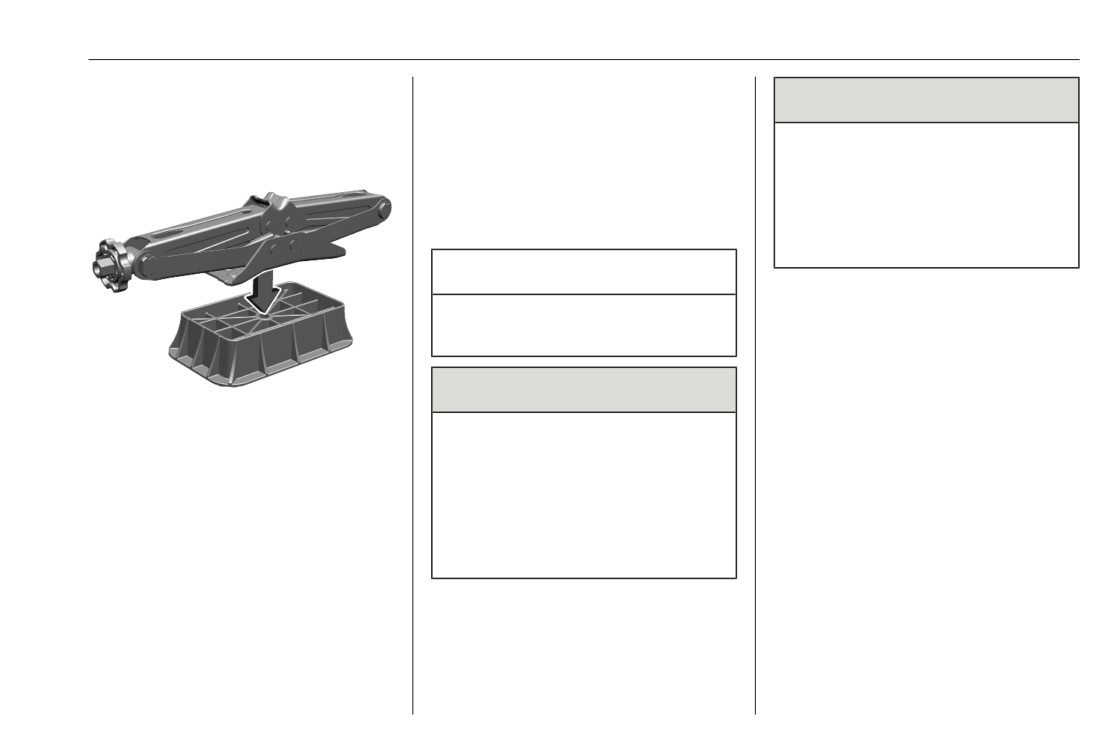
In order to use the jack properly, place
with jump leads. Any deviation
protective clothing when
it first on the jack base before lifting
from the following instructions can
handling a battery.
the vehicle.
lead to injuries or damage caused
●
Use a booster battery with the
by battery explosion or damage to
same voltage (12 V). Its capacity
the electrical systems of both
(Ah) must not be much less than
vehicles.
that of the discharged vehicle
battery.
●
Use jump leads with insulated
terminals and a cross section of
at least 16 mm2 (25 mm2 for
diesel engines).
CarManuals2.co
22
Vehicle care
●
Do not disconnect the discharged
Disengage the cover of the fuse box
vehicle battery from the vehicle.
in the engine compartment to access
the positive terminal of the vehicle
●
Switch off all unnecessary
battery.
electrical consumers.
Lead connection order:
●
Do not lean over the vehicle
battery during jump starting.
1. Connect the red lead to the
positive terminal (1) of the booster
●
Do not allow the terminals of one
battery.
lead to touch those of the other
lead.
●
The vehicles must not come into
contact with each other during
the jump starting process.
4. Connect the other end of the black
●
Apply the parking brake,
lead to the vehicle grounding point
transmission in neutral,
(4) of your vehicle in the engine
automatic transmission in P.
compartment.
Route the leads so that they cannot
catch on rotating parts in the engine
compartment.
To start the engine:
2. Connect the other end of the red
1. Start the engine of the vehicle
lead to the positive terminal (2) of
providing the jump.
the discharged battery.
2. After 5 minutes, start the other
3. Connect the black lead to the
engine. Start attempts should be
negative terminal (3) of the
made for no longer than 15
booster battery.
seconds at an interval of 1 minute.
CarManuals2.co
Vehicle care
23
3. Allow both engines to idle for
approx. three minutes with the
leads connected.
4. Switch on electrical consumers
e.g. headlights, heated rear
window of the vehicle receiving
the jump start.
5. Reverse above sequence exactly
when removing leads.
CarManuals2.co
24
Service and maintenance
Service and
General information
maintenance
Service information
The service interval for the fuel cell
vehicle is 15,000 km or one year,
General information
24
whichever comes first.
Service information
24
CarManuals2.co
Technical data
25
Technical data
Vehicle data
26
Engine data
26
Capacities
26
Tyre pressures
26
CarManuals2.co

26
Technical data
Vehicle data
Engine data
Fuel cell vehicle
Engine power [kW]
100
Fuel cell power [kW]
45
Fuel type
Hydrogen
Combined range (high voltage battery and fuel cell)
approx. 400 km
Capacities
Hydrogen tanks
Hydrogen, refilling quantity [kg]
4.4
High voltage battery
Battery capacity [kWh]
10.5
The tyre pressure information label
Tyre pressures
indicates the original equipment tyres
Regarding tyre pressures for a
and the correspondent tyre
specific vehicle, refer to the tyre
pressures.
pressure information label on the B-
pillar.
CarManuals2.co

Technical data
27
Increased payload
Vehicle with up to 3 people
With full load
Tyres
front
rear
front
rear
[kPa/bar] ([psi])
[kPa/bar] ([psi])
[kPa/bar] ([psi])
[kPa/bar] ([psi])
215/65 R16
300/3.0 (44)
300/3.0 (44)
300/3.0 (44)
370/3.7 (54)
215/60 R17
300/3.0 (44)
300/3.0 (44)
300/3.0 (44)
370/3.7 (54)
CarManuals2.co