Citroen C3 Picasso (2016 year). Manual - part 9
 

  Index      Citroen     Citroen C3 Picasso - service manual 2016 year in english


Search            


Content   ..  7  8  9  10   ..


Citroen C3 Picasso (2016 year). Manual - part 9


9

Driving

127

C3Picasso_en_Chap09_conduite_ed01-2015

Electronic gearbox

Six-speed electronically controlled gearbox 
which offers a choice between the comfort of 
fully automatic operation or the pleasure of 
manual gear changing.
There are two driving modes:

automated mode for automatic control 
of the gears by the gearbox, without any 
action on the part of the driver

manual mode for sequential gear changing 
by the driver using the gear selector or the 
steering mounted paddles.

In automated mode, you can temporarily take 
over control of gear changing.

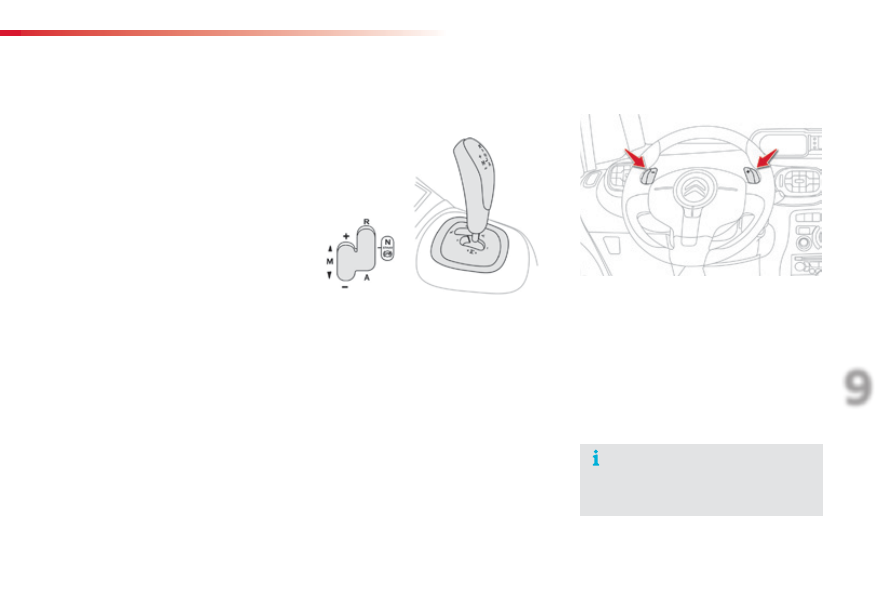
Gear selector positions

R. Reverse
F  With your foot on the brake, move the gear 

slector forwards to select this position.

N. Neutral.
F  With your foot on the brake, select this 

position to start.

A.  Automated mode.
F

  Move the selector backwards to select this 

mode.

M + / -. 

 Manual mode with sequential gear 
changing.

F

  Move the selector backwards then to the 

left to select this mode, then:
●  give a push forwards to change up,
●  or give a push rearwards to change 

down.

+.

  Paddle to the right of the steering wheel for 

changing up.

F  Press the back of the "+" steering mounted 

paddle to change up a gear.

-.

  Paddle to the left of the steering wheel for 

changing down.

F  Press the back of the "-" steering mounted 

paddle to change down a gear.

Steering mounted control paddles

The steering mounted paddles cannot 
be used to select neutral or to engage 
or disengage reverse gear.

Driving

128

C3Picasso_en_Chap09_conduite_ed01-2015

Display in the instrument panel

N. Neutral
R. Reverse
1, 2, 3, 4, 5, 6. Gears in manual mode.
AUTO.


 This comes on when the automated 
mode is selected. It switches off on 
changing to manual mode.

Moving off

F  Select position N.
F

  Press the brake pedal down fully.

F  Start the engine.

N appears in the instrument panel 
screen.

F  Select automated mode (position A) or 

manual mode (position M) or reverse 
(position R).

AUTO and 11 or R appear in the instrument 
panel screen.
F  Release the parking brake.
F  Progressively take your foot off the brake 

pedal.

F

  Accelerate away.

Automated mode

F  Select position A.

AUTO and the gear engaged appear 
in the instrument panel screen.

The gearbox operates in auto-active mode, 
without any action on the part of the driver. It 
continuously selects the most suitable gear for:

optimisation of fuel consumption,

the style of driving,

the profile of the road.

the vehicle load.

For optimum acceleration, for example 
when overtaking another vehicle, press the 
accelerator pedal firmly past the point of 
resistance.

Do not press the brake and accelerator 
pedals at the same time. There would 
be a risk of rapid wear of the clutch.

Never select neutral N

 when driving.

If the engine does not start:
- If 

N flashes in the instrument 

panel, move the gear selector to 
position A, then to position N.

If the message "Foot on the 
brake
" is displayed in the screen, 
accompanied by an audible signal, 
press the brake pedal firmly.

You can change mode at any time by 
moving the gear selector from A to M or 
the other way round.

9

Driving

129

C3Picasso_en_Chap09_conduite_ed01-2015

F  Select position M.

To engage reverse gear R, the vehicle must be 
immobilised with your foot on the brake pedal.
F  Select position R.

At very low speed, if reverse gear is requested, 
this will only be acted on when the vehicle is 
immobilised.
At high speed, if reverse gear is requested, 
the N

 indicator flashes and the gearbox goes 

into neutral. To engage a gear again, put the 
gear selector into position A or M.

Temporary control of gear 
changing

You can temporarily take over control of 
gear changing using the "+" and "-" steering 
mounted paddles: if the engine speed allows, 
the request to change gear is acted on.
This function allows you to anticipate certain 
situations such as overtaking a vehicle or the 
approach to a corner.
After a few moments without any action on 
the control paddles, the gearbox resumes 
automatic control of the gears.

The gears engaged appear in 
succession in the instrument panel 
screen.

The gear change requests are only acted on if 
the engine speed permits.
It is not necessary to release the accelerator 
during gear changes.
When braking or slowing down, the gearbox 
changes down automatically to allow the 
vehicle to accelerate in the correct gear.
On sharp acceleration, the gearbox will not 
change up unless the driver acts on the gear 
selector or the steering mounted paddles.

Never select neutral N

 while the vehicle 

is moving.

You can change mode at any time, be 
moving the gear selecto from M to A or 
the other way round.

Engagement of reverse gear is 
accompanied by an audible signal.

Manual mode

Reverse

Driving

130

C3Picasso_en_Chap09_conduite_ed01-2015

Stopping the vehicle

Operating fault

With the ignition on, the flashing of AUTO
accompanied by an audible signal and a 
message in the screen, indicates a malfunction 
of the gearbox.
Have it checked by a CITROËN dealer or a 
qualified workshop.

In all cases when parking, you must 
apply the parking brake
 to immobilise 
the vehicle.

When immobilising the vehicle, with 
the engine running, you must place the 
gear selector in neutral N.

Before carrying out any work in the 
engine compartment, ensure that the 
gear selector is in neutral N and that the 
parking brake is applied.

Before switching off the engine, you can:

move to position N to engage neutral,

 or
-  leave the gear engaged; in this case, it will 

not be possible to move the vehicle.

9

Driving

131

C3Picasso_en_Chap09_conduite_ed01-2015

Gear shift indicator*

Operation

The system intervenes only when driving 
economically.
Depending on the driving situation and your 
vehicle's equipment, the system may advise 
you to skip one or more gears. You can 
follow this instruction without engaging the 
intermediate gears.
The gear engagement recommendations must 
not be considered compulsory. In fact, the 
configuration of the road, the amount of traffic 
and safety remain determining factors when 
choosing the best gear. Therefore, the driver 
remains responsible for deciding whether or not 
to follow the advice given by the system.
This function cannot be deactivated.

Example:

The information appears in the instrument 
panel in the form of an arrow accompanied by 
the suggested gear.

You press the accelerator pedal 
moderately.

The system may suggest that you engage 
a higher gear, if appropriate.

In the case of driving which makes 
particular demands on the performance 
of the engine (firm pressure on the 
accelerator pedal, for example, when 
overtaking...), the system will not 
recommend a gear change.
The system never suggests:

engaging first gear,

engaging reverse gear,

-  engaging a lower gear.

System which reduces fuel consumption by advising the driver to change up.

* Depending on engine.

You are in third gear.

With an electronic gearbox, the system 
is only active in manual mode.

Driving

132

C3Picasso_en_Chap09_conduite_ed01-2015

Hill start assist (with 

electronic gearbox)

System which holds your vehicle temporarily 
(approximately 2 seconds) when starting on a 
slope, the time it takes to move your foot from 
the brake pedal to the accelerator pedal.
This function is only active when:
-  the vehicle is completely stationary, with 

your foot on the brake pedal,

certain conditions on a slope are met,

-  with the driver’s door closed.
The hill start assist function cannot be 
deactivated.

On an ascending slope, with the vehicle 
stationary, the vehicle is held momentarily 
when you release the brake pedal:

provided you are in automated mode 
(position A) or in manual mode (position M
with an electronic gearbox.

On a descending slope, with the vehicle 
stationary and reverse gear engaged, the 
vehicle is held momentarily when you 
release the brake pedal.

Operating fault

If a malfunction of the system occurs, these 
warning lamps come on. Contact a CITROËN 
dealer or a qualified workshop to have the 
system checked.

Do not leave the vehicle while it is being 
held in the hill start assist phase.
If you need to leave the vehicle with 
the engine running, manually apply 
the parking brake then ensure that the 
parking brake warning lamp is on (not 
flashing) in the instrument panel.

Operation

9

Driving

133

C3Picasso_en_Chap09_conduite_ed01-2015

Speed limiter

The controls of this system are grouped 
together on stalk A.
1.

  Speed limiter mode selection thumb wheel.

2.  Value decrease button.
3.  Value increase button.
4.  Speed limiter on / off button.

The programmed information is grouped 
together in the instrument panel screen.
5.  Speed limiter on / off indication.
6.  Speed limiter mode selection indication.
7.  Programmed speed value.

Steering mounted controls

Displays in the instrument panel

The speed limiter is switched on manually: 
it requires a programmed speed of at least 
20 mph (30 km/h).

The speed limiter is switched off by manual 
operation of the control.

The programmed speed can be exceeded 
temporarily by pressing the accelerator firmly.
To return to the programmed speed, simply 
slow down to a speed below the programmed 
speed.

The programmed speed remains in the memory 
when the ignition is switched off.

The speed limiter cannot, in any circumstances, 
replace the need to respect speed limits, nor can it 
replace the need for vigilance on the part of the driver.

System which prevents the vehicle from 
exceeding the speed programmed by the driver.
When the programmed speed limit is reached, 
pressing the accelerator pedal in the normal 
manner no longer has any effect.

Driving

134

C3Picasso_en_Chap09_conduite_ed01-2015

Programming

F

  Turn thumb wheel 1 to the "LIMIT" 

position: the speed limiter mode 
is selected but is not switched on 
(PAUSE).

You do not have to switch the speed limiter 
on in order to set the speed.

Exceeding the programmed speed

Pressing the accelerator pedal to exceed the programmed speed will not have 
any effect unless you press the pedal firmly past the point of resistance.
The speed limiter is deactivated temporarily and the programmed speed, 
which is still displayed, flashes.
Returning to the programmed speed, by means of intentional or unintentional 
deceleration of the vehicle, automatically cancels the flashing of the 
programmed speed.

Leaving limiter mode

F

  Turn thumb wheel 1 to the "0" position: the speed limiter mode is 

deselected. The display returns to the distance recorder.

Operating fault

In the event of a speed limiter fault, the speed 
is cleared resulting in flashing of the dashes.
Have it checked by a CITROËN dealer or a 
qualified workshop.

F  Set the speed value by pressing button 2 or 3 (e.g.: 55 mph 

(90 km/h)).

You can then change the programmed speed using buttons 2 and 3:

by + or - 1 mph (km/h) = short press,

by + or - 5 mph (km/h) = long press,

in steps of + or - 5 mph (km/h) = maintained press.

F

  Switch the speed limiter on by pressing button 4.

F

  Switch the speed limiter off by pressing button 4: the display 

confirms that it has been switched off (PAUSE).

F

  Switch the speed limiter back on by pressing button 4 again.

On a steep descent or in the event of 
sharp acceleration, the speed limiter 
will not be able to prevent the vehicle 
from exceeding the programmed speed.
To avoid any risk of jamming of the 
pedals:

ensure that the mat is secured 
correctly,

do not fit one mat on top of another.

9

Driving

135

C3Picasso_en_Chap09_conduite_ed01-2015

System which automatically maintains the 
speed of the vehicle at the value programmed 
by the driver, without any action on the 
accelerator pedal.

The controls of this system are grouped 
together on control stalk A.

The programmed information is grouped 
together in the instrument panel screen.

Steering mounted controls

Displays in the instrument panel

The cruise control is switched on manually: it 
requires a minimum vehicle speed of 25 mph 
(40 km/h) and the engaging of at least 4th gear.

The cruise control is switched off manually 
or by pressing the brake or clutch pedal or 
on triggering of the ESP system for safety 
reasons.

It is possible to exceed the programmed speed 
temporarily by pressing the accelerator pedal.
To return to the programmed speed, simply 
release the accelerator pedal.
Switching off the ignition cancels any 
programmed speed value.

1.

  Cruise control mode selection thumb whee;

2.  Speed programming / value decrease 

button

3.  Speed programming / value increase 

button

4.  Cruise control off / resume button

5.  Cruise control off / resume indication
6.  Cruise control mode selection indication
7.  Programmed speed value

The cruise control cannot, in any circumstances, 
replace the need to respect speed limits, nor can it 
replace the need for vigilance on the part of the driver.

Cruise control

Driving

136

C3Picasso_en_Chap09_conduite_ed01-2015

Programming

F  Turn dial 1 to the "CRUISE" position: 

the cruise control mode is selected 
but is not switched on (PAUSE).

Exceeding the programmed speed

Intentional or unintentional exceeding of the programmed speed results in 
flashing of this speed in the screen.
Return to the programmed speed, by means of intentional or unintentional 
deceleration of the vehicle, automatically cancels the flashing of the speed.

Return to normal driving

F  Turn dial 1 to the "0" position: the cruise control mode is 

deselected. The display returns to the distance recorder.

Operating fault

In the event of a cruise control malfunction, 
the speed is cleared resulting in flashing of the 
dashes.
Have it checked by a CITROËN dealer or a 
qualified workshop.

F  Set the programmed speed by 

accelerating to the required speed, 
then press button 2 or 3 (e.g.: 70 mph 
(110 km/h)).

F

  Switch off the cruise control by pressing button 4

this is confirmed in the screen (PAUSE).

F

  Switch the cruise control back on by pressing button 4 again.

You can then change the programmed speed using buttons 2 and 3:

by + or - 1 mph (km/h) = short press,

by + or - 5 mph (km/h) = long press,

in steps of + or - 5 mph (km/h) = maintained press.

When the cruise control is switched on, 
be careful if you maintain the pressure 
on one of the programmed speed 
changing buttons: this may result in a 
very rapid change in the speed of your 
vehicle.
Do not use the cruise control on 
slippery roads or in heavy traffic.
On a steep descent, the cruise control 
will not be able to prevent the vehicle 
from exceeding the programmed speed.
To avoid any risk of jamming of the 
pedals:

ensure that the mat is secured 
correctly,

never fit one mat on top of another.

9

Driving

137

C3Picasso_en_Chap09_conduite_ed01-2015

Rear parking sensors

System comprising four proximity sensors, located in the rear bumper.

This detects obstacles (person, vehicle, tree, 
gate, etc.) behind the vehicle. However, it 
cannot detect obstacles located just below the 
bumper.

Activation

The system is activated as soon as reverse 
gear is engaged, accompanied by an audible 
signal. The proximity information is given by:
-  an audible signal, which becomes more 

rapid as the vehicle approaches the 
obstacle,

-  a graphic in the multifunction screen, with 

blocks which become increasingly closer to 
the vehicle (depending on version).

Detection zone

When the distance between the rear of the vehicle 
and the obstacle is less than thirty centimetres, the 
audible signal becomes continuous and the "Danger" 
symbol appears in the multifunction screen.
On completion of the manoeuvre, when you exit 
reverse gear, the system becomes inactive.

An object, such as a stake, a roadworks 
cone or any other similar object may 
be detected at the beginning of the 
manoeuvre, but may no longer be detected 
when the vehicle comes close to it.

The parking sensors system cannot in 
any circumstances replace the need for 
vigilance on the part of the driver.

Driving

138

C3Picasso_en_Chap09_conduite_ed01-2015

Deactivation

Reactivation

With the engine running, press button A to 
deactivate the system permanently. The 
indicator lamp in the button comes on.

The system will be deactivated 
automatically when towing a trailer or 
when a bicycle carrier is fitted (vehicle 
fitted with a towbar or bicycle carrier 
recommended by CITROËN).

In bad or wintry weather, ensure that 
the sensors are not covered with mud, 
frost or snow.

Press button A again to reactivate the system. 
The indicator lamp in the button goes off.
If there is an operating fault, when reverse gear 
is engaged, the service warning lamp comes 
on, accompanied by an audible signal (short 
beep) and a message in the multifunction 
screen.

9

Driving

139

C3Picasso_en_Chap09_conduite_ed01-2015

Reversing camera

A reversing camera is activated automatically 
when reverse gear is engaged.
The colour image is provided in the navigation 
screen.

The space between the blue lines represents the 
width of your vehicle except for the door mirrors.

The blue lines represent the general direction 
of the vehicle.
The red line represents a distance of about 
30 cm beyond the edge of your vehicle's 
rear bumper. The audible signal becomes 
continuous from this limit.
The green lines represent distances of about 1 
and 2 metres beyond the edge of your vehicle's 
rear bumper.

Clean the reversing camera regularly 
using a soft, dry cloth.

The reversing camera cannot in any 
circumstances be a substitute for 
vigilance on the part of the driver.

Checks

140

C3Picasso_en_Chap10_verification_ed01-2015

TOTAL & CITROËN

Partners in performance 
and protecting the  
environment

Innovation in the search for 
performance

For over 40 year, the TOTAL Research and 
Development departments have developed 
lubricants for CITROËN, to match the latest 
technical innovations on CITROËN vehicles, both for 
competition and for everyday motoring.
For you, this is an assurance that you will obtain the 
best performance from your engine.

Optimum protection for 
your engine

By having your CITROËN vehicle 
serviced with TOTAL lubricants, you are 
contributing towards improving the life 
and performance of your engine, while 
also protecting the environment.

10

Checks

141

C3Picasso_en_Chap10_verification_ed01-2015

Bonnet

F

  Push the exterior safety catch B to the left 

and raise the bonnet.

F  Unclip the stay C from its housing.
F

  Fix the stay in the notch to hold the bonnet 

open.

Closing

F  Take the stay out of the support notch.
F  Clip the stay in its housing.
F

  Lower the bonnet and release it at the end 

of its travel.

F  Pull on the bonnet to check that it is 

secured correctly.

F  Open the front left door.
F  Pull the interior bonnet release lever A

located at the bottom of the door aperture.

Opening

The location of the interior bonnet 
release lever prevents opening of the 
bonnet while the front left door is closed.

Do not open the bonnet in high winds.
When the engine is hot, handle the 
exterior safety catch and the bonnet 
stay with care (risk of burns).

Checks

142

C3Picasso_en_Chap10_verification_ed01-2015

Running out of fuel (Diesel)

If the engine does not start first time, 
don't keep trying but start the procedure 
again from the beginning.

On vehicles fitted with HDi engines, the fuel system must be primed if you run out of fuel.

BlueHDi engine

F

  Fill the fuel tank with at least five litres of 

Diesel.

F

  Switch on the ignition (without starting the 

engine).

F

  Wait around 6 seconds and switch off the 

ignition.

F  Repeat the operation 10 times.
F  Operate the starter to run the engine.


Content   ..  7  8  9  10   ..