Network Intrusions Responder Program (NITRO). Instructor Guide - page 14
XOR Process
Data Bit A
Data Bit B
Output
0
0
0
0
1
1
1
0
1
1
1
0
U.S. Department of
Homeland Security
United States
Secret Service
XOR Process
Compares each data bit in data to get XOR result or “parity
data”
Below is an example of how parity data is calculated:
Data A =
10100101
Data B =
11110000
Parity Data = 01010101
Data A, B, and parity data are on separate drives in RAID
Corrupt, missing data can be reconstructed using remaining
two drives through same XOR process.
U.S. Department of
Homeland Security
United States
Secret Service
ECC
Error Correction Code or Error Checking and Correcting (ECC)
looks for errors in data being read or transmitted
Unlike parity that resends faulty information, ECC attempts to
correct information
ECC uses mathematical code to describe each 64-bit word
and sends code with data
When data is about to be stored, code is regenerated
If match, data saved, if codes are different, original code used
to correct bits
U.S. Department of
Homeland Security
United States
Secret Service
RAID 0
RAID 0 implements striped disk array without mirroring, ECC,
or parity
Data simply placed across several drives allowing each drive
to read and write data at same time
Provides best efficiency and performance, but no fault
tolerance
U.S. Department of
Homeland Security
United States
Secret Service
RAID 1
RAID 1, also known as disk mirroring, writes same data to a
pair of hard drives
Cost 100% in overhead
Provides for best fault tolerance
U.S. Department of
Homeland Security
United States
Secret Service
RAID 3
RAID 3 implements striping small amounts of data across
several hard drives
One drive assigned to store parity information
Some RAID controller card manufacturers do not support this
type of architecture because a RAID 5 with small stripes yields
similar results
U.S. Department of
Homeland Security
United States
Secret Service
RAID 5
Implements striping large amounts of data across several hard
drives
Storage of parity bit is rotated throughout all attached drives
Requires minimum of three drives
Provides full fault tolerance
U.S. Department of
Homeland Security
United States
Secret Service
RAID 0+1
RAID 0+1 implements a mirrored array of RAID 0 drives
Minimum of four drives required
Offers excellent performance and fault tolerance
U.S. Department of
Homeland Security
United States
Secret Service
Logical Block Addressing
Process that assigns linear numbers to all sectors on a drive
Process extends drive’s storage capacity from normal 528MB
Older MBs’ BIOS types or operating systems may require LBA
to be translated into CHS geometry
Translation performed automatically if required
28-bit LBA supports a partition as large as 137GB
48-bit LBA theoretically supports a single drive with storage of
144 petabytes
U.S. Department of
Homeland Security
United States
Secret Service
Zoned Bit Recording
Reassigns sectors on disk according to physical size of track
Lessens wasted storage space on outer sections of hard drive
Data on small tracks near center of disk, written closer
together than data on larger outer tracks
Outermost tracks can contain more sectors per track than
smaller inner tracks
Drive controller can recognize the variable number of sectors
per track in different zones
Set during low-level format
U.S. Department of
Homeland Security
United States
Secret Service
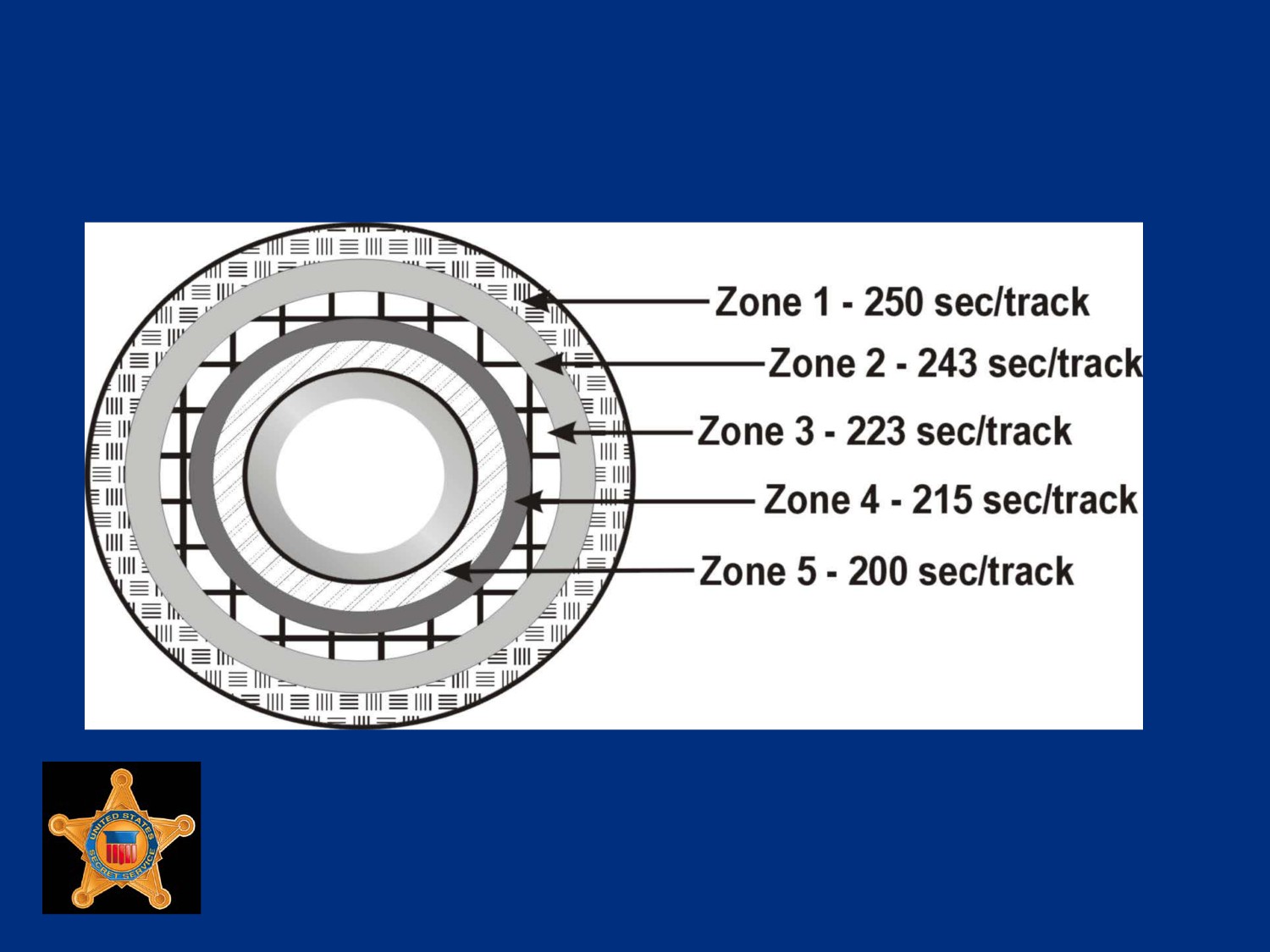
Hard Drive with Zoned Bit Recording
U.S. Department of
Homeland Security
United States
Secret Service
Perpendicular Recording
Perpendicular recording technology increases amount of
storage space on hard drive
Using perpendicular recording, manufacturers have produced
micro-drives with over 100GB of storage on a 1.8” drive, a
320GB 2.5” laptop drive, and a 3.5” drive with over 1 terabyte
of storage
Can increase storage density of a hard drive by almost ten
times compared to longitudinal recording
U.S. Department of
Homeland Security
United States
Secret Service
Perpendicular Recording
Perpendicular recording vertically records bits of a sector to a
hard drive
Stacking bits vertically increases amount of storage density
Allows more data to be stored with less risk of corruption
U.S. Department of
Homeland Security
United States
Secret Service
Hard Drive Formatting
A hard drive must be prepared before using it to store data
Preparation process involves two formatting steps (low-level
formatting and high-level formatting) with a partitioning step
between them
U.S. Department of
Homeland Security
United States
Secret Service
Low-level Formatting
Purpose of low-leveling formatting, also called physical
formatting, is to set drive geometry by first setting tracks and
then dividing them into sectors
U.S. Department of
Homeland Security
United States
Secret Service
Partitioning
To use a hard drive, it must be partitioned
On most newly purchased computers the original equipment
manufacturer (OEM) has partitioned drive as single partition
Partition designated as C: drive on system
Partitioning drive into multiple drives offers many benefits
U.S. Department of
Homeland Security
United States
Secret Service
Partitioning
Many ways to partition a drive
Operating systems provide the tools
MS-DOS uses FDISK utility
Windows XP uses Disk Management
Some distributions of Linux use Disk Druid
Interfaces look different but results are the same
U.S. Department of
Homeland Security
United States
Secret Service
Partitioning
Only two types of partitions: Primary and Extended
At least one primary partition required to boot computer from
hard drive
Extended partitions typically used for storing data and
applications
Extended partitions cannot be used to boot computer
U.S. Department of
Homeland Security
United States
Secret Service
Partitioning
Hard drives can support up to four primary partitions or three
primary partitions and one extended
The FDISK utility only recognizes one primary partition per
physical drive so DOS and Windows 9x/ME can only have one
primary partition per drive
Linux, Unix, Windows 2000, XP and Vista can all support four
primary partitions
U.S. Department of
Homeland Security
United States
Secret Service
Partitioning
Once primary partition is created, drive is ready for high-level
formatting
Extended partitions require one additional step before format
It must be further organized into logical drives which can be
accomplished with the same partitioning utilities mentioned
previously
Once partitions and logical drives are created high-level
formatting may be done
U.S. Department of
Homeland Security
United States
Secret Service
High-level Formatting
High-level formatting, also called logical formatting, is
performed by operating system
High-level formatting writes operating system-dependent file
structures to drive so it can manage and store data
Establishes boot record, file allocation table, and root directory
Process also scans disk for areas that are unable to store data
and marks and isolates them as bad sectors
U.S. Department of
Homeland Security
United States
Secret Service
MS-DOS FAT
MS-DOS, Windows 9x, and Windows ME make use of MS-
DOS-based FDISK utility
FDISK responsible for creation and deletion of partitions and
logical drives
Partitions cannot be altered easily once created
File Allocation Table (FAT) partitions cannot be resized without
use of third-party software
Original partitions must be deleted and new partitions created
U.S. Department of
Homeland Security
United States
Secret Service
FAT File System Characteristics
Each partition or logical drive contains a FAT
FAT manages a list of where files begin and end on drive
List is constantly updated with new information as files are
saved, deleted, renamed or moved
U.S. Department of
Homeland Security
United States
Secret Service
FAT File System Characteristics
Critical that list stay up to date and intact to allow operating
system to access files
So critical that latest backup copy of the FAT is saved in
another area on hard drive
Backup copy used to restore original if damaged or altered
U.S. Department of
Homeland Security
United States
Secret Service
FAT File System Characteristics
FAT16 used a 16-bit length number to identify various clusters
on a hard drive
Limited addressable capacity of a hard drive to 65,526
clusters, or 2GB of data
Using FAT16 on drives larger than 2GB requires partitioning
drive to fully use drive’s capacity
U.S. Department of
Homeland Security
United States
Secret Service
FAT File System Characteristics
FAT32 uses a 32-bit length number to identify all clusters on a
hard drive
Increase allows file system to address approximately
268,400,000 clusters, or approximately 2 terabytes of
information
U.S. Department of
Homeland Security
United States
Secret Service
FAT Drive Identification
FAT 16/32 systems can support up to two partition types per
hard drive
Types are primary and extended
Extended partition contains logical drives
Each primary partition and each logical drive within extended
partition, assigned a drive letter starting with C
When assigning drive letters, primary partitions take
precedence over logical drives
U.S. Department of
Homeland Security
United States
Secret Service
NTFS
Windows 2000 and Windows XP can operate in a FAT32 or
FAT16 environment, but default file system is NTFS
NTFS required to install Windows Vista Operating System
NTFS is more stable than FAT system and offers such benefits
as file compression and data encryption
NTFS supports dynamic volumes which allow partitions to be
added or extended without loss of data
U.S. Department of
Homeland Security
United States
Secret Service
NTFS Partitioning and Formatting
Partitioning is not performed at command prompt level
FDISK neither supports nor offers NTFS as partitioning option
Partitioning of primary partition occurs during installation
If additional hard drives are added to system, partition and
format using an integrated tool
U.S. Department of
Homeland Security
United States
Secret Service
NTFS Partitioning and Formatting
Windows Disk Management tool allows addition, deletion or
modification of partitions
Can be used to display general volume information including
file system type, amount of available space and total capacity
Can also be used to convert partition from FAT16/32 to NTFS
U.S. Department of
Homeland Security
United States
Secret Service
NTFS Partitioning and Formatting
Number of ways that a partition can be formatted or
reformatted to NTFS
Disk Administrator can be used to format
Partition can be formatted via right clicking on My Computer
and selecting appropriate options
Format command can also be executed via command line
U.S. Department of
Homeland Security
United States
Secret Service
NTFS File System Characteristics
NTFS utilizes MFT (Master File Table) to track files and
locations on volume
MFT is similar to FAT in that it maps location of directories and
folders and is updated whenever a file is accessed, changed,
deleted or added to volume
Significant differences between a MFT and FAT
U.S. Department of
Homeland Security
United States
Secret Service
NTFS File System Characteristics
FAT can be thought of as a static fixed-sized chart that cannot
change in size
The MFT is dynamic, relational database that can grow in size
if necessary
The MFT is created when drive (or volume) is formatted for
NTFS specifications with certain amount of contiguous space
reserved for MFT expansion
U.S. Department of
Homeland Security
United States
Secret Service
NTFS File System Characteristics
Expansion area sometimes called “MFT Zone”
Initially, zone is approximately 12 percent of total volume
capacity but can grow if needed
Most NTFS volumes are no larger than 2 terabytes in size
Dynamic nature of MFT allows NTFS volume to reach 16
exabytes, equivalent to approximately 16,000,000 terabytes in
capacity!
U.S. Department of
Homeland Security
United States
Secret Service
NTFS Drive Identification
Assigning drive letters in NTFS somewhat different than in FAT
Drive letters are assigned as they are discovered by operating
system
Drive letters do not change when devices are added or
removed from system
U.S. Department of
Homeland Security
United States
Secret Service
Linux
Linux offers opportunity to partition hard drive during
installation of operating system
Fedora, a Linux distribution based off former Red Hat Linux,
uses Disk Druid utility
Disk Druid offers graphical, mouse driven menu system that
creates partitions based on installer’s preferences
U.S. Department of
Homeland Security
United States
Secret Service
Linux
Linux offers an FDISK program similar to DOS-based utility
Can be used to create and remove various partitions as well as
view status of a hard drive’s configuration
Linux partition can be formatted to a number of file systems,
including:
Second Extended File System (ext2)
Third Extended File System (ext3)
Reiser File System
U.S. Department of
Homeland Security
United States
Secret Service
File System Characteristics ext2
Ext2 introduced in 1993 and became standard file systems for
many different versions of Linux
File system could be modified to fit needs of end user
Offers more features than earlier Linux file systems including
better space allocation, larger partition sizes (up to 16
terabytes in size), and long file names support
Most notable, ext2 was configurable
U.S. Department of
Homeland Security
United States
Secret Service
File System Characteristics ext3
Default file system in most Linux distributions Since 2001
In comparison to ext2, ext3 provides greater reliability by
taking advantage of journaling, which offers a more reliable file
recovery process than ext2
Journaling tracks all items related to main data areas of disk
Journaling can recreate anything lost or corrupted due to a
problem or failure
U.S. Department of
Homeland Security
United States
Secret Service
File System Characteristics ext3
Ext3 systems do not require file system check after unclean
shutdown
System checks occur only in extreme circumstances such as
hardware failures
Recovering from a power failure takes much less time when
using ext3 file system as opposed to ext2
U.S. Department of
Homeland Security
United States
Secret Service
File System Characteristics ext3
Ext3 also boasts a faster read/write speed than ext2
Ext3 uses journal to not only protect files, but also to optimize
hard drive’s read-write head motions
Read/write process is completed in a more efficient manner
U.S. Department of
Homeland Security
United States
Secret Service
File System Characteristics ext3
Volumes using ext2 file system can easily be converted to ext3
standard with one command using tune2fs program
Partitions do not have to be removed and recreated
Journal system is updated to ext3 format without loss of data
Ext3 file system can manage partitions up to 16 terabytes in
size
U.S. Department of
Homeland Security
United States
Secret Service
Reiser
Some similarities with extended file systems
Can address a partition up to 16 terabytes in size
Reiser is considered a more robust file system
Like ext3, Reiser takes advantage of journaling for greater file
reliability
Reiser provides capability of online resizing allowing file
system to automatically extend size of partition as needed
U.S. Department of
Homeland Security
United States
Secret Service
Reiser
Only allows for extending partition not shrinking
Tools are available to accomplish both growing and shrinking
of file system while offline
Development of Reiser version 3 has been stopped
Focus of development has shifted to version 4
U.S. Department of
Homeland Security
United States
Secret Service
File System Characteristics ext4
Ext4 still currently under development, primary improvements
include
Support for volume sizes of up to 1 exbibyte
Support for large file size up to 2 Terabyte
Ability to undelete files
Extents - a continuous area of storage reserved for a file
Persistent file pre-allocation
Online defragmentation
U.S. Department of
Homeland Security
United States
Secret Service
Linux Drive Identification
Drive identification process in Linux differs from those used in
FAT or NTFS
Identification values are assigned based on how device is
connected to MB, jumper settings, and relationship to other
storage devices
U.S. Department of
Homeland Security
United States
Secret Service
Lesson 2 - Floppy Drives and
Removable Media
Floppy Disk Drives
Removable Media
U.S. Department of
Homeland Security
United States
Secret Service
Floppy Disk Drives
Floppy disks are storage devices used to move information
from one system to another and to make file backups
There are two different types of floppy disks available, 5.25-
inch Disk and 3.5-inch
U.S. Department of
Homeland Security
United States
Secret Service
Floppy Disk Drives 5.25-inch
Double-sided, high-density
disk.
80 tracks with 15 sectors per
track
4 KB clusters, and either 420
KB or 1.2 MB of storage
Nearly obsolete, may be
found in systems dated
before 1994
U.S. Department of
Homeland Security
United States
Secret Service
Floppy Disk Drives 3.5-inch
Most PCs today use 1.44
MB 3.5 inch disks for data
transfer and backup
Integration in newer
computers becoming rare
Disks are encased in hard
plastic shell and come in
three density types
U.S. Department of
Homeland Security
United States
Secret Service
Floppy Disk Drives 5.25-inch
Double Sided/Extra High Density: 80 tracks; two sides, 36
sectors per track, 4 KB clusters; 2.88 MB of storage space
Double Sided/High Density: 80 tracks; 2 sides, 18 sectors per
track, 4 KB clusters; 1.44 MB of storage space
Double Sided/Double Density: 80 tracks; 2 sides, 9 sectors
per track, 4 KB clusters; 720 KB of storage space
U.S. Department of
Homeland Security
United States
Secret Service
Floppy Drive Controllers
Most floppy drive controllers are now found on super I/O chip
In past, floppy disk controller was found on a separate ISA slot
card
U.S. Department of
Homeland Security
United States
Secret Service
Characteristics of Floppy Drive
Controllers
Connected to MB for data input/output via a 34-pin ribbon
cable that has a twisted segment to differentiate drive A from
drive B
Unlike controller connections for a hard drive, floppy controller
has no standard location for pin 1
Some drives locate pin 1 close to power connector while
others place it away from power connector
Modern transfer rate has been standardized to approximately 1
Mb/sec
U.S. Department of
Homeland Security
United States
Secret Service
Removable Media
Floppy drives almost completely replaced by other forms of
removable media
Demand for storage of large amounts of data
Trend began with devices such as ZIP drives and LS 120
drives, continues now with flash drives
Removable media can be divided into several categories:
magnetic media, magneto-optical media, DVDs, CD-ROMs,
USB flash drives, and external drives
U.S. Department of
Homeland Security
United States
Secret Service
SyQuest Magnetic Media Drives
Uses 5.25 inch and 3.5 inch disk cartridges that use a rigid
platter housed in a plastic cartridge
Disk capacity: 5.25 inch disk holds 44 MB and 88 MB and 3.5
inch disk holds 105 MB and 270 MB
Used with ATAPI and SCSI interface models
Drives not widely used but may be found in older computer
systems
U.S. Department of
Homeland Security
United States
Secret Service
Iomega ZIP Magnetic Media Drives
Uses a proprietary disk format, which is a 3.5 inch disk
cartridge with a flexible platter housed inside a plastic cartridge
Disks are about twice as thick as 3.5 inch floppy
Disk capacity is 100 MB, 250 MB, and 750 MB
External models use SCSI, parallel, and USB interfaces and
internal models use SCSI or ATAPI interfaces
U.S. Department of
Homeland Security
United States
Secret Service
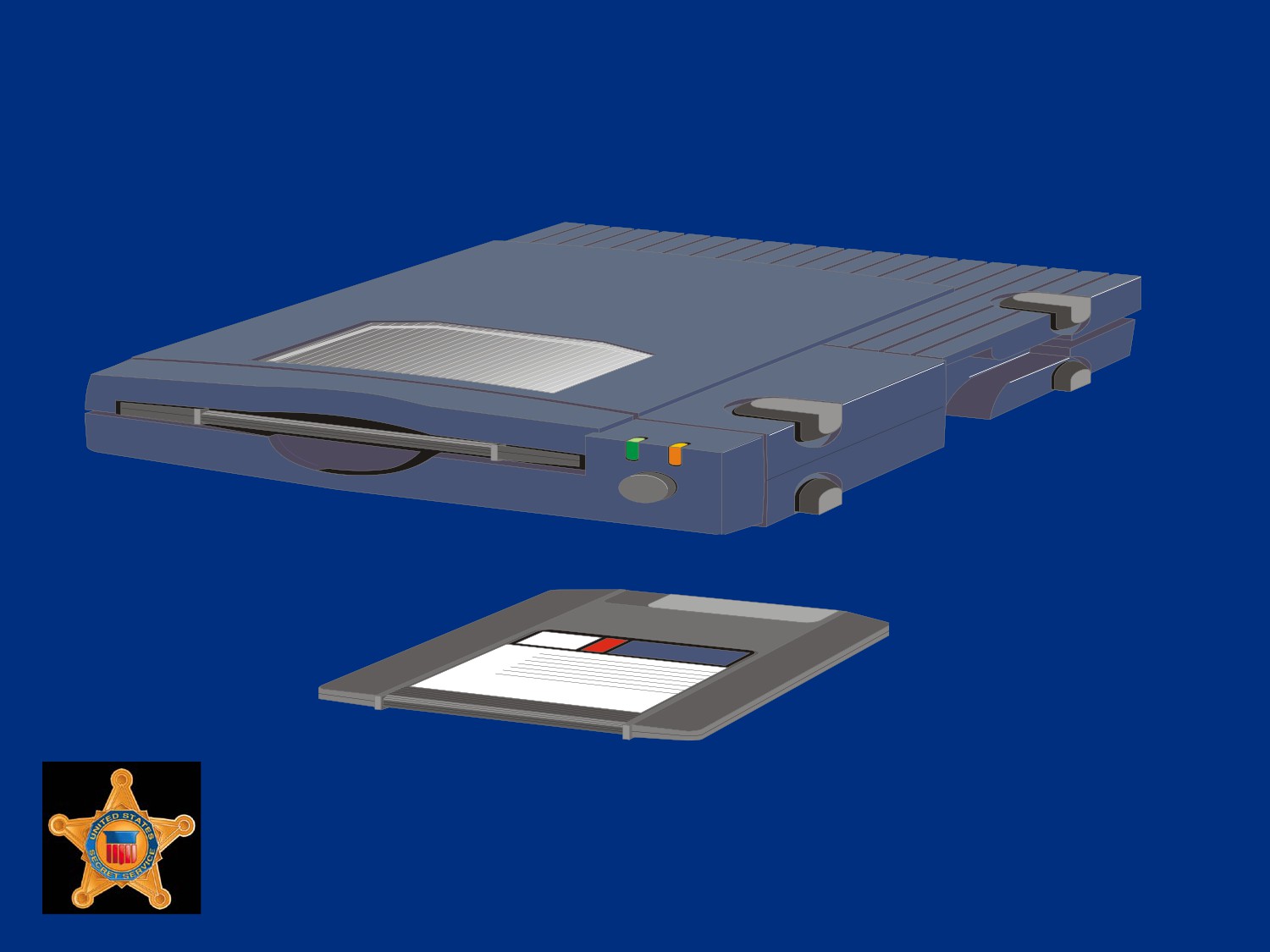
Iomega ZIP Drive and Cartridge
U.S. Department of
Homeland Security
United States
Secret Service
Magneto-optical Drives
Magneto-optical drives provide magnetic, high density storage
Data written to drives by a precise laser beam that heats a tiny
spot in disk’s alloy to Curie point of 300 degrees
Allows molecules to be realigned when subjected to magnetic
field located on opposite side of disk
U.S. Department of
Homeland Security
United States
Secret Service
Magneto-optical Drives
To read stored data on drive, weaker laser beam is used to
focus on tracks
Crystals in alloy polarize the light from the laser
Reflective beam is read by a photodiode that translates
reflective light to ones and zeros
Data then passed on
U.S. Department of
Homeland Security
United States
Secret Service
Super Floppy or Floptical Drive
The LS-120 drive, known as the super floppy or floptical, can
store twenty times more data than a conventional floppy
Most super floppies hold 120 MB of data on a 3.5-inch disk
Sony has a 200 MB model
Nearly identical in appearance to standard floppy disks and
can read/write to floppy disks
Developed by 3M, O.R. Technologies, and Mastushita-
Kotobuki Industries
U.S. Department of
Homeland Security
United States
Secret Service
Super Floppy or Floptical Drive
Uses same ferrite materials common to floppy drives
Use a special optical mechanism to align magnetic read/write
heads over data tracks
Servo track information that laser uses to guide read/write
heads is etched into disk by manufacturer
If formatted in a standard floppy drive, storage capacity will be
reduced to 1.44 MB
Drives may be found in ATAPI and SCSI systems
U.S. Department of
Homeland Security
United States
Secret Service
Tape Drives
Tape drives used primarily to backup entire systems
Tape drives come with proprietary software and newer models
have ATAPI and SCSI interfaces
The two types of tape storage include magnetic tapes and
digital audio tape (DAT)
U.S. Department of
Homeland Security
United States
Secret Service
Magnetic Tape Storage
Operate much like old reel-
to-reel recording systems
Two sizes: 1) data cartridge
(6 inches by 4 inches by
0.675 inch) 2) mini cartridges
(3.2 inches by 2.4 inches by
0.4 inch)
Stores from 2GB to over
500GB of data
U.S. Department of
Homeland Security
United States
Secret Service
DAT Storage
Records in a digital format using magnetic technology
Tape size is a little smaller than a cassette tape
Available in two primary formats: 1) 4mm cartridge that stores
up to 36GB of uncompressed data and 2) 8mm cartridge that
stores up to 80GB of uncompressed data
A third format, Digital Linear Tape (DLT), stores between
35GB and 800GB of data and is only used with high-end data
servers
U.S. Department of
Homeland Security
United States
Secret Service
Compact Disc Read Only Memory
(CD-ROM)
CD-ROM is a disc format used to hold text, graphics and hi-fi
stereo sound
Very similar to an audio CD, but uses a different format for
recording data
An audio CD player cannot play CD-ROMs, but CD-ROM
players can play audio discs
U.S. Department of
Homeland Security
United States
Secret Service
How Data is Stored on CD-ROM
Information is stamped into disc as a series of pits and lands
when manufactured
Pits are small raised areas in tracks on CD-ROM separated by
flat spaces (lands)
Back of a CD-ROM is a highly reflective surface
U.S. Department of
Homeland Security
United States
Secret Service
How Data is Stored on CD-ROM
When laser beam shines up through the disc, light is reflected
back
When light hits edge of a pit, light is not reflected back
When light hits a land, it is reflected back
Microprocessors in drive translate light and dark transitions as
1s and 0s
U.S. Department of
Homeland Security
United States
Secret Service
Compact Disc Recordable (CD-R)
CD-R is a form of CD-ROM technology that writes to a disc
Each disc can be written to only once
A CD-R drive cannot stamp pits into disc
Instead, uses a layer of dye to simulate pits and lands
U.S. Department of
Homeland Security
United States
Secret Service
Compact Disc Recordable (CD-R)
To record, laser burns dye to simulate pits and does not burn
areas for lands
To read, laser beam is reflected back from non-burnt areas
(lands) and is not reflected back from burnt areas (pits)
Drive interprets both
U.S. Department of
Homeland Security
United States
Secret Service
Compact Disc Re-writable (CD-RW)
CD-RW can record, erase, and re-record data on same disc up
to 1,000 times
Instead of stamped pits or dye, CD-RWs use a phase change
technology that involves a crystalline layer
Process uses high intensity laser pulse that turns crystalline
natural state (reflective) to an amorphous one (dull)
U.S. Department of
Homeland Security
United States
Secret Service
Compact Disc Re-writable (CD-RW)
When disc is read, it uses this dull/reflective state to simulate
pits and lands
To erase and re-record data, CD-RW uses a medium intensity
pulse to restore crystalline surface to a reflective state
U.S. Department of
Homeland Security
United States
Secret Service
DVD
DVD is commonly termed Digital Video Disc as means to
describe technology
DVD is far more capable than just storing and playing digital
video
DVD is a group of disk formats that store data, video, or audio
information with capacities between 4.7GB and 8.54GB
Generally disk is 120mm in diameter and 1.2mm thick
U.S. Department of
Homeland Security
United States
Secret Service
DVD
Reflective surfaces embedded in polycarbonate resin hold data
as pits and lands in tracks much smaller and closer together
than those on CD
All DVD drives feature backward compatibility to read CD
media
U.S. Department of
Homeland Security
United States
Secret Service
DVD-ROM
Data, be it audio, video, or software, is molded into disk when
manufactured
Unlike CD media, DVD media has its reflective data layer more
deeply protected in structure of disk
U.S. Department of
Homeland Security
United States
Secret Service
User-Recordable DVD
Data is written or “burned” into a disk by user with a write
capable drive
Currently, there are six different formats of writable DVD
Compatible media must be used in appropriate drive to make a
recording
Once written, all DVD disk types (except DVD-RAM) can be
read in other DVD drive types
U.S. Department of
Homeland Security
United States
Secret Service
Recordable DVD Media Types
DVD-RAM
Once formatted, disk together with its drive
can be treated as if it were a hard disk drive.
Re-writable up to 100,000 times.
DVD-R
Write-once, read many times
DVD-RW
Re-writable up to 1,000 times
DVD+R
Write-once, read many times
DVD+RW
Re-writable up to 1,000 times
DVD+R DL
Dual layer write once, read many times
U.S. Department of
Homeland Security
United States
Secret Service
DVD Capacity Comparison
Format
Capacity
Type
Single Sided, Single
4.7 billion bytes
“DVD-5”
Layer
Single Sided, Dual
8.5 billion bytes
“DVD-9”
Layer
Double Sided, Single
9.4 billion bytes
“DVD-10”
Layer
Double Sided, Dual
17 billion bytes
“DVD-18”
Layer
U.S. Department of
Homeland Security
United States
Secret Service
HD-DVD and Blu-ray
Introduced in 2006, HD-DVD and Blu-ray are two rival High
Density DVD formats
Each format backed by competing groups of equipment
manufacturers
HD-DVD has data capacity of 15GB for single-layer disks and
30GB for dual-layer disks
U.S. Department of
Homeland Security
United States
Secret Service
HD-DVD and Blu-ray
In late 2007 a new format was approved, allowing for three
layers to store a capacity of 51GB
Blu-ray disks can hold 25GB for single layer disks and 50GB
for dual-layer disks
Laboratory tests have successfully tried up to eight layers for a
total of 200GB per disk
U.S. Department of
Homeland Security
United States
Secret Service
USB Flash Drives
Flash drives allow transport of files between devices
Offer a very compact, non-volatile storage option for data
Transfer rate of data is dependent on type and speed of
interface used for device
Small, easily transported, and rewritable
Uses USB 1.0, 1.1, or 2.0
Store up to 64GB
U.S. Department of
Homeland Security
United States
Secret Service
Memory Cards
Memory cards are flash memory storage devices common in
many electronic devices
Some devices that may support memory cards are digital
cameras, cell phones, portable audio devices, game consoles,
mobile computers, etc.
Large storage capacities and small footprints make this
storage technology an excellent companion to many portable
electronic devices
U.S. Department of
Homeland Security
United States
Secret Service
Compact Flash
Introduced by Sandisk in 1994
With storage capacities up to 64GB, commonly found in digital
cameras or mini hard drives
Available in two variations: Type I and Type II
U.S. Department of
Homeland Security
United States
Secret Service
Secure Digital (SD)
Developed by Sandisk, Matsushita, and Toshiba
Secure Digital format supports up to 16GB of storage and up
to 32GB with high-capacity SDHC cards
U.S. Department of
Homeland Security
United States
Secret Service
MiniSD
Provides storage capacities up to 4GB
These devices can be used in a typical SD slot with use of an
adapter
U.S. Department of
Homeland Security
United States
Secret Service
MicroSD
Cards are about size of a penny and provide storage
capacities up to 8GB
Can be used in the larger SD and MiniSD slots with use of an
adapter
A high capacity implementation, MicroSDHC, allows for
capacities up to 8GB
U.S. Department of
Homeland Security
United States
Secret Service
Memory Stick
This memory is developed by Sony
Term “Memory Stick” can refer to whole memory stick lineup of
products
Include Memory Stick Pro, Memory Stick Duo/Pro Duo,
Memory Stick Micro, and Memory Stick Pro-HG
U.S. Department of
Homeland Security
United States
Secret Service
External Drives
External drives are available in USB, FireWire, and eSATA
Hot swappable and easily transported from one system to
another
USB and FireWire connections are recognized by operating
systems such as Windows XP and many versions of Linux
U.S. Department of
Homeland Security
United States
Secret Service
External Drives
The eSATA has a special adapter and cable, which eliminates
protocol issues of converting drive’s native signal to the serial
port adapter
Allows higher transfer rates
Restricts portability of drive to computers equipped for eSATA
U.S. Department of
Homeland Security
United States
Secret Service
U.S. Department of
Homeland Security
United States
Secret Service
Module 3 - Input/Output Components
U.S. Department of
Homeland Security
United States
Secret Service
You will learn …
Input/Output Devices and Ports
BIOS and System Initialization
U.S. Department of
Homeland Security
United States
Secret Service
Lesson 1 - Input/Output Devices and
Ports
Input/Output Overview
Input Devices
Output Devices
Input/Output Ports
Modems
PC Cards
U.S. Department of
Homeland Security
United States
Secret Service
Input/Output Overview
Most hardware components found on a PC can be categorized
as either an input or output device.
Modems are the exception because they transmit and receive
information
U.S. Department of
Homeland Security
United States
Secret Service
Input Devices
Keyboard
Mouse and other pointing devices
Game controllers
Scanners
U.S. Department of
Homeland Security
United States
Secret Service
Output Devices
Monitors
Video Adapter Cards
Printers
U.S. Department of
Homeland Security
United States
Secret Service
Input Devices - Keyboard Devices
Keyboard is the primary input component for a computer
Many new features added to keyboard in recent years, such as
additional short cut keys
Basic way a keyboard works has remained the same since first
IBM PC in early 1980s
Many styles of keyboards with various built-in functions
including pointing devices such as trackballs and special keys
programmed to launch programs or Web sites
U.S. Department of
Homeland Security
United States
Secret Service
How Keyboards Work
Uses grid of embedded circuits called key matrix
When key is pressed, change in current, in circuit associated
with key, is picked up by keyboard’s microprocessor
Microprocessor generates scan code that is read by
computer’s BIOS
BIOS translates scan code into ASCII code which is
recognized by application software such as word processing
software
U.S. Department of
Homeland Security
United States
Secret Service
Input Devices - Pointing Devices
Come in many shapes and sizes
Used to control computer by pointing to images instead of
using keyboard to type commands
Mouse, first device developed by Xerox in early 1980s and
remains standard
Other current devices include touchpad, trackball, trackpoint,
and game controller
U.S. Department of
Homeland Security
United States
Secret Service
Input Devices - Mouse
Standard pointing device used to navigate system’s graphical
user interface (GUI)
Internal electronics sends signals through attached cable to
computer’s operating system
Operating system translates signal to move onscreen cursor
U.S. Department of
Homeland Security
United States
Secret Service
Input Devices - Touchpad
Fixed pointing device that uses movement of a finger on touch-
sensitive pad to control location of cursor in GUI
Replaces standard mouse in laptop and notebook computers
where space is limited
Also known as glidepoint
U.S. Department of
Homeland Security
United States
Secret Service
Input Devices - Trackball
Basically an inverted mouse with the ball located on outside of
housing
Contains same connectors as found in standard mouse
U.S. Department of
Homeland Security
United States
Secret Service
Input Devices - Trackpoint
Also called a pointing stick, a small rubber component
embedded on the keyboard between G and H keys on a laptop
computer
Move stick to move cursor
U.S. Department of
Homeland Security
United States
Secret Service
Input Devices - Gyroscopic Mice
Gyroscopic mice feature gyroscopes to detect movement while
mouse is moved in mid-air
Such mice normally shaped similar to remote controls and
allow for wireless control of a computer from long distances
Commonly used for conference room and home theater
computers
U.S. Department of
Homeland Security
United States
Secret Service
Input Devices - Game Controllers
Also called joysticks, available in wide variety of designs such
as steering wheels, flight simulator controls, and pressure pads
All are input devices for game software
Joystick has upright stick that controls movement by providing
the X-Y axis coordinates of the stick
U.S. Department of
Homeland Security
United States
Secret Service
Input Devices - Game Controllers
Joysticks available in digital or analog compatible formats
Connect through game ports or USB port
More expensive controllers can be programmable with macros
to allow specific series of actions or commands to be
transmitted with single button
U.S. Department of
Homeland Security
United States
Secret Service
Input Devices - Scanner
Used to translate text or pictures into a digitized form computer
can read and store
Scans are delivered to computer as a digital image
Scanned pictures are code that can be used by graphics
software program
Printed type can be converted into editable text when scanned
using optical character recognition (OCR) software
U.S. Department of
Homeland Security
United States
Secret Service
Input Devices - Hand-held scanners
Offer low resolution, 200-400 dots-per-inch (DPI), with 8-bit
imaging.
Scan window only five to seven inches wide
Wide images require image re-sectioning
U.S. Department of
Homeland Security
United States
Secret Service
Input Devices - Flatbed scanners
Provide photo quality resolution
Typed sheets and pictures placed facedown on large scan
window
Advantages include high resolution and ability to scan thick
documents such as books
Usually come with their own proprietary image processing
software
U.S. Department of
Homeland Security
United States
Secret Service
Input Devices - Sheet-fed scanners
Scan one standard-size sheet at a time
Resolution can be the same as flatbed scanners
U.S. Department of
Homeland Security
United States
Secret Service
Output Devices - Monitors
Main video display components of PC, include monitor and
video adapter, also known as a video card
Monitor refers to display screen
U.S. Department of
Homeland Security
United States
Secret Service
Monitor Classification Criteria
Diagonal screen size measured in inches
Desktop PC monitors range in size from 14 to over 40 inches
and LCDs in laptops generally range from 6 to 21 inches
Monitors usually evaluated on two factors, size and resolution
Display resolution measured in pixels
Refresh rate ranging from 60Hz to 100Hz
U.S. Department of
Homeland Security
United States
Secret Service
Monitor Technologies
Cathode ray tube (CRT) monitor: Most common type of
monitor for desktop systems until the early 2000s
Liquid crystal display (LCD) monitor: Used in laptops as well as
high-end desktop monitors
Organic Light Emitting Diode (OLED) monitor: Used in laptops
as well as desktop monitors
U.S. Department of
Homeland Security
United States
Secret Service
Benefits of CRT Monitors
Sales of CRT monitors have decreased in recent years, though
have a few major advantages over LCD monitors
Color display on CRT monitors is better than LCD, provide a
greater color range and depth, beneficial to graphic artists
LCDs suffer from blurring during fast motion and slower
response times in redrawing the screen
Issues make high-performance CRT monitors beneficial to avid
gamers
U.S. Department of
Homeland Security
United States
Secret Service
CRT Monitor Resolution
Resolution of a monitor is measured by pixel density
More pixels, clearer image
Pixel density expressed in dots per inch (DPI)
Other notable resolution characteristics include dot pitch and
refresh rate
U.S. Department of
Homeland Security
United States
Secret Service
Dot Pitch
Dot pitch is distance in millimeters between same color
phosphor dots/squares on screen
Less distance between dots, higher screen resolution
Smaller dot pitch, greater clarity
For example, average resolution is approximately .28mm,
whereas high resolution is .26mm or less
U.S. Department of
Homeland Security
United States
Secret Service
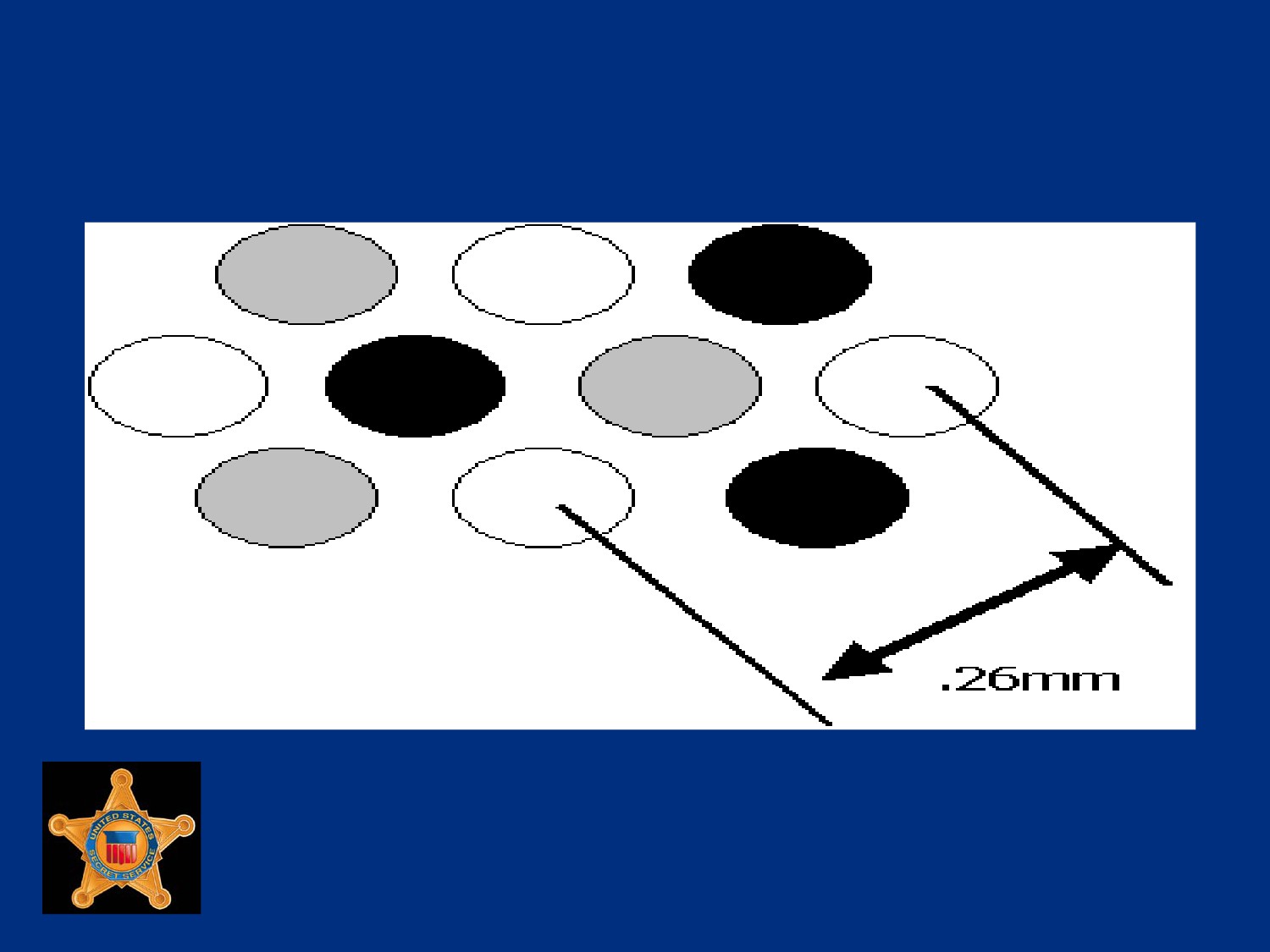
Example of Dot Pitch
U.S. Department of
Homeland Security
United States
Secret Service
Refresh Rate
Speed at which a monitor completes drawing the screen
Speed is measured in Hz
Higher the refresh rate, sharper image will be with less screen
flicker
Minimum PC refresh rate is 60 times per second
U.S. Department of
Homeland Security
United States
Secret Service
Invar mask
Perforated nickel-alloy plate inside a CRT (cathode ray tube)
Perforations contain phosphor ‘dots’ that glow when stimulated
with electrical charge
Invar mask uses dot geometry to produce an image
U.S. Department of
Homeland Security
United States
Secret Service
Aperture grill
Screen-embedded metal grillwork
Grillwork contains phosphor ‘squares’ that glow when
stimulated with electrical charge
Aperture grill will typically have higher resolution than invar
mask and is more durable
Aperture grill uses rectangular geometry
U.S. Department of
Homeland Security
United States
Secret Service
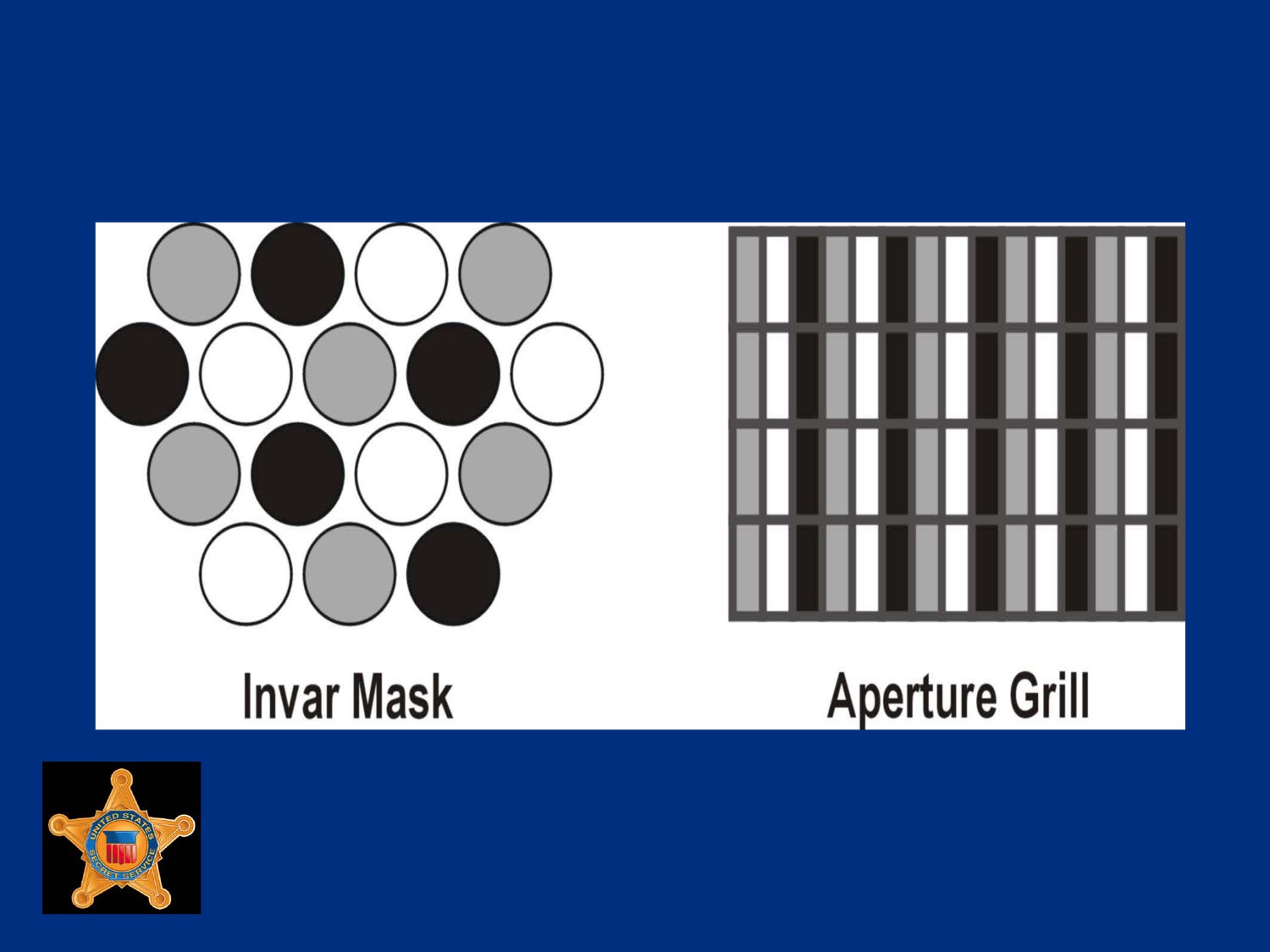
Examples of Invar Mask and Aperture
Grills
U.S. Department of
Homeland Security
United States
Secret Service
Liquid Crystal Display Monitors
Found in calculators, handheld devices, televisions, PCs,
notebook computers
Produce different colors on screen by using combination of
filters and electrically charged liquid crystal cells to filter and
change angle of light passing through panel
Transistors electrically charge crystals
Number of crystals used is proportional to number of pixels
screen can display
U.S. Department of
Homeland Security
United States
Secret Service
Liquid Crystal Display Monitors
Generally use less power than CRT counterparts
More expensive to manufacture than CRT’s and do not have
same clarity, contrast ratio, or response time
Two categories, passive matrix and active matrix LCDs
U.S. Department of
Homeland Security
United States
Secret Service
Passive Matrix LCDs
Passive matrix screen has transistors along edge of screen
connected by conductors
Intersection of conductors forms a pixel
If screen has 1,024 x 768 pixels, there are 1,024 transistors
along horizontal edge and 768 transistors along vertical edge
to electrically charge crystals
Placing transistors along edge of screen, passive matrix LCD
monitors are less bright and cheaper to manufacture than
active matrix monitors
U.S. Department of
Homeland Security
United States
Secret Service
Active Matrix LCDs
Use the same system of filters and liquid as passive matrix
LCDs, but have a transistor for every pixel
Require a greater number of transistors
For example, resolution of 1,024 x 768 requires 1,892
transistors for passive matrix monitor and 786,432 transistors
for active matrix monitor
Active matrix monitors provide greater clarity and brightness
U.S. Department of
Homeland Security
United States
Secret Service
Organic Light Emitting Diode
(OLED) Monitors
Newer evolution of LCDs
Do not require a backlight to display pixels, greatly reduces
power requirements
Have an organic substrate that glows when you put an electric
current behind it
U.S. Department of
Homeland Security
United States
Secret Service
Blurring the Line Between Monitors
and Televisions
Distinction between TVs and monitors greatly eroded
Many modern televisions, whether LCD or Plasma, feature
VGA and DVI inputs to allow direct connections from
computers
Now possible to connect computer directly to 65” LCD display
for regular computing
U.S. Department of
Homeland Security
United States
Secret Service
MultiTouch Monitors
Improvement over normal touchscreen monitors, allowing
multiple fingers or styluses to interface with screen
Example is Microsoft’s Surface Computer
U.S. Department of
Homeland Security
United States
Secret Service
Video Display Adapters
Video display adapters, also called video cards, are either
expansion cards or chipsets on MB that display images on
monitor
U.S. Department of
Homeland Security
United States
Secret Service
Video Card Components
Independent BIOS and chipset to control image on screen by
first writing data to video RAM
Video RAM with capacities as high as 1GB
Video processor (does not depend on the CPU to process
signals)
Optional TV-In/Out connector that redirects display to standard
television set or video processing/capturing equipment
U.S. Department of
Homeland Security
United States
Secret Service
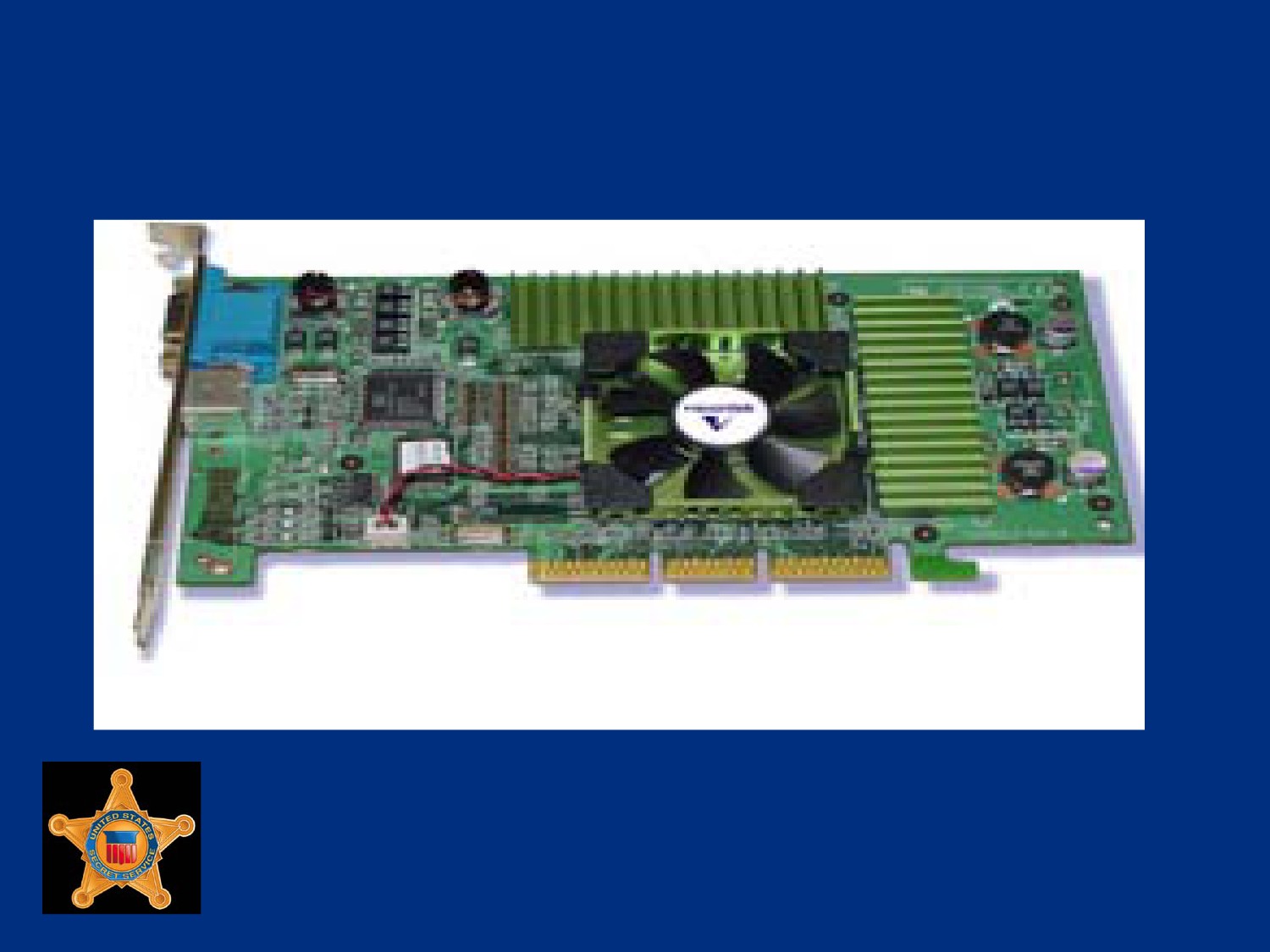
Example of Video Card
U.S. Department of
Homeland Security
United States
Secret Service
Output Devices - Printers
Device that prints illustrations, charts, or text on paper
Most prevalent types are dot matrix, ink jet and laser
U.S. Department of
Homeland Security
United States
Secret Service
Dot Matrix Printer
High-speed printer that uses grouping of mechanical pins in
the print head
Text is displayed in rows of dots
U.S. Department of
Homeland Security
United States
Secret Service
Ink Jet Printer
Higher resolution type printer when compared to dot matrix
model
Printing occurs when tiny nozzles spray magnetically directed,
ionized ink on paper
U.S. Department of
Homeland Security
United States
Secret Service
Laser Printer
Highest resolution printer
Print technology uses a toner set and laser tracing to transfer
image to paper
U.S. Department of
Homeland Security
United States
Secret Service
Input/Output Ports
Be able to recognize various input/output ports on a PC
Knowing form and location will ensure proper connections are
made
U.S. Department of
Homeland Security
United States
Secret Service
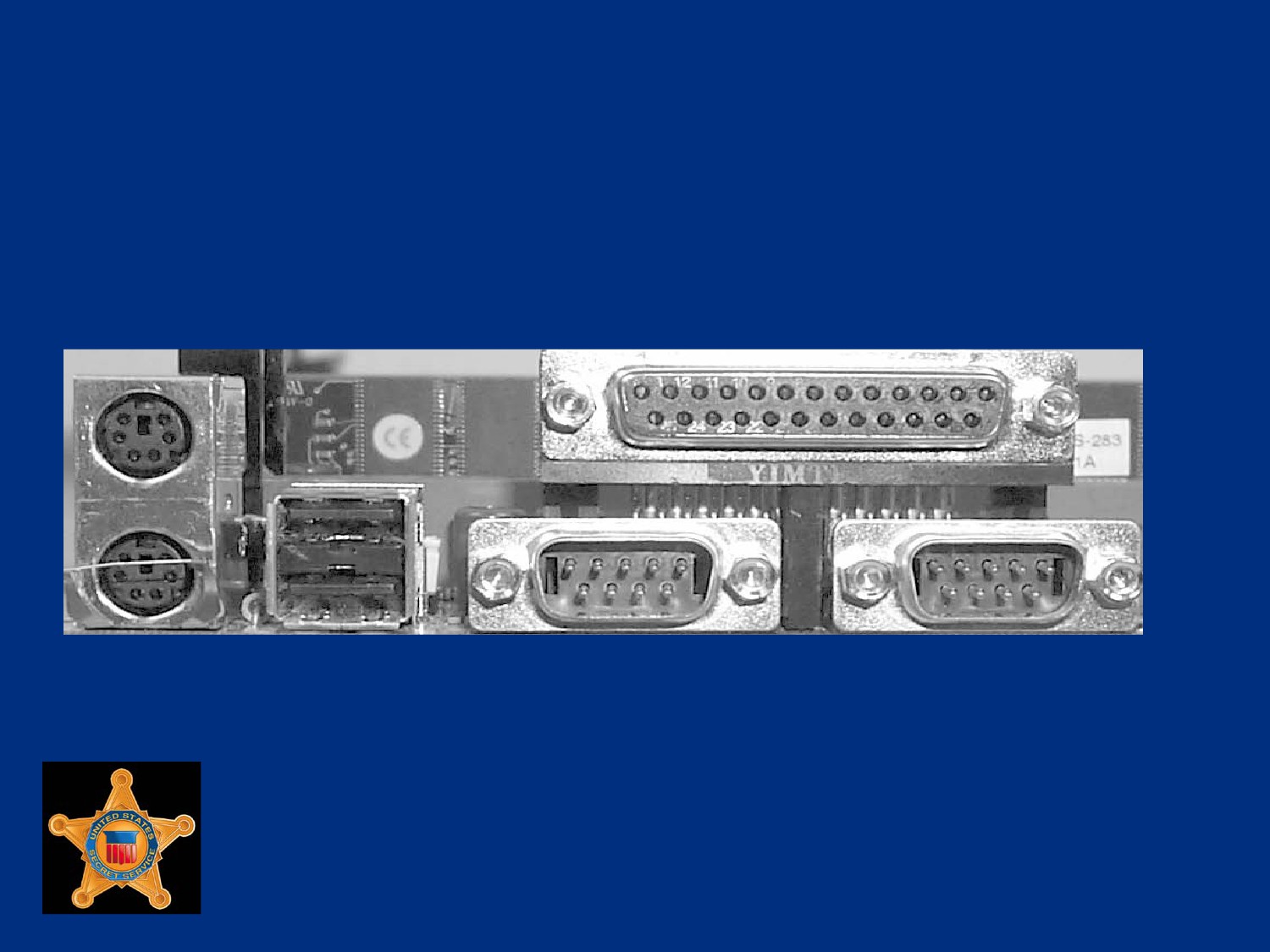
Recognizing I/O Ports
Computer Ports
U.S. Department of
Homeland Security
United States
Secret Service
Mouse and Keyboard Ports
PS/2 mouse and keyboard use barrel shaped 6-pin mini port
Ports look exactly alike unless color coded or labeled
A mouse could require a 9-pin serial or USB port
Older keyboards connect using a 5-pin barrel-shaped
connector, slightly larger than a PS/2 port
Connectors are found on AT or older MBs
U.S. Department of
Homeland Security
United States
Secret Service
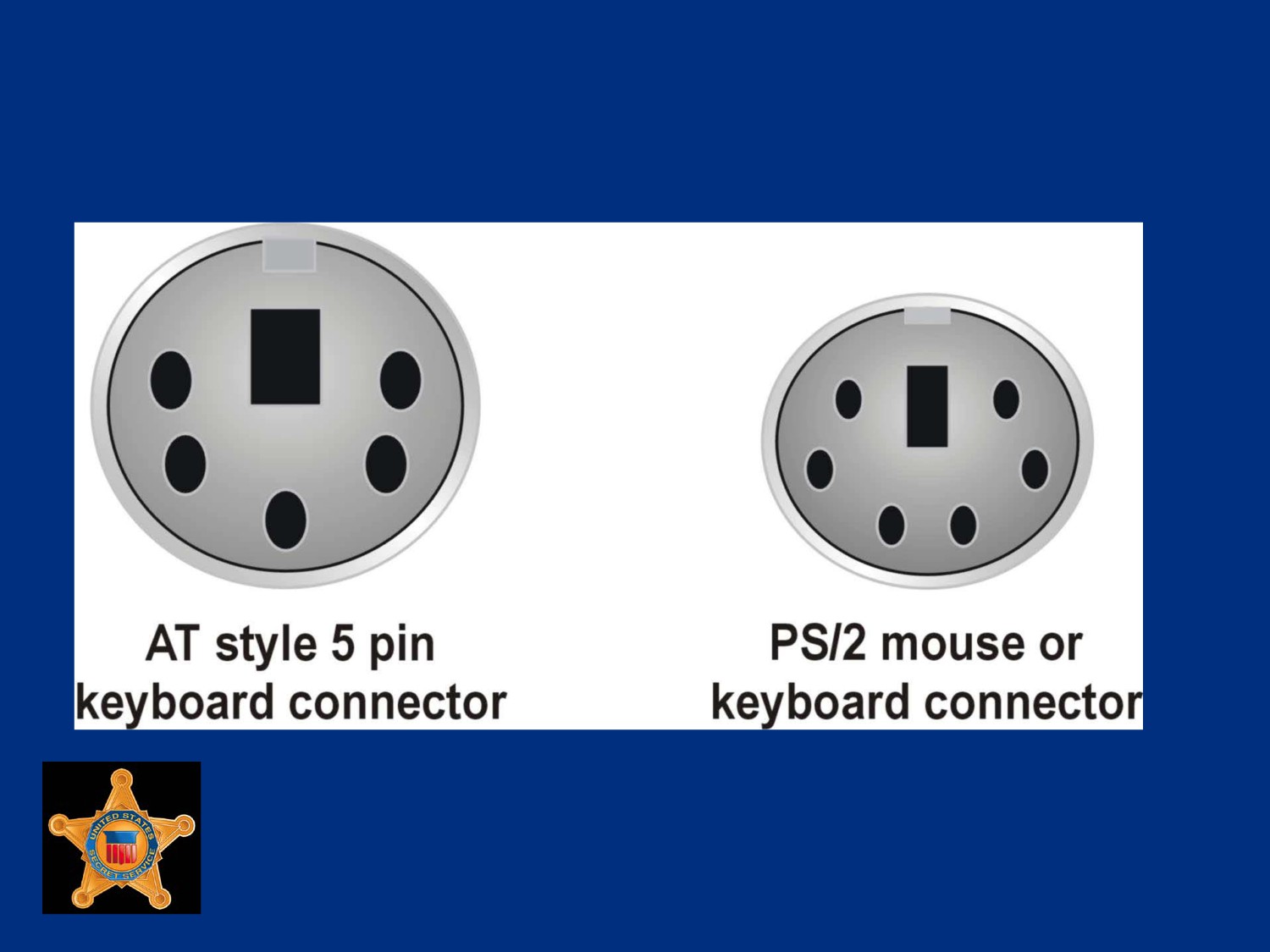
PS2 Mouse or Keyboard Port
U.S. Department of
Homeland Security
United States
Secret Service
Serial Ports
Serial port sends only one bit of data at a time over one wire,
typically used to connect older devices to computer such as
modems, touchscreens, and proprietary devices
PCs have maximum of four serial ports referred to as COM 1,
COM 2, COM 3, and COM 4
Ports divided into pairs: COM 1 paired with COM 3 and COM 2
paired with COM 4
Each pair shares same system resources
U.S. Department of
Homeland Security
United States
Secret Service
Serial Ports
Ports that comprise a pair cannot be used at the same
time
Example, COM 1 and COM 3 cannot run at same time
U.S. Department of
Homeland Security
United States
Secret Service
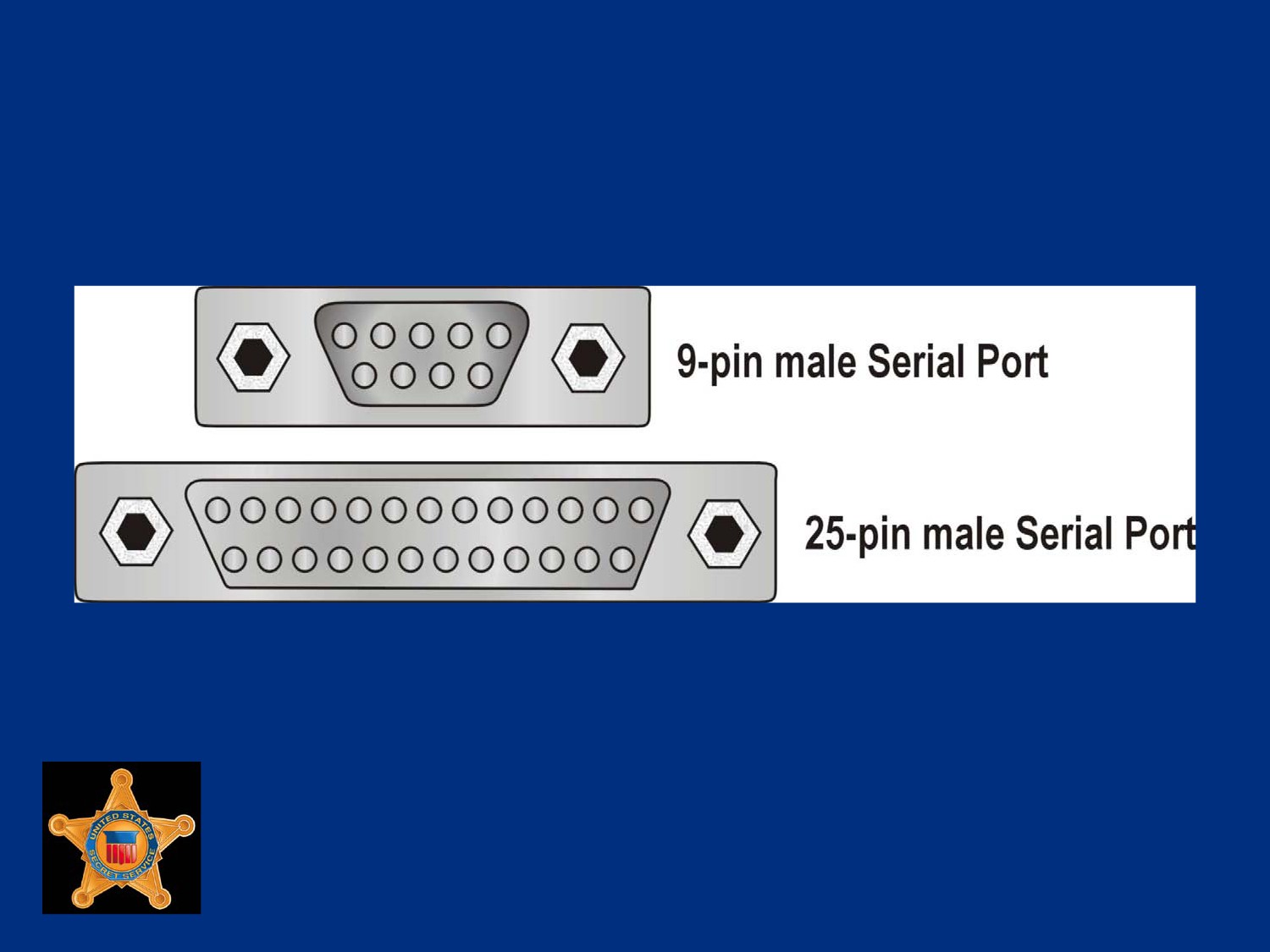
9-pin and 25-pin Serial Ports
U.S. Department of
Homeland Security
United States
Secret Service
Parallel Ports
Most PCs have one parallel port used mainly to connect printer
although can be used for certain external drives such as Zip or
Jazz
Parallel port is much faster than the serial port, it can send one
byte of data at a time, instead of just a single bit
Port is either a 25-pin parallel port or a 36-pin Centronics port
The SCSI-1 parallel port uses a 50-pin Centronics port
Do not confuse different types of parallel ports
U.S. Department of
Homeland Security
United States
Secret Service
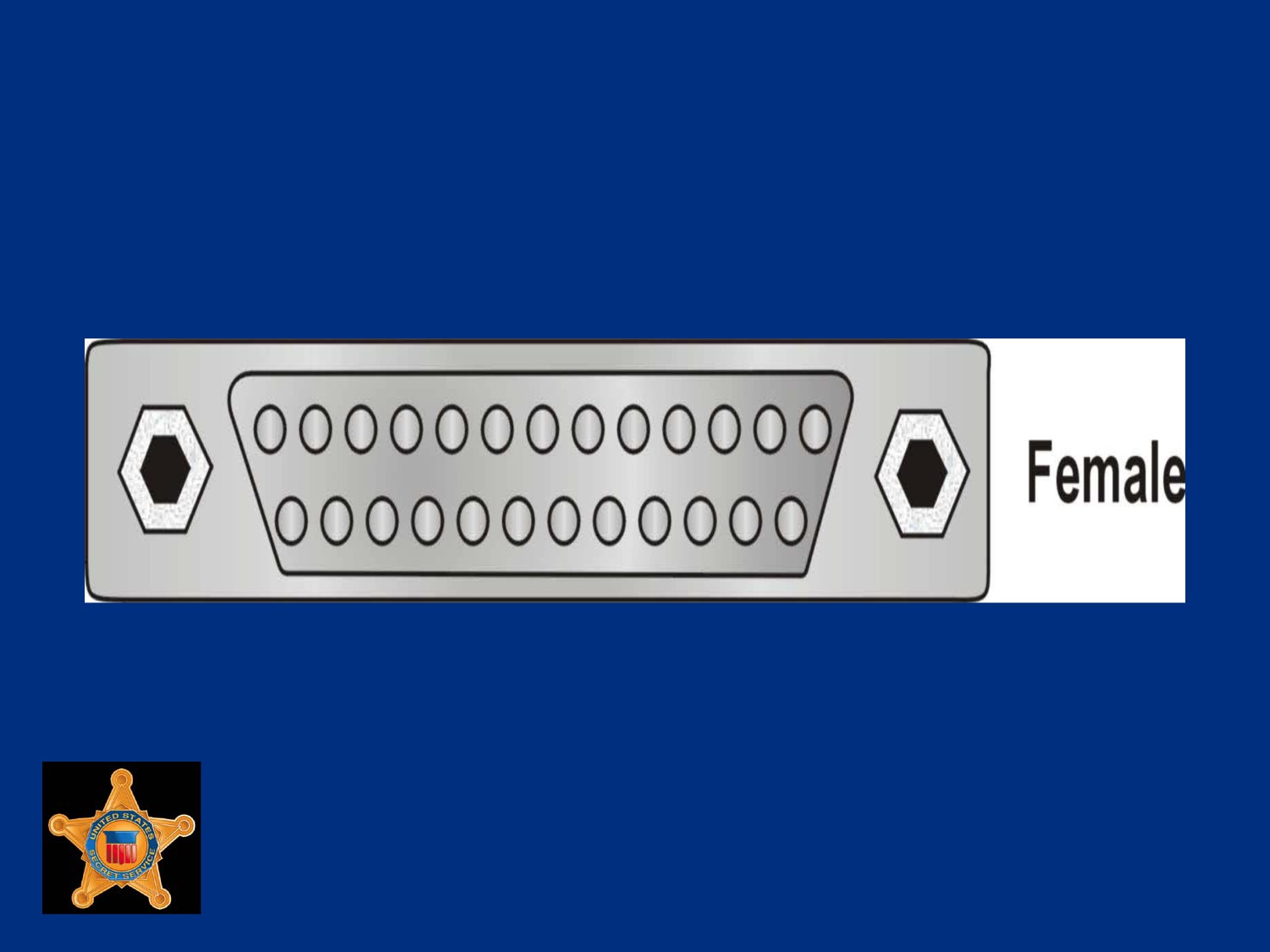
Example of Parallel Port
U.S. Department of
Homeland Security
United States
Secret Service
Universal serial bus (USB) Port
USB port enables many different components to be connected
to computer sharing the same port using a connection
configuration called daisy chain
Small, flat, rectangular connection that requires a four-wire
cable
Usually found in pairs
U.S. Department of
Homeland Security
United States
Secret Service
USB Port
Most important feature is ability to hot swap or change devices
without turning off computer
In theory, 127 devices can be daisy chained
Transfer rate of USB 1.1 is 12 Megabit/sec (1.5MB/sec)
Transfer rate of USB 2.0 is 480 Megabit/sec (60MB/sec)
Symbol signifying USB port found on back of computer
U.S. Department of
Homeland Security
United States
Secret Service
USB Symbol
U.S. Department of
Homeland Security
United States
Secret Service
FireWire and i.LINK Ports
FireWire made by Apple Computers and i.LINK made by Sony
are manufacturer brand names for IEEE 1394 ports
Alternative to USB port, transfer data at higher speed than
USB 1.1, generally 50MB/sec
Either 4-pin or 6-pin connectors with 6-pin port considered the
standard
Allow up to 63 devices to be daisy-chained to one connector
U.S. Department of
Homeland Security
United States
Secret Service
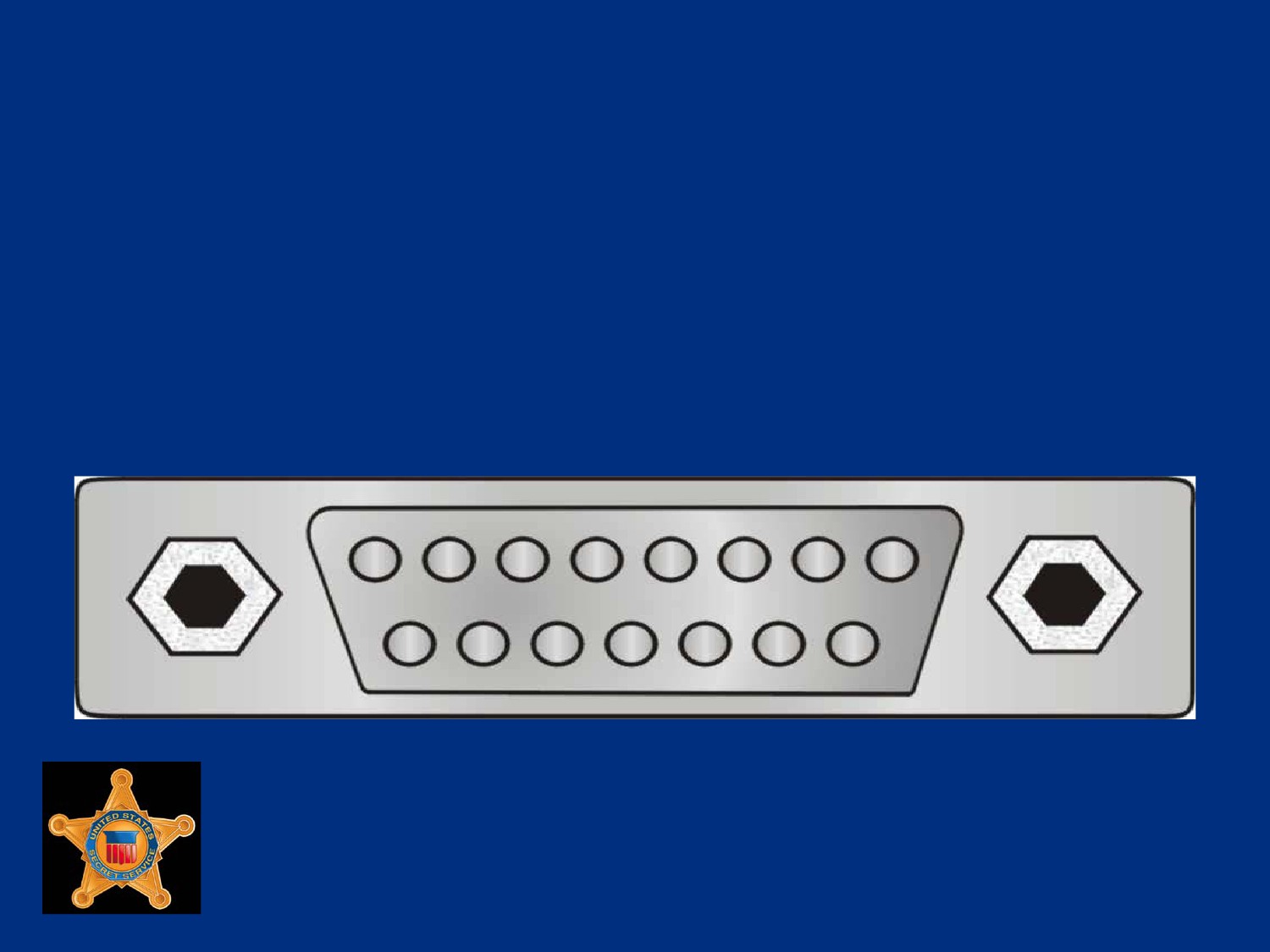
Game Controller Port
Game controller port connects joystick or other type of game
controllers to PC
Port has 15 pins distributed in two rows
U.S. Department of
Homeland Security
United States
Secret Service
VGA Video Display Ports
Video display ports connect monitor to PC
One of most common video connectors is VGA, which
transmits an analog video signal
VGA has 15 pins distributed in three rows, forming arrow
pointing in one direction
U.S. Department of
Homeland Security
United States
Secret Service
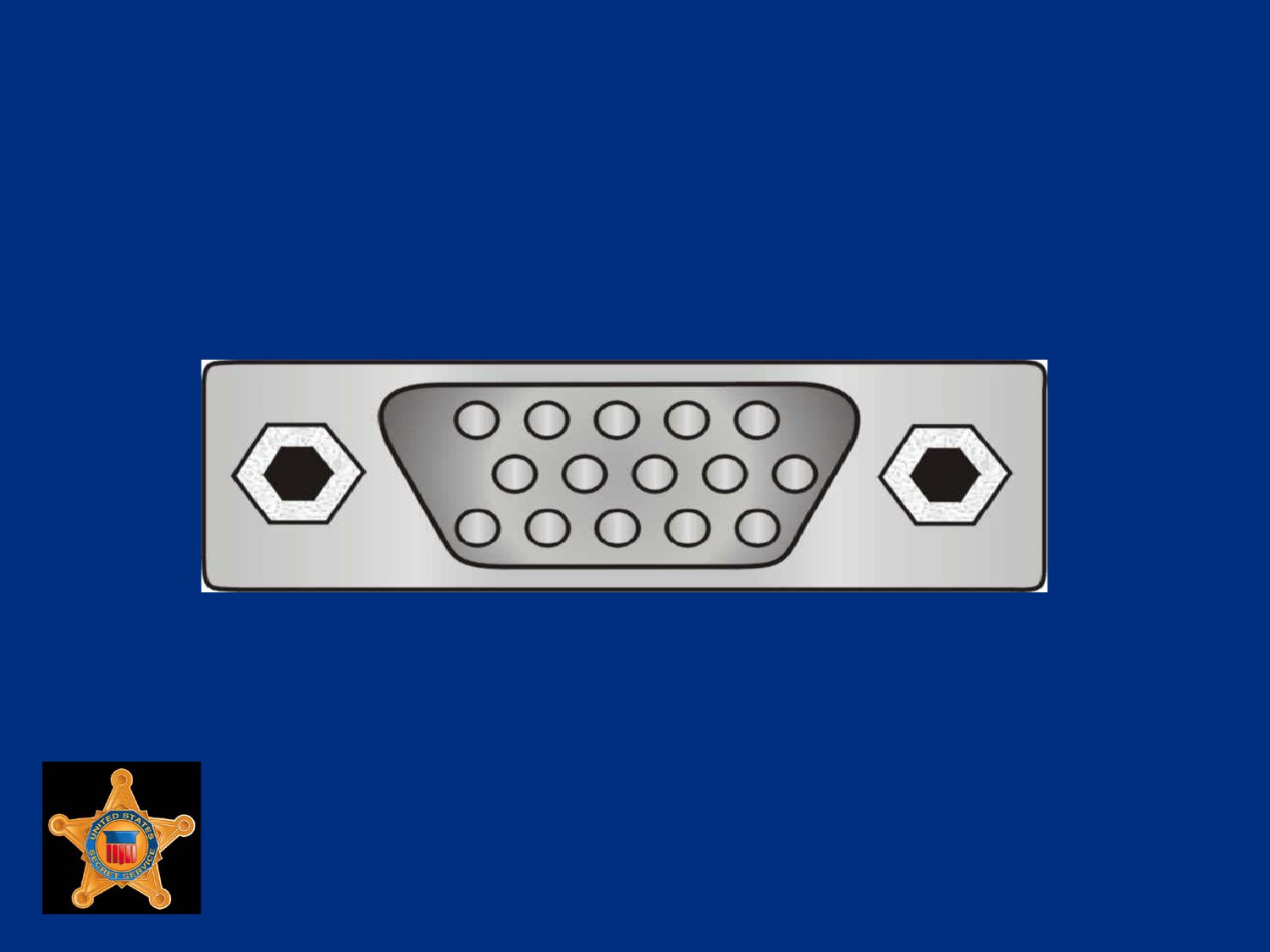
VGA Video Port
U.S. Department of
Homeland Security
United States
Secret Service
HDMI Video Display Ports
High-definition standard used extensively on televisions and
audio/video equipment
Not commonly found on PC computers, but is supported
U.S. Department of
Homeland Security
United States
Secret Service
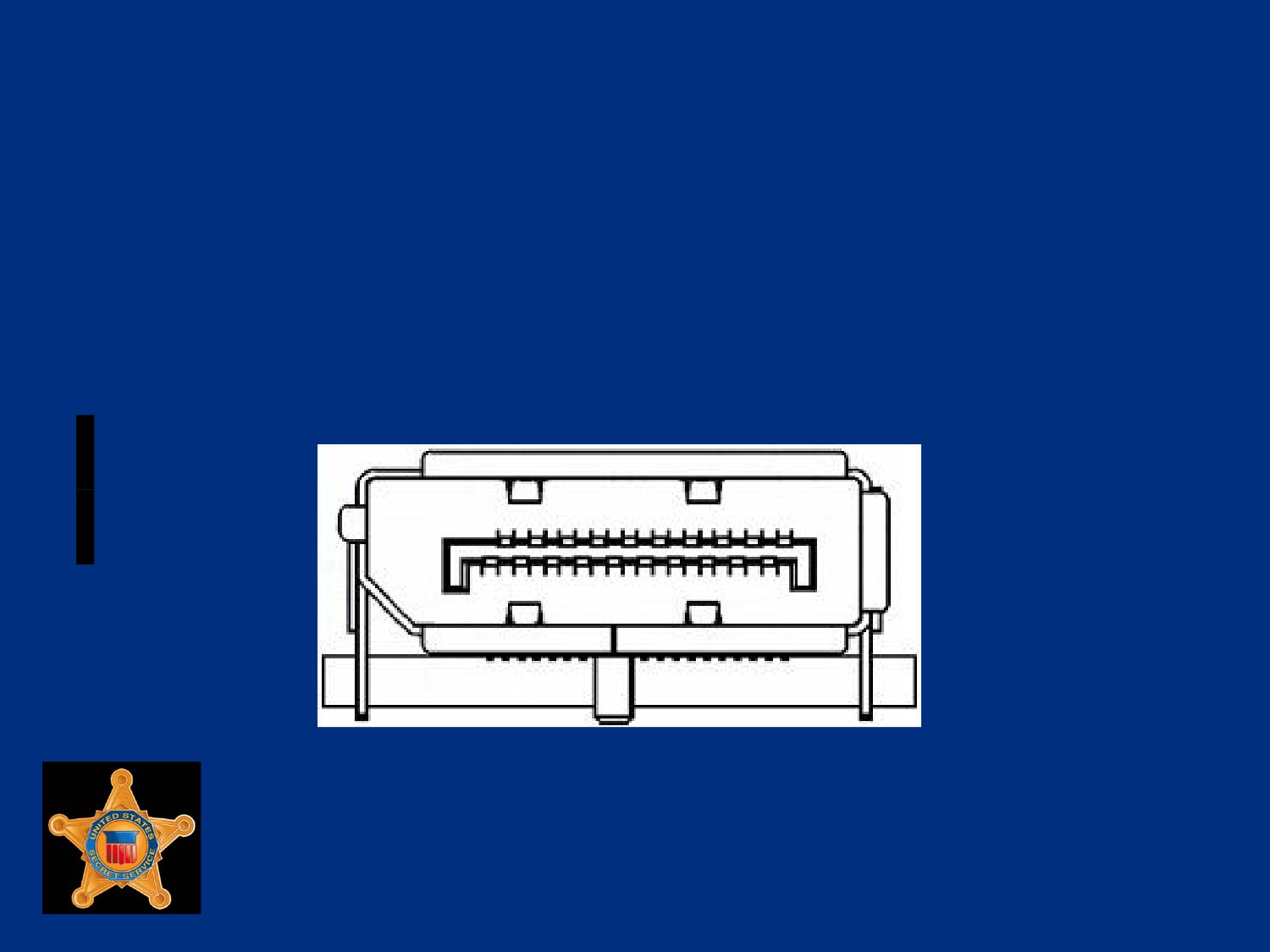
DisplayPort Video Display Ports
Newest standard, designed as a competitor to HDMI
Supports resolutions up to 2560x1600
U.S. Department of
Homeland Security
United States
Secret Service
Sound Ports
Sound cards and sound chips usually have four round 1/8 inch
mini TRS jack ports
Ports are color-coded and defined as line-in, line-out,
microphone, and speaker-out
Other sound ports may be found on PC including a stereo port,
MIDI port or digital audio output port
U.S. Department of
Homeland Security
United States
Secret Service
Modems
Modems handle communications transmitted over telephone
lines between computer systems
Most modern modems have fax capabilities
PCs are digital devices, telephone system is an analog device
U.S. Department of
Homeland Security
United States
Secret Service
Modems
Modem converts (modulates) the digital code to analog so it
can be sent over phone cables
Modem converts (or demodulates) analog signals to digital
code before transmitting data to the PC
The transmission mode takes two separate forms,
asynchronous and synchronous
U.S. Department of
Homeland Security
United States
Secret Service
Modems
Modems have standardized speeds and protocols
Speed measured in baud or bits per second and varies
depending on model
Standard transmission protocol for modern modems is V.92
protocol that transmits at speed of 56K
U.S. Department of
Homeland Security
United States
Secret Service
Modems
Use two methods to facilitate the transfer of information
Data Compression - Speeds data transfer
Error Correction - Allows modem to detect errors in transit and
either correct errors or resend data
U.S. Department of
Homeland Security
United States
Secret Service
External Modems
More expensive than internal modems
Include a separate chassis and power supply
Readily identifiable by LEDs on front panel
Connects to serial or USB port, may limit modem from
reaching full transmission capabilities
U.S. Department of
Homeland Security
United States
Secret Service
Internal Modems
Internal modems are contained on a PCI or ISA card
Internal modem will contain separate communications circuitry
and is not limited by serial port connection
Internal modems less expensive than external
U.S. Department of
Homeland Security
United States
Secret Service
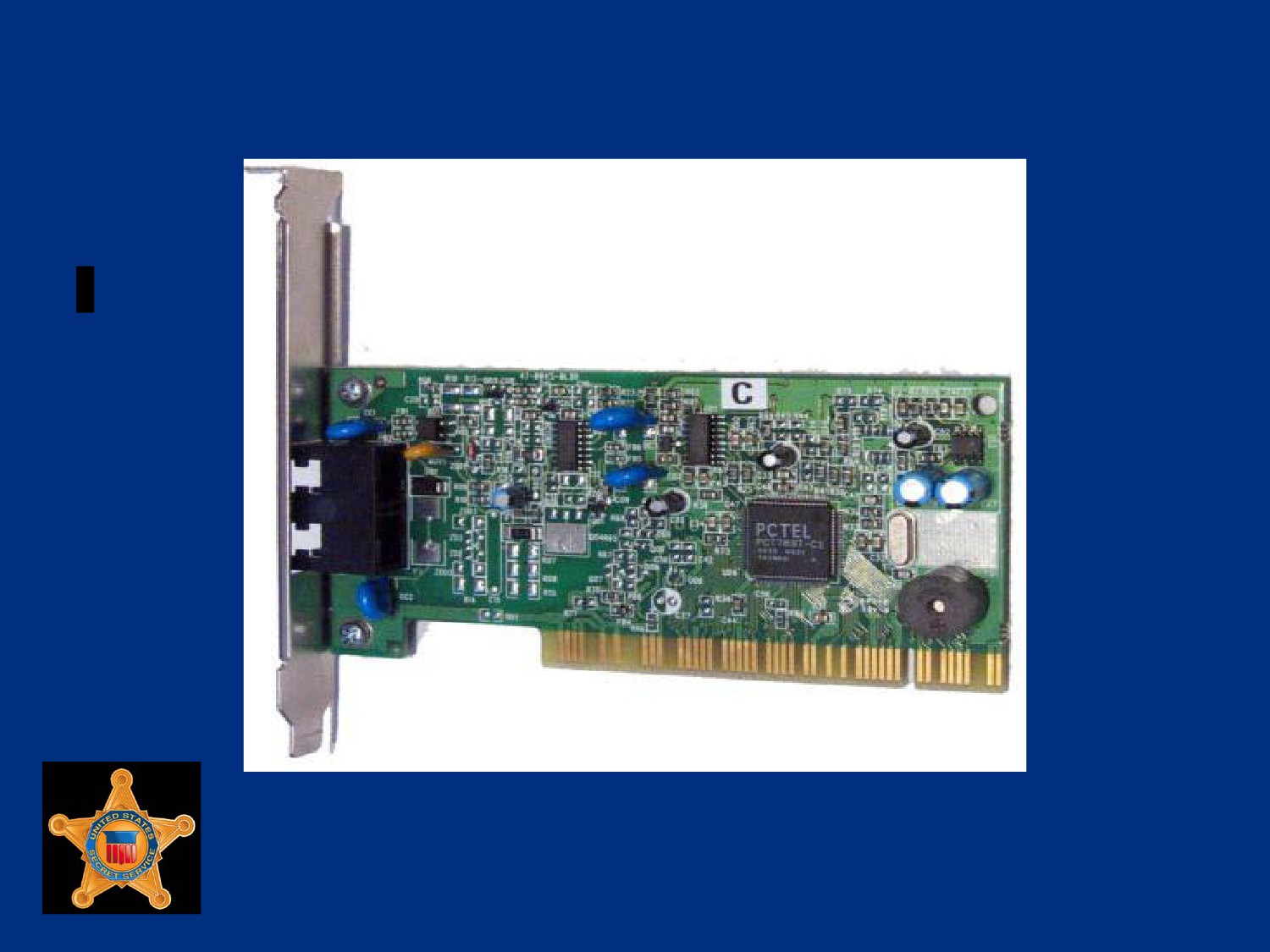
Example of Internal Modem
U.S. Department of
Homeland Security
United States
Secret Service
Caution!
Never attempt to connect a real analog modem to a multi-line
or digital connection
Voltage requirements are different
Connection will destroy the modem
U.S. Department of
Homeland Security
United States
Secret Service
Winmodems
Winmodems are internal modems
Configured by device drivers in operating system rather than
by physical jumpers
Use CPU to process data instead of onboard chip
Require system drivers to operate, usually work only with
Microsoft Windows
U.S. Department of
Homeland Security
United States
Secret Service
PC Cards
PC cards, also known as PCMCIA (Personal Computer
Memory Card International Association) cards
Metal-encased expansion cards about the size of credit card
Most often used in laptop computers
U.S. Department of
Homeland Security
United States
Secret Service
Additional Functions Provided
Fax and modem
Mini-hard drives
Network Interface Card (NIC)
Small Computer System Interface (SCSI) host adapters
Additional RAM and ROM
U.S. Department of
Homeland Security
United States
Secret Service
PC Cards
PC cards manufactured in four types
All have same dimensions (3.4 inches by 2.1 inches)
Differences are in card thickness and functions
Different card types require different card ports
Type I cards can be read by a Type II reader
Type II cards can be read by a Type III reader
U.S. Department of
Homeland Security
United States
Secret Service
PC Cards Types
Type I primarily used to add more memory (3.3 mm thick)
Type II used for modems and NICs (5 mm thick)
Type III used to add a mini-hard drive (10.5 mm thick)
Type IV used to add a high-capacity drive
Type IV not officially recognized by PCMCIA, there are no
official standards for implementation
U.S. Department of
Homeland Security
United States
Secret Service
Lesson 2 - BIOS and System
Initialization
Motherboard Components
BIOS Information
The Boot Process
The Master Boot Record
U.S. Department of
Homeland Security
United States
Secret Service
Motherboard Components
U.S. Department of
Homeland Security
United States
Secret Service
Motherboard BIOS
The MB basic input/output system (BIOS), also called system
BIOS, considered to be heart of computer
Controls communications between computer hardware and
operating system
Also referred to as ROM BIOS because the code is contained
in a non-volatile, read-only memory (ROM) chip
U.S. Department of
Homeland Security
United States
Secret Service
Motherboard BIOS
System BIOS contains software called firmware
Firmware provides basic input/output instructions to boot
computer and handles several important functions
Functions include identifying installed hardware, determining
boot device, and installing basic drivers for keyboard, video,
and disk drives prior to loading OS
U.S. Department of
Homeland Security
United States
Secret Service
Functions of Motherboard BIOS
The four major functions of BIOS are:
Function 1: Contains and executes POST
Function 2: Contains CMOS setup program
Function 3: Executes bootstrap loader
Function 4: Contains and runs initial boot device drivers
U.S. Department of
Homeland Security
United States
Secret Service
Function 1: Contains and executes
the power-on-self-test (POST)
Very generalized, hard-coded diagnostic utility that examines
crucial components of system prior to boot procedure
Tests RAM, video card, keyboard, and disk drive
U.S. Department of
Homeland Security
United States
Secret Service
Function 1: Contains and executes
the power-on-self-test (POST)
Finds fatal errors that prevents system from booting and
sends the following alerts:
Series of audio codes or beeps prior to initialization of video
On-screen text messages after initialization of video
Numeric codes sent to an internal I/O port address
Codes can only be read by special PCI or ISA card
U.S. Department of
Homeland Security
United States
Secret Service
Function 1: Contains and Executes
the Power-On-Self-Test (POST)
When warnings encountered, either continue to boot, if
possible, or enter setup to reconfigure system and resolve
error
Codes can be viewed on BIOS manufacturer’s Web site
System BIOS maintains information about all legacy and Plug
and Play devices discovered via POST
U.S. Department of
Homeland Security
United States
Secret Service
Function 2: Contains the CMOS
Setup Program
When computer boots, instructions generally found on-screen
such as “Press F1 for Setup”
Setup program run by MB BIOS
Data generated by Setup stored in separate chip called CMOS
CMOS stores data such as date and time, device used to boot
PC
Ability to enable or disable many MB functions
U.S. Department of
Homeland Security
United States
Secret Service
Function 3: Executes the Bootstrap
Loader
Code that queries CMOS to determine boot device, locates
Master Boot Record for device, locates operating system,
boots system, gives control of computer to OS
In short, performs quick check of computer system to ensure
that it is ready to accept OS
U.S. Department of
Homeland Security
United States
Secret Service
Function 4: Contains, Runs Initial
Device Drivers Needed to Boot
Device driver is a small piece of software code that allows OS
to communicate with physical device
Device drivers loaded by system BIOS are very basic drivers
for keyboard, video, and disk drives
System BIOS contains table of data for several types of disk
drives
U.S. Department of
Homeland Security
United States
Secret Service
Function 4: Contains, Runs Initial
Device Drivers Needed to Boot
BIOS interrogates drive and uses information in the table to
identify the drive and to facilitate access to the drive
If settings not found through this identification process, drive
configuration settings can be entered manually through Setup
program
U.S. Department of
Homeland Security
United States
Secret Service
The Boot Process
Activity
Description
1. Power on
When Power On button pressed,
and power supply reaches
working voltage, Power_Good
line set to true on microprocessor
2. CPU looks at ROM for
When CPU receives power good
basic instructions (BIOS)
signal it starts to load the program
at memory location 0000h, which
is start of BIOS
U.S. Department of
Homeland Security
United States
Secret Service
The Boot Process
Activity
Description
3. System BIOS loads
4. BIOS initiates POST
POST = Power On Self Test
U.S. Department of
Homeland Security
United States
Secret Service
The Boot Process
Activity
Description
5. POST checks RAM and Video.
Depending on
If either have a problem, various
manufacturer, POST
beep codes sent to speaker.
error codes vary
From this point forward, errors are
The following web site
reported with text messages
outlines many industry
displayed on the monitor.
error codes:
U.S. Department of
Homeland Security
United States
Secret Service
The Boot Process
Activity
Description
6. When RAM and Video pass
You will begin to see text
POST test, single beep occurs to
on screen. Rapid numbers
indicate that diagnostic speaker is
flashing indicate in-depth
working. A malfunctioning speaker
RAM check. Screen will
will prevent audible beep codes.
indicate BIOS
manufacturer and version
number.
U.S. Department of
Homeland Security
United States
Secret Service
The Boot Process
Activity
Description
7. POST then checks keyboard.
If an error occurs, a text
message generally displays
the on-screen
8. The BIOS checks memory
If this is a warm start BIOS
location 0472h for the value
shortens check and load
1234h which indicates a ‘warm
process to only those things
start’, or that the reset button
necessary to start system,
was pressed.
versus full diagnostic check.
U.S. Department of
Homeland Security
United States
Secret Service
The Boot Process
Activity
Description
9. CMOS data is compared against
If there is a problem
new current configuration data.
With the CMOS battery,
Drives spin, lights flash, and sounds
you will get a text
are heard as circuits are tested and
message.
prepared for system start-up.
10. Finding no major hardware errors,
Boot loader starts,
BIOS turns process over to OS boot
search for Master Boot
loader on default boot device.
Record begins.
U.S. Department of
Homeland Security
United States
Secret Service
The Boot Process
Activity
Description
11. Boot loader learns boot sequence
from (e.g. A: C: CD-ROM, etc.) and
looks for Master Boot Record on
that device.
For hard disks, boot loader looks
for a partition table. Partition table
will have pointer to MBR on primary,
active partition.
U.S. Department of
Homeland Security
United States
Secret Service
The Boot Process
Activity
Description
12. MBR contains first file needed to
start OS (IO.SYS in Windows 9x,
boot.ini in NT).
13. Process turned over to OS and you
see splash screens, etc.
U.S. Department of
Homeland Security
United States
Secret Service
The Master Boot Record (MBR)
The last thing boot loader does is search for Master Boot
Record (MBR) for OS
Originally found at cylinder 0, head 0, sector 1 of default boot
drive
Default boot drive was usually floppy disk drive
Today just about any storage device can be configured as
default boot device, including USB drives, CD’s, DVD’s, even
network interface
U.S. Department of
Homeland Security
United States
Secret Service
U.S. Department of
Homeland Security
United States
Secret Service
Module 4 - Operating Systems and
Installation
U.S. Department of
Homeland Security
United States
Secret Service
You Will Learn . . .
File System / Operating System Basics
Software Installation
U.S. Department of
Homeland Security
United States
Secret Service
Lesson 1 - File System/Operating
System Basics
File System Selection
Operating System Installation
Operating System Updates
U.S. Department of
Homeland Security
United States
Secret Service
Assess Use of Workstation
Before installation of Windows on your workstation, accurately
assess how machine will be used
Allows for best choices during installation to avoid trouble later
U.S. Department of
Homeland Security
United States
Secret Service
File System Options
Installing Microsoft Windows NT-based operating systems (NT,
2000, XP, 2003, and Vista) provides choice of FAT or NTFS
file systems
Windows Vista does not allow system partition to use FAT file
system but additional partitions can use FAT16 and FAT32 file
systems
U.S. Department of
Homeland Security
United States
Secret Service
NTFS v FAT
NTFS has several advantages over FAT file systems
NTFS provides security and better overall performance
NTFS uses a journaling mechanism which logs disks
transactions
Journaling file systems often do better job at data recovery
after power failure
U.S. Department of
Homeland Security
United States
Secret Service
FAT v NTFS
FAT does not provide security but is compatible with older
Windows Operating systems such as Windows 95, Windows
98, and Windows ME
Most USB thumb drives and storage devices are released pre-
formatted with FAT
Allows operating systems such as Linux and Mac OS X to read
and write to the device
U.S. Department of
Homeland Security
United States
Secret Service
FAT Characteristics
Each partition or logical drive contains File Allocation Table, or
FAT
FAT manages list of file locations existing on particular drive
FAT list constantly being updated with new information as files
saved, deleted, renamed or moved
Critical that list stay current and intact to allow operating
system to access files
U.S. Department of
Homeland Security
United States
Secret Service
FAT Characteristics
FAT16 used a 16-bit length number to identify clusters on drive
Limited addressable capacity to 65,526 clusters, 2GB of data
Use of FAT16 on drives larger than 2GB requires partitioning
of drive to use drive’s full capacity
FAT32 uses a 32-bit length number to identify clusters on drive
Increase allows file system to address approximately
268,400,000 clusters, about 2 terabytes of information
U.S. Department of
Homeland Security
United States
Secret Service
NTFS Characteristics
Windows 2000 and Windows XP can operate in FAT32 or
FAT16 environment but default file system is NTFS (New
Technology File System)
NTFS more stable than FAT
NTFS offers file compression and data encryption
MS Windows 2000, Windows 2003, and Windows XP
Professional support dynamic volumes, allowing partitions to
be added or extended without resulting in data loss
U.S. Department of
Homeland Security
United States
Secret Service
Converting Partitions
Windows 2000/XP Disk Management tool allows deletion or
modification of partitions and displays general volume
information including: file system type, amount of available
space and drive’s total capacity
Disk Management also used to convert partition from
FAT16/32 to NTFS
Command prompt can be used to convert partitions to NTFS
To convert FAT to NTFS type: convert <drive letter> /fs:ntfs
U.S. Department of
Homeland Security
United States
Secret Service
Converting Partitions
Partition can also be formatted via My Computer
FAT partitions can be converted to NTFS while preserving data
NTFS partitions cannot be converted to either FAT file systems
U.S. Department of
Homeland Security
United States
Secret Service