Network Intrusions Responder Program (NITRO). Instructor Guide - page 13
Module 1 - Understanding Computer
Hardware
U.S. Department of
Homeland Security
United States
Secret Service
You will learn …
Safety Overview
Overview of Computers
Motherboards and Components
CPU and Memory
U.S. Department of
Homeland Security
United States
Secret Service
Lesson 1 - Safety Briefing
Safety Briefing
Step-by-step Safety Procedures
U.S. Department of
Homeland Security
United States
Secret Service
Safety Briefing
The need for safety procedures
Work involves disassembly and reassembly of computer
components
All electrical devices contain components that may injure or kill
U.S. Department of
Homeland Security
United States
Secret Service
Step-by-Step Safety Procedures
Step 1: Turn off power and disconnect main power cables
Step 2: Use a wrist grounding strap and electrostatic mat
Step 3: Remove all jewelry from hands
U.S. Department of
Homeland Security
United States
Secret Service
Lesson 2 - Overview of Computers
Introduction
History of Computers
Basic System Components
U.S. Department of
Homeland Security
United States
Secret Service
Overview of Components
Computer is a machine that performs high-speed operations
and processes data
Collection of electronic switches, or transistors, operating very
quickly in a specific order
Programs tell transistors how, when, and in what order to turn
on and off
On and off actions equate to binary system of numbers 1 (On)
and 0 (Off)
U.S. Department of
Homeland Security
United States
Secret Service
Overview of Components
Computer programs consist of streams of bits indicating on
and off
Streams referred to as data stream or a bit stream
Computers only recognize information in bits called machine
language
Software and hardware translate numerical streams into a
human readable format
U.S. Department of
Homeland Security
United States
Secret Service
Overview of Components
Computers range in function from general purpose desktop PC
to massive mainframes to specialized chips in children’s toys
Most prevalent is PC
Consists of a case that sits on floor or desk, a monitor, a
keyboard, and various peripherals like printers
Functions range from general purpose, stand-alone systems to
specialized servers that perform networking operations
U.S. Department of
Homeland Security
United States
Secret Service
Laptops and Notebooks
Laptop and notebook computers are designed to be portable
Early models heavy, slow, and lacking storage capacity of
desktop counterparts
Many rival performance of most desktop PCs
U.S. Department of
Homeland Security
United States
Secret Service
Laptops
Typically weigh seven pounds or less and are approximately
9x12x2 inches in size
Powered by rechargeable batteries and AC adapters
Can offer high performance and multimedia capabilities
Docking station can be added to enable connectivity to
networks, regular monitors, keyboards, and other peripherals
U.S. Department of
Homeland Security
United States
Secret Service
Notebooks
Smaller and lighter than a laptop
Lack high-end multimedia functions of laptops
Many have comparable hard drive and memory configurations
and are equipped with sound and CD-ROM drives
U.S. Department of
Homeland Security
United States
Secret Service
Personal Digital Assistants (PDAs)
Known as palm pilots, IPAQs, and pocket PCs, they meet
demand for reduced-function portable computer
Enable users to manage files and swap data with a Windows
PC
Used to maintain contact lists and track appointments
Manage e-mail, paging, and faxes
Wireless connectivity to other devices using infrared
connection
U.S. Department of
Homeland Security
United States
Secret Service
Personal Digital Assistants (PDAs)
Connect to Internet through wireless modems
Removable flash memory cards
Double as cell phone
Most intended to synchronize with home or office workstations
Usually cannot permanently store data
Lose any data stored in memory if battery power lost
Battery charger essential to safeguarding stored data
U.S. Department of
Homeland Security
United States
Secret Service
Telephones
Three phone types include cell, cordless, and direct connect to
a landline system
Provide communication using landlines, radio transmission,
cellular systems, or a combination
Many phones programmable and capable of storing names
and phone numbers
Cellular phones can store appointments, e-mail, pages, voice
mail, and passwords
U.S. Department of
Homeland Security
United States
Secret Service
Phone Answering Machine
Can be integral part of phone or separate unit that connects
phone to a landline
Records voice messages from callers using either magnetic
tape or digital system
Can store phone numbers and names, voice recordings,
deleted messages, time/date information, memos, and caller
IDs
U.S. Department of
Homeland Security
United States
Secret Service
Fax Machines
Transmit and receive documents over phone system
Memory capacity to store scanned outgoing documents prior to
transmission and incoming pages prior to printing
Can store pre-programmed phone numbers, document pages,
and a send/receive log
U.S. Department of
Homeland Security
United States
Secret Service
Digital Cameras
Capture images that frequently have associated date and time
stamps
May have built-in memory, which may be expanded using flash
ROM cards
Can store images in dozens of formats, including any kind of
file(s) stored from a computer
U.S. Department of
Homeland Security
United States
Secret Service
History
Blaise Pascal’s Arithmetic Machine automated subtraction and
addition computations
Charles Babbage invented concept of Analytical Engine
Could make decisions for sequential control, branching, and
looping based on its own computations
Early machines used gears
Electricity added as a signaling medium, machines used
switches and electro-mechanical relays for computations
U.S. Department of
Homeland Security
United States
Secret Service
History
Mid 1940s, first electronic computers used vacuum tubes
instead of switches
Vacuum tubes could turn on and off much faster than earlier
machines
Very inefficient, slow, required large amounts of electricity and
space, and generated large amounts of heat
ENIAC (Electronic Numerical Integrator Analyzer and
Computer)
U.S. Department of
Homeland Security
United States
Secret Service
First Transistors
Small, solid-state electronic switch, first invented in 1929 and
manufactured in 1947 by Bell Labs
First semiconductor transistor, no moving parts, one-fifth size
of the vacuum tube, one hundred times faster
Early 1950s, Texas Instruments producing silicon transistors,
paved way for small modern computer
IBM started selling Model 650 computer to a few government
agencies and commercial businesses
U.S. Department of
Homeland Security
United States
Secret Service
The Integrated Circuit (IC)
Invented by Texas Instruments in 1959, integrated circuit (IC),
enhanced computer performance
First IC contained several transistors and circuitry connected
by layers of semiconductor (silicon) material
Connection paths etched into the silicon “chip” with acid or
lasers
Refinements led to miniaturized integrated circuits, many more
tiny transistors placed on single silicon chip
Microprocessor, developed during the 1970s, can contain
several million transistors
U.S. Department of
Homeland Security
United States
Secret Service
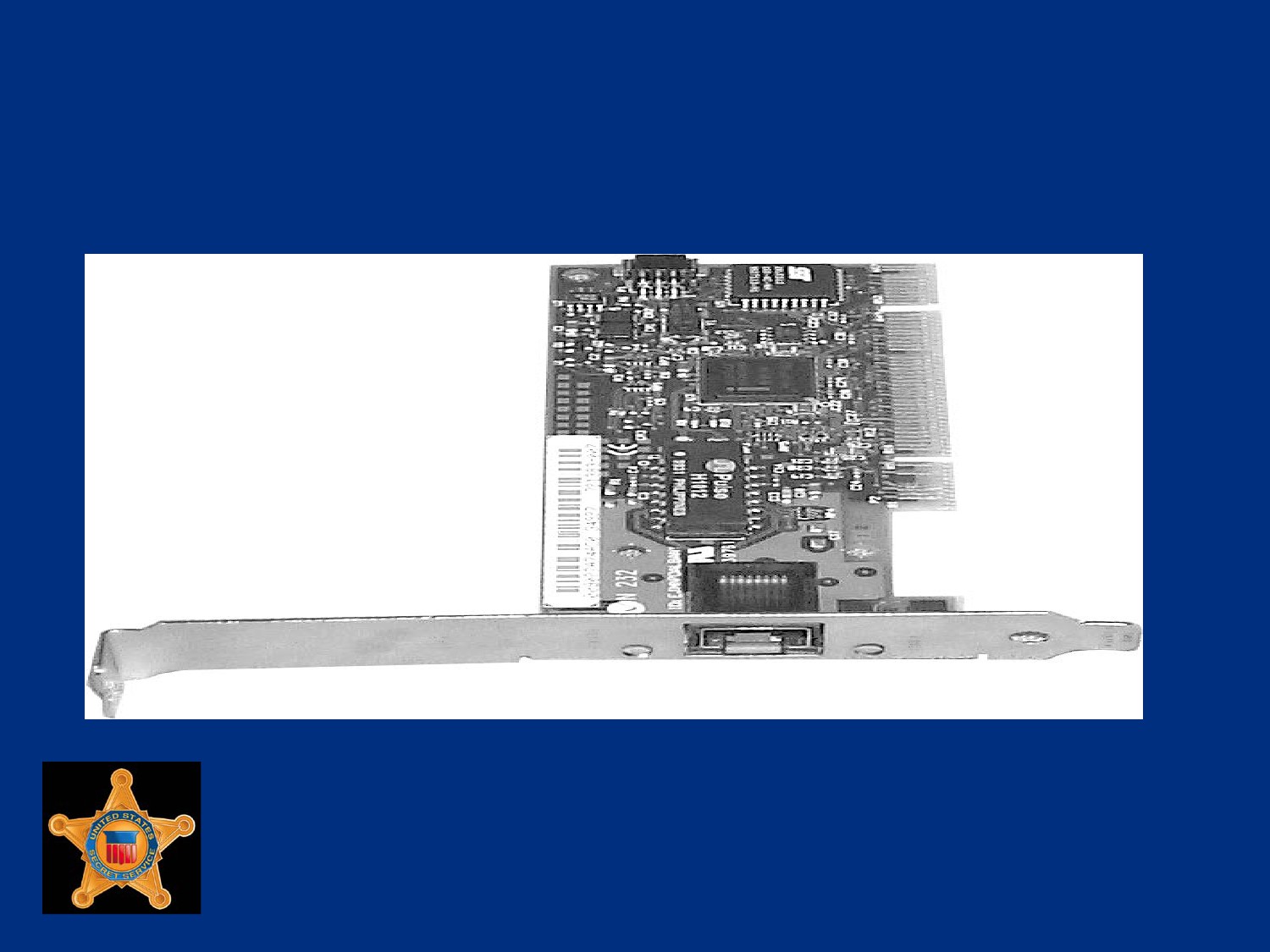
Printed Circuit Board with Integrated
Circuits
U.S. Department of
Homeland Security
United States
Secret Service
The Growth of Personal Computers
With Integrated Circuit technology came smaller and cheaper
computers
First personal computer (PC) debuted in 1975, Altair 8800
Sold as kit, contained an Intel 8080 microprocessor and 256
bytes of RAM
Built without keyboard or monitor
Users flipped switches on front panel to input data and
programs
U.S. Department of
Homeland Security
United States
Secret Service
The Growth of Personal Computers
Altair displayed output on rows of small lights called light-
emitting diodes (LEDs)
Demand grew, manufacturers make computers user-friendly
by adding keyboards, video displays, and data storage devices
1976, Apple computer first PC considered powerful enough to
be used by businesses and average consumers
U.S. Department of
Homeland Security
United States
Secret Service
The Growth of Personal Computers
IBM, Radio Shack, and Commodore offer new products for
both business and home use
CPUs more powerful and offered increased computational
abilities
Graphical user interfaces (GUI) made new microcomputers
user-friendly
U.S. Department of
Homeland Security
United States
Secret Service
Basic System Components
Main system components
Data storage and retrieval components
Input components
Output components
U.S. Department of
Homeland Security
United States
Secret Service
Main System Components
Motherboard (MB)
Printed circuit board holds memory chips, expansion cards,
and various other components
Central Processing Unit (CPU) (Brains of computer)
Uses microchip technology to process information and code
used by computer
Bus (computer’s nervous system)
Common pathway, data and power signals travel over to
various computer components
U.S. Department of
Homeland Security
United States
Secret Service
Main System Components
Chipset
Main circuit of the MB, controls many different components
of system
Memory
Stores everything system is processing at a given time
Random access memory (RAM), short-term memory
Read-only memory (ROM), hard-coded memory that is
ever-present
U.S. Department of
Homeland Security
United States
Secret Service
Main System Components
Power Supply
Provides power to every piece of hardware in computer
case, converts voltage from wall outlet to level computer
can use safely
Cooling Fans
Fans force air into case and over components to cool them
Chassis
Computer’s case that houses system’s internal components
U.S. Department of
Homeland Security
United States
Secret Service
Data Storage/Retrieval Components
Hard Drive
Main data repository for non-volatile mass storage
Uses magnetically coated metal, glass or ceramic platters
as storage media
Floppy Drive
Portable semi-mass storage
Uses 3.5 inch floppy disks
U.S. Department of
Homeland Security
United States
Secret Service
Data Storage/Retrieval Components
CD-ROM/DVD
Non-volatile, optical mass storage device
PC Card
Versatile, solid-state storage device, can be used as
additional hard drive, RAM, or communications device used
in laptops, notebooks, and select PDAs
U.S. Department of
Homeland Security
United States
Secret Service
Input Components
Keyboard
Primary input device, uses alphanumeric keys
Mouse
Device that moves pointer to make selections in a GUI
Game Controller
Joystick or other device used to play games
Require a game controller card or sound card, chip, or
chipset with game controller port
U.S. Department of
Homeland Security
United States
Secret Service
Output Components
Monitor
Main display component that interactively shows visual
input/output
Requires video card or video chip/chipset
Video Card, Chip, Chipset
Translates visual input/output and sends to monitor
Components are found on MB
U.S. Department of
Homeland Security
United States
Secret Service
Output Components
Speakers
Carry audio data processed by sound card or chipset
May be attached to sound card by cables mounted in
chassis and connected directly to MB, PC speaker, or both
Sound Card and Chipset
Translates audio input/output (I/O) and sends it to speakers
Both found on MB
U.S. Department of
Homeland Security
United States
Secret Service
Lesson 3 - Motherboard and
Components
Motherboard Overview
Motherboard Components
The Boot Process
Bus Overview
Bus Types
U.S. Department of
Homeland Security
United States
Secret Service
Motherboard Overview
Main circuit board of computer
Every component connected in some way
Contain slots that hold processor, expansion cards, and
connectors for attaching additional boards
CPU
ROM (System BIOS)
Serial and parallel ports
Memory
U.S. Department of
Homeland Security
United States
Secret Service
Motherboard Overview
Chipset
Clock and Complementary Metal Oxide Semiconductor
(CMOS) battery
Mass storage interface
Expansion slots
Connectors for peripherals including monitor, keyboard, and
disk drive(s)
Vista Specific (Screen-duo and ReadyBoost)
U.S. Department of
Homeland Security
United States
Secret Service
Types of Motherboards
Several different form factors (designs) of MBs
Older form factors include Baby-AT, first IBM PC board
released in 1981, Full-size AT, and LPX
Modern form factors found in most computers today include
the NLX, BTX and ATX family of form factors, namely the
Micro-ATX, Flex-ATX, and WTX
U.S. Department of
Homeland Security
United States
Secret Service
Types of Motherboards
Full-size AT MB replaced original IBM XT MB in 1984
Initially large board measuring 12 inches wide by 13.5 inches
long, reduced in size as advancements in design progressed
Contains two power supply connectors that plug into one non-
form molded power connector and combination of 16-bit and/or
8-bit ISA slots
U.S. Department of
Homeland Security
United States
Secret Service
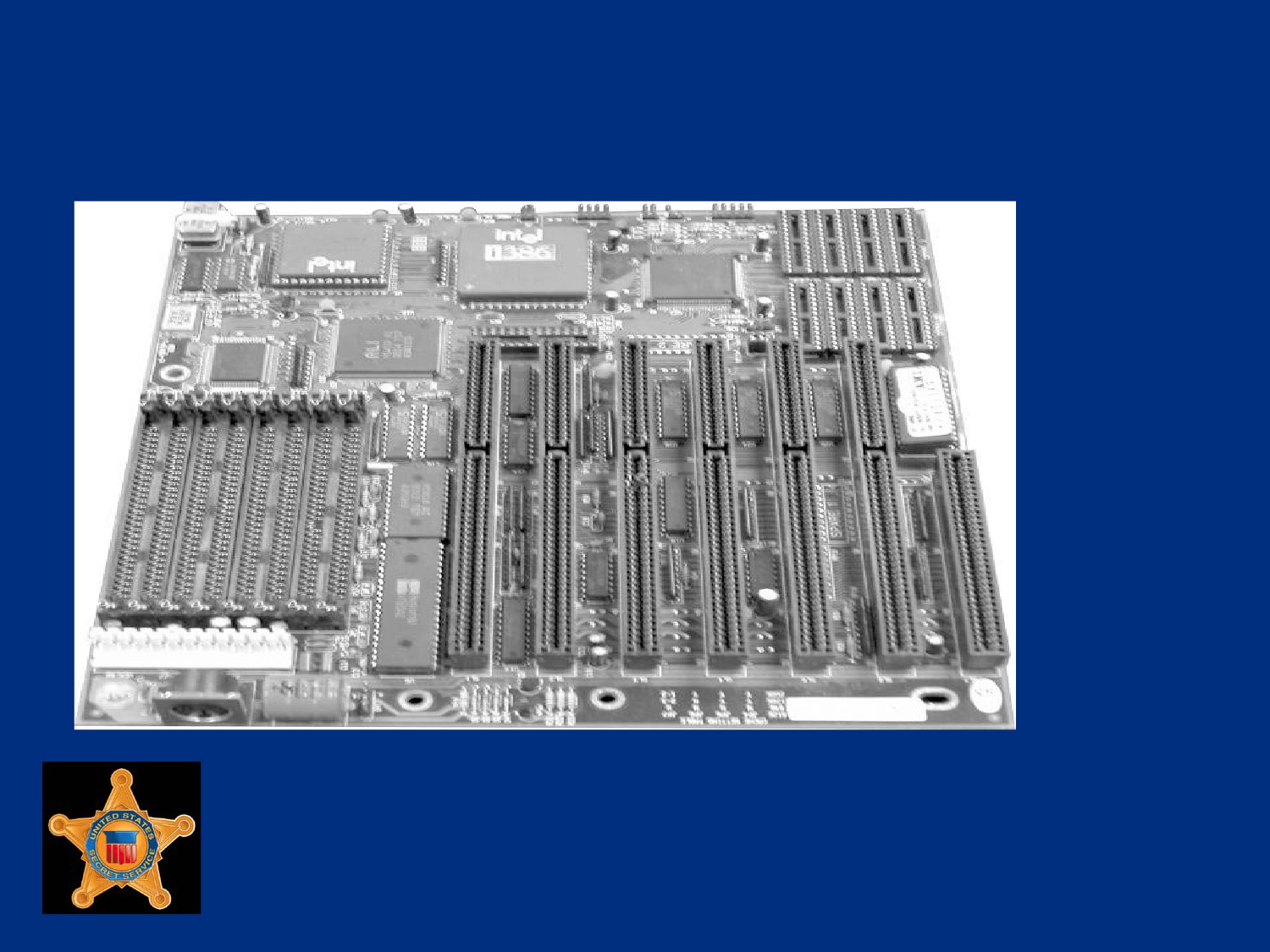
Example of AT Motherboard
U.S. Department of
Homeland Security
United States
Secret Service
Types of Motherboards
In 1996 Intel introduced ATX as replacement for Baby-AT
Considered first dramatic improvement in MB form factors
used in desktop PCs
ATX provided standard, nonproprietary design, easy to install
and maintain
Modern MBs use same form factor (9 inches wide by 12 inches
long)
First to integrate components such as Flash BIOS and I/O
logic
U.S. Department of
Homeland Security
United States
Secret Service
Types of Motherboards
ATX MB half the width of earlier MBs and contains
combination of ISA and PCI slots
Power connector for ATX is one form-molded power connector
that prevents it from being connected incorrectly
ATX-class and above MBs may be configured for suspend or
power-off functions initiated by operating system
U.S. Department of
Homeland Security
United States
Secret Service
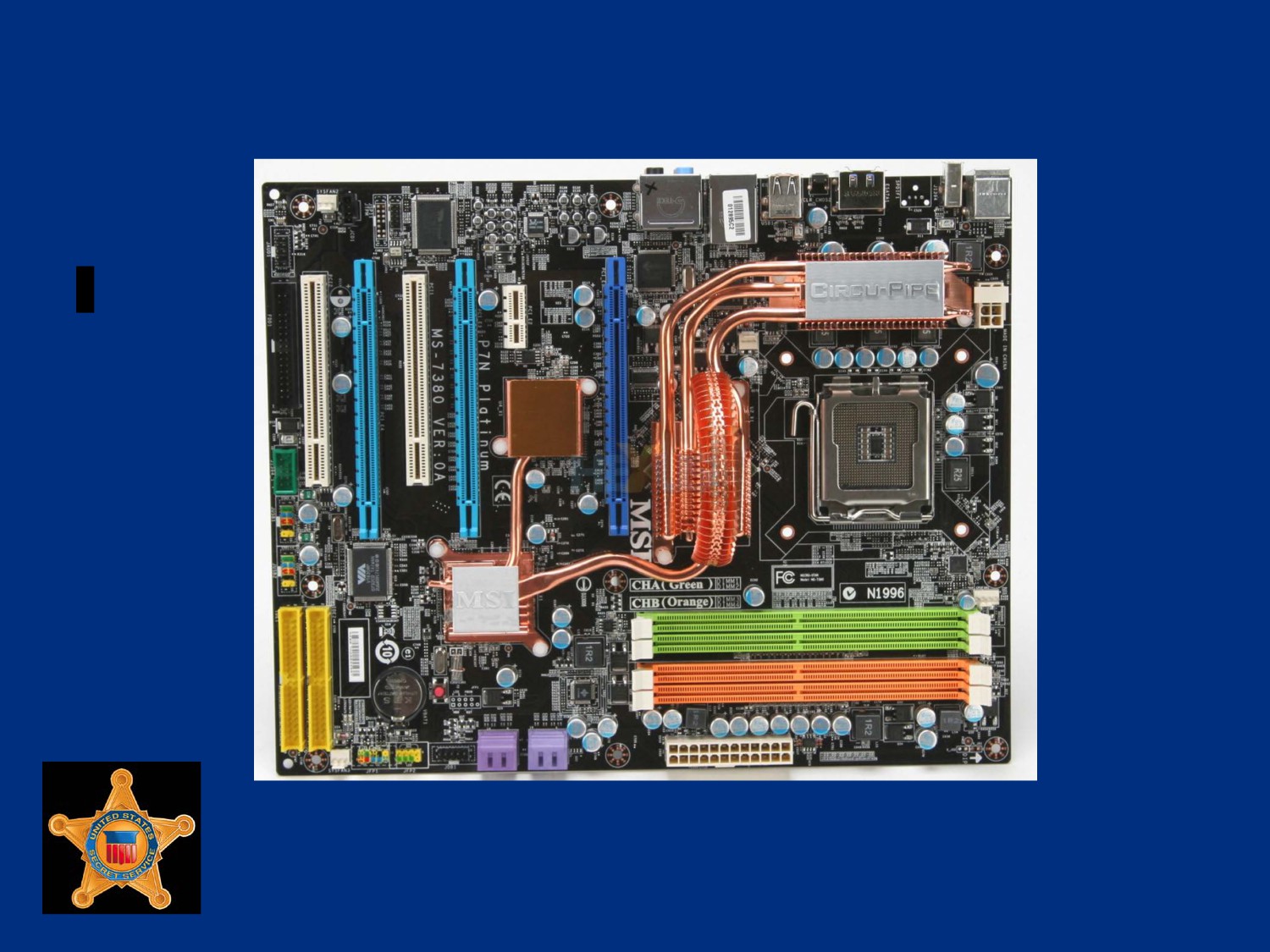
Example of ATX Motherboard
U.S. Department of
Homeland Security
United States
Secret Service
The ATX Family
ATX form factors developed by Intel as evolutions of original
ATX:
Flex ATX
Micro ATX
WTX
U.S. Department of
Homeland Security
United States
Secret Service
Low Profile Extended (LPX) Board
LPX is semi-proprietary, non-standard design introduced by
Western Digital in 1987
Incorporates slots parallel to MB allowing expansion cards to
plug sideways into riser board
Riser board connects to MB
Design change allowed for slimmer PC cases
Used in PCs sold in retail stores such as Compaq and
Packard-Bell
Easy to identify, devices parallel to MB
U.S. Department of
Homeland Security
United States
Secret Service
Riser Board Example
U.S. Department of
Homeland Security
United States
Secret Service
New Low Profile Extended (NLX)
Board
NLX is a modified, non-proprietary LPX design made by Intel
With NLX system, riser plugs into side of MB
Configuration allows easy access to components for
installation and maintenance
NLX has integrated network interface card (NIC)
U.S. Department of
Homeland Security
United States
Secret Service
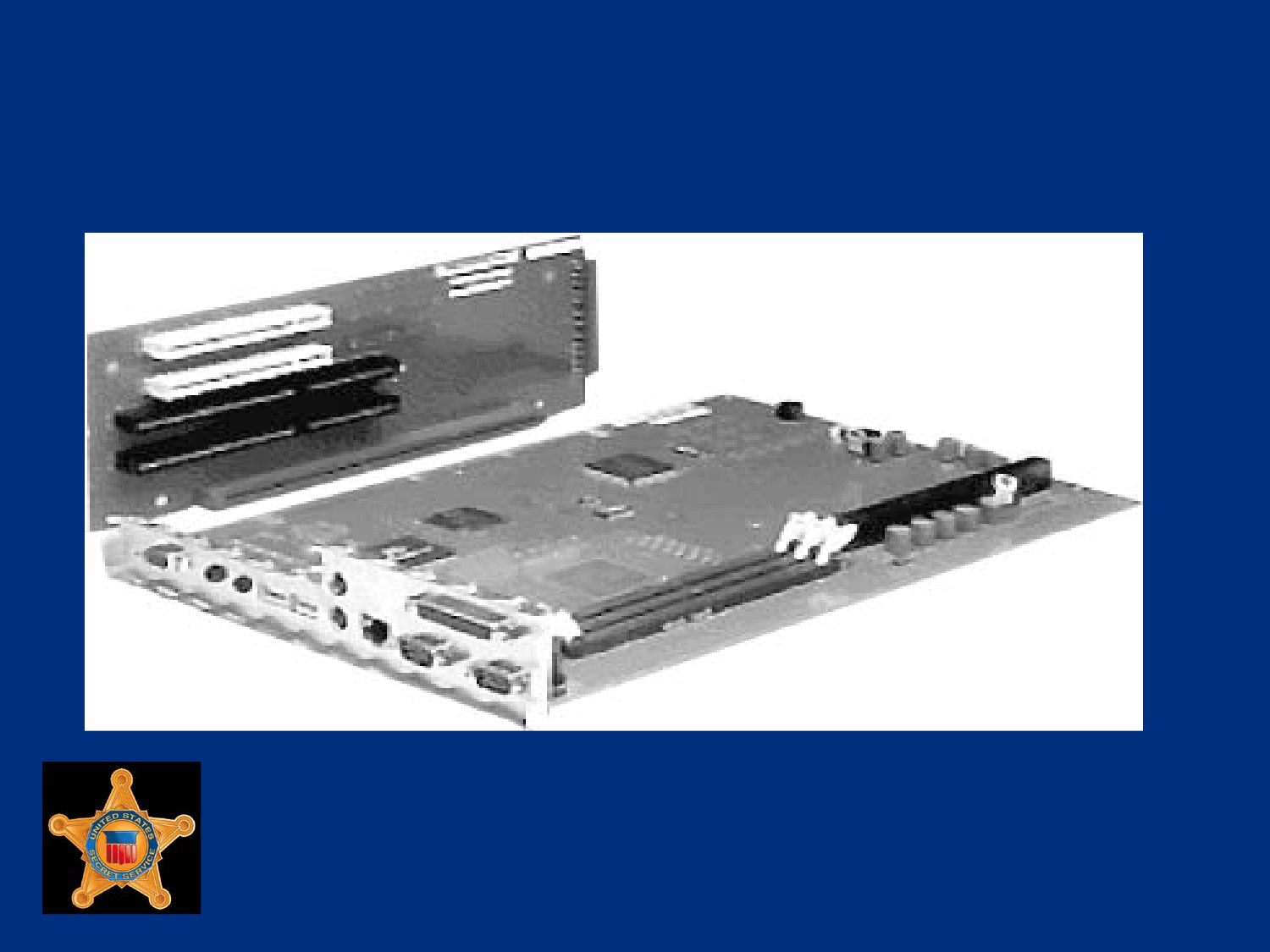
Example of NLX Motherboard with
Riser
U.S. Department of
Homeland Security
United States
Secret Service
Motherboard BIOS
Considered heart of computer, controls communications
between computer hardware and operating system
System BIOS, also referred to as ROM BIOS because code is
contained in a non-volatile, ROM chip
Contains software instruction set called firmware
Firmware provides basic input/output instructions to boot
computer and handles several important functions
U.S. Department of
Homeland Security
United States
Secret Service
Complimentary Metal Oxide on
Semiconductor (CMOS)
Chip that stores clock settings, current system configuration
data as discovered by POST or defined by setup program, and
Plug and Play settings
Located on MB
Volatile, requires battery power to maintain CMOS memory
and system time whether PC is on or off
U.S. Department of
Homeland Security
United States
Secret Service
Complimentary Metal Oxide on
Semiconductor (CMOS)
Battery power comes from one of following:
Coin-type watch battery (commonly used)
Brick/Barrel type battery
Capacitor, an electrical component that holds a charge
Data stored in CMOS chip accessed by system BIOS, includes
configurable settings such as boot sequence, CPU clock
speed, and power management
U.S. Department of
Homeland Security
United States
Secret Service
Chipset
Controls flow of information between various components of
MB
Chipset on modern PC contains two or three separate chips,
older PCs had as many as five chips
Largest chip is called North Bridge; smaller chip is called South
Bridge
U.S. Department of
Homeland Security
United States
Secret Service
Chipset
Controls many different components of system including:
CPU
Cache
Main memory
Peripheral Component Interconnect (PCI) bus
Industry Standard Architecture (ISA) bus
Various system resources
U.S. Department of
Homeland Security
United States
Secret Service
Chipset
Defines various functions the system will support including:
Defines Front-side Bus speed (66, 100, 133, or 266-plus
MHz)
Supports Accelerated Graphics Port (AGP) video cards
Defines minimum and maximum processor speed MB can
handle
Major chipset manufacturers, Intel, Apollo, VIA, and SIS
U.S. Department of
Homeland Security
United States
Secret Service
Super I/O Chip
Chip on MB that integrates devices that were contained on
expansion cards on older PCs
Allows for faster transfer rate of data between device and
system and has lower failure rate
Usually contains the following devices:
Dual serial port controllers
Floppy drive controller
Parallel port controller
Keyboard and mouse controllers
U.S. Department of
Homeland Security
United States
Secret Service
Jumpers
Small plastic-covered metal clip placed over metal pins sticking
out of board
Enables electricity to flow to pins, completing circuit
Considered closed when plastic clip covers pins
Used to control device settings including processor speed and
type, bus speed and CMOS password settings
U.S. Department of
Homeland Security
United States
Secret Service
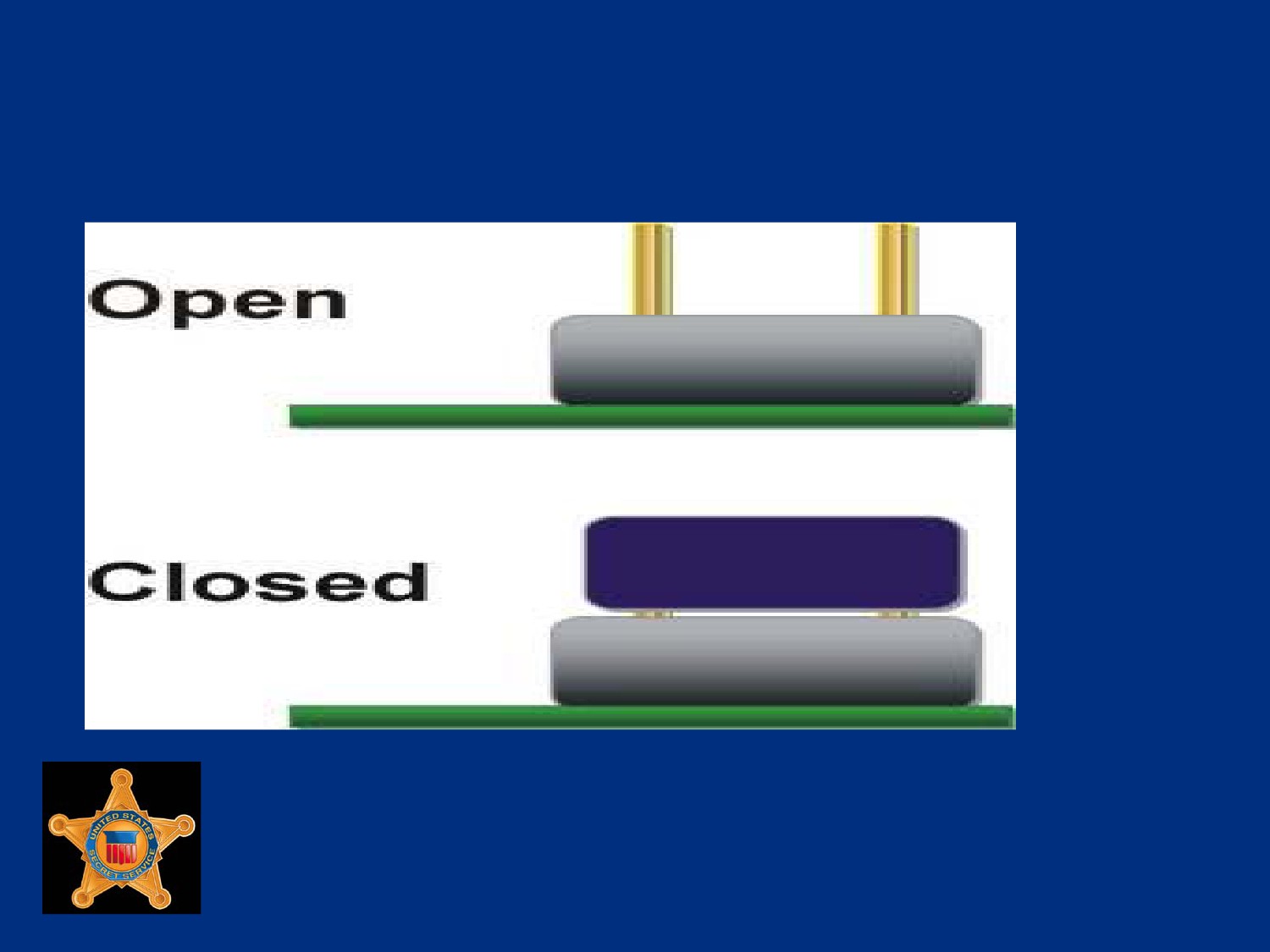
Jumpers
U.S. Department of
Homeland Security
United States
Secret Service
Dual Inline Package Switches
Dual Inline Package (DIP) switches are small switches
embedded into circuit boards
Used to configure system functions including bus speed,
processor speed and processor type
Toggled either On/Off or 1/0
Microsoft’s standard Plug and Play feature made DIP switches
obsolete
U.S. Department of
Homeland Security
United States
Secret Service
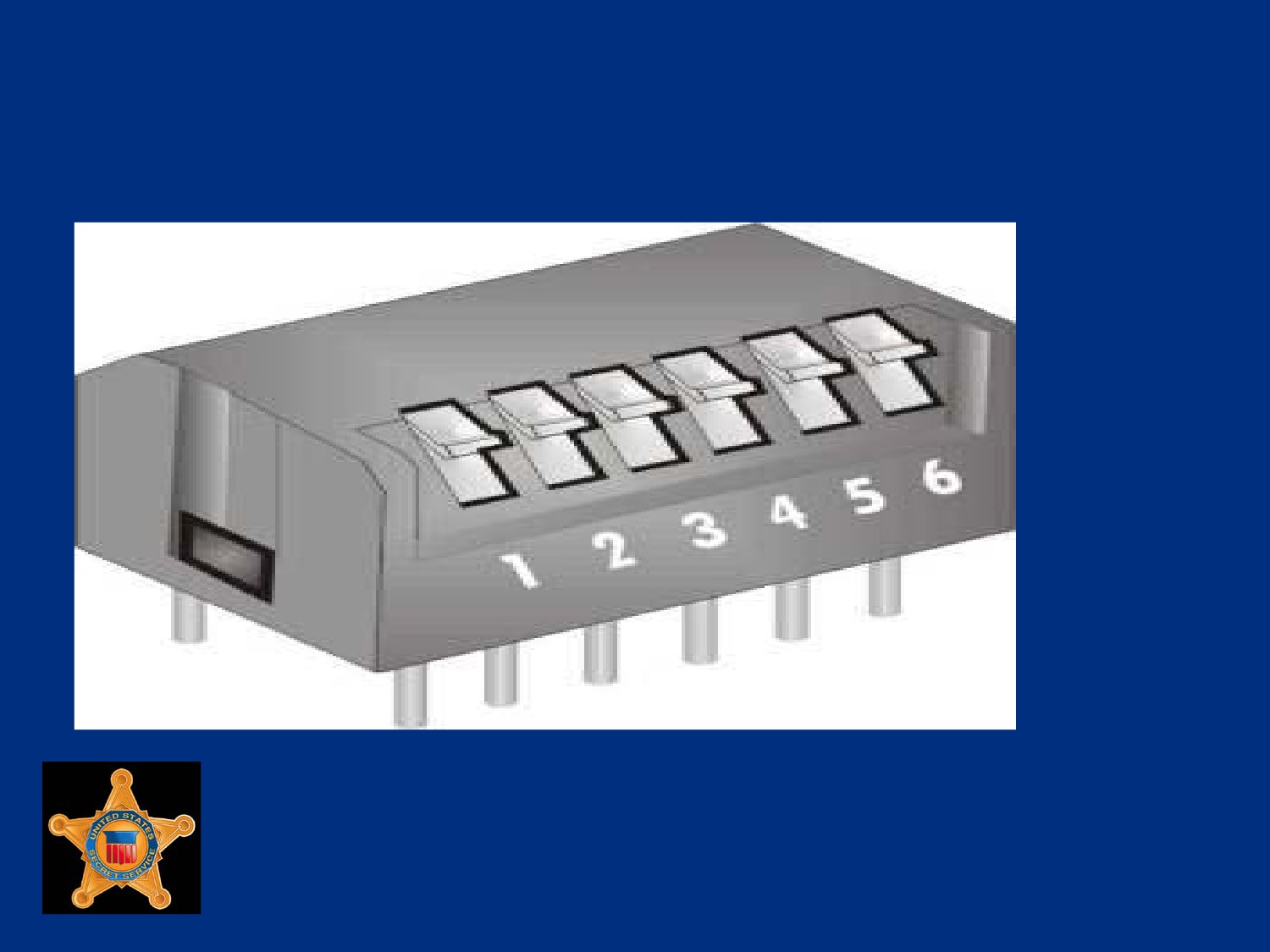
DIP Switch Example
U.S. Department of
Homeland Security
United States
Secret Service
Trusted Platform Module
TPM is a microcontroller device installed on MB
Stores encryption keys, passwords, and digital certificates
Provides secure key generation that can be used to create
and/or store both user and platform identity credentials for
authentication
Offers improved, hardware based security
Uses RSA, and SHA-1 encryption algorithms
U.S. Department of
Homeland Security
United States
Secret Service
Power Supply
Powers all internal components
Come in different wattage models ranging from 63.5 to 1000-
plus watts
Each unit contains a power transformer that converts voltage
from wall socket to power level computer can safely use
Unit transmits a power good signal to MB
Signal must be present continuously for computer to run or
computer shuts down instantly
U.S. Department of
Homeland Security
United States
Secret Service
Power Supply
Power good signal performs several functions:
Prevents computer from starting until appropriate level of
operating voltage is reached
Interfaces with computer’s reset switch
When reset switch is pressed, power good signal is
grounded out
When reset switch is released, power good resumes and
system reboots
U.S. Department of
Homeland Security
United States
Secret Service
ATX and AT Power Supplies
Main plugs of ATX and AT power supplies are very different
ATX has single, form-fitted plastic plug that fits into on-board
socket that has unique configuration
Plug is form fitted, will only fit into socket in one direction
U.S. Department of
Homeland Security
United States
Secret Service
ATX On-Board Power Socket
(front view)
U.S. Department of
Homeland Security
United States
Secret Service
ATX and AT Power Supplies
In contrast, AT power supply has two separate plugs that fit
into two separate on-board sockets
Wires on plugs are color-coded
Plugs are placed into sockets with black wires of both plugs
located directly next to each other
Properly connected, black wires will be in center of the two
seated plugs
U.S. Department of
Homeland Security
United States
Secret Service
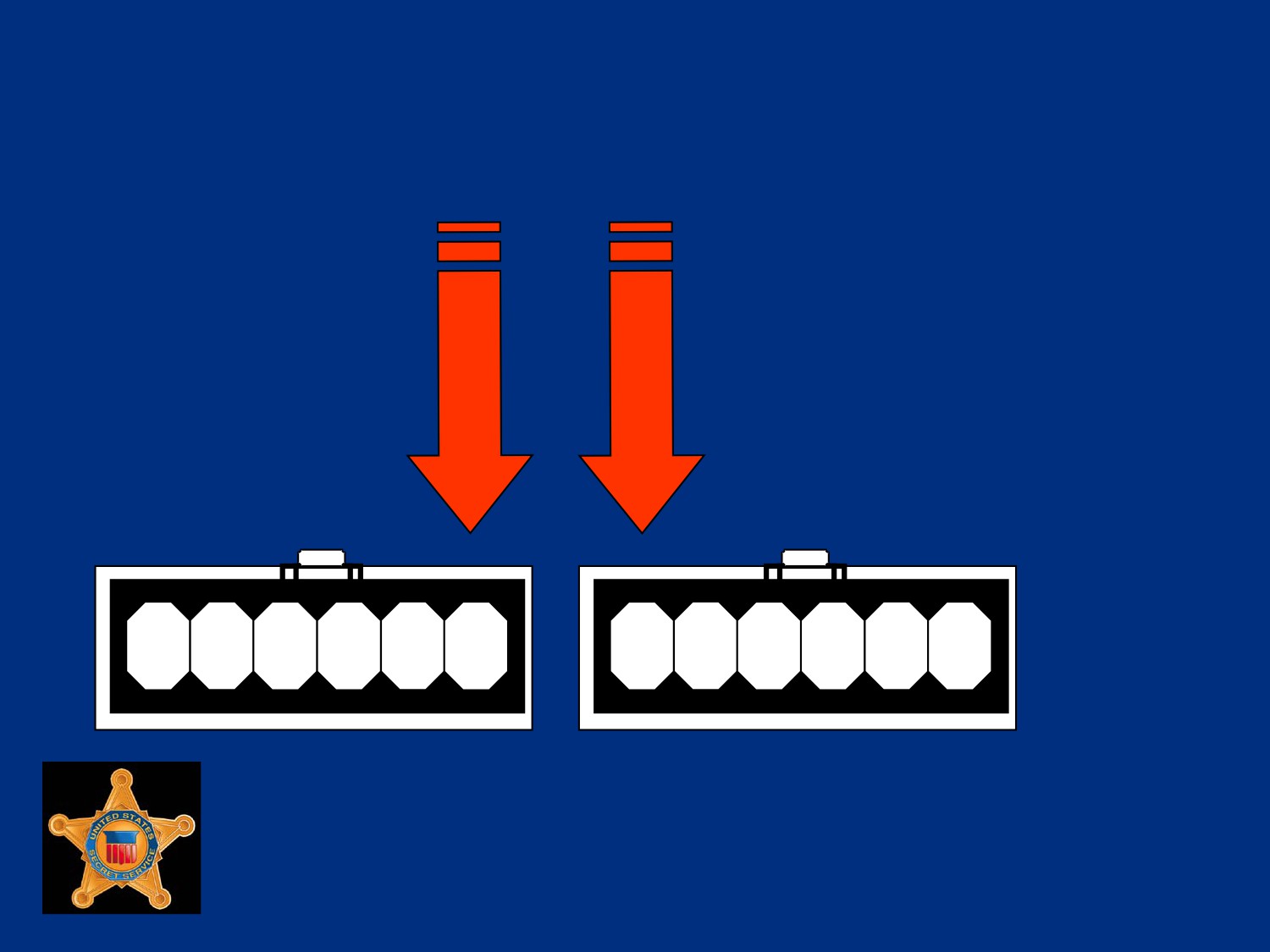
AT Power Connector Example
U.S. Department of
Homeland Security
United States
Secret Service
ATX and AT Power Supplies
Warning: Unlike form-fitted ATX plug, AT plugs can be
connected incorrectly. If AT plugs are not connected correctly,
the motherboard will fail and fire may occur.
U.S. Department of
Homeland Security
United States
Secret Service
The Boot Process
Predictable way a computer starts from moment Power On
button is pressed until operating system loads
U.S. Department of
Homeland Security
United States
Secret Service
The Boot Process
Activity
Description
1. Power good signal is sent to CPU
When Power On button
pressed
2. CPU looks at ROM for basic
When CPU receives
instructions (BIOS)
power good signal
3. System BIOS loads
4. BIOS initiates POST
U.S. Department of
Homeland Security
United States
Secret Service
The Boot Process
Activity
Description
5. POST checks RAM and Video. If
Typically, a procession
either have a problem, there are
of long single beeps for
various beep codes.
RAM; one long and two
short for video.
From this point forward, errors are
Motherboard
reported with text messages displayed
documentation contains
on the monitor.
beep codes.
U.S. Department of
Homeland Security
United States
Secret Service
The Boot Process
Activity
Description
6. When RAM and Video pass POST
Begin to see text on
test, single beep occurs. Single beep
screen. Rapid numbers
exists simply to indicate that diagnostic
flashing indicate an in-
speaker is working. Malfunctioning
depth RAM check.
speaker will prevent audible beep
Screen will indicate
codes.
BIOS manufacturer and
version number.
U.S. Department of
Homeland Security
United States
Secret Service
The Boot Process
Activity
Description
7. POST checks keyboard
If error occurs, text
message generally
displays on-screen
8. Legacy and then Plug and Play
Data gathered is
devices are identified
stored on CMOS chip
U.S. Department of
Homeland Security
United States
Secret Service
The Boot Process
Activity
Description
9. CMOS data queried against new
If there is a problem
current configuration data. Drives
with the CMOS battery,
spin, lights flash, and sounds are
Text message explains.
heard.
10. Finding no major hardware errors,
BIOS turns process over to boot
loader.
U.S. Department of
Homeland Security
United States
Secret Service
The Boot Process
Activity
Description
11. The boot loader learns boot
sequence (e.g. A: C: CD-ROM,
etc.) and looks for Master Boot
Record on device.
For hard disks, the boot loader looks
for a partition table. The partition
table will have a pointer to the MBR
on the primary, active partition
U.S. Department of
Homeland Security
United States
Secret Service
The Boot Process
Activity
Description
12. MBR contains first file needed to
start operating system (IO.SYS in
Windows 9x, boot.ini in NT).
13. Process turned over to OS and you
see splash screens, etc.
U.S. Department of
Homeland Security
United States
Secret Service
Bus Overview
Various buses comprise transportation system in computers
Acts as a highway, sends data, signals, and power among
processor, memory, and other components
Two bus categories:
Internal bus connects all internal components to CPU and
main memory
Expansion bus connects expansion boards to CPU and
main memory
U.S. Department of
Homeland Security
United States
Secret Service
Bus Overview
Key buses found in many computers include:
Processor bus
Memory bus
Accelerated Graphics Port (AGP) bus
Peripheral Component Interconnect (PCI) bus
PCI Express
Industry Standard Architecture (ISA) bus
Universal Serial bus (USB)
External SATA (E-SATA)
U.S. Department of
Homeland Security
United States
Secret Service
Bus Architecture
Complex system of thin circuits known as traces that are
located on any of several layers of MB
System chipset orchestrates data transfer from all components
via the bus
Bus includes microchips and slots to hold expansion cards or
circuit boards
U.S. Department of
Homeland Security
United States
Secret Service
Bus Architecture
Buses are hierarchically arranged so each slower bus is
connected to faster bus above
Bus size, called width, describes amount of data (measured in
bits) that can be transmitted at one time
Bus’s clock speed, measured in MHz, describes speed of data
transfer
U.S. Department of
Homeland Security
United States
Secret Service
Processor and Memory Buses
Processor bus is data pathway between CPU and MB chipset
Also called front side bus, processor bus is fastest bus on MB
Used by CPU to transfer information between cache or main
memory and chipset
Memory bus is data pathway between RAM and CPU, always
same width as processor bus
U.S. Department of
Homeland Security
United States
Secret Service
ISA Bus
Part of first IBM PC in 1984, 8 bits with speed of 5 MHz
Today, ISA bus still remains slow at 16 bits and 8 MHz
Ideal for slow-speed peripherals such as some older modems
and sound cards
Until recently, most MBs contained several ISA slots for
backward compatibility
Newer MBs have replaced ISA slots with PCI bus
U.S. Department of
Homeland Security
United States
Secret Service
Extended ISA Bus
Extended ISA (EISA) bus is a 32-bit, non-proprietary slot
connection designed to replace ISA bus
Accepts ISA devices and has two slots
Slots usually brown in color
EISA bus now obsolete in PCs, still used in high-end servers
U.S. Department of
Homeland Security
United States
Secret Service
Micro Channel Architecture
Micro Channel Architecture (MCA) connector was IBM
proprietary slot connection designed to replace ISA/EISA cards
MCA system now obsolete, may still be found in older IBM
computer systems
MCA introduced concept of busmastering
Allows devices direct access to CPU via MB I/O controller for
faster access
Busmastering still used by modern devices
U.S. Department of
Homeland Security
United States
Secret Service
Micro Channel Architecture
Two formats:
16-bit with two slots
32-bit with three slots (third slot is separated from other two)
U.S. Department of
Homeland Security
United States
Secret Service
Micro Channel Architecture
MCA 16-bit bus (2 slots)
U.S. Department of
Homeland Security
United States
Secret Service
Micro Channel Architecture
MCA 32-bit bus (3 slots)
U.S. Department of
Homeland Security
United States
Secret Service
Video Electronic Standards Assoc.
Local Bus
The Video Electronic Standards Association (VESA) local bus
(VL-Bus) is 32-bit, non-proprietary slot connection meant to
replace ISA
Has three slots (two together and one separated)
First two slots (ISA) black, third slot brown, used for older
video cards, replaced by PCI bus
U.S. Department of
Homeland Security
United States
Secret Service
PCI and PCI-X Bus
PCI bus, collection of 32-bit or 64-bit connector slots on MB,
generally white in color
Modems, NICs, SCSI host adapters, and non-AGP video cards
use PCI bus
PCI local bus, also called mezzanine (meaning intermediary)
bus because it sits in middle between CPU and RAM
Part of North Bridge, can function with other devices and RAM
without use of CPU
U.S. Department of
Homeland Security
United States
Secret Service
PCI and PCI-X Bus
PCI and PCI-X send data in parallel form in one direction at a
time
Speeds range from 33MHz (PCI) to 533MHz (PCI-X) with
maximum of 34Gbits/sec transfer in most recent PCI-X
All devices on a PCI bus take turns accessing bandwidth
PCI-X completely backward compatible
All 32-bit PCI cards function in PCI-X slot and new 64-bit PCI-
X cards will function in standard PCI slot from late 1990s
U.S. Department of
Homeland Security
United States
Secret Service
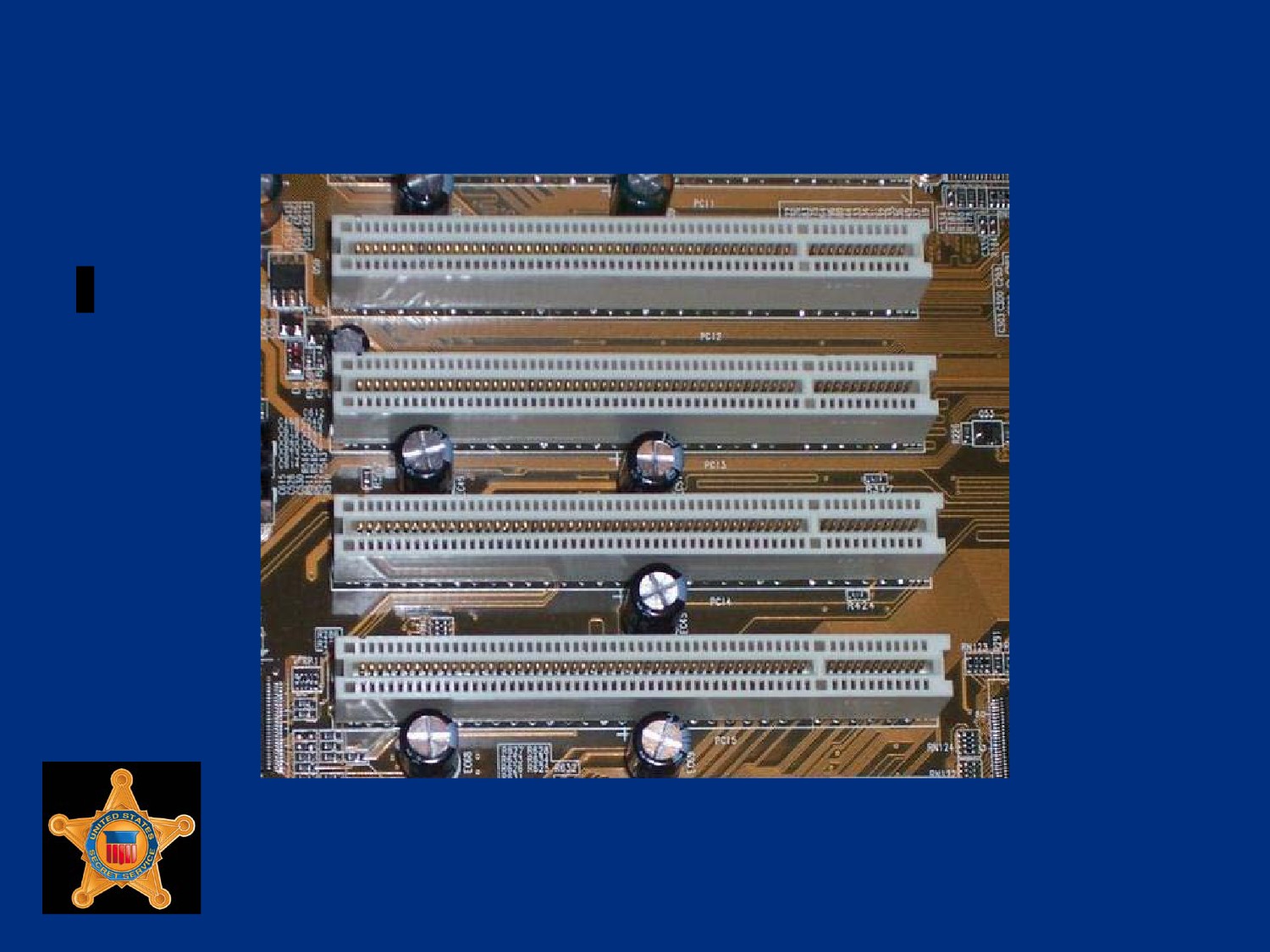
Example of PCI and PCI-X Bus
U.S. Department of
Homeland Security
United States
Secret Service
PCI Express
PCI advancement that sends data across lanes in serial form
Capable of sending and receiving data simultaneously
Various formats of PCI Express such as x1, x2, x4, x8, x12
and x16
When multiplied by four, number represents number of lanes
available to send and receive data
Introduces lane switching, allows data to be switched along
lanes as needed instead of devices taking turns waiting for bus
U.S. Department of
Homeland Security
United States
Secret Service
PCI Express
PCI Express much more efficient than PCI or PCI-X
Also known as 3GIO or 3rd generation input/output
Most common formats are x1 and x2 for general peripheral
devices and x16 as AGP replacement for graphics cards
The x16 format can provide up to 128 Gb/sec throughput
PCI Express connectors, generally black in color, physically
different from PCI
Not backward compatible with PCI or PCI-X
U.S. Department of
Homeland Security
United States
Secret Service
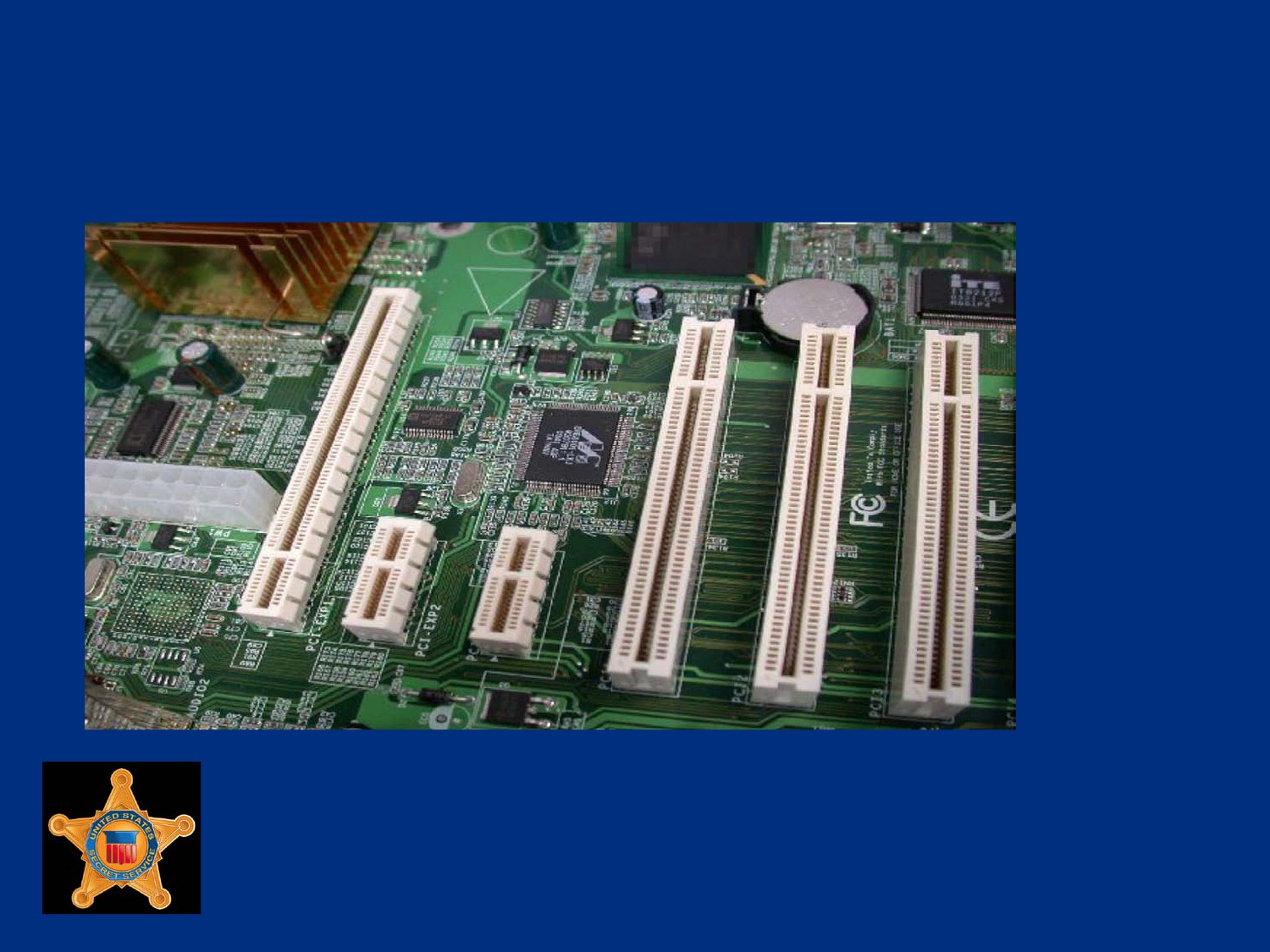
Example of PCI Express
U.S. Department of
Homeland Security
United States
Secret Service
AGP Bus
Used exclusively for high-speed graphics processing
This 66 MHz bus has a 32-bit slot connection, brown in color
Reserved for a video card
Available in 1x, 2x, 4x and 8x transfer rates
AGP local bus placed near processor bus for direct access to it
U.S. Department of
Homeland Security
United States
Secret Service
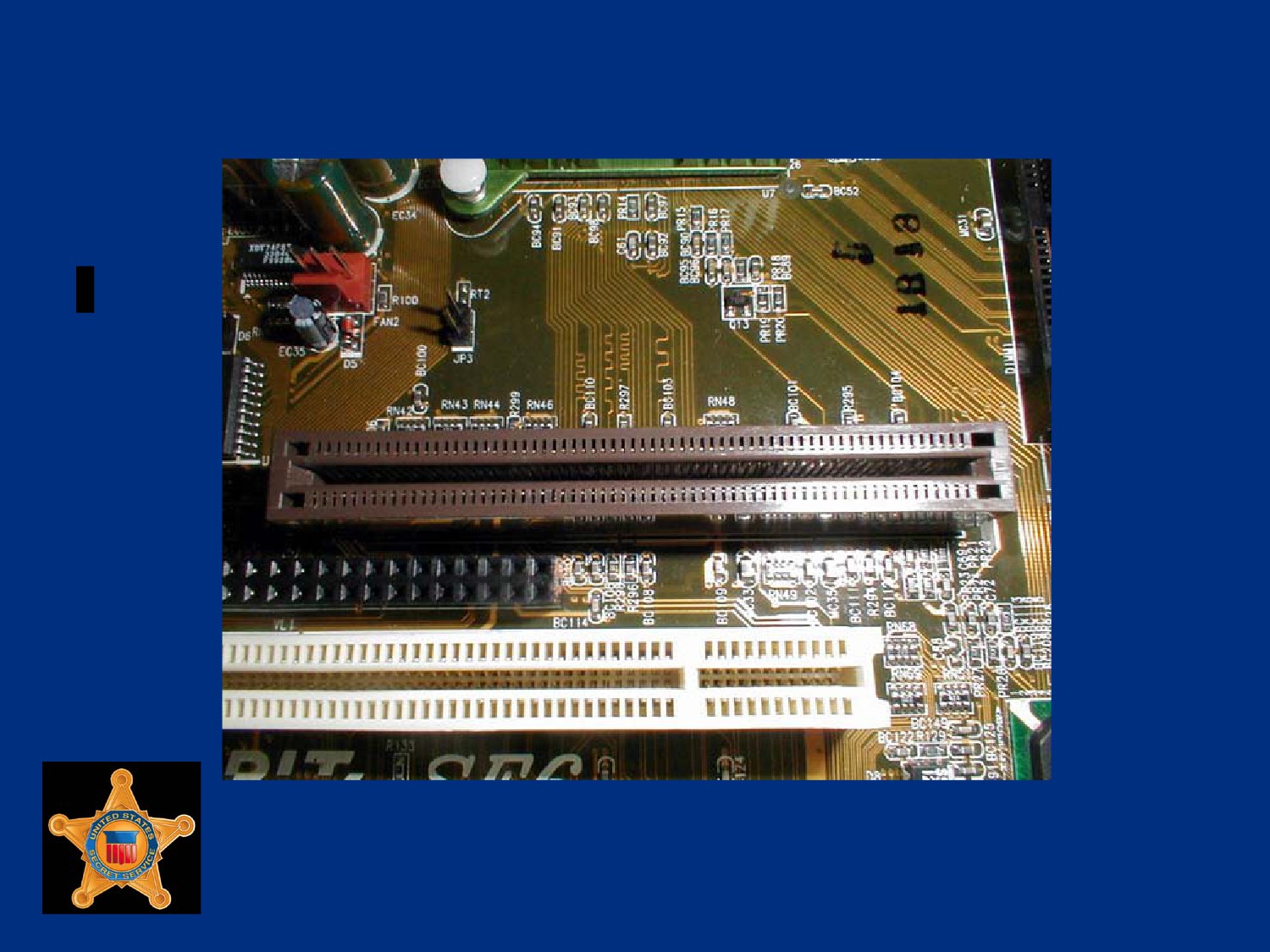
Example of AGP Bus
U.S. Department of
Homeland Security
United States
Secret Service
USB
Has port connection often located at rear of computer or on
front panel
Most computers have USB port used to connect various types
of peripherals to system
USB brings Plug and Play capabilities to peripherals
connected outside PC
Peripherals are automatically configured when attached to
USB port, reboot is not necessary to use component
U.S. Department of
Homeland Security
United States
Secret Service
USB
USB specification, version 2.0, supports data transfer rate of
480 Mb/sec
Version 2.0 backward compatible with earlier versions 1.1 and
1.0 that used 12 Mb/sec. and 1.5 Mb/sec. rates
Continually evolving technology, evidenced by announcement
of USB 3.0
USB 3.0 increases speed rating of external devices by ten
times that of USB 2.0, transferring data at 4.8 Gb/sec
USB 3.0 will be fully compatible with 2.0 and 1.1 devices
U.S. Department of
Homeland Security
United States
Secret Service
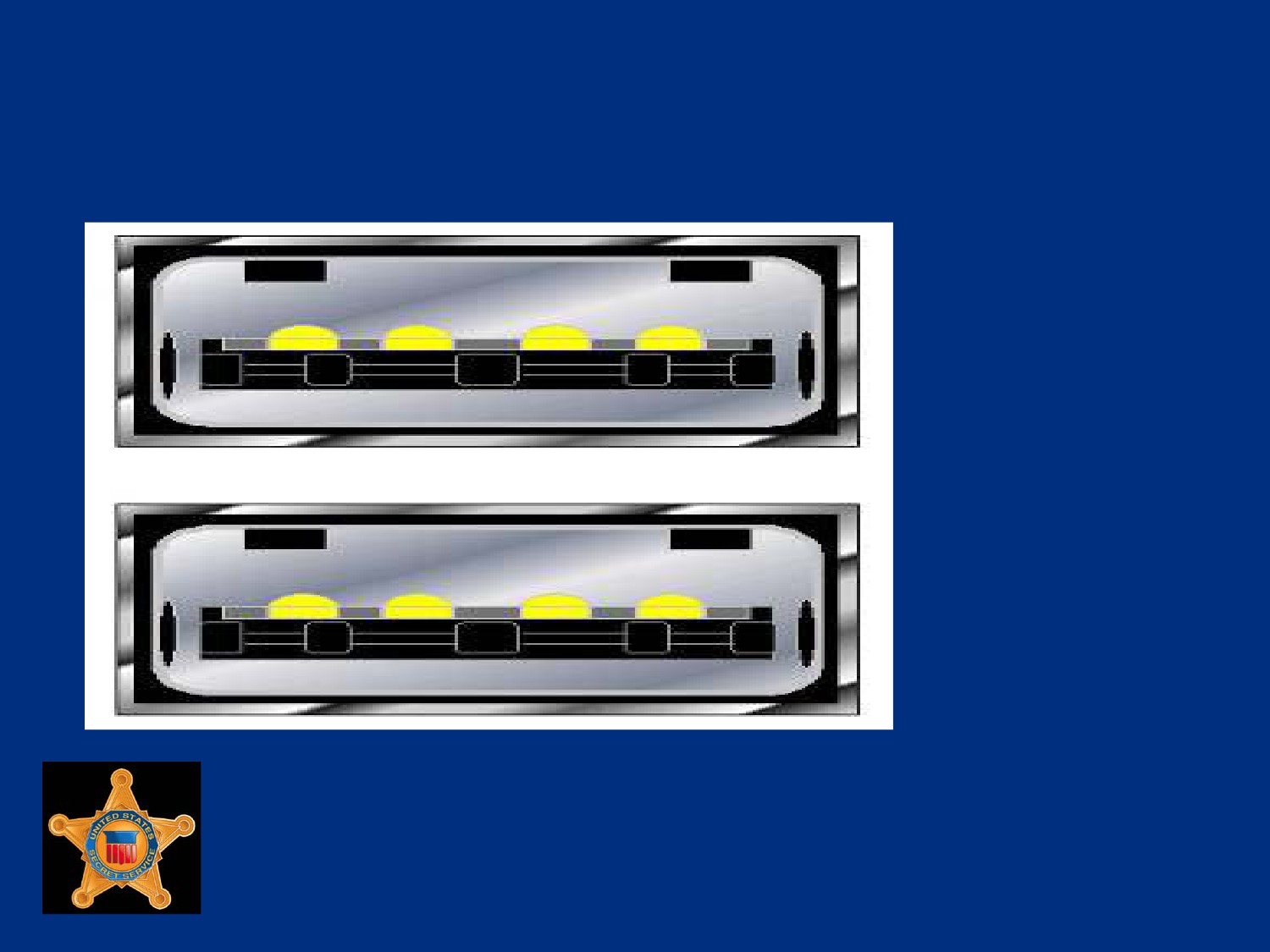
Example of USB Ports
U.S. Department of
Homeland Security
United States
Secret Service
Wireless USB
Along with wired USB solutions there are also recent
innovations in Wireless USB (WUSB)
WUSB allows for USB 2.0 speeds to devices within three
meters of computer
Works similar to Bluetooth, but features reduced range to
support higher transfer speeds
U.S. Department of
Homeland Security
United States
Secret Service
IEEE 1394 (FireWire)
IEEE 1394 is alternative to USB port
FireWire by Apple and i.Link by Sony are two brands
Allows 63 devices to be daisy chained to each connector
Can handle multiple chains
Transfer rate is approximately 400 Mb/sec, faster than USB
1.1 but slower than USB 2.0 480 Mb/sec
1394b standard allows faster signaling - up to 3.2 Gb/sec.,
requires special cables and interfaces
U.S. Department of
Homeland Security
United States
Secret Service
1394a (FireWire 400)
1394 and 1394a are original implementations of this bus type,
with speeds up to 400 Mb/sec
1394a uses two styles of connectors: a 4-pin connector and a
6-pin connector
The 6-pin has become a standard in many computers and
external devices
U.S. Department of
Homeland Security
United States
Secret Service
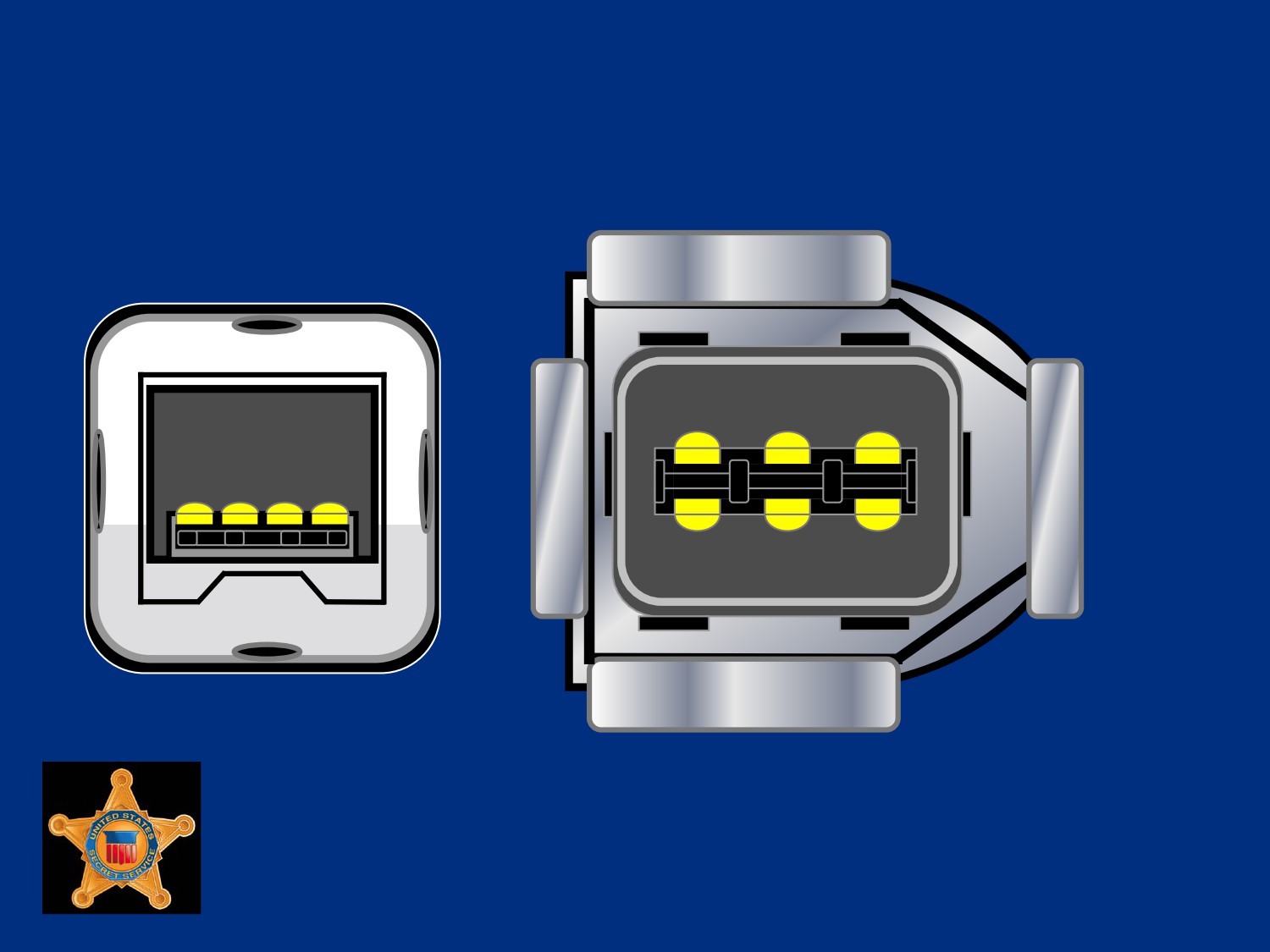
IEEE 1394 Connector Example
U.S. Department of
Homeland Security
United States
Secret Service
1394b (FireWire 800)
1394b designed as higher performance bus type, allowing up
to 800 Mb/sec and greater cable distances
1394b requires completely different cable and connector, a 9-
pin connector
Has not completely overtaken original 1394a
Many modern devices feature both 1394a and 1394b
connectors
U.S. Department of
Homeland Security
United States
Secret Service
Firewire S3200
S3200 refers to a newer FireWire standard that uses existing
1394b cables to achieve data transfer rates of 3.2 Gb/sec, four
times that of FireWire 800
U.S. Department of
Homeland Security
United States
Secret Service
E-SATA
The E-SATA is an external port connection for external SATA
devices, such as hard drives or DVD/CD devices
E-SATA runs at speeds of 300 Mb/sec
U.S. Department of
Homeland Security
United States
Secret Service
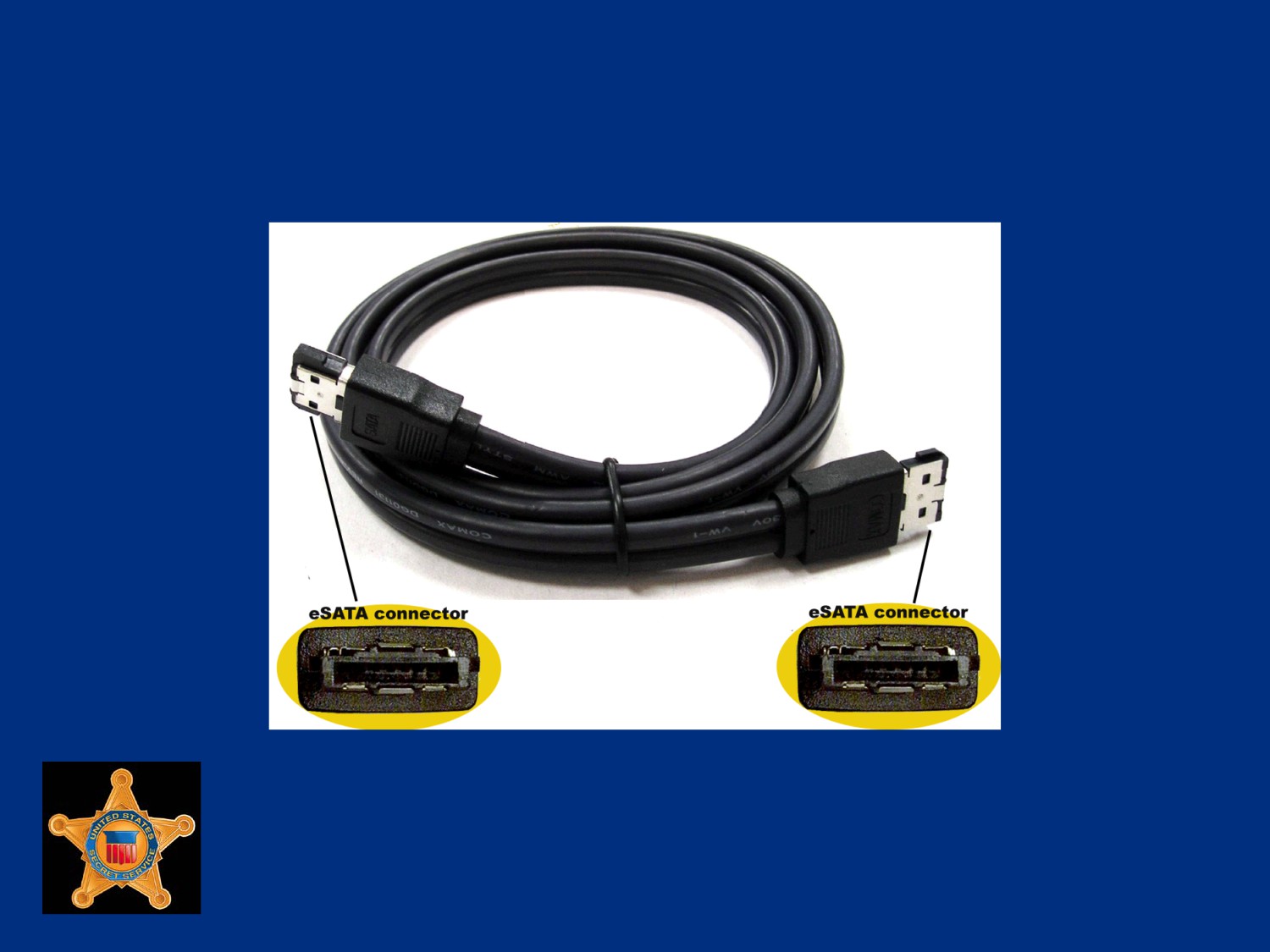
Example of E-SATA Cable and Ports
U.S. Department of
Homeland Security
United States
Secret Service
Lesson 4 - CPU and Memory
CPU Functions
Memory
U.S. Department of
Homeland Security
United States
Secret Service
CPU
Computer’s processor, most commonly called CPU or Central
Processing Unit
Main component that processes all software instructions and
makes all calculations
The CPU’s main components are the following:
Arithmetic logic unit, handles all arithmetic and logical
operations
Control unit, takes instructions from memory, translates
them, and carries out instructions
U.S. Department of
Homeland Security
United States
Secret Service
CPU
Either single-socket chip or chip mounted on a slot circuit
board
Various types from several manufacturers
Each type connects to MB in different ways
Some connect via socket in MB, others use a slot connector
Each style is produced in variety of specific and unique
designs, few compatible with each other
U.S. Department of
Homeland Security
United States
Secret Service
CPU
CPU and MB must be completely compatible
Socket-type CPUs, original method of producing CPUs, still
most popular
Actual CPU chip attaches to MB through a pin-grid array
(PGA), a square receiver containing hundreds of evenly
spaced holes
Modern Intel CPUs designed as Plastic PGA (PPGA) or Flip-
Chip PGA (FCPGA)
U.S. Department of
Homeland Security
United States
Secret Service
CPU
Only physical difference between these is orientation of actual
processor chip in relation to MB
Late 1990’s many CPUs designed using a slot-type connector
Similar to PCI card, CPU would seat into a rectangular slot on
MB
Design was inefficient for faster clock speeds, phased out
Pentium II, and many Pentium III processors designed as slot
CPUs
U.S. Department of
Homeland Security
United States
Secret Service
Memory
Temporary data storage area of a computer system
System’s workspace that houses programs and data being
processed by CPU
U.S. Department of
Homeland Security
United States
Secret Service
Two main types of memory
Read-only memory (ROM)
Random access memory (RAM)
U.S. Department of
Homeland Security
United States
Secret Service
ROM
Read-only memory (ROM), non-volatile, cannot be written to
ROM chip contains MB BIOS used to boot system
Four types of ROM chips:
ROM
Programmable ROM (PROM)
Erasable PROM (EPROM)
Electrically Erasable PROM (EEPROM) or FLASH ROM
U.S. Department of
Homeland Security
United States
Secret Service
ROM
ROM - During manufacturing, binary data stored in die of
silicon, cannot be changed without making new chip
Programmable ROM (PROM) - Chip comes blank, needs to
be programmed using special machine called device
programmer, once PROM is written to, it cannot be changed
U.S. Department of
Homeland Security
United States
Secret Service
ROM
Erasable PROM (EPROM) - Type of ROM that can be erased
by exposure to high-intensity ultraviolet light, die used is
sensitive to ultraviolet light, when exposed, all binary 0s
changed back to 1s
Electrically Erasable PROM (EEPROM) or FLASH ROM -
Chips can be electrically erased and reprogrammed on circuit
board using special software program, no other special
equipment required to reprogram chip, modern MBs use this
type chip for system board BIOS
U.S. Department of
Homeland Security
United States
Secret Service
RAM
Random access memory (RAM), main memory, can be read
by CPU and written to
Temporary, relies on electrical power, also referred to as
physical memory, actual chips that hold data
Cleared when power is off or system reset
RAM chips mounted on sticks that fit into slots on MB
Slots arranged in numbered banks starting at 0
Bank 0 is usually located nearest CPU
U.S. Department of
Homeland Security
United States
Secret Service
Dynamic RAM (DRAM)
Most common and least expensive memory chip, small with
high data density (up to 256K)
Several DRAM chips mounted on a single stick that fits into
connection slots on MB
Connection slots are arranged in banks starting at 0
U.S. Department of
Homeland Security
United States
Secret Service
Dynamic RAM (DRAM)
Bank 0 is usually located nearest CPU
Requires constant electrical refreshing to keep it dynamic
Uses capacitors and transistors in pairs, capacitors hold
charges (both positive and negative) that indicate whether
transistor is On or Off, charge holds power in transistor and
keeps RAM contents alive
U.S. Department of
Homeland Security
United States
Secret Service
SIMM (Single Inline Memory
Modules)
Used in earlier generation PCs, manufactured in sizes ranging
from 512 KB to 32 MB, with flat connection pins in two types:
30-pin SIMM, considered obsolete in PCs (used with 386
processors and below), installed in pairs
72-pin SIMM, still available, installed singularly on MBs with
CPUs below Pentiums, in pairs on Pentiums and above, widely
used a few years ago until replaced by DIMMs
U.S. Department of
Homeland Security
United States
Secret Service
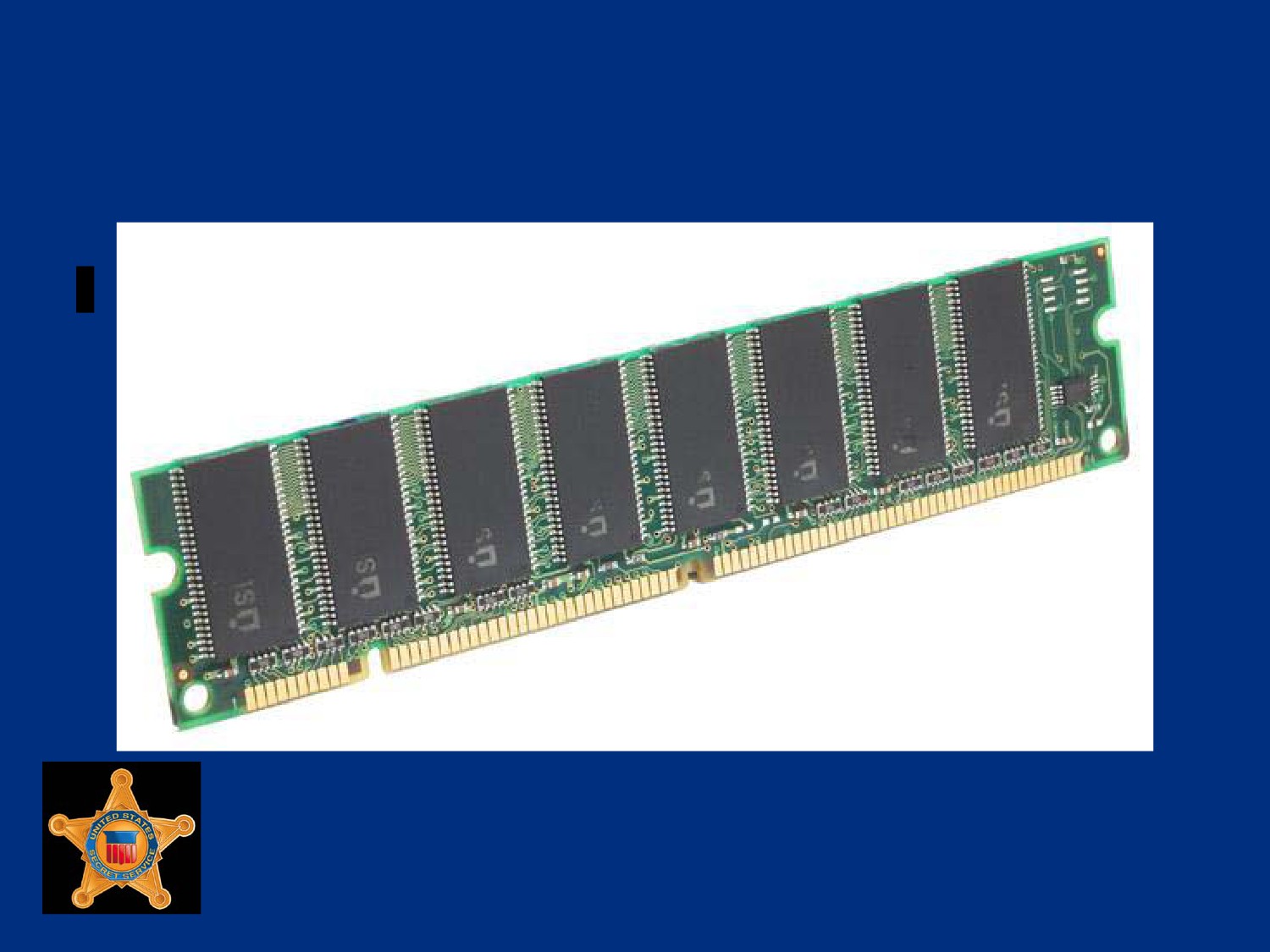
Example of SIMM Chip
U.S. Department of
Homeland Security
United States
Secret Service
DIMM (Dual Inline Memory
Modules)
Most widely used memory modules, 168-pin DIMMs, which
have replaced SIMMs
64 bits wide, range in size from 8 MB to 1 GB
DIMMS, inserted straight into sockets and locked in place
U.S. Department of
Homeland Security
United States
Secret Service
Synchronous DRAM (SDRAM)
SDRAM is modern memory standard, faster than regular
DRAM
Most prevalent in Pentium II/Athlon systems and above
Runs in synchronization with actions of processor bus
Performs operation at same time as system clock and at same
speed, increases speed of data input/output
All SDRAM are DIMMs
All DIMMs not necessarily SDRAM
U.S. Department of
Homeland Security
United States
Secret Service
Synchronous DRAM (SDRAM)
SDRAM is manufactured at single, double data rate, or quad
data rate (SDR, DDR, DDR2 and DDR3)
Rates describe speed of data transfer per clock cycle
There are several SDRAM speeds
Type and speed system requires depends on MB
U.S. Department of
Homeland Security
United States
Secret Service
Synchronous DRAM (SDRAM)
When upgrading SDRAM, select speeds greater than or equal
to frontside (processor) bus speed
Pushing slower RAM at higher speeds (overclocking) will
cause RAM to overheat and malfunction
Can cause permanent damage to MB
Acceptable to install faster RAM into slower MB
SDRAM is not compatible with all MBs, refer to MB
documentation
U.S. Department of
Homeland Security
United States
Secret Service
RIMM (RAMBUS Inline Memory
Modules)
RIMMs are found in high-end computers
Offer highest performance of available memory
Capable of transfer speeds of over 6 GB/s
Memory modules use RAMBUS Dynamic RAM (RDRAM)
chips, a proprietary chip format
Generally geared towards server market although Intel actively
pushed technology towards consumer market
Due to high cost, uncommon on most computers
U.S. Department of
Homeland Security
United States
Secret Service
RIMM (RAMBUS Inline Memory
Modules)
RIMMS manufactured with 184 connection pins
Sizes range from 64 MB to 1 GB
Most MBs require RIMM chips be installed in pairs
If only single memory module needed, a special continuity unit
(CU) is required to provide termination
CUs are additional RIMM modules without RDRAM chips that
are plugged into remaining RIMM slots not occupied by
memory modules
U.S. Department of
Homeland Security
United States
Secret Service
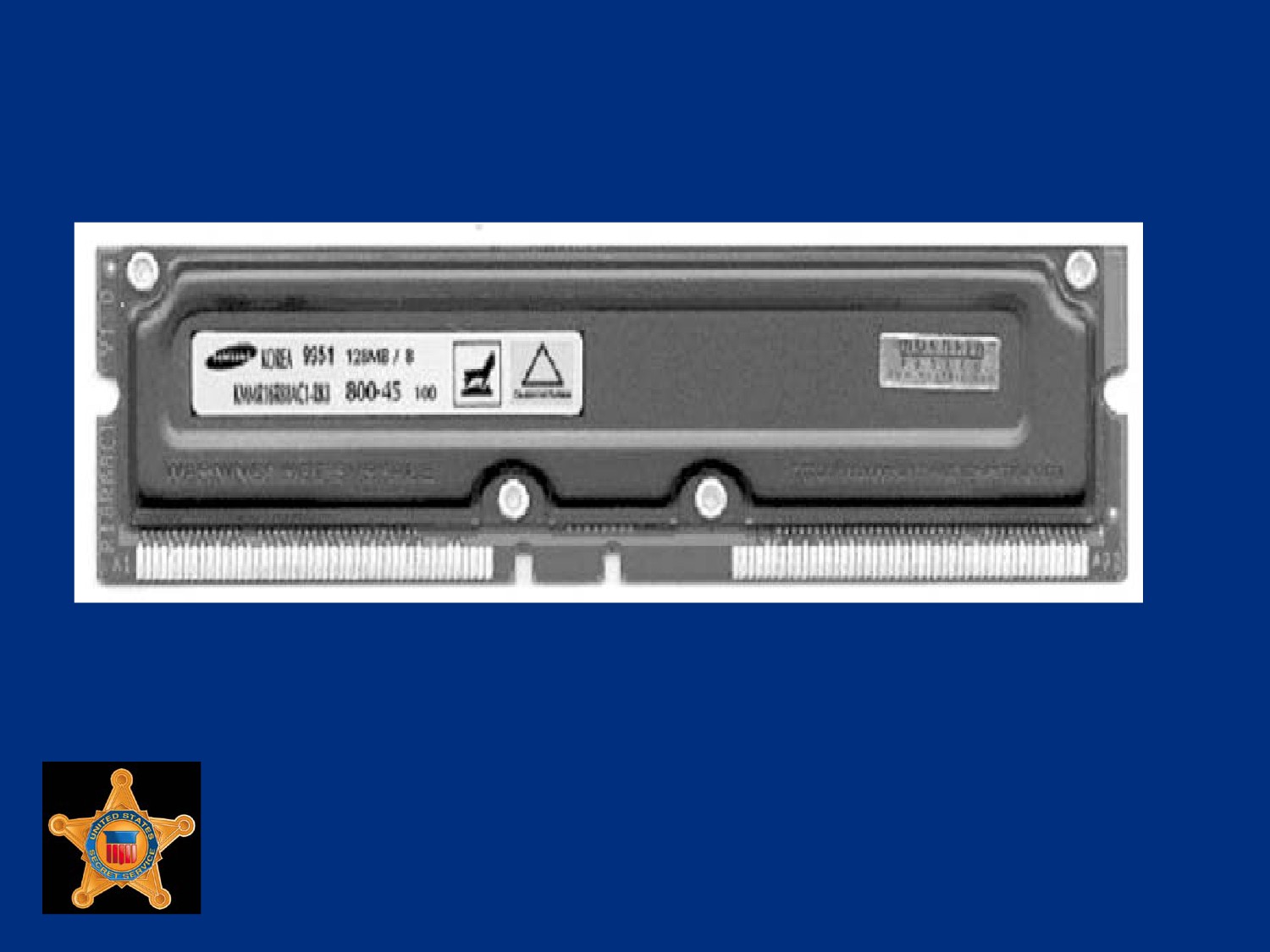
Example of RIMM Chip
U.S. Department of
Homeland Security
United States
Secret Service
U.S. Department of
Homeland Security
United States
Secret Service
Data Storage Components
U.S. Department of
Homeland Security
United States
Secret Service
You will learn …
Hard Disk Drives
Floppy Drives and Removable Media
U.S. Department of
Homeland Security
United States
Secret Service
Lesson 1 - Hard Disk Drives
Hard Drive Components
Hard Drive Controllers
Hard Drive Geometry
Drive Preparation - Wiping
RAID Configuration Overview
U.S. Department of
Homeland Security
United States
Secret Service
Saving a File to a Hard Drive
As file is written or created, contents temporarily stored in RAM
To save file, operating system takes file from RAM and stores
permanently to hard drive
Saving file initiates complex process that records the file and
tracks storage location on hard drive
U.S. Department of
Homeland Security
United States
Secret Service
Process for Storing Data on Hard
Drive
Step
Activity
1
User makes request to save file. File is temporarily
stored in RAM (if not already residing there).
2
File system analyzes disk to find required available
space.
3
Operating system receives request to transfer file from
RAM to permanent storage on disk.
U.S. Department of
Homeland Security
United States
Secret Service
Process for Storing Data on Hard
Drive
Step
Activity
4
File system (FAT, VFAT, FAT32, NTFS, ext2 or ext3)
updates file directory with newly saved file name and
exact location or directory path.
5
Operating system tells drive controller to save file. File
then transferred from RAM to hard drive.
6
Once saved, file system marks area of disk as not
available. Area cannot be overwritten by subsequent
file saves.
U.S. Department of
Homeland Security
United States
Secret Service
Hard Drive Components
Disk platters
Read/write heads
Head actuator
Spindle motor
Jumpers and/or switches
Disk controller
Cables and connections
U.S. Department of
Homeland Security
United States
Secret Service
Disk Platters
Hard drive stores archival copies of data on non-volatile disk
platters made of metal or glass with magnetic medium coating
Most hard drives can hold several 3.5-inch platters with
capacity of 250 GB or higher
Laptops and notebook computers use 2.5-inch platters with
capacity of 100 GB each
Data stored on both sides of each disk platter
U.S. Department of
Homeland Security
United States
Secret Service
Disk Platters
In operation, disk spins as read/write heads move over disks
and store information in tracks and sectors
Data is stored in concentric rings or tracks on disks
Tracks are divided into segments called sectors
Each sector can store approximately 512 bytes of data
U.S. Department of
Homeland Security
United States
Secret Service
Read-Write Heads
Mechanisms that store and read data on platters
One read-write head combination for each side of disk platter,
all heads mounted on a single track
Move in unison across platters
Float above surface of disk platter on cushion of air generated
by action of spinning disk platter
U.S. Department of
Homeland Security
United States
Secret Service
Read-Write Heads
Float three to five millionths of an inch above platters
Read changes in disk’s magnetic coating, called magnetic flux
Data is stored on both sides of platters
Side numbering starts at zero for top side of top platter
For example, if drive has four platters (eight sides), numbering
for sides would be zero through seven
U.S. Department of
Homeland Security
United States
Secret Service
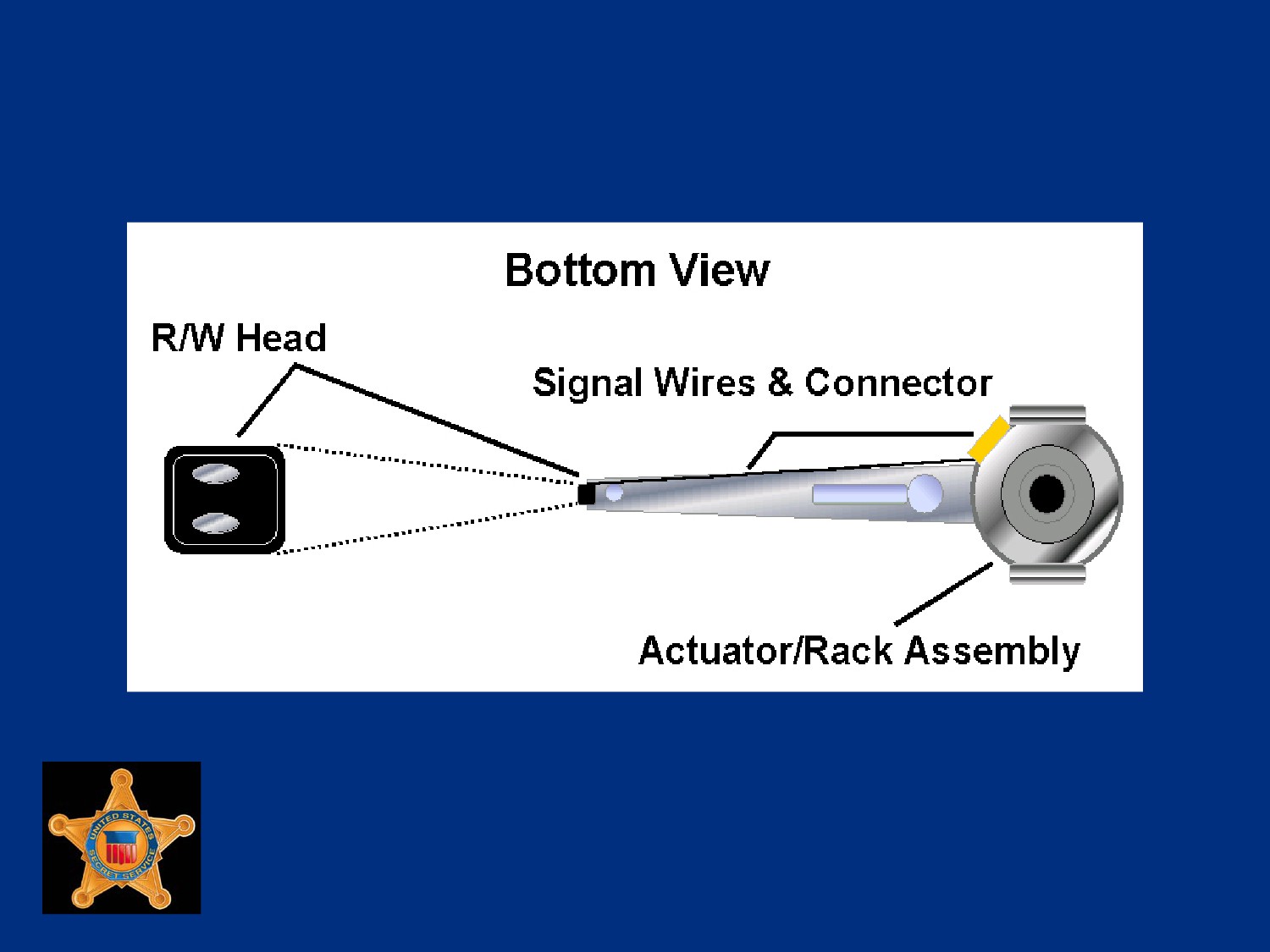
Read-Write Heads
U.S. Department of
Homeland Security
United States
Secret Service
Jumpers
Set of pins used to control device settings
Pins act like an on/off switch and are configured by placement
of a small plastic block, called a shunt
Without shunt over jumper pins, circuit is open, or off
With shunt placed over pins, small wire inside shunt connects
pins and circuit is closed, or on, also called shorted
U.S. Department of
Homeland Security
United States
Secret Service
Jumpers
Shunt can also be attached to a single pin in parked position,
does not close circuit, simply used to store shunts not currently
needed
Jumpers used when installing PATA (Parallel ATA) IDE
devices
Typical MBs house two PATA IDE channels identified by a
Primary (IDE 1) Connector and a Secondary (IDE 2)
Connector
U.S. Department of
Homeland Security
United States
Secret Service
Jumpers
Each IDE channel can support maximum of two IDE devices
Relationship of two devices on a single channel is master and
slave, simply designates sequential order of devices
U.S. Department of
Homeland Security
United States
Secret Service
Four IDE Device Relationships
Primary Master: Device 1 on primary IDE 1 channel
Primary Slave: Device 2 on primary IDE 1 channel
Secondary Master: Device 1 on secondary IDE 2 channel
Secondary Slave: Device 2 on secondary IDE 2 channel
U.S. Department of
Homeland Security
United States
Secret Service
Jumpers
Designation of master and slave between two devices on
same IDE channel determined by jumper settings on IDE
devices
Drives normally contain diagram indicating which pins to short
and which to leave open
U.S. Department of
Homeland Security
United States
Secret Service
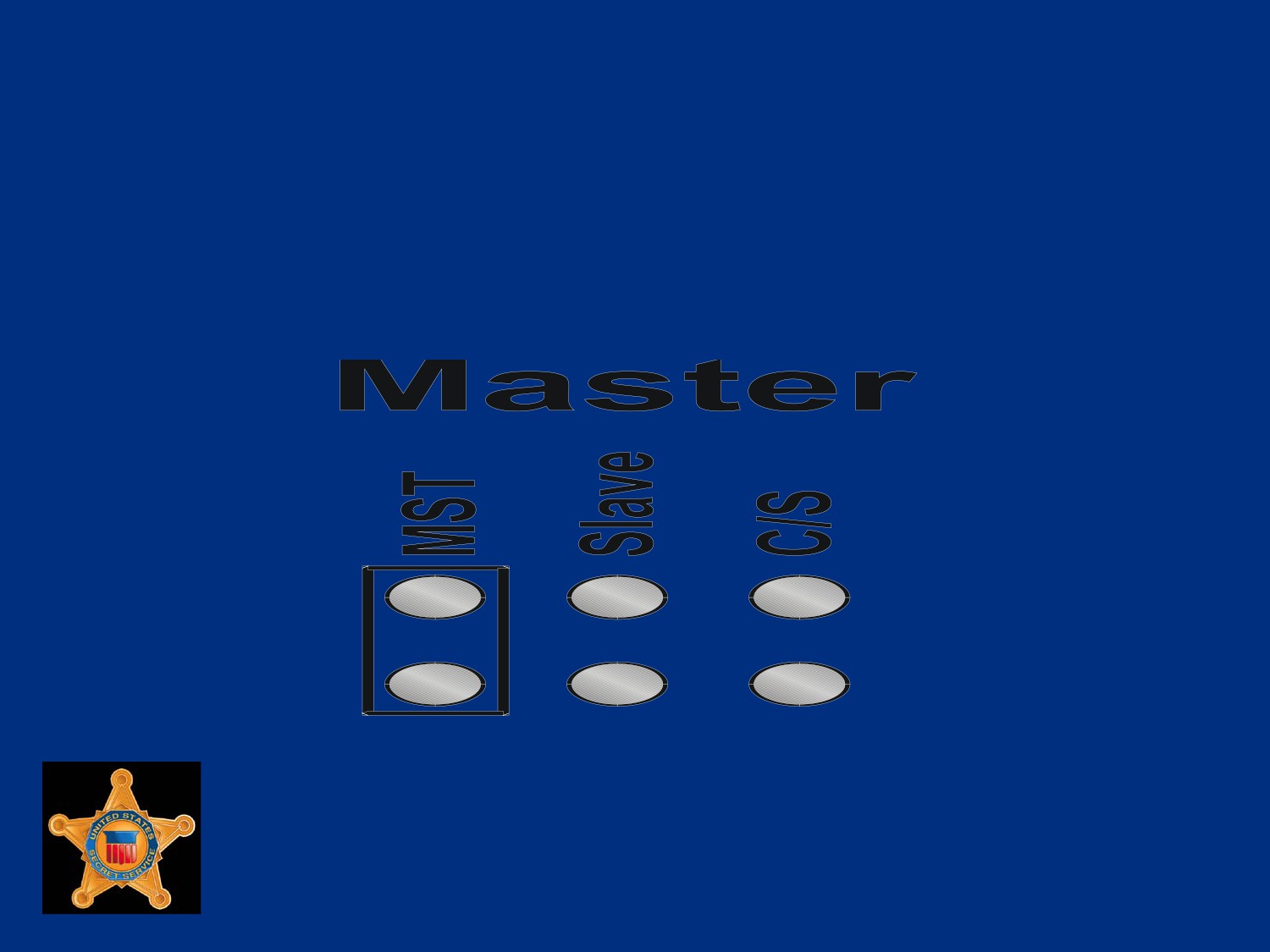
Setting the Master Drive
To indicate a primary hard drive in a series of two,
close Master jumper as in the following configuration
U.S. Department of
Homeland Security
United States
Secret Service
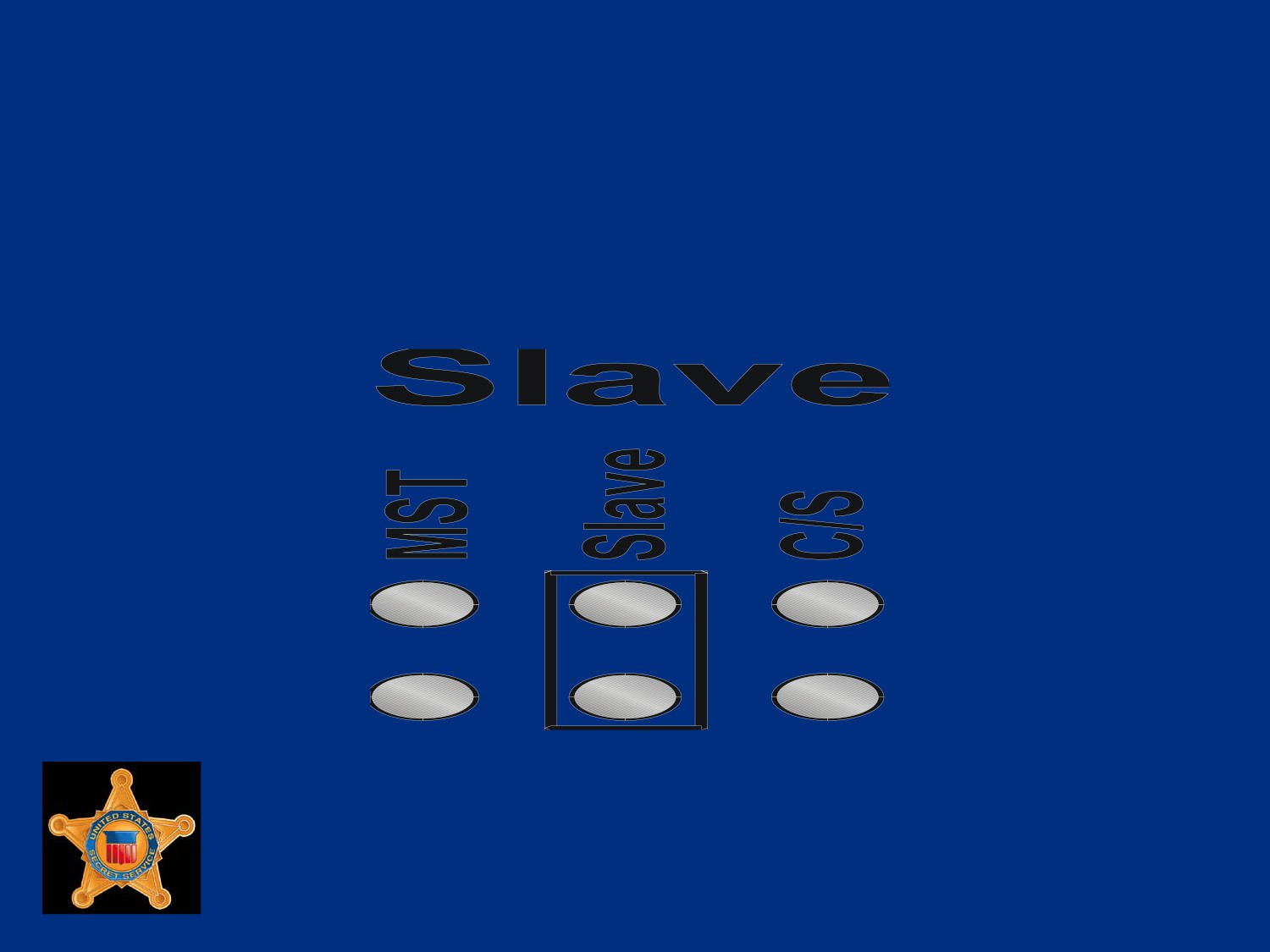
Setting the Slave Drive
To indicate a secondary hard drive in a series of two,
close the Slave jumper as in the following configuration
U.S. Department of
Homeland Security
United States
Secret Service
Jumpers
On newer MBs, with support for SATA (Serial ATA) devices,
MB may have only one PATA connector or none
SATA devices do not require a jumper for Master and Slave
settings
SATA device plugged onto its own MB connector
U.S. Department of
Homeland Security
United States
Secret Service
PATA Data Cables
Older PATA IDE hard drives, and CD-ROMs, connect to MB
via a ribbon cable to facilitate data transfer
Cables are flat and wide with wires running in parallel the
length of cable
IDE ribbon cables generally have three 40-pin connectors: one
to attach to MB and one each for Master and Slave device
A red or black stripe along one edge of the cable indicates
location of Pin 1 and is used to determine cable orientation
U.S. Department of
Homeland Security
United States
Secret Service
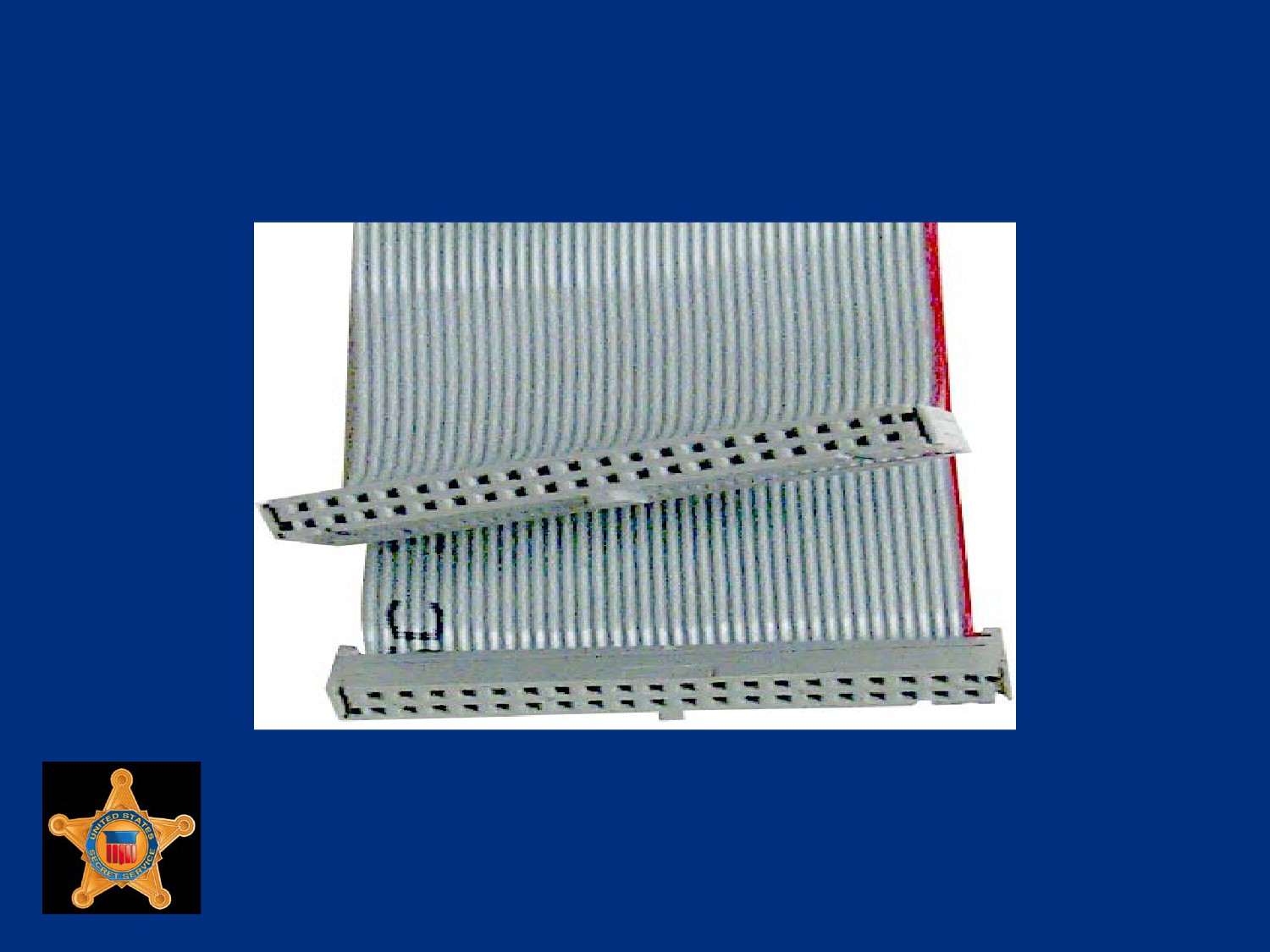
40-pin Ribbon Cable
U.S. Department of
Homeland Security
United States
Secret Service
SATA Data Cables
SATA (Serial ATA) is a communication bus technology that is
replacing older PATA (IDE) technology
SATA does not use Master/Slave jumpers on hardware to
determine device priorities
SATA device has its own dedicated connection to host device
U.S. Department of
Homeland Security
United States
Secret Service
SATA Data Cables
Bandwidth is not shared with other devices over SATA data
cables
SATA offers other benefits over PATA, such as more compact
cables for better airflow and hot swapping capabilities
SATA data cables use 7-pin connectors that only utilize 4 wires
for transferring data.
Other 3 wires used as ground
U.S. Department of
Homeland Security
United States
Secret Service
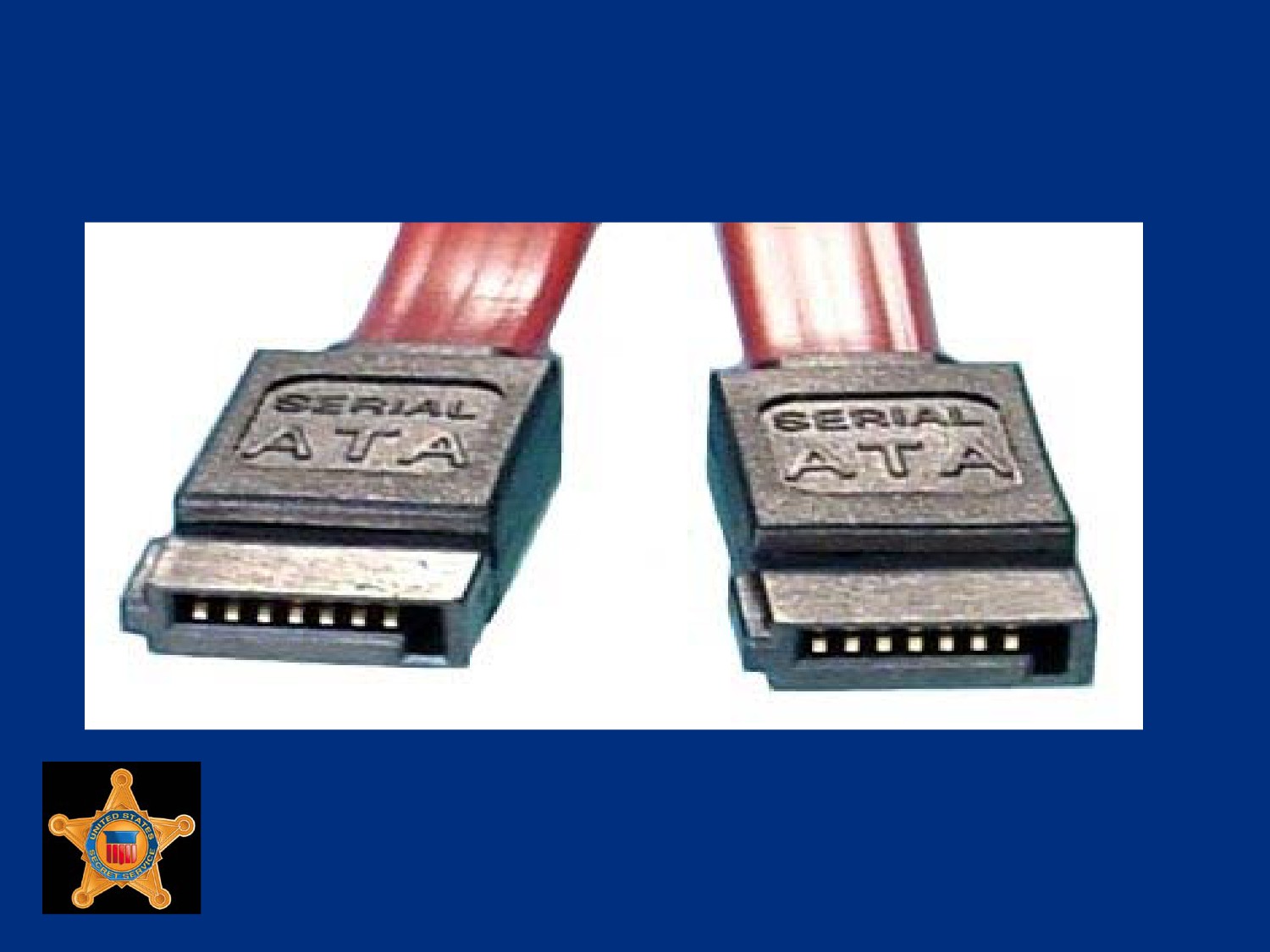
SATA Data Cable
U.S. Department of
Homeland Security
United States
Secret Service
SATA Power Cables
New power connector also specified by SATA standard,
although many SATA devices include both SATA and Molex
power connectors
Cable designed with 15-pins and supports three different
voltages; 3.3 V, 5 V, and 12 V
Nine of 15 pins used for power, 5 used for ground, and last pin
used for staggered spinup
Staggered spinup allows drives to initialize and power up
sequentially to increase reliability and prevent power surges
U.S. Department of
Homeland Security
United States
Secret Service
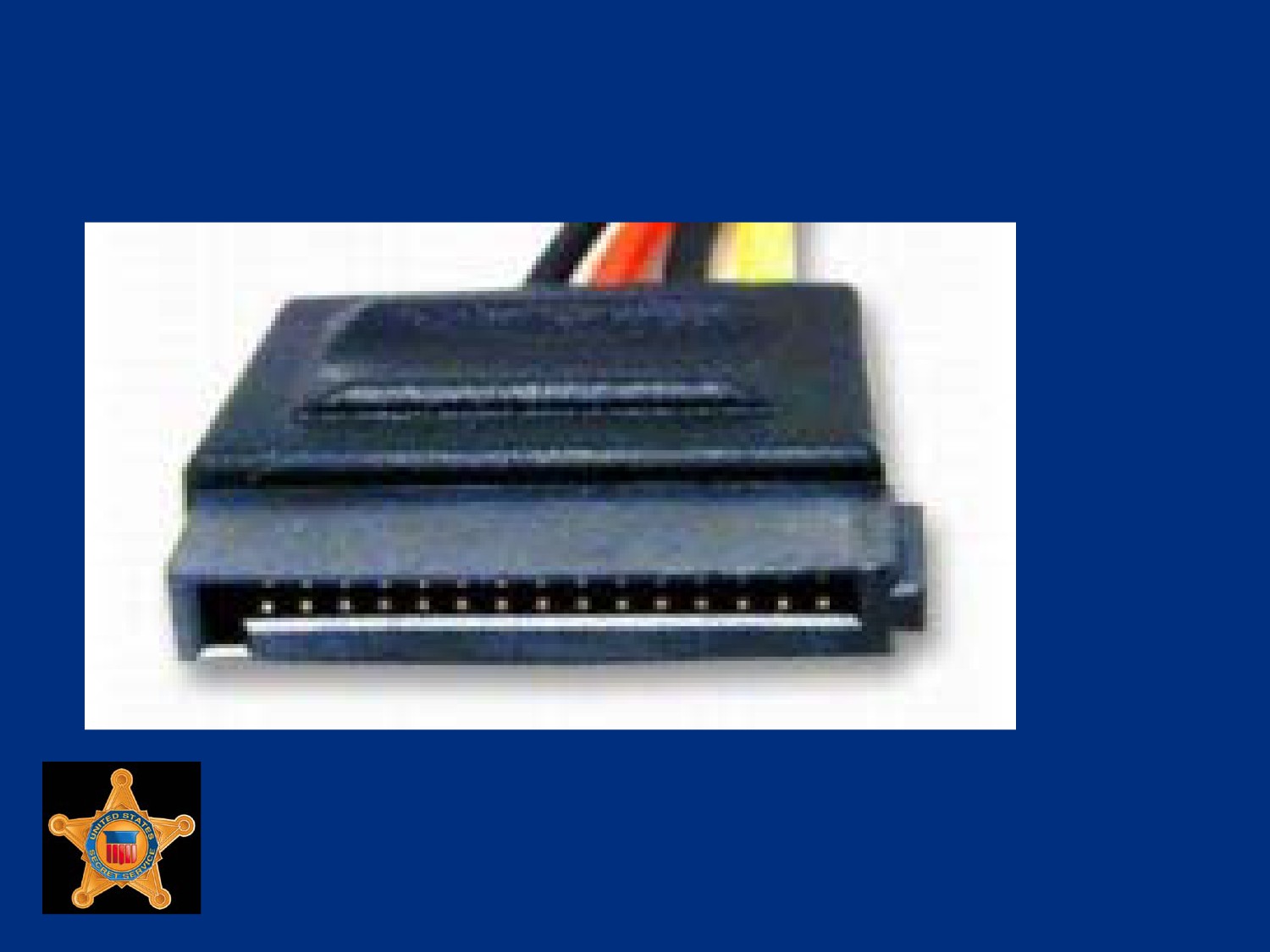
SATA Power Cable
U.S. Department of
Homeland Security
United States
Secret Service
Drive Controllers
Device that handles transfer of data between component and
computer
Required by computer storage devices including hard drives
and floppy drives to govern how they operate
U.S. Department of
Homeland Security
United States
Secret Service
Drive Controllers
Disk drive controllers discussed in this course include:
Integrated Drive Electronics (IDE)
Enhanced IDE (EIDE)
Serial ATA (SATA)
Small Computer System Interface (SCSI)
Serial Attached SCSI (SAS)
U.S. Department of
Homeland Security
United States
Secret Service
Integrated Drive Electronics (IDE)
Controller
Term used to describe any disk drive with a built-in controller
Technical name for IDE is Advanced Technology Attachment
(ATA) IDE
IDE is primary interface electronics (controller) that connects a
hard disk drive to computer
U.S. Department of
Homeland Security
United States
Secret Service
Integrated Drive Electronics (IDE)
Controller
Today’s technology allows IDE to be integrated into the drive
Drive attaches to a connector on MB
IDE makes drive more reliable than drives that have separate
ISA slotted controllers
Reliability enhances integrity of data
U.S. Department of
Homeland Security
United States
Secret Service
Integrated Drive Electronics (IDE)
Controller
IDE controllers are customized to fit IDE drives
IDE controllers contain an independent BIOS that limits total
hard drive size to 528 MB
Uses a standard 40-pin ribbon cable to connect drive to MB
U.S. Department of
Homeland Security
United States
Secret Service
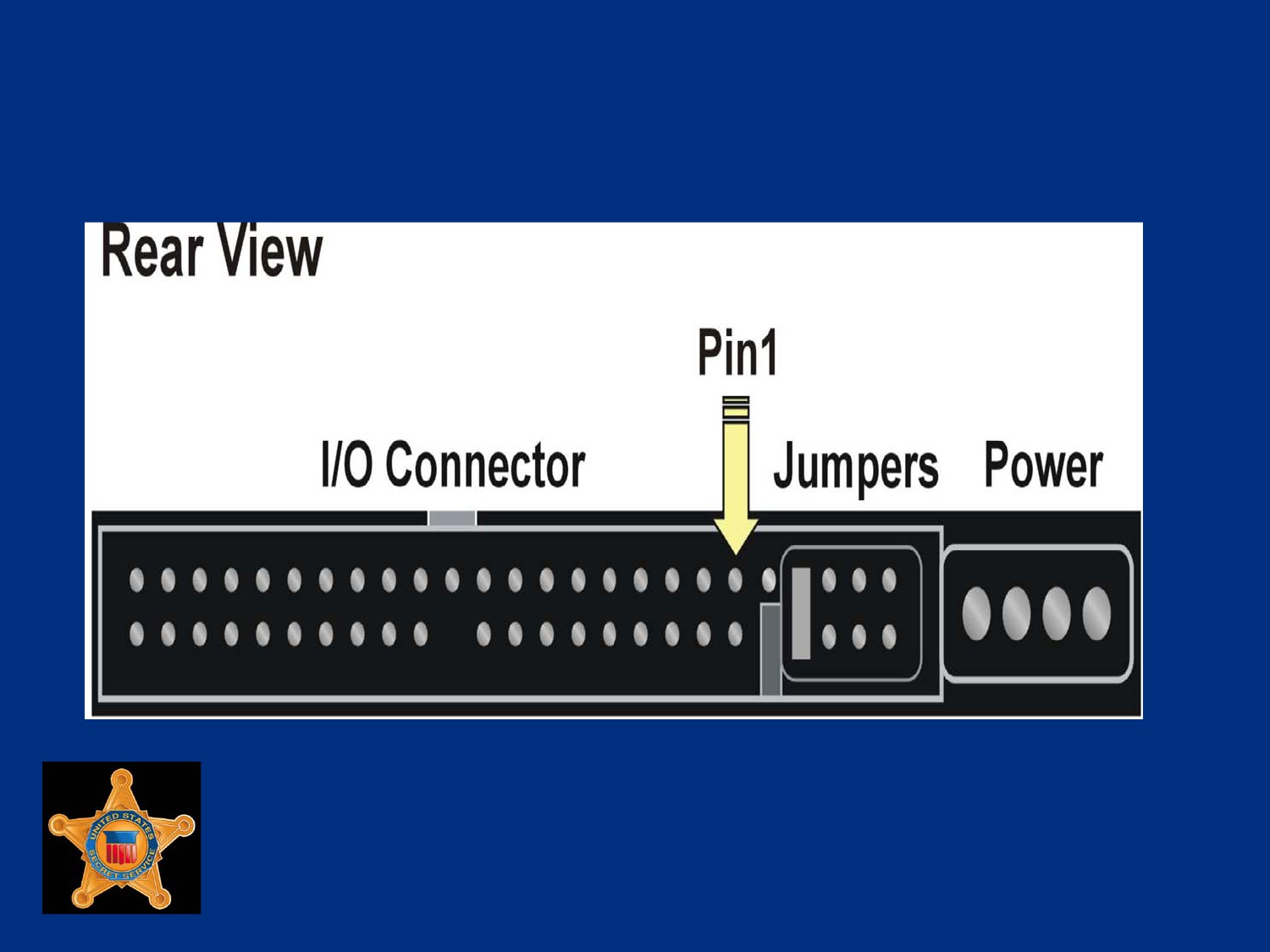
IDE Controller Connection
U.S. Department of
Homeland Security
United States
Secret Service
Enhanced IDE Controller
Enhanced IDE (EIDE) controllers offer enhanced controller
BIOS, increases maximum drive capacity to more than 528 MB
Controller’s technical names are Advanced Technology
Attachment series ATA-2 through ATA-6
Marketed as Fast ATA and Fast ATA2, drives are backward
compatible with older models
U.S. Department of
Homeland Security
United States
Secret Service
Enhanced IDE Controller
EIDE provides two data channels per connector, two drives
can be connected to each EIDE port
EIDE allows attachment of Advance Technology Attachment
Packet Interface (ATAPI) devices, CD-ROM drives, DVD
drives, and Zip drives
U.S. Department of
Homeland Security
United States
Secret Service
Enhanced IDE Controller
ATA-1, 2, and 3 Controllers:
Use CPU for data transfer (PIO mode) which takes CPU
transferring time away from other tasks
ATA-1 support a transfer rate of up to 8 MB/sec
ATA-2 support a transfer rate of up to 16 MB/sec
ATA-3 support a transfer rate of up to 16 MB/sec
U.S. Department of
Homeland Security
United States
Secret Service
Enhanced IDE Controller
ATA-4, 5 and 6 Controllers:
Use Direct Memory Addressing (DMA) modes for data
transfer
ATA-4 support a transfer rate of up to 33 MB/sec
ATA-5 supports transfer rates of up to 66 MB/sec
ATA-6 supports transfers rates of up to 100 MB/sec
To achieve rates of speed of 66 MB/sec or more, a special
40-pin, 80-wire ribbon cable must connect hard drive to MB
U.S. Department of
Homeland Security
United States
Secret Service
PATA Naming Convention
While ATA, IDE, and EIDE technically refer to three separate
concepts, they are generally grouped together and referred to
as the same technology
Often terms are used interchangeably to refer to hard drives
with exceptions of SCSI and SATA
Since introduction of SATA (Serial ATA), all examples of prior
hard drives have been retroactively renamed to PATA (Parallel
ATA)
U.S. Department of
Homeland Security
United States
Secret Service
Serial ATA (SATA)
Two-inch wide parallel PATA ribbon cable has reached
maximum transfer rate of 133 MBps
SATA currently has speeds of 150 MBps (SATA 1.5G) and 300
MBps (SATA 3G) and potential to reach 600 MBps (SATA 6G)
Serial ATA’s power requirements, 250 millivolt versus PATA’s
5 volt, have made it widely adopted in new low-power MBs
U.S. Department of
Homeland Security
United States
Secret Service
Serial ATA (SATA)
Serial ATA drives connect via a .25-inch cable that connects
drive to Serial ATA card plugged into a PCI slot or a slot
integrated onto MB
SATA cables have seven pins and seven wires
Thinner cables permit better airflow, smaller, easier to route
Parallel ATA cables are two inches wide and have maximum
length limitation of 18 inches
SATA cable has maximum length limitation of one meter
U.S. Department of
Homeland Security
United States
Secret Service
Serial ATA (SATA)
Each SATA connection supports a single drive
Jumpers settings no longer required for master or slave
configuration
SATA allows hot swapping of drives while system is running
U.S. Department of
Homeland Security
United States
Secret Service
Serial ATA (SATA)
External SATA connection allows for SATA drives to be
connected externally with transfer speeds up to 300 MBps, six
times faster than USB 2.0
The eSATA shielded cables are found in lengths up to two
meters but do not provide power to end device
eSATA currently geared towards external SATA hard drives
but able to accommodate large variety of external devices,
including CD-ROMs
U.S. Department of
Homeland Security
United States
Secret Service
Small Computer System Interface
(SCSI)
System level interface that enables connection of various
peripheral devices to computer
Most modern home PCs do not come with SCSI hardware
preinstalled
Any computer with a PCI slot can become SCSI compatible
U.S. Department of
Homeland Security
United States
Secret Service
Small Computer System Interface
(SCSI)
SCSI is not a controller like IDE
Separate data bus that connects to system bus via a host
adapter
Some high-end computers have a SCSI adapter card or an
adapter built into MB
Some current SCSI busses can support between 8 and 16
devices, though support for one device is lost to host adapter
U.S. Department of
Homeland Security
United States
Secret Service
Small Computer System Interface
(SCSI)
SCSI implementations can support many more devices, such
as SSA which supported 96 and SAS (Serial Attached SCSI)
which supports 16,256
Devices are strung together in a chain, each device is
assigned a SCSI ID
Typical SCSI host adapter can support a maximum of 16
devices, though actual SCSI adapter counts as one of those
16 devices
U.S. Department of
Homeland Security
United States
Secret Service
Small Computer System Interface
(SCSI)
When one device wants to communicate with system bus, data
passes through host adapter
Because SCSI bus operates like a chain, end of chain must be
terminated
Most computers can support up to four host adapters
SCSI bus can be either 8-bit or 16-bit
16-bit bus is typically named wide SCSI
U.S. Department of
Homeland Security
United States
Secret Service
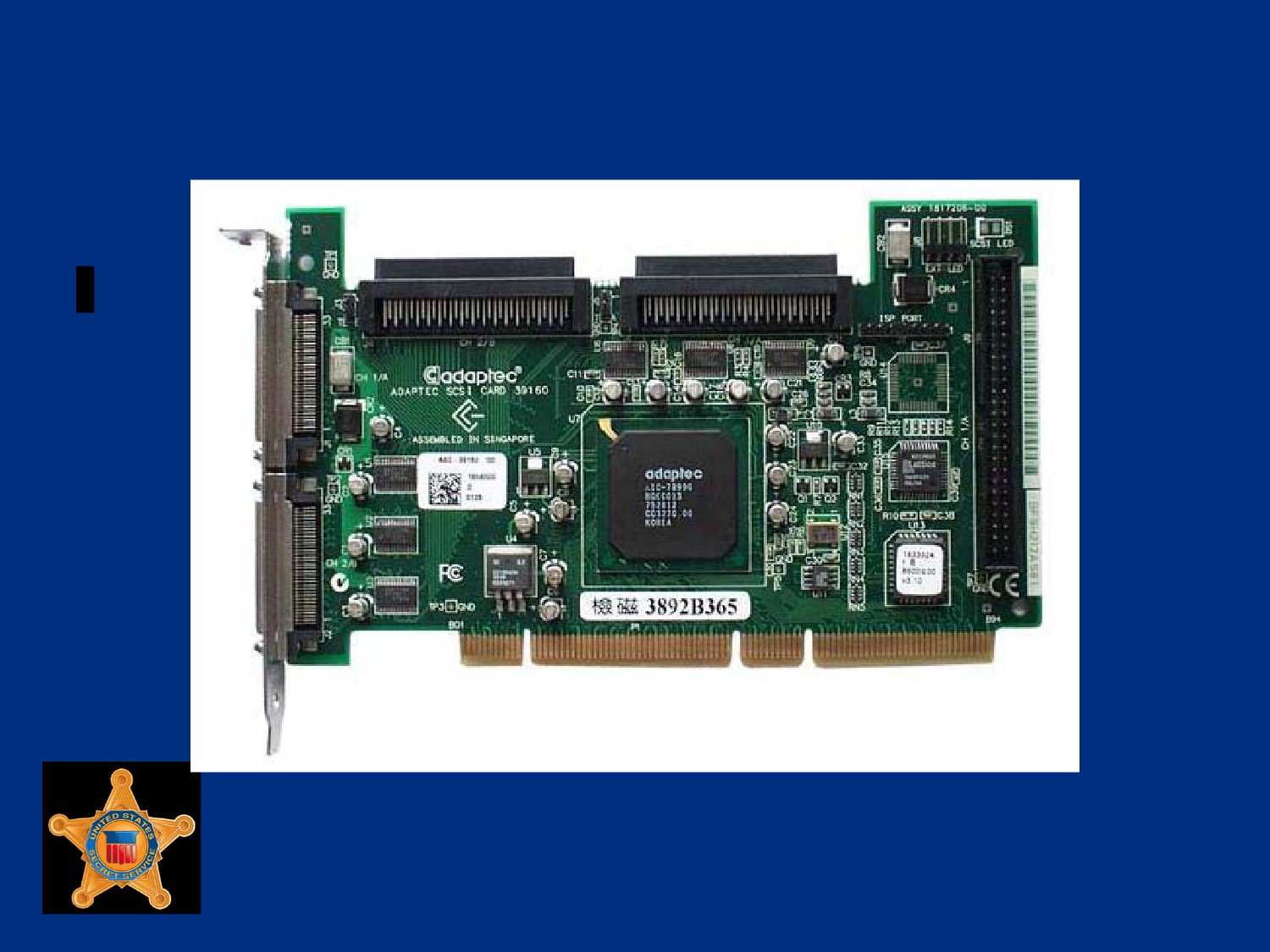
Example of SCSI Card and Cable
U.S. Department of
Homeland Security
United States
Secret Service
Serial Attached SCSI (SAS)
Serial Attached SCSI (SAS) is another serial bus technology
with similarities to both SATA and SCSI
SAS uses same communication protocols as SCSI to transmit
data and same type of connection cables as SATA
SAS controller is backwards compatible with SATA devices
U.S. Department of
Homeland Security
United States
Secret Service
Serial Attached SCSI (SAS)
A SATA hard drive can be connected to an SAS controller
Allows less expensive SATA drives to be utilized on SAS
systems while providing upgrade path to higher end SAS hard
drives
SATA controllers do not support SAS devices
U.S. Department of
Homeland Security
United States
Secret Service
Solid State Drives (SSD)
Solid State Drive (SSD) is a storage device for notebooks and
desktops that uses solid state memory to store data
No moving parts in a solid state drive
No moving parts eliminates some seek time and latency and
other electro-mechanical delays attributed to conventional hard
drives
Sizes currently range from 32 GB to 256 GB
Considered too expensive for widespread use
U.S. Department of
Homeland Security
United States
Secret Service
Hybrid Hard Drive (HHD)
Hybrid drives combine solid state and magnetic disk drives
Solid state component acts as a cache for hard drive and can
be up to 1 GB in size
As data is saved it is temporarily written to SSD cache
Only when cache is nearly full, or when new data must be
read, magnetic portion of drive spins up
U.S. Department of
Homeland Security
United States
Secret Service
Hybrid Hard Drive (HHD)
Improves hard drive performance and reliability, while reducing
heat and noise generated by normal hard drives
Flash memory, or solid state portion of drive, could be used
with Windows Vista’s ReadyBoost to increase performance on
compatible Vista systems
As of time of this edit, HHDs are only compatible with Windows
Vista-based systems
U.S. Department of
Homeland Security
United States
Secret Service
Hard Drive Geometry
Hard drives are divided into tracks, sectors, heads, and
cylinders
Most MB BIOS chips prior to 1997 do not automatically detect
geometry information
Information usually annotated on sticker fixed to drive
If not, check user reference manuals for manufacturer’s Web
site for listing of this information by drive type
U.S. Department of
Homeland Security
United States
Secret Service
Hard Drive Geometry
In computer forensic investigations it is important to know
where data is stored on a hard disk
May be asked during trial about exact location of a file
May be asked to identify exact location of data by track, sector,
and cylinder
U.S. Department of
Homeland Security
United States
Secret Service
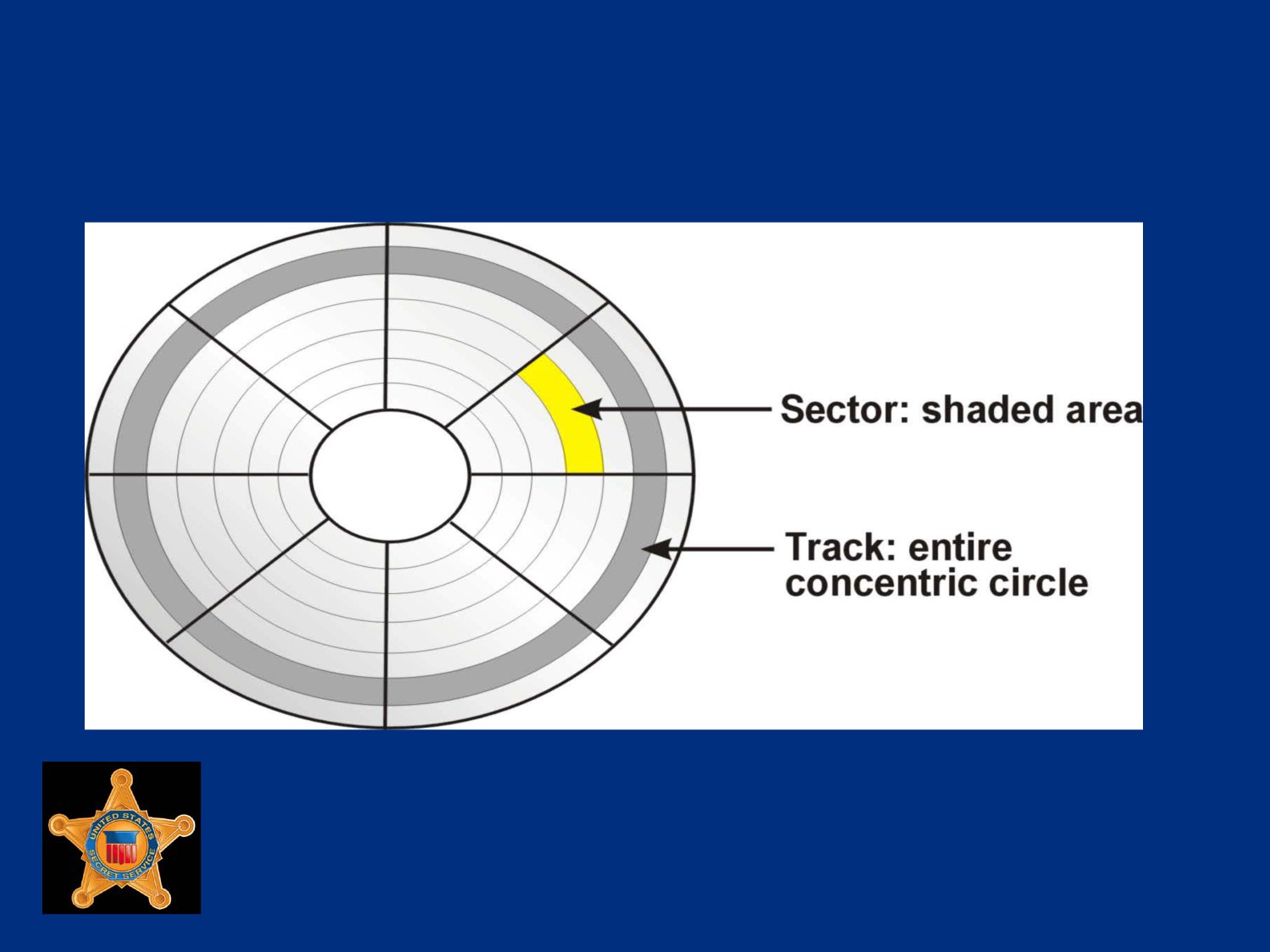
Hard Drive Geometry
U.S. Department of
Homeland Security
United States
Secret Service
Tracks
Tracks are concentric circular paths placed on both sides of
platter
Specified area that read/write head hovers over
Arranged starting at center of platter progressing to outer edge
Measured in density called tracks per inch (TPI)
U.S. Department of
Homeland Security
United States
Secret Service
Tracks
First PC hard disks in 1982 had 200-300 TPI
Today, drives have over 100,000 TPI
Tracks uniform on every platter on drive
A cylinder is formed by alignment of the same tracks on all
platters
U.S. Department of
Homeland Security
United States
Secret Service
Sectors
Sectors are shaped segments of tracks
Each sector holds 512 bytes of data
With today’s technology, each track can have between 17 and
100 or more sectors
U.S. Department of
Homeland Security
United States
Secret Service
Heads
Heads on platter represent specific side of platter
Sometimes confused with the read/write heads, which are
devices that relay data to and from platters
U.S. Department of
Homeland Security
United States
Secret Service
Cylinders
All platters in a stack are aligned with each other
Platters move in unison
A cylinder is formed by identically positioned tracks on every
platter
U.S. Department of
Homeland Security
United States
Secret Service
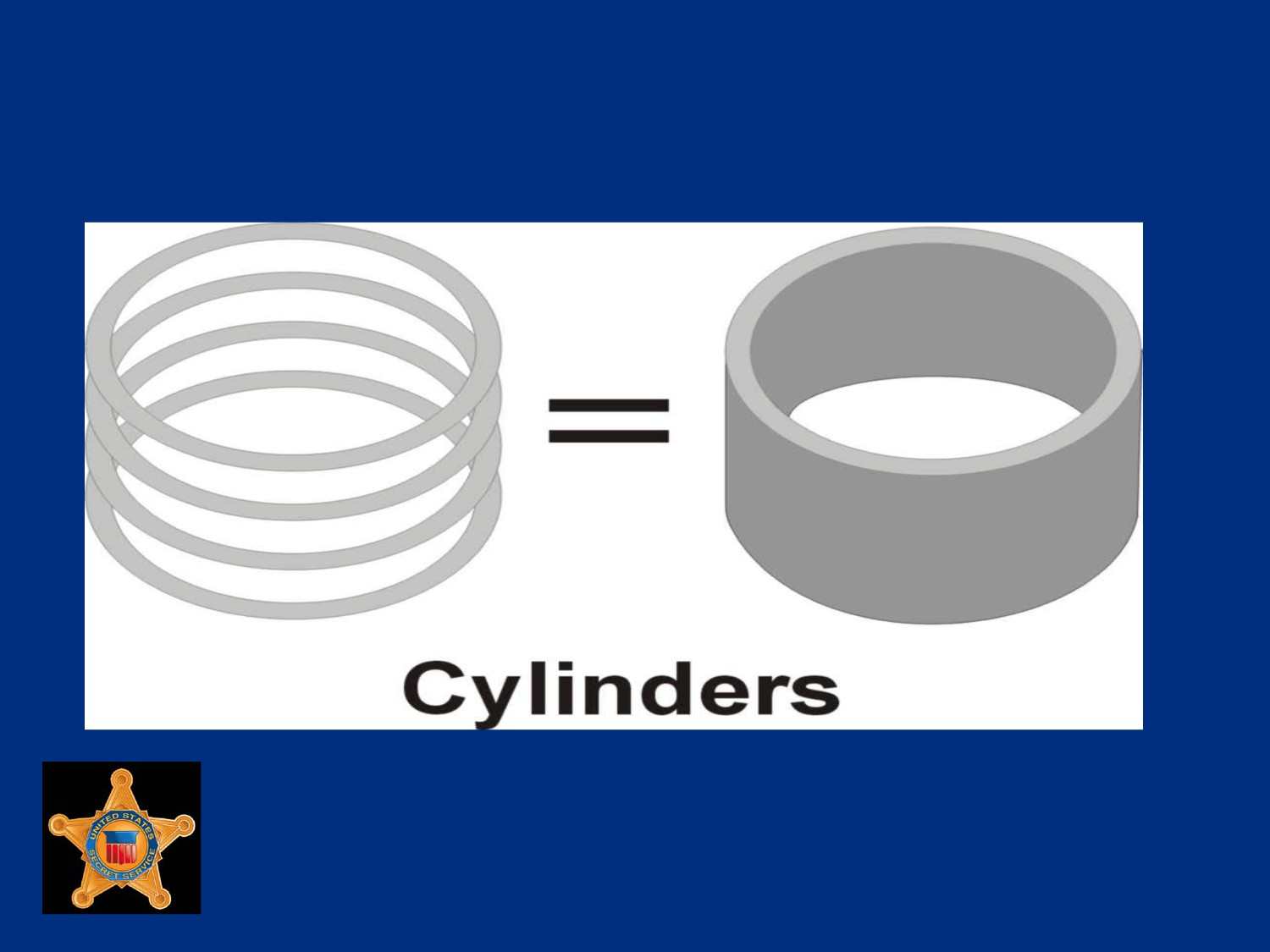
Cylinders
U.S. Department of
Homeland Security
United States
Secret Service
Clusters
A group of one or more sectors that form smallest addressable
area of storage on disk
Although the smallest unit of disk space used by an operating
system, sizes vary and depend upon OS and partition size of
disk
U.S. Department of
Homeland Security
United States
Secret Service
RAID
Redundant Array of Independent Disks (RAID) is a method of
combining multiple hard drives and storing data in different
locations on those drives at the same time
Instead of writing data to individual drives, such as drive C and
drive D, a RAID allows OS and user to view and use drives C
and D as one logical drive
Using multiple drives that appear as one logical drive instead
of using one large hard drive allow for greater performance,
capacity, and reliability
U.S. Department of
Homeland Security
United States
Secret Service
RAID
Two methods of writing to RAID:
Striping
Mirroring
Various types of RAIDs are produced using different
combinations of striping, mirroring, error correction, and parity
RAIDs are created using software or hardware methods
U.S. Department of
Homeland Security
United States
Secret Service
The most common types of RAIDs
• RAID 0
• RAID 5
• RAID 1
• RAID 6
• RAID 3
• RAID 0+1
• RAID 4
• RAID 1+0
U.S. Department of
Homeland Security
United States
Secret Service
Striping
Striping involves partitioning each drive’s storage space into
units ranging from 512 bytes to several megabytes
Data is written in bytes or groups of bytes across multiple
drives as specified by interleave ratio
More than one drive reads and writes data at same time
Performance is greatly enhanced
U.S. Department of
Homeland Security
United States
Secret Service
Mirroring
A technique that stores same data on a pair of disks
Mirroring ensures an exact duplicate of drive always exists
Provides full fault tolerance
U.S. Department of
Homeland Security
United States
Secret Service
Parity
A method of checking data when it is copied from one storage
place to another to ensure that data has not been lost,
overwritten or corrupted
When a group of bits are copied, an additional parity bit (binary
digit) is added
Parity bit provides ability to ensures that data has been copied
successfully
U.S. Department of
Homeland Security
United States
Secret Service
Parity
In RAID, parity is used for data recovery
It is implemented through exclusive OR (XOR), a logical
process that returns a value of “1” if two data bits are not the
same
If any two bits are the same (both 1s or both 0s), result is a 0
If they are 1 and 0, result is a 1
U.S. Department of
Homeland Security
United States
Secret Service