Network Intrusions Responder Program (NITRO). Instructor Guide - page 7
Report Writing
Network Intrusion Responder Program
Interview Process, continued
Suspects
Traditionally, investigators interview a victim and eventually a
suspect. However, in cyber crime cases, it can be unclear who is a
victim or who is a suspect. The investigator must use analytical
skills to determine who should be interviewed during an
investigation.
7-30
For Official Use Only - Law Enforcement Sensitive
01/09
Network Intrusion Responder Program
Legal Issues
Module 8
Legal Issues
Overview
No matter how incriminating the evidence may be, all computer
crime investigations must adhere to established legal principles. If
legal standards are not met, the case could be jeopardized and even
dismissed, thus allowing a perpetrator to walk free.
Purpose of this
The purpose of this module is to familiarize you with some basic
Module
legal issues that must be considered when conducting an
investigation involving digital data.
Objectives
After successfully completing this module, you will be able to:
Explain some of the legal issues involved in a digital
investigation
Employ practices during an investigation that that will pass
legal challenge
In this Module
The following table shows the contents of this module.
Lesson
See Page
Lesson 1 - Search Warrants
8-3
Lesson 2 - Internet Service Providers
8-19
01/09
For Official Use Only - Law Enforcement Sensitive
8-1
Legal Issues
Network Intrusion Responder Program
This page intentionally left blank.
8-2
For Official Use Only - Law Enforcement Sensitive
01/09
Network Intrusion Responder Program
Legal Issues
Lesson 1 - Search Warrants
Introduction
The search of a person or a location requires either a search
warrant or a valid exception under the 4th Amendment to the U.S.
Constitution.
Purpose of this
The failure to comply with the provisions of the 4th Amendment to
Lesson
the U.S. Constitution may result in the exclusion of valuable
evidence at trial because the evidence was not legally seized.
Investigators must document their authority to search and seize
and be prepared to effectively articulate the probable cause that
justified the search. In this lesson, you will learn about search
authorities and how they are obtained.
Objectives
After completing this lesson, you will be able to:
Explain how the 4th amendment of the United States
Constitution is applied by the government
Recognize situations in which the investigators may search or
seize without a warrant
Discuss the types of consent and their requirements
In this Lesson
The following table shows the contents of this lesson.
Topic
See Page
Search Warrants
8-4
Search Warrant Exceptions
8-10
Consent Searches
8-11
Search Incident to Arrest or Apprehension
8-14
Other Search Warrant Exceptions
8-16
01/09
For Official Use Only - Law Enforcement Sensitive
8-3
Legal Issues
Network Intrusion Responder Program
Search Warrants
Introduction
The 4th Amendment to the United States Constitution reads:
“The right of the people to be secure in their persons, houses,
papers, and effects, against unreasonable searches and seizures,
shall not be violated, and no Warrants shall issue, but upon
probable cause, supported by Oath or affirmation, and
particularly describing the place to be searched, and the persons
or things to be seized.”
This amendment sets forth the foundation upon which all search
warrants are justified and the standard by which the legality of a
search warrant is judged.
Relevance
Search warrants are a common tool used by prosecutors and
investigators in any criminal investigation. They establish the
authorization for the search and seizure of evidence with the court
or designated approval authority prior to any search or seizure.
Search warrants provide the most reliable means of obtaining
evidence in an investigation. Although search warrants are subject
to legal challenge, if properly crafted and executed, they are
difficult to overcome. The use of a Search Warrant is preferred by
the U.S. Supreme Court whenever investigators have probable
cause to believe a crime has been committed and are seeking
search authority.
Obtaining a
Investigators seeking to obtain search warrants should become
Search Warrant
familiar with Federal Rules of Criminal Procedure Rule 41,
“Search and Seizure.”
An investigator who requests a search warrant must establish by
sworn affidavit the following key pieces of information:
Description of the place to be searched
Concise description of the item(s) being sought
Probable Cause or facts that support the belief that the items
being sought are located in the place described
Failure to establish any of these facts can result in the search
warrant being overturned or not issued in the first place.
8-4
For Official Use Only - Law Enforcement Sensitive
01/09
Network Intrusion Responder Program
Legal Issues
Search Warrants, continued
Obtaining a
A current federal search warrant template is found as an editable
Search Warrant,
PDF format at:
continued
The warrant is typically accompanied by an attached affidavit. The
affidavit will normally contain the following components:
The affiant’s statement of probable cause
Attachment A - Place To Be Searched
Attachment B - Items To Be Seized
There is no formally required format for any of these documents,
although various agencies and jurisdictions may follow formats
that have been developed over time.
The warrant itself generally provides brief statements of these
three components and refers to the affidavit for greater detail. For
example, the warrant contains the text “In the Matter of the Search
of” in the upper left. If the location to be searched is a residence,
the warrant might read:
In the Matter of the Search of:
123 Patriot St, Foxboro, MA 02345, further described in
Attachment A
The United States Department of Justice, Computer Crime and
Intellectual Property Section (CCIPS), publishes a very useful
guide called Searching and Seizing Computers and Obtaining
Electronic Evidence in Criminal Investigations. This publication is
available in hardcopy, and online at:
Appendix F, “Sample Language for Search Warrants and
Accompanying Affidavits to Search and Seize Computers,” of this
publication is the de facto standard for warrant and affidavit
language in federal cyber investigations.
01/09
For Official Use Only - Law Enforcement Sensitive
8-5
Legal Issues
Network Intrusion Responder Program
Search Warrants, continued
Description of the
The 4th Amendment requires the investigator to concisely identify
Place to be
and define the search location in physical terms. This is often
Searched
difficult to do in a cyber crime investigation as the physical and
virtual worlds may not share the same physical space.
The investigator should be as careful as possible when describing
the place to be searched. The goal is to define the boundaries of
the search location in such a manner that the area within those
boundaries may be searched, but the search is not overly broad.
The following would be considered an “overly broad” description
of a place to be searched:
All property owned by John Smith.
A better description may read:
The residence located at 2021 Colony Drive, Podunk, AFB,
MD described as a two-story wood-frame single family
residence located on the south-east corner of the
intersection of Colony Drive and Athens Way. The
residence is painted off-white with brown trim and is
distinguished by a brick mailbox in front with the numbers
“2120” on the front of the mailbox facing Colony Drive.
The location includes an attached single-car garage and
detached storage shed located behind the residence inside
a fenced back yard.
8-6
For Official Use Only - Law Enforcement Sensitive
01/09
Network Intrusion Responder Program
Legal Issues
Search Warrants, continued
Description of the
Investigators crafting a search warrant affidavit should carefully
Item(s) to be
consider the description of the items they wish to seize. In most
Seized
cyber crime cases, the item sought is basically information.
If investigators can describe the information they seek through the
search, they can more easily articulate the different forms the
information may take and the different storage media upon which
that information may reside. This type of approach helps clarify
the description of the items to be seized. A description of items to
seize in a search warrant for a intrusion case might resemble the
following:
…for the seizure of exploit tools, account information,
passwords related to XYZ Corporation. This information
may be stored in physical documents, notes, papers,
electronic storage media including but not limited to:
computer memory, hard disk drives, Flash memory cards,
floppy diskettes, smart cards, memory stick, secure digital
media or other removable electronic storage media,
cellular phone storage devices and personal digital
assistant devices, compact disks, DVD disks and similar
optical storage media as well as indicia of ownership.
The investigator must establish probable cause in a sworn affidavit
for each item to be seized in the search warrant.
01/09
For Official Use Only - Law Enforcement Sensitive
8-7
Legal Issues
Network Intrusion Responder Program
Search Warrants, continued
Probable Cause
The 4th Amendment states “…and no Warrants shall issue, but
upon probable cause, supported by Oath or affirmation….” This
means that there must be a specific reason why each item is related
to the investigation and that reason must be addressed in the
investigator’s affidavit in support of a search warrant.
The investigator can base his reason for seeking an item on a
variety of facts as well as personal experience and training. In the
affidavit, the investigator should explain his experience and list all
related training regarding his expertise in the field. Once expertise
is described, the investigator can articulate the probable cause for
the seizure of items listed in the search warrant.
Here is an example of a statement in an affidavit:
Based upon my experience and training in investigation of
computer network intrusion cases, I know that computer
network intrusion suspects typically keep notes and
backg0round information related to victim systems and the
compromises of computer systems and networks. They also
typically use automated software called “exploit tools” on
computers to attack computer systems and networks.
Exploit tools often capture or return data concerning the
victim system and that data can be stored on a variety of
storage media accessible to the intruder. For this reason, I
believe that the location will likely contain storage media
as well as computer and telecommunications equipment
necessary to exploit computer systems. Additionally, many
computer and digital devices are purchased through
commercial sources and records of those purchases are
often kept by the owner for warranty and accounting
purposes indicating ownership of the device(s)…
8-8
For Official Use Only - Law Enforcement Sensitive
01/09
Network Intrusion Responder Program
Legal Issues
Search Warrants, continued
Execution of a
Once a search warrant is signed by a judge, you can serve the
Search Warrant
warrant, initiate the search, and collect evidence described in the
warrant. Most court jurisdictions require that the investigator
submit a Search Warrant Return document to the court describing
the items actually seized at the scene.
The search warrant gives the investigator the lawful authority to
enter the described premises and conduct the search irrespective of
the objections of the owner or occupant. It is not unusual for the
owner’s attorney to show up during the execution of the warrant
and demand the search be stopped. If this happens, you should
politely refer the attorney to your prosecutor for discussion and
continue the search. The owner or his attorney does not have the
right to obstruct or interfere with your execution of the warrant.
Surreptitious
In some cases, such as those involving organized crime figures, or
Execution of a
violent individuals, you may want to execute the warrant without
Search Warrant
the knowledge of the individual and without public disclosure of
the warrant or affidavit until trial. In these cases, a surreptitious
entry warrant may be requested and issued.
The surreptitious entry warrant authorizes the investigator to enter
the premises and conduct the search without the individual’s
knowledge. Affidavits, search warrants, and the Search Warrant
Return are kept under seal and not made public.
A similar physical search authority can be issued under the FISA
provision in accordance with the USA PATRIOT Act.
01/09
For Official Use Only - Law Enforcement Sensitive
8-9
Legal Issues
Network Intrusion Responder Program
Search Warrant Exceptions
Introduction
Through several rulings, the U.S. Supreme Court has interpreted
specific exceptions for the 4th Amendment requirement to obtain a
search warrant.
Relevance
Investigators need to understand the circumstances under which
they are authorized to search an individual or premises without a
warrant.
Warrant
Within certain limitations, an investigator may search an
Exceptions
individual or premises without a warrant in the following
circumstances:
Consent
Stop and Frisk
Search Incident to Arrest
Immediate threat to life or serious bodily injury
Immediate threat of the destruction of evidence
Fresh pursuit
Plain view
Vehicle searches
Custodial searches
Border searches
Of these, consent searches are the most common exceptions to the
warrant requirement.
8-10
For Official Use Only - Law Enforcement Sensitive
01/09
Network Intrusion Responder Program
Legal Issues
Consent Searches
Introduction
A person may waive his rights under the 4th Amendment and
consent to the search of his person or items under his control.
Relevance
Consent is a powerful tool for obtaining search authority. Evidence
obtained during a consent search is admissible in court as long as
the investigator obtained the proper consent. Investigators should
understand how consent is granted and the limitations on consent
searches.
Owner Consent
A property owner has the legal authority to authorize the search of
the premises as long as certain requirements are met:
Consent must be voluntary and not coerced
Consent must be informed
Consent can be withdrawn at any time
Consent can be limited
When a consent search is granted, the consent should be obtained
in writing, signed by the consenting party, and dated with a known
good local time and location. Most agencies have a consent search
form for this purpose.
01/09
For Official Use Only - Law Enforcement Sensitive
8-11
Legal Issues
Network Intrusion Responder Program
Consent Searches, continued
Voluntary Consent For a consent search to be valid, the owner must consent freely and
knowingly. The investigator may ask for consent to search. If this
permission is granted by the owner, the investigator may search
the property or premises legally. Some jurisdictions require that
the request for consent to search be predicated on definable
suspicion.
The investigator cannot coerce the owner by threats, intimidation,
or power of authority into consenting to a search.
Informed Consent
Not everyone is capable of giving consent to search. Some are
legally and mentally incompetent and unfit to make such a
decision. Those with clinically diagnosed mental conditions and
severe health problems that affect their judgment are unable to
intelligently consent to a search of person or property.
Minors are also generally not trusted to give consent. Many
jurisdictions debate whether a juvenile can give consent without
parental approval. As an investigator, you should be familiar with
the court decisions in your area concerning informed consent to
search.
Withdrawing
A person who waives his rights under the 4th Amendment can
Consent
reassert those rights at any time by simply telling the investigator
to stop the search. Once told to stop, the investigator must stop the
search unless he possesses some other legal authority to continue
the search.
Evidence located before the consent to search is withdrawn is
admissible and can be retained by the investigator for further
analysis. For example, if an investigator made a forensic copy of
evidence during the consent search, he has the right to retain the
forensic copy and examine it even though consent is later revoked.
For these reasons, the investigator should prioritize the places to
search and items to seize when operating under a consent search.
This helps to maximize the effectiveness of the search in the event
consent is withdrawn. Forensic copies of computer evidence
should be made as soon as possible in consent cases.
8-12
For Official Use Only - Law Enforcement Sensitive
01/09
Network Intrusion Responder Program
Legal Issues
Consent Searches, continued
Third Party
You can obtain consent from a third party for areas which are
Consent
communal to the target and the third party. The third party must
have ownership or the right to access the search area.
The search area may apply to computers when there are multiple
users of a single account. However, when each user has a separate
account, a third party cannot give consent or access to the target’s
account or file storage area. In this circumstance, the third party
can only consent to a search of his or her account or any shared
storage space under his or her control.
Spouses can generally consent to the search of the other spouse’s
property. This is true as long as the target has not asserted
exclusive rights to the search area. Absent any evidence to the
contrary, investigators can rely upon the consenting spouse’s
assertion to authority in good faith, even if the consenting spouse
is later deemed to not have the authority to grant consent.
Spouses or co-tenants consent cannot be used to overcome the
objections of the other tenant. The U.S. Supreme Court affirmed
their position on this issue in Georgia v Randolph (1996) by
holding that “If a potential defendant with self-interest in objecting
is in fact at the door and objects in this case, the cotenant’s
permission does not suffice for a reasonable search, whereas the
potential objector, nearby but not invited to take part in the
threshold colloquy, loses out.”
Parents can generally consent on behalf of juveniles living in
premises under the parent’s control.
Landlords generally do not have the authority to authorize a search
of a rented property unless such consent is authorized under a
rental agreement with the tenant.
Military commanders or magistrates can authorize the search of
military facilities under their command, including the search of
persons on those facilities.
System administrators may consent to the search of an entire
computer or network over which they have administrative
privileges.
01/09
For Official Use Only - Law Enforcement Sensitive
8-13
Legal Issues
Network Intrusion Responder Program
Search Incident to Arrest
Introduction
When making an arrest or apprehending a suspect, you have the
authority to conduct a search of the area under that person’s
immediate control for weapons and evidence of the offense. This is
known as a search incident to arrest.
Relevance
An investigator should understand the authority and limitations of
searches made incident to a lawful arrest or apprehension.
Although you can obtain valuable evidence, there are limitations
on the scope of the search.
Means, Motive,
There are times when the investigator may not be fully aware of
and Opportunity
the correlation between modern electronic crimes and classic
Mean, Motive, and Opportunity. Here is a brief explanation of the
modern definitions:
Means: If the attacker has the tools (software) and the
knowledge of how those tools work, they have the means.
Motive: The reason that attackers commit the crime varies. It
could be as simple as bragging rights, money, or political
reasons.
Opportunity: With so many computers on the Internet and ease
of access through home networks and open wireless networks,
the opportunity to commit the crime is everywhere.
8-14
For Official Use Only - Law Enforcement Sensitive
01/09
Network Intrusion Responder Program
Legal Issues
Search Incident to Arrest, continued
Search Incident to
Any time you arrest or apprehend an individual, you have the
Arrest
authority to search his person and the area under his immediate
control for weapons and evidence of the crime.
The scope of this search is an expansion of the authority under the
Stop and Frisk Search in that the arresting or apprehending
investigator can search for evidence of the crime. Where you can
search and what you can seize are limited by the following:
The size and possible hiding places for weapons that may
threaten your safety.
The size and nature of the evidence related to the crime for
which the subject is being arrested or apprehended.
The area under the suspect’s immediate control is limited to
the area in which he might reasonably reach to obtain a
weapon or destroy evidence. This area has generally been
limited to the room the individual is in or his surrounding area
for a reasonable distance in an open area.
Any areas open to the public or items in plain sight can be
searched and seized without additional authority.
01/09
For Official Use Only - Law Enforcement Sensitive
8-15
Legal Issues
Network Intrusion Responder Program
Other Search Warrant Exceptions
Immediate Threat
An investigator may enter and search a premise without a warrant
to Life or Serious
when there is an immediate threat to life or serious bodily injury.
Bodily Injury
This exception allows an investigator to come to the immediate
rescue of an individual in peril. While legally inside the premises,
the investigator can legally seize any evidence that may be
discovered during the rescue attempt. This exception could extend
to a computer or computer network if there was reason to believe
that information it contained could be used to avert the loss of life
or serious injury.
Immediate Threat
An investigator may enter a premise without a warrant to stop the
of the Destruction
immediate destruction of evidence in a criminal investigation. The
of Evidence
threat must be immediate. A computer or network device that
contains evidence subject to being destroyed if not seized
immediately could justify seizure; however a warrant should be
obtained before the search occurs. Once the item is in a protected
place, the exigent circumstance is vacated.
Fresh Pursuit
An investigator in pursuit of an individual may follow the
individual into or through a premise. If evidence of a crime is
observed during the pursuit, the investigator may legally seize the
evidence. This exception is not one normally used in a digital
evidence case. However the possibility exists that an officer who is
lawfully in a protected place as a result of a fresh pursuit may
observe contraband displayed on a computer screen. The best
option in this instance would be to secure the premises and obtain
a warrant. However, the officer would not be prohibited from
seizing the contraband without delay.
Plain View
Any time an investigator has the right be in a physical place, any
evidence of a crime visible to the investigator may be seized
without a warrant and is admissible in a court of law. As discussed
above, if the device seized is a computer, obtain a warrant before
searching the device.
Vehicle Searches
Due to the mobile nature of motor vehicles, the U.S. Supreme
Court has ruled that an investigator may search a vehicle without a
warrant when the vehicle has been legally stopped and probable
cause to search exists.
8-16
For Official Use Only - Law Enforcement Sensitive
01/09
Network Intrusion Responder Program
Legal Issues
Other Search Warrant Exceptions, continued
Custodial Searches When a person is booked into a jail or detention facility, he/she is
subject to a complete search of his/her person for weapons or
contraband as well as for inventory of personal property. Evidence
located during a custodial search may be legally seized without a
search warrant. Storage media for digital data are becoming
smaller and smaller and should not be overlooked during this
search. Thumb drives and data storage cards may hold crucial
evidence in a case and can be easily concealed in many locations
on and in the human body.
Border Searches
Individuals and vehicles arriving from foreign countries are
subject to Customs inspections and search without a warrant at any
port of entry into the United States. Contraband discovered during
these searches may result in charges against the person attempting
to bring it into the country.
01/09
For Official Use Only - Law Enforcement Sensitive
8-17
Legal Issues
Network Intrusion Responder Program
This page intentionally left blank.
8-18
For Official Use Only - Law Enforcement Sensitive
01/09
Network Intrusion Responder Program
Legal Issues
Lesson 2 - Internet Service Providers
Introduction
Many crimes involve the use of commercial and private networks
and communications facilities. Some records associated with
communications over the Internet are usually maintained by
Internet Service Providers (ISPs). ISPs often maintain records of
accounts, billing, transactions, and content of the communications
and data that travel over their networks. At this time, ISP’s are not
required to keep records of traffic through their service. As an
added service, many ISP’s also offer data storage on their servers
and e-mail services.
During an investigation, you will need to gather some or all of this
pertinent information from ISPs. It is imperative that an
investigator understands the proper way to request these records in
order for the evidence to be admissible in a criminal proceeding.
Purpose of this
This lesson discusses the authorities under which an investigator
Lesson
may obtain ISP records in a criminal investigation.
Objectives
After completing this lesson, you will be able to:
Explain which laws apply to a given authority and know where
to find those laws
Discuss the search authorities for gathering records
Prepare requests for records
In this Lesson
The following table shows the contents of this lesson.
Topic
See Page
Legal Framework
8-20
Express Consent
8-24
Written Consent
8-26
Preservation Letters
8-29
Subpoena
8-30
Search Warrant
8-31
Available Data
8-32
01/09
For Official Use Only - Law Enforcement Sensitive
8-19
Legal Issues
Network Intrusion Responder Program
Legal Framework
United States Code
U.S. Code is organized in the following hierarchy:
Titles
Parts
Chapters
Sections
Parts and Chapters are generally not referenced, as the numerical
sequence of the sections traverses an entire title. The section
number, together with the Title number, will uniquely identify the
section.
U.S. Code is normally referenced in the format:
[Title number] USC § [Section number]
The reference 18 USC § 2703 would therefore be a reference to
Section 2703 in Title 18.
The Official U.S. Code is published in hard copy every six years,
with annual updates being issued in between publications. The
online version of the U.S. Code is accessible at:
8-20
For Official Use Only - Law Enforcement Sensitive
01/09
Network Intrusion Responder Program
Legal Issues
Legal Framework, continued
International
With the Internet, a local agency may be faced with an
Cases
investigation with an international nexus. Most of the “419 scams”
or “Nigerian scams” originate in other countries. The prevalence
of individuals selling illicit material online from foreign locations
also poses the same challenge to local agencies.
Resolution
Local agencies can charge an individual from another country with
a crime, but when the victim resides in the local agency’s
jurisdiction, the agency generally cannot take custody of the
individual and have them extradited to their jurisdiction for trail.
As a result local agencies must look to Federal agencies that have
the capacity to deal with such issues for relief.
Federal Assistance
Many federal agencies have significant experience in the area of
international crime. The FBI, because of the presence of their
Legal Attaches in U. S. Embassies, is most often used agency for
assistance. However, many other agencies such as the U.S. Secret
Service and ICE (Immigrations and Customs Enforcement) have
agents in place or contacts available which can assist in the
investigation.
Obviously, the amount of the loss in a financial crime must be
significant to meet the threshold minimum for these agencies.
Other non-economic crimes such as distribution of child
pornography have different factors which determine whether the
agency will pursue the investigation. If a local agency needs
assistance in investigating crimes with international nexus they
should contact their closest USSS Electronic Crimes Task Force or
FBI Regional Computer Forensics Lab for assistance.
Another avenue of support is INTERPOL. INTERPOL is the
world’s largest international member police organization that
provides support and assistance in international investigations.
Cyber crime is one of the topics of focus within INTERPOL as
well as a number of other crimes that often have an international
nexus. INTERPOL can be accessed by law enforcement agencies
through their Nlets communication network. The U.S. Department
of Justice is the INTERPOL National Central Bureau for the U. S.
01/09
For Official Use Only - Law Enforcement Sensitive
8-21
Legal Issues
Network Intrusion Responder Program
Legal Framework, continued
Electronic
Access to stored wire and electronic communications and
Communications
transactional records is governed by Chapter 121 of the U.S. Code,
Privacy Act
which is currently comprised by 18 USC § 2701-2711. This
(ECPA)
chapter was enacted in 1986 by the Electronic Communications
Privacy Act (ECPA).
The ECPA defines how the government can obtain stored account
information from third parties. The types of information that can
be obtained are broken down into three categories:
Basic Subscriber Information - 18 U.S.C. § 2703(c)(2)
o Name
o Address
o Local and long distance telephone connection
records, or records of session times and durations
o Length of service (including start date) and types of
service utilized
o Telephone or instrument number or other subscriber
number or identity, including any temporarily
assigned network address; and
o Means and source of payment for such service
(including any credit card or bank account number)
Records or Other Information Pertaining to a Customer or
Subscriber - 18 U.S.C. § 2703(c)(1)
o This is a catch-all for anything else that is not
content
Contents
o
“Contents,” when used with respect to any wire,
oral, or electronic communication, includes any
information concerning the substance, purport, or
meaning of that communication
The following table, reproduced from the U.S. DOJ publication,
Searching and Seizing Computers and Obtaining Electronic
Evidence in Criminal Investigations, summarizes the mechanisms
to compel disclosure of information:
8-22
For Official Use Only - Law Enforcement Sensitive
01/09
Network Intrusion Responder Program
Legal Issues
Legal Framework, continued
Item
Mechanisms to Compel
Voluntary Disclosure Allowed
Disclosure
Non-Public
Non-Public
Public Provider
Public Provider
Provider
Provider
Not to
government,
Subpoena;
Subpoena;
Basic
unless §
2703(d) order;
2703(d) order;
subscriber,
Yes
2702(c)
or search
or search
session and
exception
warrant
warrant
billing
[§ 2702(a)(3)]
applies
information
[§ 2703(c)(2)]
[§ 2703(c)(2)]
[§ 2702(a)(3)]
Not to
government,
2703(d) order
2703(d) order
Other
unless §
Yes
or search
or search
transactional
2702(c)
warrant
warrant
and account
exception
[§ 2702(a)(3)]
records
applies
[§ 2703(c)(1)]
[§ 2703(c)(1)]
[§ 2702(a)(3)]
Accessed
Subpoena with
No, unless §
communications
notice; 2703(d)
Subpoena;
2702(b)
(opened e-mail
Yes
order with
ECPA doesn't
exception
and voice mail)
notice; or
apply
applies
left with
[§ 2702(a)(2)]
search warrant
provider and
[§ 2711(2)]
[§ 2702(a)(2)]
stored files
[§ 2703(b)]
Unretrieved
Subpoena with
Subpoena with
No, unless §
communication,
notice; 2703(d)
notice; 2703(d)
2702(b)
including e-mail
Yes
order with
order with
exception
and voice mail
notice; or
notice; or
applies
(in electronic
[§ 2702(a)(1)]
search warrant
search warrant
storage more
[§ 2702(a)(1)]
than 180 days)
[§ 2703(a,b)]
[§ 2703(a,b)]
Unretrieved
No, unless §
communication,
2702(b)
including e-mail
Yes
Search warrant
Search warrant
exception
and voice mail
applies
(in electronic
[§ 2702(a)(1)]
[§ 2703(a)]
[§ 2703(a)]
storage 180
[§ 2702(a)(1)]
days or less)
01/09
For Official Use Only - Law Enforcement Sensitive
8-23
Legal Issues
Network Intrusion Responder Program
Express Consent
Express Consent
Express Consent is consent that is derived from an individual’s
Doctrine
actions as the result of documents and notices provided to that
individual before an incident occurs. This type of consent is
usually seen in logon banners or signs advising that use of the
system or entry onto government property “implies” consent to be
monitored or searched. The act of entry onto the system or
property constitutes informed, voluntary consent.
Relevance
Whenever a cyber crime is committed that involves the
unauthorized use of a computer or network, the investigator should
establish whether or not authority to gather information exists
under the Express Consent. By doing this, the investigator can
establish the initial basis of authority for the monitoring of an
individual’s actions or the search of the individual and items under
his or her control.
Establishing
During the initial investigation of a cyber crime, the investigator
Authority and
should firmly establish the owner or Designated Authorization
Ownership
Authority of any computer or network involved in the
investigation. This ownership or authority should be documented
in the investigation report and verified by supporting
documentation in the form of policies, orders, copies of ownership
records or written statements.
8-24
For Official Use Only - Law Enforcement Sensitive
01/09
Network Intrusion Responder Program
Legal Issues
Express Consent, continued
Establishing and
When a user logs onto a computer or network, there should be an
Documenting
initial warning banner that explains the authority to access the
Express Consent
computer or network as well as any implications such access may
have for the user. Here is an example of a common warning
banner:
THIS IS A STATE OF MARYLAND COMPUTER SYSTEM
This computer system including all related equipment networks and network
devices (specifically including Internet access) are provided only for
authorized State of Maryland use. State of Maryland computer systems may
be monitored for all lawful purposes to ensure that their use is authorized for
management of the system, to facilitate protection against unauthorized
access and to verify security procedures survivability and operational
security. Monitoring includes active attacks by authorized State of Maryland
entities to test or verify the security of the system. During monitoring,
information may be examined, recorded, copied and used for authorized
purposes. All information, including personal information, placed on or sent
over this system may be monitored. Use of this State of Maryland computer
system, authorized or unauthorized, constitutes consent to monitoring of this
system. Unauthorized use may subject you to criminal prosecution. Evidence
of unauthorized use collected during monitoring may be used for
administrative, criminal or adverse action.
The banner should require some type of action by the user to
acknowledge the presence of the banner. Banners that flash and
disappear without user interaction may not suffice to establish
express consent.
For example, anyone who logs onto a State of Maryland computer
system or network must click through a banner screen before
proceeding to the logon prompt. Once users click through, they
have consented to monitoring of their activity, and access to their
data on the network or individual computer.
01/09
For Official Use Only - Law Enforcement Sensitive
8-25
Legal Issues
Network Intrusion Responder Program
Written Consent
Introduction
Fourth Amendment rights, like other constitutional rights, may be
waived, and a person may consent to a search of his person or
premises. The U.S. Supreme Court, however, has insisted that the
burden is on the prosecution to prove that the consent was
voluntary and the person was aware of the right of choice.
Relevance
Investigators should understand how to obtain voluntary consent
and the limits of that consent. Although verbal consent to search is
valid, it is very important that the consent be documented in
writing to avoid issues later at trial. Written consent from the
account holder may be necessary to obtain records from banks,
hospitals, or similar businesses unless the investigator has some
other legal authority to obtain them like a subpoena or search
warrant.
8-26
For Official Use Only - Law Enforcement Sensitive
01/09
Network Intrusion Responder Program
Legal Issues
Written Consent, continued
Written Consent
Whenever an investigator establishes that an individual has
ownership or other legal authority over any item or area, the
investigator can request consent to search the individual and
property under his or her control. Whenever possible, you should
obtain this consent in writing and establish the following in the
consent document:
The person who gives the consent has ownership or authority
over the premises or, in the case of a cyber crime, the computer
system to be searched.
The consent must be freely given.
The consent must not have been coerced. Actual knowledge of
the right to refuse consent is not essential to the issue of
voluntary consent, and therefore police are not required to
acquaint a person with his rights, as through a Fourth
Amendment version of Article 31. Giving the individual a
warning about his or her rights concerning consent has been
taken by the courts as further indication of voluntary consent.
Consent will not be regarded as voluntary when the officer
asserts his official status and the individual yields to that
authority rather than make his or her own determination.
Consent may be withdrawn by the person giving consent at any
time.
The scope of the consent search can be limited by the person
giving consent
The investigator should document all of the conditions under
which the consent is being given, particularly those listed
above and obtain the signature of the person giving consent on
the document.
01/09
For Official Use Only - Law Enforcement Sensitive
8-27
Legal Issues
Network Intrusion Responder Program
Written Consent, continued
Undercover
When consent is obtained through the deception of an undercover
Deception
officer or an informer gaining admission without advising an
individual who he is, the U.S. Supreme Court has held that the
individual has simply assumed the risk that an invitee would
betray him, and evidence obtained through the deception is
admissible.
This exception rarely applies to the production of records unless
the individual is a business entity in possession of the records and
the records are obtained within the course of an undercover
investigation.
In these cases, obtaining written consent may not be possible. The
investigator must carefully document his or her search authority
through written reports or other means such as undercover
recordings.
Third Party
Additional issues arise in determining the validity of consent to
Consent
search when consent is given not by the individual suspected of the
offense, but by a third party. In the earlier cases, third party
consent was considered sufficient if that party possessed common
authority over or other sufficient relationship to the premises or
effects sought to be inspected.
For example, spouses are presumed to have authority to consent to
the search of the other spouse’s property unless there is evidence
to the contrary. The best policy is to establish spousal control and
access in writing.
Juveniles
The law concerning the authority of a juvenile or minor to
intelligently give consent varies from jurisdiction to jurisdiction. It
is generally accepted that the parent retains the consent authority
for a juvenile and that consent should not be obtained from minors.
8-28
For Official Use Only - Law Enforcement Sensitive
01/09
Network Intrusion Responder Program
Legal Issues
Preservation Letters
Introduction
Storage and destruction of electronic logs and records is much
more dynamic than traditional methods of recordkeeping. It takes
time to obtain court orders (up to and including warrants), but
there are no federal laws that require companies to preserve
electronic records for any amount of time. Some companies
maintain records and logs for many months; some maintain no
records at all. This can present a problem for an investigator.
Relevance
What if pertinent records for your investigation exist at an Internet
Service Provider company today, but you cannot get a subpoena
for three days? Will the records you need still be there?
The answer is that it depends on the age of the data and the
company’s retention practices. The data may not be there when
you need it.
Part of the ECPA is designed to ensure that available data is not
lost during the time it takes to obtain the necessary order.
Issuing a
The benefit of the preservation request is that an investigator can
Preservation
issue it quickly and directly to preserve information for 90 days.
Request
Preservation requests are designed to ensure that the specified
information will still be there when the appropriate legal process is
18 USC § 2703(f)
served to obtain it.
18 USC § 2703(f)(1) states:
A provider of wire or electronic communication service or a
remote computing service, upon the request of a governmental
entity, shall take all necessary steps to preserve records and other
evidence in its possession pending the issuance of a court order or
other process.
There is no required format for § 2703(f) requests, but most
agencies have developed their own preferred format over time, and
it is usually in the form of a letter. Technically, the request can be
verbal.
01/09
For Official Use Only - Law Enforcement Sensitive
8-29
Legal Issues
Network Intrusion Responder Program
Subpoena
Introduction
The subpoena is a court order requiring a person or business entity
to produce records or testimony. Failure to comply with a
subpoena may result in penalties or criminal charges.
Relevance
The subpoena is commonly used by investigators and prosecutors
to require an individual or business to produce records or
testimony. Subpoenas are used to obtain stored transactional
records (basic subscriber information) and in some circumstances,
may even be used to obtain stored wire and electronic
communications (content).
Obtaining a
In a cyber crime investigation, the investigator can request that the
Subpoena
prosecutor issue a subpoena for records that are under the control
of an individual or business. The prosecutor has the authority to
issue the subpoena and have the person or business served with the
document. Once served, the individual or business has the right to
argue before a competent court of jurisdiction why the records
should not be produced.
Subpoenas are generally used to obtain records from individuals or
businesses that are not the target of the investigation. In cases
where the individual or business is the target of the investigation,
the search warrant is preferred to prevent the destruction or
alteration of the records being sought.
8-30
For Official Use Only - Law Enforcement Sensitive
01/09
Network Intrusion Responder Program
Legal Issues
Search Warrant
Introduction
While most information stored by an ISP can be retrieved with a
subpoena or a “D” order which is discussed next, at least one type
of information requires a search warrant under [§ 2703(a)].
Relevance
A search warrant is required to seize unretrieved communication,
including e-mail and voice mail (in electronic storage 180 days or
less) from an Internet Service Provider. Until 2006 opened mail or
mail that had been accessed by the user, but still stored at the ISP
over 180 days could be obtained without a search warrant. In
Warshak v U.S. the 6th Circuit Court of Appeals ruled that the
provisions of 18 U.S.C. § 2703, part of the Stored
Communications Act, which allowed law enforcement to seize
stored communications over 180 days old without a warrant and
without notifying the subscriber and allowing them to bring their
objections before the court violated the 4th amendment of the U.S.
Constitution.
Obtaining a
Search warrants issued under 2703(a) for information held by an
Search Warrant
Internet Service Provider require the same standard of probable
cause discussed earlier. Generally this is accomplished by the
applicant preparing an affidavit which contains the facts known to
him which lead him to believe that the ISP holds relevant evidence
in the case. The affiant must swear to the contents of the affidavit
before the court will, if persuaded by the affidavit, sign the
warrant.
01/09
For Official Use Only - Law Enforcement Sensitive
8-31
Legal Issues
Network Intrusion Responder Program
Available Data
Introduction
No current U. S. law requires that Internet Service Providers
maintain information of traffic through their service. All of the
U. S.-based major ISP’s do maintain logs of information on traffic
as well as connection logs, however the length of time this
information is are kept and what is kept varies.
Timeliness
When you need information from an ISP that is critical to your
case, it is very important that you send them a preservation letter
as outlined in a previous lesson. Failure to do so may result in the
information not being there when you get the appropriate legal
authority to obtain the information.
Available Data
Be aware that some small ISP’s do not store any logs pertaining to
traffic through their offices. They generally will have some sort of
subscriber information because someone is paying the bill and they
need a way of tracking the payments. Even if the subscriber
information is bogus, the credit card number that is paying the bill
may lead you back to the real subscriber.
Data that you may be able to obtain from an ISP include:
Subscriber information to include payment information
IP’s addresses used and date and times used
Session lengths (Connection Logs)
Email- opened and unopened
Stored Files (a service offered by some ISP’s)
Related account information (has multiple accounts)
Phone numbers used to access using dial up connections
8-32
For Official Use Only - Law Enforcement Sensitive
01/09
Network Intrusion Responder Program
Fundamentals of Log Analysis
Module 9
Fundamentals of Log Analysis
Overview
The analysis of computer network intrusions is a difficult task. The
Scientific Method provides a general framework that can be used
to effectively guide the investigation.
Purpose of this
This module provides a review of computer intrusion methods and
Module
a description of the Scientific Method as it applies to intrusion
investigation. This description is focused on the discovery and
analysis of log-based artifacts.
Objectives
After completing this module, you will be able to:
Describe the main steps of the Scientific Method
Explain how the Scientific Method can be applied to digital
forensic analysis
Use the initial observations in a case to determine the most
likely location of additional, related artifacts
Apply the analysis techniques learned in the previous modules
to analyze log files that contain evidence of an intrusion
In this Module
The following table shows the contents of this module.
Topic
See Page
Lesson 1 - Understanding Network Traffic
9-3
Lesson 2 - The Scientific Method and Intrusion
9-9
Analysis
Lesson 3 - Observing Intrusion-related Activity
9-15
and Generating a Hypothesis
Lesson 4 - Predicting the Nature and Location of
9-25
Intrusion Artifacts
Lesson 5 - Using Log Analysis to Evaluate an
9-37
Intrusion Hypothesis
01/09
For Official Use Only - Law Enforcement Sensitive
9-1
Fundamentals of Log Analysis
Network Intrusion Responder Program
This page intentionally left blank.
9-2
For Official Use Only - Law Enforcement Sensitive
01/09
Network Intrusion Responder Program
Fundamentals of Log Analysis
Lesson 1 - Understanding Network Traffic
Introduction
The first step in learning how to analyze log files is to look at the
types of data traffic you will typically see on a network. How these
protocols pass from system to system is important to the
investigative and analytical process.
Purpose of this
The purpose of this lesson is to describe the network traffic and to
Lesson
discuss how it can be used to guide an intrusion investigation.
Objectives
After completing this lesson, you will be able to:
Define the different types of network traffic
Recognize which types of traffic are of interest in intrusion
investigations.
In this Lesson
The following table shows the contents of this lesson.
Topic
See Page
Overview of Network Traffic
9-4
Investigation Techniques
9-5
01/09
For Official Use Only - Law Enforcement Sensitive
9-3
Fundamentals of Log Analysis
Network Intrusion Responder Program
Overview of Network Traffic
The Internet
When you look at the Internet or any network that connects two or
more computers you will see common communications types.
TCP/IP is the language of the network and there are a number of
services which use TCP/IP to communicate.
For example, we will look at a basic example of the service
HyperText Transfer Protocol (HTTP) and see how it actually
works.
Getting from One
For HTTP or any other service that generates network traffic to
Place to Another
work there must be one system that is serving or hosting
information and another system that is requesting the service data.
In the case of HTTP, there is both a Web server and a Web client
connected to a network. The network traffic that exists when the
client or browser requests a Web page from the server proceeds in
this manner:
1)
SYN: The client sends a Synchronize packet to the server,
beginning the three-way handshake which starts the
conversation.
2)
SYN-ACK: The server sends a Synchronization
Acknowledgement, acknowledging the start of the
conversation.
3)
ACK: The client then sends an acknowledgement to the
server completing the three-way handshake. The
conversation is started at this point.
4)
GET: The client requests a page from the server. If this is a
general request to a web site like www.somewhere.com
then the GET request is for the web root document
indicated with a backslash / after the get command.
Otherwise the name of the page will be part of the get
request, such as faq.html.
5)
200 OK: The server will send a response that includes the
status code for the page requested. Usually the code 200
OK is sent, meaning that the page was found and will
immediately follow:
If the specific page requested is not recognized by
the server the now famous 404 Page not found is
displayed in the browser.
The page will now be transferred to the browser program and the
page will be displayed on the client system.
9-4
For Official Use Only - Law Enforcement Sensitive
01/09
Network Intrusion Responder Program
Fundamentals of Log Analysis
Overview of Network Traffic, continued
Ports in a Data
There is an additional bit of information that follows every IP
Storm
address used on the network: the port number. There are 65535
port numbers available on most computer systems. The Internet
Assigned Numbers Authority (IANA) has the role of assigning the
types of traffic to each of these port numbers. This is done so that
programmers can agree on which ports are used for specific types
of network traffic. HTTP traffic is assigned port 80.
Types of Ports
There are three types of port numbers, Well Known Ports,
Registered Ports and Dynamic Ports.
Well Known Ports are the numbers ranging from 0 to 1023.
Registered Ports are the numbers ranging from 1024 to 49151
Dynamic Ports are the numbers ranging from 49152 to 65535
Documentation on the current assignment of these numbers can be
viewed by going to www.iana.org/assignment/port-numbers
Common Ports
Below are some of the most commonly used ports and the traffic
and Assigned
types assigned to them in the Well Known Port range:
Traffic
(20) File Transfer Protocol (FTP)
(21) File Transfer Control (FTP)
(22) Secure Shell Remote Login
(23) Telnet
(25) Simple Mail Transfer Protocol (SMTP E-mail)
(53) Domain Name Service (DNS)
(80) HTTP (Web)
(443) Secure Socket Layer (HTTPS)
Below are some of the common assigned ports in the Registered
Port Number range:
(1025) Network Blackjack
(1080) SOCKS
(1169) Tripwire
(1214) KAZAA
(1433) Microsoft SQL Server
(1689) Firefox
The Dynamic Ports can be used by any service or protocol at any
time depending on the random assignment used by the operating
system for a given computer.
01/09
For Official Use Only - Law Enforcement Sensitive
9-5
Fundamentals of Log Analysis
Network Intrusion Responder Program
Investigation Techniques
Introduction
When investigating network traffic, one of the first things to look
for is traffic types that are on the wrong assigned ports. For
example, when most government agencies realized that employees
were using AOL Instant Messenger at work, the network
administrators closed the AOL IM port 531. Users quickly
discovered this and changed their clients to use the unblocked
HTTP port 80.
Looking at a packet capture file and seeing instant message traffic
on port 80 is an indication of the sophistication of the end user.
They are technologically aware enough to know that changing the
port number used by a service or program will circumvent the
network security profile.
Types of Traffic to Here are some of the types of traffic you will probably see during
Watch For
your network investigations and the potential issues you might
look for.
HTTP (port 80) - Because most firewalls and routers will pass
traffic on port 80, it is a popular port for malicious code transfer or
for communication of other protocols that have been blocked. In
some cases, you will see programs that have opened backdoors on
systems transferring information on this port. Advanced attackers
will embed malicious information in HTTP packets hoping that
firewalls and intrusion detection systems will pass the information.
E-mail (port 25) - Although not as common a port for non-e-mail
traffic, this port is one worth watching simply because so many
attacks originate in e-mail messages.
USENET/NNTP (port 119) - This is an important protocol for law
enforcement to watch since many newsgroups are used for
distribution of pornography in all forms. This protocol is still used
as a way to transfer bootleg software, movies, music and other
copyrighted material.
9-6
For Official Use Only - Law Enforcement Sensitive
01/09
Network Intrusion Responder Program
Fundamentals of Log Analysis
Investigation Techniques, continued
Types of Traffic to
Internet Relay Chat (ports 6666-6669) - IRC is another protocol
Watch For,
that is used heavily for Peer-to-Peer transfer of copyrighted and
continued
illicit materials. Malware and Botnet traffic is seen on these ports
as well.
File Transfer Protocol (port 21) - FTP is used for transferring files
therefore if your case may involve transfers of illicit information
of any kind it would make sense to monitor FTP traffic. There are
a number of malware attacks against FTP ports as well.
Peer-to-Peer (Any ports) - P2P protocols are some of the hardest
to monitor and investigate because of the nature of the protocol.
The two systems that are transferring information can use any port
they agree on and the transfer of a file may actually take place
between multiple systems at once. This can make the reassembly
of transferred files extremely difficult. Tools like Wireshark will
typically indicate that P2P traffic is taking place.
Baselines
One popular way to make network traffic analysis easier is the
baseline method. By taking packet capture snapshots of normal
network traffic and then comparing suspicious traffic captures to
that baseline you can more quickly determine where the
investigation should focus.
01/09
For Official Use Only - Law Enforcement Sensitive
9-7
Fundamentals of Log Analysis
Network Intrusion Responder Program
This page intentionally left blank.
9-8
For Official Use Only - Law Enforcement Sensitive
01/09
Network Intrusion Responder Program
Fundamentals of Log Analysis
Lesson 2 - The Scientific Method and Intrusion
Analysis
Introduction
The Scientific Method is used as a guide for investigating any
problem, including a network intrusion. It is a simple but effective
process by which you generate a hypothesis based upon observed
events, then design and select analysis tasks to help you evaluate
that hypothesis.
Purpose of this
The purpose of this lesson is to describe the Scientific Method and
Lesson
to discuss how it can be used to guide an intrusion investigation.
Objectives
After completing this lesson, you will be able to:
Define the Scientific Method
Explain how the Scientific Method can guide an intrusion
investigation
In this Lesson
The following table shows the contents of this lesson.
Topic
See Page
Overview of the Scientific Method
9-10
Digital Forensic Analysis and the Scientific
9-12
Method
01/09
For Official Use Only - Law Enforcement Sensitive
9-9
Fundamentals of Log Analysis
Network Intrusion Responder Program
Overview of the Scientific Method
Definition
The Scientific Method is a process for investigating a set of
observations. The method is conducted by formulating a
hypothesis about observed events that are of interest, then using
deductive/inductive logic to formulate processes for evaluating
that hypothesis. The developed processes are then carried out and
their results are used to support, contradict, or modify the
hypothesis.
Steps
The following steps comprise the Scientific Method as it is used in
this course:
1.
Observation: Observing one or more events or sets
of events. Observation establishes the facts
surrounding these events to identify their cause and
consequences.
2.
Hypothesis: A hypothesis is generated that explains
the observed events, including their root cause,
interrelationship, and consequences.
3.
Prediction: Predictions are made as to the possible
nature and location of artifacts in the evidence that
will either support or contradict the hypothesis.
4.
Evaluation: Performing procedures that test for the
presence of artifacts that support, falsify, or modify
the hypothesis.
5.
Conclusion: Formation of a conclusion, based upon
the results of tests performed during the Evaluation
step. The conclusion states one of the following:
The hypothesis is supported by the facts
The hypothesis is contradicted by the facts
The facts indicate that a new or modified
hypothesis should be constructed due to new
observations or lack of relevant results.
9-10
For Official Use Only - Law Enforcement Sensitive
01/09
Network Intrusion Responder Program
Fundamentals of Log Analysis
Overview of the Scientific Method, continued
Additional
The Scientific Method has principles that are not specific steps in
Characteristics
the method, but factors vital to ensuring the Scientific Method is
carried out properly.
Repeatable: All evaluations and tests conducted during an
iteration of the method should be repeatable. This is to ensure
that results can be verified by others who want to test them for
mistakes, confounding variables, spurious relationships, etc.
Cyclic: The Scientific Method is cyclic, meaning that a
scientist may need to perform many iterations of the method,
test and resting a hypothesis, or generate additional hypothesis
to finally gain a clear understanding of the originally observed
events.
Empirical: All evidence used in the hypothesis must be based
on or derived from observation rather than pure reasoning,
faith, common sense, etc.
Falsifiable: A hypothesis that is established and tested using
the Scientific Method should be falsifiable. In other words,
there should be a way to test for contradicting evidence as well
as supporting evidence.
Objectivity: Observations and the results of any evaluations
must be interpreted as objectively as possible.
Variances in the
Not all fields of inquiry use the same steps for the Scientific
Use of the
Method and the names of the steps can differ. So when researching
Scientific Method
the method you will sometimes encounter different formats within
different reference sources. An implementation of the Scientific
Method is valid so long as it follows the principles outlined above.
01/09
For Official Use Only - Law Enforcement Sensitive
9-11
Fundamentals of Log Analysis
Network Intrusion Responder Program
Digital Forensic Analysis and the Scientific Method
The Use of the
The Scientific Method provides a useful guide when attempting to
Scientific Method
locate items of interest within digital media, or copies of digital
During Digital
media. It is also useful for the incident responder when he/she
Forensic Analysis
attempts to identify devices that may contain information related to
a series of events.
Example
As an example, an incident responder investigates the appearance
of several IDS alerts indicating an attack against a Web server.
These alerts would be the initial observations. The incident
responder might then form a hypothesis that the Web server had
been attacked and compromised by the method indicated in the
alerts.
To test this hypothesis, the analyst would then deduce (predict) the
most probable location of artifacts that would support or contradict
the hypothesis that the system had been successfully attacked.
Supporting artifacts might include unauthorized Registry entries,
the presence of malicious code, additional IDS alerts, unauthorized
user accounts, and so forth.
Contradicting artifacts could be other log entries that show that the
observed events are part of normal activity for an application. The
analyst would gather data from devices that contain these artifacts,
and evaluate that data for their presence.
The examiner finds artifacts that support the hypothesis that the
system was successfully attacked. The examiner may then
conclude that the hypothesis was correct, and proceed to write a
report.
As an alternative, the hypothesis may have been falsified due to
the discovery of artifacts indicating a legitimate technical reason
for the IDS alerts occurrence such as a standard false positive. In
addition, the investigator may not find sufficient evidence to make
any conclusion about the hypothesis, in which case he/she may
create a new hypothesis.
9-12
For Official Use Only - Law Enforcement Sensitive
01/09
Network Intrusion Responder Program
Fundamentals of Log Analysis
Digital Forensic Analysis and the Scientific Method
The Use of the
Computer network intrusions can be complex and difficult to track
Scientific Method
down. In an enterprise environment, an attack can span multiple
for Computer
networks that include thousands of computer systems. One danger
Intrusion
for the investigative team is that they will spend too much time
Investigations
acquiring and analyzing data from unrelated systems.
The Scientific Method helps avoid this pitfall by encouraging you
to follow a logical process to determine how to conduct an
investigation. The key element is the link between observed events
and subsequent investigative tasks.
By creating hypotheses based on real events, you are more likely
to perform analysis tasks that produce results, and less likely to
follow unproductive tangents. Subsequent lessons in this module
show you how to apply the method to intrusion analysis.
01/09
For Official Use Only - Law Enforcement Sensitive
9-13
Fundamentals of Log Analysis
Network Intrusion Responder Program
This page intentionally left blank.
9-14
For Official Use Only - Law Enforcement Sensitive
01/09
Network Intrusion Responder Program
Fundamentals of Log Analysis
Lesson 3 - Observing Intrusion-related Activity and
Forming a Hypothesis
Introduction
The first step of the Scientific Method applied to an intrusion is to
identify the current set of observations and form a hypothesis
based upon those observations.
Purpose of this
The purpose of this lesson is to learn the common types of
Lesson
intrusion-related observations and how to form a hypothesis based
upon them.
Objectives
After completing this lesson, you will be able to:
Describe common intrusion-related observations
Form a hypothesis
Describe common incident classifications
In this Lesson
The following table shows the contents of this lesson.
Topic
See Page
Common Observations
9-16
Hypothesis Formation
9-19
Incident Classification
9-21
01/09
For Official Use Only - Law Enforcement Sensitive
9-15
Fundamentals of Log Analysis
Network Intrusion Responder Program
Common Observations
Observations and
Network intrusion investigations should normally begin with one
Network
or more specific observations. These observations guide the
Intrusions
formation of a hypothesis as to what may have occurred.
Common Primary
Many different events can spark an intrusion investigation. Some
Observations
examples include:
Antivirus alerts: AV systems will sometimes notice the
presence of one or more malicious files. This is a common
intrusion indicator, especially when trojans, backdoors, and
rootkits are detected.
IDS/IPS alerts: Intrusion detection system alerts are messages
specific to attack-related activity and are common first warning
events.
System/applications errors: Compromised systems will
sometimes experience errors due to problems caused by attack-
related activity. Attacks against applications can cause those
applications to crash. If administrators are unable to find
legitimate reasons for crashes during their initial
troubleshooting, then those crashes may be indicators of an
intrusion.
Abnormal authentication patterns: Repeated failed
authentication attempts, unusual login times or attempts to
authenticate as a non-existent user account are indicators of an
attempted attack.
Access control list violations: Failed attempts to communicate
through a barrier system such as a firewall or proxy server that
is logged can be an indicator that an attempt is being made to
breach a network.
Generic unusual activity: Sometimes the initial observation is
simply something that a user or system administrator noticed
as being abnormal and reported to the designated security
contact. A common abnormality is activity occurring at an
unusual time that would otherwise appear legitimate, such as
file transfers.
9-16
For Official Use Only - Law Enforcement Sensitive
01/09
Network Intrusion Responder Program
Fundamentals of Log Analysis
Common Observations, continued
Supplementary
The incident responder should make supplementary observations
Observations
before creating a hypothesis. These are not directly observed
events, but rather sets of data that the responder should collect in
any security incident. Examples of this type of data includes:
Network diagrams: Logical and physical diagrams of the
networks where the event occurred.
Device documentation: Lists of device names and
configuration data. This information is especially vital for
devices directly involved in observed events.
Contact information: Names, phone numbers, e-mail addresses,
etc. for witnesses and people responsible for the affected
networks and systems.
Other data: Any other details regarding the affected devices
and networks that may seem pertinent.
01/09
For Official Use Only - Law Enforcement Sensitive
9-17
Fundamentals of Log Analysis
Network Intrusion Responder Program
Common Observations, continued
Common
Observations made during network intrusions will have attributes
Observation
that should be recorded. These attributes should be gathered
Attributes
correctly from the incident responder or the network administrator
on site. These attributes include, but are not limited to the
following:
Date/time: Record when the event occurred, as well as its
duration.
IP addresses: If the event is a log entry that includes an IP
address, or if it involves a system with an IP address, then that
IP address should be recorded.
Port numbers: If the event is a log entry that includes port
numbers, or it involves an application that engages in network
communication over a specific port, then that port should be
recorded.
Accounts and aliases: If the event involves a specific user
account or alias, then that name should be recorded, as well as
the name of the specific individual that uses that account or
alias, if that information is known.
Host names and aliases: The host names and aliases for any
system involved in an event should be recorded.
Files: At a minimum, the name and full path for any files
involved in an event should be recorded. If available, other
useful attributes that can be recorded about a file include hash
value and file system date/time stamps (created, modified, etc.)
General description: A general description as to the nature of
each event should also be recorded.
Recording
Observations can be recorded in many different forms including
Observations
written notes, office documents, and databases. You should use the
approved and tested method used by your organization. This
course uses a spreadsheet template for recording this data.
9-18
For Official Use Only - Law Enforcement Sensitive
01/09
Network Intrusion Responder Program
Fundamentals of Log Analysis
Hypothesis Formation
Hypothesis
The initial set of observations from an incident will enable you to
Formation
form a hypothesis regarding the incident. This hypothesis should
include a statement regarding each of the following:
“What/How:” Basic description of the main event(s). This may
include a common incident classification
“Where:” List the known and probable physical locations and
network segment locations of the incident.
“When:” List the known and probable timeframe of the
incident.
“Who:” List identifying information for the
individual(s)/computer(s) known to be involved or likely
involved in the incident.
“Why:” List the most likely motive(s).
At the start of an investigation, many details are still unknown.
Therefore the initial hypothesis may be broad. As the investigation
proceeds and more facts are discovered, multiple cycles through
the Scientific Method may yield more specific hypothesis.
Example
A hypothesis statement can be recorded easily in table form as
Hypothesis
noted below.
Category
Statement
What
A <incident classification> occurred against
<Victim System(s)>, resulting in <Resultant
access, theft or damage>.
Where
ABC Corp., Reston VA
<Address>
When
First Related Event: 8/16/07 0715 EST
Last Related Event: 8/19/07 1611 EST
Who
Attacker(s) Name/Alias: <Name or Handle>
Attacker System(s) Hostname: <Hostname>
Attacker System(s) IP: <IP>
Victim System Hostname(s): <Hostname>
Victim System IP(s): <IP>
Why
Possible reasons for the <incident
classification> to have taken place.
01/09
For Official Use Only - Law Enforcement Sensitive
9-19
Fundamentals of Log Analysis
Network Intrusion Responder Program
Hypothesis Formation, continued
Multiple
At some point in the investigation, you may decide that the
Hypotheses
incident is too large and complex for a single hypothesis. You may
then need to establish multiple hypotheses to account for different
parts of the incident.
For instance, a large enterprise intrusion may have signs that the
attacker entered through a public Web server and through several
compromised workstations. To effectively pursue each possibility,
you might create one hypothesis to pursue each potential method
of entry.
If you are a manager or lead investigator, you may assign different
investigators to separately investigate each hypothesized method
of entry. You could even create a third hypothesis to account for
how the attacker(s) are extracting stolen data from the network.
There is no rule for determining how many hypothesis to create or
how detailed they should be. Hypotheses should reflect the size
and complexity of the incident.
9-20
For Official Use Only - Law Enforcement Sensitive
01/09
Network Intrusion Responder Program
Fundamentals of Log Analysis
Incident Classification
Incident
You should implement an incident classification schema to ensure
Classifications
a common vocabulary between you and the organization
requesting assistance. The classification should be broad enough to
capture the major types of incidents you might encounter. Here are
the recommended incident classifications:
Denial of Service
Malicious Code
Unauthorized Access
Inappropriate usage
Suspicious activity
Multiple Component
Other
A further description of each of these is provided below, including
lists of common observations that may lead to you to include the
classification in your hypothesis.
Denial of Service
Denial of service is an attack that prevents or impairs the
authorized use of networks, systems, or applications. Observations
that could lead to this classification include:
A network service is unavailable for an unknown reason
A computer network is saturated with an excessive amount of
network traffic
An application is saturated with authentication or service
requests
A application or operating system is not functioning for an
unknown reason
Malicious Code
Malicious code is any computer program or group of programs
that perform undesirable activity on a system. Observations that
could lead to this classification include:
Antivirus alerts
IDS alerts that indicate malicious code
A higher than normal volume of network traffic
Computer systems crash or malfunction for an unknown reason
Egress communication not initiated by a user or an authorized
application
01/09
For Official Use Only - Law Enforcement Sensitive
9-21
Fundamentals of Log Analysis
Network Intrusion Responder Program
Incident Classification, continued
Unauthorized
With unauthorized access, a person gains logical or physical
Access
access without permission to a network, system, application, data,
or other resource. Observations that may lead to this classification
include:
User account authentication at abnormal times, or at times
where the user to which the account was assigned denies
having been on the subject system
Presence of unauthorized user accounts
Missing data
Logged data access at abnormal times or by a user account not
normally used for such access
Presence of unauthorized computer programs
Presence of large archives (TAR, RAR, Zip, etc.) of data files
for which there is no explanation
Common observations from any other type of intrusion-related
activity
Inappropriate
With inappropriate usage, a person violates acceptable computing
Usage
use policies. Observations that may lead to this classification
include:
Web browsing sessions to websites containing unauthorized
workplace viewing material
Inappropriate e-mails sent to coworkers or from a work
account
Recorded network traffic that indicates the presence of an
unauthorized application, such as a peer-to-peer file sharing
application
Suspicious Activity With suspicious activity, the security operations personnel notice
unusual activity not specifically related to a known threat, but in
their experience with the current environment is unexplainable.
Observations that may lead to this classification include:
Increase network activity
Increase CPU activity on a system
Unexplained network activity
9-22
For Official Use Only - Law Enforcement Sensitive
01/09
Network Intrusion Responder Program
Fundamentals of Log Analysis
Incident Classifications, continued
Multiple
The multiple component classification has a single incident that
Component
encompasses two or more incidents. For example, a malicious
code infection leads to unauthorized access to a host, which is then
used to gain unauthorized access to additional hosts. Examples
include the following:
Workstation affected by a virus and scanning the network
Server relaying IRC traffic
Other
The category “Other” serves as a catch all group for newly
identified Exploits that do not fit in any of the previously listed
categories. Examples include the following:
Penetration Testing
Innovative ways to attack a system
Zero-day Exploits
01/09
For Official Use Only - Law Enforcement Sensitive
9-23
Fundamentals of Log Analysis
Network Intrusion Responder Program
This page intentionally left blank.
9-24
For Official Use Only - Law Enforcement Sensitive
01/09
Network Intrusion Responder Program
Fundamentals of Log Analysis
Lesson 4 - Predicting the Nature and Location of
Intrusion Artifacts
Introduction
Once you develop a hypothesis, you can use it along with the
observed events to determine the most likely location(s) of any
supporting or contradicting artifacts.
Purpose of this
The purpose of this lesson is to teach you how to determine
Lesson
potential locations of artifacts related to your hypothesis.
Objectives
After completing this lesson, you will be able to:
Determine the applications and network traffic types that were
involved in observed events
Determine the flow of network traffic related to observed
events
Predict artifact location based upon the network architecture,
probably traffic flow and related applications
In this Lesson
The following table shows the contents of this lesson.
Topic
See Page
Predicting the Nature and Location of Intrusion
9-26
Artifacts
Relating Observed Events to Network Services
9-27
and Traffic Types
Mapping Observed Activity to Traffic Flow
9-29
Using Traffic Flow and Service Type to Predict
9-33
Artifact Location
01/09
For Official Use Only - Law Enforcement Sensitive
9-25
Fundamentals of Log Analysis
Network Intrusion Responder Program
Predicting the Nature and Location of Intrusion
Artifacts
Finding Intrusion Finding artifacts related to a network intrusion can be a difficult
Artifacts
process due to the vast amount of data in which these artifacts may
reside. To stay focused, use the current hypotheses for the
investigation to guide your search. This is done by:
1) Mapping observed events to related applications and traffic
types.
2) Map observed activity to traffic flow (preferably using an
accurate network diagram) so that you know which
network path related to network traffic may have taken.
3) Using the probable traffic flow, involved applications and
traffic types, determine which specific devices may have
artifacts of the observed and hypothesized events.
4) Establish a plan for gathering data from the identified
devices, and for identifying any relevant artifacts within
those data sets.
The following sections of this lesson will cover these tasks in more
detail.
9-26
For Official Use Only - Law Enforcement Sensitive
01/09
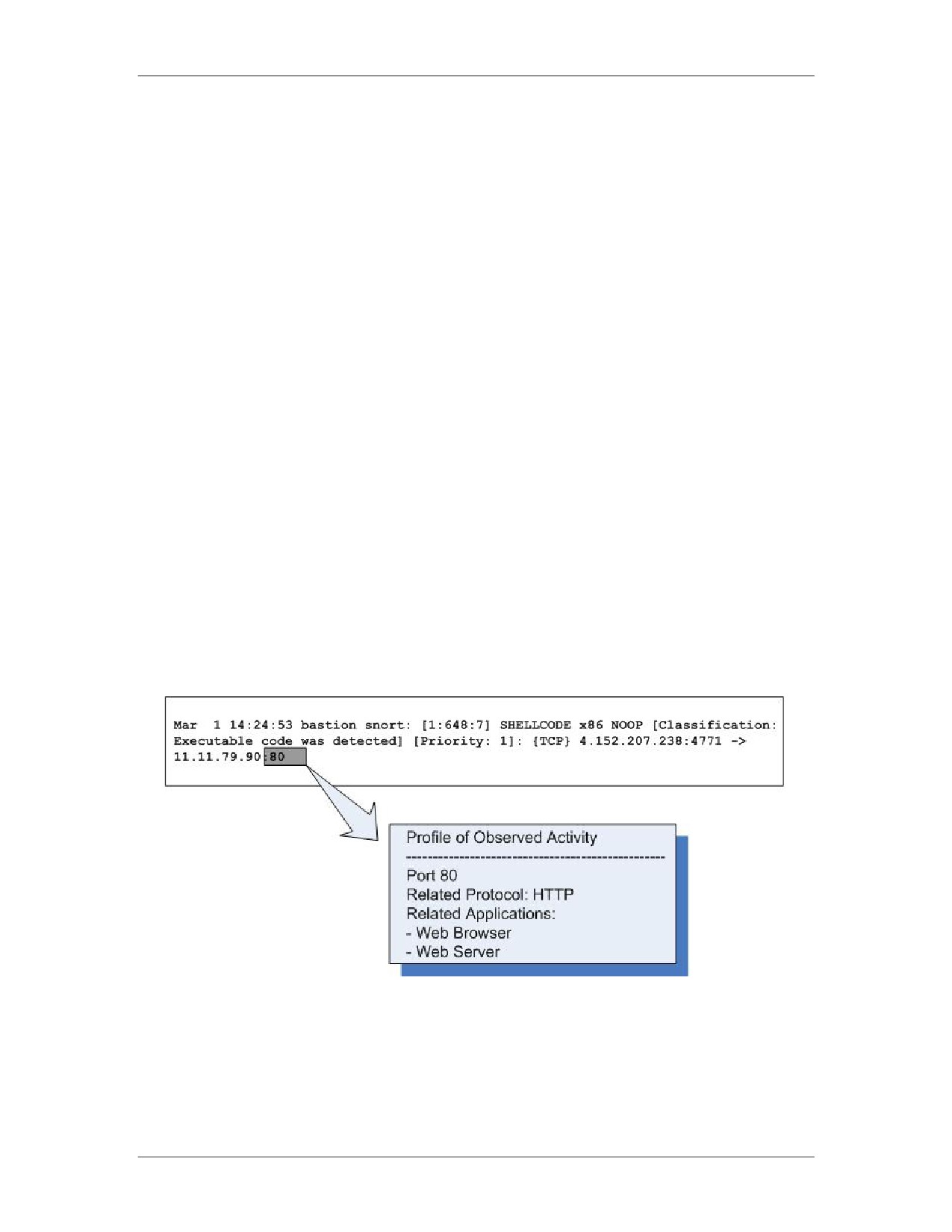
Network Intrusion Responder Program
Fundamentals of Log Analysis
Relating Observed Events to Applications and Network
Traffic Types
Relating Observed
You need to correlate all observed events to the applications
Events to
involved. This will help you to locate potential artifacts. For
Applications
instance, if the observed event was a buffer overflow IDS alert
with a destination port of 80, you could surmise that the target
application of that attack may be a Web server such as IIS or
Apache. Recognizing this, you would place this application on
your list of potential artifact sources and gather and analyze the
logs from that application.
At a minimum, you should perform the following tasks to help
identify involved applications:
Identify network traffic types that correspond to observed
TCP/UDP ports. For instance, observed TCP port 25 traffic
indicates that SMTP is most likely involved.
Identify applications related to observed and/or extrapolated
network traffic types. From the example above, if SMTP were
the likely protocol, then that would indicate that an e-mail
server and client application were probably also involved.
The image below illustrates the concept of profiling an event.
01/09
For Official Use Only - Law Enforcement Sensitive
9-27
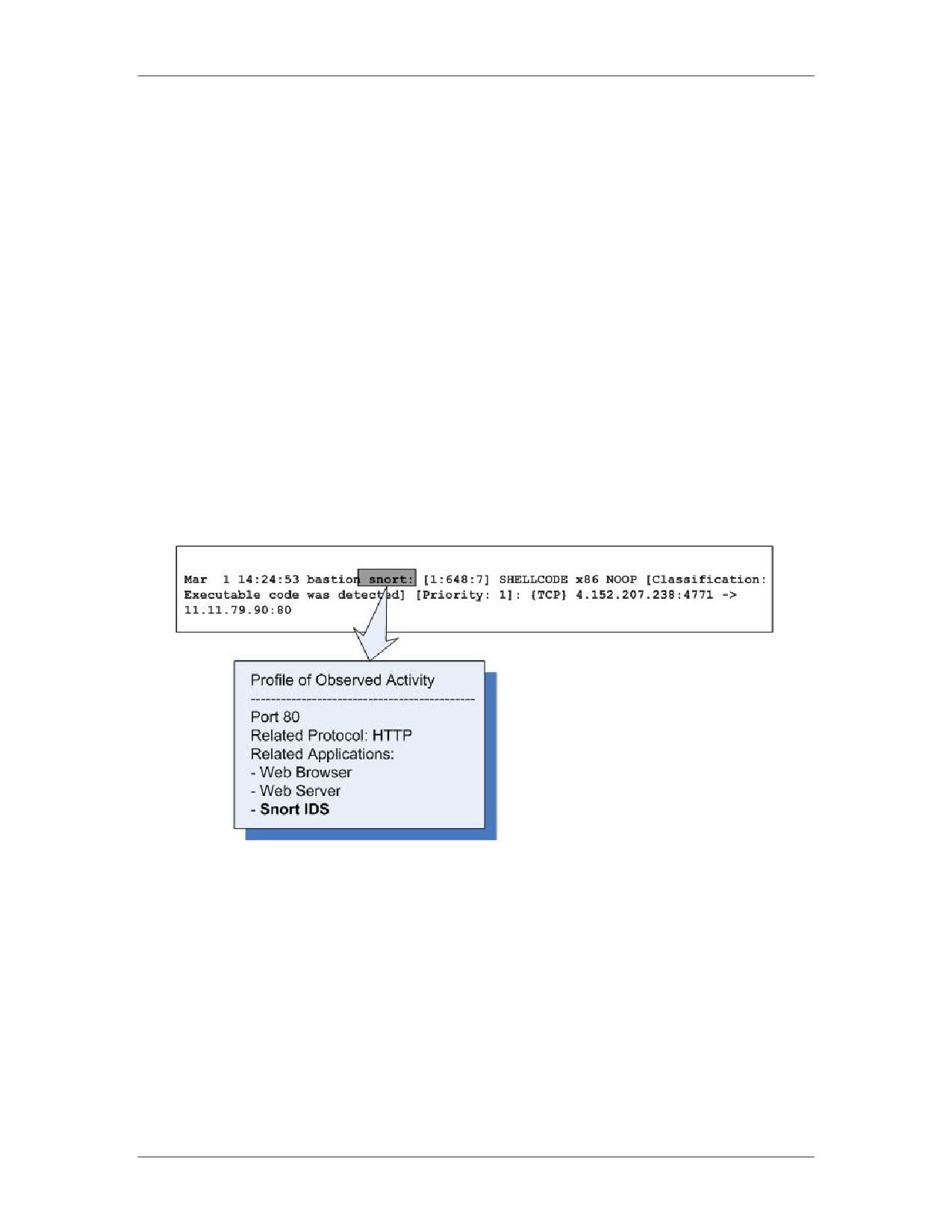
Fundamentals of Log Analysis
Network Intrusion Responder Program
Relating Observed Events to Applications and Network
Traffic Types, continued
Additional
Also list applications that meet the following criteria:
Applications
Identify applications that have the capability of logging
activity related to network traffic types and applications you
have already singled out. For instance, SMTP gateways would
have the capability of logging data about traffic between e-mail
servers and clients.
Identify applications directly involved in the generation of
observed events. This also includes security
devices/applications that produced log files that contained
initial observations. Following the example from the previous
page, the Snort IDS that generated the alert would be added to
the list of applications that may contain relevant artifacts.
Recording
The data produced here can be kept in any form with which you
Applications and
are comfortable. You could keep a list of potentially involved
Network Traffic
applications and network protocols in your notes, a database, or
Types
spreadsheet.
9-28
For Official Use Only - Law Enforcement Sensitive
01/09
Network Intrusion Responder Program
Fundamentals of Log Analysis
Mapping Observed Activity to Network Traffic Flow
Network Traffic
One simple way to identify devices that may contain relevant data
Flow and
is to locate all devices that related traffic may have passed through.
Intrusion Artifacts
For instance, if the investigator believes that intrusion-related
traffic passed through a specific point of ingress/egress for the
network, you can surmise that the devices at that point (firewalls,
routers, IDS sensors, etc.) could potentially contain important
artifacts.
Mapping
Enterprise networks can be very large and complex. Observe
Observed Activity
events to determine probable routes for related traffic. You will
to Network Traffic
need the following items to map traffic flow:
Flow
A logical or physical network diagram, and/or access to a
network administrator that has working knowledge of the
current topology. This diagram should be broad enough to
include all points of ingress/egress from the affected network
segments, including paths to the Internet.
IP addresses for devices potentially involved in the incident
Ports and protocols corresponding to related network protocols
With these items, identify all routes between the affected devices
and between those devices and the Internet. Record these routes in
your notes, or mark them on working copies of any network
diagrams you were able to obtain.
01/09
For Official Use Only - Law Enforcement Sensitive
9-29
Fundamentals of Log Analysis
Network Intrusion Responder Program
Mapping Observed Activity to Network Traffic Flow,
continued
Other Routes of
In addition to the main routes of network traffic between affected
Interest
devices and the Internet, the following routes may also be of
interest:
Alternate points of network traffic ingress/egress from the
network segment on which each device is resident.
Identify any routes to major service network segments that are
not inline with the default gateway (network segments with
directory servers, e-mail servers, file and print servers, backup
servers etc.).
Routes used by incoming traffic to the affected network
segment, if not the same as the default outbound route (routes
used by public service requests to the segment, internal service
requests, VPN pathways, etc.).
In the network, check specific protocols sent through alternate
routes to reach proxy servers. If some are found, identify the
routes between the affected network segment and those proxy
servers.
The devices along the routes identified in the questions above are
all potentially in scope. Use the additional criteria listed on the
following page for determining how to prioritize devices for
acquisition.
9-30
For Official Use Only - Law Enforcement Sensitive
01/09
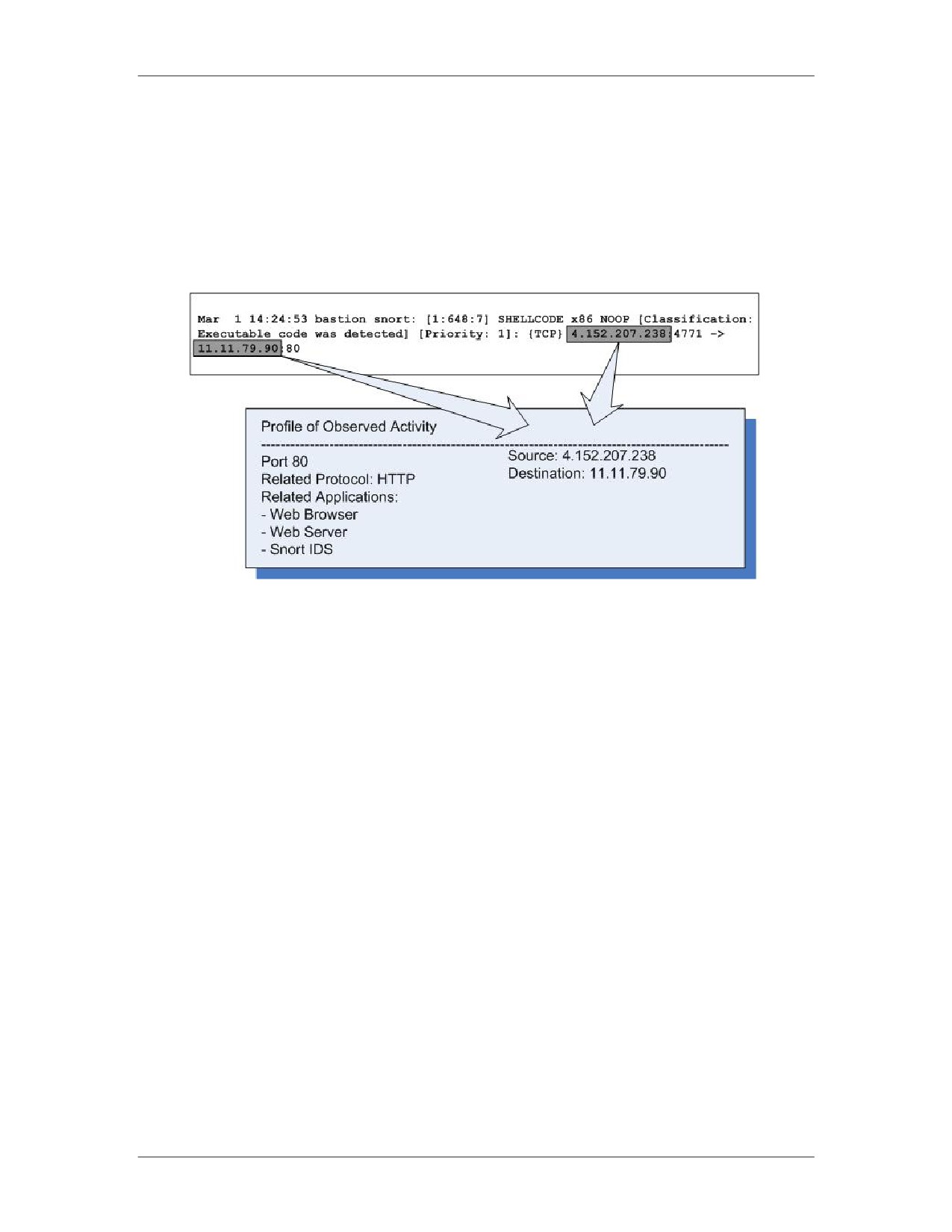
Network Intrusion Responder Program
Fundamentals of Log Analysis
Mapping Observed Activity to Network Traffic Flow,
continued
Example: Adding
You can use the current observations from the investigation to add
Source and
source and destination systems to your profile of activity. This is
Destination
illustrated below, following the example from the previous topic.
01/09
For Official Use Only - Law Enforcement Sensitive
9-31
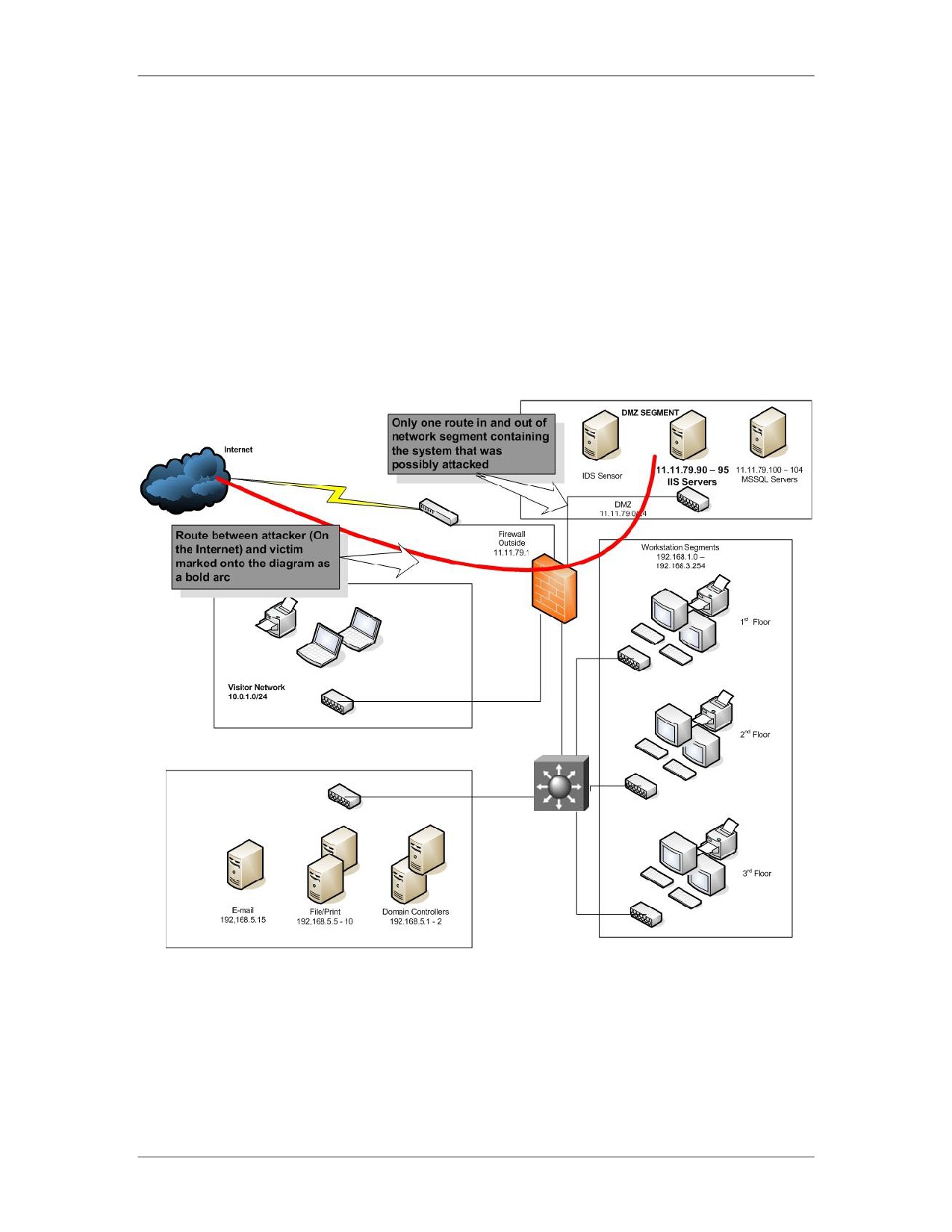
Fundamentals of Log Analysis
Network Intrusion Responder Program
Mapping Observed Activity to Network Traffic Flow,
continued
Example:
Use a network diagram and the IP addresses of involved devices to
Mapping Traffic
map relevant routes. The basic example below uses the IP
Routes
addresses added to the profile of observed activity on the previous
page. In the example, a bold line was used to mark the route
between the victim system and the attacker who is assumed to be
on the Internet. The only point of ingress/egress from the involved
network segment was also marked.
9-32
For Official Use Only - Law Enforcement Sensitive
01/09
Network Intrusion Responder Program
Fundamentals of Log Analysis
Predicting Artifact Location
Predicting Artifact
Answer the following questions to determine which devices and/or
Location: Devices
media may contain data regarding any related applications you
have identified:
On what host system is the application located?
Does the application use local or remote (SAN, NAS, etc.)
storage? If remote, identify the associated storage devices.
Is the host system backed up on a regular basis? Is data backed
up to local media, or to a remote system? If local, where are
the tapes or other backup media stored after use? If remote,
identify the remote backup server.
Is the application part of a distributed application system (such
as a Web server with a database backend)? If so, identify the
other applications in the system, and the hosts on which they
reside.
Are there multiple systems that host this application as part of
a load-balancing configuration? If so, identify all systems
hosting copies of this application.
Is the application configured to use a proxy device when
communicating on a network? If so, identify all associated
proxy devices.
01/09
For Official Use Only - Law Enforcement Sensitive
9-33
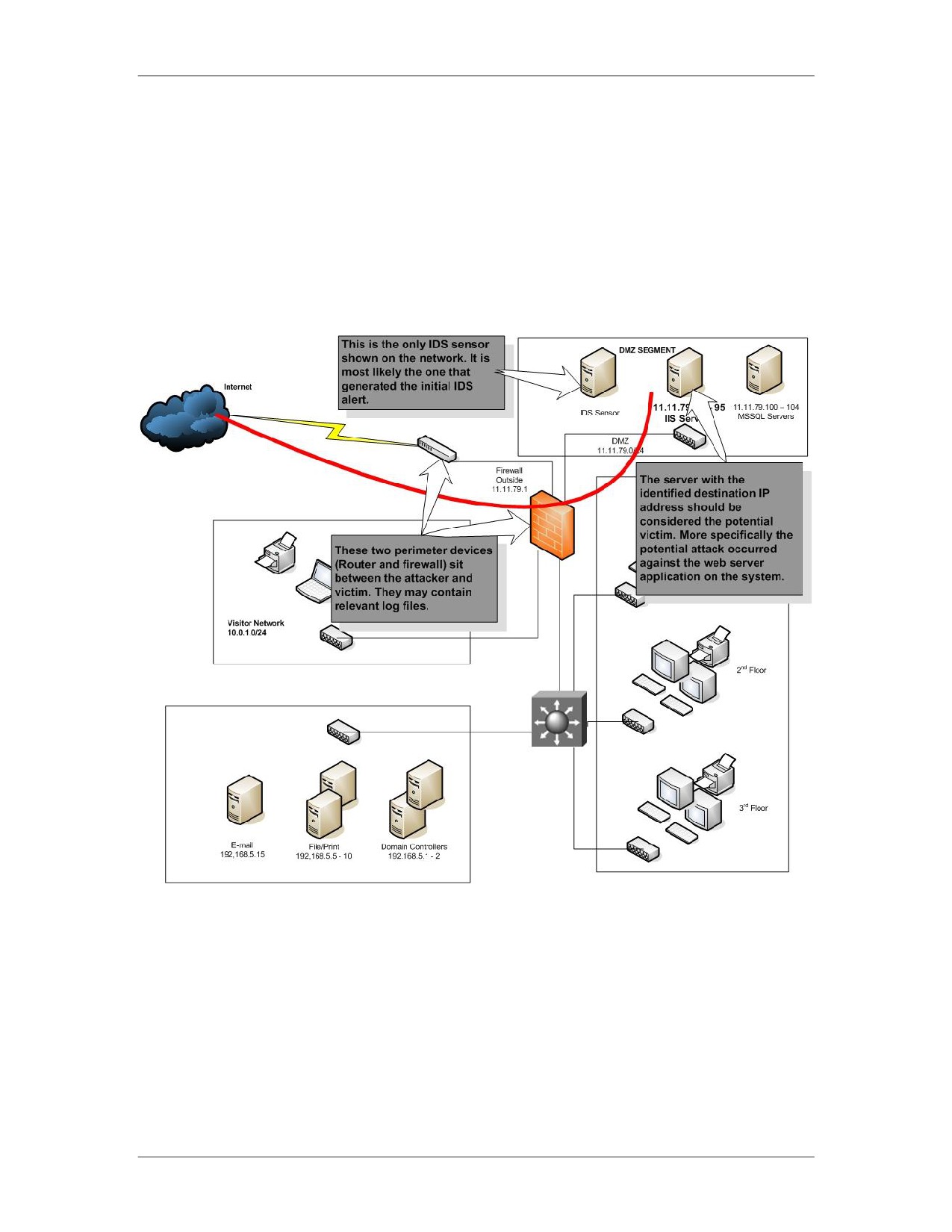
Fundamentals of Log Analysis
Network Intrusion Responder Program
Predicting Artifact Location, continued
Predicting Artifact
Based upon the map of traffic flow and profile of observed events
Location: Devices
created previously, devices can be selected which will most likely
Example
contain relevant artifacts. The diagram below is provided as a
basic example, continuing with the scenario from the previous
pages.
9-34
For Official Use Only - Law Enforcement Sensitive
01/09
Network Intrusion Responder Program
Fundamentals of Log Analysis
Predicting Artifact Location, continued
Predicting Artifact
Answer the following questions to determine which files and
Location: Files
directories may contain data about the related application:
and Directories
Does the application keep logs? If so, what is the full path to
the log storage location?
Is the application or host system configured to send logs to a
remote repository? If so, identify that system.
What is the full path and name of the files in which the
application stores configuration information?
What is the name and full path of the files in which the
application stores persistent and temporary data?
Does the application require authentication? If so, does it use
its own authentication mechanism, or does it forward
authentication data to an outside application (such as Active
Directory)?
The answers to these questions will vary between different
applications and operating systems. Research is required.
Predicting Artifact
Following the same example scenario, the potential victim in the
Location: Files
attack could be an IIS Web server that contains certain log files to
and Directories
be analyzed. Here are examples of log files that could be extracted
Example
from this system:
Windows Event Logs: The Windows operating system logs
(IIS runs on Windows), typically found in C:\[winnt or
windows]\system32\config. They will have a “.evt” extension
on recent server versions of the Windows OS.
IIS logs: The log files for the web server application, typically
located at c:\[winnt or windows]\system32\logfiles\w3svc1,
and will usually have a name of ex*.log.
Dr. Watson log: A debugging log created by the Windows OS
after some program malfunctions, named drwtsn32.log will
sometimes contain data if a process was crashed when it was
attacked.
Following this example, log files would have to be collected from
the other devices identified on the diagram (IDS, firewall, etc.).
01/09
For Official Use Only - Law Enforcement Sensitive
9-35
Fundamentals of Log Analysis
Network Intrusion Responder Program
This page intentionally left blank.
9-36
For Official Use Only - Law Enforcement Sensitive
01/09
Network Intrusion Responder Program
Fundamentals of Log Analysis
Lesson 5 - Using Log Analysis to Evaluate an
Intrusion Hypothesis
Introduction
Once you determine the most likely locations for related artifacts,
you can use the techniques presented in this course to analyze
collected evidence and evaluate the hypothesis.
Purpose of this
The purpose of this lesson is to describe how log analysis
Lesson
techniques are used to evaluate an intrusion hypothesis.
Objectives
After completing this lesson, you will be able to:
Determine the format of log files
Use search, filter, and extraction techniques to evaluate a
hypothesis
Record findings and keep track of new leads
In this Lesson
The following table shows the contents of this lesson.
Topic
See Page
Hypothesis Evaluation
9-38
Acquiring Target Log Files
9-39
Reviewing Target Log Formats
9-40
Establishing Search/Extraction Criteria
9-41
Searching Target Logs and Extracting Relevant
9-42
Data
Recording and Correlating Findings
9-43
Keeping Track of New Leads
9-45
01/09
For Official Use Only - Law Enforcement Sensitive
9-37