Duramax Diesel. Manual - part 17
 

  Index      Engines     Chevrolet / GMC Duramax Diesel - service manual 2017 year


Search            


Content   ..  15  16  17  18   ..


Duramax Diesel. Manual - part 17


Driving and Operating

67

2500/3500 Series Van Models

Vehicle

Axle Ratio

Max. Trailer Wt.

1

GCWR *

G3500 Passenger Van Short
Wheelbase

3.42

2 586 kg (5,700 lb)

5 897 kg (13,000 lb)

G3500 Passenger Van Long
Wheelbase

3.42

2 404 kg (5,300 lb)

5 897 kg (13,000 lb)

*The Gross Combination Weight Rating (GCWR) is the total allowable weight of the completely loaded vehicle and
trailer including any passengers, cargo, equipment, and conversions. The GCWR for the vehicle should not be
exceeded.

1

For Full Box Vans, choose an appropriate hitch and load the truck and trailer within the limits of GCWR, GVWR,

and RGAWR.

See “Trailer Towing” in the owner
manual for kingpin weight and trailer
tongue weight information.

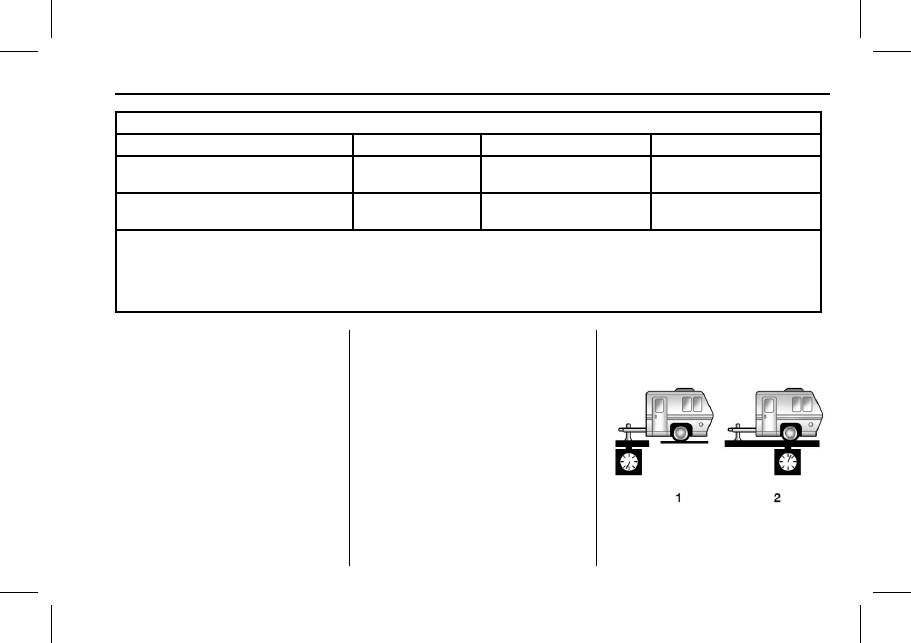
Weight of the Trailer Tongue

The tongue load (1) of any trailer is
very important because it is also
part of the vehicle weight. The
Gross Vehicle Weight (GVW)
includes the curb weight of the
vehicle, any cargo carried in it, and
the people who will be riding in the
vehicle as well as trailer tongue
weight. Vehicle options, equipment,
passengers and cargo in the vehicle

reduce the amount of tongue weight
the vehicle can carry, which will also
reduce the trailer weight the vehicle
can tow.

68

Driving and Operating

Conventional hitch trailer tongue
weight (1) should be 10–15% and
fifth-wheel or gooseneck kingpin
weight should be 15–25% of the
loaded trailer weight (2) up to the
maximums for vehicle series and
hitch type.

Colorado/Canyon

Vehicle Series

Hitch Type

Maximum Tongue

Weight

2.8L Diesel
4x2 (ALL)

Conventional Load

349 kg (770 lb)

2.8L Diesel SWB
Ext. Cab 4x4

Conventional Load

349 kg (770 lb)

2.8L Diesel SWB/
LWB Crew
Cab 4x4

Conventional Load

345 kg (760 lb)

Do not exceed the maximum
allowable tongue weight for the
vehicle. Choose the shortest hitch
extension that will position the hitch
ball closest to the vehicle. This will
help reduce the effect of trailer
tongue weight on the rear axle.

Trailer rating may be limited by the
vehicle's ability to carry tongue
weight. Tongue or kingpin weight
cannot cause the vehicle to exceed
the GVWR (Gross Vehicle Weight
Rating) or the RGAWR (Rear Gross
Axle Weight Rating). See “Total
Weight on the Vehicle's Tires” in the
owner manual.

After loading the trailer, weigh the
trailer and then the tongue,
separately, to see if the weights are
proper. If they are not, adjustments
might be made by moving some
items around in the trailer.

If a cargo carrier is used in the
trailer hitch receiver, choose a
carrier that positions the load as
close to the vehicle as possible.
Make sure the total weight,
including the carrier, is no more than
half of the maximum allowable
tongue weight for the vehicle or
227 kg (500 lb), whichever is less.

Driving and Operating

69

Conversions and
Add-Ons

Power Take-Off (PTO)

If equipped, the Power Take-Off
(PTO) is a GM Upfitter integrated
system that is used to create an
auxiliary power source for running
add-on equipment, such as salt
spreaders, snow plows, winches,
and lift buckets. The PTO system
controls engine speed to values
higher than normal base idle, PTO
load relay engagement, and remote
starting and shutdown of the engine.

When installing PTO aftermarket
equipment, the PTO wiring and
operation recommendations
provided by the service manual and
GM Upfitter documentation must be
strictly followed.

Refer to the bulletins in the
Upfitter Integration website
www.gmupfitter.com for the Power
Take Off (PTO) operating
description and application guide.

Caution

Engine exhaust contains Carbon
Monoxide (CO), which cannot be
seen or smelled. Exposure to CO
can cause unconsciousness or
even death. Never operate PTO
in an enclosed area such as a
garage or building that has no
fresh air ventilation. See “Engine
Exhaust” in the owner manual.

Caution

If the key is in the ignition during
Remote PTO operation, the
vehicle can be shifted out of
P (Park). Even though PTO will
be disengaged, depending on
PTO Upfitter application, personal
injury or property damage may
result from vehicle movement.
Always remove the key from the
ignition before operating
Remote PTO.

Primary PTO Operating Modes

PTO modes of operation are:
.

Preset

Stationary operation only: In-cab
control is standard, remote
control is available.

.

Variable

Stationary operation only: In-cab
control is standard, remote
control is available.

.

Mobile

In-cab control only.

.

Operator Selectable In-Cab
Mode (OSIM)

OSIM is for in-cab
operation only.

OSIM is for vehicles that require
both stationary and mobile
modes. OSIM is available via the
GM Service Tool only. During the
configuration of OSIM, two
modes must be paired. The
options for pairing are: stationary
preset and mobile, or stationary
variable and mobile. During
activation of OSIM, the operator

70

Driving and Operating

must select one of the two
modes within the pre-configured
pairing. If an OSIM mode is not
selected, PTO will not operate.

OSIM modes of operation are:

‐ Stationary

For stationary mode, the
configuration may be
stationary preset or stationary
variable.

‐ Mobile

For mobile mode, the
configuration is variable only.

Selection between OSIM
pairings is not available.

Remote modes are not
available.

The factory default programming
enables in-cab control. For
stationary modes, a GM Service
Tool can reprogram the system to
allow for remote control and disable
the in-cab control.

All PTO modes provide for engine
rpm control and PTO load relay
control.

All PTO modes provide for safety
interlocks for PTO load
disengagement.

Remote PTO modes provide for
remote engine starting and
shutdown.

Stationary in-cab and Remote PTO
modes provide for engine shutdown
due to critical engine conditions, as
well as a timed engine shutdown
feature.

Preset PTO

Preset Enable Conditions –
In-Cab Operation

To enable PTO:

1. With the engine running, shift

the vehicle into P (Park) and
set the parking brake. Do not
press the brake pedal.

2. Confirm that cruise control

is off.

3. Press and release the PTO

in-cab switch below the climate
controls in the center stack.
The PTO indicator light will
blink rapidly until the PTO load
relay becomes engaged and

will then be on steady. The
engine will advance to the PTO
Standby Speed.

4. Once the PTO Standby Speed

is reached, use SET− and
+RES on the cruise control to
reach the Set 1 or Set 2 PTO
engine speeds.

The accelerator pedal is
disabled and cannot be used to
override the PTO preset
speeds.

Factory Default PTO Engine

Speeds

Standby

900 rpm

Set 1 (SET−)

1200 rpm

Set 2 (+RES)

1900 rpm

The first time a vehicle is used
for PTO:

1. The PTO Control setting on the

GM Service Tool is
programmed to Interior Mode
PTO Switch.


Content   ..  15  16  17  18   ..