Kia Rio / Rio Hatchback (2022 year). Manual in english - page 5
Features of your vehicle
Smart key immobilizer system
To deactivate the immobilizer
This device complies with Part 15
system:
of the FCC rules.
Your vehicle is equipped with an
electronic engine immobilizer system
Turn the ENGINE START/STOP but-
Operation is subject to the following
to reduce the risk of unauthorized
ton to the ON position by pressing the
two conditions:
vehicle use.
button while carrying the smart key.
1. This device may not cause harm-
Your immobilizer system is com-
In order to prevent theft of your vehi-
ful interference, and
prised of a small transponder in the
cle, do not leave spare keys any-
2. This device must accept any inter-
smart key and electronic devices
where in your vehicle.
ference received, including inter-
inside the vehicle.
ference that may cause undesired
With the immobilizer system, when-
operation.
To activate the immobilizer system:
ever you turn the ENGINE
Turn the ENGINE START/STOP but-
START/STOP button to the ON posi-
ton to the OFF position. The immobi-
✽ NOTICE
tion by pressing the button while car-
lizer system activates automatically.
Changes or modifications not
rying the smart key, it verifies if the
Without a valid smart key for your
expressly approved by the party
smart key is valid. If the key is deter-
vehicle, the engine will not start.
responsible for compliance could
mined to be valid, the engine will
void the user’s authority to operate
start.
the equipment. If the keyless entry
✽ NOTICE
If the key is determined to be invalid,
system is inoperative due to changes
the engine will not start.
When starting the engine, do not use
or modifications not expressly
the key with other immobilizer keys
approved by the party responsible
around. Otherwise the engine may
for compliance, it will not be cov-
not start or may stop soon after it
ered by your manufacturer’s vehicle
starts. Keep each key separate in
warranty.
order to avoid a starting malfunction.
✽ NOTICE
If you need additional keys or lose
your keys, contact an authorized
Kia dealer.
4
14
Features of your vehicle
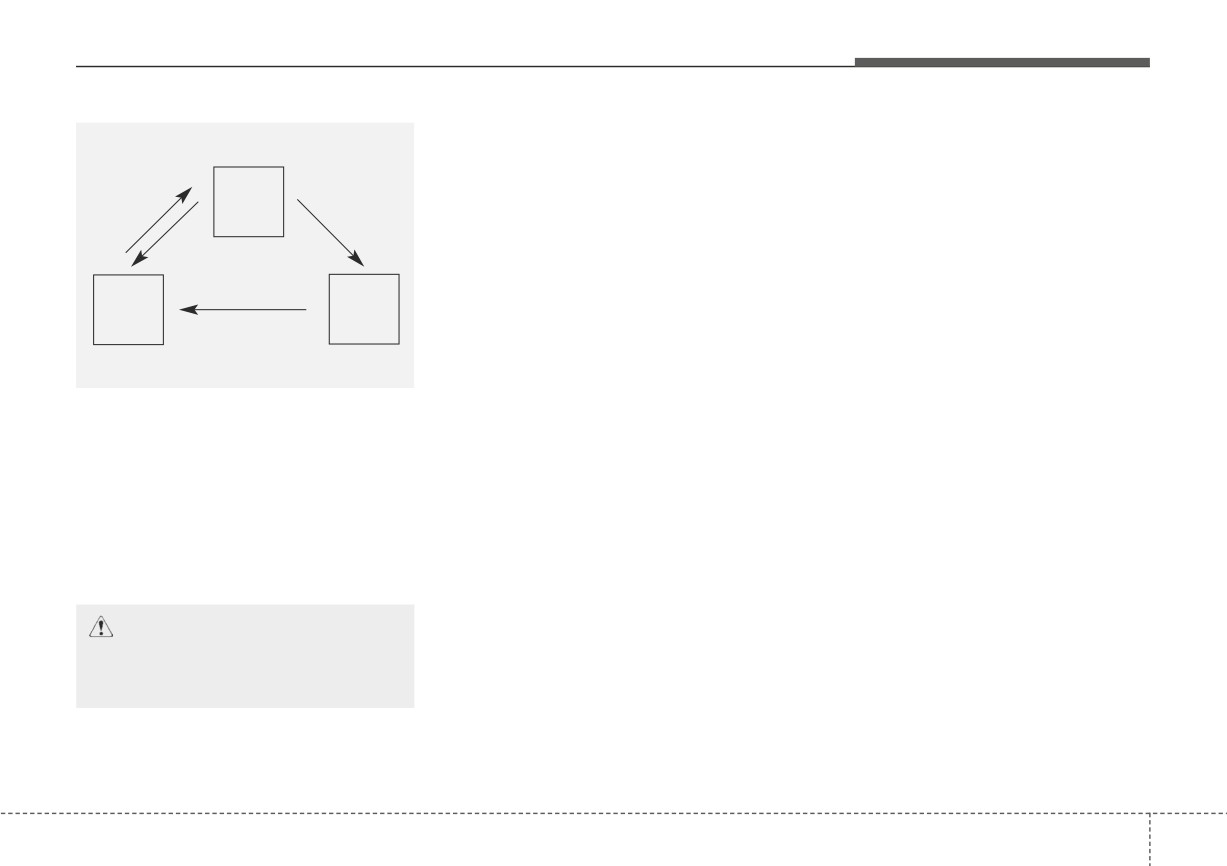
THEFT-ALARM SYSTEM (IF EQUIPPED)
Armed stage
Using the smart key
Park the vehicle and stop the engine.
Using the transmitter
Arm the system as described below.
Armed
Park the vehicle and stop the engine.
stage
1. Turn off the engine.
Arm the system as described below.
2. Make sure that all doors (and lift-
1. Turn off the engine and remove
the ignition key from the ignition
gate) and the engine hood are
closed and latched.
switch.
Disarmed
Theft-alarm
stage
stage
2. Make sure that all doors (and lift-
3. Lock the doors by pressing the
button of the front outside door
gate), the engine hood are closed
and latched.
handle with the smart key in your
possession or by pressing the but-
3. Lock the doors by pressing the
ton on the smart key.
This system is designed to provide
lock button on the transmitter.
After completion of the steps above,
protection from unauthorized entry
After completion of the steps above,
the hazard warning lights operate
into the vehicle. This system is operat-
the hazard warning lights will blink
once to indicate that the system is
ed in three stages: the first is the
once to indicate that the system is
armed.
"Armed" stage, the second is the
armed.
"Theft-alarm" stage, and the third is
If any door (and liftgate) or engine
the "Disarmed" stage. If triggered, the
hood remains open, the hazard
system provides an audible alarm with
warning lights won't operate and the
blinking of the hazard warning lights.
theft-alarm will not arm. After this, if
all doors
(and liftgate) and engine
CAUTION
hood are closed, the hazard warning
Do not attempt to alter this sys-
lights blink once.
tem or add other devices to it.
4
15
Features of your vehicle
If any door remains open, the doors
Do not arm the system until all
Theft-alarm stage
won't lock and the chime will sound
passengers have left the vehicle. If
The alarm will be activated if any of
for 3 seconds. Close the door and try
the system is armed while a pas-
the following occurs while the system
again to lock the doors.
senger(s) remains in the vehicle,
is armed.
the alarm may be activated when
If liftgate or engine hood remains
the remaining passenger(s) leave
• A front or rear door is opened without
open, the hazard warning lights
using the ignition key or transmitter
the vehicle. If any door, liftgate or
won't operate and theft-alarm will not
engine hood is opened within 30
(or smart key).
arm. After this, if the liftgate and
seconds after entering the armed
• The trunk/liftgate is opened without
engine hood are closed, the hazard
stage, the system is disarmed to
using the ignition key or transmitter
warning lights will blink once and the
prevent unnecessary alarm.
(or smart key).
theft-alarm will arm.
• The engine hood is opened.
The horn will sound and the hazard
warning lights will blink continuously for
approximately 27 seconds. To turn off
the system, unlock the doors with the
ignition key or transmitter
(or smart
key).
4
16
Features of your vehicle
Disarmed stage
✽ NOTICE
CAUTION - Adjusting
The system will be disarmed when:
•
Avoid trying to start the engine
alarm system
while the alarm is activated. The
vehicle starting motor is disabled
Do not change, alter or adjust
Transmitter
the theft-alarm system because
during the theft-alarm stage.
- The door unlock button is pressed.
- If the system is not disarmed
it could cause the theft-alarm
system to malfunction and
- The engine is started.
(within
3
with the transmitter, insert the
key into the ignition switch, turn
should only be serviced by an
seconds)
authorized Kia dealer.
the ignition switch to the ON
- The ignition switch is in the "ON"
position and wait for 30 seconds.
position for 30 seconds or more.
Then, the system will be dis-
✽ NOTICE
armed.
Malfunctions caused by improper
Smart key
- If the system is not disarmed
alterations, adjustments or modifi-
with the smart key, press the
- The door unlock button is pressed.
cations to the theft-alarm system are
ENGINE START/STOP button
- The button of the front outside door
not covered by your vehicle manu-
with the smart key. The side with
is pressed while carrying the smart
facturer warranty.
the lock button should contact
key.
the ENGINE START/STOP but-
- The engine is started.
(within
3
ton directly.
seconds)
•
If you lose your keys, consult your
authorized Kia dealer.
After the doors are unlocked, the haz-
ard warning lights will blink twice to
indicate that the system is disarmed.
After pressing the unlock button, if any
door (or trunk/liftgate) is not opened
within 30 seconds, the system will be
rearmed.
4
17
Features of your vehicle
DOOR LOCKS
Operating door locks from
• Once the doors are unlocked, they
✽ NOTICE
outside the vehicle
may be opened by pulling the door
•
In cold and wet climates, door lock
handle.
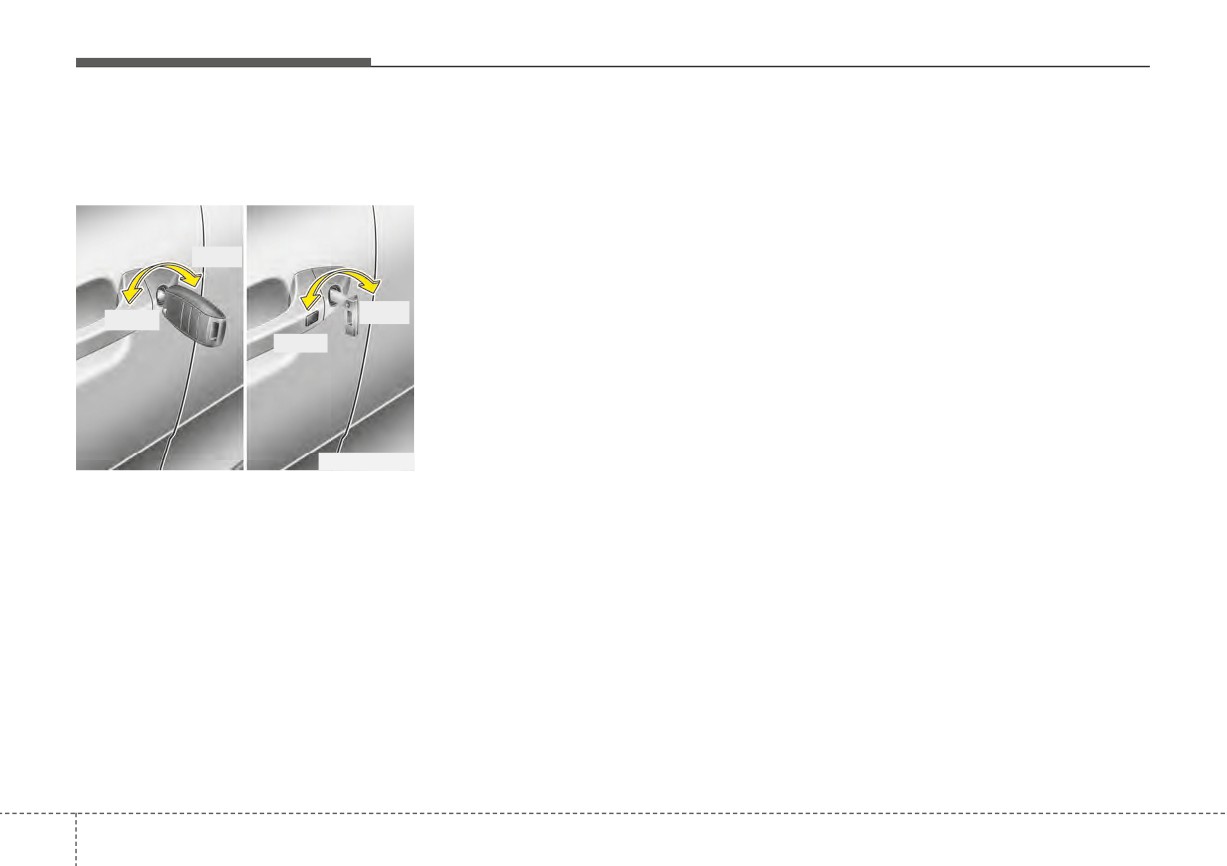
Mechanical key
and door mechanisms may not
• When closing the door, push the
work properly due to freezing con-
door by hand. Make sure the doors
ditions.
are closed securely.
•
If the door is locked/unlocked
Lock
multiple times in rapid succession
with either the vehicle key or door
Transmitter/Smart key
Unlock
Lock
lock switch, the system may stop
•
Doors can be locked and unlocked
operating temporarily in order to
Unlock
with the transmitter (or smart key).
protect the circuit and prevent
(if equipped)
damage to system components.
•
Doors can be locked and unlocked
pressing the button of the outside
door handle with the smart key in
OYB046011
your possession.
•
Turn the key toward the rear of the
•
Once the doors are unlocked, they
vehicle to lock and toward the front
may be opened by pulling the door
of the vehicle to unlock.
handle.
•
If you lock/unlock the driver’s door
•
When closing the door, push the
with a key, only the driver’s door
door by hand. Make sure that
will lock/unlock.
doors are closed securely.
•
From the driver’s door, turn the key
toward the front of the vehicle once
to unlock the driver’s door and
once more within
4 seconds to
unlock all doors.
4
18
Features of your vehicle
Operating door locks from
• If the inner door handle of the front
WARNING
inside the vehicle
door is pulled when the door lock
If people must spend a longer
button is in the lock position, the
With the door lock button
button will unlock and the door will
time in the vehicle while it is
very hot or cold outside, there
open.
is risk of severe personal
• Front doors cannot be locked if the
injuries or death. Do not lock
ignition key is in the ignition switch
the vehicle from the outside
and any front door is opened.
when there are people in it.
• Doors cannot be locked if the
smart key is in the vehicle and a
door is open.
CAUTION
Do not open and close the door
If a power door lock ever fails to func-
repeatedly if unnecessary or with
tion while you are in the vehicle, try
excessive force. Such action can
one or more of the following tech-
OSC046002
damage the vehicle door.
niques to exit:
•
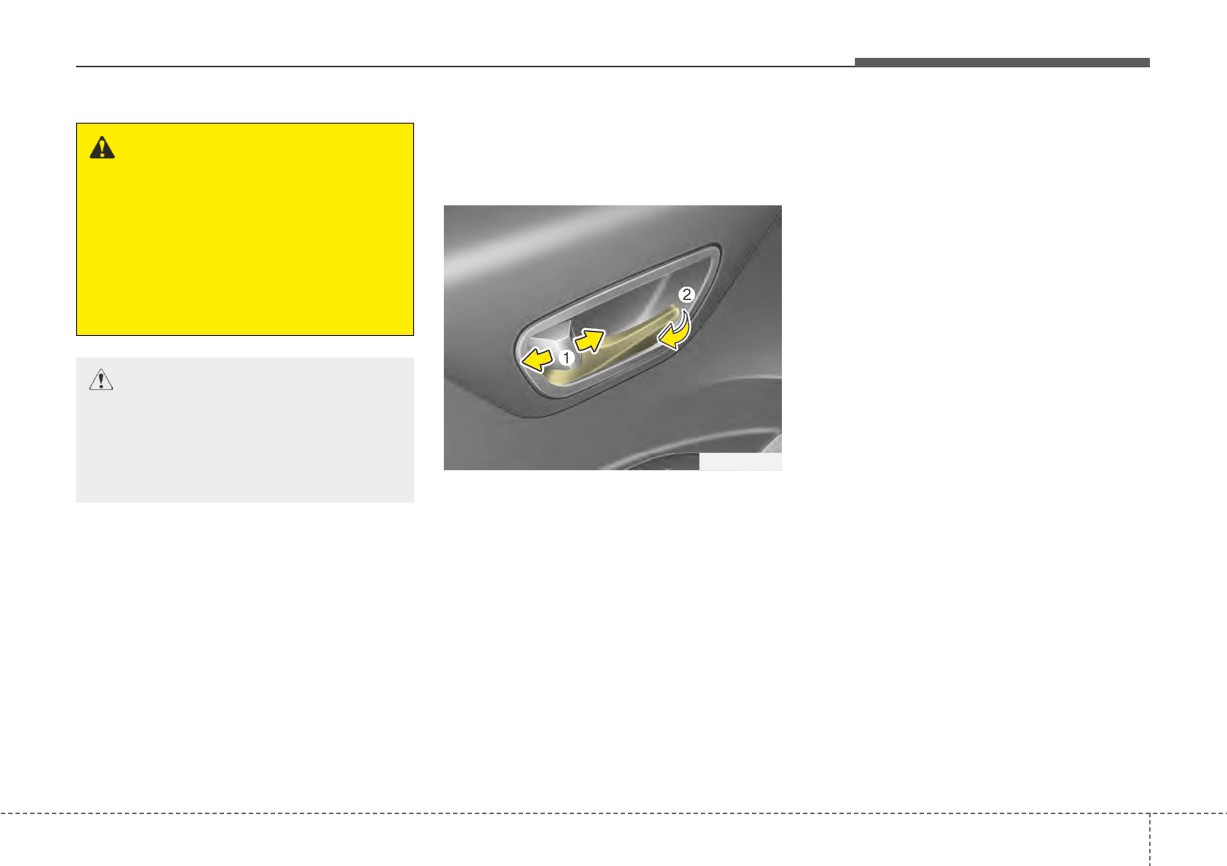
To unlock a door, pull the door lock
• Operate the door unlock feature
button (1) to the “Unlock” position.
repeatedly
(both electronic and
The red mark on the button will be
manual) while simultaneously
visible.
pulling on the door handle.
•
To lock a door, push the door lock
• Operate the other door locks and
button (1) to the “Lock” position. If
handles, front and rear.
the door is locked properly, the red
• Lower a front window and use the
mark on the door lock button will
key to unlock the door from out-
not show.
side.
•
To open a door, pull the door han-
• Move to the cargo area and open
dle (2) outward.
the liftgate (5 door).
4
19
Features of your vehicle
With central door lock switch
• Press the switch to the “Unlock”
WARNING
position (2), all vehicle doors will
■ Driver's door
Do not pull the inner door han-
unlock.
dle of driver’s (or passenger’s)
• If the key is in the ignition switch (or
door while the vehicle is mov-
if the smart key is in the vehicle)
ing.
and any front door is opened, the
doors will not lock when the “Lock”
position (1) of the central door lock
switch is pressed.
WARNING - Doors
OSC040514
The doors should always be
■ Passenger’s door
fully closed and locked while the
vehicle is in motion to prevent
the accidental opening of the
door, which could lead to seri-
ous injuries or death.
OSC047020N
Operate by pressing the central door
lock switch.
• Press the switch to the “Lock” posi-
tion (1), all vehicle doors will lock.
4
20
Features of your vehicle
Impact sensing door unlock
An authorized Kia dealer can acti-
WARNING - Unattended
system (if equipped)
vate or deactivate some auto door
children/animals
lock/ unlock features as follows;
All doors will automatically unlock
Never leave children or animals
• Auto door unlock by using the dri-
when an impact causes the air bags
unattended in your vehicle. An
to deploy.
ver's door lock button.
enclosed vehicle can become
• Auto door lock/unlock by shifting
extremely hot, causing death or
the transmission shift lever out of P
severe injury to unattended
Auto door lock/unlock feature
(Park) or into P (Park).
children or animals who cannot
(if equipped)
• Auto door unlock when the ignition
escape the vehicle.
• All doors will automatically lock
key is removed from the ignition
when the Intelligent Variable
switch or the ENGINE STAR/STOP
Transmission shift lever is shifted
button is set to the OFF position.
out of P(Park) (with engine ON, it is
If you want to activate or deactivate
activated).
some door lock/unlock feature, con-
• All doors will automatically unlock
sult an authorized Kia dealer.
when the Intelligent Variable
Transmission shift lever is shifted
into P(Park) (with engine ON, it is
activated).
Speed sensing door lock sys-
tem (if equipped)
All doors will be automatically locked
after the vehicle speed exceeds 9
mph. And all doors will be automati-
cally unlocked when you turn the
engine off or when you remove the
ignition key.
4
21
Features of your vehicle
Child-protector rear door lock
3. Close the rear door.
Rear Occupant Alert (ROA)
To open the rear door, pull the out-
system (if equipped)
side door handle.
The Rear Occupant Alert (ROA) sys-
Even though the doors may be
tem is provided to help prevent exit-
unlocked, the rear door will not open
ing the vehicle with the rear passen-
by pulling the inner door handle until
ger left in the vehicle.
the rear door child safety lock is
•
When you open the front door after
unlocked.
opening and closing the rear door
and turning off the engine, the
“Check rear seats” warning mes-
WARNING - Rear door
sage appears on the cluster.
locks
Use the rear door safety locks
OYB046015
whenever children are in the
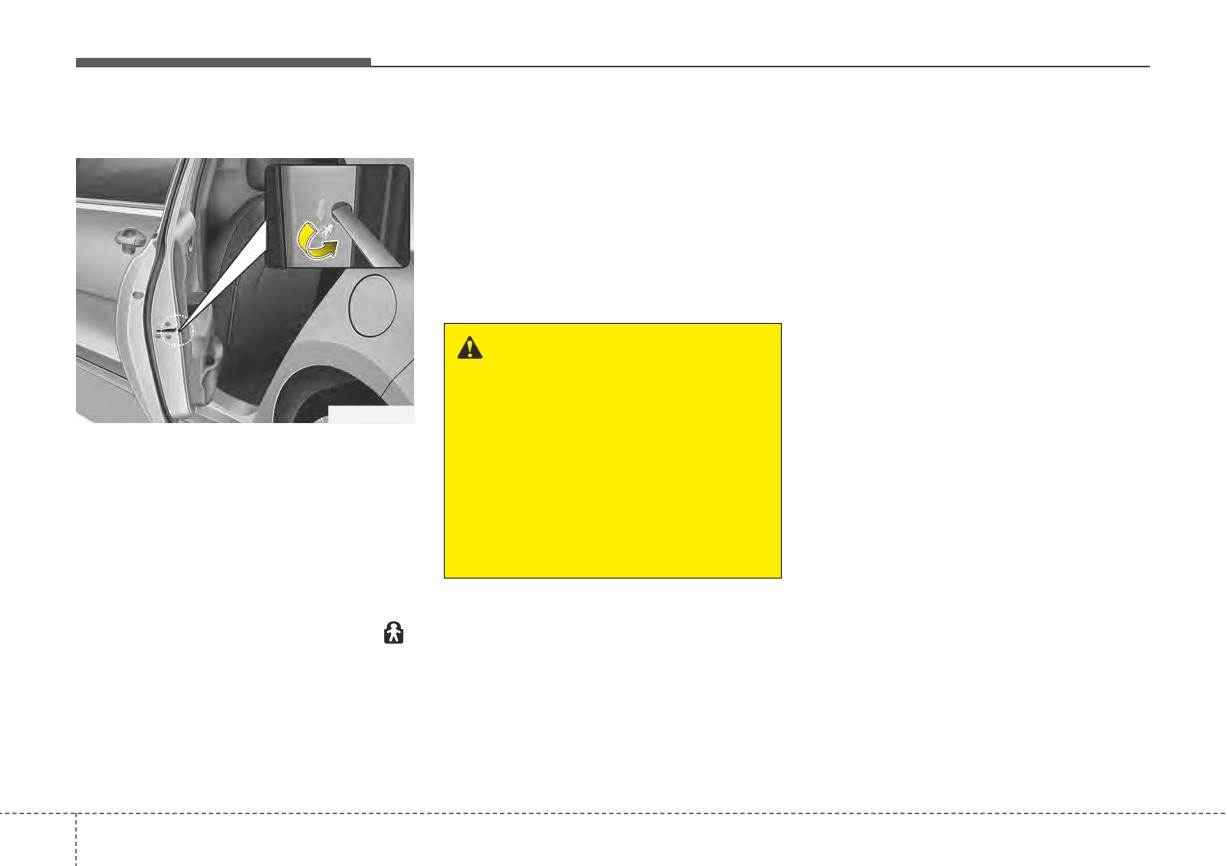
The child safety lock is provided to
vehicle. If a child accidentally
help prevent children from acciden-
opens the rear doors while the
tally opening the rear doors from
vehicle is moving, the child
inside the vehicle. The rear door
could suffer severe injuries or
safety locks should be used whenev-
death if they fall out of a moving
er children are in the vehicle.
vehicle.
1. Open the rear door.
2. Insert a key (or screwdriver) into the
hole and turn it to the lock (
)
position. The child safety lock locat-
ed on the rear edge of the door to
the lock position. When the child
safety lock is in the lock position, the
rear door will not open even when
the inner door handle is pulled.
4
22
Features of your vehicle
WARNING
The Rear Occupant Alert (ROA)
system does not actually detect
objects or people in the rear
seat. By using a rear door
opened and closed history, the
system informs the driver that
there may be something in the
rear seat.
OYB040608L
You can activate or deactivate the
✽ NOTICE
ROA from the Use Settings mode in
The Rear Occupant Alert (ROA)
the cluster LCD display.
system uses a rear door opened and
closed history.
The option can be found under the
The history is reset after the driver
following menu:
turns off ignition normally, gets off
1. Press the MODE button several
the vehicle and locks the door
times on the steering wheel until
remotely using the remote keyless
'User Settings' menu appears on
entry. So even if a rear door does not
the LCD.
reopen, the ROA system alert can
2. Select 'Convenience
→ Rear
occur.
Occupant Alert' with the MODE
For example, after the ROA system
Switch and the OK button on the
alert occur, if the driver do not lock
steering wheel.
the door then ride and drive again,
the alert can occur.
4
23
Features of your vehicle
TRUNK (FOR 4 DOOR)
Opening the trunk
Closing the trunk
WARNING
To close, lower the trunk lid, then
The trunk swings upward. Make
press down on it until it locks. To be
sure no objects or people are
sure the trunk lid is securely fas-
near the rear of the vehicle
tened, always check by trying to pull
when opening the trunk.
it up again.
WARNING - Exhaust
CAUTION
Fumes
Make certain that you close the
The trunk lid should always be
trunk before driving your vehi-
kept completely closed while
cle. Possible damage may occur
the vehicle is in motion. If it is
to attached hardware if the trunk
OSC047021N
left open or ajar, poisonous
is not closed prior to driving.
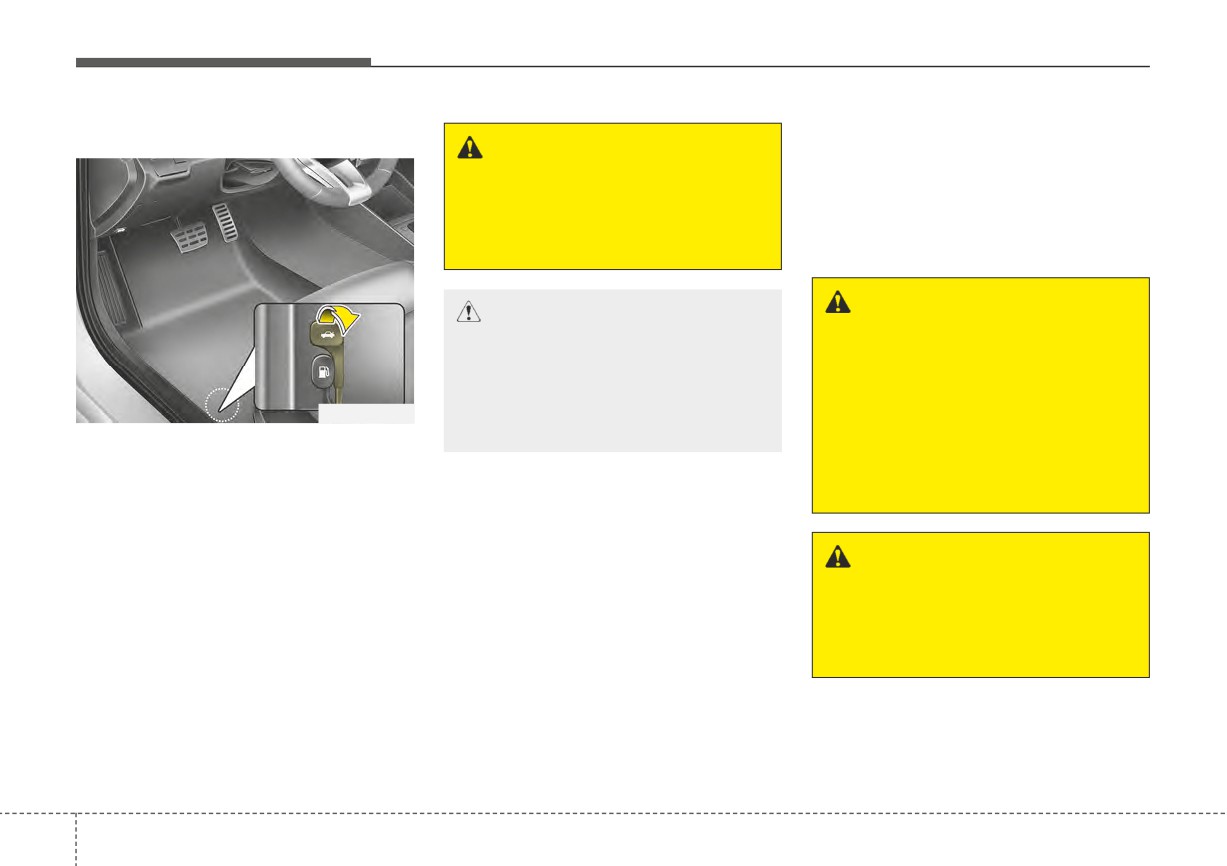
• To open the trunk from inside the
exhaust gases may enter the
vehicle, pull the trunk lid release
car and serious illness or death
lever.
may result.
Once the trunk is opened and then
closed, the trunk locks automati-
cally.
WARNING
No one should be allowed to
occupy the trunk at any time.
✽ NOTICE
The trunk is a very dangerous
In cold and wet climates, trunk lock
location in the event of a crash.
and trunk mechanisms may not work
properly due to freezing conditions.
4
24
Features of your vehicle
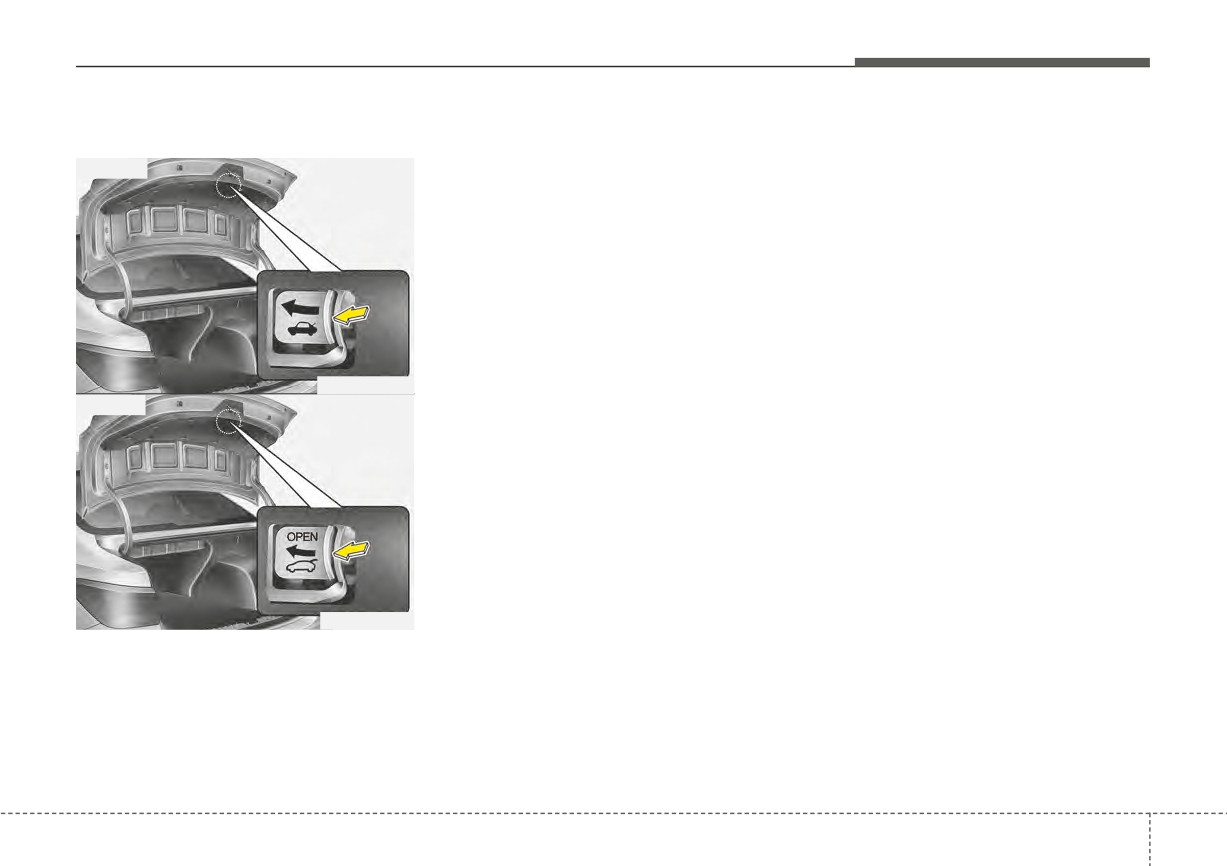
Emergency trunk safety release
No one should be allowed to occupy
the trunk at any time. The trunk is a
■ Type A
very dangerous location in the event
of a crash.
Use the release lever for emergen-
cies only. Use extreme caution,
especially while the vehicle is in
motion.
OSC047022N
■ Type B
OSC048140N
Your vehicle is equipped with an
emergency trunk release lever locat-
ed inside the trunk. If someone is
inadvertently locked in the trunk,
moving the handle in the direction of
the arrow will release the trunk latch
mechanism and open the trunk.
4
25
Features of your vehicle
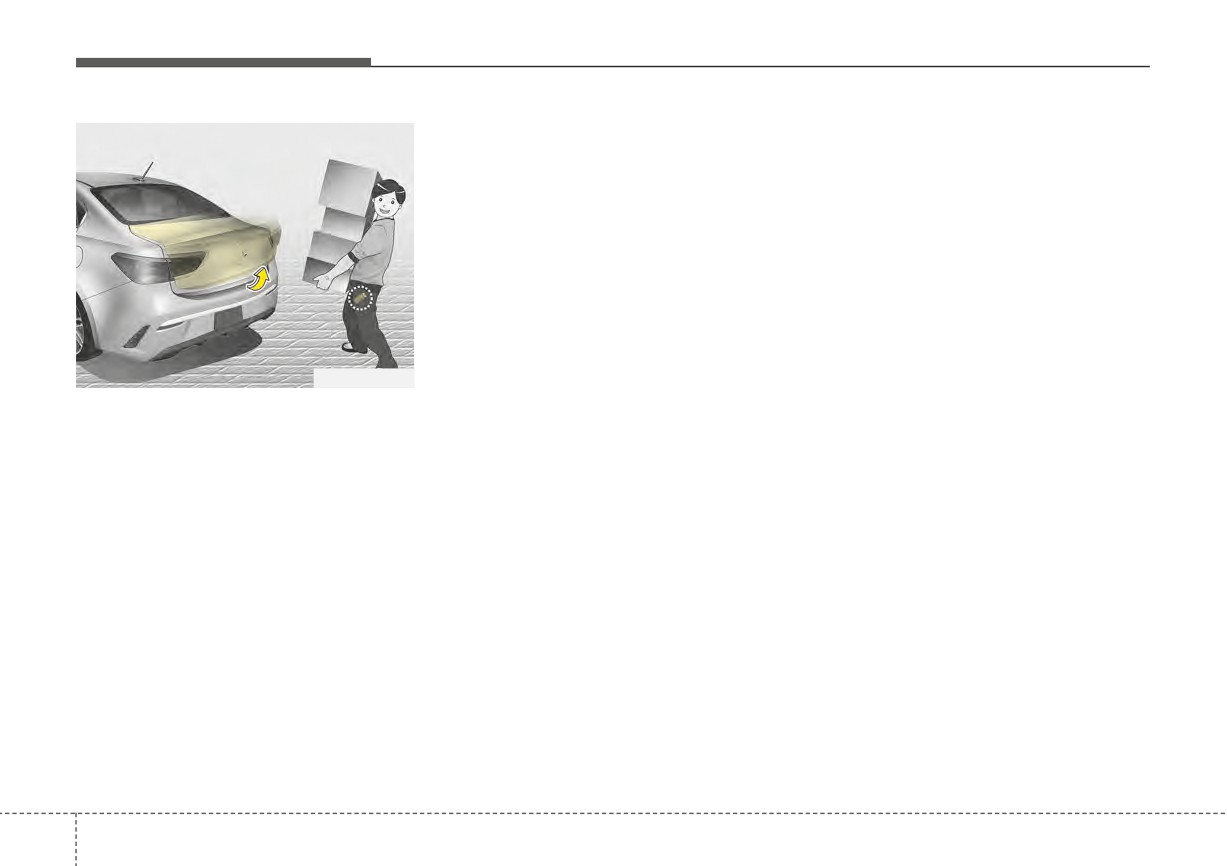
SMART TRUNK RELEASE (4 DOOR, IF EQUIPPED)
How to use the Smart Trunk
1. Setting
Release
To activate the Smart Trunk Release,
The trunk can be opened with no-
(1) Change the LCD modes to User
touch activation satisfying all the
setting mode
conditions below.
(2) Select the Door mode
• After
15 seconds when all doors
(3) Check the Smart Trunk.
are closed and locked
• Positioned in the detecting area for
❈For more details, refer
to
“LCD
more than 3 seconds.
Display” in this chapter
OSC041515N
✽ NOTICE
On a vehicle equipped with a smart
•
The Smart Trunk Release does not
key, the trunk can be opened with
operate when:
no-touch activation using the Smart
- The smart key is detected within
Trunk Release system.
15 seconds after the doors are
closed and locked, and is contin-
uously detected.
- The smart key is detected within 15
seconds after the doors are closed
and locked, and 60 inches (1.5m)
from the front door handles. (for
vehicles equipped with Welcome
Light)
- A door is not locked or closed.
- The smart key is in the vehicle.
•
When smart key is left in the
range of detection within 15 sec-
onds after the doors are closed and
locked, the function will automati-
cally turn off after 10 minutes.
4
26
Features of your vehicle
WARNING
• Make sure objects in the rear
cargo area do not come out
when opening the trunk on
the slope way. It may cause
serious injury.
• The key should be kept out of
reach of children. Children may
inadvertently open the Smart
Trunk Release while playing
OSC041516N
OSC041517N
around the rear area of the
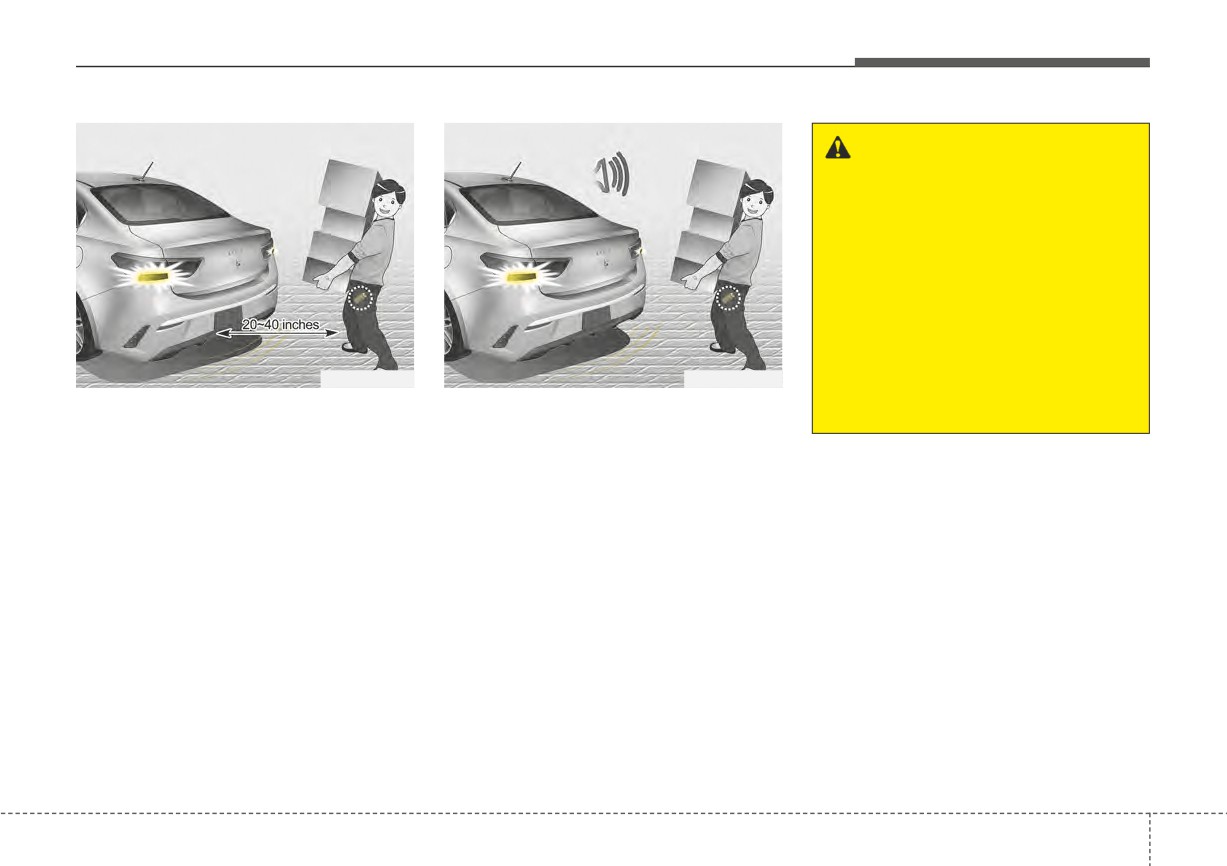
2. Detect and Alert
3. Automatic opening
vehicle.
If you are positioned in the detecting
The hazard warning lights will blink
area 20 ~ 40 inches (50 ~ 100 cm)
and chime will sound 2 times
and
•
Make certain that you close the
behind the vehicle) carrying a smart
then the trunk will open.
trunk before driving your vehicle.
key, the hazard warning lights will
blink and chime will sound for about
•
Make sure there are no people or
3 seconds to alert you the smart key
objects around the trunk before
has been detected and the trunk will
opening or closing the trunk.
open.
•
Make sure to deactivate the Smart
Trunk Release function when
✽ NOTICE
washing your vehicle.
Do not approach the detecting area if
Otherwise, the trunk may open
you do not want the trunk to open. If
inadvertently.
you have unintentionally entered the
detecting area and the hazard warn-
ing lights and chime starts to operate,
leave the detecting area with the
smart key. The trunk will stay closed.
4
27
Features of your vehicle
How to deactivate the Smart
✽ NOTICE
Detecting area
Trunk Release function using the
•
If you press the door unlock but-
smart key
ton (2), the Smart Trunk Release
function will be deactivated tem-
porarily. But, if you do not open
any door for 30 seconds, the Smart
Trunk Release function will be
activated again.
•
If you press the trunk open button
(3) for more than 1 second, the
trunk opens.
•
If you press the door lock button
(1) or trunk open button (3) when
OSC041026N
the Smart Trunk Release function
is not in the Detect and Alert stage,
•
The Smart Trunk Release operates
OYDDCO2004
the Smart Trunk Release function
with a welcome alert if the smart
will not be deactivated.
key is detected within 20 ~ 40 inch-
1. Door lock
•
In case you have deactivated the
es (50 ~ 100 cm) from the trunk.
2. Door unlock
Smart Trunk Release function by
•
The alert stops at once if the smart
3. Trunk open
pressing the smart key button and
key is positioned outside the
4. Panic
opened a door, the Smart Trunk
detecting area during the Detect
Release function can be activated
and Alert stage.
If you press any button of the smart
again by closing and locking all
key during the Detect and Alert
doors.
stage, the Smart Trunk Release
function will be deactivated.
Make sure to be aware of how to
deactivate the Smart Trunk Release
function for emergency situations.
4
28
Features of your vehicle
✽ NOTICE
•
The Smart Trunk Release function
will not work if any of the follow-
ing occurs:
- The smart key is close to a radio
transmitter such as a radio sta-
tion or an airport which can
interfere with normal operation
of the transmitter.
- The smart key is near a mobile
two way radio system or a cellu-
lar phone.
- Another vehicle's smart key is
being operated close to your
vehicle.
•
The detecting range may decrease
or increase when :
- One side of the tire is raised to
replace a tire or to inspect the
vehicle.
- The vehicle is slantingly parked
on a slope or unpaved road, etc.
4
29
Features of your vehicle
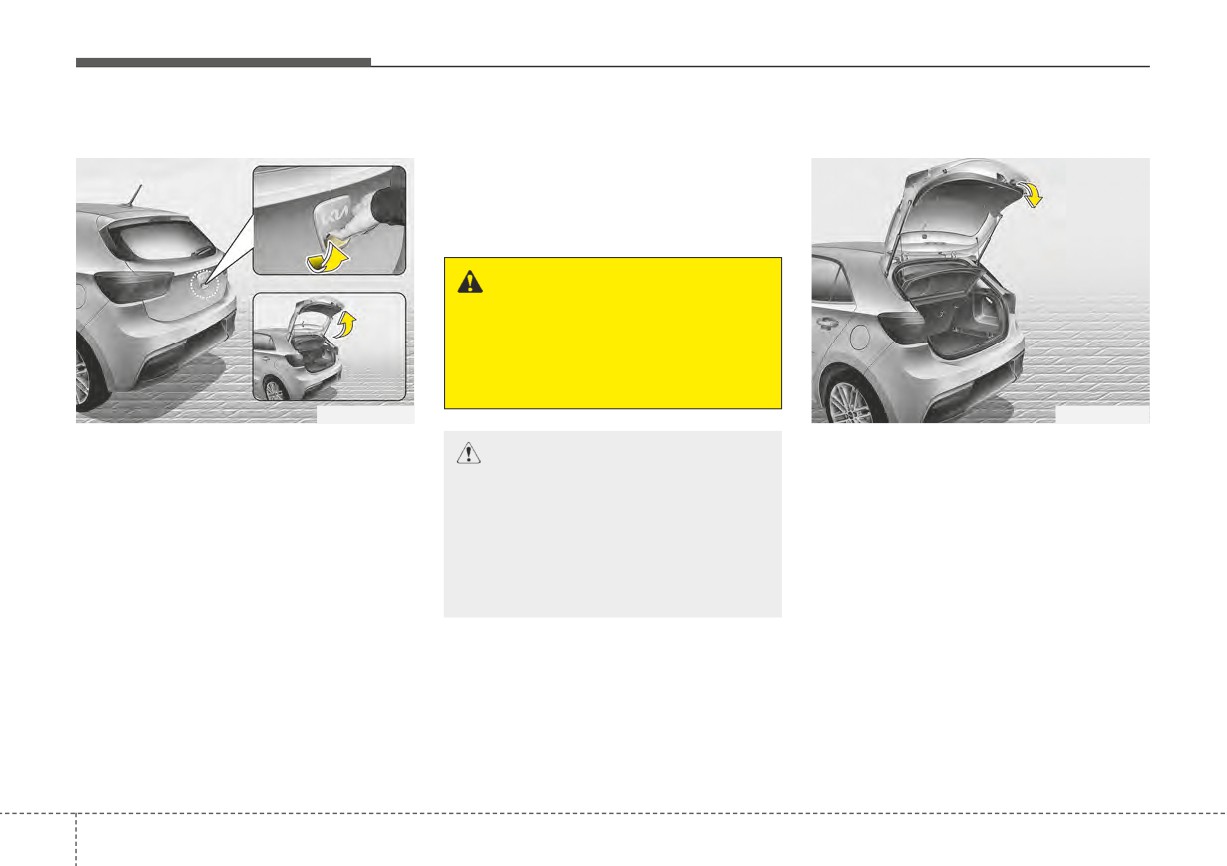
LIFTGATE (FOR 5 DOOR)
Opening the liftgate
✽ NOTICE
Closing the liftgate
In cold and wet climates, liftgate
lock and liftgate mechanisms may
not work properly due to freezing
conditions.
WARNING
The liftgate swings upward.
Make sure no objects or people
are near the rear of the vehicle
when opening the liftgate.
OSC041045N
OSC041439N
•
The liftgate is locked or unlocked
To close the liftgate, lower and push
CAUTION - Liftgate lift
when all doors are locked or
down the liftgate firmly. Make sure
Make certain that you close the
unlocked with the transmitter
(or
that the liftgate is securely latched.
liftgate before driving your vehi-
smart key) or central door lock
Make sure your hands, feet and
cle. Possible damage may occur
switch.
other parts of your body are safely
to the liftgate gas lifters and
•
If unlocked, the liftgate can be
out of the way before closing the lift-
attached hardware if the liftgate
opened by pressing the handle and
gate.
is not closed prior to driving.
pulling it up.
•
When all doors are locked if the lift-
gate unlock button on the transmit-
ter
(or smart key) is pressed for
more than 1 second, the liftgate is
unlocked. Once the liftgate is
opened and then closed, the lift-
gate is locked automatically.
❈ There is no key hole.
4
30
Features of your vehicle
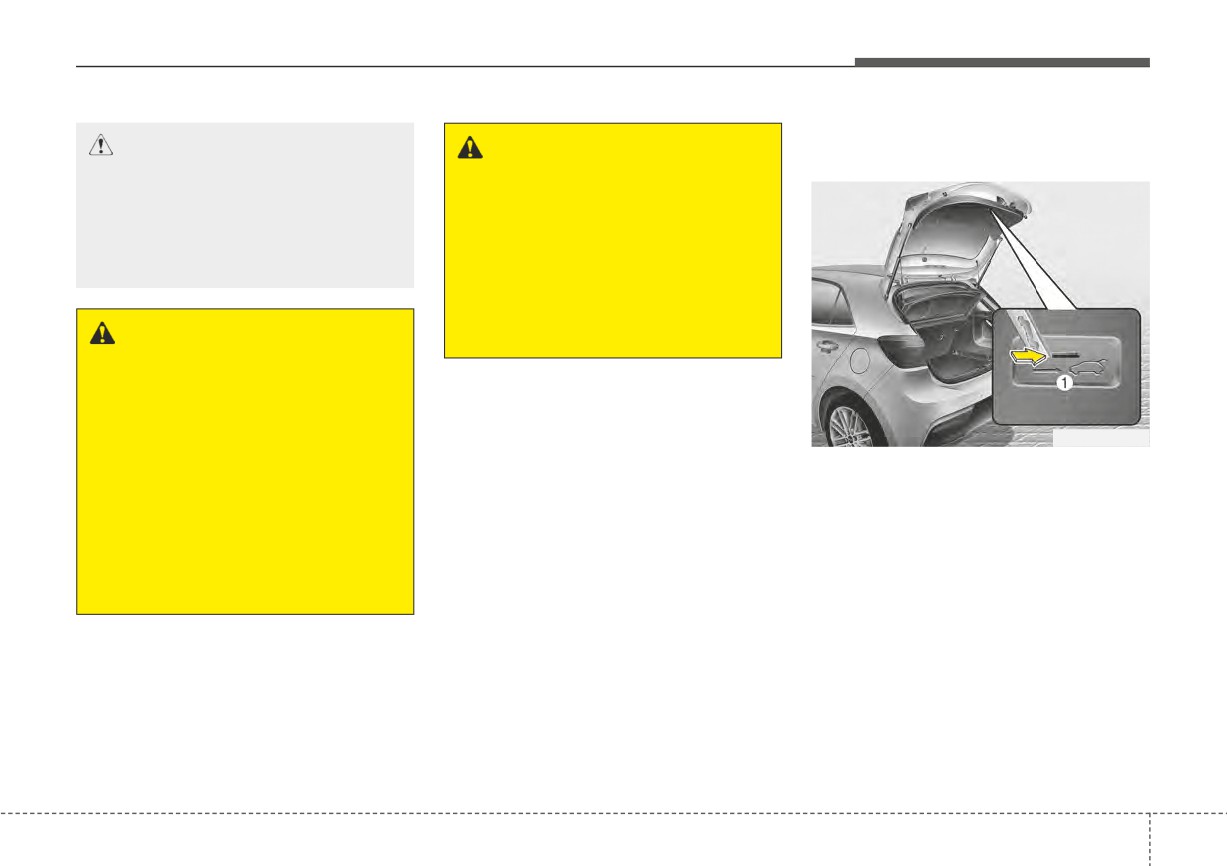
Emergency liftgate safety
CAUTION -
Closing lift-
WARNING -
Riding in
release
gate
cargo area
Make sure nothing is near the
Occupants should never ride in
liftgate latch and striker while
the rear cargo area where no
closing the liftgate. It may dam-
restraints are available. To avoid
age the liftgate's latch.
injury in the event of an accident
or sudden stops, occupants
should always
be
properly
WARNING - Exhaust
restrained.
fumes
If you drive with the liftgate
open, you will draw dangerous
exhaust fumes into your vehicle
OSC041440N
which can cause serious injury
or death to vehicle occupants.
Your vehicle is equipped with the
emergency liftgate safety release
If you must drive with the lift-
lever located on the bottom of the lift-
gate open, keep the air vents
gate. If someone is inadvertently
and all windows open so that
locked in the luggage compartment.
additional outside air comes
The liftgate can be opened by doing
into the vehicle.
as follows:
1. Input the mechanical key into the
hole.
2. Push the mechanical key to the
right.
3. Push up the liftgate.
4
31
Features of your vehicle
WARNING
• No one should be allowed to
occupy the luggage compart-
ment of the vehicle at any
time. The luggage compart-
ment is a very dangerous
location in the event of a
crash.
• Use the release lever for
emergencies only. Use with
extreme caution, especially
while the vehicle is in motion.
4
32
Features of your vehicle
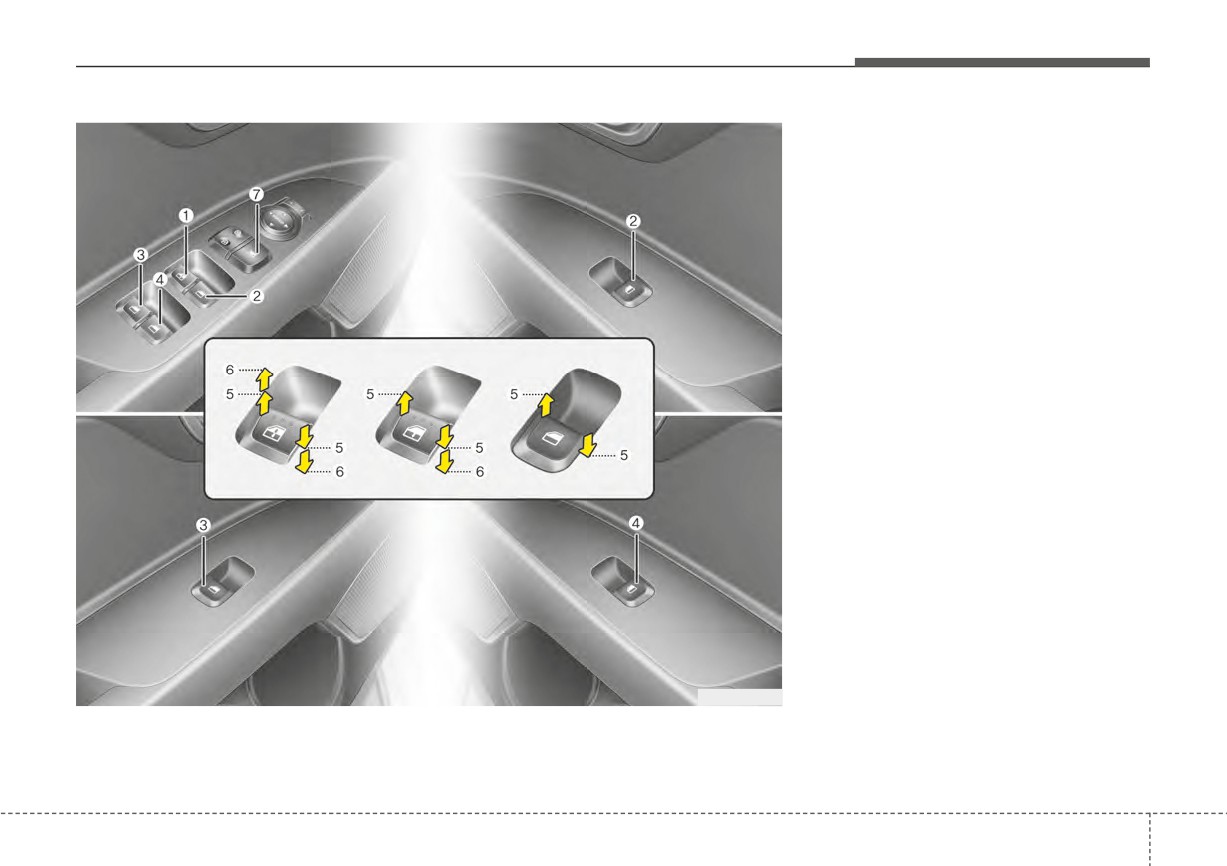
WINDOWS
(1) Driver’s door power window
switch
(2) Front passenger’s door power
window switch
(3) Rear door
(left) power window
switch*
(4) Rear door (right) power window
switch*
(5) Window opening and closing
(6) Automatic
power
window
UP*/DOWN* (Driver's window)
(7) Power window lock button*
*: if equipped
✽ NOTICE
In cold and wet climates, power win-
dows may not work properly due to
freezing conditions.
OSC040016
4
33
Features of your vehicle
Power windows (if equipped)
✽ NOTICE
WARNING - Power
The ignition switch or ENGINE
While driving with the rear windows
Windows
START/STOP button must be in the
down, your vehicle may demon-
ON position for power windows to
Do not extend your face or arms
strate a wind buffeting or pulsation
operate. Each door has a power win-
outside of the window opening
noise. This noise is a normal occur-
dow switch that controls the door’s
while the vehicle is in motion.
rence and can be reduced or elimi-
window. The driver has a power win-
Doing so could result in serious
nated by taking the following
dow lock switch which can block the
injuries.
actions. If the noise occurs with one
operation of rear passenger win-
or both of the rear windows down,
dows.
partially lower both front windows
approximately one inch.
The power windows can be operated
for approximately 30 seconds after
the ignition key is removed or is set
CAUTION
to the ACC or LOCK/OFF position.
Do not install any accessories
However, if the front doors are
in the area of windows. It may
opened, the power windows cannot
impact jam protection.
be operated even within the 30 sec-
ond period.
If a window cannot be closed
because it is blocked by objects,
remove the objects and close the
window.
4
34
Features of your vehicle
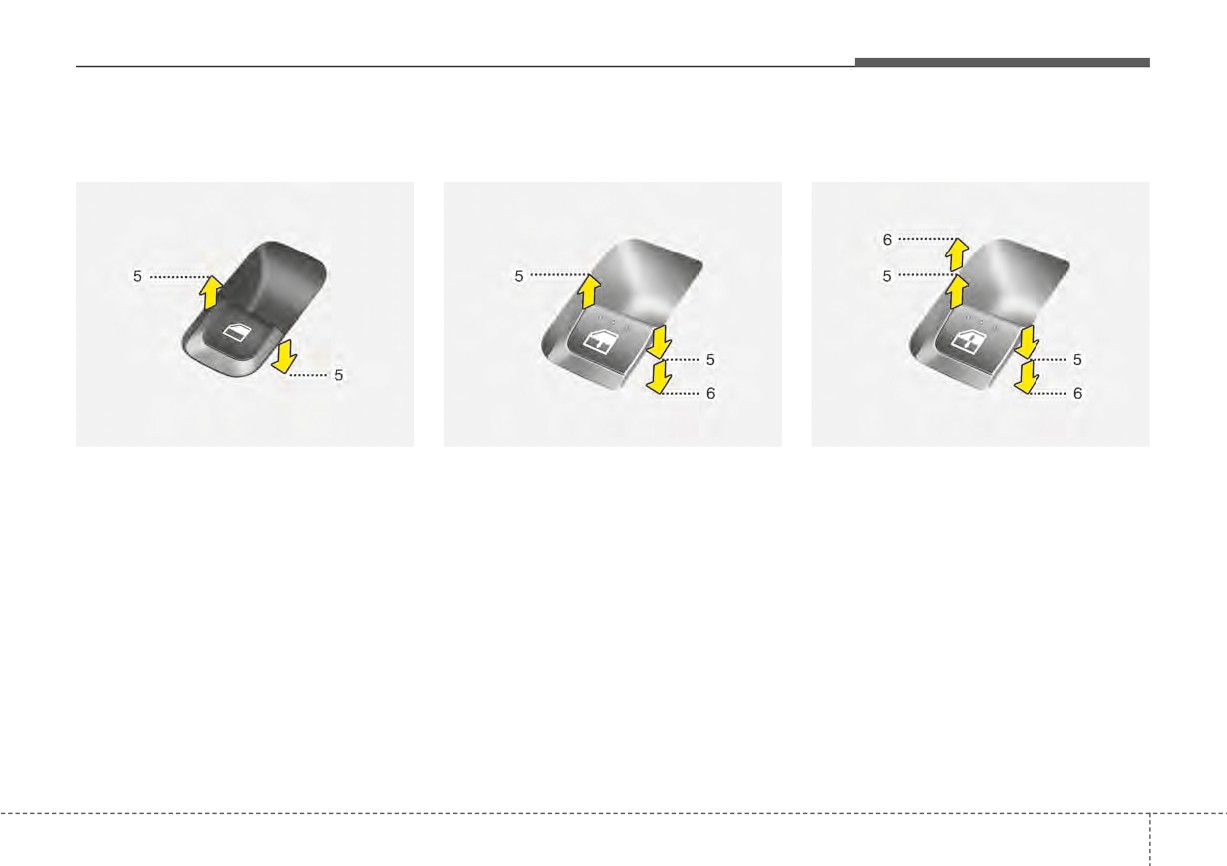
Window opening and closing
Auto down window (if equipped)
Auto up/down window (if equipped)
(if equipped)
(Driver’s window)
(Driver's window)
OYB046019
OSC046015
OYB046020
The driver’s door has a master power
Pressing the power window switch
Pressing or pulling up the power win-
window switch that controls all the
momentarily to the second detent
dow switch momentarily to the sec-
windows in the vehicle.
position
(6) completely lowers the
ond detent position
(6) completely
driver’s window even when the
lowers or lifts the window even when
To open or close a window, press
switch is released. To stop the win-
the switch is released. To stop the
down or pull up the front portion of
dow at the desired position while the
window at the desired position while
the corresponding switch to the first
window is in operation, briefly pull up
the window is in operation, pull up or
detent position (5).
the switch to the opposite direction of
press and release the switch to the
the window movement.
opposite direction of the movement.
4
35