Kia Rio / Rio Hatchback (2022 year). Manual in english - page 4
Safety features of your vehicle
Curtain air bag
Curtain air bags are located along
(Continued)
both sides of the roof rails above the
•
Never place or insert any
front and rear doors.
object into any small opening
They are designed to help protect
near side airbag labels
occupants in certain side impacts
attached to the vehicle seats.
and to help prevent them from eject-
When the air bag deploys, the
ing out of the vehicle as a result of a
object may affect the deploy-
rollover, especially when the seat-
ment and result in an unex-
belts are also in use.
pected
accident
or
bodily
• The curtain air bags are designed to
harm.
deploy during certain side impact
OYB036026
collisions, depending on the crash
severity, angle, speed and point of
impact. However, when side deploy-
ment threshold is satisfied in a front-
impact crash, the curtain air bags
may deploy.
•
The curtain air bags may deploy on
the side of the impact or on both
sides.
•
Also, the curtain air bags on both
sides of the vehicle will deploy in
OYB036025
certain rollover situations.
❈ The actual air bags in the vehicle may differ
•
The curtain air bags are not
from the illustration.
designed to deploy in all side
impact or rollover situations.
3
54
Safety features of your vehicle
Do not allow the passengers to lean
their heads or bodies onto doors, put
WARNING - No attaching
their arms on the doors, stretch their
objects
arms out of the window, or place
• Do not place any objects over
objects between the doors and pas-
the air bag. Also, do not attach
sengers when they are seated on
any objects around the area
seats equipped with side and/or cur-
the air bag inflates such as the
tain air bags.
door, side door glass, front
and rear pillar, roof side rail.
✽ NOTICE
• Do not hang hard or breakable
Never try to open or repair any com-
objects on the clothes hanger.
ponents of the side curtain air bag
system. This should only be done by
an authorized Kia dealer.
3 55
Safety features of your vehicle
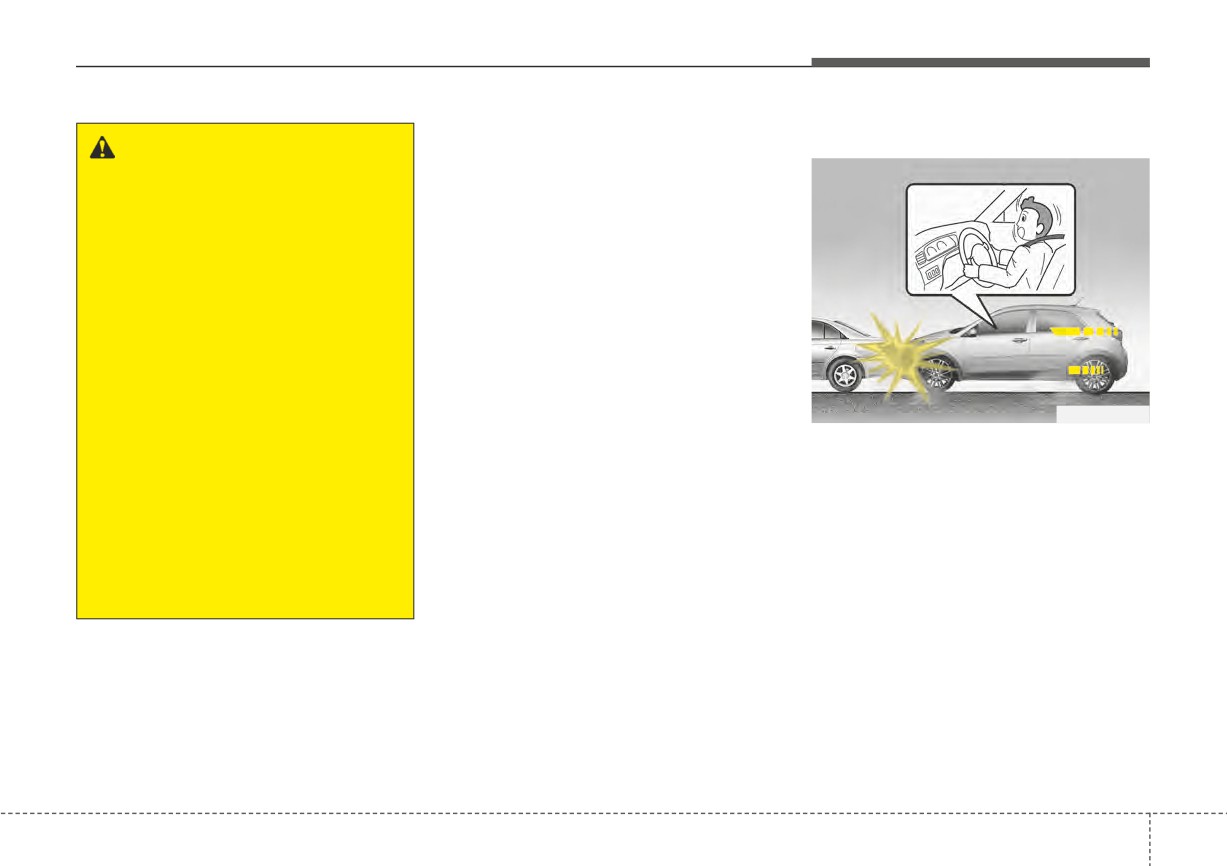
Why didn’t my air bag go off in
Air bag collision sensors
a collision? (Inflation and non-
inflation conditions of the air
bag)
There are many types of accidents in
which the air bag would not be
expected to provide additional pro-
tection.
These include rear impacts, second
or third collisions in multiple impact
accidents, as well as low speed
impacts.
In these situations, the air bags may
not deploy.
OSC031039N/OYB036032/OSC031031N/OYB036033/OYB036034
(1) SRS control module/
(3) Side impact sensor
Rollover sensor
(4) Pressure side impact sensor
(2) Front impact sensor
3
56
Safety features of your vehicle
Problems may arise if the sensor
Air bag inflation conditions
WARNING - Air bag
installation angles are changed due
sensors
to the deformation of the front
bumper, body or B pillar where side
•
Do not hit or allow any objects
collision sensors are installed. Have
to impact the locations where
the vehicle checked and repaired by
air bag or sensors are installed.
an authorized Kia dealer.
This may cause unexpected
Installing aftermarket bumper guards
air bag deployment, which
or replacing a bumper with non-gen-
could result in serious per-
uine parts may adversely affect your
sonal injury or death.
vehicle’s collision and air bag deploy-
•
If the installation location or
ment performance.
angle of the sensors is altered
in any way, the air bags may
OSC031034N
deploy when they should not
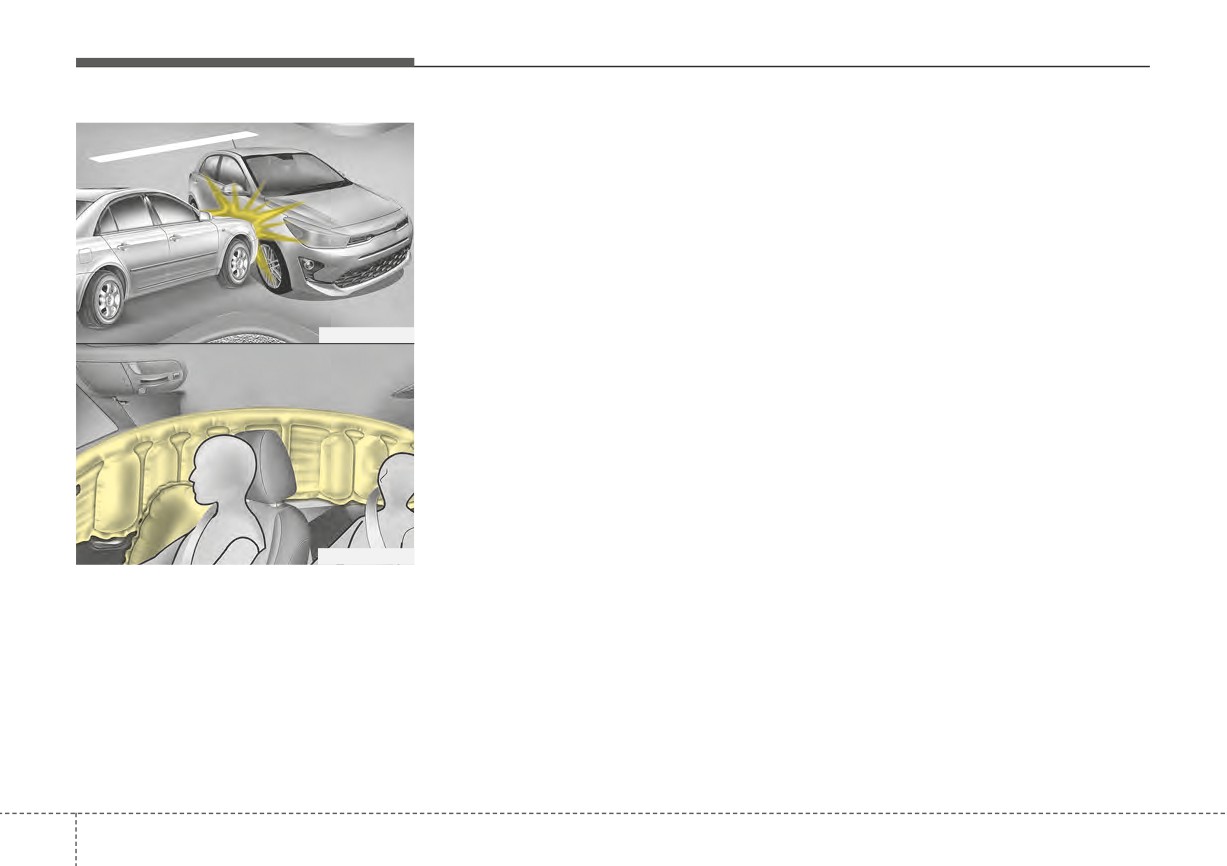
Front air bags
or they may not deploy when
Front air bags are designed to inflate
they should.
in a frontal collision depending on
Therefore, do not try to perform
the severity of impact of the front col-
maintenance on or around the
lision.
air bag sensors. Have the vehi-
cle checked and repaired by an
authorized Kia dealer.
3
57
Safety features of your vehicle
Also, the side and/or curtain air bags
Even where side and/or curtain air
are designed to inflate when a rollover
bags would not provide impact pro-
is detected by a rollover sensor.
tection in a rollover, however, they
will deploy to prevent ejection of
Although the front air bags (driver’s
occupants, especially those who are
and front passenger’s air bags) are
restrained with seat belts.
designed to inflate in frontal colli-
sions, they also may inflate in other
If the vehicle chassis is impacted by
types of collisions if the front impact
bumps or objects on unimproved
sensors detect a sufficient frontal
roads or sidewalks, air bags may
OSC031032N
force in another type of impact. Side
deploy. Drive carefully on unim-
and curtain air bags are designed to
proved roads or on surfaces not
inflate in certain side impact colli-
designed for vehicle traffic to prevent
sions. They may inflate in other types
unintended air bag deployment.
of collisions where a side force is
detected by the sensors. Side air bag
and/or curtain air bags may also
inflate where rollover sensors indi-
cate the possibility of a rollover
occurring
(even if none actually
OSC030033N
occurs) or in other situations, includ-
ing when the vehicle is tilted while
❈ The actual air bags in the vehicle may differ
being towed.
from the illustration.
Side air bags
Side air bags (side and/or curtain air
bags) are designed to inflate when an
impact is detected by side collision
sensors depending on the severity of
impact resulting from a side impact
collision.
3
58
Safety features of your vehicle
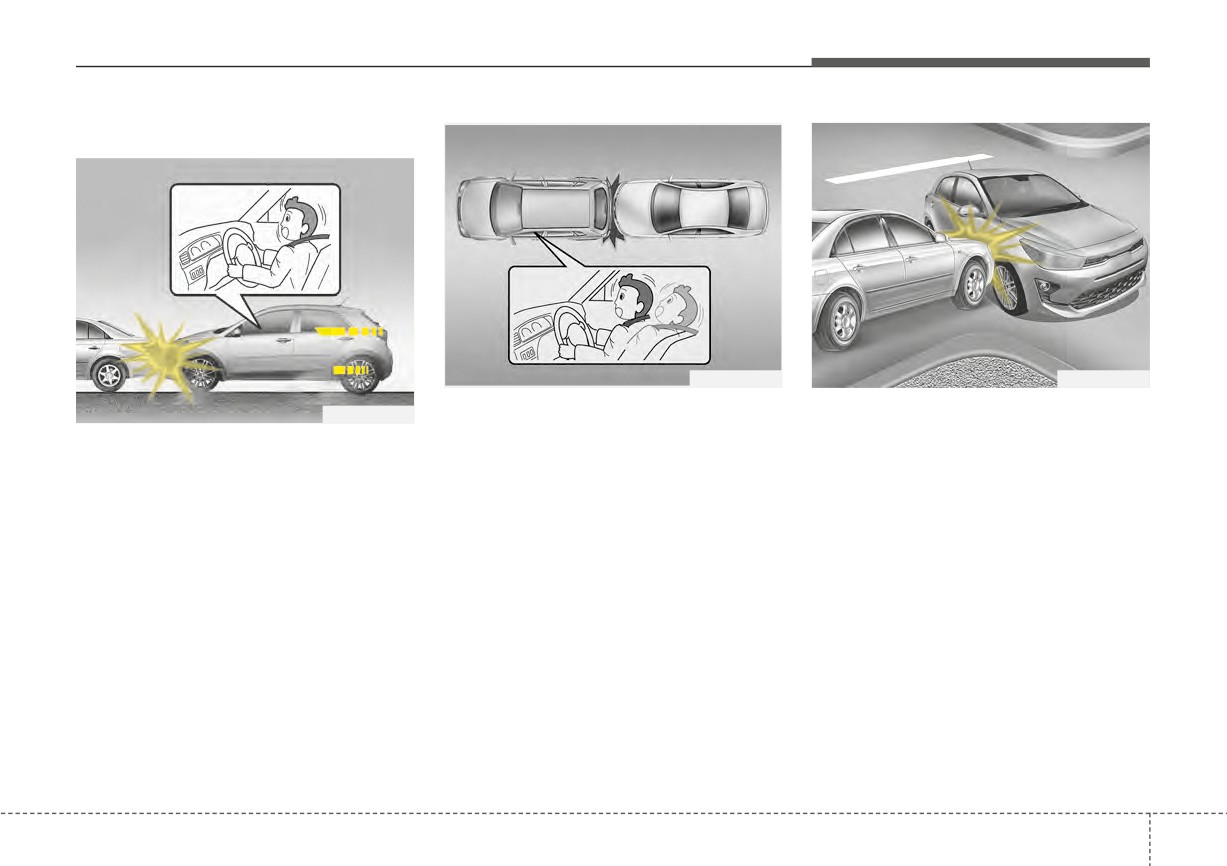
Air bag non-inflation conditions
OYB030083L
OSC031035N
• Air bags are not designed to inflate
• Front air bags may not inflate in
OSC031034N
in rear collisions, because occu-
side impact collisions, because
• In certain low-speed collisions, the
pants are moved backward by the
occupants move to the direction of
air bags may not deploy. The air
force of the impact. In this case,
the collision, and thus in side
bags are designed not to deploy in
inflated air bags would not be able
impacts, front air bag deployment
such cases because they may not
to provide any additional benefit.
would not provide additional occu-
provide benefits beyond the pro-
pant protection.
tection of the seat belts in such col-
lisions.
3
59
Safety features of your vehicle
OSC030036L
OSC031037N
1VQA2091
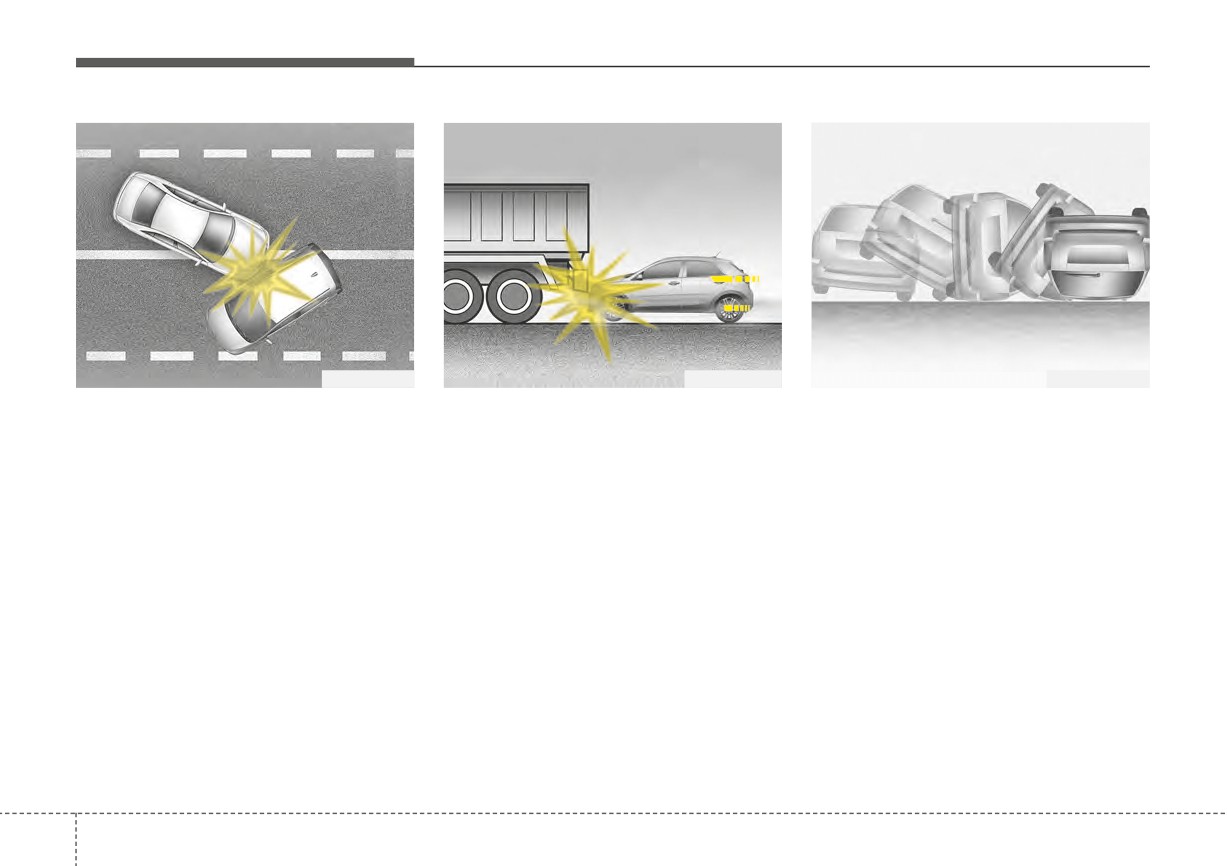
• In a slant or angled collision, the
• Just before impact, drivers often
• Front air bags may not inflate in
force of impact may direct the
brake heavily. Such heavy braking
rollover accidents because front air
occupants in a direction where the
lowers the front portion of the vehi-
bag deployment would not provide
air bags would not be able to pro-
cle causing it to “ride” under a vehi-
additional occupant protection.
vide any additional benefit, and
cle with a higher ground clearance.
However, side and curtain air bags
thus the sensors may not deploy
Air bags may not inflate in this
may inflate when the vehicle is
any air bags.
“under-ride” situation because
rolled over.
deceleration forces that are detect-
ed by sensors may be significantly
replaced by such “under-ride” colli-
sions.
3
60
Safety features of your vehicle
SRS Care
WARNING - Tampering
The SRS is virtually maintenance-free
with SRS
and there are no parts you can safely
service by yourself. If the SRS air bag
Do not tamper with or discon-
warning light does not illuminate, or
nect SRS wiring, or other com-
continuously remains on, have your
ponents of the SRS system.
vehicle immediately inspected by an
Doing so could result in the
authorized Kia dealer.
accidental inflation of the air
bags or render the SRS inoper-
ative.
Any work on the SRS system, such
as removing, installing, repairing, or
OSC031038N
any work on the steering wheel, the
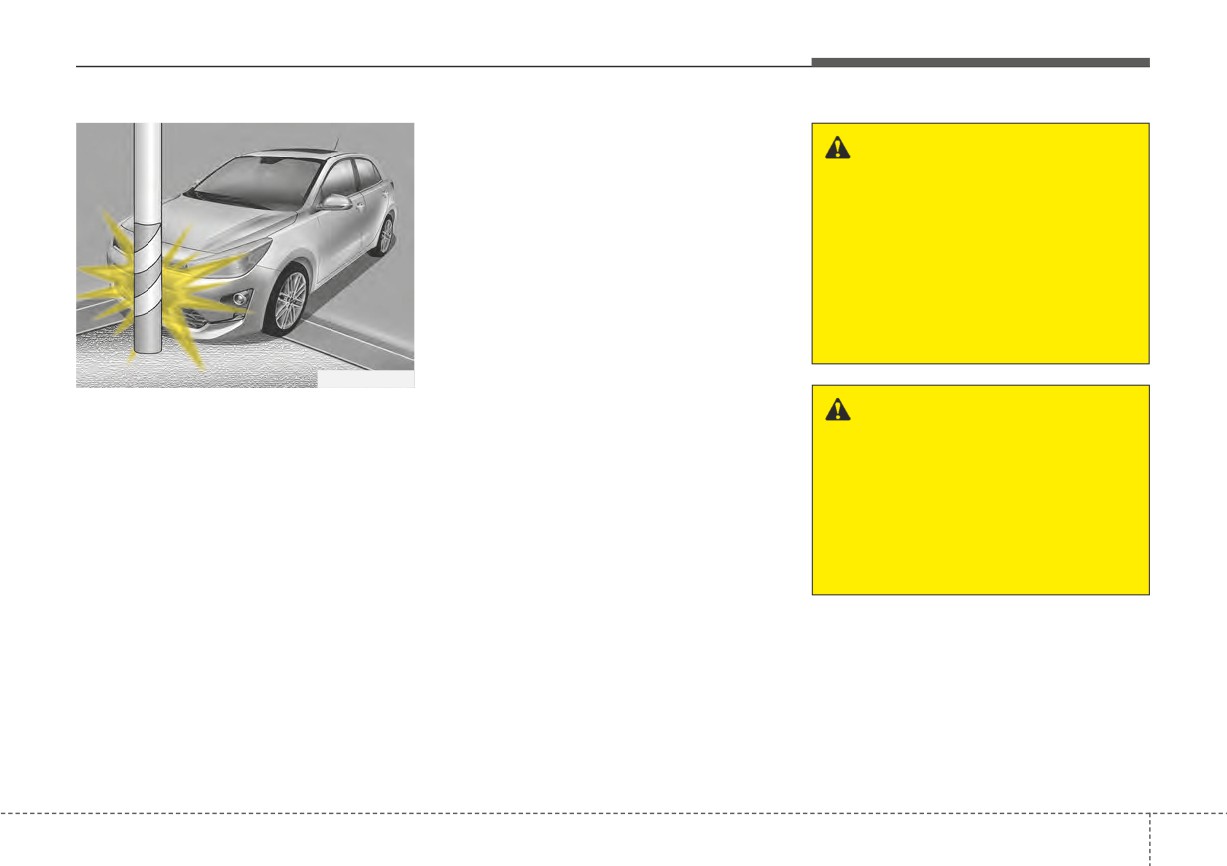
•
Air bags may not inflate if the vehi-
front passenger's panel, and front
WARNING - Towing Vehicle
cle collides with objects such as
seats must be performed by an
Always have the ignition switch
utility poles or trees, where the
authorized Kia dealer. Improper han-
in the LOCK position when your
point of impact is concentrated to
dling of the SRS system may result
vehicle is being towed. The side
one area and the full force of the
in serious personal injury.
air bags may inflate if the vehi-
impact is not delivered to the sen-
cle is tilted (such as when being
sors.
towed) because of the rollover
For cleaning the air bag pad covers,
sensors in the vehicle.
use only a soft, dry cloth or one which
has been moistened with plain water.
Solvents or cleaners could adversely
affect the air bag covers and proper
deployment of the system.
3
61
Safety features of your vehicle
If components of the air bag system
Adding equipment to or modi-
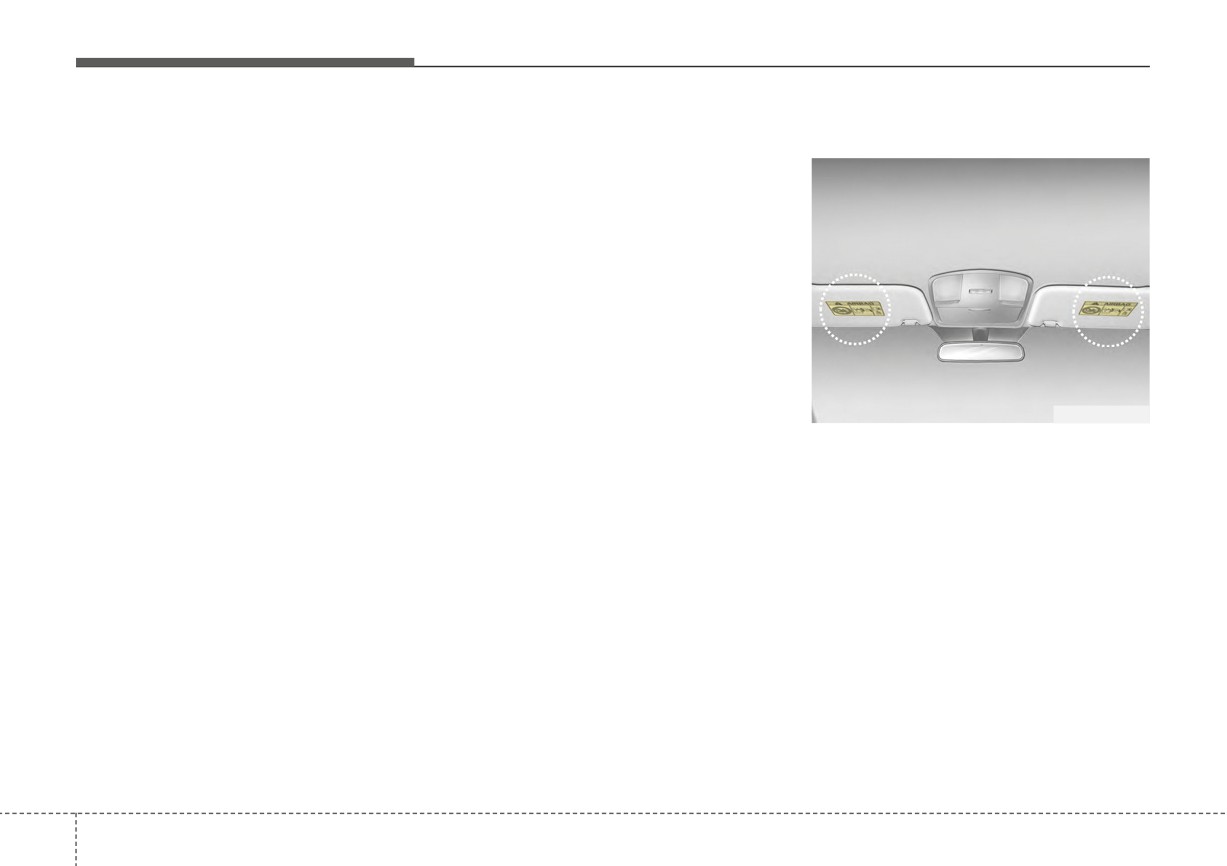
Air bag warning label
must be discarded, or if the vehicle
fying your air bag-equipped
must be scrapped, certain safety
vehicle
precautions must be observed. An
If you modify your vehicle by chang-
authorized Kia dealer knows these
ing your vehicle's frame, bumper sys-
precautions and can give you the
tem, front end or side sheet metal or
necessary information. Failure to fol-
ride height, this may affect the opera-
low these precautions and proce-
tion of your vehicle's air bag system
dures could increase the risk of per-
sonal injury.
OSC037021N
Air bag warning labels, some
required by the U.S. National
Highway Traffic Safety Administration
(NHTSA), are attached to alert the
driver and passengers of potential
risks of the air bag system.
✽ NOTICE
Be sure to read all of the informa-
tion about the air bags that are
installed on your vehicle in this
3
62
Features of your vehicle
Keys
4-4
Trunk (For 4 door)
4-24
• Record your key number
4-4
• Opening the trunk
4-24
• Key operations
4-4
• Closing the trunk
4-24
• Remote keyless entry system operations
4-5
• Emergency trunk safety release
4-25
• Transmitter precautions
4-7
Smart Trunk Release (4 door)
4-26
• Battery replacement
4-8
Liftgate (For 5 door)
4-30
• Immobilizer system
4-9
• Opening the liftgate
4-30
Smart key
4-11
• Closing the liftgate
4-30
• Smart key functions
4-11
• Emergency liftgate safety release
4-31
• Smart key precautions
4-13
Windows
4-33
4
• Smart key immobilizer system
4-14
• Power windows
4-34
Theft-alarm system
4-15
Hood
4-39
• Armed stage
4-15
• Opening the hood
4-39
• Theft-alarm stage
4-16
• Closing the hood
4-40
• Disarmed stage
4-17
• Hood open warning
4-40
Door locks
4-18
Fuel filler door
4-42
• Operating door locks from outside the vehicle
4-18
• Opening the fuel filler door
4-42
• Operating door locks from inside the vehicle
4-19
• Closing the fuel filler door
4-43
• Impact sensing door unlock system
4-21
Steering wheel
4-45
• Auto door lock/unlock feature
4-21
• Electric Power Steering (EPS)
4-45
• Speed sensing door lock system
4-21
• Tilt steering
4-46
• Child-protector rear door lock
4-22
• Horn
4-47
• Rear Occupant Alert (ROA) system
4-22
Mirrors
4-48
• Inside rearview mirror
4-48
• Outside rearview mirror
4-49
Instrument cluster
4-51
• Turn signals and lane change signals
4-97
• Instrument Cluster Control
4-52
• Front fog light
4-98
• LCD Display Control
4-52
Wipers and washers
4-99
• Gauges
4-53
• Windshield wipers
4-100
• Transmission Shift Indicator
4-57
• Windshield washers (front)
4-101
Trip computer
4-58
• Rear window wiper and washer switch (for 5 door) . 4-103
• Trip information (Trip computer)
4-58
Interior light
4-104
• Service Mode (For type A cluster)
4-63
• Automatic turn off function
4-104
LCD display (For Type B cluster)
4-64
• Map lamp
4-104
• LCD Display Mode
4-64
• Room lamp
4-105
4
• Driving Assist mode
4-65
• Trunk/Liftgate room lamp
4-107
• User Settings Mode (For type B cluster)
4-66
• Glove box lamp
4-107
• Warning messages (For type B cluster)
4-74
• Vanity mirror lamp
4-108
Warning and indicator lights
4-78
Defroster
4-109
• Warning lights
4-78
• Rear window defroster
4-109
• Indicator Lights
4-86
Manual climate control system
4-110
Rear View Monitor (RVM)
4-90
• Heating and air conditioning
4-111
• Rear View Monitor malfunction and limitations . . . 4-90
• System operation
4-116
Lighting
4-92
• Climate control air filter
4-118
• Battery saver function
4-92
• Checking the amount of air conditioner refrigerant
• Headlight escort function
4-92
and compressor lubricant
4-119
• Headlight welcome function
4-92
• Air Conditioning refrigerant label
4-120
• Lighting control
4-93
• Activate upon Washer Fluid Use
4-121
• High beam operation
4-95
• High Beam Assist (HBA)
4-96
Automatic climate control system
4-122
• Shopping bag holder
4-147
• Automatic heating and air conditioning
4-123
• Covering shelf (for 5 door)
4-147
• Manual heating and air conditioning
4-124
Infotainment system
4-149
• System operation
4-129
• Antenna
4-149
• Climate control air filter
4-131
• USB port
4-150
• Checking the amount of air conditioner refrigerant
• How vehicle audio works
4-150
and compressor lubricant
4-132
Declaration of Conformity
4-154
• Air Conditioning refrigerant label
4-133
• FCC
. . . . . . . . . . . . . . . . . . . . . . . . . . . . . . . . . . . . . . 4-154
• Activate upon washer fluid use
4-134
Windshield defrosting and defogging
4-135
4
• Manual climate control system
4-135
• Automatic climate control system
4-136
• Defogging logic
4-137
Storage compartment
4-140
• Center console storage
4-140
• Glove box
4-140
• Sunglass holder
4-141
• Luggage net holder
4-141
Interior features
4-143
• Cup holder
4-143
• Sunvisor
4-143
• Power outlet
4-144
• USB charger
4-145
• Clothes hanger
4-146
• Floor mat anchor(s)
4-146
Features of your vehicle
KEYS
Record your key number
Key operations
Smart key
The key code num-
Folding key
■ Smart key
ber is stamped on
■ Folding key
the key code tag
attached to the key
set. Should you
lose your keys, this number will
enable an authorized Kia dealer to
duplicate the keys easily. Remove
the key code tag and store it in a safe
place. Also, record the key code
number and keep it in a safe and
handy place, but not in the vehicle.
OSC041042N
OSC047004N
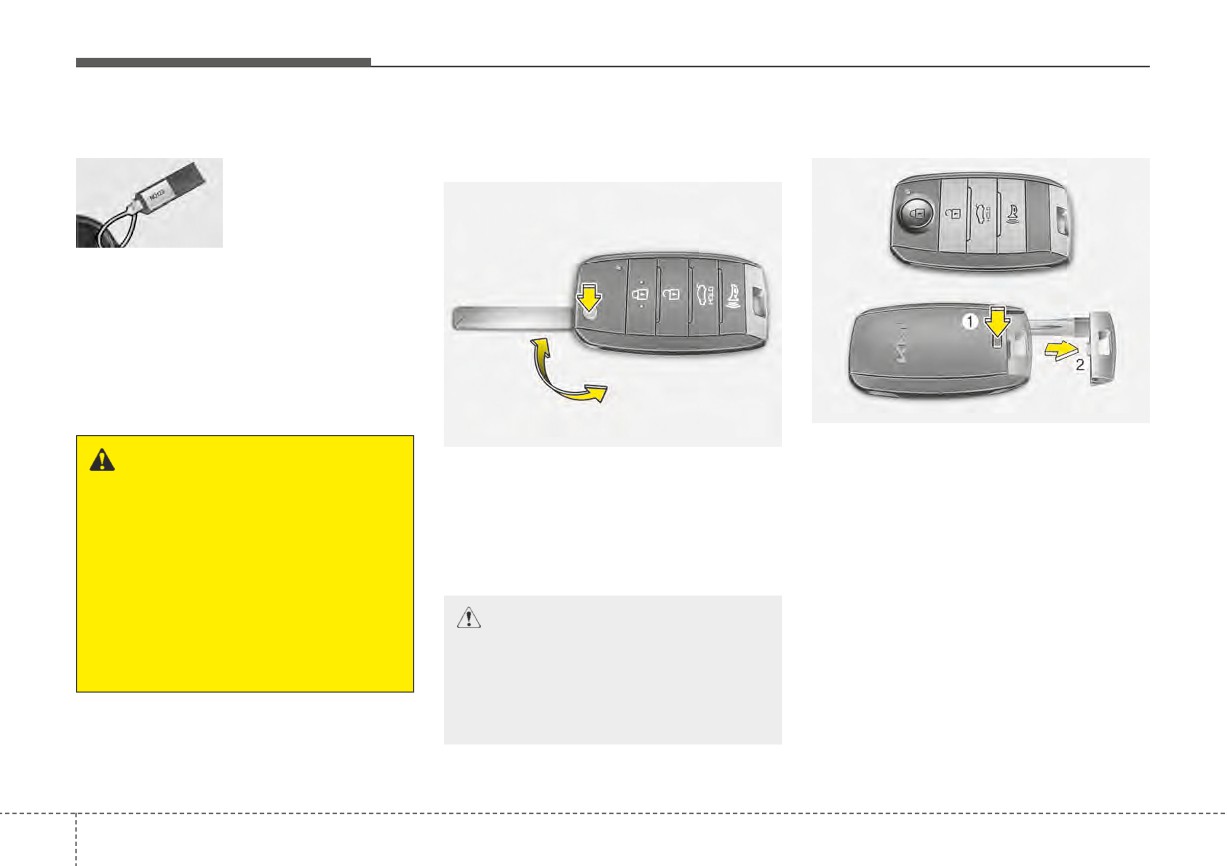
To remove the mechanical key, press
WARNING - Aftermarket
and hold the release button (1) and
To unfold the key, press the release
keys
button then the key will unfold auto-
remove the mechanical key (2).
Use only Kia original parts for
matically.
To reinstall the mechanical key, put
the ignition key in your vehicle.
the key into the hole and push it until
To fold the key, fold the key manually
If an aftermarket key is used, the
while pressing the release button
a click sound is heard.
ignition switch may not return to
ON after START. If this happens,
the starter will continue to oper-
CAUTION - Key button
ate causing possible fire due to
operation
excessive current in the wiring.
Do not fold the key without
pressing the release button.
This may damage the key.
4
4
Features of your vehicle
Remote keyless entry system
Lock (1)
WARNING - Ignition key
operations
All doors
(and hood, trunk/liftgate)
(Smart key)
are locked if the lock button is
■ Type A
Never leave the keys in your
pressed. If all doors
(and hood,
vehicle with unsupervised chil-
trunk/liftgate) are closed, the hazard
dren. Leaving children unat-
warning lights will blink and the
tended in a vehicle with a man-
chime will sound once to indicate
ual ignition key or a smart key
that all doors
(and hood, trunk/lift-
is dangerous.
gate) are locked.
Children copy adults and they
could place the key in the igni-
tion switch or press the start
button. The key would enable
OYDDCO2003
children to operate power win-
■ Type B
dows or other controls, or even
make the vehicle move, which
could result in serious bodily
injury or death.
OYDDCO2004
4
5
Features of your vehicle
Also, if the lock button is pressed
Unlock (2)
✽ NOTICE
once more within
4 seconds, the
The driver's door is unlocked if the
If the keyless entry system is inoper-
hazard warning lights will blink and
unlock button is pressed once. The
ative due to exposure to water or liq-
the chime will sound once to confirm
hazard warning lights will blink twice
uids, it will not be covered by your
that the door is locked (If equipped).
and the chime will sound twice to
manufacturer's vehicle warranty.
However, if any door remains open,
indicate that the driver’s door is
the hazard warning lights (and/or the
unlocked.
chime) will not operate. But if all
All doors are unlocked if the unlock
doors are closed after the lock button
button is pressed once more within 4
is pressed, the hazard warning lights
seconds. The hazard warning lights
will blink once.
will blink twice again to indicate that
all doors are unlocked. After pressing
this button, the doors will lock auto-
matically unless you open any door
within 30 seconds.
If you attempt to lock or unlock the
door by pressing the door
lock/unlock button in any of the fol-
lowing states, the door will not be
locked or unlocked.
- When you want to lock or unlock
the door in the ACC or ON state.
- When you want to lock a door in a
car with one or more doors open.
Depending on the vehicle, the driver
can turn off or set the TWO PRESS
UNLOCK setting function.
4
6
Features of your vehicle
Trunk open (3)
Transmitter precautions
•
If the transmitter (or smart key) is
in close proximity to your cell
The trunk is opened if the button is
The transmitter (or smart key) will not
phone or smart phone, the signal
pressed for more than 1 second.
work if any of following occurs:
from the transmitter (or smart key)
• The ignition key is in the ignition
could be blocked by normal opera-
Liftgate unlock (3)
switch.
tion of your cell phone or smart
The liftgate is unlocked if the button
• You exceed the operating distance
phone. This is especially important
is pressed for more than 1 second.
limit (about 90 feet [30 m]).
when the phone is active such as
making calls, receiving calls, text
However, after pressing this button,
• The battery in the transmitter (or
messaging, and/or sending/receiv-
the liftgate will lock automatically
smart key) is weak.
ing emails.
unless you open the liftgate within 30
• Other vehicles or objects may be
seconds.
Avoid placing the transmitter
(or
blocking the signal.
smart key) and your cell phone or
Also, once the liftgate is opened and
• The weather is extremely cold.
smart phone in the same pants or
then closed, the liftgate will lock
• The transmitter (or smart key) is
jacket pocket and maintain ade-
automatically.
close to a radio transmitter such as
quate distance between the two
a radio station or an airport which
devices.
Alarm (4)
can interfere with normal operation
of the transmitter.
The horn sounds and the hazard
warning lights blink for about 30 sec-
When the transmitter (or smart key)
onds if this button is pressed for
does not work properly, open and
more than 0.5 seconds. To stop the
close the door with the ignition key. If
horn and lights, press any button on
you have a problem with the trans-
the transmitter.
mitter
(or smart key), contact an
authorized Kia dealer.
4
7
Features of your vehicle
This device complies with Part 15
Battery replacement
A battery should last for several years,
of the FCC rules.
but if the transmitter is not working
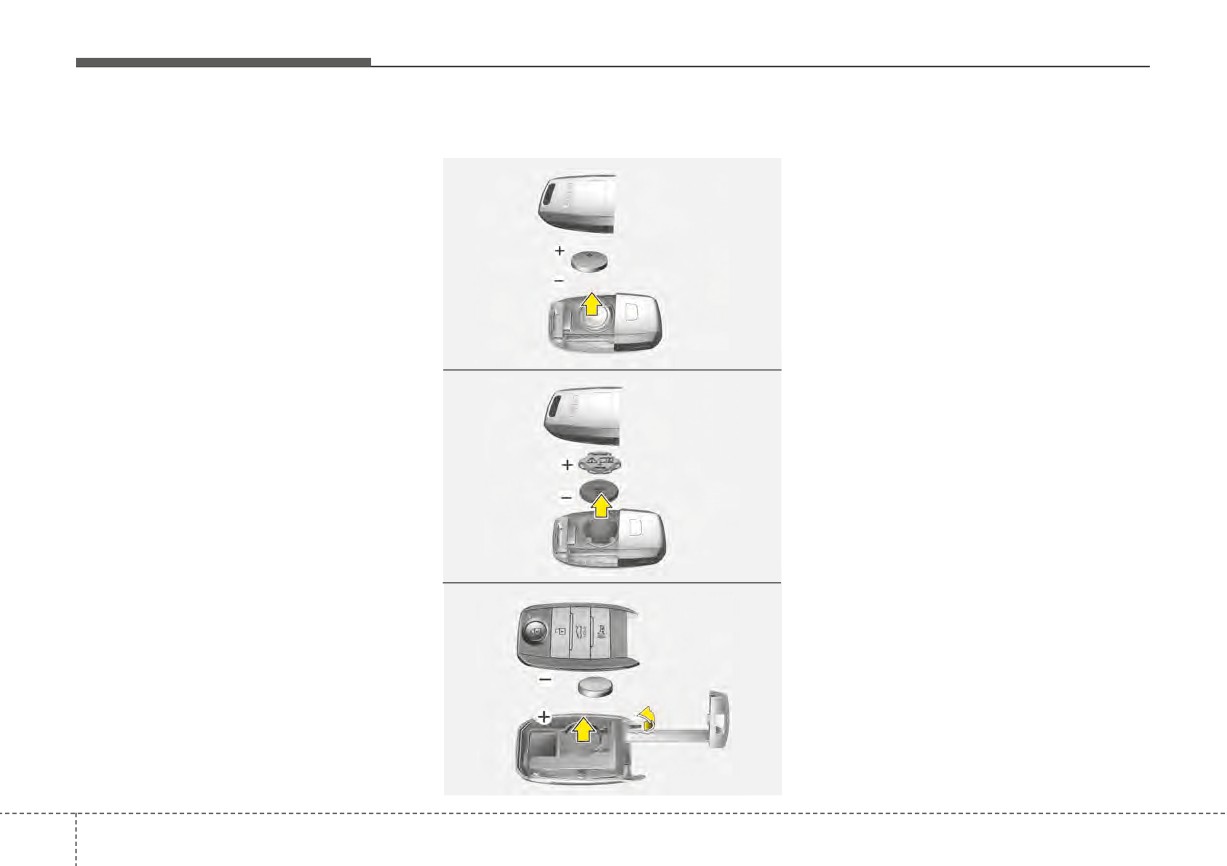
■ Folding key - Type A
properly, try replacing the battery with
Operation is subject to the following
a new one. If you are unsure how to
two conditions:
use or replace the battery, contact an
1. This device may not cause harm-
authorized Kia dealer.
ful interference, and
2. This device must accept any inter-
Folding key
ference received, including inter-
ference that may cause undesired
1. Insert a slim tool into the slot and
operation.
gently pry open the transmitter
OSC041043N
cover.
■ Folding key - Type B
2. Using a slim tool, gently pry open
✽ NOTICE
the battery cover (Type B).
Changes or modifications not
3. Replace the battery with a new
expressly approved by the party
battery (CR2032). When replacing
responsible for compliance could void
the battery, make sure the battery
the user’s authority to operate the
position is correct.
equipment. If the keyless entry sys-
tem is inoperative due to changes or
4. Install the battery in the reverse
modifications not expressly approved
order of removal.
OSC041044N
by the party responsible for compli-
■ Smart key
ance, it will not be covered by your
manufacturer’s vehicle warranty.
OJF045400L
4
8
Features of your vehicle
Smart key
Immobilizer system
WARNING
1. Remove the mechanical key.
Your vehicle may be equipped with
- THIS PRODUCT CONTAINS A
2. Insert a slim tool into the slot and
an electronic engine immobilizer sys-
BUTTON BATTERY
gently pry open the rear cover.
tem to reduce the risk of unautho-
If swallowed, a lithium button
rized vehicle use.
3. Replace the battery with a new
battery can cause severe or
battery (CR2032). When replacing
Your immobilizer system is com-
fatal injuries within 2 hours.
the battery, make sure the battery
prised of a small transponder in the
position is correct.
Keep batteries out of reach of
ignition key and electronic devices
children.
inside the vehicle.
4. Install the battery in the reverse
order of removal.
If you think batteries may have
With the immobilizer system, when-
been swallowed or placed
ever you insert your ignition key into
•
The transmitter is designed to give
you years of trouble-free use, how-
inside any part of the body,
the ignition switch and turn it to ON,
it checks and determines and verifies
ever it can malfunction if exposed
seek immediate medical atten-
that the ignition key is valid.
to moisture or static electricity. If
tion.
you are unsure how to use or
If the key is determined to be valid,
replace the battery, contact an
the engine will start.
CAUTION - Transmitter
authorized Kia dealer.
If the key is determined to be invalid,
damage
•
Using the wrong battery can cause
the engine will not start.
The transmitter can malfunction
the transmitter to malfunction. Be
sure to use the correct battery.
if dropped, exposed to moisture,
static electricity, heat or direct
•
An inappropriately dis-
sunlight.
posed battery can be harm-
ful to the environment and
human health. Dispose the
battery according to your
local law(s) or regulation.
4
9
Features of your vehicle
To deactivate the immobilizer
Do not put metal accessories near
This device complies with Part 15
system:
the ignition switch.
of the FCC rules.
Insert the ignition key into the key
Metal accessories may interrupt the
Operation is subject to the following
cylinder and turn it to the ON position.
transponder signal and may prevent
two conditions:
the engine from being started.
1. This device may not cause harm-
To activate the immobilizer sys-
If you need additional keys or lose
ful interference, and
tem:
your keys, consult an authorized Kia
2. This device must accept any inter-
dealer.
Turn the ignition key to the OFF posi-
ference received, including inter-
tion. The immobilizer system acti-
ference that may cause undesired
vates automatically. Without a valid
operation.
CAUTION - Immobilizer
ignition key for your vehicle, the
damage
engine will not start.
Do not expose your immobilizer
✽ NOTICE
Your Immobilizer password is a cus-
system to moisture, static elec-
Changes or modifications not
tomer unique password and should
tricity or rough handling. This
expressly approved by the party
be kept confidential. Do not leave this
may damage your immobilizer.
responsible for compliance could
number anywhere in your vehicle.
void the user's authority to operate
the equipment.
✽ NOTICE
CAUTION - Immobilizer
Keep each key separately in order to
alterations
avoid a starting malfunction.
Do not change, alter or adjust
the immobilizer system because
it could cause the immobilizer
system to malfunction.
4
10
Features of your vehicle
SMART KEY (IF EQUIPPED)
Smart key functions
Locking
Carrying the smart key, you may lock
and unlock the vehicle doors. Also,
you may start the engine. Refer to
the following, for more details.
OYDDCO2007
With a smart key, you can lock or
OYB046010
unlock a door and even start the
Pressing the button of the front out-
engine without inserting the key.
side door handles with all doors (and
The functions of the buttons on a
trunk, liftgate) closed and any door
smart key are similar to the remote
unlocked, locks all the doors (and
keyless entry. (Refer to the “Remote
trunk, liftgate).
keyless entry” in this chapter.)
The hazard warning lights will blink
once to indicate that all doors (and
trunk, liftgate) are locked. The button
will only operate when the smart key
is within 28 ~ 40 in. (0.7 ~ 1m) from
the outside door handle. If you want
to make sure that a door has locked
or not, you should check the door
lock button inside the vehicle or pull
the outside door handle.
4 11
Features of your vehicle
Even though you press the button,
Unlocking
Trunk (Liftgate) unlocking
the doors will not lock and the chime
Pressing the button of the driver's (or
If you are within 28 ~ 40 in (0.7 ~ 1 m)
will sound for 3 seconds if any of the
front passenger’s) outside door han-
from the outside trunk (liftgate) han-
following occurs:
dle with all doors closed and locked,
dle, with your smart key in posses-
•
The smart key is in the vehicle.
unlocks the driver's door.
sion, the trunk
(liftgate) will unlock
and open when you press the trunk
•
The ENGINE START/STOP button
The hazard warning lights will blink
is in the ACC or ON position.
twice to indicate that the driver's door
(liftgate) handle switch.
is unlocked.
The hazard warning lights will blink
•
Any door except the trunk (liftgate)
twice to indicate that the trunk (lift-
is open.
The button will only operate when
gate) is unlocked.
the smart key is within 28 ~ 40 in.
(0.7 ~ 1 m) from the outside door
Also, once the trunk
(liftgate) is
handle.
opened and then closed, the trunk
(liftgate) will lock automatically.
When Two press unlock function is
activated,
- If you press the driver's outside
door handle button, the driver's
door will unlock.
- If you press the driver's outside
door handle button within four sec-
onds again, then all the doors and
trunk will unlock.
4
12
Features of your vehicle
Smart key precautions
•
If the smart key is in close proximi-
• Internal circuit damage may occur
ty to your cell phone or smart
when the key comes into contact
•
If you lose your smart key, you will
phone, the signal from the smart
with moisture
(beverage, water
not be able to start the engine. Tow
key could be blocked by normal
etc.) or heat. Damage to the smart
the vehicle, if necessary, and con-
operation of your cell phone or
key due to exposure to liquids or
tact an authorized Kia dealer.
smart phone. This is especially
heat is not covered by the manu-
•
A maximum of 2 smart keys can be
important when the phone is active
facturer's vehicle warranty.
registered to a single vehicle. If
such as making calls, receiving
you lose a smart key, you should
calls, text messaging, and/or send-
CAUTION - Transmitter
immediately take the vehicle and
ing/receiving emails. Avoid placing
key to your authorized Kia dealer
Keep the smart key away from
the smart key and your cell phone
to protect it from potential theft.
water or any liquid as it can
or smart phone in the same pants
become damaged and not func-
•
The smart key will not work if any
or jacket pocket and maintain ade-
tion properly.
of following occurs:
quate distance between the two
devices.
- The smart key is close to a radio
transmitter such as a radio sta-
•
Do not leave the smart key near
tion or an airport which can inter-
metallic objects such as golf bags,
fere with normal operation of the
metal cases and so on.
smart key.
•
Door Lock/Unlock failure or poor
- The smart key is near a mobile
starting can occur when the smart
two-way radio system or a cellu-
key is placed near metallic objects.
lar phone.
•
Always carry your smart key when
- Another vehicle’s smart key is
you leave the car. An unattended
being operated close to your
smart key close to the vehicle can
vehicle.
cause the vehicle battery to be dis-
charged.
When the smart key does not work
correctly, open and close the door
with the mechanical key. If you
have a problem with the smart key,
contact an authorized Kia dealer.
4
13