Skoda Superb (2019 year). Instruction - part 15
The front of the vehicle and the distance to the vehicle ahead is monitored by
a radar sensor
The state in which the ACC maintains the speed or the proximity is described
as control from here on.
WARNING
■
The general information relating to the use of assistance systems must be
observed
■
The driver must always be ready to take over the operation of the accel-
erator and brake pedal.
■
The ACC does not react when approaching a stationary obstacle, such as
traffic jams, vehicle breakdowns or vehicles waiting at a traffic light.
■
The ACC does not respond to crossing or oncoming objects.
■
If the ACC does not decelerate fast enough, immediately apply the vehi-
cle's foot brake.
WARNING
For safety reasons, do not use the ACC under the following conditions.
■
When driving in turning lanes, motorway exits or construction sites, to
avoid an unwanted acceleration to the stored speed.
■
When visibility is poor, (e.g. fog, heavy rain, thick snowfall).
■
When road conditions are poor (e.g. ice, slippery road, gravel, dirt road).
■
Driving in “sharp” corners or in steep gradients / on steep inclines.
■
When driving through places where metal objects (such as metal build-
ings, railway tracks, etc.) can be found.
■
When driving through very divided and enclosed spaces (such as large-
capacity garages, car ferries, tunnels and the like.).
Note
■
The ACC is designed primarily for use on motorways.
■
The ACC reduces the speed by automatically releasing the accelerator or by
means of a braking procedure as appropriate. If the brakes are used for an au-
tomatic speed reduction at any moments, then the brake light illuminates.
■
In case of failure of more than one brake light on the vehicle or on the con-
nected trailer, the ACC becomes unavailable.
■
The control automatically cancels the engagement of the brake supportive
assistance systems (e.g. ESC) or when the maximum permitted engine speed is
exceeded.
Settings in Infotainment
Read and observe on page 237 first.
›
In the infotainment system, in menu
/ tap on function surface → Driv-
er assistance.
■
ACC (adaptive cruise control) - Setting for the ACC
■
Driving progr.: - Adjustment of vehicle acceleration when ACC is activated
(this setting is made for vehicles with driving mode selection
■
Last distance selected - Last selected distance level on/off
■
Distance: - Set the distance to the vehicles ahead
Operation
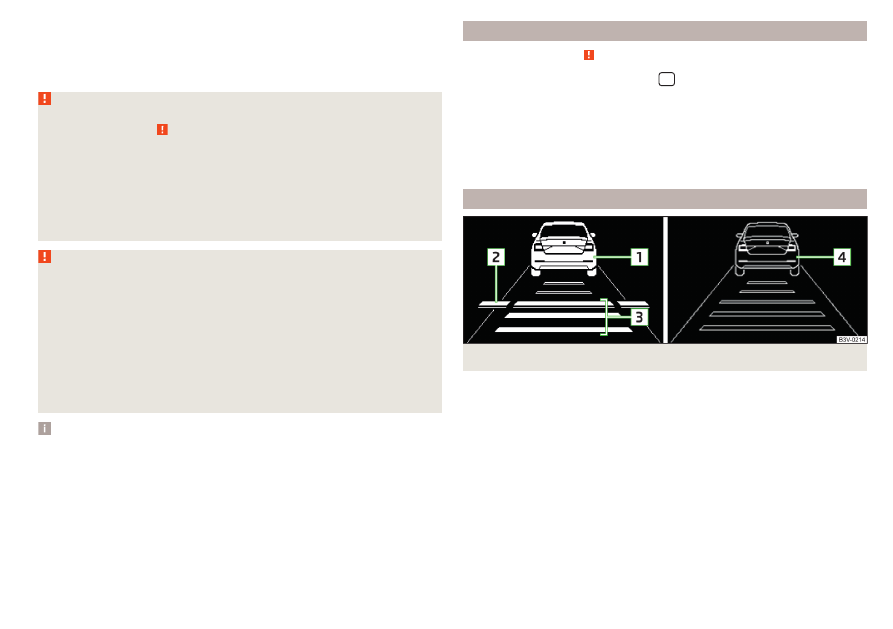
Fig. 296 Instrument cluster display: Examples of ACC displays
237
Assist systems