Seat Tarraco (2023 year). Manual in english - page 7
Assistant systems
203
Driving Assist (Travel Assist)
●
If driver intervention is requested on the in-
strument panel display, immediately resume
control of the vehicle.
●
Keep your hands on the steering wheel at
all times, to ensure you have control over the
steering at all times. The driver is always re-
sponsible for keeping the vehicle in its own
lane.
●
Always be prepared to adjust the speed
yourself.
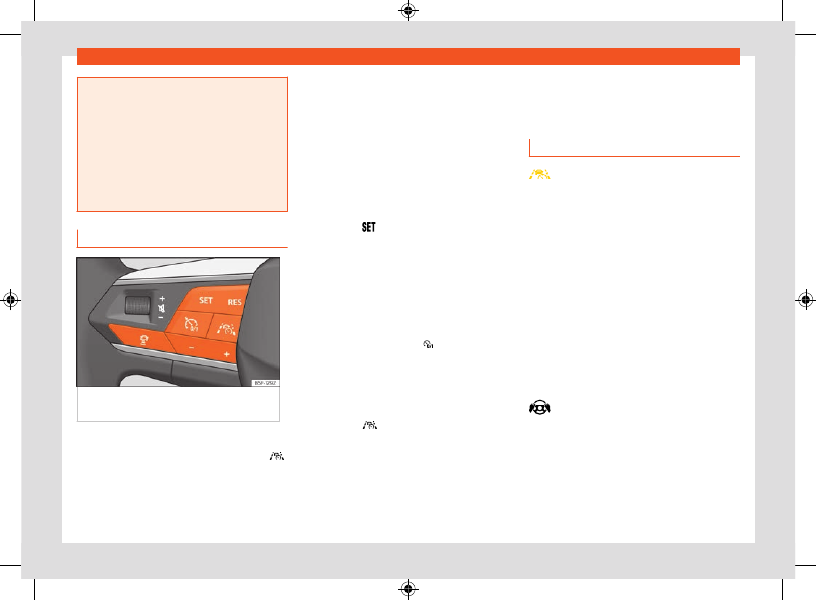
Operating Travel Assist
Fig. 149
Left side of the multifunction steering
wheel
Switch on and start regulation
1. While driving with ACC activated, press
on the multifunction steering wheel.
The vehicle switches from ACC to Travel As-
sist.
Depending on the driving situation, the vehicle
switches to the following system statuses in
Travel Assist:
●
When ACC is regulating, Travel Assist main-
tains the current speed and the preset distance
to the vehicle in front.
When lane markings are detected, the vehicle is
also kept in the lane by steering movements.
●
If ACC is not regulating, Travel Assist remains
selected but in a passive (unregulated) status.
1. Press the
button.
Travel Assist switches to the active system
status, depending on the driving situation.
The indicator lamp for the driving situation
lights up on the instrument cluster display. A
message is also displayed.
Interrupting the adjustment
1. Briefly press the button .
OR:
press the brake pedal.
The set distance remains saved.
Switch to ACC
1. Press the
button on the multi-function
steering wheel.
The vehicle switches from Travel Assist to
the ACC system status corresponding to
the driving situation.
Making other adjustments
All other aspects of Travel Assist are controlled
like the ACC.
Troubleshooting
Travel Assist is not available or does not
work as expected
The control lamp switches on yellow. A relevant
warning is also displayed on the instrument
panel screen.
●
There is a fault in the sensors. Check the cau-
ses and solutions described in the information
about the ACC
or the Lane Assist
●
There is a fault or a defect. Switch the engine
off and on again.
●
The system limits are exceeded.
●
If the problem persists, consult a specialised
workshop. SEAT recommends visiting a SEAT
dealership.
Grip the steering wheel
The warning lamp lights up white, and a mes-
sage is shown on the instrument cluster display.
●
You released the steering wheel for a few sec-
onds. Take hold of the steering wheel and take
control of the vehicle.