Renault Kangoo (2023 year). Manual in english - page 6
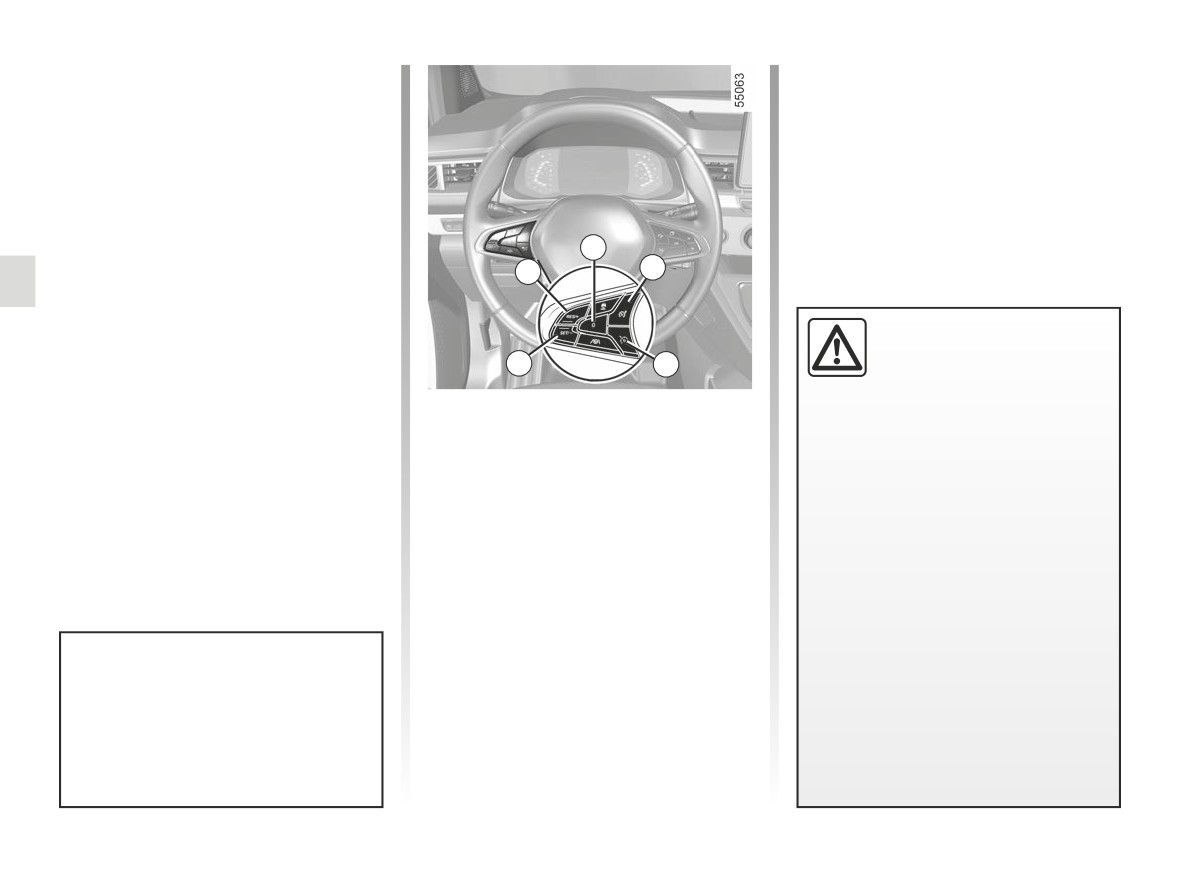
CRUISE CONTROL (1/5)
The cruise control function controls the
engine and braking system to help you
to maintain a driving speed that you
have chosen, known as the cruising
speed.
This cruising speed may be set at any
speed above 19 mph (30 km/h).
4
3
5
This function is an addi-
tional driving aid.
2
1
It can under no circum-
stances replace the driver’s
Controls
responsibility to respect speed limits
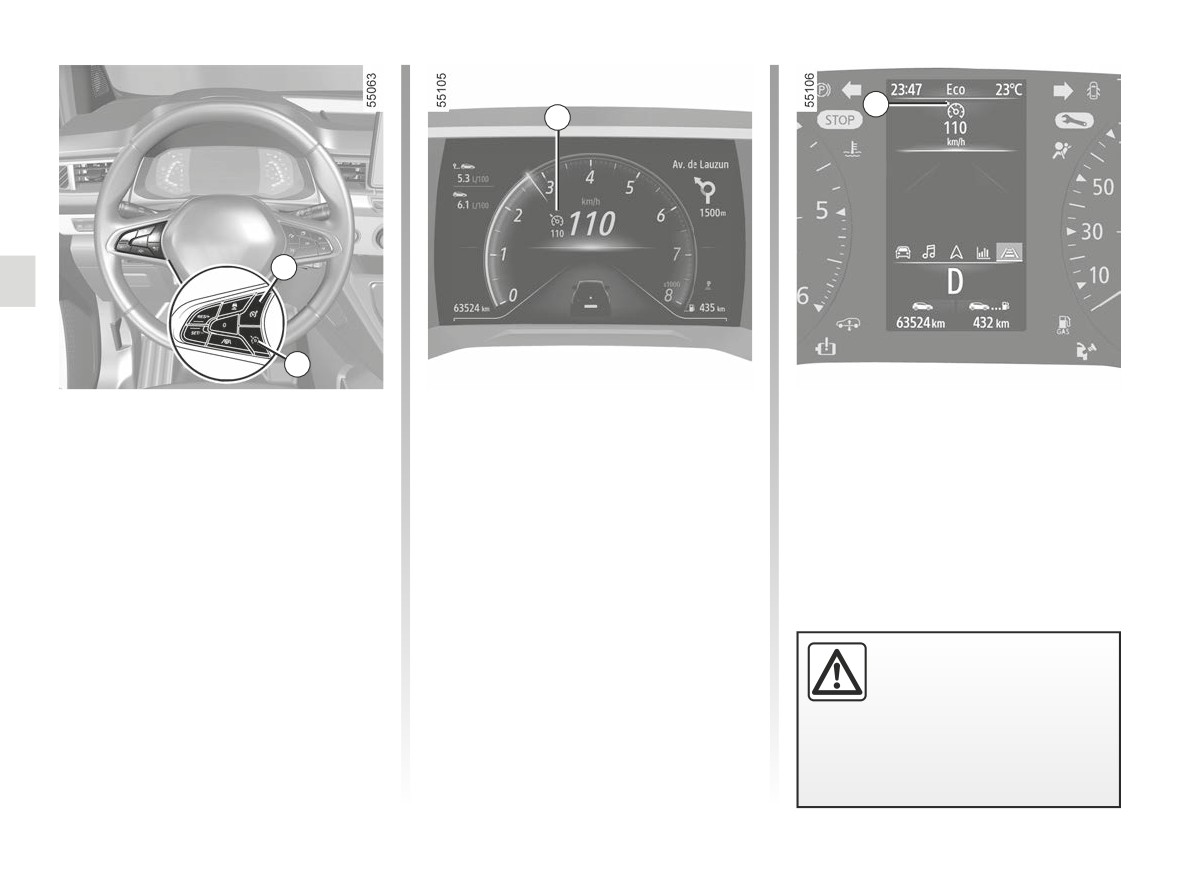
1 Cruise control On/Off switch.
or to be vigilant.
2 Switch to activate and decrease
The driver must always be in control
cruising speed (SET/-).
of the vehicle.
3 Switch to activate and increase
Cruise control must not be used
cruising speed or to recall the mem-
in heavy traffic, on winding or slip-
orised cruising speed (RES/+).
pery roads (black ice, aquaplan-
ing, gravel) and during bad weather
4 Switch the function to standby (with
(fog, rain, side winds etc.).
cruising speed saved) (0).
There is a risk of accidents.
5 Speed limiter On/Off switch.
You can link the cruise control func-
tion to the “Road sign detection”
function ➥ 2.92.
2.100
CarManuals2.co
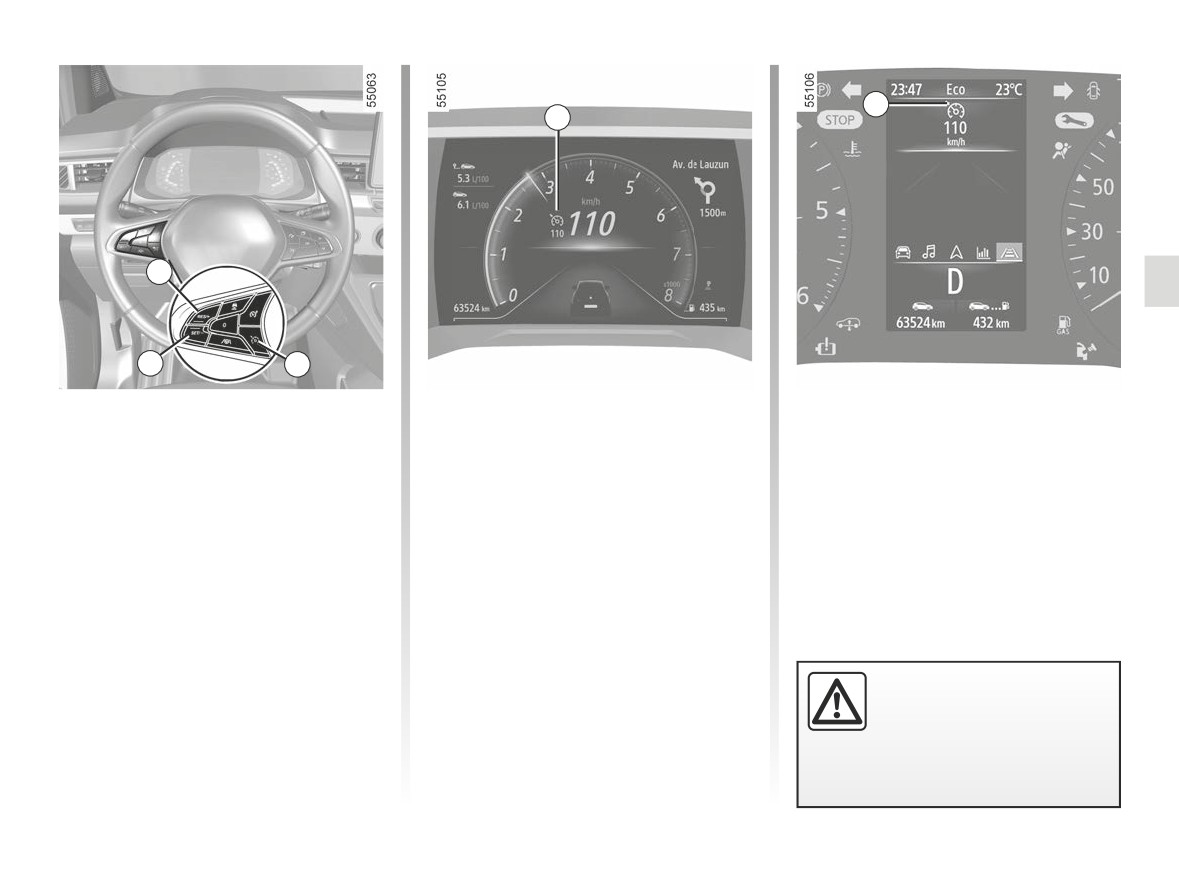
CRUISE CONTROL (2/5)
6
6
3
2
1
Switching on
Activating cruise control
Driving
Press switch 1.
While the vehicle is moving a steady
Once a cruising speed is registered
speed above approximately 19 mph
and the cruise control function is active,
The 6 warning light appears in grey.
(30 km/h), press the 2 (SET/-) switch
you may lift your foot off the accelera-
The “Cruise control ON” message ap-
or the 3 (RES/+) switch: the function
tor pedal.
pears on the instrument panel accom-
is activated and the current speed is
panied by dashes to indicate that the
taken into account.
cruise control function is in operation
The cruising speed replaces the
and waiting to memorise a cruising
dashes. Cruise control is confirmed
speed.
when the memorised speed and warn-
ing light appear in green 6.
If you try to activate the function below
19 mph (30 km/h), the message “Invalid
Please note that you must
Speed” will be displayed and the func-
keep your feet close to the
tion will remain inactive.
pedals in order to react in
an emergency.
2.101
CarManuals2.co
CRUISE CONTROL (3/5)
Exceeding the cruising speed
The cruising speed may be exceeded
at any time by depressing the accelera-
tor pedal.
While it is being exceeded, the cruising
speed flashes in red on the instrument
panel. Then, release the accelerator
pedal: after a few seconds, the vehicle
Temporarily not available
will automatically return to its set cruis-
3
The system controls accelera-
ing speed.
tion and deceleration of your vehi-
Cruising speed cannot be
cle using the engine and braking
maintained
system. The system activates the
2
brakes in order to maintain the set
If driving up or down a steep gradi-
speed, the system applies limited
ent, the system is unable to maintain
braking. In the event of a steep de-
Adjusting the cruising speed
the cruising speed: the stored speed is
scent, for example in a mountainous
flashes red on the instrument panel to
The cruising speed may be changed by
area, you must select a lower gear
inform you of this situation.
pressing the following repeatedly:
to benefit from engine braking.
- the 2 switch (SET/-) to reduce the
To reduce the load imposed on the
speed;
braking system and to prevent the
- the 3 switch (RES/+) to increase the
brakes from overheating, the cruise
speed.
control function may be temporar-
Note: press and hold one of the
ily interrupted and the message
switches to modify speed by succes-
“Check Cruise Control” may appear.
sive increments.
The message disappears when the
function becomes available again.
If the message remains, contact an
If the cruise control is no
approved dealer.
longer available (after sev-
eral attempts to activate
it), contact an Approved
Dealer.
2.102
CarManuals2.co
CRUISE CONTROL (4/5)
6
6
4
3
2
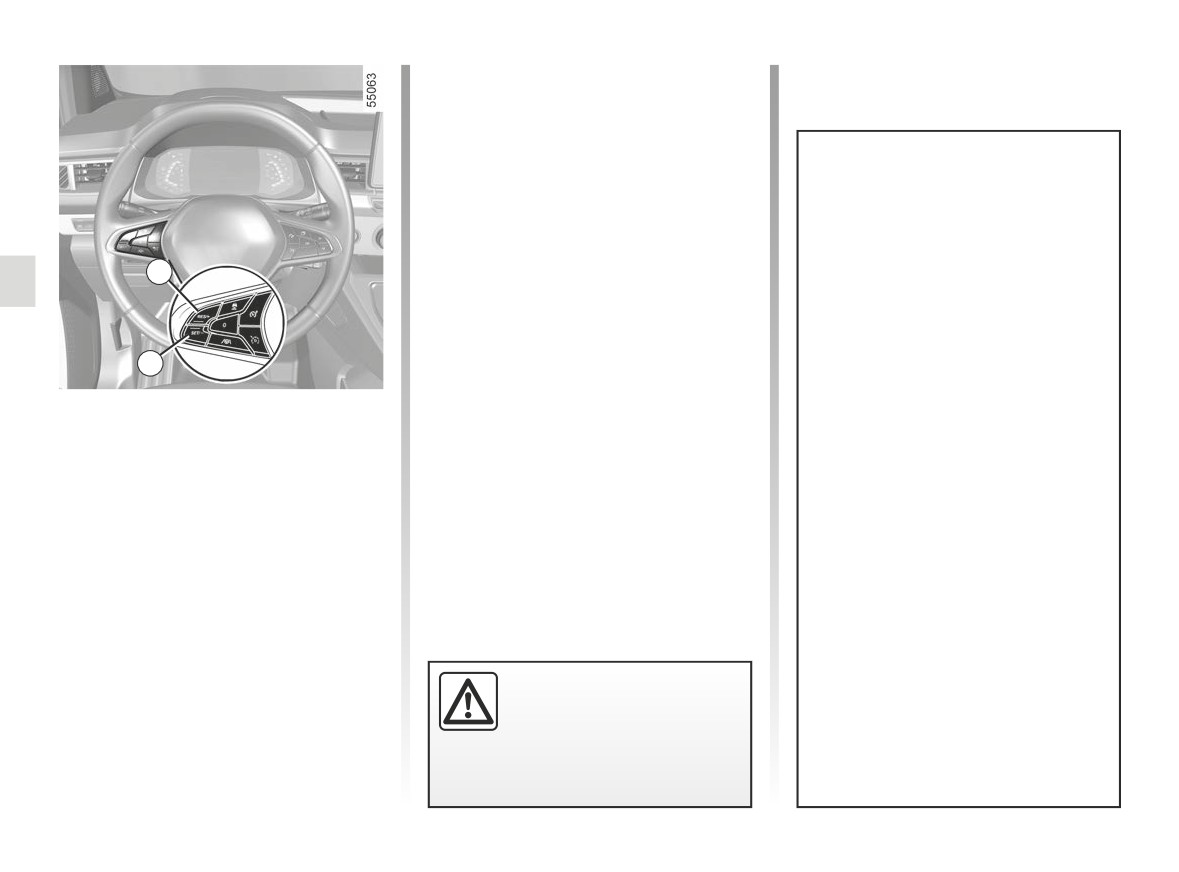
Putting the function on
Returning to the cruising speed
NB: if the speed previously stored is
much higher than the current speed,
standby
If a speed is stored, it can be recalled,
the vehicle will accelerate more rapidly
once you are sure that the road condi-
The function is set to standby if you:
to reach this threshold.
tions are suitable (traffic, road surface,
- 4 switch (0);
weather conditions, etc.). Press the
When the cruise control is set to
- the brake pedal;
switch 3 (RES/+) if the vehicle speed is
standby, pressing switch 2 (SET/-) re-
above 19 mph (30 km/h).
activates the cruise control function
- the clutch pedal for a prolonged
without taking into account the stored
period or if the vehicle is in neutral
When the speed is stored, cruise con-
speed: it is the speed at which the vehi-
for a prolonged period on vehicles
trol activation is confirmed by the dis-
cle is moving that is taken into account.
equipped with a manual gearbox;
play in green of the cruising speed and,
depending on the vehicle, the 6 warn-
- shifting to neutral position, on ve-
ing light is displayed.
hicles equipped with an automatic
gearbox.
The cruising speed is stored and dis-
played in grey on the instrument panel.
2.103
CarManuals2.co
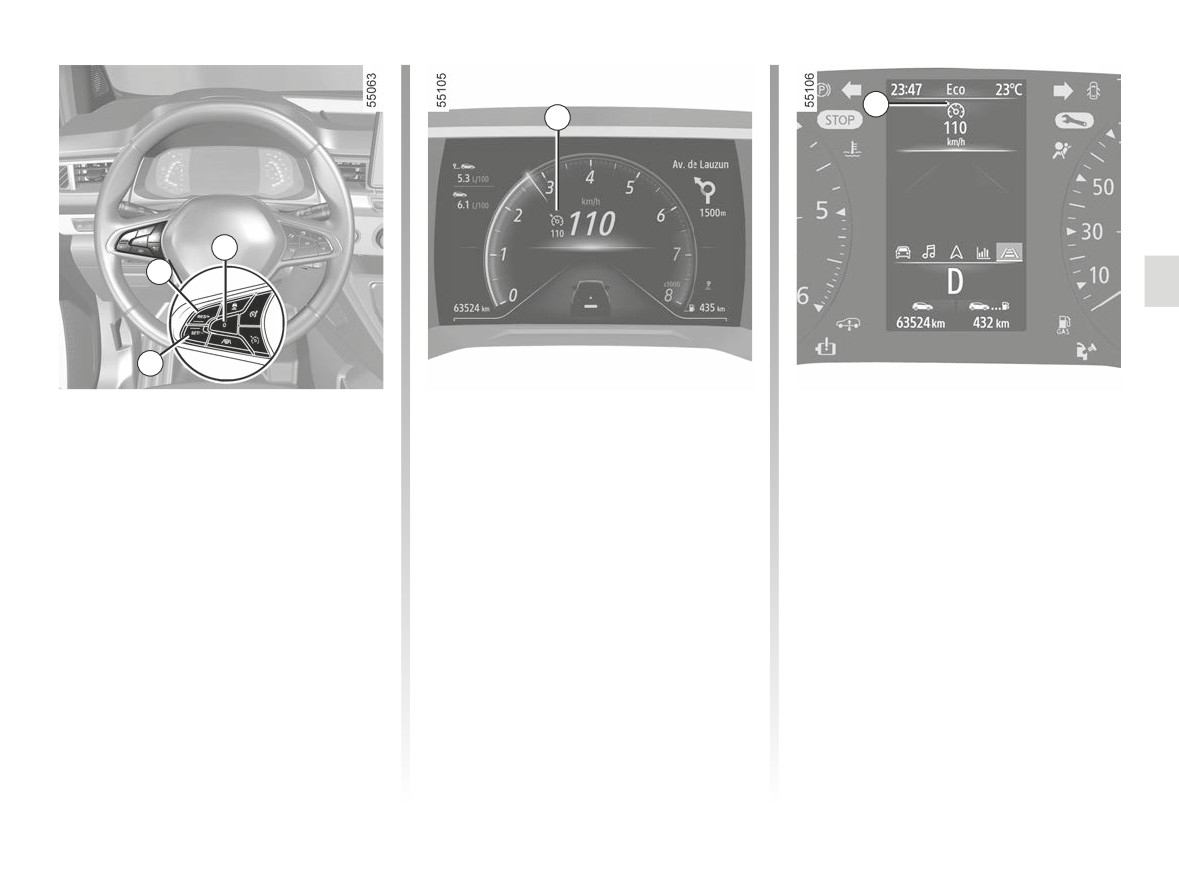
CRUISE CONTROL (5/5)
6
6
5
1
Switching off the function
The warning light 6 disappears from
the instrument panel to confirm that the
The cruise control function is inter-
function is no longer active.
rupted:
- when you press the 1 switch. In this
case, the speed is no longer stored;
- when you press the 5 switch. In this
case the speed limiter is selected
and there is no stored speed.
Putting the cruise control
on standby or switching it
off does not cause a rapid
reduction in speed: you
must brake by depressing the brake
pedal.
2.104
CarManuals2.co

ADAPTIVE CRUISE CONTROL (1/14)
Based on information from a radar
According to conditions on the road
or camera, the adaptive cruise con-
(traffic, weather etc.), the adaptive
trol function
(or Stop and Go adap-
cruise control function can be activated:
tive cruise control function on vehicles
- 0 mph (0 km/h) to 105 mph (170 km)
equipped with an automatic gearbox)
for vehicles fitted with an automatic
enables you to maintain the speed se-
This function is an addi-
gearbox;
lected (known as cruising speed) while
tional driving aid.
keeping a following distance with the
- 19 mph (30 km/h) to
105 mph
(170 km) for vehicles fitted with a
It can under no circum-
vehicle in front in the same lane.
manual gearbox.
stances replace the driver’s
On vehicles fitted with an automatic
responsibility to respect speed limits
gearbox, if the vehicle in front stops,
The function is indicated by the
or to be vigilant.
the Stop and Go adaptive cruise control
symbol.
The driver must always be in con-
function may apply the vehicle brakes
Note:
trol of the vehicle. The driver must
to a full-stop before allowing the vehicle
- the driver must observe the maxi-
always adapt their speed according
to move-on.
mum speed limit and safe distances
to the surroundings and traffic con-
The system controls acceleration and
in the country where they are driving;
ditions. The adaptive cruise control
deceleration of your vehicle using the
must only be used on a motorway
- the adaptive cruise control can brake
engine and braking system.
(or multi-lane road separated by a
the vehicle up to a third of the brak-
The system’s maximum range is ap-
barrier). The cruise control must not
ing capacity. Depending on the situ-
proximately 150 m. This may vary ac-
be used in heavy traffic, on wind-
ation, the driver may need to brake
cording to the road conditions (ground
ing or slippery roads (black ice, aq-
harder.
relief, weather conditions, etc.).
uaplaning, gravel) or during bad
weather (fog, rain, side winds etc.).
There is a risk of accidents.
The adaptive cruise control does
not trigger an emergency stop and
its braking capability is limited.
2.105
CarManuals2.co
ADAPTIVE CRUISE CONTROL (2/14)
1
8
11
3
9
4
10
7
6
5
2
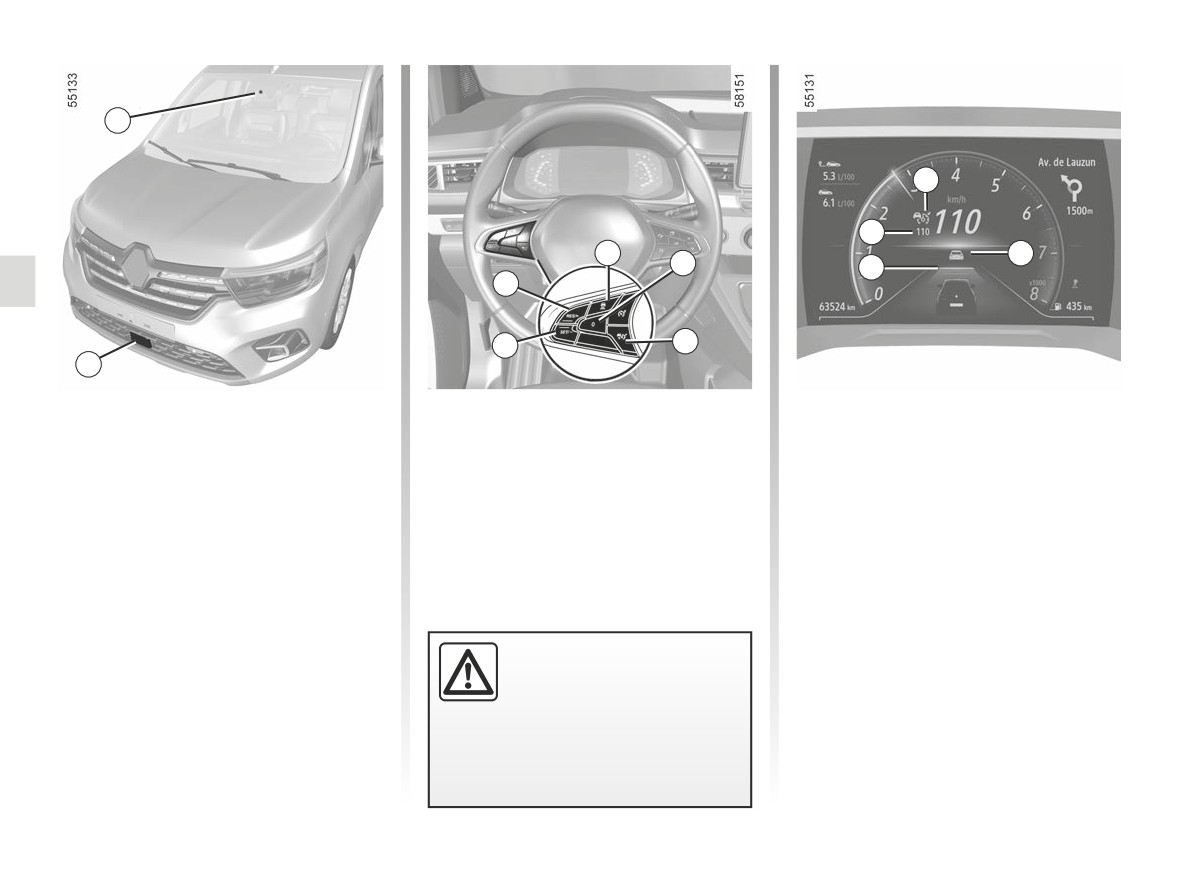
Location of the camera 1
Controls
6
Cruising speed activation, storage
and decrease switch (SET/-).
Make sure the windscreen is not ob-
3 Safe distance settings
scured (by dirt, mud, snow, condensa-
7
Switch to activate and increase cruis-
4 Switch the function to standby (with
tion etc.).
ing speed or to recall the memorised
cruising speed saved) (0).
cruising speed (RES/+).
5 Adaptive cruise control main stop/
Location of the radar 2
start switch
Ensure that the radar area is not ob-
structed
(dirt, mud, snow, a badly
fitted/attached front number plate), im-
pacted, modified (including paintwork)
or hidden by any accessory fitted on the
The radar and camera
front of the vehicle (on the grille or logo
zones must be kept clean
etc.).
and free of any tampering in
order to ensure the proper
operation of the system.
2.106
CarManuals2.co
ADAPTIVE CRUISE CONTROL (3/14)
Switching on
The cruising speed 11 replaces the
dashes and cruise control is confirmed
Press switch 5.
8
by the appearance of the cruising
11
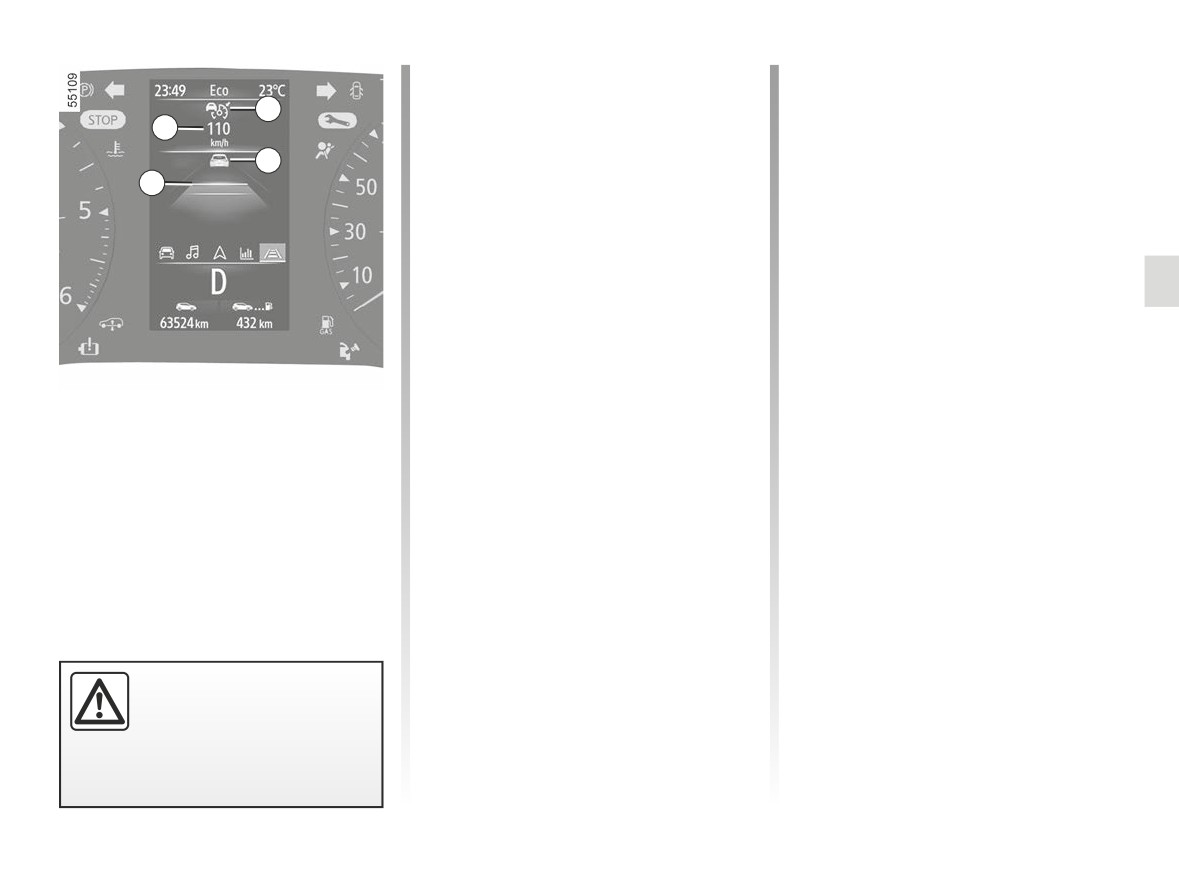
Warning light
appears in grey, and
speed in green and warning light
the message “Adaptive Cruise Ctl ON”
If you try to activate the function when
9
appears on the instrument panel, ac-
the vehicle speed is over 105 mph
10
companied by dashes to indicate that
(170 km/h) or below 19 mph (30 km/h)
the cruise control function is activated
on vehicles fitted with a manual gear-
and waiting to store a cruising speed.
box, the message “Invalid Speed” is
displayed and the function will remain
This function cannot be activated when:
inactive.
- the parking brake is applied;
Once a cruising speed is memorised
- the Park Assist function is already
and the cruise control function is active,
activated ➥ 2.147.
you may lift your foot off the accelera-
The message “Adaptive Cruise Ctl una-
tor pedal.
vailable” is displayed on the instrument
Special feature on vehicles with
Displays
panel.
an automatic gearbox: if the vehicle
8
Adaptive cruise control warning
speed is below approximately 19 mph
light.
(30 km/h), the cruising speed will auto-
Activating cruise control
matically be set to 19 mph (30 km/h).
9
Vehicle in front.
When the vehicle is stationary (vehicles
The vehicle will accelerate until it
10
Stored safe distance
equipped with an automatic gearbox) or
reaches the stored cruising speed.
when the vehicle is moving at a steady
11
Stored cruising speed.
speed (all vehicles), press the 6 (SET/-)
or 7 (RES/+) switch to activate the func-
tion and store the current speed. The
minimum cruising speed is 19 mph (30
km/h).
Important: you should keep
your feet near the pedals at
all times to prepare for any
event.
2.107
CarManuals2.co
ADAPTIVE CRUISE CONTROL (4/14)
Safe distance control
activation
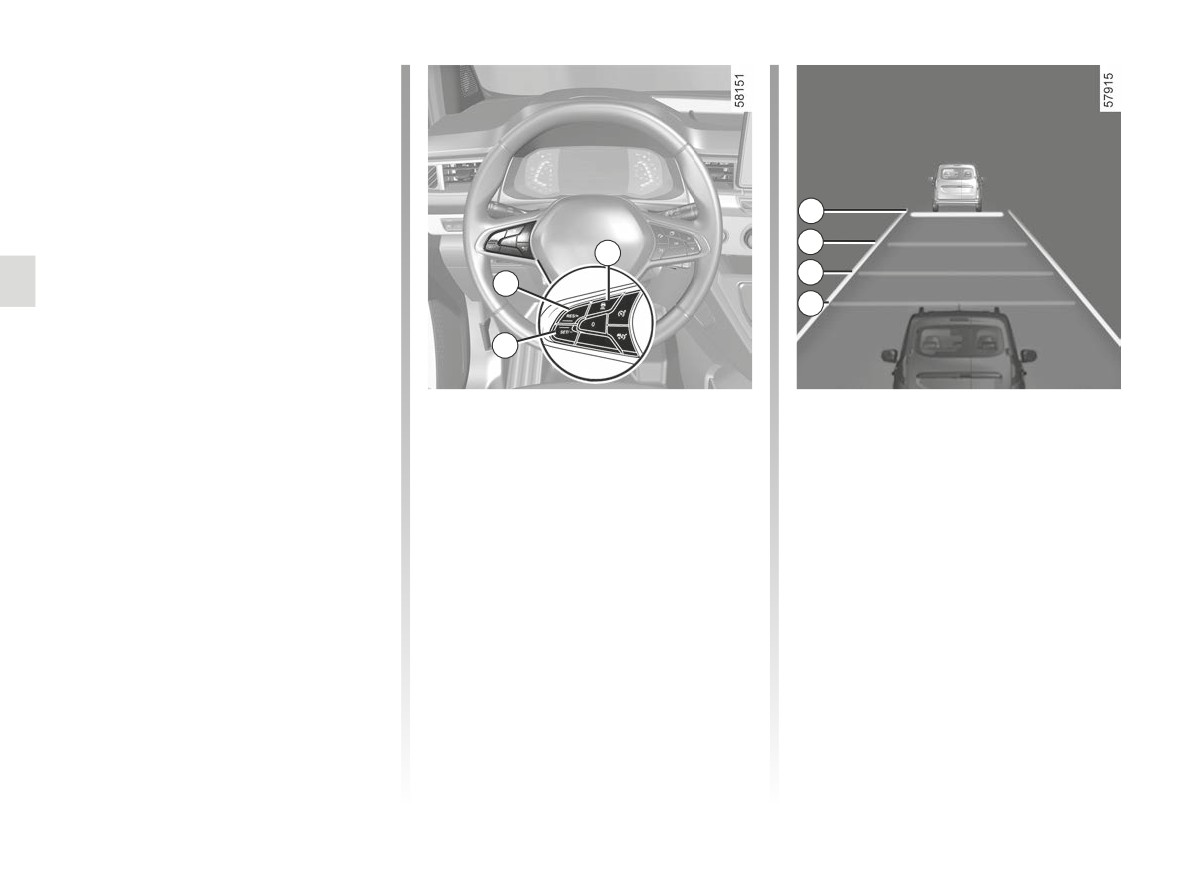
As soon as cruise control is activated,
the default safe distance 10 is displayed
in green on the instrument panel. The
default safe distance corresponds to
approximately two seconds (see follow-
A
ing pages).
B
3
If the system detects a vehicle in your
C
lane, an outline of a vehicle 9 appears
7
above the distance gauge 10 on the in-
D
strument panel.
6
Your vehicle adapts its speed to that
of the vehicle in front and applies the
brakes if necessary (the brake lights
Setting the cruising speed
Adjusting the following
come on) in order to maintain the dis-
tance displayed on the instrument
You can vary the speed by repeatedly
distance
panel.
pressing (for a small variation) or press-
You can vary the safe distance from the
ing and holding (for a larger variation)
vehicle in front at any time by pressing
Note: the size of the 9 outline varies ac-
switch 6 or 7:
switch 3 repeatedly.
cording to the distance separating you
from the vehicle in front. The larger the
- use the “SET/-” switch 6 to reduce
The horizontal distance gauge on the
outline, the closer the vehicle in front.
the speed;
instrument panel indicates the various
- use the “RES/+” switch 7 to increase
available safe distances:
the speed.
- distance gauge A: long distance
(corresponding to approximately
2.4 seconds);
2.108
CarManuals2.co
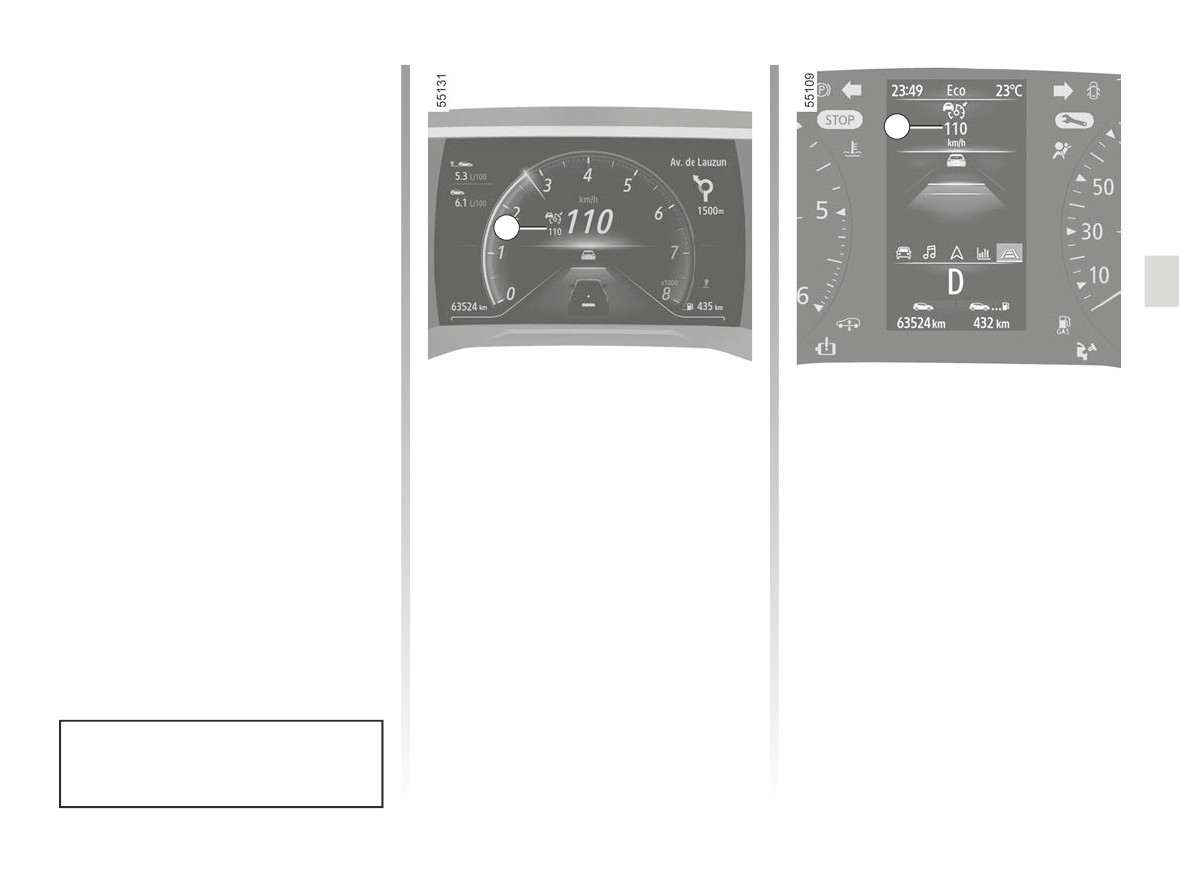
ADAPTIVE CRUISE CONTROL (5/14)
Adjusting the following
distance
(continued)
11
- distance gauge B: intermediate dis-
tance 2 (corresponding to approxi-
mately 2 seconds);
- distance gauge C: intermediate dis-
11
tance 1 (corresponding to approxi-
mately 1.6 seconds);
- distance gauge D: short distance
(corresponding to approximately
1.2 seconds).
The selected distance gauge appears
in green on the instrument panel. The
other gauges remain in grey.
Exceeding the cruising speed
Then, release the accelerator pedal:
the cruise control and safe distance
Note: the distance must be set accord-
The cruising speed may be exceeded
control will automatically resume the
ing to the traffic level, local regulation
at any time by applying the accelerator
speed and distance instructions that
and weather conditions.
pedal.
you had previously selected.
If it is exceeded, the cruising speed 11
appears in red.
Overtaking manoeuvre
The distance gauge flashes if the dis-
If you wish to overtake the vehicle in
tance between your vehicle and the
front, activating the indicator will tem-
vehicle in front is less than the safe
porarily cancel the safe distance con-
distance selected: the Safe Distance
trol and enable an acceleration speed
Control function is no longer active.
sufficient to complete overtaking.
The safe distance is adjusted by de-
fault on the distance gauge B.
2.109
CarManuals2.co
ADAPTIVE CRUISE CONTROL (6/14)
Stopping and starting on
Putting the function on
vehicles fitted with an
standby
automatic gearbox
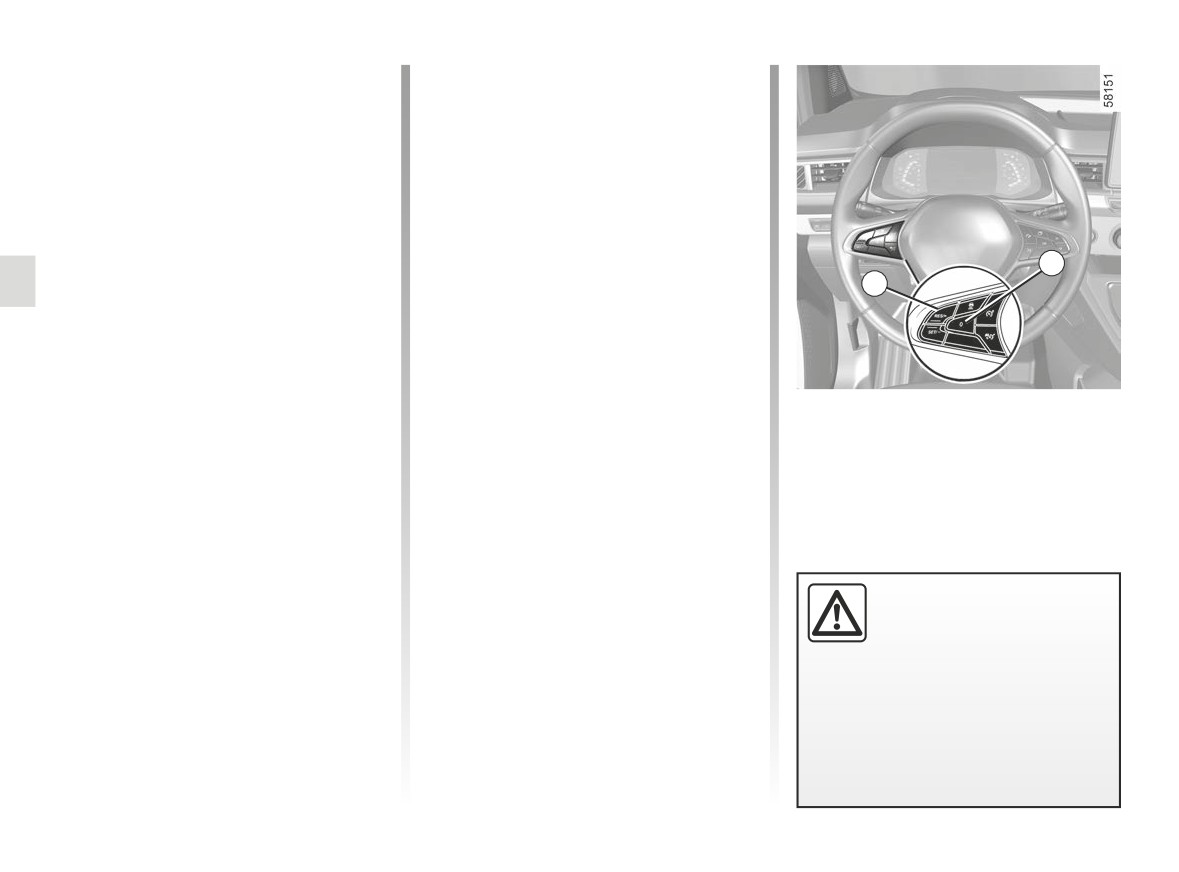
You can set the function to standby
If the vehicle in front slows down, the
when:
system adapts its speed, if necessary
- you press switch 4 (0);
to a complete stop (e.g. in heavy traf-
- you apply the brake pedal while the
fic). The vehicle stops a few metres
vehicle is moving.
from the vehicle in front. The Stop and
The function is deactivated by the
Start function can put the engine on
system if:
4
standby ➥ 2.8.
- you set the automatic gearbox to P
7
When the vehicle in front sets off again:
or N;
- if the stop does not exceed about
- you engage the reverse gear;
three seconds, the vehicle sets off
- you unbuckle the driver’s seatbelt;
automatically without any action by
- you open one of the opening ele-
the driver;
ments;
- if the stop exceeds about three sec-
- you press the engine start/stop
In all circumstances, the standby is con-
onds, you must apply the accelera-
button;
firmed when the warning lights appear
tor pedal or press button 7 (RES/+) in
– the slope is too steep;
in grey and the message “Adaptive
order for the vehicle to set off again.
– the vehicle speed is above 112 mph
Cruise Ctl Disconnected” appears on
The message “Press RES/+ or ac-
(180 km/h);
the instrument panel.
celerate” appears on the instrument
- certain driving aids and correction
panel to confirm.
devices are triggered (active emer-
If the stop exceeds about three min-
gency braking, ABS, ESC);
utes, the electronic parking brake is
- when you press the clutch pedal for a
automatically applied and the Stop
prolonged period or upon prolonged
Putting the adaptive cruise
and Go adaptive cruise control is de-
neutral position on vehicles equipped
control in standby or switch-
activated. The
warning light disap-
with a manual gearbox.
ing it off does not cause a
pears to confirm that the function is de-
rapid reduction in speed:
activated.
you must brake by applying the
brake pedal if necessary.
2.110
CarManuals2.co
ADAPTIVE CRUISE CONTROL (7/14)
Exit from standby
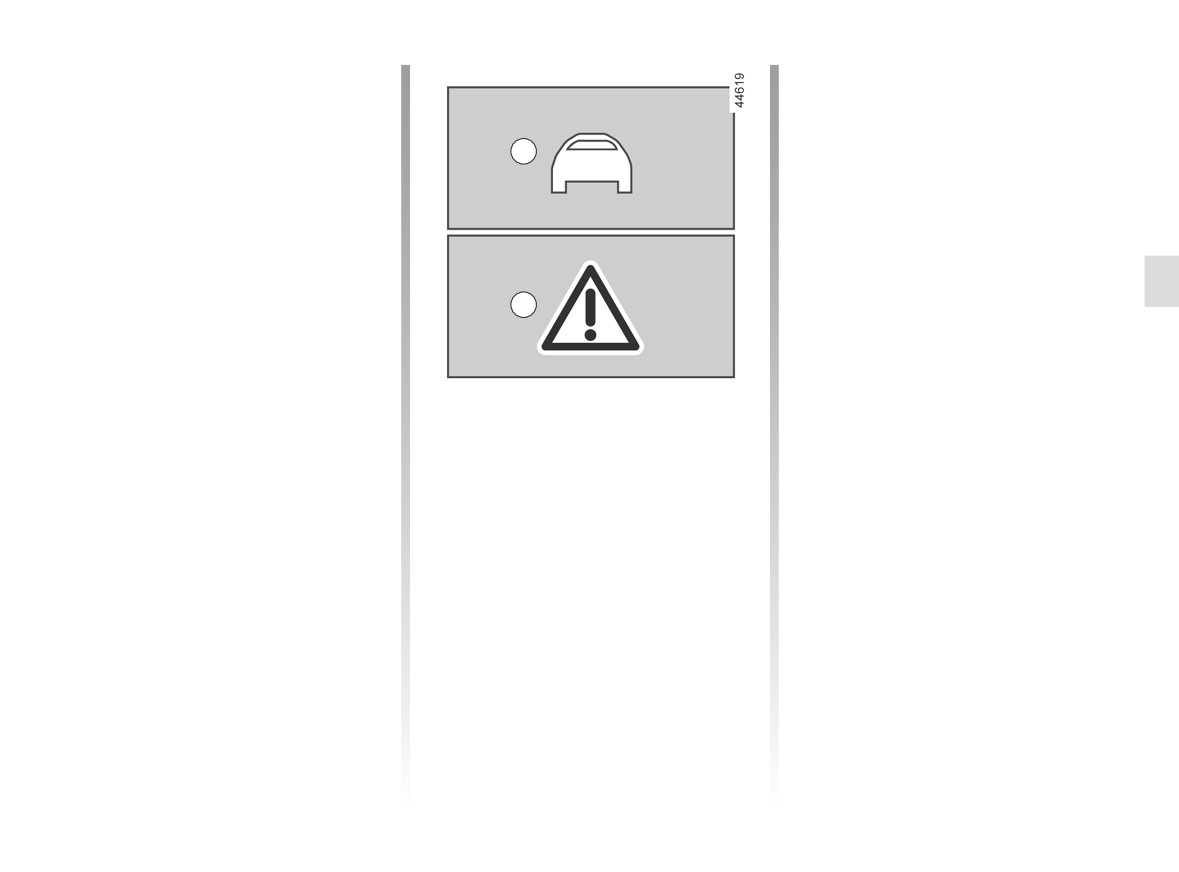
Depending on the situation, the system
sounds a beep associated with:
Based on the stored cruising speed
- the orange alert E if the situation re-
If a speed is stored, it can be recalled,
quires the driver’s attention;
E
once you are sure that the road con-
or
ditions are suitable (traffic, road sur-
face, weather conditions, etc.). Press
- the red alert F accompanied by the
switch 7 (RES/+) in the range of con-
message “Brake”, if the situation re-
firmed speeds.
quires the driver’s immediate atten-
When the stored speed is recalled, acti-
tion.
vation of the cruise control is confirmed
In all situations, react accordingly
by the illumination of the cruising speed
F
and perform the appropriate ma-
in green.
noeuvres.
Note: if the stored speed is higher than
the current speed, the vehicle will ac-
celerate to reach that speed.
“Take control of the vehicle”
Based on the current speed
warnings
When the cruise control is set to
In some situations (e.g. coming upon
standby, pressing switch 6 (SET/-) re-
a much slower vehicle, vehicle in
activates the cruise control function
front changing lanes quickly etc.), the
without taking into account the stored
system may not have time to react.
speed: it is the speed at which the vehi-
cle is moving that is taken into account.
2.111
CarManuals2.co
ADAPTIVE CRUISE CONTROL (8/14)
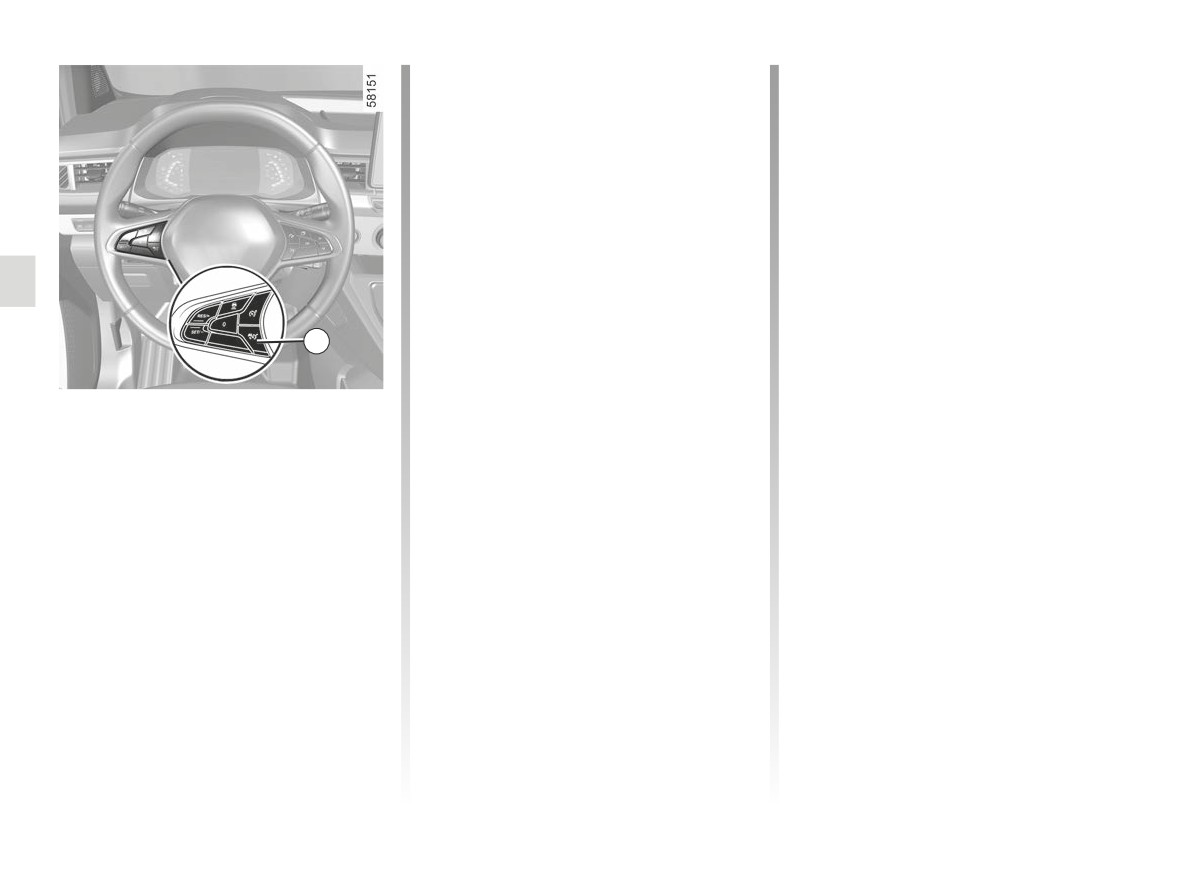
If the radar detection area is obstructed
Operating faults
or the radar signal is disrupted, the
If an adaptive cruise control function
message “Front radar no visibility” is
operating fault is detected, the mes-
displayed on the instrument panel and
sage “Check Adaptive Cruise control”
the adaptive cruise control is inter-
appears on the instrument panel and
rupted. The green warning light
the adaptive cruise control function is
disappears to confirm that the function
deactivated.
has been automatically deactivated.
Ensure that the radar area is not ob-
If an operating fault is detected on one
structed
(dirt, mud, snow, a badly
or more components of the system, the
fitted/attached front number plate), im-
adaptive cruise control function is inter-
pacted, modified (including paintwork)
rupted.
or hidden by any accessory fitted on the
The
warning light appears on
5
front of the vehicle (on the grille or logo
the instrument panel along with, de-
etc.).
pending on the malfunction, one of the
Conditions in certain geographical
following messages:
Switching off the function
areas may hinder the function, for ex-
- “Front camera to check”;
The adaptive cruise control function
ample:
is deactivated when you press the 5
- arid zones, tunnels, long bridges or
- “Front radar to check”;
switch.
lightly used roads without road lines,
- “Camera/Radar to check”;
without signs or trees nearby;
The warning light
disappears from
- “Check vehicle”.
the instrument panel to confirm that the
- a military or airport zone.
Consult an approved dealer.
function is no longer active.
You must leave such areas in order for
the function to work.
Temporary unavailability
In all cases, if the message is not
erased after the engine is restarted,
The radar is able to detect vehicles
please contact an authorised dealer.
in front of your vehicle. The system
cannot operate correctly if the radar de-
tection area is obscured or if its signal
is disrupted.
2.112
CarManuals2.co
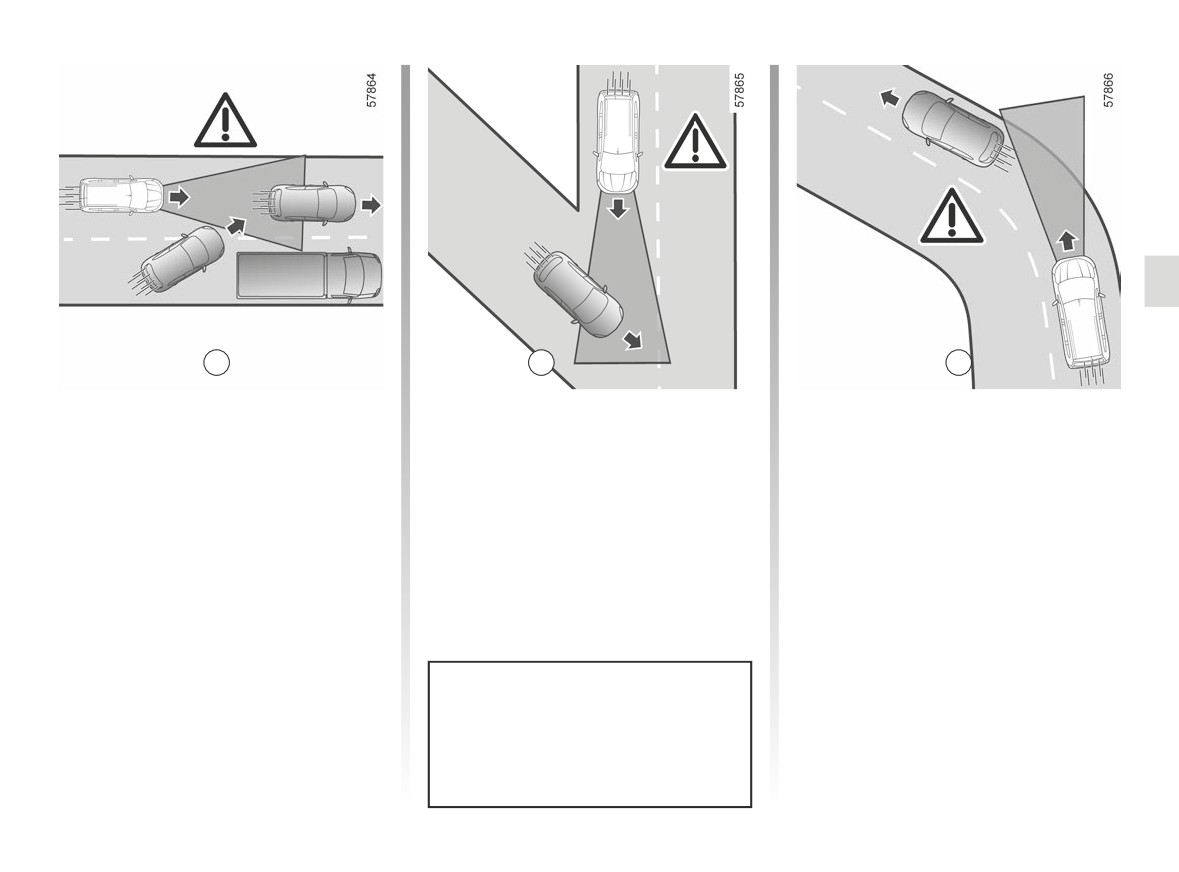
ADAPTIVE CRUISE CONTROL (9/14)
G
H
J
Limitations of system
The system cannot detect:
Detection during cornering
operation
- vehicles arriving at intersections: slip
When entering a corner or bend, the
road (e.g. H) etc;
radar and/or camera may temporarily
Vehicle detection
not be able to detect the vehicle in front
- vehicles driving on the wrong side of
The system detects only vehicles (cars,
(e.g. J).
the road or reversing towards you.
trucks, motorbikes) that are moving in
The system may trigger an accelera-
the same direction as your vehicle.
tion.
A vehicle turning into the same lane
When exiting a bend, the system’s de-
(e.g. G) will be taken into account by
tection of the vehicle in front may be
the system only once it enters the
disrupted or delayed.
camera and radar detection areas.
The system may trigger abrupt or
The system may trigger abrupt or
delayed braking.
delayed braking.
The adaptive cruise control must
only be used on a motorway (or mul-
ti-lane road separated by a barrier).
2.113
CarManuals2.co
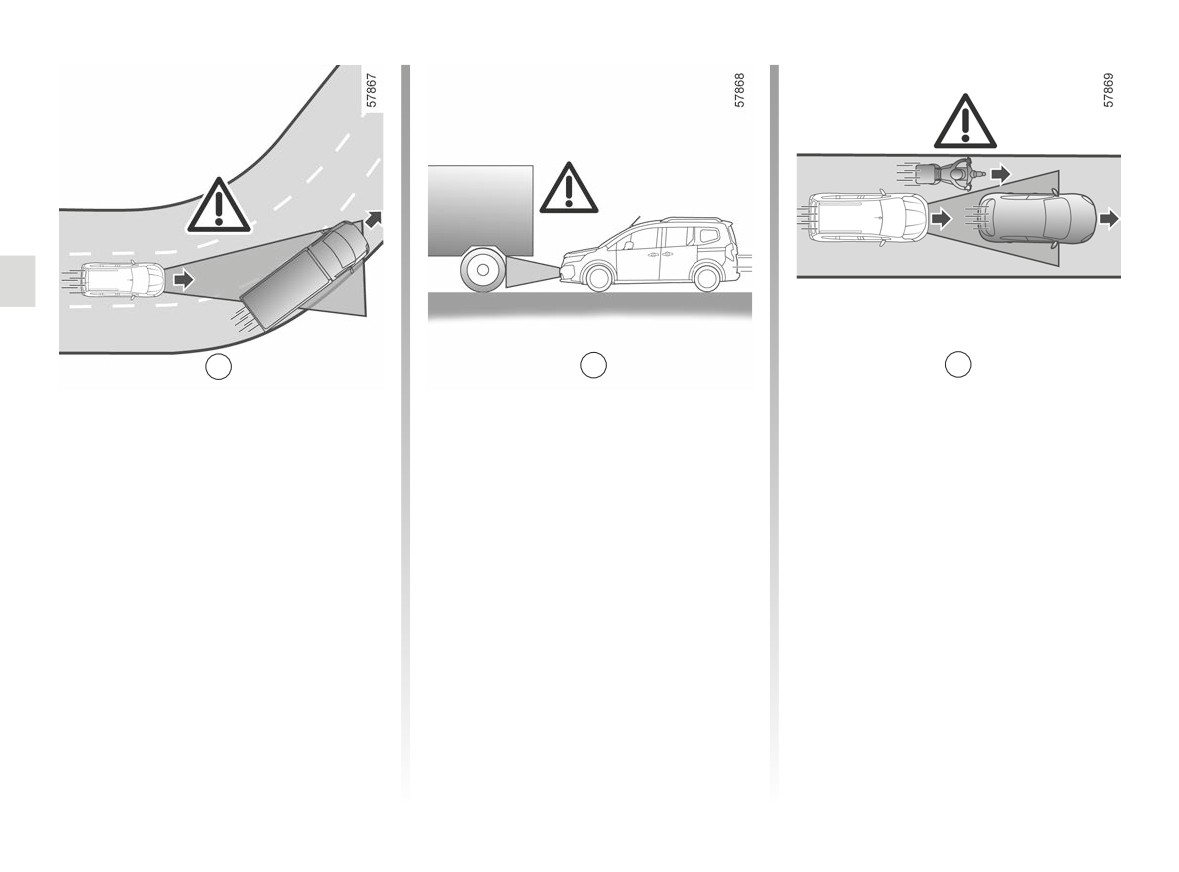
ADAPTIVE CRUISE CONTROL (10/14)
K
L
M
Detection of vehicles in adjacent
Vehicles hidden due to variations in
- vehicles transporting long objects
lanes
ground relief
which exceed the line;
The system may detect vehicles driving
The system will not detect vehicles
- the actual length of tall vehicles
on an adjacent lane when:
hidden due to variations in ground relief
(e.g. L) outside the radar detection
or those located outside of the camera
area (construction machine, agricul-
- you drive into a bend (e.g. K);
and radar detection areas when driving
tural equipment towing vehicle, etc.)
- you are driving on a road with narrow
uphill or downhill.
;
lanes;
- vehicles insufficiently centred in the
Vehicles outside the camera and
- the speed of the vehicle on the ad-
lane;
radar detection areas.
jacent lane is slower and if one of
- narrow vehicles which are very close
these vehicles is located too close to
The system will react late or not at all
(e.g. M).
the lane of the other.
if the detected vehicles are outside the
camera and radar detection areas, par-
The system may incorrectly trigger
ticularly in the following cases:
vehicle slowing or braking.
2.114
CarManuals2.co
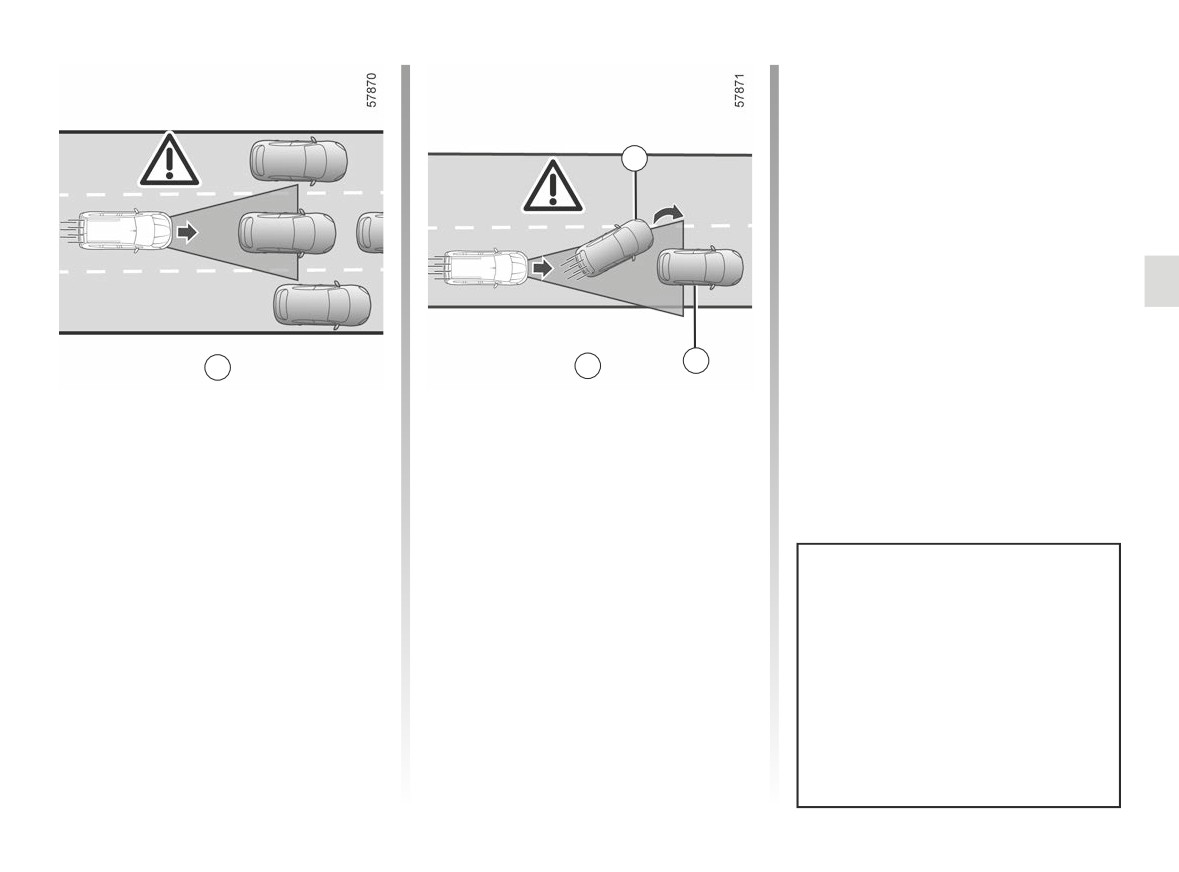
ADAPTIVE CRUISE CONTROL (11/14)
12
N
P
13
Stationary and slow moving
- vehicles in front12 which change
vehicles
lane, revealing a stationary vehi-
cle 13 (e.g. P).
When your speed is over approximately
31 mph (50 km/h), the system does
not detect:
- stationary vehicles (e.g N);
- very slow moving vehicles.
When your speed is less than approxi-
mately 31 mph (50 km/h), the system
Always be ready to take control
may not react or may react very late
of your vehicle when you come
to:
upon stationary or very slow
- stationary vehicles (e.g N);
moving vehicles (e.g. N).
– very slow moving vehicles;
The adaptive cruise control does
not trigger an emergency stop and
its braking capability is limited.
2.115
CarManuals2.co
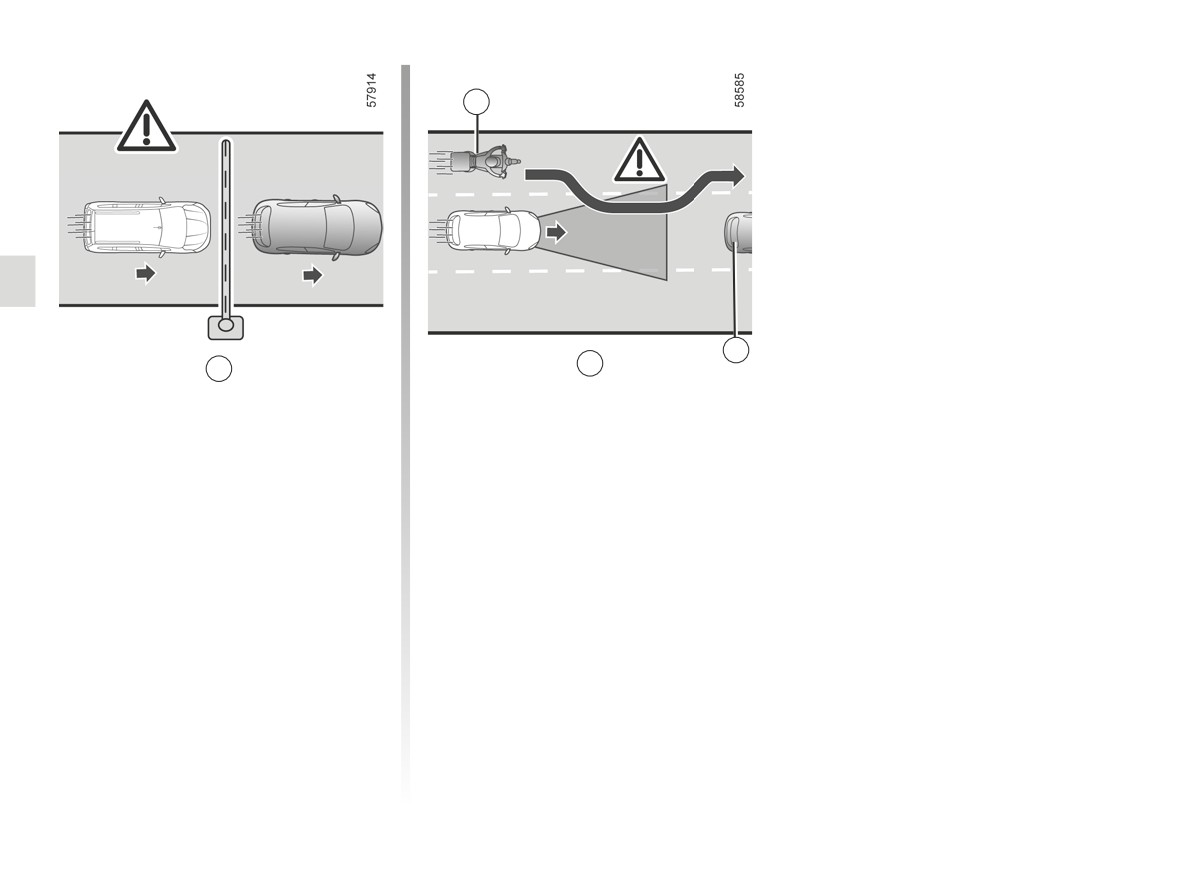
ADAPTIVE CRUISE CONTROL (12/14)
14
15
R
Q
Non-detection of fixed obstacles
Detection of vehicles moving into
and objects of a small size
lane at high speed
The system cannot detect:
When your vehicle is overtaken by an-
other vehicle driving at high speed 14
- pedestrians, bikes, scooters, etc. ;
(motorcycle, car, etc.) (e.g. R) and that
- animals;
vehicle temporarily moves in between
- fixed obstacles (toll barriers, walls,
you and the vehicle in front 15, the
etc.) (e.g. Q).
system may trigger undue accelera-
tion, slow down or braking.
These are not taken into account by the
system. They do not trigger any alert or
reaction by the system.
2.116
CarManuals2.co

ADAPTIVE CRUISE CONTROL (13/14)
This function is an additional driving aid. It can under no circumstances replace the driver’s responsibility to respect
speed limits and safe distances and to be vigilant.
The driver must always be in control of the vehicle.
The driver must always adapt their speed to the surroundings and driving conditions, regardless of system indications.
Except for lines delimiting lanes, traffic indicators (traffic lights, signs, pedestrian crossings etc.) are not recognised by the
system. These do not trigger any alert or reaction by the system.
The system should under no circumstances be taken to be an obstacle detector or an anti-collision system.
The adaptive cruise control must only be used on a motorway (or multi-lane road separated by a barrier).
System servicing/repairs
- In the event of an impact, the radar and/or camera alignment may be changed and its operation may consequently be af-
fected. Deactivate the system and consult an authorised dealer.
- Any work in the proximity of the radar and/or camera (replacements, repairs, windscreen modifications, paintwork etc.) must
be carried out by a qualified professional.
Only an authorised dealer is qualified to service the system.
Deactivating the function
You must disable the function if:
- the vehicle is travelling on a windy road;
- the vehicle is being towed (breakdowns);
- the vehicle is towing a trailer or a caravan;
- the vehicle is being driven in a tunnel or close to a metallic structure;
- the vehicle arrives at a toll point, a roadwork area or on a narrow lane;
- the vehicle is being driven up or down a very steep slope;
- the visibility is poor (glaring sun, fog etc.);
- the vehicle is being driven on a slippery road surface (rain, snow, gravel, etc.);
- the weather conditions are poor (rain, snow, side winds, etc.);
- the radar area has been damaged (impacts etc.) ;
- the camera area has been damaged (e.g. on the inside or outside of the windscreen);
- the windscreen is cracked or distorted.
In the event of the system behaving abnormally, deactivate it and consult an authorised dealer.
2.117
CarManuals2.co

ADAPTIVE CRUISE CONTROL (14/14)
In the event of system disturbance
Some conditions can disturb or damage the operation of the system, such as:
- the windscreen or radar area is obscured (by dirt, ice, snow, condensation, number plate etc.);
- a complex environment (tunnel etc.);
- poor weather conditions (snow, heavy rain, hail, black ice, etc.);
- poor visibility (night, fog etc.);
- poor contrast between the vehicle preceding it and the surrounding area (e.g. white vehicle in a snowy area etc.) ;
- being dazzled (glaring sun, lights of vehicles travelling in the opposite direction etc.);
- narrow, winding or undulating road (tight bends etc.) ;
- a slower vehicle with a significant difference in speed;
- use of mats not adapted to the vehicle. On the driver’s side, only use mats suitable for the vehicle, attached with the pre-
fitted components, and check the fitting regularly. Do not lay one mat on top of another. There is a risk of wedging the
pedals.
In these cases, the system may wrongly intervene.
Risk of unwanted braking or acceleration.
Many unforeseen situations may affect the system operation. Certain objects or vehicles that can appear in the camera or
radar detection zone may be interpreted by the system incorrectly, possibly leading to inappropriate acceleration or braking.
You should always be attentive to sudden events that might occur while you are driving. Always keep your vehicle
under control by keeping your feet near the pedals, so that you are ready to act in any event.
2.118
CarManuals2.co

MOTORWAY AND TRAFFIC ASSISTANT (1/16)
The Motorway and Traffic Assistant is a
The Stop and Go adaptive
The system controls acceleration and
driving aid system designed for use on
deceleration of your vehicle using the
cruise control function
long motorway journeys, where traffic is
engine and braking system.
Based on information from a radar or
flowing or in jams.
The Stop and Go adaptive cruise con-
camera, the Stop and Go adaptive
trol function can be activated from 0 to
Depending on the vehicle, this system
cruise control function gives you the
105 mph (0 to 170 km/h) according to
comprises the adaptive cruise control
option of maintaining a selected speed,
conditions on the road (traffic, weather
function Stop and Go ➥ 2.105 and the
known as the cruising speed, while
etc.).
“Lane Centring” function.
keeping a safe distance from the vehi-
It is represented by the following symbol
When these two functions are activated
cle in front in the same lane.
➥ 2.105.
simultaneously, the system allows the
If the vehicle in front stops, the Stop
Note:
driver to:
and Go adaptive cruise control may
- the driver must observe the maxi-
– maintain vehicle speed based on a
brake your vehicle to a complete stop
mum speed limit and safe distances
previously saved speed;
before setting off again.
in the country where they are driving;
- adjust the distance between this ve-
- the Stop and Go adaptive cruise con-
hicle and the vehicle in front;
trol can brake the vehicle up to a third
of the braking capacity. Depending
- direct the vehicle to the centre of the
on the situation, the driver may need
lane.
to brake harder.
Important: you should keep
your feet near the pedals
and your hands on the
The Stop and Go adaptive cruise
steering wheel at all times
control does not trigger an emer-
to prepare for any event.
gency stop and its braking capabil-
ity is limited.
2.119
CarManuals2.co

MOTORWAY AND TRAFFIC ASSISTANT (2/16)
The “Lane centring” function
Additional information
Using information from a camera, the
Depending on the vehicle, the
“Lane Centring” function manipulates
“Motorway and Traffic Assistant” func-
the steering system to direct the vehi-
tion may be used with other driving aid
cle to the middle of the lane. This func-
functions.
tion is only available while the Stop and
Please note that:
Go adaptive cruise control is activated
➥ 2.105.
- activating the speed limiter causes
deactivation of the system;
If the conditions allow it, the function is
available between:
- the system cannot be activated when
the “Park Assist” function is active;
- 0 mph and 99 mph (160 km/h) ap-
proximately with a vehicle in front;
- activation of the
“Lane Centring”
function leads to suspension of the
or
“Lane Departure Warning” or “Lane
- 37 mph (60 km/h) et 99 mph (160
Keep Assist” functions if these have
km/h) approximately without a vehi-
been activated. They will be reac-
cle in front.
tivated when the driver decides to
stop the “Lane Centring” function.
The “Lane Centring” function is a com-
fort feature. It is represented by the
symbol
Note: in the event of a sharp bend,
the function’s lateral retention capaci-
ties are limited and require the driver to
take immediate action on the steering
wheel.
2.120
CarManuals2.co
MOTORWAY AND TRAFFIC ASSISTANT (3/16)
2
3
1
7
4
6
5
2.121
CarManuals2.co

MOTORWAY AND TRAFFIC ASSISTANT (4/16)
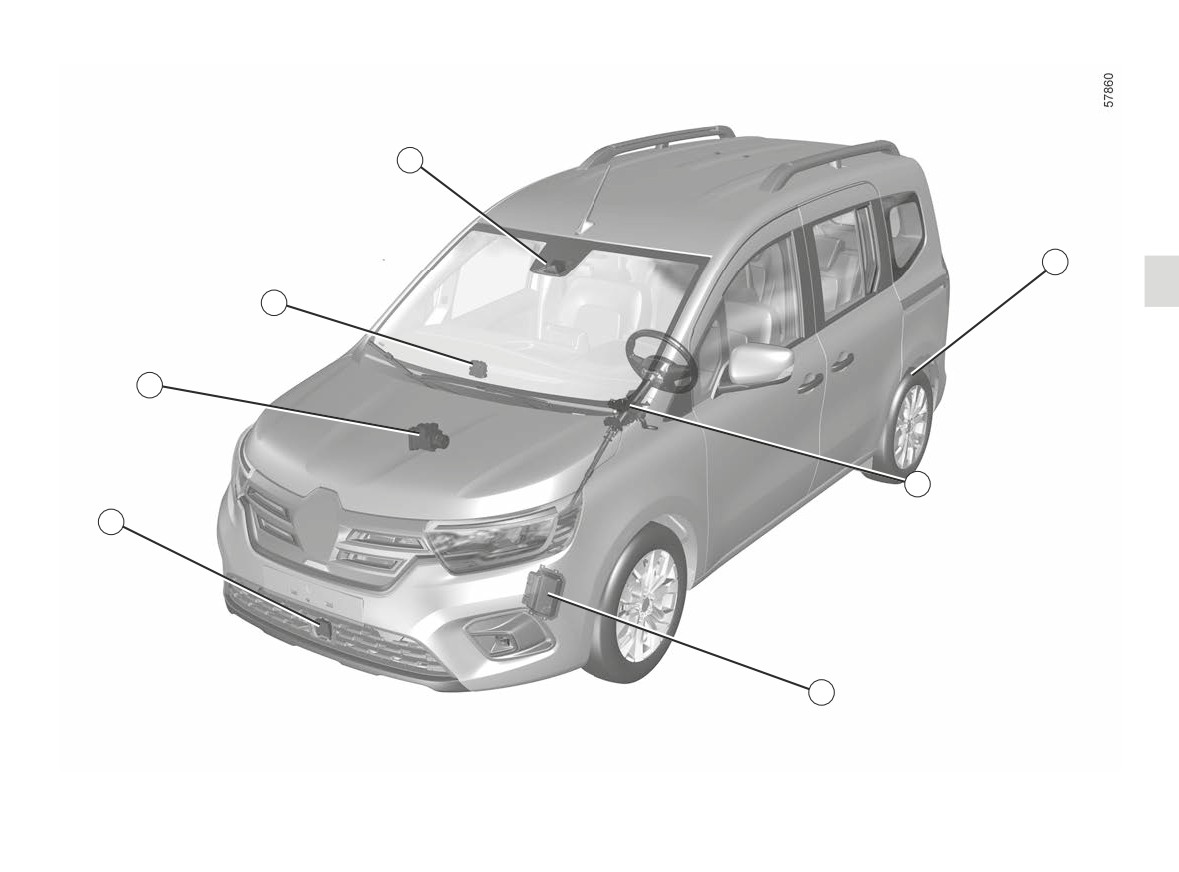
Computer 1
Power-assisted steering 4
Active vehicle control 7
Receives information from the radar
Operates the front wheels to assist the
This system provides information on
and camera to determine the vehicle
trajectory of your vehicle according to
vehicle dynamics to the computer 1
trajectory and speed (acceleration or
details transmitted by the 1 computer.
(speed, lateral acceleration, etc.) and
braking). Amongst other things, it con-
It also enables detection of the driver's
acts on the braking system to control
trols the system activation/deactivation
hands on the steering wheel.
deceleration and to keep the vehicle
parameters (door opening, etc.).
stationary.
Engine computer 5
Camera 2
It controls and directs the engine to
Detects markings on the ground and
carry out the required acceleration.
the position of vehicles on the various
traffic lanes. It complements the infor-
Radar 6
mation transmitted by the 6 radar.
Calculates the distance between your
Make sure the windscreen is not ob-
vehicle and the vehicle in front.
scured (by dirt, mud, snow, etc.).
The system's maximum range is ap-
proximately 150 m. This may vary ac-
Electronic parking brake 3
cording to the road conditions (ground
It the vehicle stationary under certain
relief, weather conditions, etc.)
conditions.
Ensure that the radar area is not ob-
structed (dirt, mud, snow, a badly fitted
front number plate), impacted, modified
(including painting) or hidden by any
accessory fitted on the front of the vehi-
cle (on the grille or logo etc.).
The
radar
and
camera
zones must be kept clean
and free of any tampering in
order to ensure the proper
operation of the system.
2.122
CarManuals2.co
MOTORWAY AND TRAFFIC ASSISTANT (5/16)
20
21
8
9
14
15
13
19
16
18
10
12
17
17
11
2.123
CarManuals2.co

MOTORWAY AND TRAFFIC ASSISTANT (6/16)
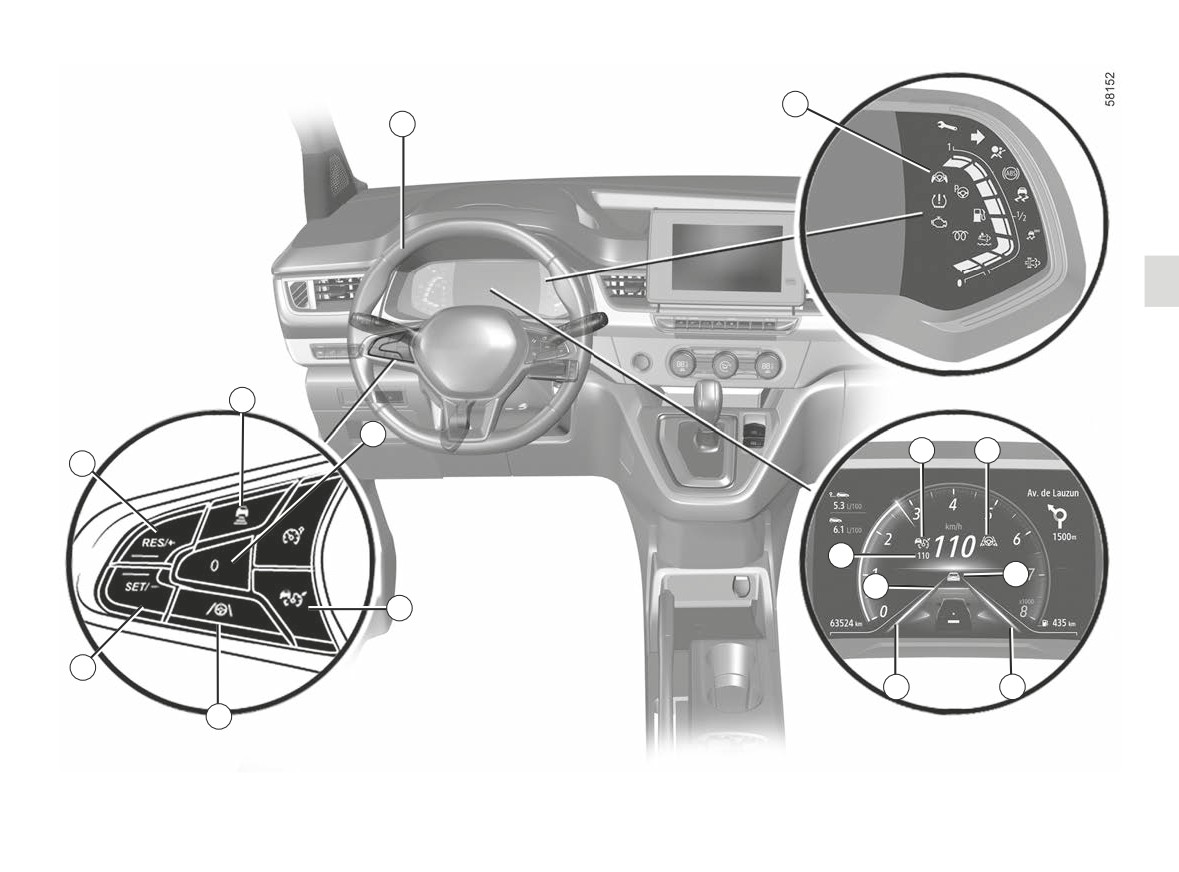
Controls
Displays on the instrument
Steering wheel 21
8
Safe distance settings
panel
The driver must always keep their
14 Stop and Go adaptive cruise con-
hands on the steering wheel. If too
9
Set active functions to standby
trol function warning light
much force is applied when turning the
(with cruising speed saved) (0).
steering wheel, the “Lane Centring”
10 Stop and Go Adaptive cruise con-
15 “Lane Centring” function warning
function is put on standby so the driver
light
trol main stop/start switch
can regain control of the vehicle.
11 “Lane Centring” function activa-
16 Vehicle in front.
Under certain conditions (sharp bends,
tion/deactivation switch
17 Left-hand and right-hand line indi-
etc.) a vibration may be triggered on the
12 Cruising speed activation, stor-
cators.
steering wheel to warn the driver that
age and decrease switch (SET/-).
they must regain control of the vehicle.
18
Stored safe distance.
13 Switch to activate and increase
If the driver does not handle the steer-
19
Stored cruising speed.
cruising speed or to recall the
ing wheel (no hands are detected) the
20 “Hands off steering wheel” detec-
“Lane Centring” function is deactivated
memorised cruising speed
tion warning light
after several alerts.
(RES/+).
2.124
CarManuals2.co
MOTORWAY AND TRAFFIC ASSISTANT (7/16)
15
11
17
17
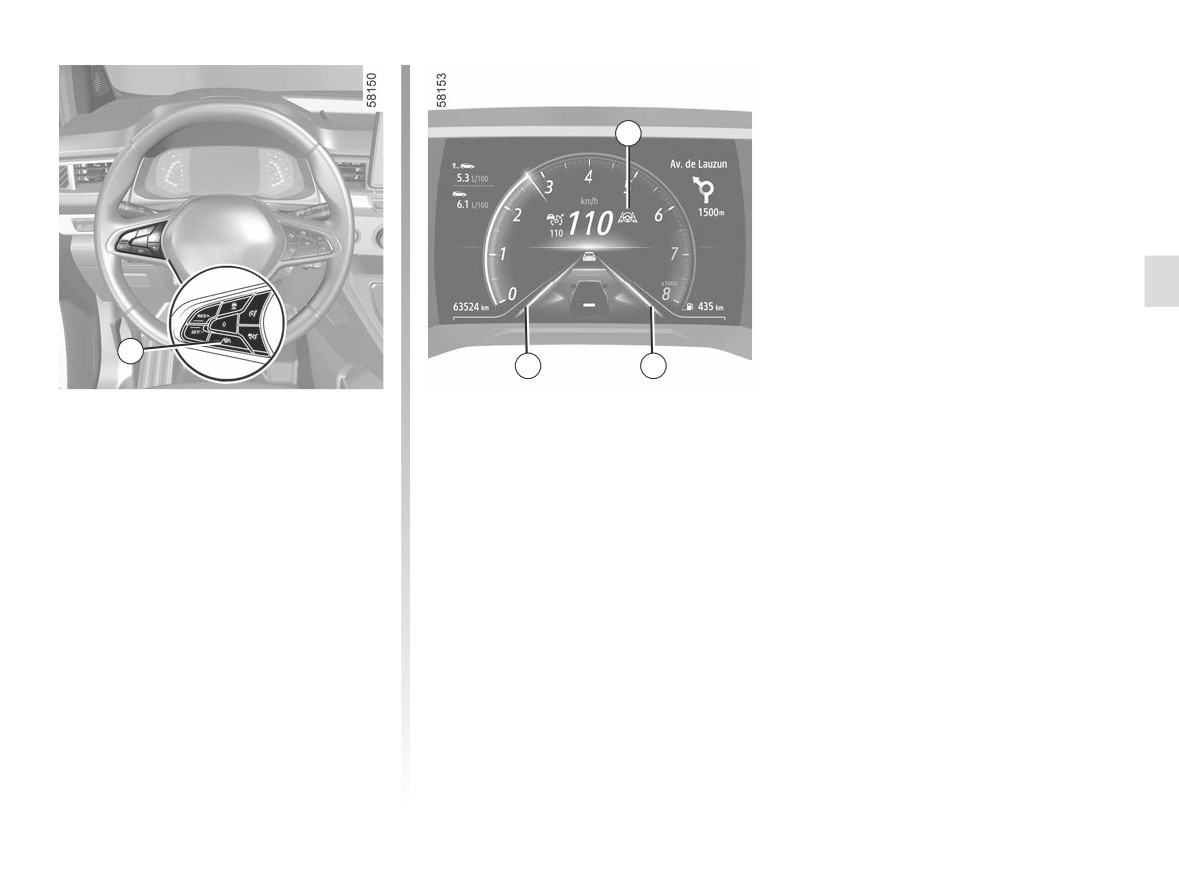
Activating the “Lane
The warning light 15
is displayed
in green and the left-hand and right-
Centring” function
hand line indicators 17 are displayed on
Once the Stop and Go adaptive cruise
the instrument panel to confirm that the
control is activated
➥ 2.105, press
function is activated and directing your
button 11 to activate the “Lane Centring”
vehicle to the centre of the lane.
function. The message “Lane centering
activated” appears on the instrument
Note: if you press button 11 when the
panel accompanied by the 15
Stop and Go adaptive cruise control is
warning light and the
symbol to
not activated, the message: “First acti-
confirm that the function is activated.
vate Adapt. cruise ct” appears on the
instrument panel.
Note: you must keep your hands on
the driving wheel when using the “Lane
Centring” function. The
symbol is
displayed to confirm that the function is
activated.
2.125
CarManuals2.co
MOTORWAY AND TRAFFIC ASSISTANT (8/16)
“Lane Centring” function on
- the vehicle speed is over approxi-
mately 99 mph (160 km/h);
standby
- the vehicle speed is below approxi-
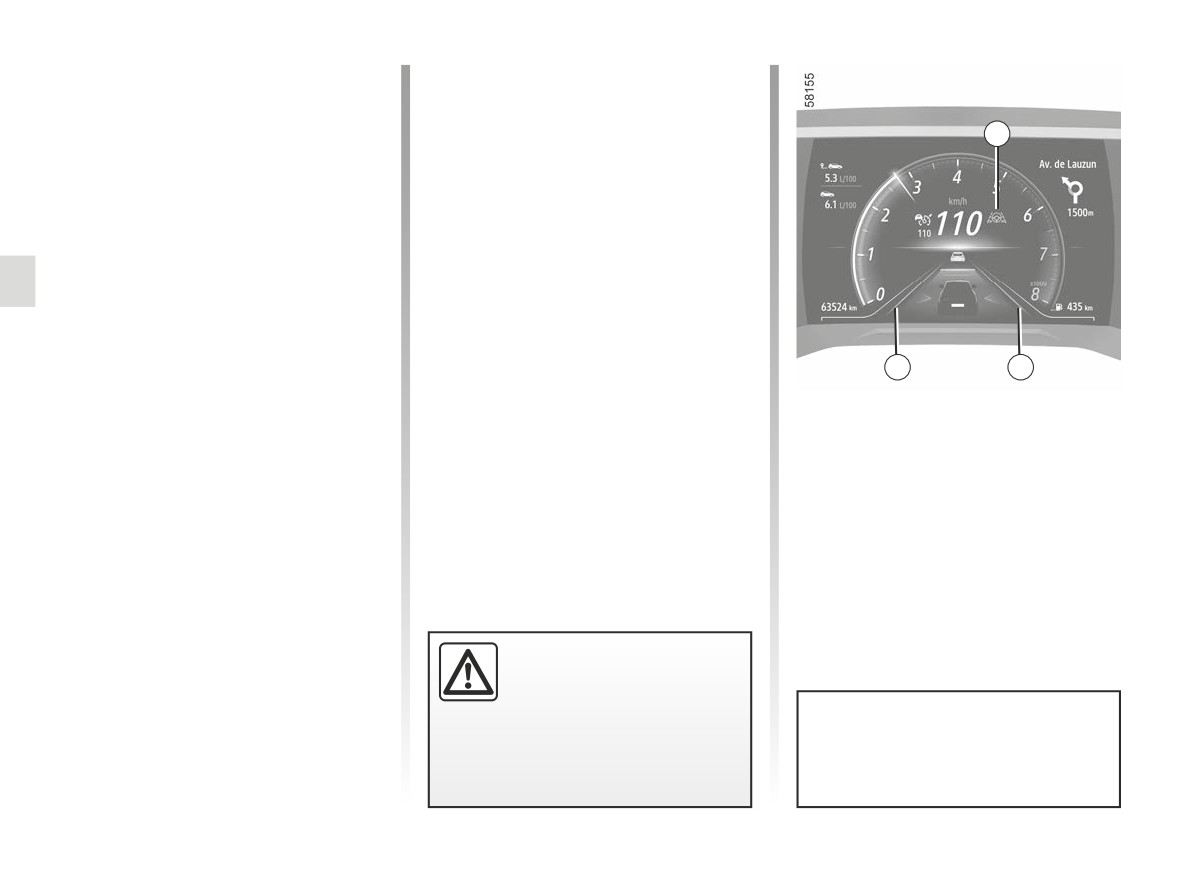
The “Lane Centring” function is put on
15
mately 37 mph (60 km/h), without
standby automatically when:
any vehicle in front;
- the Stop and Go adaptive cruise con-
- the vehicle touches or breaches a
trol is put on standby ➥ 2.105;
line;
- the system no longer detects the
- the system is temporarily disrupted
lines or only one line is detected in
(for example: camera obscured by
your lane;
dirt, mud, snow,condensation, etc.).
- the lane is too narrow or too wide;
Certain actions carried out by the driver
- the system does not detect any
also suspend the “Lane Centring” func-
hands on the steering wheel;
tion:
17
17
– the bend is too sharp.
- activating the indicators;
Once the conditions are met, the func-
- too much force is used when han-
tion again directs the vehicle to the
dling the steering wheel.
centre of the lane. The 15
warn-
Standby of the function is confirmed by
ing light and left-hand and right-hand
the 15
warning light and the left-
line indicators 17 are displayed in green
hand and right-hand line indicators 17
on the instrument panel.
appearing in grey on the instrument
panel.
Important: you should keep
your feet near the pedals
and your hands on the
steering wheel at all times
You can affect the vehicle trajec-
to prepare for any event.
tory at any point by turning the
steering wheel.
2.126
CarManuals2.co
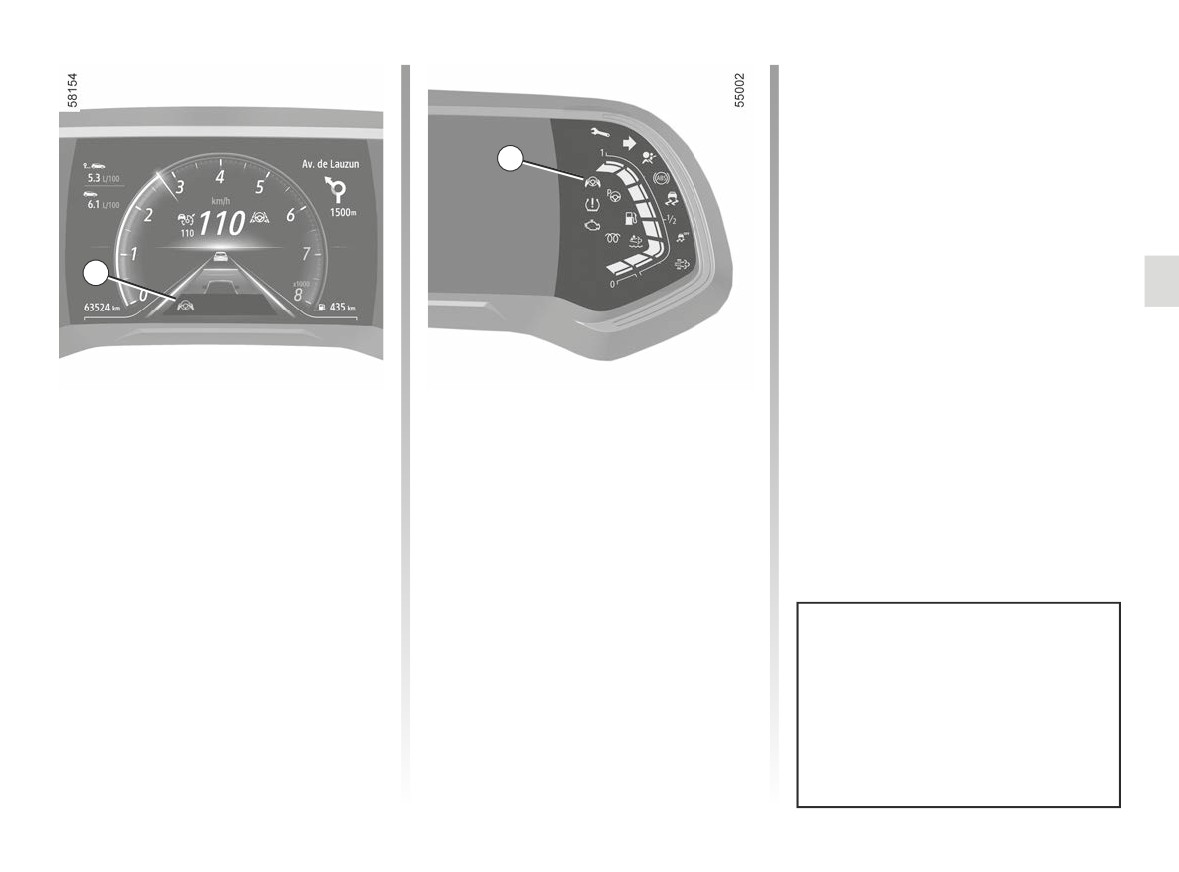
MOTORWAY AND TRAFFIC ASSISTANT (9/16)
Note: in some situations, the Lane
Centring function may no longer detect
your hands on the steering wheel and
may sound a signal:
20
- the vehicle is moving along a long
straight lane and the driver’s hands
are immobile on the steering wheel;
- the driver is holding the steering
wheel very lightly;
22
- ...
If the “Lane Centring” function is de-
activated due to the driver’s hands not
being detected on the steering wheel,
the Stop and Go adaptive cruise control
function continues to function.
“Hands off steering wheel”
- after approximately 30 seconds,
the message: “Keep hands on steer-
detection warning
ing wheel” appears on the instrument
When the “Lane Centring” function no
panel 22 and the warning light 20
longer detects your hands on the steer-
appears in red, accompanied
ing wheel, several warning levels will
by an audible signal of gradually in-
be triggered:
creasing volume;
- after
15 seconds, the message:
- after approximately 45 seconds,
“Keep hands on steering wheel” is
the audio sources go on standby, the
shown in yellow on the instrument
audible signal sounds continually,
panel 22;
the warning light 20
is switched
off and the message “Lane center-
In the first two alert levels, when the
ing deactivated” appears in red on
system again detects the presence
the instrument panel 22: the “Lane
of the driver’s hands on the steering
Centring” function is deactivated.
wheel, the system stops the alerts.
The function continues to direct the
vehicle to the centre of the lane.
2.127
CarManuals2.co
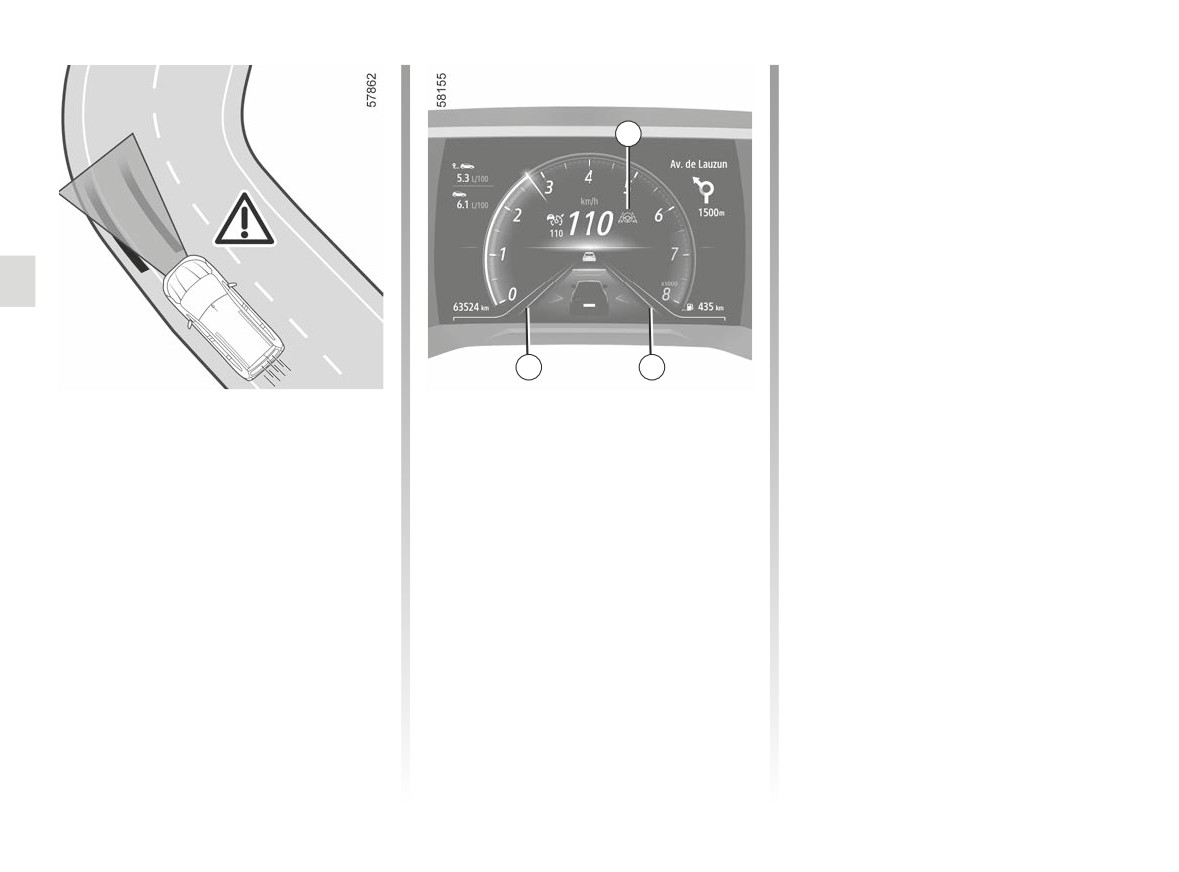
MOTORWAY AND TRAFFIC ASSISTANT (10/16)
If the vehicle crosses a line com-
pletely and moves out of lane, the
“Lane Centring” function is put on
15
standby. Standby of the function is
confirmed by the 15
warning light
and the left-hand and right-hand line in-
dicators 17 appearing in grey on the in-
strument panel.
17
17
In the case of a sharp bend
If the driver does not intervene, the
function triggers the vibration of the
In the case of a sharp band, and de-
steering wheel to signal that the vehi-
pending on the vehicle speed, the func-
cle is about to breach a line and that
tion’s side retaining capacities will be
the driver needs to carry out immediate
limited and require the driver to carry
action.
out immediate action on the steering
wheel so that the function can continue
The 15
warning light and the left-
to maintain the vehicle in the centre of
hand or right-hand line indicator 17
the lane.
appear in red on the instrument panel.
2.128
CarManuals2.co
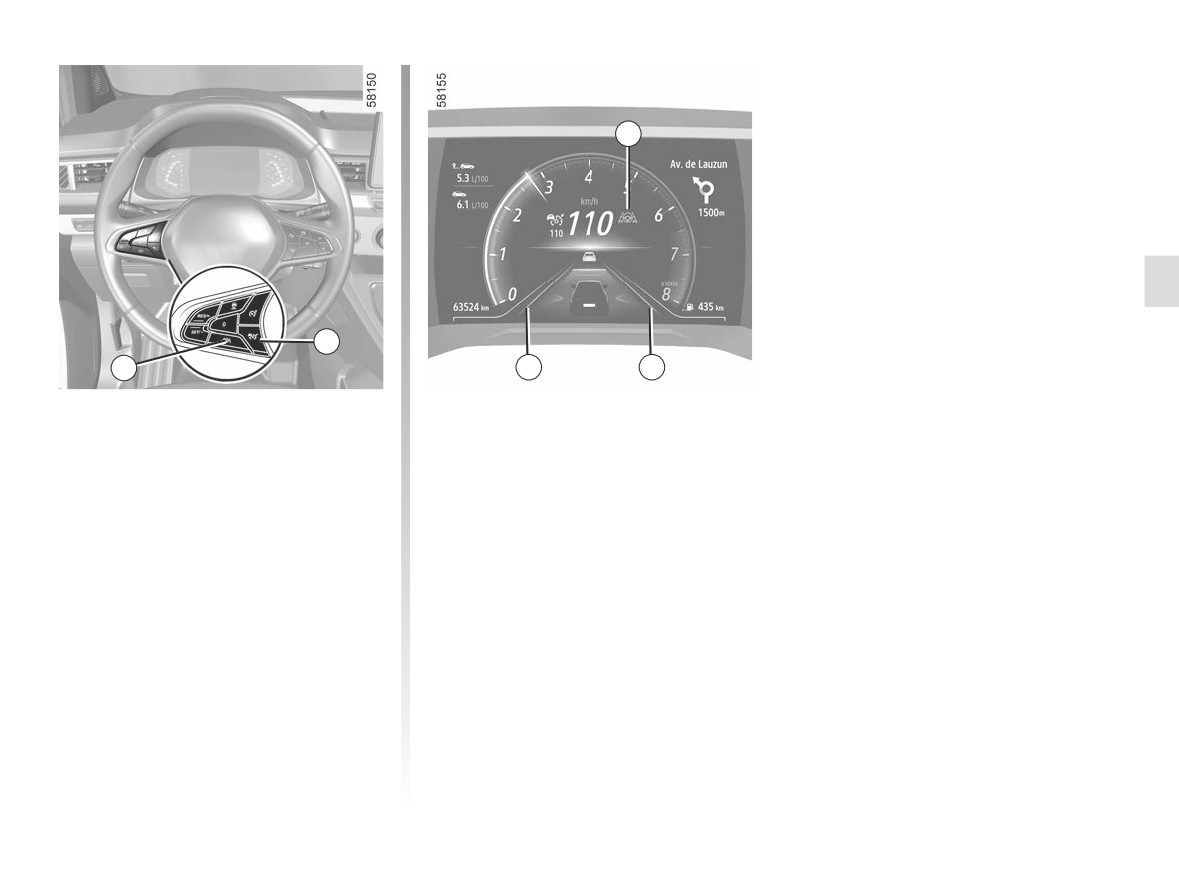
MOTORWAY AND TRAFFIC ASSISTANT (11/16)
15
10
11
17
17
Deactivating the “Lane
- the Stop and Go adaptive cruise
control is deactivated ➥ 2.105.
Centring” function
Note: pressing the 10
button
The “Lane Centring” function is deacti-
once deactivates both the Stop and
vated when:
Go adaptive cruise control function
- you press switch 11. The function’s
and the “Lane Centring” function;
deactivation is confirmed by the ap-
- the system will no longer detect the
pearance of the message: “Lane cen-
driver’s hands on the steering wheel
tering deactivated” on the instrument
for a period over 45 seconds approx-
panel.
imately.
Note: pressing the 11 switch once
The 15
warning light and the left-
deactivates the
“Lane Centring”
hand and right-hand line indicators 17
function but does not affect operation
disappear from the instrument panel.
of the Stop and Go adaptive cruise
control function;
2.129
CarManuals2.co

MOTORWAY AND TRAFFIC ASSISTANT (12/16)
Temporary unavailability
- a military or airport zone.
If a Stop and Go adaptive cruise control
function operating fault is detected, the
The radar is able to detect vehicles
You must leave such areas in order for
message “Check Adaptive Cruise con-
in front of your vehicle. The system
the function to work.
trol” appears on the instrument panel
cannot operate correctly if the radar de-
In all cases, if the message is not
and both the Stop and Go adaptive
tection area is obscured or if its signal
erased after the engine is restarted,
cruise control and Lane Centring func-
is disrupted.
please contact an authorised dealer.
tions are suspended.
If the radar detection area is obstructed
or the radar signal is disrupted, the
Consult an approved dealer.
message “Front radar no visibility” is
Operating faults
If an operating fault is detected on one
displayed on the instrument panel and
If a Lane Centring function operating
or more components of the “Motorway
the Stop and Go adaptive cruise con-
fault is detected, the message “Lane
and Traffic Assistant” system, the
trol is interrupted. The green warning
centering to check” is displayed on the
warning light appears on the in-
light
disappears to confirm that
instrument panel and the function is
strument panel, alongside, depending
the function has been automatically de-
disabled.
on the nature of the fault, the message:
activated.
The Stop and Go adaptive cruise con-
- “Front camera to check”;
Ensure that the radar area is not ob-
trol function remains in operation.
structed (dirt, mud, snow, a badly fitted
- “Front radar to check”;
front number plate), impacted, modified
Consult an approved dealer.
- “Camera/Radar to check”;
(including painting) or hidden by any
accessory fitted on the front of the vehi-
- “Check vehicle”.
cle (on the grille or logo etc.).
The Stop and Go adaptive cruise con-
Conditions in certain geographical
trol function and Lane Centring function
areas may hinder the function, for ex-
are both suspended.
ample:
- arid zones, tunnels, long bridges or
Consult an approved dealer.
lightly used roads without road lines,
without signs or trees nearby;
2.130
CarManuals2.co

MOTORWAY AND TRAFFIC ASSISTANT (13/16)
The “Motorway and Traffic Assistant” function is an additional driving aid. This system does not take the place of the
driver.
Therefore, it can under no circumstances replace the driver’s responsibility to respect speed limits and safe distances
and to be vigilant (the driver must always be ready to brake).
The driver must always be in control of the vehicle. The driver must always adapt their trajectory and speed according to the
surroundings and traffic conditions.
The “Motorway and Traffic Assistant” uses the Stop and Go adaptive cruise control function and the Lane Centring function. It
must only be used on a motorway or multi-lane road (separated by a barrier).
It must not be used in heavy traffic, on winding or slippery roads (black ice, aquaplaning, gravel) or during bad weather (fog,
rain, side winds etc.).
There is a risk of accidents.
2.131
CarManuals2.co

MOTORWAY AND TRAFFIC ASSISTANT (14/16)
The “Motorway and Traffic Assistant” function is an additional driving aid. it can under no circumstances replace the
driver's responsibility to respect speed limits and safe distances and to be vigilant.
The driver must always be in control of the vehicle.
The driver must always adapt their trajectory and speed according to the surroundings and driving conditions, regard-
less of system indications.
Except for lines delimiting lanes, traffic indicators (traffic lights, traffic signs except for speed limit signs within the limits of the
system’s detection capacity, pedestrian crossings, etc.) are not recognised by the system. These do not trigger any alert or
reaction by the system.
The “Motorway and Traffic Assistant” uses the Stop and Go adaptive cruise control function and the Lane Centring function.
The system should under no circumstances be taken to be an obstacle detector or an anti-collision system.
The Motorway and Traffic Assistant function must only be used on a motorway or multi-lane road separated by a barrier.
System servicing/repairs
- In the event of an impact, the radar and/or camera alignment may be changed and its operation may consequently be af-
fected. Deactivate the system and consult an authorised dealer.
- Any work in the proximity of the radar and/or camera (replacements, repairs, windscreen modifications, paintwork etc.) must
be carried out by a qualified professional.
Only an authorised dealer is qualified to service the system.
2.132
CarManuals2.co

MOTORWAY AND TRAFFIC ASSISTANT (15/16)
Deactivating the system
You must deactivate the system if:
- the vehicle is travelling on a windy road;
- the vehicle is being towed (breakdowns);
- the vehicle is towing a trailer or a caravan;
- the vehicle is being driven in a tunnel or close to a metallic structure;
- the vehicle arrives at a toll point, a roadwork area or on a narrow lane;
- the vehicle is being driven up or down a very steep slope;
- the visibility is poor (glaring sun, fog etc.);
- the weather conditions are poor (rain, snow, side winds, etc.);
- the vehicle is being driven on a slippery road surface (rain, snow, gravel, etc.);
- the camera area has been damaged (e.g. interior or exterior windscreen area); the windscreen is cracked or distorted;
- the radar area has been damaged (impacts, etc.) ;
- the surface of the steering wheel is damaged or damp.
In the event of the system behaving abnormally, deactivate it and consult an authorised dealer.
2.133
CarManuals2.co

MOTORWAY AND TRAFFIC ASSISTANT (16/16)
Some conditions can disrupt or damage the operation of the system, for example:
- obstruction of the windscreen or the radar area (by dirt, ice, snow, condensation etc.) Frequently check the cleanli-
ness and condition of the windscreen, front wiper blades and front bumper;
- a complex environment (tunnel etc.);
- poor weather conditions (snow, heavy rain, hail, black ice, etc.);
- poor visibility (night, fog etc.);
- poor contrast between the vehicle preceding it and the surrounding area (e.g. white vehicle in a snowy area etc.) ;
- being dazzled (glaring sun, lights of vehicles travelling in the opposite direction etc.);
- narrow, winding or undulating road (tight bends etc.);
- the tar lines detected as a line by the system;
- narrowing/widening lanes;
- road markings which are worn, lacking in contrast or very widely spaced from one another (lines partially erased etc);
- multiple markings on the road (roadworks area, slip roads connecting to adjacent motorways, hard shoulder etc.);
- road signs that do not include an arrow, located in a motorway exit;
- an area with low connectivity that makes it impossible to geolocate the vehicle or maps that are not up-to-date;
- a slower vehicle with a significant difference in speed;
- use of mats not adapted to the vehicle. On the driver’s side, only use mats suitable for the vehicle, attached with the pre-
fitted components, and check the fitting regularly. Do not lay one mat on top of another. There is a risk of wedging the
pedals.
In these cases, the system may wrongly intervene.
- Risk of unwanted braking or acceleration.
- Risk of unwanted, incorrect correction or no correction of trajectory.
Many unforeseen situations may affect the system operation. Certain objects or vehicles that can appear in the camera or
radar detection zone may be interpreted by the system incorrectly, possibly leading to inappropriate acceleration or braking.
You should always be attentive to sudden events that might occur while you are driving. Always maintain your vehi-
cle under control by keeping your feet near the pedals and your hands on the steering wheel, so that you are ready
to act in any event.
2.134
CarManuals2.co
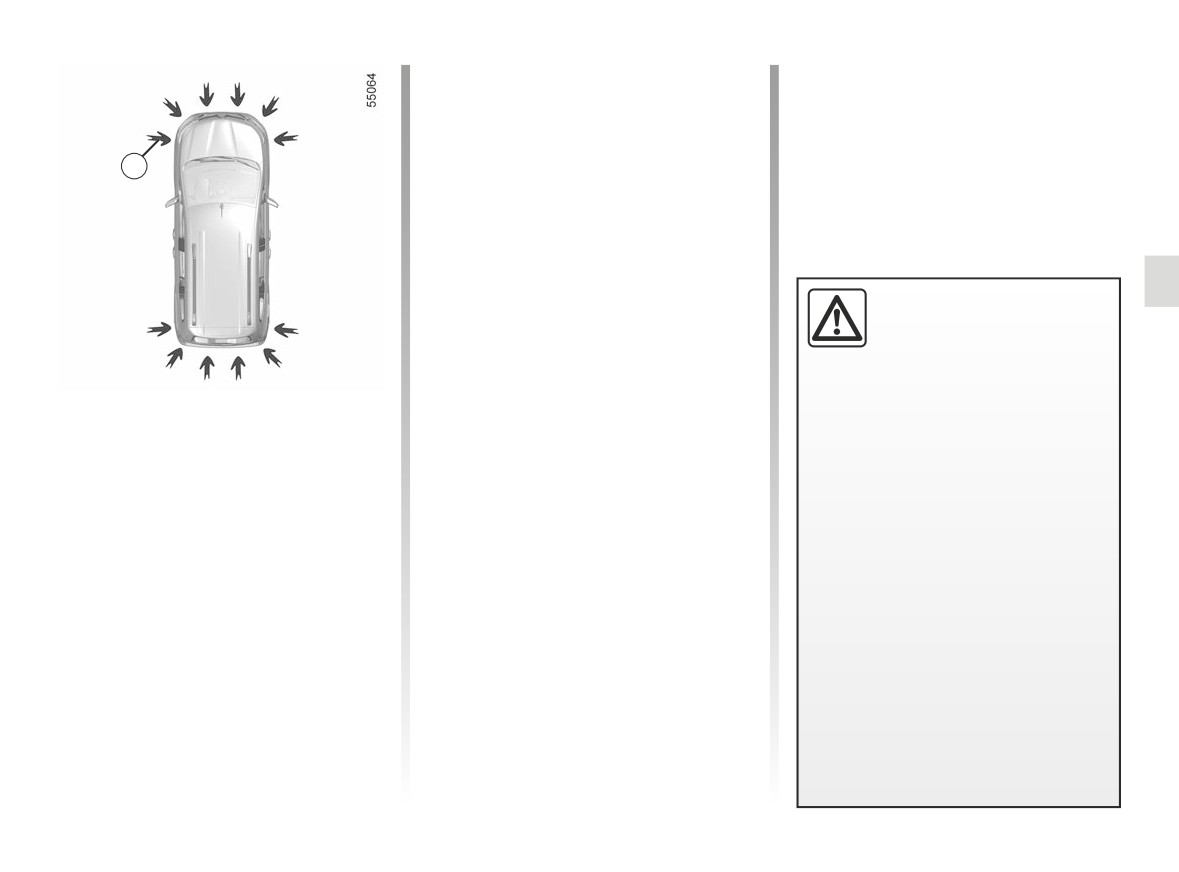
PARKING DISTANCE CONTROL (1/8)
Depending on the vehicle, the system
detects obstacles to the front, the rear
and the sides of the vehicle.
The parking distance control system
1
is only activated when the vehicle is
driven at a speed below approximately
6 mph (10 km/h).
The function does not take into account
towing or carrying systems that are not
recognised by the system.
This function is an addi-
Location of the ultrasonic sensors 1
tional aid that uses sound
signals to indicate the dis-
Ensure that the ultrasonic sensors indi-
tance between the vehicle
cated by the arrows 1 are not obscured
and an obstacle during reversing.
(by dirt, mud, snow, a badly fitted/at-
Operating principle
tached number plate), impacted, mod-
Under no circumstances should it
ified (including paintwork) or obstructed
replace the driver’s care or respon-
Ultrasonic sensors, indicated by the
by any accessory fitted to the rear and/
sibility whilst reversing.
arrows 1, are fitted in the rear bumper
or, depending on the vehicle, to the
(and in the front bumper, depending on
The driver should always be ready
front or sides of your vehicle.
the vehicle) to measure the distance
for sudden incidents while driv-
between the vehicle and an obstacle.
ing: always ensure that there are
no small, narrow moving obstacles
This measurement is indicated by
(such as a child, animal, pushchair,
beeps which become more frequent the
bicycle, stone, post, etc.) in the blind
closer you come to the obstacle, until
spot when manoeuvring.
they become a continuous beep when
the vehicle is approximately 30 centi-
metres from the obstacle.
2.135
CarManuals2.co
PARKING DISTANCE CONTROL (2/8)
Note: in the event of a change in tra-
2
jectory during a manoeuvre, the risk of
C
collision with an obstacle may be sig-
nalled late.
A
B
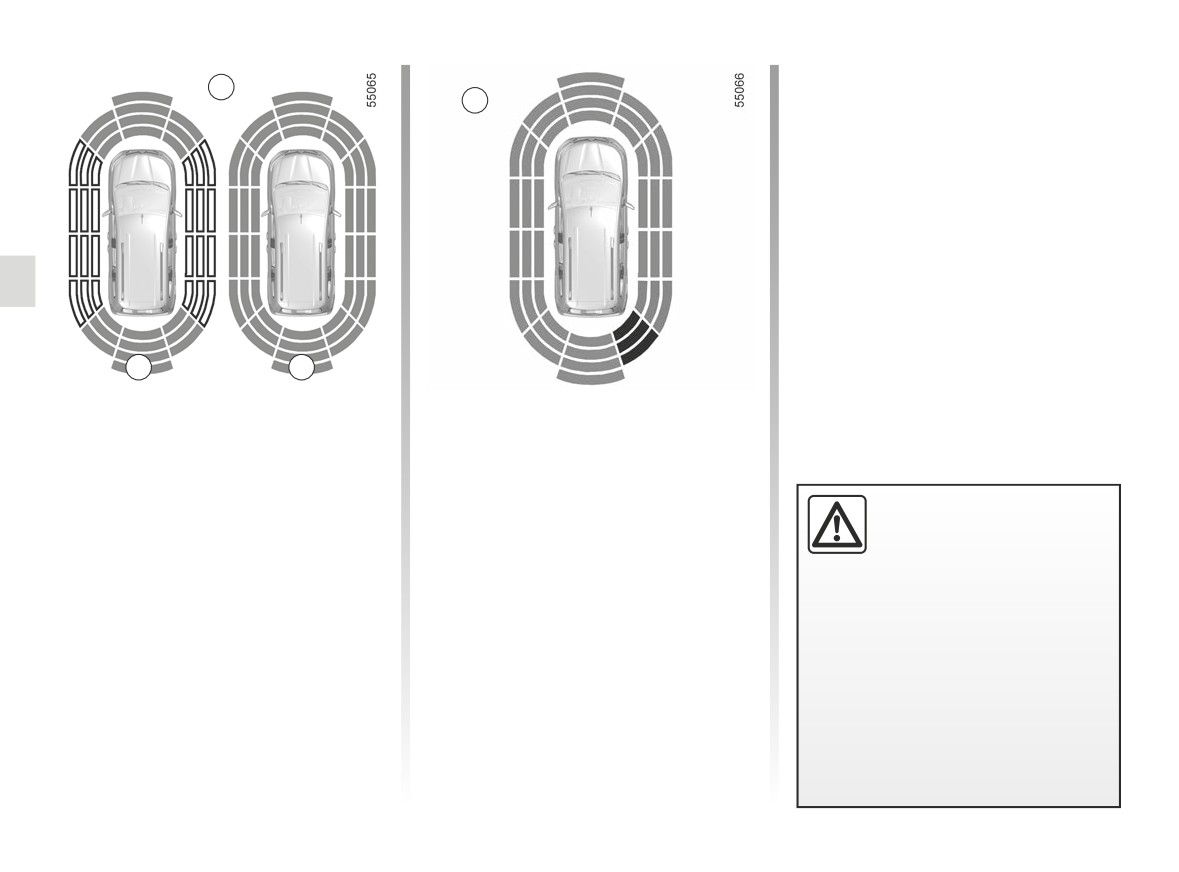
Note: the display 2 shows the vehicle
Operation
surroundings and emits beeps.
Most objects located less near the
It is necessary to travel a few metres
front, rear and sides of the vehicle are
before the side detection is activated.
detected.
If all areas have a grey background, the
Depending on the distance of the ob-
An impact to the under-
whole area around the vehicle is being
stacle, the frequency of the beep will
side of the vehicle while
monitored:
be higher while approaching it, and
manoeuvring
(e.g. strik-
will become a continuous beep around
ing a post, raised kerb or
- A: analysis of the vehicle surround-
20 cm away for obstacles to the sides,
other street furniture) may result in
ings in progress;
and around 30 cm for obstacles to the
damage to the vehicle (e.g. defor-
- B: analysis of the vehicle surround-
mation of an axle).
front or rear. The green, orange (or
ings carried out.
yellow depending on the vehicle) and
To avoid any risk of accident, have
red zones will be shown on the dis-
your vehicle checked by an ap-
play C.
proved dealer.
2.136
CarManuals2.co
PARKING DISTANCE CONTROL (3/8)
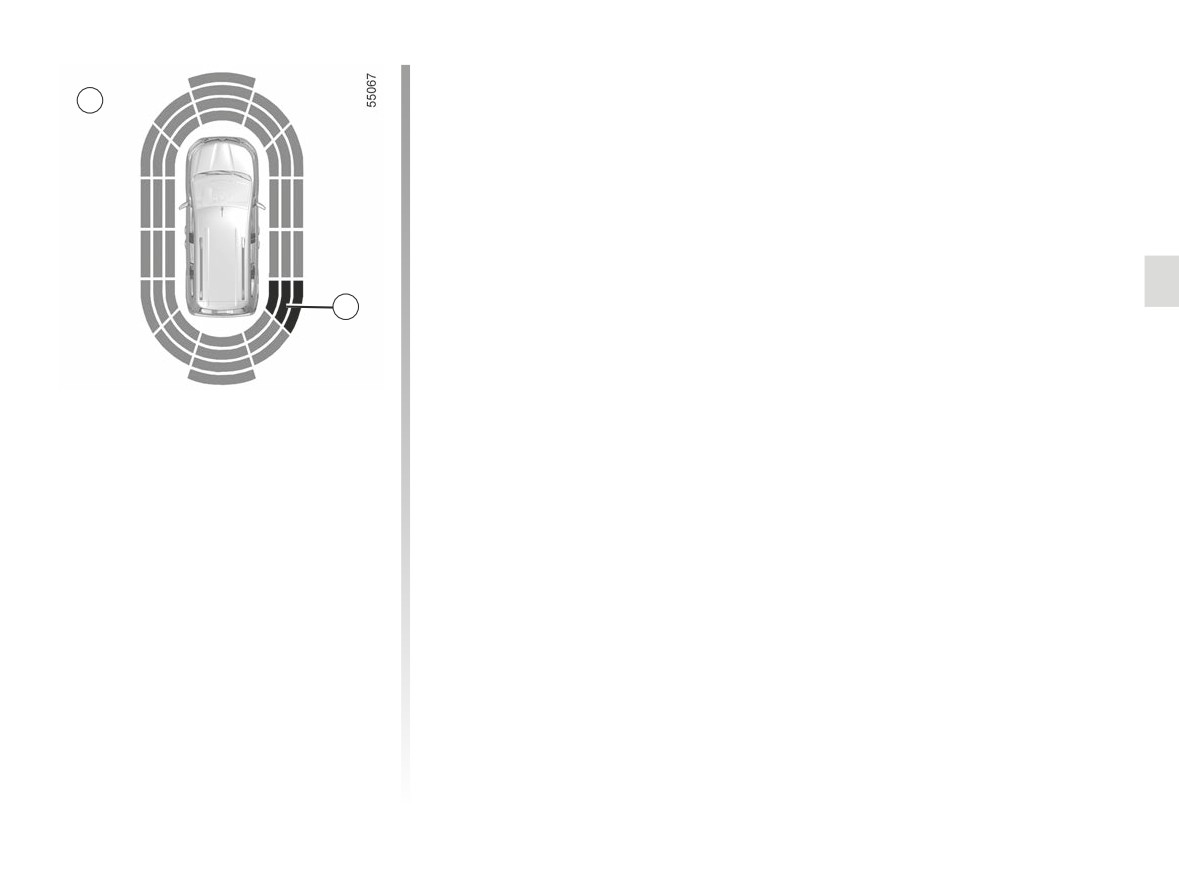
If a side obstacle is detected:
D
- the beeps become faster and then
sound continuously as the obstacle
gets nearer. Green, orange and red
zones will be displayed on the dis-
play D;
- if there is no risk of collision, no beep
will sound when approaching the ob-
stacle. Green, orange and red zones
will be displayed interspersed on the
display D.
3
Note: in the event of a change in tra-
jectory during a manoeuvre, the risk of
collision with an obstacle may be sig-
nalled late.
Detection of obstacles to the side
Depending on the direction of the
wheels, the system determines the tra-
jectory of the vehicle and notifies the
driver of any risk or otherwise of a col-
lision with an obstacle 3 to the side of
the vehicle.
2.137
CarManuals2.co
PARKING DISTANCE CONTROL (4/8)
Adjustment
4
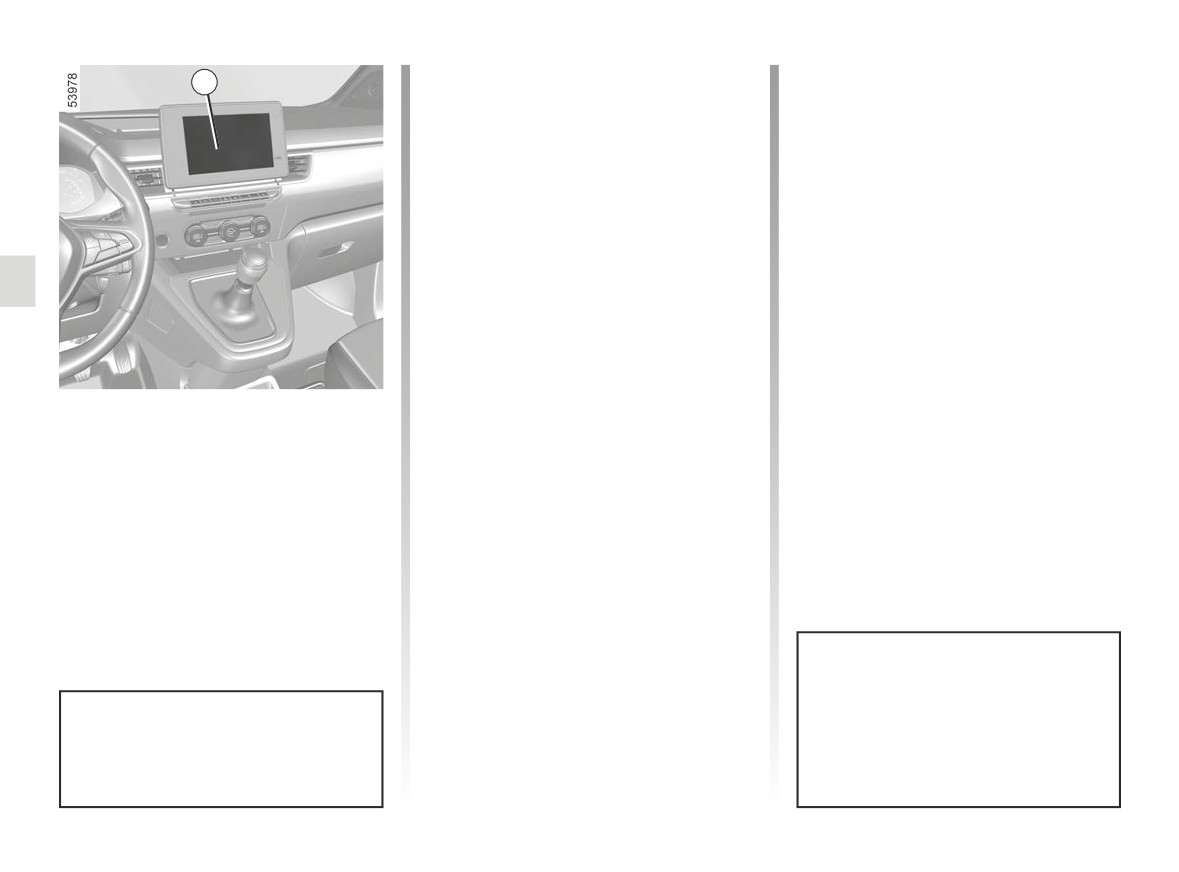
Depending on the vehicle, with the
engine running, some settings can be
adjusted from the multimedia screen 4.
Please refer to the multimedia instruc-
tions for further information.
Parking distance control audio
volume
Adjust the volume of the parking dis-
tance control by pressing + or -.
System sound
Enables the system sound to be
chosen.
Vehicles fitted with a
Deactivating the system sound
multimedia screen
Activate or deactivate the parking dis-
Activation/deactivation
tance control sound.
To activate or deactivate the various
Note: if you deactivate the sound, you
zones covered by the ultrasonic detec-
will no longer be notified with beeps
tors from the multimedia screen 4, refer
when approaching an obstacle.
to the multimedia instructions.
Select “ON” or “OFF”.
When the vehicle is travelling at a
speed below approximately 6 mph
(10 km/h), some noises (motorcy-
When the engine is started, the
cle, lorry, pneumatic drill etc.) may
system recalls the last position
trigger the beeping sound of the
stored before the ignition was
parking distance control.
switched off.
2.138
CarManuals2.co
PARKING DISTANCE CONTROL (5/8)
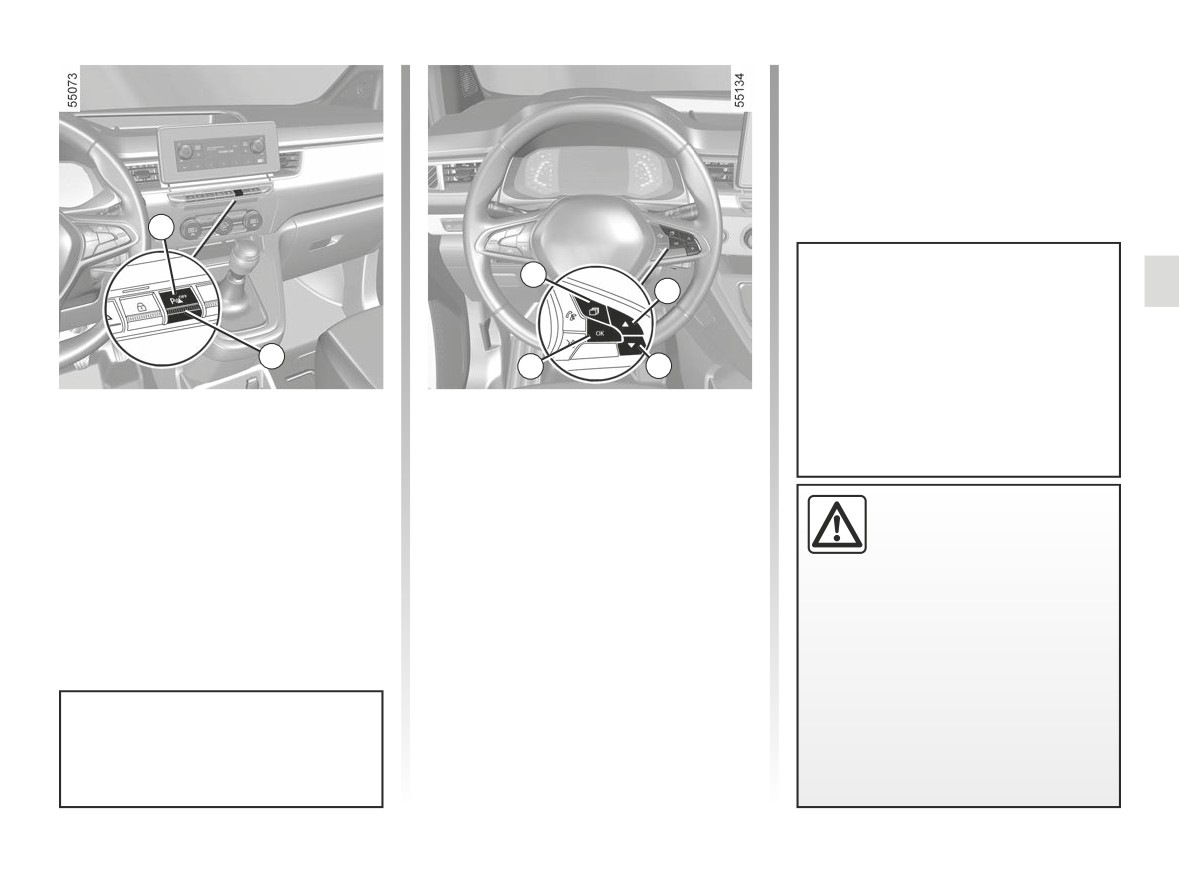
- press the 8 or 9 control repeatedly
to reach the “PARKING ASSIST”
menu. Press the switch 10 OK;
- select “ON” or “OFF” to activate or
deactivate the function.
5
7
8
If the 6 button cannot be used to re-
activate Park Assist, check that the
function has not been deactivated
on the instrument panel. To reacti-
6
10
9
vate it, please refer to the paragraph
entitled “Special feature on vehicles
Vehicles not fitted with a
Special feature on vehicles fitted
fitted with front, rear and side Park
with front, rear and side Park Assist
multimedia screen
Assist”.
You can also activate/deactivate the
Activation/deactivation
function from the instrument panel:
With the vehicle stopped, press the 6
- with the vehicle stationary, press
An impact to the under-
switch to deactivate parking distance
the 7 switch as many times as re-
side of the vehicle while
control. Warning light 5 in the switch
quired to reach the “Vehicle” tab;
manoeuvring
(e.g. strik-
lights up. Press again on the 6 switch to
ing a post, raised kerb or
- press the 8 or 9 control repeatedly to
activate the function. The indicator light
other street furniture) may result in
reach the “Settings” menu. Press the
built into the 5 switch goes out.
damage to the vehicle (e.g. defor-
switch 10 OK;
mation of an axle).
To avoid any risk of accident, have
your vehicle checked by an ap-
proved dealer.
When the engine is started, the
system recalls the last position
stored before the ignition was
switched off.
2.139
CarManuals2.co
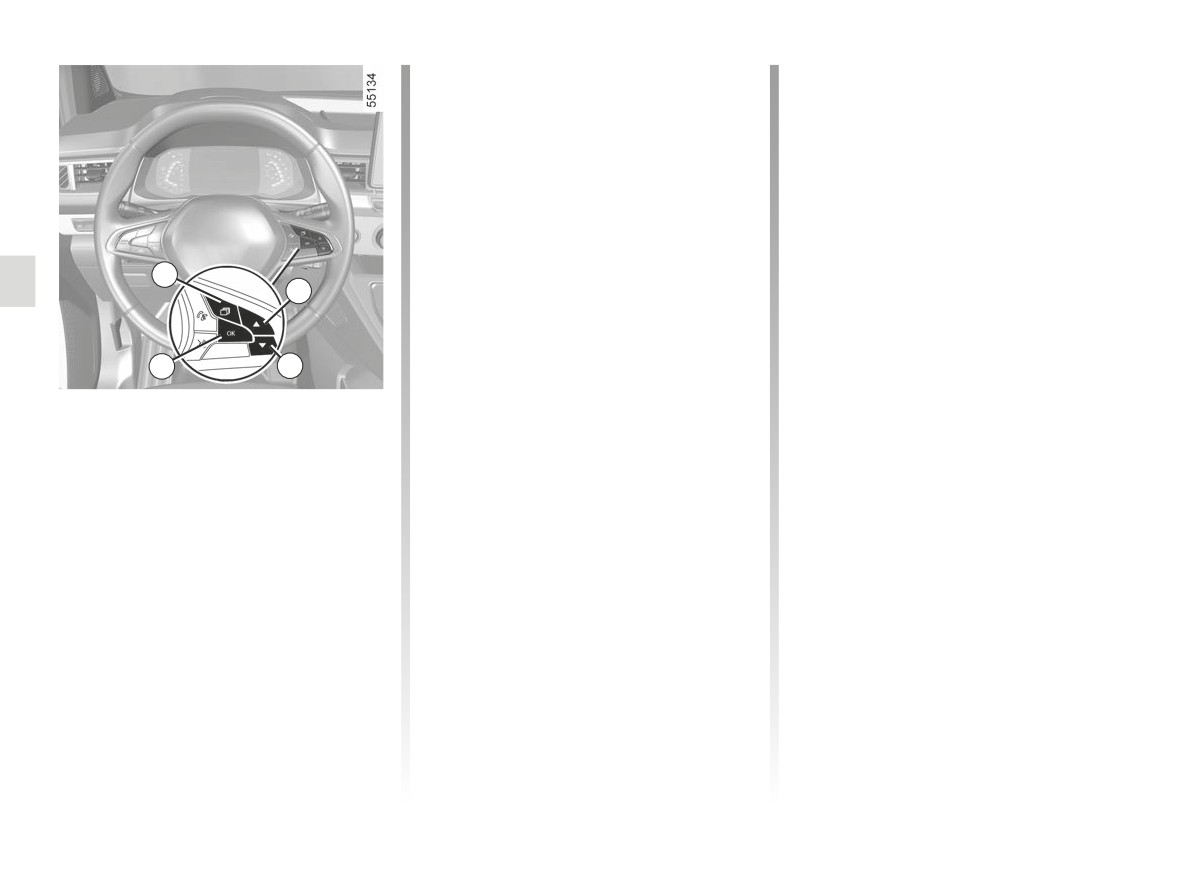
PARKING DISTANCE CONTROL (6/8)
- select “Beep volume” to adjust the
Deactivating the parking
volume of Park Assist using control 8
distance control manually
or 9.
You must disable the function if:
- if towing, carrying or trailer equip-
Automatic deactivation of the
ment that is unrecognised by the
parking distance control
system is present in front of the ul-
The system deactivates:
trasonic sensors;
- when the vehicle speed is above ap-
- in the event of damage to the ultra-
7
proximately 6 mph (10 km/h);
sonic sensors.
8
- depending on the vehicle, when the
vehicle is stationary for more than
Operating faults
approximately three seconds and an
When the system detects an operating
10
9
obstacle is detected (such as when
fault, a beep sounds for approximately
in a traffic jam etc.);
three seconds each time reverse gear
Adjustment
- when the vehicle is in neutral on
is selected and is accompanied by
- With the vehicle stopped, press the 7
manual gearboxes, or in position N
the message “Check parking sensor”
switch as many times as required to
or P on automatic gearboxes;
shown on the instrument panel. Consult
reach the “Vehicle” tab;
an approved dealer.
- when an operating fault is detected.
- press the 8 or 9 control repeatedly to
Note: if the vehicle is fitted with a
reach the “Settings” menu. Press the
towbar recognised by the system, only
switch 10 OK;
the rear Park Assist is deactivated.
- press the 8 or 9 control repeatedly
to reach the “PARKING ASSIST”
menu. Press the switch 10 OK;
2.140
CarManuals2.co

PARKING DISTANCE CONTROL (7/8)
System servicing/repairs
- In the event of an impact, the alignment of the sensors may be altered and their operation may consequently be affected.
Deactivate the function and consult an authorised dealer.
- Any work in the area where the sensors are located (repairs, replacements, etc.) must be carried out by a qualified profes-
sional.
Only an authorised dealer is qualified to service the system.
System disturbance
Some conditions can disrupt or damage the operation of the system, for example:
- poor weather conditions (rain, snow, hail, black ice, etc.);
- in the event of exposure to strong electromagnetic waves (under high-voltage lines, etc.);
- some types of noise (motorcycle, lorry, pneumatic drill etc.);
- fitting a non-compatible towing ball or hook;
- ...
Risk of false alarms or absence of warnings
In the event of the system behaving abnormally, deactivate it and consult an authorised dealer.
2.141
CarManuals2.co

PARKING DISTANCE CONTROL (8/8)
Limitation of the system operation
- The area around the sensors must be kept clean and free of any modifications in order to ensure the proper operation of the
system.
- Small objects moving close to the vehicle (motorcycles, bicycles, pedestrians, etc.) may not be recognised by the system.
- The system may not detect objects that are too close to the vehicle.
- The system may not provide a warning when the other vehicles or objects are travelling at a significantly different speed.
- When there is a change in trajectory during a manoeuvre, the system may be slow in reporting obstacles.
- When the vehicle is towing a trailer, the rear Park Assist system must be deactivated.
Deactivating the function
You must disable the function if:
- the area around the sensors has been damaged;
- the vehicle is equipped with a towing device that is not recognised by the system (electrical adapter, ball, hook, etc.).
2.142
CarManuals2.co
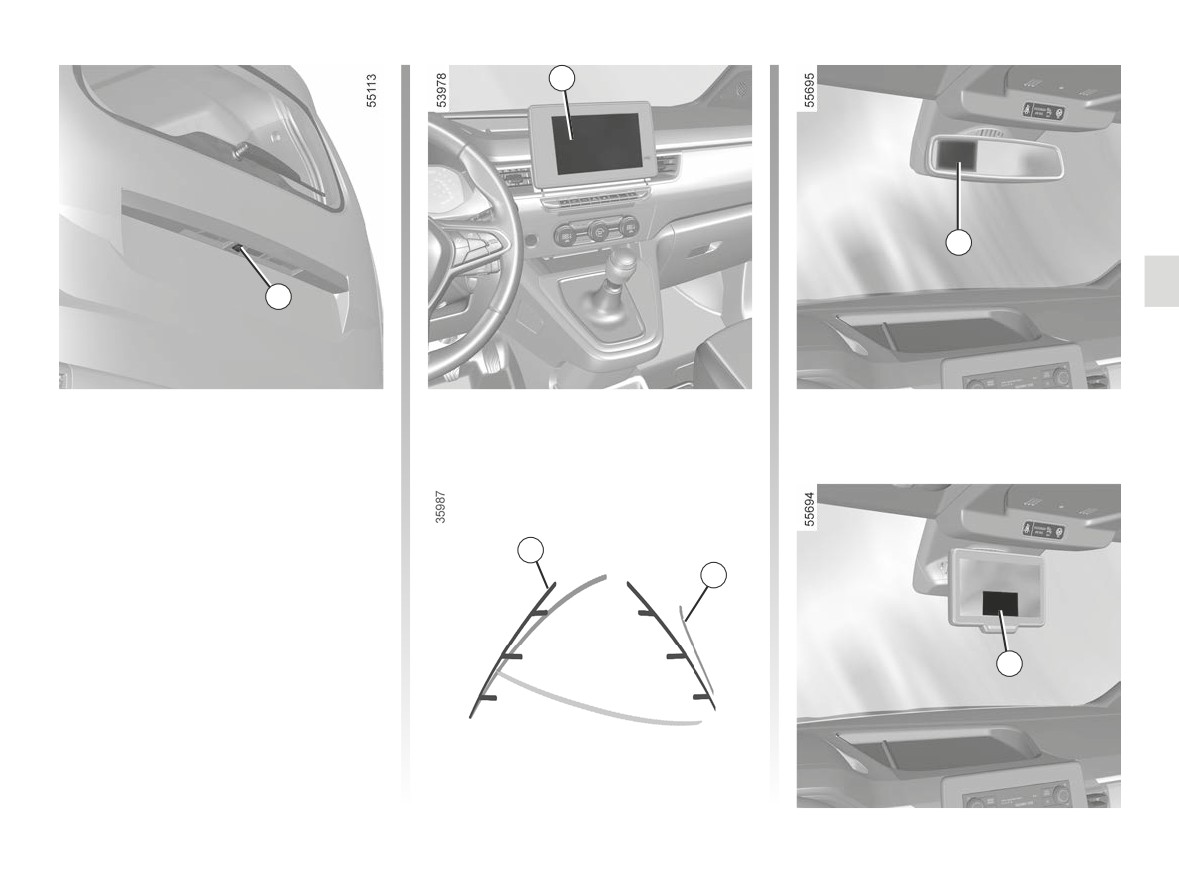
REVERSING CAMERA (1/4)
2
3
1
Operation
Depending on the vehicle, when the re-
verse gear is engaged, the camera 1
located on the tailgate or on the rear
hinged door transmits a view of the sur-
roundings behind the vehicle to:
- the multimedia screen 2, accom-
5
panied by one or two guidelines 5
6
and 6 (fixed and moving);
or
- the rear view mirror 3, accompanied
by a fixed guideline 5;
4
or
- the camera rear view system
screen 4, accompanied by a fixed
guideline 5.
2.143
CarManuals2.co
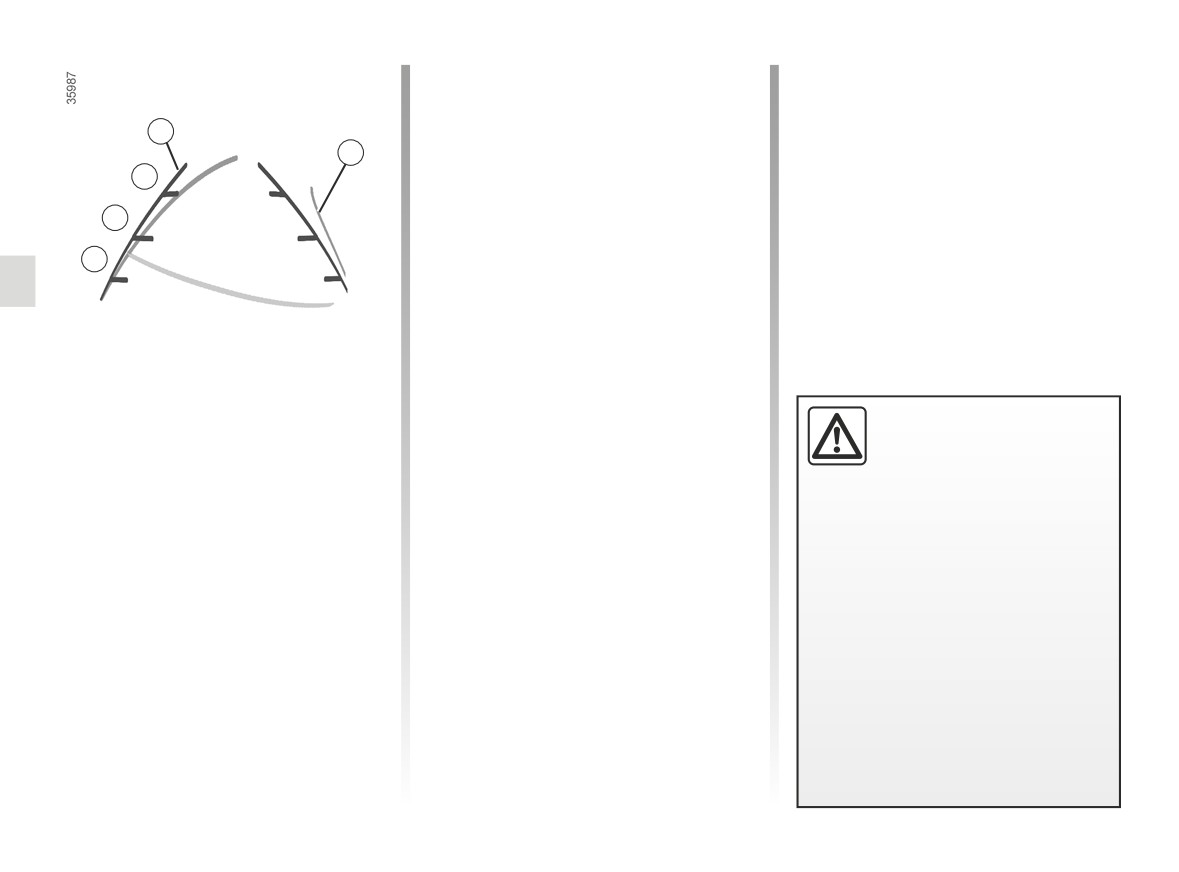
REVERSING CAMERA (2/4)
Fixed clearance gauge 5
6 moving guide line:
The fixed clearance gauge comprises
This is shown in blue and indicates
coloured markers A, B and C indicating
the vehicle trajectory in relation to the
5
the distance behind the vehicle:
steering wheel position.
6
C
- A(red) approximately 30 centimetres
from the vehicle;
Special feature
B
- B(yellow) approximately 70 centime-
Make sure that the camera is not ob-
tres from the vehicle;
scured (by dirt, mud, snow, condensa-
A
- C(green) approximately 150 centi-
tion etc.).
metres from the vehicle.
This gauge remains fixed and indicates
the vehicle trajectory if the wheels are
in line with the vehicle.
This system uses several guidelines for
This function is an additional
its operation (mobile for trajectory and
aid. It cannot, therefore,
fixed for distance). When the red zone
under any circumstances
is reached, use the bumper image to
replace the vigilance or the
stop accurately.
responsibility of the driver.
The driver should always be ready
for sudden incidents while driv-
ing: always ensure that there are
no small, narrow moving obstacles
(such as a child, animal, pushchair,
bicycle, stone, post, etc.) in the blind
spot when manoeuvring.
2.144
CarManuals2.co
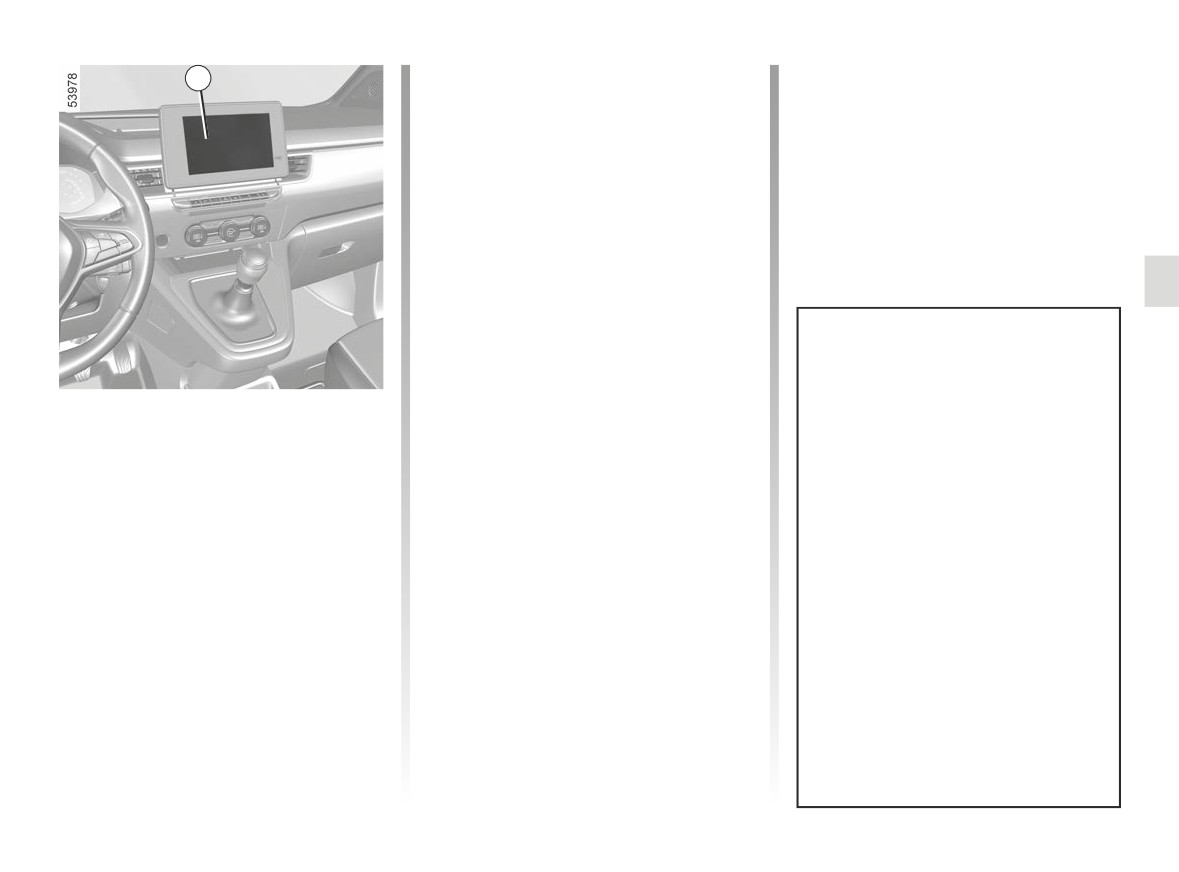
REVERSING CAMERA (3/4)
2
Operating faults
When reverse gear is engaged, if the
system detects an operating fault, a
black screen is displayed temporarily
on the multimedia screen 2.
This may be caused by a fault affecting
the camera or screen (clearness, fixed
image, delayed communication etc.).
If the temporary display of the black
screen persists, please consult an ap-
proved dealer.
The screen shows a reverse mirror
image.
Settings
The frames are a representation
While the engine is running, from the
projected on a flat surface. This in-
multimedia screen 2 you can add or
formation is to not be taken into ac-
remove the guides and adjust the
count when superimposed on a
camera image settings (brightness,
vertical object or an object on the
contrast etc.). Please refer to the mul-
ground.
timedia instructions for further informa-
Objects which appear on the edge
tion.
of the screen may be deformed.
In very bright light (snow, vehicle in
sunshine, etc.), the camera vision
may be adversely affected.
If the luggage compartment is open
or incorrectly closed, the message
“WARNING: Boot Open” appears
on the multimedia screen.
2.145
CarManuals2.co
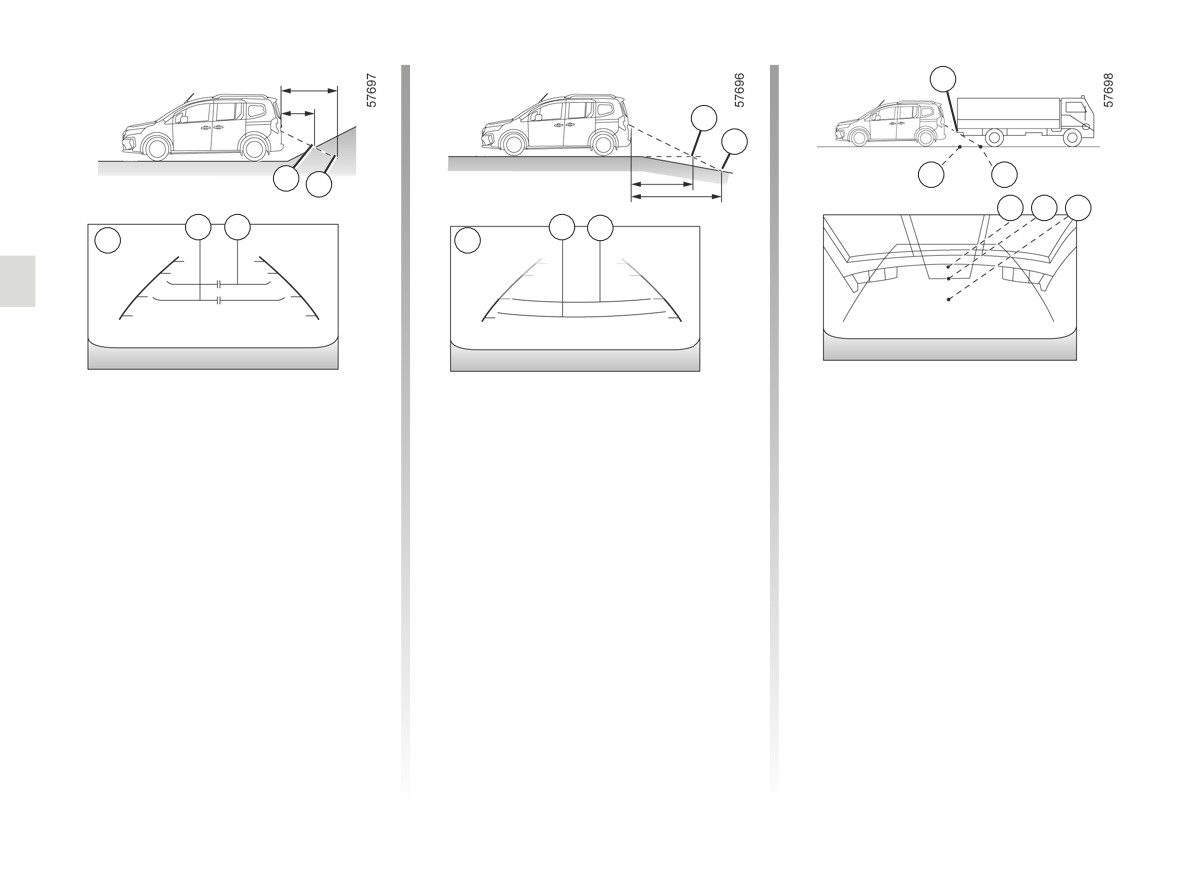
REVERSING CAMERA (4/4)
H
F
G
D
K
J
E
H J K
D E
F G
5
5
Difference between the
Reversing towards a steep downhill
Reversing towards a protruding
slope
object
estimated distance and
actual distance
The fixed guidelines 5 show the dis-
Position H seems further than position J
tances as further than they actually are.
on the screen. However, position H is at
Reversing towards a steep uphill
the same distance as position K.
Therefore, the objects shown on the
slope
screen are actually closer on the slope.
The trajectory indicated by the fixed
The fixed guidelines 5 show the dis-
and mobile guidelines do not take into
For example, if the screen displays an
tances as closer than they actually are.
account the height of the object. So
object at G, the actual distance of the
there is a risk that the vehicle may col-
The objects shown on the screen are
object is at F.
lide with the object when reversing to-
actually further away on the slope.
wards position K.
For example, if the screen displays an
object at D, the actual distance of the
object is at E.
2.146
CarManuals2.co
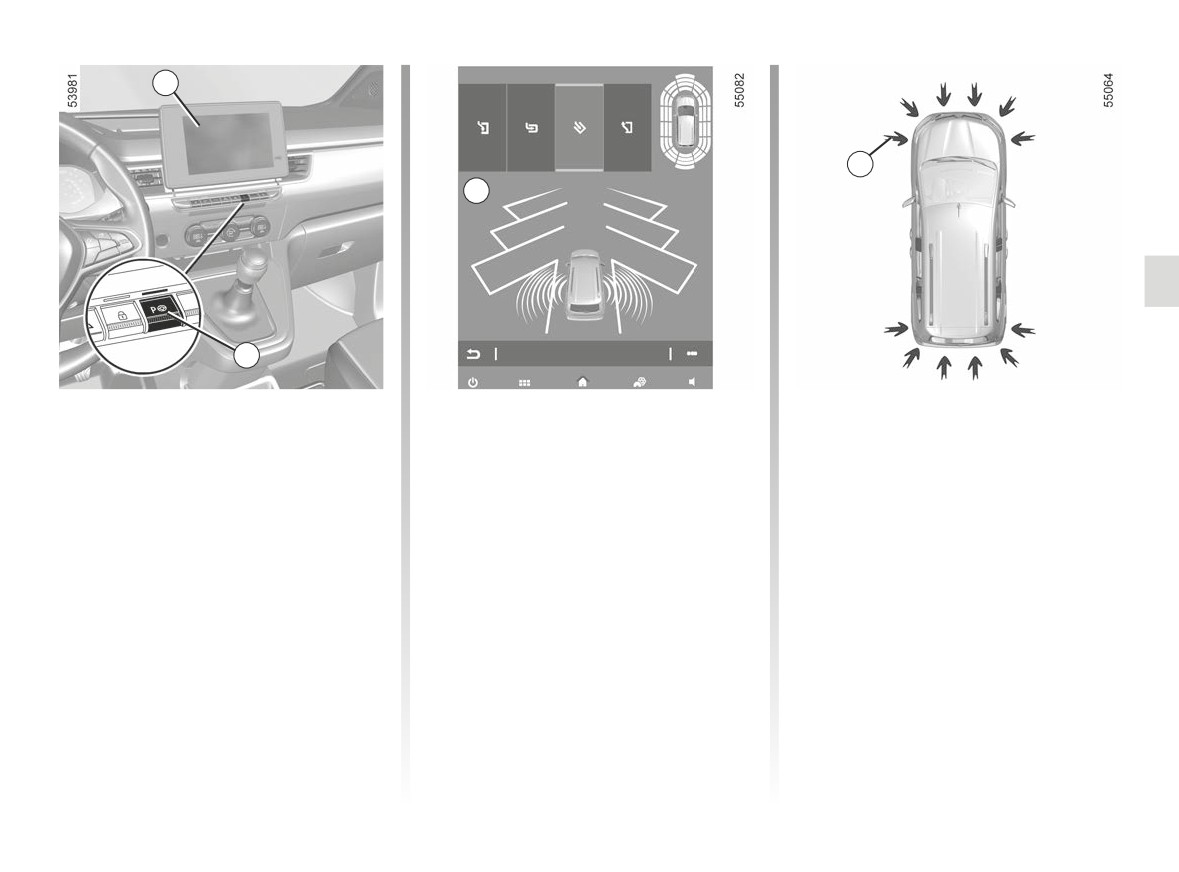
ASSISTED PARKING (1/5)
1
3
A
2
Using ultrasonic detectors as indicated
Switching on
Special features
by the 3 arrows installed in the vehicle
While the engine is running, vehicle
Ensure that the ultrasonic sensors indi-
bumpers, this function helps to find ac-
stationary or driving at less than ap-
cated by arrows 3 are not obscured (by
cessible parking spaces and assists in
proximately 19 mph (30 km/h):
dirt, mud, snow, etc.).
the parking manoeuvre.
- press switch 2. The indicator light in
Remove your hands from the steering
switch 2 lights up and display A ap-
wheel, you only control:
pears on the multimedia screen 1.
- the accelerator pedal;
- set the direction indicator to the side
- the brake pedal;
of the vehicle where you want to
park.
- the gear lever.
At any time, you can regain control by
using the steering wheel.
2.147
CarManuals2.co
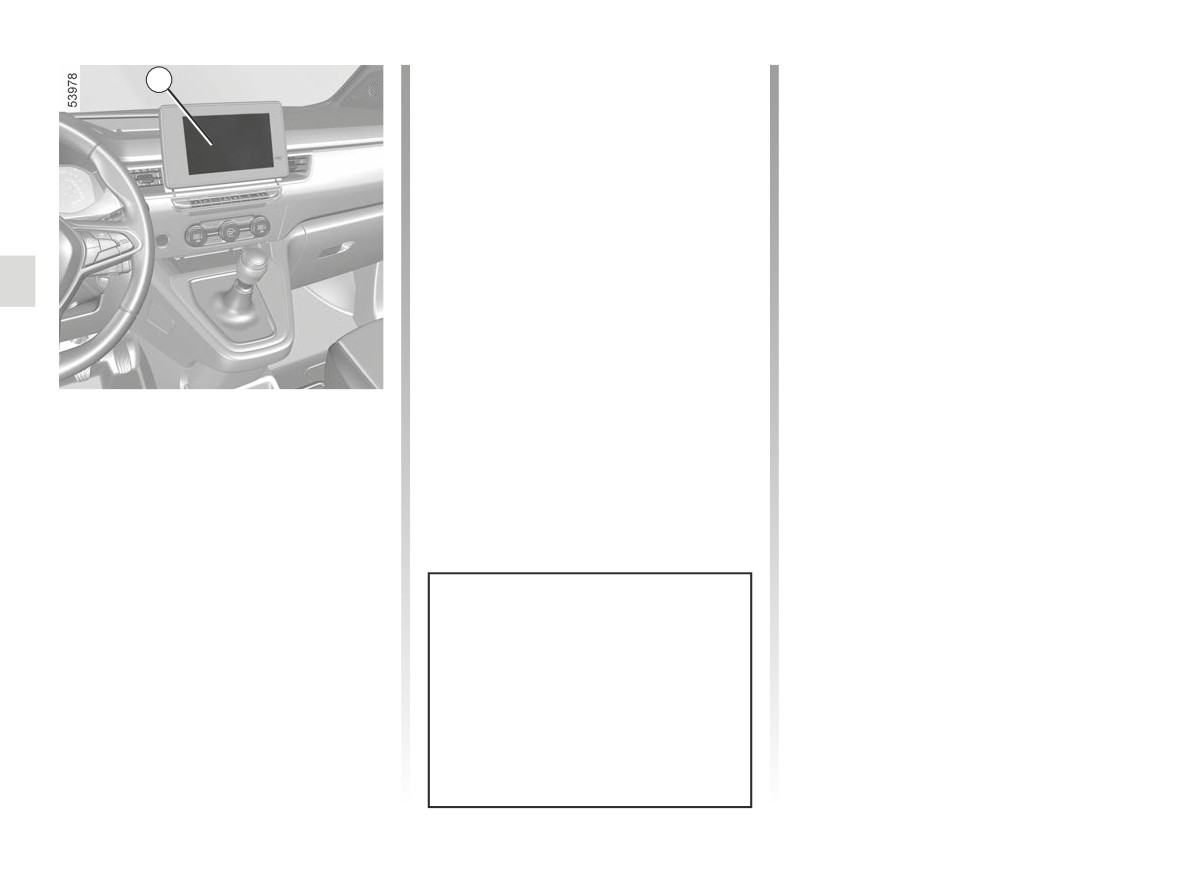
ASSISTED PARKING (2/5)
Note: when starting the vehicle, or after
Operation
1
having successfully completed parallel
parking using the system, the default
Parking
manoeuvre proposed by the system is
As long as the vehicle speed is less
assistance in exiting a parallel parking
than 19 mph (30 km/h), the system
space. In other cases, the default ma-
searches for available parking spaces
noeuvre can be set from the multimedia
on the side of the vehicle chosen by the
screen 1. Please refer to the multime-
driver.
dia instructions for further information.
Note: if parking spaces are available
on the other side of the vehicle, set the
direction indicator to the other direc-
tion to enable the system to search for
spaces.
Once a space has been found, it is dis-
played on the multimedia screen, indi-
Choice of manoeuvre
cated by a small letter “P”. Drive slowly,
with the direction indicator activated on
The system can perform four types of
the side where the space is available,
manoeuvres:
until the “Stop” message is displayed
- parallel parking;
and a beep sounds.
- perpendicular parking;
- angle parking;
- moving out of a parallel parking
space.
From the 1 multimedia screen, select
the manoeuvre to carry out.
The system start up is accompa-
nied by activation of the parking dis-
tance control and, on those vehicles
equipped, the reversing camera to
help the driver visualise the ma-
noeuvre. ➥ 2.135 and ➥ 2.143.
2.148
CarManuals2.co
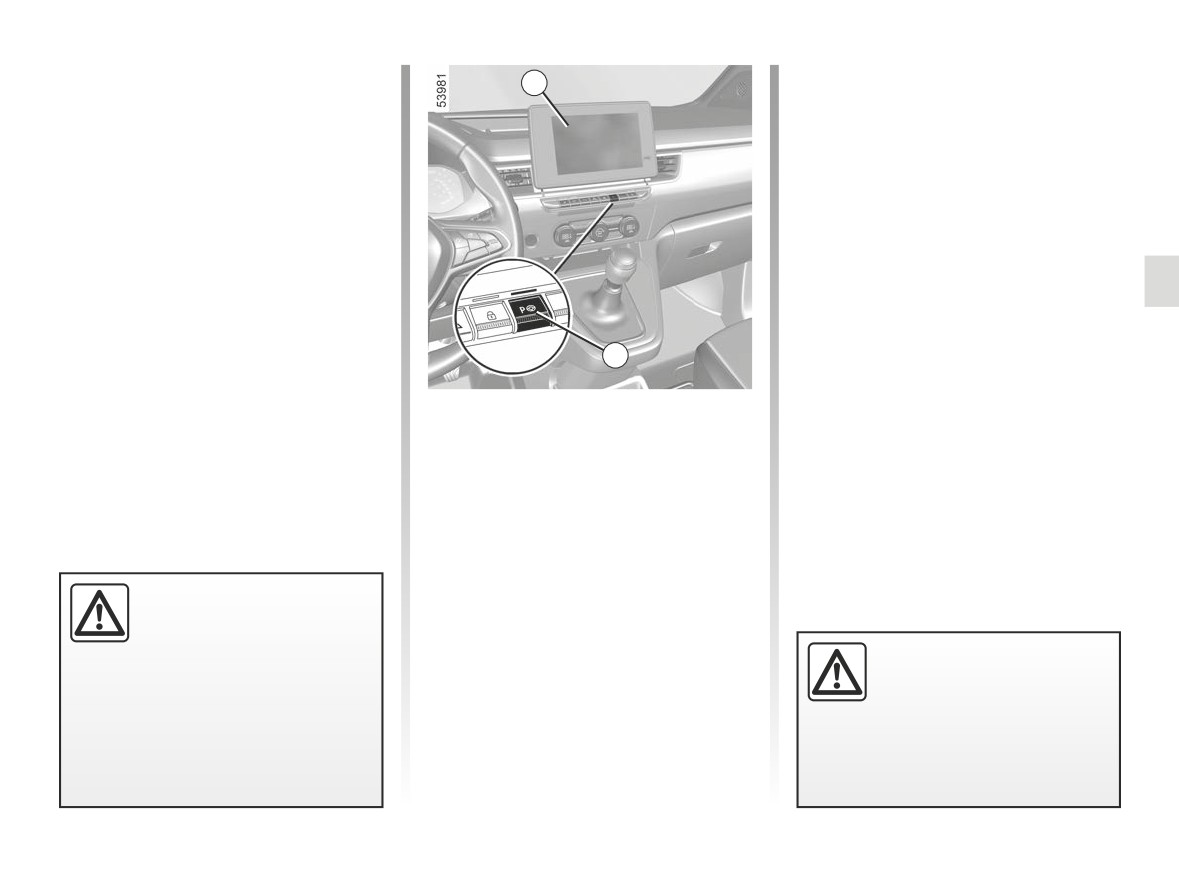
ASSISTED PARKING (3/5)
The space is then indicated on the mul-
- Release the steering wheel;
1
timedia screen by a capital letter “P”.
- carry out manoeuvres at the front
- Stop the vehicle;
and rear by following the instructions
shown on the multimedia screen 1
- select reverse gear.
and using the parking distance con-
trol system alerts.
The indicator light
lights up
on the instrument panel and a beep
Your speed should not exceed around 4
sounds.
mph (7 km/h).
- Release the steering wheel;
Once the vehicle is in a position to exit
- follow the instructions shown on the
the parking space, the
warning
multifunction screen 1.
light disappears from the instrument
Your speed should not exceed around 4
panel and a sound signal and message
2
mph (7 km/h).
appear on the multimedia screen 1 to
confirm that the manoeuvre is com-
Exiting a parallel parking space
plete.
Once the warning light
on the
instrument panel goes off and a beep
- Briefly press the 2 switch;
sounds, the manoeuvre has been com-
- Select the
“Exit parallel parking
pleted.
space” mode;
- activate the direction indicator on the
side you wish to go out of;
- press and hold switch 2 (approx. two
seconds).
This function is an addi-
The indicator light
lights up
tional driving aid.
on the instrument panel and a beep
Therefore, it can under no
sounds.
When manoeuvring, the
circumstances replace the
steering wheel may turn
driver’s vigilance and responsibility
quickly: do not put your
during manoeuvres (the driver must
hands inside, and make
always be ready to brake).
sure that nothing is caught inside.
2.149
CarManuals2.co
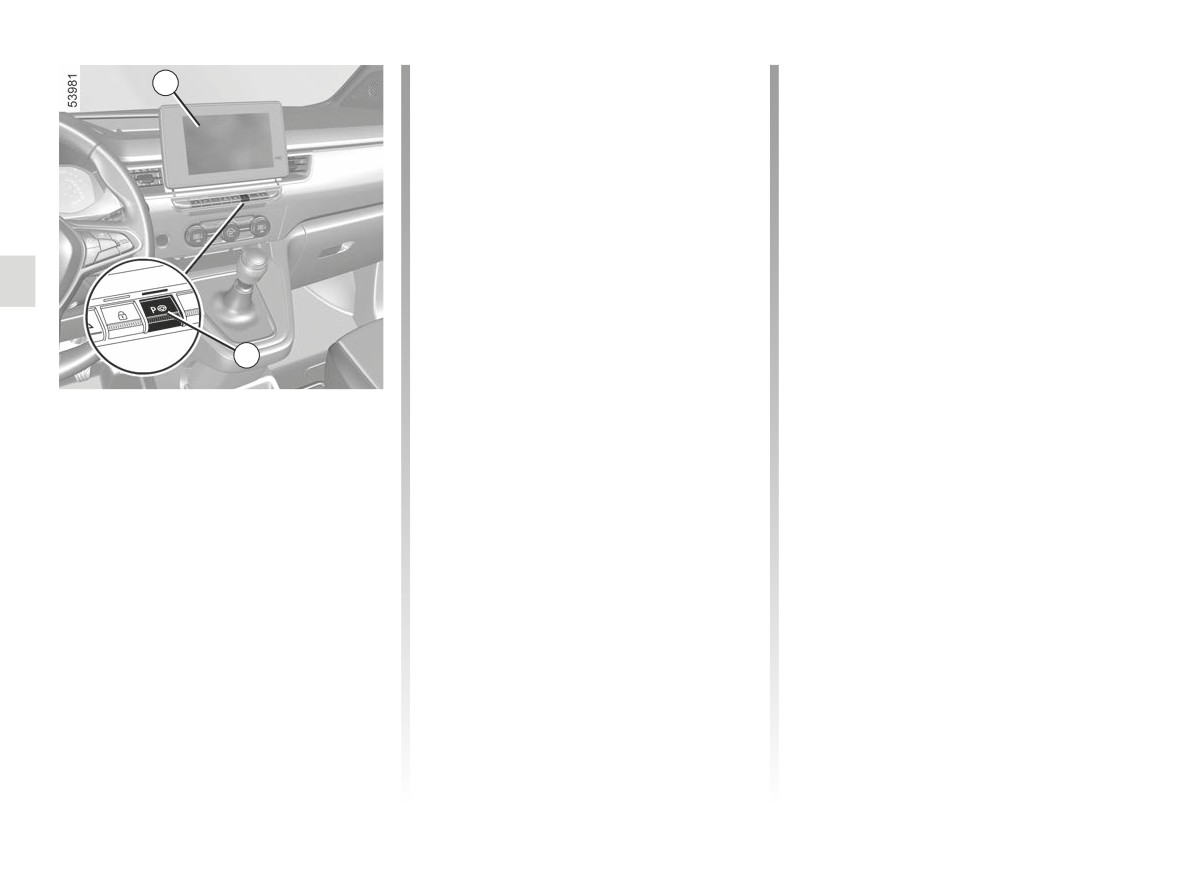
ASSISTED PARKING (4/5)
The switch warning light 2 goes out,
Cancelling the manoeuvre
1
The manoeuvre is cancelled in the fol-
the
warning light disappears
lowing cases:
from the instrument panel and an au-
dible signal confirms that the manoeu-
- the vehicle is too far from the desired
vre has been suspended. The reason
parking space;
for suspending the manoeuvre will be
- the vehicle speed has exceeded 4
displayed on the multimedia screen 1.
mph (7 km/h);
- by pressing switch 2 or by deactivat-
Make sure:
ing from the multimedia screen;
- the vehicle is stationary;
- you have performed more than 14
and
forwards/backwards movements in
- you have released the steering
one manoeuvre;
wheel;
- the parking distance control sensors
and
2
are dirty or blocked;
- that all doors and the boot are closed;
- a fault in the Park Assist system;
and
- the vehicle wheels have skidded.
Suspending/Resuming the
– that no obstacles are in the way of
the direction of movement;
The 2 switch warning light and the
manoeuvre
and
The manoeuvre is suspended in the fol-
warning light disappear from the
- that the engine is started.
lowing circumstances:
instrument panel and a sound signal
If the warning light on the 2 switch
confirms that the manoeuvre has been
- you take control of the wheel;
flashes, this indicates that the system
cancelled. The reason for cancelling
- the vehicle is stationary for more
is once again available to resume the
the manoeuvre will be displayed on the
than one minute;
manoeuvre.
multimedia screen 1.
- an obstacle in the direction of move-
To resume the manoeuvre, press and
ment prevents the manoeuvre from
hold the 2 switch. The 2 switch warning
being completed;
light appears and
is displayed
- the engine stops;
on the instrument panel.
- a door or the luggage compartment
Follow the instructions shown on the
is opened.
multimedia screen 1.
2.150
CarManuals2.co