Nissan Qashqai (2007-2010). Manual - part 1984


  Index      Nissan     Nissan Qashqai - service and repair manual 2007 - 2010 year


Search            copyright infringement  


Content   ..  1982  1983  1984  1985   ..


Nissan Qashqai (2007-2010). Manual - part 1984


AV-194

< SYMPTOM DIAGNOSIS >

[AUDIO WITH NAVIGATION]

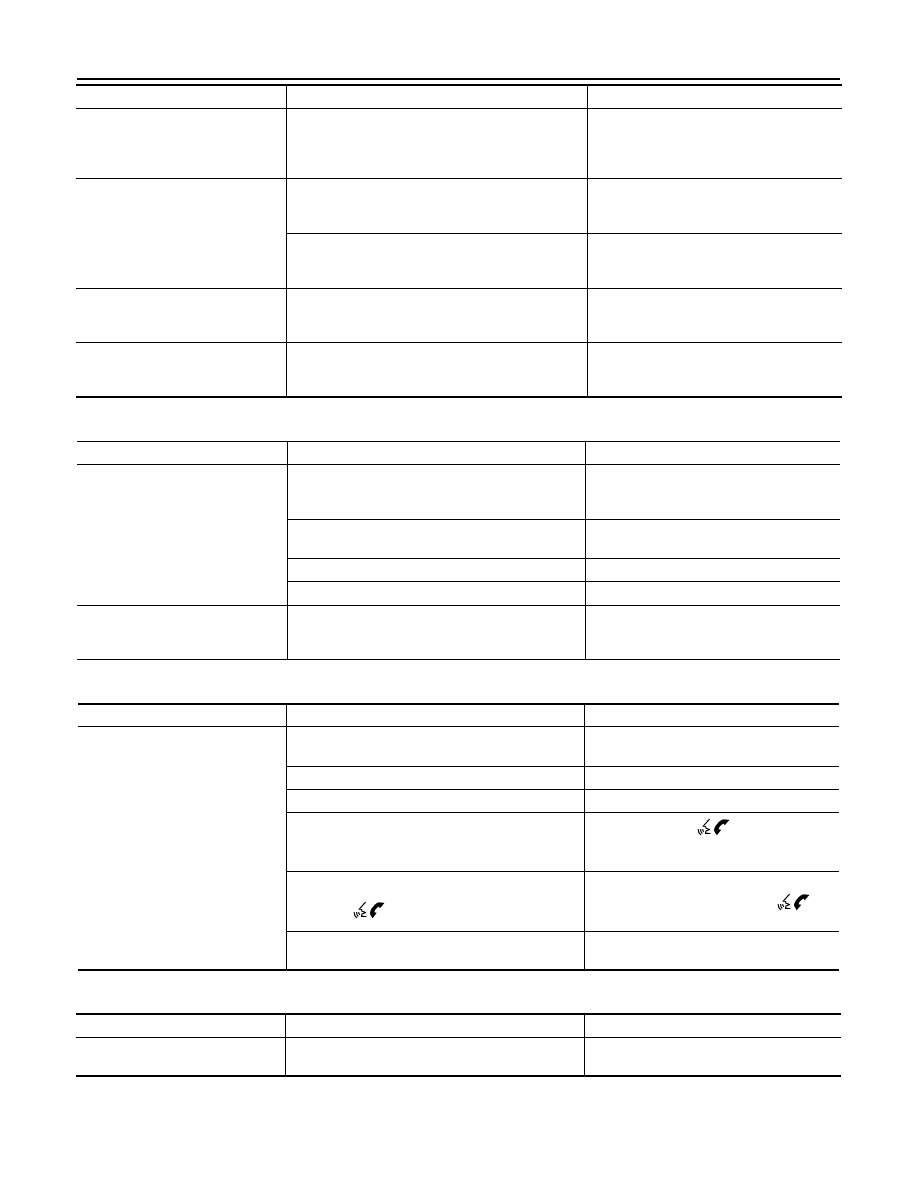
NORMAL OPERATING CONDITION

VOICE GUIDANCE

VOICE RECOGNITION

REAR VIEW MONITOR

The part of the route already 
passed is deleted.

A route is managed by sections between waypoints. 
The section between the starting point and the way-
point is deleted if you passed the first waypoint. (It 
may not be deleted depending on the area.)

This is not a malfunction.

An indirect route is suggested.

The system may suggest an indirect route if there 
are restrictions (such as one way streets) on roads 
close to the starting point or destination.

Adjust the location of the starting point or 
destination.

The system may suggest an indirect route because 
route calculation does not take into consideration 
some areas such as narrow streets (gray roads).

Reset the destination to a main or ordinary 
road, and recalculate the route.

The landmark information does not 
correspond to the actual informa-
tion.

This may be caused by insufficient or incorrect data 
on the DVD-ROM.

This is not a malfunction.

The suggested route does not ex-
actly connect to the starting point, 
waypoints, or destination.

There is no data for route calculation closer to these 
locations.

Set the starting point, waypoints and desti-
nation on main road, and perform route cal-
culation.

Symptoms

Possible cause

Possible solution

Symptoms

Possible cause

Possible solution

The voice guidance is not available.

Voice guidance is only available at certain intersec-
tions. In some cases, voice guidance is not avail-
able even when the vehicle should make a turn.

This is not a malfunction.

The vehicle has deviated from the suggested route.

Go back to the suggested route or request 
route calculation again.

Voice guidance is set to off.

Turn on the voice guidance.

Route guidance is set to off.

Turn on the voice guidance.

The guidance content does not cor-
respond to the actual condition.

The content of the voice guidance may vary, de-
pending on the types of intersections at which turns 
are made.

Follow all traffic rules and regulations.

Symptom

Possible cause

Possible solution

The system does not recognize the 
command.
The system recognizes the com-
mand incorrectly.

The interior of the vehicle is too noisy.

Close the windows or have other occupants 
be quiet.

The volume of the voice is too low.

Speak louder.

Pronunciation is unclear.

Speak clearly.

Voice recognition mode is not yet ready to speak.

Push the release “

” on the steering 

switch, and speak a command after the 
tone sounds. 

5 seconds or more have passed after pushed and 

released “

” on the steering switch.

Make sure to speak a command within 5 

seconds after push and release “

” on 

the steering switch.

Only a limited range of voice commands is usable 
for each screen.

Use a correct voice command appropriate 
for the current screen.

Symptoms

Possible cause

Possible solution

Rear view monitor image is not dis-
played

Shift lever (M/T models) or selector lever (CVT 
models) is not in R position.

Shift lever (M/T models) or selector lever 
(CVT models) is in R position.

AV

NORMAL OPERATING CONDITION

AV-195

< SYMPTOM DIAGNOSIS >

[AUDIO WITH NAVIGATION]

C

D

E

F

G

H

I

J

K

L

M

B

A

O

P

EXAMPLES OF CURRENT LOCATION MARK DISPLACEMENT

It calculates vehicle travel by reading travel distance and turn angle. Therefore, a mistake will occur in the cur-
rent location display if the vehicle is driven in the following manner. Perform location correction if correct loca-
tion has not been restored after driving the vehicle normally.

Rear view monitor image is not 
clear

Front glass of camera lens is dirty.

Dip a soft cloth into water and wipe the glass 
softly.

There are raindrops, snow, etc.

Wipe it with a soft cloth softly.

The sunlight or the headlight of following vehicle is 
shining directly to the camera lens.

It returns to the original condition if the light 
applied to the lens disappears.

Symptoms

Possible cause

Possible solution

SEL698V

AV-196

< SYMPTOM DIAGNOSIS >

[AUDIO WITH NAVIGATION]

NORMAL OPERATING CONDITION

Cause (condition)

Driving condition

Remarks (correction, etc.)

Road pat-
tern

Y-intersections

At a Y intersection or similar gradual 
division of roads, errors in the direc-
tion of travel deduced by the sensor 
may result in the current location 
mark appearing on the wrong road.

Perform location correction and, if 
necessary, direction correction if the 
correct location has not been re-
stored after traveling about 10 km/h 
(6 MPH).

Spiral roads

Turning angle errors accumulate 
and vehicle mark may deviate from 
the correct location when driving on 
a large, continuous spiral road (such 
as loop bridge).

Straight roads

Map-matching does not work effec-
tively enough and distance errors 
may accumulate when driving on a 
long, straight, slowly curving road 
without stopping. As a result, the ve-
hicle mark may deviate from the cor-
rect location when the vehicle turns 
at a corner.

Switchback turns

The map may be matched to other 
roads in a similar direction nearby at 
every turn, and the vehicle mark 
may deviate from the correct loca-
tion when driving on a zigzag road.

Grid pattern roads

The map may be matched to them 
by mistake and the vehicle mark 
may deviate from the correct loca-
tion when driving in a location where 
roads are laid out in a grid pattern, 
where many roads are running in the 
similar direction nearby.

Parallel roads

The map may be matched to the oth-
er road by mistake and the vehicle 
mark may deviate from the correct 
location when two roads are running 
in parallel (such as highway and 
sideway).

ELK0192D

ELK0193D

ELK0194D

ELK0195D

ELK0196D

ELK0197D

AV

NORMAL OPERATING CONDITION

AV-197

< SYMPTOM DIAGNOSIS >

[AUDIO WITH NAVIGATION]

C

D

E

F

G

H

I

J

K

L

M

B

A

O

P

Place

In a parking lot

Matching may place the vehicle 
mark on a nearby road when driving 
in a parking lot, or other locations 
where there are no roads on the 
map. The vehicle mark may have 
deviated from the correct location 
when the vehicle returns to the road.
Direction errors accumulate, and the 
vehicle mark may deviate from the 
correct location when driving in cir-
cle or turning the steering wheel re-
peatedly.

Perform location correction and, if 
necessary, direction correction if the 
correct location has not been re-
stored after traveling about 10 km/h 
(6 MPH).

Turntable

The navigation system cannot re-
ceive the signal from the gyroscope 
(angular speed sensor) when the ig-
nition switch is OFF. Therefore, the 
displayed direction may be incorrect 
and the correct road may not be eas-
ily returned to after rotating the vehi-
cle on a turntable with the ignition 
OFF.

Slippery roads

On snow, wet roads, gravel, or other 
roads where tires may slip easily, ac-
cumulated mileage errors may 
cause the vehicle mark to deviate 
from the correct road.

Slopes

An error in the turning angle will oc-
cur, and the vehicle mark may devi-
ate from the road when parking in 
sloped garages, when traveling on 
banked roads, or in other cases 
where the vehicle turns when tilted.

Map data

Roads not displayed on the map screen

Map matching does not function cor-
rectly and matches the location to a 
nearby road when driving on new 
roads or other roads not displayed 
on the map screen. The vehicle 
mark may deviate from the correct 
road when the vehicle returns to a 
road which is on the map.

Different road pattern
(Changed due to repair)

Map matching does not function cor-
rectly and matches the location to a 
nearby road if the road pattern 
stored in the map data and the actu-
al road pattern are different. The ve-
hicle mark may deviate from the 
correct road.

Cause (condition)

Driving condition

Remarks (correction, etc.)

SEL709V

SEL710V

SEL699V

ELK0201D


Content   ..  1982  1983  1984  1985   ..