Lexus NX350 (2024 year). Manual in english - page 14
 

  Index      Manuals     Lexus NX350 (2024 year). Manual in english


Search            copyright infringement  


Content      ..     12      13      14      15     ..


Lexus NX350 (2024 year). Manual in english - page 14


Illuminates when the RCTA is turned off. At
this time, a message will be displayed on the
multi-information display.

INFORMATION

Outside rear view mirror indicator visibility

In strong sunlight, the outside rear view mirror indicator may be difficult to see.

Hearing the RCTA buzzer

The RCTA buzzer may be difficult to hear over loud noises, such as if the audio system
volume is high.

Rear side radar sensors

 P.415

RCTA function

The RCTA function is operational when

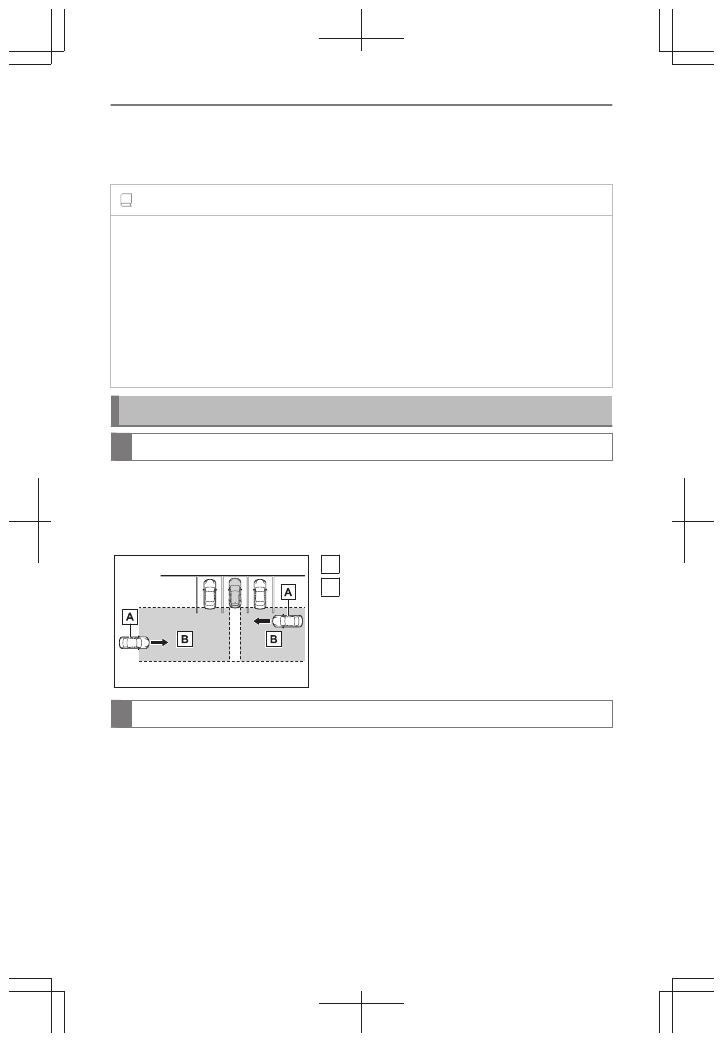
The RCTA function uses rear side radar sensors to detect vehicles approaching
from the right or left at the rear of the vehicle and alerts the driver of the presence
of such vehicles by flashing the outside rear view mirror indicators and sounding a
buzzer.


A

Approaching vehicles

B

Detection areas of approaching vehicles

RCTA icon display

When a vehicle approaching from the right or left at the rear of the vehicle is
detected, the following will be displayed on the center display.

*2 : 

Depending on the vehicle grade and equipped options, the actual screen may be

different from this illustration.

6-2. Using the safe driving support functions

440

Example: Vehicles are approaching from both
sides of the vehicle (Example: Vehicles with a
Lexus parking assist monitor)

RCTA function detection areas

The areas that vehicles can be detected in are outlined below.
The buzzer can alert the driver of faster vehicles
approaching from farther away.
Example:

Approaching vehicle

speed

 Approximate alert

distance

34 mph (56 km/h) (fast) 98 ft. (30 m)

5 mph (8 km/h) (slow)

13 ft. (4 m)

Changing the RCTA settings

Turning the RCTA function ON/OFF

The RCTA function can be enabled/disabled on the center display as follows:

1

Select 

 .

2

Select [Driving assist].

3

Select [Rear cross traffic alert].

When the RCTA function is disabled, the driving assist information indicator
illuminates on the multi-information display.
(Each time the engine switch is turned off then changed to ON, the RCTA function
will be enabled automatically.)

Changing the RCTA buzzer volume

The buzzer volume can be adjusted on the center display.

1

Select 

.

2

Select [Driving assist].

3

Select [Collision mitigation].

6-2. Using the safe driving support functions

441

6

Driving suppor

t s

ystem

4

Select [Parking assist volume].

Temporarily muting the RCTA buzzer

A mute button will be displayed on the center display when an object is detected.
To mute the buzzer, select

.To mute the buzzer, select 

. The buzzers for the

intuitive parking assist sensor, RCTA and RCD function will be muted simultane-
ously.

INFORMATION

Mute will be canceled automatically in the following situations:

When the shift position is changed.

When the vehicle speed exceeds a certain speed.

When there is a malfunction in a sensor or the system is temporarily unavailable.

When the operating function is disabled manually.

When the engine switch is turned off.

6-2. Using the safe driving support functions

442

Rear Camera Detection

*

Purpose of the RCD (Rear Camera Detection)

When the vehicle is backing up, the rear camera detection function can detect
pedestrians in the detection area behind the vehicle. If a pedestrian is detected, a
buzzer will sound and an icon will be displayed on the center display to inform the
driver of the pedestrian.

WARNING

Cautions regarding the use of the system

The recognition and control capabilities for this system are limited.
The driver should always drive safely by always being responsible without over relying on
the system and have a understanding of the surrounding situations.

To ensure the system can operate properly

Observe the following, otherwise there is the danger that could lead to an accident.

Always clean the camera with damaging it.

Do not install market electronic parts (such as Illuminated license plate, fog lamps,
etc.) in the camera vicinity.

Do not subject the camera vicinity to strong impacts. If the vicinity is subjected to a
strong impact, have the vehicle inspected by your Lexus dealer.

Do not disassemble, remodel or paint the camera.

Do not attach accessories or stickers to the camera.

Do not install market protection parts (bumper trim, etc.) to the rear bumper.

Maintain suitable tire air pressure.

Make sure the back door is completely closed.

RCD function is turned off

In the following situations the system turns off. The RCD function may not operate
properly and thus there is the danger that an accident may occur.

The contents mentioned above are not observed.

Suspensions other than Lexus genuine parts are installed.

INFORMATION

The rear camera detection function is operational when

The engine switch is in ON.

* : 

If equipped

6-2. Using the safe driving support functions

443

6

Driving suppor

t s

ystem

RCD function is on.

The shift position is in R.

Situations in which the system may not operate properly

Some pedestrians, such as the following, may not be detected by the rear camera
detection function, preventing the function from operating properly:

Pedestrians who are bending forward or squatting

Pedestrians who are lying down

Pedestrians who are running

Pedestrians who suddenly enter the detection area

People riding a bicycle, skateboard, or other light vehicle

Pedestrians wearing oversized clothing such as a rain coat, long skirt, etc., making
their silhouette obscure

Pedestrians whose body is partially hidden by an object, such as a cart or umbrella

Pedestrians which are obscured by darkness, such as at night

In some situations, such as the following, pedestrians may not be detected by the rear
camera detection function, preventing the function from operating properly:

When backing up in inclement weather (rain, snow, fog, etc.)

When the rear camera is obscured (dirt, snow, ice, etc. are attached) or scratched

When a very bright light, such as the sun, or the headlights of another vehicle,
shines directly into the rear camera

When backing up in a place where the surrounding brightness changes suddenly,
such as at the entrance or exit of a garage or underground parking lot

When backing up in a dim environment such as during dusk or in an underground
parking lot

When the camera position and direction are deviated

When a towing hook is attached

When water droplets are flowing on the camera lens

When the rear washer is operating

When the vehicle height is extremely changed (nose up, nose down)

When tire chains or an emergency tire puncture repair kit is used

If the suspension has been modified or tires of a size other than specified are
installed

When install market electronic parts (such as Illuminated license plate, fog lamps,
etc.) in the camera vicinity

When install market protection parts (bumper trim, etc.) to the rear bumper

6-2. Using the safe driving support functions

444

Situations in which the system may operate unexpectedly

Even though there are no pedestrians in the detection area, some objects, such as the
following, may be detected, possibly causing the rear camera detection function to
operate.

Three dimensional objects, such as a pole, traffic cone, fence, or parked vehicle

Moving objects, such as a car or motorcycle

Objects moving toward your vehicle when backing up, such as flags or puddles (or
airborne matter, such as smoke, steam, rain, or snow)

Cobblestone or gravel roads, tram rails, road repairs, white lines, pedestrian cross-
ings or fallen leaves on the road

Metal covers (gratings), such as those used for drainage ditches

Objects reflected in a puddle or on a wet road surface

Shadows on the road

In some situations, such as the following, the rear camera detection function may
operate even though there are no pedestrians in the detection area.

When backing up toward the roadside or a bump on the road

When backing up toward an incline/decline

If the rear of the vehicle is raised or lowered due to the carried load

If a bumper protector, such as an additional trim strip, is installed to the rear bumper

If the orientation of the rear camera has been changed

If a towing eyelet is installed to the rear of the vehicle

When water is flowing over the rear camera lens

When the rear camera is obscured (dirt, snow, ice, etc., are attached) or scratched

If there is a flashing light in the detection area, such as the emergency flashers of
another vehicle

When a tire chains or an emergency tire puncture repair kit is used

Situations in which the rear camera detection function may be difficult to notice

The buzzer may be difficult to hear if the surrounding area is noisy, the volume of
the audio system volume is high, the air conditioning system is being used, etc.

If the temperature in the cabin is extremely high or low, the audio system screen
may not operate correctly.

RCD function

6-2. Using the safe driving support functions

445

6

Driving suppor

t s

ystem

Center Display


A

Pedestrian detection icon
Displayed automatically when a pedestrian
is detected.
(Each time the engine switch is turned off
then changed to ON, the RCD function will
be enabled automatically.)

When a pedestrian is detected

If the rear camera detection function detects a pedestrian in the detection area, the
buzzer and pedestrian detection will operate as follows:


A

If a pedestrian is detected in area 
Buzzer: Sounds repeatedly
Pedestrian detection icon: Blinks

B

If a pedestrian is detected in area 
Buzzer (When the vehicle is stationary):
Sounds 3 times
Buzzer (When the vehicle is backing up,
when a pedestrian approaches the rear of
the vehicle): Sounds repeatedly
Pedestrian detection icon: Blinks

C

If the system determines that your vehicle
may collide with a pedestrian in area 
Buzzer: Sounds repeatedly
Pedestrian detection icon: Blinks

Changing the RCD settings

Turning the RCD function ON/OFF

The RCD function can be enabled/disabled on the center display as follows:

1

Select 

 .

2

Select [Driving assist].

3

Select [Rear camera detection].

A

B

C

6-2. Using the safe driving support functions

446

When the RCD function is disabled, the driving assist information indicator illumi-
nates on the multi-information display.

Changing the RCD buzzer volume

The buzzer volume can be adjusted on the center display.

1

Select 

.

2

Select [Driving assist].

3

Select [Collision mitigation].

4

Select [Parking assist volume].

Temporarily muting the RCD buzzer

A mute button will be displayed on the center display when an object is detected.
To mute the buzzer, select 

.To mute the buzzer, select 

. The buzzers for

the intuitive parking assist sensor, RCTA and RCD function will be muted simulta-
neously.

INFORMATION

Mute will be canceled automatically in the following situations:

When the shift position is changed.

When the vehicle speed exceeds a certain speed.

When there is a malfunction in a sensor or the system is temporarily unavailable.

When the operating function is disabled manually.

When the engine switch is turned off.

6-2. Using the safe driving support functions

447

6

Driving suppor

t s

ystem

Parking Support Brake

*

Purpose of the PKSB (Parking Support Brake) system

*

The PKSB (Parking Support Brake) system consists of the following functions that
operate when driving at a low speed or backing up, such as when parking. When
the system determines that the probability of a collision with a detected object is
high, a warning operates to urge the driver to take evasive action.

Parking assist function

The system can detect the following as detectable objects. (Detectable objects
differ depending on the function.)

Static Objects Front and Rear of the vehicle

Moving Vehicles Rear of the Vehicle

Pedestrians Rear of the Vehicle

PKSB (Parking Support Brake) system

WARNING

Cautions regarding the use of the system

Do not overly rely on the system, as doing so may lead to an accident. Always drive while
checking the safety of the surroundings of the vehicle.
Depending on the vehicle and road conditions, weather, etc., the system may not operate.
The detection capabilities of sensors and radars are limited. Always drive while checking
the safety of the surroundings of the vehicle.

The driver is solely responsible for safe driving. Always drive carefully, taking care to
observe your surroundings. The PKSB (Parking Support Brake) system is designed
to provide support to lessen the severity of collisions. However, it may not operate in
some situations.

The PKSB (Parking Support Brake) system is not designed to stop the vehicle com-
pletely. Additionally, even if the system has stopped the vehicle, it is necessary to
depress the brake pedal immediately as brake control will be canceled after approxi-
mately 2 seconds.

It is extremely dangerous to check the system operations by intentionally driving the
vehicle into the direction of a wall, etc. Never attempt such actions.

When to disable the PKSB (Parking Support Brake) system

In the following situations, disable the PKSB (Parking Support Brake) as the system may
operate even though there is no possibility of a collision.

* : 

If equipped

6-2. Using the safe driving support functions

448

WARNING

When inspecting the vehicle using a chassis roller, chassis dynamo or free roller

When loading the vehicle onto a boat, truck or other transport vessel

If the suspension has been modified or tires of a size other than specified are installed

If the front of the vehicle is raised or lowered due to the carried load

When equipment that may obstruct a sensor is installed, such as a towing eyelet,
bumper protector (an additional trim strip, etc.), bicycle carrier, or snow plow

When using automatic car washing devices

If the vehicle cannot be driven in a stable manner, such as when the vehicle has been in
an accident or is malfunctioning

When the vehicle is driven in a sporty manner or off-road

When the tires are not properly inflated

When the tires are very worn

When a tire chains, compact spare tire or an emergency tire puncture repair kit is
used

When your vehicle is towing a trailer or during emergency towing

Precautions for the suspension

Do not modify the suspension of the vehicle. If the height or tilt of the vehicle is changed,
the sensors may not be able to detect detectable objects and the system may not operate
correctly, possibly leading to an accident.

System overview

If the PKSB (Parking Support Brake) determines that a collision with a detected
object or pedestrian is possible, the engine output will be restricted to restrain
any increase in the vehicle speed. (Engine output restriction control: See figure 2.)
Additionally, if the accelerator pedal continues to be depressed, the brakes will be
applied automatically to reduce the vehicle speed. (Brake control: See figure 3.)

Figure 1 When the PKSB (Parking Support Brake) is not operating


A

Engine output

B

Braking force

C

Time

Figure 2 When engine output restriction control operates

6-2. Using the safe driving support functions

449

6

Driving suppor

t s

ystem


A

Engine output

B

Braking force

C

Time

D

Engine output restriction control begins op-
erating (System determines that possibility
of collision with detected object is high)

Figure 3 When engine output restriction control and brake control operates


A

Engine output

B

Braking force

C

Time

D

Engine output restriction control begins op-
erating (System determines that possibility
of collision with detected object is high)

E

Brake control begins operating (System de-
termines that possibility of collision with de-
tected object is extremely high)

INFORMATION

If the PKSB (Parking Support Brake) system has operated

If the vehicle is stopped due to operation of the PKSB (Parking Support Brake), the PKSB
(Parking Support Brake) will be disabled and the driving assist information indicator will
illuminate.
If the PKSB (Parking Support Brake) system operates unnecessarily, brake control can
be canceled by depressing the brake pedal or waiting approximately 2 seconds for
it to automatically be canceled. Then, the vehicle can be operated by depressing the
accelerator pedal.

Re-enabling the PKSB (Parking Support Brake) system

To re-enable the PKSB (Parking Support Brake) when it has been disabled due to
operation of the PKSB (Parking Support Brake), either enable the system again, or turn
the engine switch off and then back to ON.
Additionally, if any of the following conditions are met, the system will be re-enabled
automatically and the driving assist information indicator will turn off:

The P shift position is selected

The object is no longer detected in the traveling direction of the vehicle

The traveling direction of the vehicle changes

*1

*1 : 

Except when the Pedestrians Rear of the Vehicle operated.

6-2. Using the safe driving support functions

450

Turning the PKSB (Parking Support Brake) system ON/OFF

The PKSB (Parking Support Brake) system can be changed between ON (ena-
bled) and OFF (disabled) on the center display.

1

Select 

 .

2

Select [Driving assist].

3

Select [Parking support brake] to change ON (enable)/OFF (disabled).

When the PKSB (Parking Support Brake) is disabled, the driving assist information
indicator illuminates.
When turned OFF (disabled), the PKSB (Parking Support Brake) will be disabled
and will not be enabled until the setting is changed to ON again in center display.
(The function will not be re-enabled by operating the engine switch.)

PKSB (Parking Support Brake) function displays and buzzers

When the engine output restriction control or brake control operates, a buzzer
sounds and a message is displayed on the multi-information display, head-up
display

*

 and center display to alert the driver.

Depending on the situation, output restriction control operates to either limit
acceleration or restrict output as much as possible.

Engine output restriction control is operating (acceleration restriction) 

Acceleration greater than a certain amount is restricted by the system.

Multi-information display:"Object Detected Acceleration Reduced"

Head-up display

*

:"Object Detected Acceleration Reduced"

Center display: No warning displayed

Driving assist information indicator: Not illuminated

Buzzer: Does not sound

Engine output restriction control is operating (output restricted as much as
possible)

The system has determined that stronger-than-normal brake operation is neces-
sary.

Multi-information display and head-up display

*

: "BRAKE!"

Center display: "BRAKE!"

Driving assist information indicator: Not illuminated

* : 

If equipped

6-2. Using the safe driving support functions

451

6

Driving suppor

t s

ystem

Buzzer: Short beep

Brake control is operating

The system determined that emergency braking is necessary.

Multi-information display and head-up display

*

: "BRAKE!"

Center display: "BRAKE!"

Driving assist information indicator: Not illuminated

Buzzer: Short beep

Vehicle stopped by system operation

The vehicle has been stopped by brake control operation.

Multi-information display: "Accelerator Pedal is Pressed Press Brake Pedal" (If
the accelerator pedal is not depressed, "Press Brake Pedal" will be displayed.)

Head-up display

*

: "Accelerator Pedal is Pressed Press Brake Pedal" (If the

accelerator pedal is not depressed, "Press Brake Pedal" will be displayed.)

Center display: "Press Brake Pedal"

Driving assist information indicator: Illuminated

Buzzer: Sounds repeatedly

Static Objects Front and Rear of the vehicle 

*

If the sensors detect a static object, such as a wall, in the travelling direction of the
vehicle and the system determines that a collision may occur due to the vehicle
suddenly moving forward due to an accidental accelerator pedal operation, the
vehicle moving the unintended direction due to the wrong shift position, or while
parking or traveling at low speeds, the system will operate to lessen the impact with
the detected static object and reduce the resulting damage.

INFORMATION

The system will operate when

The function will operate when the driving assist information indicator is not illuminated
or flashing and all of the following conditions are met:

Engine output restriction control

PKSB (Parking Support Brake) system is enabled.

The vehicle speed is approximately 9 mph (15 km/h) or less.     

There is a static object in the traveling direction of the vehicle (approximately 6 to
13 ft. [2 to 4 m] ahead).   

* : 

If equipped

6-2. Using the safe driving support functions

452

The Parking Support Brake determines that a stronger-than-normal brake opera-
tion is necessary to avoid a collision.

Brake control

Engine output restriction control is operating.

The Parking Support Brake determines that an immediate brake operation is
necessary to avoid a collision.

The system will stop operating when

The function will stop operating if any of the following conditions are met:

Engine output restriction control

PKSB (Parking Support Brake) system is disabled.

The system determines that the collision has become avoidable with normal brake
operation.

The static object is no longer in the traveling direction of the vehicle or approxi-
mately 6 to 13 ft. (2 to 4 m) away from the vehicle.

Brake control

PKSB (Parking Support Brake) system is disabled.

Approximately 2 seconds have elapsed since the vehicle was stopped by brake
control.

The brake pedal is depressed after the vehicle is stopped by brake control.

The static object is no longer in the traveling direction of the vehicle or approxi-
mately 6 to 13 ft. (2 to 4 m) away from the vehicle. 

Detection range

The detection range of the system differs from the detection range of the intuitive parking
assist. 
Therefore, even if the intuitive parking assist detects a static object and provides a
warning, the PKSB (Parking Support Brake) system may not start operating. 

Intuitive parking assist sensor buzzer

Regardless of whether the intuitive parking assist sensor buzzer is enabled or not, if the
PKSB (Parking Support Brake) system is enabled, the front or rear sensors detect an
object and brake control is performed, the intuitive parking assist buzzer will sound to
notify the driver of the approximate distance to the object. 

Situations in which the system may not operate properly

 P.427

6-2. Using the safe driving support functions

453

6

Driving suppor

t s

ystem

Situations in which the system may operate even if there is no possibility of a
collision

 P.426

WARNING

If the PKSB (Parking Support Brake) system operates unnecessarily, such as at a
railroad crossing

 P.448

Static Objects Front and Rear of the vehicle sensors

 P.431

WARNING

To ensure the system can operate properly

 P.426

Notes when washing the vehicle

 P.431

Static Objects Front and Rear of the vehicle operation examples

The system operates in the following situations when a static object is detected in
the traveling direction of the vehicle.

When the vehicle is traveling at a low speed
and the brake pedal is not depressed, or is de-
pressed late

6-2. Using the safe driving support functions

454

When the accelerator pedal is depressed ex-
cessively

When the moves forward due to the incorrect
shift position being selected

Moving Vehicles Rear of the Vehicle 

*

If a rear radar sensor detects a vehicle approaching from the right or left at the rear
of the vehicle and the system determines that the possibility of a collision is high,
this function will perform brake control to reduce the likelihood of an impact with
the approaching vehicle.

INFORMATION

The system will operate when

The function will operate when the driving assist information indicator is not illuminated
or flashing and all of the following conditions are met:

Engine output restriction control

PKSB (Parking Support Brake) system is enabled.

The vehicle speed is 9 mph (15 km/h) or less.

Vehicles are approaching from the right or left at the rear of the vehicle at a
traveling speed of approximately 5 mph (8 km/h) or more.

* : 

If equipped

6-2. Using the safe driving support functions

455

6

Driving suppor

t s

ystem

The shift position is in R.

The PKSB (Parking Support Brake) determines that a stronger than normal brake
operation is necessary to avoid a collision with an approaching vehicle.

Brake control

Engine output restriction control is operating.

The PKSB (Parking Support Brake) determines that an emergency brake operation
is necessary to avoid a collision with an approaching vehicle.

The system will stop operating when

The function will stop operating if any of the following conditions are met:

Engine output restriction control

PKSB (Parking Support Brake) system is disabled.

The collision becomes avoidable with normal brake operation.

A vehicle is no longer approaching from the right or left at the rear of the vehicle.

Brake control

PKSB (Parking Support Brake) system is disabled.

Approximately 2 seconds have elapsed since the vehicle was stopped by brake
control.

The brake pedal is depressed after the vehicle is stopped by brake control.

A vehicle is no longer approaching from the right or left at the rear of the vehicle.

Detection range

The detection range of the system differs from the detection area of the RCTA function.
(

 P.441) Therefore, even if the RCTA function detects a vehicle and provides an alert,

the PKSB (Parking Support Brake) system may not start operating.

RCTA buzzer

Regardless of whether the RCTA function is on or off, if the PKSB (Parking Support
Brake) system is not disabled, when the brake control operates, the buzzer will sound to
alert the driver.

Situations in which the system may not operate properly

 P.435

Situations in which the system may operate even if there is no possibility of a
collision

 P.435

6-2. Using the safe driving support functions

456

Examples of the Moving Vehicles Rear of the Vehicle operation

This function will operate in situations such as the following if a vehicle is detected
in the traveling direction of the vehicle.

When reversing, a vehicle is approaching and the brake pedal is not de-
pressed, or is depressed late

Moving Vehicles Rear of the Vehicle sensors

 P.414

WARNING

To ensure the system can operate properly

 P.414

Pedestrians Rear of the Vehicle

*

If the rear camera sensor detects a pedestrian behind the vehicle while backing
up and the system determines that the possibility of colliding with the detected
pedestrian is high, a buzzer will sound. If the system determines that the possibility
of colliding with the detected pedestrian is extremely high, the brakes will be
applied automatically to help reduce the impact of the collision.

INFORMATION

The system will operate when

The function will operate when the driving assist information indicator is not illuminat-
ed or flashing and all of the following conditions are met:

Engine output restriction control

PKSB (Parking Support Brake) system is enabled.

The vehicle speed is approximately 9 mph (15 km/h) or less.

The shift position is in R.

* : 

If equipped

6-2. Using the safe driving support functions

457

6

Driving suppor

t s

ystem

The rear camera sensor detects a pedestrian behind the vehicle while backing
up and the system determines that the possibility of colliding with the detected
pedestrian is high.

The PKSB (Parking Support Brake) determines that a stronger-than-normal brake
operation is necessary to avoid a collision.

Brake control

Engine output restriction control is operating.

The PKSB (Parking Support Brake) determines that an emergency brake operation
is necessary to avoid a collision with a pedestrians.

The system will stop operating when

The function will stop operating if any of the following conditions are met:

Engine output restriction control

PKSB (Parking Support Brake) system is disabled.

The collision becomes avoidable with normal brake operation.

The pedestrian is no longer detected behind your vehicle.

Brake control

PKSB (Parking Support Brake) system is disabled.

Approximately 2 seconds have elapsed since the vehicle was stopped by brake
control.

The brake pedal is depressed after the vehicle is stopped by brake control.

The pedestrian is no longer detected behind your vehicle.

Detection range

The detection range of the system differs from the detection area of the RCTA function.
(

 P.446) Therefore, even if the RCTA function detects a vehicle and provides an alert,

the PKSB (Parking Support Brake) system may not start operating.

Situations in which the system may not operate properly

 P.443

Situations in which the system may operate unexpectedly

 P.443

When a vehicle is detected behind the vehicle

When a pedestrian is detected behind the vehicle while backing up, the brake
pedal is not depressed or is depressed late.

6-2. Using the safe driving support functions

458

Pedestrians Rear of the Vehicle display

Displays a message to urge the driver to take evasive action when a pedestrian
is detected in the detection area behind the vehicle. (A message will also be
displayed on the center display.)


A

Pedestrian detection icon

B

Brake reminder

6-2. Using the safe driving support functions

459

6

Driving suppor

t s

ystem

Engine output restriction when the accelerator pedal and brake pedal
are depressed at the same time

Purpose of the brake override system

If the accelerator pedal and brake pedal are depressed at the same time, the brake
override system may operate and restrain the engine output. A warning message is
displayed on the multi-information display while the system is operating.

WARNING

To avoid depressing the wrong pedal, become familiar with the location of the brake
pedal and accelerator pedal before driving the vehicle.
If the accelerator pedal is mistaken for the brake pedal and depressed, the vehicle may
suddenly start off.

NOTICE

Do not depress the accelerator pedal and brake pedal at the same time while driving, as
this may cause the engine output to be restrained.

6-2. Using the safe driving support functions

460

Sudden start restraint control

Sudden start restraint control (Drive-Start Control [DSC])

When the following unusual operation is performed with the accelerator pedal
depressed, the engine output may be restrained.

When the shift lever is shifted to R

*1

When the shift lever is shifted from P or R to forward drive shift positon such as
D

*1

When the system operates, a message appears on the multi-information display.
Read the message and follow the instruction.

INFORMATION

Drive-Start Control (DSC)

When the TRAC is turned off, sudden start restraint control also does not operate.


If your vehicle have trouble escaping from the mud or fresh snow due to sudden start
restraint control operation, deactivate TRAC so that the vehicle may become able to
escape from the mud or fresh snow.
Also, sudden start restraint control will not operate in the following conditions:

When Trail Mode is turned on

 Related Links 

Driving assist systems(P. 334)

*1 : 

Depending on the situation, the shift position may not be changed.

6-2. Using the safe driving support functions

461

6

Driving suppor

t s

ystem

Reducing impact to the occupants in a collision

Reducing impact to passengers in a collision

Seat belt pretensioners

When the vehicle is subjected to a severe frontal or side impact or rollover, the
pretensioners retract the seat belts of the front seats and rear outer seats to
securely restrain the occupants.

The pretensioners will not operate in minor frontal or side impacts, or rear impacts.

INFORMATION

Replacing the belt after the pretensioner has been activated

If the vehicle is involved in multiple collisions, the pretensioner will activate for the first
collision, but will not activate for the second or subsequent collisions.

PCS-linked control

If the PCS (Pre-Collision System) determines that the possibility of a collision with a
vehicle is high, the seat belt pretensioners will be prepared to operate.

WARNING

Seat belt pretensioners

Observe the following precautions to reduce the risk of injury in the event of sudden
braking or an accident. Failure to do so may result in death or serious injury.

Do not place anything, such as a cushion, on the front passenger’s seat.
Doing so will disperse the passenger’s weight, which prevents the sensor from detect-
ing the passenger’s weight properly. As a result, the seat belt pretensioner for the front
passenger’s seat may not operate in the event of a collision.

If a pretensioner has operated, the SRS warning light will illuminate.
In this situation, the seat belt cannot be used and must be replaced by your Lexus
dealer.

6-3. Reducing impact to the occupants in a collision

462

SRS airbags

The SRS airbags deploy when the vehicle is subjected to certain types of severe
impact that may cause significant injury to the occupants. The airbags work togeth-
er with the seat belts to help reduce the risk of death or serious injury.

A

SRS driver airbag/front passenger airbag

Help reduce impact to the head and chest of the driver and front passenger

B

SRS knee airbags

Help reduce impact to the driver

C

SRS seat cushion airbags

Helps reduce impact to the front passenger

Help restrain the occupant of a rear seat

D

SRS side airbags

Help reduce impact to the chest of the occupants of the front seats

E

SRS curtain shield airbags

Help reduce impact to the heads of the occupants of the front and rear outer seats

Can help prevent the occupants from being thrown from the vehicle in the event of
vehicle rollover

Your vehicle is equipped with ADVANCED AIRBAGS designed based on US
motor vehicle safety standards (FMVSS208). The airbag sensor assembly (ECU)
controls airbag deployment based on information obtained from the sensors, etc.,

6-3. Reducing impact to the occupants in a collision

463

6

Driving suppor

t s

ystem

shown in the system components diagram above. This information includes crash
severity and occupant information. As the airbags deploy, a chemical reaction in
the inflators quickly fills the airbags with non-toxic gas to help restrain the motion of
the occupants.

INFORMATION

If the SRS airbags deploy (inflate)

Slight abrasions, burns, bruising, etc., may be sustained from SRS airbags, due to the
extremely high speed of deployment (inflation) by hot gases.

A loud noise and white powder will be emitted.

Parts of the airbag module (steering wheel hub, airbag cover and inflator) as well as
the parts around the airbags may be hot for several minutes. The airbag itself may also
be hot.

The windshield may crack.

All of the doors will be unlocked.

The brakes and stop lights will be controlled automatically.

The interior lights will turn on automatically.

The emergency flashers will turn on automatically.

Fuel supply to the engine will be stopped.

For Safety Connect subscribers, if any of the following situations occur, the system is
designed to send an emergency call to the response center, notifying them of the vehi-
cle's location (without needing to push the [SOS] button) and an agent will attempt to
speak with the occupants to ascertain the level of emergency and assistance required.
If the occupants are unable to communicate, the agent automatically treats the call as
an emergency and helps to dispatch the necessary emergency services.

When an SRS airbag has been deployed

When a seat belt pretensioner has operated

When the vehicle has been involved in a severe rear-end collision

The SRS airbags deploy in a frontal impact when

The following SRS airbags will deploy in the event of an impact that exceeds a
threshold level (level of force corresponding to an approximately 12 - 18 mph [20 - 30
km/h] frontal collision with a fixed wall that does not move or deform):

SRS front airbags

SRS seat cushion airbags

SRS knee airbags

The threshold level at which the SRS airbags will deploy will be higher than normal in
the in the following situations:

6-3. Reducing impact to the occupants in a collision

464

When the vehicle collides with an object, such as a parked vehicle or sign pole,
which moves or deforms on impact
If the vehicle is involved in an underride collision, such as a collision in which the
front of the vehicle “underrides”, or goes under, the bed of a truck

Depending on the type of collision, only the following may deploy:

Seat belt pretensioners

The SRS airbags for the front passenger's seat will not deploy if there is no passenger
in the front passenger seat. However, the SRS airbags for the front passenger's seat
may deploy, even if the seat is unoccupied, if luggage is put on the seat.

The SRS seat cushion airbag for the front passenger’s seat will not deploy if the seat
belt of the front passenger’s seat is unfastened.

In the event of an especially severe frontal collision, the left and right SRS curtain shield
airbags may also deploy.

The SRS airbags deploy in a side impact when

The following SRS airbags will deploy in the event of an impact that exceeds the
set threshold level (level of force corresponding to the impact force produced by an
approximately 3300 lb. [1500 kg] vehicle colliding with the passenger compartment
at a perpendicular angle at an approximate speed of 12 - 18 mph [20 - 30 km/h]):

SRS side airbags

SRS curtain shield airbags

In the event of a side collision, regardless of the impacted side, both the left and right
SRS curtain shield airbags will deploy.

If the vehicle is involved in a rollover, the following SRS airbags will deploy:

Both left and right SRS curtain shield airbags

The SRS airbags deploy in an underside impact when

The following airbags may deploy if the underside
of the vehicle collides with a hard object:

SRS front airbags

SRS knee airbags

SRS seat cushion airbags

SRS side airbags

SRS curtain shield airbags

6-3. Reducing impact to the occupants in a collision

465

6

Driving suppor

t s

ystem

The following airbags may deploy if the vehicle be-
comes significantly tilted or is strongly impacted
by skidding into a curb, etc.:

SRS curtain shield airbags

The SRS side airbags will not deploy when

The following SRS airbags will not normally deploy
in side or rear collisions, vehicle rollovers, or low
speed frontal collisions. However, if such a colli-
sion causes sufficient sudden deceleration, the
SRS airbags may deploy.

SRS front airbags

SRS knee airbags

SRS seat cushion airbags

The following SRS airbags may not deploy if the
vehicle is collided with at a certain angle or in a
side collision where an area of the vehicle other
than the passenger compartment is collided with:

SRS side airbags

SRS curtain shield airbags

The following SRS airbags will not normally deploy
in front or rear collisions, vehicle rollovers, or low
speed side collisions:

SRS side airbags

The following SRS airbags will not normally deploy
in rear collisions, end over end vehicle rollovers, or
low speed front or side collisions:

SRS curtain shield airbags

6-3. Reducing impact to the occupants in a collision

466

When to contact your Lexus dealer

In the following situations, the vehicle will require inspection and/or repair. Contact your
Lexus dealer as soon as possible.

When any of the SRS airbags have been deployed

When the front of the vehicle is damaged or de-
formed, or was involved in a collision that was not
severe enough to cause any of the following SRS
airbags to deploy:

SRS front airbags

SRS knee airbags

SRS seat cushion airbags

When a door or its surrounding area is damaged,
deformed or has had a hole made in it, or was in-
volved in a collision that was not severe enough to
cause any of the following SRS airbags to deploy:

SRS side airbags

SRS curtain shield airbags

When the pad section of the steering wheel, the dashboard near the front passenger
SRS airbag or the lower side of the instrument panel is scratched, cracked, or other-
wise damaged.

When the seat cushion surface is scratched, cracked, or otherwise damaged.

When the surface of a seat with an SRS side airbag is scratched, cracked, or otherwise
damaged.

When the part of a front pillar, rear pillar or roof side rail garnish (padding) which
covers a SRS curtain shield airbag is scratched, cracked, or otherwise damaged.

WARNING

SRS airbag precautions

Observe the following precautions. Failure to do so may result in death or serious injury.

The driver and all passengers must wear their seat belts correctly.
The SRS airbags are supplemental devices to be used with the seat belts.

The SRS driver airbag deploys with considerable force, and can cause death or
serious injury, especially if the driver is very close to the airbag. The National Highway
Traffic Safety Administration (NHTSA) advises:
Since the risk zone for the driver’s airbag is the first 2 - 3 in. (50 - 75 mm) of inflation,
placing yourself 10 in. (250 mm) from your driver airbag provides you with a clear

6-3. Reducing impact to the occupants in a collision

467

6

Driving suppor

t s

ystem

WARNING

margin of safety. This distance is measured from the center of the steering wheel to
your breastbone. If your current driving position places you less than 10 in. (250 mm)
away from the driver airbag, you can change your driving position in several ways:

Move your seat to the rear as far as possible while still being able to reach the
pedals comfortably.

Slightly recline the seatback. Although vehicle designs vary, many drivers can
achieve the 10 in. (251 mm) distance, even with the driver seat all the way forward,
simply by reclining the seatback somewhat. If reclining the seatback makes it hard
to see the road, raise yourself by using a firm, non-slippery cushion, or raise the seat
if your vehicle has that feature.

If your steering wheel is adjustable, tilt it downward. This points the airbag toward
your chest instead of your head and neck. The seat should be adjusted as recom-
mended by the NHTSA, while still being able to control the vehicle with the pedals
and steering wheel, and maintaining your view of the instrument panel controls.

If a seat belt extender has been connected to a
front seat belt buckle but the latch plate of the seat
belt has not been fastened to the seat belt extend-
er, the SRS airbag system will judge that the occu-
pant is wearing the seat belt even though the seat
belt has not been fastened. In this case, the SRS
front airbags may not deploy correctly in a colli-
sion, resulting in death or serious injury. Be sure to
wear the seat belt correctly when using a seat belt
extender.

The SRS front passenger airbag deploys with considerable force, and can cause death
or serious injury, especially if the front passenger is very close to the airbag. The front
passenger seat should be positioned as far possible from the airbag with the seatback
adjusted so that the passenger is sat upright.

Improperly seated and/or restrained infants and children can be killed or seriously
injured by a deploying airbag. An infant or child who is too small to use a seat belt
should be properly secured using a child restraint system. Lexus strongly recommends
that all infants and children be placed in the rear seats of the vehicle and properly
restrained. The rear seats are safer for infants and children than the front passenger
seat.

6-3. Reducing impact to the occupants in a collision

468

WARNING

Do not sit on the edge of the seat or lean against
the dashboard.

Do not allow a child to stand in front of the SRS
front passenger airbag or sit on the lap of a front
passenger.

Front seat occupants should never hold items on
their lap.

Do not lean against the door, roof side rail, or front,
side, or rear pillar.

Do not allow anyone to kneel on a seat toward the
door or put their head or hands outside the vehi-
cle.

Do not attach anything to or lean anything against
areas such as the dashboard, steering wheel pad
and lower portion of the instrument panel.

6-3. Reducing impact to the occupants in a collision

469

6

Driving suppor

t s

ystem

WARNING

Do not attach anything to areas such as the doors,
windshield, side windows, front or rear pillars, roof
side rails and assist grips.(With the exception of
the speed limit label 

Do not hang coat hangers or other hard objects on the coat hooks. These items could
become projectiles if the SRS curtain shield airbags deploy, possibly leading to death
or serious injury.

If a vinyl cover is attached to the area where the SRS knee airbag deploys, be sure to
remove it.

Do not use seat accessories which cover the parts from which the SRS airbags deploy,
as they may interfere with inflation of the SRS airbags. Such accessories may prevent
the SRS airbags from deploying correctly, may disable the system or cause the SRS
airbags to inflate unintentionally, possibly resulting in death or serious injury.

Do not strike or apply significant force to the SRS airbag system components, front
doors or their surrounding area. Doing so may cause the SRS airbags to malfunction.

Do not touch any components of the SRS airbags immediately after the SRS airbags
have deployed (inflated) as they may be hot.

If breathing becomes difficult after the SRS airbags have deployed, open a door or
window to allow fresh air in, or leave the vehicle if it is safe to do so. Wash off any
residue as soon as possible to prevent skin irritation.

If a part where an SRS airbag is stored is damaged or cracked, have it replaced by
your Lexus dealer.

Do not place anything, such as a cushion, on the front passenger's seat. Doing so
will disperse the passenger’s weight, which prevents the sensor from detecting the
passenger’s weight properly. As a result, the SRS front airbags for the front passenger’s
seat may not deploy in the event of a collision.

Modification and disposal of SRS airbag system components

Do not dispose of your vehicle or perform any of the following modifications without
consulting your Lexus dealer.
The SRS airbags may malfunction or deploy unintentionally, possibly leading to death or
serious injury.

Removal, installation, disassembly or repair of the SRS airbags

Repair, removal or modification of the following parts or their surrounding

Steering wheel

6-3. Reducing impact to the occupants in a collision

470

WARNING

Instrument panel

Dashboard

Seats

Seat upholstery

Front pillars

Side pillars

Rear pillars

Roof side rails

Front door panels

Front door trim

Front door speakers

Modifications to the front door panels (such as making holes in them)

Repair or modification of the following parts or their surrounding

Front fender

Front bumper

Sides of the vehicle interior

Installation of the following parts or accessories

Bull bars or kangaroo bars

Snow plows

Winches

Modifications to the vehicle's suspension

Installation of electronic devices such as mobile two-way radios (RF-transmitter) and
CD players

Modifications to your vehicle for a persons with a physical disability

 Related Links 

Operation of the fuel pump shut off system(P. 555)
Locking/unlocking the doors using smart access system with push-button start(P. 56)
Driving assist systems(P. 334)
Location of the interior lights(P. 266)
Using the emergency flashers to warn other drivers(P. 553)
Connected Services(P. 480)

6-3. Reducing impact to the occupants in a collision

471

6

Driving suppor

t s

ystem


Content      ..     12      13      14      15     ..