Lexus UX 300e (2023 year). Manual in english - page 10
 

  Index      Manuals     Lexus UX 300e (2023 year). Manual in english


Search            copyright infringement  


Content      ..     8      9      10      11     ..


Lexus UX 300e (2023 year). Manual in english - page 10


317

5

5-4. Using the driving support systems

Dr

ivin
g

height between your vehicle and the 

vehicle that enters the detection area.

O

When a sensor or the area around a sen-

sor is extremely hot or cold.

O

If the suspension has been modified or 

tires of a size other than specified are 

installed.

O

If the front of the vehicle is raised or low-

ered due to the carried load.

O

When turning while backing up.

O

When a vehicle turns into the detection 

area.

Q

Situations in which the system may 

operate even if there is no possibility of a 

collision

Instances of the RCTA function unneces-

sarily detecting a vehicle and/or object may 

increase in the following situations:

O

When the parking space faces a street 

and vehicles are being driven on the 

street.

O

When the distance between your vehicle 

and metal objects, such as a guardrail, 

wall, sign, or parked vehicle, which may 

reflect electrical waves toward the rear of 

the vehicle, is short.

O

When equipment that may obstruct a 

sensor is installed, such as a towing eye-

let, bumper protector (an additional trim 

strip, etc.), bicycle carrier, or snow plow.

O

When a vehicle passes by the side of your 

vehicle.

O

When a detected vehicle turns while 

approaching the vehicle.

O

When there are spinning objects near 

your vehicle such as the fan of an air con-

ditioning unit.

O

When water is splashed or sprayed 

toward the rear bumper, such as from a 

sprinkler.

O

Moving objects (flags, exhaust fumes, 

large rain droplets or snowflakes, rain 

water on the road surface, etc.).

318

5-4. Using the driving support systems

O

When the distance between your vehicle 

and a guardrail, wall, etc., that enters the 

detection area is short.

O

Gratings and gutters.

O

When a sensor or the area around a sen-

sor is extremely hot or cold.

O

If the suspension has been modified or 

tires of a size other than specified are 

installed.

O

If the front of the vehicle is raised or low-

ered due to the carried load.

*

: If  equipped

Q

Parking Support Brake function 
(static objects)

P.323

Q

Parking Support Brake function 
(rear-crossing vehicles) (if 
equipped)

P.325

PKSB (Parking Support 
Brake)

*

The Parking Support Brake system 
consists of the following functions 
that operate when driving at a low 
speed or backing up, such as when 
parking. When the system deter-
mines that the possibility of a colli-
sion with a detected object is high, a 
warning operates to urge the driver 
to take evasive action. If the system 
determines that the possibility of a 
collision with a detected object is 
extremely high, the brakes are 
automatically applied to help avoid 
the collision or help reduce the 
impact of the collision.

PKSB (Parking Support Brake) 
system

319

5

5-4. Using the driving support systems

Dr

ivin
g

WARNING

Q

Cautions regarding the use of the 

system

Do not overly rely on the system, as 

doing so may lead to an accident. Always 

drive while checking the safety of the sur-

roundings of the vehicle. Depending on 

the vehicle and road conditions, weather, 

etc., the system may not operate. The 

detection capabilities of sensors and 

radars are limited. Always drive while 

checking the safety of the surroundings 

of the vehicle.

O

The driver is solely responsible for safe 

driving. Always drive carefully, taking 

care to observe your surroundings. 

The Parking Support Brake system is 

designed to provide support to lessen 

the severity of collisions. However, it 

may not operate in some situations.

O

The Parking Support Brake system is 

not designed to stop the vehicle com-

pletely. Additionally, even if the system 

has stopped the vehicle, it is necessary 

to depress the brake pedal immedi-

ately as brake control will be canceled 

after approximately 2 seconds.

O

It is extremely dangerous to check the 

system operations by intentionally 

driving the vehicle into the direction of 

a wall, etc. Never attempt such actions.

Q

When to disable the Parking Support 

Brake

In the following situations, disable the 

Parking Support Brake as the system 

may operate even though there is no 

possibility of a collision.

O

When inspecting the vehicle using a 

chassis roller, chassis dynamo or free 

roller.

O

When loading the vehicle onto a boat, 

truck or other transport vessel.

O

If the suspension has been modified or 

tires of a size other than specified are 

installed.

O

If the front of the vehicle is raised or 

lowered due to the carried load.

O

When equipment that may obstruct a 

sensor is installed, such as a towing 

eyelet, bumper protector (an addi-

tional trim strip, etc.), bicycle carrier, 

or snow plow.

O

When using automatic car washing 

devices.

O

If the vehicle cannot be driven in a sta-

ble manner, such as when the vehicle 

has been in an accident or is malfunc-

tioning.

O

When the vehicle is driven in a sporty 

manner or off-road.

O

When the tires are not properly 

inflated.

O

When the tires are very worn.

O

When tire chains, a compact spare tire 

or an emergency tire puncture repair 

kit are used.

NOTICE

Q

If “Parking Support Brake Unavail-

able” is displayed on the multi-infor-

mation display and the PKSB OFF 

indicator is flashing

If this message is displayed immediately 

after the power switch is changed to ON, 

operate the vehicle carefully, paying 

attention to your surroundings. It may be 

necessary to drive the vehicle for a cer-

tain amount of time before the system 

returns to normal. (If the system does not 

return to normal after driving for a while, 

clean the sensors and their surrounding 

area on the bumpers.)

320

5-4. Using the driving support systems

The Parking Support Brake can be 
enabled/disabled on the multi-infor-
mation display. All of the Parking Sup-
port Brake functions (static objects and 
rear crossing vehicles) are 
enabled/disabled simultaneously.
Use the meter control switches to 
enable/disable the parking support 
brake. (

P.164)

1

Press 

 or 

 to select 

.

2

Press 

 or 

 to select 

 and 

then press “OK”.

When the Parking Support Brake is dis-

abled, the PKSB OFF indicator (

P.159) 

illuminates on the multi-information dis-

play.
When the Parking Support Brake is turned 

on or off, operation of the Parking Support 

Brake continues in the same condition the 

next time the EV system is started.

If the EV system output restriction control 
or brake control operates, a buzzer will 
sound and a message will be displayed on 
the Center Display (Panoramic view moni-
tor) and multi-information display, to alert 
the driver. On vehicles with head-up dis-
play, the head-up display will display the 
same message as the multi-information 
display.
Depending on the situation, EV system 
output restriction control will operate to 
either limit acceleration or restrict output 

as much as possible.

EV system output restriction control 
is operating (acceleration restric-
tion)

Acceleration greater than a certain 
amount is restricted by the system.
Center Display (Panoramic view monitor): 
No warning displayed
Multi-information display: “Object 
Detected Acceleration Reduced”
PKSB OFF indicator: Not illuminated
Buzzer: Does not sound

EV system output restriction control 
is operating (output restricted as 
much as possible)

The system has determined that stronger-
than-normal brake operation is necessary.
Center Display (Panoramic view monitor): 
“BRAKE!”
Multi-information display: “BRAKE!”
PKSB OFF indicator: Not illuminated
Buzzer: Short beep

Brake control is operating

The system determined that emergency 
braking is necessary.
Center Display (Panoramic view monitor): 
“BRAKE!”
Multi-information display: “BRAKE!”
PKSB OFF indicator: Not illuminated
Buzzer: Short beep

Vehicle stopped by system opera-
tion

The vehicle has been stopped by brake 
control operation.
Center Display (Panoramic view monitor): 
“Press Brake Pedal”

Enabling/Disabling the Parking 
Support Brake

Displays and buzzers for EV sys-
tem output restriction control 
and brake control

321

5

5-4. Using the driving support systems

Dr

ivin
g

Multi-information display: “Switch to 
Brake” (If the accelerator pedal is not 
depressed, “Press Brake Pedal” will be dis-
played.)
PKSB OFF indicator: Illuminated
Buzzer: Short beep

If the Parking Support Brake deter-
mines that a collision with a detected 
object is possible, the EV system out-
put will be restricted to restrain any 
increase in the vehicle speed. (EV sys-
tem output restriction control: See fig-
ure 2 below.)
Additionally, if the accelerator pedal 
continues to be depressed, the brakes 
will be applied automatically to reduce 
the vehicle speed. (Brake control: See 
figure 3 below.)

Figure 1 When the PKSB (Parking 
Support Brake) is disabled

EV system output

Braking force

Time

Figure 2 When EV system output 
restriction control operates

EV system output

Braking force

Time

EV system output restriction con-
trol begins operating (The system 
determines that possibility of colli-
sion with detected object is high)

“BRAKE!” is displayed on the multi-infor-
mation display.

EV system output reduced

Figure 3 When brake control oper-
ates

EV system output

Braking force

Time

EV system output restriction con-
trol begins operating (The system 
determines that possibility of colli-

System overview

A
B
C

A
B
C
D

E

A
B
C
D

322

5-4. Using the driving support systems

sion with detected object is high)

“BRAKE!” is displayed on the multi-infor-
mation display.

EV system output reduced

Brake control begins operating 
(the system determines that possi-
bility of collision with detected 
object is extremely high)

Brake control strength increased

“Switch to Brake” is displayed on 
the multi-information display

Q

If the Parking Support Brake has oper-

ated

If the vehicle is stopped due to operation of 

the Parking Support Brake, the Parking 

Support Brake will be disabled and the 

PKSB OFF indicator will illuminate. If the 

Parking Support Brake operates unneces-

sarily, brake control can be canceled by 

depressing the brake pedal or waiting for 

approximately 2 seconds for it to automati-

cally be canceled. Then, the vehicle can be 

operated by depressing the accelerator 

pedal.

Q

Re-enabling the Parking Support Brake

To re-enable the Parking Support Brake 

when it is disabled due to operation of the 

Parking Support Brake, either enable the 

system again (

P.320), or turn the power 

switch off and then back to ON. Addition-

ally, if the object becomes no longer in the 

traveling direction of the vehicle or if the 

traveling direction of the vehicle changes 

(such as changing from moving forward to 

backing up, or from backing up to moving 

forward), the system will be re-enabled 

automatically.

Q

If “Parking Support Brake Unavailable” 

is displayed on the multi-information 

display and the PKSB OFF indicator is 

flashing

If this message is displayed, a sensor on the 

front or rear bumper may be dirty. Clean 

the sensors and their surrounding area on 

the bumpers.

Q

If “Parking Support Brake Unavailable” 

and “Parking Assist Unavailable Clean 

Parking Assist Sensor” are displayed on 

the multi-information display and the 

PKSB OFF indicator is flashing

O

A sensor may be covered with ice, snow, 

dirt, etc. In this case, remove the ice, 

snow, dirt, etc., from the sensor to return 

the system to normal. If this message is 

shown even after removing dirt from the 

sensor, or shown when the sensor was 

not dirty to begin with, have the vehicle 

inspected by any authorized Lexus 

retailer or Lexus authorized repairer, or 

any reliable repairer.

O

A sensor may be frozen. Once the ice 

melts, the system will return to normal.

O

Water may be continuously flowing over 

the sensor surface, such as in a heavy 

rain. When the system determines that it 

is normal, the system will return to nor-

mal.

Q

If a 12-volt battery terminal has been 

disconnected and reconnected

The system needs to be initialized. To initial-

ize the system, drive the vehicle straight 

ahead for 5 seconds or more at a speed of 

approximately 35 km/h (22 mph) or more.

E
F

G

H

323

5

5-4. Using the driving support systems

Dr

ivin
g

*

: If equipped

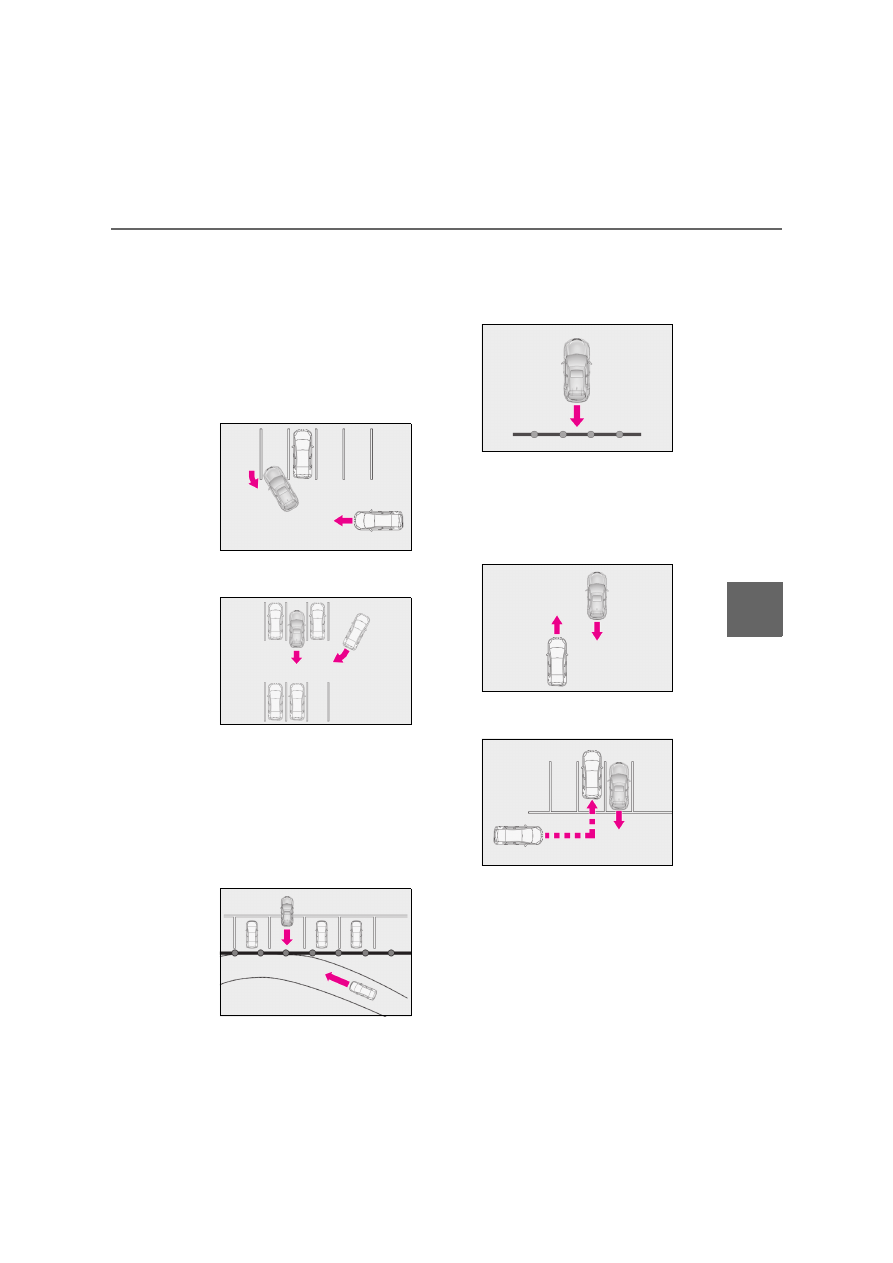
This function will operate in situations 
such as the following if an object is 
detected in the traveling direction of 
the vehicle.

Q

When traveling at a low speed and 
the brake pedal is not depressed, 
or is depressed late

Q

When the accelerator pedal is 
depressed excessively

Parking Support Brake 
function (static objects)

*

If the sensors detect a static object, 
such as a wall, in the traveling direc-
tion of the vehicle and the system 
determines that a collision may 
occur due to the vehicle suddenly 
moving forward due to an acciden-
tal accelerator pedal operation, the 
vehicle moving the unintended 
direction due to the wrong shift 
position being selected, or while 
parking or traveling at low speeds, 
the system will operate to lessen 
the impact with the detected static 
object and reduce the resulting 
damage.

Examples of function operation

324

5-4. Using the driving support systems

Q

When the vehicle moves in the 
unintended direction due to the 
wrong shift position being selected

P.306

Q

The Parking Support Brake function 

(static objects) will operate when

The function will operate when the PKSB 

OFF indicator is not illuminated or flashing 

(

P.158, 159) and all of the following con-

ditions are met:

O

EV system output restriction control

• The Parking Support Brake is enabled.

• The vehicle speed is approximately 15 

km/h (10 mph) or less.

• There is a static object in the traveling 

direction of the vehicle and approxi-

mately 2 to 4 m (6 to 13 ft.) away.

• The Parking Support Brake determines 

that a stronger-than-normal brake oper-

ation is necessary to avoid a collision.

O

Brake control

• EV system output restriction control is 

operating.

• The Parking Support Brake determines 

that an immediate brake operation is 

necessary to avoid a collision.

Q

The Parking Support Brake function 

(static objects) will stop operating when

The function will stop operating if any of the 

following conditions are met:

O

EV system output restriction control

• The Parking Support Brake is disabled.

• The system determines that the collision 

has become avoidable with normal brake 

operation.

• The static object is no longer approxi-

mately 2 to 4 m (6 to 13 ft.) away from the 

vehicle or in the traveling direction of the 

vehicle.

O

Brake control

• The Parking Support Brake is disabled.

• Approximately 2 seconds have elapsed 

since the vehicle was stopped by brake 

control.

• The brake pedal is depressed after the 

vehicle is stopped by brake control.

• The static object is no longer approxi-

mately 2 to 4 m (6 to 13 ft.) away from the 

vehicle or in the traveling direction of the 

vehicle.

Q

Detection range of the Parking Support 

Brake function (static objects)

The detection range of the Parking Support 

Brake function (static objects) differs from 

the detection range of the Lexus parking 

assist-sensor. (

P.310) Therefore, even if 

the Lexus parking assist-sensor detects an 

object and provides a warning, the Parking 

Support Brake function (static objects) may 

not start operating.

Types of sensors

WARNING

Q

To ensure the system can operate 

properly

P.307

Q

If the Parking Support Brake function 

(static objects) operates unnecessar-

ily, such as at a railroad crossing

P.322

Q

Notes when washing the vehicle

P.308

325

5

5-4. Using the driving support systems

Dr

ivin
g

Q

Situations in which the system may not 

operate properly

P.309

Q

Situations in which the system may 

operate even if there is no possibility of a 

collision

P.309

*

: If  equipped

This function will operate in situations 
such as the following if a vehicle is 
detected in the traveling direction of 
the vehicle.

Q

When reversing, a vehicle is 
approaching and the brake pedal is 
not depressed, or is depressed late

P.301

Parking Support Brake 
function (rear-crossing vehi-
cles)

*

If a rear radar sensor detects a 
vehicle approaching from the right 
or left at the rear of the vehicle and 
the system determines that the pos-
sibility of a collision is high, this 
function will perform brake control 
to reduce the likelihood of an 
impact with the approaching vehi-
cle.

Examples of function operation

Types of sensors

326

5-4. Using the driving support systems

Q

The Parking Support Brake function 

(rear-crossing vehicles) will operate 

when

The function will operate when the PKSB 

OFF indicator is not illuminated or flashing 

(

P.158, 159) and all of the following con-

ditions are met:

O

EV system output restriction control

• The Parking Support Brake is enabled.

• The vehicle speed is approximately 15 

km/h (10 mph) or less.

• Vehicles are approaching from the right 

or left at the rear of the vehicle at a travel-

ing speed of approximately 8 km/h (5 

mph) or more.

• The shift position is in R.

• The Parking Support Brake determines 

that a stronger than normal brake opera-

tion is necessary to avoid a collision with 

an approaching vehicle.

O

Brake control

• EV system output restriction control is 

operating.

• The Parking Support Brake determines 

that an emergency brake operation is 

necessary to avoid a collision with an 

approaching vehicle.

Q

The Parking Support Brake function 

(rear-crossing vehicles) will stop oper-

ating when

The function will stop operating if any of the 

following conditions are met:

O

EV system output restriction control

• The Parking Support Brake is disabled.

• The collision becomes avoidable with 

normal brake operation.

• A vehicle is no longer approaching from 

the right or left at the rear of the vehicle.

O

Brake control

• The Parking Support Brake is disabled.

• Approximately 2 seconds have elapsed 

since the vehicle was stopped by brake 

control.

• The brake pedal is depressed after the 

vehicle is stopped by brake control.

• A vehicle is no longer approaching from 

the right or left at the rear of the vehicle.

Q

Detection area of the Parking Support 

Brake function (rear-crossing vehicles)

The detection area of the Parking Support 

Brake function (rear-crossing vehicles) dif-

fers from the detection area of the RCTA 

function (

P.315). Therefore, even if the 

RCTA function detects a vehicle and pro-

vides an alert, the Parking Support Brake 

function (rear-crossing vehicles) may not 

start operating.

Q

Situations in which the system may not 

operate properly

P.316

Q

Situations in which the system may 

operate even if there is no possibility of a 

collision

P.317

WARNING

Q

To ensure the system can operate 

properly

P.301

327

5

5-4. Using the driving support systems

Dr

ivin
g

1

Normal mode

Provides an optimal balance of electricity 
consumption, quietness, and dynamic per-
formance. Suitable for city driving.
Press the switch to change the driving 
mode to Normal mode when not in Nor-
mal mode.

2

Eco drive mode

Helps the driver accelerate in an eco-
friendly manner and improve electricity 
consumption through moderate throttle 
characteristics and by controlling the 
operation of the air conditioning system 
(heating/cooling).
When not in Eco drive mode, if the driving 
mode select switch is turned toward you, 
the “Eco” indicator comes on.

3

Sport mode

Assists acceleration response by con-
trolling the EV system and steering. Suit-

able for when precise handling is desirable, 
for example when driving on mountain 
roads.
When not in Sport mode, if the driving 
mode select switch is turned backward, the 
“Sport” indicator comes on.

Q

Operation of the air conditioning sys-

tem in Eco drive mode

Eco drive mode controls the heating/cool-

ing operations and fan speed of the air con-

ditioning system to enhance electricity 

consumption efficiency. To improve air 

conditioning performance, perform the fol-

lowing operations:

O

Turn off eco air conditioning mode 

(

P.350)

O

Adjust the fan speed (

P.346, 349)

O

Turn off Eco drive mode

Q

Automatic deactivation of Sport mode

If the power switch is turned off after driving 

in Sport mode, the driving mode will be 

changed to Normal mode.

Q

Driving mode pop-up display (vehicles 

with 10.3-inch display model)

When the driving mode is changed, the 

selected driving mode will be temporarily 

displayed on the side display. (

P.343)

Driving mode select switch

The driving modes can be selected 
to suit driving conditions.

Selecting the driving mode

328

5-4. Using the driving support systems

Q

ECB (Electronically Controlled 
Brake System)

The electronically controlled system 
generates braking force correspond-
ing to the brake operation

Q

ABS (Anti-lock Brake System)

Helps to prevent wheel lock when the 
brakes are applied suddenly, or if the 
brakes are applied while driving on a 
slippery road surface

Q

Brake assist

Generates an increased level of brak-
ing force after the brake pedal is 
depressed when the system detects a 
panic stop situation

Q

VSC (Vehicle Stability Control)

Helps the driver to control skidding 
when swerving suddenly or turning on 
slippery road surfaces.

Q

VSC + (Vehicle Stability Control +)

Provides cooperative control of the 
ABS, TRC, VSC and EPS.

Helps to maintain directional stability 
when swerving on slippery road sur-
faces by controlling steering perfor-
mance.

Q

TRC (Traction Control)

Helps to maintain drive power and 
prevent the drive wheels from spinning 
when starting the vehicle or accelerat-
ing on slippery roads

Q

Active Cornering Assist (ACA)

Helps to prevent the vehicle from drift-
ing to the outer side by performing 
inner wheel brake control when 
attempting to accelerate while turning

Q

Hill-start assist control

Helps to reduce the backward move-
ment of the vehicle when starting on an 
uphill

Q

EPS (Electric Power Steering)

Employs an electric motor to reduce 
the amount of effort needed to turn the 
steering wheel

Q

Emergency brake signal

When the brakes are applied suddenly, 
the stop lights automatically flash to 
alert the vehicle behind.

Q

Secondary Collision Brake

When the SRS airbag sensor detects a 
collision and the system operates, the 
brakes and brake lights are automati-
cally controlled to reduce the vehicle 
speed and help reduce the possibility 
of further damage due to a secondary 
collision.

Driving assist systems

To keep driving safety and perfor-
mance, the following systems oper-
ate automatically in response to 
various driving situations. Be 
aware, however, that these systems 
are supplementary and should not 
be relied upon too heavily when 
operating the vehicle.

Summary of the driving assist 
systems

329

5

5-4. Using the driving support systems

Dr

ivin
g

Q

When the TRC/VSC/ABS systems are 

operating

The slip indicator light will flash while the 

TRC/VSC/ABS systems are operating.

Q

Disabling the TRC system

If the vehicle gets stuck in mud, dirt or snow, 

the TRC system may reduce power from 

the EV system to the wheels. Pressing the 

 switch to turn the system off may 

make it easier for you to rock the vehicle in 

order to free it.
To turn the TRC system off, quickly press 
and release the 

 switch.

The “Traction Control Turned Off” will be 
shown on the multi-information display.

Press the 

 switch again to turn the 

system back on.

Q

Turning off both TRC and VSC systems

To turn the TRC and VSC systems off, 
press and hold the 

 switch for more 

than 3 seconds while the vehicle is stopped.
The VSC OFF indicator light will come on 

and the “Traction Control Turned Off” will 
be shown on the multi-information display.

*

Press the 

 switch again to turn the 

systems back on.

*

: Pre-collision brake assist and pre-colli-

sion braking will also be disabled. The 
PCS warning light will come on and a 
message will be displayed on the multi-
information display. (

P.268)

Q

When the message is displayed on the 

multi-information display showing that 
TRC has been disabled even if the 


switch has not been pressed

TRC is temporary deactivated. If the infor-

mation continues to show, contact any 

authorized Lexus retailer or Lexus autho-

rized repairer, or any reliable repairer.

Q

Operating conditions of hill-start assist 

control

When all of the following conditions are 

met, the hill-start assist control will operate:

O

The shift position is in a position other 

than P or N (when starting off for-

ward/backward on an upward incline)

O

The vehicle is stopped

O

The accelerator pedal is not depressed

O

The parking brake is not engaged

O

Power switch is in ON

Q

Automatic system cancelation of hill-

start assist control

The hill-start assist control will turn off in any 

of the following situations:

O

The shift position is shifted to P or N

O

The accelerator pedal is depressed

O

The parking brake is engaged

O

2 seconds at maximum elapsed after the 

brake pedal is released

O

Power switch is turned to OFF

Q

Sounds and vibrations caused by the 

ABS, brake assist, VSC, TRC and hill-

start assist control systems

O

A sound may be heard from the motor 

compartment when the brake pedal is 

depressed repeatedly, when the EV sys-

330

5-4. Using the driving support systems

tem is started or just after the vehicle 

begins to move. This sound does not indi-

cate that a malfunction has occurred in 

any of these systems.

O

Any of the following conditions may 

occur when the above systems are oper-

ating. None of these indicates that a mal-

function has occurred.

• Vibrations may be felt through the vehi-

cle body and steering.

• A motor sound may be heard also after 

the vehicle comes to a stop.

Q

ECB operating sound

ECB operating sound may be heard in the 

following cases, but it does not indicate that 

a malfunction has occurred.

O

Operating sound heard from the motor 

compartment when the brake pedal is 

operated.

O

Motor sound of the brake system heard 

from the front part of the vehicle when 

the driver’s door is opened.

O

Operating sound heard from the motor 

compartment when one or two minutes 

passed after the stop of the EV system.

Q

Active Cornering Assist operation 

sounds and vibrations

When Active Cornering Assist is operated, 

operation sounds and vibrations may be 

generated from the brake system, but this is 

not a malfunction.

Q

EPS operation sound

When the steering wheel is operated, a 

motor sound (whirring sound) may be 

heard.

This does not indicate a malfunction.

Q

Automatic reactivation of TRC and 

VSC systems

After turning the TRC and VSC systems off, 

the systems will be automatically re-

enabled in the following situations:

O

When the power switch is turned off

O

If only the TRC system is turned off, the 

TRC will turn on when vehicle speed 

increases. If both the TRC and VSC sys-

tems are turned off, automatic re-

enabling will not occur when vehicle 

speed increases.

Q

Operating conditions of Active Corner-

ing Assist

The system operates when the following 

occurs.

O

TRC/VSC can operate

O

The driver is attempting to accelerate 

while turning

O

The system detects that the vehicle is 

drifting to the outer side

O

The brake pedal is released

Q

Reduced effectiveness of the EPS sys-

tem

The effectiveness of the EPS system is 

reduced to prevent the system from over-

heating when there is frequent steering 

input over an extended period of time. The 

steering wheel may feel heavy as a result. 

Should this occur, refrain from excessive 

steering input or stop the vehicle and turn 

the EV system off. The EPS system should 

return to normal within 10 minutes.

Q

Operating conditions of emergency 

brake signal

When the following conditions are met, the 

emergency brake signal will operate:

O

The emergency flashers are off.

O

Actual vehicle speed is over 55 km/h 

(35 mph).

O

The system judges from the vehicle 

deceleration that it is a sudden braking 

operation.

Q

Automatic system cancelation of emer-

gency brake signal

The emergency brake signal will be can-

celed in any of the following situations:

O

The emergency flashers are turned on.

O

The system judges from the vehicle 

deceleration that is not a sudden braking 

operation

Q

Secondary Collision Brake operating 

conditions

The system operates when the SRS airbag 

sensor detects a collision while the vehicle 

331

5

5-4. Using the driving support systems

Dr

ivin
g

is in motion. However, the system does not 

operate in any of the following situations.

O

The vehicle speed is below 10 km/h (6 

mph)

O

Components are damaged

Q

Secondary Collision Brake automatic 

cancellation

The system is automatically canceled in any 

of the following situations.

O

The vehicle speed drops below approxi-

mately 10 km/h (6 mph)

O

A certain amount of time elapses during 

operation

O

The accelerator pedal is depressed a 

large amount

WARNING

Q

The ABS does not operate effectively 

when

O

The limits of tire gripping performance 

have been exceeded (such as exces-

sively worn tires on a snow covered 

road).

O

The vehicle hydroplanes while driving 

at high speed on wet or slick roads.

Q

Stopping distance when the ABS is 

operating may exceed that of normal 

conditions

The ABS is not designed to shorten the 

vehicle’s stopping distance. Always 

maintain a safe distance from the vehicle 

in front of you, especially in the following 

situations:

O

When driving on dirt, gravel or snow-

covered roads

O

When driving with tire chains

O

When driving over bumps in the road

O

When driving over roads with pot-

holes or uneven surfaces

Q

TRC/VSC may not operate effec-

tively when

Directional control and power may not 

be achievable while driving on slippery 

road surfaces, even if the TRC/VSC sys-

tem is operating.

Drive the vehicle carefully in conditions 

where stability and power may be lost.

Q

Active Cornering Assist does not 

operate effectively when

O

Do not overly rely on Active Corner-

ing Assist. Active Cornering Assist 

may not operate effectively when 

accelerating down slopes or driving on 

slippery road surfaces.

O

When Active Cornering Assist fre-

quently operates, Active Cornering 

Assist may temporarily stop operating 

to ensure proper operation of the 

brakes, TRC and VSC.

Q

Hill-start assist control does not oper-

ate effectively when

O

Do not overly rely on hill-start assist 

control. Hill-start assist control may 

not operate effectively on steep 

inclines and roads covered with ice.

O

Unlike the parking brake, hill-start 

assist control is not intended to hold 

the vehicle stationary for an extended 

period of time. Do not attempt to use 

hill-start assist control to hold the vehi-

cle on an incline, as doing so may lead 

to an accident.

Q

When the TRC/ABS/VSC is acti-

vated

The slip indicator light flashes. Always 

drive carefully. Reckless driving may 

cause an accident. Exercise particular 

care when the indicator light flashes.

332

5-4. Using the driving support systems

WARNING

Q

When the TRC/VSC systems are 

turned off

Be especially careful and drive at a 

speed appropriate to the road condi-

tions. As these are the systems to help 

ensure vehicle stability and driving force, 

do not turn the TRC/VSC systems off 

unless necessary.

Q

Replacing tires

Make sure that all tires are of the speci-

fied size, brand, tread pattern and total 

load capacity. In addition, make sure that 

the tires are inflated to the recom-

mended tire inflation pressure level.

The ABS, TRC and VSC systems will not 

function correctly if different tires are 

installed on the vehicle.

Contact any authorized Lexus retailer or 

Lexus authorized repairer, or any reli-

able repairer for further information 

when replacing tires or wheels.

Q

Handling of tires and the suspension

Using tires with any kind of problem or 

modifying the suspension will affect the 

driving assist systems, and may cause a 

system to malfunction.

Q

Secondary Collision Brake

Do not rely solely upon the Secondary 

Collision Brake. This system is designed 

to help reduce the possibility of further 

damage due to a secondary collision, 

however, that effect changes according 

to various conditions. Overly relying on 

the system may result in death or serious 

injury.

333

5

5-5. Driving tips

Dr

ivin
g

5-5.Driving tips

Use fluids that are appropriate to 
the prevailing outside temperatures.

• Power control unit coolant
• Heater coolant
• Washer  fluid

Have a service technician inspect 
the condition of the 12-volt battery.

Have the vehicle fitted with four 
snow tires or purchase a set of tire 
chains for the front tires.

Ensure that all tires are the same size and 
brand, and that chains match the size of the 
tires.

Perform the following according to the 
driving conditions:

Do not try to forcibly open a window 
or move a wiper that is frozen. Pour 
warm water over the frozen area to 
melt the ice. Wipe away the water 

Winter driving tips

Carry out the necessary prepara-
tions and inspections before driving 
the vehicle in winter. Always drive 
the vehicle in a manner appropriate 
to the prevailing weather condi-
tions.

Preparation for winter

WARNING

Q

Driving with snow tires

Observe the following precautions to 

reduce the risk of accidents.

Failure to do so may result in a loss of 

vehicle control and cause death or seri-

ous injury.

O

Use tires of the specified size.

O

Maintain the recommended level of air 

pressure.

O

Do not drive at speeds in excess of the 

speed limit or the speed limit specified 

for the snow tires being used.

O

Use snow tires on all, not just some 

wheels.

Q

Driving with tire chains

Observe the following precautions to 

reduce the risk of accidents.

Failure to do so may result in the vehicle 

being unable to be driven safely, and may 

cause death or serious injury.

O

Do not drive in excess of the speed 

limit specified for the tire chains being 

used, or 50 km/h (30 mph), which-

ever is lower.

O

Avoid driving on bumpy road surfaces 

or over potholes.

O

Avoid sudden acceleration, abrupt 

steering, sudden braking and shifting 

operations that cause sudden regen-

erative braking.

O

Slow down sufficiently before entering 

a curve to ensure that vehicle control 

is maintained.

O

Do not use LTA (Lane Tracing Assist).

NOTICE

Q

Repairing or replacing snow tires

Request repairs or replacement of snow 

tires from any authorized Lexus retailer 

or Lexus authorized repairer, or any reli-

able repairer or legitimate tire retailers.

This is because the removal and attach-

ment of snow tires affects the operation 

of the tire pressure warning valves and 

transmitters.

Before driving the vehicle

334

5-5. Driving tips

immediately to prevent it from 
freezing.

To ensure proper operation of the 
climate control system fan, remove 
any snow that has accumulated on 
the air inlet vents in front of the 
windshield.

Check for and remove any excess 
ice or snow that may have accumu-
lated on the exterior lights, vehicle’s 
roof, chassis, around the tires or on 
the brakes.

Remove any snow or mud from the 
bottom of your shoes before getting 
in the vehicle.

Accelerate the vehicle slowly, keep a 
safe distance between you and the 
vehicle ahead, and drive at a reduced 
speed suitable to road conditions.

Park the vehicle and shift the shift 
position to P without setting the 
parking brake. The parking brake 
may freeze up, preventing it from 
being released. If the vehicle is 
parked without setting the parking 
brake, make sure to block the 
wheels.
Failure to do so may be dangerous 
because it may cause the vehicle to 
move unexpectedly, possibly lead-
ing to an accident.

When the parking brake is in automatic 

mode, release the parking brake after shift-
ing the shift position to P. (

P.234)

If the vehicle is left parked with the 
brakes damp in cold temperatures, 
there is a possibility of the brakes 
freezing.

Use the correct tire chain size when 
mounting the tire chains. Chain size is 
regulated for each tire size.

Side chain:

3 mm (0.12 in.) in diameter

10 mm (0.39 in.) in width

25 mm (0.98 in.) in length

Cross chain:

4 mm (0.16 in.) in diameter

14 mm (0.55 in.) in width

25 mm (0.98 in.) in length

When driving the vehicle

When parking the vehicle

WARNING

Q

When parking the vehicle

When parking the vehicle without apply-

ing the parking brake, make sure to 

chock the wheels. If you do not chock the 

wheels, the vehicle may move unexpect-

edly, possibly resulting in an accident.

Selecting tire chains

A
B
C

D

E
F

335

5

5-5. Driving tips

Dr

ivin
g

Regulations regarding the use of tire 
chains vary depending on location and 
type of road. Always check local regu-
lations before installing chains.

Q

Tire chain installation

Observe the following precautions when 

installing and removing chains:

O

Install and remove tire chains in a safe 

location.

O

Install tire chains on the front tires only. 

Do not install tire chains on the rear tires.

O

Install tire chains on front tires as tightly 

as possible. Retighten chains after driving 

0.5 - 1.0 km (1/4 - 1/2 mile).

O

Install tire chains following the instruc-

tions provided with the tire chains.

To enable the windshield wipers to be 
lifted when heavy snow or icy condi-
tions are expected, change the rest 
position of the windshield wipers from 
the retracted position below the hood 
to the service position using the wiper 
lever. (

P.253)

Specific design characteristics give 
it a higher center of gravity than 
ordinary passenger cars. This vehi-
cle design feature causes this type 
of vehicle to be more likely to roll-
over. Utility vehicles have a signifi-
cantly higher rollover rate than 
other types of vehicles.

An advantage of the higher ground 
clearance is a better view of the 
road allowing you to anticipate 
problems.

It is not designed for cornering at 
the same speeds as ordinary pas-
senger cars any more than low-
slung sports cars designed to per-
form satisfactorily under off-road 
conditions. Therefore, sharp turns at 
excessive speeds may cause roll-
over.

Regulations on the use of tire 
chains

NOTICE

Q

Fitting tire chains

The tire pressure warning valves and 

transmitters may not function correctly 

when tire chains are fitted.

Windshield wipers

Utility vehicle precautions

This vehicle belongs to the utility 
vehicle class, which has higher 
ground clearance and narrower 
tread in relation to the height of its 
center of gravity.

Utility vehicle feature

336

5-5. Driving tips

Your vehicle is not designed to be 
driven off-road. However, in the event 
that off-road driving cannot be 
avoided, please observe the following 
precautions to help avoid the areas 

prohibited to vehicles.

Drive your vehicle only in areas 
where off-road vehicles are permit-
ted to travel.

Respect private property. Get 
owner’s permission before entering 
private property.

Do not enter areas that are closed. 
Honor gates, barriers and signs that 
restrict travel.

Stay on established roads. When 
conditions are wet, driving tech-
niques should be changed or travel 
delayed to prevent damage to 
roads.

WARNING

Q

Utility vehicle precautions

Always observe the following precau-

tions to minimize the risk of death or seri-

ous injury or damage to your vehicle:

O

In a rollover crash, an unbelted person 

is significantly more likely to die than a 

person wearing a seat belt. Therefore, 

the driver and all passengers should 

always fasten their seat belts.

O

Avoid sharp turns or abrupt maneu-

vers, if at all possible.

Failure to operate this vehicle cor-

rectly may result in loss of control or 

vehicle rollover causing death or seri-

ous injury.

O

Loading cargo on the roof luggage 

carrier (if equipped) will make the cen-

ter of the vehicle gravity higher. Avoid 

high speeds, sudden starts, sharp 

turns, sudden braking or abrupt 

maneuvers, otherwise it may result in 

loss of control or vehicle rollover due 

to failure to operate this vehicle cor-

rectly.

O

Always slow down in gusty crosswinds. 

Because of its profile and higher cen-

ter of gravity, your vehicle is more sen-

sitive to side winds than an ordinary 

passenger car. Slowing down will 

allow you to have better control.

O

Do not drive horizontally across steep 

slopes. Driving straight up or straight 

down is preferred. Your vehicle (or 

any similar off-road vehicle) can tip 

over sideways much more easily than 

forward or backward.

Off-road driving

WARNING

Q

Off-road driving precautions

Always observe the following precau-

tions to minimize the risk of death or seri-

ous injury or damage to your vehicle:

O

Drive carefully when off the road. Do 

not take unnecessary risks by driving 

in dangerous places.

O

Do not grip the steering wheel spokes 

when driving off-road. A bad bump 

could jerk the wheel and injure your 

hands. Keep both hands and especially 

your thumbs on the outside of the rim.

O

Always check your brakes for effec-

tiveness immediately after driving in 

sand, mud, water or snow.

O

After driving through tall grass, mud, 

rock, sand, water, etc., check that 

there is no grass, bush, paper, rags, 

stone, sand, etc. adhering or trapped 

to the underbody. Clear off any such 

matter from the underbody. If the vehi-

cle is used with these materials 

trapped or adhering to the underbody, 

a breakdown or fire could occur.

337

5

5-5. Driving tips

Dr

ivin
g

WARNING

O

When driving off-road or in rugged 

terrain, do not drive at excessive 

speeds, jump, make sharp turns, strike 

objects, etc. This may cause loss of 

control or vehicle rollover causing 

death or serious injury. You are also 

risking expensive damage to your 

vehicle’s suspension and chassis.

NOTICE

Q

To prevent water damage

Take all necessary safety measures to 

ensure that water damage to the traction 

battery, EV system or other components 

does not occur.

O

Water entering the motor compart-

ment may cause severe damage to the 

EV system.

O

Water entering the transmission will 

cause deterioration in transmission 

quality. The vehicle may not be driv-

able.

O

Water can wash the grease from 

wheel bearings, causing rusting and 

premature failure, and may also enter 

the transmission case, reducing the 

gear oil’s lubricating qualities.

Q

When you drive through water

If driving through water, such as when 

crossing shallow streams, first check the 

depth of the water and the bottom of the 

riverbed for firmness. Drive slowly and 

avoid deep water.

Q

Inspection after off-road driving

O

Sand and mud that has accumulated 

around brake discs may affect braking 

efficiency and may damage brake sys-

tem components.

O

Always perform a maintenance 

inspection after each day of off-road 

driving that has taken you through 

rough terrain, sand, mud, or water.

338

5-5. Driving tips

6

339

6

In

te

rio

r f

eat
ur

es

Interior features

6-1. Remote Touch

Remote Touch............................

340

6-2. Lexus Climate Concierge

Lexus Climate Concierge.....

344

6-3. Using the air conditioning system 

and defogger

Automatic air conditioning 

system .........................................

346

Remote Air Conditioning System

........................................................

355

Heated steering wheel/seat heat-

ers/seat ventilators................

357

6-4. Using the interior lights

Interior lights list..........................

361

6-5. Using the storage features

List of storage features ...........

364

Luggage compartment features

........................................................

367

6-6. Using the other interior features

Other interior features ............

371

340

6-1. Remote Touch

6-1.Remote Touch

Q

Switches

“MAP” button (10.3-inch display 
model)

Press this button to display the vehicle’s 
current position.

“MENU” button

Press this button to display the menu 
screen.

Back button

Press this button to display the previous 
screen.

Touchpad

Slide your finger on the touchpad and 
move the pointer to select a function, letter 
and screen button.
Press the touchpad to enter the selected 
function, letter or screen button. Certain 
finger movements on the touchpad can 

perform functions, such as changing map 
scalings and scrolling list screens.

Sub function button

When 

 is displayed on the screen, a 

function screen assigned to the screen can 
be displayed.

“HOME” button (7-inch display 
model)

Press this button to display the home 
screen.

Q

Using the touchpad

1

Select: Touch the touchpad to 
select the desired button on the 
screen.

2

Enter: The buttons on the screen 
can be selected by either depress-
ing or double tapping on the 
touchpad. Once a button has been 
selected, the screen will change.

Q

Touch operation

Operations are performed by touch-
ing the touchpad with your finger.

Trace

Trace the pad surface while maintaining 
contact with the touch pad. Moving the 
cursor and the pointer.

Remote Touch

The Remote Touch can be used to 
operate Center Display. Owners of 
models equipped with a navigation 
system should refer to the “NAVI-
GATION AND MULTIMEDIA 
SYSTEM OWNER’S MANUAL”.

Remote Touch operation

A

B

C

D

E

F

341

6

6-1. Remote Touch

In

te

rio

r f

eat
ur

es

Double tap

Tap the touchpad twice, quickly. Select the 
button on the screen.

Flick

Quick and long movement along the 
touchpad with your finger. Move the list 
screen.

Pinch in/Pinch out

Slide fingers toward each other or apart on 
the touchpad. Change the scale of the 
map.

Q

Menu screen

Press the “MENU” button on the 
Remote Touch to display the menu 
screen.
The displays shown in the illustrations 
are used for example only and may dif-
fer from the actual vehicle.

NOTICE

Q

To prevent damage to the Remote 

Touch

Observe the following precautions. Fail-

ure to do so may cause damage to the 

Remote Touch.

O

Do not allow the Remote Touch to 

come into contact with food, liquid, 

stickers or lit cigarettes.

O

Do not subject the Remote Touch to 

excessive pressure or strong impact.

O

Do not push the touchpad with a 

strong force or use a sharp pointed 

object to operate the pad.

Center Display overview

342

6-1. Remote Touch

10.3-inch display model

7-inch display model

*1

: Refer to the “NAVIGATION AND 

MULTIMEDIA SYSTEM OWNER’S 
MANUAL”.

*2

: If equipped

*3

: This function is not made available in 

some countries or areas.

Q

Split-screen display (10.3-inch display model)

Different information can be displayed on the left and right of the screen. For 
example, the air conditioning system screen can be displayed and operated while 
the audio control screen is being displayed. The large screen on the left of the dis-
play is called the main display, and the small screen to the right is called the side 
display.

Switch

Function

Select to display the destination 
screen.

*1, 2

Select to display the audio con-
trol screen.

*1

Select to display the hands-free 
control screen.

*1

Select to display the application 
screen.

*1, 3

Select to display the home 
screen of Apple CarPlay.

*1, 3

Select to display the home 
screen of Android Auto.

*1, 3

Select to display the setup 
screen.

*1

Select to display the air condi-
tioning control screen. (

349)

Select to adjust the contrast and 
brightness of the screens, turn 
the screen off, etc.

*1, 2

Switch

Function

343

6

6-1. Remote Touch

In

te

rio

r f

eat
ur

es

Q

Main display

For details about the functions and 
operation of the main display, refer to 
the respective section and “NAVIGA-
TION AND MULTIMEDIA SYSTEM 
OWNER’S MANUAL”.

Q

Side display (10.3-inch display 
model)

The following functions can be dis-
played and operated on the side dis-
play.

Select 

 or 

 to display the desired 

screen.

Navigation system

*

Audio

*

Air conditioning system (

P.349)

Show/hide the side display.

*

: Refer to the “NAVIGATION AND 

MULTIMEDIA SYSTEM OWNER’S 
MANUAL”.

Q

Screen display during low temperatures

When the ambient temperature is 

extremely low, screen response may be 

delayed even if the Remote Touch is oper-

ated.

A
B

C
D

344

6-2. Lexus Climate Concierge

6-2.Lexus Climate Concierge

Select 

The indicator on the Lexus Climate Con-
cierge control screen illuminates, and the 
automatic air conditioning system, front 
seat heaters and ventilators (if equipped), 
and heated steering wheel (if equipped) 
operate in automatic mode.
If any of the system is operated manually, 
the indicator turns off. However, all other 
functions continue to operate in automatic 
mode.

Q

When using the Lexus Climate Con-

cierge

Lexus Climate Concierge can be operated 

on the sub function menu or option control 

screen. (

P.349)

Q

Automatic air conditioning system 
(

P.346)

The temperature can be adjusted inde-
pendently for the driver seat and pas-
senger seat.

Q

Front seat heaters and ventilators 
(if equipped) (

P.357)

Heating or ventilation is automatically 
selected according to the set tempera-
ture of the air conditioning system, the 
outside temperature, etc.
The seat heater and ventilator of the 
front passenger seat operate in auto-
matic mode if a passenger is detected.

Q

Heated steering wheel (if 
equipped) (

P.357)

Heated steering wheel operates auto-
matically according to the set tem-
perature of the air conditioning system, 
the outside temperature, etc.

Lexus Climate Concierge

The front seat heaters (if equipped), 
seat ventilators (if equipped) and 
heated steering wheel (if equipped) 
are each automatically controlled 
according to the set temperature of 
the air conditioning system, the out-
side and cabin temperature, etc. 
Lexus Climate Concierge allows a 
comfortable condition to be main-
tained without adjusting each sys-
tem.
Press the “MENU” button on the 
Remote Touch and select “Cli-
mate” to display the air condition-
ing control screen. Then, select 


to display the Lexus Climate Con-
cierge control screen.

Turning on Lexus Climate Con-
cierge

Operation of each system

345

6

6-2. Lexus Climate Concierge

In

te

rio

r f

eat
ur

es

Q

Front seat heater/ventilator operation

When automatic mode is selected using the 

front seat heater/ventilator switch, passen-

ger detection is not performed.

346

6-3. Using the air conditioning system and defogger

6-3.Using the air conditioning system and defogger

Left-hand side temperature control switch

Fan speed control switch

Automatic mode switch

Off switch

Windshield defogger switch

Rear window and outside rear view mirror defogger switch

Automatic air conditioning system

Air outlets and fan speed are automatically adjusted according to the tem-
perature setting.
Press the “MENU” button on the Remote Touch, then select “Climate” to dis-
play the air conditioning control screen. (

P.341)

10.3-inch display model: The air conditioning system can be displayed and 
operated on the side display.
The illustrations below are for left-hand drive vehicles.
The button positions will differ for right-hand drive vehicles.

Air conditioning controls

A
B
C
D

E
F

347

6

6-3. Using the air conditioning system and defogger

In

te

rio

r f

eat
ur

es

Outside/recirculated air mode switch

Airflow mode control switch

Right-hand side temperature control switch

Q

Adjusting the temperature setting

Operate the temperature control 
switch upwards to increase the tem-
perature and downwards to decrease 
the temperature.

Q

Setting the fan speed

Operate the fan speed control switch 
upwards to increase the fan speed and 
downwards to decrease the fan speed.

Press the off switch to turn the fan off.

Q

Change the airflow mode

Operate the airflow mode control 
switch upwards or downwards.

The mode changes as follows each time 
the switch is operated.

Air flows to the upper body.

Air flows to the upper body and 
feet.

Air flows to the feet.

Air flows to the feet and the wind-
shield defogger operates.

Q

Switching between outside air and 
recirculated air modes

Press the outside/recirculated air 
mode switch.

The mode switches between outside air 
mode (the indicator is off) and recirculated 
air mode (the indicator is on) each time the 
switch is pressed.

Q

Defogging the windshield

Defoggers are used to defog the wind-
shield and front side windows.
Press the windshield defogger switch.

Set the outside/recirculated air mode 
switch to outside air mode if the recircu-
lated air mode is used. (It may switch auto-
matically.)
To defog the windshield and the side win-
dows early, turn the air flow and tempera-
ture up.
To return to the previous mode, press the 
windshield defogger switch again when the 
windshield is defogged.

Q

Defogging the rear window and 
outside rear view mirrors

Defoggers are used to defog the rear 
window and to remove raindrops, dew 
and frost from the outside rear view 
mirrors.
Press the rear window and outside 
rear view mirror defogger switch.

The defoggers will automatically turn off 

G

H

I

A
B

C

D

348

6-3. Using the air conditioning system and defogger

after a period of time.

Q

Windshield wiper de-icer (if 
equipped)

P.351

Q

Fogging up of the windows

O

The windows will easily fog up when the 

humidity in the vehicle is high. Selecting 

“A/C” will dehumidify the air from the 

outlets and defog the windshield effec-

tively.

O

If you turn “A/C” off, the windows may 

fog up more easily.

O

The windows may fog up if the recircu-

lated air mode is used.

Q

When driving on dusty roads

Close all windows. If dust thrown up by the 

vehicle is still drawn into the vehicle after 

closing the windows, it is recommended 

that the air intake mode be set to outside air 

mode and the fan speed to any setting 

except off.

Q

Outside/recirculated air mode

O

Setting to the recirculated air mode tem-

porarily is recommended in preventing 

dirty air from entering the vehicle interior 

and helping to cool the vehicle when the 

outside air temperature is high.

O

Outside/recirculated air mode may 

automatically switch depending on the 

temperature setting or the inside tem-

perature.

Q

Operation of the air conditioning sys-

tem in Eco drive mode

O

In Eco drive mode, the air conditioning 

system is controlled as follows to priori-

tize electricity consumption efficiency

• Motor speed and compressor operation 

controlled to restrict heating/cooling 

capacity

• Fan speed restricted when automatic 

mode is selected

O

To improve air conditioning perfor-

mance, perform the following operations

• Turn off eco air conditioning mode 

(

P.349)

• Adjust the fan speed

• Turn off Eco drive mode

Q

When the outside temperature is low

The dehumidification function may not 

operate even when “A/C” is selected.

Q

Ventilation and air conditioning odors

O

To let fresh air in, set the air conditioning 

system to the outside air mode.

O

During use, various odors from inside 

and outside the vehicle may enter into 

and accumulate in the air conditioning 

system. This may then cause odor to be 

emitted from the vents.

O

To reduce potential odors from occur-

ring:

• It is recommended that the air condition-

ing system be set to outside air mode 

prior to turning the vehicle off.

• The start timing of the blower may be 

delayed for a short period of time imme-

diately after the air conditioning system is 

started in automatic mode or pollen 

removal mode.

Q

Air conditioning filter

P.412

Q

Customization

Settings (e.g. A/C automatic mode switch 

operation) can be changed.

(Customizable features: 

P.485)

WARNING

Q

To prevent the windshield from fog-

ging up

Do not use the windshield defogger 

switch during cool air operation in 

extremely humid weather. The difference 

between the temperature of the outside 

air and that of the windshield can cause 

the outer surface of the windshield to fog 

up, blocking your vision.


Content      ..     8      9      10      11     ..