Lexus UX 300e (2023 year). Manual in english - page 2
 

  Index      Manuals     Lexus UX 300e (2023 year). Manual in english


Search            copyright infringement  


Content      ..      1      2      3      ..


Lexus UX 300e (2023 year). Manual in english - page 2


61

1

1-3. Emergency assistance

For
 sa

fe

ty

 an

d s

ec

uri

ty

1-3.Emergency assistance

*

: Operates within the eCall coverage. 

The system name differs depending on 
the country.

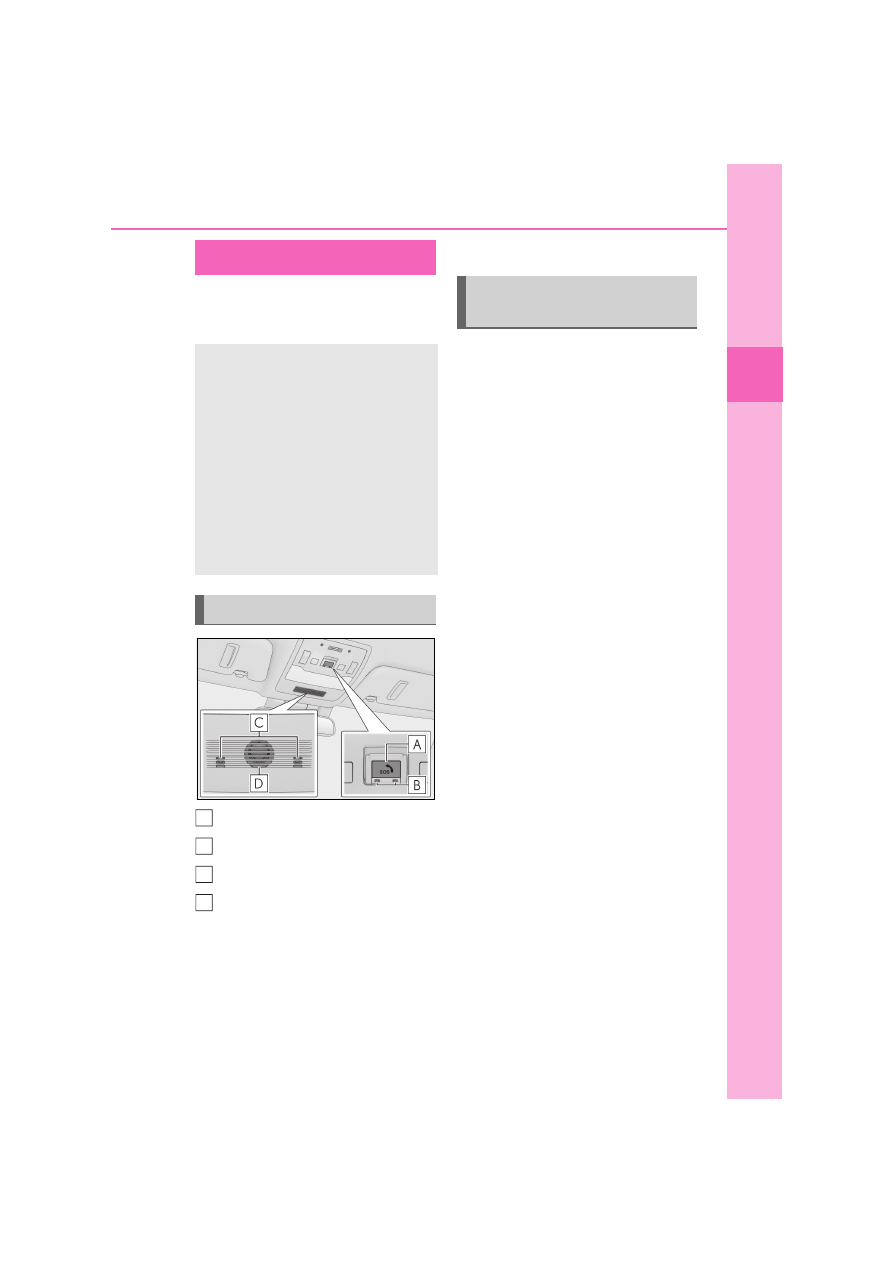
“SOS” button

*

Indicator lights

Microphone

Speaker

*

: This button is intended for communica-

tion with the eCall system operator.
Other SOS buttons available in other 
systems of a motor vehicle do not relate 
to the device and are not intended for 
communication with the eCall system 

operator.

Q

Automatic Emergency Calls

If any airbag deploys, the system is 
designed to automatically call the 
eCall control center.

*

 The answering 

operator receives the vehicle’s loca-
tion, the time of the incident and the 
vehicle VIN, and attempts to speak 
with the vehicle occupants to assess 
the situation. If the occupants are 
unable to communicate, the operator 
automatically treats the call as an 
emergency and contacts the nearest 
emergency services provider (112 sys-
tem etc.) to describe the situation and 
request that assistance be sent to the 
location.

*

: In some cases, the call cannot be made. 

(

P.62)

Q

Manual Emergency Calls

In the event of an emergency, press the 
“SOS” button to call the eCall control 
center.

*

 The answering operator will 

determine your vehicle’s location, 
assess the situation, and dispatch the 
necessary assistance required.
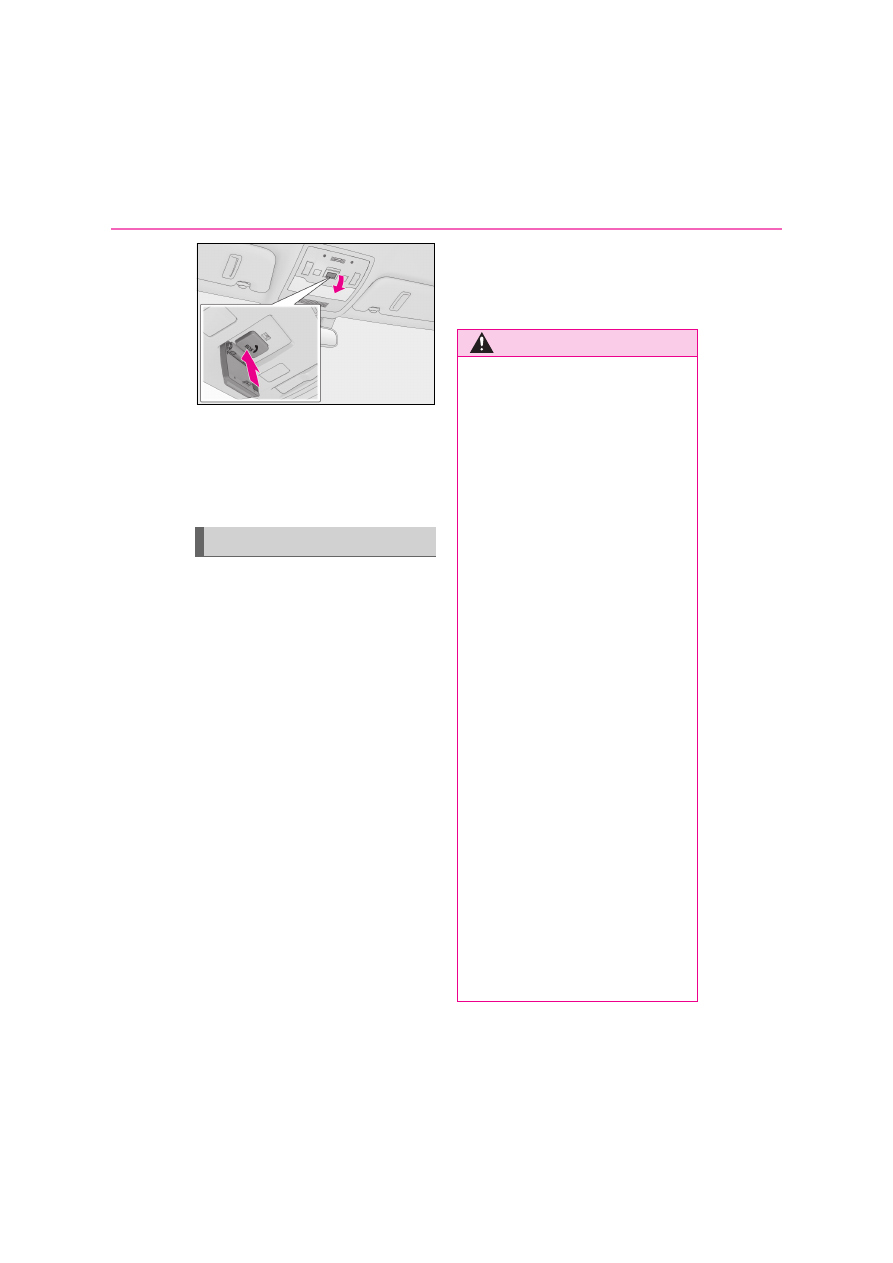
Make sure to open the cover before 
pressing the “SOS” button.

eCall

*

eCall is a telematics service that 
uses Global Navigation Satellite 
System (GNSS) data and embed-
ded cellular technology to enable 
the following emergency calls to be 
made: Automatic emergency calls 
(Automatic Collision Notification) 
and manual emergency calls (by 
pressing the “SOS” button). This 
service is required by European 
Union Regulations.

System components

A
B
C
D

Emergency Notification Ser-
vices
62

1-3. Emergency assistance

If you accidentally press the “SOS” button, 
tell the operator that you are not experi-
encing an emergency.

*

: In some cases, the call cannot be made. 

(

P.62)

When the power switch is turned to 
ON, the red indicator light will illumi-
nate for 10 seconds and then the green 
indicator light will illuminate, indicating 
that the system is enabled. The indica-
tor lights indicate the following:

If the green indicator light illumi-
nates and stays on, the system is 
enabled.

If the green indicator light flashes 
twice per second, an automatic or 
manual Emergency Call is being 
made.

If the red indicator light illuminates 
at any time other than immediately 
after the power switch is turned to 
ON, the system may be malfunc-
tioning or the backup battery may 
be depleted.

If the red indicator light blinks for 
approximately 30 seconds during 
an Emergency Call, the call has 

been disconnected or the cellular 
network signal is weak.

The service life of the backup battery does 
not exceed 3 years.

Indicator lights

WARNING

Q

When the Emergency Call may not 

be made

O

It may not be possible to make Emer-

gency Calls in any of the following situ-

ations. In such cases, report to 

emergency services provider (112 sys-

tem etc.) by other means such as 

nearby public phones.

• Even when the vehicle is in the cellular 

phone service area, it may be difficult 

to connect to the eCall control center 

if the reception is poor or the line is 

busy. In such cases, even though the 

system attempts to connect to the 

eCall control center, you may not be 

able to connect to the eCall control 

center to make Emergency Calls and 

contact emergency services.

• When the vehicle is out of the cellular 

phone service area, the Emergency 

Calls cannot be made.

• When any related equipment (such as 

the “SOS” button panel, indicator 

lights, microphone, speaker, DCM, 

antenna, or any wires connecting the 

equipment) is malfunctioning, dam-

aged or broken, the Emergency Call 

cannot be made.

• During an Emergency Call, the system 

makes repeated attempts to connect 

to the eCall control center. However, 

if it cannot connect to the eCall control 

center due to poor radio wave recep-

tion, the system may not be able to 

connect to the cellular network and 

the call may finish without connecting. 

The red indicator light will blink for 

approximately 30 seconds to indicate 

this disconnection.

63

1

1-3. Emergency assistance

For
 sa

fe

ty

 an

d s

ec

uri

ty

WARNING

O

If the 12-volt battery’s voltage 

decreases or there is a disconnection, 

the system may not be able to connect 

to the eCall control center.

O

The Emergency Call system might not 

work outside of EU area, depending 

on the available infrastructure in the 

country.

Q

When the Emergency Call system is 

replaced with a new one

The Emergency Call system should be 

registered. Contact any authorized 

Lexus retailer or Lexus authorized 

repairer, or any reliable repairer.

Q

For your safety

O

Please drive safely.

The function of this system is to assist 

you in making the Emergency Call in 

case of accidents such as traffic acci-

dents or sudden medical emergencies, 

and it does not protect the driver or 

passengers in any way. Please drive 

safely and fasten your seatbelts at all 

times for your safety.

O

In case of an emergency, make lives 

the top priority.

O

If you smell anything burning or other 

unusual smells, leave the vehicle and 

evacuate to a safe area immediately.

O

If the airbags deploy when the system 

is operating normally, the system 

makes emergency call. The system 

also makes emergency call when the 

vehicle is struck from the rear or rolls 

over, even if the airbags do not deploy.

O

For safety, do not make the Emer-

gency Call while driving.

Making calls during driving may cause 

mishandling of the steering wheel, 

which may lead to unexpected acci-

dents.

Stop the vehicle and confirm the safety 

of your surroundings before making 

the Emergency Call.

O

When changing fuses, please use the 

specified fuses. Using other fuses may 

cause ignition or smoke in the circuit 

and lead to a fire.

O

Using the system while there is smoke 

or an unusual smell may cause a fire. 

Stop using the system immediately and 

consult any authorized Lexus retailer 

or Lexus authorized repairer, or any 

reliable repairer.

NOTICE

Q

To prevent damage

Do not pour any liquids onto the “SOS” 

button panel, etc. and do not impact it.

Q

If the “SOS” button panel, speaker or 

microphone malfunctions during an 

Emergency Call or manual mainte-

nance check

It may not be possible to make Emer-

gency Calls, confirm the system status, or 

communicate with the eCall control cen-

ter operator. If any of the above equip-

ment is damaged, please consult any 

authorized Lexus retailer or Lexus 

authorized repairer, or any reliable 

repairer.

64

1-3. Emergency assistance

Q

Data processing flow

Server

Storage

Processing

DCM

1

Activation of data sharing is done by enabling a service on the “MyT by Toyota” 
app or purchasing a service that requires data collection.

2

Server activates the service in the DCM and defines which vehicle data to col-
lect.

3

Defined vehicle data is collected by the DCM.

4

Data is shared with the server.

5

Data is stored in the server.

6

Data is processed in the server for fulfilling the service.

7

Processed data is presented to the customer.

For a list of eligible services in your region please visit the Lexus website or contact 
any authorized Lexus retailer or Lexus authorized repairer, or any reliable 
repairer.

System overview of added service

A
B
C
D

65

1

1-3. Emergency assistance

For
 sa

fe

ty

 an

d s

ec

uri

ty

Implementing Regulation

Implementing Regulation Annex1 PART3 User Information

Conformity

1. DESCRIPTION OF THE ECALL IN-VEHICLE SYSTEM

1.1.

Overview of the 112-based eCall in-vehicle system, 
its operation and functionalities

O

1.2.

The 112-based eCall service is a public service of 
general interest and is accessible free of charge.

O

1.3.

The 112-based eCall in-vehicle system is activated by 
default. It is activated automatically by means of in-
vehicle sensors in the event of a severe accident. It 
will also be triggered automatically when the vehicle 
is equipped with a TPS system which does not func-
tion in the event of a severe accident.

O

1.4.

The 112-based eCall in-vehicle system can also be 
triggered manually, if needed. Instructions for manual 
activation of the system

O

1.5.

In the event of a critical system failure that would dis-
able the 112-based eCall in-vehicle system, the fol-
lowing warning will be given to the occupants of the 
vehicle

O

2. INFORMATION ON DATA PROCESSING

66

1-3. Emergency assistance

2.1.

Any processing of personal data through the 112-
based eCall in-vehicle system shall comply with the 
personal data protection rules provided for in Direc-
tives 95/46/EC and 2002/58/EC, and in particu-
lar, shall be based on the necessity to protect the vital 
interests of the individuals in accordance with Article 
7(d) of Directive 95/46/EC.

O

2.2.

Processing of such data is strictly limited to the pur-
pose of handling the emergency eCall to the single 
European emergency number 112.

O

2.3. Types of data and its recipients

2.3.1.

The 112-based eCall in-vehicle system may collect 
and process only the following data: Vehicle Identifi-
cation Number, Vehicle type (passenger vehicle or 
light commercial vehicle), Vehicle propulsion stor-
age type (gasoline/diesel/CNG/LPG/elec-
tric/hydrogen), Vehicle last three locations and 
direction of travel, Log file of the automatic activation 
of the system and its timestamp, Any additional data 
(if applicable)

O

2.3.2.

Recipients of data processed by the 112-based eCall 
in-vehicle system are the relevant public safety 
answering points designated by the respective public 
authorities of the country on which territory they are 
located, to first receive and handle eCalls to the sin-
gle European emergency number 112. Additional 
information (if available):

O

Implementing Regulation Annex1 PART3 User Information

Conformity

67

1

1-3. Emergency assistance

For
 sa

fe

ty

 an

d s

ec

uri

ty

2.4. Arrangements for data processing

2.4.1.

The 112-based eCall in-vehicle system is designed in 
such a way as to ensure that the data contained in the 
system memory is not available outside the system 
before an eCall is triggered. Additional remarks (if 
any):

O

2.4.2.

The 112-based eCall in-vehicle system is designed in 
such a way as to ensure that it is not traceable and not 
subject to any constant tracking in its normal opera-
tion status. Additional remarks (if any):

O

2.4.3.

The 112-based eCall in-vehicle system is designed in 
such a way as to ensure that data in the system inter-
nal memory is automatically and continuously 
removed.

O

2.4.3.1.

The vehicle location data is constantly overwritten in 
the internal memory of the system so as always to 
keep maximum of the last three up-to-date locations 
of the vehicle necessary for the normal functioning of 
the system.

O

2.4.3.2.

The log of activity data in the 112-based eCall in-vehi-
cle system is kept for no longer than necessary for 
attaining the purpose of handling the emergency 
eCall and in any case not beyond 13 hours from the 
moment an emergency eCall was initiated.

O

Implementing Regulation Annex1 PART3 User Information

Conformity

68

1-3. Emergency assistance

2.5. Modalities for exercising data subject’s rights

2.5.1.

The data subject (the vehicle’s owner) has a right of 
access to data and as appropriate to request the rec-
tification, erasure or blocking of data, concerning him 
or her, the processing of which does not comply with 
the provisions of Directive 95/46/EC. Any third 
parties to whom the data have been disclosed have 
to be notified of such rectification, erasure or block-
ing carried out in compliance with this Directive, 
unless it proves impossible or involves a dispropor-
tionate effort.

O

2.5.2.

The data subject has a right to complain to the com-
petent data protection authority if he or she consid-
ers that his or her rights have been infringed as a 
result of the processing of his or her personal data.

O

2.5.3.

Contact service responsible for handling access 
requests (if any):

P.69

O

3. INFORMATION ON THIRD PARTY SERVICES AND OTHER ADDED VALUE 
SERVICES (IF FITTED)

Implementing Regulation Annex1 PART3 User Information

Conformity

69

1

1-3. Emergency assistance

For
 sa

fe

ty

 an

d s

ec

uri

ty

Q

Service responsible for handling access requests

3.1.

Description of the operation and the functionalities of 
the TPS system/added value service

P.64

3.2.

Any processing of personal data through the TPS 
system/other added value service shall comply with 
the personal data protection rules provided for in 
Directives 95/46/EC and 2002/58/EC.

O

3.2.1.

Legal basis for the use of TPS system and/or added 
value services and for processing data through them

The European 

Union Gen-

eral Data Pro-

tection 

Regulation

3.3.

The TPS system and/or other added value services 
shall process personal data only on the base of the 
explicit consent of the data subject (the vehicle’s 
owner or owners).

O

3.4.

Modalities for data processing through TPS system 
and/or other added value services, including any 
necessary additional information regarding trace-
ability, tracking and processing of personal data

P.64

3.5.

The owner of a vehicle equipped with a TPS eCall 
system and/or other added value service in addition 
to the 112-based eCall in-vehicle system has the right 
to choose to use the 112-based eCall in-vehicle sys-
tem rather than the TPS eCall system and the other 
added value service.

O

3.5.1.

Contact details for handling TPS eCall system deac-
tivation requests

N/A

Country

Contact information

Austria

datenschutz@toyota-frey.at

Belgium/Luxembourg

privacy@toyota.be

Croatia

dpcp@toyota.hr

Czech Republic/Hungary/Slovakia adatvedelem@toyota-ce.com

Denmark

toyota@toyota.dk og

Implementing Regulation Annex1 PART3 User Information

Conformity

70

1-3. Emergency assistance

Q

Free/Open Source Software Information

This product contains Free/Open Source Software (FOSS).
The license information and/or the source code of such FOSS can be found at the following 
URL.
http://www.opensourceautomotive.com/dcm/lexus/

Estonia

privacy@lexus.ee

Finland

tietosuoja@toyota.fi

France

delegue.protectiondonnees@toyota-europe.com

Germany

Toyota.Datenschutz@toyota.de

Great Britain

privacy@tgb.toyota.co.uk

Greece

customer@toyota.gr

Iceland

personuvernd@toyota.is

Ireland

customerservice@toyota.ie

Italy

tmi.dpo@toyota-europe.com

Netherlands

www.toyota.nl/klantenservice

Norway

personvern@toyota.no

Poland

klient@toyota.pl

Portugal

gestaodadospessoais@toyotacaetano.pt

Romania

relatii.clienti@toyota.ro

Slovenia

dpcp@toyota.si

Spain

clientes@lexusauto.es/dpo@lexusauto.es

Sweden

integritet@lexus.se

Switzerland

info@toyota.ch

Country

Contact information

71

1

1-4. Theft deterrent system

For
 sa

fe

ty

 an

d s

ec

uri

ty

1-4.Theft deterrent system

The security indicator flashes after the 
power switch has been turned off to 
indicate that the system is operating.
The indicator stops flashing after the 
power switch has been turned to ACC 
or ON to indicate that the system has 
been canceled.

Q

System maintenance

The vehicle has a maintenance-free type 

immobilizer system.

Q

Conditions that may cause the system to 

malfunction

O

If the grip portion of the key is in contact 

with a metallic object

O

If the key is in close proximity to or touch-

ing a key registered to the security sys-

tem (key with a built-in transponder chip) 

of another vehicle

Immobilizer system

The vehicle’s keys have built-in 
transponder chips that prevent the 
EV system from starting if a key has 
not been previously registered in 
the vehicle’s on-board computer.
Never leave the keys inside the 
vehicle when you leave the vehicle.

This system is designed to help pre-
vent vehicle theft but does not guar-
antee absolute security against all 
vehicle thefts.

Operating the system

NOTICE

Q

To ensure the system operates cor-

rectly

Do not modify or remove the system. If 

modified or removed, the proper opera-

tion of the system cannot be guaranteed.

72

1-4. Theft deterrent system

Q

Setting

Turn the power switch off, have all the 
passengers exit the vehicle and ensure 
that all the doors are closed.
Using the entry function:
Touch the sensor area on the outside 
door handle twice within 5 seconds.
Using the wireless remote control:
Press 

 twice within 5 seconds.

Q

Canceling

Using the entry function: Hold the out-
side door handle.
Using the wireless remote control: 
Press .

Double locking system

Unauthorized access to the vehicle 
is prevented by disabling the door 
unlocking function from both the 
interior and exterior of the vehicle.
Vehicles employing this system 
have labels on the side window of 
both front doors.

Setting/canceling the double 
locking system

WARNING

Q

Double locking system precaution

Never activate the double locking sys-

tem when there are people in the vehicle, 

because all the doors cannot be opened 

from inside the vehicle.

73

1

1-4. Theft deterrent system

For
 sa

fe

ty

 an

d s

ec

uri

ty

*

: If equipped

Q

Items to check before locking the 
vehicle

To prevent unexpected triggering of 
the alarm and vehicle theft, make sure 
of the following.

Nobody is in the vehicle.

The windows and moon roof (if 
equipped) are closed before the 
alarm is set.

No valuables or other personal 
items are left in the vehicle.

Q

Setting

Close the doors and hood, and lock all 
the doors using the entry function (if 
equipped) or wireless remote control. 
The system will be set automatically 
after 30 seconds.

The security indicator changes from being 
on to flashing when the system is set.

Q

Canceling or stopping

Do one of the following to deactivate 
or stop the alarm.

Unlock the doors using the entry 
function (if equipped) or wireless 
remote control.

Start the EV system. (The alarm will 
be deactivated or stopped after a 
few seconds.)

Q

System maintenance

The vehicle has a maintenance-free type 

alarm system.

Q

Triggering of the alarm

The alarm may be triggered in the following 

situations:

Alarm

*

The alarm uses light and sound to 
give an alert when an intrusion is 
detected.
The alarm is triggered in the follow-
ing situations when the alarm is set:

A locked door is unlocked or 
opened in any way other than 
using the entry function (if 
equipped) or wireless remote 
control. (The doors will lock again 
automatically.)

The hood is opened.

The intrusion sensor detects 
something moving inside the 
vehicle. (An intruder gets in the 
vehicle.)

Vehicles with tilt sensor: The tilt 
sensor detects a change of vehi-
cle inclination.

Vehicles with glass breakage sen-
sor: Any of the windows are bro-
ken.

Setting/canceling/stopping the 
alarm system

74

1-4. Theft deterrent system

(Stopping the alarm deactivates the alarm 

system.)

O

The doors are unlocked using the 

mechanical key.

O

A person inside the vehicle opens a door 

or hood, or unlocks the vehicle using an 

inside lock button.

O

The 12-volt battery is disconnected. 

(

P.463)

Q

Alarm-operated door lock

In the following cases, depending on the sit-

uation, the door may automatically lock to 

prevent improper entry into the vehicle:

O

When a person remaining in the vehicle 

unlocks the door and the alarm is acti-

vated.

O

While the alarm is activated, a person 

remaining in the vehicle unlocks the door.

O

When recharging or replacing the 12-

volt battery.

Q

The intrusion sensor and tilt sensor 
detection

The intrusion sensor detects intrud-
ers or movement in the vehicle.

The tilt sensor detects changes in 
vehicle inclination, such as when the 
vehicle is towed away.

This system is designed to deter and 
prevent vehicle theft but does not 
guarantee absolute security against all 
intrusions.

Q

Setting the intrusion sensor and tilt 
sensor

The intrusion sensor and tilt sensor will 
be set automatically when the alarm is 
set. (

P.73)

Q

Canceling the intrusion sensor and 
tilt sensor

If you are leaving pets or other moving 
things inside the vehicle, make sure to 
disable the intrusion sensor and tilt 
sensor before setting the alarm, as they 
will respond to movement inside the 
vehicle.

1

Turn the power switch off.

2

Press the intrusion sensor and tilt 
sensor cancel switch.

NOTICE

Q

To ensure the system operates cor-

rectly

Do not modify or remove the system. If 

modified or removed, the proper opera-

tion of the system cannot be guaranteed.

Intrusion sensor (if equipped) 
and tilt sensor (if equipped)

75

1

1-4. Theft deterrent system

For
 sa

fe

ty

 an

d s

ec

uri

ty

Press the switch again to re-enable the 

intrusion sensor and tilt sensor.
Each time the intrusion sensor and tilt sen-

sor are canceled/set, a message will be 

shown on the multi-information display in 

the instrument cluster.

Q

Canceling and automatic re-enabling of 

the intrusion sensor and tilt sensor

O

The alarm will still be set even when the 

intrusion sensor and tilt sensor are can-

celed.

O

After the intrusion sensor and tilt sensor 

are canceled, pressing the power switch 

or unlocking the doors using the entry 

function (if equipped) or wireless remote 

control will re-enable the intrusion sensor 

and tilt sensor.

O

The intrusion sensor and tilt sensor will 

automatically be re-enabled when the 

alarm system is reactivated.

O

The intrusion sensor will automatically be 

canceled when the remote air condition-

ing system is activated.

Q

Intrusion sensor detection consider-

ations

The sensor may trigger the alarm in the fol-

lowing situations:

O

People or pets are in the vehicle.

O

A window or the moon roof (if equipped) 

is open.

In this case, the sensor may detect the fol-
lowing:
• Wind or the movement of objects such as 

leaves and insects inside the vehicle

• Ultrasonic waves emitted from devices 

such as the intrusion sensors of other 

vehicles

• The movement of people outside the 

vehicle

O

Unstable items, such as dangling acces-

sories or clothes hanging on the coat 

hooks, are in the vehicle.

O

The vehicle is parked in a place where 

extreme vibrations or noises occur, such 

as in a parking garage.

76

1-4. Theft deterrent system

O

Ice or snow is removed from the vehicle, 

causing the vehicle to receive repeated 

impacts or vibrations.

O

The vehicle is inside an automatic or 

high-pressure car wash.

O

The vehicle experiences impacts, such as 

hail, lightning strikes, and other kinds of 

repeated impacts or vibrations.

Q

Tilt sensor detection considerations

The sensor may trigger the alarm in the fol-

lowing situations:

O

The vehicle is transported by a ferry, 

trailer, train, etc.

O

The vehicle is parked in a parking garage.

O

The vehicle is inside a car wash that 

moves the vehicle.

O

Any of the tires loses air pressure.

O

The vehicle is jacked up.

O

An earthquake occurs or the road caves 

in.

O

Cargo is loaded onto or unloaded from 

the roof luggage carrier.

NOTICE

Q

To ensure the intrusion sensor func-

tions correctly

O

Do not spray air fresheners or other 

products directly into the sensor holes.

O

To ensure that the sensors operate 

properly, do not touch or cover them.

O

Installing accessories other than genu-

ine Lexus parts or leaving objects 

between the driver’s seat and front 

passenger’s seat may reduce the 

detection performance.

O

Vehicles with entry function: The intru-

sion sensor may be canceled when the 

electronic key is near the vehicle.

2

77

2

El

ect
ric V
eh

icle

 sy

st

em

Electric Vehicle system

2-1. Electric vehicle system

Electric Vehicle system features

...........................................................

78

Electric Vehicle system precau-

tions..................................................

81

Electric Vehicle driving tips.....

85

Driving range.................................

87

2-2. Charging

Charging equipment..................

89

AC charging cable.......................

92

Locking and unlocking the AC 

charging port lid and AC 
charging connector ...............

105

Power sources that can be used 

(AC charging)..........................

107

Charging methods ....................

109

Charging tips ................................

112

Things to know before charging

..........................................................

114

How to use AC charging.........

116

How to use DC charging........

125

Using the charging schedule 

function (AC charging)........

129

Using My Room Mode............

139

When charging cannot be per-

formed normally ......................

143

78

2-1. Electric vehicle system

2-1.Electric vehicle system

The illustration is an example for explanation and may differ from the actual item.

Onboard traction battery charger

Electric motor (traction motor)

Traction battery

Provides electricity to the electric motor.

AC charging port

DC charging port

12-volt battery

Provides electricity to various vehicle systems such as the SRS airbags, headlights, wipers, 

Electric Vehicle system features

Electric vehicles are considerably different from conventional vehicles.
They use electricity charged in a traction battery, to drive the electric motor. 
Since electric vehicles are driven using electricity, they do not emit any emis-
sions such as CO

2

 (Carbon Dioxide) and NOx (Nitrogen Oxides). Electric 

vehicles are environmentally friendly vehicles.

System components

A
B
C

D

E
F

79

2

2-1. Electric vehicle system

El

ect
ric V
eh

icle

 sy

st

em

etc.

Q

When braking (regenerative brak-
ing)

The electric motor (traction motor) 
charges the traction battery.
The driving range can be extended by 
actively using this regenerative braking 
to store electricity in the traction bat-
tery.

The electric vehicle is driven using 
electricity, received an external power 
source, that is stored in the traction 
battery. Not only public charging sta-
tions, but also household outlets can be 
used for charging. Procedures are dif-
ferent from refueling a conventional 
vehicle. Therefore, make sure to read 
the following thoroughly.

Charging equipment (

P.89)

AC charging cable (

P.92)

Power sources that can be used 
(

P.107)

Things to know before charging 
(

P.114)

How to charge your vehicle 
(

P.116, 125)

When charging cannot be per-
formed normally (

P.143)

Q

Regenerative braking

In the following situations, kinetic energy is 

converted to electric energy and decelera-

tion force can be obtained in conjunction 

with the recharging of the traction battery.

O

The accelerator pedal is released while 

driving with the shift position in D or B.

O

The brake pedal is depressed while driv-

ing with the shift position in D or B.

Q

Charging the 12-volt battery

The 12-volt battery is charged from the 

traction battery when the EV system is 

operated or while the traction battery is 

being charged.
If the vehicle has not been used for a long 

time, the 12-volt battery may become low 

due to self-discharge. If this occurs, follow 

the correct procedures. (

P.461)

Q

When not using the vehicle for an 

extended period of time

O

When the vehicle will not be used for an 

extended period of time, charge the trac-

tion battery once a month. 

This protects the traction battery from 

extreme voltage decline due to self dis-

charging.

O

To prevent the 12-volt battery from being 

discharged, do not leave the charging 

port lid open or the charging cable con-

nected to the vehicle.

Q

Charging the traction battery

Be sure to maintain the traction battery 

charge level suitable for your driving needs.
If the traction battery fully discharges, the 

vehicle cannot be driven at all. When the 

battery becomes low, charge it as soon as 

possible.

Q

If the traction battery becomes low

O

If the traction battery becomes low, the 

traction battery charge warning light 

comes on or flashes and a message will 

be displayed on the multi-information dis-

play. (

P.436)

O

If the traction battery is completely dis-

charged, the EV system cannot be 

started and driving will not be possible. 

When the traction battery becomes low, 

charge it as soon as possible.

Charging

80

2-1. Electric vehicle system

Q

Sounds and vibrations specific to an 

electric vehicle

Because there is no engine sound or vibra-

tion, it is easy to mistake the electric vehicle 

for being off when it is actually still running, 

as indicated by the “READY” indicator 

being illuminated. For safety, make sure to 

always shift the shift position to P and apply 

the parking brake when parked.
Before and after the EV system is started, 

the following sounds and vibrations may 

occur. However, these sounds and/or 

vibrations are not signs of malfunctions:

O

The brake system operation sound may 

be heard from the front of the vehicle 

when the driver’s door is opened.

O

Motor sounds may be heard from the 

motor compartment.

O

Electrical relay sounds may be heard 

from the motor compartment when the 

EV system starts or stops.

O

Relay operating sounds such as a snap or 

soft clank will be emitted from the trac-

tion battery in the following situations:

• When the EV system is started or 

stopped

• When charging starts or completes

• When the vehicle is driven the first time 

after the traction battery has been 

charged using DC charging

O

Sounds may be heard due to regenera-

tive braking when the brake pedal is 

depressed or as the accelerator pedal is 

released.

O

Cooling fan operating sounds from the 

radiator and/or traction battery.

O

The operation sound of the air condition-

ing system (air conditioning compressor, 

blower motor).

Q

Maintenance, repair, recycling, and dis-

posal

Contact any authorized Lexus retailer or 

Lexus authorized repairer, or any reliable 

repairer regarding maintenance, repair, 

recycling and disposal. Do not dispose of 

the vehicle yourself.

A sound which changes in accordance 
with the driving speed, will be played in 
order to warn people nearby of the 
vehicle’s approach. This sound may be 
heard inside the vehicle. The sound will 
stop when the vehicle speed exceeds 
approximately 25 km/h (15 mph).

Q

Acoustic Vehicle Alerting System

In the following cases, the Acoustic Vehicle 

Alerting System may be difficult for sur-

rounding people to hear.

O

In very noisy areas

O

In the wind or the rain

Also, as the Acoustic Vehicle Alerting Sys-
tem is installed on the front of the vehicle, it 
may be more difficult to hear from the rear 
of the vehicle compared to the front.

Acoustic Vehicle Alerting Sys-
tem

81

2

2-1. Electric vehicle system

El

ect
ric V
eh

icle

 sy

st

em

The illustration is an example for explanation and may differ from the actual item.

Warning label

High voltage cables (orange)

Power control unit and DC-DC converter

Service plug

AC charging inlet

DC charging inlet

Traction battery

Electric Vehicle system precautions

Be careful of the high voltage components (nominal voltage at 355.2 V), such 
as the traction battery, power control unit, orange colored high voltage 
cables, and electric motor, as well as high temperature components such as 
the cooling radiator, which are provided on the electric vehicle. For the high 
voltage components, warning labels are provided on them. Read them when 
they need to be handled.

System components

A
B
C
D

E
F

G

82

2-1. Electric vehicle system

Electric motor (traction motor)

Air conditioning compressor

Onboard traction battery charger

Q

Electromagnetic waves

O

High-voltage parts and cables on the 

electric vehicles incorporate electro-

magnetic shielding, and therefore emit 

approximately the same amount of elec-

tromagnetic waves as conventional gaso-

line-powered vehicles or home 

electronic appliances.

O

Your vehicle may cause sound interfer-

ence in some third party-produced radio 

parts.

Q

Traction battery (Lithium-ion battery)

The traction battery has a limited service 

life.
The traction battery capacity (the ability to 

store energy) reduces with time and use in 

the same way as other rechargeable batter-

ies. The extent at which capacity reduces 

changes drastically depending on the envi-

ronment (outside temperature, etc.) and 

usage conditions, such as how the vehicle is 

driven and how the traction battery is 

charged.
This is a natural characteristic of lithium-ion 

battery, and is not a malfunction. Also, even 

though the driving range decreases when 

the traction battery capacity reduces, vehi-

cle performance does not significantly 

become worse. In order to reduce the pos-

sibility of the capacity reducing, follow the 

directions listed on P.115, “Capacity reduc-

tion of the traction battery”.

Q

Starting the EV system in an extremely 

cold environment

When the traction battery is extremely cold 

(below approximately -30°C [-22°F]) due 

to the temperature outside of the vehicle, it 

may not be possible to start the EV system. 

In this case, try to start the EV system again 

after the temperature of the traction battery 

increases due to the outside temperature 

increasing, etc.

Q

Declaration of conformity

This model conforms to hydrogen emis-

sions according to regulation ECE100 

(Battery electric vehicle safety).

H

I

J

WARNING

Q

High-voltage precautions

The vehicle has high voltage DC and AC 

systems as well as a 12-volt system.
DC and AC high voltage systems are 

very dangerous and can cause severe 

burns and electric shock that may result 

in death or serious injury.

O

Never touch, disassemble, remove, or 

replace the high voltage parts, cables 

(orange) or their connectors.

O

The EV system will become hot after 

starting as the system uses high volt-

age. Be careful of both the high volt-

age and the high temperature, and 

always obey the warning labels 

attached to the vehicle.

O

Never try to open the service plug 

access hole located under the floor. 

The service plug is used only when the 

vehicle is being serviced and is subject 

to high voltage.

83

2

2-1. Electric vehicle system

El

ect
ric V
eh

icle

 sy

st

em

WARNING

Q

Road accident cautions

Observe the following precautions to 

reduce the risk of death or serious injury:

O

Stop the vehicle in a safe place to pre-

vent subsequent accidents. While 

depressing the brake pedal, apply the 

parking brake and shift the shift posi-

tion to P to stop the EV system. Then, 

slowly release the brake pedal.

O

Do not touch the high voltage parts, 

cables (orange) and connectors.

O

If electric wires are exposed inside or 

outside your vehicle, an electric shock 

may occur. Never touch exposed 

electric wires.

O

Do not touch the traction battery if liq-

uid is leaking from or adhered to it. If 

electrolyte (Organic Carbonate-

based electrolyte) from the traction 

battery comes into contact with the 

eyes or skin, it could cause blindness 

or skin wounds. In the unlikely event 

that it comes into contact with the eyes 

or skin, wash it off immediately with a 

large amount of water, and seek 

immediate medical attention.

O

If electrolyte is leaking from the trac-

tion battery, do not approach the vehi-

cle. 

Even in the unlikely event that the trac-

tion battery has been damaged, the 

internal construction of the battery will 

prevent a large amount of electrolyte 

from leaking out. However, if electro-

lyte leaks, vapors will be emitted. 

These vapors are an irritant to skin and 

eyes and could cause acute poisoning 

if inhaled.

O

Do not bring burning or high-tem-

perature items close to the electrolyte. 

The electrolyte may ignite and cause a 

fire.

O

If a fire occurs in the electric vehicle, 

leave the vehicle as soon as possible. 

Never use a fire extinguisher that is not 

meant for electrical fires. Using even a 

small amount of water may be danger-

ous.

O

If your vehicle needs to be towed, be 

sure to transport the vehicle with the 

front wheels raised. If the vehicle is 

towed with the front wheels which are 

connected to the electric motor (trac-

tion motor) contacting the ground, 

electricity generated by the operation 

of the motor may cause a fire to occur 

depending on the nature of the dam-

age or malfunction. (

P.427)

O

Carefully inspect the ground under the 

vehicle. If leaked liquid (other than 

water from the air conditioning) is 

found on the ground, the traction bat-

tery may have been damaged. Leave 

the vehicle as soon as possible. 

In addition, contact any authorized 

Lexus retailer or Lexus authorized 

repairer, or any reliable repairer with 

regard to the leakage found on the 

ground.

Q

Traction battery

O

Your vehicle contains a sealed lithium-

ion battery.

O

Never resell, hand over or modify the 

traction battery. To prevent accidents, 

traction batteries that have been 

removed from a disposed vehicle are 

collected through any authorized 

Lexus retailer or Lexus authorized 

repairer, or any reliable repairer. Do 

not dispose of the battery yourself. 

Unless the battery is properly col-

lected, the following may occur, result-

ing in death or serious injury:

• The traction battery may be illegally 

disposed of or dumped, and it is haz-

ardous to the environment or some-

one may touch a high voltage part, 

resulting in an electric shock.

84

2-1. Electric vehicle system

When a certain level of impact is 
detected by the impact sensors, the 
emergency shut off system turns off the 
EV system and blocks the high voltage 
current. If the emergency shut off sys-
tem activates, your vehicle will not 
restart. To restart the EV system, con-
tact any authorized Lexus retailer or 
Lexus authorized repairer, or any reli-
able repairer.

A message is automatically displayed 
when a malfunction occurs in the EV 
system or an improper operation is 
attempted.

WARNING

• The traction battery is intended to be 

used exclusively with your electric 

vehicle. If the traction battery is used 

outside of your vehicle or modified in 

any way, accidents such as electric 

shock, heat generation, smoke gener-

ation, an explosion and electrolyte 

leakage may occur. When reselling or 

handing over your vehicle, the possi-

bility of an accident is extremely high 

because the person receiving the vehi-

cle may not be aware of these dangers.

O

If your vehicle is disposed of without 

the traction battery having been 

removed, there is a danger of serious 

electric shock if high voltage parts, 

cables and their connectors are 

touched. In the event that your vehicle 

must be disposed of, the traction bat-

tery must be disposed of by any autho-

rized Lexus retailer or Lexus 

authorized repairer, or any reliable 

repairer or a qualified service shop. If 

the traction battery is not disposed of 

properly, it may cause electric shock 

that can result in death or serious 

injury.

O

For information about traction battery 

collection locations, contact informa-

tion, or the recycling process, contact 

any authorized Lexus retailer or Lexus 

authorized repairer, or any reliable 

repairer.

Q

Caution while driving

O

Pay special attention to the area 

around the vehicle. Because there is 

no engine noise, pedestrians, people 

riding bicycles or other people and 

vehicles in the area may not be aware 

of the vehicle starting off or approach-

ing them, so take extra care while driv-

ing. Therefore, take extra care while 

driving even if the Acoustic Vehicle 

Alerting System is active.

O

If the vehicle under floor area receives 

strong shock or impact while driving, 

stop the vehicle in a safe place and 

check around the bottom of the vehi-

cle. If there is damage to the traction 

battery or liquid leakage, it may lead to 

a vehicle fire, etc. Do not touch the 

vehicle and immediately contact any 

authorized Lexus retailer or Lexus 

authorized repairer, or any reliable 

repairer.

Q

Modifications

Do not modify to lower the height of the 

vehicle. The traction battery in the under 

floor area may come into contact with 

the ground when the height of vehicle is 

lowered. If the traction battery is dam-

aged, a vehicle fire may occur, possibly 

resulting in death or serious injury.

Emergency shut off system

Warning message

85

2

2-1. Electric vehicle system

El

ect
ric V
eh

icle

 sy

st

em

If a warning message is shown on the 
multi-information display, read the 
message and follow the instructions. 
(

P.150, 440)

Q

If a warning light comes on, a warning 

message is displayed, or the 12-volt bat-

tery is disconnected

The EV system may not start.
In that case, try to start the system again. If 

the “READY” indicator does not come on, 

contact any authorized Lexus retailer or 

Lexus authorized repairer, or any reliable 

repairer.

Q

When the traction battery is completely 

discharged

When the EV system cannot be started due 

to the traction battery being completely dis-

charged, restart the system after AC 

charging or DC charging. When charging, 

it is recommended to charge the traction 

battery until the traction battery charge 

warning light turns off in order to ensure 

sufficient driving distance.
Also, in the completely discharged state, 

DC charging can not be performed with 

the power switch ON, charge the traction 

battery with the power switch OFF.

Shift the shift position to D when 
stopped at a traffic light, or driving in 
heavy traffic etc. Shift the shift position 
to P when parking. When shifting the 
shift position to N while driving, there is 
no positive effect on electricity con-
sumption. In the N, the traction battery 
cannot be charged. Also, when using 
the air conditioning system, etc., the 
traction battery electricity is con-
sumed. (

P.228)

Electric Vehicle driving tips

Unlike the conventional vehicles, 
the electricity consumption effi-
ciency of electric vehicles will 
decline if they continue driving on 
highways (or freeways) or at high 
average speeds, causing the possi-
ble driving distance to reduce. 
Therefore, if the remaining charge 
of the traction battery is low, avoid 
relying on the displayed possible 
driving distance too much as well as 
driving on highways (or freeways). 
Driving the vehicle at moderate 
speeds, the traction battery’s elec-
tricity consumption can be con-
trolled.
The following driving tips will con-
tribute to reduction in the battery 
consumption and increase in the 
driving range.

Shift position operation

86

2-1. Electric vehicle system

Repeated acceleration and decelera-
tion due to traffic congestion, long 
waits at traffic lights, and driving on 
steep inclines will lead to poor electric-
ity consumption. In order to avoid 
those situations as much as possible, 
check traffic reports before leaving. If 
the vehicle is driven in traffic conges-
tion, gently release the brake pedal to 
allow the vehicle to move forward 
slightly, avoid overuse of the accelera-
tor pedal. Doing so can help minimize 
unnecessary electricity consumption.

Keeping the EV System Indicator 
within Eco area can help minimize con-
sumption of the traction battery, allow-
ing the vehicle to drive in an Eco-
friendly manner. (

P.162, 172)

Make sure to operate the brakes gen-
tly and a timely manner. A greater 
amount of electrical energy can be 
regenerated when slowing down.

Control and maintain the vehicle at a 
constant speed. Before stopping at a 
toll booth or similar, allow plenty of 
time to release the accelerator and 
gently apply the brakes. A greater 
amount of electrical energy can be 

regenerated when slowing down.

Use the air conditioning only when 
necessary. Doing so can help 
reduce excessive electricity con-
sumption.

In summer: When the ambient tempera-
ture is high, use the recirculated air mode. 
Doing so will help to reduce the burden on 
the air conditioning system and reduce 
electricity consumption as well.
In winter: Excessive or unnecessary heat-
ing should be avoided. Also, electricity 
consumption can be improved by avoiding 
overuse of the heater.

Lexus Climate Concierge allows 
automatic air-conditioning control 
to maintain a comfortable condition, 
helping minimize unnecessary elec-
tricity consumption. (

P.344)

When using the Remote Air Condi-
tioning System (

P.355) while the 

AC charging cable is connected to 
the vehicle, electricity consumption 
immediately after starting off will be 
reduced because air conditioning is 
operated mainly using electricity 
from an external power source.

When setting the charging sched-
ule, selecting “Departure” charging 
mode and setting “Climate Prep” to 
“On”, electricity consumption 
immediately after starting off can be 
reduced because air conditioning is 
operated to adjust the cabin tem-
perature in advance and match it 
with the departure time. (

P.130)

Delays

Use of EV System Indicator

When braking

Highway (or freeways) driving

Air conditioning

87

2

2-1. Electric vehicle system

El

ect
ric V
eh

icle

 sy

st

em

Make sure to check the tire inflation 
pressure frequently. Improper tire 
inflation pressure can cause poor elec-
tricity consumption.
Also, as snow tires can cause large 
amounts of friction, their use on dry 
roads will lead to poor electricity con-
sumption. Use tires that are appropri-
ate for the season.

Carrying heavy luggage will lead to 
poor electricity consumption. Avoid 
carrying unnecessary luggage.

A value for which a sufficient level of 
driving performance can be provided 
is estimated based on the remaining 
charge of the traction battery, the state 
of the traction battery, the outside tem-
perature, etc. and is displayed on the 
multi-information display. (

P.165)

When the outside temperature is low, 
the traction battery output may be 
decreased, causing the possible driv-
ing distance to be shorter. However, 
this is not a malfunction. Charge the 
traction battery earlier than usual.

Possible driving distance varies signifi-
cantly depending on how the vehicle is 
driven, road conditions, the weather, 
the outside temperature, usage condi-
tions of electrical components and the 
number of occupants.
Possible driving distance could be 
extended if the followings are per-
formed:

Maintain a safe distance from the 

Checking tire inflation pressure

Luggage

Driving range

The driving range displayed on the 
multi-information display, etc., 
shows the reference distance that 
driving is possible, and the actual 
distance that can be driven may dif-
fer from that displayed.

Displayed value

Tips for extending the driving 
range

88

2-1. Electric vehicle system

vehicle in front and avoid unneces-
sary acceleration and deceleration

Accelerate and decelerate the vehi-
cle as smoothly as possible

Drive at moderate speeds as much 
as possible and maintain a constant 
speed

Set the air conditioning system to a 
moderate temperature and avoid 
using the heating and cooling func-
tions excessively.

Use tires of the specified size and 
maintain the specified tire pressure

Do not add unnecessary weight to 
the vehicle

The followings indicate that charging 
has been carried out properly.

The AC charging indicator turns off

“Charging complete” is displayed 
on the multi-information display 
when a door is opened while the 
power switch is off. (

P.113)

Regardless of the type of power 
source or whether the charging sched-
ule function is used, charging is com-
pleted if the above can be confirmed.
Charging-related messages: 

P.150

Display when charging is com-
pleted

89

2

2-2. Charging

El

ect
ric V
eh

icle

 sy

st

em

2-2.Charging

AC charging indicator (

P.91)

AC charging inlet light

AC charging inlet

AC charging inlet cap

Caution label/identification label (

P.95)

AC charging port lid (

P.90)

DC charging port

DC charging port lid (

P.90)

DC charging inlet cap

DC charging inlet light

DC charging inlet

Charging equipment

This vehicle features equipment for connecting to an external power source.

Charging components

A
B
C
D

E
F

G

H

I

J

K

90

2-2. Charging

AC charging port

AC charging cable (

P.92)

Opening and closing methods for the 
AC charging port lid and DC charging 
port lid are the same.

Q

Open

Unlock the charging port lid by unlock-
ing the doors. (

P.178)

Slightly open the charging port lid by 
pressing the rear edge of it (the posi-
tion shown in the illustration)
Fully open the charging port lid by 
hand.

Q

Close

Move the charging port lid to the 
slightly open position and then press 

the rear edge (the position shown in 
the illustration) to close it.
Charging port lid also locks when the 
doors are locked.

Q

The charging port lids will be locked 

when

O

In the following cases, the charging port 

lid will be locked.

• The doors are locked with the wireless 

remote control

• The doors are locked with the smart entry 

& start system

• The doors are locked with the mechani-

cal key

O

The charging port lids will automatically 

be locked if none of the doors and neither 

of the charging port lids are opened after 

they have been unlocked.

O

If the charging port lid is closed after the 

doors are locked, the charging port lid 

will not be locked. In that case, after 

L

M

Opening/closing the charging 
port lids

91

2

2-2. Charging

El

ect
ric V
eh

icle

 sy

st

em

unlocking the doors once, the charging 

port lid can be locked by locking the 

doors.

O

The DC charging port lid will be locked 

when the AC charging connector is 

locked.

Q

When the charging port lids cannot be 

opened

P.457

The illumination/flashing pattern 
changes to inform the user of the AC 
charging status as follows.

*

: Flashes for a certain period of time

Q

AC charging indicator

If a malfunction occurs during AC charging 

or using the Remote Air Conditioning Sys-

tem, the AC charging indicator will flash 

rapidly for a certain period of time and then 

turn off.
If this occurs, a message will be displayed 

on the multi-information display when a 

door is opened while the power switch is 

off. Follow the instructions displayed on the 

multi-information display.

AC charging indicator

Indicator 

condition

Vehicle condition

Illuminated

AC charging is in progress

AC charging is possible

Traction battery heater 
(

P.110) is operating

Traction battery cooler 
(

P.111) is operating

Flashes 
normally

*

Charging schedule is regis-
tered (

P.129) and AC 

charging cable is connected

Flashes 
rapidly

*

AC charging cannot be per-
formed due to power source 
or vehicle malfunction. 
(

P.143)

Not illumi-
nated

AC charging connector is 
not connected to AC 
charging inlet

Charging schedule 
(

P.129) is on standby

AC charging is completed

Indicator 

condition

Vehicle condition

92

2-2. Charging

*

: If equipped

AC charging cable

*

The function, correct operation, 
etc., of the AC charging cable are 
as follows.

WARNING

Q

When using the AC charging cable 

and CCID (Charging Circuit Inter-

rupting Device)

Observe the following precautions.
Failure to do so may cause an unex-

pected accident, resulting in death or 

serious injury.

O

Do not attempt to disassemble or 

repair the AC charging cable, AC 

charging connector, plug or CCID 

(Charging Circuit Interrupting 

Device). If a problem arises with the 

AC charging cable or the CCID 

(Charging Circuit Interrupting 

Device), stop charging immediately 

and contact any authorized Lexus 

retailer or Lexus authorized repairer, 

or any reliable repairer.

O

Do not drop or subject the AC 

charging cable, AC charging connec-

tor, plug or CCID (Charging Circuit 

Interrupting Device) to strong impact.

O

Do not apply excessive force to the 

AC charging cable by forcefully fold-

ing, twisting, pulling or dragging the 

AC charging cable.

O

Do not damage the AC charging 

cable with sharp objects.

O

Do not bend the terminals of the AC 

charging connector or plug or attach 

anything to them.

O

Do not put the AC charging connec-

tor and plug in water.

O

Do not bring the AC charging cable 

near objects which generate heat, 

such as a heater.

O

Do not wrap the plug-cord or AC 

charging cable around the AC 

charging connector, CCID (Charging 

Circuit Interrupting Device), etc., as 

doing so may damage the cable.

O

Do not use the AC charging cable if 

excessive load is applied to the plug or 

power electrical socket, such as if the 

CCID (Charging Circuit Interrupting 

Device) is left hanging, etc.

O

Mode 3 AC charging cable: Do not 

use outside the rated voltage (less than 

277 V) or rated current (less than 20 

A).

NOTICE

Q

Precautions when handling the AC 

charging cable

Make sure to observe the following pre-

cautions. Failure to observe these pre-

cautions may result in damage to the AC 

charging cable and AC charging inlet.

O

Insert the AC charging connector 

straight into the AC charging inlet.

O

After inserting the AC charging con-

nector, do not apply excessive force to 

or twist the connector. Also, do not 

lean on the connector or hang any 

objects from it.

O

Do not step on or trip over the AC 

charging cable.

O

Before removing the AC charging 

connector, make sure that it is 

unlocked.

O

After removing the AC charging 

cable, promptly return it to its proper 

location.

O

After removing the AC charging con-

nector, securely install the AC 

charging inlet cap.


Content      ..      1      2      3      ..