Lexus RZ450E (2023 year). Manual in english - page 1


  Index      Manuals     Lexus RZ450E (2023 year). Manual in english


Search            copyright infringement  


Content      ..      1       2         ..


Lexus RZ450E (2023 year). Manual in english - page 1


19

1

1

Be

fore
 driving

Before driving

.

1-1. Using the dedicated floor mats

Using the dedicated floor mats 

correctly........................................

20

1-2. Important points for the EV sys-

tem

Electric vehicle system features

.............................................................

21

Electric Vehicle system precau-

tions..................................................

24

Battery Electric Vehicle driving 

tips ...................................................

28

Driving range.................................

30

1-3. Charging with the EV system

Charging equipment ..................

32

AC charging cable......................

35

Locking and unlocking AC 

charging connector..................

39

Power sources that can be used 

for AC charging (vehicles with 
an AC charging cable) .............

41

Charging methods ......................

43

Charging tips .................................

45

Things to know before charging

...........................................................

46

How to use AC charging..........

49

How to use DC charging..........

56

Using the charging schedule func-

tion...................................................

60

Using My Room Mode..............

65

1-4. Vehicle load limits

Vehicle load limits........................

67

1-5. For safe driving with children on 

board

Riding with children ....................

68

Child restraint systems ...............

69

1-6. Entering/exiting the vehicle

Key types..........................................

82

Smart access system with 

push-button start.......................

84

Digital Key.......................................

88

Opening/closing the doors.....

89

Locking/unlocking the doors

...........................................................

92

Immobilizer system ......................

94

Alarm .................................................

95

Trailer towing..................................

97

Dinghy towing ...............................

98

Opening and closing the windows

..........................................................

98

1-7. Loading luggage

Loading the vehicle with luggage

.........................................................

101

1-8. Obtaining the correct driving 

posture

Adjusting the seats ....................

120

Using the seat belts...................

123

Adjusting the position of the 

steering wheel and mirrors

........................................................
126

20

1-1. Using the dedicated floor mats

1-1.Using the dedicated floor mats

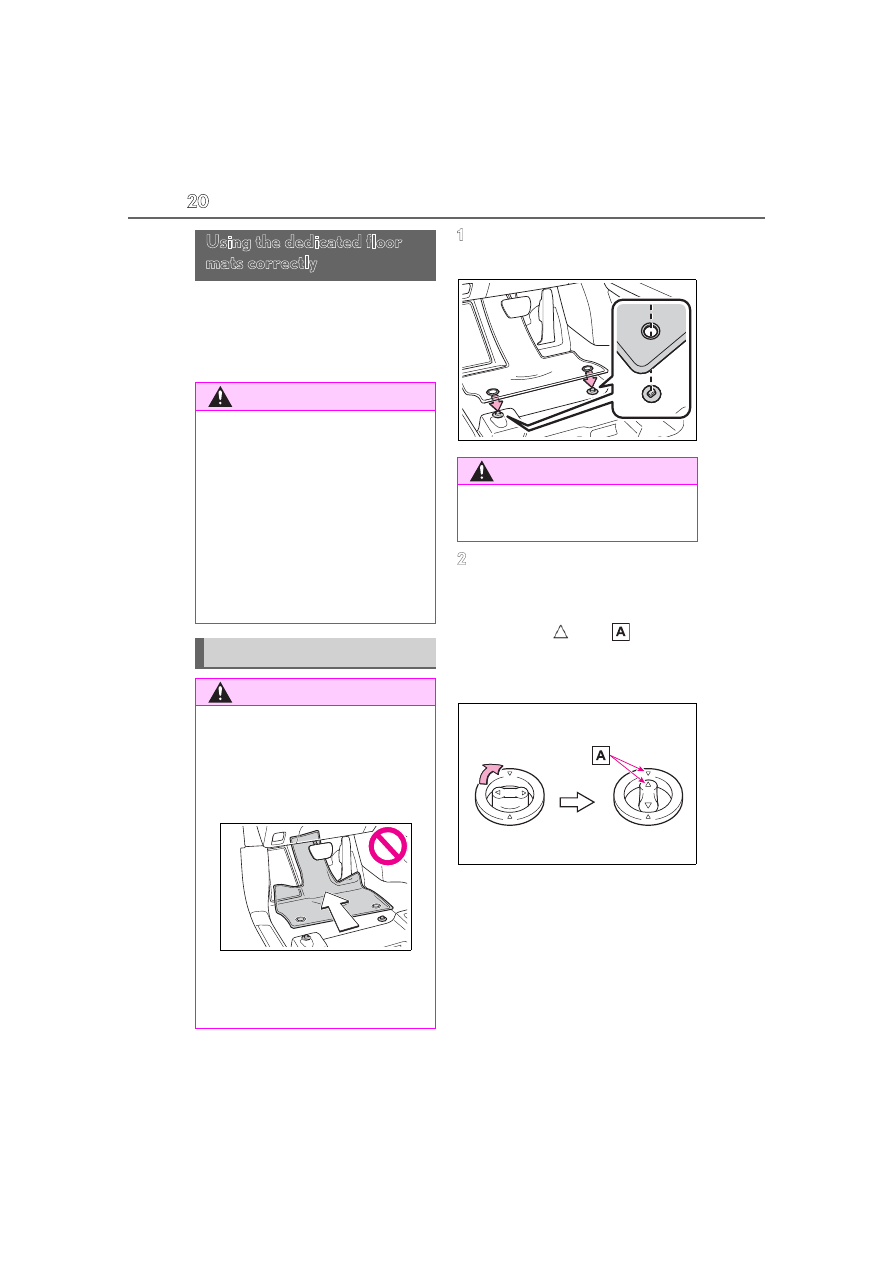
Use only floor mats designed specifi-
cally for vehicles of the same model 
and model year as your vehicle. Fix 
them securely in place onto the carpet.

1

Insert the retaining hooks (clips) 
into the floor mat eyelets.

2

Turn the upper knob of each retain-
ing hook (clip) to secure the floor 
mats in place.

Always align the 

 marks 

.

The shape of the retaining hooks (clips) 

may differ from that shown in the illustra-

tion.

Using the dedicated floor 
mats correctly

WARNING

When installing a driver's side floor 

mat, do not use floor mats designed for 

other models or different model year 

vehicles, even if they are Lexus Genu-

ine floor mats.

Only use floor mats designed for the 

driver’s seat.

Do not use two or more floor mats on 

top of each other.

Do not place the floor mat bot-

tom-side up or upside-down.

Securing the floor mats

WARNING

Check the following before driving.

Check that the floor mat is securely 

fixed in the correct place with all the 

provided retaining hooks (clips). Be 

especially careful to perform this 

check after cleaning the floor.

With the EV system stopped and the 

shift position in P, fully depress each 

pedal to the floor to make sure it does 

not interfere with the floor mat.

WARNING

Always install the floor mat securely 

using the retaining hooks (clips) pro-

vided.

21

1-2. Important points for the EV system

1

Be

fore
 driving

1-2.Important points for the EV system

The illustration is an example for explanation and may differ from the actual item.

ESU: Electricity Supply Unit (built in onboard traction battery charger/DC-DC 
converter)
Electric motor (traction motor)/Inverter (front/rear)
Traction battery

Provides electricity to the electric motor.

Charging port
12-volt battery

Provides electricity to various vehicle systems such as the SRS airbags, headlights, wipers, 
etc.

Electric vehicle system features

Battery electric vehicles are considerably different from conventional vehi-
cles.

They use electricity charged in a traction battery, to drive the electric motor. 
Since battery electric vehicles are driven using electricity, they do not emit 
any emissions such as CO

2

 (Carbon Dioxide) and NOx (Nitrogen Oxides). 

Battery electric vehicles are environmentally friendly vehicles.

System components

A

B
C

D

E

22

1-2. Important points for the EV system

When braking (regenerative brak-
ing)

The electric motor (traction motor) 
charges the traction battery.
The driving range can be extended by 
actively using this regenerative braking 
to store electricity in the traction bat-
tery.

The battery electric vehicle is driven 
using electricity, which is received from 
an external power source and stored in 
the traction battery. Not only public 
charging stations, but also household 
sockets can be used for charging. Pro-
cedures are different from refueling a 
conventional vehicle. Therefore, make 
sure to read the following thoroughly.

Charging equipment (

P.32)

AC charging cable (

P.35)

Power sources that can be used 
(

P.41)

Things to know before charging 
(

P.46)

How to charge your vehicle 
(

P.49, 56)

When charging cannot be per-
formed normally (

P.534, 537)

Regenerative braking

In the following situations, kinetic energy is 

converted to electric energy and decelera-

tion force can be obtained in conjunction 

with the recharging of the traction battery.

The accelerator pedal is released while 

driving with the shift position in D.

The brake pedal is depressed while driv-

ing with the shift position in D.

Charging the 12-volt battery

The 12-volt battery is charged from the trac-

tion battery when the EV system is oper-

ated or while the traction battery is being 

charged.
If the vehicle has not been used for a long 

time, the 12-volt battery may become low 

due to self-discharge. If this occurs, follow 

the correct procedures. (

P.526)

When not using the vehicle for an 

extended period of time

When the vehicle will not be used for an 

extended period of time, charge the trac-

tion battery once a month. 

This protects the traction battery from 

extreme voltage decline due to self dis-

charging.

When the vehicle will not be used for an 

extended period of time, the 12-volt bat-

tery will be charged from the traction bat-

tery to reduce the risk of the 12-volt 

battery discharged. In this case, the cool-

ing fan may operate, however it is not a 

malfunction.

To prevent the 12-volt battery from being 

discharged, do not leave the charging 

port lid open or the charging cable con-

nected to the vehicle.

Charging the traction battery

Be sure to maintain the traction battery 

charge level suitable for your driving needs.
If the traction battery fully discharges, the 

vehicle cannot be driven at all. When the 

battery becomes low, charge it as soon as 

possible.

If the traction battery becomes low

If the traction battery becomes low, the 

traction battery charge warning light 

comes on or flashes and a message will 

be displayed on the multi-information dis-

play. (

P.473)

If the traction battery is completely dis-

charged, the EV system cannot be 

started and driving will not be possible. 

When the traction battery becomes low, 

charge it as soon as possible.

Charging

23

1-2. Important points for the EV system

1

Be

fore
 driving

Sounds and vibrations specific to an 

electric vehicle

Because there is no engine sound or vibra-

tion, it is easy to mistake the electric vehicle 

for being off when it is actually still running, 

as indicated by the “READY” indicator 

being illuminated. For safety, make sure to 

always shift the shift position to P and apply 

the parking brake when parked.
Before and after the EV system is started, 

the following sounds and vibrations may 

occur. However, these sounds and/or vibra-

tions are not signs of malfunctions:

The brake system operation sound may 

be heard from the front of the vehicle 

when the driver’s door is opened.

Motor sounds may be heard from the 

motor compartment or luggage com-

partment.

Electrical relay sounds may be heard 

from the motor compartment when the 

EV system starts or stops.

Relay operating sounds such as a snap or 

soft clank will be emitted from the trac-

tion battery in the following situations:

• When the EV system is started or 

stopped

• When charging starts or completes

• When the vehicle is driven the first time 

after the traction battery has been 

charged using DC charging

Sounds may be heard due to regenera-

tive braking when the brake pedal is 

depressed or as the accelerator pedal is 

released.

Cooling fan operating sounds from the 

radiator.

The operation sound of the air condition-

ing system (air conditioning compressor, 

blower motor).

Maintenance, repair, recycling, and dis-

posal

Contact your Lexus dealer regarding main-

tenance, repair, recycling and disposal. Do 

not dispose of the vehicle yourself.

A sound which changes in accordance 
with the driving speed, will be played in 
order to warn people nearby of the 
vehicle’s approach. This sound may be 
heard inside the vehicle. The sound will 
stop when the vehicle speed exceeds 
approximately 22 mph (37 km/h).

Acoustic Vehicle Alerting System

In the following cases, the Acoustic Vehicle 

Alerting System may be difficult for sur-

rounding people to hear.

In very noisy areas

In the wind or the rain

Acoustic Vehicle Alerting Sys-
tem

24

1-2. Important points for the EV system

The illustration is an example for explanation and may differ from the actual item.

Warning label
High voltage cables (orange)
ESU: Electricity Supply Unit (built in onboard traction battery charger/DC-DC 
converter)
Service plug
AC charging inlet
DC charging inlet
Traction battery
Electric motor (traction motor)/Inverter (front/rear)

Electric Vehicle system precautions

Be careful of the high voltage components (nominal voltage at 355.2 V), such 
as the traction battery, electricity supply unit, orange colored high voltage 
cables, and electric motor, as well as high temperature components such as 
the cooling radiator, which are provided on the battery electric vehicle. For the 
high voltage components, warning labels are provided on them. Read them 
when they need to be handled.

System components

A
B
C

D

E
F

G

H

25

1-2. Important points for the EV system

1

Be

fore
 driving

Air conditioning compressor

Electromagnetic waves

High-voltage parts and cables on the bat-

tery electric vehicles incorporate elec-

tro-magnetic shielding, and therefore 

emit approximately the same amount of 

electromagnetic waves as conventional 

gasoline-powered vehicles or home elec-

tronic appliances.

Your vehicle may cause sound interfer-

ence in some third party-produced radio 

parts.

Traction battery (Lithium-ion battery)

The traction battery has a limited service 

life.
The traction battery capacity (the ability to 

store energy) reduces with time and use in 

the same way as other rechargeable batter-

ies. The extent at which capacity reduces 

changes drastically depending on the envi-

ronment (outside temperature, etc.) and 

usage conditions, such as how the vehicle is 

driven and how the traction battery is 

charged.
This is a natural characteristic of lithium-ion 

batteries, and is not a malfunction. Also, 

even though the driving range decreases 

when the traction battery capacity reduces, 

vehicle performance does not significantly 

become worse. In order to reduce the pos-

sibility of the capacity reducing, follow the 

directions listed on P.48, “Capacity reduc-

tion of the traction battery”.

Starting the EV system in an extremely 

cold environment

When the traction battery is extremely cold 

(below approximately -22°F [-30°C]) due 

to the temperature outside of the vehicle, it 

may not be possible to start the EV system. 

In this case, try to start the EV system again 

after the temperature of the traction battery 

increases due to the outside temperature 

increasing, etc.

I

WARNING

High-voltage precautions

The vehicle has high voltage DC and AC 

systems as well as a 12-volt system.

DC and AC high voltage systems are 

very dangerous and can cause severe 

burns and electric shock that may result 

in death or serious injury.

Never touch, disassemble, remove, or 

replace the high voltage parts, cables 

(orange) or their connectors.

The EV system will become hot after 

starting as the system uses high volt-

age. Be careful of both the high volt-

age and the high temperature, and 

always obey the warning labels 

attached to the vehicle.

Never try to open the service plug 

access hole located under the floor. 

The service plug is used only when the 

vehicle is being serviced and is subject 

to high voltage.

Road accident cautions

Observe the following precautions to 

reduce the risk of death or serious injury:

Stop the vehicle in a safe place to pre-

vent subsequent accidents. While 

depressing the brake pedal, apply the 

parking brake and shift the shift posi-

tion to P to stop the EV system. Then, 

slowly release the brake pedal.

Do not touch the high voltage parts, 

cables (orange) and connectors.

26

1-2. Important points for the EV system

WARNING

If electric wires are exposed inside or 

outside your vehicle, an electric shock 

may occur. Never touch exposed elec-

tric wires.

Do not touch the traction battery if liq-

uid is leaking from or adhered to it. If 

electrolyte (Organic Carbon-

ate-based electrolyte) from the trac-

tion battery comes into contact with 

the eyes or skin, it could cause blind-

ness or skin wounds. In the unlikely 

event that it comes into contact with 

the eyes or skin, wash it off immedi-

ately with a large amount of water, and 

seek immediate medical attention.

If electrolyte is leaking from the trac-

tion battery, do not approach the vehi-

cle. 

Even in the unlikely event that the trac-

tion battery has been damaged, the 

internal construction of the battery will 

prevent a large amount of electrolyte 

from leaking out. However, if electro-

lyte leaks, vapors will be emitted. 

These vapors are an irritant to skin and 

eyes and could cause acute poisoning 

if inhaled.

Do not bring burning or high-tem-

perature items close to the electrolyte. 

The electrolyte may ignite and cause a 

fire.

If a fire occurs in the battery electric 

vehicle, leave the vehicle as soon as 

possible. Never use a fire extinguisher 

that is not meant for electrical fires. 

Using even a small amount of water 

may be dangerous.

If your vehicle needs to be towed, be 

sure to transport the vehicle with the 

four wheels raised. If the vehicle is 

towed with the wheels which are con-

nected to the electric motor (traction 

motor) contacting the ground, elec-

tricity generated by the operation of 

the motor may cause a fire to occur 

depending on the nature of the dam-

age or malfunction. (

P.549)

Carefully inspect the ground under the 

vehicle. If leaked liquid (other than 

water from the air conditioning) is 

found on the ground, the traction bat-

tery may have been damaged. Leave 

the vehicle as soon as possible.

In addition, contact your Lexus dealer 

with regard to the leakage found on the 

ground.

Even in the event of a minor accident, the 

traction battery and surrounding parts 

may be damaged. In case of an accident, 

have the traction battery inspected at 

your Lexus dealer.

Traction battery

Your vehicle contains a sealed lith-

ium-ion battery.

Never resell, hand over or modify the 

traction battery. To prevent accidents, 

traction batteries that have been 

removed from a disposed vehicle are 

collected through your Lexus dealer. 

Do not dispose of the battery yourself. 

Unless the battery is properly col-

lected, the following may occur, result-

ing in death or serious injury:

• Do not illegally dispose of or dump the 

traction battery, and it is hazardous to 

the environment or someone may 

touch a high voltage part, resulting in 

an electric shock.

• The traction battery is intended to be 

used exclusively with your battery 

electric vehicle. If the traction battery 

is used outside of your vehicle or mod-

ified in any way, accidents such as 

electric shock, heat generation, smoke 

generation, an explosion and electro-

lyte leakage may occur. When resell-

ing or handing over your vehicle, the 

possibility of an accident is extremely 

high because the person receiving the 

vehicle may not be aware of the dan-

gers from these modifications.

27

1-2. Important points for the EV system

1

Be

fore
 driving

P.471

A message is automatically displayed 
when a malfunction occurs in the EV 
system or an improper operation is 
attempted.

If a warning message is shown on the 
multi-information display, read the 
message and follow the instructions. 
(

P.483)

If a warning light comes on, a warning 

message is displayed, or the 12-volt bat-

tery is disconnected

The EV system may not start.
In that case, try to start the system again. If 

the “READY” indicator does not come on, 

contact your Lexus dealer.

WARNING

If your vehicle is disposed of without 

the traction battery having been 

removed, there is a danger of serious 

electric shock if high voltage parts, 

cables and their connectors are 

touched. In the event that your vehicle 

must be disposed of, the traction bat-

tery must be disposed of by your Lexus 

dealer or a qualified service shop. If 

the traction battery is not disposed of 

properly, it may cause electric shock 

that can result in death or serious 

injury.

For information about traction battery 

collection locations, contact informa-

tion, or the recycling process, contact 

your Lexus dealer.

Caution while driving

Pay special attention to the area 

around the vehicle. Because there is 

no engine noise, pedestrians, people 

riding bicycles or other people and 

vehicles in the area may not be aware 

of the vehicle starting off or approach-

ing them, so take extra care while driv-

ing. Therefore, take extra care while 

driving even if the Acoustic Vehicle 

Alerting System is active.

If the vehicle under floor area receives 

strong shock or impact while driving, 

stop the vehicle in a safe place and 

check around the bottom of the vehi-

cle. If there is damage to the traction 

battery or liquid leakage, it may lead to 

a vehicle fire, etc. Do not touch the 

vehicle and immediately contact your 

Lexus dealer.

Even if no damage can be seen under 

the floor, the traction battery may be 

damaged. If the vehicle received an 

impact under the floor, have the trac-

tion battery inspected at your Lexus 

dealer.

Modifications

Do not make modifications that lower the 

height of the vehicle. The traction battery 

in the under floor area may come into 

contact with the ground when the height 

of vehicle is lowered. If the traction bat-

tery is damaged, a vehicle fire may occur, 

possibly resulting in death or serious 

injury.

Emergency shut off system

Warning message

28

1-2. Important points for the EV system

When the traction battery is completely 

discharged

When the EV system cannot be started due 

to the traction battery being completely dis-

charged, restart the system after AC 

charging or DC charging. When charging, 

it is recommended to charge the traction 

battery until the traction battery charge 

warning light turns off in order to ensure 

sufficient driving distance.

Shift the shift position to D when 
stopped at a traffic light, or driving in 
heavy traffic, etc. Shift the shift position 
to P when parking. When shifting the 
shift position to N while driving, there is 
no positive effect on electricity con-
sumption. In the N, the traction battery 
cannot be charged. Also, when using 
the air conditioning system, etc., the 
traction battery electricity is con-
sumed. (

P.145)

Battery Electric Vehicle driv-
ing tips

Unlike the conventional vehicles, 
the electricity consumption effi-
ciency of battery electric vehicles 
will decline if they continue driving 
on highways (or freeways) or at 
high average speeds, causing the 
possible driving distance to reduce. 
Therefore, if the remaining charge 
of the traction battery is low, avoid 
relying on the displayed possible 
driving distance too much as well as 
driving on highways (or freeways). 
Driving the vehicle at moderate 
speeds, the traction battery’s elec-
tricity consumption can be con-
trolled.

The following driving tips will con-
tribute to reduction in the battery 
consumption and increase in the 
driving range.

Shift position operation

29

1-2. Important points for the EV system

1

Be

fore
 driving

Eco drive mode

When using Eco drive mode, torque 
generation is slower when stepping on 
the accelerator pedal, air conditioning 
operations (heating/cooling) are 
restrained, and driving becomes suited 
for improved electricity consump-
tion.(

P.192)

Range mode

When using range mode, the driving 
controls is changed to those for 
improved electric consumption, in 
terms of the vehicle speed limits, the 
maximum driving force limits, the opti-
mized front-rear allocation of the driv-
ing force, etc., along with turning off of 
the air conditioning system (heat-
ing/cooling). In this mode, the driving 
distance will be maximized. (

P.192)

Repeated acceleration and decelera-
tion due to traffic congestion, long 
waits at traffic lights, and driving on 
steep inclines will lead to poor electric-
ity consumption. In order to avoid 
those situations as much as possible, 
check traffic reports before leaving. If 
the vehicle is driven in traffic conges-
tion, gently release the brake pedal to 
allow the vehicle to move forward 
slightly, avoid overuse of the accelera-
tor pedal. Doing so can help minimize 
unnecessary electricity consumption.

Make sure to operate the brakes gently 
and a timely manner. A greater amount 
of electrical energy can be regener-
ated when slowing down.

Control and maintain the vehicle at a 
constant speed. Before stopping at a 
toll booth or similar, allow plenty of 
time to release the accelerator and 
gently apply the brakes. A greater 
amount of electrical energy can be 
regenerated when slowing down.

Use the air conditioning only when 
necessary. Doing so can help 
reduce excessive electricity con-
sumption.

In summer: When the ambient tempera-
ture is high, use the recirculated air mode. 
Doing so will help to reduce the burden on 
the air conditioning system and reduce 
electricity consumption as well.
In winter: Excessive or unnecessary heat-
ing should be avoided. Also, electricity 
consumption can be improved by avoiding 
overuse of the heater.

Lexus Climate Concierge allows 
automatic air conditioning control 
to maintain a comfortable condition, 
helping minimize unnecessary elec-
tricity consumption. (

P.203)

Using Eco drive mode/Range 
mode

Delays

When braking

Highway (or freeways) driving

Air conditioning

30

1-2. Important points for the EV system

Make sure to check the tire inflation 
pressure frequently. Improper tire infla-
tion pressure can cause poor electric-
ity consumption.
Also, as snow tires can cause large 
amounts of friction, their use on dry 
roads will lead to poor electricity con-
sumption. Use tires that are appropri-
ate for the season.

Carrying heavy luggage will lead to 
poor electricity consumption. Avoid 
carrying unnecessary luggage.

The value that sufficient driving perfor-
mance is provided, estimated from the 
remaining charge of the traction bat-
tery, the state of the traction battery, 
and the outside temperature, is dis-
played on the meter. (

P.241)

When the outside temperature is low, 
the traction battery output may be 
decreased, causing the possible driv-
ing distance to be shorter. However, 
this is not a malfunction. Charge the 
traction battery earlier than usual.

Possible driving distance varies signifi-
cantly depending on how the vehicle is 
driven, road conditions, the weather, 
the outside temperature, usage condi-
tions of electrical components and the 
number of occupants.
Possible driving distance could be 
extended if the followings are per-
formed:

Maintain a safe distance from the 
vehicle in front and avoid unneces-
sary acceleration and deceleration

Checking tire inflation pressure

Luggage

Driving range

The driving range displayed on the 
meter, etc., shows the reference 
distance that driving is possible, 
and the actual distance that can be 
driven may differ from that dis-
played.

Displayed value

Tips for extending the driving 
range

31

1-2. Important points for the EV system

1

Be

fore
 driving

Accelerate and decelerate the vehi-
cle as smoothly as possible

Drive at moderate speeds as much 
as possible and maintain a constant 
speed

Set the air conditioning system to a 
moderate temperature and avoid 
using the heating and cooling func-
tions excessively.

Use tires of the specified size and 
maintain the specified tire pressure

Do not add unnecessary weight to 
the vehicle

The followings indicate that charging 
has been carried out properly.

The charging indicator turns off

“Charging Complete” is displayed 
on the multi-information display 
when a door is opened while the 
power switch is off. (

P.45)

The front emblem (light-emitting 
type) turns off. (if equipped) 
(

P.32)

Regardless of the type of power source 
or whether the charging schedule 
function is used, charging is completed 
if the above can be confirmed.
Charging-related messages:

P.489

Display when charging is com-
pleted

32

1-3. Charging with the EV system

1-3.Charging with the EV system

AC charging inlet
Charging indicator (

P.34)

Charging inlet light
DC charging inlet
Charging port lid (

P.32)

AC charging cable (if equipped) (

P.35)

Charging port
Front emblem (light-emitting type) (if equipped)

Front emblem (light-emitting type) (if 

equipped)

Front emblem (light-emitting type) illumi-

nates during charging.

Open

Unlock the charging port lid by unlock-
ing the doors. (

P.89)

Slightly open the charging port lid by 
pressing the rear edge of it (the posi-

Charging equipment

Charging equipment and names

A
B
C
D

E
F

G

H

Opening/closing the charging 
port lid

33

1-3. Charging with the EV system

1

Be

fore
 driving

tion shown in the illustration)
Fully open the charging port lid by 
hand.

Close

Move the charging port lid to the 
slightly open position and then press 
the rear edge (the position shown in 
the illustration) to close it.

Charging port lid also locks when the 
doors are locked.

The charging port lid will be locked 

when

In the following cases, the charging port 

lid will be locked.

• The doors are locked with the wireless 

remote control

• The doors are locked with the smart 

access system with push-button start

• The doors are locked with the mechani-

cal key

The charging port lid will automatically 

be locked if the security feature locks the 

doors when the charging port lid is 

closed. (

P.95)

If the charging port lid is closed after the 

doors are locked, the charging port lid 

will not be locked. In that case, after 

unlocking the doors once, the charging 

port lid can be locked by locking the 

doors.

Lid lifter

The charging lid is not closed if the lifter is 

pushing in before closing the charging lid. In 

that case, while unlocking the door, push 

again and release the lid lifter, and close the 

charging lid again.

34

1-3. Charging with the EV system

Charging port lid open/close detection 

switch

When the charging port lid is open, do not 

touch the charging port lid open/close 

detection switch (Position shown in the fig-

ure).
If you touch it by mistake, the vehicle may 

incorrectly display the opened/closed sta-

tus of the charging port lid, or the charging 

connector may not be able to lock/unlock 

normally.

When the charging port lid cannot be 

opened

P.533

The illumination/flashing pattern 
changes to inform the user of the 
charging status in the following ways.

*1

: The indicator will turn off when 

charging stops or is complete.

*2

: Flashes for a certain period of time, and 

then turns off.

Charging indicator of the charging port

When a system malfunction occurs while 

charging, the charging indicator rapidly 

flashes for a certain period of time, and then 

turns off.
If this occurs, when a door is opened with 

the power switch off, a message is displayed 

on the multi-information display. When a 

message is displayed, follow the instructions 

displayed on the screen.

Charging indicator

Illumina-

tion/flash-

ing pattern

Vehicle condition

Illuminated

Charging is in progress

*1

Traction battery heater 
(

P.43) is operating

Flashes 
normally

*2

When charging schedule is 
registered (

P.60) and AC 

charging cable is connected 
to vehicle

Flashes 
rapidly

*2

When charging cannot be 
carried out due to malfunc-
tion in a power source or the 
vehicle, etc. (

P.536)

35

1-3. Charging with the EV system

1

Be

fore
 driving

*

: If equipped

AC charging cable

*

The function, correct operating 
procedure, etc., of the AC charging 
cable are explained.

WARNING

When using the AC charging cable 

and CCID (Charging Circuit Inter-

rupting Device)

Observe the following precautions.

Failure to do so may cause an unex-

pected accident, resulting in death or 

serious injury.

Do not attempt to disassemble or 

repair the AC charging cable, 

charging connector, plug or CCID 

(Charging Circuit Interrupting 

Device). If a problem arises with the 

AC charging cable or the CCID 

(Charging Circuit Interrupting 

Device), stop charging immediately 

and contact your Lexus dealer.

Do not subject the AC charging cable, 

charging connector, plug or CCID 

(Charging Circuit Interrupting 

Device) to strong force or impact.

Do not apply excessive force to the 

AC charging cable by forcefully fold-

ing, twisting, pulling or dragging the 

AC charging cable.

Do not damage the AC charging 

cable with sharp objects.

Do not fold the charging connector or 

plug or insert foreign objects into 

them.

Do not put the charging connector 

and plug into water.

Do not bring the AC charging cable to 

a high-temperature item such as a 

heating device.

Do not apply a load to the AC 

charging cable and plug-cord (such as 

wrapping the AC charging cable 

around the CCID (Charging Circuit 

Interrupting Device) and the charging 

connector).

Do not use or leave the AC charging 

cable in situations where a load is 

applied to the socket and the plug 

(such as when the CCID (Charging 

Circuit Interrupting Device) is hanging 

in the air without contacting the 

ground).

NOTICE

Precautions when handling AC 

charging cable

Make sure to observe the following pre-

cautions. Failure to observe these pre-

cautions may result in damage to the AC 

charging cable and AC charging inlet.

Insert the charging connector straight 

into the AC charging inlet.

After inserting the charging connec-

tor, do not apply excessive force to or 

twist the connector. Also, do not lean 

on the connector or hang any objects 

from it.

Do not step on or trip over the AC 

charging cable.

Before removing the charging con-

nector, make sure that it is unlocked. 

(

P.39)

After removing the AC charging 

cable, promptly return it to its proper 

location.

After removing the charging connec-

tor, securely close the charging port 

lid.

When using the AC charging cable 

and related parts

P.49

36

1-3. Charging with the EV system

Charging connector cap
Charging connector
Latch release button
Plug
Plug-cord
CCID (Charging Circuit Interrupting Device)
Power indicator (

P.37)

Charging indicator (CCID) (

P.37)

Error warning indicator (

P.37)

NOTICE

Precautions for low temperatures

In low temperatures, the AC charging 

cable and plug-cord may become hard. 

Therefore, make sure to not apply exces-

sive force when they are hard. If exces-

sive force is applied to the hardened AC 

charging cable and plug-cord, they may 

be damaged.

The names of each part of the AC charging cable

A
B
C
D

E
F

G

H

I

37

1-3. Charging with the EV system

1

Be

fore
 driving

The CCID (Charging Circuit Inter-
rupting Device) has the following 
safety features.

Electrical leakage detection func-
tion

If an electrical leakage is detected 
during charging, the power source will 
be automatically interrupted, thus pre-
venting fires or electrical shocks 
caused by electrical leakage.

If the power source is interrupted, the error 
warning indicator flashes.
If the power source is interrupted: 

P.541

Automatic check function

This is an automatic system check that 
is run before charging begins to check 
for problems in the operation of the 
electrical leakage detection function.

If a malfunction is found in the electrical 
leakage detection function as a result of 
the check, the error warning indicator 
flashes to inform the user. (

P.541)

Temperature detection function

A temperature detection function is 
equipped to the plug. While charging, 
if heat is generated due to looseness 
on the socket side etc., this function 
suppresses heat by controlling the 
charging current.

Conditions for supplying current to 
the vehicle

The CCID (Charging Circuit Inter-
rupting Device) is designed to prevent 
electrical current from being supplied 
to the charging connector when it is 
not connected to the vehicle, even if 

the plug is inserted into the socket.

Indicator operation

3 indicators are used to indicate the 
following conditions.

Power indicator

Illuminates when electricity is flowing to the 
CCID (Charging Circuit Interrupting 
Device).

Charging indicator

Illuminates when charging is in progress.

Error warning indicator

Illuminates or flashes when there is an elec-
trical leakage or when a malfunction 
occurs in the CCID (Charging Circuit 
Interrupting Device).

If the indicator on the CCID (Charging 

Circuit Interrupting Device) of the AC 

charging cable illuminates or flashes

P.541

For safety, inspect the AC charging 
cable on a routine basis.

Safety functions

CCID (Charging Circuit Inter-
rupting Device) indicators

Inspecting the AC charging 
cable

A

B

C

38

1-3. Charging with the EV system

WARNING

Routine inspection

Check the following points regularly.

Failure to do so may cause an unex-

pected accident, resulting in death or 

serious injury.

The AC charging cable, plug, charging 

connector, CCID (Charging Circuit 

Interrupting Device), etc., have not 

been damaged

The socket has not been damaged.

The plug can be securely inserted into 

the socket.

The plug does not get extremely hot 

during use

The tip of the plug has not been 

deformed.

The plug is not dirtied by dust, etc.

Remove the plug from the socket before 

inspecting it. If any abnormalities are 

found in the AC charging cable as a 

result of the inspection, immediately stop 

use and consult your Lexus dealer.

Maintaining the AC charging cable

When the AC charging cable is dirty, first 

remove the dirt with a hard, wringed 

cloth, and then wipe the cable with a dry 

cloth.

However, never wash it with water. If the 

AC charging cable is washed with water, 

fire or electric shock may occur during 

charging, possibly resulting in death or 

serious injury.

When not using the AC charging 

cable for a long time

Remove the plug from the socket. Dust 

could accumulate on the plug or in the 

socket, possibly causing overheating 

which could lead to a fire.

Also, keep the cable in a place free from 

moisture.

39

1-3. Charging with the EV system

1

Be

fore
 driving

Locking the charging connector

The AC charging connector will be 
automatically locked when inserting it 
into the AC charging inlet.
(The setting can be changed: 

P.39)

Unlocking the charging connector

The AC charging connector will be 
unlocked when the doors are unlocked 
using the smart access system with 
push-button start or wireless remote 
control.
The AC charging connector locks 
when connected and unlocks when the 
door is unlocked, so locking/unlocking 
the AC charging connector does not 
necessarily correspond to lock-
ing/unlocking the door.
If the door is unlocked and the AC 
charging connector is locked, you can 
unlock it by doing the following:
• When using the smart access sys-

tem with push-button start, lock the 
door once and then unlock it again. 
(

P.92)

• When using the wireless remote 

control, press the unlock button to 

unlock the door. (

P.93)

Changing the charging connector 
lock settings

The method for locking and unlocking 
the charging connector can be 
changed on the 

 screen on the cen-

ter display.

*1

 (

P.597)

*1

: The settings cannot be changed when 

the power switch is in ACC.

AC charging connector lock-
ing/unlocking settings can be changed 
as follows.

*2

: The charging connector can be 

unlocked by similar operations to that of 
“Auto Lock” (Default setting).

*3

: The charging connector will be 

unlocked if power supply is interrupted 
due to a power outage etc. after the 
charging connector is automatically 

Locking and unlocking AC 
charging connector

The AC charging connector will be 
locked when it is connected to the 
AC charging inlet, preventing the 
AC charging cable from being dis-
connected while charging.

Locking and unlocking the AC 
charging connector

Setting

Operation descrip-
tion

“Auto Lock” (Default 
setting)

The charging con-
nector is automati-
cally locked when 
the charging con-
nector is connected.

“Auto Lock & 
Unlock”

The charging con-
nector is automati-
cally locked when 
the charging con-
nector is connected 
and automatically 
unlocked when 
charging is com-
pleted.

* 2, 3, 4

“Off”

The charging con-
nector lock system 
does not operate.

40

1-3. Charging with the EV system

locked.

*4

: When the stop time of the charging 

schedule “Start and stop” setting is 
reached, the AC charging connector is 
unlocked even if it is not fully charged.

AC charging connector lock function

If the AC charging connector is 

locked/unlocked repeatedly, it may not 

work temporarily due to protect the sys-

tem by AC charging system. In this case, 

wait for a while before connecting the 

AC charging connector to AC charging 

inlet again.

The AC charging connector lock func-

tion does not guarantee that theft of the 

AC charging cable will be prevented, and 

is not necessarily effective for all mis-

chiefs.

Security function for unlocking

If the AC charging connector is not 

removed within approximately 30 seconds 

after the vehicle is unlocked, the security 

function automatically locks the connector 

again.

When the AC charging connector can-

not be inserted into the AC charging 

inlet

Check that the connector lock pin is not 

extended.
If the connector lock pin is extended, the 
connector lock is operating. Perform door 
unlock operation to unlock the AC 
charging connector lock and check that 
the connector lock pin is not extended.

If the AC charging connector cannot be 

unlocked

P.540

WARNING

When connecting the AC charging 

connector to the AC charging inlet

Do not insert hand into the connector 

lock portion. A hand may be caught in 

the connector lock pin, resulting in an 

injury.

NOTICE

When locking the AC charging con-

nector

Observe the following precautions. Fail-

ure to do so may cause a malfunction in 

the charging connector locking system.

Check that the AC charging connec-

tor is compatible with this vehicle.

A charging connector of the different 

type or a charging connector with 

damaged or deformed insertion part 

may not be locked.

Do not apply excessive force to the 

AC charging connector when the AC 

charging connector is locked.

When removing the AC charging con-

nector, make sure to unlock the AC 

charging connector.

41

1-3. Charging with the EV system

1

Be

fore
 driving

Connect to an AC 120 V socket 
(NEMA 5-15R) with a 
Ground-Fault Circuit-Interrupter 
(GFCI) and a circuit breaker. Use of 
a 15A individual circuit is strongly 
recommended to ensure the AC 
charging cable will operate prop-
erly.

When charging outdoors, make 
sure to connect to a weatherproof 
socket that is certified for outdoor 
use. Checking Ground-Fault Cir-
cuit-Interrupter (GFCI) operation 
before its use is recommended.

NEMA 5-15R socket

The illustration is an example shown for 
demonstration purposes, and may differ 
from the actual configuration.

The charging environment

For safe charging, the following charging 

equipment and settings are recommended.

Weatherproof socket

When charging outdoors, connect the 
plug to a weatherproof socket, and ensure 
that the plug remains waterproof while the 
plug is connected.

Dedicated circuit

• To reduce the risk of fire, connect only to 

an at least 15A branch circuit with an 

over-current protection in accordance 

with the National Electric Code, 

ANSI/NFPA 70.

• To reduce the risk of electric shock when 

working with the plug, connect to a 

socket with a Ground-Fault Circuit-Inter-

rupter (GFCI) or that has an Earth Leak-

age Circuit Breaker installed.

Power sources that can be 
used for AC charging (vehi-
cles with an AC charging 
cable)

An external power source that ful-
fills the following criteria is neces-
sary for charging this vehicle. 
Confirm this before charging.

WARNING

Warnings for electrical faults

Make sure to observe the precautions in 

this Owner’s Manual when charging the 

vehicle.

Failure to use a power source that fulfills 

the requirements, or failure to observe 

regulations while charging could lead to 

an accident, possibly resulting in death or 

serious injury.

Power sources

Sockets that can be connected

WARNING

Power sources precautions

Observe the following precautions.

If you do not follow them, fire, electrical 

shock or damage may occur, possibly 

resulting in death or serious injury.

42

1-3. Charging with the EV system

WARNING

Connect to an AC 120 V socket 

(NEMA 5-15R) with a Ground-Fault 

Circuit-Interrupter (GFCI) and sup-

plied by a circuit breaker per your 

local code. Use of a 15A individual cir-

cuit is strongly recommended.

Do not connect the AC charging cable 

to a multiple electrical socket adapter, 

multi-plugs, or conversion plug.

Connecting the AC charging cable to 

an extension cord is strictly prohibited. 

The extension cord may overheat and 

does not contain a Ground-Fault Cir-

cuit-Interrupter (GFCI).

The leakage detection function of the 

CCID (Charging Circuit Interrupting 

Device) (

P.37) may not operate 

correctly.

Do not connect to a power strip.

Use of a block heater for charging is 

prohibited.

Make sure to connect the charging 

connector and AC charging inlet 

directly. Do not connect a converting 

adaptor or extension cord between 

the charging connector and AC 

charging inlet.

43

1-3. Charging with the EV system

1

Be

fore
 driving

AC charging (

P.49)

This is a charging method used when 
charging from an AC socket with the 
AC charging cable or charging that 
uses AC charger.

By setting charging schedule, it is also pos-
sible to charge at the desired date and 
time. (

P.60)

DC charging (

P.56)

This is a charging method that uses a 
DC charger that complies with SAE J 
1772. The traction battery can be 
charged in a shorter time than AC 
charging.
SAE is an abbreviation for an industrial 
standard issued by the Society of Auto-
motive Engineers.

This vehicle is equipped with several 
functions that are linked with charging.

My Room Mode (

P.65)

When the charging cable is connected 
to the vehicle, electrical components 
such as the air conditioning system and 
audio system can be used by the power 
supply from an external power source

*

.

*

: Depending on the situation, electricity of 

the traction battery may be consumed.

Traction battery heater

When the outside temperature is low 
and the charging cable is connected to 
the vehicle, this function automatically 
warms the traction battery until it 
reaches or exceeds a certain tempera-
ture.

The operation of this function is 
stopped automatically when the 
charging cable is disconnected or if 
the charging cable is left connected 
to the vehicle for approximately 3 
days.

When the charging schedule is used 
(

P.60), this function will operate 

according to the schedule settings.

Traction battery warming control 
(Alaska and Canada only)

This control operates after the AC 
charging cable remains connected to 
the vehicle for approximately 3 days 
and the traction battery heater auto-
matically stops. It automatically insu-
lates the traction battery in extremely 
low temperatures.

This control stops 31 days after the 
charging cable is connected, even if 
it is still connected to the vehicle.

When this control operates, 
charging schedule settings are 
ignored and charging starts imme-
diately.

Traction battery cooler

When the traction battery is hot and 
the AC charging cable is connected to 
the vehicle, this function cools the trac-
tion battery to protect it.

Charging methods

The following methods can be used 
to charge the traction battery.

Types of charging methods

Charging-linked functions

44

1-3. Charging with the EV system

The function may operate when 
continuously driving at high speeds 
such as driving on highways or free-
ways, or during DC charging.

For AC charging: Traction battery 
cooler will operate when the “Bat-
tery cooling” of the “Charging” on 
the center display is on. (

P.597)

When selecting to off, the traction battery 
output may be restricted depending on the 
driving situation.

Using My Room Mode during DC 

charging

P.65

AC charging

AC charging requires less load on the trac-

tion battery than DC charging, leading to 

longer traction battery life.

Traction battery heater

Traction battery heater may operate 

when charging is not being performed.

When Traction battery heater is operat-

ing, the charging indicator will illuminate.

When Traction battery heater is operat-

ing during charging, the charging may 

take longer than normal.

The remaining charge of the traction bat-

tery declines when the traction battery 

heater operates, it might be necessary to 

recharge the traction battery again in 

order to supplement the remaining 

charge.

Traction battery cooler

The charging indicator will illuminate 

when the traction battery cooler is on 

standby or operating.

When the charge level of the traction 

battery is low, the traction battery cooler 

may not operate, even if the temperature 

of the traction battery is high.

When the following conditions are met 

while the traction battery cooler is oper-

ating, the cooling operation will stop.

• The hood is opened

• The power switch is turned to ACC or 

ON.

• The shift position is changed to any posi-

tion other than P

• The remaining charge of the traction bat-

tery drops below a certain amount

The traction battery cooler operates 

using power supplied by the traction bat-

tery and an external power source.

• While the traction battery cooler is oper-

ating, the charge of the traction battery 

will increase and decrease within a cer-

tain range, and will not increase as during 

AC charging.

• When the traction battery cooler oper-

ates, charger will recognize it as the bat-

tery being charged. If this function 

operates while a charger which charges a 

charging fee is connected to the vehicle, 

AC charging fees will apply.

45

1-3. Charging with the EV system

1

Be

fore
 driving

To enable the use of battery electric 
vehicle, we recommend systematically 
charging the vehicle.

Before leaving home

In order to use the battery electric 
vehicle, charge the traction battery at 
home before leaving.

On the way to the destination or at 
the destination

When the remaining charge of the 
traction battery gets low, recharge the 
battery at the nearest charging station.

After returning home

In order to drive the next time, charge 
the traction battery.

Settings the charging schedule allows you 
to charge the traction battery at the 
desired time such as late at night or early in 
the morning. Furthermore, the charging 
schedule can be set to automatically 
charge the traction battery every day or at 
the same time on certain days. (

P.60)

Information related to charging is dis-
played and can be checked on the 
multi-information display.

*

*

: Various information related to charging 

can also be checked remotely.

While charging

When any door is opened during 
charging with the power switch off, the 
current charging condition and 
approximate time remaining until 
charging is complete are displayed for 
a certain period of time.
The actual charging time may differ 
depending on conditions such as the 
remaining capacity of the traction bat-
tery, outside temperature, and specifi-
cations of the AC/DC charger.
The time until charging completed may 
not be displayed if the charging current 
to the traction battery becomes 
smaller and the charging time 
becomes longer.

After charging is complete

When any door is opened with the 
power switch off after charging is com-
plete, a message detailing the results of 
the charging is displayed for a while.
Also, a message is displayed if an oper-
ation that stops charging is performed 
or a situation where charging cannot 
be performed occurs.
When a message is displayed, follow 

Charging tips

This section explains methods for 
using the charging function for this 
vehicle and checking information 
related to charging.

Systematically charging

Checking information related to 
charging

46

1-3. Charging with the EV system

the instructions displayed on the 
screen. (

P.483)

Safety functions

The EV system will not start while the 

charging cable is attached to the vehicle, 

even if the power switch is operated.

If the charging cable is connected while 

the “READY” indicator is illuminated, the 

EV system will stop automatically and 

driving will not be possible.

Things to know before 
charging

Make sure to read the following 
precautions before charging the 
traction battery.

WARNING

Caution when charging

People with implantable cardiac pace-

makers or cardiac resynchronization 

therapy-pacemakers should not carry 

out the charging procedure. Ask some-

one else to do it.

Do not approach the charger and 

charging cable while charging. 

Charging procedure may affect the 

operation of such devices.

Do not remain in the vehicle during 

charging. 

Charging procedure may affect the 

operation of such devices.

Do not enter the vehicle even to take 

something out of the luggage com-

partment. 

Charging procedure may affect the 

operation of such devices.

When the charging cable is con-

nected to the vehicle

Do not change the shift position from P.

47

1-3. Charging with the EV system

1

Be

fore
 driving

Before charging, always check the fol-
lowing items.

The parking brake is applied. 

(

P.154)

The power switch is turned to OFF. 
(

P.140)

Lights such as the headlights, emer-
gency flashers and interior lights, 
etc. are turned off.

If these light switches are turned on, then 
these features will consume electricity, and 
charging time will increase.

Before charging, make sure that each 
part of the AC charging cable is in 
good condition. (

P.37)

During charging

The charging starting time may differ 

depending on the state of the vehicle, but 

this does not indicate a malfunction.

During charging, sounds may be heard 

from near the traction battery in accor-

dance with the operation of the air condi-

tioning system or traction battery cooler.

During and after charging, the motor 

compartment and its surrounding area in 

which the onboard traction battery char-

ger is installed may get warm.

The surface of the CCID (Charging Cir-

cuit Interrupting Device) may become 

hot, but this does not indicate a malfunc-

tion.

Depending on radio wave conditions, 

interference may be heard on the radio.

When charging using a public charging 

facility

When charging using a public charging 

facility, check the setting of the charging 

schedule function.

When the charging schedule is regis-

tered, temporarily turn off the function or 

turn “Charge Now” on. (

P.62, 64)

When the charging schedule is set to on, 

WARNING

In the unlikely event that the charging 

cable has been damaged, the shift posi-

tion may change from P to another posi-

tion and the vehicle could move, possibly 

leading to an accident.

Charging precautions

This vehicle has been designed to allow 

charging from an external power source 

using an AC charging cable for exclusive 

use with standard household AC sock-

ets.

However, the vehicle differs greatly from 

standard household electrical goods in 

the following ways, and incorrect usage 

could cause fire or electric shock, possi-

bly leading to death or serious injury.

When charging, a large amount of cur-

rent will flow for a long time.

Charging can be conducted outdoors.

NOTICE

Charging precautions

To charge properly, follow the procedure 

after reading the explanation below. 

Charging is intended to be carried out by 

licensed drivers only who properly 

understand the charging procedure.

Do not allow people who is not used to 

charging, such as children, to perform 

charging without supervision.

Also, keep the AC charging cable out 

of reach of infants.

When charging with a charger, follow 

the procedures for using each charger.

Confirm the following before 
charging

Inspecting the AC charging 
cable

48

1-3. Charging with the EV system

charging will not start even if the AC 

charging cable is connected. Also, 

charging fee may occur due to connec-

tion of the AC charging cable.

Capacity reduction of the traction bat-

tery

The capacity of the traction battery will 

decline gradually when the traction battery 

is in use. The rate at which it declines will dif-

fer in accordance with environmental con-

ditions and the way in which the vehicle is 

used. Observing the following can help 

suppress the decline in the traction battery 

capacity.

Avoid parking the vehicle in high tem-

perature areas, under direct sunlight 

when the traction battery is fully charged.

Avoid accelerating and decelerating fre-

quently and suddenly.

Avoid frequent driving at high speed.

Use the charging schedule function as 

much as possible in order to fully charged 

the traction battery before starting off. 

(

P.60)

Avoid frequent DC charging

Also, if the capacity of the traction battery 
capacity reduces, the distance that can be 
driven decreases. However, vehicle per-
formance does not significantly become 
worse.

When the remaining charge of the trac-

tion battery is low after charging

In the following situations, the remaining 

charge of the traction battery after charging 

completes may be less than normal in order 

to protect the traction battery (the driving 

range after the battery is fully charged may 
be shorter).

*

Charging is performed when the outside 

temperature is low or high

Charging is performed immediately after 

high-load driving or in extreme heat

In any other situation, if the remaining 
charge of the traction battery is signifi-
cantly lower than normal after charging 
completes, have the vehicle inspected by 

your Lexus dealer.

*

: When this occurs, even if the remaining 

charge display of the traction battery 
shows that it is fully charged, the remain-
ing charge rapidly decreases faster than 
normal.

The charging amount sent to the trac-

tion battery or the remaining charge 

amount of the traction battery may 

decrease when

When the operation of the battery heater, 

etc. reduces the charging power sent to the 

traction battery, the charging amount sent 

to the traction battery or the remaining 

charge amount of the traction battery may 

decrease.

Certification

This device complies with Part 15 of the 

FCC Rules. Operation is subject to the fol-

lowing two conditions: 

(1) this device may not cause harmful inter-

ference, and (2) this device must accept any 

interference received, including interfer-

ence that may cause undesired operation.

Charging time may increase

In the following situations, charging time 

may become longer than normal:

In very hot or very cold temperatures.

When the traction battery becomes hot, 

such as immediately after high-load driv-

ing.

The vehicle is consuming a lot of electric-

ity, for example, when the headlights are 

on, etc.

When using My Room Mode. (

P.65)

There is a power outage during charging.

When adjusting the power supply with 

the charger.

There is an interruption in the electrical 

supply.

There is a drop in the voltage of external 

power source.

The charge in the 12-volt battery is low, 

for example due to the vehicle being left 

unused for a long period of time.

When the upper limit of charging current 

49

1-3. Charging with the EV system

1

Be

fore
 driving

is changed in the charging current setting 

of the vehicle (

P.52)

When the battery heater operates. 

(

P.43)

When the traction battery cooler is oper-

ated before charging. (

P.43)

When the plug generates heat due to a 

loose socket connection, etc.

When frequently and repeatedly using 

DC charging.

When selecting “DC charging power” 

setting other than “Max”. (

P.57)

When the temperature of 

charging-related parts is high.

AC charging power

AC charging of up to approximately 7 kW 

can be performed on this vehicle.
However, depending on the used charger 

or AC charging cable, charging power may 

be limited.

When performing charging in 

extremely cold conditions

When the outside temperature is extremely 

low, it may take longer than usual to charge 

the vehicle.
Before starting charging, it is recom-

mended to remove snow or ice that covers 

the hood, front grille, and front bumper and 

install a car cover, etc.

How to use AC charging

This section explains the procedure 
for charging the traction battery 
with an AC charging cable.

When using an AC charger, make 
sure to check the operation 
instructions of the AC charger.

When the charging schedule is reg-
istered, make sure “Charge Now” 
is turned on before charging. 
(

P.63, 64)

NOTICE

When using the AC charging cable 

and related parts

To prevent damage to the AC charging 

cable and related parts, observe the fol-

lowing precautions.

When interrupting or canceling 

charging, remove the charging con-

nector before removing the plug.

When removing the AC charging 

cable, check that the charging con-

nector is unlocked.

Do not forcefully pull the charging 

connector cap.

Do not apply a vibration to the 

charging connector while charging. 

Charging may be stopped.

Do not insert anything but the 

charging connector into the AC 

charging inlet.

When inserting the plug into or 

removing the plug from the socket, 

make sure to hold the body of the plug.

Do not forcefully pull the AC charging 

cable that is caught or entangled. If the 

cable is entangled, disentangle it 

before using.

50

1-3. Charging with the EV system

P.47

1

Prepare the AC charging cable.

2

Insert the plug of the AC charging 
cable into the socket of the external 
power source.

Make sure to hold the body of the plug and 

insert it firmly into the socket.
If there is a switch that can switch the 

power supply to the socket, turn it on.
Check that the power indicator on the 

CCID (Charging Circuit Interrupting 

Device) is illuminated.
(If it is not illuminated, refer to P.541)
In order to reduce the load on the socket 

and plug, when inserting the plug, use a 

string, etc., to hang the CCID (Charging 

Circuit Interrupting Device) on a hook or 

equivalent.

3

Open the charging port lid. 
(

P.32)

The charging inlet light will illuminate.

4

Remove the charging connector 
cap and secure it to the cable.

NOTICE

AC charging inlet

Do not disassemble, repair or modify the 

AC charging inlet. When the AC 

charging inlet needs to be repaired, con-

sult your Lexus dealer.

Charging precautions

When charging


Content      ..      1       2         ..


//////////////////////////////////////////