Vauxhall Mokka B (2023 year). Manual in english - page 7
 

  Index      Manuals     Vauxhall Mokka B (2023 year). Manual in english


Search            copyright infringement  


Content      ..     5      6      7      8     ..


Vauxhall Mokka B (2023 year). Manual in english - page 7


198

Driving and operating

When going downhill you may have to

brake to maintain or reduce your

speed.
Note that applying the brake

deactivates the system.

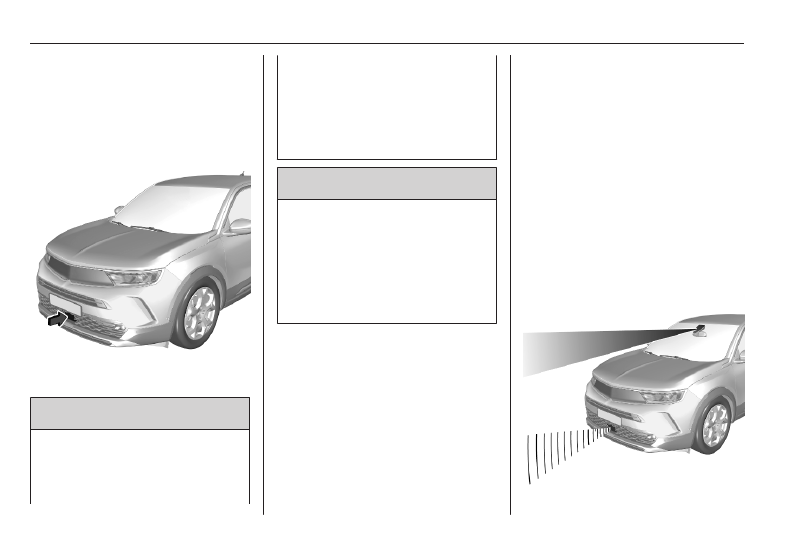
Radar unit

The radar unit is located in the middle

of the front bumper.

9

Warning

The radar unit was aligned

carefully during manufacture.

Therefore, in the event of a front-

end impact, do not use the system.

The front bumper may appear to

be intact, however the sensor

behind may be affected and react

incorrectly. After an accident,

consult a workshop to verify and

adjust the radar unit position.

9

Warning

The usage of a license plate

support on the front bumper may

affect the proper radar unit

functionality.
When using a license plate

support, follow the markings and

indications on the front bumper.

Fault

In the event of an adaptive cruise

control fault, a warning light is

illuminated in the Driver Information

Centre and a warning message is

displayed in the Driver Information

Centre accompanied by an audible

signal.

The speed limit recognition may not

operate correctly if traffic signs do not

comply with the Vienna Convention

on Road Signs and Signals.
Have the system checked by a dealer

or a qualified workshop.
As a safety measure, do not use the

system if the brake lights are faulty.

Do not use the system if the front

bumper is damaged.

Forward collision alert

The forward collision alert may help to

avoid or reduce the harm caused by

front-end crashes.

Driving and operating

199

The forward collision alert uses the

front camera in the windscreen and

depending on the vehicle

configuration a radar unit located

behind the front bumper to detect a

vehicle directly ahead, in the path.
If a vehicle directly ahead is

approached too quickly, a warning

chime sounds and a message is

displayed in the Driver Information

Centre.

9

Warning

Forward collision alert is just a

warning system and does not

apply the brakes. When

approaching a vehicle ahead too

rapidly, it may not provide you

enough time to avoid a collision.
The driver accepts full

responsibility for the appropriate

following distance based on traffic,

weather and visibility conditions.
The complete attention of the

driver is always required while

driving. The driver must always be

ready to take action and apply the

brakes.

Activation

The forward collision alert operates

from 3 mph to vehicle's maximum

speed.

Alerting the driver

The driver is warned by following

alerts:

● A warning message is displayed

in the Driver Information Center,

when the distance to the vehicle

ahead gets too small.

● A warning message is displayed

in the Driver Information Center

and a warning chime sounds,

when a collision is imminent and

immediate driver's action is

required.

● In some cases, the system

performs a short braking, when a

collision is imminent and

immediate driver's action is

required.

Selecting the alert sensitivity

Three alert sensitivities can be

selected in the settings of the active

emergency braking within the vehicle

personalisation 

3

 81.

The chosen setting will be memorised

when the ignition has been switched

off. The alert timing will vary based on

selected alert setting.

Deactivation

The system can only be deactivated

by deactivating the active emergency

braking in the vehicle personalisation

3

 81. When ignition is switched on

next time, system is activated.

System limitations

Forward collision alert is designed to

warn on vehicles, pedestrians and

cyclists, but may react also to other

objects.

200

Driving and operating

In the following cases, forward

collision alert may not detect a vehicle

ahead or sensor performance is

limited:

● driving on winding or hilly roads
● driving during nighttime
● weather limits visibility, such as

fog, rain, or snow

● the sensor in the windscreen or

the radar unit behind the front

bumper are blocked by snow, ice,

slush, mud, dirt etc.

● the windscreen is damaged or

affected by foreign objects, e.g.

stickers

● the bumper is damaged or

affected by foreign objects, e.g.

license plate support

Active emergency braking

Active emergency braking can help to

reduce the damage and injury from

crashes with vehicles and

pedestrians directly ahead, when the

driver does not actively take action

either by manual braking or by

steering. For vehicles equipped with

camera and radar, active emergency

braking also detects cyclists. Before

the active emergency braking

applies, the driver is warned by the

forward collision alert.
Forward collision alert 

3

 198.

Front pedestrian protection 

3

 204.

Active emergency braking can be

deactivated in the vehicle

personalisation 

3

 81. Depending on

version, this is only possible at a

standstill. If deactivated, 

m

illuminates in the Driver Information

Centre. When ignition is switched on

next time, system is automatically

activated.
The feature uses various inputs (e.g.

camera sensor, radar sensor) to

calculate the probability of a frontal

collision.

9

Warning

This system is not intended to

replace the driver's responsibility

for driving the vehicle and looking

ahead. It warns the driver if the

vehicle is at risk of a collision with

the preceding vehicle, a

pedestrian or a cyclist. Just before

the imminent collision, it reduces

the vehicle's speed to avoid a

collision or to limit its severity.
The system may not react to

animals. After a sudden lane

change, the system needs a

certain time to detect the next

preceding vehicle.
The driver must always be ready

to take action and apply the brakes

and steer to avoid collisions.

Functionality

Depending on the vehicle

configuration and the detected

objects, there are several operational

speed ranges.
Active emergency braking operates

up to 50 mph when a pedestrian has

been detected.
On vehicles equipped with radar

sensor and front camera, the active

emergency braking operates up to

50 mph when a stationary vehicle or

a cyclist has been detected.

Driving and operating

201

On vehicles equipped only with front

camera, the active emergency

braking operates from 3 mph to

50 mph or 87 mph when a moving

vehicle has been detected.
On vehicles equipped with radar

sensor and front camera, the active

emergency braking operates from

3 mph to 87 mph when a moving

vehicle has been detected.
The system includes:

● brake preparation system
● emergency automatic braking
● smart brake assist
● forward collision alert
● front pedestrian protection

Brake preparation system

When approaching a vehicle ahead

or a pedestrian so quickly that a

collision is likely, the brake

preparation system slightly

pressurises the brakes. This reduces

the response time, when braking is

requested.
The pressurisation of the brakes may

produce a noise in the brake system.

Emergency automatic braking

After activation of brake preparation

system and just before the imminent

collision, this function automatically

applies braking to reduce the impact

speed of the collision or prohibit a

crash.
If active emergency braking is

applied, 

m

 flashes in the Driver

Information Centre. If active

emergency braking is finished, 

m

flashes for a few seconds. During this

time, active emergency braking

cannot be applied if there is a risk of

a further collision.
Forward collision alert 

3

 198.

Front pedestrian protection 

3

 204.

Depending on version, below a speed

of 19 mph or 31 mph, emergency

automatic braking may slow down the

vehicle to a complete stop. If the

speed exceeds this limit, emergency

automatic braking reduces the speed.

However, the driver must apply the

brake to come to a complete stop.

● Automatic transmission: If the

vehicle comes to a complete

stop, automatic braking is

maintained for a certain time.

Keep the brake pedal depressed

to prevent the vehicle from

starting off again.

● Manual transmission: If the

vehicle comes to a complete

stop, the engine may stall. Keep

the brake pedal depressed to

prevent the vehicle from rolling

away.

Cruise control and adaptive cruise

control will be deactivated when an

emergency automatic braking occurs.
In some cases, the active emergency

braking system may provide an

automatic braking in situations that

seem to be unnecessary. Firmly apply

the accelerator pedal or firmly turn the

steering wheel to override the

automatic braking if the situation and

the surroundings permit.

9

Warning

Do not rely on the system to brake

the vehicle. Emergency automatic

braking is only applied just before

the collision and it will not brake

202

Driving and operating

outside of its operating speed

range. It only responds to detected

vehicles and pedestrians. For

vehicles equipped with camera

and radar, it also responds to

detected cyclists.

Antilock brake system 

3

 182.

Smart brake assist

If the driver brakes, but not sufficiently

to avoid a collision, this system will

supplement the braking. This

assistance will only be provided if the

driver presses the brake pedal.
Smart brake assist will automatically

disengage when the brake pedal is

released.
Forward collision alert 

3

 198.

Front pedestrian protection 

3

 204.

Operation conditions

Active emergency braking only works

when

● the seat belts of the front seats

and depending on version of the

rear seats are fastened

● the brake system is operational
● Electronic Stability Control and

Traction Control system are

activated

Active emergency braking is

automatically deactivated in the

following cases:

● A spare wheel with smaller

diameter is detected.

● A fault with the brake pedal

switch or with the left or right

brake light is detected.

● A fault in the active emergency

braking system, in the electronic

or in the brake system is

detected.

● A severe crash, e.g., with airbag

deployment was detected.

System limitations

The system performance may be

degraded or not available in the

following cases:

● sensor covered with snow, ice,

slush, mud or dirt

● windscreen damaged or

smeared, with blurred view or

covered with foreign items, e.g.

stickers,

● damaged or deformed front

bumper or front bumper covered

with foreign items, e.g. stickers

● radar unit is out of its regular

position resulting from an impact

of the front bumper

● front camera out of its regular

position

● automatic braking not available,

e.g. brake discs cooling going on

● brake pedal continuously used

for a long time, e.g. on a long

downhill road

● winding or hilly roads
● during initialisation of the system,

e.g. after the vehicle battery has

been disconnected

Driving and operating

203

● sun or lights shining into the front

camera lens

● adverse environmental

conditions, e.g. rain, fog, or snow

● vehicle ahead creating road

spray

After an impact or when damages are

visible have the vehicle checked by a

workshop.
The system performance may be

affected by:

● electronic stability control and

traction control system in

operation

● vehicle battery out of normal

operation voltage

● wet road reflecting lights
● close vehicles ahead
● tractors, muddy vehicles or

vehicles with a trailer

● banked roads
● poor lighting conditions
● sudden lighting changes
● vehicle modifications, e.g. tyres
● vehicle overloaded

If a sensor is covered, a message is

displayed indicating that the sensors

have to be cleaned.
If the system is temporarily affected

and no driver action is required, no

message is displayed.
Complete attention is always required

while driving, and be ready to take

action to avoid crashes.
We recommend to deactivate the

system in the vehicle personalisation

in the following cases:

● when towing a trailer or caravan
● when carrying long objects on

roof bars or a roof rack

● when the vehicle is being towed
● when performing any

maintenance with ignition on

● when the vehicle is fitted with

snow chains

● when a spare wheel is fitted that

is smaller than the other wheels

● before using an automatic car

wash

● before placing the vehicle on a

rolling road in a workshop

● if the windscreen has been

damaged close to the camera

● if the front bumper has been

damaged or deformed

● if the radar unit is out of its regular

position resulting from an impact

of the front bumper

● if the brake lights are not working

Fault

If the system has a fault, 

m

illuminates in the Driver Information

Centre, a message is displayed and

an audible signal is given. Consult a

workshop.
If the system does not work properly

or is not available, e.g. during the

initialisation, 

m

 illuminates in the

Driver Information Centre.
If 

m

 and 

C

 illuminate in the Driver

Information Centre after the engine

has been switched off and then

restarted, consult a workshop.
Vehicle messages 

3

 80.

204

Driving and operating

Automatic post collision

braking

If an accident is detected, the vehicle

requests automatic post collision

braking. The goal of this function is to

reduce the risk of further collisions if

the driver does not react. The

automatic post collision braking is not

operational if the capability of the

vehicle to trigger and execute the

automatic post collision braking is

unavailable, as it can occur in

destructive accidents or in other

specific accident scenarios.
It is possible to override the automatic

braking by pressing the accelerator

pedal or the brake pedal.

System limitations

The system operates if the following

conditions are fulfilled:

● airbags or seat belt pretensioners

have been deployed by the

collision

● braking system and electric

functions remain continuously

operational during and after

collision

● driver has not depressed brake

pedal or accelerator pedal

Fault

If automatic post collision braking is

not available, the control indicator 

J

or 

d

 illuminates continuously, a

corresponding message appears in

the Driver Information Centre and a

warning chime sounds.
Have the cause of the fault remedied

by a workshop.

Front pedestrian protection

Front pedestrian protection may help

to avoid or reduce the harm caused

by front-end crashes with pedestrians

when driving forward.

The system uses the front camera in

the windscreen and depending on the

vehicle configuration a radar unit in

the front bumper to detect a

pedestrian directly ahead in the path.

Driving and operating

205

9

Warning

The usage of a license plate

support on the front bumper may

affect the proper radar unit

functionality.
When using a license plate

support, follow the markings and

indications on the front bumper.

Front pedestrian protection can

detect and alert to pedestrians in a

forward gear at speeds between

3 mph and 50 mph. Additionally, it can

automatically brake the vehicle.
During nighttime driving, system

performance is limited.

9

Danger

Front pedestrian braking does not

provide an alert or automatically

brake the vehicle, unless it detects

a pedestrian.
The system may not detect

pedestrians, including children,

when the pedestrian is not directly

ahead, not fully visible, not

standing upright, or when part of a

group.

The system can only be deactivated

by deactivating the active emergency

braking in the vehicle personalisation

3

 81. When ignition is switched on

next time, system is activated.

Front pedestrian alert

When approaching a detected

pedestrian too quickly, a warning

message is displayed in the Driver

Information Centre. A warning chime

is provided.
Cruise control or adaptive cruise

control may be disengaged when the

front pedestrian alert occurs.

System limitations

In the following cases, front

pedestrian protection may not detect

a pedestrian ahead or sensor

performance is limited:

● driving on winding or hilly roads
● driving in the dark

● weather limits visibility, such as

fog, rain, or snow

● the sensor in the windscreen or

the radar unit behind the front

bumper is blocked by snow, ice,

slush, mud, dirt or by foreign

objects, e.g. stickers

● the windscreen is damaged
● the bumper is damaged

Parking assist

General information

The rear system is deactivated when

a plug is connected to the power

outlet of the trailer hitch.

9

Warning

The driver bears full responsibility

for the parking manoeuvre.
Always check the surrounding

area when driving backwards or

forwards while using parking

assist system.

206

Driving and operating

Rear parking assist

The system warns the driver with

audible signals and a display

indication against potentially

hazardous obstacles behind the

vehicle while the reverse gear is

engaged.

The system operates with ultrasonic

parking sensors in the rear bumper.

Activation

After engaging the reverse gear, an

audible signal is given from the rear

speakers and a display indication will

be shown. If no audible signal is

given, the display indication is not

shown or a warning message

appears, the system has a failure.

Depending on version the system is

ready to operate when the LED in the

parking assist button 

e

 is not

illuminated. The state of the system is

memorised when the ignition is

switched off.

Deactivation

The system is switched off when

reverse gear is disengaged.

Press 

e

 to deactivate the system

manually. The LED in the button

illuminates when the system is

deactivated. If the system has been

deactivated manually, it is not

reactivated automatically the next

time the ignition is switched on.

Indication

As soon as an obstacle gets closer to

the vehicle, an audible signal is given

and the symbol 

1

 may flash. The

interval between the sounds

becomes shorter as the vehicle gets

closer to that obstacle. When the

distance is less than approx. 30 cm,

the sound is continuous.

Driving and operating

207

If the vehicle stops for more than

three seconds, if the automatic

transmission is in P position, or if no

further obstacles are detected, no

audible signals are given.

Notice

An audible signal is not given if the

sound has been muted or if the

display of the rear view camera

indicated on the Info Display has

been switched off.

Additionally, the distance to rear

obstacles is displayed by changing

distance lines in the Info Display

3

 78. When the obstacle is very close,

+

 for danger is displayed.

Muting the sound / closing the display

indication

If the audible signal is muted or the

display of the rear view camera is

closed and an obstacle gets closer,

only the 

1

 flashes.

When engaging the forward gear and

driving more than 6 mph the sound

and the display are automatically

resumed.

Front-rear parking assist

The front-rear parking assist

measures the distance between the

vehicle and obstacles in front and

behind the vehicle. It informs and

warns the driver by giving audible

signals and a display indication.

The system operates with ultrasonic

parking sensors in the rear and front

bumper.

If the obstacle (1) is within the driving

path and might lead to a collision, an

audible signal is given.
The interval between the sounds

becomes shorter as the vehicle gets

closer to the obstacle in the driving

path. When the distance is less than

approx. 30 cm, the sound is

continuous.
Obstacles (2) that are close to the

vehicle, but not within the calculated

driving path are indicated in the Info

Display, but no audible signal is

given.

208

Driving and operating

The distance to rear, front and lateral

obstacles is displayed by changing

distance lines in the Info Display

3

 78.

If the vehicle stops for more than

three seconds in a forward gear, if the

automatic transmission is in P

position, the vehicle speed exceeds

6 mph or if no further obstacles are

detected, no audible signals are given

and no visual feedback is displayed in

the Info Display.

Side protection

This function warns the driver by

display indication in the case of

obstacles alongside the vehicle. If the

obstacle is alongside the vehicle and

within the driving path and might lead

to a collision, an audible signal is

given. Obstacles alongside the

vehicle are only considered if they

have been previously recognised by

the parking sensors and memorised

by the system.

9

Warning

Only fixed obstacles are indicated

correctly.
Moving obstacles detected at the

beginning of a manoeuvre may be

indicated mistakenly.
Moving obstacles that appear

alongside the vehicle and were not

previously recognised by the

parking sensors will not be

indicated.

Objects memorised during the

manoeuvre will only be considered

during the current ignition cycle.

Activation

When a forward gear has been

engaged, the front parking assist is

triggered, as soon as an obstacle is

detected in the front and the speed of

the vehicle is below 6 mph.
When the reverse gear has been

engaged, the front parking assist is

triggered additionally to the rear

parking assist.
After engaging the reverse gear, an

audible signal is given from the rear

speakers and a display indication will

be shown. If no audible signal is

given, the display indication is not

shown or a warning message

appears, the system has a failure.

Driving and operating

209

Depending on version the system is

ready to operate when the LED in the

parking assist button 

e

 is not

illuminated. The state of the system is

memorised when the ignition is

switched off.

Deactivation

The system is switched off when

reverse gear is disengaged.

Press 

e

 or apply the electric parking

brake to deactivate the system

manually. When the system is

deactivated manually, the LED in the

button illuminates. If the system has

been deactivated manually, it is not

reactivated automatically the next

time the ignition is switched on.

Indication

As soon as an obstacle gets closer to

the vehicle, an audible signal is given

and the symbol 

1

 may flash. The

interval between the sounds

becomes shorter as the vehicle gets

closer to that obstacle. When the

distance is less than approx. 30 cm,

the sound is continuous.
Audible signals are given via front or

rear loudspeakers depending on

which detected obstacle is nearest to

the vehicle.
If the vehicle stops for more than

three seconds, if the automatic

transmission is in P position, or if no

further obstacles are detected, no

audible signals are given.

Notice

An audible signal is not given if the

sound has been muted or if the

display of the rear view camera

indicated on the Info Display has

been switched off.

Additionally, the distance to obstacles

is displayed by changing distance

lines in the Info Display 

3

 78. When

the obstacle is very close, 

+

 for

danger is displayed.

Muting the sound / closing the display

indication

If the audible signal is muted or the

display of the rear view camera is

closed and an obstacle gets closer,

only the 

1

 flashes.

When engaging the forward gear and

driving more than 6 mph the sound

and the display are automatically

resumed.

System limitations

In the event of a fault or if the system

does not work temporarily, e.g.

because of high external noise level

or other interference factors, 

C

illuminates in the Driver Information

Centre. A message is displayed in the

Driver Information Centre and a

warning chime sounds.
In the case of a permanent fault, seek

the assistance of a workshop.

210

Driving and operating

9

Warning

Under certain circumstances,

various reflective surfaces on

objects or clothing as well as

external noise sources may cause

the system to fail to detect

obstacles.
Special attention must be paid to

low obstacles which can damage

the lower part of the bumper.

Caution

In the case of a severe failure of

the vehicle with the need to stop

the vehicle, the system is

deactivated.
In the case of a gearbox failure,

the parking assist system is not

active, when reverse gear is

engaged.
In the case of a loudspeaker

failure, the audible signals may not

be given.

Performance of the system can be

reduced when sensors are

covered, e.g. by ice or snow.
If a sensor is covered, a message

is displayed indicating that the

sensors have to be cleaned.
Performance of the parking assist

system may be limited or the

functionality may not be available

at all if 

C

 illuminates or if the

image shown on the Info Display

is frozen or if the screen is black.
Performance of the parking assist

system can be reduced due to

heavy loading.
Special conditions apply if there

are taller vehicles in the vicinity

(e.g. off-road vehicles, mini vans,

vans). Object identification and

correct distance indication in the

upper part of these vehicles

cannot be guaranteed.
Objects with a very small reflection

cross-section, e.g. objects of

narrow size or soft materials, may

not be detected by the system.

Parking assist systems do not

detect objects outside the

detection range, e.g. below the

bumper or underneath the vehicle.
During a reverse parking

manoeuvre, the system does not

consider a mounted coupling ball

bar. The driver has to consider this

additional length.

Notice

It is possible that the sensor detects

a non-existing object caused by

echo disturbance from external

acoustic noise or mechanical

misalignments (sporadic false

warnings may occur).
Make sure that the front number

plate is properly mounted (not bent

and no gaps to the bumper on the left

or right side) and the sensors are

firmly in place. The performance of

the parking assist may be reduced if

the license plate is bent or a license

plate support is used.
Low curbs and surface irregularities,

e.g. on construction zones, are not

detected by the system. The driver

accepts responsibility.

Driving and operating

211

Advanced parking assist

9

Warning

The driver bears full responsibility

for accepting the parking slot

suggested by the system and the

parking manoeuvre.
Always check the surrounding

area in all directions when using

the advanced parking assist.

The advanced parking assist

measures a suitable parking slot

while passing, calculates the

trajectory and automatically steers

the vehicle while parking.
Advanced parking assist provides

assistance for the following

manoeuvres:

● entry into a parallel parking slot
● entry into a perpendicular parking

slot

● exit from a parallel parking slot

The driver must control acceleration,

braking and gear shifting, while

steering is done automatically. The

driver can take control at any time by

gripping the steering wheel.
It may be necessary to move forwards

and backwards more than once.
Instructions are given in the Info

Display 

3

 78.

Advanced parking assist can only be

activated when driving forwards.

Advanced parking assist is always

combined with front-rear parking

assist.
The system has six ultrasonic parking

sensors each in both the rear and

front bumper.

Entry into a parallel parking slot

Activation

Slow down the vehicle speed below

19 mph.

Press 

S

 or activate the system via

the Info Display.
Info Display 

3

 78.

212

Driving and operating

Select the parallel parking slot menu.

S

 is illuminated in the Driver

Information Centre to confirm the

activation of the system.
The allowed parallel distance

between the vehicle and a row of

parked cars is between 0.5 m and

1.5 m.
The system will not identify slots that

are clearly smaller than the vehicle.

When a free slot is detected, a visual

feedback on the Info Display and a

first acoustic signal are given.
Drive slowly forwards. When the

second acoustic signal is given, stop

the vehicle, select reverse gear,

release the steering wheel and start

moving slowly. A visual feedback is

given on the Info Display.

Move forwards and backwards while

observing the warnings of the parking

assist until the end of manoeuvre is

indicated.

Entry into a perpendicular parking

slot

Activation

Slow down the vehicle speed below

19 mph.

Driving and operating

213

Press 

S

 or activate the system via

the Info Display.
Info Display 

3

 78.

Select the perpendicular parking slot

menu. 

S

 is illuminated in the Driver

Information Centre to confirm the

activation of the system.
The allowed parallel distance

between the vehicle and a row of

parked cars is between 0.5 m and

1.5 m.
When several successive slots are

found, the vehicle will be directed

towards the last one.
The system will not identify slots that

are clearly smaller than the vehicle.

When a free slot is detected, a visual

feedback on the Info Display and an

acoustic signal are given. Stop the

vehicle, select reverse gear, release

the steering wheel and start moving

without exceeding 4 mph.

Move forwards and backwards as

instructed by observing the warnings

of the parking assist and paying

attention to the acoustic signals until

the end of manoeuvre is indicated.
During the parking manoeuvre, the

system is automatically deactivated

once the rear of the vehicle is within

50 cm of an obstacle.

214

Driving and operating

Exiting a parallel parking slot

Activation

Press 

S

 or activate the system via

the Info Display.
Info Display 

3

 78.

Select the exit side in the menu. 

S

 is

illuminated in the Driver Information

Centre to confirm the activation of the

system.
Engage reverse or forward gear,

release the steering wheel and start

moving without exceeding 3 mph.

Move forwards and backwards while

observing the warnings of the parking

assist until the end of manoeuvre is

indicated.
The manoeuvre is complete when the

vehicle's front wheels are out of the

parking slot.
After deactivation ensure to take

control over the vehicle.

Display indication

The instructions on the display show:

● general hints and warning

messages

● the demand to stop the vehicle,

when a parking slot is detected

Driving and operating

215

● the direction of driving during the

parking manoeuvre

● the demand to shift into reverse

or first gear

● the demand to stop or to drive

slowly

● the successful completion of the

parking manoeuvre indicated by

a pop-up symbol and a chime

● the cancelling of a parking

manoeuvre

Deactivation

Do not use the advanced parking

assist when a temporary spare wheel

is mounted. The rear view camera

may not work properly.
The current park assist manoeuvre is

cancelled via the button to return to

the previous screen in the Info

Display. To deactivate the system

completely, press 

S

 in the centre

console.
The system is deactivated

automatically:

● if the ignition is switched off
● if stalling the engine

● if no manoeuvre is started within

5 minutes of selection of the type

of manoeuvre

● after a prolonged stop of the

vehicle during a manoeuvre

● activating the turn light on the

opposite side to that of the

manoeuvre

● if the electronic stability control is

triggered

● if the speed of the vehicle

exceeds the stated limit

● when the driver interrupts

movement of the steering wheel

● after ten manoeuvres to enter or

exit a parallel parking slot or after

seven manoeuvres to enter a

perpendicular parking slot

● by opening the driver's door
● if one of the front wheels

encounters an obstacle

● parking manoeuvre successfully

ended

Deactivation by the driver or by the

system during manoeuvring will be

indicated on the display. Additionally,

a chime sounds.

The system is deactivated when a

plug is connected to the power outlet

of the trailer hitch.
Contact your dealer to switch off the

system for a prolonged period.

Fault

In the event of a fault, a message is

displayed in the Colour Info Display,

accompanied by an acoustic signal.
In the event of a fault in the power

steering, 

C

 illuminates and a

message is displayed in the Driver

Information Centre.

Notice

Advanced parking assist system

may not respond to changes in the

available parking space after

initiating a parking manoeuvre. The

system may recognize an entry, a

gateway, a courtyard or even a

crossing as a parking slot. Take care

regarding the availability of the

suggested parking slot.

216

Driving and operating

Side blind spot alert

Side blind spot alert assist helps to

avoid crashes due to unintentional

lane departures when an object is

detected within a specified blind spot

zone.
The system displays a visual alert in

each exterior mirror, when detecting

objects that may not be visible in the

interior and exterior mirrors.
Side blind spot alert uses some of the

advanced parking assist sensors

which are located in the front and rear

bumper on both sides of the vehicle.

9

Warning

Side blind spot alert is only a lane

changing aid and does not replace

driver vision.
Side blind spot alert does not

detect:

● Vehicles outside the side blind

zones which may be rapidly

approaching.

● Pedestrians or animals.

● Non-moving objects, e.g.

stationary vehicles, street

lights, road signs, etc.

Failure to use proper care when

changing lanes may result in

damage to the vehicle, injury, or

death. Always check the outside

and rearview mirrors, glance over

your shoulder, and use the turn

signal before changing lanes.

Activation

The system can be activated via the

vehicle settings menu in the Info

Display.
Info Display 

3

 78.

Functionality

When the system detects a vehicle in

the side blind zone while driving

forwards, an LED will illuminate in the

relevant exterior mirror. If the turn

lights of the relevant side are

activated, the LED will flash.
The LED comes on immediately when

your vehicle is being passed.
The LED comes on after a delay when

your vehicle is passing another

vehicle slowly.

Driving and operating

217

Operation conditions

The following conditions must be

fulfilled for proper operation:

● all vehicles are moving in the

same direction and in adjacent

lanes

● the speed of your vehicle is

between 7 or 20 and 87 mph

● passing a vehicle with a speed

difference of less than 6 mph

● another vehicle is passing with a

speed difference of less than

15 mph

● the traffic flow is normal
● driving on a straight or slightly

curved road

● no plug is connected to the power

outlet of the trailer hitch

● the sensors are not covered by

mud, ice or snow

● the warning zones in the door

mirrors or the detection zones on

front and rear bumper ar not

covered with adhesive labels or

other objects

No alert will be given in the following

situations:

● in the presence of non-moving

objects, e.g. parked vehicles,

barriers, street lamps, road signs

● in very dense traffic, when

moving vehicles might be

confused with a stationary object

● with vehicles moving in the

opposite direction

● driving on a winding road or a

sharp corner

● when passing or being passed by

a very long vehicle, e.g. lorry,

coach, which is at the same time

detected at the rear in the blind

spot angle and present in the

driver's forward field of vision

● when passing too quickly

Deactivation

The system can be activated via the

vehicle settings menu in the Info

Display.
Info Display 

3

 78.

The state of the system is memorised

when switching off the ignition.

The system is deactivated when a

plug is connected to the power outlet

of the trailer hitch.
Due to adverse weather conditions,

such as heavy rain, false detections

may occur.

Fault

In the event of a fault, 

C

 appears in

the Driver Information Centre,

accompanied by a display message.

Seek the assistance of a workshop.

Rear view camera

The rear view camera assists the

driver when reversing. It allows views

of the vehicle's surroundings to be

displayed as a nearly 180° picture in

the Info Display, like a bird's eye view.

9

Warning

The rear view camera does not

replace driver vision. Note that

objects that are outside the

camera's field of view and the

218

Driving and operating

parking assist sensors, e.g. below

the bumper or underneath the

vehicle, are not displayed.
Do not reverse or park the vehicle

using only the rear view camera.
Always check the surrounding of

the vehicle before and during

driving.

The system may use:

● rear view camera, installed

above the rear number plate

● ultrasonic parking sensors in the

rear bumper

The screen in the Info display is

divided into two parts. On the right

there is a view from above the vehicle,

and on the left there is the view from

the rear displayed. If the vehicle is

equipped with ultrasonic parking

sensors, they complete the

information on the view from above

the vehicle.
The area displayed by the rear view

camera is limited. The distance of the

image that appears on the display

differs from the actual distance.

Activation

Rear view camera is activated when

reverse gear is engaged.

Functionality

Different views can be selected in the

left part of the display. Change the

type of view at any time during a

manoeuvre by pressing the touch

field in the left lower zone of the

display and selecting a view from the

view selection menu:

● Standard view
● Auto mode
● Zoom view
● 180° view

The display is immediately updated

with the type of view selected.
Auto mode is activated by default. In

this mode, the system selects the

best view, standard or zoom, to

display according to the information

from the parking sensors.
The state of the system is not kept in

memory when the ignition is switched

off.

Driving and operating

219

Standard view

The area behind the vehicle is

displayed in the screen. The vertical

lines represent the width of the

vehicle with mirrors unfolded. The

direction of the lines changes with the

position of the steering wheel.
The first horizontal line represents a

distance of about 30 cm beyond the

edge of vehicle's rear bumper. The

upper horizontal lines represent

distances of about 1 m and 2 m.
This view is available in auto mode or

in the view selection menu.

Trajectory lane of the vehicle is

shown in accordance with the

steering angle.

Auto mode

This mode is activated by default. If

the vehicle is equipped with ultrasonic

parking sensors, the automatic view

changes from rear view to a view from

above, as an obstacle is approached

during a manoeuvre.
If the vehicle is not equipped with

ultrasonic parking sensors, the view

needs to be changed manually in the

Info Display.

Zoom view

The rear view camera records the

vehicle's surroundings during the

manoeuvre in order to reconstruct a

view from above the vehicle in its near

surroundings.Thus, the vehicle can

be manoeuvred around obstacles

nearby. This view is available with

auto mode or in the view selection

menu.

180° view

The 180° view facilitates reversing

out of a parking bay, making it

possible to see the approach of

vehicles, pedestrians and cyclists.

This view is not recommended for

carrying out a complete manoeuvre.

220

Driving and operating

It is made up of three areas: left 1,

centre 2 and right 3. This view is

available from the view selection

menu only.

Deactivation

The rear view camera is deactivated

when:

● a plug is connected to the power

outlet of the trailer hitch

● a certain forward speed is

exceeded or if reverse gear is not

engaged for 7 seconds

● by pressing the icon 

q

 in the left

upper corner of the touch screen

System limitations

Caution

For optimal operation of the

system, it is important to keep the

lense of the camera, which is

located in the bumper between the

number plate lights, always clean.

Rinse the lenses with water and

wipe with a soft cloth.

Do not clean the lenses with a

steam-jet or high-pressure jet

cleaner.

The rear view camera may not

operate properly when:

● surrounding is dark
● sun or beam of headlights is

shining directly into camera

lenses

● weather limits visibility, such as

fog, rain, or snow

● camera lenses blocked by snow,

ice, slush, mud, dirt. Clean the

lense, rinse with water, and wipe

with a soft cloth

● vehicle had a rear end accident
● extreme temperature changes

Traffic sign assistant

9

Warning

The actual traffic sign always

takes priority over the traffic sign

displayed in the Driver Information

Centre.

Depending on version, are two

different systems available.

Speed limit system 1

Using the camera at the top of the

windscreen and the vehicle's

integrated navigation system, this

system provides speed limits and end

of speed limits in the Driver

Information Centre.
The system can be activated or

deactivated in the vehicle

personalisation 

3

 81.

If the system is activated but does not

detect a speed limit sign, the following

sign is displayed:

If the vehicle exceeds the speed limit

by at least 3 mph, the speed limit

displayed flashes about ten seconds.
Speed limiter 

3

 190.

Cruise control 

3

 188.

Driving and operating

221

Adaptive cruise control 

3

 192.

Updating navigation map data

To maintain the performance of the

system, the navigation map should be

updated in periodical intervals. A

navigation map update is available

twice per year.
Further information is avaialble in the

Infotainment system section.

Speed limit system 2

This system displays permanently

speed limit information in the Driver

Information Centre.
Providing the speed limit information

involves the following systems:

● camera at the top of the

windscreen

● vehicle's integrated navigation

system

● telematics service

If travelling on a road with no speed

restrictions, e.g., on German

motorways, the following sign is

displayed:

If no speed limit information can be

provided, the following sign is

displayed:

If a new speed limit is provided, a

confirmation chime is given. The

confirmation chime can be activated /

deactivated in the vehicle

personalisation 

3

 81.

If the vehicle exceeds the speed limit,

the speed limit displayed after some

time in the Driver Information Centre

flashes and an audible signal is given

after some time. Time of occurrence

varies. Both flashing and audible

signal are terminated after a few

seconds. Due to legal requirements,

the audible signal can only be

deactivated in the vehicle

personalisation until the next time the

ignition is switched on. If the audible

signal is deactivated, 

4

 illuminates

for a few seconds.
In case of a failure, 

4

 illuminates

permanently. Consult a workshop.
Speed limiter 

3

 190.

Cruise control 

3

 188.

Adaptive cruise control 

3

 192.

Operation conditions

To provide country-specific speed

limit information, the vehicle needs to

identify the country it is currently in. If

a corresponding country list is

available in the Info Display, the

respective country has to be selected

manually. Otherwise, the country is

automatically selected.
To get valid speed limit information,

the vehicle's current position is sent

via the telematics unit and is

immediately deleted after processing.

Tracking of the vehicle position is not

possible at any time.

222

Driving and operating

This is not impacted by the privacy

settings of Vauxhall Connect.

Notice

It is possible to report a permanent

speed limit misinformation on our

website.

Updating data

To maintain the performance of the

system, the vehicle software and the

navigation map should be updated in

periodical intervals.
A navigation map update is available

at least once per year. Further

information is available in the

Infotainment system section.
For vehicle software update consult a

workshop.

Other traffic signs

The system detects traffic signs and

displays them in specific page of the

Driver Information Centre.

This system can be activated or

deactivated in the vehicle

personalisation 

3

 81.

Driver Information Centre 

3

 77.

System limitations

Traffic sign assistant may not operate

properly when:

● Driving on winding or hilly roads.
● Driving during nighttime.
● Driving with snow chains.
● Driving with a trailer.
● The area of the windscreen,

where the front camera is

located, is not clean or affected

by foreign items, e.g. stickers.

● The visibility is limited because of

the weather, such as fog, rain, or

snow.

● The sun is shining directly into

the camera lens.

● Traffic signs are completely or

partially covered or difficult to

discern.

● Traffic signs are incorrectly

mounted or damaged.

● Traffic signs do not comply with

the Vienna Convention on Road

Signs and Signals.

● The navigation map data is

outdated.

Caution

The system is intended to help the

driver within a defined speed

range to recognise certain traffic

signs. Do not ignore traffic signs

which are not displayed by the

system.
Do not let this special feature

tempt you into taking risks when

driving.
Always adapt speed regarding

road, traffic and weather

conditions.

Driving and operating

223

The driver assistance systems do

not relieve the driver from full

responsibility for vehicle

operation.
When driving abroad make sure

the vehicle uses the speed unit of

the respective country. If

necessary, select the correct units

in the Info Display.

Lane departure warning

The lane departure warning system

supports the driver to avoid

unintended leaving of the lane. The

front camera observes road edges,

as well as the lane markings between

which the vehicle is driving. If the

vehicle approaches a road edge or a

lane marking, the system warns the

driver.
Unintended lane departure is not

assumed by the system when the turn

lights are operated and during few

seconds after turn lights have been

switched off.
No warning will be issued with a

dynamic driving, i.e. pressure on the

brake or accelerator pedal.
When the system recognises an

unintended lane departure, the

control indicator 

L

 flashes yellow.

9

Warning

This system is a driving aid that

cannot, in any circumstances,

replace the need for vigilance on

the part of the driver.

Activation

If the system is activated, the LED in

the button 

j

 is not illuminated. To

activate the system when the system

is deactivated, press 

j

.

The system is only operable at

vehicle speeds above 40 mph.

Deactivation

To deactivate the system, press 

j

until LED in the button is illuminated.

224

Driving and operating

Fault

In the event of a fault, 

L

 and 

C

appear in the Driver Information

Centre, accompanied by a display

message and a warning chime. Seek

the assistance of a workshop.

System limitations

The system performance may be

affected by:

● covered camera by snow, ice,

slush, mud, dirt, or affected by

windscreen damage or foreign

items, e.g. stickers

● close vehicles ahead
● banked roads
● winding or hilly roads
● poor lighting conditions
● sudden lighting changes
● shining sun directly into the

camera lens

● adverse environmental

conditions, e.g. heavy rain, fog,

or snow

● vehicle modifications, e.g. tyres
● roads with poor lane markings

Lane keep assist

Lane keep assist supports the driver

to avoid unintended leaving of the

lane. The front camera observes road

edges, as well as the lane markings

between which the vehicle is driving.

If the vehicle approaches a road edge

or a lane marking, the steering wheel

is gently turned so that the vehicle

turns back into the lane. The driver

will notice a turning movement of the

steering wheel. Turn steering wheel

in same direction, if the system does

not steer sufficiently. Turn steering

wheel gently into opposite direction, if

lane change is intended.
When the system steers to correct the

trajectory of the vehicle, 

L

 flashes

yellow in the Driver Information

Centre. Lane keep assist does not

continuously steer the vehicle.
Unintended lane departure is not

assumed by the system when the turn

lights are operated and during few

seconds after turn lights have been

switched off.

If the system detects that the steering

wheel is not held permanently, it

interrupts a correction after a short

time.
When hands-off driving is detected

during a correction a warning

message appears in the Driver

Information Centre, accompanied by

a warning chime. Every further

hands-off detection prolongs the

warning chime duration.
A lane departure warning in the Driver

Information Centre alerts when the

system cannot hold the vehicle within

the lane and immediate driver´s

action is required.

Notice

The system may be switched off if it

detects lanes which are too narrow,

too wide or too curved.

Following preconditions have to be

fulfilled that the system corrects:

● vehicle speed must be between

40 mph and 112 mph

● the turn lights are not activated
● the electronic stability control is

activated and not in operation

Driving and operating

225

● no plug is connected to the power

outlet of the trailer hitch

● no dynamic driving, i.e. pressure

on the brake or accelerator pedal

● roads with good lane markings
● no temporary spare wheel is

used

● the vehicle is not driven in a tight

corner

● no system fault is present which

prevents corrections

Depending on version, only lane

departure warning system is active,

when a system fault is present, a

spare wheel used, or e.g. a trailer is

attached.
Lane departure warning 

3

 223.

Activation

Depending on version, the system is

automatically activated when ignition

is switched on. If the system is

activated, the LED in the button 

j

 is

not illuminated. To activate the

system when the system is

deactivated, press 

j

.

Deactivation

To deactivate the system, press 

j

until LED in the button is illuminated.

Fault

In the event of a fault, 

L

 and 

C

appear in the Driver Information

Centre, accompanied by a display

message and a warning chime. Seek

the assistance of a workshop.

System limitations

The system performance may be

affected by:

● covered camera by snow, ice,

slush, mud, dirt, or affected by

windscreen damage or foreign

items, e.g. stickers

● close vehicles ahead
● banked roads
● winding or hilly roads
● poor lighting conditions
● sudden lighting changes
● shining sun directly into the

camera lens

● adverse environmental

conditions, e.g. heavy rain, fog,

or snow

● vehicle modifications, e.g. tyres
● roads with poor lane markings

226

Driving and operating

A warning message may appear

when the vehicle is travelling in a long

straight lane on a smooth road

surface even if the driver is holding

the steering wheel properly.
Deactivate the system if the system is

disturbed by tar marks, shadows,

road cracks, temporary or

construction lane markings, or other

road imperfections.

9

Warning

Always keep your attention on the

road and maintain proper vehicle

position within the lane, otherwise

vehicle damage, injury or death

could occur.
The system may not keep the

vehicle in the lane or give an alert,

even if a lane marking is detected.
The steering of the system may

not be sufficient to avoid a lane

departure.
The system may not detect hands-

off driving due to external

influences (road condition and

surface, weather etc). The driver

has full responsibility to control the

vehicle and is always required to

keep the hands on the steering

wheel while driving.
Using the system while towing a

trailer or on slippery roads could

cause loss of control of the vehicle

and a crash. Switch the system off.

Advanced lane keep assist

9

Warning

The system assists the driver in

managing the steering,

acceleration and braking within

the limits of the laws of physics

and the capabilities of the vehicle.

Some road infrastructure

elements or vehicles present on

the road may not be properly seen

or may be poorly interpreted by the

camera and radar, which may lead

to an unexpected change in

direction, a lack of steering

correction and/or inappropriate

management of the acceleration

or braking.

The activated system observes the

lane markings by using the camera

located at the top of the windscreen.

It steers the vehicle inside the

detected lane. The driver will notice a

turning movement of the steering

wheel.

Thus, the current position of the

vehicle within the lane is kept.
When the vehicle is steered by the

system, 

O

 illuminates green in the

Driver Information Centre.
However, the control of the vehicle

can be taken over at any time by the

driver. Therefore, the driver needs to

apply some additional force when

turning the steering wheel.
If the system detects that the driver is

not holding the steering wheel firmly

enough, it triggers a series of gradual

alerts. If the interruption takes too

long, the system will be deactivated.

Driving and operating

227

O

 extinguishes in the Driver

Information Centre. The system has

to be reactivated again by the driver.
Adaptive cruise control 

3

 192.

Required preconditions

● Adaptive cruise control must be

activated.

● The driver must hold the steering

wheel.

● The turn lights are not activated.
● The Electronic Stability Control is

activated and not in operation.

● No plug is connected to the

power outlet of the trailer hitch.

● No dynamic driving is detected,

i.e. pressure on the brake or

accelerator pedal.

● Roads have good lane markings.
● No temporary spare wheel is

used.

● The vehicle is not driven in a tight

corner.

● No system fault is present which

prevents corrections.

Activation

Press 

C

 to activate the system. The

LED in the button is illuminated and

O

 illuminates green in the Driver

Information Centre.

Deactivation

To deactivate the system, press 

C

.

The LED in the button and 

O

 in the

Driver Information Centre are

extinguished.

Pausing / suspending the system

Advanced lane keep assist may be

paused or suspended in the following

situations:

● The Electronic Stability Control is

in operation or it has been

deactivated.

● At least one of the lane markings

is not detected by the system for

several seconds. The system will

be reactivated once the operating

conditions are regained.

● The turn lights are activated.
● Driving outside the lane limits.
● The steering wheel is held too

tight or moved too dynamically.

● The brake pedal or the

accelerator pedal are applied.

● The adaptive cruise control is

paused.

● The road is too narrow or wide.
● The lateral acceleration in curves

is too high.

O

 illuminates grey in the Driver

Information Centre.

228

Driving and operating

Fault

In the event of a fault, 

O

 and 

C

appear yellow in the Driver

Information Centre, accompanied by

a display message and a warning

chime. Seek the assistance of a

workshop.

System limitations

The system performance may be

affected by:

● covered camera by snow, ice,

slush, mud, dirt, or affected by

windscreen damage or foreign

items, e.g. stickers

● close vehicles ahead
● banked roads
● winding or hilly roads
● poor lighting conditions
● sudden lighting changes
● shining sun directly into the

camera lens

● adverse environmental

conditions, e.g. heavy rain, fog,

or snow

● vehicle modifications, e.g. tyres
● roads with poor lane markings

A warning message may appear

when the vehicle is travelling in a long

straight lane on a smooth road

surface even if the driver is holding

the steering wheel properly.
Deactivate the system if the system is

disturbed by tar marks, shadows,

road cracks, temporary or

construction lane markings, or other

road imperfections.

9

Warning

Always keep your attention on the

road and maintain proper vehicle

position within the lane, otherwise

vehicle damage, injury or death

could occur.
The system may not keep the

vehicle in the lane or give an alert,

even if a lane marking is detected.
The steering of the system may

not be sufficient to avoid a lane

departure.

The system may not detect hands-

off driving due to external

influences (road condition and

surface, weather etc). The driver

has full responsibility to control the

vehicle and is always required to

keep the hands on the steering

wheel while driving.
Using the system while towing a

trailer or on slippery roads could

cause loss of control of the vehicle

and a crash. Switch the system off.

Driver alert

The driver alert system monitores the

driving time and the vigilance of the

driver. Monitoring the vigilance of the

driver is based on the trajectory

variations of the vehicle compared to

the lane markings.
The system cannot replace the need

for vigilance on the part of the driver.

Taking a break is recommended as

soon as feeling tired or at least every

two hours. Do not drive when feeling

tired.

Driving and operating

229

Activation or Deactivation

The system can be activated or

deactivated in the vehicle

personalisation 

3

 81.

When the system is deactivated 

2

may illuminate in the Driver

Information Centre.
The system is automatically activated

when ignition is switched on.

Driving time alert

The driver gets notified by a pop-up

reminder symbol 

 in the Driver

Information Centre simultaneously

with an acoustic alert if the driver has

not taken a break after two hours of

driving at a speed above 40 mph. The

alert is repeated hourly until the

vehicle is stopped, no matter how

vehicle speed evolves.
The counting of driving time alert is

reset when the ignition has been

switched off for a few minutes or the

driver's seat belt has been

unfastened and the driver's door has

been opened.

Driver drowsiness detection

The system monitors the driver's level

of vigilance at speeds above 40 mph.

A camera at the top of the windscreen

detects variations in trajectory

compared to the lane markings.
The system may perform a learning

procedure for up to 30 minutes after

the start of the monitoring. During this

period, the driver's individual driving

behaviour is analysed and no alert is

given.
If the trajectory of the vehicle

suggests a certain level of

drowsiness or inattention by the

driver, the system triggers the first

level of alert. The driver is notified by

a message and an audible signal is

given.
After three first level alerts, the

system triggers a new alert with a

message, accompanied by a more

pronounced audible signal.
In certain driving conditions such as

poor road surface or strong winds

etc., the system may give alerts

independent of the driver's level of

vigilance.

The driver drowsiness detection is

reinitialised in the following situations:

● the ignition has been switched off

for a few minutes

● the speed remains below

40 mph for a few minutes

● the driver's seat belt has been

unfastened and the driver's door

has been opened

System limitations

In the following situations, the system

may not operate properly or even not

operate at all:

● poor visibility caused by

inadequate lighting of the

roadway, falling snow, heavy

rain, dense fog etc.

● dazzle caused by headlamps of

oncoming vehicles, low sun,

reflections on damp roads,

leaving a tunnel, alternating

shade and light etc.

● no lane markings detected or

multiple lane markings due to

roadworks

● close vehicles ahead


Content      ..     5      6      7      8     ..